EP2520999A1 - Methods for adjusting a presentation of graphical data displayed on a graphical user interface - Google Patents
Methods for adjusting a presentation of graphical data displayed on a graphical user interface Download PDFInfo
- Publication number
- EP2520999A1 EP2520999A1 EP11164752A EP11164752A EP2520999A1 EP 2520999 A1 EP2520999 A1 EP 2520999A1 EP 11164752 A EP11164752 A EP 11164752A EP 11164752 A EP11164752 A EP 11164752A EP 2520999 A1 EP2520999 A1 EP 2520999A1
- Authority
- EP
- European Patent Office
- Prior art keywords
- graphical data
- electronic device
- gui
- movement
- existing
- Prior art date
- Legal status (The legal status is an assumption and is not a legal conclusion. Google has not performed a legal analysis and makes no representation as to the accuracy of the status listed.)
- Ceased
Links
Images





Classifications
-
- G—PHYSICS
- G06—COMPUTING OR CALCULATING; COUNTING
- G06F—ELECTRIC DIGITAL DATA PROCESSING
- G06F1/00—Details not covered by groups G06F3/00 - G06F13/00 and G06F21/00
- G06F1/16—Constructional details or arrangements
- G06F1/1613—Constructional details or arrangements for portable computers
- G06F1/1633—Constructional details or arrangements of portable computers not specific to the type of enclosures covered by groups G06F1/1615 - G06F1/1626
- G06F1/1684—Constructional details or arrangements related to integrated I/O peripherals not covered by groups G06F1/1635 - G06F1/1675
- G06F1/1694—Constructional details or arrangements related to integrated I/O peripherals not covered by groups G06F1/1635 - G06F1/1675 the I/O peripheral being a single or a set of motion sensors for pointer control or gesture input obtained by sensing movements of the portable computer
-
- G—PHYSICS
- G06—COMPUTING OR CALCULATING; COUNTING
- G06F—ELECTRIC DIGITAL DATA PROCESSING
- G06F1/00—Details not covered by groups G06F3/00 - G06F13/00 and G06F21/00
- G06F1/16—Constructional details or arrangements
- G06F1/1613—Constructional details or arrangements for portable computers
- G06F1/1626—Constructional details or arrangements for portable computers with a single-body enclosure integrating a flat display, e.g. Personal Digital Assistants [PDAs]
-
- G—PHYSICS
- G06—COMPUTING OR CALCULATING; COUNTING
- G06F—ELECTRIC DIGITAL DATA PROCESSING
- G06F2200/00—Indexing scheme relating to G06F1/04 - G06F1/32
- G06F2200/16—Indexing scheme relating to G06F1/16 - G06F1/18
- G06F2200/163—Indexing scheme relating to constructional details of the computer
- G06F2200/1637—Sensing arrangement for detection of housing movement or orientation, e.g. for controlling scrolling or cursor movement on the display of an handheld computer
Definitions
- the present disclosure relates to adjusting graphical data displayed on graphical user interfaces of portable electronic devices and, more specifically, to overlaying new graphical data to existing graphical data in response to a predetermined movement of such devices.
- Portable electronic devices include, for example, mobile stations, cellular telephones, smart telephones, wireless personal digital assistants, and laptop computers with wireless capabilities.
- Such devices include displays and operating systems providing graphical user interfaces (GUIs) that impart, among other things, graphical data about applications and services provided by the device to the user.
- GUIs graphical user interfaces
- the displayed graphical data may be modified depending on the functions and operations being performed.
- a user may highlight, add, or remove graphical data displayed on the GUIs by, for example, inputting commands and functions via a keypad or the like.
- Fig. 1 is a block diagram of a portable electronic device, consistent with disclosed embodiments
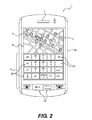
- Fig. 2 is a top plan view of a portable electronic device, consistent with disclosed embodiments
- Fig. 3 is a flow diagram of an example process for adjusting a presentation of graphical data displayed on a display of a portable electronic device, consistent with disclosed embodiments;
- Figs. 4 to 5 illustrate an example of adjustment of graphical data displayed on a display of a portable electronic device, consistent with disclosed embodiments
- Figs. 6 to 7 illustrate another example of adjustment of graphical data displayed on a display of a portable electronic device, consistent with disclosed embodiments
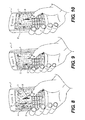
- Figs. 8 to 10 illustrate another example of adjustment of graphical data displayed on a display of a portable electronic device, consistent with disclosed embodiments.
- Figs. 11 to 13 illustrate another example adjustment of graphical data displayed on a display of a portable electronic device, consistent with disclosed embodiments.
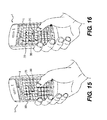
- Figs. 14 to 16 illustrate another example adjustment of graphical data displayed on a display of a portable electronic device, consistent with disclosed embodiments.
- the disclosure generally relates to a portable electronic device.
- portable electronic devices include mobile, or handheld, wireless communication devices such as pagers, cellular phones, cellular smart-phones, wireless organizers, personal digital assistants, tablets, and wirelessly enabled notebook computers.
- the portable electronic device may also be a portable electronic device without wireless communication capabilities, such as a handheld electronic game device, digital photograph album, digital camera, or other portable device.
- Fig. 1 illustrates a block diagram of an example of a portable electronic device 1.
- Portable electronic device 1 includes multiple components, such as a processor 2 configured to control the overall operation of the portable electronic device 1.
- processor 2 comprises a microprocessor.
- Communication functions, including data and voice communications, are performed through communication subsystem 3.
- device 1 is configured to receive compressed data and to decompress and decrypt the data by using a decoder 4.
- Communication subsystem 3 receives messages from and send messages to a wireless network 5.
- Wireless network 5 may be any type of wireless network, including, but not limited to, data wireless networks, voice wireless networks, and networks that support both voice and data communications.
- Power source 6, such as one or more rechargeable batteries or a port to an external power supply, powers portable electronic device 1.
- processor 2 interacts with other components of portable electronic device 1, such as a random access memory (RAM) 7, a display 8, a speaker 9, a keypad 10, auxiliary I/O devices 11, a data port 12, a microphone 13, a flash memory 14, and a clock 15.
- RAM random access memory
- display 8 a display 8
- speaker 9 a keypad 10
- auxiliary I/O devices 11 a data port 12
- microphone 13 a flash memory 14
- clock 15 a clock
- portable electronic device 1 uses a Subscriber Identity Module or a Removable User Identity Module (SIM/RUIM) card 16 for communication with a network, such as wireless network 5.
- SIM/RUIM Removable User Identity Module
- user identification information may be programmed into flash memory 14.
- Portable electronic device 1 includes an operating system 17 and software programs or applications 18 that are executed by processor 2 and may be stored in a persistent, updatable store such as flash memory 14. Additional applications or programs may be loaded onto portable electronic device 1 through wireless network 5, auxiliary I/O subsystem 11, data port 12, short-range communications subsystem 19, or any other suitable subsystem 20.
- a received signal such as a text message, an e-mail message, or web page download is processed by communication subsystem 3 and input to processor 2.
- Processor 2 processes the received signal for output to display 8 and/or to auxiliary I/O subsystem 11.
- a user may generate data items, for example e-mail or text messages, which may be transmitted over wireless network 5 through communication subsystem 3.
- Speaker 9 outputs audible information converted from electrical signals, and microphone 13 converts audible information into electrical signals for processing.
- Electronic device 1 also includes a location module 21.
- Location module 21 may include, for example, a GPS module, and may be configured to receive and interpret GPS signals from a system of satellites to triangulate the current location of device 1.
- Electronic device 1 also includes a graphics system 22 configured to manage graphical data displayed on display 8.
- graphics system 22 includes a movement detection module 23 and a GUI adjustment module 24.
- Movement detection module 23 is configured to detect movement of electronic device 1 and input movement data to processor 2.
- movement detection module 23 includes a motion sensor 25 configured to generate a signal responsive to a change in orientation of electronic device 1.
- motion sensor 25 includes a low-g micro-electromechanical system (MEMs) accelerometer.
- the accelerometer may be any type, including a capacitive, piezoelectric, piezoresistive, or a gas-based accelerometer.
- the accelerometer senses and converts an acceleration detected from a motion or a movement of electronic device 1 (e.g., tilt, rotation, inertial, or vibration) or gravity into an electrical signal and may be available in one, two, or three axis configurations.
- the accelerometer produces digital or analog output signals.
- motion sensor 25 includes a tilt, motion or orientation sensor, such as a gyroscope.
- GUI adjustment module 24 is configured to receive movement data determined by movement detection module 23 and associate new graphical data to existing graphical data displayed on display 8 based on the movement data. For instance, GUI adjustment module 24 is configured to overlay new graphical data to existing graphical data.
- Graphical data includes, for example, text, icons, graphics, dialog boxes, and any other visual information for a user. Graphical data, and information relating to, for example, the current view, placement, location, and orientation of the graphical data, is stored in flash memory 14 and accessed and modified by GUI adjustment module 24.
- FIG. 2 A top plan view of portable electronic device 1 is shown generally in Fig. 2 .
- the example portable electronic device 1 illustrated in Fig. 2 includes a housing 200 in which may be disposed various components such as those shown in Fig. 1 .
- various input apparatuses and output apparatuses, processor 2, and flash memory 14 for storing at least programs and/or applications 18 are disposed in housing 200.
- Processor 2 is responsive to input signals from input apparatus, such as keypad 10, and provides output signals to output apparatus, such as display 8 or speaker 9.
- Processor 2 also interfaces with flash memory 14 and is capable of executing programs 18.
- a screen image 26 is generated on display 8 and comprises graphical data related to one or more applications and/or programs stored in flash memory 14. For example, applications and/or programs may generate and control graphical data on screen image 26.
- screen image 26 includes graphical data related to a map application 27.
- Map application 27 provides a graphical interface to allow a user to determine the user's location and to navigate around a geographic region near the user's location.
- Graphical data pertaining to map application 27 includes, for example, images depicting streets, points of interest, and text identifying street names and destinations. Accordingly, the GUI is comprised of the graphical data and user-operated functions related to a program or an application presented on display 8.
- the output apparatus includes display 8 and speaker 9, each of which is responsive to one or more output signals from processor 2.
- the input apparatus includes keypad 10.
- Keypad 10 includes input members 225, such as mechanical keys using, for example, a mechanical dome switch actuator.
- input members 225 on keypad 10 may be part of display 8, with display having a touch-sensitive configuration as is known in the art.
- input members 225 form a QWERTY keyboard, either in reduced or full format. In a reduced keyboard, a number of input members 225 are assigned to two or more characters. In other example embodiments, input members 225 are assigned characters alphabetically.
- handheld electronic device 1 includes other input apparatuses, such as a scroll wheel, an optical trackpad, or a ball located either on the face or side of device 1.
- input apparatuses provide additional inputs to processor 2.
- a scroll wheel provides one input to processor 2 when rotated and a second input to processor 2 when actuated.
- An optical trackpad provides one input to processor 2 when swiped and a second input to processor 2 when pressed or tapped.
- Fig. 3 illustrates a flow diagram of an example process for adjusting a presentation of graphical data displayed on display 8 of electronic device 1.
- the process is carried out by software stored as part of programs 18, and executed by processor 2.
- a user opens an application or program, such as map application 27 discussed above, and processor 2 then generates default graphical data related to the user selected application (e.g., map application 27) on display 8 (step 301).
- the default graphical data includes an initial set of images, graphics, and/or text associated with the user selected application.
- the default graphical data is generated and positioned on display 8 under baseline conditions of electronic device 1, such as when electronic device 1 is motionless or lying flat relative to the user.
- graphics system 22 monitors movements of electronic device 1. That is, movement detection module 23 detects movements (e.g., shifts, tilts, rotations, vibrations, and the like) of electronic device 1 and delivers movement data corresponding to a detected movement to processor 2.
- Processor 2 stores the movement data in flash memory 14, and GUI adjustment module 24 receives the movement data from flash memory 14. If a movement has been detected, the movement data is obtained by GUI adjustment module 24 and analyzed to determined whether the detected movement is within the scope of a predetermined movement, step 303.
- the predetermined movement is a threshold motion or movement, which initiates GUI adjustment module 24 to adjust the default graphical data presented on display 8.
- the predetermined movement has particular motion characteristics, such as direction, orientation, and acceleration, stored in flash memory 14. If GUI adjustment module 24 obtains movement data at least substantially similar to the stored motion characteristics, GUI adjustment module 24 proceeds to adjust the default graphical data.
- rotation of electronic device 1 to the left or to the right relative to the user at a preset acceleration constitutes a predetermined movement appropriate for initializing graphical adjustment by GUI adjustment module 24.
- tilting electronic device 1 forwards or backwards at a preset acceleration may be the predetermined movement.
- predetermined movement is any other motion or movement, such as shifting or shaking electronic device 1 up or down and/or left or right.
- GUI adjustment module 24 then associates new graphical data to the default graphical data presented on display 8 (step 304).
- GUI adjustment module 24 overlays new graphical data on top of the default graphical data already existing on display 8. For instance, in response to the movement of electronic device 1, GUI adjustment module 24 adds new images, text, dialog boxes, and/or graphics to the existing default images and graphics on display 8.
- the new graphical data presents additional information to the user pertaining to the user selected application.
- display 8 does not display new graphical data prior to the movement of electronic device 1.
- the new images, text, and/or graphics are positioned directly on top of the existing images and graphics to highlight information previously presented by the default graphical data.
- the new images, text, and/or graphics are positioned adjacent, proximate, or separate from the existing graphical data on display 8.
- the new graphical data covers or masks at least some of the existing graphical data presented on display 8. Additionally, or alternatively, the new graphical data is positioned directly on top of the existing graphical data and displayed in a transparent mode to expose the existing graphical data. Such an arrangement allows the user to distinguish between the new and existing graphical data yet still identify both sets of graphical data.
- GUI adjustment module 24 also removes at least some of the default graphical data existing on display 8. For example, in response to an appropriate movement (e.g., movement within the scope of the predetermined movement) of electronic device 1, GUI adjustment module 24 hides or eliminates existing images, graphics, and/or text from display 8. By removing certain graphical data, display 8 presents only a predetermined selection of graphical data, which may provide graphical clarity and organization to the user. In other words, GUI adjustment module 24 highlights graphical data to the user by displaying only certain images, text, and/or graphics. It should also be appreciated that GUI adjustment module 24 provides a smooth transition when overlaying new graphical data or removing existing graphical data.
- an appropriate movement e.g., movement within the scope of the predetermined movement
- GUI adjustment module 24 When overlaying new graphical data or removing certain existing graphical data, GUI adjustment module 24 maintains a position and an orientation of the existing graphical data remaining on display 8. In other words, certain existing images, graphics, and/or text retain a spatial arrangement on display 8. For example, the existing images, graphics, and/or text are notionally positioned relative to each other using x, y, and z Cartesian coordinates on display 8. GUI adjustment module 24 fixes the existing images, graphics, and/or text at their corresponding x, y, and z coordinates when new images, graphics, and/or text is added or when certain existing graphical data is removed. That is, the position of the existing graphical data does not move when new graphical data is added to display 8 and when some graphical data is eliminated from display 8.
- Graphics system 22 continues to monitor movements of electronic device 1 (step 302), and overlays new graphical data to the default graphical data when appropriate.
- GUI adjustment module 24 regenerates the default graphical data on display 8 (step 301), if movement data obtained by module 24 is indicative of baseline conditions (e.g., the initial position and configuration of device prior to the predetermined movement).
- GUI adjustment module 24 regenerates the default graphical data if electronic device 1 is not moved for a set period of time, as indicated by the arrow labeled "timeout.” For example, when electronic device 1 moves to a new position from a baseline position, new graphical data is added to the default graphical data on display 8. If electronic device 1 remains at rest (or is not moved) at the new position for a set period of time, the new graphical data is gradually removed from display 8, and display 8 presents the default graphical data as initially displayed during baseline conditions.
- GUI adjustment module 24 obtains the time data and regenerates the default graphical data based on the aforementioned "timeout" conditions.
- Figs. 4-5 illustrate an example of a process for adjusting a presentation of graphical data displayed on display 8 of electronic device 1 related to map application 27.
- Map application 27 presents graphical data related to the geographic location of device 1 provided by location module 21. For instance, map application 27 provides images depicting streets 28 and geographic terrain 29 bordered by streets 28. Map application 27 also includes destination markers 30, which graphically indicate the geographical locations of a desired destination, such as restaurants, gas stations, and the like.
- Fig. 4 depicts electronic device 1 under baseline conditions. That is, electronic device 1 remains motionless and the plane of display 8 is positioned flat relative to the user. Accordingly, the graphical data of map application 27 (e.g., streets 28, geographic terrain 29, and destination markers 30), as shown in Fig. 4 , represents the default graphical data under baseline conditions of electronic device 1.
- Fig. 5 illustrates the electronic device 1 of Fig. 4 rotated to a leftward position relative to the user.
- movement detection module 23 detects the movement
- GUI adjustment module 24 determines that the movement is within the scope of a predetermined movement.
- GUI adjustment module 24 then associates new graphical data to the existing, default graphical data presented on display 8.
- GUI adjustment module 24 overlays new text 31 on top of the existing street images 28.
- the text 31 provides street names to the street images 28, which may have previously been presented on display 8 under the baseline conditions of electronic device 1.
- the text 31 is positioned directly over the existing street images 28 and provides additional graphical data pertaining to map application 27 simply through a user-controlled motion of device 1.
- Movement of electronic device 1 also initiates GUI adjustment module 24 to remove destination markers 30. Destination markers 30 is removed to clarify and highlight the text 31 associated with street images 28. Smaller destination pinpoints 32 replace destination markers 30 to improve GUI clarity.
- the default graphical arrangement presented in Fig. 4 is regenerated by moving electronic device 1 back to the position defined by the baseline conditions, or by waiting a set amount of time in the rotated position such that the above-described "timeout" function gradually reverts display 8 back to the default graphical arrangement.
- the relative positions of the existing graphical data is maintained on display 8 when new graphical data is overlaid.
- the positions of street images 28 and geographical terrain 29 are fixed as street text 31 are overlaid onto the existing street images 28.
- the x, y, and z coordinates of the exiting graphical data do not change when new graphical data (e.g., street text 31) is added to display 8.
- FIGs. 4-5 illustrate electronic device 1 being rotated in a leftward direction to initiate graphical adjustment by GUI adjustment module 24, it should be appreciated that any other motion initiates GUI adjustment module 24, such as rightward rotation, shaking, and/or upward and downward tilting.
- Figs. 6-7 illustrate another example of a process for adjusting a presentation of graphical data displayed on display 8 of electronic device 1 related to a video application 33.
- video application 33 presents video data to the user in any known form, such as AVI, MPEG, MP4, and the like.
- a movie stored in RAM 7 or flash memory 14 or downloaded from wireless network 5 can be played for display on display 8.
- Fig. 6 depicts electronic device 1 under baseline conditions. That is, when electronic device 1 remains motionless, the plane of display 8 is positioned flat relative to the user.
- the graphical data of video application 33 (e.g., the scenes of the movie) represents the default graphical data.
- Fig. 7 illustrates the electronic device 1 of Fig. 6 tilted towards the user to a downward position.
- movement detection module 23 detects the movement
- GUI adjustment module 24 determines that the movement is within the scope of a predetermined movement.
- GUI adjustment module 24 then adds a playbar 34 directly on top of the scenes presented by video application 33.
- playbar 34 is overlaid on top of the previously existing scenes.
- Playbar 34 provides new graphical data to the user by indicating the progress and time elapsed of the movie being played.
- the playbar 34 allows for control of video playback, such as pausing, fast forwarding, reverse play, etc.
- the default graphical arrangement presented in Fig. 6 i.e., the video without playbar 34
- GUI adjustment module 24 may initiate GUI adjustment module 24 to adjust the presentation of graphical data related to video application 33 displayed on display 8.
- Figs. 8-10 illustrate another example of a process for adjusting a presentation of graphical data displayed on display 8 of electronic device 1 related to a calendar application 35.
- Calendar application 35 graphically tracks appointments and other status matters relating to a user and device 1.
- Calendar application 35 provides a daily, weekly, and/or monthly electronic schedule of appointments, meetings, and events.
- calendar application 35 organizes and displays graphical data relating to particular events, for example, social events 36 (solid bars) and work-related events 37 (cross-hatched bars), on a schedule 38.
- Fig. 8 depicts electronic device 1 under baseline conditions. That is, electronic device 1 remains motionless and the plane of display 8 is positioned flat relative to the user. Accordingly, the graphical data of calendar application 35 (e.g., schedule 38, social events 36, and work-related events 37) represents the default graphical data under the baseline conditions of electronic device 1.
- Fig. 9 illustrates the electronic device 1 of Fig. 8 rotated to a leftward position relative to the user.
- movement detection module 23 detects the movement
- GUI adjustment module 24 determines that the movement is within the scope of a predetermined movement.
- GUI adjustment module 24 then removes at least some of the existing graphical data presented on display 8.
- GUI adjustment module 24 removes the social events 36 images, thereby leaving only the work-related events 37 images on schedule 38.
- rotating electronic device 1 to a rightward position relative to the user removes the work-related events 37 images, and may leave only the social events 36 images displayed on schedule 38, as shown in Fig. 10 .
- Removing certain existing graphical data by merely moving electronic device 1 simplifies the manner in which graphical data is organized and presented to the user. For instance, the user highlights and/or determines what social events 36 to be scheduled by a mere rightward rotation of device 1.
- the existing graphical data e.g., schedule 38, social events 36, and work-related events 37
- the default graphical arrangement presented in Fig. 8 is regenerated by moving device 1 back to the baseline position or by waiting for the "timeout" function to initiate. It should be appreciated that any other motion may initiate GUI adjustment module 24 to adjust the presentation of graphical data related to calendar application 35 displayed on display 8.
- Figs. 11-13 illustrate another example of a process for adjusting a presentation of graphical data displayed on display 8 of electronic device 1 related to another map application 39.
- Fig. 11 depicts electronic device 1 under baseline conditions.
- Map application 39 displays a highlighted navigation route 40 (solid lines) and highlighted traffic data 41 (i.e., the degree of congestion on a certain street, depicted as cross-hatched lines) associated with street images 42.
- GUI adjustment module 24 removes highlighted traffic data 41 from display 8 and leaves street images 42 and highlighted navigation route 40, as shown in Fig. 12 .
- GUI adjustment module 24 removes highlighted navigation route 40 from display 8 and leaves street images 42 and highlighted traffic data 41.
- the existing graphical data e.g., highlighted navigation route 40, highlighted traffic data 41, and street images 42
- the default graphical arrangement presented in Fig. 11 is regenerated by moving device 1 back to the baseline position or by waiting for the "timeout" function to initiate. It should also be appreciated that any other motion may initiate GUI adjustment module 24 to adjust the presentation of graphical data related to map application 39 displayed on display 8.
- Figs. 14-16 illustrate another example of adjusting a presentation of graphical data displayed on display 8 of electronic device 1 related to a calendar application 350.
- Calendar application 350 graphically tracks appointments and other status matters relating to a user and device 1.
- Calendar application 350 provides a daily, weekly, and/or monthly electronic schedule of appointments, meetings, and events.
- calendar application 350 organizes and displays graphical data relating to, for example, the number of events or the duration of one or more events, scheduled on a particular day.
- an event bar 370 indicates to a user the number of events or the duration of one or more events scheduled on a particular day relative to the other days based on the relative length of event bar 370.
- Fig. 14 depicts electronic device 1 under baseline conditions.
- the graphical data of calendar application 350 (e.g., the windows representing the days of a month and event bars 370) represents the default graphical data under the baseline conditions of electronic device 1.
- Fig. 15 illustrates the electronic device 1 of Fig. 14 rotated to a leftward position relative to the user.
- movement detection module 23 detects the movement
- GUI adjustment module 24 determines that the movement is within the scope of a predetermined movement.
- GUI adjustment module 24 then overlays a three-dimensional block 380 over the windows of days that have scheduled events.
- Each three-dimensional block 380 corresponds to a particular event bar 370.
- a height of each three-dimensional block 380 indicates to the user the number of events or the duration of one or more events scheduled on a particular day relative to the other days.
- the three-dimensional blocks 380 therefore provide an additional view of the events scheduled in calendar application 350.
- Fig. 15 illustrates the electronic device 1 of Fig. 14 rotated to a leftward position relative to the user.
- rotating electronic device 1 to a rightward position relative to the user overlays three-dimensional blocks 380 over the windows of days and provides a perspective view of the left side of each block 380.
- the default graphical arrangement presented in Fig. 14 is regenerated by moving device 1 back to the baseline position or by waiting for the "timeout" function to initiate. It should be appreciated that any other motion may initiate GUI adjustment module 24 to adjust the presentation of graphical data related to calendar application 350 displayed on display 8.
- the user may control the angle of rotation that initiates GUI adjustment module 24 to adjust the presentation of graphical data.
- the user may change the degree of leftward or rightward rotation of the electronic device 1 that initiates GUI adjustment module 24.
- the user may input the desired rotation angle as a setting of the electronic device 1.
Landscapes
- Engineering & Computer Science (AREA)
- Computer Hardware Design (AREA)
- Theoretical Computer Science (AREA)
- Human Computer Interaction (AREA)
- Physics & Mathematics (AREA)
- General Engineering & Computer Science (AREA)
- General Physics & Mathematics (AREA)
- User Interface Of Digital Computer (AREA)
Abstract
Description
- The present disclosure relates to adjusting graphical data displayed on graphical user interfaces of portable electronic devices and, more specifically, to overlaying new graphical data to existing graphical data in response to a predetermined movement of such devices.
- Electronic devices, including portable electronic devices, have gained widespread use and may provide a variety of functions including, for example, telephonic, electronic messaging, and other personal information manager application functions. Portable electronic devices include, for example, mobile stations, cellular telephones, smart telephones, wireless personal digital assistants, and laptop computers with wireless capabilities.
- Such devices include displays and operating systems providing graphical user interfaces (GUIs) that impart, among other things, graphical data about applications and services provided by the device to the user. The displayed graphical data may be modified depending on the functions and operations being performed. In certain instances, a user may highlight, add, or remove graphical data displayed on the GUIs by, for example, inputting commands and functions via a keypad or the like.
- For certain applications, it may be cumbersome and/or undesirable for a user to access the keypad to control and modify the graphical data displayed on the GUI. Accordingly, a need exists to simplify the manner in which graphical data displayed on the GUI may be modified.
- It is to be understood that following detailed description is examplary and explanatory only and is not restrictive of the concepts disclosed herein, as claimed. The accompanying drawings, which are incorporated in and constitute a part of this specification, illustrate several embodiments together with the description. In the drawings:
-
Fig. 1 is a block diagram of a portable electronic device, consistent with disclosed embodiments; -
Fig. 2 is a top plan view of a portable electronic device, consistent with disclosed embodiments; -
Fig. 3 is a flow diagram of an example process for adjusting a presentation of graphical data displayed on a display of a portable electronic device, consistent with disclosed embodiments; -
Figs. 4 to 5 illustrate an example of adjustment of graphical data displayed on a display of a portable electronic device, consistent with disclosed embodiments; -
Figs. 6 to 7 illustrate another example of adjustment of graphical data displayed on a display of a portable electronic device, consistent with disclosed embodiments; -
Figs. 8 to 10 illustrate another example of adjustment of graphical data displayed on a display of a portable electronic device, consistent with disclosed embodiments; and -
Figs. 11 to 13 illustrate another example adjustment of graphical data displayed on a display of a portable electronic device, consistent with disclosed embodiments. -
Figs. 14 to 16 illustrate another example adjustment of graphical data displayed on a display of a portable electronic device, consistent with disclosed embodiments. - Reference will now be made in detail to the example embodiments, which are illustrated in the accompanying drawings. For simplicity and clarity of illustration, reference numerals may be repeated among the figures to indicate corresponding or analogous elements. Numerous details are set forth to provide an understanding of the embodiments described herein. The embodiments may be practiced without these details. In other instances, well-known methods, procedures, and components have not been described in detail to avoid obscuring the example embodiments described. The description is not to be considered as limited to the scope of the example embodiments described herein.
- The disclosure generally relates to a portable electronic device. Examples of portable electronic devices include mobile, or handheld, wireless communication devices such as pagers, cellular phones, cellular smart-phones, wireless organizers, personal digital assistants, tablets, and wirelessly enabled notebook computers. The portable electronic device may also be a portable electronic device without wireless communication capabilities, such as a handheld electronic game device, digital photograph album, digital camera, or other portable device.
-
Fig. 1 illustrates a block diagram of an example of a portableelectronic device 1. Portableelectronic device 1 includes multiple components, such as aprocessor 2 configured to control the overall operation of the portableelectronic device 1. In one embodiment,processor 2 comprises a microprocessor. Communication functions, including data and voice communications, are performed throughcommunication subsystem 3. In one embodiment,device 1 is configured to receive compressed data and to decompress and decrypt the data by using adecoder 4.Communication subsystem 3 receives messages from and send messages to awireless network 5.Wireless network 5 may be any type of wireless network, including, but not limited to, data wireless networks, voice wireless networks, and networks that support both voice and data communications.Power source 6, such as one or more rechargeable batteries or a port to an external power supply, powers portableelectronic device 1. - In addition,
processor 2 interacts with other components of portableelectronic device 1, such as a random access memory (RAM) 7, adisplay 8, aspeaker 9, akeypad 10, auxiliary I/O devices 11, adata port 12, amicrophone 13, aflash memory 14, and aclock 15. - To identify a subscriber for network access, portable
electronic device 1 uses a Subscriber Identity Module or a Removable User Identity Module (SIM/RUIM)card 16 for communication with a network, such aswireless network 5. Alternatively, user identification information may be programmed intoflash memory 14. - Portable
electronic device 1 includes an operating system 17 and software programs orapplications 18 that are executed byprocessor 2 and may be stored in a persistent, updatable store such asflash memory 14. Additional applications or programs may be loaded onto portableelectronic device 1 throughwireless network 5, auxiliary I/O subsystem 11,data port 12, short-range communications subsystem 19, or any othersuitable subsystem 20. - A received signal such as a text message, an e-mail message, or web page download is processed by
communication subsystem 3 and input toprocessor 2.Processor 2 processes the received signal for output to display 8 and/or to auxiliary I/O subsystem 11. A user may generate data items, for example e-mail or text messages, which may be transmitted overwireless network 5 throughcommunication subsystem 3. For voice communications, the overall operation of the portableelectronic device 1 may be similar.Speaker 9 outputs audible information converted from electrical signals, andmicrophone 13 converts audible information into electrical signals for processing. -
Electronic device 1 also includes alocation module 21.Location module 21 may include, for example, a GPS module, and may be configured to receive and interpret GPS signals from a system of satellites to triangulate the current location ofdevice 1. -
Electronic device 1 also includes agraphics system 22 configured to manage graphical data displayed ondisplay 8. In one embodiment,graphics system 22 includes amovement detection module 23 and aGUI adjustment module 24. -
Movement detection module 23 is configured to detect movement ofelectronic device 1 and input movement data toprocessor 2. In one embodiment,movement detection module 23 includes amotion sensor 25 configured to generate a signal responsive to a change in orientation ofelectronic device 1. In this embodiment,motion sensor 25 includes a low-g micro-electromechanical system (MEMs) accelerometer. The accelerometer may be any type, including a capacitive, piezoelectric, piezoresistive, or a gas-based accelerometer. The accelerometer senses and converts an acceleration detected from a motion or a movement of electronic device 1 (e.g., tilt, rotation, inertial, or vibration) or gravity into an electrical signal and may be available in one, two, or three axis configurations. The accelerometer produces digital or analog output signals. In other example embodiments,motion sensor 25 includes a tilt, motion or orientation sensor, such as a gyroscope. -
GUI adjustment module 24 is configured to receive movement data determined bymovement detection module 23 and associate new graphical data to existing graphical data displayed ondisplay 8 based on the movement data. For instance,GUI adjustment module 24 is configured to overlay new graphical data to existing graphical data. Graphical data includes, for example, text, icons, graphics, dialog boxes, and any other visual information for a user. Graphical data, and information relating to, for example, the current view, placement, location, and orientation of the graphical data, is stored inflash memory 14 and accessed and modified byGUI adjustment module 24. - A top plan view of portable
electronic device 1 is shown generally inFig. 2 . The example portableelectronic device 1 illustrated inFig. 2 includes ahousing 200 in which may be disposed various components such as those shown inFig. 1 . For example, various input apparatuses and output apparatuses,processor 2, andflash memory 14 for storing at least programs and/orapplications 18 are disposed inhousing 200.Processor 2 is responsive to input signals from input apparatus, such askeypad 10, and provides output signals to output apparatus, such asdisplay 8 orspeaker 9.Processor 2 also interfaces withflash memory 14 and is capable of executingprograms 18. - A
screen image 26 is generated ondisplay 8 and comprises graphical data related to one or more applications and/or programs stored inflash memory 14. For example, applications and/or programs may generate and control graphical data onscreen image 26. In the example embodiment ofFig. 2 ,screen image 26 includes graphical data related to amap application 27.Map application 27 provides a graphical interface to allow a user to determine the user's location and to navigate around a geographic region near the user's location. Graphical data pertaining to mapapplication 27 includes, for example, images depicting streets, points of interest, and text identifying street names and destinations. Accordingly, the GUI is comprised of the graphical data and user-operated functions related to a program or an application presented ondisplay 8. - As can be understood from
Fig. 2 , the output apparatus includesdisplay 8 andspeaker 9, each of which is responsive to one or more output signals fromprocessor 2. The input apparatus includeskeypad 10.Keypad 10 includesinput members 225, such as mechanical keys using, for example, a mechanical dome switch actuator. Alternatively,input members 225 onkeypad 10 may be part ofdisplay 8, with display having a touch-sensitive configuration as is known in the art. In certain example embodiments,input members 225 form a QWERTY keyboard, either in reduced or full format. In a reduced keyboard, a number ofinput members 225 are assigned to two or more characters. In other example embodiments,input members 225 are assigned characters alphabetically. - Although not shown in
Fig. 2 , it should be appreciated that some embodiments of handheldelectronic device 1 include other input apparatuses, such as a scroll wheel, an optical trackpad, or a ball located either on the face or side ofdevice 1. These input apparatuses provide additional inputs toprocessor 2. For example, a scroll wheel provides one input toprocessor 2 when rotated and a second input toprocessor 2 when actuated. An optical trackpad provides one input toprocessor 2 when swiped and a second input toprocessor 2 when pressed or tapped. -
Fig. 3 illustrates a flow diagram of an example process for adjusting a presentation of graphical data displayed ondisplay 8 ofelectronic device 1. In one embodiment, the process is carried out by software stored as part ofprograms 18, and executed byprocessor 2. - At
step 300, a user opens an application or program, such asmap application 27 discussed above, andprocessor 2 then generates default graphical data related to the user selected application (e.g., map application 27) on display 8 (step 301). The default graphical data includes an initial set of images, graphics, and/or text associated with the user selected application. The default graphical data is generated and positioned ondisplay 8 under baseline conditions ofelectronic device 1, such as whenelectronic device 1 is motionless or lying flat relative to the user. - At
step 302,graphics system 22 monitors movements ofelectronic device 1. That is,movement detection module 23 detects movements (e.g., shifts, tilts, rotations, vibrations, and the like) ofelectronic device 1 and delivers movement data corresponding to a detected movement toprocessor 2.Processor 2 stores the movement data inflash memory 14, andGUI adjustment module 24 receives the movement data fromflash memory 14. If a movement has been detected, the movement data is obtained byGUI adjustment module 24 and analyzed to determined whether the detected movement is within the scope of a predetermined movement,step 303. - The predetermined movement is a threshold motion or movement, which initiates
GUI adjustment module 24 to adjust the default graphical data presented ondisplay 8. For example, the predetermined movement has particular motion characteristics, such as direction, orientation, and acceleration, stored inflash memory 14. IfGUI adjustment module 24 obtains movement data at least substantially similar to the stored motion characteristics,GUI adjustment module 24 proceeds to adjust the default graphical data. In one example embodiment, rotation ofelectronic device 1 to the left or to the right relative to the user at a preset acceleration constitutes a predetermined movement appropriate for initializing graphical adjustment byGUI adjustment module 24. Additionally, or alternatively, tiltingelectronic device 1 forwards or backwards at a preset acceleration may be the predetermined movement. In other words, predetermined movement is any other motion or movement, such as shifting or shakingelectronic device 1 up or down and/or left or right. - If movement of
electronic device 1 is not within the scope of the predetermined movement,graphics system 22 continues to monitor movements ofelectronic device 1,step 302. If movement of electronic device is within the scope of the predetermined movement,GUI adjustment module 24 then associates new graphical data to the default graphical data presented on display 8 (step 304). - At
step 304,GUI adjustment module 24 overlays new graphical data on top of the default graphical data already existing ondisplay 8. For instance, in response to the movement ofelectronic device 1,GUI adjustment module 24 adds new images, text, dialog boxes, and/or graphics to the existing default images and graphics ondisplay 8. The new graphical data presents additional information to the user pertaining to the user selected application. Furthermore, in some example embodiments,display 8 does not display new graphical data prior to the movement ofelectronic device 1. The new images, text, and/or graphics are positioned directly on top of the existing images and graphics to highlight information previously presented by the default graphical data. Moreover, the new images, text, and/or graphics are positioned adjacent, proximate, or separate from the existing graphical data ondisplay 8. In one embodiment, the new graphical data covers or masks at least some of the existing graphical data presented ondisplay 8. Additionally, or alternatively, the new graphical data is positioned directly on top of the existing graphical data and displayed in a transparent mode to expose the existing graphical data. Such an arrangement allows the user to distinguish between the new and existing graphical data yet still identify both sets of graphical data. -
GUI adjustment module 24 also removes at least some of the default graphical data existing ondisplay 8. For example, in response to an appropriate movement (e.g., movement within the scope of the predetermined movement) ofelectronic device 1,GUI adjustment module 24 hides or eliminates existing images, graphics, and/or text fromdisplay 8. By removing certain graphical data,display 8 presents only a predetermined selection of graphical data, which may provide graphical clarity and organization to the user. In other words,GUI adjustment module 24 highlights graphical data to the user by displaying only certain images, text, and/or graphics. It should also be appreciated thatGUI adjustment module 24 provides a smooth transition when overlaying new graphical data or removing existing graphical data. - When overlaying new graphical data or removing certain existing graphical data,
GUI adjustment module 24 maintains a position and an orientation of the existing graphical data remaining ondisplay 8. In other words, certain existing images, graphics, and/or text retain a spatial arrangement ondisplay 8. For example, the existing images, graphics, and/or text are notionally positioned relative to each other using x, y, and z Cartesian coordinates ondisplay 8.GUI adjustment module 24 fixes the existing images, graphics, and/or text at their corresponding x, y, and z coordinates when new images, graphics, and/or text is added or when certain existing graphical data is removed. That is, the position of the existing graphical data does not move when new graphical data is added todisplay 8 and when some graphical data is eliminated fromdisplay 8. -
Graphics system 22 continues to monitor movements of electronic device 1 (step 302), and overlays new graphical data to the default graphical data when appropriate. In one embodiment,GUI adjustment module 24 regenerates the default graphical data on display 8 (step 301), if movement data obtained bymodule 24 is indicative of baseline conditions (e.g., the initial position and configuration of device prior to the predetermined movement). That is, any new graphical data is removed, and any removed default graphical data is restored, whenelectronic device 1 is moved and returned to the initial, default position, as indicated by the arrow labeled "baseline conditions." Additionally,GUI adjustment module 24 regenerates the default graphical data ifelectronic device 1 is not moved for a set period of time, as indicated by the arrow labeled "timeout." For example, whenelectronic device 1 moves to a new position from a baseline position, new graphical data is added to the default graphical data ondisplay 8. Ifelectronic device 1 remains at rest (or is not moved) at the new position for a set period of time, the new graphical data is gradually removed fromdisplay 8, anddisplay 8 presents the default graphical data as initially displayed during baseline conditions. Moreover, if certain default graphical data was removed fromdisplay 8 in the new position, the removed, previously presented graphical data is regenerated ontodisplay 8 ifelectronic device 1 is maintained at the new position for the set period of time. The set period of time is stored inflash memory 14, andprocessor 2 monitors the time at whichelectronic device 1 is in the new position via, for example,clock 15 and stores time data inflash memory 14.GUI adjustment module 24 obtains the time data and regenerates the default graphical data based on the aforementioned "timeout" conditions. -
Figs. 4-5 illustrate an example of a process for adjusting a presentation of graphical data displayed ondisplay 8 ofelectronic device 1 related to mapapplication 27.Map application 27 presents graphical data related to the geographic location ofdevice 1 provided bylocation module 21. For instance,map application 27 providesimages depicting streets 28 andgeographic terrain 29 bordered bystreets 28.Map application 27 also includesdestination markers 30, which graphically indicate the geographical locations of a desired destination, such as restaurants, gas stations, and the like.Fig. 4 depictselectronic device 1 under baseline conditions. That is,electronic device 1 remains motionless and the plane ofdisplay 8 is positioned flat relative to the user. Accordingly, the graphical data of map application 27 (e.g.,streets 28,geographic terrain 29, and destination markers 30), as shown inFig. 4 , represents the default graphical data under baseline conditions ofelectronic device 1. -
Fig. 5 illustrates theelectronic device 1 ofFig. 4 rotated to a leftward position relative to the user. Aselectronic device 1 is rotated,movement detection module 23 detects the movement, andGUI adjustment module 24 determines that the movement is within the scope of a predetermined movement.GUI adjustment module 24 then associates new graphical data to the existing, default graphical data presented ondisplay 8. For example,GUI adjustment module 24 overlaysnew text 31 on top of the existingstreet images 28. Thetext 31 provides street names to thestreet images 28, which may have previously been presented ondisplay 8 under the baseline conditions ofelectronic device 1. Thetext 31 is positioned directly over the existingstreet images 28 and provides additional graphical data pertaining to mapapplication 27 simply through a user-controlled motion ofdevice 1. Moreover, presenting thetext 31 in a separate graphical arrangement prevents a cluttered GUI. Movement ofelectronic device 1 also initiatesGUI adjustment module 24 to removedestination markers 30.Destination markers 30 is removed to clarify and highlight thetext 31 associated withstreet images 28. Smaller destination pinpoints 32 replacedestination markers 30 to improve GUI clarity. - The default graphical arrangement presented in
Fig. 4 is regenerated by movingelectronic device 1 back to the position defined by the baseline conditions, or by waiting a set amount of time in the rotated position such that the above-described "timeout" function gradually revertsdisplay 8 back to the default graphical arrangement. As illustrated inFigs. 4-5 , the relative positions of the existing graphical data is maintained ondisplay 8 when new graphical data is overlaid. For example, the positions ofstreet images 28 andgeographical terrain 29 are fixed asstreet text 31 are overlaid onto the existingstreet images 28. In other words, the x, y, and z coordinates of the exiting graphical data (e.g.,street images 28 and geographical terrain 29) do not change when new graphical data (e.g., street text 31) is added todisplay 8. - Although
Figs. 4-5 illustrateelectronic device 1 being rotated in a leftward direction to initiate graphical adjustment byGUI adjustment module 24, it should be appreciated that any other motion initiatesGUI adjustment module 24, such as rightward rotation, shaking, and/or upward and downward tilting. -
Figs. 6-7 illustrate another example of a process for adjusting a presentation of graphical data displayed ondisplay 8 ofelectronic device 1 related to avideo application 33. As illustrated inFig. 6 ,video application 33 presents video data to the user in any known form, such as AVI, MPEG, MP4, and the like. For example, a movie stored inRAM 7 orflash memory 14 or downloaded fromwireless network 5 can be played for display ondisplay 8. Similar to the embodiment ofFig. 4 ,Fig. 6 depictselectronic device 1 under baseline conditions. That is, whenelectronic device 1 remains motionless, the plane ofdisplay 8 is positioned flat relative to the user. As such, the graphical data of video application 33 (e.g., the scenes of the movie) represents the default graphical data. -
Fig. 7 illustrates theelectronic device 1 ofFig. 6 tilted towards the user to a downward position. Aselectronic device 1 is tilted,movement detection module 23 detects the movement, andGUI adjustment module 24 determines that the movement is within the scope of a predetermined movement.GUI adjustment module 24 then adds aplaybar 34 directly on top of the scenes presented byvideo application 33. In other words, playbar 34 is overlaid on top of the previously existing scenes.Playbar 34 provides new graphical data to the user by indicating the progress and time elapsed of the movie being played. In some example embodiments, theplaybar 34 allows for control of video playback, such as pausing, fast forwarding, reverse play, etc. As before, the default graphical arrangement presented inFig. 6 (i.e., the video without playbar 34) can be regenerated by movingelectronic device 1 back to the position defined by the baseline conditions, or by waiting a set amount of time in the tilted position. - It should be appreciated that any other motion may initiate
GUI adjustment module 24 to adjust the presentation of graphical data related tovideo application 33 displayed ondisplay 8. -
Figs. 8-10 illustrate another example of a process for adjusting a presentation of graphical data displayed ondisplay 8 ofelectronic device 1 related to acalendar application 35.Calendar application 35 graphically tracks appointments and other status matters relating to a user anddevice 1.Calendar application 35 provides a daily, weekly, and/or monthly electronic schedule of appointments, meetings, and events. In the example embodiments ofFigs. 8-10 ,calendar application 35 organizes and displays graphical data relating to particular events, for example, social events 36 (solid bars) and work-related events 37 (cross-hatched bars), on aschedule 38.Fig. 8 depictselectronic device 1 under baseline conditions. That is,electronic device 1 remains motionless and the plane ofdisplay 8 is positioned flat relative to the user. Accordingly, the graphical data of calendar application 35 (e.g.,schedule 38,social events 36, and work-related events 37) represents the default graphical data under the baseline conditions ofelectronic device 1. -
Fig. 9 illustrates theelectronic device 1 ofFig. 8 rotated to a leftward position relative to the user. Aselectronic device 1 is rotated,movement detection module 23 detects the movement, andGUI adjustment module 24 determines that the movement is within the scope of a predetermined movement.GUI adjustment module 24 then removes at least some of the existing graphical data presented ondisplay 8. In one embodiment, for example,GUI adjustment module 24 removes thesocial events 36 images, thereby leaving only the work-relatedevents 37 images onschedule 38. Similarly, rotatingelectronic device 1 to a rightward position relative to the user removes the work-relatedevents 37 images, and may leave only thesocial events 36 images displayed onschedule 38, as shown inFig. 10 . Removing certain existing graphical data by merely movingelectronic device 1 simplifies the manner in which graphical data is organized and presented to the user. For instance, the user highlights and/or determines whatsocial events 36 to be scheduled by a mere rightward rotation ofdevice 1. - Similar to the embodiments above, the existing graphical data (e.g.,
schedule 38,social events 36, and work-related events 37) maintains their relative positions when certain graphical data is removed fromdisplay 8. Moreover, the default graphical arrangement presented inFig. 8 is regenerated by movingdevice 1 back to the baseline position or by waiting for the "timeout" function to initiate. It should be appreciated that any other motion may initiateGUI adjustment module 24 to adjust the presentation of graphical data related tocalendar application 35 displayed ondisplay 8. -
Figs. 11-13 illustrate another example of a process for adjusting a presentation of graphical data displayed ondisplay 8 ofelectronic device 1 related to anothermap application 39.Fig. 11 depictselectronic device 1 under baseline conditions.Map application 39 displays a highlighted navigation route 40 (solid lines) and highlighted traffic data 41 (i.e., the degree of congestion on a certain street, depicted as cross-hatched lines) associated withstreet images 42. Whenelectronic device 1 is rotated to a leftward position relative to the user,GUI adjustment module 24 removes highlightedtraffic data 41 fromdisplay 8 and leavesstreet images 42 and highlightednavigation route 40, as shown inFig. 12 . Furthermore, and as shown inFig. 13 , whenelectronic device 1 is rotated to a rightward position relative to the user,GUI adjustment module 24 removes highlightednavigation route 40 fromdisplay 8 and leavesstreet images 42 and highlightedtraffic data 41. - Similar to the example embodiments above, the existing graphical data (e.g., highlighted
navigation route 40, highlightedtraffic data 41, and street images 42) maintains their relative positions when certain graphical data is removed fromdisplay 8. Moreover, the default graphical arrangement presented inFig. 11 is regenerated by movingdevice 1 back to the baseline position or by waiting for the "timeout" function to initiate. It should also be appreciated that any other motion may initiateGUI adjustment module 24 to adjust the presentation of graphical data related to mapapplication 39 displayed ondisplay 8. -
Figs. 14-16 illustrate another example of adjusting a presentation of graphical data displayed ondisplay 8 ofelectronic device 1 related to acalendar application 350.Calendar application 350 graphically tracks appointments and other status matters relating to a user anddevice 1.Calendar application 350 provides a daily, weekly, and/or monthly electronic schedule of appointments, meetings, and events. In the example embodiments ofFigs. 14-16 ,calendar application 350 organizes and displays graphical data relating to, for example, the number of events or the duration of one or more events, scheduled on a particular day. In other words, anevent bar 370 indicates to a user the number of events or the duration of one or more events scheduled on a particular day relative to the other days based on the relative length ofevent bar 370.Fig. 14 depictselectronic device 1 under baseline conditions. That is,electronic device 1 remains motionless and the plane ofdisplay 8 is positioned flat relative to the user. Accordingly, the graphical data of calendar application 350 (e.g., the windows representing the days of a month and event bars 370) represents the default graphical data under the baseline conditions ofelectronic device 1. -
Fig. 15 illustrates theelectronic device 1 ofFig. 14 rotated to a leftward position relative to the user. Aselectronic device 1 is rotated,movement detection module 23 detects the movement, andGUI adjustment module 24 determines that the movement is within the scope of a predetermined movement.GUI adjustment module 24 then overlays a three-dimensional block 380 over the windows of days that have scheduled events. Each three-dimensional block 380 corresponds to aparticular event bar 370. In other words, a height of each three-dimensional block 380 indicates to the user the number of events or the duration of one or more events scheduled on a particular day relative to the other days. The three-dimensional blocks 380 therefore provide an additional view of the events scheduled incalendar application 350. Similarly, and as shown inFig. 16 , rotatingelectronic device 1 to a rightward position relative to the user overlays three-dimensional blocks 380 over the windows of days and provides a perspective view of the left side of eachblock 380. Moreover, the default graphical arrangement presented inFig. 14 is regenerated by movingdevice 1 back to the baseline position or by waiting for the "timeout" function to initiate. It should be appreciated that any other motion may initiateGUI adjustment module 24 to adjust the presentation of graphical data related tocalendar application 350 displayed ondisplay 8. - Furthermore, it should appreciated that the user may control the angle of rotation that initiates
GUI adjustment module 24 to adjust the presentation of graphical data. In other words, the user may change the degree of leftward or rightward rotation of theelectronic device 1 that initiatesGUI adjustment module 24. The user may input the desired rotation angle as a setting of theelectronic device 1. - The present disclosure may be embodied in other specific forms without departing from its spirit or essential characteristics. The described embodiments are to be considered in all respects only as illustrative and not restrictive. The scope of the disclosure is, therefore, indicated by the appended claims rather than by the foregoing description. All changes that come within the meaning and range of equivalency of the claims are to be embraced within their scope.
- Other embodiments will be apparent to those skilled in the art from consideration of the specification and practice of the concepts disclosed herein. It is intended that the specification and examples be considered as example only, with a true scope and spirit of the concepts disclosed herein being indicated by the following claims.
Claims (15)
- A method for adjusting presentation of graphical data displayed on a graphical user interface (GUI) (8) of an electronic device (1), comprising:monitoring movement of the electronic device (302);identifying a predetermined movement of the electronic device (303); andoverlaying new graphical data to existing graphical data displayed on the GUI in response to the predetermined movement (304).
- The method of claim 1, further comprising fixing a position of the existing graphical data relative to the GUI when overlaying the new graphical data.
- The method of any preceding claim, further comprising positioning the new graphical data directly on top of the existing graphical data displayed on the GUI in response to the predetermined movement.
- The method of any preceding claim, further comprising removing at least some of the existing graphical data displayed on the GUI in response to the predetermined movement.
- The method of any preceding claim, further comprising setting a default arrangement on the GUI when a predetermined time has passed after the predetermined movement has been identified.
- The method of claim 5, wherein the default arrangement includes an initial arrangement of the existing graphical data prior to overlaying the new graphical data.
- The method of any preceding claim, further comprising reverting to an initial arrangement of the existing graphical data when the electronic device is returned to an initial position.
- The method of claim 7, wherein the initial arrangement includes an arrangement of the existing graphical data prior to adding the new graphical data.
- A computer-readable medium having computer-readable code executable by at least one processor of the portable electronic device to perform the method of any preceding claim.
- A portable electronic device (1), comprising:a processor (2); anda graphics system (22) for managing graphical data displayed on a graphical user interface (GUI) of an electronic device, the system including:a movement detection module (23) configured to detect movement of the electronic device; anda GUI adjustment module (24) configured to receive movement data from the movement detection module and overlay new graphical data to existing graphical data displayed on the GUI based on the movement data.
- The electronic device of claim 10, wherein the GUI adjustment module is configured to position the new graphical data directly on top of the existing graphical data displayed on the GUI in response to a predetermined movement of the electronic device.
- The electronic device of claim 10 or claim 11, wherein the new graphical data is not displayed on the GUI prior to the predetermined movement of the electronic device
- The electronic device of any of claims 10-12, wherein the GUI adjustment module is configured to remove at least some of the existing graphical data displayed on the GUI in response to a predetermined movement of the electronic device.
- The electronic device of claim 10, wherein the GUI adjustment module is configured to maintain a position of the existing graphical data relative to the GUI when overlaying the new graphical data.
- The electronic device of claim 10, wherein the GUI adjustment module is configured to set a default arrangement on the GUI when a predetermined time has passed after movement of the mobile device.
Priority Applications (1)
| Application Number | Priority Date | Filing Date | Title |
|---|---|---|---|
| EP11164752A EP2520999A1 (en) | 2011-05-04 | 2011-05-04 | Methods for adjusting a presentation of graphical data displayed on a graphical user interface |
Applications Claiming Priority (1)
| Application Number | Priority Date | Filing Date | Title |
|---|---|---|---|
| EP11164752A EP2520999A1 (en) | 2011-05-04 | 2011-05-04 | Methods for adjusting a presentation of graphical data displayed on a graphical user interface |
Publications (1)
| Publication Number | Publication Date |
|---|---|
| EP2520999A1 true EP2520999A1 (en) | 2012-11-07 |
Family
ID=44117685
Family Applications (1)
| Application Number | Title | Priority Date | Filing Date |
|---|---|---|---|
| EP11164752A Ceased EP2520999A1 (en) | 2011-05-04 | 2011-05-04 | Methods for adjusting a presentation of graphical data displayed on a graphical user interface |
Country Status (1)
| Country | Link |
|---|---|
| EP (1) | EP2520999A1 (en) |
Cited By (2)
| Publication number | Priority date | Publication date | Assignee | Title |
|---|---|---|---|---|
| US10569174B1 (en) | 2018-09-27 | 2020-02-25 | Microsoft Licensing Technology, LLC | Implementing a graphical overlay for a streaming game based on current game scenario |
| US11038684B2 (en) | 2018-06-28 | 2021-06-15 | Microsoft Technology Licensing, Llc | User authentication using a companion device |
Citations (5)
| Publication number | Priority date | Publication date | Assignee | Title |
|---|---|---|---|---|
| EP1667471A1 (en) * | 2004-12-02 | 2006-06-07 | Sony Ericsson Mobile Communications AB | Portable communication device with three dimensional display |
| EP2144425A2 (en) * | 2008-07-07 | 2010-01-13 | Lg Electronics Inc. | Mobile terminal and operation control method thereof using movement detection |
| US20100030469A1 (en) * | 2008-07-31 | 2010-02-04 | Kyu-Tae Hwang | Contents navigation apparatus and method thereof |
| US20100138766A1 (en) * | 2008-12-03 | 2010-06-03 | Satoshi Nakajima | Gravity driven user interface |
| US20100188503A1 (en) * | 2009-01-28 | 2010-07-29 | Apple Inc. | Generating a three-dimensional model using a portable electronic device recording |
-
2011
- 2011-05-04 EP EP11164752A patent/EP2520999A1/en not_active Ceased
Patent Citations (5)
| Publication number | Priority date | Publication date | Assignee | Title |
|---|---|---|---|---|
| EP1667471A1 (en) * | 2004-12-02 | 2006-06-07 | Sony Ericsson Mobile Communications AB | Portable communication device with three dimensional display |
| EP2144425A2 (en) * | 2008-07-07 | 2010-01-13 | Lg Electronics Inc. | Mobile terminal and operation control method thereof using movement detection |
| US20100030469A1 (en) * | 2008-07-31 | 2010-02-04 | Kyu-Tae Hwang | Contents navigation apparatus and method thereof |
| US20100138766A1 (en) * | 2008-12-03 | 2010-06-03 | Satoshi Nakajima | Gravity driven user interface |
| US20100188503A1 (en) * | 2009-01-28 | 2010-07-29 | Apple Inc. | Generating a three-dimensional model using a portable electronic device recording |
Cited By (3)
| Publication number | Priority date | Publication date | Assignee | Title |
|---|---|---|---|---|
| US11038684B2 (en) | 2018-06-28 | 2021-06-15 | Microsoft Technology Licensing, Llc | User authentication using a companion device |
| US10569174B1 (en) | 2018-09-27 | 2020-02-25 | Microsoft Licensing Technology, LLC | Implementing a graphical overlay for a streaming game based on current game scenario |
| US11033819B2 (en) | 2018-09-27 | 2021-06-15 | Microsoft Technology Licensing, Llc | Implementing a graphical overlay for a streaming game based on current game scenario |
Similar Documents
| Publication | Publication Date | Title |
|---|---|---|
| CA2834914C (en) | Methods for adjusting a presentation of graphical data displayed on a graphical user interface | |
| US8553016B2 (en) | Mobile terminal and method of controlling operation of the mobile terminal | |
| EP3258361B1 (en) | Mobile terminal using pressure sensor and method of controlling the mobile terminal | |
| EP2385453B1 (en) | Mobile terminal and method for displaying an image in a mobile terminal | |
| EP2410715B1 (en) | Mobile terminal and controlling method thereof | |
| EP3033837B1 (en) | Mobile terminal and method for controlling the same | |
| KR101902052B1 (en) | Upright mounted camera actuator component with trapezoidal magnet for optical image stabilization | |
| US8723812B2 (en) | Mobile terminal and method of controlling the mobile terminal | |
| EP2400737B1 (en) | A method for providing an augmented reality display on a mobile device | |
| KR101592033B1 (en) | Mobile terminal and its screen division method | |
| EP2323026A2 (en) | Mobile terminal and image processing method therefor | |
| US20120170089A1 (en) | Mobile terminal and hologram controlling method thereof | |
| US20130169545A1 (en) | Cooperative displays | |
| KR20090101733A (en) | Mobile terminal and displaying method of display information using face recognition thereof | |
| US9584651B2 (en) | Mobile terminal and method for controlling the same | |
| US10970888B2 (en) | Information processing device, information processing method and program | |
| EP2611117B1 (en) | Cooperative displays | |
| EP2520999A1 (en) | Methods for adjusting a presentation of graphical data displayed on a graphical user interface | |
| KR101186334B1 (en) | Mobile terminal and operation control method thereof | |
| US9041733B2 (en) | Methods for adjusting a presentation of graphical data displayed on a graphical user interface | |
| US20130093667A1 (en) | Methods and devices for managing views displayed on an electronic device | |
| KR101791061B1 (en) | Electronic device and audio playback method for electronic device | |
| KR101651477B1 (en) | Mobile terminal and operation method thereof | |
| KR101556787B1 (en) | A mobile terminal having a navigation function |
Legal Events
| Date | Code | Title | Description |
|---|---|---|---|
| PUAI | Public reference made under article 153(3) epc to a published international application that has entered the european phase |
Free format text: ORIGINAL CODE: 0009012 |
|
| 17P | Request for examination filed |
Effective date: 20110504 |
|
| AK | Designated contracting states |
Kind code of ref document: A1 Designated state(s): AL AT BE BG CH CY CZ DE DK EE ES FI FR GB GR HR HU IE IS IT LI LT LU LV MC MK MT NL NO PL PT RO RS SE SI SK SM TR |
|
| AX | Request for extension of the european patent |
Extension state: BA ME |
|
| RAP1 | Party data changed (applicant data changed or rights of an application transferred) |
Owner name: BLACKBERRY LIMITED |
|
| RAP1 | Party data changed (applicant data changed or rights of an application transferred) |
Owner name: BLACKBERRY LIMITED |
|
| STAA | Information on the status of an ep patent application or granted ep patent |
Free format text: STATUS: THE APPLICATION HAS BEEN REFUSED |
|
| 18R | Application refused |
Effective date: 20131001 |