EP2500834A1 - Method and System for Transferring Application Program Settings Between Applications - Google Patents
Method and System for Transferring Application Program Settings Between Applications Download PDFInfo
- Publication number
- EP2500834A1 EP2500834A1 EP12168355A EP12168355A EP2500834A1 EP 2500834 A1 EP2500834 A1 EP 2500834A1 EP 12168355 A EP12168355 A EP 12168355A EP 12168355 A EP12168355 A EP 12168355A EP 2500834 A1 EP2500834 A1 EP 2500834A1
- Authority
- EP
- European Patent Office
- Prior art keywords
- data
- application
- web browser
- settings
- browser
- Prior art date
- Legal status (The legal status is an assumption and is not a legal conclusion. Google has not performed a legal analysis and makes no representation as to the accuracy of the status listed.)
- Withdrawn
Links
Images




Classifications
-
- G—PHYSICS
- G06—COMPUTING OR CALCULATING; COUNTING
- G06Q—INFORMATION AND COMMUNICATION TECHNOLOGY [ICT] SPECIALLY ADAPTED FOR ADMINISTRATIVE, COMMERCIAL, FINANCIAL, MANAGERIAL OR SUPERVISORY PURPOSES; SYSTEMS OR METHODS SPECIALLY ADAPTED FOR ADMINISTRATIVE, COMMERCIAL, FINANCIAL, MANAGERIAL OR SUPERVISORY PURPOSES, NOT OTHERWISE PROVIDED FOR
- G06Q50/00—Information and communication technology [ICT] specially adapted for implementation of business processes of specific business sectors, e.g. utilities or tourism
-
- G—PHYSICS
- G06—COMPUTING OR CALCULATING; COUNTING
- G06F—ELECTRIC DIGITAL DATA PROCESSING
- G06F16/00—Information retrieval; Database structures therefor; File system structures therefor
- G06F16/90—Details of database functions independent of the retrieved data types
- G06F16/95—Retrieval from the web
- G06F16/955—Retrieval from the web using information identifiers, e.g. uniform resource locators [URL]
- G06F16/9562—Bookmark management
-
- G—PHYSICS
- G06—COMPUTING OR CALCULATING; COUNTING
- G06F—ELECTRIC DIGITAL DATA PROCESSING
- G06F16/00—Information retrieval; Database structures therefor; File system structures therefor
- G06F16/90—Details of database functions independent of the retrieved data types
- G06F16/95—Retrieval from the web
- G06F16/955—Retrieval from the web using information identifiers, e.g. uniform resource locators [URL]
Definitions
- the field of invention relates generally to transferring application-specific data between applications, and more particularly, to transferring web browser data between web browsers.
- a web browser is an application program that provides a way to look at and interact with information on the Internet.
- a web browser typically uses the Hypertext Transfer Protocol (HTTP) to make requests of web servers throughout the Internet on behalf of the browser user.
- HTTP Hypertext Transfer Protocol
- IE Microsoft® Internet Explorer
- Netscape® Navigator Netscape® Navigator
- Opera browser Opera browser
- Firefox browser Lynx browser
- Each web browser is associated with a set of browser data that includes, for example, bookmarks, security settings, general settings, links to pages visited by a user, a home page, cookie settings, user interface (UI) elements (e.g., toolbar positions and visibility), etc.
- a user may decide to switch to a different web browser. For example, the user may switch to a different web browser installed on the same or different computer, or to a different instance of the same web browser installed on the same or different computer.
- a user switches to a new IE browser, the user can transfer bookmarks from an old IE browser to the new IE browser. However, the user has to manually enter the rest of the browser data for the new web browser.
- the two web browsers are of different types (e.g., an old web browser is Netscape Navigator and a new web browser is Microsoft IE), the user may not be able to transfer any of the old web browser data to the new browser.
- a method for transferring web browser data between web browsers includes collecting browser data pertaining to a first web browser, packaging the browser data into an intermediate format, and storing the packaged data for a subsequent import into a second web browser.
- Figure 1 presents a diagram illustrating an overview of one embodiment of the present invention
- Figure 2 is a block diagram illustrating an architecture in which one embodiment of the present invention may be implemented
- Figure 3 is a flow diagram of one embodiment of a method for exporting web browser data
- Figure 4 presents a flow diagram of one embodiment of a method for importing web browser data
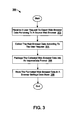
- Figure 5 is a block diagram of one embodiment of a computer system.
- the web browser data includes various property settings specific to a current instance of the web browser by the current instance of the web browser.
- the web browser data may include bookmarks, security settings, general settings, links to documents accessed by a user, information specifying frequency and times when the documents were accessed (e.g., to determine which links should be displayed in the "already-visited" color, or to power the history pane), a home page, cookie settings, user interface (UI) elements, intermediate files maintained by the web browser, profile/autofill data (e.g., information maintained by a browser for "My Profile" option of a business card tool), password data (e.g., a subset of filled in forms), input history data (e.g., a list of data filled in by a user for text boxes and other web forms encountered by the user), popup blocker and whitelisted sites data, data identifying language and character set, accessibility data, etc.
- UI user interface
- UI elements associated with the web browser may specify, for example, visibility of toolbars in the browser windows, positioning of toolbars within the browser window, visibility of buttons on a toolbar, positioning of buttons on the toolbar, color settings, background images, etc.
- Intermediate files maintained by the web browser may include, for example, cached documents viewed by the user, plug-in executable files (e.g., plug-ins for displaying different types of audio and video messages), browsing history records, and various temporary files used by the web browser.
- a user may request to export web browser data pertaining to the current web browser. For example, the user may issue such a request by pressing an export settings button on a toolbar in the browser window.
- the web browser data is exported from the current web browser, packaged into an intermediate format and stored in a designated data store.
- the designated data store may be on the same computer as the present web browser or on a server coupled to this computer via a network.
- the new web browser may be a different web browser installed on the same or different computer.
- the old web browser may be Microsoft® Internet Explorer (IE) and the new web browser may be Netscape® Navigator.
- the new web browser may be a different instance of the same web browser (e.g., the IE browser) installed on the same or different computer.
- Figure 1 presents a diagram illustrating an overview of one embodiment of the present invention.
- a browser window 102 controlled by a first web browser includes an export settings button 108.
- the web browser data pertaining to the first web browser 102 is gathered, packaged into an intermediate format, and stored in a data store 106.
- the data store 106 may be on the same computer as the first web browser or on a server coupled to this computer via a network (e.g., a public network or a local area network).
- a browser window 104 is controlled by a second web browser.
- the second web browser may be a different web browser installed on the same or different computer, or a different instance of the same web browser installed on the same or different computer.
- the browser window 104 includes an import settings button 110. When the user presses the button 110, the web browser data pertaining to the first web browser is retrieved from the data store 106 and applied to the second web browser. In one embodiment, if the second web browser supports only a subset of the web browser data pertaining to the first web browser, only the web browser data supported by the second web browser is imported onto the second web browser.
- these techniques are not limited to web browser applications and can be used with various other applications. For example, these techniques may be used to transfer settings between different instances of Microsoft Word or Microsoft PowerPoint, or to transfer settings from Microsoft Word to Microsoft PowerPoint and vice versa. In another example, these techniques may be used to transfer settings between a web browser and some other application (e.g., Microsoft Word).
- references throughout this specification to "one embodiment” or “an embodiment” indicate that a particular feature, structure, or characteristic described in connection with the embodiment is included in at least one embodiment.
- the appearances of the phrases “in one embodiment” or “in an embodiment” in various places throughout this specification are not necessarily all referring to the same embodiment.
- a document as used herein broadly refers to various items, such as files, directories, or other data or information that may be stored, received, sent, created or otherwise processed by one or more computing devices.
- a document may include any file created on a computing system.
- file as used herein includes a collection of bytes or bits stored as an individual entity.
- a file may be a binary file, a text file, or a combination thereof, such as a word processor file, a data file, a spreadsheet, a workbook, an image, a drawing, an audio file, a video file, an audio/visual file, a multimedia file, an archive file, a batch file, a source file, an object file, or an executable program.
- file may also refer to a file system object which is accessed as though the object were a file.
- a document may be linked to one or more other documents, such as via a hyperlink.
- a document may include a web page, such as a file coded in a markup language (e.g. hypertext markup language (HTML) or extensible markup language (XML)), a file coded in a scripting language (e.g. JavaScript, Active Server Pages (ASP), or Perl), or a file viewed in a web browser (e.g. a portable document format (PDF), an image file or text file).
- HTML hypertext markup language
- XML extensible markup language
- a scripting language e.g. JavaScript, Active Server Pages (ASP), or Perl
- PDF portable document format
- a document may reside on a single system, or may be accessed by one or more systems via a network, e.g. an Intranet or the Internet.
- FIG. 2 is a block diagram illustrating an architecture 200 in which one embodiment of the present invention may be implemented.
- the architecture 200 includes client devices 208 and 220, a server 202, and a network 206.
- the client devices 208 and 220 may be personal computers (PCs), wireless telephones, palm-sized computing devices, personal digital assistants (PDAs), consumer electronic devices, etc.
- the client devices 208 and 220 are coupled to the server 202 via the network 206, which may be a public network (e.g., Internet) or a private network (e.g., Ethernet or a local area Network (LAN)).
- the network 206 may be a public network (e.g., Internet) or a private network (e.g., Ethernet or a local area Network (LAN)).
- the client devices 208 and 220 host web browsers 210 and 222 respectively.
- the web browsers 210 and 222 may be of the same type (e.g., the IE browser) or of different types (e.g., the IE browser and the Firefox browser).
- the client devices 208 and 220 also include browser settings modules 212 and 224 respectively.
- the browser settings module 212 or 224 may be a part of the corresponding web browser 210 or 220, or a part of some other application (e.g., Google® Firefox Toolbar, Google® Toolbar for Windows, etc.) running on the corresponding client device 208 or 220, or an independent application running on the corresponding client device 208 or 220.
- the module 212 is part of a first instance of a specific application (e.g., IE browser or Google Toolbar), and the module 224 is part of a second instance of the same application.
- the module 212 may be a part of one application (e.g., IE browser) and the module 224 may be a part of another application (e.g., Yahoo Toolbar).
- the browser settings modules 212 and 224 communicate with the server 202.
- both modules 212 and 224 communicate with the server 202 using the same network protocol (e.g., hypertext transfer protocol (HTTP).
- HTTP hypertext transfer protocol
- the modules 212 and 224 communicate with the server 202 using different network protocols (e.g., HTTP and file transfer protocol (FTP)).
- HTTP hypertext transfer protocol
- FTP file transfer protocol
- each of the browser settings modules 212 and 220 includes an exporter (i.e., exporters 214 and 226) and an importer (e.g., importers 216 and 228).
- the browser settings module 212 or 220 may only include either the exporter or the importer but not both of them.
- the exporter 214 or 226 is responsible for collecting web browser data pertaining to the web browser 210 or 222 respectively, packaging the collected data into a canonical format, and sending the web browser data in the canonical format to the server 202, which then stores this web browser data in a browser settings database 204.
- a canonical format referred to herein is an intermediate format that provides a flexible way for describing data and is understandable by various browser settings modules including modules 212 and 224. Examples of the canonical format may include the extension markup language (XML) format, the binary format, etc.
- the browser settings database 204 stores web browser data for various web browsers.
- the browser settings database 204 may be located on the client device 208 or 220.
- the web browser data may be stored using a different storage means (e.g., a file on disk).
- the importer 216 or 228 is responsible for importing, onto the web browser 210 or 222 respectively, web browser data pertaining to a different web browser.
- the importer 216 may import web browser data pertaining to the web browser 222 onto the web browser 210.
- the importer extracts the subset supported by the target web browser from the relevant web browser data stored in the database 204 and applies the extracted web browser data to the target web browser.
- the importer 216 or 228 can only import specific web browser data.
- the importer 216 or 228 may determine whether a web browser data item can be imported by comparing a data type tag assigned to the web browser data item by the exporter 214 or 226 with a predefined list of allowed data types. In one embodiment, if the importer 216 or 228 encounters a web browser data item of an unknown type, heuristics rules are utilized to determine how to handle this web browser data item.
- the browser settings module 212 or 224 displays an export settings button and/or an import settings button as part of a toolbar or somewhere else within the browser window.
- the exporter 214 or 226 initiates the export of relevant web browser data.
- the importer 216 or 228 initiates the import of desired web browser data.
- the user may request export or import of browser settings by selecting a specific option in a web browser window (e.g., by selecting an entry in Tools dropdown list) or somewhere else on the screen (e.g., on the control panel, a separate application, etc.), or pressing a specific key on the keyboard, or using some other method.
- the user when a user issues a request to export/import web browser settings, the user is allowed to specify the desired settings. For example, once the user presses the export settings button, the user is presented with a list of settings that can be exported, from which the user can select some settings for exporting.
- the export occurs automatically (i.e., without a user request) at regular intervals (e.g., for a backup function).
- the import may also occur automatically at regular intervals (e.g., to keep two computers synchronized).
- Figure 3 presents a flow diagram of one embodiment of a method 300 for exporting web browser data.
- the method may be performed by processing logic, which may comprise hardware, software, or a combination of both.
- Processing logic may reside either in a client device, or partially or entirely in a separate device and/or system(s).
- processing logic receives a user request to export web browser data pertaining to a current web browser (referred to as the source web browser).
- the web browser data may include bookmarks, security settings, general settings, links to documents accessed by a user, a home page, cookie settings, user interface (UI) elements, intermediate files maintained by the web browser, etc.
- UI elements associated with the web browser may specify, for example, visibility of toolbars in the browser windows, positioning of toolbars within the browser window, visibility of buttons on a toolbar, positioning of buttons on the toolbar, color settings, background images, skins, themes, etc.
- Intermediate files maintained by the web browser may include, for example, cached documents viewed by the user, plug-in executable files (e.g., plug-ins for displaying different types of audio and video messages), browsing history records, and various temporary files used by the web browser.
- processing logic receives the user request when the user presses an export settings button in the browser window.
- the user request specifies which browser settings need to be exported.
- the user request covers all web browser data pertaining to the source web browser.
- processing logic collects the web browser data according to the user request.
- processing logic packages the collected web browser data into an intermediate format (e.g., an XML format, a binary format, etc.).
- an intermediate format e.g., an XML format, a binary format, etc.
- processing logic stores the formatted web browser data in a browser settings data store.
- this data store resides on the same client device as the source web browser.
- the browser settings data store resides on a server.
- Figure 4 presents a flow diagram of one embodiment of a method 400 for importing web browser data.
- the method may be performed by processing logic, which may comprise hardware, software, or a combination of both.
- Processing logic may reside either in a client device, or partially or entirely in a separate device and/or system(s).
- processing logic receives a user request to import web browser data onto a current web browser (referred to as the target web browser).
- the user request identifies the source web browser whose data is to be imported onto the target web browser (e.g., by identifying the instance of the web browser or the type of the web browser).
- the user request specifies which browser settings need to be imported. For example, the user may be presented with a list of available settings to allow the user to select the desired settings. Alternatively, the user request covers all web browser data pertaining to the source web browser.
- the source web browser and the target web browser may reside on the same client device or different client devices and may be of the same browser type or different browser types.
- processing logic retrieves web browser data pertaining to the source web browser from a data store.
- processing logic retrieves the web browser data upon verifying that the target importer has permissions to access the web browser data.
- the data store may reside on the same client device as the target web browser, on the client device hosting the source web browser, or on a server.
- the web browser data is stored in the data store in an intermediate format (e.g., XML or binary format).
- processing logic extracts the specified settings from the retrieved web browser data.
- processing logic maps the web browser data to properties of the target web browser. If the target web browser does not support all of the available browser settings, processing logic discards the portion of web browser settings that is not supported by the target web browser.
- processing logic applies the mapped data to the target web browser.
- Figure 5 shows a diagrammatic representation of a machine in the exemplary form of a computer system 500 within which a set of instructions, for causing the machine to perform any one or more of the methodologies discussed herein, may be executed.
- the machine operates as a standalone device or may be connected (e.g., networked) to other machines.
- the machine may operate in the capacity of a server or a client machine in server-client network environment, or as a peer machine in a peer-to-peer (or distributed) network environment.
- the machine may be a personal computer (PC), a tablet PC, a set-top box (STB), a Personal Digital Assistant (PDA), a cellular telephone, a web appliance, a network router, switch or bridge, or any machine capable of executing a set of instructions (sequential or otherwise) that specify actions to be taken by that machine.
- PC personal computer
- PDA Personal Digital Assistant
- STB set-top box
- WPA Personal Digital Assistant
- the exemplary computer system 500 includes a processor 502 (e.g., a central processing unit (CPU) a graphics processing unit (GPU) or both), a main memory 504 and a static memory 506, which communicate with each other via a bus 508.
- the computer system 500 may further include a video display unit 510 (e.g., a liquid crystal display (LCD) or a cathode ray tube (CRT)).
- the computer system 500 also includes an alphanumeric input device 512 (e.g., a keyboard), a cursor control device 514 (e.g., a mouse), a disk drive unit 516, a signal generation device 518 (e.g., a speaker) and a network interface device 520.
- the disk drive unit 516 includes a machine-readable medium 522 on which is stored one or more sets of instructions (e.g., software 524) embodying any one or more of the methodologies or functions described herein.
- the software 524 may also reside, completely or at least partially, within the main memory 504 and/or within the processor 502 during execution thereof by the computer system 500, the main memory 504 and the processor 502 also constituting machine-readable media.
- the software 524 may further be transmitted or received over a network 526 via the network interface device 520.
- machine-readable medium 522 is shown in an exemplary embodiment to be a single medium, the term “machine-readable medium” should be taken to include a single medium or multiple media (e.g., a centralized or distributed database, and/or associated caches and servers) that store the one or more sets of instructions.
- the term “machine-readable medium” shall also be taken to include any medium that is capable of storing, encoding or carrying a set of instructions for execution by the machine and that cause the machine to perform any one or more of the methodologies of the present invention.
- the term “machine-readable medium” shall accordingly be taken to included, but not be limited to, solid-state memories, optical and magnetic media, and carrier wave signals.
- the processes described above can be stored in a memory of a computer system as a set of instructions to be executed.
- the instructions to perform the processes described above could alternatively be stored on other forms of machine-readable media, including magnetic and optical disks.
- the processes described could be stored on machine-readable media, such as magnetic disks or optical disks, which are accessible via a disk drive (or computer-readable medium drive).
- the instructions can be downloaded into a computing device over a data network in a form of compiled and linked version.
- the logic to perform the processes as discussed above could be implemented in additional computer and/or machine readable media, such as discrete hardware components as large-scale integrated circuits (LSI's), application-specific integrated circuits (ASIC's), firmware such as electrically erasable programmable read-only memory (EEPROM's); and electrical, optical, acoustical and other forms of propagated signals (e.g., carrier waves, infrared signals, digital signals, etc.); etc.
- LSI's large-scale integrated circuits
- ASIC's application-specific integrated circuits
- firmware such as electrically erasable programmable read-only memory (EEPROM's)
- EEPROM's electrically erasable programmable read-only memory
- electrical, optical, acoustical and other forms of propagated signals e.g., carrier waves, infrared signals, digital signals, etc.
Landscapes
- Engineering & Computer Science (AREA)
- Theoretical Computer Science (AREA)
- Databases & Information Systems (AREA)
- Physics & Mathematics (AREA)
- General Physics & Mathematics (AREA)
- Data Mining & Analysis (AREA)
- General Engineering & Computer Science (AREA)
- Business, Economics & Management (AREA)
- Health & Medical Sciences (AREA)
- Economics (AREA)
- General Health & Medical Sciences (AREA)
- Human Resources & Organizations (AREA)
- Marketing (AREA)
- Primary Health Care (AREA)
- Strategic Management (AREA)
- Tourism & Hospitality (AREA)
- General Business, Economics & Management (AREA)
- Information Transfer Between Computers (AREA)
Abstract
Description
- The field of invention relates generally to transferring application-specific data between applications, and more particularly, to transferring web browser data between web browsers.
- A web browser is an application program that provides a way to look at and interact with information on the Internet. A web browser typically uses the Hypertext Transfer Protocol (HTTP) to make requests of web servers throughout the Internet on behalf of the browser user. Known web browsers include, for example, Microsoft® Internet Explorer (IE), Netscape® Navigator, Opera browser, Firefox browser and Lynx browser.
- Each web browser is associated with a set of browser data that includes, for example, bookmarks, security settings, general settings, links to pages visited by a user, a home page, cookie settings, user interface (UI) elements (e.g., toolbar positions and visibility), etc. A user may decide to switch to a different web browser. For example, the user may switch to a different web browser installed on the same or different computer, or to a different instance of the same web browser installed on the same or different computer. Currently, when a user switches to a new IE browser, the user can transfer bookmarks from an old IE browser to the new IE browser. However, the user has to manually enter the rest of the browser data for the new web browser. In addition, if the two web browsers are of different types (e.g., an old web browser is Netscape Navigator and a new web browser is Microsoft IE), the user may not be able to transfer any of the old web browser data to the new browser.
- Thus, what is desired is a method or system that helps overcome one or more of the above-described limitations.
- In one embodiment, a method for transferring web browser data between web browsers includes collecting browser data pertaining to a first web browser, packaging the browser data into an intermediate format, and storing the packaged data for a subsequent import into a second web browser.
- The present invention is illustrated by way of example and not limitation in the figures of the accompanying drawings, in which like references indicate similar elements and in which:
-
Figure 1 presents a diagram illustrating an overview of one embodiment of the present invention; -
Figure 2 is a block diagram illustrating an architecture in which one embodiment of the present invention may be implemented; -
Figure 3 is a flow diagram of one embodiment of a method for exporting web browser data; -
Figure 4 presents a flow diagram of one embodiment of a method for importing web browser data; and -
Figure 5 is a block diagram of one embodiment of a computer system. - A method and system for transferring web browser data between web browsers is described. The web browser data includes various property settings specific to a current instance of the web browser by the current instance of the web browser. For example, the web browser data may include bookmarks, security settings, general settings, links to documents accessed by a user, information specifying frequency and times when the documents were accessed (e.g., to determine which links should be displayed in the "already-visited" color, or to power the history pane), a home page, cookie settings, user interface (UI) elements, intermediate files maintained by the web browser, profile/autofill data (e.g., information maintained by a browser for "My Profile" option of a business card tool), password data (e.g., a subset of filled in forms), input history data (e.g., a list of data filled in by a user for text boxes and other web forms encountered by the user), popup blocker and whitelisted sites data, data identifying language and character set, accessibility data, etc. UI elements associated with the web browser may specify, for example, visibility of toolbars in the browser windows, positioning of toolbars within the browser window, visibility of buttons on a toolbar, positioning of buttons on the toolbar, color settings, background images, etc. Intermediate files maintained by the web browser may include, for example, cached documents viewed by the user, plug-in executable files (e.g., plug-ins for displaying different types of audio and video messages), browsing history records, and various temporary files used by the web browser.
- In one embodiment, a user may request to export web browser data pertaining to the current web browser. For example, the user may issue such a request by pressing an export settings button on a toolbar in the browser window. In response to the user request, the web browser data is exported from the current web browser, packaged into an intermediate format and stored in a designated data store. The designated data store may be on the same computer as the present web browser or on a server coupled to this computer via a network.
- Subsequently, when the user issues a request to import the web browser data onto a new web browser, the stored web browser data is retrieved and applied to the new web browser. The new web browser may be a different web browser installed on the same or different computer. For example, the old web browser may be Microsoft® Internet Explorer (IE) and the new web browser may be Netscape® Navigator. Alternatively, the new web browser may be a different instance of the same web browser (e.g., the IE browser) installed on the same or different computer.
-
Figure 1 presents a diagram illustrating an overview of one embodiment of the present invention. - Referring to
Figure 1 , abrowser window 102 controlled by a first web browser includes anexport settings button 108. When a user presses thebutton 108, the web browser data pertaining to thefirst web browser 102 is gathered, packaged into an intermediate format, and stored in adata store 106. Thedata store 106 may be on the same computer as the first web browser or on a server coupled to this computer via a network (e.g., a public network or a local area network). - A
browser window 104 is controlled by a second web browser. The second web browser may be a different web browser installed on the same or different computer, or a different instance of the same web browser installed on the same or different computer. Thebrowser window 104 includes animport settings button 110. When the user presses thebutton 110, the web browser data pertaining to the first web browser is retrieved from thedata store 106 and applied to the second web browser. In one embodiment, if the second web browser supports only a subset of the web browser data pertaining to the first web browser, only the web browser data supported by the second web browser is imported onto the second web browser. - It should be noted that the techniques described herein are not limited to web browser applications and can be used with various other applications. For example, these techniques may be used to transfer settings between different instances of Microsoft Word or Microsoft PowerPoint, or to transfer settings from Microsoft Word to Microsoft PowerPoint and vice versa. In another example, these techniques may be used to transfer settings between a web browser and some other application (e.g., Microsoft Word).
- In addition, references throughout this specification to "one embodiment" or "an embodiment" indicate that a particular feature, structure, or characteristic described in connection with the embodiment is included in at least one embodiment. Thus, the appearances of the phrases "in one embodiment" or "in an embodiment" in various places throughout this specification are not necessarily all referring to the same embodiment.
- Further, the term "document" as used herein broadly refers to various items, such as files, directories, or other data or information that may be stored, received, sent, created or otherwise processed by one or more computing devices. For example, a document may include any file created on a computing system. The term file as used herein includes a collection of bytes or bits stored as an individual entity. For example, a file may be a binary file, a text file, or a combination thereof, such as a word processor file, a data file, a spreadsheet, a workbook, an image, a drawing, an audio file, a video file, an audio/visual file, a multimedia file, an archive file, a batch file, a source file, an object file, or an executable program. The term file may also refer to a file system object which is accessed as though the object were a file. A document may be linked to one or more other documents, such as via a hyperlink. A document may include a web page, such as a file coded in a markup language (e.g. hypertext markup language (HTML) or extensible markup language (XML)), a file coded in a scripting language (e.g. JavaScript, Active Server Pages (ASP), or Perl), or a file viewed in a web browser (e.g. a portable document format (PDF), an image file or text file). A document may reside on a single system, or may be accessed by one or more systems via a network, e.g. an Intranet or the Internet.
- Furthermore, the particular features, structures, or characteristics may be combined in any suitable manner in one or more embodiments.
-
Figure 2 is a block diagram illustrating anarchitecture 200 in which one embodiment of the present invention may be implemented. Thearchitecture 200 includesclient devices server 202, and a network 206. - The
client devices client devices server 202 via the network 206, which may be a public network (e.g., Internet) or a private network (e.g., Ethernet or a local area Network (LAN)). - The
client devices host web browsers web browsers client devices browser settings modules browser settings module corresponding web browser corresponding client device corresponding client device module 212 is part of a first instance of a specific application (e.g., IE browser or Google Toolbar), and themodule 224 is part of a second instance of the same application. Alternatively, themodule 212 may be a part of one application (e.g., IE browser) and themodule 224 may be a part of another application (e.g., Yahoo Toolbar). - The
browser settings modules server 202. In one embodiment, bothmodules server 202 using the same network protocol (e.g., hypertext transfer protocol (HTTP). Alternatively, themodules server 202 using different network protocols (e.g., HTTP and file transfer protocol (FTP)). - In one embodiment, each of the
browser settings modules exporters 214 and 226) and an importer (e.g.,importers 216 and 228). Alternatively, thebrowser settings module - The
exporter web browser server 202, which then stores this web browser data in abrowser settings database 204. A canonical format referred to herein is an intermediate format that provides a flexible way for describing data and is understandable by various browser settingsmodules including modules - The
browser settings database 204 stores web browser data for various web browsers. In an another embodiment, thebrowser settings database 204 may be located on theclient device - The
importer web browser importer 216 may import web browser data pertaining to theweb browser 222 onto theweb browser 210. In one embodiment, if the web browser targeted for import supports only a subset of web browser data pertaining to the source web browser, the importer extracts the subset supported by the target web browser from the relevant web browser data stored in thedatabase 204 and applies the extracted web browser data to the target web browser. - In one embodiment, the
importer importer exporter importer - In one embodiment, the
browser settings module exporter importer - Alternatively, the user may request export or import of browser settings by selecting a specific option in a web browser window (e.g., by selecting an entry in Tools dropdown list) or somewhere else on the screen (e.g., on the control panel, a separate application, etc.), or pressing a specific key on the keyboard, or using some other method.
- In one embodiment, when a user issues a request to export/import web browser settings, the user is allowed to specify the desired settings. For example, once the user presses the export settings button, the user is presented with a list of settings that can be exported, from which the user can select some settings for exporting.
- In another embodiment, the export occurs automatically (i.e., without a user request) at regular intervals (e.g., for a backup function). Similarly, the import may also occur automatically at regular intervals (e.g., to keep two computers synchronized).
-
Figure 3 presents a flow diagram of one embodiment of amethod 300 for exporting web browser data. The method may be performed by processing logic, which may comprise hardware, software, or a combination of both. Processing logic may reside either in a client device, or partially or entirely in a separate device and/or system(s). - At block 302, processing logic receives a user request to export web browser data pertaining to a current web browser (referred to as the source web browser). As discussed above, the web browser data may include bookmarks, security settings, general settings, links to documents accessed by a user, a home page, cookie settings, user interface (UI) elements, intermediate files maintained by the web browser, etc. UI elements associated with the web browser may specify, for example, visibility of toolbars in the browser windows, positioning of toolbars within the browser window, visibility of buttons on a toolbar, positioning of buttons on the toolbar, color settings, background images, skins, themes, etc. Intermediate files maintained by the web browser may include, for example, cached documents viewed by the user, plug-in executable files (e.g., plug-ins for displaying different types of audio and video messages), browsing history records, and various temporary files used by the web browser. In one embodiment, processing logic receives the user request when the user presses an export settings button in the browser window. In one embodiment, the user request specifies which browser settings need to be exported. Alternatively, the user request covers all web browser data pertaining to the source web browser.
- At processing block 304, processing logic collects the web browser data according to the user request.
- At
processing block 306, processing logic packages the collected web browser data into an intermediate format (e.g., an XML format, a binary format, etc.). - At
processing block 308, processing logic stores the formatted web browser data in a browser settings data store. In one embodiment, this data store resides on the same client device as the source web browser. Alternatively, the browser settings data store resides on a server. -
Figure 4 presents a flow diagram of one embodiment of amethod 400 for importing web browser data. The method may be performed by processing logic, which may comprise hardware, software, or a combination of both. Processing logic may reside either in a client device, or partially or entirely in a separate device and/or system(s). - At block 402, processing logic receives a user request to import web browser data onto a current web browser (referred to as the target web browser). In one embodiment, the user request identifies the source web browser whose data is to be imported onto the target web browser (e.g., by identifying the instance of the web browser or the type of the web browser). In one embodiment, the user request specifies which browser settings need to be imported. For example, the user may be presented with a list of available settings to allow the user to select the desired settings. Alternatively, the user request covers all web browser data pertaining to the source web browser.
- The source web browser and the target web browser may reside on the same client device or different client devices and may be of the same browser type or different browser types.
- At
block 404, processing logic retrieves web browser data pertaining to the source web browser from a data store. In one embodiment, processing logic retrieves the web browser data upon verifying that the target importer has permissions to access the web browser data. The data store may reside on the same client device as the target web browser, on the client device hosting the source web browser, or on a server. The web browser data is stored in the data store in an intermediate format (e.g., XML or binary format). In one embodiment, if the user request specifies certain browser settings to be imported, processing logic extracts the specified settings from the retrieved web browser data. - At
block 406, processing logic maps the web browser data to properties of the target web browser. If the target web browser does not support all of the available browser settings, processing logic discards the portion of web browser settings that is not supported by the target web browser. - At
block 408, processing logic applies the mapped data to the target web browser. -
Figure 5 shows a diagrammatic representation of a machine in the exemplary form of acomputer system 500 within which a set of instructions, for causing the machine to perform any one or more of the methodologies discussed herein, may be executed. In alternative embodiments, the machine operates as a standalone device or may be connected (e.g., networked) to other machines. In a networked deployment, the machine may operate in the capacity of a server or a client machine in server-client network environment, or as a peer machine in a peer-to-peer (or distributed) network environment. The machine may be a personal computer (PC), a tablet PC, a set-top box (STB), a Personal Digital Assistant (PDA), a cellular telephone, a web appliance, a network router, switch or bridge, or any machine capable of executing a set of instructions (sequential or otherwise) that specify actions to be taken by that machine. Further, while only a single machine is illustrated, the term "machine" shall also be taken to include any collection of machines that individually or jointly execute a set (or multiple sets) of instructions to perform any one or more of the methodologies discussed herein. - The
exemplary computer system 500 includes a processor 502 (e.g., a central processing unit (CPU) a graphics processing unit (GPU) or both), amain memory 504 and astatic memory 506, which communicate with each other via a bus 508. Thecomputer system 500 may further include a video display unit 510 (e.g., a liquid crystal display (LCD) or a cathode ray tube (CRT)). Thecomputer system 500 also includes an alphanumeric input device 512 (e.g., a keyboard), a cursor control device 514 (e.g., a mouse), adisk drive unit 516, a signal generation device 518 (e.g., a speaker) and a network interface device 520. - The
disk drive unit 516 includes a machine-readable medium 522 on which is stored one or more sets of instructions (e.g., software 524) embodying any one or more of the methodologies or functions described herein. The software 524 may also reside, completely or at least partially, within themain memory 504 and/or within theprocessor 502 during execution thereof by thecomputer system 500, themain memory 504 and theprocessor 502 also constituting machine-readable media. - The software 524 may further be transmitted or received over a
network 526 via the network interface device 520. - While the machine-readable medium 522 is shown in an exemplary embodiment to be a single medium, the term "machine-readable medium" should be taken to include a single medium or multiple media (e.g., a centralized or distributed database, and/or associated caches and servers) that store the one or more sets of instructions. The term "machine-readable medium" shall also be taken to include any medium that is capable of storing, encoding or carrying a set of instructions for execution by the machine and that cause the machine to perform any one or more of the methodologies of the present invention. The term "machine-readable medium" shall accordingly be taken to included, but not be limited to, solid-state memories, optical and magnetic media, and carrier wave signals.
- The processes described above can be stored in a memory of a computer system as a set of instructions to be executed. In addition, the instructions to perform the processes described above could alternatively be stored on other forms of machine-readable media, including magnetic and optical disks. For example, the processes described could be stored on machine-readable media, such as magnetic disks or optical disks, which are accessible via a disk drive (or computer-readable medium drive). Further, the instructions can be downloaded into a computing device over a data network in a form of compiled and linked version.
- Alternatively, the logic to perform the processes as discussed above could be implemented in additional computer and/or machine readable media, such as discrete hardware components as large-scale integrated circuits (LSI's), application-specific integrated circuits (ASIC's), firmware such as electrically erasable programmable read-only memory (EEPROM's); and electrical, optical, acoustical and other forms of propagated signals (e.g., carrier waves, infrared signals, digital signals, etc.); etc.
- In the foregoing specification, the invention has been described with reference to specific exemplary embodiments thereof. It will, however, be evident that various modifications and changes may be made thereto without departing from the broader spirit and scope of the invention as set forth in the appended claims. The specification and drawings are, accordingly, to be regarded in an illustrative rather than a restrictive sense.
-
- A. A method comprising: collecting browser data pertaining to a first web browser; packaging the browser data into an intermediate format; and storing the packaged data for a subsequent import onto a second web browser.
- B. The method of statement A wherein the browser data is selected from the group consisting of bookmarks, homepage, cookie, links, user interface (UI) elements, security settings, general settings, cache data, temporary files, browsing history data, information specifying frequency and times of accessing documents, intermediate files maintained by the web browser, profile/autofill data, password data, input history data, popup blocker and whitelisted sites data, data identifying language and character set, accessibility data, and a list of plug-ins.
- C. The method of statement A wherein the first web browser and the second web browser are web browsers of two different types.
- D. The method of statement A wherein the first web browser resides on a first device and the second web browser resides on any one of the first device and a second device.
- E. The method of statement A further comprising receiving a user request to export the browser data, the user request to export the browser data being received upon a user pressing an export settings button on a toolbar.
- F. The method of statement A further comprising: receiving a user request to import the browser data onto the second web browser; and applying the packaged browser data to the second web browser.
- G. The method of statement A wherein the packaged data is stored on any one of a server and a user device hosting the first web browser.
- H. The method of statement A wherein the intermediate format is any one of an extensible markup language (XML) format and a binary format.
- I. A method comprising: accessing stored browser data pertaining to a first web browser, the stored browser data being in an intermediate format; and importing the stored browser data onto a second web browser.
- J. The method of statement I further comprising: determining that the second web browser supports a subset of browser data pertaining to the first web browser; extracting the subset of browser data from the stored browser data; and applying the subset of browser data to the second web browser.
- K. The method of statement I wherein the stored browser data includes data selected from the group consisting of bookmarks, homepage, cookie, links, user interface (UI) elements, security settings, general settings, cache data, temporary files, browsing history data, and a list of plug-ins.
- L. The method of statement I wherein the first web browser and the second web browser are web browsers of two different types.
- M. The method of statement I wherein the first web browser and the second web browser reside on two different devices.
- N. The method of statement I further comprising receiving a user request to import browser data, the user request to import browser data being received upon a user pressing an import settings button on any one of a toolbar and a menu.
- O. The method of statement I wherein the stored browser data is accessed on any one of a server and a user device hosting the first web browser.
- P. The method of statement I wherein the intermediate format is any one of an extensible markup language (XML) format and a binary format.
- Q. An apparatus comprising: means for collecting browser data pertaining to a first web browser; means for packaging the browser data into an intermediate format; and means for storing the packaged data for a subsequent import onto a second web browser.
- R. An apparatus comprising: means for accessing stored browser data pertaining to a first web browser, the stored browser data being in an intermediate format; and means for importing the stored browser data onto a second web browser
- S. A system comprising: an exporter to collect browser data pertaining to a first web browser, and to package the browser data into an intermediate format; and a data store to store the packaged data for a subsequent import onto a second web browser.
- T. A system comprising: a data store to store browser data pertaining to a first web browser, the stored browser data being in an intermediate format; and an importer to retrieve the stored browser data, and to import the stored browser data onto a second web browser
- U. A system comprising: an exporter to collect browser data pertaining to a first web browser, and to package the browser data into an, intermediate format; a data store to store the packaged data; and an importer to retrieve the packaged data from the data store, and to import the stored data onto a second web browser.
- V. A computer readable medium comprising instructions, which when executed on a processing system, cause the processing system to perform a method comprising: collecting browser data pertaining to a first web browser; packaging the browser data into an intermediate format; and storing the packaged data for a subsequent import onto a second web browser.
- W. A computer readable medium comprising instructions, which when executed on a processing system, cause the processing system to perform a method comprising: accessing stored browser data pertaining to a first web browser, the stored browser data being in an intermediate format; and importing the stored browser data onto a second web browser.
Claims (15)
- A method performed by one or more devices, the method comprising:receiving a request to transfer settings between a first application and a second application,wherein the second application is different than the first application;
detecting selection of at least one setting of the first application;
obtaining data corresponding to the at least one setting of the first application;
packaging the obtained data, into an intermediate format, to form transformed data,
wherein the intermediate format is compatible with the first application and the second application;
assigning a data type tag to each of one or more data items included in the obtained data, each data type tag representing a data type of a corresponding one of the one or more data items; and
storing the transformed data,
wherein the stored transformed data is to be imported to the second application based on the data type tag assigned to each of the one or more data items. - The method of claim 1, wherein the first application corresponds to a first web browser, and
wherein the second application corresponds to a second web browser that is different than the first web browser. - The method of claim 2, wherein the at least one setting includes at least one of user interface (UI) data, browsing history data, bookmark data, profile data, autofill data, password data, popup blocker data, information identifying frequency of accessing documents via the first web browser, information identifying when documents are accessed via the first web browser, or information identifying plug-ins.
- The method of claim 2, where the first web browser and the second web browser are web browsers of a same type.
- The method of claim 2, further comprising:providing an export settings button as part of a toolbar of the first web browser; anddetecting selection of the export settings button,wherein the request to transfer the settings between the first application and the second application is received based on the selection of the export settings button.
- The method of claim 1, wherein the at least one setting includes at least one of security settings, general settings, cookie settings, or color settings.
- The method of claim 1, further comprising:comparing the data type tag of each of the one or more data items to a list of data types allowed by the second application; andimporting only a subset of the one or more data items that are supported by the second application, based on comparing the data type tag of each of the one or more data items to the list of data types allowed by the second application.
- One or more devices comprising:one or more processors configured to:receive a request to transfer settings between a first application and a second application,wherein the second application is different than the first application;
detect selection of at least one setting of the first application;
obtain data corresponding to the at least one setting of the first application;
package the obtained data, into an intermediate format, to form transformed data,
wherein the intermediate format is compatible with the first application and the second application;
assign a data type tag to each of one or more data items included in the obtained data, each data type tag representing a data type of a corresponding one of the one or more data items; and
store the transformed data,
wherein the stored transformed data is to be imported to the second application based on the data type tag assigned to each of the one or more data items. - The one or more devices of claim 8, where the one or more processors are further configured to:compare the data type tag of each of the one or more data items to data types that are supported by the second application; andimport only a subset of the one or more data items that are supported by the second application, based on comparing the data type tag of each of the one or more data items to the data types that are supported by the second application.
- The one or more devices of claim 8, wherein the first application corresponds to a first web browser, and
wherein the second application corresponds to a second web browser that is different than the first web browser. - The one or more devices of claim 10, where the one or more processors are further configured to:provide an export settings button as part of a toolbar of the first web browser,wherein the request to transfer settings between the first application and the second application is received based on selection of the export settings button.
- The one or more devices of claim 10, wherein the at least one setting includes at least one of user interface (UI) data, browsing history data, bookmark data, profile data, autofill data, password data, popup blocker data, information identifying frequency of accessing documents via the first web browser, information identifying when documents are accessed via the first web browser, or information identifying plug-ins.
- The one or more devices of claim 8, where the first application and the second application are applications of different types.
- The one or more devices of claim 8, wherein the at least one setting includes at least one of security settings, general settings, cookie settings, or color settings.
- A computer program comprising instructions executable by one or more computers for enabling the one or more computers to carry out a method according to claims 1-7.
Applications Claiming Priority (2)
| Application Number | Priority Date | Filing Date | Title |
|---|---|---|---|
| US11/096,859 US7805495B2 (en) | 2005-03-31 | 2005-03-31 | Method and system for transferring web browser data between web browsers |
| EP06740430.1A EP1869590B1 (en) | 2005-03-31 | 2006-03-31 | Method and system for transferring web browser data between web browsers |
Related Parent Applications (2)
| Application Number | Title | Priority Date | Filing Date |
|---|---|---|---|
| EP06740430.1A Division-Into EP1869590B1 (en) | 2005-03-31 | 2006-03-31 | Method and system for transferring web browser data between web browsers |
| EP06740430.1A Division EP1869590B1 (en) | 2005-03-31 | 2006-03-31 | Method and system for transferring web browser data between web browsers |
Publications (1)
| Publication Number | Publication Date |
|---|---|
| EP2500834A1 true EP2500834A1 (en) | 2012-09-19 |
Family
ID=36592971
Family Applications (2)
| Application Number | Title | Priority Date | Filing Date |
|---|---|---|---|
| EP12168355A Withdrawn EP2500834A1 (en) | 2005-03-31 | 2006-03-31 | Method and System for Transferring Application Program Settings Between Applications |
| EP06740430.1A Expired - Lifetime EP1869590B1 (en) | 2005-03-31 | 2006-03-31 | Method and system for transferring web browser data between web browsers |
Family Applications After (1)
| Application Number | Title | Priority Date | Filing Date |
|---|---|---|---|
| EP06740430.1A Expired - Lifetime EP1869590B1 (en) | 2005-03-31 | 2006-03-31 | Method and system for transferring web browser data between web browsers |
Country Status (6)
| Country | Link |
|---|---|
| US (3) | US7805495B2 (en) |
| EP (2) | EP2500834A1 (en) |
| KR (1) | KR101317972B1 (en) |
| AU (1) | AU2006230578B2 (en) |
| CA (1) | CA2603423C (en) |
| WO (1) | WO2006105503A1 (en) |
Families Citing this family (57)
| Publication number | Priority date | Publication date | Assignee | Title |
|---|---|---|---|---|
| US7805495B2 (en) | 2005-03-31 | 2010-09-28 | Google Inc. | Method and system for transferring web browser data between web browsers |
| JP2006350831A (en) * | 2005-06-17 | 2006-12-28 | Ntt Docomo Inc | Communication apparatus and browser switching method |
| US7761226B1 (en) * | 2005-07-27 | 2010-07-20 | The United States Of America As Represented By The Secretary Of The Navy | Interactive pedestrian routing system |
| US7673233B2 (en) * | 2005-09-08 | 2010-03-02 | Microsoft Corporation | Browser tab management |
| US8689098B2 (en) | 2006-04-20 | 2014-04-01 | Google Inc. | System and method for organizing recorded events using character tags |
| US8103947B2 (en) * | 2006-04-20 | 2012-01-24 | Timecove Corporation | Collaborative system and method for generating biographical accounts |
| US8793579B2 (en) | 2006-04-20 | 2014-07-29 | Google Inc. | Graphical user interfaces for supporting collaborative generation of life stories |
| US7996778B2 (en) * | 2006-05-18 | 2011-08-09 | Dell Products L.P. | Central internet browser control for multiple browsers enabled system |
| TWI386817B (en) * | 2006-05-24 | 2013-02-21 | Kofax Inc | System for and method of providing a user interface for a computer-based software application |
| US8112550B2 (en) * | 2006-09-19 | 2012-02-07 | Tacoda Llc | System and method for preserving consumer choice |
| US8285732B2 (en) * | 2006-12-18 | 2012-10-09 | Sap Ag | Method and system for providing themes for software applications |
| US20080172606A1 (en) * | 2006-12-27 | 2008-07-17 | Generate, Inc. | System and Method for Related Information Search and Presentation from User Interface Content |
| US8392837B2 (en) * | 2007-02-28 | 2013-03-05 | Red Hat, Inc. | Browser supporting multiple users |
| US20080288477A1 (en) * | 2007-05-17 | 2008-11-20 | Sang-Heun Kim | Method and system of generating an aggregate website search database using smart indexes for searching |
| US8171109B2 (en) * | 2007-05-30 | 2012-05-01 | Red Hat, Inc. | Mobile bookmarks |
| US20090113301A1 (en) * | 2007-10-26 | 2009-04-30 | Yahoo! Inc. | Multimedia Enhanced Browser Interface |
| US8601381B2 (en) * | 2007-10-29 | 2013-12-03 | Microsoft Corporation | Rich customizable user online environment |
| US20090249216A1 (en) * | 2008-03-28 | 2009-10-01 | International Business Machines Corporation | Interacting with multiple browsers simultaneously using linked browsers controlled from a primary browser interface |
| US20090290773A1 (en) * | 2008-05-21 | 2009-11-26 | Varian Medical Systems, Inc. | Apparatus and Method to Facilitate User-Modified Rendering of an Object Image |
| US8316357B2 (en) * | 2008-09-03 | 2012-11-20 | Microsoft Corporation | Type descriptor management for frozen objects |
| WO2010110788A1 (en) * | 2009-03-25 | 2010-09-30 | Hewlett-Packard Development Company, L.P. | Capturing an application state |
| US8819625B2 (en) * | 2009-09-03 | 2014-08-26 | International Business Machines Corporation | Sharable development environment bookmarks for functional/data flow |
| US8661245B1 (en) * | 2009-09-25 | 2014-02-25 | Nimvia, LLC | Systems and methods for empowering IP practitioners |
| US9875671B2 (en) * | 2009-12-17 | 2018-01-23 | Google Llc | Cloud-based user interface augmentation |
| JP5682996B2 (en) * | 2010-02-04 | 2015-03-11 | インターナショナル・ビジネス・マシーンズ・コーポレーションInternational Business Machines Corporation | Client program, terminal, server device, server program, system and method |
| US20150074561A1 (en) * | 2010-05-07 | 2015-03-12 | Google Inc. | Customizable themes for browsers and web content |
| US9164671B2 (en) | 2010-06-11 | 2015-10-20 | Microsoft Technology Licensing, Llc | Web application navigation domains |
| US8671384B2 (en) | 2010-06-11 | 2014-03-11 | Microsoft Corporation | Web application pinning including task bar pinning |
| US8434135B2 (en) | 2010-06-11 | 2013-04-30 | Microsoft Corporation | Creating and launching a web application with credentials |
| US8595551B2 (en) * | 2010-06-11 | 2013-11-26 | Microsoft Corporation | Web application transitioning and transient web applications |
| US8863001B2 (en) | 2010-06-11 | 2014-10-14 | Microsoft Corporation | Web application home button |
| US8793650B2 (en) | 2010-06-11 | 2014-07-29 | Microsoft Corporation | Dynamic web application notifications including task bar overlays |
| US8429546B2 (en) | 2010-06-11 | 2013-04-23 | Microsoft Corporation | Creating task sessions |
| US9645992B2 (en) | 2010-08-21 | 2017-05-09 | Oracle International Corporation | Methods and apparatuses for interaction with web applications and web application data |
| US9003272B2 (en) * | 2010-09-16 | 2015-04-07 | International Business Machines Corporation | Method and system of a user associating a first webpage link and second webpage link and viewing of the contents of the webpage links by the selection of the first webpage link |
| US20120185543A1 (en) * | 2011-01-18 | 2012-07-19 | Samsung Electronics Co., Ltd. | Apparatus and method for sharing information on a webpage |
| US9722972B2 (en) | 2012-02-26 | 2017-08-01 | Oracle International Corporation | Methods and apparatuses for secure communication |
| JP5896221B2 (en) * | 2012-03-16 | 2016-03-30 | ソニー株式会社 | Information processing method, information processing apparatus, and information processing system |
| WO2014028901A2 (en) * | 2012-08-16 | 2014-02-20 | Skyfire Labs, Inc. | Mobile device toolbar architecture |
| RU2523113C1 (en) | 2012-12-25 | 2014-07-20 | Закрытое акционерное общество "Лаборатория Касперского" | System and method for target installation of configured software |
| RU2541935C2 (en) | 2012-12-25 | 2015-02-20 | Закрытое акционерное общество "Лаборатория Касперского" | System and method for deploying preconfigured software |
| JP6482526B2 (en) | 2013-03-15 | 2019-03-13 | オラクル・インターナショナル・コーポレイション | Security service management for computer applications by changing object code of computer applications |
| US9344422B2 (en) | 2013-03-15 | 2016-05-17 | Oracle International Corporation | Method to modify android application life cycle to control its execution in a containerized workspace environment |
| US9129112B2 (en) | 2013-03-15 | 2015-09-08 | Oracle International Corporation | Methods, systems and machine-readable media for providing security services |
| US10594808B2 (en) * | 2013-04-23 | 2020-03-17 | Facebook, Inc. | Pre-fetching newsfeed stories from a social networking system for presentation to a user |
| US9912720B2 (en) * | 2013-05-13 | 2018-03-06 | Appsense Us Llc | Context aware browser policy |
| US20140359488A1 (en) * | 2013-05-29 | 2014-12-04 | Microsoft Corporation | Centralized Management of Link Data for Multiple Applications, Computers and Resources, through Operating Systems and Networked Storage Services |
| US8805972B1 (en) | 2013-06-26 | 2014-08-12 | Kaspersky Lab Zao | Multi-platform operational objective configurator for computing devices |
| US9826008B1 (en) | 2014-05-30 | 2017-11-21 | Google Inc. | Embedding a user interface of a guest module within a user interface of an embedder module |
| JP6464256B2 (en) | 2014-09-24 | 2019-02-06 | オラクル・インターナショナル・コーポレイション | How to manage application execution within a containerized workspace environment by changing the life cycle of an Android application |
| US9940312B1 (en) | 2014-11-18 | 2018-04-10 | Google Llc | Transferring a web content display from one container to another container while maintaining state |
| US11556699B2 (en) * | 2019-02-04 | 2023-01-17 | Citrix Systems, Inc. | Data migration across SaaS applications |
| KR102382850B1 (en) | 2020-04-29 | 2022-04-05 | 주식회사 쓰리케이소프트 | The method of securitying XML web document |
| US11689627B1 (en) | 2020-06-04 | 2023-06-27 | State Farm Mutual Automobile Insurance Company | Multi-session cookie swap |
| US11841916B2 (en) * | 2021-06-08 | 2023-12-12 | Dell Products L.P. | System and method to update a bookmarked document link and avoid a broken link |
| US11531784B1 (en) * | 2022-02-22 | 2022-12-20 | Uab 360 It | System and method for protecting browser data |
| KR20240009273A (en) * | 2022-07-13 | 2024-01-22 | 삼성전자주식회사 | Display device and operating method for the same |
Citations (4)
| Publication number | Priority date | Publication date | Assignee | Title |
|---|---|---|---|---|
| US5497491A (en) * | 1993-01-26 | 1996-03-05 | International Business Machines Corporation | System and method for importing and exporting data between an object oriented computing environment and an external computing environment |
| US6742181B1 (en) * | 1998-10-16 | 2004-05-25 | Mitsubishi Denki Kabushiki Kaisha | Inter-application data transmitting/receiving system and method |
| US20040225958A1 (en) * | 2001-02-15 | 2004-11-11 | David Halpert | Automatic transfer and expansion of application-specific data for display at a website |
| US20040237045A1 (en) * | 2003-05-21 | 2004-11-25 | Eintelligence, Inc. | Method for asynchronous sharing of integrated spreadsheets using a network |
Family Cites Families (27)
| Publication number | Priority date | Publication date | Assignee | Title |
|---|---|---|---|---|
| US4032036A (en) * | 1976-11-01 | 1977-06-28 | The United States Of America As Represented By The Secretary Of The Navy | Retaining clip |
| US5408421A (en) * | 1991-05-28 | 1995-04-18 | Prest; Edward | Portable battery back-up data cartridge |
| US5604824A (en) * | 1994-09-22 | 1997-02-18 | Houston Advanced Research Center | Method and apparatus for compression and decompression of documents and the like using splines and spline-wavelets |
| JP3448129B2 (en) * | 1995-06-16 | 2003-09-16 | 株式会社ゼネラル リサーチ オブ エレクトロニックス | External frequency setting device for wireless receiver |
| US6421050B1 (en) * | 1997-02-27 | 2002-07-16 | Mitsubishi Electric Research Laboratories, Inc. | User interface for creation of image generation and transformation functions |
| US6336124B1 (en) * | 1998-10-01 | 2002-01-01 | Bcl Computers, Inc. | Conversion data representing a document to other formats for manipulation and display |
| US6182212B1 (en) * | 1998-12-14 | 2001-01-30 | International Business Machine Corporation | Method and system for automated migration of user settings to a replacement computer system |
| US6697837B1 (en) * | 1999-11-19 | 2004-02-24 | Installation Software Technologies, Inc. | End user profiling method |
| US6711624B1 (en) * | 1999-01-13 | 2004-03-23 | Prodex Technologies | Process of dynamically loading driver interface modules for exchanging data between disparate data hosts |
| US6546392B1 (en) * | 1999-06-25 | 2003-04-08 | Mediaone Group, Inc. | Self service gateway |
| US6993476B1 (en) * | 1999-08-26 | 2006-01-31 | International Business Machines Corporation | System and method for incorporating semantic characteristics into the format-driven syntactic document transcoding framework |
| US7340439B2 (en) * | 1999-09-28 | 2008-03-04 | Chameleon Network Inc. | Portable electronic authorization system and method |
| US6546393B1 (en) | 1999-10-07 | 2003-04-08 | Clickmarks, Inc. | System method and article of manufacture for dynamically user-generated internet search directory based on prioritized server-sided user bookmarks |
| US6963908B1 (en) * | 2000-03-29 | 2005-11-08 | Symantec Corporation | System for transferring customized hardware and software settings from one computer to another computer to provide personalized operating environments |
| US7032011B2 (en) * | 2000-03-29 | 2006-04-18 | Symantec Corporation | Server based extraction, transfer, storage and processing of remote settings, files and data |
| US6661531B1 (en) * | 2000-11-15 | 2003-12-09 | Lexmark International, Inc. | Method for adaptively matching print quality and performance in a host based printing system |
| DE60136448D1 (en) * | 2001-06-22 | 2008-12-18 | Microsoft Corp | Wireless browser |
| US7043086B2 (en) * | 2001-07-02 | 2006-05-09 | International Business Machines Corporation | JPEG packed block data structure for enhanced image processing |
| US7065588B2 (en) * | 2001-08-10 | 2006-06-20 | Chaavi, Inc. | Method and system for data transformation in a heterogeneous computer system |
| US6944653B2 (en) * | 2001-08-30 | 2005-09-13 | Hewlett-Packard Development Company, L.P. | Zero-click deployment of data processing systems |
| JP2003337699A (en) | 2002-03-13 | 2003-11-28 | Saora Inc | Information processing device and method, and storage medium with program stored therein |
| US20030195896A1 (en) * | 2002-04-15 | 2003-10-16 | Suda Aruna Rohra | Method and apparatus for managing imported or exported data |
| JP4485293B2 (en) * | 2003-09-08 | 2010-06-16 | 株式会社リコー | Information processing apparatus, client terminal, image forming apparatus, data processing method, and program for causing computer to execute the method |
| US7506253B2 (en) * | 2004-05-21 | 2009-03-17 | Electronics For Imaging, Inc. | Methods and apparatus for recording web information |
| US7532231B2 (en) * | 2004-12-17 | 2009-05-12 | Codian Limited | Video conference recorder |
| US7805495B2 (en) | 2005-03-31 | 2010-09-28 | Google Inc. | Method and system for transferring web browser data between web browsers |
| JP4887893B2 (en) * | 2006-04-26 | 2012-02-29 | 株式会社日立製作所 | Computer system and computer system control method |
-
2005
- 2005-03-31 US US11/096,859 patent/US7805495B2/en active Active
-
2006
- 2006-03-31 WO PCT/US2006/012370 patent/WO2006105503A1/en not_active Ceased
- 2006-03-31 EP EP12168355A patent/EP2500834A1/en not_active Withdrawn
- 2006-03-31 KR KR1020077025322A patent/KR101317972B1/en not_active Expired - Lifetime
- 2006-03-31 CA CA2603423A patent/CA2603423C/en not_active Expired - Lifetime
- 2006-03-31 EP EP06740430.1A patent/EP1869590B1/en not_active Expired - Lifetime
- 2006-03-31 AU AU2006230578A patent/AU2006230578B2/en not_active Ceased
-
2010
- 2010-08-26 US US12/869,346 patent/US8069223B2/en not_active Expired - Lifetime
-
2011
- 2011-10-28 US US13/284,605 patent/US8335837B2/en not_active Expired - Lifetime
Patent Citations (4)
| Publication number | Priority date | Publication date | Assignee | Title |
|---|---|---|---|---|
| US5497491A (en) * | 1993-01-26 | 1996-03-05 | International Business Machines Corporation | System and method for importing and exporting data between an object oriented computing environment and an external computing environment |
| US6742181B1 (en) * | 1998-10-16 | 2004-05-25 | Mitsubishi Denki Kabushiki Kaisha | Inter-application data transmitting/receiving system and method |
| US20040225958A1 (en) * | 2001-02-15 | 2004-11-11 | David Halpert | Automatic transfer and expansion of application-specific data for display at a website |
| US20040237045A1 (en) * | 2003-05-21 | 2004-11-25 | Eintelligence, Inc. | Method for asynchronous sharing of integrated spreadsheets using a network |
Non-Patent Citations (1)
| Title |
|---|
| FICHTER, D.: "Tools for Finding Things Again", ONLINE, vol. 28, no. 5, September 2004 (2004-09-01) - October 2004 (2004-10-01), Wilton, Connecticut, pages 52 - 56, XP008066006 * |
Also Published As
| Publication number | Publication date |
|---|---|
| AU2006230578B2 (en) | 2011-03-10 |
| AU2006230578A1 (en) | 2006-10-05 |
| EP1869590B1 (en) | 2019-05-15 |
| CA2603423C (en) | 2013-08-06 |
| KR101317972B1 (en) | 2013-10-18 |
| KR20070117703A (en) | 2007-12-12 |
| CA2603423A1 (en) | 2006-10-05 |
| US20100325241A1 (en) | 2010-12-23 |
| US20120047451A1 (en) | 2012-02-23 |
| EP1869590A1 (en) | 2007-12-26 |
| WO2006105503A1 (en) | 2006-10-05 |
| US8069223B2 (en) | 2011-11-29 |
| US7805495B2 (en) | 2010-09-28 |
| US8335837B2 (en) | 2012-12-18 |
| US20060224967A1 (en) | 2006-10-05 |
Similar Documents
| Publication | Publication Date | Title |
|---|---|---|
| US8069223B2 (en) | Transferring data between applications | |
| US8041763B2 (en) | Method and system for providing sharable bookmarking of web pages consisting of dynamic content | |
| US7500181B2 (en) | Method for updating a portal page | |
| US6549220B1 (en) | Method, system, and program for providing pages of information with navigation and content areas | |
| US9436772B2 (en) | Appending a uniform resource identifier (URI) fragment identifier to a uniform resource locator (URL) | |
| US20040254935A1 (en) | Method and apparatus for automatic consolidation of personalized dynamic data | |
| US20020078165A1 (en) | System and method for prefetching portions of a web page based on learned preferences | |
| US20040205543A1 (en) | Apparatus and method of bookmarking a section of a web page | |
| US8056014B2 (en) | Web portal page interactive user interfaces with maximum accessibility to user selected portlets | |
| US20130268832A1 (en) | Method and system for creating digital bookmarks | |
| CN112384940A (en) | Mechanism for WEB crawling of electronic business resource page | |
| WO2007139913A2 (en) | Locating a portion of data on a computer network | |
| US20070282825A1 (en) | Systems and methods for dynamic content linking | |
| US8082516B2 (en) | Preview panel | |
| EP2201482A1 (en) | System and method for maintaining persistent links to information on the internet | |
| US9998559B2 (en) | Preemptive caching of data | |
| US20060004785A1 (en) | Saving multiple browser instances as a selectable web project | |
| US20070168855A1 (en) | Screen splitting for Web browsers | |
| US11288336B2 (en) | Systems and methods for providing content items in situations involving suboptimal network conditions | |
| AU2011202768B2 (en) | Transferring data between applications | |
| US20030131314A1 (en) | Method of open selected files by converting paths of the files into addresses | |
| WO2002080000A1 (en) | Personal banner creating program | |
| US20040174391A1 (en) | Apparatus, system and method of displaying a web page in a browser |
Legal Events
| Date | Code | Title | Description |
|---|---|---|---|
| PUAI | Public reference made under article 153(3) epc to a published international application that has entered the european phase |
Free format text: ORIGINAL CODE: 0009012 |
|
| AC | Divisional application: reference to earlier application |
Ref document number: 1869590 Country of ref document: EP Kind code of ref document: P |
|
| AK | Designated contracting states |
Kind code of ref document: A1 Designated state(s): AT BE BG CH CY CZ DE DK EE ES FI FR GB GR HU IE IS IT LI LT LU LV MC NL PL PT RO SE SI SK TR |
|
| 17P | Request for examination filed |
Effective date: 20130313 |
|
| RAP1 | Party data changed (applicant data changed or rights of an application transferred) |
Owner name: GOOGLE LLC |
|
| 17Q | First examination report despatched |
Effective date: 20180615 |
|
| REG | Reference to a national code |
Ref country code: DE Ref legal event code: R079 Free format text: PREVIOUS MAIN CLASS: G06F0017300000 Ipc: G06F0016955000 |
|
| GRAP | Despatch of communication of intention to grant a patent |
Free format text: ORIGINAL CODE: EPIDOSNIGR1 |
|
| RIC1 | Information provided on ipc code assigned before grant |
Ipc: G06F 16/955 20190101AFI20190206BHEP |
|
| INTG | Intention to grant announced |
Effective date: 20190312 |
|
| STAA | Information on the status of an ep patent application or granted ep patent |
Free format text: STATUS: THE APPLICATION IS DEEMED TO BE WITHDRAWN |
|
| 18D | Application deemed to be withdrawn |
Effective date: 20190723 |
|
| P01 | Opt-out of the competence of the unified patent court (upc) registered |
Effective date: 20230519 |