EP2492793A2 - Device selecting apparatus, and printing system and computer readable medium for the same - Google Patents
Device selecting apparatus, and printing system and computer readable medium for the same Download PDFInfo
- Publication number
- EP2492793A2 EP2492793A2 EP11192627A EP11192627A EP2492793A2 EP 2492793 A2 EP2492793 A2 EP 2492793A2 EP 11192627 A EP11192627 A EP 11192627A EP 11192627 A EP11192627 A EP 11192627A EP 2492793 A2 EP2492793 A2 EP 2492793A2
- Authority
- EP
- European Patent Office
- Prior art keywords
- printer
- identifier
- device information
- selected state
- information
- Prior art date
- Legal status (The legal status is an assumption and is not a legal conclusion. Google has not performed a legal analysis and makes no representation as to the accuracy of the status listed.)
- Granted
Links
Images





Classifications
-
- G—PHYSICS
- G06—COMPUTING OR CALCULATING; COUNTING
- G06F—ELECTRIC DIGITAL DATA PROCESSING
- G06F3/00—Input arrangements for transferring data to be processed into a form capable of being handled by the computer; Output arrangements for transferring data from processing unit to output unit, e.g. interface arrangements
- G06F3/12—Digital output to print unit, e.g. line printer, chain printer
- G06F3/1201—Dedicated interfaces to print systems
- G06F3/1278—Dedicated interfaces to print systems specifically adapted to adopt a particular infrastructure
- G06F3/1285—Remote printer device, e.g. being remote from client or server
-
- G—PHYSICS
- G06—COMPUTING OR CALCULATING; COUNTING
- G06F—ELECTRIC DIGITAL DATA PROCESSING
- G06F3/00—Input arrangements for transferring data to be processed into a form capable of being handled by the computer; Output arrangements for transferring data from processing unit to output unit, e.g. interface arrangements
- G06F3/12—Digital output to print unit, e.g. line printer, chain printer
- G06F3/1201—Dedicated interfaces to print systems
- G06F3/1202—Dedicated interfaces to print systems specifically adapted to achieve a particular effect
- G06F3/1203—Improving or facilitating administration, e.g. print management
- G06F3/1204—Improving or facilitating administration, e.g. print management resulting in reduced user or operator actions, e.g. presetting, automatic actions, using hardware token storing data
-
- G—PHYSICS
- G06—COMPUTING OR CALCULATING; COUNTING
- G06F—ELECTRIC DIGITAL DATA PROCESSING
- G06F3/00—Input arrangements for transferring data to be processed into a form capable of being handled by the computer; Output arrangements for transferring data from processing unit to output unit, e.g. interface arrangements
- G06F3/12—Digital output to print unit, e.g. line printer, chain printer
- G06F3/1201—Dedicated interfaces to print systems
- G06F3/1223—Dedicated interfaces to print systems specifically adapted to use a particular technique
- G06F3/1224—Client or server resources management
- G06F3/1226—Discovery of devices having required properties
-
- G—PHYSICS
- G06—COMPUTING OR CALCULATING; COUNTING
- G06F—ELECTRIC DIGITAL DATA PROCESSING
- G06F3/00—Input arrangements for transferring data to be processed into a form capable of being handled by the computer; Output arrangements for transferring data from processing unit to output unit, e.g. interface arrangements
- G06F3/12—Digital output to print unit, e.g. line printer, chain printer
- G06F3/1201—Dedicated interfaces to print systems
- G06F3/1223—Dedicated interfaces to print systems specifically adapted to use a particular technique
- G06F3/1229—Printer resources management or printer maintenance, e.g. device status, power levels
- G06F3/1232—Transmitting printer device capabilities, e.g. upon request or periodically
Definitions
- the following description relates to one or more techniques for selecting an identifier of an intended device from identifiers listed on a screen.
- a technique to assist a user to select an intended one of printers which technique is adapted to accept an input to specify a condition for narrowing down possible printers (candidate printers), display a list of printer information (such as IP addresses and model names) of the possible printers conforming to the specified condition, and prompt the user to select the printer information of the intended printer from the list of printer information.
- IP addresses and/or model names are displayed as the printer information.
- the user does not know the IP address or the model name of the intended printer, it is hard for the user to select the intended printer even from the narrowed-down possible printers.
- aspects of the present invention are advantageous to provide one or more improved techniques that make it possible to select an identifier of an intended device from listed identifiers even though a user does not know the identifier of the intended device.
- a device selecting apparatus which includes a display unit, a communication unit configured to connect the device selecting apparatus communicably with one or more devices therethrough, and a controller configured to display, on the display unit, a list of one or more identifiers of the one or more devices, to receive, from a specified device, device information for identifying the specified device via the communication unit, and to perform a selection process to put, into a selected state, an identifier of the specified device identified by the device information received via the communication unit, on the list displayed on the display unit.
- a printing system which includes a printer including a printer-side interface configured to be connected with a communication network, an accepting unit configured to accept a transmission instruction to transmit printer information for identifying the printer, and a printer-side controller configured to transmit the printer information via the printer-side interface in response to accepting the transmission instruction via the accepting unit, and a computer including a computer-side interface configured to be connected communicably with the printer via the communication network, a display unit configured to display a list of identifiers of devices connected with the computer via the communication network, and a computer-side controller configured to, in response to receiving the printer information from the printer via the computer-side interface, perform a selection process to put, into a selected state, an identifier of the printer identified by the printer information received via the computer-side interface, on the list displayed on the display unit.
- a non-transitory computer readable medium storing instructions that, when executed by a processor coupled with a display unit and a communication unit through which the processor is connected communicably with one or more devices, cause the processor to display, on the display unit, a list of one or more identifiers of the one or more devices, to receive, from a specified device, device information for identifying the specified device via the communication unit, and to perform a selection process to put, into a selected state, an identifier of the specified device identified by the device information received via the communication unit, on the list displayed on the display unit.
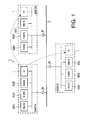
- Fig. 1 schematically shows an overall configuration of a communication network 4 connected with a personal computer (PC) 1 in a first embodiment.
- the communication network 4 includes subnets N1, N2, and N3, and a backbone network 5 connected with the subnets N1 to N3.
- the subnets N1 to N3 are connected with the backbone network 5 via routers 6a to 6c, respectively.
- the PC 1 is a portable notebook computer configured such that a user can move carrying it.
- the PC 1 has a universal printer driver 43 (see Fig. 2 ) installed therein.
- the universal printer driver 43 is configured to control a plurality of printers 2.
- the user is allowed to cause the printer 2 connected with the subnet to perform printing.
- the plurality of printers 2 may be of the same model or of different models, respectively. Further, the plurality of printers 2 may include a printer of a model uncontrollable by the universal printer driver 43. In the following description, a device which is simply referred to as the "printer 2" denotes one of the printers 2a to 2j.
- Fig. 2 is a block diagram schematically showing an electrical configuration of the PC 1.
- the PC 1 includes a CPU 11, a ROM 12, a RAM 13, a display unit 14, a network interface (NW I/F) 15, an operation unit 16, and a storage unit 17.
- NW I/F network interface
- the CPU 11 is configured to control each element of the PC 1 when executing various kinds of programs stored on the ROM 12 and the storage unit 17.
- the ROM 12 stores thereon various kinds of programs to be executed by the CPU 11 and various kinds of data.
- the CPU 11 uses the RAM 13 as a main memory when performing various processes.
- the display unit 14 includes a display device such as a liquid crystal display device, and a drive circuit for driving the display device.
- the network interface 15 is connected communicably with external devices such as the printers 2 via the communication network 4.
- the operation unit 16 includes one or more input devices such as a mouse and a keyboard.
- the storage unit 17 includes a non-volatile memory such as a hard disk drive and a flash memory.
- the storage unit 17 is configured to store various kinds of data and various kinds of programs such as an operating system (OS) 41, application programs 42 (e.g., a word processor, a spreadsheet, and an image editor), and the universal printer driver 43.
- OS operating system
- application programs 42 e.g., a word processor, a spreadsheet, and an image editor
- Fig. 3 is a block diagram schematically showing an electrical configuration of a printer 2 of a model controllable by the universal printer driver 43.
- the printer 2 of the model includes a controller 21, a printing unit 22, a network interface (NW I/F) 23, and an operation unit 24.
- NW I/F network interface
- the controller 21 is provided with a CPU, a ROM, and a RAM.
- the CPU is configured to control each element of the printer 2 when executing various programs stored on the ROM.
- the ROM stores various kinds of programs and data.
- the CPU uses the RAM as a main memory when performing various processes.
- the printing unit 22 includes a sheet tray configured to accommodate sheets, a feeding section configured to feed the sheets placed in the tray on a sheet-by-sheet basis, an image forming section configured to form an image on each of the sheets fed by the feeding section in an electrophotographic method or an inkjet method.
- the network interface 23 is connected communicably with an external device such as the PC 1 via the communication network 4.
- the operation unit 24 includes a liquid crystal display device and various operation buttons. When operating the operation buttons, the user is allowed to configure various settings and issue a transmission instruction to transmit printer information of the printer 2 to the PC 1.
- the printer information is information for identifying the printer 2 on the same subnet. Specifically, the printer information may be an IP address of the printer 2, a printer name provided to the printer 2, or a combination of the IP address and the printer name.
- the printer name may be a model name of the printer 2 or a name provided independently of the model.
- the user When issuing the transmission instruction, the user initially operates the operation unit 24 to specify the PC 1 as a destination to which the printer information is to be transmitted.
- the user may directly input the IP address and/or the computer name of the PC 1.
- the user may select the IP address and/or the computer name of the PC 1 from listed data such as IP addresses and computer names of all computers connected with the printer 2 via the same subnet, which data may be acquired from a management computer that manages the subnet.
- the printer 2 When receiving the transmission instruction from the user, the printer 2 sends the printer information to the PC 1 specified as the destination, in a unicast transmission manner. It is noted that “unicast transmission” is to send data to a single destination specified on a network.
- Fig. 4 illustrates a flow of a printing procedure using the universal printer driver 43.
- the application 42 displays a print screen 31.
- the universal printer driver 43 is not a driver complying with only a specific printer 2. Hence, when wishing to perform printing using the universal printer driver 43, the user directly selects the universal printer driver 43. The following descriptions will be provided based on an assumption that the universal printer driver 43 is selected.
- the application 42 calls the universal printer driver 43.
- the universal printer driver 43 displays a printer selection screen 32.
- the printer selection screen 32 includes a "Favorites” tab 32a and an "Available Printer List” tab 32b.
- the "Favorites" tab 32a is a screen to display identifiers (such as printer names and IP addresses) that had been selected on the "Available Printer List" tab 32b in the past. It is noted that the identifiers may only include either the printer names or the IP addresses. Further, the identifiers may be information for identifying the printers 2 other than the printer names and the IP addresses.
- a default tab of the printer selection screen 32 is the "Favorites" tab 32a. Namely, the "Favorites” tab 32a is initially shown immediately after the printer selection screen 32 is displayed. The user is able to select the identifier(s) of an intended printer 2 from the identifiers listed on the "Favorites" tab 32a.
- the "Available Printer List” tab 32b is a tab to display a list of identifiers of available printers 2 connected with the PC 1 via the same subnet.
- the universal printer driver 43 broadcasts a request for information such as the IP address and/or the printer name to each printer 2 connected with the PC 1 via the same subnet. Then, the universal printer driver 43 discriminates controllable printers 2 based on information transmitted by each printer 2 as a reply to the request, and lists the identifiers of the controllable printers 2 on the "Available Printer List" 32b.
- the user is allowed to select the identifier of an intended printer 2 with which the user is to perform printing from the identifiers listed on the "Available Printer List" tab 32b.
- One is a method to select the identifier by operating a mouse.
- the other is a method to select the identifier by issuing the transmission instruction via the operation unit 21 of the intended printer 2.
- the background color of the selected identifier varies to represent that the identifier is put into a selected state.
- the OS 41 sets a printer 2 corresponding to the selected identifier to a printer to be controlled by the universal printer driver 43.
- the printer selection screen 32 When the user clicks an "OK” button 32c on the printer selection screen 32, the printer selection screen 32 is closed. Then, a print condition setting screen 33 for setting print conditions is displayed. When the user clicks an "OK” button 32c on the print condition setting screen 33, the print condition setting screen 33 is closed. Then, the print screen 31 is displayed again.
- the application 42 sends a print instruction to the universal printer driver 43.
- the universal printer driver 43 creates print data based on the print instruction and the print conditions set on the print condition setting screen 33. Then, the universal printer driver 43 sends the created print data to the intended printer 2 corresponding to the identifier selected on the printer selection screen 32 to control the printer 2 to perform printing based on the print data.
- the user is allowed to select the identifier of the intended printer 2 on the "Available Printer List" tab 32b in the two methods.
- the user By clicking (selecting) with the mouse the identifier of the intended printer 2 from the identifiers listed on the "Available Printer List" 32b, the user is able to put the identifier into the selected state. In this respect, however, when selecting the identifier with the mouse, the user needs to grasp the identifier of the intended printer 2.
- the universal printer driver 43 When receiving the printer information from the printer 2 via the network interface 15, the universal printer driver 43 switches to the "Available Printer List” tab 32b in the case where the "Favorites" tab 32a is displayed. Then, the universal printer driver 43 puts the identifier of the printer 2 identified based on the received printer information into the selected state. Thereby, the user is able to put the identifier of the intended printer 2 into the selected state.
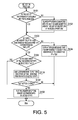
- Fig. 5 is a flowchart showing a procedure of a selection process to be executed by the universal printer driver 43 (the controller 10) in the aforementioned method to select the identifier by issuing the transmission instruction on the printer 2.
- the universal printer driver 43 (the controller 10) launches the selection process when receiving the printer information via the network interface 15 in a situation where the "Favorites" tab 32a or the "Available Printer List” tab 32b is displayed. It is noted that the printer information received by the PC 1 is printer information sent to the PC 1 in the unicast transmission manner.
- the universal printer driver 43 determines whether the list of the identifiers of the available printers 2 is created. For example, when the "Available Printer List" tab 32b is not yet displayed after the "Favorites" tab 32a has been displayed, the list of the identifiers of the available printers 2 is not created. In this case, the universal printer driver 43 determines that the list of the identifiers of the available printers 2 is not created. When determining that the list of the identifiers of the available printers 2 is not created (S101: No), the universal printer driver 43 goes to S 102. In the meantime, when determining that the list of the identifiers of the available printers 2 is created (S101: Yes), the universal printer driver 43 goes to S103.
- the universal printer driver 43 searches the printers 2 connected with the PC 1 via the same subnet to create the list of the identifiers of the available printers 2.
- the universal printer driver 43 determines whether the identifier of a printer 2 identified by the printer information received from the printer 2 is on the list of the identifiers of the available printers 2. For example, even though the identified printer 2 is configured to send its printer information to the PC 1 in response to acceptance of the transmission instruction issued by the user, the universal printer driver 43 may be unable to control the identified printer 2. In such a case, the universal printer driver 43 determines that the identifier of the identified printer 2 is not on the list of the identifiers of the available printers 2. When determining that the identifier of the identified printer 2 is not on the list of the identifiers of the available printers 2 (S103: No), the universal printer driver 43 goes to S104. Meanwhile, when determining that the identifier of the identified printer 2 is on the list of the identifiers of the available printers 2 (S103: Yes), the universal printer driver 43 goes to S105.
- the universal printer driver 43 displays on the display unit 14 an error message window 34 as exemplified in Fig. 6 to provide a notification that it is impossible to select the identifier of the identified printer 2.
- an "OK" button is clicked on the error message window 34, the universal printer driver 43 terminates the process.
- the universal printer driver 43 determines whether the identifier of the identified printer 2 is in the selected state on the "Available Printer List" tab 32b. When determining that the identifier of the identified printer 2 is not in the selected state (S105: No), the universal printer driver 43 goes to S106. Meanwhile, when determining that the identifier of the identified printer 2 is in the selected state (S105: Yes), the universal printer driver 43 terminates the process.
- the universal printer driver 43 displays on the display unit 14 a printer change window 35 as exemplified in Fig. 7 to ask the user whether to put the identifier of the identified printer 2 into the selected state.
- the universal printer driver 43 determines whether a "Yes" button has been clicked on the printer change window 35 (i.e., whether the user has determined to put the identifier of the identified printer 2 into the selected state).
- the universal printer driver 43 goes to S108.
- the universal printer driver 43 terminates the process.
- the universal printer driver 43 displays the "Available Printer List” tab 32b to replace the "Favorites” tab 32a, and shows the created list on the "Available Printer List” tab 32b. Then, when a different identifier is already in the selected state, the universal printer driver 43 cancels the selected state of the different identifier and puts the identifier of the identified printer 2 into the selected state.
- the user who usually works with the PC 1 connected with the subnet N1 moves to a different location carrying the PC 1 for a certain reason, there connects the PC 1 with the subnet N2, and wishes to make the printer 2f connected with the subnet N2 perform printing.
- the user usually uses a printer 2 connected with the subnet N1 the user may not know which identifiers correspond to a printer name and an IP address of the printer 2f even if the printer names and IP addresses of the printers 2 connected with the subnet N2 are listed on the "Available Printer List" tab 32b.
- the universal printer driver 43 of the first embodiment when issuing the transmission instruction on the printer 2f with the PC 1 specified as the destination of the printer information of the printer 2f, the user is allowed to have the identifier of the printer 2f put into the selected state on the "Available Printer List" tab 32b. Namely, according to the universal printer driver 43 of the first embodiment, even though the user does not know the identifier of the intended printer 2, the user is allowed to select the identifier of the intended printer 2 from the listed identifiers. Thereby, the user is not required to check the identifier of the intended printer 2 by himself (herself). Thus, it is possible to enhance user-friendliness of the communication network 4.
- the universal printer driver 43 provides the user with a notification that it is impossible to put the identifier of the identified printer 2 into the selected state.
- the universal printer driver 43 provides the user with a notification that it is impossible to put the identifier of the identified printer 2 into the selected state.
- the universal printer driver 43 asks the user whether to put the identifier of the identified printer 2 into the selected state. Therefore, even after issuing the transmission instruction to put the identifier of the intended printer 2 into the selected state, when wishing to make a different printer 2 perform printing after that, the user is allowed to prevent the identifier of the printer 2 on which the user has issued the transmission instruction from being put into the selected state, by making a choice not to put the identifier into the selected state.
- the universal printer driver 43 it is possible to control the printer 2 corresponding to the identifier in the selected state to perform printing.
- the printers 2 of the first embodiment by issuing the transmission instruction on the intended printer 2, the user is allowed to send the printer information for identifying the intended printer 2 to the PC 1. Thereby, even though the user does not know the identifier of the intended printer 2, the user is able to select the identifier of the intended printer 2 from the identifiers listed on the "Available Printer List" tab 32b.
- Fig. 8 is a block diagram showing a logical configuration of the universal printer driver 43 in the second embodiment.
- the universal printer driver 43 of the second embodiment includes a reception program 51 and a selection program 52.
- the reception program 51 is configured to receive the printer information from a printer 2 via the network interface 15.
- the reception program 51 is executed as a resident program, which is referred to for instance as "Service” in Microsoft Windows (trademark registered) or "Daemon” in UNIX (trademark registered).
- the reception program 51 determines whether the selection program 52 is being executed. When determining that the selection program 52 is being executed, the reception program 51 transfers the received printer information to the selection program 52. Meanwhile, when determining that the selection program 52 is not being executed, the reception program 51 stores the received printer information onto the storage nit 17. It is noted that the printer information may be stored on the RAM 13.
- the selection program 52 is a program corresponding to the universal printer driver 43 of the first embodiment. Nonetheless, when launched, the selection program 52 initially displays the "Available Printer List” tab 32b instead of the "Favorites” tab 32a in the case where the printer information is stored on the storage unit 17. Then, the selection program 52 puts the identifier of the printer 2 identified by the stored printer information.
- Fig. 9 is a flowchart showing a procedure of a process to be performed when the reception program 51 is executed.
- the reception program 51 (the controller 10) launches the process when receiving the printer information from a printer 2 via the network interface 15. It is noted that the printer information received by the PC 1 is printer information sent to the PC 1 in the unicast transmission manner.
- the reception program 51 determines whether the selection program 52 is being executed. When determining that the selection program 52 is being executed (S201: Yes), the reception program 51 goes to S202. Meanwhile, when determining that the selection program 52 is not being executed (S201: No), the reception program 51 goes to S203. In S202, the reception program 51 transfers the received printer information to the selection program 52.
- the reception program 51 determines whether different printer information is already stored on the storage unit 17. When determining that different printer information is not stored on the storage unit 17 (S203: No), the reception program 51 goes to S204. Meanwhile, when determining that different printer information is stored on the storage unit 17 (S203: Yes), the reception program 51 goes to S205. In S204, the reception program 51 stores the received printer information onto the storage unit 17. In S205, the reception program 51 additionally stores the received printer information onto the storage unit 17.
- Figs. 10 and 11 illustrate a flowchart showing a procedure of a process to be performed when the selection program 52 is launched.
- the selection program 52 is launched when the "Properties" button 31a is clicked and the universal printer driver 43 is called by the application 42.
- the application 42 the universal printer driver 43 is called by the application 42.
- the selection program 52 (the controller 10) issues a request for printer information to the reception program 51.
- the reception program 51 transfers all the stored printer information to the selection program 52. Meanwhile, when the storage unit 17 does not store any printer information, the reception program 51 provides the selection program 52 with a notification that there is not printer information stored.
- the selection program 52 determines whether there is printer information stored on the storage unit 17. Specifically, when the reception program 51 transfers one or more pieces of printer information, the selection program 52 determines that there is printer information stored on the storage unit 17. Meanwhile, when receiving from the reception program 51 the notification that there is not printer information stored, the selection program 52 determines that there is not printer information stored on the storage unit 17. When determining that there is printer information stored on the storage unit 17 (S302: Yes), the selection program 52 goes to S303. Meanwhile, when determining that there is not printer information stored on the storage unit 17 (S302: No), the selection program 52 terminates the process. When the process is terminated, the "Favorites" tab 32a is initially displayed in the same manner as the first embodiment.
- the selection program 52 asks the user whether to put the identifier of a printer 2 identified by the stored printer information into the selected state.
- the selection program 52 determines whether there are two or more pieces of printer information stored on the storage unit 17. Specifically, when the reception program 51 transfers two or more pieces of printer information, the selection program 52 determines that there are two or more pieces of printer information stored on the storage unit 17. Meanwhile, when the reception program 51 transfers only one piece of printer information, the selection program 52 determines that there are not two or more pieces of printer information stored on the storage unit 17. When determining that there are two or more pieces of printer information stored on the storage unit 17 (S304: Yes), the selection program 52 goes to S305. When determining that there are not two or more pieces of printer information stored on the storage unit 17 (S304: No), the selection program 52 goes to S 103.
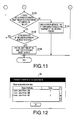
- the selection program 52 displays, on the display unit 14, a printer information selection screen 36 as shown in Fig. 12 to prompt the user to select printer information of a printer 2 of which the identifier is to be put into the selected state, from a plurality of pieces of printer information displayed.
- the selection program 52 displays on the printer information selection screen 36 the order in which each printer information has been stored, as well as the printer information.
- the user who has issued the transmission instructions must grasp the association between each printer 2 and the order in which the printer information of each printer 2 has been stored. Accordingly, by reference to the orders, the user is allowed to select the printer information of an intended one of the printers 2 on each of which the user has issued the transmission instruction. It is noted that, instead of the orders in which the transmission instructions have been issued, clock times when the transmission instructions have been issued may be displayed.
- the second embodiment is substantially the same as the first embodiment.
- the universal printer driver 43 of the second embodiment even when printer information is transmitted by a printer 2 before execution of the selection program 52, in response to the selection program 52 being launched, the identifier of the printer 2 identified by the printer information is put into the selected state. Accordingly, the user is allowed to issue the transmission instruction on the printer 2 when the selection program 52 is not executed, and thus it enhances user-friendliness of the communication network 4.
- the universal printer driver 43 prompts the user to select one of the plurality of pieces of printer information. Therefore, even when receiving the plurality of pieces of printer information before execution of the selection program 52, the universal printer driver 43 puts into the selected state the identifier of the printer 2 identified by the user-selected printer information.
- a third embodiment is a modification of the second embodiment.
- the reception program 51 in the case where there is already printer information stored on the storage unit 17 when the reception program 51 newly receives printer information from a printer 2 via the network interface 15, the reception program 51 additionally stores the received printer information onto the storage unit 17. Meanwhile, in the third embodiment, the printer information stored on the storage unit 17 is replaced (overwritten) with the received printer information. Accordingly, in the third embodiment, only a single piece of printer information is stored on the storage unit 17. When the user has issued transmission instructions on a plurality of printers 2 before execution of the selection program 52, the printer information of the printer 2 on which the user has issued the last transmission instruction is only stored on the storage unit 17.
- the selection program 52 does not perform S204 and S205.
- the third embodiment is substantially the same as the second embodiment.
- the universal printer driver 43 of the third embodiment in the case where there is already printer information stored on the storage unit 17 when the reception program 51 newly receives printer information, the printer information that has already been stored on the storage unit 17 is replaced (overwritten) with the received printer information. Therefore, it is possible to put into the selected state the identifier of the printer 2 identified by the latest printer information.
- a fourth embodiment according to aspects of the present invention will be described with reference to Fig. 13 .
- the user when the user issues the transmission instruction on a printer 2, the user is made specify the PC 1 as a destination computer to which the printer information is to be transmitted. Meanwhile, in the fourth embodiment, the user is not made to specify the PC 1, and the printer information is broadcasted.
- the printer 2 when the printer 2 broadcasts the print information, the universal printer driver 43 executed by a computer connected with the printer 2 via the same subnet cannot determine whether an intended destination of the printer information is the computer.
- the printer 2 when the user issues the transmission instruction on a printer 2, the printer 2 causes (prompts) the user to specify a user ID used when the user logs in to the OS 41 executed by the PC 1 and broadcasts the printer information and the user ID.
- the PC 1 connected with the printer 2 via the same subnet, receives the printer information and the user ID from the printer 2.
- the printer 2 may cause the user to specify any information for identifying the user who logs in to the OS 41, instead of the user ID. For example, the printer may cause the user to specify a name of the user.
- Fig. 13 is a flowchart showing a procedure of a process to be performed when the reception program 51 is executed in the fourth embodiment.
- operations that are substantially the same as those of the second embodiment will be provided with the same reference characters, and explanations about the operations will be omitted.
- the reception program 51 determines whether the received user ID is identical to the user ID of the user who currently logs in to the OS 41 executed by the PC 1 that executes the reception program 51.
- the reception program 51 determines that the intended destination of the printer information is the PC1, and goes to S201.
- the reception program 51 determines that the intended destination of the printer information is a computer other than the PC1, discards the printer information, and terminates the process.
- the selection program 52 puts the identifier of the printer 2 identified by the received printer information into the selected state. Meanwhile, when the intended destination of the printer information received via the network interface 15 is not the PC 1, the selection program 52 does not put the identifier of the printer 2 identified by the received printer information into the selected state.
- the fourth embodiment is substantially the same as the second embodiment.
- the universal printer driver 43 when broadcasting the printer information, the universal printer driver 43 also transmits the user ID as information representing the intended destination of the printer information.
- the user ID As information representing the intended destination of the printer information.
- the selection program 52 when the selection program 52 is launched, the selection program 52 sends a request for printer information to the reception program 51.
- the reception program 51 monitors whether the selection program 52 is launched, and transfers the printer information to the selection program 52 when the selection program 52 is launched.
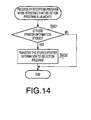
- Fig. 14 is a flowchart showing a procedure of a process to be performed when the reception program 51 detects that the selection program 52 is launched. The process is started in response to the reception program 51 detecting that the selection program 52 is launched.
- the reception program 51 determines whether there is printer information stored on the storage unit 17. When determining that there is printer information stored on the storage unit 17 (S501: Yes), the reception program 51 goes to S402. Meanwhile, when determining that there is not printer information stored on the storage unit 17 (S501: No), the reception program 51 terminates the process. In S402, the reception program 51 sends to the selection program 52 the printer information stored on the storage unit 17.
- the selection program 52 does not perform "the process to be performed when the selection program 52 is launched" described in the second embodiment. This is because when the reception program 51, which has detected that selection program 52 has been launched, sends the printer information, it is only necessary for the selection program 52 to perform the same process as the selection process described in the first embodiment.
- the identifier of the printer 2 identified by the received printer information is not in the selected state on the "Available Printer List" tab 32b, the user is asked whether to put the identifier of the identified printer 2 into the selected state.
- the identifier of the identified printer 2 may be put into the selected state without asking the user whether to put the identifier of the identified printer 2 into the selected state.
- the error message window 34 for informing that it is impossible to select the identifier of the identified printer 2 is displayed on the display unit 14.
- the error message window 34 may not necessarily have to be displayed.
- the two methods to select the identifier of the intended printer 2 on the "Available Printer List" tab 32b have been exemplified. However, only one, of the two methods, to select the identifier of the intended printer 2 by issuing the transmission instruction on the intended printer 2 may be applied.
- the selection program 52 when the selection program 52 is launched, the selection program 52 issues a request for printer information to the reception program 51. However, the selection program 52 may directly access the storage unit 17 and determine whether there is printer information stored on the storage unit 17. Further, when determining that there is printer information stored on the storage unit 17, the selection program 52 may directly read out the printer information from the storage unit 17 without involving the reception program 51.
- the universal printer driver 43 executed by each computer cannot determine whether the intended destination of the printer information is the computer. In such a case, in the same manner as the first embodiment, the universal printer driver 43 may ask the user whether to put into the selected state the identifier of the printer 2 identified by the received printer information.
- the identifier of the printer 2 identified by the received printer information is put into the selected state on the "Available Printer List" tab 32b.
- the identifier of the printer 2 identified by the received printer information may be not put into the selected state but displayed in a discriminable manner.
- the identifier displayed in a discriminable manner may be put into the selected state when the user clicks the identifier with the mouse.
- the selection process may include a process to display the identifier of the printer 2 identified by the received printer information in a discriminable manner and a process to put the identifier clicked (selected) by the user into the selected state.
- methods to display the identifier in a discriminable manner may include a method to display the identifier in a flashing manner and a method to display a predetermined mark near the identifier, any of which methods may be selected as needed.
- the printer 2 is exemplified.
- the device to be selected may be a scanner.
- the universal printer driver 43 when determining that the identifier of the printer 2 identified by the received printer information is not on the list of the identifiers of the available printers 2 (S103: No), the universal printer driver 43 goes to S104, in which the universal printer driver 43 displays on the display unit 14 the error message window 34. Instead, the universal printer driver 43 may provide a notification that a printer 2 uncontrollable by the universal printer driver 43 is selected. There may be a printer 2 on the same subnet, which printer cannot be controlled by the universal printer driver 43 owing to inconsistency between the emulation of the printer 2 and the emulation controllable by the universal printer driver 43. Even in such a case, the user is allowed to confirm that the user selects a printer 2 that the universal printer driver 43 cannot control, and thus to reselect another printer 2.
Landscapes
- Engineering & Computer Science (AREA)
- Theoretical Computer Science (AREA)
- Human Computer Interaction (AREA)
- Physics & Mathematics (AREA)
- General Engineering & Computer Science (AREA)
- General Physics & Mathematics (AREA)
- Accessory Devices And Overall Control Thereof (AREA)
Abstract
Description
- The following description relates to one or more techniques for selecting an identifier of an intended device from identifiers listed on a screen.
- So far, a technique to assist a user to select an intended one of printers has been known, which technique is adapted to accept an input to specify a condition for narrowing down possible printers (candidate printers), display a list of printer information (such as IP addresses and model names) of the possible printers conforming to the specified condition, and prompt the user to select the printer information of the intended printer from the list of printer information.
- According to the known technique, IP addresses and/or model names are displayed as the printer information. Hence, when the user does not know the IP address or the model name of the intended printer, it is hard for the user to select the intended printer even from the narrowed-down possible printers.
- Aspects of the present invention are advantageous to provide one or more improved techniques that make it possible to select an identifier of an intended device from listed identifiers even though a user does not know the identifier of the intended device.
- According to aspects of the present invention, a device selecting apparatus is provided, which includes a display unit, a communication unit configured to connect the device selecting apparatus communicably with one or more devices therethrough, and a controller configured to display, on the display unit, a list of one or more identifiers of the one or more devices, to receive, from a specified device, device information for identifying the specified device via the communication unit, and to perform a selection process to put, into a selected state, an identifier of the specified device identified by the device information received via the communication unit, on the list displayed on the display unit.
- According to aspects of the present invention, further provided is a printing system, which includes a printer including a printer-side interface configured to be connected with a communication network, an accepting unit configured to accept a transmission instruction to transmit printer information for identifying the printer, and a printer-side controller configured to transmit the printer information via the printer-side interface in response to accepting the transmission instruction via the accepting unit, and a computer including a computer-side interface configured to be connected communicably with the printer via the communication network, a display unit configured to display a list of identifiers of devices connected with the computer via the communication network, and a computer-side controller configured to, in response to receiving the printer information from the printer via the computer-side interface, perform a selection process to put, into a selected state, an identifier of the printer identified by the printer information received via the computer-side interface, on the list displayed on the display unit.
- According to aspects of the present invention, further provided is a non-transitory computer readable medium storing instructions that, when executed by a processor coupled with a display unit and a communication unit through which the processor is connected communicably with one or more devices, cause the processor to display, on the display unit, a list of one or more identifiers of the one or more devices, to receive, from a specified device, device information for identifying the specified device via the communication unit, and to perform a selection process to put, into a selected state, an identifier of the specified device identified by the device information received via the communication unit, on the list displayed on the display unit.
-
-
Fig. 1 schematically shows an overall configuration of a communication network in a first embodiment according to one or more aspects of the present invention. -
Fig. 2 is a block diagram schematically showing an electrical configuration of a personal computer (PC) in the first embodiment according to one or more aspects of the present invention. -
Fig. 3 is a block diagram schematically showing an electrical configuration of a printer of a model controllable by a universal printer driver in the first embodiment according to one or more aspects of the present invention. -
Fig. 4 illustrates a flow of a printing procedure using the universal printer driver in the first embodiment according to one or more aspects of the present invention. -
Fig. 5 is a flowchart showing a procedure of a selection process in the first embodiment according to one or more aspects of the present invention. -
Fig. 6 exemplifies an error message window in the first embodiment according to one or more aspects of the present invention. -
Fig. 7 exemplifies a printer change window in the first embodiment according to one or more aspects of the present invention. -
Fig. 8 is a block diagram showing a logical configuration of the universal printer driver in a second embodiment according to one or more aspects of the present invention. -
Fig. 9 is a flowchart showing a procedure of a process to be performed when a reception program is executed in the second embodiment according to one or more aspects of the present invention. -
Figs. 10 and11 are flowcharts showing a procedure of a process to be performed when a selection program is executed in the second embodiment according to one or more aspects of the present invention. -
Fig. 11 is a flowchart showing a procedure of the scaling process to enlarge and reduce the thumbnail images in the first embodiment according to one or more aspects of the present invention. -
Fig. 12 exemplifies a printer information selection screen in the third embodiment according to one or more aspects of the present invention. -
Fig. 13 is a flowchart showing a procedure of a process to be performed when a reception program is executed in the fourth embodiment according to one or more aspects of the present invention. -
Fig. 14 is a flowchart showing a procedure of a process to be performed when a reception program detects that a selection program is launched in a fifth embodiment according to one or more aspects of the present invention. - It is noted that various connections are set forth between elements in the following description. It is noted that these connections in general and, unless specified otherwise, may be direct or indirect and that this specification is not intended to be limiting in this respect. Aspects of the invention may be implemented in computer software as programs storable on computer-readable media including but not limited to RAMs, ROMs, flash memories, EEPROMs, CD-media, DVD-media, temporary storage, hard disk drives, floppy drives, permanent storage, and the like.
- Hereinafter, embodiments according to aspects of the present invention will be described with reference to the accompanying drawings.
-
Fig. 1 schematically shows an overall configuration of acommunication network 4 connected with a personal computer (PC) 1 in a first embodiment. Thecommunication network 4 includes subnets N1, N2, and N3, and abackbone network 5 connected with the subnets N1 to N3. The subnets N1 to N3 are connected with thebackbone network 5 via routers 6a to 6c, respectively. - For example, the PC 1 is a portable notebook computer configured such that a user can move carrying it. The PC 1 has a universal printer driver 43 (see
Fig. 2 ) installed therein. Theuniversal printer driver 43 is configured to control a plurality ofprinters 2. When moving to a subnet, connecting the PC 1 with the subnet, and controlling theprinter 2 connected with the subnet using theuniversal printer driver 43, the user is allowed to cause theprinter 2 connected with the subnet to perform printing. - The plurality of
printers 2 may be of the same model or of different models, respectively. Further, the plurality ofprinters 2 may include a printer of a model uncontrollable by theuniversal printer driver 43. In the following description, a device which is simply referred to as the "printer 2" denotes one of theprinters 2a to 2j. -
Fig. 2 is a block diagram schematically showing an electrical configuration of thePC 1. As shown inFig. 2 , thePC 1 includes aCPU 11, aROM 12, aRAM 13, adisplay unit 14, a network interface (NW I/F) 15, anoperation unit 16, and astorage unit 17. It is noted that a plurality of elements, such as theCPU 11, theROM 12, theRAM 13, and thestorage unit 17, form acontroller 10 configured to take overall control of thePC 1. - Specifically, the
CPU 11 is configured to control each element of the PC 1 when executing various kinds of programs stored on theROM 12 and thestorage unit 17. TheROM 12 stores thereon various kinds of programs to be executed by theCPU 11 and various kinds of data. TheCPU 11 uses theRAM 13 as a main memory when performing various processes. Thedisplay unit 14 includes a display device such as a liquid crystal display device, and a drive circuit for driving the display device. - The
network interface 15 is connected communicably with external devices such as theprinters 2 via thecommunication network 4. Theoperation unit 16 includes one or more input devices such as a mouse and a keyboard. Thestorage unit 17 includes a non-volatile memory such as a hard disk drive and a flash memory. Thestorage unit 17 is configured to store various kinds of data and various kinds of programs such as an operating system (OS) 41, application programs 42 (e.g., a word processor, a spreadsheet, and an image editor), and theuniversal printer driver 43. -
Fig. 3 is a block diagram schematically showing an electrical configuration of aprinter 2 of a model controllable by theuniversal printer driver 43. Theprinter 2 of the model includes acontroller 21, aprinting unit 22, a network interface (NW I/F) 23, and anoperation unit 24. - The
controller 21 is provided with a CPU, a ROM, and a RAM. The CPU is configured to control each element of theprinter 2 when executing various programs stored on the ROM. The ROM stores various kinds of programs and data. The CPU uses the RAM as a main memory when performing various processes. - The
printing unit 22 includes a sheet tray configured to accommodate sheets, a feeding section configured to feed the sheets placed in the tray on a sheet-by-sheet basis, an image forming section configured to form an image on each of the sheets fed by the feeding section in an electrophotographic method or an inkjet method. The network interface 23 is connected communicably with an external device such as the PC 1 via thecommunication network 4. - The
operation unit 24 includes a liquid crystal display device and various operation buttons. When operating the operation buttons, the user is allowed to configure various settings and issue a transmission instruction to transmit printer information of theprinter 2 to the PC 1. The printer information is information for identifying theprinter 2 on the same subnet. Specifically, the printer information may be an IP address of theprinter 2, a printer name provided to theprinter 2, or a combination of the IP address and the printer name. The printer name may be a model name of theprinter 2 or a name provided independently of the model. - When issuing the transmission instruction, the user initially operates the
operation unit 24 to specify thePC 1 as a destination to which the printer information is to be transmitted. To specify thePC 1 as the destination of the printer information, the user may directly input the IP address and/or the computer name of thePC 1. Alternatively, the user may select the IP address and/or the computer name of thePC 1 from listed data such as IP addresses and computer names of all computers connected with theprinter 2 via the same subnet, which data may be acquired from a management computer that manages the subnet. - When receiving the transmission instruction from the user, the
printer 2 sends the printer information to thePC 1 specified as the destination, in a unicast transmission manner. It is noted that "unicast transmission" is to send data to a single destination specified on a network. -
Fig. 4 illustrates a flow of a printing procedure using theuniversal printer driver 43. When the user selects "Printing" on a menu window (not shown) displayed by theCPU 11 executing an application program 42 (hereinafter, which CPU will be simply referred to as an "application 42"), theapplication 42 displays aprint screen 31. - On the
print screen 31, the user is allowed to select the printer name of an intendedprinter 2 with which the user is to perform printing. Theuniversal printer driver 43 is not a driver complying with only aspecific printer 2. Hence, when wishing to perform printing using theuniversal printer driver 43, the user directly selects theuniversal printer driver 43. The following descriptions will be provided based on an assumption that theuniversal printer driver 43 is selected. - When the user clicks a "Properties"
button 31a in a state where theuniversal printer driver 43 is selected, theapplication 42 calls theuniversal printer driver 43. When called by theapplication 42, theuniversal printer driver 43 displays aprinter selection screen 32. As shown inFig. 4 , theprinter selection screen 32 includes a "Favorites"tab 32a and an "Available Printer List"tab 32b. - The "Favorites"
tab 32a is a screen to display identifiers (such as printer names and IP addresses) that had been selected on the "Available Printer List"tab 32b in the past. It is noted that the identifiers may only include either the printer names or the IP addresses. Further, the identifiers may be information for identifying theprinters 2 other than the printer names and the IP addresses. - A default tab of the
printer selection screen 32 is the "Favorites"tab 32a. Namely, the "Favorites"tab 32a is initially shown immediately after theprinter selection screen 32 is displayed. The user is able to select the identifier(s) of an intendedprinter 2 from the identifiers listed on the "Favorites"tab 32a. - The "Available Printer List"
tab 32b is a tab to display a list of identifiers ofavailable printers 2 connected with thePC 1 via the same subnet. When selecting the identifier of aprinter 2 that the user has not ever selected in the past, the user clicks the "Available Printer List"tab 32b. When the "Available Printer List"tab 32b is clicked, theuniversal printer driver 43 broadcasts a request for information such as the IP address and/or the printer name to eachprinter 2 connected with thePC 1 via the same subnet. Then, theuniversal printer driver 43 discriminatescontrollable printers 2 based on information transmitted by eachprinter 2 as a reply to the request, and lists the identifiers of thecontrollable printers 2 on the "Available Printer List" 32b. - The user is allowed to select the identifier of an intended
printer 2 with which the user is to perform printing from the identifiers listed on the "Available Printer List"tab 32b. As will be described in detail later, there are two methods to select the identifier of the intendedprinter 2. One is a method to select the identifier by operating a mouse. The other is a method to select the identifier by issuing the transmission instruction via theoperation unit 21 of the intendedprinter 2. - When the user selects the identifier of the intended
printer 2, the background color of the selected identifier varies to represent that the identifier is put into a selected state. When the user clicks the "OK"button 32 in a situation where the identifier is in the selected state, theOS 41 sets aprinter 2 corresponding to the selected identifier to a printer to be controlled by theuniversal printer driver 43. - When the user clicks an "OK"
button 32c on theprinter selection screen 32, theprinter selection screen 32 is closed. Then, a printcondition setting screen 33 for setting print conditions is displayed. When the user clicks an "OK"button 32c on the printcondition setting screen 33, the printcondition setting screen 33 is closed. Then, theprint screen 31 is displayed again. - When the user clicks a "Print"
button 31b on theprint screen 31, theapplication 42 sends a print instruction to theuniversal printer driver 43. When receiving the print instruction from theapplication 42, theuniversal printer driver 43 creates print data based on the print instruction and the print conditions set on the printcondition setting screen 33. Then, theuniversal printer driver 43 sends the created print data to the intendedprinter 2 corresponding to the identifier selected on theprinter selection screen 32 to control theprinter 2 to perform printing based on the print data. - As described above, the user is allowed to select the identifier of the intended
printer 2 on the "Available Printer List"tab 32b in the two methods. - By clicking (selecting) with the mouse the identifier of the intended
printer 2 from the identifiers listed on the "Available Printer List" 32b, the user is able to put the identifier into the selected state. In this respect, however, when selecting the identifier with the mouse, the user needs to grasp the identifier of the intendedprinter 2. - In a situation where the "Favorites"
tab 32a or the "Available Printer List" 32b is displayed, the user once leaves thePC 1 and moves to a location where the intendedprinter 2 is placed. Then, on the intendedprinter 2, the user specifies thePC 1 as the destination and issues the transmission instruction to send the printer information to thePC 1. - When receiving the printer information from the
printer 2 via thenetwork interface 15, theuniversal printer driver 43 switches to the "Available Printer List"tab 32b in the case where the "Favorites"tab 32a is displayed. Then, theuniversal printer driver 43 puts the identifier of theprinter 2 identified based on the received printer information into the selected state. Thereby, the user is able to put the identifier of the intendedprinter 2 into the selected state. -
Fig. 5 is a flowchart showing a procedure of a selection process to be executed by the universal printer driver 43 (the controller 10) in the aforementioned method to select the identifier by issuing the transmission instruction on theprinter 2. The universal printer driver 43 (the controller 10) launches the selection process when receiving the printer information via thenetwork interface 15 in a situation where the "Favorites"tab 32a or the "Available Printer List"tab 32b is displayed. It is noted that the printer information received by thePC 1 is printer information sent to thePC 1 in the unicast transmission manner. - In S101, the universal printer driver 43 (the controller 10) determines whether the list of the identifiers of the
available printers 2 is created. For example, when the "Available Printer List"tab 32b is not yet displayed after the "Favorites"tab 32a has been displayed, the list of the identifiers of theavailable printers 2 is not created. In this case, theuniversal printer driver 43 determines that the list of the identifiers of theavailable printers 2 is not created. When determining that the list of the identifiers of theavailable printers 2 is not created (S101: No), theuniversal printer driver 43 goes to S 102. In the meantime, when determining that the list of the identifiers of theavailable printers 2 is created (S101: Yes), theuniversal printer driver 43 goes to S103. - In S102, the
universal printer driver 43 searches theprinters 2 connected with thePC 1 via the same subnet to create the list of the identifiers of theavailable printers 2. - In S103, the
universal printer driver 43 determines whether the identifier of aprinter 2 identified by the printer information received from theprinter 2 is on the list of the identifiers of theavailable printers 2. For example, even though the identifiedprinter 2 is configured to send its printer information to thePC 1 in response to acceptance of the transmission instruction issued by the user, theuniversal printer driver 43 may be unable to control the identifiedprinter 2. In such a case, theuniversal printer driver 43 determines that the identifier of the identifiedprinter 2 is not on the list of the identifiers of theavailable printers 2. When determining that the identifier of the identifiedprinter 2 is not on the list of the identifiers of the available printers 2 (S103: No), theuniversal printer driver 43 goes to S104. Meanwhile, when determining that the identifier of the identifiedprinter 2 is on the list of the identifiers of the available printers 2 (S103: Yes), theuniversal printer driver 43 goes to S105. - In S104, the
universal printer driver 43 displays on thedisplay unit 14 anerror message window 34 as exemplified inFig. 6 to provide a notification that it is impossible to select the identifier of the identifiedprinter 2. When an "OK" button is clicked on theerror message window 34, theuniversal printer driver 43 terminates the process. - In S105, the
universal printer driver 43 determines whether the identifier of the identifiedprinter 2 is in the selected state on the "Available Printer List"tab 32b. When determining that the identifier of the identifiedprinter 2 is not in the selected state (S105: No), theuniversal printer driver 43 goes to S106. Meanwhile, when determining that the identifier of the identifiedprinter 2 is in the selected state (S105: Yes), theuniversal printer driver 43 terminates the process. - In S106, the
universal printer driver 43 displays on the display unit 14 aprinter change window 35 as exemplified inFig. 7 to ask the user whether to put the identifier of the identifiedprinter 2 into the selected state. In S107, theuniversal printer driver 43 determines whether a "Yes" button has been clicked on the printer change window 35 (i.e., whether the user has determined to put the identifier of the identifiedprinter 2 into the selected state). When determining that the "Yes" button has been clicked (S107: Yes), theuniversal printer driver 43 goes to S108. Meanwhile, when determining that a "No" button has been clicked on the printer change window 35 (S107: No), theuniversal printer driver 43 terminates the process. - In S108, when the "Favorites"
tab 32a is displayed, theuniversal printer driver 43 displays the "Available Printer List"tab 32b to replace the "Favorites"tab 32a, and shows the created list on the "Available Printer List"tab 32b. Then, when a different identifier is already in the selected state, theuniversal printer driver 43 cancels the selected state of the different identifier and puts the identifier of the identifiedprinter 2 into the selected state. - Suppose, for instance, the user who usually works with the
PC 1 connected with the subnet N1 (seeFig. 1 ) moves to a different location carrying thePC 1 for a certain reason, there connects thePC 1 with the subnet N2, and wishes to make theprinter 2f connected with the subnet N2 perform printing. In this case, since the user usually uses aprinter 2 connected with the subnet N1, the user may not know which identifiers correspond to a printer name and an IP address of theprinter 2f even if the printer names and IP addresses of theprinters 2 connected with the subnet N2 are listed on the "Available Printer List"tab 32b. - In such a case, according to the
universal printer driver 43 of the first embodiment, when issuing the transmission instruction on theprinter 2f with thePC 1 specified as the destination of the printer information of theprinter 2f, the user is allowed to have the identifier of theprinter 2f put into the selected state on the "Available Printer List"tab 32b. Namely, according to theuniversal printer driver 43 of the first embodiment, even though the user does not know the identifier of the intendedprinter 2, the user is allowed to select the identifier of the intendedprinter 2 from the listed identifiers. Thereby, the user is not required to check the identifier of the intendedprinter 2 by himself (herself). Thus, it is possible to enhance user-friendliness of thecommunication network 4. - Further, when the identifier of the
printer 2 identified by the printer information received via thenetwork interface 15 is not on the list of the identifiers of theavailable printers 2, theuniversal printer driver 43 provides the user with a notification that it is impossible to put the identifier of the identifiedprinter 2 into the selected state. In other words, when the identifier of the identifiedprinter 2 is not included in the list of the identifiers of theavailable printers 2, theuniversal printer driver 43 provides the user with a notification that it is impossible to put the identifier of the identifiedprinter 2 into the selected state. Thereby, the user is able to know that it is impossible to select theprinter 2 on which the user has issued the transmission instruction. - Further, when the identifier of the
printer 2 identified by the printer information received via thenetwork interface 15 is not in the selected state, theuniversal printer driver 43 asks the user whether to put the identifier of the identifiedprinter 2 into the selected state. Therefore, even after issuing the transmission instruction to put the identifier of the intendedprinter 2 into the selected state, when wishing to make adifferent printer 2 perform printing after that, the user is allowed to prevent the identifier of theprinter 2 on which the user has issued the transmission instruction from being put into the selected state, by making a choice not to put the identifier into the selected state. - Further, according to the
universal printer driver 43, it is possible to control theprinter 2 corresponding to the identifier in the selected state to perform printing. - Further, according to the
printers 2 of the first embodiment, by issuing the transmission instruction on the intendedprinter 2, the user is allowed to send the printer information for identifying the intendedprinter 2 to thePC 1. Thereby, even though the user does not know the identifier of the intendedprinter 2, the user is able to select the identifier of the intendedprinter 2 from the identifiers listed on the "Available Printer List"tab 32b. - Subsequently, a second embodiment according to aspects of the present invention will be described with reference to
Figs. 8 to 12 .Fig. 8 is a block diagram showing a logical configuration of theuniversal printer driver 43 in the second embodiment. As shown inFig. 8 , theuniversal printer driver 43 of the second embodiment includes areception program 51 and aselection program 52. - The
reception program 51 is configured to receive the printer information from aprinter 2 via thenetwork interface 15. Thereception program 51 is executed as a resident program, which is referred to for instance as "Service" in Microsoft Windows (trademark registered) or "Daemon" in UNIX (trademark registered). - When receiving the printer information from a
printer 2, thereception program 51 determines whether theselection program 52 is being executed. When determining that theselection program 52 is being executed, thereception program 51 transfers the received printer information to theselection program 52. Meanwhile, when determining that theselection program 52 is not being executed, thereception program 51 stores the received printer information onto thestorage nit 17. It is noted that the printer information may be stored on theRAM 13. - The
selection program 52 is a program corresponding to theuniversal printer driver 43 of the first embodiment. Nonetheless, when launched, theselection program 52 initially displays the "Available Printer List"tab 32b instead of the "Favorites"tab 32a in the case where the printer information is stored on thestorage unit 17. Then, theselection program 52 puts the identifier of theprinter 2 identified by the stored printer information. - In the following descriptions, detailed explanations will be provided about the
reception program 51 and theselection program 52. -
Fig. 9 is a flowchart showing a procedure of a process to be performed when thereception program 51 is executed. The reception program 51 (the controller 10) launches the process when receiving the printer information from aprinter 2 via thenetwork interface 15. It is noted that the printer information received by thePC 1 is printer information sent to thePC 1 in the unicast transmission manner. - In S201, the reception program 51 (the controller 10) determines whether the
selection program 52 is being executed. When determining that theselection program 52 is being executed (S201: Yes), thereception program 51 goes to S202. Meanwhile, when determining that theselection program 52 is not being executed (S201: No), thereception program 51 goes to S203. In S202, thereception program 51 transfers the received printer information to theselection program 52. - In S203, the
reception program 51 determines whether different printer information is already stored on thestorage unit 17. When determining that different printer information is not stored on the storage unit 17 (S203: No), thereception program 51 goes to S204. Meanwhile, when determining that different printer information is stored on the storage unit 17 (S203: Yes), thereception program 51 goes to S205. In S204, thereception program 51 stores the received printer information onto thestorage unit 17. In S205, thereception program 51 additionally stores the received printer information onto thestorage unit 17. -
Figs. 10 and11 illustrate a flowchart showing a procedure of a process to be performed when theselection program 52 is launched. Theselection program 52 is launched when the "Properties"button 31a is clicked and theuniversal printer driver 43 is called by theapplication 42. In the following descriptions, operations that are substantially the same as those of the first embodiment will be provided with the same reference characters as the first embodiment, and explanations about the operations will be omitted. - In S301, the selection program 52 (the controller 10) issues a request for printer information to the
reception program 51. In response to receipt of the request for printer information, when thestorage unit 17 stores one or more pieces of printer information, thereception program 51 transfers all the stored printer information to theselection program 52. Meanwhile, when thestorage unit 17 does not store any printer information, thereception program 51 provides theselection program 52 with a notification that there is not printer information stored. - In S302, the
selection program 52 determines whether there is printer information stored on thestorage unit 17. Specifically, when thereception program 51 transfers one or more pieces of printer information, theselection program 52 determines that there is printer information stored on thestorage unit 17. Meanwhile, when receiving from thereception program 51 the notification that there is not printer information stored, theselection program 52 determines that there is not printer information stored on thestorage unit 17. When determining that there is printer information stored on the storage unit 17 (S302: Yes), theselection program 52 goes to S303. Meanwhile, when determining that there is not printer information stored on the storage unit 17 (S302: No), theselection program 52 terminates the process. When the process is terminated, the "Favorites"tab 32a is initially displayed in the same manner as the first embodiment. - In S303, the
selection program 52 asks the user whether to put the identifier of aprinter 2 identified by the stored printer information into the selected state. In S304, theselection program 52 determines whether there are two or more pieces of printer information stored on thestorage unit 17. Specifically, when thereception program 51 transfers two or more pieces of printer information, theselection program 52 determines that there are two or more pieces of printer information stored on thestorage unit 17. Meanwhile, when thereception program 51 transfers only one piece of printer information, theselection program 52 determines that there are not two or more pieces of printer information stored on thestorage unit 17. When determining that there are two or more pieces of printer information stored on the storage unit 17 (S304: Yes), theselection program 52 goes to S305. When determining that there are not two or more pieces of printer information stored on the storage unit 17 (S304: No), theselection program 52 goes toS 103. - In S305, the
selection program 52 displays, on thedisplay unit 14, a printerinformation selection screen 36 as shown inFig. 12 to prompt the user to select printer information of aprinter 2 of which the identifier is to be put into the selected state, from a plurality of pieces of printer information displayed. - The user may not determine which is the printer information of the intended
printer 2 even when looking at the plurality of pieces of printer information displayed. Therefore, theselection program 52 displays on the printerinformation selection screen 36 the order in which each printer information has been stored, as well as the printer information. The user who has issued the transmission instructions must grasp the association between eachprinter 2 and the order in which the printer information of eachprinter 2 has been stored. Accordingly, by reference to the orders, the user is allowed to select the printer information of an intended one of theprinters 2 on each of which the user has issued the transmission instruction. It is noted that, instead of the orders in which the transmission instructions have been issued, clock times when the transmission instructions have been issued may be displayed. With respect to the other aspects, the second embodiment is substantially the same as the first embodiment. - According to the
universal printer driver 43 of the second embodiment, even when printer information is transmitted by aprinter 2 before execution of theselection program 52, in response to theselection program 52 being launched, the identifier of theprinter 2 identified by the printer information is put into the selected state. Accordingly, the user is allowed to issue the transmission instruction on theprinter 2 when theselection program 52 is not executed, and thus it enhances user-friendliness of thecommunication network 4. - Further, in the case where there are a plurality of pieces of printer information stored on the
storage unit 17 when theselection program 52 is launched, theuniversal printer driver 43 prompts the user to select one of the plurality of pieces of printer information. Therefore, even when receiving the plurality of pieces of printer information before execution of theselection program 52, theuniversal printer driver 43 puts into the selected state the identifier of theprinter 2 identified by the user-selected printer information. - Subsequently, a third embodiment according to aspects of the present invention will be described, which is a modification of the second embodiment. In the aforementioned second embodiment, in the case where there is already printer information stored on the
storage unit 17 when thereception program 51 newly receives printer information from aprinter 2 via thenetwork interface 15, thereception program 51 additionally stores the received printer information onto thestorage unit 17. Meanwhile, in the third embodiment, the printer information stored on thestorage unit 17 is replaced (overwritten) with the received printer information. Accordingly, in the third embodiment, only a single piece of printer information is stored on thestorage unit 17. When the user has issued transmission instructions on a plurality ofprinters 2 before execution of theselection program 52, the printer information of theprinter 2 on which the user has issued the last transmission instruction is only stored on thestorage unit 17. - Further, since only a single piece of printer information is stored on the
storage unit 17, theselection program 52 does not perform S204 and S205. With respect to the other aspects, the third embodiment is substantially the same as the second embodiment. - According to the
universal printer driver 43 of the third embodiment, in the case where there is already printer information stored on thestorage unit 17 when thereception program 51 newly receives printer information, the printer information that has already been stored on thestorage unit 17 is replaced (overwritten) with the received printer information. Therefore, it is possible to put into the selected state the identifier of theprinter 2 identified by the latest printer information. - Subsequently, a fourth embodiment according to aspects of the present invention will be described with reference to
Fig. 13 . In the aforementioned first embodiment, when the user issues the transmission instruction on aprinter 2, the user is made specify thePC 1 as a destination computer to which the printer information is to be transmitted. Meanwhile, in the fourth embodiment, the user is not made to specify thePC 1, and the printer information is broadcasted. - In this respect, however, when the
printer 2 broadcasts the print information, theuniversal printer driver 43 executed by a computer connected with theprinter 2 via the same subnet cannot determine whether an intended destination of the printer information is the computer. In consideration of such a problem, in the fourth embodiment, when the user issues the transmission instruction on aprinter 2, theprinter 2 causes (prompts) the user to specify a user ID used when the user logs in to theOS 41 executed by thePC 1 and broadcasts the printer information and the user ID. Thereby, thePC 1, connected with theprinter 2 via the same subnet, receives the printer information and the user ID from theprinter 2. It is noted that theprinter 2 may cause the user to specify any information for identifying the user who logs in to theOS 41, instead of the user ID. For example, the printer may cause the user to specify a name of the user. -
Fig. 13 is a flowchart showing a procedure of a process to be performed when thereception program 51 is executed in the fourth embodiment. Here, operations that are substantially the same as those of the second embodiment will be provided with the same reference characters, and explanations about the operations will be omitted. - In S401, the reception program 51 (the controller 10) determines whether the received user ID is identical to the user ID of the user who currently logs in to the
OS 41 executed by thePC 1 that executes thereception program 51. When determining that the received user ID is identical to the user ID of the user who currently logs in to the OS 41 (S401: Yes), thereception program 51 determines that the intended destination of the printer information is the PC1, and goes to S201. Meanwhile, when determining that the received user ID is not identical to the user ID of the user who currently logs in to the OS 41 (S401: No), thereception program 51 determines that the intended destination of the printer information is a computer other than the PC1, discards the printer information, and terminates the process. Consequently, when the intended destination of the printer information received via thenetwork interface 15 is thePC 1, theselection program 52 puts the identifier of theprinter 2 identified by the received printer information into the selected state. Meanwhile, when the intended destination of the printer information received via thenetwork interface 15 is not thePC 1, theselection program 52 does not put the identifier of theprinter 2 identified by the received printer information into the selected state. With respect to the other aspects, the fourth embodiment is substantially the same as the second embodiment. - In the fourth embodiment, when broadcasting the printer information, the
universal printer driver 43 also transmits the user ID as information representing the intended destination of the printer information. Thus, it is possible to prevent the identifier of theprinter 2 identified by the transmitted printer information from being put into the selected state on all computers connected with the identifiedprinter 2 via the same subnet. - Next, a fifth embodiment according to aspects of the present embodiment will be described with reference to
Fig. 14 . In the aforementioned second embodiment, when theselection program 52 is launched, theselection program 52 sends a request for printer information to thereception program 51. In the fifth embodiment, thereception program 51 monitors whether theselection program 52 is launched, and transfers the printer information to theselection program 52 when theselection program 52 is launched. -
Fig. 14 is a flowchart showing a procedure of a process to be performed when thereception program 51 detects that theselection program 52 is launched. The process is started in response to thereception program 51 detecting that theselection program 52 is launched. - In S501, the reception program 51 (the controller 10) determines whether there is printer information stored on the
storage unit 17. When determining that there is printer information stored on the storage unit 17 (S501: Yes), thereception program 51 goes to S402. Meanwhile, when determining that there is not printer information stored on the storage unit 17 (S501: No), thereception program 51 terminates the process. In S402, thereception program 51 sends to theselection program 52 the printer information stored on thestorage unit 17. - In the fifth embodiment, the
selection program 52 does not perform "the process to be performed when theselection program 52 is launched" described in the second embodiment. This is because when thereception program 51, which has detected thatselection program 52 has been launched, sends the printer information, it is only necessary for theselection program 52 to perform the same process as the selection process described in the first embodiment. - Hereinabove, the embodiments according to aspects of the present invention have been described. The present invention can be practiced by employing conventional materials, methodology and equipment. Accordingly, the details of such materials, equipment and methodology are not set forth herein in detail. In the previous descriptions, numerous specific details are set forth, such as specific materials, structures, chemicals, processes, etc., in order to provide a thorough understanding of the present invention. However, it should be recognized that the present invention can be practiced without reapportioning to the details specifically set forth. In other instances, well known processing structures have not been described in detail, in order not to unnecessarily obscure the present invention.
- Only exemplary embodiments of the present invention and but a few examples of their versatility are shown and described in the present disclosure. It is to be understood that the present invention is capable of use in various other combinations and environments and is capable of changes or modifications within the scope of the inventive concept as expressed herein. For example, the following modifications are feasible.
- In the aforementioned first embodiment, when the identifier of the
printer 2 identified by the received printer information is not in the selected state on the "Available Printer List"tab 32b, the user is asked whether to put the identifier of the identifiedprinter 2 into the selected state. However, the identifier of the identifiedprinter 2 may be put into the selected state without asking the user whether to put the identifier of the identifiedprinter 2 into the selected state. - In the aforementioned first embodiment, when the identifier of the
printer 2 identified by the received printer information is not on the list of the identifiers of theavailable printers 2, theerror message window 34 for informing that it is impossible to select the identifier of the identifiedprinter 2 is displayed on thedisplay unit 14. However, theerror message window 34 may not necessarily have to be displayed. - In the aforementioned first embodiment, the two methods to select the identifier of the intended
printer 2 on the "Available Printer List"tab 32b have been exemplified. However, only one, of the two methods, to select the identifier of the intendedprinter 2 by issuing the transmission instruction on the intendedprinter 2 may be applied. - In the aforementioned second embodiment, when the
selection program 52 is launched, theselection program 52 issues a request for printer information to thereception program 51. However, theselection program 52 may directly access thestorage unit 17 and determine whether there is printer information stored on thestorage unit 17. Further, when determining that there is printer information stored on thestorage unit 17, theselection program 52 may directly read out the printer information from thestorage unit 17 without involving thereception program 51. - In the aforementioned fourth embodiment, when the printer information is broadcasted, the user is made specify the user ID. However, the user may not be made specify the user ID. In this case, the printer information is sent to all computers connected with the
printer 2 on which the user has issued the transmission instruction via the same subnet. Further, theuniversal printer driver 43 executed by each computer cannot determine whether the intended destination of the printer information is the computer. In such a case, in the same manner as the first embodiment, theuniversal printer driver 43 may ask the user whether to put into the selected state the identifier of theprinter 2 identified by the received printer information. - In the aforementioned first embodiment, the identifier of the
printer 2 identified by the received printer information is put into the selected state on the "Available Printer List"tab 32b. However, the identifier of theprinter 2 identified by the received printer information may be not put into the selected state but displayed in a discriminable manner. Further, the identifier displayed in a discriminable manner may be put into the selected state when the user clicks the identifier with the mouse. In this case, the selection process may include a process to display the identifier of theprinter 2 identified by the received printer information in a discriminable manner and a process to put the identifier clicked (selected) by the user into the selected state. Moreover, methods to display the identifier in a discriminable manner may include a method to display the identifier in a flashing manner and a method to display a predetermined mark near the identifier, any of which methods may be selected as needed. - In the aforementioned embodiments, as a device to be selected, the
printer 2 is exemplified. However, the device to be selected may be a scanner. - In the aforementioned first embodiment, in S103, when determining that the identifier of the
printer 2 identified by the received printer information is not on the list of the identifiers of the available printers 2 (S103: No), theuniversal printer driver 43 goes to S104, in which theuniversal printer driver 43 displays on thedisplay unit 14 theerror message window 34. Instead, theuniversal printer driver 43 may provide a notification that aprinter 2 uncontrollable by theuniversal printer driver 43 is selected. There may be aprinter 2 on the same subnet, which printer cannot be controlled by theuniversal printer driver 43 owing to inconsistency between the emulation of theprinter 2 and the emulation controllable by theuniversal printer driver 43. Even in such a case, the user is allowed to confirm that the user selects aprinter 2 that theuniversal printer driver 43 cannot control, and thus to reselect anotherprinter 2.
Claims (16)
- A device selecting apparatus comprising:a display unit;a communication unit configured to connect the device selecting apparatus communicably with one or more devices therethrough; anda controller configured to:display, on the display unit, a list of one or more identifiers of the one or more devices;receive, from a specified device, device information for identifying the specified device via the communication unit; andperform a selection process to put, into a selected state, an identifier of the specified device identified by the device information received via the communication unit, on the list displayed on the display unit.
- The device selecting apparatus according to claim 1,
wherein, in the selection process, when determining that the identifier of the specified device is not on the list, the controller provides a notification that it is impossible to put the identifier of the specified device into the selected state. - The device selecting apparatus according to claim 1 or 2,
wherein, in the selection process, when determining that the identifier of the specified device is not in the selected state on the list, the controller displays a predetermined window to ask a user whether to put the identifier of the specified device into the selected state, and
wherein, in response to an instruction input by the user to put the identifier of the specified device into the selected state, the controller puts the identifier of the specified device into the selected state. - The device selecting apparatus according to any of claims 1 to 3,
wherein the communication unit is configured to receive the device information and a destination of the device information that are broadcasted by the specified device, and
wherein, when determining that the destination of the device information received via the communication unit is the device selecting apparatus, the controller puts into the selected state the identifier of the specified device identified by the device information received via the communication unit, in the selection process. - The device selecting apparatus according to any of claims 1 to 4,
wherein the controller is configured to execute a reception program as a resident program and a selection program,
wherein, when executed by the controller, the reception program causes the controller to:in response to determining that the selection program is being executed when the device information is received via the communication unit, transfer the device information to the selection program; andin response to determining that the selection program is not being executed when the device information is received via the communication unit, store the device information onto a storage unit, andwherein, when executed by the controller, the selection program causes the controller to, in response to determining that the device information is stored on the storage unit when the selection program is launched, put into the selected state the identifier of the specified device identified by the device information stored on the storage unit, in the selection process. - The device selecting apparatus according to claim 5,
wherein, when executed by the controller, the reception program further causes the controller to:in response to determining that the selection program is being executed when the device information is received via the communication unit, determine whether device information different from the device information received via the communication unit is stored on the storage unit; andin response to determining that different device information is stored on the storage unit, additionally store the received device information onto the storage unit, andwherein, when executed by the controller, the selection program further causes the controller to:when determining that there are two or more pieces of printer information stored on the storage unit, prompt the user to select one of the two or more pieces of printer information; andput into the selected state an identifier of a device identified by the selected printer information. - The device selecting apparatus according to claim 5,
wherein, when executed by the controller, the reception program further causes the controller to:in response to determining that the selection program is not being executed when the device information is received via the communication unit, determine whether device information different from the device information received via the communication unit is stored on the storage unit; andwhen determining that different device information is stored on the storage unit, overwrite the different device information with the received device information. - The device selecting apparatus according to any of claims 1 to 7,
wherein the controller is configured to control the specified device corresponding to the identifier in the selected state to perform an intended function of the specified device. - The device selecting apparatus according to any of claims 1 to 8,
wherein the controller comprises:a processor; anda memory storing instructions that, when executed by the processor, cause the processor to:receive, from the specified device, the device information for identifying the specified device via the communication unit;display, on the display unit, the list of the one or more identifiers of the one or more devices; andthe selection process to put, into the selected state, the identifier of the specified device identified by the device information received via the communication unit, on the list displayed on the display unit. - The device selecting apparatus according to claim 1,
wherein the device selecting apparatus is a computer, and
wherein the one or more devices include one or more printers. - A printing system comprising:a printer comprising:a printer-side interface configured to be connected with a communication network;an accepting unit configured to accept a transmission instruction to transmit printer information for identifying the printer; anda printer-side controller configured to transmit the printer information via the printer-side interface in response to accepting the transmission instruction via the accepting unit; anda computer comprising:a computer-side interface configured to be connected communicably with the printer via the communication network;a display unit configured to display a list of identifiers of devices connected with the computer via the communication network; anda computer-side controller configured to, in response to receiving the printer information from the printer via the computer-side interface, perform a selection process to put, into a selected state, an identifier of the printer identified by the printer information received via the computer-side interface, on the list displayed on the display unit.
- A non-transitory computer readable medium storing instructions that, when executed by a processor coupled with a display unit and a communication unit through which the processor is connected communicably with one or more devices, cause the processor to:display, on the display unit, a list of one or more identifiers of the one or more devices;receive, from a specified device, device information for identifying the specified device via the communication unit; andperform a selection process to put, into a selected state, an identifier of the specified device identified by the device information received via the communication unit, on the list displayed on the display unit.
- The computer readable medium according to claim 12,
wherein the instructions further cause the processor to, when determining that the identifier of the specified device is not on the list, provide a notification that it is impossible to put the identifier of the specified device into the selected state, in the selection process. - The computer readable medium according to claim 12 or 13,
wherein the instructions further cause the processor to:in the selection process, when determining that the identifier of the specified device is not in the selected state on the list, display a predetermined window to ask a user whether to put the identifier of the specified device into the selected state; andin response to an instruction input by the user to put the identifier of the specified device into the selected state, put the identifier of the specified device into the selected state. - The computer readable medium according to any of claims 12 to 14,
wherein the communication unit is configured to receive the device information and a destination of the device information that are broadcasted by the specified device, and
wherein the instructions further cause the processor to, when determining that the destination of the device information received via the communication unit is the device selecting apparatus, put into the selected state the identifier of the specified device identified by the device information received via the communication unit, in the selection process. - The computer readable medium according to any of claims 12 to 15, storing a reception program and a selection program,
wherein, when executed as a resident program by the processor, the reception program causes the processor to:in response to determining that the selection program is being executed when the device information is received via the communication unit, transfer the device information to the selection program; andin response to determining that the selection program is not being executed when the device information is received via the communication unit, store the device information onto a storage unit, andwherein, when executed by the processor, the selection program causes the processor to, in response to determining that the device information is stored on the storage unit when the selection program is launched, put into the selected state the identifier of the specified device identified by the device information stored on the storage unit, in the selection process.
Applications Claiming Priority (1)
| Application Number | Priority Date | Filing Date | Title |
|---|---|---|---|
| JP2011037327A JP5673200B2 (en) | 2011-02-23 | 2011-02-23 | Device selection program and device |
Publications (3)
| Publication Number | Publication Date |
|---|---|
| EP2492793A2 true EP2492793A2 (en) | 2012-08-29 |
| EP2492793A3 EP2492793A3 (en) | 2013-06-26 |
| EP2492793B1 EP2492793B1 (en) | 2017-05-03 |
Family
ID=45406434
Family Applications (1)
| Application Number | Title | Priority Date | Filing Date |
|---|---|---|---|
| EP11192627.5A Active EP2492793B1 (en) | 2011-02-23 | 2011-12-08 | Device selecting apparatus, and printing system and computer readable medium for the same |
Country Status (4)
| Country | Link |
|---|---|
| US (1) | US9690529B2 (en) |
| EP (1) | EP2492793B1 (en) |
| JP (1) | JP5673200B2 (en) |
| CN (1) | CN102693103B (en) |
Families Citing this family (18)
| Publication number | Priority date | Publication date | Assignee | Title |
|---|---|---|---|---|
| JP5733176B2 (en) | 2011-11-28 | 2015-06-10 | ブラザー工業株式会社 | Server, image processing apparatus, and image processing system |
| JP5900268B2 (en) * | 2012-09-26 | 2016-04-06 | ブラザー工業株式会社 | Information processing system, information processing apparatus, portable terminal, installation target setting method, and program |
| JP5744942B2 (en) * | 2013-03-13 | 2015-07-08 | 東芝テック株式会社 | Printer device |
| CN103434279B (en) * | 2013-08-14 | 2017-02-15 | 广州市宝比万像科技有限公司 | Printer and operation control method thereof |
| CN104424004A (en) * | 2013-09-11 | 2015-03-18 | 中兴通讯股份有限公司 | Service execution method and device, service execution driving method and device and mobile terminal |
| CN103648001A (en) * | 2013-11-29 | 2014-03-19 | 乐视致新电子科技(天津)有限公司 | Switching method and apparatus |
| JP2015122010A (en) * | 2013-12-25 | 2015-07-02 | 株式会社リコー | Information processing apparatus, information processing system, information processing method, and program |
| CN103914267A (en) * | 2014-03-20 | 2014-07-09 | 上海合合信息科技发展有限公司 | Network printer, network printer control device and network printer control method |
| US9377971B2 (en) * | 2014-04-16 | 2016-06-28 | Canon Kabushiki Kaisha | Systems and methods for improving device discovery |
| CN105373353A (en) * | 2014-07-30 | 2016-03-02 | 致伸科技股份有限公司 | How to search for printing devices |
| JP6686770B2 (en) * | 2016-07-28 | 2020-04-22 | 富士ゼロックス株式会社 | Information processing device and program |
| JP6926488B2 (en) * | 2017-01-24 | 2021-08-25 | ブラザー工業株式会社 | program |
| JP6984161B2 (en) * | 2017-04-26 | 2021-12-17 | ブラザー工業株式会社 | Programs and mobile terminals |
| JP7600567B2 (en) * | 2020-08-27 | 2024-12-17 | 株式会社リコー | Information processing device, program, and information processing system |
| CN112486395B (en) * | 2020-12-18 | 2022-05-31 | 珠海奔图电子有限公司 | Method, device and system for displaying information of scanning equipment based on domestic operating system |
| EP4180940B1 (en) * | 2021-11-10 | 2025-03-12 | Canon Kabushiki Kaisha | Information processing apparatus, method of controlling information processing apparatus, and non-transitory computer-readable storage medium |
| JP2023071159A (en) * | 2021-11-10 | 2023-05-22 | キヤノン株式会社 | Information processing device, control method for information processing device, and program |
| JP7757833B2 (en) * | 2022-03-01 | 2025-10-22 | セイコーエプソン株式会社 | Printing Control Program |
Family Cites Families (23)
| Publication number | Priority date | Publication date | Assignee | Title |
|---|---|---|---|---|
| US6956844B2 (en) * | 1999-12-22 | 2005-10-18 | Pitney Bowes Inc. | Facsimile machine having multi-purpose data ports for signal routing and data management |
| JP2001265551A (en) | 2000-03-16 | 2001-09-28 | Seiko Epson Corp | Information processing apparatus and information processing method |
| JP4483110B2 (en) * | 2001-03-12 | 2010-06-16 | コニカミノルタビジネステクノロジーズ株式会社 | Software setting system |
| JP3888452B2 (en) * | 2001-07-02 | 2007-03-07 | セイコーエプソン株式会社 | Printing method via network |
| JP4013718B2 (en) | 2002-09-25 | 2007-11-28 | セイコーエプソン株式会社 | POS system and printer selection method |
| JP2004129142A (en) * | 2002-10-07 | 2004-04-22 | Oki Data Corp | Network line connection method |
| US20040176159A1 (en) * | 2003-03-04 | 2004-09-09 | Walker Jay S | Systems and methods for executing games employing bonus amounts based on bonus characteristics |
| US8150907B2 (en) | 2003-05-29 | 2012-04-03 | Brother Kogyo Kabushiki Kaisha | Composite service providing system for a plurality of communicatively connected electronic devices |
| JP3821115B2 (en) * | 2003-05-29 | 2006-09-13 | ブラザー工業株式会社 | Complex service providing system, electronic device, and program |
| JP2005122275A (en) * | 2003-10-14 | 2005-05-12 | Canon Inc | Information processing apparatus, method, and program |
| JP2005228243A (en) * | 2004-02-16 | 2005-08-25 | Canon Inc | Information processing apparatus, control method therefor, and program |
| JP4694421B2 (en) * | 2005-07-29 | 2011-06-08 | 株式会社リコー | Image transfer system and image transfer method |
| KR100709072B1 (en) * | 2005-08-16 | 2007-04-18 | 삼성전자주식회사 | Network printing system and data processing method |
| JP2007265392A (en) * | 2006-03-03 | 2007-10-11 | Ricoh Co Ltd | Information processing apparatus, program, and storage medium storing the program |
| JP2008027153A (en) * | 2006-07-20 | 2008-02-07 | Ricoh Co Ltd | Information processing program, information processing apparatus, and information processing method |
| JP4347358B2 (en) * | 2007-03-29 | 2009-10-21 | 株式会社沖データ | Image processing apparatus and image processing system |
| JP4968914B2 (en) * | 2007-04-12 | 2012-07-04 | キヤノン株式会社 | Information processing apparatus, image processing apparatus, control method therefor, and program |
| US20090089457A1 (en) * | 2007-09-28 | 2009-04-02 | Konica Minolta Systems Laboratory, Inc. | Reconnecting a host computer with a networked printer having a dynamic network address |
| JP2009134423A (en) * | 2007-11-29 | 2009-06-18 | Konica Minolta Business Technologies Inc | Printing system and printer specifying method |
| JP4702410B2 (en) | 2008-07-08 | 2011-06-15 | コニカミノルタビジネステクノロジーズ株式会社 | Printing device selection device and printing device selection program |
| JP5219777B2 (en) * | 2008-12-17 | 2013-06-26 | キヤノン株式会社 | Image processing apparatus, image processing apparatus control method, and computer program |
| JP5274294B2 (en) * | 2009-02-18 | 2013-08-28 | キヤノン株式会社 | Information processing apparatus and control method thereof, and image processing apparatus and control method thereof |
| JP2011186725A (en) * | 2010-03-08 | 2011-09-22 | Seiko Epson Corp | Printer driver, print control device, and printer search program |
-
2011
- 2011-02-23 JP JP2011037327A patent/JP5673200B2/en active Active
- 2011-12-08 EP EP11192627.5A patent/EP2492793B1/en active Active
- 2011-12-22 US US13/335,828 patent/US9690529B2/en active Active
-
2012
- 2012-02-13 CN CN201210031707.XA patent/CN102693103B/en active Active
Non-Patent Citations (1)
| Title |
|---|
| None |
Also Published As
| Publication number | Publication date |
|---|---|
| EP2492793B1 (en) | 2017-05-03 |
| US20120212759A1 (en) | 2012-08-23 |
| JP5673200B2 (en) | 2015-02-18 |
| JP2012174124A (en) | 2012-09-10 |
| CN102693103B (en) | 2016-02-17 |
| EP2492793A3 (en) | 2013-06-26 |
| CN102693103A (en) | 2012-09-26 |
| US9690529B2 (en) | 2017-06-27 |
Similar Documents
| Publication | Publication Date | Title |
|---|---|---|
| EP2492793B1 (en) | Device selecting apparatus, and printing system and computer readable medium for the same | |
| US7756955B2 (en) | Information processing apparatus, information processing method, and program thereof | |
| US8836962B2 (en) | Universal device driver and device control program | |
| US9621748B2 (en) | Information processing system, information processing apparatus, and information processing method | |
| US9075627B2 (en) | Server connected to image forming apparatus and client, client, and method of remotely installing driver of image forming apparatus | |
| CN110321086B (en) | Non-transitory computer-readable recording medium and method of controlling information processing device | |
| US9529560B2 (en) | Information processing apparatus, information processing method, and program | |
| US8072632B2 (en) | Network compliant output device, information processing apparatus, control method therefor, computer program on computer-readable storage medium, and network system which determine alternative network compliant output device | |
| EP2474906A2 (en) | Network device management system, network device management apparatus, client apparatus, and network device management method | |
| US20170013147A1 (en) | Information processing apparatus, image processing apparatus, medium, and user interface | |
| US20130301069A1 (en) | Information processing device, computer program product, and image forming apparatus | |
| EP2290523A2 (en) | Host apparatus connectable to image forming apparatus and compatible function information providing method | |
| CN107229437B (en) | Pull type printing system | |
| US20200026504A1 (en) | Method, device, and storage medium for processing driver on terminal device side | |
| US7958275B2 (en) | Information processing apparatus, network device, control method therefor, computer program, and computer readable storage medium | |
| US8605312B2 (en) | Performing a print job by having a host change a port of an image forming apparatus if the IP address of the image forming apparatus has changed | |
| JP6486233B2 (en) | Peripheral device, method thereof, and program | |
| JP4649584B2 (en) | Peripheral device driver installation system | |
| US8725908B2 (en) | Information processing apparatus, peripheral apparatus control method, and storage medium | |
| JP2012098821A (en) | Device control program and device | |
| JP2012252411A (en) | Selection program, image processor, and computer | |
| WO2024203452A1 (en) | Information processing program | |
| US20230280959A1 (en) | Non-transitory computer readable storage medium storing print control program | |
| JP2006181966A (en) | System and program of image processing and image forming apparatus | |
| JP2007249351A (en) | Printing apparatus and program installation method |
Legal Events
| Date | Code | Title | Description |
|---|---|---|---|
| PUAI | Public reference made under article 153(3) epc to a published international application that has entered the european phase |
Free format text: ORIGINAL CODE: 0009012 |
|
| AK | Designated contracting states |
Kind code of ref document: A2 Designated state(s): AL AT BE BG CH CY CZ DE DK EE ES FI FR GB GR HR HU IE IS IT LI LT LU LV MC MK MT NL NO PL PT RO RS SE SI SK SM TR |
|
| AX | Request for extension of the european patent |
Extension state: BA ME |
|
| PUAL | Search report despatched |
Free format text: ORIGINAL CODE: 0009013 |
|
| AK | Designated contracting states |
Kind code of ref document: A3 Designated state(s): AL AT BE BG CH CY CZ DE DK EE ES FI FR GB GR HR HU IE IS IT LI LT LU LV MC MK MT NL NO PL PT RO RS SE SI SK SM TR |
|
| AX | Request for extension of the european patent |
Extension state: BA ME |
|
| RIC1 | Information provided on ipc code assigned before grant |
Ipc: G06F 3/12 20060101AFI20130517BHEP |
|
| 17P | Request for examination filed |
Effective date: 20130719 |
|
| RBV | Designated contracting states (corrected) |
Designated state(s): AL AT BE BG CH CY CZ DE DK EE ES FI FR GB GR HR HU IE IS IT LI LT LU LV MC MK MT NL NO PL PT RO RS SE SI SK SM TR |
|
| 17Q | First examination report despatched |
Effective date: 20151029 |
|
| GRAP | Despatch of communication of intention to grant a patent |
Free format text: ORIGINAL CODE: EPIDOSNIGR1 |
|
| STAA | Information on the status of an ep patent application or granted ep patent |
Free format text: STATUS: GRANT OF PATENT IS INTENDED |
|
| INTG | Intention to grant announced |
Effective date: 20161129 |
|
| GRAS | Grant fee paid |
Free format text: ORIGINAL CODE: EPIDOSNIGR3 |
|
| GRAA | (expected) grant |
Free format text: ORIGINAL CODE: 0009210 |
|
| STAA | Information on the status of an ep patent application or granted ep patent |
Free format text: STATUS: THE PATENT HAS BEEN GRANTED |
|
| AK | Designated contracting states |
Kind code of ref document: B1 Designated state(s): AL AT BE BG CH CY CZ DE DK EE ES FI FR GB GR HR HU IE IS IT LI LT LU LV MC MK MT NL NO PL PT RO RS SE SI SK SM TR |
|
| REG | Reference to a national code |
Ref country code: GB Ref legal event code: FG4D |
|
| REG | Reference to a national code |
Ref country code: AT Ref legal event code: REF Ref document number: 890684 Country of ref document: AT Kind code of ref document: T Effective date: 20170515 Ref country code: CH Ref legal event code: EP |
|
| REG | Reference to a national code |
Ref country code: IE Ref legal event code: FG4D |
|
| REG | Reference to a national code |
Ref country code: DE Ref legal event code: R096 Ref document number: 602011037505 Country of ref document: DE |
|
| REG | Reference to a national code |
Ref country code: NL Ref legal event code: MP Effective date: 20170503 |
|
| REG | Reference to a national code |
Ref country code: AT Ref legal event code: MK05 Ref document number: 890684 Country of ref document: AT Kind code of ref document: T Effective date: 20170503 |
|
| REG | Reference to a national code |
Ref country code: LT Ref legal event code: MG4D |
|
| PG25 | Lapsed in a contracting state [announced via postgrant information from national office to epo] |
Ref country code: LT Free format text: LAPSE BECAUSE OF FAILURE TO SUBMIT A TRANSLATION OF THE DESCRIPTION OR TO PAY THE FEE WITHIN THE PRESCRIBED TIME-LIMIT Effective date: 20170503 Ref country code: ES Free format text: LAPSE BECAUSE OF FAILURE TO SUBMIT A TRANSLATION OF THE DESCRIPTION OR TO PAY THE FEE WITHIN THE PRESCRIBED TIME-LIMIT Effective date: 20170503 Ref country code: GR Free format text: LAPSE BECAUSE OF FAILURE TO SUBMIT A TRANSLATION OF THE DESCRIPTION OR TO PAY THE FEE WITHIN THE PRESCRIBED TIME-LIMIT Effective date: 20170804 Ref country code: FI Free format text: LAPSE BECAUSE OF FAILURE TO SUBMIT A TRANSLATION OF THE DESCRIPTION OR TO PAY THE FEE WITHIN THE PRESCRIBED TIME-LIMIT Effective date: 20170503 Ref country code: AT Free format text: LAPSE BECAUSE OF FAILURE TO SUBMIT A TRANSLATION OF THE DESCRIPTION OR TO PAY THE FEE WITHIN THE PRESCRIBED TIME-LIMIT Effective date: 20170503 Ref country code: NO Free format text: LAPSE BECAUSE OF FAILURE TO SUBMIT A TRANSLATION OF THE DESCRIPTION OR TO PAY THE FEE WITHIN THE PRESCRIBED TIME-LIMIT Effective date: 20170803 Ref country code: HR Free format text: LAPSE BECAUSE OF FAILURE TO SUBMIT A TRANSLATION OF THE DESCRIPTION OR TO PAY THE FEE WITHIN THE PRESCRIBED TIME-LIMIT Effective date: 20170503 |
|
| REG | Reference to a national code |
Ref country code: FR Ref legal event code: PLFP Year of fee payment: 7 |
|
| PG25 | Lapsed in a contracting state [announced via postgrant information from national office to epo] |
Ref country code: IS Free format text: LAPSE BECAUSE OF FAILURE TO SUBMIT A TRANSLATION OF THE DESCRIPTION OR TO PAY THE FEE WITHIN THE PRESCRIBED TIME-LIMIT Effective date: 20170903 Ref country code: BG Free format text: LAPSE BECAUSE OF FAILURE TO SUBMIT A TRANSLATION OF THE DESCRIPTION OR TO PAY THE FEE WITHIN THE PRESCRIBED TIME-LIMIT Effective date: 20170803 Ref country code: SE Free format text: LAPSE BECAUSE OF FAILURE TO SUBMIT A TRANSLATION OF THE DESCRIPTION OR TO PAY THE FEE WITHIN THE PRESCRIBED TIME-LIMIT Effective date: 20170503 Ref country code: NL Free format text: LAPSE BECAUSE OF FAILURE TO SUBMIT A TRANSLATION OF THE DESCRIPTION OR TO PAY THE FEE WITHIN THE PRESCRIBED TIME-LIMIT Effective date: 20170503 Ref country code: RS Free format text: LAPSE BECAUSE OF FAILURE TO SUBMIT A TRANSLATION OF THE DESCRIPTION OR TO PAY THE FEE WITHIN THE PRESCRIBED TIME-LIMIT Effective date: 20170503 Ref country code: PL Free format text: LAPSE BECAUSE OF FAILURE TO SUBMIT A TRANSLATION OF THE DESCRIPTION OR TO PAY THE FEE WITHIN THE PRESCRIBED TIME-LIMIT Effective date: 20170503 Ref country code: LV Free format text: LAPSE BECAUSE OF FAILURE TO SUBMIT A TRANSLATION OF THE DESCRIPTION OR TO PAY THE FEE WITHIN THE PRESCRIBED TIME-LIMIT Effective date: 20170503 |
|
| PG25 | Lapsed in a contracting state [announced via postgrant information from national office to epo] |
Ref country code: CZ Free format text: LAPSE BECAUSE OF FAILURE TO SUBMIT A TRANSLATION OF THE DESCRIPTION OR TO PAY THE FEE WITHIN THE PRESCRIBED TIME-LIMIT Effective date: 20170503 Ref country code: EE Free format text: LAPSE BECAUSE OF FAILURE TO SUBMIT A TRANSLATION OF THE DESCRIPTION OR TO PAY THE FEE WITHIN THE PRESCRIBED TIME-LIMIT Effective date: 20170503 Ref country code: RO Free format text: LAPSE BECAUSE OF FAILURE TO SUBMIT A TRANSLATION OF THE DESCRIPTION OR TO PAY THE FEE WITHIN THE PRESCRIBED TIME-LIMIT Effective date: 20170503 Ref country code: DK Free format text: LAPSE BECAUSE OF FAILURE TO SUBMIT A TRANSLATION OF THE DESCRIPTION OR TO PAY THE FEE WITHIN THE PRESCRIBED TIME-LIMIT Effective date: 20170503 Ref country code: SK Free format text: LAPSE BECAUSE OF FAILURE TO SUBMIT A TRANSLATION OF THE DESCRIPTION OR TO PAY THE FEE WITHIN THE PRESCRIBED TIME-LIMIT Effective date: 20170503 |
|
| REG | Reference to a national code |
Ref country code: DE Ref legal event code: R097 Ref document number: 602011037505 Country of ref document: DE |
|
| PG25 | Lapsed in a contracting state [announced via postgrant information from national office to epo] |
Ref country code: SM Free format text: LAPSE BECAUSE OF FAILURE TO SUBMIT A TRANSLATION OF THE DESCRIPTION OR TO PAY THE FEE WITHIN THE PRESCRIBED TIME-LIMIT Effective date: 20170503 Ref country code: IT Free format text: LAPSE BECAUSE OF FAILURE TO SUBMIT A TRANSLATION OF THE DESCRIPTION OR TO PAY THE FEE WITHIN THE PRESCRIBED TIME-LIMIT Effective date: 20170503 |
|
| PLBE | No opposition filed within time limit |
Free format text: ORIGINAL CODE: 0009261 |
|
| STAA | Information on the status of an ep patent application or granted ep patent |
Free format text: STATUS: NO OPPOSITION FILED WITHIN TIME LIMIT |
|
| 26N | No opposition filed |
Effective date: 20180206 |
|
| PG25 | Lapsed in a contracting state [announced via postgrant information from national office to epo] |
Ref country code: SI Free format text: LAPSE BECAUSE OF FAILURE TO SUBMIT A TRANSLATION OF THE DESCRIPTION OR TO PAY THE FEE WITHIN THE PRESCRIBED TIME-LIMIT Effective date: 20170503 |
|
| REG | Reference to a national code |
Ref country code: CH Ref legal event code: PL |
|
| REG | Reference to a national code |
Ref country code: IE Ref legal event code: MM4A |
|
| PG25 | Lapsed in a contracting state [announced via postgrant information from national office to epo] |
Ref country code: LU Free format text: LAPSE BECAUSE OF NON-PAYMENT OF DUE FEES Effective date: 20171208 Ref country code: MT Free format text: LAPSE BECAUSE OF NON-PAYMENT OF DUE FEES Effective date: 20171208 |
|
| REG | Reference to a national code |
Ref country code: BE Ref legal event code: MM Effective date: 20171231 |
|
| PG25 | Lapsed in a contracting state [announced via postgrant information from national office to epo] |
Ref country code: IE Free format text: LAPSE BECAUSE OF NON-PAYMENT OF DUE FEES Effective date: 20171208 |
|
| PG25 | Lapsed in a contracting state [announced via postgrant information from national office to epo] |
Ref country code: LI Free format text: LAPSE BECAUSE OF NON-PAYMENT OF DUE FEES Effective date: 20171231 Ref country code: CH Free format text: LAPSE BECAUSE OF NON-PAYMENT OF DUE FEES Effective date: 20171231 Ref country code: BE Free format text: LAPSE BECAUSE OF NON-PAYMENT OF DUE FEES Effective date: 20171231 |
|
| PG25 | Lapsed in a contracting state [announced via postgrant information from national office to epo] |
Ref country code: MC Free format text: LAPSE BECAUSE OF FAILURE TO SUBMIT A TRANSLATION OF THE DESCRIPTION OR TO PAY THE FEE WITHIN THE PRESCRIBED TIME-LIMIT Effective date: 20170503 Ref country code: HU Free format text: LAPSE BECAUSE OF FAILURE TO SUBMIT A TRANSLATION OF THE DESCRIPTION OR TO PAY THE FEE WITHIN THE PRESCRIBED TIME-LIMIT; INVALID AB INITIO Effective date: 20111208 |
|
| PG25 | Lapsed in a contracting state [announced via postgrant information from national office to epo] |
Ref country code: CY Free format text: LAPSE BECAUSE OF NON-PAYMENT OF DUE FEES Effective date: 20170503 |
|
| PG25 | Lapsed in a contracting state [announced via postgrant information from national office to epo] |
Ref country code: MK Free format text: LAPSE BECAUSE OF FAILURE TO SUBMIT A TRANSLATION OF THE DESCRIPTION OR TO PAY THE FEE WITHIN THE PRESCRIBED TIME-LIMIT Effective date: 20170503 |
|
| PG25 | Lapsed in a contracting state [announced via postgrant information from national office to epo] |
Ref country code: TR Free format text: LAPSE BECAUSE OF FAILURE TO SUBMIT A TRANSLATION OF THE DESCRIPTION OR TO PAY THE FEE WITHIN THE PRESCRIBED TIME-LIMIT Effective date: 20170503 |
|
| PG25 | Lapsed in a contracting state [announced via postgrant information from national office to epo] |
Ref country code: PT Free format text: LAPSE BECAUSE OF FAILURE TO SUBMIT A TRANSLATION OF THE DESCRIPTION OR TO PAY THE FEE WITHIN THE PRESCRIBED TIME-LIMIT Effective date: 20170503 |
|
| PG25 | Lapsed in a contracting state [announced via postgrant information from national office to epo] |
Ref country code: AL Free format text: LAPSE BECAUSE OF FAILURE TO SUBMIT A TRANSLATION OF THE DESCRIPTION OR TO PAY THE FEE WITHIN THE PRESCRIBED TIME-LIMIT Effective date: 20170503 |
|
| P01 | Opt-out of the competence of the unified patent court (upc) registered |
Effective date: 20230529 |
|
| PGFP | Annual fee paid to national office [announced via postgrant information from national office to epo] |
Ref country code: DE Payment date: 20251118 Year of fee payment: 15 |
|
| PGFP | Annual fee paid to national office [announced via postgrant information from national office to epo] |
Ref country code: GB Payment date: 20251113 Year of fee payment: 15 |
|
| PGFP | Annual fee paid to national office [announced via postgrant information from national office to epo] |
Ref country code: FR Payment date: 20251111 Year of fee payment: 15 |