EP2482171A1 - Input receiving device, input receiving method, recording medium, and mobile communication terminal - Google Patents
Input receiving device, input receiving method, recording medium, and mobile communication terminal Download PDFInfo
- Publication number
- EP2482171A1 EP2482171A1 EP10818822A EP10818822A EP2482171A1 EP 2482171 A1 EP2482171 A1 EP 2482171A1 EP 10818822 A EP10818822 A EP 10818822A EP 10818822 A EP10818822 A EP 10818822A EP 2482171 A1 EP2482171 A1 EP 2482171A1
- Authority
- EP
- European Patent Office
- Prior art keywords
- display
- operation area
- touches
- input receiving
- unit
- Prior art date
- Legal status (The legal status is an assumption and is not a legal conclusion. Google has not performed a legal analysis and makes no representation as to the accuracy of the status listed.)
- Withdrawn
Links
Images






Classifications
-
- G—PHYSICS
- G06—COMPUTING OR CALCULATING; COUNTING
- G06F—ELECTRIC DIGITAL DATA PROCESSING
- G06F3/00—Input arrangements for transferring data to be processed into a form capable of being handled by the computer; Output arrangements for transferring data from processing unit to output unit, e.g. interface arrangements
- G06F3/01—Input arrangements or combined input and output arrangements for interaction between user and computer
- G06F3/048—Interaction techniques based on graphical user interfaces [GUI]
-
- G—PHYSICS
- G06—COMPUTING OR CALCULATING; COUNTING
- G06F—ELECTRIC DIGITAL DATA PROCESSING
- G06F3/00—Input arrangements for transferring data to be processed into a form capable of being handled by the computer; Output arrangements for transferring data from processing unit to output unit, e.g. interface arrangements
- G06F3/01—Input arrangements or combined input and output arrangements for interaction between user and computer
- G06F3/048—Interaction techniques based on graphical user interfaces [GUI]
- G06F3/0487—Interaction techniques based on graphical user interfaces [GUI] using specific features provided by the input device, e.g. functions controlled by the rotation of a mouse with dual sensing arrangements, or of the nature of the input device, e.g. tap gestures based on pressure sensed by a digitiser
- G06F3/0488—Interaction techniques based on graphical user interfaces [GUI] using specific features provided by the input device, e.g. functions controlled by the rotation of a mouse with dual sensing arrangements, or of the nature of the input device, e.g. tap gestures based on pressure sensed by a digitiser using a touch-screen or digitiser, e.g. input of commands through traced gestures
-
- G—PHYSICS
- G06—COMPUTING OR CALCULATING; COUNTING
- G06F—ELECTRIC DIGITAL DATA PROCESSING
- G06F3/00—Input arrangements for transferring data to be processed into a form capable of being handled by the computer; Output arrangements for transferring data from processing unit to output unit, e.g. interface arrangements
- G06F3/01—Input arrangements or combined input and output arrangements for interaction between user and computer
- G06F3/03—Arrangements for converting the position or the displacement of a member into a coded form
- G06F3/041—Digitisers, e.g. for touch screens or touch pads, characterised by the transducing means
- G06F3/0412—Digitisers structurally integrated in a display
-
- G—PHYSICS
- G06—COMPUTING OR CALCULATING; COUNTING
- G06F—ELECTRIC DIGITAL DATA PROCESSING
- G06F3/00—Input arrangements for transferring data to be processed into a form capable of being handled by the computer; Output arrangements for transferring data from processing unit to output unit, e.g. interface arrangements
- G06F3/01—Input arrangements or combined input and output arrangements for interaction between user and computer
- G06F3/048—Interaction techniques based on graphical user interfaces [GUI]
- G06F3/0481—Interaction techniques based on graphical user interfaces [GUI] based on specific properties of the displayed interaction object or a metaphor-based environment, e.g. interaction with desktop elements like windows or icons, or assisted by a cursor's changing behaviour or appearance
-
- G—PHYSICS
- G06—COMPUTING OR CALCULATING; COUNTING
- G06F—ELECTRIC DIGITAL DATA PROCESSING
- G06F3/00—Input arrangements for transferring data to be processed into a form capable of being handled by the computer; Output arrangements for transferring data from processing unit to output unit, e.g. interface arrangements
- G06F3/01—Input arrangements or combined input and output arrangements for interaction between user and computer
- G06F3/048—Interaction techniques based on graphical user interfaces [GUI]
- G06F3/0481—Interaction techniques based on graphical user interfaces [GUI] based on specific properties of the displayed interaction object or a metaphor-based environment, e.g. interaction with desktop elements like windows or icons, or assisted by a cursor's changing behaviour or appearance
- G06F3/0482—Interaction with lists of selectable items, e.g. menus
-
- G—PHYSICS
- G06—COMPUTING OR CALCULATING; COUNTING
- G06F—ELECTRIC DIGITAL DATA PROCESSING
- G06F3/00—Input arrangements for transferring data to be processed into a form capable of being handled by the computer; Output arrangements for transferring data from processing unit to output unit, e.g. interface arrangements
- G06F3/01—Input arrangements or combined input and output arrangements for interaction between user and computer
- G06F3/048—Interaction techniques based on graphical user interfaces [GUI]
- G06F3/0484—Interaction techniques based on graphical user interfaces [GUI] for the control of specific functions or operations, e.g. selecting or manipulating an object, an image or a displayed text element, setting a parameter value or selecting a range
-
- G—PHYSICS
- G06—COMPUTING OR CALCULATING; COUNTING
- G06F—ELECTRIC DIGITAL DATA PROCESSING
- G06F3/00—Input arrangements for transferring data to be processed into a form capable of being handled by the computer; Output arrangements for transferring data from processing unit to output unit, e.g. interface arrangements
- G06F3/01—Input arrangements or combined input and output arrangements for interaction between user and computer
- G06F3/048—Interaction techniques based on graphical user interfaces [GUI]
- G06F3/0484—Interaction techniques based on graphical user interfaces [GUI] for the control of specific functions or operations, e.g. selecting or manipulating an object, an image or a displayed text element, setting a parameter value or selecting a range
- G06F3/04842—Selection of displayed objects or displayed text elements
-
- G—PHYSICS
- G06—COMPUTING OR CALCULATING; COUNTING
- G06F—ELECTRIC DIGITAL DATA PROCESSING
- G06F3/00—Input arrangements for transferring data to be processed into a form capable of being handled by the computer; Output arrangements for transferring data from processing unit to output unit, e.g. interface arrangements
- G06F3/01—Input arrangements or combined input and output arrangements for interaction between user and computer
- G06F3/048—Interaction techniques based on graphical user interfaces [GUI]
- G06F3/0487—Interaction techniques based on graphical user interfaces [GUI] using specific features provided by the input device, e.g. functions controlled by the rotation of a mouse with dual sensing arrangements, or of the nature of the input device, e.g. tap gestures based on pressure sensed by a digitiser
- G06F3/0488—Interaction techniques based on graphical user interfaces [GUI] using specific features provided by the input device, e.g. functions controlled by the rotation of a mouse with dual sensing arrangements, or of the nature of the input device, e.g. tap gestures based on pressure sensed by a digitiser using a touch-screen or digitiser, e.g. input of commands through traced gestures
- G06F3/04886—Interaction techniques based on graphical user interfaces [GUI] using specific features provided by the input device, e.g. functions controlled by the rotation of a mouse with dual sensing arrangements, or of the nature of the input device, e.g. tap gestures based on pressure sensed by a digitiser using a touch-screen or digitiser, e.g. input of commands through traced gestures by partitioning the display area of the touch-screen or the surface of the digitising tablet into independently controllable areas, e.g. virtual keyboards or menus
-
- H—ELECTRICITY
- H04—ELECTRIC COMMUNICATION TECHNIQUE
- H04B—TRANSMISSION
- H04B1/00—Details of transmission systems, not covered by a single one of groups H04B3/00 - H04B13/00; Details of transmission systems not characterised by the medium used for transmission
- H04B1/38—Transceivers, i.e. devices in which transmitter and receiver form a structural unit and in which at least one part is used for functions of transmitting and receiving
- H04B1/40—Circuits
-
- G—PHYSICS
- G06—COMPUTING OR CALCULATING; COUNTING
- G06F—ELECTRIC DIGITAL DATA PROCESSING
- G06F2203/00—Indexing scheme relating to G06F3/00 - G06F3/048
- G06F2203/048—Indexing scheme relating to G06F3/048
- G06F2203/04801—Cursor retrieval aid, i.e. visual aspect modification, blinking, colour changes, enlargement or other visual cues, for helping user do find the cursor in graphical user interfaces
-
- H—ELECTRICITY
- H04—ELECTRIC COMMUNICATION TECHNIQUE
- H04M—TELEPHONIC COMMUNICATION
- H04M2250/00—Details of telephonic subscriber devices
- H04M2250/22—Details of telephonic subscriber devices including a touch pad, a touch sensor or a touch detector
Definitions
- the present invention relates to an input receiving device, input receiving method, recording medium, and mobile communication terminal.
- a touch panel In an input receiving device that receives input operations from a user, a touch panel is widely used.
- the touch panel is arranged with being superposed on a front surface of a display unit such as a liquid crystal display (LCD), and waits for a contact operation (a touch operation) by a user's finger or a touch pen (such as a stylus) while displaying a target image (for example, a key image) on the display unit.
- the input receiving device when an area of the touch panel that corresponds to a key image (a receiving area) is touched, detects the touch to realize a function assigned to the key image (see, for example, Patent Document 1).
- a mobile phone also has used an input receiving device having such a touch panel (see, for example, Patent Document 2).
- a mobile communication terminal described in Patent Document 2 enlarges and displays a character that is inputted frequently on the touch panel, thereby improving the operability of a character selection operation.
- the present invention has been made in light of the above problems, and a first objective of the present invention is to provide an input receiving device and an input receiving method that have high operability , and a recording medium that records a program for realizing the input receiving device and input receiving method on a computer.
- a second objective of the present invention is to provide a mobile communication terminal that has both high operability and sufficient functions.
- an input receiving device comprises: a display to display an image; and a touch panel that is arranged with being superposed on the display, and touched by a user, the input receiving device comprising:
- a mobile communication terminal comprises: an input receiver to receive information input; a wireless communicator to transmit and receive radio waves containing predetermined information; and a communication controller to control the wireless communicator on a basis of information inputted to the input receiver thereby to communicate with outside, the mobile communication terminal comprising the above-described input receiving device as the input receiver.
- An input receiving method is performed by an input receiving device comprising: a display to display an image; and a touch panel that is arranged with being superposed on the display, and touched by a user, the input receiving method comprising::
- a computer-readable recording medium records a program, the program making a computer function as, the computer comprising: a display to display an image; and a touch panel that is arranged with being superposed on the display, and touched by a user:
- the present invention can provide a mobile communication terminal that has both high operability and sufficient functions.
- FIG. 1 is a schematic diagram illustrating an appearance of a typical mobile phone (a mobile communication terminal) including an input receiving device according to an embodiment of the present invention.
- a display unit 22a As illustrated, on a surface of this mobile phone 50, disposed are a display unit 22a and a touch panel 25a that is arranged with being superposed on the display unit.
- a light emitting diode (LED) 33 On the surface of the mobile phone 50, also disposed are a light emitting diode (LED) 33, operation unit 42, microphone 43, and speaker 44.
- LED light emitting diode
- the mobile phone 50 performs a verbal communication function, e-mail sending and receiving function, Internet connection function, various application functions such as a TV broadcast receiving and playing function and game applications, and so on, as with an ordinary mobile phone.
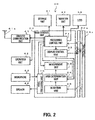
- the mobile phone 50 as illustrated in FIG. 2 , includes a main control unit 20, storage unit 31, vibration unit 32, wireless communication unit 41 with an antenna 41 a, and operation unit 42, in addition to the above-described display unit 22a, touch panel 25a, LED 33, microphone 43, and speaker 44.
- the input receiving device is configured to have the display unit 22a, touch panel 25a, main control unit 20, storage unit 31, as well as the vibration unit 32, LED 33 and speaker 44 as an indication unit that will be described later.
- the display unit 22a is configured to have a liquid crystal display device, an organic electroluminescence (EL) display device, or the like, and displays various information such as character information and key images.
- the touch panel 25a serves as an operation unit, and when an area corresponding a key image or the like displayed in the display unit 22a is touched by a user's finger or a touch pen, detects the touch to realize a function assigned to the area.
- the touch panel 25a is a so-called resistive touch panel and has a structure in which two resistance films are laminated with a narrow gap therebetween.
- the touch panel 25a when the panel (resistance films) is pressed down (touch operation) by a finger or the like, the resistance films contact to each other and current flows, whereby voltage is detected. Since a resistance value of the resistance films varies depending on a current-carrying position, an output voltage from the resistance films varies depending on the position. Therefore, the touch panel 25a can output a signal for specifying a position of a touch (a touch position) outward, based on this change of a voltage.
- the touch panel 25a can be, for example, a capacitance touch panel, instead of the resistive touch panel.
- the wireless communication unit 41 demodulates radio waves that are received via the antenna 41 a and contain predetermined information such as voice information and e-mails to electrical signals containing the predetermined information and supplies the electrical signals to a processing control unit 21.
- the wireless communication unit 41 also modulates electrical signals containing predetermined information such as voice information and e-mails supplied from the processing control unit 21 to radio waves including the predetermined information and transmits the radio waves via the antenna 41 a.
- the operation unit 42 is configured to have: a function selection unit 42a that includes a function button to select an e-mail function, communication mode function, menu display function, and so on, a scroll key to move a highlighted portion displayed on the screen, and the like; and a numerical keypad unit 42b to receive character and number inputs.
- the operation unit 42 configured to have press buttons and scroll key that receive various inputs on the basis of mechanical structures.
- the indication unit is configured to have the vibration unit 32, LED 33, and the speaker 44 described above, as illustrated in FIG. 2 .
- the vibration unit 32 includes a vibration motor, to which a weight is attached so that its gravity center is eccentric to a rotary shaft of the motor. When the motor is turning, vibration occurs due to imbalance of the gravity center.
- the LED 33 lights up or flickers by inputting a predetermined electrical signal.
- the speaker 44 generates sound or voice by inputting a predetermined electrical signal.
- the main control unit 20 is configured to have a microcomputer including a central processing unit (CPU) and operates by a program stored in the storage unit 31.
- CPU central processing unit
- the main control unit 20 includes the processing control unit 21 serving as a communication control unit that controls the wireless communication unit 41 on the basis of information inputted to the touch panel 25a or operation unit 42 to communicate with outside.
- the main control unit 20 includes a display control unit 22 that controls the display unit 22a to display various information such as character information and key image in a predetermined area and also performs processing such as enlarging the key image displayed in the display unit 22a and displaying a frame border encircling the key image in bold.
- the main control unit 20 further includes a voice processing unit 26 that converts voice information inputted via the microphone 43 into an electrical signal and also generates the inputted electrical signal containing the voice information as voice from the speaker.
- the processing control unit 21 controls the wireless communication unit 41 to process e-mails sending to and receiving from a wireless base station, and also controls the wireless communication unit 41 to transmit radio waves containing voice information to a wireless network and to receive radio waves containing voice information from the wireless network.
- the processing control unit 21 when the verbal communication function, e-mail sending and receiving function, Internet connection function, or any of various application functions such as a TV broadcast receiving and playing function and game applications is selected via the touch panel 25a, realizes the function.
- the processing control unit 21 also controls the vibration unit 32 to transmit various electrical signals to the motor, and thereby generates vibration.
- the main control unit 20 includes a detection unit 25 to detect a touch position on the basis of an electrical signal outputted from the touch panel 25a and an area determination unit 24 to determine whether or not the detected position is within an area corresponding to a key image displayed in the display unit 22a.
- the main control unit 20 includes a measurement unit 23 that, if the detected position is not within an area corresponding to a key image displayed in the display unit 22a, measures (counts) number of times of touches on the area and outputs the measured value (count value) to the processing control unit 21.
- the measurement unit 23 has a timer built-in, and measuring the number of times of touches on an area corresponding to a key image displayed in the display unit 22a is performed within a time period set by the timer.
- the storage unit 31 includes a random access memory (RAM), read only memory (ROM), hard disk device, flash memory, and the like; stores a program for making the main control unit 20 operate and various data to be used for the program; and serves as a work area of the main control unit 20.
- RAM random access memory
- ROM read only memory
- flash memory flash memory
- the main control unit 20 realizes the above functions of the mobile phone 50 by the program stored in the storage unit 31. That is, the program serves as: the display control unit 22 to cause the display unit 22a to display the display screen (an image displayed in the screen) in such a way that the display screen is divided into a key image (operation area) and an area other than the key image (incorrect operation area); the detection unit 25 to detect occurrence of touch on the touch panel 25a and a touch position thereof; the area determination unit 24 to determine whether the touch position is within an area of the key image or within an area other than the key image; the measurement unit 23 that measures the number of times of touches on the area other than the key image within a certain period of time and, on the basis of the number of times of touches, determines whether or not a plurality of touches on the area other than the key image are performed consecutively within the certain period of time; and the processing control unit 21 that, if the touches on the area other than the key image are consecutively performed, controls the display control unit 22 to display the key image in a different
- the display unit 22a is controlled by the display control unit 22 thereby to display an initial screen illustrated in FIG. 4 .
- the display unit 22a displays the display screen in such a way that the display screen is divided into an operation area and an incorrect operation area (Step S101).
- an operation area is an area such as an area for a key image where a touch operation by the user is supposed to occur in the display screen
- an incorrect operation area is an area such as a background area other than an area for an key image where a touch operation by the user is not supposed to occur in the display screen.
- the display unit 22a displays the display screen in such a way that the display screen is divided into the operation area configured to have a phone-call key image 22b, e-mail key image 22c, Internet connection key image 22d, and application key image 22e and the incorrect operation area configured to have a background area A to display a photograph, picture, plain image and so on other than the key images 22b to 22e.
- the detection unit 25 detects whether or not the touch panel 25a is touched (Step S102), and if the touch panel 25a is touched (Step S102: Yes), detects a position of the touch (touch position) on the display screen of the display unit 22a (Step S103).
- Step S102 if the touch panel 25a is not touched (Step S102: No), the detection unit 25 continues to detect whether or not the touch panel 25a is touched (Step S102).
- the area determination unit 24 determines whether or not the touch position is within the incorrect operation area (Step S104).
- Step S105 if the flag (FLG) is one (Step S105: No), the measurement unit 23 continues the time measurement by the timer and also continues processing of measuring (counting) the number of times of touches on the background area A that is the incorrect operation area and incrementing the count value (Step S107).
- the measurement unit 23 determines whether or not the time is up, that is, whether or not the timer goes beyond a period of time (a certain period of time) preset by the timer (Step S108). It the time is not up (Step S108: No), the processing control unit 21 determines whether the count value is greater than or equal to a predetermined threshold value or less than the predetermined threshold vale (Step S109).
- Step S109 If the count value becomes greater than or equal to the threshold value before the time is up (Step S109: Yes), the display unit 22a is controlled by the display control unit 22 to enlarge and display the operation area, that is, the key images 22b to 22e as illustrated in FIG. 5 (Step S110). Then, the processing returns to Step S102, and the detection unit 25 continues to detect whether or not the touch panel 25a is touched (Step S102).
- Step S104 If in Step S104 it is determined that the operation area is touched (Step S104: No), a function corresponding to the touched area is realized (Step S111).
- a function assigned to the touched key image is realized. That is, when the user touches the phone-call key image 22b, the display unit 22a displays an address book to realize a telephone call function. When the user touches the e-mail key image 22c, the display unit 22a displays a screen for editing an e-mail to realize an e-mail editing and sending function. When the user touches the Internet connection key image 22d, the display unit 22a displays a screen for connecting the Internet to realize an Internet (web) connection function. When the user touches the application key image 22e, the display unit 22a displays an application menu to realize various application functions such as a TV broadcast receiving and playing function and game applications.
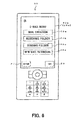
- the display unit 22a displays an e-mail menu screen, which displays a mail creation key image 23a, receiving folder key image 23b, sending folder key image 23c, and new mail retrieval key image 23d that are assigned to a plurality of types of functions related to an e-mail, enabling a required key to be selected.
- the display unit 22a further displays a clear key image 27 and an end key image 28.
- the clear key image 27 an image displayed in the display unit 22a in the previous time, in this case, an image illustrated in FIG. 4 or FIG. 5 is displayed.
- the end key image 28 the screen returns to the initial screen illustrated in FIG. 4 and also forcibly quits the realized function.
- the display unit 22a is controlled by the display control unit 22 to display the display screen in such a way that the display screen is divided into the operation area and the incorrect operation area (Step S201).
- the display unit 22a displays the display screen in such a way that the display screen is divided into the operation area configured to have the mail creation key image 23a, receiving folder key image 23b, sending folder key image 23c, and new mail retrieval key image 23d and the incorrect operation area configured to have an unpatterned, unicolor background area B other than the key images 23a to 23d.
- the detection unit 25 detects whether or not the touch panel 25a is touched (Step S202), and if the touch panel 25a is touched (Step S202: Yes), detects a position of the touch on the display screen of the display unit 22a (Step S203).
- Step S202 if the touch panel 25a is not touched (Step S202: No), the detection unit 25 continues to detect whether or not the touch panel 25a is touched (Step S202).
- the area determination unit 24 determines whether or not the touch position is within the incorrect operation area (Step S204).
- Step S205 if the flag (FLG) is one (Step S205: No), the measurement unit 23 continues the time measurement by the timer and also continues processing of measuring (counting) the number of times of touch on the background area B that is the incorrect operation area and incrementing the count value (Step S207).
- the measurement unit 23 determines whether or not the time is up, that is, whether or not the timer goes beyond a period of time (a certain period of time) preset by the timer (Step S208). If the time is not up (Step S208: No), the processing control unit 21 determines whether the count value is greater than or equal to a predetermined threshold value or less than the predetermined threshold value (Step S209).
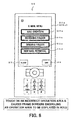
- Step S209 If the count value becomes greater than or equal to the threshold value before the timer is up (Step S209: Yes), the display unit 22a is controlled by the display control unit 22 to display the operation area, that is, the frame borders encircling the key images 23a to 23d in bold, as illustrated in FIG. 8 (Step S210). Then, the processing returns to Step S202, and the detection unit 25 continues to detect whether or not the touch panel 25a is touched (Step S202).
- Step S208 Yes
- Step S204 If in Step S204 it is determined that the operation area is touched (Step S204: No), a function corresponding to the touched area is realized (Step S211).
- a function assigned to the touched key image is realized. That is, when the user touches the mail creation key image 23a, the display unit 22a displays the screen for editing an e-mail to realize the e-mail editing and sending function. When the user touches the receiving folder key image 23b, the display unit 22a displays a list of received e-mails to realize the function for viewing received mails. When the user touches the sending folder key image 23c, the display unit 22a displays a list of sent e-mails to realize the function for viewing sent mails. When the user touches the new mail retrieval key image 23d, the display unit 22a displays the screen for new mail retrieval to realize the function for checking new mails.
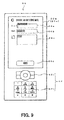
- the display unit 22a displays the screen for creating an outgoing mail and enables an e-mail address, subject, and text of the outgoing mail to be inputted via the operation unit 42.
- the display unit 22a is controlled by the display control unit 22 to display the display screen in such a way that the display screen is divided into the operation area and the incorrect operation area and to perform the same processing as the input receiving processing described with reference to FIG. 3 or FIG. 7 .
- a background area C is set to be the incorrect operation area
- a mail sending key image 24d is set to be the operation area. If the background area C that is the incorrect operation area is touched consecutively within a certain period of time, processing of enlarging and displaying the mail sending key image 24d that is the operation area or displaying the frame border encircling the mail sending key image 24d in bold is performed.
- Step S212 when the user inputs a mail address, subject, and text, and then correctly touches the mail sending key image 24d displayed on the display screen (Step S212), the e-mail is sent to a wireless base station and the processing here is terminated.
- the display unit 22a displays the key images 22b to 22e and 23a to 23d (operation area) in a different mode from a mode before the consecutive touches. Specifically, the display unit 22a displays the key images 22b to 22e enlarged, compared with the key images 22 before the consecutive incorrect touches or displays the frame borders encircling the key images 23a to 23d in bold.
- a key image (operation area) is displayed in a different mode from a mode before the consecutive incorrect touches.
- performed is the processing of enlarging the key images 22b to 22e or displaying the frame borders encircling the key images 23a to 23d in bold displayed on the display unit 22a.
- the present invention is not limited to this embodiment, but may be adapted such that, as for characters displayed within a key image, their font, character style (color, bold, fine, italic), character size, character type (for example, Hiragana ) may be displayed in a different mode from a mode before the consecutive touches.
- the key images 22b to 22e may be changed in display color, displayed brighter, flickered, changed in shape (for example, circle, oval, triangle, star), rotated, vibrated, or moved in position.
- the display unit 22a displays the key images 22b to 22e and 23a to 23d in a different mode from a mode before the consecutive touches.
- the present invention is not limited to this embodiment, but may be adapted such that the threshold value is configured to have a plurality of stages of threshold values, and every time the number of times of consecutive incorrect touches within a certain period of time reaches beyond each of the plurality of stages of threshold values, a key image (operation area) is enlarged in a stepwise fashion or a frame border encircling the key image is displayed in bold in a stepwise fashion.
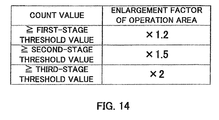
- the display unit 22a enlarges a size of a key image (touched area) 1.2 times more than a size before the consecutive incorrect touches within a certain period of time; if it reaches beyond a second-stage threshold value, 1.5 times; and if it reaches beyond a third-stage threshold value, twice.
- the threshold value may be configured to have a plurality of stages of threshold values, and every time the number of times of consecutive incorrect touches reaches beyond each of the plurality of stages of threshold values, the display unit 22a may display the key images 22b to 22e and 23a to 23d in a gradually different mode from a mode before the consecutive touches.
- FIG. 14 is only one example, and stages of threshold values are not limited to three stages and any enlargement factor can be employed.
- the display unit 22a displays the key images 22b to 22e and 23a to 23d in a different mode from a mode before the consecutive touches.
- the present invention is not limited to this embodiment, but may be adapted such that that, on the condition that it is determined that two or more keys are touched by a finger or the like at the same time, the display unit 22a displays the key images 22b to 22e and 23a to 23d in a different mode from a mode before the consecutive touches.
- the display unit 22a displays the key images 22b to 22e and 23a to 23d in a different mode from a mode before the consecutive touches.
- the change from the previous mode to the different mode may be immediate or gradual.
- the key images 22b to 22e displayed in a different mode from the previous mode can return to the previous mode as time passes. That is, the display unit 22a displays the key images 22b to 22e in a different mode from the previous mode after consecutive incorrect touches within a certain period of time, and after a predetermined threshold period of time passes, the key images 22b to 22e may be displayed in the previous mode; or as time passes, the key images 22b to 22e may be gradually displayed in the previous mode.
- the display unit 22a displays an key image (operation area) in only a difference mode from a mode before the consecutive touches.
- the present invention is not limited to this embodiment, but may be adapted such that in the case where incorrect touches are performed consecutively within a certain period of time, the display unit 22a displays a key image (operation area) in a different mode from a mode before the consecutive touches, and in addition to this, the indication unit provides indication by at least one of vibration, light, and voice.
- the display unit 22a displays a mode selection screen that is an initial screen.
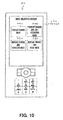
- This mode selection screen displays four key images, that is, a display-change mode key image 25b, display-change and vibration mode key image 25c, display-change and LED-flickering mode key image 25d, and display-change and voice mode key image 25e.
- a display-change mode is set to perform processing in which the display unit 22a enlarges and displays the key images 22b to 22e, or displays the frame borders encircling the key images 23a to 23d in bold, as described in the above embodiment.
- a display-change and voice mode is set.
- the vibration unit 32 vibrates in addition to enlarging and displaying the key images 22b to 22e as compared with the key images 22b to 22e before the consecutive touches (or processing of displaying the frame borders encircling the key images 22b to 22e in bold is also possible).
- a display-change and LED-flickering mode is set.
- this display-change and LED-flickering mode as illustrated in FIG. 12 , in the case where incorrect touches are performed consecutively within a certain period of time, the LED 33 flickers in addition to enlarging and displaying the key images 22b to 22e as compared with the key images 22b to 22e before the consecutive touches (or processing of displaying the frame borders encircling the key images 22b to 22e in bold is also possible).
- a display-change and voice mode is set.
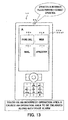
- this display-change and voice mode as illustrated in FIG. 13 , in the case where incorrect touches are performed consecutively within a certain period of time, the speaker 44 issues a voice ("Your operation is incorrect. Please perform a correct operation.") in addition to enlarging and displaying the key images 22b to 22e as compared with the key images 22b to 22e before the consecutive touches (or processing of displaying the frame borders encircling the key images 22b to 22e in bold is also possible).
- Release of each of the above modes can be performed by touching again any of the key images 25b to 25e touched by the user for setting the corresponding mode.
- the mobile phone 50 is in an initial state in which any of the above respective modes is not set at the factory shipment. By touching again each of the key images 25b to 25e, the mobile phone 50 returns to the initial state.
- more than one of the above vibration, light or voice indication can be simultaneously performed, in addition to displaying the key images 23a to 23d in a different mode from a mode before the consecutive touches.
- an indication by vibration and light, indication by light and voice, or indication by vibration and voice can be performed.
- a key image operation area
- a degree of vibration, intensity of light, or volume of voice may be increased in a stepwise fashion.
- a mode previously assigned to each of the key images 22b to 22e is selected and set.
- the present invention is not limited to this embodiment, but may be adapted such that a plurality of modes suitable for respective users are previously stored in the storage unit 31 according to a password; and by inputting the password to the operation unit 42, the main control unit 20 automatically selects and sets a suitable mode.
- a suitable mode according to an attribute of a user such as an adult, child, or senior may be previously stored in the storage unit 31. Then, based on a face image, voice, or the like detected by a camera or microphone disposed in the mobile phone 50, the main control unit 20 automatically determines an attribute of the user, and if the incorrect operation area is consecutively touched within a certain period of time, the main control unit 20 may automatically select and set a mode corresponding to the attribute of the user.
- characters and sentences within a key image may be displayed with the use of an easy word, character style (bold), character size, and character type (" hiragana ", " katakana “ and the like) that are easy to be recognized by a child.
- the operation unit 42 configured to have the function selection unit 42a and numerical keypad unit 42b is separated from the display unit 22a and touch panel 25a, and is configured to have the mechanical structures such as the press buttons and scroll key.
- the present invention is not limited to this embodiment, but can be adapted such that the display unit 22a displays a function selection key image or numerical keypad, thereby configuring the operation unit 42 in a software fashion.
- the present invention is not limited to the mobile phone described in the above embodiment, but can be applied to a mobile communication terminal such as a personal digital assistant (PDA), mobile personal computer (PC), as well as other information processing devices. That is, the above embodiment is only for explaining the present invention, and not for limiting the scope of the present invention. Accordingly, a person skilled in the art can employ embodiments in which each or all of these components is/are substituted by the equivalent(s), and these embodiments are also included in the scope of the present invention.
- PDA personal digital assistant
- PC mobile personal computer
Landscapes
- Engineering & Computer Science (AREA)
- General Engineering & Computer Science (AREA)
- Theoretical Computer Science (AREA)
- Human Computer Interaction (AREA)
- Physics & Mathematics (AREA)
- General Physics & Mathematics (AREA)
- Computer Networks & Wireless Communication (AREA)
- Signal Processing (AREA)
- User Interface Of Digital Computer (AREA)
- Telephone Function (AREA)
Abstract
Description
- The present invention relates to an input receiving device, input receiving method, recording medium, and mobile communication terminal.
- In an input receiving device that receives input operations from a user, a touch panel is widely used. The touch panel is arranged with being superposed on a front surface of a display unit such as a liquid crystal display (LCD), and waits for a contact operation (a touch operation) by a user's finger or a touch pen (such as a stylus) while displaying a target image (for example, a key image) on the display unit. The input receiving device, when an area of the touch panel that corresponds to a key image (a receiving area) is touched, detects the touch to realize a function assigned to the key image (see, for example, Patent Document 1).
- Recently, a mobile phone also has used an input receiving device having such a touch panel (see, for example, Patent Document 2).
- In such a mobile phone, in addition to improvement of the design, for dealing with diversification, various functions such as image transmission, bar code reader, GPS, application download, and address (address book) registration are realized by sophisticated operability using the touch panel.
- Furthermore, a mobile communication terminal described in
Patent Document 2 enlarges and displays a character that is inputted frequently on the touch panel, thereby improving the operability of a character selection operation. -
- Patent Document 1: Unexamined Japanese Patent Application Kokai Publication No.
2008-65518 - Patent Document 1: Unexamined Japanese Patent Application Kokai Publication No.
2007-280153 - In the above mobile communication terminal, however, since a character is enlarged according to an input frequency, operability has not been improved due to lack of information of the input frequency during an earlier stage after beginning of use. Further, since operability is improved specializing in character input, operability of operation other than character input, including a contact operation to an area on the touch panel corresponding to a key image, is not sufficiently improved. If a user is a child or a senior, the user may consecutively perform incorrect contacts unconsciously; however, no measure has been undertaken to solve such an incorrect operation. Therefore, a new approach is desired that has both higher operability and sufficient functions for users in a wide age range.
- The present invention has been made in light of the above problems, and a first objective of the present invention is to provide an input receiving device and an input receiving method that have high operability , and a recording medium that records a program for realizing the input receiving device and input receiving method on a computer.
- A second objective of the present invention is to provide a mobile communication terminal that has both high operability and sufficient functions.
- In order to achieve the above first objective, an input receiving device according to a first aspect of the present invention comprises: a display to display an image; and a touch panel that is arranged with being superposed on the display, and touched by a user, the input receiving device comprising:
- a display controller to display an operation area and an incorrect operation area on a display screen of the display;
- a detector to detect occurrence of touch on the touch panel and a touch position thereof on the display screen;
- an area determiner to determine whether the detected touch position is within the operation area or within the incorrect operation area; and
- a processing controller to, if touches on the incorrect operation area are performed consecutively within a certain period of time, control the display controller to display the operation area in a different mode from a mode before the consecutive touches.
- A mobile communication terminal according to a second aspect of the present invention comprises: an input receiver to receive information input; a wireless communicator to transmit and receive radio waves containing predetermined information; and a communication controller to control the wireless communicator on a basis of information inputted to the input receiver thereby to communicate with outside, the mobile communication terminal comprising
the above-described input receiving device as the input receiver. - An input receiving method according to a third aspect of the present invention is performed by an input receiving device comprising: a display to display an image; and a touch panel that is arranged with being superposed on the display, and touched by a user, the input receiving method comprising::
- displaying an operation area and an incorrect operation area on a display screen of the display;
- detecting occurrence of touch on the touch panel and a touch position thereof on the display screen;
- determining whether the detected touch position is within the operation area or within the incorrect operation area;
- measuring number of times of touches on the incorrect operation area within a certain period of time;
- determining whether or not touches on the incorrect operation area are performed consecutively within a certain period of time on a basis of number of times of touches on the incorrect operation area, and
- if touches on the incorrect operation area are performed consecutively within a certain period of time, displaying the operation area in a different mode from a mode before the consecutive touches.
- A computer-readable recording medium according to a fourth aspect of the present invention records a program, the program making a computer function as, the computer comprising: a display to display an image; and a touch panel that is arranged with being superposed on the display, and touched by a user:
- a display controller to display an operation area and an incorrect operation area on a display screen of the display;
- a detector to detect occurrence of touch on the touch panel and a touch position thereof on the display screen;
- an area determiner to determine whether the detected touch position is within the operation area or within the incorrect operation area; and
- a processing controller to, if the touches on the incorrect operation area are performed consecutively within a certain period of time, display the operation area in a different mode from a mode before the consecutive touches.
- The present invention can provide a mobile communication terminal that has both high operability and sufficient functions.
-
-
FIG. 1 is a schematic diagram illustrating an appearance of a typical mobile phone in which an input receiving device according to an embodiment of the present invention is realized; -
FIG. 2 is a functional block diagram of the mobile phone; -
FIG. 3 is a flow chart for explaining input receiving processing by the input receiving device; -
FIG. 4 is a view illustrating one display screen (before key images are enlarged) of the mobile phone; -
FIG. 5 is a view illustrating one display screen (after key images are enlarged) of the mobile phone; -
FIG. 6 is a view illustrating one display screen (before frame borders of key images are displayed in bold) of the mobile phone; -
FIG. 7 is a flow chart for explaining the rest of the input receiving processing by the input receiving device illustrated inFIG. 3 ; -
FIG. 8 is a view illustrating one display screen (after frame borders of key images are displayed in bold) of the mobile phone; -
FIG. 9 is a view illustrating one display screen (transmission mail creation screen) of the mobile phone; -
FIG. 10 is a view illustrating one display screen (mode selection screen) of the mobile phone; -
FIG. 11 is a view illustrating one display screen (after key images are enlarged) of the mobile phone and a state where a vibration unit is vibrating; -
FIG. 12 is a view illustrating one display screen (after key images are enlarged) of the mobile phone and a state where an LED is flickering; -
FIG. 13 is a view illustrating one display screen (after key images are enlarged) of the mobile phone and a state where a speaker is issuing a voice; and -
FIG. 14 is a table illustrating one example of correspondence relationships between a plurality of threshold values and enlargement factors of key images. - Embodiments of the present invention will hereinafter be described with reference to the drawings.
FIG. 1 is a schematic diagram illustrating an appearance of a typical mobile phone (a mobile communication terminal) including an input receiving device according to an embodiment of the present invention. As illustrated, on a surface of thismobile phone 50, disposed are a display unit 22a and atouch panel 25a that is arranged with being superposed on the display unit. On the surface of themobile phone 50, also disposed are a light emitting diode (LED) 33,operation unit 42,microphone 43, andspeaker 44. - The
mobile phone 50 according to the present embodiment performs a verbal communication function, e-mail sending and receiving function, Internet connection function, various application functions such as a TV broadcast receiving and playing function and game applications, and so on, as with an ordinary mobile phone. Themobile phone 50, as illustrated inFIG. 2 , includes amain control unit 20, storage unit 31,vibration unit 32,wireless communication unit 41 with an antenna 41 a, andoperation unit 42, in addition to the above-described display unit 22a,touch panel 25a,LED 33,microphone 43, andspeaker 44. - In the
mobile phone 50, the input receiving device is configured to have the display unit 22a,touch panel 25a,main control unit 20, storage unit 31, as well as thevibration unit 32,LED 33 andspeaker 44 as an indication unit that will be described later. - Referring to
FIGS. 1 and2 , the display unit 22a is configured to have a liquid crystal display device, an organic electroluminescence (EL) display device, or the like, and displays various information such as character information and key images. Thetouch panel 25a serves as an operation unit, and when an area corresponding a key image or the like displayed in the display unit 22a is touched by a user's finger or a touch pen, detects the touch to realize a function assigned to the area. - The
touch panel 25a is a so-called resistive touch panel and has a structure in which two resistance films are laminated with a narrow gap therebetween. In thetouch panel 25a, when the panel (resistance films) is pressed down (touch operation) by a finger or the like, the resistance films contact to each other and current flows, whereby voltage is detected. Since a resistance value of the resistance films varies depending on a current-carrying position, an output voltage from the resistance films varies depending on the position. Therefore, thetouch panel 25a can output a signal for specifying a position of a touch (a touch position) outward, based on this change of a voltage. Thetouch panel 25a can be, for example, a capacitance touch panel, instead of the resistive touch panel. - Referring to
FIG. 2 , thewireless communication unit 41 demodulates radio waves that are received via the antenna 41 a and contain predetermined information such as voice information and e-mails to electrical signals containing the predetermined information and supplies the electrical signals to aprocessing control unit 21. Thewireless communication unit 41 also modulates electrical signals containing predetermined information such as voice information and e-mails supplied from theprocessing control unit 21 to radio waves including the predetermined information and transmits the radio waves via the antenna 41 a. - As illustrated in
FIG. 1 , theoperation unit 42 is configured to have: a function selection unit 42a that includes a function button to select an e-mail function, communication mode function, menu display function, and so on, a scroll key to move a highlighted portion displayed on the screen, and the like; and a numerical keypad unit 42b to receive character and number inputs. In this way, theoperation unit 42 configured to have press buttons and scroll key that receive various inputs on the basis of mechanical structures. - The indication unit is configured to have the
vibration unit 32,LED 33, and thespeaker 44 described above, as illustrated inFIG. 2 . Thevibration unit 32 includes a vibration motor, to which a weight is attached so that its gravity center is eccentric to a rotary shaft of the motor. When the motor is turning, vibration occurs due to imbalance of the gravity center. TheLED 33 lights up or flickers by inputting a predetermined electrical signal. Thespeaker 44 generates sound or voice by inputting a predetermined electrical signal. - The
main control unit 20 is configured to have a microcomputer including a central processing unit (CPU) and operates by a program stored in the storage unit 31. - The
main control unit 20 includes theprocessing control unit 21 serving as a communication control unit that controls thewireless communication unit 41 on the basis of information inputted to thetouch panel 25a oroperation unit 42 to communicate with outside. Themain control unit 20 includes adisplay control unit 22 that controls the display unit 22a to display various information such as character information and key image in a predetermined area and also performs processing such as enlarging the key image displayed in the display unit 22a and displaying a frame border encircling the key image in bold. Themain control unit 20 further includes avoice processing unit 26 that converts voice information inputted via themicrophone 43 into an electrical signal and also generates the inputted electrical signal containing the voice information as voice from the speaker. - The
processing control unit 21 controls thewireless communication unit 41 to process e-mails sending to and receiving from a wireless base station, and also controls thewireless communication unit 41 to transmit radio waves containing voice information to a wireless network and to receive radio waves containing voice information from the wireless network. - The
processing control unit 21, when the verbal communication function, e-mail sending and receiving function, Internet connection function, or any of various application functions such as a TV broadcast receiving and playing function and game applications is selected via thetouch panel 25a, realizes the function. Theprocessing control unit 21 also controls thevibration unit 32 to transmit various electrical signals to the motor, and thereby generates vibration. - The
main control unit 20 includes adetection unit 25 to detect a touch position on the basis of an electrical signal outputted from thetouch panel 25a and anarea determination unit 24 to determine whether or not the detected position is within an area corresponding to a key image displayed in the display unit 22a. - The
main control unit 20 includes ameasurement unit 23 that, if the detected position is not within an area corresponding to a key image displayed in the display unit 22a, measures (counts) number of times of touches on the area and outputs the measured value (count value) to theprocessing control unit 21. Themeasurement unit 23 has a timer built-in, and measuring the number of times of touches on an area corresponding to a key image displayed in the display unit 22a is performed within a time period set by the timer. - The storage unit 31 includes a random access memory (RAM), read only memory (ROM), hard disk device, flash memory, and the like; stores a program for making the
main control unit 20 operate and various data to be used for the program; and serves as a work area of themain control unit 20. - The
main control unit 20 realizes the above functions of themobile phone 50 by the program stored in the storage unit 31. That is, the program serves as: thedisplay control unit 22 to cause the display unit 22a to display the display screen (an image displayed in the screen) in such a way that the display screen is divided into a key image (operation area) and an area other than the key image (incorrect operation area); thedetection unit 25 to detect occurrence of touch on thetouch panel 25a and a touch position thereof; thearea determination unit 24 to determine whether the touch position is within an area of the key image or within an area other than the key image; themeasurement unit 23 that measures the number of times of touches on the area other than the key image within a certain period of time and, on the basis of the number of times of touches, determines whether or not a plurality of touches on the area other than the key image are performed consecutively within the certain period of time; and theprocessing control unit 21 that, if the touches on the area other than the key image are consecutively performed, controls thedisplay control unit 22 to display the key image in a different mode from a mode before the consecutive touches. - Next, the input receiving processing of the
mobile phone 50 according to the present embodiment will be described with reference to flow charts inFIGS. 3 and7 , andFIGS. 4 to 6 ,8 and9 . - First, when a user turns on the
mobile phone 50, the display unit 22a is controlled by thedisplay control unit 22 thereby to display an initial screen illustrated inFIG. 4 . In the initial screen, the display unit 22a displays the display screen in such a way that the display screen is divided into an operation area and an incorrect operation area (Step S101). Here, "an operation area" is an area such as an area for a key image where a touch operation by the user is supposed to occur in the display screen, and "an incorrect operation area" is an area such as a background area other than an area for an key image where a touch operation by the user is not supposed to occur in the display screen. - Specifically, as illustrated in
FIG. 4 , the display unit 22a displays the display screen in such a way that the display screen is divided into the operation area configured to have a phone-call key image 22b, e-mail key image 22c, Internet connection key image 22d, and application key image 22e and the incorrect operation area configured to have a background area A to display a photograph, picture, plain image and so on other than the key images 22b to 22e. - Next, the
detection unit 25 detects whether or not thetouch panel 25a is touched (Step S102), and if thetouch panel 25a is touched (Step S102: Yes), detects a position of the touch (touch position) on the display screen of the display unit 22a (Step S103). - On the other hand, if the
touch panel 25a is not touched (Step S102: No), thedetection unit 25 continues to detect whether or not thetouch panel 25a is touched (Step S102). - When the
detection unit 25 detects a touch position on the display screen of the display unit 22a, thearea determination unit 24 determines whether or not the touch position is within the incorrect operation area (Step S104). - If it is determined that the background area A in the incorrect operation area is touched (Step S104: Yes), the
measurement unit 23 determines whether or not a flag (FLG) is zero (Step S105), and if FLG = 0 (Step S105: Yes), starts the built-in timer to start time measurement and also set FLG = 1 (Step S106). Further, themeasurement unit 23 measures (counts) the number of times of touches and increments the count value one by one (Step S107). That is, count value = count value + 1. In an initial state, FLG = 0, timer = 0 [sec], and count value = 0. - On the other hand, if the flag (FLG) is one (Step S105: No), the
measurement unit 23 continues the time measurement by the timer and also continues processing of measuring (counting) the number of times of touches on the background area A that is the incorrect operation area and incrementing the count value (Step S107). - Then, the
measurement unit 23 determines whether or not the time is up, that is, whether or not the timer goes beyond a period of time (a certain period of time) preset by the timer (Step S108). It the time is not up (Step S108: No), theprocessing control unit 21 determines whether the count value is greater than or equal to a predetermined threshold value or less than the predetermined threshold vale (Step S109). As for this threshold value, any value can be set by a program. For example, as for two consecutive touches, the threshold value = 2; and as for n (n is a natural number) consecutive touches, the threshold value = n. - If the count value becomes greater than or equal to the threshold value before the time is up (Step S109: Yes), the display unit 22a is controlled by the
display control unit 22 to enlarge and display the operation area, that is, the key images 22b to 22e as illustrated inFIG. 5 (Step S110). Then, the processing returns to Step S102, and thedetection unit 25 continues to detect whether or not thetouch panel 25a is touched (Step S102). - On the other hand, if the time is up without determining whether the count value is greater than or equal to the predetermined threshold value or less than the predetermined threshold value (Step S108: Yes), the
measurement unit 23 resets the count value, timer, and flag (count value = 0, timer = 0 [sec], FLG = 0) (Step S113). Then, without enlarging the key images 22b to 22e by the display unit 22a, processing returns to Step S102, and thedetection unit 25 continues to detect whether or not thetouch panel 25a is touched (Step S102). - If in Step S104 it is determined that the operation area is touched (Step S104: No), a function corresponding to the touched area is realized (Step S111).
- To describe specifically, when any of the key images 22b to 22e set in the operation area is touched, a function assigned to the touched key image is realized. That is, when the user touches the phone-call key image 22b, the display unit 22a displays an address book to realize a telephone call function. When the user touches the e-mail key image 22c, the display unit 22a displays a screen for editing an e-mail to realize an e-mail editing and sending function. When the user touches the Internet connection key image 22d, the display unit 22a displays a screen for connecting the Internet to realize an Internet (web) connection function. When the user touches the application key image 22e, the display unit 22a displays an application menu to realize various application functions such as a TV broadcast receiving and playing function and game applications.
- Here, it is assumed that the user touches the e-mail key image 22c. Then, as illustrated in
FIG. 6 , the display unit 22a displays an e-mail menu screen, which displays a mail creation key image 23a, receiving folder key image 23b, sending folder key image 23c, and new mail retrieval key image 23d that are assigned to a plurality of types of functions related to an e-mail, enabling a required key to be selected. Further, theprocessing control unit 21 controls themeasurement unit 23 to reset the count value, timer, and flag (count value =0, FLG = 0, timer = 0 [sec]) (Step S112). - On this e-mail menu screen, as illustrated in
FIG. 6 , the display unit 22a further displays a clearkey image 27 and an endkey image 28. When the user touches the clearkey image 27, an image displayed in the display unit 22a in the previous time, in this case, an image illustrated inFIG. 4 orFIG. 5 is displayed. When the user touches the endkey image 28, the screen returns to the initial screen illustrated inFIG. 4 and also forcibly quits the realized function. - Even in this e-mail menu screen, as illustrated in
FIG. 7 , the display unit 22a is controlled by thedisplay control unit 22 to display the display screen in such a way that the display screen is divided into the operation area and the incorrect operation area (Step S201). - Specifically, the display unit 22a displays the display screen in such a way that the display screen is divided into the operation area configured to have the mail creation key image 23a, receiving folder key image 23b, sending folder key image 23c, and new mail retrieval key image 23d and the incorrect operation area configured to have an unpatterned, unicolor background area B other than the key images 23a to 23d.
- Next, the
detection unit 25 detects whether or not thetouch panel 25a is touched (Step S202), and if thetouch panel 25a is touched (Step S202: Yes), detects a position of the touch on the display screen of the display unit 22a (Step S203). - On the other hand, if the
touch panel 25a is not touched (Step S202: No), thedetection unit 25 continues to detect whether or not thetouch panel 25a is touched (Step S202). - When the
detection unit 25 detects the touch position on the display screen of the display unit 22a, thearea determination unit 24 determines whether or not the touch position is within the incorrect operation area (Step S204). - If it is determined that the background area B of the incorrect operation area is touched (Step S204: Yes), the
measurement unit 23 determines whether or not the flag (FLG) is zero (Step S205), and if FLG = 0 (Step S205: Yes), starts the built-in timer to start time measurement and also sets FLG = 1 (Step S206). Further, themeasurement unit 23 measures (counts) the number of times of touches and increments the count value one by one (Step S207). That is, count value = count value + 1. - On the other hand, if the flag (FLG) is one (Step S205: No), the
measurement unit 23 continues the time measurement by the timer and also continues processing of measuring (counting) the number of times of touch on the background area B that is the incorrect operation area and incrementing the count value (Step S207). - Then, the
measurement unit 23 determines whether or not the time is up, that is, whether or not the timer goes beyond a period of time (a certain period of time) preset by the timer (Step S208). If the time is not up (Step S208: No), theprocessing control unit 21 determines whether the count value is greater than or equal to a predetermined threshold value or less than the predetermined threshold value (Step S209). As for this threshold value, any value can be set by a program. For example, as for two consecutive touches, the threshold value = 2; and as for n (n is a natural number) consecutive touches, the threshold value = n. - If the count value becomes greater than or equal to the threshold value before the timer is up (Step S209: Yes), the display unit 22a is controlled by the
display control unit 22 to display the operation area, that is, the frame borders encircling the key images 23a to 23d in bold, as illustrated inFIG. 8 (Step S210). Then, the processing returns to Step S202, and thedetection unit 25 continues to detect whether or not thetouch panel 25a is touched (Step S202). - On the other hand, if the time is up without determining whether the count value is greater than or equal to the predetermined threshold value or less than the predetermined threshold value (Step S208: Yes), the
measurement unit 23 resets the count value, timer, and flag (count value = 0, timer = 0 [sec], FLG = 0) (Step S213). Then, without displaying the frame borders encircling the key images 23a to 23d in bold by the display unit 22a, the processing returns to Step S202, and thedetection unit 25 continues to detect whether or not thetouch panel 25a is touched (Step S202). - If in Step S204 it is determined that the operation area is touched (Step S204: No), a function corresponding to the touched area is realized (Step S211).
- To describe specifically, if any of the key images 23a to 23d set in the operation area is touched, a function assigned to the touched key image is realized. That is, when the user touches the mail creation key image 23a, the display unit 22a displays the screen for editing an e-mail to realize the e-mail editing and sending function. When the user touches the receiving folder key image 23b, the display unit 22a displays a list of received e-mails to realize the function for viewing received mails. When the user touches the sending folder key image 23c, the display unit 22a displays a list of sent e-mails to realize the function for viewing sent mails. When the user touches the new mail retrieval key image 23d, the display unit 22a displays the screen for new mail retrieval to realize the function for checking new mails.
- Here, it is assumed that the user touches the mail creation key image 23a. Then, as illustrated in
FIG. 9 , the display unit 22a displays the screen for creating an outgoing mail and enables an e-mail address, subject, and text of the outgoing mail to be inputted via theoperation unit 42. - Even in this screen for creating an outgoing-mail, the display unit 22a is controlled by the
display control unit 22 to display the display screen in such a way that the display screen is divided into the operation area and the incorrect operation area and to perform the same processing as the input receiving processing described with reference toFIG. 3 orFIG. 7 . - Specifically, a background area C is set to be the incorrect operation area, and a mail sending
key image 24d is set to be the operation area. If the background area C that is the incorrect operation area is touched consecutively within a certain period of time, processing of enlarging and displaying the mail sendingkey image 24d that is the operation area or displaying the frame border encircling the mail sendingkey image 24d in bold is performed. - In the screen for creating an outgoing mail illustrated in
FIG. 9 , when the user inputs a mail address, subject, and text, and then correctly touches the mail sendingkey image 24d displayed on the display screen (Step S212), the e-mail is sent to a wireless base station and the processing here is terminated. - In the
mobile phone 50 according to the present embodiment, if there are consecutive touches on an area of thetouch panel 25a corresponding to the incorrect operation area displayed in the display unit 22a, that is, consecutive incorrect touches within a certain period of time, the display unit 22a displays the key images 22b to 22e and 23a to 23d (operation area) in a different mode from a mode before the consecutive touches. Specifically, the display unit 22a displays the key images 22b to 22e enlarged, compared with thekey images 22 before the consecutive incorrect touches or displays the frame borders encircling the key images 23a to 23d in bold. This enables the user to physically and clearly recognize whether touch on thetouch panel 25a is correct or incorrect even if the user has a low cognitive ability and a low operation ability such as a child, thereby leading the user to correctly touch thetouch panel 25a. Even in the case where themobile phone 50 realizes a wide variety of functions, both of high operability and sufficient functions can be obtained. - In the present embodiment, if incorrect touches are performed consecutively within a certain period of time, a key image (operation area) is displayed in a different mode from a mode before the consecutive incorrect touches. Specifically, performed is the processing of enlarging the key images 22b to 22e or displaying the frame borders encircling the key images 23a to 23d in bold displayed on the display unit 22a. However, the present invention is not limited to this embodiment, but may be adapted such that, as for characters displayed within a key image, their font, character style (color, bold, fine, italic), character size, character type (for example, Hiragana) may be displayed in a different mode from a mode before the consecutive touches. The key images 22b to 22e may be changed in display color, displayed brighter, flickered, changed in shape (for example, circle, oval, triangle, star), rotated, vibrated, or moved in position.
- In the present embodiment, on the condition that it is determined that an area of the
touch panel 25a corresponding to the incorrect operation area displayed in the display unit 22a is touched consecutively the number of times corresponding to one predetermined threshold value within a certain period of time, the display unit 22a displays the key images 22b to 22e and 23a to 23d in a different mode from a mode before the consecutive touches. However, the present invention is not limited to this embodiment, but may be adapted such that the threshold value is configured to have a plurality of stages of threshold values, and every time the number of times of consecutive incorrect touches within a certain period of time reaches beyond each of the plurality of stages of threshold values, a key image (operation area) is enlarged in a stepwise fashion or a frame border encircling the key image is displayed in bold in a stepwise fashion. - In an example illustrated in
FIG. 14 , if the number of times of consecutive incorrect touches within a certain period of time reaches beyond a first-stage threshold value, the display unit 22a enlarges a size of a key image (touched area) 1.2 times more than a size before the consecutive incorrect touches within a certain period of time; if it reaches beyond a second-stage threshold value, 1.5 times; and if it reaches beyond a third-stage threshold value, twice. In this way, the threshold value may be configured to have a plurality of stages of threshold values, and every time the number of times of consecutive incorrect touches reaches beyond each of the plurality of stages of threshold values, the display unit 22a may display the key images 22b to 22e and 23a to 23d in a gradually different mode from a mode before the consecutive touches.FIG. 14 is only one example, and stages of threshold values are not limited to three stages and any enlargement factor can be employed. - In the present embodiment, on the condition that it is determined that an area of the
touch panel 25a corresponding to the incorrect operation area displayed in the display unit 22a is consecutively touched a plurality of number of times within a certain period of time, the display unit 22a displays the key images 22b to 22e and 23a to 23d in a different mode from a mode before the consecutive touches. However, the present invention is not limited to this embodiment, but may be adapted such that that, on the condition that it is determined that two or more keys are touched by a finger or the like at the same time, the display unit 22a displays the key images 22b to 22e and 23a to 23d in a different mode from a mode before the consecutive touches. It is also possible that, on the condition that it is determined that an area of thetouch panel 25a corresponding to the operation area or incorrect operation area remains touched for a certain period of time or more, the display unit 22a displays the key images 22b to 22e and 23a to 23d in a different mode from a mode before the consecutive touches. - In the present embodiment, when the display unit 22a displays the key images 22b to 22e in a different mode from the previous mode, the change from the previous mode to the different mode may be immediate or gradual.
- In the present embodiment, the key images 22b to 22e displayed in a different mode from the previous mode can return to the previous mode as time passes. That is, the display unit 22a displays the key images 22b to 22e in a different mode from the previous mode after consecutive incorrect touches within a certain period of time, and after a predetermined threshold period of time passes, the key images 22b to 22e may be displayed in the previous mode; or as time passes, the key images 22b to 22e may be gradually displayed in the previous mode.
- In the present embodiment, in the case where there are consecutive incorrect touches within a certain period of time, the display unit 22a displays an key image (operation area) in only a difference mode from a mode before the consecutive touches.
- However, the present invention is not limited to this embodiment, but may be adapted such that in the case where incorrect touches are performed consecutively within a certain period of time, the display unit 22a displays a key image (operation area) in a different mode from a mode before the consecutive touches, and in addition to this, the indication unit provides indication by at least one of vibration, light, and voice.
- Specifically, first, as illustrated in
FIG. 10 , when the user turns on themobile phone 50, the display unit 22a displays a mode selection screen that is an initial screen. This mode selection screen displays four key images, that is, a display-change mode key image 25b, display-change and vibration mode key image 25c, display-change and LED-flickering modekey image 25d, and display-change and voice mode key image 25e. - Then, when the user touches the display-change mode key image 25b, a display-change mode is set to perform processing in which the display unit 22a enlarges and displays the key images 22b to 22e, or displays the frame borders encircling the key images 23a to 23d in bold, as described in the above embodiment.
- When the user touches the display-change and vibration mode key image 25c, a display-change and voice mode is set. In this display-change and voice mode, as illustrated in
FIG. 11 , in the case where incorrect touches are performed consecutively within a certain period of time, thevibration unit 32 vibrates in addition to enlarging and displaying the key images 22b to 22e as compared with the key images 22b to 22e before the consecutive touches (or processing of displaying the frame borders encircling the key images 22b to 22e in bold is also possible). - When the user touches the display-change and LED-flickering mode
key image 25d, a display-change and LED-flickering mode is set. In this display-change and LED-flickering mode, as illustrated inFIG. 12 , in the case where incorrect touches are performed consecutively within a certain period of time, theLED 33 flickers in addition to enlarging and displaying the key images 22b to 22e as compared with the key images 22b to 22e before the consecutive touches (or processing of displaying the frame borders encircling the key images 22b to 22e in bold is also possible). - When the user touches the display-change and voice mode key image 25e, a display-change and voice mode is set. In this display-change and voice mode, as illustrated in
FIG. 13 , in the case where incorrect touches are performed consecutively within a certain period of time, thespeaker 44 issues a voice ("Your operation is incorrect. Please perform a correct operation.") in addition to enlarging and displaying the key images 22b to 22e as compared with the key images 22b to 22e before the consecutive touches (or processing of displaying the frame borders encircling the key images 22b to 22e in bold is also possible). - Release of each of the above modes can be performed by touching again any of the key images 25b to 25e touched by the user for setting the corresponding mode. The
mobile phone 50 is in an initial state in which any of the above respective modes is not set at the factory shipment. By touching again each of the key images 25b to 25e, themobile phone 50 returns to the initial state. - Further, more than one of the above vibration, light or voice indication can be simultaneously performed, in addition to displaying the key images 23a to 23d in a different mode from a mode before the consecutive touches. For example, an indication by vibration and light, indication by light and voice, or indication by vibration and voice can be performed.
- Further, the threshold value may be configured to have a plurality of stages of threshold values (here, three stages: a first-stage threshold value = 2, second-stage threshold value = 4, and third-stage threshold value = 6), and every time the number of times of consecutive incorrect touches within a certain period of time reaches the first-stage threshold value (= 2), the second-stage threshold value (= 4), and the third-stage threshold value (= 6), a key image (operation area) may be sequentially changed to the mode illustrated in
FIG. 11 , to the mode illustrated inFIG. 12 , and to the mode illustrated inFIG. 13 , respectively. Alternatively, every time the number of times of consecutive incorrect touches within a certain period of time reaches the first-stage threshold value (= 2), second-stage threshold value (= 4), or third-stage threshold value (= 6), a degree of vibration, intensity of light, or volume of voice may be increased in a stepwise fashion. - In the present embodiment, with the use of four key images 22b to 22e displayed in the display unit 22a, a mode previously assigned to each of the key images 22b to 22e is selected and set. However, the present invention is not limited to this embodiment, but may be adapted such that a plurality of modes suitable for respective users are previously stored in the storage unit 31 according to a password; and by inputting the password to the
operation unit 42, themain control unit 20 automatically selects and sets a suitable mode. - Further, the following configuration can also be employed. That is, a suitable mode according to an attribute of a user such as an adult, child, or senior may be previously stored in the storage unit 31. Then, based on a face image, voice, or the like detected by a camera or microphone disposed in the
mobile phone 50, themain control unit 20 automatically determines an attribute of the user, and if the incorrect operation area is consecutively touched within a certain period of time, themain control unit 20 may automatically select and set a mode corresponding to the attribute of the user. For example, if it is determined that the user is a child by face image authentication, characters and sentences within a key image may be displayed with the use of an easy word, character style (bold), character size, and character type ("hiragana", "katakana" and the like) that are easy to be recognized by a child. - In the present embodiment, the
operation unit 42 configured to have the function selection unit 42a and numerical keypad unit 42b is separated from the display unit 22a andtouch panel 25a, and is configured to have the mechanical structures such as the press buttons and scroll key. However, the present invention is not limited to this embodiment, but can be adapted such that the display unit 22a displays a function selection key image or numerical keypad, thereby configuring theoperation unit 42 in a software fashion. - The present invention is not limited to the mobile phone described in the above embodiment, but can be applied to a mobile communication terminal such as a personal digital assistant (PDA), mobile personal computer (PC), as well as other information processing devices. That is, the above embodiment is only for explaining the present invention, and not for limiting the scope of the present invention. Accordingly, a person skilled in the art can employ embodiments in which each or all of these components is/are substituted by the equivalent(s), and these embodiments are also included in the scope of the present invention.
- The present invention is based on Japanese Patent Application Publication No.
2009-221628 filed on September 25, 2009 2009-221628 -
- 20
- Main Control Unit
- 21
- Processing Control Unit
- 22
- Display Control Unit
- 22a
- Display Unit
- 23
- Measurement Unit
- 24
- Area Determination Unit
- 25
- Detection Unit
- 25a
- Touch Panel
- 26
- Voice Processing Unit
- 31
- Storage Unit
- 33
- LED
- 41
- Wireless Communication Unit
- 41a
- Antenna
- 42
- Operation Unit
- 42a
- Function Selection Unit
- 42b
- Numerical Keypad Unit
- 43
- Microphone
- 44
- Speaker
- 50
- Mobile Phone
Claims (8)
- An input receiving device comprising: a display to display an image; and a touch panel that is arranged with being superposed on the display, and touched by a user; the input receiving device comprising:a display controller to display an operation area and an incorrect operation area on a display screen of the display;a detector to detect occurrence of touch on the touch panel and a touch position thereof on the display screen;an area determiner to determine whether the detected touch position is within the operation area or within the incorrect operation area; anda processing controller to, if touches on the incorrect operation area are performed consecutively within a certain period of time, control the display controller to display the operation area in a different mode from a mode before the consecutive touches.
- The input receiving device according to claim 1, further comprising a counter to measure number of times of touches on the incorrect operation area within a certain period of time,
wherein the processing controller, if the number of times of touches becomes greater than or equal to a predetermined threshold value, controls the display controller to display the operation area in a different mode from a mode displayed when the number of times of touches is less than the threshold value. - The input receiving device according to claim 2, wherein the processing controller, if the number of times of touches becomes greater than or equal to the predetermined threshold value, controls the display controller to display the operation area in such a way that the operation area is enlarged and displayed, as compared with the operation area displayed when the number of times of touches is less than the threshold value.
- The input receiving device according to claim 2, wherein the threshold value is configured to have a plurality of stages of threshold values, and the processing controller controls the display controller to display the operation area in a different mode every time the number of times of touches becomes greater than or equal to the threshold value of each of the stages.
- The input receiving device according to claim 4, wherein the processing controller controls the display controller to display the operation area in such a way that the operation area is enlarged in a stepwise fashion every time the number of times of touches becomes greater than or equal to the threshold value of each of the stages.
- A mobile communication terminal comprising: an input receiver to receive information input; a wireless communicator to transmit and receive radio waves containing predetermined information; and a communication controller to control the wireless communicator on a basis of information inputted to the input receiver thereby to communicate with outside, the mobile communication terminal comprising
the input receiving device according to claim 1 as the input receiver. - An input receiving method performed by an input receiving device, the input receiving device comprising: a display to display an image; and a touch panel that is arranged with being superposed on the display, and touched by a user, the input receiving method comprising:displaying an operation area and an incorrect operation area on a display screen of the display;detecting occurrence of touch on the touch panel and a touch position thereof on the display screen;determining whether the detected touch position is within the operation area or within the incorrect operation area;measuring number of times of touches on the incorrect operation area within a certain period of time;determining whether or not touches on the incorrect operation area are performed consecutively within a certain period of time on a basis of number of times of touches on the incorrect operation area; andif touches on the incorrect operation area are performed consecutively within a certain period of time, displaying the operation area in a different mode from a mode before the consecutive touches.
- A computer-readable recording medium that records a program, the program making a computer function as, the computer comprising: a display to display an image; and a touch panel that is arranged with being superposed on the display, and touched by a user:a display controller to display an operation area and an incorrect operation area on a display screen of the display;a detector to detect occurrence of touch on the touch panel and a touch position thereof on the display screen;an area determiner to determine whether the detected touch position is within the operation area or within the incorrect operation area; anda processing controller to, if the touches on the incorrect operation area are performed consecutively within a certain period of time, display the operation area in a different mode from a mode before the consecutive touches.
Applications Claiming Priority (2)
| Application Number | Priority Date | Filing Date | Title |
|---|---|---|---|
| JP2009221628 | 2009-09-25 | ||
| PCT/JP2010/066446 WO2011037149A1 (en) | 2009-09-25 | 2010-09-22 | Input receiving device, input receiving method, recording medium, and mobile communication terminal |
Publications (2)
| Publication Number | Publication Date |
|---|---|
| EP2482171A1 true EP2482171A1 (en) | 2012-08-01 |
| EP2482171A4 EP2482171A4 (en) | 2014-06-04 |
Family
ID=43795895
Family Applications (1)
| Application Number | Title | Priority Date | Filing Date |
|---|---|---|---|
| EP10818822.8A Withdrawn EP2482171A4 (en) | 2009-09-25 | 2010-09-22 | Input receiving device, input receiving method, recording medium, and mobile communication terminal |
Country Status (6)
| Country | Link |
|---|---|
| US (1) | US20120172091A1 (en) |
| EP (1) | EP2482171A4 (en) |
| JP (1) | JP5609880B2 (en) |
| KR (1) | KR101369655B1 (en) |
| CN (1) | CN102549533A (en) |
| WO (1) | WO2011037149A1 (en) |
Cited By (2)
| Publication number | Priority date | Publication date | Assignee | Title |
|---|---|---|---|---|
| CN103777877A (en) * | 2012-10-22 | 2014-05-07 | 中兴通讯股份有限公司 | Processing method and device of touch operation of touch screen |
| EP3565284A4 (en) * | 2017-01-12 | 2020-02-19 | Samsung Electronics Co., Ltd. | APPARATUS AND METHOD FOR PROVIDING ADAPTIVE USER INTERFACE |
Families Citing this family (27)
| Publication number | Priority date | Publication date | Assignee | Title |
|---|---|---|---|---|
| JP5418532B2 (en) * | 2011-03-29 | 2014-02-19 | アイシン・エィ・ダブリュ株式会社 | Display device, display device control method, and program |
| JP5105127B2 (en) * | 2011-05-30 | 2012-12-19 | Necインフロンティア株式会社 | Portable terminal, its key operation control method and program |
| JP5811603B2 (en) | 2011-06-07 | 2015-11-11 | ソニー株式会社 | Information processing terminal and method, program, and recording medium |
| JP2013134657A (en) * | 2011-12-27 | 2013-07-08 | Nippon Telegr & Teleph Corp <Ntt> | Device, method and program for information processing |
| CN103324421B (en) * | 2012-03-20 | 2016-06-22 | 中兴通讯股份有限公司 | The method and apparatus of touch screen terminal operation |
| CN102799373B (en) * | 2012-06-29 | 2015-07-29 | 联想(北京)有限公司 | Electronic equipment, the method generating input area and terminal device |
| KR101996084B1 (en) * | 2012-07-16 | 2019-07-03 | 주식회사 실리콘웍스 | Method and apparatus for lowing noise on touch screen panel |
| CN102843466A (en) * | 2012-08-10 | 2012-12-26 | 东莞宇龙通信科技有限公司 | Terminal and cooperative communication method |
| CN103870137B (en) * | 2012-12-10 | 2017-06-27 | 联想(北京)有限公司 | Control method of electronic device and electronic equipment |
| CN103870771B (en) * | 2012-12-14 | 2017-12-26 | 联想(北京)有限公司 | A kind of method, apparatus and electronic equipment for preventing touch-screen false triggering |
| AU349925S (en) * | 2013-01-09 | 2013-07-29 | Samsung Electronics Co Ltd | Display screen for an electronic device |
| US20150338960A1 (en) * | 2013-01-09 | 2015-11-26 | Sharp Kabushiki Kaisha | Touch panel system |
| CN104238793B (en) * | 2013-06-21 | 2019-01-22 | 中兴通讯股份有限公司 | A method and device for preventing misoperation of touch screen mobile equipment |
| CN103744593B (en) * | 2013-12-30 | 2017-05-17 | 宇龙计算机通信科技(深圳)有限公司 | Mobile terminal and method for preventing mis-operation of mobile terminal |
| KR20160047202A (en) * | 2014-10-22 | 2016-05-02 | 현대자동차주식회사 | Method and control apparatus for providing user interface |
| CN105045475A (en) * | 2015-07-08 | 2015-11-11 | 浪潮软件集团有限公司 | A medical self-service terminal for quick medical treatment and its interface display method |
| JP5862994B2 (en) * | 2015-09-24 | 2016-02-16 | ソニー株式会社 | Information processing apparatus and method, program, and recording medium |
| CN105631367A (en) * | 2015-12-24 | 2016-06-01 | 深圳市金立通信设备有限公司 | Terminal operation area management method and terminal |
| CN105739868B (en) * | 2016-02-01 | 2019-05-14 | 宇龙计算机通信科技(深圳)有限公司 | A kind of method and device that identification terminal is accidentally touched |
| JP2017220165A (en) * | 2016-06-10 | 2017-12-14 | パナソニックIpマネジメント株式会社 | Failure detection device and failure detection method of input interface device |
| CN106681634B (en) * | 2016-12-14 | 2019-03-15 | 珠海格力电器股份有限公司 | Method and device for preventing misoperation of terminal touch screen and electronic equipment |
| CN106527818B (en) * | 2016-12-16 | 2019-07-02 | Oppo广东移动通信有限公司 | A control method, device and mobile terminal for touch operation on a mobile terminal |
| JP6990991B2 (en) * | 2017-05-19 | 2022-01-12 | ヤフー株式会社 | Information display program, information display method, and information display device |
| US10795571B2 (en) * | 2017-09-28 | 2020-10-06 | The Toronto-Dominion Bank | System and method to perform an undo operation using a continuous gesture |
| JP7419051B2 (en) * | 2019-12-17 | 2024-01-22 | キヤノン株式会社 | Electronic devices, their control methods, programs and storage media |
| US11216182B2 (en) * | 2020-03-03 | 2022-01-04 | Intel Corporation | Dynamic configuration of a virtual keyboard |
| CN117877147A (en) * | 2024-01-11 | 2024-04-12 | 无锡富绅电子科技有限公司 | A PKE key control system and a carrying device |
Family Cites Families (20)
| Publication number | Priority date | Publication date | Assignee | Title |
|---|---|---|---|---|
| JPH03252718A (en) * | 1990-03-02 | 1991-11-12 | Hitachi Ltd | Method and device for identification of input position and plant monitoring controller using the same |
| US5334805A (en) * | 1992-06-15 | 1994-08-02 | Carroll Touch | Controller for an acoustic wave touch panel |
| US5818451A (en) * | 1996-08-12 | 1998-10-06 | International Busienss Machines Corporation | Computer programmed soft keyboard system, method and apparatus having user input displacement |
| JPH10191412A (en) * | 1996-12-25 | 1998-07-21 | Nec Shizuoka Ltd | Selective radio call receiver |
| US6131047A (en) * | 1997-12-30 | 2000-10-10 | Ericsson Inc. | Radiotelephones having contact-sensitive user interfaces and methods of operating same |
| JP2000020200A (en) * | 1998-07-03 | 2000-01-21 | Mitsubishi Electric Corp | User interface device |
| JP2000172427A (en) * | 1998-12-10 | 2000-06-23 | Nec Corp | Input device with misinput detecting function and misinput detecting method for input device |
| JP4125089B2 (en) * | 2002-10-22 | 2008-07-23 | キヤノン株式会社 | Data input device and data input method |
| AU2003288689A1 (en) * | 2002-11-29 | 2004-06-23 | Koninklijke Philips Electronics N.V. | User interface with displaced representation of touch area |
| JP3729417B1 (en) * | 2004-09-07 | 2005-12-21 | ソニー株式会社 | Information processing apparatus and method, and program |
| JP2007280153A (en) | 2006-04-10 | 2007-10-25 | Sony Ericsson Mobilecommunications Japan Inc | Character input device, character input method, character input program and portable terminal device |
| KR100830467B1 (en) * | 2006-07-13 | 2008-05-20 | 엘지전자 주식회사 | A video device having a touch panel and a method of performing a zoom function in the video device |
| US20080055259A1 (en) * | 2006-08-31 | 2008-03-06 | Honeywell International, Inc. | Method for dynamically adapting button size on touch screens to compensate for hand tremor |
| JP4918314B2 (en) | 2006-09-06 | 2012-04-18 | クラリオン株式会社 | Input reception device with touch panel |
| KR100843077B1 (en) * | 2006-09-28 | 2008-07-02 | 삼성전자주식회사 | Apparatus and method for displaying information grouped in variable size on touch screen |
| CN101354618A (en) * | 2007-07-24 | 2009-01-28 | 英华达(上海)电子有限公司 | Method and apparatus for positioning touch screen |
| KR101443617B1 (en) * | 2007-10-10 | 2014-09-23 | 엘지전자 주식회사 | Mobile terminal and control method thereof |
| US8456717B2 (en) * | 2008-07-23 | 2013-06-04 | International Business Machines Corporation | Method of pressure detection for selective scanning of a document |
| US8334849B2 (en) * | 2009-08-25 | 2012-12-18 | Pixart Imaging Inc. | Firmware methods and devices for a mutual capacitance touch sensing device |
| US8519960B2 (en) * | 2009-09-17 | 2013-08-27 | Aten International Co., Ltd. | Method and apparatus for switching of KVM switch ports using gestures on a touch panel |
-
2010
- 2010-09-22 WO PCT/JP2010/066446 patent/WO2011037149A1/en not_active Ceased
- 2010-09-22 EP EP10818822.8A patent/EP2482171A4/en not_active Withdrawn
- 2010-09-22 CN CN201080042751XA patent/CN102549533A/en active Pending
- 2010-09-22 KR KR1020127007451A patent/KR101369655B1/en not_active Expired - Fee Related
- 2010-09-22 JP JP2011533010A patent/JP5609880B2/en not_active Expired - Fee Related
- 2010-09-22 US US13/395,831 patent/US20120172091A1/en not_active Abandoned
Cited By (3)
| Publication number | Priority date | Publication date | Assignee | Title |
|---|---|---|---|---|
| CN103777877A (en) * | 2012-10-22 | 2014-05-07 | 中兴通讯股份有限公司 | Processing method and device of touch operation of touch screen |
| EP3565284A4 (en) * | 2017-01-12 | 2020-02-19 | Samsung Electronics Co., Ltd. | APPARATUS AND METHOD FOR PROVIDING ADAPTIVE USER INTERFACE |
| US10852904B2 (en) | 2017-01-12 | 2020-12-01 | Samsung Electronics Co., Ltd. | Apparatus and method for providing adaptive user interface |
Also Published As
| Publication number | Publication date |
|---|---|
| JP5609880B2 (en) | 2014-10-22 |
| EP2482171A4 (en) | 2014-06-04 |
| KR20120058568A (en) | 2012-06-07 |
| US20120172091A1 (en) | 2012-07-05 |
| KR101369655B1 (en) | 2014-03-04 |
| WO2011037149A1 (en) | 2011-03-31 |
| CN102549533A (en) | 2012-07-04 |
| JPWO2011037149A1 (en) | 2013-02-21 |
Similar Documents
| Publication | Publication Date | Title |
|---|---|---|
| US20120172091A1 (en) | Input receiving device, input receiving method, recording medium, and mobile communication terminal | |
| JP4479962B2 (en) | Input processing program, portable terminal device, and input processing method | |
| CN108563394B (en) | Apparatus and method for controlling screen display in portable terminal | |
| US8302004B2 (en) | Method of displaying menu items and related touch screen device | |
| JP5160337B2 (en) | INPUT PROCESSING DEVICE, INPUT PROCESSING METHOD, INPUT PROCESSING PROGRAM, AND PORTABLE TERMINAL DEVICE | |
| KR20100034431A (en) | Mobile terminal and method for displaying data thereof | |
| KR20110091651A (en) | Context retrieval by mobile communication device | |
| CN102216882A (en) | Systems and methods for changing multiple key input regions based on detected tilt and/or tilt rate of an electronic device | |
| TW200810501A (en) | Electronic apparatus and method for symbol input | |
| WO2008085769A1 (en) | Portable electronic device with alert acceleration sensor for adapting the volume of the alert signal | |
| US9152240B2 (en) | Method for previewing output character and electronic device | |
| KR100683483B1 (en) | How to display phone book on mobile terminal | |
| JP7338057B2 (en) | Message processing method and electronic device | |
| US6943777B2 (en) | Electronic device with user interface capability and method therefor | |
| EP1229428A1 (en) | A portable touch screen device | |
| CN1964534A (en) | Method for web page display in mobile communication terminal | |
| US11354031B2 (en) | Electronic apparatus, computer-readable non-transitory recording medium, and display control method for controlling a scroll speed of a display screen | |
| KR100650123B1 (en) | Keypad display method of mobile terminal and its device | |
| JP2017194776A (en) | Mobile terminal device | |
| US20100205564A1 (en) | Portable telephone and a method of operating it | |
| US9134806B2 (en) | Mobile terminal device, storage medium and display control method | |
| JP2013125372A (en) | Character display unit, auxiliary information output program, and auxiliary information output method | |
| US20200033959A1 (en) | Electronic apparatus, computer-readable non-transitory recording medium, and display control method | |
| JP2005122499A (en) | Mobile terminal device | |
| KR100757743B1 (en) | Character input device and method in portable terminal |
Legal Events
| Date | Code | Title | Description |
|---|---|---|---|
| PUAI | Public reference made under article 153(3) epc to a published international application that has entered the european phase |
Free format text: ORIGINAL CODE: 0009012 |
|
| 17P | Request for examination filed |
Effective date: 20120323 |
|
| AK | Designated contracting states |
Kind code of ref document: A1 Designated state(s): AL AT BE BG CH CY CZ DE DK EE ES FI FR GB GR HR HU IE IS IT LI LT LU LV MC MK MT NL NO PL PT RO SE SI SK SM TR |
|
| DAX | Request for extension of the european patent (deleted) | ||
| A4 | Supplementary search report drawn up and despatched |
Effective date: 20140508 |
|
| RIC1 | Information provided on ipc code assigned before grant |
Ipc: G06F 3/0484 20130101ALI20140425BHEP Ipc: G06F 3/041 20060101AFI20140425BHEP Ipc: G06F 3/048 20130101ALI20140425BHEP Ipc: G06F 3/0482 20130101ALI20140425BHEP Ipc: G06F 3/0488 20130101ALI20140425BHEP Ipc: G06F 3/0481 20130101ALI20140425BHEP Ipc: H04M 1/247 20060101ALI20140425BHEP Ipc: H04M 1/00 20060101ALI20140425BHEP |
|
| RAP1 | Party data changed (applicant data changed or rights of an application transferred) |
Owner name: LENOVO INNOVATIONS LIMITED (HONG KONG) |
|
| STAA | Information on the status of an ep patent application or granted ep patent |
Free format text: STATUS: THE APPLICATION HAS BEEN WITHDRAWN |
|
| 18W | Application withdrawn |
Effective date: 20150310 |