EP2472377A2 - Method for unlocking screen and executing application program - Google Patents
Method for unlocking screen and executing application program Download PDFInfo
- Publication number
- EP2472377A2 EP2472377A2 EP11178311A EP11178311A EP2472377A2 EP 2472377 A2 EP2472377 A2 EP 2472377A2 EP 11178311 A EP11178311 A EP 11178311A EP 11178311 A EP11178311 A EP 11178311A EP 2472377 A2 EP2472377 A2 EP 2472377A2
- Authority
- EP
- European Patent Office
- Prior art keywords
- touch
- screen
- application program
- drag operation
- app
- Prior art date
- Legal status (The legal status is an assumption and is not a legal conclusion. Google has not performed a legal analysis and makes no representation as to the accuracy of the status listed.)
- Withdrawn
Links
Images

Classifications
-
- G—PHYSICS
- G06—COMPUTING OR CALCULATING; COUNTING
- G06F—ELECTRIC DIGITAL DATA PROCESSING
- G06F3/00—Input arrangements for transferring data to be processed into a form capable of being handled by the computer; Output arrangements for transferring data from processing unit to output unit, e.g. interface arrangements
- G06F3/01—Input arrangements or combined input and output arrangements for interaction between user and computer
- G06F3/048—Interaction techniques based on graphical user interfaces [GUI]
- G06F3/0487—Interaction techniques based on graphical user interfaces [GUI] using specific features provided by the input device, e.g. functions controlled by the rotation of a mouse with dual sensing arrangements, or of the nature of the input device, e.g. tap gestures based on pressure sensed by a digitiser
- G06F3/0488—Interaction techniques based on graphical user interfaces [GUI] using specific features provided by the input device, e.g. functions controlled by the rotation of a mouse with dual sensing arrangements, or of the nature of the input device, e.g. tap gestures based on pressure sensed by a digitiser using a touch-screen or digitiser, e.g. input of commands through traced gestures
- G06F3/04883—Interaction techniques based on graphical user interfaces [GUI] using specific features provided by the input device, e.g. functions controlled by the rotation of a mouse with dual sensing arrangements, or of the nature of the input device, e.g. tap gestures based on pressure sensed by a digitiser using a touch-screen or digitiser, e.g. input of commands through traced gestures for inputting data by handwriting, e.g. gesture or text
-
- G—PHYSICS
- G06—COMPUTING OR CALCULATING; COUNTING
- G06F—ELECTRIC DIGITAL DATA PROCESSING
- G06F3/00—Input arrangements for transferring data to be processed into a form capable of being handled by the computer; Output arrangements for transferring data from processing unit to output unit, e.g. interface arrangements
- G06F3/01—Input arrangements or combined input and output arrangements for interaction between user and computer
- G06F3/048—Interaction techniques based on graphical user interfaces [GUI]
- G06F3/0487—Interaction techniques based on graphical user interfaces [GUI] using specific features provided by the input device, e.g. functions controlled by the rotation of a mouse with dual sensing arrangements, or of the nature of the input device, e.g. tap gestures based on pressure sensed by a digitiser
- G06F3/0488—Interaction techniques based on graphical user interfaces [GUI] using specific features provided by the input device, e.g. functions controlled by the rotation of a mouse with dual sensing arrangements, or of the nature of the input device, e.g. tap gestures based on pressure sensed by a digitiser using a touch-screen or digitiser, e.g. input of commands through traced gestures
-
- G—PHYSICS
- G06—COMPUTING OR CALCULATING; COUNTING
- G06F—ELECTRIC DIGITAL DATA PROCESSING
- G06F3/00—Input arrangements for transferring data to be processed into a form capable of being handled by the computer; Output arrangements for transferring data from processing unit to output unit, e.g. interface arrangements
- G06F3/01—Input arrangements or combined input and output arrangements for interaction between user and computer
- G06F3/048—Interaction techniques based on graphical user interfaces [GUI]
- G06F3/0484—Interaction techniques based on graphical user interfaces [GUI] for the control of specific functions or operations, e.g. selecting or manipulating an object, an image or a displayed text element, setting a parameter value or selecting a range
- G06F3/0486—Drag-and-drop
Definitions
- the invention relates to a method for operating a user interface. Particularly, the invention relates to a method for unlocking screen and executing application program.
- the touch screen is quite sensitive to an external touch operation, and a user may inadvertently touch a screen key displayed on the touch screen to execute a specific function, for example, a call function by accident. Therefore, the mobile device has a screen lock mode to prevent the user from miss-touching the touch screen.
- the user Under the screen lock mode, the user has to complete a specific unlocking operation in order to normally use the input interface. Then, the user may operate the touch screen to activate and execute required application programs. Therefore, if the screen can be unlocked within an extremely short time while simultaneously executing an application program commonly used by the user (for example, editing a message or accessing the Internet, etc.), utilization convenience of the portable mobile device is improved.
- the invention is directed to a method for unlocking screen and executing application program, by which a user can unlock the screen within an extremely short time while simultaneously executing a commonly used application program.
- the invention provides a method for unlocking screen and executing application program.
- the method is adapted to a mobile device having a touch screen. Under a screen lock mode of the mobile device, the touch screen is used to detect a touch and drag operation of a user. Then, it is determined whether a start point of the touch and drag operation is located within a first predetermined region of the touch screen and a dragging distance of the touch and drag operation along a predetermined path is over a predetermined distance. If yes, it is further determined whether an end point of the touch and drag operation is located within one of a plurality of segmented regions of the touch screen, where the segmented regions respectively correspond to a plurality of application programs. When the end point of the touch and drag operation is located within one of the segmented regions, the screen lock state is exited and the application program corresponding to the segmented region where the end point of the touch and drag operation is located is executed simultaneously.
- the method further includes determining whether the touch and drag operation drags to a second predetermined region of the touch screen. If yes, it is further determined the segmented region where the end point of the touch and drag operation is located, so as to execute the corresponding application program.
- the method for unlocking screen and executing application program further includes displaying an unlocking icon in the first predetermined region of the touch screen to notify the user executing the touch and drag operation for unlocking.
- the method for unlocking screen and executing application program further includes displaying an application program icon in each of the segmented regions of the touch screen to notify the user the application program corresponding to each of the segmented regions.
- the application program icons are displayed when it is determined that the start point of the touch and drag operation is located within the first predetermined region of the touch screen and the dragging distance is over the predetermined distance.
- the segmented regions are a plurality of square regions obtained by equally segmenting the touch screen, or a plurality of ring-shape regions extending outwards while taking the start point of the touch and drag operation as a circle center.
- the predetermined path is a straight line path, a spiral path, a clockwise path, a counter clockwise path or a Z-shape path.
- the first predetermined region is one of four corner regions of the touch screen.
- the segmented regions are a plurality of ring-shape regions extending outwards while taking the corner of the touch screen as a circle center.
- the application programs corresponding to the segmented regions are predetermined by the user or commonly used application programs.
- the user when the user uses a mobile device having a touch screen, the user can unlock the screen while executing an application program through a simple touch and drag operation. In this way, a step and time for clicking and selecting the application program to be activated after the screen is unlocked can be saved, which improves convenience for the user using the mobile device having the touch screen.
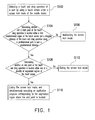
- FIG. 1 is a flowchart illustrating a method for unlocking screen and executing application program according to an embodiment of the invention.
- FIG. 2(a) to FIG. 2(c) are examples of segmented regions corresponding to application programs according to an embodiment of the invention.
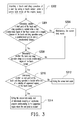
- FIG. 3 is a flowchart illustrating a method for unlocking screen and executing application program according to another embodiment of the invention.
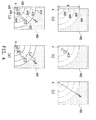
- FIG. 4(a) to FIG. 4(e) are diagrams illustrating examples of a method for unlocking screen and executing application program according to an embodiment of the invention.
- a mobile device having a touch screen is used to detect a touch and drag operation of a user on the touch screen under a screen lock mode, and a predetermined region and a plurality of segmented regions are defined on the touch screen. Then, it is determined whether the screen lock mode is exited according to the touch and drag operation of the user in these regions, and an application program is simultaneously executed.
- FIG. 1 is a flowchart illustrating a method for unlocking screen and executing application program according to an embodiment of the invention.
- the method of the embodiment is adapted to a mobile device having a touch screen, for example, a mobile phone, a personal digital assistant (PDA), a PDA phone, or a notebook computer, etc.
- PDA personal digital assistant
- FIG. 1 steps of the method are as follows.
- the mobile device of the embodiment has entered the screen lock mode, it is determined whether the screen is unlocked or the screen is unlocked while an application program is executed according to a touch and drag operation of the user.
- the mobile device may, for example, automatically enter the screen lock mode when an operation of the user is not detected for a period of time, or directly enter the screen lock mode when an indicating signal of a screen lock function is received, which is not limited by the invention.
- the touch screen of the mobile device still continually operates and does not stop operating due to that the screen lock mode is entered. Therefore, under the screen lock mode of the mobile device, the touch screen can still be used to detect the touch and drag operation of the user on the touch screen (step S102).
- the touch screen detects the touch and drag operation, it is determined whether a start point of the touch and drag operation is located within a first predetermined region of the touch screen and a dragging distance of the touch and drag operation along a predetermined path is over a predetermined distance.
- the first predetermined region may include a touch region of the whole touch screen or may only include a part of the touch region of the touch screen.
- the dragging distance has to be over the predetermined distance along the predetermined path, where the predetermined path is a straight line path, a spiral path, a clockwise path, a counter clockwise path or a Z-shape path, etc. Since a length of the predetermined distance is limited by a size of the touch screen, it is determined according to an actual design requirement, which is not limited by the invention.
- the mobile device maintains the screen lock mode (S106). If the start point of the touch and drag operation is located within the first predetermined region of the touch screen and the dragging distance is over the predetermined distance along the predetermined path, it is further determined whether an end point of the touch and drag operation is located within one of a plurality of segmented regions of the touch screen (S108).
- step S110 When the end point of the touch and drag operation is located within one of the segmented regions of the touch screen, the screen lock state is exited and the application program corresponding to the segmented region where the end point of the touch and drag operation is located is executed simultaneously (step S110).
- the mobile device When the end point of the touch and drag operation is not located within one of the segmented regions of the touch screen, the mobile device only releases the screen lock mode (S112).
- the segmented regions may include the touch region of the whole touch screen or may only include a part of the touch region of the touch screen.
- the segmented regions are a plurality of square regions obtained by equally segmenting the touch screen.
- the segmented regions are a plurality of ring-shape regions extending outwards while taking the start point of the touch and drag operation as a circle center.
- the segmenting method of the segmented regions is not limited by the invention.
- each segmented region corresponds to a different application program, and the application programs are predetermined by the user or commonly used application programs.
- FIG. 2(a) to FIG. 2(c) are examples of segmented regions corresponding to application programs according to an embodiment of the invention.
- a touch screen 210 of the mobile device has four square segmented regions respectively corresponding to four different application programs App_1-App_4.
- FIG. 2(b) and FIG. 2(c) a plurality of ring-shape regions extending outwards while taking the start point of the touch and drag operation as a circle center is taken as an example, as shown in FIG.
- a point A is the start point of the touch and drag operation
- a ring-shape region 212 corresponds to the first application program App_1
- a ring-shape region 214 corresponds to the second application program App_2
- a ring-shape region 216 corresponds to the third application program App_3.
- four circular segmented regions of FIG. 2(c) respectively correspond to the four different application programs App_1-App_4.
- a difference between the example of FIG. 2(b) and the example of FIG. 2(c) lies in different positions of the start point A of the touch and drag operation, so that ranges and sizes of the ring-shape regions are different. Therefore, the numbers, ranges and sizes of the segmented regions are not limited by the invention, which can be determined according to an actual design requirement.
- FIG. 3 is a flowchart illustrating a method for unlocking screen and executing application program according to another embodiment of the invention.
- step S302 under the screen lock mode of the mobile device, the touch screen is used to detect a touch and drag operation of the user. Then, in step S304, it is determined whether a start point of the touch and drag operation is located within a first predetermined region of the touch screen and a dragging distance of the touch and drag operation along a predetermined path is over a predetermined distance. If the above conditions are not satisfied, a step S306 is executed, by which the mobile device maintains the screen lock mode.
- a step S308 is executed, by which it is further determined whether the touch and drag operation drags to a second predetermined region of the touch screen. If the touch and drag operation does not drag to the second predetermined region, the screen lock state is still maintained, and if the touch and drag operation indeed drags to the second predetermined region, in step S310, it is further determined whether an end point of the touch and drag operation is located within one of a plurality of segmented regions. When the end point of the touch and drag operation is not located within one of the segmented regions, a step S312 is executed, by which only the screen lock state is exited. When the end point of the touch and drag operation is located within one of the segmented regions, in step S314, the screen lock state is exited and the application program corresponding to the segmented region where the end point is located is executed simultaneously.
- the mobile device confirms a valid touch and drag operation to exit the screen lock state and simultaneously execute the application program corresponding to the segmented region where the end point of the touch and drag operation is located.
- FIG. 4(a) to FIG. 4(e) are diagrams illustrating examples of the method for unlocking screen and executing application program according to an embodiment of the invention.
- the first predetermined region can be one of four corner regions of the touch screen.
- the start point A of the touch and drag operation is located within one of the four corners, and now the predetermined distance, the segmented regions and the second predetermined region can be defined.
- the segmented regions are a plurality of ring-shape regions extending outwards while taking the corner where the start point A of the touch and drag operation is located as a circle center. As shown in FIG.
- a first ring-shape region is located between a dot line 404 and a dot line 406, a second ring-shape region is located between the dot line 406 and a dot line 408, a third ring-shape region is located between the dot line 408 and a dot line 410, and a fourth ring-shape region is located inside the dot line 410.
- the remained gray part is the second predetermined region, and a length of the predetermined distance is set to d.
- an unlocking icon can be displayed in the first predetermined region to notify the user executing the touch and drag operation for unlocking.
- an unlocking icon 412 is, for example, an arrow symbol, and a direction of the arrow notifies the user that the touch and drag operation has to drag towards top right of the touch screen 402 for unlocking. Then, when the user drags from the start point A to a point B shown in FIG.
- solid lines 414-420 segment four ring-shape regions.
- an application program icon 422 represents a message function and is located in the first ring-shape region
- an application program icon 424 represents a multimedia function and is located in the second ring-shape region
- an application program icon 426 represents an address-book function and is located in the third ring-shape region
- an application program icon 428 represents a chat room function and is located in the fourth ring-shape region.
- the above application programs can be predetermined by the user or can be commonly used application programs that are automatically set by the mobile device, which is not limited by the invention.
- the mobile device exits the screen lock mode and executes the application program of the message function corresponding to the first ring-shape region.
- the touch and drag operation for activating the application program icon 422 is faster than the touch and drag operation for activating the application program icon 428 due to that the first ring-shape region is closer to the second predetermined region. Therefore, when the user sets the application program corresponding to each of the ring-shape regions, the user may set the most commonly used application program in the first ring-shape region, and then set the secondary commonly used application program in the second ring-shape region, and deduced by analogy. In this way, the utilization convenience is improved.
- the invention provides a method for unlocking screen and executing application program, by which when the user uses a mobile device having a touch screen, the user can unlock the screen while executing an application program through a simple touch and drag operation. In this way, steps and time for operating the touch screen can be saved, which improves convenience for the user using the mobile device having the touch screen.
Landscapes
- Engineering & Computer Science (AREA)
- General Engineering & Computer Science (AREA)
- Theoretical Computer Science (AREA)
- Human Computer Interaction (AREA)
- Physics & Mathematics (AREA)
- General Physics & Mathematics (AREA)
- Telephone Function (AREA)
- User Interface Of Digital Computer (AREA)
- Position Input By Displaying (AREA)
Abstract
Description
- This application claims the priority benefit of Taiwan application serial no.
99147235, filed on December 31, 2010 - The invention relates to a method for operating a user interface. Particularly, the invention relates to a method for unlocking screen and executing application program.
- In the current era of information explosion, electronic communication is indispensable in people's daily life, and people often use portable electronic devices to communicate with each other, especially mobile communication devices that can be carried around, for example, mobile phones or mobile devices having a wireless communication function, etc. However, regarding the portable mobile device requiring features of lightness, slimness, shortness and smallness, a size thereof is strictly limited, so that a touch screen technique is developed to integrate a soft keyboard with a screen to serve as an input interface of the portable electronic device, so as to save cost of a conventional keyboard and an area occupied by the conventional keyboard.
- However, the touch screen is quite sensitive to an external touch operation, and a user may inadvertently touch a screen key displayed on the touch screen to execute a specific function, for example, a call function by accident. Therefore, the mobile device has a screen lock mode to prevent the user from miss-touching the touch screen.
- Under the screen lock mode, the user has to complete a specific unlocking operation in order to normally use the input interface. Then, the user may operate the touch screen to activate and execute required application programs. Therefore, if the screen can be unlocked within an extremely short time while simultaneously executing an application program commonly used by the user (for example, editing a message or accessing the Internet, etc.), utilization convenience of the portable mobile device is improved.
- Accordingly, the invention is directed to a method for unlocking screen and executing application program, by which a user can unlock the screen within an extremely short time while simultaneously executing a commonly used application program.
- The invention provides a method for unlocking screen and executing application program. The method is adapted to a mobile device having a touch screen. Under a screen lock mode of the mobile device, the touch screen is used to detect a touch and drag operation of a user. Then, it is determined whether a start point of the touch and drag operation is located within a first predetermined region of the touch screen and a dragging distance of the touch and drag operation along a predetermined path is over a predetermined distance. If yes, it is further determined whether an end point of the touch and drag operation is located within one of a plurality of segmented regions of the touch screen, where the segmented regions respectively correspond to a plurality of application programs. When the end point of the touch and drag operation is located within one of the segmented regions, the screen lock state is exited and the application program corresponding to the segmented region where the end point of the touch and drag operation is located is executed simultaneously.
- In an embodiment of the invention, after the step of determining whether the start point of the touch and drag operation is located within the first predetermined region of the touch screen and the dragging distance of the touch and drag operation along the predetermined path is over the predetermined distance, the method further includes determining whether the touch and drag operation drags to a second predetermined region of the touch screen. If yes, it is further determined the segmented region where the end point of the touch and drag operation is located, so as to execute the corresponding application program.
- In an embodiment of the invention, the method for unlocking screen and executing application program further includes displaying an unlocking icon in the first predetermined region of the touch screen to notify the user executing the touch and drag operation for unlocking.
- In an embodiment of the invention, the method for unlocking screen and executing application program further includes displaying an application program icon in each of the segmented regions of the touch screen to notify the user the application program corresponding to each of the segmented regions.
- In an embodiment of the invention, the application program icons are displayed when it is determined that the start point of the touch and drag operation is located within the first predetermined region of the touch screen and the dragging distance is over the predetermined distance.
- In an embodiment of the invention, the segmented regions are a plurality of square regions obtained by equally segmenting the touch screen, or a plurality of ring-shape regions extending outwards while taking the start point of the touch and drag operation as a circle center.
- In an embodiment of the invention, the predetermined path is a straight line path, a spiral path, a clockwise path, a counter clockwise path or a Z-shape path.
- In an embodiment of the invention, the first predetermined region is one of four corner regions of the touch screen.
- In an embodiment of the invention, the segmented regions are a plurality of ring-shape regions extending outwards while taking the corner of the touch screen as a circle center.
- In an embodiment of the invention, the application programs corresponding to the segmented regions are predetermined by the user or commonly used application programs.
- According to the above descriptions, when the user uses a mobile device having a touch screen, the user can unlock the screen while executing an application program through a simple touch and drag operation. In this way, a step and time for clicking and selecting the application program to be activated after the screen is unlocked can be saved, which improves convenience for the user using the mobile device having the touch screen.
- In order to make the aforementioned and other features and advantages of the invention comprehensible, several exemplary embodiments accompanied with figures are described in detail below.
- The accompanying drawings are included to provide a further understanding of the invention, and are incorporated in and constitute a part of this specification. The drawings illustrate embodiments of the invention and, together with the description, serve to explain the principles of the invention.
-
FIG. 1 is a flowchart illustrating a method for unlocking screen and executing application program according to an embodiment of the invention. -
FIG. 2(a) to FIG. 2(c) are examples of segmented regions corresponding to application programs according to an embodiment of the invention. -
FIG. 3 is a flowchart illustrating a method for unlocking screen and executing application program according to another embodiment of the invention. -
FIG. 4(a) to FIG. 4(e) are diagrams illustrating examples of a method for unlocking screen and executing application program according to an embodiment of the invention. - In the invention, a mobile device having a touch screen is used to detect a touch and drag operation of a user on the touch screen under a screen lock mode, and a predetermined region and a plurality of segmented regions are defined on the touch screen. Then, it is determined whether the screen lock mode is exited according to the touch and drag operation of the user in these regions, and an application program is simultaneously executed. In order to fully convey the spirit of the invention to those skilled in the art, embodiments are provided below for descriptions.
-
FIG. 1 is a flowchart illustrating a method for unlocking screen and executing application program according to an embodiment of the invention. The method of the embodiment is adapted to a mobile device having a touch screen, for example, a mobile phone, a personal digital assistant (PDA), a PDA phone, or a notebook computer, etc. Referring toFIG. 1 , steps of the method are as follows. - In case that the mobile device of the embodiment has entered the screen lock mode, it is determined whether the screen is unlocked or the screen is unlocked while an application program is executed according to a touch and drag operation of the user. The mobile device may, for example, automatically enter the screen lock mode when an operation of the user is not detected for a period of time, or directly enter the screen lock mode when an indicating signal of a screen lock function is received, which is not limited by the invention.
- Moreover, although the mobile device has entered the screen lock mode, the touch screen of the mobile device still continually operates and does not stop operating due to that the screen lock mode is entered. Therefore, under the screen lock mode of the mobile device, the touch screen can still be used to detect the touch and drag operation of the user on the touch screen (step S102).
- When the touch screen detects the touch and drag operation, it is determined whether a start point of the touch and drag operation is located within a first predetermined region of the touch screen and a dragging distance of the touch and drag operation along a predetermined path is over a predetermined distance. (S104). The first predetermined region may include a touch region of the whole touch screen or may only include a part of the touch region of the touch screen. In order to distinguish whether the touch and drag operation detected by the touch screen is an operation intentionally performed by the user or inadvertently performed by the user, the dragging distance has to be over the predetermined distance along the predetermined path, where the predetermined path is a straight line path, a spiral path, a clockwise path, a counter clockwise path or a Z-shape path, etc. Since a length of the predetermined distance is limited by a size of the touch screen, it is determined according to an actual design requirement, which is not limited by the invention.
- If the start point of the touch and drag operation is not located within the first predetermined region of the touch screen, or the start point of the touch and drag operation is located within the first predetermined region of the touch screen though the dragging distance is not over the predetermined distance along the predetermined path, the mobile device maintains the screen lock mode (S106). If the start point of the touch and drag operation is located within the first predetermined region of the touch screen and the dragging distance is over the predetermined distance along the predetermined path, it is further determined whether an end point of the touch and drag operation is located within one of a plurality of segmented regions of the touch screen (S108).
- When the end point of the touch and drag operation is located within one of the segmented regions of the touch screen, the screen lock state is exited and the application program corresponding to the segmented region where the end point of the touch and drag operation is located is executed simultaneously (step S110). When the end point of the touch and drag operation is not located within one of the segmented regions of the touch screen, the mobile device only releases the screen lock mode (S112).
- The segmented regions may include the touch region of the whole touch screen or may only include a part of the touch region of the touch screen. In an embodiment of the invention, the segmented regions are a plurality of square regions obtained by equally segmenting the touch screen. In another embodiment, the segmented regions are a plurality of ring-shape regions extending outwards while taking the start point of the touch and drag operation as a circle center. The segmenting method of the segmented regions is not limited by the invention. Moreover, each segmented region corresponds to a different application program, and the application programs are predetermined by the user or commonly used application programs.
- For example,
FIG. 2(a) to FIG. 2(c) are examples of segmented regions corresponding to application programs according to an embodiment of the invention. Referring toFIG. 2 , inFIG. 2(a) , atouch screen 210 of the mobile device has four square segmented regions respectively corresponding to four different application programs App_1-App_4. InFIG. 2(b) and FIG. 2(c) , a plurality of ring-shape regions extending outwards while taking the start point of the touch and drag operation as a circle center is taken as an example, as shown inFIG. 2(b) , a point A is the start point of the touch and drag operation, a ring-shape region 212 corresponds to the first application program App_1, a ring-shape region 214 corresponds to the second application program App_2, and a ring-shape region 216 corresponds to the third application program App_3. Deduced by analogy, four circular segmented regions ofFIG. 2(c) respectively correspond to the four different application programs App_1-App_4. A difference between the example ofFIG. 2(b) and the example ofFIG. 2(c) lies in different positions of the start point A of the touch and drag operation, so that ranges and sizes of the ring-shape regions are different. Therefore, the numbers, ranges and sizes of the segmented regions are not limited by the invention, which can be determined according to an actual design requirement. -
FIG. 3 is a flowchart illustrating a method for unlocking screen and executing application program according to another embodiment of the invention. Referring toFIG. 3 , in step S302, under the screen lock mode of the mobile device, the touch screen is used to detect a touch and drag operation of the user. Then, in step S304, it is determined whether a start point of the touch and drag operation is located within a first predetermined region of the touch screen and a dragging distance of the touch and drag operation along a predetermined path is over a predetermined distance. If the above conditions are not satisfied, a step S306 is executed, by which the mobile device maintains the screen lock mode. If the above conditions of the step S304 are satisfied, a step S308 is executed, by which it is further determined whether the touch and drag operation drags to a second predetermined region of the touch screen. If the touch and drag operation does not drag to the second predetermined region, the screen lock state is still maintained, and if the touch and drag operation indeed drags to the second predetermined region, in step S310, it is further determined whether an end point of the touch and drag operation is located within one of a plurality of segmented regions. When the end point of the touch and drag operation is not located within one of the segmented regions, a step S312 is executed, by which only the screen lock state is exited. When the end point of the touch and drag operation is located within one of the segmented regions, in step S314, the screen lock state is exited and the application program corresponding to the segmented region where the end point is located is executed simultaneously. - In brief, only when the user first touches the first predetermined region, and then drags from the first predetermined region to the second predetermined region, and finally ends the touch and drag operation within one of the segmented regions, the mobile device confirms a valid touch and drag operation to exit the screen lock state and simultaneously execute the application program corresponding to the segmented region where the end point of the touch and drag operation is located.
- In order to further describe the method for unlocking screen and executing application program, another embodiment is provided below for description.
FIG. 4(a) to FIG. 4(e) are diagrams illustrating examples of the method for unlocking screen and executing application program according to an embodiment of the invention. - Referring to
FIG. 4 , under the screen lock state of atouch screen 402, it is first determined whether the start point of the touch and drag operation of the user is located within the first predetermined region of the touch screen. In the present embodiment, the first predetermined region can be one of four corner regions of the touch screen. As shown inFIG. 4(a) , the start point A of the touch and drag operation is located within one of the four corners, and now the predetermined distance, the segmented regions and the second predetermined region can be defined. The segmented regions are a plurality of ring-shape regions extending outwards while taking the corner where the start point A of the touch and drag operation is located as a circle center. As shown inFIG. 4(a) , a first ring-shape region is located between adot line 404 and adot line 406, a second ring-shape region is located between thedot line 406 and adot line 408, a third ring-shape region is located between thedot line 408 and adot line 410, and a fourth ring-shape region is located inside thedot line 410. The remained gray part is the second predetermined region, and a length of the predetermined distance is set to d. - After the start point A of the touch and drag operation is detected, an unlocking icon can be displayed in the first predetermined region to notify the user executing the touch and drag operation for unlocking. For example, as shown in
FIG. 4(b) , an unlockingicon 412 is, for example, an arrow symbol, and a direction of the arrow notifies the user that the touch and drag operation has to drag towards top right of thetouch screen 402 for unlocking. Then, when the user drags from the start point A to a point B shown inFIG. 4(c) , since a dragging distance of the touch and drag operation exceeds the predetermined distance d, and the touch and drag operation reaches the second predetermined region of thetouch screen 402, actual ranges of the segmented regions are displayed on the touch screen, and icons of the application programs are displayed in the segmented regions to notify the user the application program corresponding to each of the segmented regions. - As shown in
FIG. 4(d) , solid lines 414-420 segment four ring-shape regions. For example, anapplication program icon 422 represents a message function and is located in the first ring-shape region, anapplication program icon 424 represents a multimedia function and is located in the second ring-shape region, anapplication program icon 426 represents an address-book function and is located in the third ring-shape region, and anapplication program icon 428 represents a chat room function and is located in the fourth ring-shape region. The above application programs can be predetermined by the user or can be commonly used application programs that are automatically set by the mobile device, which is not limited by the invention. - Referring to
FIG. 4(e) , if the user continually drags from the point B to a point C on thetouch screen 402, and ends the touch and drag operation at the point C, since the end point C of the touch and drag operation is determined to be located in one of the four ring-shape regions, for example, the first ring-shape region ofFIG. 4(e) , the mobile device exits the screen lock mode and executes the application program of the message function corresponding to the first ring-shape region. - It should be noticed that since the first ring-shape region is closest to the second predetermined region, and the second ring-shape region is secondarily closest to the second predetermined region, and deduced by analogy, the touch and drag operation for activating the
application program icon 422 is faster than the touch and drag operation for activating theapplication program icon 428 due to that the first ring-shape region is closer to the second predetermined region. Therefore, when the user sets the application program corresponding to each of the ring-shape regions, the user may set the most commonly used application program in the first ring-shape region, and then set the secondary commonly used application program in the second ring-shape region, and deduced by analogy. In this way, the utilization convenience is improved. - In summary, the invention provides a method for unlocking screen and executing application program, by which when the user uses a mobile device having a touch screen, the user can unlock the screen while executing an application program through a simple touch and drag operation. In this way, steps and time for operating the touch screen can be saved, which improves convenience for the user using the mobile device having the touch screen.
- It will be apparent to those skilled in the art that various modifications and variations can be made to the structure of the invention without departing from the scope or spirit of the invention. In view of the foregoing, it is intended that the invention cover modifications and variations of this invention provided they fall within the scope of the following claims and their equivalents.
Claims (11)
- A method for unlocking screen and executing application program, adapted to a mobile device having a touch screen (210, 402), the method comprising:detecting (S102, S302) a touch and drag operation of a user by using the touch screen (210, 402) under a screen lock mode of the mobile device;determining (S104) whether a start point (A) of the touch and drag operation is located within a first predetermined region of the touch screen (210, 402) and a dragging distance of the touch and drag operation along a predetermined path is over a predetermined distance;if yes, determining (S108, S310) whether an end point (B) of the touch and drag operation is located within one of a plurality of segmented regions (212, 214, 216) of the touch screen (210, 402), wherein the segmented regions (212, 214, 216) respectively correspond to a plurality of application programs (App_1, App_2, App_3) of the mobile device; andexiting (S 110, S314) the screen lock mode, and simultaneously executing the application program (App_1, App_2, App_3) corresponding to the segmented region (212, 214, 216) where the end point (B) is located when the end point (B) of the touch and drag operation is located within one of the segmented regions (212, 214, 216).
- The method for unlocking screen and executing application program as claimed in claim 1, wherein after the step of determining whether the start point (A) of the touch and drag operation is located within the first predetermined region of the touch screen (210, 402) and the dragging distance of the touch and drag operation along the predetermined path is over the predetermined distance, the method further comprises:determining (S308) whether the touch and drag operation drags to a second predetermined region of the touch screen (210, 402); andif yes, determining the segmented region (212, 214, 216) where the end point (B) of the touch and drag operation is located (S310), so as to execute the corresponding application program.
- The method for unlocking screen and executing application program as claimed in claim 1 or 2, further comprising:displaying an unlocking icon (412) in the first predetermined region of the touch screen (210, 402) to notify the user executing the touch and drag operation for unlocking.
- The method for unlocking screen and executing application program as claimed in any one of claims 1 to 3, further comprising:displaying an application program icon (422, 424, 426, 428) in each of the segmented regions (212, 214, 216) of the touch screen (210, 402) to notify the user the application program corresponding to each of the segmented regions (212, 214, 216).
- The method for unlocking screen and executing application program as claimed in claim 4, wherein the application program icons (422, 424, 426, 428) are displayed when it is determined that the start point (A) of the touch and drag operation is located within the first predetermined region of the touch screen (210, 402) and the dragging distance is over the predetermined distance.
- The method for unlocking screen and executing application program as claimed in any one of claims 1 to 5, wherein the segmented regions (212, 214, 216) are a plurality of square regions obtained by equally segmenting the touch screen (210, 402), or a plurality of ring-shape regions extending outwards while taking the start point (A) of the touch and drag operation as a circle center.
- The method for unlocking screen and executing application program as claimed in any one of claims 1 to 6, wherein the predetermined path is a straight line path, a spiral path, a clockwise path, a counter clockwise path or a Z-shape path.
- The method for unlocking screen and executing application program as claimed in any one of claims 1 to 7, wherein the first predetermine region is one of four corner regions of the touch screen (210, 402).
- The method for unlocking screen and executing application program as claimed in claim 8, wherein the segmented regions (212, 214, 216) are a plurality of ring-shape regions extending outwards while taking the corner of the touch screen (210, 402) as a circle center.
- The method for unlocking screen and executing application program as claimed in any one of claims 1 to 9, wherein the application programs (App_1, App_2, App_3) corresponding to the segmented regions (212, 214, 216) are predetermined by the user or commonly used application programs (App_1, App_2, App_3).
- The method for unlocking screen and executing application program as claimed in any one of claims 1 to 10, wherein the application programs (App_1, App_2, App_3) are arranged according to a using frequency thereof.
Applications Claiming Priority (1)
| Application Number | Priority Date | Filing Date | Title |
|---|---|---|---|
| TW099147235A TW201227393A (en) | 2010-12-31 | 2010-12-31 | Method for unlocking screen and executing application program |
Publications (2)
| Publication Number | Publication Date |
|---|---|
| EP2472377A2 true EP2472377A2 (en) | 2012-07-04 |
| EP2472377A3 EP2472377A3 (en) | 2015-11-25 |
Family
ID=44533990
Family Applications (1)
| Application Number | Title | Priority Date | Filing Date |
|---|---|---|---|
| EP11178311.4A Withdrawn EP2472377A3 (en) | 2010-12-31 | 2011-08-22 | Method for unlocking screen and executing application program |
Country Status (4)
| Country | Link |
|---|---|
| US (1) | US20120174042A1 (en) |
| EP (1) | EP2472377A3 (en) |
| CN (1) | CN102566881A (en) |
| TW (1) | TW201227393A (en) |
Cited By (6)
| Publication number | Priority date | Publication date | Assignee | Title |
|---|---|---|---|---|
| KR101398183B1 (en) | 2013-05-07 | 2014-05-23 | 공정인 | Method of direct-running an mirror-application software of smart phone using hardware input means and the smart phone having the method |
| EP2869171A4 (en) * | 2012-08-02 | 2015-09-02 | Zte Corp | Screen unlocking method, device and terminal |
| CN105373325A (en) * | 2014-09-01 | 2016-03-02 | 深圳富泰宏精密工业有限公司 | Touch screen unlocking method and system |
| EP3026542A1 (en) * | 2014-11-27 | 2016-06-01 | LG Electronics Inc. | Mobile terminal and method for controlling the same |
| EP3023865A4 (en) * | 2013-07-18 | 2017-03-08 | Samsung Electronics Co., Ltd. | Portable terminal having display and method for operating same |
| EP3435218A1 (en) * | 2017-07-28 | 2019-01-30 | Beijing Xiaomi Mobile Software Co., Ltd. | Method and device for displaying application, and storage medium |
Families Citing this family (74)
| Publication number | Priority date | Publication date | Assignee | Title |
|---|---|---|---|---|
| US8638385B2 (en) | 2011-06-05 | 2014-01-28 | Apple Inc. | Device, method, and graphical user interface for accessing an application in a locked device |
| KR20130027774A (en) * | 2011-09-08 | 2013-03-18 | 삼성전자주식회사 | Method and apparatus for providing user interface to control lock state |
| US8887081B2 (en) * | 2011-09-24 | 2014-11-11 | VIZIO Inc. | Touch display unlock mechanism |
| KR101853856B1 (en) * | 2011-10-04 | 2018-05-04 | 엘지전자 주식회사 | Mobile terminal and control method for the same |
| JP5816516B2 (en) * | 2011-10-24 | 2015-11-18 | 京セラ株式会社 | Electronic device, control program, and process execution method |
| US9645733B2 (en) * | 2011-12-06 | 2017-05-09 | Google Inc. | Mechanism for switching between document viewing windows |
| KR20130093721A (en) * | 2011-12-23 | 2013-08-23 | 삼성전자주식회사 | Display apparatus for releasing lock status and method thereof |
| US9372978B2 (en) * | 2012-01-20 | 2016-06-21 | Apple Inc. | Device, method, and graphical user interface for accessing an application in a locked device |
| US8806383B2 (en) * | 2012-02-06 | 2014-08-12 | Motorola Mobility Llc | Initiation of actions by a portable computing device from a locked state |
| US8847903B2 (en) | 2012-04-26 | 2014-09-30 | Motorola Mobility Llc | Unlocking an electronic device |
| KR101413286B1 (en) * | 2012-05-02 | 2014-07-01 | 주식회사 팬택 | Electronic device and apparatus and method for unlocking the electronic device |
| WO2013169865A2 (en) | 2012-05-09 | 2013-11-14 | Yknots Industries Llc | Device, method, and graphical user interface for moving a user interface object based on an intensity of a press input |
| CN109298789B (en) | 2012-05-09 | 2021-12-31 | 苹果公司 | Device, method and graphical user interface for providing feedback on activation status |
| CN107977084B (en) | 2012-05-09 | 2021-11-05 | 苹果公司 | Method and apparatus for providing haptic feedback for operations performed in a user interface |
| US9207860B2 (en) * | 2012-05-25 | 2015-12-08 | Blackberry Limited | Method and apparatus for detecting a gesture |
| KR20130134508A (en) * | 2012-05-31 | 2013-12-10 | 삼성전기주식회사 | Unlocking method using touch-screen and electric device thereof |
| US20130346921A1 (en) * | 2012-06-26 | 2013-12-26 | Google Inc. | Light field lockscreen |
| CN104321731B (en) * | 2012-08-09 | 2018-03-16 | 东莞宇龙通信科技有限公司 | Terminals and Terminal Unlocking Methods |
| CN102880408B (en) * | 2012-08-10 | 2015-02-11 | 北京奇虎科技有限公司 | Scenario unlocking method of terminal equipment and terminal equipment |
| US9696879B2 (en) | 2012-09-07 | 2017-07-04 | Google Inc. | Tab scrubbing using navigation gestures |
| KR20140042280A (en) * | 2012-09-28 | 2014-04-07 | 엘지전자 주식회사 | Portable device and controlling method thereof |
| WO2014060128A1 (en) | 2012-10-19 | 2014-04-24 | Telefonica Digital España, S.L.U. | Method and device for improved unlocking of an electronic device |
| WO2014060129A1 (en) | 2012-10-19 | 2014-04-24 | Telefonica Digital España, S.L.U. | Method and device for improved electronic device unlocking |
| TWI506476B (en) * | 2012-11-29 | 2015-11-01 | Egalax Empia Technology Inc | Method for unlocking touch screen, electronic device thereof, and recording medium thereof |
| CN103019600A (en) * | 2012-12-14 | 2013-04-03 | 广东欧珀移动通信有限公司 | A method and system for opening an application program in a mobile terminal |
| TWI486868B (en) * | 2012-12-26 | 2015-06-01 | Giga Byte Tech Co Ltd | Electrionic device with shortcut function and control method thereof |
| WO2014105279A1 (en) | 2012-12-29 | 2014-07-03 | Yknots Industries Llc | Device, method, and graphical user interface for switching between user interfaces |
| KR101742808B1 (en) | 2012-12-29 | 2017-06-01 | 애플 인크. | Device, method, and graphical user interface for navigating user interface hierachies |
| CN103927106A (en) * | 2013-01-14 | 2014-07-16 | 富泰华工业(深圳)有限公司 | Application program starting system and method |
| CN103064628B (en) * | 2013-01-15 | 2016-01-13 | 深圳市朵唯志远科技有限公司 | A kind ofly unlock and start method and the mobile intelligent terminal of application program |
| TWI579730B (en) * | 2013-01-16 | 2017-04-21 | 群邁通訊股份有限公司 | System and method for unlocking screen. |
| KR102025806B1 (en) * | 2013-02-04 | 2019-09-26 | 엘지전자 주식회사 | Operating Method for Mobil terminal |
| KR20140115761A (en) * | 2013-03-22 | 2014-10-01 | 삼성전자주식회사 | Controlling Method of Screen lock and Electronic Device supporting the same |
| WO2014157885A1 (en) | 2013-03-27 | 2014-10-02 | Samsung Electronics Co., Ltd. | Method and device for providing menu interface |
| US9996246B2 (en) | 2013-03-27 | 2018-06-12 | Samsung Electronics Co., Ltd. | Device and method for displaying execution result of application |
| WO2014157886A1 (en) | 2013-03-27 | 2014-10-02 | Samsung Electronics Co., Ltd. | Method and device for executing application |
| WO2014157893A1 (en) | 2013-03-27 | 2014-10-02 | Samsung Electronics Co., Ltd. | Method and device for providing a private page |
| US10229258B2 (en) | 2013-03-27 | 2019-03-12 | Samsung Electronics Co., Ltd. | Method and device for providing security content |
| WO2014157908A1 (en) | 2013-03-27 | 2014-10-02 | Samsung Electronics Co., Ltd. | Device and method for displaying execution result of application |
| WO2014157894A1 (en) | 2013-03-27 | 2014-10-02 | Samsung Electronics Co., Ltd. | Display apparatus displaying user interface and method of providing the user interface |
| WO2014157897A1 (en) | 2013-03-27 | 2014-10-02 | Samsung Electronics Co., Ltd. | Method and device for switching tasks |
| JP6052004B2 (en) * | 2013-03-27 | 2016-12-27 | 富士通株式会社 | Terminal device and terminal control program |
| KR20140143599A (en) * | 2013-06-07 | 2014-12-17 | 주식회사 엘지씨엔에스 | Method and apparatus for unlocking a locking mode of terminal |
| TWI502394B (en) * | 2013-09-24 | 2015-10-01 | Wistron Corp | Electronic device and unlocking method thereof |
| CN104573437B (en) * | 2013-10-23 | 2018-12-28 | 深圳市腾讯计算机系统有限公司 | Information authentication method and device and terminal |
| KR20150061336A (en) * | 2013-11-27 | 2015-06-04 | 엘지전자 주식회사 | Mobile terminal and method for controlling the same |
| TWI502479B (en) | 2013-12-24 | 2015-10-01 | Acer Inc | Unlocking method and electronic device |
| CN104834441B (en) * | 2014-02-11 | 2018-07-31 | 联想企业解决方案(新加坡)有限公司 | Method and device for unlocking touch screen |
| CN104077518A (en) * | 2014-07-03 | 2014-10-01 | 南昌欧菲生物识别技术有限公司 | Device and method for unlocking and executing application |
| US20160042172A1 (en) * | 2014-08-06 | 2016-02-11 | Samsung Electronics Co., Ltd. | Method and apparatus for unlocking devices |
| KR20160020738A (en) * | 2014-08-14 | 2016-02-24 | 삼성전자주식회사 | Electronic Device And Method For Providing User Interface Of The Same |
| CN104281411B (en) * | 2014-10-13 | 2017-10-24 | 惠州Tcl移动通信有限公司 | Touch screen unlocking method and system based on mobile terminal |
| CN104361273A (en) * | 2014-10-23 | 2015-02-18 | 上海天奕达电子科技有限公司 | Intelligent page turning method and terminal |
| CN105786090B (en) * | 2014-12-17 | 2019-11-08 | 宏碁股份有限公司 | Electronic device, electronic device suite, and user interface operation method |
| CN104636065A (en) * | 2014-12-31 | 2015-05-20 | 小米科技有限责任公司 | Method and device for awakening terminal |
| CN104636070B (en) * | 2015-02-09 | 2019-04-26 | 联想(北京)有限公司 | Method of toch control and electronic equipment |
| US9632664B2 (en) | 2015-03-08 | 2017-04-25 | Apple Inc. | Devices, methods, and graphical user interfaces for manipulating user interface objects with visual and/or haptic feedback |
| US10095396B2 (en) | 2015-03-08 | 2018-10-09 | Apple Inc. | Devices, methods, and graphical user interfaces for interacting with a control object while dragging another object |
| KR20160143135A (en) * | 2015-06-04 | 2016-12-14 | 엘지전자 주식회사 | Mobile terminal and method for controlling the same |
| US9891811B2 (en) * | 2015-06-07 | 2018-02-13 | Apple Inc. | Devices and methods for navigating between user interfaces |
| US9860451B2 (en) | 2015-06-07 | 2018-01-02 | Apple Inc. | Devices and methods for capturing and interacting with enhanced digital images |
| US9880735B2 (en) | 2015-08-10 | 2018-01-30 | Apple Inc. | Devices, methods, and graphical user interfaces for manipulating user interface objects with visual and/or haptic feedback |
| CN105183461A (en) * | 2015-08-24 | 2015-12-23 | 努比亚技术有限公司 | Electronic device and control method |
| CN105426214B (en) * | 2015-12-08 | 2019-04-30 | 惠州Tcl移动通信有限公司 | A kind of application program launching method, system and mobile terminal |
| CN105912258B (en) * | 2016-04-13 | 2019-12-13 | 北京小米移动软件有限公司 | Operation and processing method and device |
| CN106096349A (en) * | 2016-06-07 | 2016-11-09 | 惠州Tcl移动通信有限公司 | A kind of method quickly opening application based on screen locking and mobile terminal |
| CN106572239A (en) * | 2016-10-19 | 2017-04-19 | 惠州Tcl移动通信有限公司 | Incoming call processing method |
| RU2658803C2 (en) * | 2016-10-28 | 2018-06-22 | Общество с ограниченной ответственностью "ПИРФ" (ООО "ПИРФ") | Method and system of calling user interface on the screen of an electronic device |
| CN106484433A (en) * | 2016-11-02 | 2017-03-08 | 珠海格力电器股份有限公司 | Terminal unlocking method, terminal unlocking device and terminal |
| US10409406B2 (en) | 2017-03-03 | 2019-09-10 | Verifone, Inc. | Systems and methods for increased security in authentication code entry for touch-sensitive screen enabled devices |
| CN108874450B (en) * | 2018-05-28 | 2021-05-04 | 北京小米移动软件有限公司 | Method and device for waking up voice assistant |
| US11960615B2 (en) | 2021-06-06 | 2024-04-16 | Apple Inc. | Methods and user interfaces for voice-based user profile management |
| CN115964994A (en) * | 2021-10-08 | 2023-04-14 | 北京字跳网络技术有限公司 | Information processing method, device, terminal and storage medium |
| US12517995B2 (en) | 2023-05-05 | 2026-01-06 | Apple Inc. | Devices, methods, and graphical user interfaces for transitioning between multiple modes of operation |
Family Cites Families (19)
| Publication number | Priority date | Publication date | Assignee | Title |
|---|---|---|---|---|
| FI20021655A7 (en) * | 2002-06-19 | 2003-12-20 | Nokia Corp | Method for unlocking and portable electronic device |
| US7657849B2 (en) * | 2005-12-23 | 2010-02-02 | Apple Inc. | Unlocking a device by performing gestures on an unlock image |
| KR100672605B1 (en) * | 2006-03-30 | 2007-01-24 | 엘지전자 주식회사 | Item selection method and terminal for same |
| US8127254B2 (en) * | 2007-06-29 | 2012-02-28 | Nokia Corporation | Unlocking a touch screen device |
| CN101526861B (en) * | 2008-03-06 | 2012-01-18 | 郑国书 | A method for recognizing mouse gestures and executing corresponding instructions according to the recognition results |
| CN101546231B (en) * | 2008-03-24 | 2012-09-26 | 宏碁股份有限公司 | Method and device for multi-object orientation touch selection |
| TWI353545B (en) * | 2008-04-17 | 2011-12-01 | Htc Corp | Method for unlocking screen, mobile electronic dev |
| CN101587398A (en) * | 2008-05-23 | 2009-11-25 | 鸿富锦精密工业(深圳)有限公司 | Password protection method |
| KR101517967B1 (en) * | 2008-07-07 | 2015-05-06 | 엘지전자 주식회사 | Controlling a Mobile Terminal |
| CA2739760C (en) * | 2008-10-06 | 2016-12-06 | Tat The Astonishing Tribe Ab | Method for application launch and system function invocation |
| KR101565768B1 (en) * | 2008-12-23 | 2015-11-06 | 삼성전자주식회사 | Apparatus and method for unlocking a locking mode of portable terminal |
| KR101549558B1 (en) * | 2009-03-18 | 2015-09-03 | 엘지전자 주식회사 | Mobile terminal and control method thereof |
| US8539382B2 (en) * | 2009-04-03 | 2013-09-17 | Palm, Inc. | Preventing unintentional activation and/or input in an electronic device |
| KR101537706B1 (en) * | 2009-04-16 | 2015-07-20 | 엘지전자 주식회사 | Mobile terminal and control method thereof |
| KR101564222B1 (en) * | 2009-05-26 | 2015-11-06 | 삼성전자주식회사 | A method and device for releasing a lock mode of a portable terminal |
| KR101768540B1 (en) * | 2009-10-30 | 2017-08-18 | 삼성전자주식회사 | Mobile device and method for providing UI |
| US20110271181A1 (en) * | 2010-04-28 | 2011-11-03 | Acer Incorporated | Screen unlocking method and electronic apparatus thereof |
| US8402533B2 (en) * | 2010-08-06 | 2013-03-19 | Google Inc. | Input to locked computing device |
| TWI441072B (en) * | 2010-09-21 | 2014-06-11 | Altek Corp | Touch screen unlock method and electric device with camera function thereof |
-
2010
- 2010-12-31 TW TW099147235A patent/TW201227393A/en unknown
-
2011
- 2011-02-22 CN CN2011100419948A patent/CN102566881A/en active Pending
- 2011-07-27 US US13/191,485 patent/US20120174042A1/en not_active Abandoned
- 2011-08-22 EP EP11178311.4A patent/EP2472377A3/en not_active Withdrawn
Non-Patent Citations (1)
| Title |
|---|
| None |
Cited By (11)
| Publication number | Priority date | Publication date | Assignee | Title |
|---|---|---|---|---|
| EP2869171A4 (en) * | 2012-08-02 | 2015-09-02 | Zte Corp | Screen unlocking method, device and terminal |
| US9380148B2 (en) | 2012-08-02 | 2016-06-28 | Zte Corporation | Screen unlocking method, device and terminal |
| KR101398183B1 (en) | 2013-05-07 | 2014-05-23 | 공정인 | Method of direct-running an mirror-application software of smart phone using hardware input means and the smart phone having the method |
| EP3023865A4 (en) * | 2013-07-18 | 2017-03-08 | Samsung Electronics Co., Ltd. | Portable terminal having display and method for operating same |
| US10775869B2 (en) | 2013-07-18 | 2020-09-15 | Samsung Electronics Co., Ltd. | Mobile terminal including display and method of operating the same |
| CN105373325A (en) * | 2014-09-01 | 2016-03-02 | 深圳富泰宏精密工业有限公司 | Touch screen unlocking method and system |
| CN105373325B (en) * | 2014-09-01 | 2020-07-14 | 深圳富泰宏精密工业有限公司 | Touch screen unlocking method and system |
| EP3026542A1 (en) * | 2014-11-27 | 2016-06-01 | LG Electronics Inc. | Mobile terminal and method for controlling the same |
| US9927967B2 (en) | 2014-11-27 | 2018-03-27 | Lg Electronics Inc. | Mobile terminal and method for controlling the same |
| EP3435218A1 (en) * | 2017-07-28 | 2019-01-30 | Beijing Xiaomi Mobile Software Co., Ltd. | Method and device for displaying application, and storage medium |
| US11243660B2 (en) | 2017-07-28 | 2022-02-08 | Beijing Xiaomi Mobile Software Co., Ltd. | Method and device for displaying application, and storage medium |
Also Published As
| Publication number | Publication date |
|---|---|
| TW201227393A (en) | 2012-07-01 |
| EP2472377A3 (en) | 2015-11-25 |
| US20120174042A1 (en) | 2012-07-05 |
| CN102566881A (en) | 2012-07-11 |
Similar Documents
| Publication | Publication Date | Title |
|---|---|---|
| US20120174042A1 (en) | Method for unlocking screen and executing application program | |
| US8826172B2 (en) | Method for unlocking screen-locked state of touch screen, electronic device and recording medium using the same | |
| KR101528262B1 (en) | A Method of Unlocking a Locking Mode of Portable Terminal and an Apparatus having the same | |
| US9411510B2 (en) | Techniques for preventing typographical errors on soft keyboards | |
| US9026950B2 (en) | Gesture-enabled settings | |
| CN101828380B (en) | User interface with enlarged icon display of key function | |
| US9965158B2 (en) | Touch screen hover input handling | |
| US9342235B2 (en) | Device, method, and storage medium storing program | |
| KR101445944B1 (en) | User interface methods for ending an application | |
| US9619139B2 (en) | Device, method, and storage medium storing program | |
| US7856605B2 (en) | Method, system, and graphical user interface for positioning an insertion marker in a touch screen display | |
| US7602378B2 (en) | Method, system, and graphical user interface for selecting a soft keyboard | |
| US7956846B2 (en) | Portable electronic device with content-dependent touch sensitivity | |
| US8072435B2 (en) | Mobile electronic device, method for entering screen lock state and recording medium thereof | |
| US9280275B2 (en) | Device, method, and storage medium storing program | |
| US7667148B2 (en) | Method, device, and graphical user interface for dialing with a click wheel | |
| US20100107067A1 (en) | Input on touch based user interfaces | |
| US20140189584A1 (en) | Method for switching applications in user interface and electronic apparatus using the same | |
| CN105284098A (en) | Salient control element and mobile device with salient control element | |
| US20090040188A1 (en) | Terminal having touch screen and method of performing function thereof | |
| KR101354841B1 (en) | Electronic Device With Touch Screen And Input Data Processing Method Thereof | |
| CN103186332A (en) | screen unlock method | |
| CN103116459A (en) | Screen unlocking method | |
| KR20100097358A (en) | Method for processing widget in portable electronic device with touch-screen | |
| CN103713840A (en) | Portable device and method for adjusting button click range |
Legal Events
| Date | Code | Title | Description |
|---|---|---|---|
| AK | Designated contracting states |
Kind code of ref document: A2 Designated state(s): AL AT BE BG CH CY CZ DE DK EE ES FI FR GB GR HR HU IE IS IT LI LT LU LV MC MK MT NL NO PL PT RO RS SE SI SK SM TR |
|
| AX | Request for extension of the european patent |
Extension state: BA ME |
|
| PUAI | Public reference made under article 153(3) epc to a published international application that has entered the european phase |
Free format text: ORIGINAL CODE: 0009012 |
|
| PUAL | Search report despatched |
Free format text: ORIGINAL CODE: 0009013 |
|
| AK | Designated contracting states |
Kind code of ref document: A3 Designated state(s): AL AT BE BG CH CY CZ DE DK EE ES FI FR GB GR HR HU IE IS IT LI LT LU LV MC MK MT NL NO PL PT RO RS SE SI SK SM TR |
|
| AX | Request for extension of the european patent |
Extension state: BA ME |
|
| RIC1 | Information provided on ipc code assigned before grant |
Ipc: G06F 3/048 20130101AFI20151016BHEP |
|
| STAA | Information on the status of an ep patent application or granted ep patent |
Free format text: STATUS: THE APPLICATION IS DEEMED TO BE WITHDRAWN |
|
| 18D | Application deemed to be withdrawn |
Effective date: 20160526 |