EP2455846A2 - Application displaying method for touch-controlled device and touch-controlled device thereof - Google Patents
Application displaying method for touch-controlled device and touch-controlled device thereof Download PDFInfo
- Publication number
- EP2455846A2 EP2455846A2 EP11178420A EP11178420A EP2455846A2 EP 2455846 A2 EP2455846 A2 EP 2455846A2 EP 11178420 A EP11178420 A EP 11178420A EP 11178420 A EP11178420 A EP 11178420A EP 2455846 A2 EP2455846 A2 EP 2455846A2
- Authority
- EP
- European Patent Office
- Prior art keywords
- application
- touch
- touch panel
- controlled device
- gesture
- Prior art date
- Legal status (The legal status is an assumption and is not a legal conclusion. Google has not performed a legal analysis and makes no representation as to the accuracy of the status listed.)
- Withdrawn
Links
Images





Classifications
-
- G—PHYSICS
- G06—COMPUTING OR CALCULATING; COUNTING
- G06F—ELECTRIC DIGITAL DATA PROCESSING
- G06F3/00—Input arrangements for transferring data to be processed into a form capable of being handled by the computer; Output arrangements for transferring data from processing unit to output unit, e.g. interface arrangements
- G06F3/01—Input arrangements or combined input and output arrangements for interaction between user and computer
- G06F3/048—Interaction techniques based on graphical user interfaces [GUI]
- G06F3/0487—Interaction techniques based on graphical user interfaces [GUI] using specific features provided by the input device, e.g. functions controlled by the rotation of a mouse with dual sensing arrangements, or of the nature of the input device, e.g. tap gestures based on pressure sensed by a digitiser
- G06F3/0488—Interaction techniques based on graphical user interfaces [GUI] using specific features provided by the input device, e.g. functions controlled by the rotation of a mouse with dual sensing arrangements, or of the nature of the input device, e.g. tap gestures based on pressure sensed by a digitiser using a touch-screen or digitiser, e.g. input of commands through traced gestures
- G06F3/04883—Interaction techniques based on graphical user interfaces [GUI] using specific features provided by the input device, e.g. functions controlled by the rotation of a mouse with dual sensing arrangements, or of the nature of the input device, e.g. tap gestures based on pressure sensed by a digitiser using a touch-screen or digitiser, e.g. input of commands through traced gestures for inputting data by handwriting, e.g. gesture or text
-
- G—PHYSICS
- G06—COMPUTING OR CALCULATING; COUNTING
- G06F—ELECTRIC DIGITAL DATA PROCESSING
- G06F2203/00—Indexing scheme relating to G06F3/00 - G06F3/048
- G06F2203/048—Indexing scheme relating to G06F3/048
- G06F2203/04808—Several contacts: gestures triggering a specific function, e.g. scrolling, zooming, right-click, when the user establishes several contacts with the surface simultaneously; e.g. using several fingers or a combination of fingers and pen
Definitions
- the present invention relates to a method for displaying applications of a touch-controlled device and a touch-controlled device according to the pre-characterizing clauses of claims 1 and 8.
- the present invention aims at providing a touch-controlled device and a related method for detecting a gesture to display an application container to improve the usage efficiency.
- the claimed method for displaying applications of a touch-controlled device includes the following steps: generating an electronic signal according a gesture applied on a touch panel of the touch-controlled device; generating a detection result according to the electronic signal, wherein the detection result includes a first position corresponding to the touch panel; when the detection result indicates that the detected gesture is a grab gesture, starting an application container; and outputting a control signal to the touch panel according to the application container, in order to display the application container at the first position.
- the touch-controlled device may include a touch panel, a detecting unit, a determining unit, and a control unit.
- the touch panel is arranged for generating an electronic signal according a gesture applied on a touch panel, and for displaying an application container according to a control signal.
- the detecting unit is arranged for generating a detection result according to the electronic signal, wherein the detection result includes a first position of the gesture corresponding to the touch panel.
- the determining unit is arranged for starting the application container when the detection result indicates that the detected gesture is a multi-fingered grab gesture.
- the control unit is arranged for outputting the control signal to the touch panel according to the application container, in order to display the application container at the first position.
- a touch-controlled device and a related method for detecting a gesture applied on a touch panel of the touch-controlled device to display an application container are provided in the present invention.
- the application menu and the functional menu can be quickly launched in order to avoid complicated operating processes and improve the usage efficiency.
- FIG. 1 is a diagram illustrating a touch-controlled device 100 according to a first embodiment of the present invention.
- the touch-controlled device 100 may include, a touch panel 101, a detecting unit 110, a determining unit 120, and a control unit 130.
- the touch panel 101 is an input device of the touch-controlled device 100, and is arranged for generating an electronic signal SIG according a gesture applied on the touch panel 101, and for displaying an application container APC according to a control signal CTRL.
- the detecting unit 110 is coupled to the touch panel 101 , and is arranged for generating a detection result DR according to the electronic signal SIG, wherein the detection result DR includes information related to a first position P1 of the gesture corresponding to the touch panel 101.
- the determining unit 120 is coupled to the detecting unit 110, and is arranged for starting the application container APC when the detection result DR indicates that the detected gesture is a multi-fingered grab gesture.
- the control unit 130 is coupled to the determining unit 120 and the touch panel 101, and is arranged for outputting the control signal CTRL to the touch panel 101 according to the application container APC.
- the touch panel 101 is further arranged for displaying the application container APC at the first position P1 according to the control signal CTRL.
- the first position P1 can be a center point of the gesture, but the present invention is not limited to this only. In other embodiments, the first position P1 can be defined as any point near the gesture.
- the display position of the application container APC is not fixed, and can be changed as the position of the gesture changes.
- the application container APC may include an application menu APP_LST and a functional menu AXN_LST.
- the functional menu AXN_LST shows a roulette shape
- the application menu APP_LST shows a circular shape in the periphery of the functional menu AXN_LST.
- the touch-controlled device 100 may be a notebook PC or a tablet PC
- the touch panel 101 may be an implemented by a multi-touch touch panel, a capacitive touch panel, a resistive touch panel, or an optical touch panel.
- the detecting unit 110 can determine the type of the gesture according to characteristics of the electronic signal SIG and translate its related information (such as, the start status, the process, the end status, and/or the position of the gesture) into the detecting result DR.
- the position of the gesture is corresponding to the first position P1, such that the determining unit 1 20 can start the application container APC when the detection result DR indicates that the detected gesture is a multi-fingered grab gesture.
- the control unit 130 may output the control signal CTRL to the touch panel 101 according to the application container APC, in order to display the application container APC at the first position P1.
- the multi-fingered grab gesture is presented merely to illustrate practicable designs of the present invention, which implies that the detected gesture will not be implemented by a single-fingered gesture or a two-fingered gesture, and in no way should be considered to be limitations of the scope of the present invention.
- FIG. 2 and FIG.3 are diagrams illustrating how to display an application container on a touch-controlled device according to a multi-fingered grab gesture according to an exemplary embodiment of the present invention.
- FIG.2 shows how to apply a multi-fingered grab gesture on the touch-controlled device 100 according to an exemplary embodiment of the present invention.
- the corresponding electronic signal SIG is generated by the touch panel 1 01.
- the detecting unit 110 may generate the detection result DR according to the electronic signal SIG, wherein the detection result DR includes the first position P1 which is corresponding to the position of the multi-fingered grab gesture applied on the touch panel 101.
- FIG. 3 shows how to display the application container APC on the touch panel 101 of the touch-controlled device 100.
- the determining unit 1 20 may start the application container APC.
- the control unit 1 30 may output the control signal CTRL to the touch panel 101 according to the application container APC, in order to display the application container APC at the first position P1.
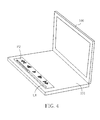
- FIG. 4 is a diagram illustrating how to display an interactive user interface Ul of the touch-controlled device 100 according to an exemplary embodiment of the present invention.
- the interactive user interface Ul may be implemented by a control panel of a multimedia player for controlling the multimedia player.
- the control panel of the multimedia player is display at the second position P2 of the touch panel 101 (i.e., the bottom of the touch panel 101).
- the second position P2 can be predefined in each application, those skilled in the art can easily understand features related to the second position P2, and further description is omitted here for brevity.
- FIG. 5 is a diagram illustrating a touch-controlled device 400 according to a second embodiment of the present invention.
- the architecture of the touch-controlled device 400 shown in FIG. 5 is similar to that of the touch-controlled device 100 shown in FIG. 1 , and the difference between them is that: the touch-controlled device 400 shown in FIG. 5 further includes an information unit 440 coupled to the control unit 130 and the determining unit 120, for obtaining an application information INFO corresponding to at least one application of the application menu APP_LST, wherein the application information INFO at least comprises an application name NAME and an application snapshot position SNAPSHOT_PATH.
- control unit 130 may output the control signal CTRL to the touch panel 101 according to the application name NAME and the application snapshot position SNAPSHOT_PATH, in order to display a name and a snapshot of the at least one application at the first position P1 .
- a dynamic-link library (DLL) file can be used for storing the program name NAME with multiple languages in the present invention.
- FIG. 6 is a diagram illustrating how to display an application container APC on the touch-controlled device 400 according to an exemplary embodiment of the present invention.
- the application container APC may be computer code stored in the touch-controlled device 400, which when executed, may generate the functional menu and application menu as follows.
- the functional menu AXN_LST shows a roulette shape in the middle location of the touch panel 101
- the application menu APP_LST shows a circular shape and displays the snapshots of the applications in the periphery of the functional menu AXN_LST.
- an application to be executed in the application menu APP_LST can be selected according to a single-fingered drag gesture.
- the snapshot corresponding to the selected application will be highlighted in order to make things convenient for the user upon distinguishing the selected application.
- the application information INFO may further include a window name TITLE, an executable file name EXE, an application installation path INST_PATH, and parameters AGU for executing an application.
- the window name TITLE can be used for message handling between the application container APC and the application.
- the application container APC may utilize the window name TITLE to transmit an update snapshot information UD_SNAPSHOT_MSG to the application of the application container APC for asking the application corresponding to the window name TITLE to update its snapshot.
- the application container APC may utilize a kill application information KILL_MSG for asking the application corresponding to the window name TITLE to automatically close the application.
- the executable file name EXE, the application installation path INST_PATH, and parameters AGU for executing the application can be used for generating an execution command CMD for executing the application.
- What calls for special attention is that: using the window name for message handling and generating execution command are already well-known to those skilled in the art, and further description is omitted here for brevity.
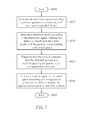
- FIG. 7 is a flowchart illustrating a method for displaying applications of the touch-controlled device 100 shown in FIG.1 according to an exemplary embodiment of the present invention. Please note that the following steps are not limited to be performed according to the exact sequence shown in FIG.7 if a roughly identical result can be obtained.
- the method may include, but is not limited to, the following steps:
- FIG. 8 is a flowchart illustrating a method for displaying applications of a touch-controlled device 400 shown in FIG.5 according to another exemplary embodiment of the present invention. Please note that the following steps are not limited to be performed according to the exact sequence shown in FIG. 8 if a roughly identical result can be obtained.
- the method may include, but is not limited to, the following steps:
- the application menu APP_LST is extensible. That is, when the application container APC is started, a newly-added application can be checked according to the rules of the specification, and items (such as, icons) of the newly-added applications will be displayed when displaying the application menu APP_LST. Furthermore, the snapshots of the applications can adopt different updating manners according to the characteristics of each program. For example, regarding a text processing program, its snapshot can be updated when the program is closed. On the other hand, regarding an internet browsing program, its snapshot can be updated real time. Therefore, the user experiences can be improved by updating the snapshot of the programs.
- a touch-controlled device and a related method for detecting a gesture applied on a touch panel of the touch-controlled device to display an application container are provided.
- the application menu and the functional menu can be quickly launched in order to avoid complicated operating processes and improve the usage efficiency.
Landscapes
- Engineering & Computer Science (AREA)
- General Engineering & Computer Science (AREA)
- Theoretical Computer Science (AREA)
- Human Computer Interaction (AREA)
- Physics & Mathematics (AREA)
- General Physics & Mathematics (AREA)
- User Interface Of Digital Computer (AREA)
- Position Input By Displaying (AREA)
Abstract
Description
- The present invention relates to a method for displaying applications of a touch-controlled device and a touch-controlled device according to the pre-characterizing clauses of claims 1 and 8.
- The design of the user interface (Ul) of touch-controlled devices plays an increasingly important role. However, manipulation gestures of the touch-controlled devices at present are mostly a single-fingered gesture or a two-fingered gesture, and thus the manipulation variations of the gestures are limited.
- Hence, increasing manipulation variability of the touch-controlled device in order to improve the usage efficiency has become an important topic in this field.
- This in mind, the present invention aims at providing a touch-controlled device and a related method for detecting a gesture to display an application container to improve the usage efficiency.
- This is achieved by a method for displaying applications of a touch-controlled device and a touch-controlled device according to the pre-characterizing clauses of claims 1 and 8. The dependent claims pertain to corresponding further developments and improvements.
- As will be seen more clearly from the detailed description following below, the claimed method for displaying applications of a touch-controlled device is provided. The method includes the following steps: generating an electronic signal according a gesture applied on a touch panel of the touch-controlled device; generating a detection result according to the electronic signal, wherein the detection result includes a first position corresponding to the touch panel; when the detection result indicates that the detected gesture is a grab gesture, starting an application container; and outputting a control signal to the touch panel according to the application container, in order to display the application container at the first position.
- As will be seen more clearly from the detailed description following below, the claimed touch-controlled device is provided. The touch-controlled device may include a touch panel, a detecting unit, a determining unit, and a control unit. The touch panel is arranged for generating an electronic signal according a gesture applied on a touch panel, and for displaying an application container according to a control signal. The detecting unit is arranged for generating a detection result according to the electronic signal, wherein the detection result includes a first position of the gesture corresponding to the touch panel. The determining unit is arranged for starting the application container when the detection result indicates that the detected gesture is a multi-fingered grab gesture. The control unit is arranged for outputting the control signal to the touch panel according to the application container, in order to display the application container at the first position.
- In summary, a touch-controlled device and a related method for detecting a gesture applied on a touch panel of the touch-controlled device to display an application container are provided in the present invention. By using a grab gesture, the application menu and the functional menu can be quickly launched in order to avoid complicated operating processes and improve the usage efficiency.
- In the following, the invention is further illustrated by way of example, taking reference to the accompanying drawings. Thereof
-
FIG. 1 is a diagram illustrating a touch-controlled device according to a first embodiment of the present invention; -
FIG. 2 is a diagram illustrating how to display an application container on a touch-controlled device according to a multi-fingered grab gesture according to an exemplary embodiment of the present invention; -
FIG.3 is a diagram that shows how to display the application container APC on the touch panel of the touch-controlled device according to an exemplary embodiment of the present invention; -
FIG. 4 is a diagram illustrating how to display an interactive user interface of the touch-controlled device according to an exemplary embodiment of the present invention; -
FIG. 5 is a diagram illustrating a touch-controlled device according to a second embodiment of the present invention; -
FIG. 6 is a diagram illustrating how to display an application container on the touch-controlled device according to an exemplary embodiment of the present invention; -
FIG. 7 is a flowchart illustrating a method for displaying applications of a touch-controlled device according to an exemplary embodiment of the present invention; and -
FIG. 8 is a flowchart illustrating a method for displaying applications of a touch-controlled device according to another exemplary embodiment of the present invention. - Certain terms are used throughout the description and following claims to refer to particular components. As one skilled in the art will appreciate, manufacturers may refer to a component by different names. This document does not intend to distinguish between components that differ in name but not function. In the following description and in the claims, the terms "include" and "comprise" are used in an open-ended fashion, and thus should be interpreted to mean "include, but not limited to ...". Also, the term "couple" is intended to mean either an indirect or direct electrical connection. Accordingly, if one device is coupled to another device, that connection may be through a direct electrical connection, or through an indirect electrical connection via other devices and connections.
- Please refer to
FIG. 1. FIG. 1 is a diagram illustrating a touch-controlleddevice 100 according to a first embodiment of the present invention. The touch-controlleddevice 100 may include, atouch panel 101, a detectingunit 110, a determiningunit 120, and acontrol unit 130. Thetouch panel 101 is an input device of the touch-controlleddevice 100, and is arranged for generating an electronic signal SIG according a gesture applied on thetouch panel 101, and for displaying an application container APC according to a control signal CTRL. The detectingunit 110 is coupled to thetouch panel 101 , and is arranged for generating a detection result DR according to the electronic signal SIG, wherein the detection result DR includes information related to a first position P1 of the gesture corresponding to thetouch panel 101. The determiningunit 120 is coupled to the detectingunit 110, and is arranged for starting the application container APC when the detection result DR indicates that the detected gesture is a multi-fingered grab gesture. In addition, thecontrol unit 130 is coupled to the determiningunit 120 and thetouch panel 101, and is arranged for outputting the control signal CTRL to thetouch panel 101 according to the application container APC. After that, thetouch panel 101 is further arranged for displaying the application container APC at the first position P1 according to the control signal CTRL. In this embodiment, the first position P1 can be a center point of the gesture, but the present invention is not limited to this only. In other embodiments, the first position P1 can be defined as any point near the gesture. In other words, the display position of the application container APC is not fixed, and can be changed as the position of the gesture changes. Moreover, the application container APC may include an application menu APP_LST and a functional menu AXN_LST. In this embodiment, the functional menu AXN_LST shows a roulette shape, and the application menu APP_LST shows a circular shape in the periphery of the functional menu AXN_LST. However, this should not be considered as a limitation of the present invention, and those skilled in the art should appreciate that various modifications of the shape of the application menu APP_LST and the functional menu AXN_LST may be made. The touch-controlleddevice 100 may be a notebook PC or a tablet PC, and thetouch panel 101 may be an implemented by a multi-touch touch panel, a capacitive touch panel, a resistive touch panel, or an optical touch panel. - In more detail, when the electronic signal SIG is detected by the detecting
unit 110, the detectingunit 110 can determine the type of the gesture according to characteristics of the electronic signal SIG and translate its related information (such as, the start status, the process, the end status, and/or the position of the gesture) into the detecting result DR. Herein the position of the gesture is corresponding to the first position P1, such that the determining unit 1 20 can start the application container APC when the detection result DR indicates that the detected gesture is a multi-fingered grab gesture. Then, thecontrol unit 130 may output the control signal CTRL to thetouch panel 101 according to the application container APC, in order to display the application container APC at the first position P1. The multi-fingered grab gesture is presented merely to illustrate practicable designs of the present invention, which implies that the detected gesture will not be implemented by a single-fingered gesture or a two-fingered gesture, and in no way should be considered to be limitations of the scope of the present invention. - In the following descriptions, some exemplary embodiments are cited for illustrating how to display the application container APC. Please refer to
FIG. 2 and FIG.3 , which are diagrams illustrating how to display an application container on a touch-controlled device according to a multi-fingered grab gesture according to an exemplary embodiment of the present invention.FIG.2 shows how to apply a multi-fingered grab gesture on the touch-controlleddevice 100 according to an exemplary embodiment of the present invention. As shown inFIG. 2 , when a user applies a multi-fingered grab gesture on thetouch panel 101 of the touch-controlleddevice 100, the corresponding electronic signal SIG is generated by the touch panel 1 01. After that, the detectingunit 110 may generate the detection result DR according to the electronic signal SIG, wherein the detection result DR includes the first position P1 which is corresponding to the position of the multi-fingered grab gesture applied on thetouch panel 101. Please keep referring toFIG. 3. FIG. 3 shows how to display the application container APC on thetouch panel 101 of the touch-controlleddevice 100. As shown inFIG. 3 , when the detection result DR indicates that the detected gesture is a multi-fingered grab gesture, the determining unit 1 20 may start the application container APC. After that, the control unit 1 30 may output the control signal CTRL to thetouch panel 101 according to the application container APC, in order to display the application container APC at the first position P1. - Besides, after an application is started, the
control unit 130 may be further used for displaying an interactive user interface Ul corresponding to the application at a second position P2 of the touch panel, wherein the interactive user interface Ul is used for controlling the application. Please refer toFIG. 4. FIG. 4 is a diagram illustrating how to display an interactive user interface Ul of the touch-controlleddevice 100 according to an exemplary embodiment of the present invention. As shown inFIG. 4 , the interactive user interface Ul may be implemented by a control panel of a multimedia player for controlling the multimedia player. After the multimedia player (i.e., the application to be executed) is started by thecontrol unit 130, the control panel of the multimedia player is display at the second position P2 of the touch panel 101 (i.e., the bottom of the touch panel 101). The second position P2 can be predefined in each application, those skilled in the art can easily understand features related to the second position P2, and further description is omitted here for brevity. - Please refer to
FIG. 5. FIG. 5 is a diagram illustrating a touch-controlleddevice 400 according to a second embodiment of the present invention. The architecture of the touch-controlleddevice 400 shown inFIG. 5 is similar to that of the touch-controlleddevice 100 shown inFIG. 1 , and the difference between them is that: the touch-controlleddevice 400 shown inFIG. 5 further includes aninformation unit 440 coupled to thecontrol unit 130 and the determiningunit 120, for obtaining an application information INFO corresponding to at least one application of the application menu APP_LST, wherein the application information INFO at least comprises an application name NAME and an application snapshot position SNAPSHOT_PATH. Then, thecontrol unit 130 may output the control signal CTRL to thetouch panel 101 according to the application name NAME and the application snapshot position SNAPSHOT_PATH, in order to display a name and a snapshot of the at least one application at the first position P1 . Since the application NAME may need to support several languages, a dynamic-link library (DLL) file can be used for storing the program name NAME with multiple languages in the present invention. - Please keep referring to
FIG. 6. FIG. 6 is a diagram illustrating how to display an application container APC on the touch-controlleddevice 400 according to an exemplary embodiment of the present invention. The application container APC may be computer code stored in the touch-controlleddevice 400, which when executed, may generate the functional menu and application menu as follows. As shown inFIG. 6 , the functional menu AXN_LST shows a roulette shape in the middle location of thetouch panel 101, and the application menu APP_LST shows a circular shape and displays the snapshots of the applications in the periphery of the functional menu AXN_LST. Furthermore, an application to be executed in the application menu APP_LST can be selected according to a single-fingered drag gesture. When the block of the application menu APP_LST displayed on thetouch panel 101 is touched and dragged by a single finger of the user, the snapshot corresponding to the selected application will be highlighted in order to make things convenient for the user upon distinguishing the selected application. - In addition, the application information INFO may further include a window name TITLE, an executable file name EXE, an application installation path INST_PATH, and parameters AGU for executing an application. The window name TITLE can be used for message handling between the application container APC and the application. For example, the application container APC may utilize the window name TITLE to transmit an update snapshot information UD_SNAPSHOT_MSG to the application of the application container APC for asking the application corresponding to the window name TITLE to update its snapshot. Or the application container APC may utilize a kill application information KILL_MSG for asking the application corresponding to the window name TITLE to automatically close the application. On the other hand, the executable file name EXE, the application installation path INST_PATH, and parameters AGU for executing the application can be used for generating an execution command CMD for executing the application. What calls for special attention is that: using the window name for message handling and generating execution command are already well-known to those skilled in the art, and further description is omitted here for brevity.
- Please refer to
FIG. 7. FIG. 7 is a flowchart illustrating a method for displaying applications of the touch-controlleddevice 100 shown inFIG.1 according to an exemplary embodiment of the present invention. Please note that the following steps are not limited to be performed according to the exact sequence shown inFIG.7 if a roughly identical result can be obtained. The method may include, but is not limited to, the following steps: - Step S600: Start.
- Step S61 0: Generate an electronic signal SIG according a gesture applied on a
touch panel 101 of the touch-controlleddevice 100. - Step S620: Generate a detection result DR according to the electronic signal SIG, wherein the detection result DR includes a first position P1 of the gesture corresponding to the touch panel 1 01.
- Step S630: When the detection result DR indicates that the detected gesture is a multi-fingered grab gesture, start an application container APC.
- Step S640: Output a control signal CTRL to the
touch panel 101 according to the application container APC, in order to display the application container APC at the first position P1. - Step S650: End.
- Those skilled in the art can readily understand the details and variations how each element operates by combining the steps shown in
FIG.7 and the elements of the touch-controlleddevice 100 shown inFIG.1 stated above, and further description is omitted here for brevity. - Please refer to
FIG. 8. FIG. 8 is a flowchart illustrating a method for displaying applications of a touch-controlleddevice 400 shown inFIG.5 according to another exemplary embodiment of the present invention. Please note that the following steps are not limited to be performed according to the exact sequence shown inFIG. 8 if a roughly identical result can be obtained. The method may include, but is not limited to, the following steps: - Step S700: Start.
- Step S710: Generate an electronic signal SIG according a gesture applied on a
touch panel 101 of the touch-controlleddevice 400. - Step S720: Generate a detection result DR according to the electronic signal SIG, wherein the detection result DR includes a first position P1 of the gesture corresponding to the touch panel 1 01.
- Step S730: When the detection result DR indicates that the detected gesture is a multi-fingered grab gesture, start an application container APC, wherein the application container APC includes an application menu APP_LST and a functional menu AXN_LST.
- Step S740: Obtain an application information INFO corresponding to at least one application of the application menu, wherein the application information INFO at least comprises an application name NAME and an application snapshot position SNAPSHOT_PATH.
- Step S750: Output the control signal CTRL to the
touch panel 101 according to the application name NAME and the application snapshot position SNAPSHOT_PATH, in order to display a name and a snapshot of the at least one application at the first position P1 . - Step S760: End.
- Those skilled in the art can readily understand the details and variations how each element operates by combining the steps shown in
FIG.8 and the elements of the touch-controlleddevice 400 shown inFIG.5 stated above, and further description is omitted here for brevity. - The application menu APP_LST is extensible. That is, when the application container APC is started, a newly-added application can be checked according to the rules of the specification, and items (such as, icons) of the newly-added applications will be displayed when displaying the application menu APP_LST. Furthermore, the snapshots of the applications can adopt different updating manners according to the characteristics of each program. For example, regarding a text processing program, its snapshot can be updated when the program is closed. On the other hand, regarding an internet browsing program, its snapshot can be updated real time. Therefore, the user experiences can be improved by updating the snapshot of the programs.
- In summary, a touch-controlled device and a related method for detecting a gesture applied on a touch panel of the touch-controlled device to display an application container are provided. By using a grab gesture, the application menu and the functional menu can be quickly launched in order to avoid complicated operating processes and improve the usage efficiency.
- All combinations and sub-combinations of above-described features also belong to the invention.
Claims (13)
- A method for displaying applications of a touch-controlled device ( 100 ), characterized by:generating an electronic signal according a gesture applied on a touch
panel of the touch-controlled device ( 100 ) ;generating a detection result according to the electronic signal,
wherein the detection result includes a first position of the gesture corresponding to the touch panel ( 101 ) ;when the detection result indicates that the detected gesture is a
multi-fingered grab gesture, starting an application container; andoutputting a control signal to the touch panel ( 101 ) according to the
application container, in order to display the application container at the first position. - The method according to claim 1, further characterized in that displaying the application container comprises displaying an application menu and/or a functional menu.
- The method according to claim 2, further characterized in that the step of outputting the control signal to the touch panel ( 101 ) according to the application container, in order to display the application container at the first position comprises:obtaining an application information corresponding to at least one
application of the application menu, wherein the application information at least comprises an application name and an application snapshot position; andoutputting the control signal to the touch panel ( 101 ) according to
the application name and the application snapshot position, in order to display a name and a snapshot of the at least one application at the first position. - The method according to claim 3, further characterized in that obtaining the application information further comprises obtaining a window name for message handling between the application container and the at least one application.
- The method according to claim 1, characterized by:after an application is started, displaying an interactive user interface corresponding to the application at a second position of the touch panel ( 101 ) , wherein the interactive user interface is used for controlling the application.
- The method according to claim 1, further characterized in displaying the functional menu as a roulette shape, and displaying the application menu as a circular shape in the periphery of the functional menu.
- The method according to claim 6, characterized by:selecting an application to be executed in the application menu according to a single-fingered drag gesture.
- A touch-controlled device ( 100 ) , characterized by:a touch panel ( 101 ) , arranged for generating an electronic signal
according a gesture applied on the touch panel ( 101 ) , and for displaying an application container stored in the touch controlled device according to a control signal;a detecting unit ( 110 ) , coupled to the touch panel ( 101 ) , for
generating a detection result according to the electronic signal, wherein the detection result includes a first position of the gesture corresponding to the touch panel ( 101 ) ;a determining unit ( 120 ) , coupled to the detecting unit ( 110 ) , for
starting the application container when the detection result indicates that the detected gesture is a multi-fingered grab gesture; anda control unit ( 130 ) , coupled to the determining unit ( 120 ) and the
touch panel ( 101 ) , for outputting the control signal to the touch panel ( 101 ) according to the application container, in order to display the application container at the first position. - The touch-controlled device ( 100 ) according to claim 8, further characterized in that the application container comprises computer code for generating an application menu and a functional menu.
- The touch-controlled device ( 400 ) according to claim 9, characterized by:an information unit (440 ) , coupled to the control unit ( 130 ) and the
determining unit ( 1 20 ) , configured for obtaining an application information corresponding to at least one application of the application menu, wherein the application information at least comprises an application name and an application snapshot position;wherein the control unit ( 1 30 )is further configured for outputting the
control signal to the touch panel ( 101 ) according to the application name and the application snapshot position, in order to display a name and a snapshot of the at least one application at the first position. - The touch-controlled device ( 100 ) according to claim 10, further characterized in that the application information further comprises computer code for generating a window name for message handling between the application container and the at least one application.
- The touch-controlled device ( 100 ) according to claim 9, further characterized in that, when executed, the stored computer code for generating the functional menu generates the functional menu in a roulette shape, and the stored computer code for generating the application menu generates the application menu in a circular shape in the periphery of the functional menu.
- The touch-controlled device ( 100 ) according to claim 8, further characterized in that the control unit ( 130 ) is further configured for displaying an interactive user interface corresponding to an application at a second position of the touch panel ( 101 ) after the application is started, wherein the interactive user interface is used for controlling the application.
Applications Claiming Priority (2)
| Application Number | Priority Date | Filing Date | Title |
|---|---|---|---|
| US41587210P | 2010-11-22 | 2010-11-22 | |
| TW100113137A TWI436265B (en) | 2010-11-22 | 2011-04-15 | Touch device application display method and touch device thereof |
Publications (2)
| Publication Number | Publication Date |
|---|---|
| EP2455846A2 true EP2455846A2 (en) | 2012-05-23 |
| EP2455846A3 EP2455846A3 (en) | 2017-01-18 |
Family
ID=44534000
Family Applications (1)
| Application Number | Title | Priority Date | Filing Date |
|---|---|---|---|
| EP11178420.3A Withdrawn EP2455846A3 (en) | 2010-11-22 | 2011-08-23 | Application displaying method for touch-controlled device and touch-controlled device thereof |
Country Status (2)
| Country | Link |
|---|---|
| US (1) | US8572508B2 (en) |
| EP (1) | EP2455846A3 (en) |
Families Citing this family (11)
| Publication number | Priority date | Publication date | Assignee | Title |
|---|---|---|---|---|
| CN102902469B (en) * | 2011-07-25 | 2015-08-19 | 宸鸿光电科技股份有限公司 | Gesture recognition method and touch system |
| CA2781742A1 (en) * | 2011-12-08 | 2012-09-11 | Exopc | User interface and method for providing same |
| USD733723S1 (en) * | 2012-02-24 | 2015-07-07 | Htc Corporation | Portion of a display screen with graphical user interface |
| US20130272041A1 (en) * | 2012-04-13 | 2013-10-17 | Aeon Labs | Electrical device with low voltage output and low voltage touch panel |
| WO2014083953A1 (en) * | 2012-11-27 | 2014-06-05 | ソニー株式会社 | Display device, display method, and computer program |
| JP6215534B2 (en) * | 2013-01-07 | 2017-10-18 | サターン ライセンシング エルエルシーSaturn Licensing LLC | Information processing apparatus, information processing method, and computer program |
| CN104615362A (en) * | 2013-11-05 | 2015-05-13 | 英业达科技有限公司 | Touch device capable of realizing on the basis of sliding gesture switching program and method thereof |
| US20150261390A1 (en) * | 2014-03-13 | 2015-09-17 | Boyd Stephen Edmondson | Contextual Disk Menu |
| CN107357586B (en) * | 2017-07-14 | 2018-06-05 | 腾讯科技(深圳)有限公司 | Control method, device and the equipment of application program |
| CN109976621A (en) * | 2019-03-29 | 2019-07-05 | 广州朗国电子科技有限公司 | Shortcut menu control method and system |
| CN113747216B (en) * | 2020-05-29 | 2023-09-08 | 海信视像科技股份有限公司 | Display device and touch menu interaction method |
Family Cites Families (17)
| Publication number | Priority date | Publication date | Assignee | Title |
|---|---|---|---|---|
| US7346850B2 (en) * | 1998-06-12 | 2008-03-18 | Cygnus Systems, Inc. | System and method for iconic software environment management |
| US20030041142A1 (en) * | 2001-08-27 | 2003-02-27 | Nec Usa, Inc. | Generic network monitoring tool |
| US7318202B2 (en) * | 2003-05-19 | 2008-01-08 | Seiko Epson Corporation | User interface device and its display method |
| KR100801089B1 (en) * | 2005-12-13 | 2008-02-05 | 삼성전자주식회사 | Mobile device and its operation method which can be controlled by touch and drag |
| US8181122B2 (en) * | 2007-07-30 | 2012-05-15 | Perceptive Pixel Inc. | Graphical user interface for large-scale, multi-user, multi-touch systems |
| US8352867B2 (en) * | 2007-12-18 | 2013-01-08 | Verizon Patent And Licensing Inc. | Predictive monitoring dashboard |
| TWI361376B (en) * | 2007-12-31 | 2012-04-01 | Htc Corp | Method for operating handheld electronic device and touch interface apparatus and storage media using the same |
| CN101498973B (en) | 2008-01-30 | 2013-04-10 | 义隆电子股份有限公司 | A touch interpretation device and method for touch operation with multi-finger gestures |
| US9459784B2 (en) * | 2008-07-25 | 2016-10-04 | Microsoft Technology Licensing, Llc | Touch interaction with a curved display |
| CN102257471B (en) * | 2008-10-26 | 2015-07-22 | 思杰系统有限公司 | Method for rendering a window on a native display of a mobile computing device |
| US20100123665A1 (en) * | 2008-11-14 | 2010-05-20 | Jorgen Birkler | Displays for Mobile Devices that Detect User Inputs Using Touch and Tracking of User Input Objects |
| US8427438B2 (en) * | 2009-03-26 | 2013-04-23 | Apple Inc. | Virtual input tools |
| US8799775B2 (en) * | 2009-09-25 | 2014-08-05 | Apple Inc. | Device, method, and graphical user interface for displaying emphasis animations for an electronic document in a presentation mode |
| EP2325737B1 (en) * | 2009-10-28 | 2019-05-08 | Orange | Verfahren und Vorrichtung zur gestenbasierten Eingabe in eine graphische Benutzeroberfläche zur Anzeige von Anwendungsfenstern |
| US20110138313A1 (en) * | 2009-12-03 | 2011-06-09 | Kevin Decker | Visually rich tab representation in user interface |
| US20110143769A1 (en) * | 2009-12-16 | 2011-06-16 | Microsoft Corporation | Dual display mobile communication device |
| US9542202B2 (en) * | 2010-10-19 | 2017-01-10 | Apple Inc. | Displaying and updating workspaces in a user interface |
-
2011
- 2011-06-15 US US13/161,455 patent/US8572508B2/en active Active
- 2011-08-23 EP EP11178420.3A patent/EP2455846A3/en not_active Withdrawn
Non-Patent Citations (1)
| Title |
|---|
| None |
Also Published As
| Publication number | Publication date |
|---|---|
| US20120131503A1 (en) | 2012-05-24 |
| EP2455846A3 (en) | 2017-01-18 |
| US8572508B2 (en) | 2013-10-29 |
Similar Documents
| Publication | Publication Date | Title |
|---|---|---|
| US8572508B2 (en) | Application displaying method for touch-controlled device and touch-controlled device thereof | |
| CN110663018B (en) | App launch in multi-monitor devices | |
| US10152228B2 (en) | Enhanced display of interactive elements in a browser | |
| EP2805220B1 (en) | Skinnable touch device grip patterns | |
| US10055102B2 (en) | Method of promptly starting windowed applications installed on a mobile operating system and device using the same | |
| JP6450768B2 (en) | Quick task for on-screen keyboard | |
| US20120113044A1 (en) | Multi-Sensor Device | |
| US20130300668A1 (en) | Grip-Based Device Adaptations | |
| US20150040065A1 (en) | Method and apparatus for generating customized menus for accessing application functionality | |
| US20120174020A1 (en) | Indication of active window when switching tasks in a multi-monitor environment | |
| US20120144298A1 (en) | Touch input disambiguation | |
| AU2018430027B2 (en) | Method for browsing application folder and electronic device | |
| CN105786326B (en) | Display device and control method thereof | |
| US20160224221A1 (en) | Apparatus for enabling displaced effective input and associated methods | |
| CN105988860A (en) | Method for executing application program and mobile device | |
| US20100293499A1 (en) | Rendering to a device desktop of an adaptive input device | |
| CN108228040A (en) | Mobile terminal and floating barrier method of controlling operation thereof, device | |
| CN103176734A (en) | Touchscreen-enabled terminal and application control method thereof | |
| EP3151083A1 (en) | Mobile terminal and method for controlling the same | |
| CN104391724A (en) | Method and device for reconfiguring positions of icons | |
| EP2615537A1 (en) | Method and apparatus for keyboard layout using touch | |
| WO2016036982A1 (en) | Unified input and invoke handling | |
| EP2677413B1 (en) | Method for improving touch recognition and electronic device thereof | |
| WO2016183912A1 (en) | Menu layout arrangement method and apparatus | |
| US10732719B2 (en) | Performing actions responsive to hovering over an input surface |
Legal Events
| Date | Code | Title | Description |
|---|---|---|---|
| PUAI | Public reference made under article 153(3) epc to a published international application that has entered the european phase |
Free format text: ORIGINAL CODE: 0009012 |
|
| AK | Designated contracting states |
Kind code of ref document: A2 Designated state(s): AL AT BE BG CH CY CZ DE DK EE ES FI FR GB GR HR HU IE IS IT LI LT LU LV MC MK MT NL NO PL PT RO RS SE SI SK SM TR |
|
| AX | Request for extension of the european patent |
Extension state: BA ME |
|
| PUAL | Search report despatched |
Free format text: ORIGINAL CODE: 0009013 |
|
| AK | Designated contracting states |
Kind code of ref document: A3 Designated state(s): AL AT BE BG CH CY CZ DE DK EE ES FI FR GB GR HR HU IE IS IT LI LT LU LV MC MK MT NL NO PL PT RO RS SE SI SK SM TR |
|
| AX | Request for extension of the european patent |
Extension state: BA ME |
|
| RIC1 | Information provided on ipc code assigned before grant |
Ipc: G06F 3/048 20130101AFI20161212BHEP |
|
| STAA | Information on the status of an ep patent application or granted ep patent |
Free format text: STATUS: REQUEST FOR EXAMINATION WAS MADE |
|
| 17P | Request for examination filed |
Effective date: 20170419 |
|
| RBV | Designated contracting states (corrected) |
Designated state(s): AL AT BE BG CH CY CZ DE DK EE ES FI FR GB GR HR HU IE IS IT LI LT LU LV MC MK MT NL NO PL PT RO RS SE SI SK SM TR |
|
| STAA | Information on the status of an ep patent application or granted ep patent |
Free format text: STATUS: EXAMINATION IS IN PROGRESS |
|
| STAA | Information on the status of an ep patent application or granted ep patent |
Free format text: STATUS: THE APPLICATION HAS BEEN WITHDRAWN |
|
| 17Q | First examination report despatched |
Effective date: 20190717 |
|
| 18W | Application withdrawn |
Effective date: 20190808 |