EP2372523A2 - Automatic file transfer system and storage medium - Google Patents
Automatic file transfer system and storage medium Download PDFInfo
- Publication number
- EP2372523A2 EP2372523A2 EP11156705A EP11156705A EP2372523A2 EP 2372523 A2 EP2372523 A2 EP 2372523A2 EP 11156705 A EP11156705 A EP 11156705A EP 11156705 A EP11156705 A EP 11156705A EP 2372523 A2 EP2372523 A2 EP 2372523A2
- Authority
- EP
- European Patent Office
- Prior art keywords
- transfer
- personal computer
- printer
- file
- printers
- Prior art date
- Legal status (The legal status is an assumption and is not a legal conclusion. Google has not performed a legal analysis and makes no representation as to the accuracy of the status listed.)
- Ceased
Links
Images




Classifications
-
- G—PHYSICS
- G06—COMPUTING OR CALCULATING; COUNTING
- G06F—ELECTRIC DIGITAL DATA PROCESSING
- G06F3/00—Input arrangements for transferring data to be processed into a form capable of being handled by the computer; Output arrangements for transferring data from processing unit to output unit, e.g. interface arrangements
- G06F3/12—Digital output to print unit, e.g. line printer, chain printer
- G06F3/1201—Dedicated interfaces to print systems
- G06F3/1278—Dedicated interfaces to print systems specifically adapted to adopt a particular infrastructure
- G06F3/1284—Local printer device
-
- G—PHYSICS
- G06—COMPUTING OR CALCULATING; COUNTING
- G06F—ELECTRIC DIGITAL DATA PROCESSING
- G06F3/00—Input arrangements for transferring data to be processed into a form capable of being handled by the computer; Output arrangements for transferring data from processing unit to output unit, e.g. interface arrangements
- G06F3/12—Digital output to print unit, e.g. line printer, chain printer
- G06F3/1201—Dedicated interfaces to print systems
- G06F3/1202—Dedicated interfaces to print systems specifically adapted to achieve a particular effect
- G06F3/1203—Improving or facilitating administration, e.g. print management
- G06F3/1204—Improving or facilitating administration, e.g. print management resulting in reduced user or operator actions, e.g. presetting, automatic actions, using hardware token storing data
-
- G—PHYSICS
- G06—COMPUTING OR CALCULATING; COUNTING
- G06F—ELECTRIC DIGITAL DATA PROCESSING
- G06F3/00—Input arrangements for transferring data to be processed into a form capable of being handled by the computer; Output arrangements for transferring data from processing unit to output unit, e.g. interface arrangements
- G06F3/12—Digital output to print unit, e.g. line printer, chain printer
- G06F3/1201—Dedicated interfaces to print systems
- G06F3/1223—Dedicated interfaces to print systems specifically adapted to use a particular technique
- G06F3/1237—Print job management
- G06F3/1268—Job submission, e.g. submitting print job order or request not the print data itself
- G06F3/127—Job submission, e.g. submitting print job order or request not the print data itself by using hot folders, e.g. folder for which print settings or print data management rules are set in advance
Definitions
- the invention relates to an automatic file transfer system with which a file is automatically transferred to a printer connected to a personal computer and also relates to a storage medium.
- printers There have conventionally been known many printers, and among which are printers wherein a print or a display process is executed using preinstalled data of characters, images or templates for layouts, etc. and in addition to these printers there are printers wherein a user can freely store data of characters, images or templates for layouts and a print or a display process is executed using the freely-stored data.
- the data set freely by the user can be created at the printer, and in other printers, the data can be transmitted from a personal computer.
- each piece of data transmitted from the personal computer is controlled as a file for each piece of data.
- a file can be transmitted to plural printers; however, the file is not necessarily compatible to all the plural printers.
- Many files are of a kind compatible to a specific printer or a specific model of a printer. Accordingly, there is a case in which files are controlled in the personal computer so as to be sorted into different folders according to corresponding printers or models of printers and then stored, so that a user can be spared troubles of operation to determine whether to transmit a file to a certain printer or not when transmitting the file.
- printer information is added to each of the files, instead of sorting the files into different folders.
- files are each sorted into and stored in each of the corresponding folders
- files of a template for a layout or of external character data are stored in different folders in the personal computer according to the predetermined classification, and in the personal computer in which the transmission software is activated, first of all, a user is asked to designate a folder, namely, a classification of a file transmission source, using a predetermined window. Then, the user is asked to designate a file to be transmitted using another window, transmission is set to the file, and the file to which transmission is set is transmitted to a printer.
- the present invention has been made in view of the above-described problem, and the object of the present invention is to provide an automatic file transfer system that automatically transfers a new file which is moved to a transfer folder to a printer connected to a personal computer and to provide a storage medium.
- an automatic file transfer system (1) including a personal computer (101) and one or more printers (11A, 11B, 11C, 11D), the automatic file transfer system (1) including: a transfer folder (107b, 405) capable of containing one or more files (601, 602), wherein, when the personal computer (101) recognizes, through plug-and-play, that a printer among the one or more printers (11A, 11B, 11C, 11D) which are connected to the personal computer (101) is powered on, if the printer currently recognized is a transfer-target printer (11A, 11B, 11C), the personal computer (101) executes in a repetitive manner, for the printer currently recognized, processes of: (i) determining whether or not a new file (601, 602) is moved into the transfer folder (107b, 405); and (ii) transferring, if it is determined that a new file (601, 602) is moved into the transfer folder (107b, 405), the
- a transfer folder (107b, 405) configured to contain one or more files (601, 602), and when the personal computer (101) recognizes through plug-and-play that the power is on in a printer among one or more printers (11A, 11B, 11C, 11D) connected to the personal computer (101), if the printer thus recognized is a printer of a transfer-target (11A, 11B, 11C), the processes of (i) through (ii) are repeatedly executed for each printer thus recognized.
- the personal computer (101) includes: a transfer-destination counter (109a); and an input unit (104) configured to transmit a force-quit signal, and the personal computer (101) executes processes of: (A) incrementing the transfer-destination counter (109a) by "1” if the personal computer (101) recognizes, through the plug-and-play, that a printer among the one or more printers (11A, 11B, 11C, 11D) which are connected to the personal computer (101) is powered on; (B) decrementing the transfer-destination counter (109a) by "1” if the personal computer (101) recognizes that the printer currently recognized is powered off; (C) decrementing the transfer-destination counter (109a) by "1” if the force-quit signal is received from the input unit (104); and (D) terminating the processes (i) through (ii) if the transfer-destination counter (109a) indicates "0".
- the personal computer (101) executes the processes (A) through (D) below. Namely, the personal computer (101): (A) increments the transfer-destination counter (109a) by "1" when recognizing through plug-and-play that the powered is on at a printer among the one or more printers (11A, 11B, 11C, 11D) connected to the personal computer (101); (B) decrements the transfer-destination counter (109a) by "1” when recognizing that the printer currently recognized is powered off; (C) decrements the transfer-destination counter (109a) by "1” when a force-quit signal is received from the input unit (104); and (D) terminates the processes (i) through (ii) when the transfer-destination counter (109a) indicates "0". Thereby, using the transfer-destination counter (109a), the timing to quit the automatic transfer can be formulated with a simple program configuration
- the automatic file transfer system (1) mentioned above further includes: a network (2) which connects the personal computer (101) and each of the one or more printers (11A, 11B, 11C, 11D), wherein the transfer folder (107b, 405) is set within the network (2).
- the transfer folder (107b, 405) is set within the network (2) which connects the personal computer (101) to each of the one or more printers (11A, 11B, 11C, 11D), even if a printer among the one or more printers (11A, 11B, 11C, 11D) is arranged locally, being set through the connection of the network such as LAN, or another automatic file transfer system (1) of the present invention is arranged remotely connected through the internet, etc, the above effects can still be obtained.
- a storage medium (107) storing a program designed to execute processes (i) through (ii) below in a repetitive manner at an automatic file transfer system (1) including a personal computer (101) and one or more printers (11A, 11B, 11C, 11D), using the personal computer (101), the automatic file transfer system (1) including: a transfer folder (107b, 405) capable of containing one or more files (601, 602), wherein, when the personal computer (101) recognizes, through plug-and-play, that a printer among the one or more printers (11A, 11B, 11 C, 11 D) which are connected to the personal computer (101) is powered on, if the printer currently recognized is a transfer-target printer (11A, 11B, 11C), the personal computer (101) executes in a repetitive manner, for the printer currently recognized, the processes of: (i) determining whether or not a new file (601, 602) is moved into the transfer folder (107b, 405); and (ii) transferring,
- the automatic file transfer system (1) wherein a program stored in the computer-readable storage medium (107) of the present invention is executed at the personal computer (101), similar to the first aspect, it is made possible to automatically transfer the new file (601, 602) moved to the transfer folder (107b, 405) to the printer (11A, 11B, 11C) connected to the personal computer (101).
- the personal computer (101) includes: a transfer-destination counter (109a); and an input unit (104) configured to transmit a force-quit signal, and the personal computer (101) executes the processes of: (A) incrementing the transfer-destination counter (109a) by "1" if the personal computer (101) recognizes, through the plug-and-play, that a printer among the one or more printers (11A, 11B, 11C, 11D) which are connected to the personal computer (101) is powered on; (B) decrementing the transfer-destination counter (109a) by "1” if the personal computer (101) recognizes that the printer currently recognized is powered off; (C) decrementing the transfer-destination counter (109a) by "1” if the force-quit signal is received from the input unit (104); and (D) terminating the processes (i) through (ii)
- the timing to quit the automatic transfer can be formulated with a simple program configuration.
- the automatic file transfer system (1) further comprises a network (2) which connects the personal computer (101) and each of the one or more printers (11A, 11B, 11C, 11D), wherein the transfer folder (107b, 405) is set within the network (2).
- the personal computer 101 is provided with a transfer folder 107b.
- a compressed file A 601 and a compressed file B 602 are placed each as an object to be transferred.
- a transfer destination (target printer) of a file placed in the transfer folder 107b is specified in advance.
- each of the first printer 11A, the second printer 11B, and the third printer 11C is a "label printer,” and is set as the transfer destination (target printer) of a file placed in the transfer folder 107b.
- the fourth printer 11D is a "page printer", a "line printer,” or the like and excluded from the transfer destination (target printer) of a file placed in the transfer folder 107b.
- the transfer folder 107b there are placed files which are to be automatically transferred to the first printer 11A, the second printer 11B and the third printer 11C, as above mentioned.
- the compressed file A 601 and the compressed file B 602 are placed therein according to the example as illustrated in FIG. 1 through FIG. 3 and FIG. 6 above.
- the ROM 108 stores various kinds of control programs, etc.
- the RAM 109 provides work areas for executing the various control programs in the control unit 102, so that, for example, a later-described transfer-destination counter 109a is secured therein.
- control unit 102 increments the transfer-destination counter 109a secured in the RAM 109 by "1".
- the initial value of the transfer-destination counter 109a is "0".
- the control unit 102 then shifts the process to S103.
- the control unit 102 determines whether or not the power of the "target printer” recognized at S101 is turned off. Here, if the power of the "target printer” recognized at S101 above is not turned off (NO at S105), the control unit 102 shifts the process to S106.
- the control unit 102 determines whether or not value "0" is indicated in the transfer-destination counter 109a secured in the RAM 109. Here, if it is determined that value "0" is indicated in the transfer-destination counter 109a secured in the RAM 109 (YES at S108), the control unit 102 shifts the process to S109, quits the "transfer tool," and following this, terminates this program. Meanwhile, if it is determined that value "1" or more is indicated in the transfer-destination counter 109a secured in the RAM 109 (NO at S108), the control unit 102 terminates this program without executing anything.
- the control unit 102 determines whether or not value "0" is indicated in the transfer-destination counter 109a secured in the RAM 109.
- the control unit 102 shifts the process to S113, quits the "transfer tool," and following this, terminates this program.
- the control unit 102 terminates this program without executing anything.
- the automatic file transfer system 1 directed to the present embodiment, namely, the automatic file transfer system 1 wherein an application program stored in the area 107a of the storage unit 107 is executed at the personal computer 101, is provided with the transfer folder 107b, 405, etc. configured to contain one or more files 601, 602, etc., and when the personal computer 101 recognizes through plug-and-play that the power is on at a printer among one or more printers 11A, 11B, 11C, 11D, etc. connected to the personal computer 101, the following processes (i) through (ii) are repeatedly executed for each printer thus recognized if the printer thus recognized is a printer of a transfer-target ("target printer”) (YES at S101).
- target printer a printer of a transfer-target
- the personal computer 101 executes the processes (A) through (D) below.
- the personal computer 101 (A) increments the transfer-destination counter 109a by "1" when recognizing through plug-and-play that the powered is on at a printer among the one or more printers 11A, 11 B, 11 C, etc., each of which is a "target printer” (S102) and connected to the personal computer 101; (B) decrements the transfer-destination counter 109a by "1” when recognizing that the printer currently recognized is powered off (S110); (C) decrements the transfer-destination counter 109a by "1” when a force-quit signal is received based on an operation of a user through the input unit 104 (S107); and (D) terminates the processes (i) through (ii) (S109, S113) when the transfer-destination counter 109a indicates "0" (YES at S108, YES at S111, YES at S112).
- the personal computer 101 can use the transfer-destination counter 109a as in the program illustrated in FIG. 8 , and can
- This program is a program designed to be activated when a printer which is recognized through the plug-and-play appears among the printers connected to the personal computer 101, and this program is to be executed on the RAM 109 after the program code is copied to the RAM 109 as above discussed.
- the program code is not to be copied to the RAM 109 in this case. In this embodiment, however, even if the copied program code already exists in the RAM 109, the program code is still copied onto the RAM 109 independently.
- the above transfer tool is not shared with plural subjects (plural tasks), and each subject has its own transfer tool for the corresponding copy.
- the transfer-destination counter 109a on the RAM 109 does not exist.
- a plurality of these programs including transfer tools
- the processes of the whole subjects (tasks) are terminated as a result of the force-quitting in the one embodiment above, for only one copied program code exists.
- force-quitting a user designates and terminates one of the plurality of these programs, and the other programs are not terminated.
- a data transfer process is executed.
- the file newly placed in the transfer folder whose location setting is set by a user is transferred to the "target printer," whose power is recognized to be turned on.
- the control unit 102 then shifts the process to S204.
- the transfer folder in the Web server 301 can be shared with the plurality of automatic file transfer systems 1 directed to the above embodiments each of which is locally arranged. Accordingly, even if the plurality of automatic file transfer systems 1 directed to the above embodiments each of which is locally arranged are located remotely from one another, the same effect can still be obtained in each of the plurality of automatic file transfer systems 1 directed to the above embodiments.
Landscapes
- Engineering & Computer Science (AREA)
- Theoretical Computer Science (AREA)
- Human Computer Interaction (AREA)
- Physics & Mathematics (AREA)
- General Engineering & Computer Science (AREA)
- General Physics & Mathematics (AREA)
- Databases & Information Systems (AREA)
- Accessory Devices And Overall Control Thereof (AREA)
- Information Retrieval, Db Structures And Fs Structures Therefor (AREA)
- Information Transfer Between Computers (AREA)
Abstract
Description
- The invention relates to an automatic file transfer system with which a file is automatically transferred to a printer connected to a personal computer and also relates to a storage medium.
- There have conventionally been known many printers, and among which are printers wherein a print or a display process is executed using preinstalled data of characters, images or templates for layouts, etc. and in addition to these printers there are printers wherein a user can freely store data of characters, images or templates for layouts and a print or a display process is executed using the freely-stored data. In some printers, the data set freely by the user can be created at the printer, and in other printers, the data can be transmitted from a personal computer.
- In a conventional printer, each piece of data transmitted from the personal computer is controlled as a file for each piece of data. From the personal computer, a file can be transmitted to plural printers; however, the file is not necessarily compatible to all the plural printers. Many files are of a kind compatible to a specific printer or a specific model of a printer. Accordingly, there is a case in which files are controlled in the personal computer so as to be sorted into different folders according to corresponding printers or models of printers and then stored, so that a user can be spared troubles of operation to determine whether to transmit a file to a certain printer or not when transmitting the file. Alternatively, there is also a case in which printer information is added to each of the files, instead of sorting the files into different folders.
- In case files are each sorted into and stored in each of the corresponding folders, in an example of conventional transmission software which is described in
JP Laid-open Patent Application Publication No. 2004-157912 - However, in the above conventional transmission software, even if the transmission software is activated in a personal computer, a file cannot be transmitted from the personal computer to a printer unless many manual operations are conducted by a user.
- The present invention has been made in view of the above-described problem, and the object of the present invention is to provide an automatic file transfer system that automatically transfers a new file which is moved to a transfer folder to a printer connected to a personal computer and to provide a storage medium.
- To achieve the purpose of the present invention, according to a first aspect of the present invention, there is provided an automatic file transfer system (1) including a personal computer (101) and one or more printers (11A, 11B, 11C, 11D), the automatic file transfer system (1) including: a transfer folder (107b, 405) capable of containing one or more files (601, 602), wherein, when the personal computer (101) recognizes, through plug-and-play, that a printer among the one or more printers (11A, 11B, 11C, 11D) which are connected to the personal computer (101) is powered on, if the printer currently recognized is a transfer-target printer (11A, 11B, 11C), the personal computer (101) executes in a repetitive manner, for the printer currently recognized, processes of: (i) determining whether or not a new file (601, 602) is moved into the transfer folder (107b, 405); and (ii) transferring, if it is determined that a new file (601, 602) is moved into the transfer folder (107b, 405), the new file (601, 602) to the printer currently recognized.
- According to the automatic file transfer system (1) of the first aspect of the present invention, there is provided a transfer folder (107b, 405) configured to contain one or more files (601, 602), and when the personal computer (101) recognizes through plug-and-play that the power is on in a printer among one or more printers (11A, 11B, 11C, 11D) connected to the personal computer (101), if the printer thus recognized is a printer of a transfer-target (11A, 11B, 11C), the processes of (i) through (ii) are repeatedly executed for each printer thus recognized. That is, in the personal computer (101), (i) it is determined whether or not a new file (601, 602) is moved to the transfer folder (107b, 405), and (ii) if it is determined that a new file (601, 602) is moved to the transfer folder (107b, 405), the new file (601, 602) is transferred to the printer currently recognized, and accordingly, it is made possible to automatically transfer the new file (601, 602) moved to the transfer folder (107b, 405) to the printer (11A, 11B, 11C) connected to the personal computer (101).
- Accordingly, troubles in the operation to transfer a file can be saved, safe file transfer can be ensured, and erroneous file transfer can be prevented in a case where the same file (601, 602) is transferred to plural printers (11A, 11B, 11C).
- In the automatic file transfer system (1) mentioned above, according to a second aspect of the invention, the personal computer (101) includes: a transfer-destination counter (109a); and an input unit (104) configured to transmit a force-quit signal, and the personal computer (101) executes processes of: (A) incrementing the transfer-destination counter (109a) by "1" if the personal computer (101) recognizes, through the plug-and-play, that a printer among the one or more printers (11A, 11B, 11C, 11D) which are connected to the personal computer (101) is powered on; (B) decrementing the transfer-destination counter (109a) by "1" if the personal computer (101) recognizes that the printer currently recognized is powered off; (C) decrementing the transfer-destination counter (109a) by "1" if the force-quit signal is received from the input unit (104); and (D) terminating the processes (i) through (ii) if the transfer-destination counter (109a) indicates "0".
- According to the automatic file transfer system (1) of the second aspect of the present invention, for a condition to terminate the processes (i) through (ii), the personal computer (101) executes the processes (A) through (D) below. Namely, the personal computer (101): (A) increments the transfer-destination counter (109a) by "1" when recognizing through plug-and-play that the powered is on at a printer among the one or more printers (11A, 11B, 11C, 11D) connected to the personal computer (101); (B) decrements the transfer-destination counter (109a) by "1" when recognizing that the printer currently recognized is powered off; (C) decrements the transfer-destination counter (109a) by "1" when a force-quit signal is received from the input unit (104); and (D) terminates the processes (i) through (ii) when the transfer-destination counter (109a) indicates "0". Thereby, using the transfer-destination counter (109a), the timing to quit the automatic transfer can be formulated with a simple program configuration.
- Also, the automatic file transfer system (1) mentioned above, according to a third aspect of the invention, further includes: a network (2) which connects the personal computer (101) and each of the one or more printers (11A, 11B, 11C, 11D), wherein the transfer folder (107b, 405) is set within the network (2).
- According to the automatic file transfer system (1) of the third aspect of the present invention, if the transfer folder (107b, 405) is set within the network (2) which connects the personal computer (101) to each of the one or more printers (11A, 11B, 11C, 11D), even if a printer among the one or more printers (11A, 11B, 11C, 11D) is arranged locally, being set through the connection of the network such as LAN, or another automatic file transfer system (1) of the present invention is arranged remotely connected through the internet, etc, the above effects can still be obtained.
- According to a fourth aspect of the invention, there is provided a storage medium (107) storing a program designed to execute processes (i) through (ii) below in a repetitive manner at an automatic file transfer system (1) including a personal computer (101) and one or more printers (11A, 11B, 11C, 11D), using the personal computer (101), the automatic file transfer system (1) including: a transfer folder (107b, 405) capable of containing one or more files (601, 602), wherein, when the personal computer (101) recognizes, through plug-and-play, that a printer among the one or more printers (11A, 11B, 11 C, 11 D) which are connected to the personal computer (101) is powered on, if the printer currently recognized is a transfer-target printer (11A, 11B, 11C), the personal computer (101) executes in a repetitive manner, for the printer currently recognized, the processes of: (i) determining whether or not a new file (601, 602) is moved into the transfer folder (107b, 405); and (ii) transferring, if it is determined that a new file (601, 602) is moved into the transfer folder (107b, 405), the new file (601, 602) to the printer currently recognized.
- That is, in the automatic file transfer system (1) wherein a program stored in the computer-readable storage medium (107) of the present invention is executed at the personal computer (101), similar to the first aspect, it is made possible to automatically transfer the new file (601, 602) moved to the transfer folder (107b, 405) to the printer (11A, 11B, 11C) connected to the personal computer (101).
- Accordingly, troubles in the operation to transfer a file can be saved, safe file transfer can be ensured, and erroneous file transfer can be prevented in a case where the same file (601, 602) is transferred to plural printers (11A, 11B, 11C).
- In the storage medium (107) mentioned above, according to a fifth aspect of the invention, further storing a program designed to execute processes (A) through (D) below in a repetitive manner, the personal computer (101) includes: a transfer-destination counter (109a); and an input unit (104) configured to transmit a force-quit signal, and the personal computer (101) executes the processes of: (A) incrementing the transfer-destination counter (109a) by "1" if the personal computer (101) recognizes, through the plug-and-play, that a printer among the one or more printers (11A, 11B, 11C, 11D) which are connected to the personal computer (101) is powered on; (B) decrementing the transfer-destination counter (109a) by "1" if the personal computer (101) recognizes that the printer currently recognized is powered off; (C) decrementing the transfer-destination counter (109a) by "1" if the force-quit signal is received from the input unit (104); and (D) terminating the processes (i) through (ii) if the transfer-destination counter (109a) indicates "0".
- In the automatic file transfer system (1) wherein a program stored in the computer-readable storage medium (107) of the present invention is executed at the personal computer (101), similar to the second aspect, using the transfer-destination counter (109a), the timing to quit the automatic transfer can be formulated with a simple program configuration.
- In the storage medium (107) mentioned above, according to a sixth aspect of the invention, the automatic file transfer system (1) further comprises a network (2) which connects the personal computer (101) and each of the one or more printers (11A, 11B, 11C, 11D), wherein the transfer folder (107b, 405) is set within the network (2).
- In the automatic file transfer system (1) wherein a program stored in the computer-readable storage medium (107) of the present invention is executed at the personal computer (101), similar to the third aspect, even if a printer among the one or more printers (11A, 11B, 11C, 11D) is arranged locally, being set through the connection of the network such as LAN, or another automatic file transfer system (1) of the present invention is arranged remotely connected through the internet, etc, the above effects can still be obtained.
- Further developments of the present invention are given in the dependent claims.
-
-
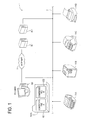
FIG. 1 is a schematic diagram illustrating an automatic file transfer system directed to one embodiment of the invention; -
FIG. 2 is a schematic diagram illustrating the automatic file transfer system; -
FIG. 3 is a schematic diagram illustrating the automatic file transfer system; -
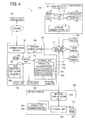
FIG. 4 is a block diagram illustrating the automatic file transfer system; -
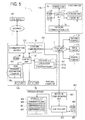
FIG. 5 is a block diagram illustrating the automatic file transfer system; -
FIG. 6 is a front view illustrating a window for changing a location setting of a transfer folder; -
FIG. 7 is a front view illustrating a window for changing the location setting of the transfer folder; -
FIG. 8 is a flowchart of a program that realizes an operation of the automatic file transfer system; and -
FIG. 9 is a flowchart of a program that realizes an operation of an automatic file transfer system directed to another embodiment of the invention. - A detailed description of a preferred embodiment of an automatic file transfer system and a storage medium of the invention will now be given referring to the accompanying drawings
- A detailed description of one embodiment directed to the invention will be given by referring to drawings. First, there will be described the outline of an automatic file transfer system directed to the one embodiment directed to the invention by referring to
FIG. 1 through FIG. 3 . - As illustrated in
FIG. 1 through FIG. 3 , in the automaticfile transfer system 1 directed to the one embodiment, apersonal computer 101 is connected through a local area network (LAN) 2 to afirst printer 11A, a second printer 118, athird printer 11C, afourth printer 11D, anetwork server 401, and the like. Further, through the Internet I, thepersonal computer 101 is connected to aWeb server 301, and the like. - Further, in the automatic
file transfer system 1 directed to the one embodiment, thepersonal computer 101 is provided with atransfer folder 107b. In thetransfer folder 107b, acompressed file A 601 and acompressed file B 602 are placed each as an object to be transferred. However, a transfer destination (target printer) of a file placed in thetransfer folder 107b is specified in advance. - Here, each of the
first printer 11A, thesecond printer 11B, and thethird printer 11C is a "label printer," and is set as the transfer destination (target printer) of a file placed in thetransfer folder 107b. Whereas thefourth printer 11D is a "page printer", a "line printer," or the like and excluded from the transfer destination (target printer) of a file placed in thetransfer folder 107b. - In the automatic
file transfer system 1 directed to the one embodiment, if, for instance, thefirst printer 11A is powered on as illustrated inFIG. 2 while thepersonal computer 101 is activated, thecompressed file A 601 and thecompressed file B 602 are automatically transferred to thefirst printer 11A from thetransfer folder 107b in thepersonal computer 101. This operation is the same as to thesecond printer 11B and to thethird printer 11C. - Though not illustrated, if a new file is placed in the
transfer folder 107b in thepersonal computer 101 while the power of thefirst printer 11A is on, the new file is automatically transferred to thefirst printer 11A from thetransfer folder 107b in thepersonal computer 101 in the same manner. This operation is also the same as to thesecond printer 11B and to thethird printer 11C. - Meanwhile, in the automatic
file transfer system 1 directed to the one embodiment, for example, if thefourth printer 11D is powered on as illustrated inFIG. 3 while thepersonal computer 101 is activated, none of thecompressed file A 601 and thecompressed file B 602 is automatically transferred to thefourth printer 11D from thetransfer folder 107b in thepersonal computer 101. This is because thefourth printer 11D is excluded from the transfer destination (target printer) of a file placed in thetransfer folder 107b, as described above. - Accordingly, though not illustrated, if a new file is placed in the
transfer folder 107b in thepersonal computer 101 while the power of thefourth printer 11D is on, the new file will never be automatically transferred to thefourth printer 11D from thetransfer folder 107b in thepersonal computer 101 likewise. - As above mentioned, in the automatic
file transfer system 1 directed to the one embodiment, thepersonal computer 101 has therein thetransfer folder 107b in which is placed a file which is to be automatically transferred to thefirst printer 11A, thesecond printer 11B and thethird printer 11C, but such a transfer folder may be provided in theWeb server 301 or in thenetwork server 401. - However, the location setting of the transfer folder is manually changed by a user at the
personal computer 101. That is, when changing the location setting of the transfer folder, a user makes thepersonal computer 101 display a window for the change. - On a
window 501 displayed on thepersonal computer 101, as illustrated inFIG. 6 and FIG. 7 , there are displayed threeradio buttons 502, anedit box 503, anOK button 504, a cancelbutton 505, a message saying "Set data-storage location on:" and the like. Through clicking aradio button 502 positioned at the head of an item displaying a location to set a transfer folder and then clicking theOK button 504, the user can change the location setting for the transfer folder. - In the example of
FIG. 6 , a mark indicating ON is put on theradio button 502 positioned at the head of an item "Local Folder," then if theOK button 504 is clicked under this state, a transfer folder is set in thepersonal computer 101. In principle, a path in thepersonal computer 101 is to be input in theedit box 503 to set a transfer folder, but theOK button 504 can be clicked without an input. In this case, it is regarded that the same folder as the application is designated. - In the example of
FIG. 7 , a mark indicating ON is put on theradio button 502 positioned at the head of an item "Network Server," then if theOK button 504 is clicked under this state, a transfer folder is set in thenetwork server 401. However, in this case, unless a path withinnetwork server 401 is input in theedit box 503, theOK button 504 cannot be clicked. - In addition, a transfer folder can be set in the
Web server 301. Thewindow 501 corresponding to this setting is not illustrated inFIG. 6 or FIG. 7 , but a user can click theradio button 502 positioned at the head of an item "Web Server" and put a mark indicating ON therein, then click theOK button 504. With this operation, a transfer folder is set in theWeb server 301. However, also in this case, unless a URL of theWeb server 301 is input in theedit box 503, theOK button 504 cannot be clicked. - As illustrated in the block diagram of
FIG. 4 , the automaticfile transfer system 1 directed to the one embodiment is provided with thepersonal computer 101, the local area network (LAN) 2 and the Internet I, and further, theWeb server 301 which is connected to the Internet I, andprinters network server 401, and the like. - The
personal computer 101 is a host of theprinters control unit 102, acommunication module 103, aninput unit 104, anoutput unit 105, anetwork communication unit 106, astorage unit 107,ROM 108,RAM 109 and so on. Thecontrol unit 102 is a microcontroller configured to control the above constituent elements and the like, and also configured to execute various kinds of programs. Thecommunication module 103 is a unit for making a connection to the Internet I. Theinput unit 104 is made up with various operation buttons provided on a keyboard, or with a mouse, etc. As for theoutput unit 105, a liquid crystal display or the like is used. Thenetwork communication unit 106 is a unit for making a connection to the local area network (LAN) 2. Thestorage unit 107 secures, using flash ROM, anarea 107a storing an application, atransfer folder 107b, an area, which is not illustrated, storing printer drivers corresponding to theprinters FIG. 1 through FIG. 3 ,FIG. 6 and FIG. 7 , and may be stored in theROM 108. In thetransfer folder 107b, there are placed files which are to be automatically transferred to thefirst printer 11A, thesecond printer 11B and thethird printer 11C, as above mentioned. InFIG. 4 , thecompressed file A 601 and thecompressed file B 602 are placed therein according to the example as illustrated inFIG. 1 through FIG. 3 andFIG. 6 above. TheROM 108 stores various kinds of control programs, etc. TheRAM 109 provides work areas for executing the various control programs in thecontrol unit 102, so that, for example, a later-described transfer-destination counter 109a is secured therein. An activated program except some program (such as a boot program) is executed on theRAM 109 once a command code thereof is copied from a medium (such as thestorage unit 107 or the ROM 108) which stores the program to theRAM 109. Then, when the program is quit, the copy of the command code which has been copied on theRAM 109 is abolished. - The
first printer 11A is a "label printer" whose host is thepersonal computer 101 and includes acontrol unit 12, aprinting unit 14, astorage unit 15,ROM 16,RAM 17, apower key 18, anetwork communication unit 19 and so on. Thecontrol unit 12 is a microcontroller configured to control the above constituent elements and the like, and also configured to execute various kinds of programs. Theprinting unit 14 is configured to print on a printing medium for a label based on a printer command (such as a print command or print data). Thestorage unit 15 stores contents to be printed on a print medium for a label, etc. TheROM 16 stores various kinds of control programs, etc. TheRAM 17 provides work areas for executing the various control programs in thecontrol unit 12. As for thepower key 18, a press-down button or the like is used. Thenetwork communication unit 19 is a unit for making a connection to the local area network (LAN) 2. - Since the
second printer 11B, thethird printer 11C and thefourth printer 11 D are configured similarly in comparison with thefirst printer 11 A, illustrations of their respective constituent elements and descriptions will be omitted. However, thefourth printer 11 D is a "page printer" or a "line printer," whose host is thepersonal computer 101, and executes a print on cut sheet paper (of size A4, for instance). Further, as above mentioned, thefirst printer 11A, thesecond printer 11B and thethird printer 11C are each set as the transfer destination (target printer) of a file placed in thetransfer folder 107b. Whereas thefourth printer 11 D is excluded from the file transfer destination (target printer) of a file placed in thetransfer folder 107b. These settings are decided at thepersonal computer 101. - The
network server 401 is a server provided at the local area network (LAN) 2, and includes acontrol unit 402, anetwork communication unit 403, astorage unit 404,ROM 406,RAM 407, and so on. Thecontrol unit 402 is a microcontroller configured to control the above constituent elements and the like, and also configured to execute various kinds of programs. Thenetwork communication unit 403 is a unit for making a connection to the local area network (LAN) 2. Thestorage unit 404 uses flash ROM, etc., and is provided with atransfer folder 405 and so on. TheROM 406 stores various kinds of control programs, etc. TheRAM 407 provides work areas for executing the various control programs in thecontrol unit 402. - The
Web server 301 is a public server provided on the Internet I, and is a server where a transfer folder can be set, as described above. - If a transfer folder is set in the
network server 401 as in the example ofFIG. 7 , thecompressed file A 601 and thecompressed file B 602 are placed in thetransfer folder 405 in thestorage device 404 provided in thenetwork server 401, as illustrated inFIG. 5 . The detailed description ofFIG. 5 is omitted because the block diagram ofFIG. 5 is the same as the block diagram ofFIG. 4 except the location where thecompressed file A 601 and thecompressed file B 602 are placed. - The program illustrated in the flowchart of
FIG. 8 is a program for major part of an application stored in thearea 107a of thestorage unit 107 in thepersonal computer 101. The program illustrated in the flowchart ofFIG. 8 is executed on thepersonal computer 101 which is activated. - This program is a program designed to be activated when a printer which is recognized through plug-and-play appears among the printers connected to the
personal computer 101, and as above discussed, after copied to theRAM 109, the program code is executed on theRAM 109. In this case, if the copied program code already exists in theRAM 109 and is executed on theRAM 109, the program code is not to be copied to theRAM 109. That is, at most one copy of the program code is allowed to exist on theRAM 109. Further, this program is executed as a multitask program, and every time a printer which is recognized through the plug-and-play appears, one subject for executing this program is provided (one task to execute this program is generated), and this program is carried out from the first step S101. This program is carried out in thecontrol unit 102, but to put it another way, thecontrol unit 102 is made up of a plurality of CPUs (of the same number as the printers recognized through the plug-and-play), and the operation thereof is similar to executing one program code copied on theRAM 109 while sharing the one program code. In a similar manner, the above transfer tool is shared with plural subjects (plural tasks), and the transfer-destination counter 109a on theRAM 109 is also shared with plural subjects (plural tasks). If there exist plural subjects (tasks), codes in different locations in this program may be simultaneously executed. - The operation discussed below is an operation in one subject (one task). According to
FIG. 8 , in the operation of the automaticfile transfer system 1 directed to the one embodiment, thecontrol unit 102 first determines, in S101, whether or not a printer where the power is turned on among the printers connected to thepersonal computer 101 is a "target printer." The printer where the power is turned on among the printers connected to thepersonal computer 101 is recognized through the plug-and-play by thecontrol unit 102. It is determined, in accordance with a piece of information written in a printer driver corresponding to the printer currently recognized, whether or not the printer recognized by thecontrol unit 102 is a "target printer." That is, an area, which is not illustrated, where a printer driver is stored in thestorage unit 107 is referenced for the determination. - Here, if the printer whose power is turned on among the printers connected to the
personal computer 101 is a "target printer" (YES at S101), thecontrol unit 102 shifts the process to S102. - At S102, the
control unit 102 increments the transfer-destination counter 109a secured in theRAM 109 by "1". The initial value of the transfer-destination counter 109a is "0". Thecontrol unit 102 then shifts the process to S103. - At S103, the
control unit 102 determines whether or not transfer data exists. In the determination, it is determined whether or not a new file is placed in the transfer folder whose location setting is set by a user. Here, if no transfer data exists, namely, if no new file is placed in the transfer folder whose location setting is set by a user (NO at S103), thecontrol unit 102 shifts the process toS 105 below without executing anything. Meanwhile, if transfer data exists, namely, if a new file is placed in the transfer folder whose location setting is set by a user (YES at S103), thecontrol unit 102 shifts the process to S104. - At S104, a data transfer process is executed. In the data transfer process, the file newly placed in the transfer folder whose location setting is set by a user is transferred to the "target printer," whose power is recognized to be turned on. The
control unit 102 then shifts the process to S105. - At S105, the
control unit 102 determines whether or not the power of the "target printer" recognized at S101 is turned off. Here, if the power of the "target printer" recognized at S101 above is not turned off (NO at S105), thecontrol unit 102 shifts the process to S106. - At S106, the
control unit 102 determines whether or not to force-quit the "transfer tool" with respect to the "target printer" recognized at S101 above. This determination is carried out by an operation of a user through theinput unit 104. Here, if it is determined not to force-quit the "transfer tool" with respect to the "target printer" recognized at S101 above (NO at S106), thecontrol unit 102 returns to S103 above. Meanwhile, if it is determined to force-quit the "transfer tool" with respect to the "target printer" recognized at S101 above (YES at S106), thecontrol unit 102 shifts the process to S107. - At S107, the
control unit 102 decrements the transfer-destination counter 109a secured in theRAM 109 by "1". Thecontrol unit 102 then shifts the process to S108. - At S108, the
control unit 102 determines whether or not value "0" is indicated in the transfer-destination counter 109a secured in theRAM 109. Here, if it is determined that value "0" is indicated in the transfer-destination counter 109a secured in the RAM 109 (YES at S108), thecontrol unit 102 shifts the process to S109, quits the "transfer tool," and following this, terminates this program. Meanwhile, if it is determined that value "1" or more is indicated in the transfer-destination counter 109a secured in the RAM 109 (NO at S108), thecontrol unit 102 terminates this program without executing anything. - Further, at S105 above, if the "target printer" recognized at S101 above is powered off (YES at S105), the
control unit 102 shifts the process to S110. At S110, thecontrol unit 102 decrements the transfer-destination counter 109a secured in theRAM 109 by "1". Thecontrol unit 102 then shifts the process to S111. - At S111, the
control unit 102 determines whether or not value "0" is indicated in the transfer-destination counter 109a secured in theRAM 109. Here, if it is determined that value "0" is indicated in the transfer-destination counter 109a secured in the RAM 109 (YES at S111), thecontrol unit 102 shifts the process to S109, quits the "transfer tool," and following this, terminates this program. Meanwhile, if it is determined that value "1" or more is indicated in the transfer-destination counter 109a secured in the RAM 109 (NO at S111), thecontrol unit 102 terminates this program without executing anything. - Further, if, at S101 above, the printer where the power is turned on among the printers connected to the
personal computer 101 is not a "target printer" (NO at S101), thecontrol unit 102 shifts the process to S 112. - At S 112, the
control unit 102 determines whether or not value "0" is indicated in the transfer-destination counter 109a secured in theRAM 109. Here, if it is determined that value "0" is indicated in the transfer-destination counter 109a secured in the RAM 109 (YES at S112), thecontrol unit 102 shifts the process to S113, quits the "transfer tool," and following this, terminates this program. Meanwhile, if it is determined that value "1" or more is indicated in the transfer-destination counter 109a secured in the RAM 109 (NO at S112), thecontrol unit 102 terminates this program without executing anything. - As has been discussed in detail, the automatic
file transfer system 1 directed to the present embodiment, namely, the automaticfile transfer system 1 wherein an application program stored in thearea 107a of thestorage unit 107 is executed at thepersonal computer 101, is provided with thetransfer folder more files personal computer 101 recognizes through plug-and-play that the power is on at a printer among one ormore printers personal computer 101, the following processes (i) through (ii) are repeatedly executed for each printer thus recognized if the printer thus recognized is a printer of a transfer-target ("target printer") (YES at S101). That is, in thepersonal computer 101, and (i) it is determined whether or not a new file is moved to the transfer folder (whose location setting is set by a user) (S103), (ii) if it is determined that a new file is moved to the transfer folder (YES at S103), the new file is transferred to the printer currently recognized ("target printer") (S104), and accordingly, it is made possible to automatically transfer the new file moved to the transfer folder to the printer ("target printer") connected to thepersonal computer 101. - Accordingly, troubles in the operation to transfer a file can be saved, safe file transfer can be ensured, and erroneous file transfer can be prevented in a case where the same file is transferred to plural printers ("target printers").
- Furthermore, in the automatic
file transfer system 1 directed to the present embodiment, namely, in the automaticfile transfer system 1 wherein an application program stored in thearea 107a of thestorage unit 107 is executed at thepersonal computer 101, for a condition to terminate the processes (i) through (ii), thepersonal computer 101 executes the processes (A) through (D) below. Namely, the personal computer 101: (A) increments the transfer-destination counter 109a by "1" when recognizing through plug-and-play that the powered is on at a printer among the one ormore printers personal computer 101; (B) decrements the transfer-destination counter 109a by "1" when recognizing that the printer currently recognized is powered off (S110); (C) decrements the transfer-destination counter 109a by "1" when a force-quit signal is received based on an operation of a user through the input unit 104 (S107); and (D) terminates the processes (i) through (ii) (S109, S113) when the transfer-destination counter 109a indicates "0" (YES at S108, YES at S111, YES at S112). Thereby, thepersonal computer 101 can use the transfer-destination counter 109a as in the program illustrated inFIG. 8 , and can formulate the timing to quit the automatic transfer with a simple program configuration. - Further, according to the automatic
file transfer system 1 directed to the one embodiment, namely, in the automaticfile transfer system 1 wherein an application program stored in thearea 107a of thestorage unit 107 is executed at thepersonal computer 101, thetransfer folder personal computer 101 to each of the one ormore printers printers - A description of an automatic file transfer system according to another embodiment of the invention will next be given referring to
FIG. 9 . This embodiment is almost similar to the above one embodiment except the processing of the application, therefore the differences therebetween are mainly discussed. Here, the same reference signs are assigned to the portions identical with those in the above one embodiment. - The program as illustrated in the flowchart of
FIG. 9 is executed in thepersonal computer 101 which is activated, in a manner similar to the one embodiment. - This program is a program designed to be activated when a printer which is recognized through the plug-and-play appears among the printers connected to the
personal computer 101, and this program is to be executed on theRAM 109 after the program code is copied to theRAM 109 as above discussed. In the one embodiment, if a copied program code already exists on theRAM 109 and is executed on theRAM 109, the program code is not to be copied to theRAM 109 in this case. In this embodiment, however, even if the copied program code already exists in theRAM 109, the program code is still copied onto theRAM 109 independently. That is, in the one embodiment above, at most one copy of the program code is allowed to exist on theRAM 109 in a certain moment, but in this embodiment, plural copies of the program codes can exist on theRAM 109 in a certain moment. Furthermore, this program is the same regarding a point that this program is executed as a multitask program, and every time a printer which is recognized through the plug-and-play appears, one subject for executing this program is provided (one task to execute this program is generated) and this program is executed from the first step S101. However, in this program, each of a plurality of subjects (of the same number as the printers recognized through the plug-and-play) has a program code copied on theRAM 109, and each subject executes each corresponding program code copied. In this embodiment, similar to this program, the above transfer tool is not shared with plural subjects (plural tasks), and each subject has its own transfer tool for the corresponding copy. The transfer-destination counter 109a on theRAM 109 does not exist. When there are a plurality of subjects (tasks), a plurality of these programs (including transfer tools) are activated, and if a user carries out force-quitting with respect to one of them, the processes of the whole subjects (tasks) are terminated as a result of the force-quitting in the one embodiment above, for only one copied program code exists. In contrast, in this embodiment, when force-quitting, a user designates and terminates one of the plurality of these programs, and the other programs are not terminated. - The operation discussed below is an operation at one subject (one task). According to
FIG. 9 , in the operation of the automaticfile transfer system 1 directed to this embodiment, thecontrol unit 102 first determines, in S201, whether or not a printer where the power is turned on among the printers connected to thepersonal computer 101 is a "target printer." The printer where the power is turned on among the printers connected to thepersonal computer 101 is recognized through the plug-and-play by thecontrol unit 102. It is determined in accordance with a piece of information written in the printer driver corresponding to the printer currently recognized, whether or not the printer recognized by thecontrol unit 102 is a "target printer." That is, an area, which is not illustrated, where a printer driver is stored in thestorage unit 107 is referenced for the determination. - Here, if the printer where the power is turned on among the printers connected to the
personal computer 101 is a "target printer" (YES at S201), thecontrol unit 102 shifts the process to S202. - At S202, the
control unit 102 determines whether or not transfer data exists. In the determination, it is determined whether or not a new file is placed in the transfer folder whose location setting is set by a user. Here, if no transfer data exists, namely, if no new file is placed in the transfer folder whose location setting is set by a user (NO at S202), thecontrol unit 102 shifts the process to S204 below without executing anything. Meanwhile, if transfer data exists, namely, if a new file is placed in the transfer folder whose location setting is set by a user (YES at S202), thecontrol unit 102 shifts the process to S203. - At S203, a data transfer process is executed. The file newly placed in the transfer folder whose location setting is set by a user is transferred to the "target printer," whose power is recognized to be turned on. The
control unit 102 then shifts the process to S204. - At S204, the
control unit 102 determines whether or not the power of the "target printer" recognized at S201 above is turned off. Here, if the power of the "target printer" recognized at S201 above is not turned off (NO at S204), thecontrol unit 102 shifts the process to S205. - At S205, the
control unit 102 determines whether or not to force-quit the "transfer tool" with respect to the "target printer" recognized at S201 above. This determination is carried out by an operation of a user through theinput unit 104. Here, if it is determined not to force-quit the "transfer tool" with respect to the "target printer" recognized at S201 above (NO at S205), thecontrol unit 102 returns the process to S202 above. Meanwhile, if it is determined to force-quit the "transfer tool" with respect to the "target printer" recognized at S201 above (YES at S205), thecontrol unit 102 shifts the process to S206. - At S206, the
control unit 102 terminates the "transfer tool," and then terminates this program. - Further, at S204 above, if the "target printer" recognized at S201 above is powered off (YES at S204), the
control unit 102 shifts the process to S206. At S206, thecontrol unit 102 terminates the "transfer tool," and then terminates this program. - Further, if, at S201 above, the printer where the power is turned on among the printers connected to the
personal computer 101 is not a "target printer" (NO at S201), thecontrol unit 102 shifts the process to S206. At S206, thecontrol unit 102 terminates the "transfer tool," and then terminates this program. - As has been discussed in detail, the automatic
file transfer system 1 directed to this embodiment, namely, the automaticfile transfer system 1 wherein an application program stored in thearea 107a of thestorage unit 107 is executed at thepersonal computer 101, is provided with thetransfer folder more files personal computer 101 recognizes through plug-and-play that the power is on at a printer among one ormore printers personal computer 101, the following processes (i) through (ii) are repeatedly executed for each printer thus recognized if the printer thus recognized is a printer of a transfer-target ("target printer") (YES at S201). That is, in thepersonal computer 101, and (i) it is determined whether or not a new file is moved to the transfer folder (whose location setting is set by a user) (S202), (ii) if it is determined that a new file is moved to the transfer folder (YES at S202), the new file is transferred to the printer currently recognized ("target printer") (S203), and accordingly, it is made possible to automatically transfer the new file moved to the transfer folder to the printer ("target printer") connected to thepersonal computer 101. - Accordingly, troubles in the operation to transfer a file can be saved, safe file transfer can be ensured, and erroneous file transfer can be prevented in a case where the same file is transferred to plural printers ("target printers").
- Further, according to the automatic
file transfer system 1 directed to this embodiment, namely, the automaticfile transfer system 1 wherein an application program stored in thearea 107a of thestorage unit 107 is executed at thepersonal computer 101, thetransfer folder personal computer 101 to each of the one ormore printers more printers - While presently preferred embodiments of the present invention have been shown and described, it is to be understood that the present invention is for the purpose of illustration and that various changes and modifications may be made without departing from the scope of the present invention as set forth in the appended claims.
- For instance, if a transfer folder is set in the
Web server 301, the transfer folder in theWeb server 301 can be shared with the plurality of automaticfile transfer systems 1 directed to the above embodiments each of which is locally arranged. Accordingly, even if the plurality of automaticfile transfer systems 1 directed to the above embodiments each of which is locally arranged are located remotely from one another, the same effect can still be obtained in each of the plurality of automaticfile transfer systems 1 directed to the above embodiments. - Further, in the above embodiments, the
printers personal computer 101 through the connection with the local area network (LAN) 2, however, theprinters personal computer 101 without the connection through the local area network (LAN) 2. - Further, in the automatic
file transfer system 1 directed to the above embodiments, an application program stored in thearea 107a of thestorage unit 107 is executed at thepersonal computer 101. That is, in the above embodiments, the application program is stored in thearea 107a of thestorage unit 107 which is a built-in storage medium in thepersonal computer 101; however, the application program may be stored in a storage medium connected or inserted to thepersonal computer 101.
Claims (6)
- An automatic file transfer system (1) including a personal computer (101) and one or more printers (11A, 11B, 11C, 11D), the automatic file transfer system (1) comprising:a transfer folder (107b, 405) capable of containing one or more files (601, 602),wherein, when the personal computer (101) recognizes, through plug-and-play, that a printer among the one or more printers (11A, 118, 11C, 11D) which are connected to the personal computer (101) is powered on, if the printer currently recognized is a transfer-target printer (11A, 11B, 11C), the personal computer (101) executes in a repetitive manner, for the printer currently recognized, processes of:(i) determining whether or not a new file (601, 602) is moved into the transfer folder (107b, 405); and(ii) transferring, if it is determined that a new file (601, 602) is moved into the transfer folder (107b, 405), the new file (601, 602) to the printer currently recognized.
- The automatic file transfer system (1) according to claim 1,
wherein the personal computer (101) comprises:a transfer-destination counter (109a); andan input unit (104) configured to transmit a force-quit signal, and wherein the personal computer (101) executes processes of:(A) incrementing the transfer-destination counter (109a) by "1" if the personal computer (101) recognizes, through the plug-and-play, that a printer among the one or more printers (11A, 11B, 11C, 11D) which are connected to the personal computer (101) is powered on;(B) decrementing the transfer-destination counter (109a) by "1" if the personal computer (101) recognizes that the printer currently recognized is powered off;(C) decrementing the transfer-destination counter (109a) by "1" if the force-quit signal is received from the input unit (104); and(D) terminating the processes (i) through (ii) if the transfer-destination counter (109a) indicates "0". - The automatic file transfer system (1) according to claim 1 or 2, further comprising a network (2) which connects the personal computer (101) and each of the one or more printers (11A, 11B, 11C, 11D), wherein the transfer folder (107b, 405) is set within the network (2).
- A storage medium (107) storing a program designed to execute processes(i) through (ii) below in a repetitive manner at an automatic file transfer system (1) including a personal computer (101) and one or more printers (11A, 11B, 11C, 11D), using the personal computer (101), the automatic file transfer system (1) comprising:a transfer folder (107b, 405) capable of containing one or more files (601, 602),wherein, when the personal computer (101) recognizes, through plug-and-play, that a printer among the one or more printers (11A, 11B, 11C, 11D) which are connected to the personal computer (101) is powered on, if the printer currently recognized is a transfer-target printer (11A, 11B, 11C), the personal computer (101) executes in a repetitive manner, for the printer currently recognized, the processes of:(i) determining whether or not a new file (601, 602) is moved into the transfer folder (107b, 405); and(ii) transferring, if it is determined that a new file (601, 602) is moved into the transfer folder (107b, 405), the new file (601, 602) to the printer currently recognized.
- The storage medium (107) according to claim 4, further storing a program designed to execute processes (A) through (D) below in a repetitive manner,
wherein the personal computer (101) comprises:a transfer-destination counter (109a); andan input unit (104) configured to transmit a force-quit signal, and wherein the personal computer (101) executes the processes of:(A) incrementing the transfer-destination counter (109a) by "1" if the personal computer (101) recognizes, through the plug-and-play, that a printer among the one or more printers (11A, 11B, 11C, 11D) which are connected to the personal computer (101) is powered on;(B) decrementing the transfer-destination counter (109a) by "1" if the personal computer (101) recognizes that the printer currently recognized is powered off;(C) decrementing the transfer-destination counter (109a) by "1" if the force-quit signal is received from the input unit (104); and(D) terminating the processes (i) through (ii) if the transfer-destination counter (109a) indicates "0". - The storage medium (107) according to claim 4 or 5, wherein the automatic file transfer system (1) further comprises a network (2) which connects the personal computer (101) and each of the one or more printers (11A, 11B, 11C, 11D), wherein the transfer folder (107b, 405) is set within the network (2).
Applications Claiming Priority (2)
| Application Number | Priority Date | Filing Date | Title |
|---|---|---|---|
| JP2010079681 | 2010-03-30 | ||
| JP2010277173A JP5533618B2 (en) | 2010-03-30 | 2010-12-13 | Automatic file transfer system, program, and recording medium |
Publications (2)
| Publication Number | Publication Date |
|---|---|
| EP2372523A2 true EP2372523A2 (en) | 2011-10-05 |
| EP2372523A3 EP2372523A3 (en) | 2013-05-15 |
Family
ID=43901196
Family Applications (1)
| Application Number | Title | Priority Date | Filing Date |
|---|---|---|---|
| EP11156705.3A Ceased EP2372523A3 (en) | 2010-03-30 | 2011-03-03 | Automatic file transfer system and storage medium |
Country Status (4)
| Country | Link |
|---|---|
| US (1) | US8559038B2 (en) |
| EP (1) | EP2372523A3 (en) |
| JP (1) | JP5533618B2 (en) |
| CN (1) | CN102207833B (en) |
Families Citing this family (4)
| Publication number | Priority date | Publication date | Assignee | Title |
|---|---|---|---|---|
| JP5783001B2 (en) * | 2011-11-11 | 2015-09-24 | 村田機械株式会社 | Communication system, communication terminal device, server device, and cloud transfer box setting method |
| JP2013228873A (en) * | 2012-04-25 | 2013-11-07 | Canon Inc | Information processing apparatus, information processing method and program |
| CN109408004B (en) * | 2018-09-30 | 2022-03-15 | 福建星谷信息科技有限公司 | A USB multi-channel synchronous download tool applied to a printer and its working method |
| JP7668647B2 (en) * | 2021-02-17 | 2025-04-25 | キヤノン株式会社 | COMMUNICATION DEVICE AND CONTROL METHOD |
Citations (1)
| Publication number | Priority date | Publication date | Assignee | Title |
|---|---|---|---|---|
| JP2004157912A (en) | 2002-11-08 | 2004-06-03 | Brother Ind Ltd | Printing system, data creation device, printing device, program, and recording medium for recording the program |
Family Cites Families (10)
| Publication number | Priority date | Publication date | Assignee | Title |
|---|---|---|---|---|
| JP3257895B2 (en) | 1994-04-01 | 2002-02-18 | キヤノン株式会社 | Scanner printer server system, automatic image transfer method, and scanner printer server |
| JP3404692B2 (en) * | 1996-10-09 | 2003-05-12 | 京セラミタ株式会社 | Copier management system |
| US6943905B2 (en) * | 2001-12-20 | 2005-09-13 | Sharp Laboratories Of America, Inc. | Virtual print driver system and method |
| JP2003308181A (en) * | 2002-04-18 | 2003-10-31 | Konica Minolta Holdings Inc | Automatic printing system, automatic printing method, server and printer |
| JP3903995B2 (en) * | 2004-03-03 | 2007-04-11 | コニカミノルタビジネステクノロジーズ株式会社 | Image data distribution apparatus, image data distribution method, and computer program |
| JP4895347B2 (en) * | 2004-12-02 | 2012-03-14 | キヤノン株式会社 | Document management system and control method thereof |
| JP4756994B2 (en) * | 2005-10-27 | 2011-08-24 | キヤノン株式会社 | Network print system, network peripheral device, information processing device and program |
| JP2007142704A (en) * | 2005-11-17 | 2007-06-07 | Canon Inc | COMMUNICATION DEVICE, COMMUNICATION DEVICE CONTROL METHOD, AND PROGRAM |
| JP2009206596A (en) * | 2008-02-26 | 2009-09-10 | Brother Ind Ltd | Data transmission program, data transmitter and data transmission/reception system |
| JP5141453B2 (en) * | 2008-09-05 | 2013-02-13 | 村田機械株式会社 | Communication device and relay server |
-
2010
- 2010-12-13 JP JP2010277173A patent/JP5533618B2/en not_active Expired - Fee Related
-
2011
- 2011-03-03 EP EP11156705.3A patent/EP2372523A3/en not_active Ceased
- 2011-03-07 US US13/041,915 patent/US8559038B2/en active Active
- 2011-03-22 CN CN201110072708.4A patent/CN102207833B/en not_active Expired - Fee Related
Patent Citations (1)
| Publication number | Priority date | Publication date | Assignee | Title |
|---|---|---|---|---|
| JP2004157912A (en) | 2002-11-08 | 2004-06-03 | Brother Ind Ltd | Printing system, data creation device, printing device, program, and recording medium for recording the program |
Also Published As
| Publication number | Publication date |
|---|---|
| CN102207833A (en) | 2011-10-05 |
| JP5533618B2 (en) | 2014-06-25 |
| US8559038B2 (en) | 2013-10-15 |
| EP2372523A3 (en) | 2013-05-15 |
| US20110242588A1 (en) | 2011-10-06 |
| JP2011227866A (en) | 2011-11-10 |
| CN102207833B (en) | 2015-08-05 |
Similar Documents
| Publication | Publication Date | Title |
|---|---|---|
| CN1307525C (en) | Information processing apparatus, information processing method | |
| US8773680B2 (en) | Information processing apparatus and information processing method | |
| KR100615475B1 (en) | Print instruction apparatus and print instruction method | |
| US20180139343A1 (en) | Non-transitory recording medium storing computer readable print setting history display program, printing system, and server | |
| JP2006140898A (en) | Image formation system | |
| US8923721B2 (en) | Image forming system and image forming apparatus | |
| CN109976681B (en) | Information processing apparatus, image forming apparatus, and computer-readable recording medium | |
| US20120133982A1 (en) | Printing system and information processing apparatus | |
| JP2008009565A (en) | Data processing apparatus, print job control method, and print data processing apparatus | |
| US20030234950A1 (en) | Notification and adjustment of non-matching printers and printer drivers | |
| US8559038B2 (en) | Automatic file transfer system and storage medium | |
| CN102253814A (en) | Information processing apparatus and control method thereof | |
| US8279486B2 (en) | Information processing apparatus | |
| US20160054956A1 (en) | Computer-readable recording medium, configuration presentation method, and configuration presentation device | |
| US9203985B2 (en) | Function setting control system and image forming apparatus | |
| US20100002262A1 (en) | Display terminal and computer program product therefor | |
| US20080238971A1 (en) | Method of Selecting Objects To Be Printed For A Hand-Held Printer | |
| JP7196494B2 (en) | programs and communication systems | |
| CN107767802B (en) | Display system, control device and display control method | |
| JP3994115B1 (en) | Print system and its management server and terminal | |
| JP5007696B2 (en) | Distributed printing method of printer, distributed printing system, and virtual printer driver | |
| JP5371540B2 (en) | Information processing apparatus, control method therefor, and program | |
| JP4631669B2 (en) | Printing system and printing control program | |
| US20090190155A1 (en) | Printing system | |
| JP2005173913A (en) | Printing system, printer driver and printer |
Legal Events
| Date | Code | Title | Description |
|---|---|---|---|
| PUAI | Public reference made under article 153(3) epc to a published international application that has entered the european phase |
Free format text: ORIGINAL CODE: 0009012 |
|
| AK | Designated contracting states |
Kind code of ref document: A2 Designated state(s): AL AT BE BG CH CY CZ DE DK EE ES FI FR GB GR HR HU IE IS IT LI LT LU LV MC MK MT NL NO PL PT RO RS SE SI SK SM TR |
|
| AX | Request for extension of the european patent |
Extension state: BA ME |
|
| PUAL | Search report despatched |
Free format text: ORIGINAL CODE: 0009013 |
|
| AK | Designated contracting states |
Kind code of ref document: A3 Designated state(s): AL AT BE BG CH CY CZ DE DK EE ES FI FR GB GR HR HU IE IS IT LI LT LU LV MC MK MT NL NO PL PT RO RS SE SI SK SM TR |
|
| AX | Request for extension of the european patent |
Extension state: BA ME |
|
| RIC1 | Information provided on ipc code assigned before grant |
Ipc: G06F 3/12 20060101AFI20130410BHEP |
|
| 17P | Request for examination filed |
Effective date: 20131028 |
|
| RBV | Designated contracting states (corrected) |
Designated state(s): AL AT BE BG CH CY CZ DE DK EE ES FI FR GB GR HR HU IE IS IT LI LT LU LV MC MK MT NL NO PL PT RO RS SE SI SK SM TR |
|
| 17Q | First examination report despatched |
Effective date: 20171127 |
|
| STAA | Information on the status of an ep patent application or granted ep patent |
Free format text: STATUS: THE APPLICATION HAS BEEN REFUSED |
|
| 18R | Application refused |
Effective date: 20190903 |