EP2369458A1 - Display method and electronic device for using the same - Google Patents
Display method and electronic device for using the same Download PDFInfo
- Publication number
- EP2369458A1 EP2369458A1 EP10156706A EP10156706A EP2369458A1 EP 2369458 A1 EP2369458 A1 EP 2369458A1 EP 10156706 A EP10156706 A EP 10156706A EP 10156706 A EP10156706 A EP 10156706A EP 2369458 A1 EP2369458 A1 EP 2369458A1
- Authority
- EP
- European Patent Office
- Prior art keywords
- pages
- contents
- thumbnail images
- display panel
- electronic device
- Prior art date
- Legal status (The legal status is an assumption and is not a legal conclusion. Google has not performed a legal analysis and makes no representation as to the accuracy of the status listed.)
- Withdrawn
Links
Images



Classifications
-
- G—PHYSICS
- G06—COMPUTING OR CALCULATING; COUNTING
- G06F—ELECTRIC DIGITAL DATA PROCESSING
- G06F3/00—Input arrangements for transferring data to be processed into a form capable of being handled by the computer; Output arrangements for transferring data from processing unit to output unit, e.g. interface arrangements
- G06F3/01—Input arrangements or combined input and output arrangements for interaction between user and computer
- G06F3/048—Interaction techniques based on graphical user interfaces [GUI]
- G06F3/0484—Interaction techniques based on graphical user interfaces [GUI] for the control of specific functions or operations, e.g. selecting or manipulating an object, an image or a displayed text element, setting a parameter value or selecting a range
- G06F3/0485—Scrolling or panning
-
- G—PHYSICS
- G06—COMPUTING OR CALCULATING; COUNTING
- G06F—ELECTRIC DIGITAL DATA PROCESSING
- G06F15/00—Digital computers in general; Data processing equipment in general
- G06F15/02—Digital computers in general; Data processing equipment in general manually operated with input through keyboard and computation using a built-in program, e.g. pocket calculators
- G06F15/025—Digital computers in general; Data processing equipment in general manually operated with input through keyboard and computation using a built-in program, e.g. pocket calculators adapted to a specific application
- G06F15/0283—Digital computers in general; Data processing equipment in general manually operated with input through keyboard and computation using a built-in program, e.g. pocket calculators adapted to a specific application for data storage and retrieval
-
- G—PHYSICS
- G06—COMPUTING OR CALCULATING; COUNTING
- G06F—ELECTRIC DIGITAL DATA PROCESSING
- G06F3/00—Input arrangements for transferring data to be processed into a form capable of being handled by the computer; Output arrangements for transferring data from processing unit to output unit, e.g. interface arrangements
- G06F3/01—Input arrangements or combined input and output arrangements for interaction between user and computer
- G06F3/048—Interaction techniques based on graphical user interfaces [GUI]
- G06F3/0481—Interaction techniques based on graphical user interfaces [GUI] based on specific properties of the displayed interaction object or a metaphor-based environment, e.g. interaction with desktop elements like windows or icons, or assisted by a cursor's changing behaviour or appearance
- G06F3/0483—Interaction with page-structured environments, e.g. book metaphor
-
- G—PHYSICS
- G06—COMPUTING OR CALCULATING; COUNTING
- G06F—ELECTRIC DIGITAL DATA PROCESSING
- G06F3/00—Input arrangements for transferring data to be processed into a form capable of being handled by the computer; Output arrangements for transferring data from processing unit to output unit, e.g. interface arrangements
- G06F3/01—Input arrangements or combined input and output arrangements for interaction between user and computer
- G06F3/048—Interaction techniques based on graphical user interfaces [GUI]
- G06F3/0487—Interaction techniques based on graphical user interfaces [GUI] using specific features provided by the input device, e.g. functions controlled by the rotation of a mouse with dual sensing arrangements, or of the nature of the input device, e.g. tap gestures based on pressure sensed by a digitiser
- G06F3/0488—Interaction techniques based on graphical user interfaces [GUI] using specific features provided by the input device, e.g. functions controlled by the rotation of a mouse with dual sensing arrangements, or of the nature of the input device, e.g. tap gestures based on pressure sensed by a digitiser using a touch-screen or digitiser, e.g. input of commands through traced gestures
- G06F3/04883—Interaction techniques based on graphical user interfaces [GUI] using specific features provided by the input device, e.g. functions controlled by the rotation of a mouse with dual sensing arrangements, or of the nature of the input device, e.g. tap gestures based on pressure sensed by a digitiser using a touch-screen or digitiser, e.g. input of commands through traced gestures for inputting data by handwriting, e.g. gesture or text
-
- G—PHYSICS
- G06—COMPUTING OR CALCULATING; COUNTING
- G06F—ELECTRIC DIGITAL DATA PROCESSING
- G06F2203/00—Indexing scheme relating to G06F3/00 - G06F3/048
- G06F2203/048—Indexing scheme relating to G06F3/048
- G06F2203/04806—Zoom, i.e. interaction techniques or interactors for controlling the zooming operation
Definitions
- the present invention relates to an operating method and an electronic device for using the same. More particularly, the present invention relates to a display method and an electronic device for using the same.
- the portable electronic devices such as the mobile phone, the personal digital assistant (PDA) or digital camera, sometimes, possess multiple functions.
- the mobile phone or the PDA not only provides the simple telecommunication function but also supports the short message transmission and receiving functions while the user is not available for answering the incoming calls immediately.
- the portable electronic device can further stores and plays multimedia files and provide the user an editable calendar for recording miscellaneous notes or agenda.
- the commonly used function, the commonly used applications, the home screen, the calendar and the contact list are displayed on the screen of the electronic device in forms of pages of contents arranged in a page flow or in forms of tabs arranged in a tab list at the bottom of the main desktop frame. It is highly possible that the user needs to roll over the page flow or the tab list to find out the page of content or the tab to be select.
- the practicability of the electronic device is decreased.
- the present invention provides a display method capable of simplifying the operation of the electronic device.
- the present invention further provides an electronic device with a relatively high practicability.
- the invention provides a display method for an electronic device.
- the electronic device has a display panel displaying at least one of a plurality of pages of contents and the pages of contents are contiguously arranged in a page flow.
- the display method comprising receiving a zoom-out signal and resizing the pages of contents to be a plurality of thumbnail images respectively according to the zoom-out signal and displaying the thumbnail images on the display panel of the electronic device.
- the step of resizing the pages of contents further comprises zooming out the displayed page of content towards to a predetermined position on the display panel.
- the zoom-out signal is generated according to a pinch gesture on a touch panel of the electronic device corresponding to the displayed page of content displayed on the display panel.
- the pages of contents are contiguously arranged in the page flow in an arranging order, and the thumbnail images displayed on the display panel are arranged according to the arranging order of the pages of contents.
- the display method when the thumbnail images are displayed on the display panel, the display method further comprises receiving a dragging signal for dragging one of the thumbnail images and moving the dragged thumbnail image to be around any one of rest of the thumbnail images according to the dragging signal so as to change the arranging order.
- the dragging signal is generated by a dragging gesture on a touch panel of the electronic device.
- the display method when the thumbnail images are displayed on the display panel according to the arranging order, the display method further comprises receiving a selecting signal for selecting one of the thumbnail images, resizing the thumbnail images to be the pages of contents respectively and displaying one of the pages of contents on the display panel according to the selecting signal, wherein the displayed page of content corresponds to the selected thumbnail image and the pages of contents are contiguously arranged in the page flow according to the arranging order.
- the pages of contents include a home screen frame, a desktop frame or an application frame.
- the invention also provides a display method for an electronic device.
- the electronic device has a display panel displaying a plurality of thumbnail images, the thumbnail images respectively correspond a plurality of pages of contents and the thumbnail images displayed on the display panel are arranged according to an arranging order.
- the display method comprising receiving a dragging for dragging one of the thumbnail images and moving the dragged thumbnail image to be around any one of rest of the thumbnail images according to the dragging signal so as to change the arranging order.
- the display method when the thumbnail images are displayed on the display panel according to the arranging order, the display method further comprises receiving a selecting signal for selecting one of the thumbnail images, resizing the thumbnail images to be the pages of contents respectively and displaying one of the pages of contents on the display panel according to the selecting signal, wherein the displayed page of content corresponds to the selected thumbnail image and the pages of contents are contiguously arranged in a page flow according to the changed arranging order.
- the display method when one of the pages of contents is displayed on the display panel and the pages of contents are contiguously arranged in a page flow according to the arranging order, the display method further comprises receiving a zoom-out signal, resizing the pages of contents to be the thumbnail images respectively according to the zoom-out signal and displaying the thumbnail images on the display panel of the electronic device according to the arranging order.
- the step of resizing the pages of contents further comprises zooming out the displayed page of content towards to a predetermined position on the display panel.
- the zoom-out signal is generated according to a pinch gesture on a touch panel of the electronic device corresponding to the displayed page of content displayed on the display panel.
- the dragging signal is generated by a dragging gesture on a touch panel of the electronic device.
- the pages of contents include a home screen frame, a desktop frame or an application frame.
- the invention further provides an electronic device.
- the electronic device comprises a display panel, a touch sensing module, an image resizing module and a displaying module.
- the display panel is used for displaying at least one of a plurality of pages of contents, wherein the pages of contents are contiguously arranged in a page flow.
- the touch sensing module is used for receiving a zoom-out signal.
- the image resizing module is used for resizing the pages of contents to be a plurality of thumbnail images respectively according to the zoom-out signal.
- the displaying module is used for displaying the thumbnail images on the display panel of the electronic device.
- the image resizing module while resizing the pages of contents, the image resizing module further zooming out the displayed page of content towards to a predetermined position on the display panel.
- the zoom-out signal is generated according to a pinch gesture on the touch sensing module corresponding to the displayed page of content displayed on the display panel.
- the pages of contents are contiguously arranged in the page flow in an arranging order, and the thumbnail images displayed on the display panel are arranged according to the arranging order of the pages of contents.
- the electronic device when the thumbnail images are displayed on the display panel according to the arranging order of the pages of contents and the touch sensing module further receives a dragging signal for dragging one of the thumbnail images, the electronic device further comprises a sorting module for changing the arranging order when the dragged thumbnail image is moved to be around any one of rest of the thumbnail images according to the dragging signal.
- the dragging signal is generated by a dragging gesture on the touch sensing module.
- the touch sensing module when the thumbnail images are displayed on the display panel according to the arranging order, the touch sensing module further receives a selecting signal for selecting one of the thumbnail images, the image resizing module resizes in the thumbnail images to be the pages of contents respectively according to the selecting signal and the displaying module displays one of the pages of contents on the display panel according to the selecting signal, wherein the displayed page of content corresponds to the selected thumbnail image and the pages of contents are contiguously arranged in the page flow according to the arranging order.
- the invention provides an electronic device.
- the electronic device comprises a display panel, a touch sensing module and a sorting module.
- the display panel is used for displaying a plurality of thumbnail images, wherein the thumbnail images respectively correspond a plurality of pages of contents and the thumbnail images displayed on the display panel are arranged according to an arranging order.
- the touch sensing module is used for receiving a dragging for dragging one of the thumbnail images.
- the sorting module is used for changing the arranging order when the dragged thumbnail image is moved to be around any one of rest of the thumbnail images according to the dragging signal.
- the electronic device when the thumbnail images are displayed on the display panel according to the arranging order and the touch sensing module further receives a selecting signal for selecting one of the thumbnail images, the electronic device further comprises an image resizing module and a displaying module.
- the image resizing module is used for resizing the thumbnail images to be the pages of contents respectively.
- the displaying module is used for displaying one of the pages of contents on the display panel according to the selecting signal, wherein the displayed page of content corresponds to the selected thumbnail image and the pages of contents are contiguously arranged in a page flow according to the changed arranging order.
- the touch sensing module when one of the pages of contents is displayed on the display panel and the pages of contents are contiguously arranged in a page flow according to the arranging order, the touch sensing module further receives a zoom-out signal, the image resizing module resizes the pages of contents to be the thumbnail images respectively according to the zoom-out signal and the displaying module displays the thumbnail images on the display panel of the electronic device according to the arranging order.
- the image resizing module while resizing the pages of contents, the image resizing module further zooms out the displayed page of content towards to a predetermined position on the display panel.
- the zoom-out signal is generated according to a pinch gesture on a touch panel of the electronic device corresponding to the displayed page of content displayed on the display panel.
- the dragging signal is generated by a dragging gesture on a touch panel of the electronic device.
- the displayed page of content is resized according to a zoom-out signal and then the thumbnail images respectively corresponding to the pages of contents contiguously arranged in the page flow are displayed in the same display region of the display panel.
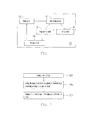
- Fig. 1 is a block diagram schematically showing an electronic device according to one embodiment of the invention.
- Fig. 2 is a flow chart showing a display method for an electronic device according to one embodiment of the invention.
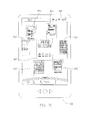
- Figs. 3A through 3D are schematic views showing the dynamic changing of the frame displayed on the display panel of the electronic device according to the display method shown in Fig .2 .
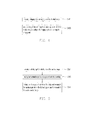
- Fig. 4 is a flow chart showing a display method for an electronic device according to another embodiment of the invention.
- Fig. 5 is a flow chart showing a display method for an electronic device according to the other embodiment of the invention.
- Fig. 1 is a block diagram schematically showing an electronic device according to one embodiment of the invention.
- an electronic device 100 of the present embodiment comprises a display panel 102, a touch sensing module 104, an image resizing module 106 and a displaying module 108.
- the electronic device 100 can also comprises a sorting module 110.
- the electronic device 100 can be, for example but not limited to, a personal computer (PC), a mobile phone, a smart phone, a personal digital assistant, a palmtop play station (such as PSP/GBA), a MP4/PMP player, a digital camera, a tablet PC, or a notebook computer, and the scope thereof is not limited herein.
- the display panel 102 can be integrated with the touch sensing module 104 to be a touch panel.
- Fig. 2 is a flow chart showing a display method for an electronic device according to one embodiment of the invention.
- Figs. 3A through 3D are schematic views showing the dynamic changing of the frame displayed on the display panel of the electronic device according to the display method shown in Fig .2 .
- the display panel 102 displays at least one of a plurality of pages of contents such as pages of contents 302a, 302b, 302c, 302d, 302e, 302f and 302g.
- the display panel 300a of the electronic device 300 which is a portable phone, for example, displays the page of content 302d.
- the pages of contents 302a, 302b, 302c, 302d, 302e, 302f and 302g are contiguously arranged in a page flow 304 and only page of content 302d is displayed by the display panel 300a.
- each of the pages of contents 302a, 302b, 302c, 302d, 302e, 302f and 302g can be, for example, a home screen frame, a desktop frame, an application frame or even a simple blank page without indicating any corresponding theme.
- the number of the contiguous pages of contents is seven, the number of the pages of contents can be customized according the practical requirements and the present invention is not limited thereto.
- the touch sensing module 104 receives a resizing signal such as a zoom-out signal.
- a zoom-out signal is generated according to a pinch gesture 306 on the touch sensing module 104 (not shown in Fig. 3A ) integrated with the display panel 300a. More specifically, the pinch gesture 306 comprises of two sub-gestures towards to each other along a diagonal line of the page of content 302d displayed on the display panel 300a.
- the zoom-out signal generated according to the pinch gesture 306 is only an exemplar of the present invention and is not used to limit the scope of the present invention.
- the zoom-out signal can be, for example, generated by any form of input method such as shaking the electronic device 100 in a specific angle or pressing a physical key on the electronic device or a virtual key displayed by the display panel.
- the image resizing module 106 resizes the pages of contents 302a, 302b, 302c, 302d, 302e, 302f and 302g to be a plurality of thumbnail images 302a', 302b', 302c', 302d', 302e', 302f' and 302g' respectively according to the zoom-out signal.
- the image resizing module 106 further resizing the displayed page of content 302d towards to a predetermined position on the display panel 300a.
- the pages of contents 302a, 302b, 302c, 302d, 302e, 302f and 302g are contiguously arranged in the page flow 304 in an arranging order so that the thumbnail images 302a', 302b', 302c', 302d', 302e', 302f' and 302g' displayed on the display panel are arranged according to the arranging order of the pages of contents.
- each of the pages of contents 302a, 302b, 302c, 302d, 302e, 302f and 302g is resized to a corresponding predetermined position so that the thumbnail images 302a', 302b', 302c', 302d', 302e', 302f' and 302g' displayed on the display panel are arranged according to the arranging order of the pages of contents 302a, 302b, 302c, 302d, 302e, 302f and 302g contiguously arranged in the page flow 304.
- each of the thumbnail images respectively corresponds to a specific deployed position on the display panel 300a according to the arranging order of the pages of contents 302a, 302b, 302c, 302d, 302e, 302f and 302g in the page flow 304y.
- the displayed page of content 302d is the fourth page in the page flow 304.
- the thumbnail image corresponding to the page of content 302d is arranged to be at the fourth position among the thumbnail positions on the display panel 300a counting from the top to the bottom and from the left to the right of the display panel 300a.
- the displayed page of content 302d is located between the pages of contents 302c and 302e in the page flow 304 so that the thumbnail image corresponding to the page of content 302d is also located between the thumbnail images corresponding to the pages of contents 302c and 302e respectively.
- the displaying module 108 displays the thumbnail images 302a', 302b', 302c', 302d', 302e', 302f' and 302g' on the display panel of the electronic device.
- the thumbnail images of all of the pages of contents are displayed in the same frame by the display module 108 at a thumbnail displaying mode in which the pages of contents are resized to be the thumbnail images respectively.
- arranging order of the pages of contents in the page flow can be changed through changing the arrangement of the thumbnail images.
- the following description accompanying with Fig. 4 details the steps for changing the arranging order of the pages of contents in the page flow by rearranging the thumbnail images.
- Fig. 4 is a flow chart showing a display method for an electronic device according to another embodiment of the invention.
- the touch sensing module 104 further receives a dragging signal for dragging one of the thumbnail images 302a', 302b', 302c', 302d', 302e', 302f' and 302g' (step S401).
- the sorting module 110 changes the arranging order when the dragged thumbnail image is moved to be around any one of rest of the thumbnail images according to the dragging signal (step S405). That is, in the present embodiment, by dragging one of the thumbnail images to be around any other thumbnail images, the thumbnail images displayed on the display panel are rearranged.
- the dragging signal is generated by a dragging gesture on the touch sensing module 104 of the electronic device 100. More specifically, the dragging gesture is initiated at a location of the touch sensing module 104 corresponding to one of the thumbnail images so that the thumbnail image corresponding to the location is dragged according to the dragging signal. Also, the dragging signal generated on the touch sensing module 104 is only an exemplar of the present invention and is not used to limit the scope of the present invention. That is, in the other embodiments, the dragging signal can be, for example, generated by any form of input method such as pressing a physical key on the electronic device or a virtual key displayed by the display panel.
- Fig. 5 is a flow chart showing a display method for an electronic device according to the other embodiment of the invention. As shown in Fig. 5 , when the thumbnail images 302a', 302b', 302c', 302d', 302e', 302f' and 302g' are displayed on the display panel 102 according to the arranging order, the touch sensing module 104 receives a selecting signal for selecting one of the thumbnail images (step S501).
- the image resizing module 106 resizes the thumbnail images to be the pages of contents respectively according to the selecting signal (step S505). Then, the displaying module 108 displays at least one of the pages of contents on the display panel according to the selecting signal (step S511).
- the displayed page of content corresponds to the selected thumbnail image and the pages of contents are contiguously arranged in the page flow according to the arranging order.
- the page displaying mode after the sorting module 110 changes the arranging order shown in step S405
- the pages of contents are contiguously arranged in the page flow according to the changed arranging order after the displaying mode is switched from the thumbnail displaying mode to the page displaying mode.
- the selecting signal is generated at a location of the touch sensing module 104 corresponding to one of the thumbnail images so that the thumbnail image corresponding to the location is selected to be resized to the page of content displayed on the display panel 102.
- the selecting signal generated at a location of the touch sensing module 104 is only an exemplar of the present invention and is not used to limit the scope of the present invention. That is, in the other embodiments, the selecting signal can be, for example, generated by any form of input method such as pressing a physical key on the electronic device or a virtual key displayed by the display panel.
- the displayed page of content is resized according to a zoom-out signal and then the thumbnail images respectively corresponding to the pages of contents contiguously arranged in the page flow are displayed in the same display region of the display panel. That is, the user can easily browse all of the pages of contents in the forms of thumbnail images arranging in the same display region of the display panel.
- the conventional page browsing method in which the user needs to roll over almost all pages of contents to select one of them, it is convenient for the user to select to expand one of thumbnail images in order to select the corresponding page of content.
Landscapes
- Engineering & Computer Science (AREA)
- Theoretical Computer Science (AREA)
- General Engineering & Computer Science (AREA)
- Physics & Mathematics (AREA)
- General Physics & Mathematics (AREA)
- Human Computer Interaction (AREA)
- Computing Systems (AREA)
- Computer Hardware Design (AREA)
- User Interface Of Digital Computer (AREA)
- Controls And Circuits For Display Device (AREA)
- Control Of Indicators Other Than Cathode Ray Tubes (AREA)
Abstract
The invention provides a display method for an electronic device. The electronic device has a display panel displaying at least one of a plurality of pages of contents and the pages of contents are contiguously arranged in a page flow. The display method comprising receiving a zoom-out signal and resizing the pages of contents to be a plurality of thumbnail images respectively according to the zoom-out signal and displaying the thumbnail images on the display panel of the electronic device.
Description
- The present invention relates to an operating method and an electronic device for using the same. More particularly, the present invention relates to a display method and an electronic device for using the same.
- With the advancement of the portable electronic devices, the functionalities of the portable electronic device are various. The portable electronic devices such as the mobile phone, the personal digital assistant (PDA) or digital camera, sometimes, possess multiple functions. For instance, the mobile phone or the PDA not only provides the simple telecommunication function but also supports the short message transmission and receiving functions while the user is not available for answering the incoming calls immediately. Besides, the portable electronic device can further stores and plays multimedia files and provide the user an editable calendar for recording miscellaneous notes or agenda.
- However, conventionally, the commonly used function, the commonly used applications, the home screen, the calendar and the contact list are displayed on the screen of the electronic device in forms of pages of contents arranged in a page flow or in forms of tabs arranged in a tab list at the bottom of the main desktop frame. It is highly possible that the user needs to roll over the page flow or the tab list to find out the page of content or the tab to be select. In other words, with the increasing variety of functions of the electronic devices, it is not easy for the user to target the page of content or the tab as quickly as the user wants. Also, it is not easy for the user to quickly switch between two pages of contents while the two pages of contents are not contiguous to each other in the page flow. Thus, it is not convenient for the user to operate the electronic device. Hence, the practicability of the electronic device is decreased.
- Accordingly, the present invention provides a display method capable of simplifying the operation of the electronic device.
- The present invention further provides an electronic device with a relatively high practicability.
- The invention provides a display method for an electronic device. The electronic device has a display panel displaying at least one of a plurality of pages of contents and the pages of contents are contiguously arranged in a page flow. The display method comprising receiving a zoom-out signal and resizing the pages of contents to be a plurality of thumbnail images respectively according to the zoom-out signal and displaying the thumbnail images on the display panel of the electronic device.
- According to one embodiment of the present invention, the step of resizing the pages of contents further comprises zooming out the displayed page of content towards to a predetermined position on the display panel.
- According to one embodiment of the present invention, the zoom-out signal is generated according to a pinch gesture on a touch panel of the electronic device corresponding to the displayed page of content displayed on the display panel.
- According to one embodiment of the present invention, the pages of contents are contiguously arranged in the page flow in an arranging order, and the thumbnail images displayed on the display panel are arranged according to the arranging order of the pages of contents.
- According to one embodiment of the present invention, when the thumbnail images are displayed on the display panel, the display method further comprises receiving a dragging signal for dragging one of the thumbnail images and moving the dragged thumbnail image to be around any one of rest of the thumbnail images according to the dragging signal so as to change the arranging order.
- According to one embodiment of the present invention, the dragging signal is generated by a dragging gesture on a touch panel of the electronic device.
- According to one embodiment of the present invention, when the thumbnail images are displayed on the display panel according to the arranging order, the display method further comprises receiving a selecting signal for selecting one of the thumbnail images, resizing the thumbnail images to be the pages of contents respectively and displaying one of the pages of contents on the display panel according to the selecting signal, wherein the displayed page of content corresponds to the selected thumbnail image and the pages of contents are contiguously arranged in the page flow according to the arranging order.
- According to one embodiment of the present invention, the pages of contents include a home screen frame, a desktop frame or an application frame.
- The invention also provides a display method for an electronic device. The electronic device has a display panel displaying a plurality of thumbnail images, the thumbnail images respectively correspond a plurality of pages of contents and the thumbnail images displayed on the display panel are arranged according to an arranging order. The display method comprising receiving a dragging for dragging one of the thumbnail images and moving the dragged thumbnail image to be around any one of rest of the thumbnail images according to the dragging signal so as to change the arranging order.
- According to one embodiment of the present invention, when the thumbnail images are displayed on the display panel according to the arranging order, the display method further comprises receiving a selecting signal for selecting one of the thumbnail images, resizing the thumbnail images to be the pages of contents respectively and displaying one of the pages of contents on the display panel according to the selecting signal, wherein the displayed page of content corresponds to the selected thumbnail image and the pages of contents are contiguously arranged in a page flow according to the changed arranging order.
- According to one embodiment of the present invention, when one of the pages of contents is displayed on the display panel and the pages of contents are contiguously arranged in a page flow according to the arranging order, the display method further comprises receiving a zoom-out signal, resizing the pages of contents to be the thumbnail images respectively according to the zoom-out signal and displaying the thumbnail images on the display panel of the electronic device according to the arranging order.
- According to one embodiment of the present invention, the step of resizing the pages of contents further comprises zooming out the displayed page of content towards to a predetermined position on the display panel.
- According to one embodiment of the present invention, the zoom-out signal is generated according to a pinch gesture on a touch panel of the electronic device corresponding to the displayed page of content displayed on the display panel.
- According to one embodiment of the present invention, the dragging signal is generated by a dragging gesture on a touch panel of the electronic device.
- According to one embodiment of the present invention, the pages of contents include a home screen frame, a desktop frame or an application frame.
- The invention further provides an electronic device. The electronic device comprises a display panel, a touch sensing module, an image resizing module and a displaying module. The display panel is used for displaying at least one of a plurality of pages of contents, wherein the pages of contents are contiguously arranged in a page flow. The touch sensing module is used for receiving a zoom-out signal. The image resizing module is used for resizing the pages of contents to be a plurality of thumbnail images respectively according to the zoom-out signal. The displaying module is used for displaying the thumbnail images on the display panel of the electronic device.
- According to one embodiment of the present invention, while resizing the pages of contents, the image resizing module further zooming out the displayed page of content towards to a predetermined position on the display panel.
- According to one embodiment of the present invention, the zoom-out signal is generated according to a pinch gesture on the touch sensing module corresponding to the displayed page of content displayed on the display panel.
- According to one embodiment of the present invention, the pages of contents are contiguously arranged in the page flow in an arranging order, and the thumbnail images displayed on the display panel are arranged according to the arranging order of the pages of contents.
- According to one embodiment of the present invention, when the thumbnail images are displayed on the display panel according to the arranging order of the pages of contents and the touch sensing module further receives a dragging signal for dragging one of the thumbnail images, the electronic device further comprises a sorting module for changing the arranging order when the dragged thumbnail image is moved to be around any one of rest of the thumbnail images according to the dragging signal.
- According to one embodiment of the present invention, the dragging signal is generated by a dragging gesture on the touch sensing module.
- According to one embodiment of the present invention, when the thumbnail images are displayed on the display panel according to the arranging order, the touch sensing module further receives a selecting signal for selecting one of the thumbnail images, the image resizing module resizes in the thumbnail images to be the pages of contents respectively according to the selecting signal and the displaying module displays one of the pages of contents on the display panel according to the selecting signal, wherein the displayed page of content corresponds to the selected thumbnail image and the pages of contents are contiguously arranged in the page flow according to the arranging order.
- The invention provides an electronic device. The electronic device comprises a display panel, a touch sensing module and a sorting module. The display panel is used for displaying a plurality of thumbnail images, wherein the thumbnail images respectively correspond a plurality of pages of contents and the thumbnail images displayed on the display panel are arranged according to an arranging order. The touch sensing module is used for receiving a dragging for dragging one of the thumbnail images. The sorting module is used for changing the arranging order when the dragged thumbnail image is moved to be around any one of rest of the thumbnail images according to the dragging signal.
- According to one embodiment of the present invention, when the thumbnail images are displayed on the display panel according to the arranging order and the touch sensing module further receives a selecting signal for selecting one of the thumbnail images, the electronic device further comprises an image resizing module and a displaying module. The image resizing module is used for resizing the thumbnail images to be the pages of contents respectively. The displaying module is used for displaying one of the pages of contents on the display panel according to the selecting signal, wherein the displayed page of content corresponds to the selected thumbnail image and the pages of contents are contiguously arranged in a page flow according to the changed arranging order.
- According to one embodiment of the present invention, when one of the pages of contents is displayed on the display panel and the pages of contents are contiguously arranged in a page flow according to the arranging order, the touch sensing module further receives a zoom-out signal, the image resizing module resizes the pages of contents to be the thumbnail images respectively according to the zoom-out signal and the displaying module displays the thumbnail images on the display panel of the electronic device according to the arranging order.
- According to one embodiment of the present invention, while resizing the pages of contents, the image resizing module further zooms out the displayed page of content towards to a predetermined position on the display panel.
- According to one embodiment of the present invention, the zoom-out signal is generated according to a pinch gesture on a touch panel of the electronic device corresponding to the displayed page of content displayed on the display panel.
- According to one embodiment of the present invention, the dragging signal is generated by a dragging gesture on a touch panel of the electronic device.
- In the present invention, the displayed page of content is resized according to a zoom-out signal and then the thumbnail images respectively corresponding to the pages of contents contiguously arranged in the page flow are displayed in the same display region of the display panel. By comparing with the conventional page browsing method in which the user needs to roll over almost all pages of contents to select one of them, it is convenient for the user to select one of the pages of contents in forms of thumbnail images at the same frame. Furthermore, by easily dragging the thumbnail images to a new position around the other thumbnail images in the display region of the display panel, the arranging order of the pages of contents in the page flow can be changed. Hence, the operation for rearranging the pages of contents is simplified.
- It is to be understood that both the foregoing general description and the following detailed description are exemplary, and are intended to provide further explanation of the invention as claimed.
- The accompanying drawings are included to provide a further understanding of the invention, and are incorporated in and constitute a part of this specification. The drawings illustrate embodiments of the invention and, together with the description, serve to explain the principles of the invention.
-
Fig. 1 is a block diagram schematically showing an electronic device according to one embodiment of the invention. -
Fig. 2 is a flow chart showing a display method for an electronic device according to one embodiment of the invention. -
Figs. 3A through 3D are schematic views showing the dynamic changing of the frame displayed on the display panel of the electronic device according to the display method shown inFig .2 . -
Fig. 4 is a flow chart showing a display method for an electronic device according to another embodiment of the invention. -
Fig. 5 is a flow chart showing a display method for an electronic device according to the other embodiment of the invention. -
Fig. 1 is a block diagram schematically showing an electronic device according to one embodiment of the invention. As shown inFig. 1 , anelectronic device 100 of the present embodiment comprises adisplay panel 102, atouch sensing module 104, animage resizing module 106 and a displayingmodule 108. Further, theelectronic device 100 can also comprises asorting module 110. Theelectronic device 100 can be, for example but not limited to, a personal computer (PC), a mobile phone, a smart phone, a personal digital assistant, a palmtop play station (such as PSP/GBA), a MP4/PMP player, a digital camera, a tablet PC, or a notebook computer, and the scope thereof is not limited herein. It should be noticed that thedisplay panel 102 can be integrated with thetouch sensing module 104 to be a touch panel. -
Fig. 2 is a flow chart showing a display method for an electronic device according to one embodiment of the invention.Figs. 3A through 3D are schematic views showing the dynamic changing of the frame displayed on the display panel of the electronic device according to the display method shown inFig .2 . As shown inFig. 1, Fig. 2 andFig. 3A , thedisplay panel 102 displays at least one of a plurality of pages of contents such as pages ofcontents Fig. 3A , thedisplay panel 300a of theelectronic device 300 which is a portable phone, for example, displays the page ofcontent 302d. More specifically, the pages ofcontents page flow 304 and only page ofcontent 302d is displayed by thedisplay panel 300a. Noticeably, each of the pages ofcontents - Then, as shown in
Fig. 1, Fig. 2 andFig. 3A , in the step S201, thetouch sensing module 104 receives a resizing signal such as a zoom-out signal. In the present embodiment, as shown inFig. 3A , the zoom-out signal is generated according to apinch gesture 306 on the touch sensing module 104 (not shown inFig. 3A ) integrated with thedisplay panel 300a. More specifically, thepinch gesture 306 comprises of two sub-gestures towards to each other along a diagonal line of the page of content 302d displayed on thedisplay panel 300a. The zoom-out signal generated according to thepinch gesture 306 is only an exemplar of the present invention and is not used to limit the scope of the present invention. That is, in the other embodiments not shown in the drawings, the zoom-out signal can be, for example, generated by any form of input method such as shaking theelectronic device 100 in a specific angle or pressing a physical key on the electronic device or a virtual key displayed by the display panel. - Moreover, as shown in
Fig. 1, Fig. 2 ,Fig. 3B andFig. 3C , in the step S205, theimage resizing module 106 resizes the pages ofcontents thumbnail images 302a', 302b', 302c', 302d', 302e', 302f' and 302g' respectively according to the zoom-out signal. It should be noticed that, while resizing the pages ofcontents image resizing module 106 further resizing the displayed page of content 302d towards to a predetermined position on thedisplay panel 300a. - More specifically, in the present embodiment, the pages of
contents page flow 304 in an arranging order so that thethumbnail images 302a', 302b', 302c', 302d', 302e', 302f' and 302g' displayed on the display panel are arranged according to the arranging order of the pages of contents. That is, at the time theresizing module 106 resizes each of the pages ofcontents thumbnail images 302a', 302b', 302c', 302d', 302e', 302f' and 302g', each of the pages ofcontents thumbnail images 302a', 302b', 302c', 302d', 302e', 302f' and 302g' displayed on the display panel are arranged according to the arranging order of the pages ofcontents page flow 304. In other words, each of the thumbnail images respectively corresponds to a specific deployed position on thedisplay panel 300a according to the arranging order of the pages ofcontents - For instance, the displayed page of
content 302d is the fourth page in thepage flow 304. Hence, the thumbnail image corresponding to the page ofcontent 302d is arranged to be at the fourth position among the thumbnail positions on thedisplay panel 300a counting from the top to the bottom and from the left to the right of thedisplay panel 300a. In other words, the displayed page ofcontent 302d is located between the pages ofcontents page flow 304 so that the thumbnail image corresponding to the page ofcontent 302d is also located between the thumbnail images corresponding to the pages ofcontents - Furthermore, as shown in
Fig. 1, Fig. 2 andFig. 3D , in the step S211, the displayingmodule 108 displays thethumbnail images 302a', 302b', 302c', 302d', 302e', 302f' and 302g' on the display panel of the electronic device. - Noticeably, in the present invention, although some of the pages of contents are not displayed by the
display module 108 at a page displaying mode in which thedisplay module 108 displays at least one of the pages of contents, the thumbnail images of all of the pages of contents are displayed in the same frame by thedisplay module 108 at a thumbnail displaying mode in which the pages of contents are resized to be the thumbnail images respectively. - Moreover, it should be noticed that the arranging order of the pages of contents in the page flow can be changed through changing the arrangement of the thumbnail images. The following description accompanying with
Fig. 4 details the steps for changing the arranging order of the pages of contents in the page flow by rearranging the thumbnail images. -
Fig. 4 is a flow chart showing a display method for an electronic device according to another embodiment of the invention. As shown inFig. 4 , in the present embodiment, when thethumbnail images 302a', 302b', 302c', 302d', 302e', 302f' and 302g' are displayed on thedisplay panel 300a according to the arranging order of the pages ofcontents touch sensing module 104 further receives a dragging signal for dragging one of thethumbnail images 302a', 302b', 302c', 302d', 302e', 302f' and 302g' (step S401). Thereafter, thesorting module 110 changes the arranging order when the dragged thumbnail image is moved to be around any one of rest of the thumbnail images according to the dragging signal (step S405). That is, in the present embodiment, by dragging one of the thumbnail images to be around any other thumbnail images, the thumbnail images displayed on the display panel are rearranged. - Noticeably, the dragging signal is generated by a dragging gesture on the
touch sensing module 104 of theelectronic device 100. More specifically, the dragging gesture is initiated at a location of thetouch sensing module 104 corresponding to one of the thumbnail images so that the thumbnail image corresponding to the location is dragged according to the dragging signal. Also, the dragging signal generated on thetouch sensing module 104 is only an exemplar of the present invention and is not used to limit the scope of the present invention. That is, in the other embodiments, the dragging signal can be, for example, generated by any form of input method such as pressing a physical key on the electronic device or a virtual key displayed by the display panel. - Furthermore, the following description accompanying with
Fig. 5 details the steps for switching the displaying mode from displaying all of the thumbnail images in the same frame (i.e. the thumbnail displaying mode) to displaying at least one of the pages of contents in the page flow (i.e. the page displaying mode).Fig. 5 is a flow chart showing a display method for an electronic device according to the other embodiment of the invention. As shown inFig. 5 , when thethumbnail images 302a', 302b', 302c', 302d', 302e', 302f' and 302g' are displayed on thedisplay panel 102 according to the arranging order, thetouch sensing module 104 receives a selecting signal for selecting one of the thumbnail images (step S501). Thereafter, theimage resizing module 106 resizes the thumbnail images to be the pages of contents respectively according to the selecting signal (step S505). Then, the displayingmodule 108 displays at least one of the pages of contents on the display panel according to the selecting signal (step S511). - It should be noticed that the displayed page of content corresponds to the selected thumbnail image and the pages of contents are contiguously arranged in the page flow according to the arranging order. In one embodiment, when the steps for switching the displaying mode from the thumbnail displaying mode the page displaying mode after the
sorting module 110 changes the arranging order shown in step S405, the pages of contents are contiguously arranged in the page flow according to the changed arranging order after the displaying mode is switched from the thumbnail displaying mode to the page displaying mode. In addition, the selecting signal is generated at a location of thetouch sensing module 104 corresponding to one of the thumbnail images so that the thumbnail image corresponding to the location is selected to be resized to the page of content displayed on thedisplay panel 102. Also, the selecting signal generated at a location of thetouch sensing module 104 is only an exemplar of the present invention and is not used to limit the scope of the present invention. That is, in the other embodiments, the selecting signal can be, for example, generated by any form of input method such as pressing a physical key on the electronic device or a virtual key displayed by the display panel. - In the present invention, the displayed page of content is resized according to a zoom-out signal and then the thumbnail images respectively corresponding to the pages of contents contiguously arranged in the page flow are displayed in the same display region of the display panel. That is, the user can easily browse all of the pages of contents in the forms of thumbnail images arranging in the same display region of the display panel. Thus, by comparing with the conventional page browsing method in which the user needs to roll over almost all pages of contents to select one of them, it is convenient for the user to select to expand one of thumbnail images in order to select the corresponding page of content. Furthermore, by easily dragging the thumbnail images from the original arranged position to a new position around the other thumbnail images in the display region of the display panel, the arranging order of the pages of contents in the page flow can be changed. Hence, the operation for rearranging the pages of contents is simplified.
- It will be apparent to those skilled in the art that various modifications and variations can be made to the structure of the present invention without departing from the scope or spirit of the invention. In view of the foregoing descriptions, it is intended that the present invention covers modifications and variations of this invention if they fall within the scope of the following claims and their equivalents.
Claims (15)
- A display method for an electronic device (100), wherein the electronic device (100) has a display panel (102) displaying at least one of a plurality of pages of contents, and the display method comprising:receiving a zoom-out signal;resizing the pages of contents to be a plurality of thumbnail images respectively according to the zoom-out signal; anddisplaying the thumbnail images on the display panel (102) of the electronic device (100).
- The display method of claim 1, wherein the step of resizing the pages of contents further comprises zooming out the displayed page of content towards to a predetermine position on the display panel (102).
- The display method of claim 1 or 2, wherein the zoom-out signal is generated according to a pinch gesture on a touch sensing module (104) of the electronic device (100) corresponding to the displayed page of content displayed on the display panel (102).
- The display method of any of the preceding claims, wherein the pages of contents are contiguously arranged in a page flow (304) in an arranging order, and the thumbnail images displayed on the display panel (102) are arranged according to the arranging order of the pages of contents.
- The display method of claim 4, when the thumbnail images are displayed on the display panel (102), further comprising:receiving a dragging signal for dragging one of the thumbnail images; andmoving the dragged thumbnail image to be around any one of rest of the thumbnail images according to the dragging signal so as to change the arranging order.
- The display method of claim 5, wherein the dragging signal is generated by a dragging gesture on a touch sensing module (104) of the electronic device (100).
- The display method of claim 4, when the thumbnail images are displayed on the display panel (102) according to the arranging order, further comprising:receiving a selecting signal for selecting one of the thumbnail images;resizing the thumbnail images to be the pages of contents respectively; anddisplaying one of the pages of contents on the display panel according to the selecting signal, wherein the displayed page of content corresponds to the selected thumbnail image and the pages of contents are contiguously arranged in the page flow (304) according to the arranging order.
- The display method of any of the preceding claims, wherein the pages of contents include a home screen frame, a desktop frame or an application frame.
- An electronic device (100), comprising:a display panel (102) for displaying at least one of a plurality of pages of contents;a touch sensing module (104) for receiving a zoom-out signal;an image resizing module (106) for resizing the pages of contents to be a plurality of thumbnail images respectively according to the zoom-out signal; anda displaying module (108) for displaying the thumbnail images on the display panel (102) of the electronic device (100).
- The electronic device (100) of claim 9, wherein while resizing the pages of contents, the image resizing module (106) further zooming out the displayed page of content towards to a predetermined position on the display panel (102).
- The electronic device (100) of claim 9 or 10, wherein the zoom-out signal is generated according to a pinch gesture on the touch sensing module (104) corresponding to the displayed page of content displayed on the display panel (102).
- The electronic device (100) of any of claims 9 to 11, wherein the pages of contents are contiguously arranged in a page flow (304) in an arranging order, and the thumbnail images displayed on the display panel (102) are arranged according to the arranging order of the pages of contents.
- The electronic device (100) of claim 12, when the thumbnail images are displayed on the display panel (102) according to the arranging order of the pages of contents and the touch sensing module (104) further receives a dragging signal for dragging one of the thumbnail images, further comprising:a sorting module (110) for changing the arranging order when the dragged thumbnail image is moved to be around any one of rest of the thumbnail images according to the dragging signal.
- The electronic device (100) of claim 13, wherein the dragging signal is generated by a dragging gesture on the touch sensing module (104).
- The electronic device (100) of claim 12, wherein, when the thumbnail images are displayed on the display panel (102) according to the arranging order, the touch sensing module (104) further receives a selecting signal for selecting one of the thumbnail images, the image resizing module (106) resizes the thumbnail images to be the pages of contents respectively according to the selecting signal and the displaying module (108) displays one of the pages of contents on the display panel (102) according to the selecting signal, wherein the displayed page of content corresponds to the selected thumbnail image and the pages of contents are contiguously arranged in the page flow (304) according to the arranging order.
Applications Claiming Priority (1)
| Application Number | Priority Date | Filing Date | Title |
|---|---|---|---|
| US12/711,261 US20110209080A1 (en) | 2010-02-24 | 2010-02-24 | Display method and electronic device for using the same |
Publications (1)
| Publication Number | Publication Date |
|---|---|
| EP2369458A1 true EP2369458A1 (en) | 2011-09-28 |
Family
ID=42145162
Family Applications (1)
| Application Number | Title | Priority Date | Filing Date |
|---|---|---|---|
| EP10156706A Withdrawn EP2369458A1 (en) | 2010-02-24 | 2010-03-17 | Display method and electronic device for using the same |
Country Status (4)
| Country | Link |
|---|---|
| US (1) | US20110209080A1 (en) |
| EP (1) | EP2369458A1 (en) |
| CN (1) | CN102163126A (en) |
| TW (1) | TW201129926A (en) |
Cited By (3)
| Publication number | Priority date | Publication date | Assignee | Title |
|---|---|---|---|---|
| CN102880389A (en) * | 2012-09-17 | 2013-01-16 | 广东威创视讯科技股份有限公司 | Method and device for performing page switching by touching and moving |
| CN103309552A (en) * | 2012-03-16 | 2013-09-18 | 联想(北京)有限公司 | Home screen page moving method and terminal |
| KR20140076267A (en) * | 2012-12-12 | 2014-06-20 | 엘지전자 주식회사 | Mobile terminal and control method thereof |
Families Citing this family (20)
| Publication number | Priority date | Publication date | Assignee | Title |
|---|---|---|---|---|
| JP5678324B2 (en) * | 2011-02-10 | 2015-03-04 | パナソニックIpマネジメント株式会社 | Display device, computer program, and display method |
| US20120297335A1 (en) * | 2011-05-17 | 2012-11-22 | Microsoft Corporation | Document glancing and navigation |
| KR101891803B1 (en) * | 2011-05-23 | 2018-08-27 | 삼성전자주식회사 | Method and apparatus for editing screen of mobile terminal comprising touch screen |
| KR101802759B1 (en) * | 2011-05-30 | 2017-11-29 | 엘지전자 주식회사 | Mobile terminal and Method for controlling display thereof |
| TWI472946B (en) | 2011-09-15 | 2015-02-11 | Htc Corp | Portable electronic apparatus and operation method thereof and computer readable media |
| US20130069893A1 (en) * | 2011-09-15 | 2013-03-21 | Htc Corporation | Electronic device, controlling method thereof and computer program product |
| US9536224B2 (en) | 2011-11-03 | 2017-01-03 | Htc Corporation | Method, apparatus and recording medium for displaying tasks |
| TWI492074B (en) * | 2011-11-03 | 2015-07-11 | Htc Corp | Method, apparatus and computer program product for displaying tasks |
| KR101916742B1 (en) * | 2011-11-10 | 2018-11-09 | 삼성전자 주식회사 | Method and apparatus for providing user interface in portable device |
| CN102520860B (en) * | 2011-12-09 | 2018-01-19 | 中兴通讯股份有限公司 | A kind of method and mobile terminal for carrying out desktop display control |
| CN103197849B (en) * | 2012-01-05 | 2016-08-10 | 宏碁股份有限公司 | Image configuration method and electronic device |
| CA2763276C (en) * | 2012-01-06 | 2013-03-19 | Microsoft Corporation | Input pointer delay and zoom logic |
| US9747019B2 (en) | 2012-02-24 | 2017-08-29 | Lg Electronics Inc. | Mobile terminal and control method thereof |
| USD742916S1 (en) * | 2013-02-07 | 2015-11-10 | Htc Corporation | Portion of a display screen with a graphical user interface |
| KR20150021354A (en) * | 2013-08-20 | 2015-03-02 | 삼성전자주식회사 | Method for setting print option trough touch input and mobile device for performing the same |
| US20150262113A1 (en) * | 2014-03-11 | 2015-09-17 | Bank Of America Corporation | Work status monitoring and reporting |
| US9787812B2 (en) | 2014-08-28 | 2017-10-10 | Honda Motor Co., Ltd. | Privacy management |
| WO2016106477A1 (en) * | 2014-12-29 | 2016-07-07 | 华为技术有限公司 | Method for reducing valid presentation region of screen and mobile terminal |
| CN104881232A (en) * | 2015-05-15 | 2015-09-02 | 青岛海信移动通信技术股份有限公司 | Page ordering method and device for operation interface |
| CN112698803A (en) * | 2021-03-24 | 2021-04-23 | 统信软件技术有限公司 | Display processing method and device and computing equipment |
Citations (3)
| Publication number | Priority date | Publication date | Assignee | Title |
|---|---|---|---|---|
| EP1491990A2 (en) * | 2003-06-20 | 2004-12-29 | Apple Computer, Inc. | Graphical user interface system and method of displaying objects in a graphical user interface |
| US20080036743A1 (en) * | 1998-01-26 | 2008-02-14 | Apple Computer, Inc. | Gesturing with a multipoint sensing device |
| WO2009143076A2 (en) * | 2008-05-23 | 2009-11-26 | Palm, Inc. | Card metaphor for activities in a computing device |
Family Cites Families (12)
| Publication number | Priority date | Publication date | Assignee | Title |
|---|---|---|---|---|
| US7469381B2 (en) * | 2007-01-07 | 2008-12-23 | Apple Inc. | List scrolling and document translation, scaling, and rotation on a touch-screen display |
| US20020186257A1 (en) * | 2001-06-08 | 2002-12-12 | Cadiz Jonathan J. | System and process for providing dynamic communication access and information awareness in an interactive peripheral display |
| US20060248470A1 (en) * | 2005-04-29 | 2006-11-02 | Microsoft Corporation | Variable-rate scrolling of media items |
| US7664739B2 (en) * | 2006-02-14 | 2010-02-16 | Microsoft Corporation | Object search ui and dragging object results |
| US20080134070A1 (en) * | 2006-11-09 | 2008-06-05 | Koji Kobayashi | Image processing apparatus and image processing method |
| US7956847B2 (en) * | 2007-01-05 | 2011-06-07 | Apple Inc. | Gestures for controlling, manipulating, and editing of media files using touch sensitive devices |
| JP2009009334A (en) * | 2007-06-27 | 2009-01-15 | Ricoh Co Ltd | Image processing apparatus, image processing method, and image processing program |
| US20090240736A1 (en) * | 2008-03-24 | 2009-09-24 | James Crist | Method and System for Creating a Personalized Multimedia Production |
| CN105468230B (en) * | 2008-04-30 | 2019-09-03 | 宏达国际电子股份有限公司 | User interface switching method, electronic device using same and storage medium |
| US8533622B2 (en) * | 2009-06-17 | 2013-09-10 | Microsoft Corporation | Integrating digital book and zoom interface displays |
| US8365059B2 (en) * | 2009-11-03 | 2013-01-29 | Oto Technologies, Llc | E-reader semantic text manipulation |
| US20110191692A1 (en) * | 2010-02-03 | 2011-08-04 | Oto Technologies, Llc | System and method for e-book contextual communication |
-
2010
- 2010-02-24 US US12/711,261 patent/US20110209080A1/en not_active Abandoned
- 2010-03-17 EP EP10156706A patent/EP2369458A1/en not_active Withdrawn
-
2011
- 2011-02-23 TW TW100106042A patent/TW201129926A/en unknown
- 2011-02-24 CN CN2011100453690A patent/CN102163126A/en active Pending
Patent Citations (3)
| Publication number | Priority date | Publication date | Assignee | Title |
|---|---|---|---|---|
| US20080036743A1 (en) * | 1998-01-26 | 2008-02-14 | Apple Computer, Inc. | Gesturing with a multipoint sensing device |
| EP1491990A2 (en) * | 2003-06-20 | 2004-12-29 | Apple Computer, Inc. | Graphical user interface system and method of displaying objects in a graphical user interface |
| WO2009143076A2 (en) * | 2008-05-23 | 2009-11-26 | Palm, Inc. | Card metaphor for activities in a computing device |
Cited By (7)
| Publication number | Priority date | Publication date | Assignee | Title |
|---|---|---|---|---|
| CN103309552A (en) * | 2012-03-16 | 2013-09-18 | 联想(北京)有限公司 | Home screen page moving method and terminal |
| CN103309552B (en) * | 2012-03-16 | 2017-12-15 | 联想(北京)有限公司 | Main screen page moving method and terminal |
| CN102880389A (en) * | 2012-09-17 | 2013-01-16 | 广东威创视讯科技股份有限公司 | Method and device for performing page switching by touching and moving |
| CN102880389B (en) * | 2012-09-17 | 2016-03-02 | 广东威创视讯科技股份有限公司 | By touching the mobile method and the device thereof that carry out page layout switch |
| KR20140076267A (en) * | 2012-12-12 | 2014-06-20 | 엘지전자 주식회사 | Mobile terminal and control method thereof |
| EP2743815A3 (en) * | 2012-12-12 | 2017-01-18 | LG Electronics, Inc. | Mobile terminal and method of controlling the mobile terminal |
| US10025483B2 (en) | 2012-12-12 | 2018-07-17 | Lg Electronics Inc. | Mobile terminal and method of controlling the mobile terminal |
Also Published As
| Publication number | Publication date |
|---|---|
| US20110209080A1 (en) | 2011-08-25 |
| CN102163126A (en) | 2011-08-24 |
| TW201129926A (en) | 2011-09-01 |
Similar Documents
| Publication | Publication Date | Title |
|---|---|---|
| US20110209080A1 (en) | Display method and electronic device for using the same | |
| US11348201B2 (en) | Electronic device having rollable display and method of controlling the same | |
| CN105843519B (en) | The scrolling method of mobile terminal and equipment for executing the scrolling method | |
| US8791963B2 (en) | Responding to the receipt of zoom commands | |
| CN103597446B (en) | Method and system for context switching of mobile browser | |
| EP2983077B1 (en) | Display control device, display control method, and display control program | |
| KR101683356B1 (en) | Navigating among content items in a browser using an array mode | |
| CN102440065B (en) | Column organization of content | |
| CN101996047B (en) | User interface method and electronic equipment | |
| US20130152024A1 (en) | Electronic device and page zooming method thereof | |
| US20190205004A1 (en) | Mobile terminal and method of operating the same | |
| US20090109243A1 (en) | Apparatus and method for zooming objects on a display | |
| US20120032988A1 (en) | Display control apparatus that displays list of images onto display unit, display control method, and storage medium storing control program therefor | |
| US20100259562A1 (en) | Display control apparatus, display control method and computer program | |
| US20130318437A1 (en) | Method for providing ui and portable apparatus applying the same | |
| CN105320453B (en) | Display apparatus and method of controlling the same | |
| KR101863925B1 (en) | Mobile terminal and method for controlling thereof | |
| US20120266103A1 (en) | Method and apparatus of scrolling a document displayed in a browser window | |
| HK1224041A1 (en) | Zooming method and device based on gesture | |
| CN103827801A (en) | Pinch to adjust | |
| WO2018112928A1 (en) | Method for displaying information, apparatus and terminal device | |
| WO2013030892A1 (en) | Information processing terminal, display control method, and display control program | |
| TW201222389A (en) | An electronic apparatus having a touch-controlled interface and method of displaying figures related to files within certain time period | |
| KR20050088314A (en) | Method and apparatus for presenting a list of items | |
| JP6102456B2 (en) | Electronic document browsing system and program |
Legal Events
| Date | Code | Title | Description |
|---|---|---|---|
| PUAI | Public reference made under article 153(3) epc to a published international application that has entered the european phase |
Free format text: ORIGINAL CODE: 0009012 |
|
| 17P | Request for examination filed |
Effective date: 20100318 |
|
| AK | Designated contracting states |
Kind code of ref document: A1 Designated state(s): AT BE BG CH CY CZ DE DK EE ES FI FR GB GR HR HU IE IS IT LI LT LU LV MC MK MT NL NO PL PT RO SE SI SK SM TR |
|
| AX | Request for extension of the european patent |
Extension state: AL BA ME RS |
|
| STAA | Information on the status of an ep patent application or granted ep patent |
Free format text: STATUS: THE APPLICATION IS DEEMED TO BE WITHDRAWN |
|
| 18D | Application deemed to be withdrawn |
Effective date: 20120926 |