EP2341701A1 - Method of remotely controlling a presentation in a loop mode using a portable electronic device - Google Patents
Method of remotely controlling a presentation in a loop mode using a portable electronic device Download PDFInfo
- Publication number
- EP2341701A1 EP2341701A1 EP10164300A EP10164300A EP2341701A1 EP 2341701 A1 EP2341701 A1 EP 2341701A1 EP 10164300 A EP10164300 A EP 10164300A EP 10164300 A EP10164300 A EP 10164300A EP 2341701 A1 EP2341701 A1 EP 2341701A1
- Authority
- EP
- European Patent Office
- Prior art keywords
- presentation
- portable electronic
- electronic device
- slide
- data
- Prior art date
- Legal status (The legal status is an assumption and is not a legal conclusion. Google has not performed a legal analysis and makes no representation as to the accuracy of the status listed.)
- Granted
Links
Images




Classifications
-
- H—ELECTRICITY
- H04—ELECTRIC COMMUNICATION TECHNIQUE
- H04M—TELEPHONIC COMMUNICATION
- H04M1/00—Substation equipment, e.g. for use by subscribers
- H04M1/72—Mobile telephones; Cordless telephones, i.e. devices for establishing wireless links to base stations without route selection
- H04M1/724—User interfaces specially adapted for cordless or mobile telephones
- H04M1/72403—User interfaces specially adapted for cordless or mobile telephones with means for local support of applications that increase the functionality
- H04M1/72409—User interfaces specially adapted for cordless or mobile telephones with means for local support of applications that increase the functionality by interfacing with external accessories
- H04M1/72415—User interfaces specially adapted for cordless or mobile telephones with means for local support of applications that increase the functionality by interfacing with external accessories for remote control of appliances
-
- G—PHYSICS
- G06—COMPUTING OR CALCULATING; COUNTING
- G06F—ELECTRIC DIGITAL DATA PROCESSING
- G06F40/00—Handling natural language data
- G06F40/10—Text processing
- G06F40/103—Formatting, i.e. changing of presentation of documents
-
- H—ELECTRICITY
- H04—ELECTRIC COMMUNICATION TECHNIQUE
- H04M—TELEPHONIC COMMUNICATION
- H04M2250/00—Details of telephonic subscriber devices
- H04M2250/02—Details of telephonic subscriber devices including a Bluetooth® interface
Definitions
- the present disclosure relates to portable electronic devices, and more particularly to a method of remotely controlling a presentation in a loop mode using a portable electronic device.
- Slide presentation software facilitates the creation of multimedia documents incorporating text, images, audio and/or visual clips for presentation in one or more slides. Often the documents are presented in a slideshow, displaying the slides sequentially.
- the slides may be displayed to a display screen of a computing device (e.g. personal computer) or remotely via a presentation device such as a projector for projecting the presentation to a remote screen.
- portable electronic devices such as wireless mobile devices (cellular phones, PDAs, etc.) among others, may include a viewer for displaying slide presentations in multiple display modes, such as a text mode for displaying text information distilled from the slides, a preview mode for displaying thumbnail slide images rendered from the slides and a mixed mode for displaying both text information and thumbnail slide images together.
- the slide presentation viewer may also include a slide show mode to display the slide images in full screen along with an interface (e.g. menu) for selecting among the multiple modes and for invoking and controlling the slide show.
- a network server may process slide presentation documents to generate the text information and slide images for communicating to wireless devices equipped with appropriate slide presentation viewers.
- the network server may be an attachment server providing services for email attachments and the slide presentation viewers may be attachment viewers for email or dedicated viewers for presentations.
- Handheld communication devices may also be capable of remotely controlling display of an electronic slide presentation.
- a presentation mode of operation may be provided for wirelessly controlling display of a slide presentation on a remote presentation device.
- the slides being displayed on the handheld electronic device are the same as those displayed on the presentation device.
- a communication channel must be maintained between the handheld device and remote presentation device in order for the presentation to continue. If the handheld device moves out of range of the remote presentation device, or otherwise loses its ability to communicate with the remote presentation device, the communication channel is lost and the presentation will stop.
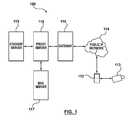
- FIG. 1 is a schematic diagram of a wireless communication system
- FIG. 2 is a block diagram of components of a portable electronic device forming part of the communication system of Fig. 1 , according to an embodiment
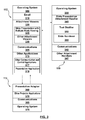
- FIG. 3 is a block diagram showing client-server functional components for downloading and viewing a presentation on the portable electronic device, according to an embodiment
- FIG. 4 is a flowchart showing a method for downloading a presentation to the portable electronic device, using the functional components of FIG. 3 , according to an embodiment
- FIG. 5 is a flowchart showing a method of initiating viewing and remote control of a presentation, using the functional components of FIGS. 1 - 3 , according to an embodiment
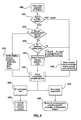
- FIG. 6 is a flowchart showing a method of remotely controlling a presentation using the portable electronic device of FIGS. 1 - 3 , according to an embodiment
- FIG. 7 is a flowchart showing a method of remotely controlling the presentation in a loop mode, according to an embodiment.
- a system and method are set forth for remotely controlling a presentation in a loop mode to allow the presentation to continue in the absence of a communication channel between the portable electronic device and remote presentation device.
- the portable electronic device can issue a command to the remote presentation device to present the presentation in loop mode so that a user of the portable electronic device can leave the vicinity of the remote presentation device (e.g. out of communication range) while the presentation plays in loop mode.
- a method of remotely controlling a presentation device from a portable electronic device comprising: establishing communication between the portable electronic device and presentation device; sending presentation data from the portable electronic device to the presentation device so that a presentation is displayed simultaneously at the portable electronic device and presentation device; remotely controlling the display of said presentation data at the presentation device to continue in a loop mode in the absence of communication between the presentation device and portable electronic device.
- a presentation system comprising: a portable electronic device capable of displaying a presentation; a presentation device; a communications component in each of said portable electronic device and presentation device for establishing communication therebetween; a presentation application component associated with the portable electronic device in communication with a presentation adapter associated with the presentation device via each said communications component for sending presentation data from the portable electronic device to the presentation device so that said presentation is displayed simultaneously at the portable electronic device and presentation device and for remotely controlling the display of said presentation data at the presentation device to continue in a loop mode in the absence of communication between the presentation device and portable electronic device.
- simulating includes, but is not limited to, a single presentation slide (such as a PowerPoint ® slide), a page in a PDF document, or a single photo image.
- FIG. 1 shows a communication network system 100 comprising at least one portable electronic device 112, a public IP network 114 (including a wireless carrier network and base station (not shown)), a wireless network gateway server 116, an enterprise email server 117, an enterprise wireless communication device server or proxy server 118 and an attachment server 119.
- a public IP network 114 including a wireless carrier network and base station (not shown)
- a wireless network gateway server 116 including a wireless carrier network and base station (not shown)
- an enterprise email server 117 including a wireless carrier network and base station (not shown)
- an enterprise wireless communication device server or proxy server 118 an attachment server 119.
- the portable electronic device 112 is operable to effect communications over public IP network 114 via a radio communications channel, and communicates with the base station (not shown) while located within a coverage area that is defined by the base station.
- the base station is part of the wireless public IP network 114, or other network such as a WAN. Data is delivered to the portable electronic device 112 via wireless transmission from the base station. Similarly, data is sent from the portable electronic device 112 via wireless transmission to the base station.
- wireless networks include GSM/GPRS, CDPD, TDMA, iDEN, Mobitex, DataTAC networks, EDGE, EVDO or UMTS and broadband networks such as Bluetooth and variants of 802.11.
- the portable electronic device 112 is further operable to deliver content to and control a presentation device 113.
- device 112 can send slide presentation content and control signals to the presentation device 113 for controlling display of a presentation, such as a PowerPoint ® presentation or successive pages of an image attachment, such as a PDF document.
- Proxy server 118 handles client requests from the portable electronic device 112 for documents stored within attachment server 119.
- the attachment server 119 communicates with the proxy server 118 to transmit attachments such as documents, spreadsheets, images, multimedia files, etc. through the gateway 116 and network 114 for viewing via an attachment viewer of the portable electronic device 112 so as to allow a user to view attachments that are received in email messages. While only one attachment server 119 is shown for illustration purposes, a person skilled in the art will understand that the attachment server 119 may alternatively be a network of attachment servers.
- Sources for the attachments stored within server 119 include mail server 117, and may include a web server, IM server, etc.
- the attachment data is downloaded to portable electronic device 112 in chunks of binary data in an attachment viewer readable format, for example Universal Content Stream (UCS) format.
- UCS Universal Content Stream
- the portable electronic device 112 is based on the computing environment and functionality of a wireless personal digital assistant (PDA). It will be understood, however, that the portable electronic device 112 is not limited to wireless personal digital assistants. Other portable electronic devices are possible, such as smart telephones, and laptop computers.
- PDA personal digital assistant
- the portable electronic device 112 includes a processor 200 connected to a read-only-memory (ROM) 210 that contains a plurality of applications executable by the processor 200 for enabling the portable electronic device 112 to perform certain functions including, for example, PIN message functions, SMS message functions and cellular telephone functions, and at least one attachment viewer application for viewing attachments (e.g. document attachments to emails or documents from other sources, such as web servers, etc.).
- the processor 200 is also connected to a random access memory unit (RAM) 220 and a persistent storage device 230, which are responsible for various storage functions of the portable electronic device 112.
- the processor 200 receives input from input devices such as a keypad 240 and a trackball or touch sensitive input 250.
- the processor 200 outputs to various output devices, such as an LCD display 260.
- a microphone 270 and phone speaker 280 are connected to the processor 200 for cellular telephone functions.
- the processor 200 is also connected to a modem and radio device 290.
- the modem and radio device 290 is used to connect to wireless networks for transmitting and receiving voice and data communications through an antenna 294.
- a Bluetooth receiver/transmitter 296 may be provided to effect wireless (i.e. infrared) communication between device 112 and other Bluetooth-enabled devices, such as presentation device 113, as discussed in greater detail below.
- portable electronic device 112 is configured (e.g. via software stored, for example, in ROM 210) to comprise various components including an operating system 300, a communications system 305 for wireless communication, an email application 310 and other applications 315.
- Email application 310 may comprise or otherwise cooperate with various attachment viewers 320 for retrieving and viewing attachments.
- One such attachment viewer is slide presentation viewer 325.
- Other viewers 330 may include spreadsheet viewers, image viewers, word processing document viewers, etc. (not described herein).
- Other applications 315 may include other communication and control applications 317 and a presentation application 319 for communicating with and controlling presentation device 113.
- Attachment server 119 is configured (e.g. via software stored, for example, in nonvolatile memory (not shown)) to comprise various components including a operating system 335, communications system 340, slide presentation attachment handler 345 as well as other attachment handlers 347 for other attachment types.
- Slide presentation attachment handler 345 comprises or otherwise cooperates with a text distiller 350 and slide renderer 355.
- Text distiller 350 is configured to parse or otherwise review slide presentation documents to extract text information for delivery to handheld devices such as portable electronic device 112.
- Slide renderer 355 defines rasterized slide images (e.g. in a jpeg, tiff or other image format) from the slide presentation document for each slide for similar delivery.
- the attachment server 119 and/or proxy server 118 and portable electronic device 112 communicate such that when a user invokes the attachment viewer 325 to view the content of a slide presentation, the portable electronic device 112 transmits one or more requests for slide information, (i.e. the text information and slide images) and receives same in response. Requests and responses are illustrated notionally as communicating directly between the portable electronic device 112 and attachment server 119 but it is understood that communications are through network 114 via gateway 116 and proxy server 118.
- the portable electronic device 112 may make multiple requests either automatically or in response to direct or indirect user actions. For example, as described above, during a slide show, the slide presentation viewer 325 may automatically make requests for slide information in the background while a slide show is being viewed. For example, the viewer 325 may anticipate the need for more slide information in response to input via trackball or touch input 250 scrolling toward the end of the slides present on the handheld device. Alternatively, a menu choice may be invoked (e.g. a "More" command) for additional slide information, as applicable, to pre-load slides.
- a menu choice may be invoked (e.g. a "More" command) for additional slide information, as applicable, to pre-load slides.
- a request (e.g. for slide information) includes a flag or other data indicating a screen size for the portable electronic device 112 when rendering slide images.
- Other display capabilities may be indicated to the attachment server 119 as well or alternatively. For example, the colour capabilities of the display screen (e.g. back and white only or the number of colours available), reflective type, etc. may be indicated to help render slide images.
- the attachment server 119 may then adjust the colour palette of the rendered slide presentation for viewing on the requesting device.
- Slide presentation viewer 325 provides a graphical user interface (GUI), described in greater detail below, to present the slides in the various modes and provides a menu or other command interface for user input to invoke the presentation application 319 for transmitting the slide presentation to presentation device 113 and controlling the presentation thereat.
- GUI graphical user interface
- presentation device 113 includes a presentation adapter 360 for communicating with presentation application 319 so that the presentation may continue in a loop mode without maintaining communication between the presentation device and portable electronic device 112.
- presentation device 113 includes other hardware and software such as communications 365, other projector applications 370 and operating system 375.
- the portable electronic device 112 requests an attachment (e.g. slide presentation) from attachment server 119.
- the request may be initiated, for example, by a trackball click or menu item selection to "Open attachment” or "Download attachment”.
- the presentation attachment may be an attachment to an email, calendar event, instant message (IM), browser link, or other attachment-enabled event.
- the presentation attachment has been previously saved to memory of the device 119 (e.g. persistent store 230 or SD card (not shown)), then the attachment is locally retrieved and process flows continues at FIG. 5 .
- attachment server 119 builds a DOM that represents the attachment by parsing the attachment document (step 420). In this manner, a graph structure is built within attachment server 119 representing a map of the original attachment file.
- the DOM contains textual content, font, style and formatting attributes as well as layout attributes, such as page/slide size, positioning information (i.e. x, y and z coordinates on the page), embedded graphics and tables, for example.
- DOM structure is known and is disclosed in United States Patent Application No. 2006/0055693 , which is herein incorporated by reference.
- the attachment server 119 transcerpts and encapsulates the DOM in UCS data, as indicated at 430.
- the UCS data is then sent to portable electronic device 112 in chunks, as indicated at 440.
- Each chunk is a self-contained data representation of a portion of the presentation attachment (e.g. one slide of a presentation). That is, there is sufficient data contained in a chunk to enable the attachment viewer to display the content of the chunk.
- the entire attachment can be transmitted in one chunk or in multiple chunks.
- attachment server 119 can transmit the chunks in sequence or out of sequence. For example, if the attachment viewer requests the fifth slide of a presentation attachment, attachment server 119 can transmit the chunks corresponding to the fifth slide, even if chunks for slides 1 to 4 have not been transmitted to the device 112.
- the attachment is then previewed via display 260 and several menu or command options are made available (450) such as “Present”, “Retrieve Info/View Info”, “Zoom”, “Rotate”, “Fit to Screen”, “Next Slide”, “Prev Slide (if applicable), “Save Slide”, “Download Attachment”, “Help”, “Call Voice Mail”, etc. Additional operations may be performed in response to actuation of the trackball/touch input device 250, such as scrolling to a next (or previous) slide.
- attachment server 119 transcerpts and encapsulates the DOM in UCS data, and transmits the UCS data to portable electronic device 112 in chunks, as indicated at 445, for display (450).
- the presentation application 319 Upon selection of the "Present" command (500), the presentation application 319 is launched, as shown in FIG. 5 .
- the application first checks to see that the presentation adapter 360 is connected. If not, a communication channel is established between portable electronic device 112 and presentation device 113 via a pairing connection process (515).
- the pairing connection process calls up a wizard for presenting steps to establish communication pairing between the device 112 and presentation adapter 360 of the presentation device 113 using the communications applications 305 and 365 (e.g. Bluetooth discovery and pairing).
- the application 319 sends at least one of a slide number and animation sequence number to the paired presentation adapter 360.
- the application checks for slide presentation data (e.g. a first UCS chunk representing the first slide) having already been transmitted to and locally stored at the presentation adapter 360 (525). If not, the presentation application 319 sends the slide data to the presentation adapter 360 (and simultaneously requests additional data from the attachment server 119, as discussed above in connection with FIG. 4 ).
- presentation application 319 sends a command to the presentation adapter 360 to display the first slide, while the first slide is simultaneously displayed on the portable electronic device 112 (e.g. functionally equivalent to hitting "F5" on a PC to display a PowerPoint ® presentation).
- the presentation typically starts from the first slide regardless of which slide was in preview at 450.
- an option may be provided for starting the presentation from the slide being previewing at 450.
- the portable electronic device 112 When UCS slide data is being transmitted to the presentation adapter 360 (e.g. at 530), the portable electronic device 112 must determine what to show on the display 260 (605). When displaying a PDF image or other non-presentation file format, the display 260 mirrors what is being displayed by the presentation device 113 through the presentation adapter 360 (610). When displaying a presentation (e.g. a .PPT file), and if no alternate presentation option was selected (615) then if text is associated with a slide (620), the device 112 can display such text (e.g. speakers notes) while the slide is being displayed via presentation device 113 (625).
- a presentation e.g. a .PPT file
- the device 112 can display such text (e.g. speakers notes) while the slide is being displayed via presentation device 113 (625).
- the portable electronic device 112 can display a simple message, such as "Slide #__, No notes" for any slides that are not associated with content in the notes and the slides on the display 260 mirror what is being displayed via presentation device 113.
- Additional display options may be provided (630), such as “Text”, which shows the slide text with images stripped out, “Slides”, which shows the slide images, and “Both”, which shows a thumbnail image of the complete slide above stripped out text.
- the presentation format can default to mirror the content of display 260 with the external presentation device display, unless the user has previously chosen an alternate handheld display option (615).
- Menu options may be provided to switch the content on the display 260. If such an alternate option is chosen, the new option will be selected as a new default the next time the presentation adapter 360 is launched.
- control options include several basic control options, which may be implemented differently depending on whether they are actuated from a menu button on device 112, trackball/touch input 250, or a keyboard short-cut on keypad 240.
- a tool tip is displayed via display 260 during navigation between slides, showing at least the slide number, and title of the slide.
- the portable electronic device 112 preferably vibrates and displays a "connection lost” message or provides some other indication of the lost connection and an "Active Session Recovery” process (650) is invoked to try and recover the connection using a previously established session ID (520). According to one embodiment, the portable electronic device 112 continues to attempt re-establishment of the lost connection for a default timeout period (e.g. 120 minutes).
- the presentation adapter 360 closes, thereby returning the presentation device display to its state previous to opening the presentation (655) and the wireless pairing between device 112 and presentation device 113 is broken.
- a menu item is selected at portable electronic device 112 to "Loop" the presentation (e.g. via manipulation and/or actuation of one or more of trackball/touch input 250, keypad 240, etc.)
- a command is then sent from the portable electronic device 112 to the presentation device 113 (720) via communication between presentation application 319 and presentation adapter 319, to invoke a setting internal to the presentation device 113 (e.g. via other projector applications 370) for causing the presentation to continue in Loop Mode (i.e. automatically circulate back to the first slide following display of the last presentation slide).
- the command enables a "Loop continuously until 'Esc'" show option in a PowerPoint ® presentation.
- the presentation application 319 also sends a loop duration message to the presentation adapter for controlling the duration (e.g. in seconds) between presentation of successive slides in loop mode (730).
- presentation application 319 causes a prompt to be generated (760) at display 260 to automatically enter Loop Mode the next time that the presentation device 113 is turned on (i.e. without requiring communication pairing with the portable electronic device 112).
- presentation device 113 may be incorporated into the device 113 or may be implemented in a separate interface or control device that is connect to the presentation device 113. All such modifications and variations are believed to be within the sphere and scope of the present embodiment.
Landscapes
- Engineering & Computer Science (AREA)
- Theoretical Computer Science (AREA)
- Signal Processing (AREA)
- Computer Networks & Wireless Communication (AREA)
- Human Computer Interaction (AREA)
- Computational Linguistics (AREA)
- Physics & Mathematics (AREA)
- General Engineering & Computer Science (AREA)
- General Physics & Mathematics (AREA)
- General Health & Medical Sciences (AREA)
- Health & Medical Sciences (AREA)
- Audiology, Speech & Language Pathology (AREA)
- Artificial Intelligence (AREA)
- Mobile Radio Communication Systems (AREA)
- Telephone Function (AREA)
- Information Transfer Between Computers (AREA)
- Controls And Circuits For Display Device (AREA)
Abstract
Description
- The present disclosure relates to portable electronic devices, and more particularly to a method of remotely controlling a presentation in a loop mode using a portable electronic device.
- Electronic slide presentations are a common way to present information to one or more viewers. Slide presentation software (e.g. PowerPoint®) facilitates the creation of multimedia documents incorporating text, images, audio and/or visual clips for presentation in one or more slides. Often the documents are presented in a slideshow, displaying the slides sequentially. The slides may be displayed to a display screen of a computing device (e.g. personal computer) or remotely via a presentation device such as a projector for projecting the presentation to a remote screen.
- More particularly, portable electronic devices such as wireless mobile devices (cellular phones, PDAs, etc.) among others, may include a viewer for displaying slide presentations in multiple display modes, such as a text mode for displaying text information distilled from the slides, a preview mode for displaying thumbnail slide images rendered from the slides and a mixed mode for displaying both text information and thumbnail slide images together. The slide presentation viewer may also include a slide show mode to display the slide images in full screen along with an interface (e.g. menu) for selecting among the multiple modes and for invoking and controlling the slide show. For handheld wireless communication devices in particular, a network server may process slide presentation documents to generate the text information and slide images for communicating to wireless devices equipped with appropriate slide presentation viewers. The network server may be an attachment server providing services for email attachments and the slide presentation viewers may be attachment viewers for email or dedicated viewers for presentations.
- Handheld communication devices may also be capable of remotely controlling display of an electronic slide presentation. For example, a presentation mode of operation may be provided for wirelessly controlling display of a slide presentation on a remote presentation device. When controlling a presentation in this fashion, the slides being displayed on the handheld electronic device are the same as those displayed on the presentation device.
- Therefore, a communication channel must be maintained between the handheld device and remote presentation device in order for the presentation to continue. If the handheld device moves out of range of the remote presentation device, or otherwise loses its ability to communicate with the remote presentation device, the communication channel is lost and the presentation will stop.
- The embodiments will be better understood with reference to the following Figures in which like numerals denote like parts and in which:
-
FIG. 1 is a schematic diagram of a wireless communication system; -
FIG. 2 is a block diagram of components of a portable electronic device forming part of the communication system ofFig. 1 , according to an embodiment; -
FIG. 3 is a block diagram showing client-server functional components for downloading and viewing a presentation on the portable electronic device, according to an embodiment; -
FIG. 4 is a flowchart showing a method for downloading a presentation to the portable electronic device, using the functional components ofFIG. 3 , according to an embodiment; -
FIG. 5 is a flowchart showing a method of initiating viewing and remote control of a presentation, using the functional components ofFIGS. 1 - 3 , according to an embodiment; -
FIG. 6 is a flowchart showing a method of remotely controlling a presentation using the portable electronic device ofFIGS. 1 - 3 , according to an embodiment; -
FIG. 7 is a flowchart showing a method of remotely controlling the presentation in a loop mode, according to an embodiment. - As set forth in greater detail below, a system and method are set forth for remotely controlling a presentation in a loop mode to allow the presentation to continue in the absence of a communication channel between the portable electronic device and remote presentation device. In particular, the portable electronic device can issue a command to the remote presentation device to present the presentation in loop mode so that a user of the portable electronic device can leave the vicinity of the remote presentation device (e.g. out of communication range) while the presentation plays in loop mode.
- In one aspect there is provided a method of remotely controlling a presentation device from a portable electronic device, the method comprising: establishing communication between the portable electronic device and presentation device; sending presentation data from the portable electronic device to the presentation device so that a presentation is displayed simultaneously at the portable electronic device and presentation device; remotely controlling the display of said presentation data at the presentation device to continue in a loop mode in the absence of communication between the presentation device and portable electronic device.
- In another aspect there is provided a presentation system, comprising: a portable electronic device capable of displaying a presentation; a presentation device; a communications component in each of said portable electronic device and presentation device for establishing communication therebetween; a presentation application component associated with the portable electronic device in communication with a presentation adapter associated with the presentation device via each said communications component for sending presentation data from the portable electronic device to the presentation device so that said presentation is displayed simultaneously at the portable electronic device and presentation device and for remotely controlling the display of said presentation data at the presentation device to continue in a loop mode in the absence of communication between the presentation device and portable electronic device.
- The term "slide" as used throughout the specification and drawings includes, but is not limited to, a single presentation slide (such as a PowerPoint® slide), a page in a PDF document, or a single photo image.
-
FIG. 1 shows acommunication network system 100 comprising at least one portableelectronic device 112, a public IP network 114 (including a wireless carrier network and base station (not shown)), a wirelessnetwork gateway server 116, anenterprise email server 117, an enterprise wireless communication device server orproxy server 118 and anattachment server 119. - The portable
electronic device 112 is operable to effect communications overpublic IP network 114 via a radio communications channel, and communicates with the base station (not shown) while located within a coverage area that is defined by the base station. The base station is part of the wirelesspublic IP network 114, or other network such as a WAN. Data is delivered to the portableelectronic device 112 via wireless transmission from the base station. Similarly, data is sent from the portableelectronic device 112 via wireless transmission to the base station. - It will be appreciated that the portable
electronic device 112 is movable within the coverage area and can be moved to coverage areas defined by other base stations. Further, as will be understood by one of ordinary skill in the art, wireless networks include GSM/GPRS, CDPD, TDMA, iDEN, Mobitex, DataTAC networks, EDGE, EVDO or UMTS and broadband networks such as Bluetooth and variants of 802.11. - The portable
electronic device 112 is further operable to deliver content to and control apresentation device 113. For example,device 112 can send slide presentation content and control signals to thepresentation device 113 for controlling display of a presentation, such as a PowerPoint® presentation or successive pages of an image attachment, such as a PDF document. -
Proxy server 118 handles client requests from the portableelectronic device 112 for documents stored withinattachment server 119. Theattachment server 119 communicates with theproxy server 118 to transmit attachments such as documents, spreadsheets, images, multimedia files, etc. through thegateway 116 andnetwork 114 for viewing via an attachment viewer of the portableelectronic device 112 so as to allow a user to view attachments that are received in email messages. While only oneattachment server 119 is shown for illustration purposes, a person skilled in the art will understand that theattachment server 119 may alternatively be a network of attachment servers. Sources for the attachments stored withinserver 119 includemail server 117, and may include a web server, IM server, etc. Preferably the attachment data is downloaded to portableelectronic device 112 in chunks of binary data in an attachment viewer readable format, for example Universal Content Stream (UCS) format. - Referring now to
Figure 2 , a block diagram of certain components within the portableelectronic device 112 is provided. In the present embodiment, the portableelectronic device 112 is based on the computing environment and functionality of a wireless personal digital assistant (PDA). It will be understood, however, that the portableelectronic device 112 is not limited to wireless personal digital assistants. Other portable electronic devices are possible, such as smart telephones, and laptop computers. - The portable
electronic device 112 includes aprocessor 200 connected to a read-only-memory (ROM) 210 that contains a plurality of applications executable by theprocessor 200 for enabling the portableelectronic device 112 to perform certain functions including, for example, PIN message functions, SMS message functions and cellular telephone functions, and at least one attachment viewer application for viewing attachments (e.g. document attachments to emails or documents from other sources, such as web servers, etc.). Theprocessor 200 is also connected to a random access memory unit (RAM) 220 and apersistent storage device 230, which are responsible for various storage functions of the portableelectronic device 112. Theprocessor 200 receives input from input devices such as akeypad 240 and a trackball or touch sensitive input 250. Theprocessor 200 outputs to various output devices, such as anLCD display 260. Amicrophone 270 andphone speaker 280 are connected to theprocessor 200 for cellular telephone functions. Theprocessor 200 is also connected to a modem andradio device 290. The modem andradio device 290 is used to connect to wireless networks for transmitting and receiving voice and data communications through anantenna 294. A Bluetooth receiver/transmitter 296 may be provided to effect wireless (i.e. infrared) communication betweendevice 112 and other Bluetooth-enabled devices, such aspresentation device 113, as discussed in greater detail below. A content store 298, which is generally a file storage system for the portableelectronic device 112, is also provided. - Request/view functionality for an attachment is provided by the client/server combination of attachment viewer within the portable
electronic device 112 and theattachment server 118. More particularly, with reference toFIG. 3 , portableelectronic device 112 is configured (e.g. via software stored, for example, in ROM 210) to comprise various components including anoperating system 300, acommunications system 305 for wireless communication, an email application 310 andother applications 315. Email application 310 may comprise or otherwise cooperate withvarious attachment viewers 320 for retrieving and viewing attachments. One such attachment viewer isslide presentation viewer 325.Other viewers 330 may include spreadsheet viewers, image viewers, word processing document viewers, etc. (not described herein).Other applications 315 may include other communication andcontrol applications 317 and apresentation application 319 for communicating with and controllingpresentation device 113. -
Attachment server 119 is configured (e.g. via software stored, for example, in nonvolatile memory (not shown)) to comprise various components including aoperating system 335,communications system 340, slidepresentation attachment handler 345 as well asother attachment handlers 347 for other attachment types. Slidepresentation attachment handler 345 comprises or otherwise cooperates with atext distiller 350 andslide renderer 355.Text distiller 350 is configured to parse or otherwise review slide presentation documents to extract text information for delivery to handheld devices such as portableelectronic device 112.Slide renderer 355 defines rasterized slide images (e.g. in a jpeg, tiff or other image format) from the slide presentation document for each slide for similar delivery. - The
attachment server 119 and/orproxy server 118 and portableelectronic device 112 communicate such that when a user invokes theattachment viewer 325 to view the content of a slide presentation, the portableelectronic device 112 transmits one or more requests for slide information, (i.e. the text information and slide images) and receives same in response. Requests and responses are illustrated notionally as communicating directly between the portableelectronic device 112 andattachment server 119 but it is understood that communications are throughnetwork 114 viagateway 116 andproxy server 118. - Due in part at least to communication protocol constraints on a message's size, a single message may be insufficient to communicate all of the text information and/or all of the slide images for a slide presentation document. Thus, the portable
electronic device 112 may make multiple requests either automatically or in response to direct or indirect user actions. For example, as described above, during a slide show, theslide presentation viewer 325 may automatically make requests for slide information in the background while a slide show is being viewed. For example, theviewer 325 may anticipate the need for more slide information in response to input via trackball or touch input 250 scrolling toward the end of the slides present on the handheld device. Alternatively, a menu choice may be invoked (e.g. a "More" command) for additional slide information, as applicable, to pre-load slides. - Preferably, a request (e.g. for slide information) includes a flag or other data indicating a screen size for the portable
electronic device 112 when rendering slide images. This may be a specific pixel size (e.g. 340 x 280), a code flag (1=340 x 280 pixels) or a device type, among other types, where theattachment server 119 orproxy server 118 determines the screen size from the code flag or device type. Other display capabilities may be indicated to theattachment server 119 as well or alternatively. For example, the colour capabilities of the display screen (e.g. back and white only or the number of colours available), reflective type, etc. may be indicated to help render slide images. Theattachment server 119 may then adjust the colour palette of the rendered slide presentation for viewing on the requesting device. -
Slide presentation viewer 325 provides a graphical user interface (GUI), described in greater detail below, to present the slides in the various modes and provides a menu or other command interface for user input to invoke thepresentation application 319 for transmitting the slide presentation topresentation device 113 and controlling the presentation thereat. - More particularly,
presentation device 113 includes apresentation adapter 360 for communicating withpresentation application 319 so that the presentation may continue in a loop mode without maintaining communication between the presentation device and portableelectronic device 112. - In addition to
presentation adapter 360,presentation device 113 includes other hardware and software such ascommunications 365,other projector applications 370 andoperating system 375. - With reference to
FIG. 4 , a method is set forth for downloading and viewing a presentation on the portable electronic device, using the functional components ofFIG. 3 . First, at 400, the portableelectronic device 112 requests an attachment (e.g. slide presentation) fromattachment server 119. The request may be initiated, for example, by a trackball click or menu item selection to "Open attachment" or "Download attachment". The presentation attachment may be an attachment to an email, calendar event, instant message (IM), browser link, or other attachment-enabled event. - Alternatively, if the presentation attachment has been previously saved to memory of the device 119 (e.g.
persistent store 230 or SD card (not shown)), then the attachment is locally retrieved and process flows continues atFIG. 5 . - If the presentation attachment has not been previously requested (i.e. a "No" at 410),
attachment server 119 builds a DOM that represents the attachment by parsing the attachment document (step 420). In this manner, a graph structure is built withinattachment server 119 representing a map of the original attachment file. The DOM contains textual content, font, style and formatting attributes as well as layout attributes, such as page/slide size, positioning information (i.e. x, y and z coordinates on the page), embedded graphics and tables, for example. DOM structure is known and is disclosed in United States Patent Application No.2006/0055693 , which is herein incorporated by reference. - Once the DOM of the attachment has been built the
attachment server 119 transcerpts and encapsulates the DOM in UCS data, as indicated at 430. The UCS data is then sent to portableelectronic device 112 in chunks, as indicated at 440. Each chunk is a self-contained data representation of a portion of the presentation attachment (e.g. one slide of a presentation). That is, there is sufficient data contained in a chunk to enable the attachment viewer to display the content of the chunk. Depending on the size of the chunks and the size of the attachment, the entire attachment can be transmitted in one chunk or in multiple chunks. Depending on the nature of the request from the attachment viewer,attachment server 119 can transmit the chunks in sequence or out of sequence. For example, if the attachment viewer requests the fifth slide of a presentation attachment,attachment server 119 can transmit the chunks corresponding to the fifth slide, even if chunks for slides 1 to 4 have not been transmitted to thedevice 112. - The attachment is then previewed via
display 260 and several menu or command options are made available (450) such as "Present", "Retrieve Info/View Info", "Zoom", "Rotate", "Fit to Screen", "Next Slide", "Prev Slide (if applicable), "Save Slide", "Download Attachment", "Help", "Call Voice Mail", etc. Additional operations may be performed in response to actuation of the trackball/touch input device 250, such as scrolling to a next (or previous) slide. - If the attachment has been previously requested (i.e. a "Yes" at 410),
attachment server 119 transcerpts and encapsulates the DOM in UCS data, and transmits the UCS data to portableelectronic device 112 in chunks, as indicated at 445, for display (450). - Upon selection of the "Present" command (500), the
presentation application 319 is launched, as shown inFIG. 5 . At 510, the application first checks to see that thepresentation adapter 360 is connected. If not, a communication channel is established between portableelectronic device 112 andpresentation device 113 via a pairing connection process (515). The pairing connection process calls up a wizard for presenting steps to establish communication pairing between thedevice 112 andpresentation adapter 360 of thepresentation device 113 using thecommunications applications 305 and 365 (e.g. Bluetooth discovery and pairing). - At 520, the
application 319 sends at least one of a slide number and animation sequence number to the pairedpresentation adapter 360. The application then checks for slide presentation data (e.g. a first UCS chunk representing the first slide) having already been transmitted to and locally stored at the presentation adapter 360 (525). If not, thepresentation application 319 sends the slide data to the presentation adapter 360 (and simultaneously requests additional data from theattachment server 119, as discussed above in connection withFIG. 4 ). - At 540,
presentation application 319 sends a command to thepresentation adapter 360 to display the first slide, while the first slide is simultaneously displayed on the portable electronic device 112 (e.g. functionally equivalent to hitting "F5" on a PC to display a PowerPoint® presentation). - Turning to
FIG. 6 , the presentation typically starts from the first slide regardless of which slide was in preview at 450. Alternatively, an option may be provided for starting the presentation from the slide being previewing at 450. - When UCS slide data is being transmitted to the presentation adapter 360 (e.g. at 530), the portable
electronic device 112 must determine what to show on the display 260 (605). When displaying a PDF image or other non-presentation file format, thedisplay 260 mirrors what is being displayed by thepresentation device 113 through the presentation adapter 360 (610). When displaying a presentation (e.g. a .PPT file), and if no alternate presentation option was selected (615) then if text is associated with a slide (620), thedevice 112 can display such text (e.g. speakers notes) while the slide is being displayed via presentation device 113 (625). On the other hand, if no such text exists then the portableelectronic device 112 can display a simple message, such as "Slide #__, No notes" for any slides that are not associated with content in the notes and the slides on thedisplay 260 mirror what is being displayed viapresentation device 113. - Additional display options may be provided (630), such as "Text", which shows the slide text with images stripped out, "Slides", which shows the slide images, and "Both", which shows a thumbnail image of the complete slide above stripped out text.
- If there are no slides with speakers notes in the entire presentation, the presentation format can default to mirror the content of
display 260 with the external presentation device display, unless the user has previously chosen an alternate handheld display option (615). - Menu options may be provided to switch the content on the
display 260. If such an alternate option is chosen, the new option will be selected as a new default the next time thepresentation adapter 360 is launched. - As shown at 635, various presentation control options may be provided, as set forth in Table A. The control options include several basic control options, which may be implemented differently depending on whether they are actuated from a menu button on
device 112, trackball/touch input 250, or a keyboard short-cut onkeypad 240. Preferably, a tool tip is displayed viadisplay 260 during navigation between slides, showing at least the slide number, and title of the slide. -
Table A: Function Menu Option Trackball Keyboard Advance to next slide "Next" - Roll trackball down - Spacebar - Or click for menu option "Next" - "N" on full QWERTY (Single slide advance.) - "6" on Suretype - On screen control for touch-screen devices Move back to previous slide "Previous" - Roll trackball up - "P" on full QWERTY - Or click for menu option - "4" on Suretype - On screen control for touch-screen devices (Move back one slide / animation step. Go to slide "Go to Slide..." "Go to Slide..." (when input box is brought up, keypad defaults to numeric) (Brings up input box). (Brings up input box). Freeze frame "Freeze"/ "Unfreeze" OR "Go to Slide..." Loop "Loop" N/A N/A End Show "End Show" Msg box should pop-up asking user "Are you sure you want to exit" - Before describing the various presentation control options of Table A, three methods are briefly described for ceasing control of a presentation: (i) Losing the Bluetooth (BT) connection (640), for example as a result of moving out of range of the presentation adapter 360), and deliberate closing of the presentation (645) by (ii) ending the session at the
presentation adapter 360, or (iii) closing the presentation via the presentation application (319). - If the Bluetooth connection is lost during the presentation (640), the portable
electronic device 112 preferably vibrates and displays a "connection lost" message or provides some other indication of the lost connection and an "Active Session Recovery" process (650) is invoked to try and recover the connection using a previously established session ID (520). According to one embodiment, the portableelectronic device 112 continues to attempt re-establishment of the lost connection for a default timeout period (e.g. 120 minutes). - If the option to end the presentation is deliberately selected (645), the
presentation adapter 360 closes, thereby returning the presentation device display to its state previous to opening the presentation (655) and the wireless pairing betweendevice 112 andpresentation device 113 is broken. - Turning now to
FIG. 7 , a method is shown for remotely controlling the presentation in a loop mode, according to an embodiment. At 700, a menu item is selected at portableelectronic device 112 to "Loop" the presentation (e.g. via manipulation and/or actuation of one or more of trackball/touch input 250,keypad 240, etc.) A command is then sent from the portableelectronic device 112 to the presentation device 113 (720) via communication betweenpresentation application 319 andpresentation adapter 319, to invoke a setting internal to the presentation device 113 (e.g. via other projector applications 370) for causing the presentation to continue in Loop Mode (i.e. automatically circulate back to the first slide following display of the last presentation slide). According to an exemplary embodiment, the command enables a "Loop continuously until 'Esc'" show option in a PowerPoint® presentation. Thepresentation application 319 also sends a loop duration message to the presentation adapter for controlling the duration (e.g. in seconds) between presentation of successive slides in loop mode (730). Upon deliberately ending the presentation (750)presentation application 319 causes a prompt to be generated (760) atdisplay 260 to automatically enter Loop Mode the next time that thepresentation device 113 is turned on (i.e. without requiring communication pairing with the portable electronic device 112). - A specific embodiment has been shown and described herein. However, modifications and variations may occur to those skilled in the art. For example, one or more of the functional components of the
presentation device 113, such aspresentation adapter 360, may be incorporated into thedevice 113 or may be implemented in a separate interface or control device that is connect to thepresentation device 113. All such modifications and variations are believed to be within the sphere and scope of the present embodiment.
Claims (15)
- A method of remotely controlling a presentation device from a portable electronic device, the method comprising:establishing communication between the portable electronic device and presentation device;sending presentation data from the portable electronic device to the presentation device so that a presentation is displayed simultaneously at the portable electronic device and presentation device;remotely controlling the display of said presentation data at the presentation device to continue in a loop mode in the absence of communication between the presentation device and portable electronic device.
- The method of claim 1, wherein establishing said communication includes wireless pairing of the portable electronic device and presentation device.
- The method of claim 2, wherein said wireless pairing utilizes Bluetooth communication.
- The method of any of claims 1 to 3, wherein remotely controlling the display of said presentation data at the presentation device further includes sending a command from the portable electronic device to the presentation device for activating an embedded presentation setting to a loop mode.
- The method of any of claims 1 to 4, further including activating a session recovery process for re-establishing communication between the presentation device and portable electronic device.
- The method of claim 5, further including sending a loop duration message from said portable electronic device to said presentation device for controlling duration between presentation of successive slides of said presentation data in said loop mode.
- The method of claim 4 or 5, wherein sending said command is initiated at the portable electronic device by a menu selection.
- The method of any of claims 4 to 7, further including displaying a prompt for automating initiation of said loop mode upon subsequently activating said presentation device.
- The method of claim 5, wherein said sending presentation data and commands from the portable electronic device to the presentation device includes sending a session ID, and said session recovery process attempts to re-establish communication using said session ID.
- The method of claim 9, further including checking for slide presentation data having already been transmitted to and locally stored at the presentation device based on at least one of a slide number and an animation sequence number and if slide presentation data has already been locally stored at the presentation device then retrieving and displaying said slide presentation data at said presentation device, and if slide presentation data has not already been transmitted and locally stored at the presentation device then sending the slide data to the presentation adapter for display.
- A presentation system, comprising:a portable electronic device capable of displaying a presentation;a presentation device;a communications component in each of said portable electronic device and presentation device for establishing communication therebetween;a presentation application component associated with the portable electronic device in communication with a presentation adapter associated with the presentation device via each said communications component for sending presentation data from the portable electronic device to the presentation device so that said presentation is displayed simultaneously at the portable electronic device and presentation device and for remotely controlling the display of said presentation data at the presentation device to continue in a loop mode in the absence of communication between the presentation device and portable electronic device.
- The presentation system of claim 11, wherein each said communication component establishes communication via wireless pairing.
- The presentation system of claim 12, wherein said wireless pairing utilizes Bluetooth communication.
- The presentation system of claim 13, wherein said presentation device is a projector.
- The presentation system of any of claims 11 to 14, further including an attachment server for storing said presentation data and having a text distiller for parsing, extracting and transmitting text information from said presentation data to said portable electronic device for transmission to said presentation device, and a slide renderer for rasterizing and transmitting slide images from said presentation data to said portable electronic device transmission to said presentation device.
Applications Claiming Priority (1)
| Application Number | Priority Date | Filing Date | Title |
|---|---|---|---|
| US29233710P | 2010-01-05 | 2010-01-05 |
Publications (2)
| Publication Number | Publication Date |
|---|---|
| EP2341701A1 true EP2341701A1 (en) | 2011-07-06 |
| EP2341701B1 EP2341701B1 (en) | 2013-10-09 |
Family
ID=42737200
Family Applications (1)
| Application Number | Title | Priority Date | Filing Date |
|---|---|---|---|
| EP10164300.5A Active EP2341701B1 (en) | 2010-01-05 | 2010-05-28 | Method of remotely controlling a presentation in a loop mode using a portable electronic device |
Country Status (3)
| Country | Link |
|---|---|
| US (1) | US8732583B2 (en) |
| EP (1) | EP2341701B1 (en) |
| CA (1) | CA2722336C (en) |
Families Citing this family (5)
| Publication number | Priority date | Publication date | Assignee | Title |
|---|---|---|---|---|
| US9465457B2 (en) * | 2010-08-30 | 2016-10-11 | Vmware, Inc. | Multi-touch interface gestures for keyboard and/or mouse inputs |
| JP6465372B2 (en) * | 2013-10-09 | 2019-02-06 | 株式会社インタラクティブソリューションズ | Mobile terminal device, slide information management system, and mobile terminal control method |
| US11790154B2 (en) | 2013-10-09 | 2023-10-17 | Interactive Solutions Corp. | Mobile terminal device, slide information managing system, and a control method of mobile terminal |
| CN110796905A (en) * | 2018-08-03 | 2020-02-14 | 深圳市鸿合创新信息技术有限责任公司 | Courseware operating method, terminal and electronic equipment |
| US12284169B2 (en) * | 2021-07-13 | 2025-04-22 | Omnissa, Llc | Accessing corporate resources through an enrolled user device |
Citations (3)
| Publication number | Priority date | Publication date | Assignee | Title |
|---|---|---|---|---|
| DE10242161A1 (en) * | 2002-09-10 | 2004-03-11 | Philips Intellectual Property & Standards Gmbh | Presentation system displaying images and operated by remote control unit, transmits displayed image back to separate screen on remote controller |
| US20060055693A1 (en) | 2004-09-15 | 2006-03-16 | Arizan Corporation | Method for requesting and viewing a zoomed area of detail from an image attachment on a mobile communication device |
| US20070124372A1 (en) * | 2005-11-30 | 2007-05-31 | Microsoft Corporation | Using a mobile phone to control a personal computer |
Family Cites Families (22)
| Publication number | Priority date | Publication date | Assignee | Title |
|---|---|---|---|---|
| US5859623A (en) * | 1996-05-14 | 1999-01-12 | Proxima Corporation | Intelligent display system presentation projection arrangement and method of using same |
| US6008807A (en) * | 1997-07-14 | 1999-12-28 | Microsoft Corporation | Method and system for controlling the display of objects in a slide show presentation |
| US6525670B1 (en) * | 1998-10-23 | 2003-02-25 | Matsushita Electric Works, Ltd. | In-home health care system |
| US7007235B1 (en) * | 1999-04-02 | 2006-02-28 | Massachusetts Institute Of Technology | Collaborative agent interaction control and synchronization system |
| US7123212B2 (en) * | 2000-12-22 | 2006-10-17 | Harman International Industries, Inc. | Information transmission and display method and system for a handheld computing device |
| US7180475B2 (en) * | 2001-06-07 | 2007-02-20 | Infocus Corporation | Method and apparatus for wireless image transmission to a projector |
| US7434166B2 (en) * | 2003-06-03 | 2008-10-07 | Harman International Industries Incorporated | Wireless presentation system |
| US20050101343A1 (en) * | 2003-11-12 | 2005-05-12 | Shih-Shien Hsiao | Mobile phone device with video output |
| EP1901545A4 (en) * | 2005-07-01 | 2010-02-24 | Panasonic Corp | COMMUNICATION TERMINAL |
| US7912458B2 (en) * | 2005-09-14 | 2011-03-22 | Jumptap, Inc. | Interaction analysis and prioritization of mobile content |
| US7996436B2 (en) * | 2005-09-23 | 2011-08-09 | Livebinders, Inc. | Media management system |
| TW200805131A (en) * | 2006-05-24 | 2008-01-16 | Lg Electronics Inc | Touch screen device and method of selecting files thereon |
| US8064391B2 (en) * | 2006-08-22 | 2011-11-22 | Embarq Holdings Company, Llc | System and method for monitoring and optimizing network performance to a wireless device |
| KR20080020789A (en) * | 2006-09-01 | 2008-03-06 | 엘지전자 주식회사 | Video device with slide show jump function and its control method |
| US20090022208A1 (en) * | 2007-07-18 | 2009-01-22 | Steven Deane Hall | Method and system for rapidly detecting the presence of interferers in bluetooth frequency hopping |
| US20090044117A1 (en) * | 2007-08-06 | 2009-02-12 | Apple Inc. | Recording and exporting slide show presentations using a presentation application |
| US8160097B2 (en) * | 2007-11-07 | 2012-04-17 | Broadcom Corporation | System and method for optimizing communication between a mobile communications device and a second communications device |
| US20090251607A1 (en) * | 2008-04-03 | 2009-10-08 | Slideshow Technologies, Inc. | Displaying presentations |
| US9342231B2 (en) * | 2008-12-29 | 2016-05-17 | Apple Inc. | Remote control of a presentation |
| US7870496B1 (en) * | 2009-01-29 | 2011-01-11 | Jahanzeb Ahmed Sherwani | System using touchscreen user interface of a mobile device to remotely control a host computer |
| EP2341700B1 (en) * | 2010-01-05 | 2016-12-07 | BlackBerry Limited | Method of remotely controlling a presentation to freeze an image using a portable electronic device |
| CA2720054C (en) * | 2010-03-31 | 2015-01-27 | Research In Motion Limited | Presentation slide preparation |
-
2010
- 2010-05-28 EP EP10164300.5A patent/EP2341701B1/en active Active
- 2010-05-28 US US12/790,582 patent/US8732583B2/en active Active
- 2010-11-25 CA CA2722336A patent/CA2722336C/en active Active
Patent Citations (3)
| Publication number | Priority date | Publication date | Assignee | Title |
|---|---|---|---|---|
| DE10242161A1 (en) * | 2002-09-10 | 2004-03-11 | Philips Intellectual Property & Standards Gmbh | Presentation system displaying images and operated by remote control unit, transmits displayed image back to separate screen on remote controller |
| US20060055693A1 (en) | 2004-09-15 | 2006-03-16 | Arizan Corporation | Method for requesting and viewing a zoomed area of detail from an image attachment on a mobile communication device |
| US20070124372A1 (en) * | 2005-11-30 | 2007-05-31 | Microsoft Corporation | Using a mobile phone to control a personal computer |
Also Published As
| Publication number | Publication date |
|---|---|
| CA2722336A1 (en) | 2011-07-05 |
| US8732583B2 (en) | 2014-05-20 |
| US20110167351A1 (en) | 2011-07-07 |
| EP2341701B1 (en) | 2013-10-09 |
| CA2722336C (en) | 2014-08-19 |
Similar Documents
| Publication | Publication Date | Title |
|---|---|---|
| CA2723049C (en) | Method of remotely controlling a presentation to freeze an image using a portable electronic device | |
| KR101701151B1 (en) | Integrated Message Transmitting and Receiving Method and Apparatus Using Portable Device | |
| US8380515B2 (en) | Method and apparatus for scrolling text display of voice call or message during video display session | |
| US8117269B2 (en) | Method for viewing non-image attachments on a portable electronic device | |
| US20080081662A1 (en) | Method and system for initiating a communication from an arbitrary document | |
| US8621358B2 (en) | Presentation slide preparation | |
| US20040110462A1 (en) | Method and system for creating rich calls | |
| US20070229556A1 (en) | Display data size adjustment apparatus and method for portable terminal | |
| US20080104515A1 (en) | System and method for slide presentation | |
| US20120157134A1 (en) | Method and apparatus for displaying message in mobile communication terminal | |
| EP2341701B1 (en) | Method of remotely controlling a presentation in a loop mode using a portable electronic device | |
| US7283839B2 (en) | Wireless communicating terminal for providing integrated messaging service and method thereof | |
| US20060140141A1 (en) | Method and an apparatus for providing multimedia services in mobile terminal | |
| US9070114B2 (en) | Method for receiving email attachment on a portable electronic device | |
| KR20130095965A (en) | Apparatus and method for providing message service in electronic device | |
| US8619088B2 (en) | Slide preparation | |
| KR20090116268A (en) | Messenger communication system and method thereof, and mobile communication terminal with messenger information storage function | |
| EP2362652A1 (en) | Unified visual presenter | |
| US20080119218A1 (en) | Adjustable Download Rate for a Portable Electronic Device | |
| CA2722726C (en) | Slide preparation | |
| WO2009066944A2 (en) | Method and device for displaying of message | |
| AU2003100686A4 (en) | Method and Software Product for Creating Mobile Device Messages | |
| CA2568820C (en) | Method for receiving email attachment on a portable electronic device |
Legal Events
| Date | Code | Title | Description |
|---|---|---|---|
| PUAI | Public reference made under article 153(3) epc to a published international application that has entered the european phase |
Free format text: ORIGINAL CODE: 0009012 |
|
| 17P | Request for examination filed |
Effective date: 20100528 |
|
| AK | Designated contracting states |
Kind code of ref document: A1 Designated state(s): AL AT BE BG CH CY CZ DE DK EE ES FI FR GB GR HR HU IE IS IT LI LT LU LV MC MK MT NL NO PL PT RO SE SI SK SM TR |
|
| AX | Request for extension of the european patent |
Extension state: BA ME RS |
|
| 17Q | First examination report despatched |
Effective date: 20111116 |
|
| GRAP | Despatch of communication of intention to grant a patent |
Free format text: ORIGINAL CODE: EPIDOSNIGR1 |
|
| INTG | Intention to grant announced |
Effective date: 20130502 |
|
| GRAS | Grant fee paid |
Free format text: ORIGINAL CODE: EPIDOSNIGR3 |
|
| RAP1 | Party data changed (applicant data changed or rights of an application transferred) |
Owner name: BLACKBERRY LIMITED |
|
| GRAA | (expected) grant |
Free format text: ORIGINAL CODE: 0009210 |
|
| AK | Designated contracting states |
Kind code of ref document: B1 Designated state(s): AL AT BE BG CH CY CZ DE DK EE ES FI FR GB GR HR HU IE IS IT LI LT LU LV MC MK MT NL NO PL PT RO SE SI SK SM TR |
|
| REG | Reference to a national code |
Ref country code: GB Ref legal event code: FG4D |
|
| REG | Reference to a national code |
Ref country code: AT Ref legal event code: REF Ref document number: 635946 Country of ref document: AT Kind code of ref document: T Effective date: 20131015 Ref country code: CH Ref legal event code: EP |
|
| REG | Reference to a national code |
Ref country code: IE Ref legal event code: FG4D |
|
| REG | Reference to a national code |
Ref country code: CH Ref legal event code: PCOW Free format text: NEW ADDRESS: 2200 UNIVERSITY AVENUE EAST, WATERLOO, ON N2K 0A7 (CA) |
|
| RAP2 | Party data changed (patent owner data changed or rights of a patent transferred) |
Owner name: BLACKBERRY LIMITED |
|
| REG | Reference to a national code |
Ref country code: DE Ref legal event code: R096 Ref document number: 602010010780 Country of ref document: DE Effective date: 20131205 |
|
| REG | Reference to a national code |
Ref country code: NL Ref legal event code: T3 |
|
| REG | Reference to a national code |
Ref country code: AT Ref legal event code: MK05 Ref document number: 635946 Country of ref document: AT Kind code of ref document: T Effective date: 20131009 |
|
| PG25 | Lapsed in a contracting state [announced via postgrant information from national office to epo] |
Ref country code: SI Free format text: LAPSE BECAUSE OF FAILURE TO SUBMIT A TRANSLATION OF THE DESCRIPTION OR TO PAY THE FEE WITHIN THE PRESCRIBED TIME-LIMIT Effective date: 20131009 |
|
| REG | Reference to a national code |
Ref country code: LT Ref legal event code: MG4D |
|
| PG25 | Lapsed in a contracting state [announced via postgrant information from national office to epo] |
Ref country code: LT Free format text: LAPSE BECAUSE OF FAILURE TO SUBMIT A TRANSLATION OF THE DESCRIPTION OR TO PAY THE FEE WITHIN THE PRESCRIBED TIME-LIMIT Effective date: 20131009 Ref country code: SE Free format text: LAPSE BECAUSE OF FAILURE TO SUBMIT A TRANSLATION OF THE DESCRIPTION OR TO PAY THE FEE WITHIN THE PRESCRIBED TIME-LIMIT Effective date: 20131009 Ref country code: HR Free format text: LAPSE BECAUSE OF FAILURE TO SUBMIT A TRANSLATION OF THE DESCRIPTION OR TO PAY THE FEE WITHIN THE PRESCRIBED TIME-LIMIT Effective date: 20131009 Ref country code: IS Free format text: LAPSE BECAUSE OF FAILURE TO SUBMIT A TRANSLATION OF THE DESCRIPTION OR TO PAY THE FEE WITHIN THE PRESCRIBED TIME-LIMIT Effective date: 20140209 Ref country code: NO Free format text: LAPSE BECAUSE OF FAILURE TO SUBMIT A TRANSLATION OF THE DESCRIPTION OR TO PAY THE FEE WITHIN THE PRESCRIBED TIME-LIMIT Effective date: 20140109 Ref country code: BE Free format text: LAPSE BECAUSE OF FAILURE TO SUBMIT A TRANSLATION OF THE DESCRIPTION OR TO PAY THE FEE WITHIN THE PRESCRIBED TIME-LIMIT Effective date: 20131009 Ref country code: FI Free format text: LAPSE BECAUSE OF FAILURE TO SUBMIT A TRANSLATION OF THE DESCRIPTION OR TO PAY THE FEE WITHIN THE PRESCRIBED TIME-LIMIT Effective date: 20131009 |
|
| PG25 | Lapsed in a contracting state [announced via postgrant information from national office to epo] |
Ref country code: LV Free format text: LAPSE BECAUSE OF FAILURE TO SUBMIT A TRANSLATION OF THE DESCRIPTION OR TO PAY THE FEE WITHIN THE PRESCRIBED TIME-LIMIT Effective date: 20131009 Ref country code: ES Free format text: LAPSE BECAUSE OF FAILURE TO SUBMIT A TRANSLATION OF THE DESCRIPTION OR TO PAY THE FEE WITHIN THE PRESCRIBED TIME-LIMIT Effective date: 20131009 Ref country code: AT Free format text: LAPSE BECAUSE OF FAILURE TO SUBMIT A TRANSLATION OF THE DESCRIPTION OR TO PAY THE FEE WITHIN THE PRESCRIBED TIME-LIMIT Effective date: 20131009 Ref country code: CY Free format text: LAPSE BECAUSE OF FAILURE TO SUBMIT A TRANSLATION OF THE DESCRIPTION OR TO PAY THE FEE WITHIN THE PRESCRIBED TIME-LIMIT Effective date: 20131009 Ref country code: PL Free format text: LAPSE BECAUSE OF FAILURE TO SUBMIT A TRANSLATION OF THE DESCRIPTION OR TO PAY THE FEE WITHIN THE PRESCRIBED TIME-LIMIT Effective date: 20131009 |
|
| PG25 | Lapsed in a contracting state [announced via postgrant information from national office to epo] |
Ref country code: PT Free format text: LAPSE BECAUSE OF FAILURE TO SUBMIT A TRANSLATION OF THE DESCRIPTION OR TO PAY THE FEE WITHIN THE PRESCRIBED TIME-LIMIT Effective date: 20140210 |
|
| REG | Reference to a national code |
Ref country code: DE Ref legal event code: R097 Ref document number: 602010010780 Country of ref document: DE |
|
| PG25 | Lapsed in a contracting state [announced via postgrant information from national office to epo] |
Ref country code: EE Free format text: LAPSE BECAUSE OF FAILURE TO SUBMIT A TRANSLATION OF THE DESCRIPTION OR TO PAY THE FEE WITHIN THE PRESCRIBED TIME-LIMIT Effective date: 20131009 |
|
| PLBE | No opposition filed within time limit |
Free format text: ORIGINAL CODE: 0009261 |
|
| STAA | Information on the status of an ep patent application or granted ep patent |
Free format text: STATUS: NO OPPOSITION FILED WITHIN TIME LIMIT |
|
| PG25 | Lapsed in a contracting state [announced via postgrant information from national office to epo] |
Ref country code: RO Free format text: LAPSE BECAUSE OF FAILURE TO SUBMIT A TRANSLATION OF THE DESCRIPTION OR TO PAY THE FEE WITHIN THE PRESCRIBED TIME-LIMIT Effective date: 20131009 Ref country code: IT Free format text: LAPSE BECAUSE OF FAILURE TO SUBMIT A TRANSLATION OF THE DESCRIPTION OR TO PAY THE FEE WITHIN THE PRESCRIBED TIME-LIMIT Effective date: 20131009 Ref country code: CZ Free format text: LAPSE BECAUSE OF FAILURE TO SUBMIT A TRANSLATION OF THE DESCRIPTION OR TO PAY THE FEE WITHIN THE PRESCRIBED TIME-LIMIT Effective date: 20131009 Ref country code: SK Free format text: LAPSE BECAUSE OF FAILURE TO SUBMIT A TRANSLATION OF THE DESCRIPTION OR TO PAY THE FEE WITHIN THE PRESCRIBED TIME-LIMIT Effective date: 20131009 |
|
| 26N | No opposition filed |
Effective date: 20140710 |
|
| PG25 | Lapsed in a contracting state [announced via postgrant information from national office to epo] |
Ref country code: DK Free format text: LAPSE BECAUSE OF FAILURE TO SUBMIT A TRANSLATION OF THE DESCRIPTION OR TO PAY THE FEE WITHIN THE PRESCRIBED TIME-LIMIT Effective date: 20131009 |
|
| REG | Reference to a national code |
Ref country code: DE Ref legal event code: R097 Ref document number: 602010010780 Country of ref document: DE Effective date: 20140710 |
|
| PG25 | Lapsed in a contracting state [announced via postgrant information from national office to epo] |
Ref country code: LU Free format text: LAPSE BECAUSE OF FAILURE TO SUBMIT A TRANSLATION OF THE DESCRIPTION OR TO PAY THE FEE WITHIN THE PRESCRIBED TIME-LIMIT Effective date: 20140528 |
|
| REG | Reference to a national code |
Ref country code: CH Ref legal event code: PL |
|
| PG25 | Lapsed in a contracting state [announced via postgrant information from national office to epo] |
Ref country code: LI Free format text: LAPSE BECAUSE OF NON-PAYMENT OF DUE FEES Effective date: 20140531 Ref country code: MC Free format text: LAPSE BECAUSE OF FAILURE TO SUBMIT A TRANSLATION OF THE DESCRIPTION OR TO PAY THE FEE WITHIN THE PRESCRIBED TIME-LIMIT Effective date: 20131009 Ref country code: CH Free format text: LAPSE BECAUSE OF NON-PAYMENT OF DUE FEES Effective date: 20140531 |
|
| REG | Reference to a national code |
Ref country code: IE Ref legal event code: MM4A |
|
| PG25 | Lapsed in a contracting state [announced via postgrant information from national office to epo] |
Ref country code: IE Free format text: LAPSE BECAUSE OF NON-PAYMENT OF DUE FEES Effective date: 20140528 |
|
| PG25 | Lapsed in a contracting state [announced via postgrant information from national office to epo] |
Ref country code: MT Free format text: LAPSE BECAUSE OF FAILURE TO SUBMIT A TRANSLATION OF THE DESCRIPTION OR TO PAY THE FEE WITHIN THE PRESCRIBED TIME-LIMIT Effective date: 20131009 |
|
| PG25 | Lapsed in a contracting state [announced via postgrant information from national office to epo] |
Ref country code: SM Free format text: LAPSE BECAUSE OF FAILURE TO SUBMIT A TRANSLATION OF THE DESCRIPTION OR TO PAY THE FEE WITHIN THE PRESCRIBED TIME-LIMIT Effective date: 20131009 |
|
| REG | Reference to a national code |
Ref country code: FR Ref legal event code: PLFP Year of fee payment: 7 |
|
| PG25 | Lapsed in a contracting state [announced via postgrant information from national office to epo] |
Ref country code: GR Free format text: LAPSE BECAUSE OF FAILURE TO SUBMIT A TRANSLATION OF THE DESCRIPTION OR TO PAY THE FEE WITHIN THE PRESCRIBED TIME-LIMIT Effective date: 20140110 Ref country code: BG Free format text: LAPSE BECAUSE OF FAILURE TO SUBMIT A TRANSLATION OF THE DESCRIPTION OR TO PAY THE FEE WITHIN THE PRESCRIBED TIME-LIMIT Effective date: 20131009 |
|
| PG25 | Lapsed in a contracting state [announced via postgrant information from national office to epo] |
Ref country code: TR Free format text: LAPSE BECAUSE OF FAILURE TO SUBMIT A TRANSLATION OF THE DESCRIPTION OR TO PAY THE FEE WITHIN THE PRESCRIBED TIME-LIMIT Effective date: 20131009 Ref country code: HU Free format text: LAPSE BECAUSE OF FAILURE TO SUBMIT A TRANSLATION OF THE DESCRIPTION OR TO PAY THE FEE WITHIN THE PRESCRIBED TIME-LIMIT; INVALID AB INITIO Effective date: 20100528 |
|
| REG | Reference to a national code |
Ref country code: FR Ref legal event code: PLFP Year of fee payment: 8 |
|
| REG | Reference to a national code |
Ref country code: FR Ref legal event code: PLFP Year of fee payment: 9 |
|
| PG25 | Lapsed in a contracting state [announced via postgrant information from national office to epo] |
Ref country code: MK Free format text: LAPSE BECAUSE OF FAILURE TO SUBMIT A TRANSLATION OF THE DESCRIPTION OR TO PAY THE FEE WITHIN THE PRESCRIBED TIME-LIMIT Effective date: 20131009 |
|
| PG25 | Lapsed in a contracting state [announced via postgrant information from national office to epo] |
Ref country code: AL Free format text: LAPSE BECAUSE OF FAILURE TO SUBMIT A TRANSLATION OF THE DESCRIPTION OR TO PAY THE FEE WITHIN THE PRESCRIBED TIME-LIMIT Effective date: 20131009 |
|
| REG | Reference to a national code |
Ref country code: DE Ref legal event code: R082 Ref document number: 602010010780 Country of ref document: DE Ref country code: DE Ref legal event code: R081 Ref document number: 602010010780 Country of ref document: DE Owner name: MALIKIE INNOVATIONS LTD., IE Free format text: FORMER OWNER: BLACKBERRY LIMITED, WATERLOO, ONTARIO, CA |
|
| PGFP | Annual fee paid to national office [announced via postgrant information from national office to epo] |
Ref country code: NL Payment date: 20250526 Year of fee payment: 16 |
|
| PGFP | Annual fee paid to national office [announced via postgrant information from national office to epo] |
Ref country code: DE Payment date: 20250528 Year of fee payment: 16 |
|
| PGFP | Annual fee paid to national office [announced via postgrant information from national office to epo] |
Ref country code: FR Payment date: 20250526 Year of fee payment: 16 |
|
| PGFP | Annual fee paid to national office [announced via postgrant information from national office to epo] |
Ref country code: GB Payment date: 20260319 Year of fee payment: 17 |