EP2336868A1 - User location-based display method and apparatus - Google Patents
User location-based display method and apparatus Download PDFInfo
- Publication number
- EP2336868A1 EP2336868A1 EP10190697A EP10190697A EP2336868A1 EP 2336868 A1 EP2336868 A1 EP 2336868A1 EP 10190697 A EP10190697 A EP 10190697A EP 10190697 A EP10190697 A EP 10190697A EP 2336868 A1 EP2336868 A1 EP 2336868A1
- Authority
- EP
- European Patent Office
- Prior art keywords
- user
- screen
- display apparatus
- location
- distance
- Prior art date
- Legal status (The legal status is an assumption and is not a legal conclusion. Google has not performed a legal analysis and makes no representation as to the accuracy of the status listed.)
- Ceased
Links
Images




Classifications
-
- G—PHYSICS
- G06—COMPUTING OR CALCULATING; COUNTING
- G06F—ELECTRIC DIGITAL DATA PROCESSING
- G06F3/00—Input arrangements for transferring data to be processed into a form capable of being handled by the computer; Output arrangements for transferring data from processing unit to output unit, e.g. interface arrangements
- G06F3/01—Input arrangements or combined input and output arrangements for interaction between user and computer
- G06F3/017—Gesture based interaction, e.g. based on a set of recognized hand gestures
-
- G—PHYSICS
- G06—COMPUTING OR CALCULATING; COUNTING
- G06F—ELECTRIC DIGITAL DATA PROCESSING
- G06F3/00—Input arrangements for transferring data to be processed into a form capable of being handled by the computer; Output arrangements for transferring data from processing unit to output unit, e.g. interface arrangements
- G06F3/01—Input arrangements or combined input and output arrangements for interaction between user and computer
- G06F3/011—Arrangements for interaction with the human body, e.g. for user immersion in virtual reality
- G06F3/012—Head tracking input arrangements
-
- G—PHYSICS
- G06—COMPUTING OR CALCULATING; COUNTING
- G06F—ELECTRIC DIGITAL DATA PROCESSING
- G06F3/00—Input arrangements for transferring data to be processed into a form capable of being handled by the computer; Output arrangements for transferring data from processing unit to output unit, e.g. interface arrangements
- G06F3/01—Input arrangements or combined input and output arrangements for interaction between user and computer
- G06F3/03—Arrangements for converting the position or the displacement of a member into a coded form
- G06F3/041—Digitisers, e.g. for touch screens or touch pads, characterised by the transducing means
- G06F3/0412—Digitisers structurally integrated in a display
-
- G—PHYSICS
- G06—COMPUTING OR CALCULATING; COUNTING
- G06F—ELECTRIC DIGITAL DATA PROCESSING
- G06F3/00—Input arrangements for transferring data to be processed into a form capable of being handled by the computer; Output arrangements for transferring data from processing unit to output unit, e.g. interface arrangements
- G06F3/01—Input arrangements or combined input and output arrangements for interaction between user and computer
- G06F3/03—Arrangements for converting the position or the displacement of a member into a coded form
- G06F3/041—Digitisers, e.g. for touch screens or touch pads, characterised by the transducing means
- G06F3/0416—Control or interface arrangements specially adapted for digitisers
- G06F3/04166—Details of scanning methods, e.g. sampling time, grouping of sub areas or time sharing with display driving
-
- G—PHYSICS
- G06—COMPUTING OR CALCULATING; COUNTING
- G06F—ELECTRIC DIGITAL DATA PROCESSING
- G06F3/00—Input arrangements for transferring data to be processed into a form capable of being handled by the computer; Output arrangements for transferring data from processing unit to output unit, e.g. interface arrangements
- G06F3/01—Input arrangements or combined input and output arrangements for interaction between user and computer
- G06F3/048—Interaction techniques based on graphical user interfaces [GUI]
- G06F3/0481—Interaction techniques based on graphical user interfaces [GUI] based on specific properties of the displayed interaction object or a metaphor-based environment, e.g. interaction with desktop elements like windows or icons, or assisted by a cursor's changing behaviour or appearance
- G06F3/04815—Interaction with a metaphor-based environment or interaction object displayed as three-dimensional [3D], e.g. changing the user viewpoint with respect to the environment or object
-
- G—PHYSICS
- G06—COMPUTING OR CALCULATING; COUNTING
- G06F—ELECTRIC DIGITAL DATA PROCESSING
- G06F3/00—Input arrangements for transferring data to be processed into a form capable of being handled by the computer; Output arrangements for transferring data from processing unit to output unit, e.g. interface arrangements
- G06F3/01—Input arrangements or combined input and output arrangements for interaction between user and computer
- G06F3/048—Interaction techniques based on graphical user interfaces [GUI]
- G06F3/0481—Interaction techniques based on graphical user interfaces [GUI] based on specific properties of the displayed interaction object or a metaphor-based environment, e.g. interaction with desktop elements like windows or icons, or assisted by a cursor's changing behaviour or appearance
- G06F3/0482—Interaction with lists of selectable items, e.g. menus
-
- G—PHYSICS
- G06—COMPUTING OR CALCULATING; COUNTING
- G06F—ELECTRIC DIGITAL DATA PROCESSING
- G06F3/00—Input arrangements for transferring data to be processed into a form capable of being handled by the computer; Output arrangements for transferring data from processing unit to output unit, e.g. interface arrangements
- G06F3/01—Input arrangements or combined input and output arrangements for interaction between user and computer
- G06F3/048—Interaction techniques based on graphical user interfaces [GUI]
- G06F3/0487—Interaction techniques based on graphical user interfaces [GUI] using specific features provided by the input device, e.g. functions controlled by the rotation of a mouse with dual sensing arrangements, or of the nature of the input device, e.g. tap gestures based on pressure sensed by a digitiser
- G06F3/0488—Interaction techniques based on graphical user interfaces [GUI] using specific features provided by the input device, e.g. functions controlled by the rotation of a mouse with dual sensing arrangements, or of the nature of the input device, e.g. tap gestures based on pressure sensed by a digitiser using a touch-screen or digitiser, e.g. input of commands through traced gestures
-
- G—PHYSICS
- G06—COMPUTING OR CALCULATING; COUNTING
- G06F—ELECTRIC DIGITAL DATA PROCESSING
- G06F2203/00—Indexing scheme relating to G06F3/00 - G06F3/048
- G06F2203/041—Indexing scheme relating to G06F3/041 - G06F3/045
- G06F2203/04101—2.5D-digitiser, i.e. digitiser detecting the X/Y position of the input means, finger or stylus, also when it does not touch, but is proximate to the digitiser's interaction surface and also measures the distance of the input means within a short range in the Z direction, possibly with a separate measurement setup
Definitions
- the present invention relates to a user location-based display method and apparatus. More particularly, the present invention relates to a display method and apparatus which configure a screen according to a location of a user, and apply variable methods of user input, depending on the location of the user.
- TV television
- TFT LCD thin film transistor liquid crystal displays
- PDP plasma display panels
- the large screens are used in many applications. For example, in the advertisement field, the large screens are adapted to provide a variety of contents and dynamic video services in more ways that appeal to customers, compared to conventional advertisements which only provide flat and fragmented contents.
- a display apparatus designed for the abovementioned purpose is a so-called digital information display (DID), and a large screen display formed in the abovementioned manner is a so-called large format display (LFD).
- DID digital information display
- LFD large format display
- Exemplary embodiments of the present invention provide a display method and apparatus which configure a screen according to a location of user, and apply user input in different ways, depending also on the location of the user, thereby providing realistic interaction with the user.
- a display method of a display apparatus which may include the steps of determining a location of a user relative to the display apparatus, configuring and displaying a screen based on the location of the user, selectively extracting user information based on the location of the user, and changing the displayed screen based on the extracted user information.
- the location of the user may be a distance from the display apparatus to the user, and the configuring and displaying may include configuring the screen with a content which operates in response to the touch of the user, and displays the configured screen when the distance to the user is shorter than a first distance.
- the location of the user may be a distance from the display apparatus to the user, and the selectively extracting may include selectively extracting the user information based on coordinate information of a location where the user touches on the display apparatus, when the distance to the user is shorter than a first distance.
- the configuring and displaying may include configuring a menu screen to select an item and displaying the configured menu screen.
- the changing may include changing to a screen which is related to an item which corresponds to the coordinate information of the location where the user touches the display apparatus.
- the location of the user may be a distance from the display apparatus to the user, and the selectively extracting may include selectively extracting the user information based on information related with a user motion, when the distance to the user is equal to or longer than a first distance and shorter than a second distance.
- the user motion may include at least one of a face motion and a hand motion of the user.
- the changing may include changing the screen to distinguish a certain portion of the screen from the rest area, when a face or hand of the user is directed to the certain portion of the screen.
- the location of the user may include a direction where the user is positioned relative to the screen of the display apparatus, and the configuring and displaying may include configuring the screen so as to give the effect that the screen is displayed to the direction where the user is positioned, and displaying the configured screen.
- the location of the user may include a distance from the display apparatus to the user, and the selectively extracting may include selectively extracting the user information based on information related with a direction to which the user moves, when the distance to the user is equal to or longer than a second distance and shorter than a third distance.
- the changing may include changing the screen so as to give an effect that the screen is displayed to a certain direction, when the user moves to the certain direction.
- the location of the user may include a distance from the display apparatus to the user, and the configuring and displaying may include configuring an advertising screen and displaying the advertising screen, when the distance to the user is equal to or longer than a first distance and shorter than a third distance.
- a display method of a display apparatus which may include dividing an ambient area of the display apparatus into a plurality of areas, setting a method of giving a command with respect to the display apparatus for each of the plurality of areas, determining an area the user is positioned among the plurality of areas, and ignoring command, when command input is non-compliant with the command giving method which is set with respect to the area where the user is positioned, and displaying the screen in accordance with the command, when command input is compliant with the set method.
- a display apparatus which may include a location recognizing unit which determines a location of a user relative to the display apparatus, and a control unit which causes a screen to be configured and displayed based on the location of the user, causes user information to be selectively extracted based on the location of the user, and causes the displayed screen to be changed based on the extracted user information.
- the location of the user may be a distance from the display apparatus to the user, and the control unit may cause the screen to be configured to provide a content which operates in response to the touch of the user, and displayed, when the distance to the user is shorter than a first distance.
- the location of the user may be a distance from the display apparatus to the user, and the control unit may cause the user information to be selectively extracted based on coordinate information of a location where the user touches the display apparatus, when the distance to the user is shorter than a first distance.
- the control unit may cause a menu screen to select an item to be configured and displayed, and may cause a current screen to be changed to a related screen with an item which corresponds to the coordinate information of the location where the user touches the display apparatus.
- the location of the user may be a distance from the display apparatus to the user, and the control unit may cause the user information to be selectively extracted based on information related with a user motion, when the distance to the user is equal to or longer than a first distance and shorter than a second distance.
- the user motion may include at least one of a face motion and a hand motion of the user.
- the control unit may cause the screen to be changed to distinguish a certain portion of the screen from the rest area, when a face or hand of the user is directed to the certain portion of the screen.
- the location of the user may include a direction where the user is positioned relative to the screen of the display apparatus, and the control unit may cause the screen to be configured so as to give the effect that the screen is displayed in the direction where the user is positioned.
- the location of the user may be a distance from the display apparatus to the user, and the control unit may cause the user information to be selectively extracted based on information related with a direction to which the user moves, when the distance to the user is equal to or longer than a second distance and shorter than a third distance.
- the control unit may cause the screen to be changed so as to give the effect that the screen is displayed to a certain direction, when the user moves in the certain direction.
- the location of the user may be a distance from the display apparatus to the user.
- the control unit may cause an advertising screen to be configured and displayed, when the distance to the user is equal to or longer than a first distance and shorter than a third distance.
- a display apparatus which may include a location recognizing unit which determines an area where a user is positioned, and a control unit which divides an ambient area of the display apparatus into a plurality of areas, sets a method of giving a command with respect to the display apparatus for each of the plurality of areas, and ignores a command, when the command input is non-compliant with the command giving method, which is set with respect to the area where the user is positioned, and displays the screen in accordance with the command, when command input is compliant with the set method.
- FIGS. 1 and 4 which will be followed by an explanation of the user motions in each location, with reference to FIGS. 5 to 8 , followed by an explanation of the flow of motions for configuring the screen, with reference to FIG. 9 .
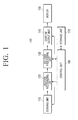
- FIG. 1 illustrates a display apparatus 100 according to an exemplary embodiment.
- Display apparatus 100 configures a screen according to a location of a user relative to display apparatus 100, provides the configured screen to the user, and responds only to the manipulations which are made with respect to display apparatus 100, and which correspond to the location of the user.
- Display apparatus 100 may include a sensing unit 110, a location recognizing unit 120, a content processing unit 130, a content output unit 140, a display 150, a control unit 160, and a storage unit 170.
- Sensing unit 110 senses a user input such as touch made with respect to a front image or to a screen of display apparatus 100. Sensing unit 110 transmits information regarding a sensed image or touch to location recognizing unit 120.
- Location recognizing unit 120 receives the information about the sensed image or touch from sensing unit 110, and extracts information about a user ('user information') based on the sensed image or touch.
- the 'user information' includes information related to user, including, but not limited to, a location of the user relative to display apparatus 100, coordinates of a location on display apparatus 100 where the user touches, a user motion made in front of display apparatus 100, or a direction of user movement in front of display apparatus 100.
- location recognizing unit 120 extracts from the sensed image the user information, based on the user location or area relative to the display apparatus 100, and selectively extracts part of or the entire user information based on user location or area.
- location recognizing unit 120 may extract from the sensed image the user information indicating that the user is in a first area, and exclusively extract the information about the direction of user movement which corresponds to the first area.
- user information is selectively extracted based on the user location or area, considering the fact that, depending on the purpose of display apparatus 100, some user information may be necessary while the rest of the user information may not be necessary.
- display apparatus 100 displays an advertisement of a product
- the user information such as a user's touch is unnecessary for display apparatus 100.
- display apparatus 100 may operate for variable purposes depending on the user location or area, it is necessary for the display apparatus to receive general information about the user and selectively extract the user information considered necessary, based on the user location or area.
- the location recognizing unit 120 transmits the information about the user location or area and the selectively-extracted user information to content processing unit 130. First, location recognizing unit 120 transmits to the information about the user location or area which is sensed by sensing unit 110 content processing unit 130, and then transmits the user information which is selectively extracted in accordance with the user location or area to content processing unit 130.
- Content processing unit 130 processes the content based on the information about the user location or area, which is received from location recognizing unit 120, to configure a screen.
- content processing unit 130 may configure a screen for product purchase, when determining that the user is near display apparatus 100, or may configure a screen for product advertisement, when determining that the user is away from display apparatus 100.
- Content processing unit 130 transmits the configured screen to content output unit 140, and content output unit 140 causes a screen corresponding to the image signal received from the content processing unit 130 to be output, and thus provided to the user through display 150.
- Control unit 160 controls the overall operation of display apparatus 100. Specifically, control unit 160 controls sensing unit 110 to sense, for example, a user touch input with respect to the front image or the screen of display apparatus 100, and to transmit information about the sensed image or touch to location recognizing unit 120.
- control unit 160 controls location recognizing unit 120 to extract the user information based on the user location or area relative to display apparatus 100, and to selectively extract part of or the entire user information based on the user location or area.
- control unit 160 controls content processing unit 130 and content output unit 140 to configure and output a screen corresponding to the user location, or to change a screen based on the selectively extracted user information, and outputting the user information to the screen.
- Storage unit 170 is a recording medium which stores programs for operating the entirety of display apparatus 100, and may include, but is not limited thereto, a memory, or a hard disk drive (HDD).
- HDD hard disk drive
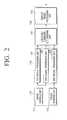
- FIG. 2 is a view illustrating the detailed structure of the display apparatus 100 according to an exemplary embodiment. Components including content output unit 140, display 150, control unit 160, and storage unit 170 are skipped in FIG. 2 for purposes of brevity.
- Sensing unit 110 includes an image sensing unit 111 and a touch sensing unit 113.
- Image sensing unit 111 is placed on an upper end of display apparatus 100 to photograph images in front of display apparatus 100, and transmit an image signal related to the photographed image, to location recognizing unit 120.
- Touch sensing unit 113 may be placed on a front side of display apparatus 100, to receive a user touch manipulation and transmit a touch signal corresponding to the touch input by the user, to location recognizing unit 120.
- Location recognizing unit 120 includes a first signal processing unit 121, a second signal processing unit 123, and a third signal processing unit 125.
- First signal processing unit 121 extracts user information related to the user location and area from the image signal received from image sensing unit 110, and analyzes the extracted information. Specifically, based on the image signal received from image sensing unit 110, first signal processing unit 121 computes coordinates of the user location based on display apparatus 100, and transmits the computed location coordinates to content processing unit 130.
- Second signal processing unit 123 extracts user information related to the user motion from the image signal received from image sensing unit 110, and analyzes the extracted information. Specifically, based on the image signal received from image sensing unit 110, second signal processing unit 123 computes coordinates of the user's face and hands based on the front side of display apparatus 100, and transmits the computed coordinates to content processing unit 130.
- Third signal processing unit 125 extracts user information related to the user's touch from the touch signal received from touch sensing unit 113, and analyzes the extracted information. Specifically, based on the touch signal received from touch sensing unit 113, third signal processing unit 125 computes touch coordinates of a touched location on display apparatus 100, and transmits the computed touch coordinates to content processing unit 130.
- Content processing unit 130 includes an area and command determining unit 131, and a display image processing unit 133.
- the area and command determining unit 131 receives from the first, second and third signal processing units 121, 123, 125: i) coordinates of user location relative to display apparatus 100; ii) coordinates of a user's face and hands based on the front side of the display apparatus 100; and iii) coordinates of a location where the user touches the screen of the display apparatus 100, and determines the user location or area, and user command.
- area and command determining unit 131 determines the user location or area relative to display apparatus 100. Additionally, based on the coordinates of the user's face and hands received from second signal processing unit 123, area and command determining unit 131 determines the user manipulation command with respect to display apparatus 100. Additionally, based on the touch coordinates received from the third signal processing unit 125, the area and command determining unit 131 determines the user command corresponding to the touch coordinates.
- FIG. 3 is provided to explain an area where the user is positioned. Specifically, FIG. 3 illustrates display apparatus 100 when viewed from above.
- the surrounding area of display apparatus 100 may be divided into a touch area, a gesture area, and a follow area.
- the 'touch area' is where display apparatus 100 responds to the user touch manipulation.
- display apparatus 100 configures and displays a screen corresponding to the touch area, selectively extracts the user information based on the coordinates of a location on display apparatus 100 where the user touches, and changes the current screen to a screen based on the touch coordinates, and displays the changed screen.
- display apparatus 100 configures a menu screen for product purchase and provides the screen to the user.
- the 'gesture area' is where display apparatus 100 responds to the user gesture manipulation.
- display apparatus 100 configures and displays a screen corresponding to the gesture area, selectively extracts the user information based on user motion, and changes the current screen to a screen corresponding to the user motion, and displays the changed screen.
- display apparatus 100 configures and displays an advertising screen, in a manner that the advertising screen changes in accordance with the user motion, to thereby raise the user's interest.
- the 'follow area' is where display apparatus 100 responds to the movement of the user.
- display apparatus 100 configures and displays a screen corresponding to the follow area, selectively extracts the user information based on the direction or location of the user movement, and changes the current screen to a screen corresponding to the direction or location of the user movement, and displays the changed screen.
- display apparatus 100 configures and displays an advertising screen, in a manner that the advertising screen follows in the direction of the user to draw the user's attention.
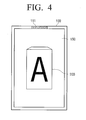
- FIG. 4 illustrates a front appearance of display apparatus 100 according to an exemplary embodiment.
- display apparatus 100 includes image sensing unit 111 provided on the upper end to photograph images in front of the display apparatus 100.
- touch sensing unit 113 senses a touch input which is provided inside display 150 to support display 150 operating in a touch screen mode.
- display apparatus 100 configures and displays a screen in accordance with the user area. Accordingly, when the user is in the touch area, an item 200 displayed on the screen is for product purchase, while the item 200 displayed on the screen is for product advertising, when the user is in the gesture or follow area.
- item 200 on the screen is changeable or selectable by user manipulation through touching, and when the user is in the gesture or follow area, the item 200 on the screen is changeable in accordance with user motion or the direction where the user moves.
- area and command determining unit 131 determines the user manipulation command based on the location, direction of movement, or touch or motion of the user.
- Area and command determining unit 131 transmits to display image processing unit 133 the information regarding the user location or area, and information regarding the user manipulation command.
- Display image processing unit 133 configures a screen based on the user location or area, in a manner that the screen is changed and configured based on the user information which is selectively extracted in accordance with the user location or area.
- Display image processing unit 133 transmits the configured or changed screen to content output unit 140.
- FIG. 5 is a view provided to explain the operation in the touch area.
- display apparatus 100 configures and displays the same menu screen, irrespective of whether the user is on the upper, lower, left or right side of the touch area. Since the user is relatively near display apparatus 100, it is meaningless to divide the user location to the upper, lower, left and right sides of the touch area, and configure different menu screens for each.
- display apparatus 100 provides a menu screen which is suitable for receiving a user's touch input.
- display apparatus 100 may provide a menu screen on which items are provided in appropriate sizes (not to small), within convenient reach of the user's hand (instead of being presented at corners), or at locations where the user can easily touch by raising his right or left hand.
- display apparatus 100 selectively extracts the user information based on the user's touch input, and operates according to the extracted user information. Accordingly, as illustrated, when the user touches an item 200, the item 200 is changed in accordance with the user's touch input.
- FIG. 6 is a view provided to explain the operations in the gesture area.
- display apparatus 100 configures and displays the same advertising screen, irrespective of whether the user is on the upper, lower, left, or right side of the gesture area. Again, since the user is relatively near to display apparatus 100, it is meaningless to divide the user location to the upper, lower, left and right sides of the gesture area, and configure different advertising screens for each.
- display apparatus 100 provides an appropriate advertising screen in response to user motions. That is, the advertising screen may contain content with which a user is tempted to make motions in order to operate display apparatus 100, without requiring separate instructions.
- display apparatus 100 When the user is in the gesture area, display apparatus 100 selectively extracts the user information based on the user motions, and operates in accordance with the selectively extracted user information, that is, the user motions. Accordingly, when the user is standing in front of display apparatus 100, display apparatus 100 analyzes the locations of the user's head, eyes, hands, or the like, and when the analyzed locations change, extract the changes as the user command.
- display apparatus 100 in this exemplary embodiment analyzes the locations of the user's head and one hand (indicated by dotted squares 610, 630).
- display apparatus 100 may extract the user command based on the user's motion of changing his hand from right side to the left, and changes to a screen which corresponds to the user command by, for instance, rotating a polygonal item 200 from the right side to the left.
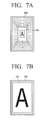
- FIGS. 7A to 7D provide supplemental explanation of changes in the screen, in accordance with the motions made by the user.
- display apparatus 100 when the user's face or hand is directed to a certain portion of the screen, display apparatus 100 causes the certain portion to be distinctively displayed rather than the rest portions displayed before motion occurs, or to replace the rest portions presented on the screen when motion is provided.
- FIG. 7A is a view illustrating a screen which is changed and displayed as the user moves his hand to the direction of display apparatus 100.
- display apparatus 100 assumes that too large screen is provided to the user, and thus contracts the items 200 on screen and provides items 200 in smaller sizes.
- FIG. 7B is a view illustrating a screen which is changed and displayed as the user moves his hand toward himself.
- display apparatus 100 assumes that too small a screen is provided to the user, and thus expands the items 200 on the screen and provides items 200 in larger sizes.
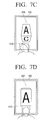
- FIG. 7C is a view illustrating a screen which is changed and displayed as the user bends his head down.
- display apparatus 100 assumes that the user wants to check the lower portion of the items 200, and thus rotates the items 200 on screen so that the lower portion is displayed.
- display apparatus 100 is checking the location of the user's head, as indicated by the dotted square 610.
- FIG. 7D is a view illustrating a screen which is changed and displayed as the user turns his back to the screen.
- display apparatus 100 highlights the screen itself, or items 200 on screen, to draw the user's attention to the screen.
- FIG. 8 is a view provided to explain the operations carried out in the follow area.
- display apparatus 100 may configure a different advertising screen depending on the location where the user is positioned, and displays the configured screen. By doing so, display apparatus 100 ensures that the user interest is excited, to induce the user to watch the advertising screen, even when the user is relatively far away from the display apparatus 100 and does not perceive the advertising screen quite well.
- display apparatus 100 may configure a screen to have an effect that the screen is displayed to the left direction where the user is positioned, and displays the screen.
- display apparatus 100 selectively extracts the user command based on the direction of the user movement, and operates according to the selectively-extracted user information, that is, according to the direction of user movement.
- display apparatus 100 changes the screen so that the screen is displayed to the center.
- display apparatus 100 changes the screen so that the screen is displayed to the right side.
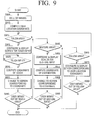
- FIG. 9 is a flowchart provided to explain a display method according to an exemplary embodiment.
- display apparatus 100 collects images, and at S910, computes coordinates of the user location based on the collected images.
- the display apparatus 100 configures a screen for touch input and displays the screen.
- display apparatus 100 computes coordinates of a location where the touch is input, and at S935, changes the current screen to a screen which corresponds to the coordinates of the location where the touch is input.
- display apparatus 100 determines whether or not the user moves out of the touch area, at S940-Y, when determining so, determines at S945 when the user is in the gesture area, or determines at S970 when the user is in the follow area.
- display apparatus 100 configures a screen for gesture input and displays the screen.
- display apparatus 100 computes coordinates regarding a user's motion, and at S960, changes to a screen which corresponds to the coordinates of the motion made by the user's hand, head, or the like.
- display apparatus 100 determines when the user moves out of the gesture area, and at S965-Y, when determining so, at S970, determines whether the user is in the follow area.
- display apparatus 100 configures a screen which corresponds to the coordinates of the direction where the user moves, and displays the screen.
- display apparatus 100 determines when the user moves out of the follow area, and at S980-Y, when determining so, at S915, determines when the user is in the touch area.
- the user area may be divided into more than three areas, and display apparatus 100 may operate in a manner different from those explained above with respect to the three user areas.
- the same user information may also be extracted for different user areas.
- the user motion and direction of user movement information may be extracted along with the coordinates of the location where the user touch is input, while with respect to the gesture area, not only the user motion information, but also the information about the direction of user movement can be extracted.
- the user areas are divided based on a distance from the display apparatus 100, a different reference may be equally applied to divide the user areas.
Landscapes
- Engineering & Computer Science (AREA)
- General Engineering & Computer Science (AREA)
- Theoretical Computer Science (AREA)
- Human Computer Interaction (AREA)
- Physics & Mathematics (AREA)
- General Physics & Mathematics (AREA)
- User Interface Of Digital Computer (AREA)
- Controls And Circuits For Display Device (AREA)
Abstract
Description
- The present invention relates to a user location-based display method and apparatus. More particularly, the present invention relates to a display method and apparatus which configure a screen according to a location of a user, and apply variable methods of user input, depending on the location of the user.
- The development of large size television (TV) technology, which was mainly led by the two technologies, i.e., thin film transistor liquid crystal displays (TFT LCD) and the plasma display panels (PDP), continues to provide viewers with images on larger screens.
- The large screens are used in many applications. For example, in the advertisement field, the large screens are adapted to provide a variety of contents and dynamic video services in more ways that appeal to customers, compared to conventional advertisements which only provide flat and fragmented contents. A display apparatus designed for the abovementioned purpose is a so-called digital information display (DID), and a large screen display formed in the abovementioned manner is a so-called large format display (LFD).
- However, the application of large size display apparatuses in areas such as advertising, has room for improvement. That is, content can be configured and displayed in a more unique manner, and much more considerations about the environments of the user near the large screen displays can be taken into account.
- Therefore, there is a need for methods that raise the user's interest or curiosity more actively, and provide contents which are more effectively based on interaction with the user.
- Exemplary embodiments of the present invention provide a display method and apparatus which configure a screen according to a location of user, and apply user input in different ways, depending also on the location of the user, thereby providing realistic interaction with the user.
- According to an aspect of the present invention, there is provided a display method of a display apparatus, which may include the steps of determining a location of a user relative to the display apparatus, configuring and displaying a screen based on the location of the user, selectively extracting user information based on the location of the user, and changing the displayed screen based on the extracted user information.
- The location of the user may be a distance from the display apparatus to the user, and the configuring and displaying may include configuring the screen with a content which operates in response to the touch of the user, and displays the configured screen when the distance to the user is shorter than a first distance.
- The location of the user may be a distance from the display apparatus to the user, and the selectively extracting may include selectively extracting the user information based on coordinate information of a location where the user touches on the display apparatus, when the distance to the user is shorter than a first distance.
- The configuring and displaying may include configuring a menu screen to select an item and displaying the configured menu screen. The changing may include changing to a screen which is related to an item which corresponds to the coordinate information of the location where the user touches the display apparatus.
- The location of the user may be a distance from the display apparatus to the user, and the selectively extracting may include selectively extracting the user information based on information related with a user motion, when the distance to the user is equal to or longer than a first distance and shorter than a second distance.
- The user motion may include at least one of a face motion and a hand motion of the user.
- The changing may include changing the screen to distinguish a certain portion of the screen from the rest area, when a face or hand of the user is directed to the certain portion of the screen.
- The location of the user may include a direction where the user is positioned relative to the screen of the display apparatus, and the configuring and displaying may include configuring the screen so as to give the effect that the screen is displayed to the direction where the user is positioned, and displaying the configured screen.
- The location of the user may include a distance from the display apparatus to the user, and the selectively extracting may include selectively extracting the user information based on information related with a direction to which the user moves, when the distance to the user is equal to or longer than a second distance and shorter than a third distance.
- The changing may include changing the screen so as to give an effect that the screen is displayed to a certain direction, when the user moves to the certain direction.
- The location of the user may include a distance from the display apparatus to the user, and the configuring and displaying may include configuring an advertising screen and displaying the advertising screen, when the distance to the user is equal to or longer than a first distance and shorter than a third distance.
- According to another aspect of the present invention, there is provided a display method of a display apparatus, which may include dividing an ambient area of the display apparatus into a plurality of areas, setting a method of giving a command with respect to the display apparatus for each of the plurality of areas, determining an area the user is positioned among the plurality of areas, and ignoring command, when command input is non-compliant with the command giving method which is set with respect to the area where the user is positioned, and displaying the screen in accordance with the command, when command input is compliant with the set method.
- According to yet another aspect of the present invention, there is provided a display apparatus, which may include a location recognizing unit which determines a location of a user relative to the display apparatus, and a control unit which causes a screen to be configured and displayed based on the location of the user, causes user information to be selectively extracted based on the location of the user, and causes the displayed screen to be changed based on the extracted user information.
- The location of the user may be a distance from the display apparatus to the user, and the control unit may cause the screen to be configured to provide a content which operates in response to the touch of the user, and displayed, when the distance to the user is shorter than a first distance.
- The location of the user may be a distance from the display apparatus to the user, and the control unit may cause the user information to be selectively extracted based on coordinate information of a location where the user touches the display apparatus, when the distance to the user is shorter than a first distance.
- The control unit may cause a menu screen to select an item to be configured and displayed, and may cause a current screen to be changed to a related screen with an item which corresponds to the coordinate information of the location where the user touches the display apparatus.
- The location of the user may be a distance from the display apparatus to the user, and the control unit may cause the user information to be selectively extracted based on information related with a user motion, when the distance to the user is equal to or longer than a first distance and shorter than a second distance.
- The user motion may include at least one of a face motion and a hand motion of the user.
- The control unit may cause the screen to be changed to distinguish a certain portion of the screen from the rest area, when a face or hand of the user is directed to the certain portion of the screen.
- The location of the user may include a direction where the user is positioned relative to the screen of the display apparatus, and the control unit may cause the screen to be configured so as to give the effect that the screen is displayed in the direction where the user is positioned.
- The location of the user may be a distance from the display apparatus to the user, and the control unit may cause the user information to be selectively extracted based on information related with a direction to which the user moves, when the distance to the user is equal to or longer than a second distance and shorter than a third distance.
- The control unit may cause the screen to be changed so as to give the effect that the screen is displayed to a certain direction, when the user moves in the certain direction.
- The location of the user may be a distance from the display apparatus to the user. The control unit may cause an advertising screen to be configured and displayed, when the distance to the user is equal to or longer than a first distance and shorter than a third distance.
- According to yet another aspect of the present invention, there is provided a display apparatus, which may include a location recognizing unit which determines an area where a user is positioned, and a control unit which divides an ambient area of the display apparatus into a plurality of areas, sets a method of giving a command with respect to the display apparatus for each of the plurality of areas, and ignores a command, when the command input is non-compliant with the command giving method, which is set with respect to the area where the user is positioned, and displays the screen in accordance with the command, when command input is compliant with the set method.
- The above and/or other aspects of the exemplary embodiments will be more apparent by describing certain exemplary embodiments with reference to the accompanying drawings, in which:
-
FIG. 1 is a view illustrating a display apparatus according to an exemplary embodiment; -
FIG. 2 is a view illustrating a detailed structure of a display apparatus according to an exemplary embodiment; -
FIG. 3 is a view provided to explain a user area where a user is positioned; -
FIG. 4 is a view illustrating a front view of a display apparatus according to an exemplary embodiment; -
FIG. 5 is a view provided to explain motions within a touch area according to an exemplary embodiment; -
FIG. 6 is a view provided to explain motions within a gesture area according to an exemplary embodiment; -
FIGS. 7A to 7D represent views provided for supplement explanation of screen changes, in accordance with the motions made; -
FIG. 8 is a view providing an explanation of motions in an area, according to an exemplary embodiment; and -
FIG. 9 is a flow chart provided for explanation of a display method, according to an exemplary embodiment. - Certain exemplary embodiments will now be described in greater detail with reference to the accompanying drawings.
- In the following description, the same drawing reference numerals are used to represent the same elements, in different drawings. The matters defined in the description, such as detailed construction and elements, are provided to assist in a comprehensive understanding of the exemplary embodiments. Thus, it is apparent that the exemplary embodiments can be carried out without those specifically defined matters defined in the description. Also, well-known functions or constructions are not described in detail since they would obscure the exemplary embodiments with unnecessary detail.
- In the following description, the basic structure of the display apparatus and principles of operation thereof will be explained first with reference to
FIGS. 1 and4 , which will be followed by an explanation of the user motions in each location, with reference toFIGS. 5 to 8 , followed by an explanation of the flow of motions for configuring the screen, with reference toFIG. 9 . - Basic structure of a display apparatus and principles of operation thereof
FIG. 1 illustrates adisplay apparatus 100 according to an exemplary embodiment. -
Display apparatus 100 according to an exemplary embodiment configures a screen according to a location of a user relative to displayapparatus 100, provides the configured screen to the user, and responds only to the manipulations which are made with respect to displayapparatus 100, and which correspond to the location of the user. -
Display apparatus 100 may include asensing unit 110, alocation recognizing unit 120, acontent processing unit 130, acontent output unit 140, adisplay 150, acontrol unit 160, and astorage unit 170. - Sensing
unit 110 senses a user input such as touch made with respect to a front image or to a screen ofdisplay apparatus 100.Sensing unit 110 transmits information regarding a sensed image or touch tolocation recognizing unit 120. -
Location recognizing unit 120 receives the information about the sensed image or touch from sensingunit 110, and extracts information about a user ('user information') based on the sensed image or touch. - The 'user information' includes information related to user, including, but not limited to, a location of the user relative to display
apparatus 100, coordinates of a location ondisplay apparatus 100 where the user touches, a user motion made in front ofdisplay apparatus 100, or a direction of user movement in front ofdisplay apparatus 100. - Specifically,
location recognizing unit 120 extracts from the sensed image the user information, based on the user location or area relative to thedisplay apparatus 100, and selectively extracts part of or the entire user information based on user location or area. - By way of example,
location recognizing unit 120 may extract from the sensed image the user information indicating that the user is in a first area, and exclusively extract the information about the direction of user movement which corresponds to the first area. - As explained above, user information is selectively extracted based on the user location or area, considering the fact that, depending on the purpose of
display apparatus 100, some user information may be necessary while the rest of the user information may not be necessary. - By way of example, if
display apparatus 100 displays an advertisement of a product, the user information such as a user's touch is unnecessary fordisplay apparatus 100. - However, according to an aspect of the exemplary embodiments, since
display apparatus 100 may operate for variable purposes depending on the user location or area, it is necessary for the display apparatus to receive general information about the user and selectively extract the user information considered necessary, based on the user location or area. - The
location recognizing unit 120 transmits the information about the user location or area and the selectively-extracted user information tocontent processing unit 130. First,location recognizing unit 120 transmits to the information about the user location or area which is sensed by sensingunit 110content processing unit 130, and then transmits the user information which is selectively extracted in accordance with the user location or area tocontent processing unit 130. -
Content processing unit 130 processes the content based on the information about the user location or area, which is received fromlocation recognizing unit 120, to configure a screen. By way of example,content processing unit 130 may configure a screen for product purchase, when determining that the user is neardisplay apparatus 100, or may configure a screen for product advertisement, when determining that the user is away fromdisplay apparatus 100. -
Content processing unit 130 transmits the configured screen tocontent output unit 140, andcontent output unit 140 causes a screen corresponding to the image signal received from thecontent processing unit 130 to be output, and thus provided to the user throughdisplay 150. -
Control unit 160 controls the overall operation ofdisplay apparatus 100. Specifically,control unit 160controls sensing unit 110 to sense, for example, a user touch input with respect to the front image or the screen ofdisplay apparatus 100, and to transmit information about the sensed image or touch tolocation recognizing unit 120. - Additionally,
control unit 160 controlslocation recognizing unit 120 to extract the user information based on the user location or area relative to displayapparatus 100, and to selectively extract part of or the entire user information based on the user location or area. - Additionally,
control unit 160 controlscontent processing unit 130 andcontent output unit 140 to configure and output a screen corresponding to the user location, or to change a screen based on the selectively extracted user information, and outputting the user information to the screen. -
Storage unit 170 is a recording medium which stores programs for operating the entirety ofdisplay apparatus 100, and may include, but is not limited thereto, a memory, or a hard disk drive (HDD). - The detailed operation of
display apparatus 100 according to an exemplary embodiment will be explained below with reference toFIG. 2 . -
FIG. 2 is a view illustrating the detailed structure of thedisplay apparatus 100 according to an exemplary embodiment. Components includingcontent output unit 140,display 150,control unit 160, andstorage unit 170 are skipped inFIG. 2 for purposes of brevity. -
Sensing unit 110 includes animage sensing unit 111 and atouch sensing unit 113. -
Image sensing unit 111 is placed on an upper end ofdisplay apparatus 100 to photograph images in front ofdisplay apparatus 100, and transmit an image signal related to the photographed image, tolocation recognizing unit 120. -
Touch sensing unit 113 may be placed on a front side ofdisplay apparatus 100, to receive a user touch manipulation and transmit a touch signal corresponding to the touch input by the user, tolocation recognizing unit 120. -
Location recognizing unit 120 includes a firstsignal processing unit 121, a secondsignal processing unit 123, and a thirdsignal processing unit 125. - First
signal processing unit 121 extracts user information related to the user location and area from the image signal received fromimage sensing unit 110, and analyzes the extracted information. Specifically, based on the image signal received fromimage sensing unit 110, firstsignal processing unit 121 computes coordinates of the user location based ondisplay apparatus 100, and transmits the computed location coordinates tocontent processing unit 130. - Second
signal processing unit 123 extracts user information related to the user motion from the image signal received fromimage sensing unit 110, and analyzes the extracted information. Specifically, based on the image signal received fromimage sensing unit 110, secondsignal processing unit 123 computes coordinates of the user's face and hands based on the front side ofdisplay apparatus 100, and transmits the computed coordinates tocontent processing unit 130. - Third
signal processing unit 125 extracts user information related to the user's touch from the touch signal received fromtouch sensing unit 113, and analyzes the extracted information. Specifically, based on the touch signal received fromtouch sensing unit 113, thirdsignal processing unit 125 computes touch coordinates of a touched location ondisplay apparatus 100, and transmits the computed touch coordinates tocontent processing unit 130. -
Content processing unit 130 includes an area andcommand determining unit 131, and a displayimage processing unit 133. - The area and
command determining unit 131 receives from the first, second and thirdsignal processing units apparatus 100; ii) coordinates of a user's face and hands based on the front side of thedisplay apparatus 100; and iii) coordinates of a location where the user touches the screen of thedisplay apparatus 100, and determines the user location or area, and user command. - Specifically, based on the user location coordinates received from first
signal processing unit 121, area andcommand determining unit 131 determines the user location or area relative to displayapparatus 100. Additionally, based on the coordinates of the user's face and hands received from secondsignal processing unit 123, area andcommand determining unit 131 determines the user manipulation command with respect to displayapparatus 100. Additionally, based on the touch coordinates received from the thirdsignal processing unit 125, the area andcommand determining unit 131 determines the user command corresponding to the touch coordinates. - The above mentioned operation will be explained in more detail below with reference to
FIGS. 3 and4 . -
FIG. 3 is provided to explain an area where the user is positioned. Specifically,FIG. 3 illustratesdisplay apparatus 100 when viewed from above. - As illustrated in
FIG. 3 , the surrounding area ofdisplay apparatus 100, or more specifically, the front area ofdisplay apparatus 100 may be divided into a touch area, a gesture area, and a follow area. - The 'touch area' is where
display apparatus 100 responds to the user touch manipulation. By way of example, when the user is in the touch area,display apparatus 100 configures and displays a screen corresponding to the touch area, selectively extracts the user information based on the coordinates of a location ondisplay apparatus 100 where the user touches, and changes the current screen to a screen based on the touch coordinates, and displays the changed screen. - If the user is in the touch area, it is likely that the user is interested in
display apparatus 100. Accordingly, based on the assumption that the user is interested,display apparatus 100 configures a menu screen for product purchase and provides the screen to the user. - The 'gesture area' is where
display apparatus 100 responds to the user gesture manipulation. By way of example, when the user is in the gesture area,display apparatus 100 configures and displays a screen corresponding to the gesture area, selectively extracts the user information based on user motion, and changes the current screen to a screen corresponding to the user motion, and displays the changed screen. - When the user is in the gesture area, the user is likely to have a lesser, but certain degree of interest, or it is possible that his interest is increased. Accordingly,
display apparatus 100 configures and displays an advertising screen, in a manner that the advertising screen changes in accordance with the user motion, to thereby raise the user's interest. - The 'follow area' is where
display apparatus 100 responds to the movement of the user. By way of example, when the user is in the follow area,display apparatus 100 configures and displays a screen corresponding to the follow area, selectively extracts the user information based on the direction or location of the user movement, and changes the current screen to a screen corresponding to the direction or location of the user movement, and displays the changed screen. - If the user is in the follow area, it is likely that the user has a little or no interest in
display apparatus 100. Accordingly,display apparatus 100 configures and displays an advertising screen, in a manner that the advertising screen follows in the direction of the user to draw the user's attention. -
FIG. 4 illustrates a front appearance ofdisplay apparatus 100 according to an exemplary embodiment. - As illustrated,
display apparatus 100 includesimage sensing unit 111 provided on the upper end to photograph images in front of thedisplay apparatus 100. - Additionally,
touch sensing unit 113 senses a touch input which is provided insidedisplay 150 to supportdisplay 150 operating in a touch screen mode. - As explained above,
display apparatus 100 configures and displays a screen in accordance with the user area. Accordingly, when the user is in the touch area, anitem 200 displayed on the screen is for product purchase, while theitem 200 displayed on the screen is for product advertising, when the user is in the gesture or follow area. - If the user is in the touch area,
item 200 on the screen is changeable or selectable by user manipulation through touching, and when the user is in the gesture or follow area, theitem 200 on the screen is changeable in accordance with user motion or the direction where the user moves. - Referring back to
FIG. 2 , as the screen is configured based on the user location or area, area andcommand determining unit 131 determines the user manipulation command based on the location, direction of movement, or touch or motion of the user. - Area and
command determining unit 131 transmits to displayimage processing unit 133 the information regarding the user location or area, and information regarding the user manipulation command. Displayimage processing unit 133 configures a screen based on the user location or area, in a manner that the screen is changed and configured based on the user information which is selectively extracted in accordance with the user location or area. - Display
image processing unit 133 transmits the configured or changed screen tocontent output unit 140. - Accordingly, a realistic interaction is possible between
display apparatus 100 and the user, and the user is provided with contents in a more effective manner. - Hereinbelow, the detailed operations that are carried out based on the user location or area will be explained with reference to
FIGS. 5 to 8 . -
FIG. 5 is a view provided to explain the operation in the touch area. - As illustrated, as long as the user is in the touch area,
display apparatus 100 configures and displays the same menu screen, irrespective of whether the user is on the upper, lower, left or right side of the touch area. Since the user is relatively neardisplay apparatus 100, it is meaningless to divide the user location to the upper, lower, left and right sides of the touch area, and configure different menu screens for each. - Meanwhile,
display apparatus 100 provides a menu screen which is suitable for receiving a user's touch input. By way of example,display apparatus 100 may provide a menu screen on which items are provided in appropriate sizes (not to small), within convenient reach of the user's hand (instead of being presented at corners), or at locations where the user can easily touch by raising his right or left hand. - If the user is in the touch area,
display apparatus 100 selectively extracts the user information based on the user's touch input, and operates according to the extracted user information. Accordingly, as illustrated, when the user touches anitem 200, theitem 200 is changed in accordance with the user's touch input. -
FIG. 6 is a view provided to explain the operations in the gesture area. - As illustrated, when the user is in the gesture area,
display apparatus 100 configures and displays the same advertising screen, irrespective of whether the user is on the upper, lower, left, or right side of the gesture area. Again, since the user is relatively near to displayapparatus 100, it is meaningless to divide the user location to the upper, lower, left and right sides of the gesture area, and configure different advertising screens for each. - Meanwhile,
display apparatus 100 provides an appropriate advertising screen in response to user motions. That is, the advertising screen may contain content with which a user is tempted to make motions in order to operatedisplay apparatus 100, without requiring separate instructions. - When the user is in the gesture area,
display apparatus 100 selectively extracts the user information based on the user motions, and operates in accordance with the selectively extracted user information, that is, the user motions. Accordingly, when the user is standing in front ofdisplay apparatus 100,display apparatus 100 analyzes the locations of the user's head, eyes, hands, or the like, and when the analyzed locations change, extract the changes as the user command. - Referring particularly to
FIG. 6 ,display apparatus 100 in this exemplary embodiment analyzes the locations of the user's head and one hand (indicated bydotted squares 610, 630). - Accordingly,
display apparatus 100 may extract the user command based on the user's motion of changing his hand from right side to the left, and changes to a screen which corresponds to the user command by, for instance, rotating apolygonal item 200 from the right side to the left. -
FIGS. 7A to 7D provide supplemental explanation of changes in the screen, in accordance with the motions made by the user. Referring toFIGS. 7A to 7D , when the user's face or hand is directed to a certain portion of the screen,display apparatus 100 causes the certain portion to be distinctively displayed rather than the rest portions displayed before motion occurs, or to replace the rest portions presented on the screen when motion is provided. - Specifically,
FIG. 7A is a view illustrating a screen which is changed and displayed as the user moves his hand to the direction ofdisplay apparatus 100. In this case,display apparatus 100 assumes that too large screen is provided to the user, and thus contracts theitems 200 on screen and providesitems 200 in smaller sizes. -
FIG. 7B is a view illustrating a screen which is changed and displayed as the user moves his hand toward himself. In this case,display apparatus 100 assumes that too small a screen is provided to the user, and thus expands theitems 200 on the screen and providesitems 200 in larger sizes. -
FIG. 7C is a view illustrating a screen which is changed and displayed as the user bends his head down. In this case,display apparatus 100 assumes that the user wants to check the lower portion of theitems 200, and thus rotates theitems 200 on screen so that the lower portion is displayed. - In this situation,
display apparatus 100 is checking the location of the user's head, as indicated by the dottedsquare 610. -
FIG. 7D is a view illustrating a screen which is changed and displayed as the user turns his back to the screen. In this situation,display apparatus 100 highlights the screen itself, oritems 200 on screen, to draw the user's attention to the screen. -
FIG. 8 is a view provided to explain the operations carried out in the follow area. - If the user is in the follow area,
display apparatus 100 may configure a different advertising screen depending on the location where the user is positioned, and displays the configured screen. By doing so,display apparatus 100 ensures that the user interest is excited, to induce the user to watch the advertising screen, even when the user is relatively far away from thedisplay apparatus 100 and does not perceive the advertising screen quite well. - By way of example, when the user is on the left side of
display apparatus 100, as illustrated,display apparatus 100 may configure a screen to have an effect that the screen is displayed to the left direction where the user is positioned, and displays the screen. - Additionally, when the user is in the follow area,
display apparatus 100 selectively extracts the user command based on the direction of the user movement, and operates according to the selectively-extracted user information, that is, according to the direction of user movement. - Accordingly, when the user moves from the left side to the center of the
display apparatus 100, as illustrated,display apparatus 100 changes the screen so that the screen is displayed to the center. When the user continues moving from the center to the right side ofdisplay apparatus 100, as illustrated,display apparatus 100 changes the screen so that the screen is displayed to the right side. - As a result, a realistic interaction is possible between
display apparatus 100 and the user, and the user is provided with contents in a more effective way. - The operation flowchart of configuring a screen based on user information will be explained below, with reference to
FIG. 9 , which is a flowchart provided to explain a display method according to an exemplary embodiment. - At S905,
display apparatus 100 collects images, and at S910, computes coordinates of the user location based on the collected images. - At S915-Y, when determining that the user is in the touch area based on the computed coordinates, at S920, the
display apparatus 100 configures a screen for touch input and displays the screen. - At S925-Y, when the user touch is input, at S930,
display apparatus 100 computes coordinates of a location where the touch is input, and at S935, changes the current screen to a screen which corresponds to the coordinates of the location where the touch is input. - At S940,
display apparatus 100 determines whether or not the user moves out of the touch area, at S940-Y, when determining so, determines at S945 when the user is in the gesture area, or determines at S970 when the user is in the follow area. - Meanwhile, at S945-Y, when determining that the user is in the gesture area based on the computed coordinates, at S950,
display apparatus 100 configures a screen for gesture input and displays the screen. - Additionally, at S955,
display apparatus 100 computes coordinates regarding a user's motion, and at S960, changes to a screen which corresponds to the coordinates of the motion made by the user's hand, head, or the like. - At S965,
display apparatus 100 determines when the user moves out of the gesture area, and at S965-Y, when determining so, at S970, determines whether the user is in the follow area. - Meanwhile, at S970-Y, when determining that the user is in the follow area based on the computed coordinates, at S975,
display apparatus 100 configures a screen which corresponds to the coordinates of the direction where the user moves, and displays the screen. - At S980,
display apparatus 100 determines when the user moves out of the follow area, and at S980-Y, when determining so, at S915, determines when the user is in the touch area. - As a result, a realistic interaction is possible between
display apparatus 100 and the user, and the user is provided with contents in a more effective way. - The foregoing exemplary embodiments and advantages are merely exemplary and are not to be construed as limiting. The present teaching can be readily applied to other types of apparatuses. Also, the description of the exemplary embodiments is intended to be illustrative, and not to limit the scope of the claims, and many alternatives, modifications, and variations will be apparent to those skilled in the art.
- Specifically, the screen configurations or manner of changing the screen explained above are only examples used for the sake of convenient explanation. Therefore, different screen configurations, or different manners of screen changes are equally applicable to the present invention.
- Furthermore, although three user areas are particularly exemplified and explained in the description provided above, these should not be understood as limiting. Accordingly, the user area may be divided into more than three areas, and
display apparatus 100 may operate in a manner different from those explained above with respect to the three user areas. - Furthermore, although it is explained that a menu screen or an advertising screen is configured and displayed, this also should not be understood as limiting, since the content of the screen can be configured in a different manner.
- Furthermore, although it is explained that different user information is extracted depending on the user area, this also should not be understood as limiting. The same user information may also be extracted for different user areas. By way of example, with respect to the touch area, the user motion and direction of user movement information may be extracted along with the coordinates of the location where the user touch is input, while with respect to the gesture area, not only the user motion information, but also the information about the direction of user movement can be extracted.
- Furthermore, although the user areas are divided based on a distance from the
display apparatus 100, a different reference may be equally applied to divide the user areas. - As a result, it is possible to provide a realistic interaction between
display apparatus 100 and the user, provide the user with specialized service, and thus excite the user's interest and excitement about the content provided to the user.
Claims (15)
- A display method of a display apparatus, the display method comprising:determining a location of a user relative to the display apparatus;configuring and displaying a screen based on the location of the user;selectively extracting user information based on the location of the user; andchanging the displayed screen based on the extracted user information.
- The display method of claim 1, wherein the location of the user comprises a distance from the display apparatus to the user, and
the configuring and displaying comprises configuring the screen with a content which operates in response to the touch of the user and displaying the configured screen, if the distance to the user is shorter than a first distance. - The display method of claim 1 or claim 2, wherein the location of the user comprises a distance from the display apparatus to the user, and
the selectively extracting comprises selectively extracting the user information based on coordinate information of a location where the user touches the display apparatus, if the distance to the user is shorter than a first distance. - The display method of claim 3, wherein the configuring and displaying comprises configuring a menu screen to select an item and displaying the configured menu screen, and
the changing comprises changing to a screen related to an item which corresponds to the coordinate information of the location where the user touches on the display apparatus. - The display method of one of claims 1 to 4, wherein the location of the user comprises a distance from the display apparatus to the user, and
the selectively extracting comprises selectively extracting the user information based on information related with a user motion, if the distance to the user is equal to or longer than a first distance and shorter than a second distance. - The display method of claim 5, wherein the user motion comprises at least one of a face motion and a hand motion of the user.
- The display method of claim 6, wherein the changing comprises changing the screen to distinguish a certain portion of the screen from a rest area, if a face or hand of the user is directed to the certain portion of the screen.
- The display method of one of claims 1 to 7, wherein the location of the user comprises a direction where the user is positioned relative to the screen of the display apparatus, and
the configuring and displaying comprises configuring the screen so as to give an effect that the screen is displayed to the direction where the user is positioned, and displaying the configured screen. - The display method of one of claims 1 to 8, wherein the location of the user comprises a distance from the display apparatus to the user, and
the selectively extracting comprises selectively extracting the user information based on information related to a direction to which the user moves, if the distance to the user is equal to or longer than a second distance and shorter than a third distance. - The display method of claim 9, wherein the changing comprises changing the screen so as to give an effect that the screen is displayed to a certain direction, if the user moves to the certain direction.
- The display method of one of claims 1 to 10, wherein the location of the user comprises a distance from the display apparatus to the user, and
the configuring and displaying comprises configuring an advertising screen and displaying the advertising screen, if the distance to the user is equal to or longer than a first distance and shorter than a third distance. - A display apparatus, comprising:a location recognizing unit arranged to determine a location of a user relative to the display apparatus; anda control unit arranged to cause a screen to be configured and displayed based on the location of the user, to cause user information to be selectively extracted based on the location of the user, and to cause the displayed screen to be changed based on the extracted user information.
- The display apparatus of claim 12, wherein the location of the user comprises a distance from the display apparatus to the user, and
the control unit is arranged to cause the screen to be configured to provide a content which operates in response to the touch of the user, and displayed, if the distance to the user is shorter than a first distance. - The display apparatus of claim 12 or claim 13, wherein the location of the user comprises a distance from the display apparatus to the user, and
the control unit is arranged to cause the user information to be selectively extracted based on coordinate information of a location where the user touches on the display apparatus, if the distance to the user is shorter than a first distance. - The display apparatus of one of claims 12 to 14, wherein the location of the user comprises a distance from the display apparatus to the user, and
the control unit is arranged to cause the user information to be selectively extracted based on information related to a user motion, if the distance to the user is equal to or longer than a first distance and shorter than a second distance.
Applications Claiming Priority (1)
| Application Number | Priority Date | Filing Date | Title |
|---|---|---|---|
| KR1020090117758A KR101657168B1 (en) | 2009-12-01 | 2009-12-01 | Display method and apparatus based on user's potion |
Publications (1)
| Publication Number | Publication Date |
|---|---|
| EP2336868A1 true EP2336868A1 (en) | 2011-06-22 |
Family
ID=43884155
Family Applications (1)
| Application Number | Title | Priority Date | Filing Date |
|---|---|---|---|
| EP10190697A Ceased EP2336868A1 (en) | 2009-12-01 | 2010-11-10 | User location-based display method and apparatus |
Country Status (3)
| Country | Link |
|---|---|
| US (1) | US9507424B2 (en) |
| EP (1) | EP2336868A1 (en) |
| KR (1) | KR101657168B1 (en) |
Cited By (2)
| Publication number | Priority date | Publication date | Assignee | Title |
|---|---|---|---|---|
| WO2013153264A1 (en) * | 2012-04-13 | 2013-10-17 | Nokia Corporation | Free hand gesture control of automotive user interface |
| EP2913740A1 (en) * | 2014-01-29 | 2015-09-02 | Samsung Electronics Co., Ltd | Display apparatus and control method thereof |
Families Citing this family (27)
| Publication number | Priority date | Publication date | Assignee | Title |
|---|---|---|---|---|
| USD678323S1 (en) * | 2011-02-10 | 2013-03-19 | Ricoh Company, Ltd. | Display screen with icon |
| US20120209669A1 (en) * | 2011-02-11 | 2012-08-16 | Carl Zealer | Configurable advertising and content rendering |
| JP2012212340A (en) * | 2011-03-31 | 2012-11-01 | Sony Corp | Information processing apparatus, image display device and image processing method |
| USD712910S1 (en) * | 2011-11-12 | 2014-09-09 | Giga-Byte Technology Co., Ltd. | Display screen with graphical user interface |
| USD703236S1 (en) * | 2012-01-06 | 2014-04-22 | Samsung Electronics Co., Ltd. | Display screen or portion thereof with graphical user interface |
| US11042244B2 (en) * | 2012-04-24 | 2021-06-22 | Sony Corporation | Terminal device and touch input method |
| US8965170B1 (en) | 2012-09-04 | 2015-02-24 | Google Inc. | Automatic transition of content based on facial recognition |
| US9684372B2 (en) * | 2012-11-07 | 2017-06-20 | Samsung Electronics Co., Ltd. | System and method for human computer interaction |
| US9159116B2 (en) | 2013-02-13 | 2015-10-13 | Google Inc. | Adaptive screen interfaces based on viewing distance |
| USD1066508S1 (en) * | 2013-03-11 | 2025-03-11 | King Show Games, Inc. | Gaming apparatus having display screen with graphical user interface |
| KR101799294B1 (en) | 2013-05-10 | 2017-11-20 | 삼성전자주식회사 | Display appratus and Method for controlling display apparatus thereof |
| KR20140133357A (en) | 2013-05-10 | 2014-11-19 | 삼성전자주식회사 | display apparatus and user interface screen providing method thereof |
| KR20140138424A (en) | 2013-05-23 | 2014-12-04 | 삼성전자주식회사 | Method and appratus for user interface based on gesture |
| AP00651S1 (en) * | 2013-08-30 | 2014-12-16 | Samsung Electronics Co Ltd | Graphical user interfaces for display screens or portions thereof |
| JP2015127897A (en) * | 2013-12-27 | 2015-07-09 | ソニー株式会社 | Display control device, display control system, display control method, and program |
| USD763305S1 (en) * | 2014-01-08 | 2016-08-09 | Mitsubishi Electric Corporation | Display screen with remote controller animated graphical user interface |
| US9971490B2 (en) | 2014-02-26 | 2018-05-15 | Microsoft Technology Licensing, Llc | Device control |
| USD752629S1 (en) * | 2014-04-26 | 2016-03-29 | Inbay Technologies Inc. | Display screen with graphical user interface |
| USD774539S1 (en) | 2014-04-28 | 2016-12-20 | Inbay Technologies Inc. | Display screen with graphical user interface |
| US10955987B2 (en) * | 2016-10-04 | 2021-03-23 | Facebook, Inc. | Three-dimensional user interface |
| KR102750287B1 (en) * | 2016-12-27 | 2025-01-08 | 삼성전자주식회사 | Display apparatus and Method for controlling the display apparatus thereof |
| KR102399084B1 (en) * | 2017-12-29 | 2022-05-18 | 삼성전자주식회사 | Display apparatus and method for controlling thereof |
| KR102616850B1 (en) * | 2018-03-05 | 2023-12-26 | 삼성전자주식회사 | An external device capable of being combined with an electronic device, and a display method thereof. |
| WO2020111380A1 (en) * | 2018-11-30 | 2020-06-04 | (주)이지위드 | Kinetic art device manufacturing system and method, and kinetic art device manufactured thereby |
| KR102130769B1 (en) * | 2018-11-30 | 2020-07-06 | (주)이지위드 | System and method for producing kinetic art apparatus |
| WO2022114334A1 (en) * | 2020-11-27 | 2022-06-02 | 한국전자기술연구원 | Method and device for controlling content in vehicle for plurality of users |
| KR102715351B1 (en) * | 2021-10-21 | 2024-10-11 | 주식회사 뉴토 | Content providing device based on motion recognition |
Citations (4)
| Publication number | Priority date | Publication date | Assignee | Title |
|---|---|---|---|---|
| US7225414B1 (en) * | 2002-09-10 | 2007-05-29 | Videomining Corporation | Method and system for virtual touch entertainment |
| US20080018595A1 (en) * | 2000-07-24 | 2008-01-24 | Gesturetek, Inc. | Video-based image control system |
| US20080129688A1 (en) * | 2005-12-06 | 2008-06-05 | Naturalpoint, Inc. | System and Methods for Using a Movable Object to Control a Computer |
| US20090058829A1 (en) * | 2007-08-30 | 2009-03-05 | Young Hwan Kim | Apparatus and method for providing feedback for three-dimensional touchscreen |
Family Cites Families (2)
| Publication number | Priority date | Publication date | Assignee | Title |
|---|---|---|---|---|
| US7134080B2 (en) * | 2002-08-23 | 2006-11-07 | International Business Machines Corporation | Method and system for a user-following interface |
| US7626569B2 (en) * | 2004-10-25 | 2009-12-01 | Graphics Properties Holdings, Inc. | Movable audio/video communication interface system |
-
2009
- 2009-12-01 KR KR1020090117758A patent/KR101657168B1/en not_active Expired - Fee Related
-
2010
- 2010-05-20 US US12/783,835 patent/US9507424B2/en not_active Expired - Fee Related
- 2010-11-10 EP EP10190697A patent/EP2336868A1/en not_active Ceased
Patent Citations (4)
| Publication number | Priority date | Publication date | Assignee | Title |
|---|---|---|---|---|
| US20080018595A1 (en) * | 2000-07-24 | 2008-01-24 | Gesturetek, Inc. | Video-based image control system |
| US7225414B1 (en) * | 2002-09-10 | 2007-05-29 | Videomining Corporation | Method and system for virtual touch entertainment |
| US20080129688A1 (en) * | 2005-12-06 | 2008-06-05 | Naturalpoint, Inc. | System and Methods for Using a Movable Object to Control a Computer |
| US20090058829A1 (en) * | 2007-08-30 | 2009-03-05 | Young Hwan Kim | Apparatus and method for providing feedback for three-dimensional touchscreen |
Non-Patent Citations (1)
| Title |
|---|
| KRAHNSTOEVER N ET AL: "A real-time framework for natural multimodal interaction with large screen displays", MULTIMODAL INTERFACES, 2002. PROCEEDINGS. FOURTH IEEE INTERNATIONAL CO NFERENCE ON 14-16 OCT. 2002, PISCATAWAY, NJ, USA,IEEE, 14 October 2002 (2002-10-14), pages 349 - 354, XP010624340, ISBN: 978-0-7695-1834-3 * |
Cited By (6)
| Publication number | Priority date | Publication date | Assignee | Title |
|---|---|---|---|---|
| WO2013153264A1 (en) * | 2012-04-13 | 2013-10-17 | Nokia Corporation | Free hand gesture control of automotive user interface |
| CN104364735A (en) * | 2012-04-13 | 2015-02-18 | 诺基亚公司 | Free hand gesture control of automotive user interface |
| US9239624B2 (en) | 2012-04-13 | 2016-01-19 | Nokia Technologies Oy | Free hand gesture control of automotive user interface |
| CN104364735B (en) * | 2012-04-13 | 2017-11-03 | 诺基亚技术有限公司 | The free hand gestures control at user vehicle interface |
| EP2913740A1 (en) * | 2014-01-29 | 2015-09-02 | Samsung Electronics Co., Ltd | Display apparatus and control method thereof |
| US9602872B2 (en) | 2014-01-29 | 2017-03-21 | Samsung Electronics Co., Ltd. | Display apparatus and control method thereof |
Also Published As
| Publication number | Publication date |
|---|---|
| KR20110061187A (en) | 2011-06-09 |
| KR101657168B1 (en) | 2016-09-19 |
| US9507424B2 (en) | 2016-11-29 |
| US20110131502A1 (en) | 2011-06-02 |
Similar Documents
| Publication | Publication Date | Title |
|---|---|---|
| US9507424B2 (en) | User location-based display method and apparatus | |
| US10467949B2 (en) | Display apparatus, driving method thereof, and computer readable recording medium | |
| KR20150056074A (en) | Electronic apparatus and method for screen sharing with external display apparatus | |
| EP3024220A2 (en) | Display apparatus and display method | |
| CN105493023A (en) | Manipulation of content on a surface | |
| US11231785B2 (en) | Display device and user interface displaying method thereof | |
| KR20170059242A (en) | Image display apparatus and operating method for the same | |
| US20140143654A1 (en) | Systems and methods for generating mobile app page template, and storage medium thereof | |
| KR20150025214A (en) | Method for displaying visual object on video, machine-readable storage medium and electronic device | |
| US20180174356A1 (en) | Display apparatus and control method thereof | |
| JP2012079194A (en) | Digital signage system | |
| AU2015362278A1 (en) | Display apparatus and display method | |
| CN103970451A (en) | Method and apparatus for controlling content playback | |
| WO2005091651A3 (en) | Interactive video display system | |
| JP2009295016A (en) | Control method for information display, display control program and information display | |
| CN105763920A (en) | Display device and display method | |
| JP2014016904A (en) | Content display device, program and recording medium | |
| CN211506772U (en) | Virtual book page turning display device | |
| KR20160097868A (en) | A display apparatus and a display method | |
| EP2750401A1 (en) | Display apparatus and method for providing menu thereof | |
| CN101770327A (en) | Imaging system and method capable of switching and starting an execution program of a multi-view display screen | |
| US20130321469A1 (en) | Method of controlling display | |
| KR102314109B1 (en) | A display apparatus and a display method | |
| JP2009295012A (en) | Control method for information display, display control program and information display | |
| US20240069703A1 (en) | Electronic apparatus and control method thereof |
Legal Events
| Date | Code | Title | Description |
|---|---|---|---|
| PUAI | Public reference made under article 153(3) epc to a published international application that has entered the european phase |
Free format text: ORIGINAL CODE: 0009012 |
|
| AK | Designated contracting states |
Kind code of ref document: A1 Designated state(s): AL AT BE BG CH CY CZ DE DK EE ES FI FR GB GR HR HU IE IS IT LI LT LU LV MC MK MT NL NO PL PT RO RS SE SI SK SM TR |
|
| AX | Request for extension of the european patent |
Extension state: BA ME |
|
| 17P | Request for examination filed |
Effective date: 20111123 |
|
| RAP1 | Party data changed (applicant data changed or rights of an application transferred) |
Owner name: SAMSUNG ELECTRONICS CO., LTD. |
|
| 17Q | First examination report despatched |
Effective date: 20161130 |
|
| STAA | Information on the status of an ep patent application or granted ep patent |
Free format text: STATUS: THE APPLICATION HAS BEEN REFUSED |
|
| 18R | Application refused |
Effective date: 20190911 |