EP2336642A2 - Cooking appliance with programmable recipe system - Google Patents
Cooking appliance with programmable recipe system Download PDFInfo
- Publication number
- EP2336642A2 EP2336642A2 EP10195389A EP10195389A EP2336642A2 EP 2336642 A2 EP2336642 A2 EP 2336642A2 EP 10195389 A EP10195389 A EP 10195389A EP 10195389 A EP10195389 A EP 10195389A EP 2336642 A2 EP2336642 A2 EP 2336642A2
- Authority
- EP
- European Patent Office
- Prior art keywords
- cooking
- user
- screen
- selection screen
- monitoring
- Prior art date
- Legal status (The legal status is an assumption and is not a legal conclusion. Google has not performed a legal analysis and makes no representation as to the accuracy of the status listed.)
- Withdrawn
Links
- 238000010411 cooking Methods 0.000 title claims abstract description 117
- 238000012544 monitoring process Methods 0.000 claims abstract description 36
- 239000000523 sample Substances 0.000 claims abstract description 32
- 238000000034 method Methods 0.000 claims abstract description 31
- 238000012552 review Methods 0.000 claims abstract description 23
- 230000002452 interceptive effect Effects 0.000 claims abstract description 3
- 230000008569 process Effects 0.000 claims description 7
- 238000010438 heat treatment Methods 0.000 claims description 4
- 235000012396 frozen pizza Nutrition 0.000 claims description 3
- 235000013372 meat Nutrition 0.000 claims description 3
- 235000014594 pastries Nutrition 0.000 claims description 3
- 235000013305 food Nutrition 0.000 description 4
- 235000015278 beef Nutrition 0.000 description 2
- 238000005485 electric heating Methods 0.000 description 2
- 241000287828 Gallus gallus Species 0.000 description 1
- 230000003213 activating effect Effects 0.000 description 1
- 230000008859 change Effects 0.000 description 1
- 238000006243 chemical reaction Methods 0.000 description 1
- 238000004891 communication Methods 0.000 description 1
- 238000011161 development Methods 0.000 description 1
- 230000018109 developmental process Effects 0.000 description 1
- 235000012020 french fries Nutrition 0.000 description 1
- 230000000977 initiatory effect Effects 0.000 description 1
- 238000012986 modification Methods 0.000 description 1
- 230000004048 modification Effects 0.000 description 1
- 235000015277 pork Nutrition 0.000 description 1
- 238000007789 sealing Methods 0.000 description 1
- 238000010792 warming Methods 0.000 description 1
Images




Classifications
-
- F—MECHANICAL ENGINEERING; LIGHTING; HEATING; WEAPONS; BLASTING
- F24—HEATING; RANGES; VENTILATING
- F24C—DOMESTIC STOVES OR RANGES ; DETAILS OF DOMESTIC STOVES OR RANGES, OF GENERAL APPLICATION
- F24C7/00—Stoves or ranges heated by electric energy
- F24C7/08—Arrangement or mounting of control or safety devices
- F24C7/082—Arrangement or mounting of control or safety devices on ranges, e.g. control panels, illumination
Definitions
- the present invention pertains to the art of cooking appliances and, more particularly, to a cooking appliance including a user interface and control system for initiating and controlling a cooking operation based on an established and saved recipe.
- the present invention is directed to a system and method of controlling a cooking appliance, in particular operating an oven based on a saved cooking recipe.
- the cooking appliance includes an oven cavity adapted to be used in cooking foods and a control system that includes a control display adapted to display an interactive sequence of display screens through which a user can enter a recipe.
- the sequence of display screens includes a cooking mode selection screen, a cooking temperature selection screen, a cooking monitoring selection screen from which a user selects from a probe monitoring process or a timer monitoring process, and a review screen for prompting the user to review the cooking mode, cooking temperature and method of monitoring selections.
- a user may also add additional stages to create a multi-stage recipe.
- FIG. 1 is a perspective view of a cooking appliance including controls in accordance with the present invention
- Figure 2A is a plan view of an initial clock screen employed in the cooking appliance of Figure 1 ;
- Figure 2B is plan view of an Initial Selection screen of the present invention.
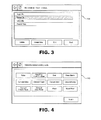
- Figure 3 is a plan view of a My Creations screen in accordance with the present invention.
- Figure 4 is a Cooking Mode Selection screen
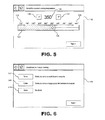
- Figure 5 is a plan view of a Temperature Selection screen of the present invention.
- Figures 6 is a plan view of a Monitoring Method Selection screen of the invention.
- Figure 7 is a plan view of a Timer Length Selection screen
- Figure 8 is a plan view of a Probe Temperature Selection screen of the invention.
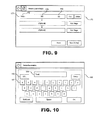
- Figure 9 is a plan view of a Review screen of the present invention.
- Figures 10 is a plan view of a Save screen according to the present invention.
- Figure 11 is a programming flow chart depicting a method of controlling a cooking appliance in accordance with the present invention.
- oven 10 is a wall-mounted or built-in oven, and includes a cabinet 12 which forms an oven cavity 14.
- a door 16 is pivotally mounted to cabinet 12 for selectively closing oven 10 and sealing oven cavity 14.
- Oven cavity 14 includes opposing side walls 18 having a plurality of spaced rails 20 for supporting repositionable racks (not shown) in a manner known in the art.
- Oven 10 also includes a plurality of heating elements. More specifically, oven 10 includes an upper broil element 30 mounted adjacent an upper wall 32 of oven cavity 14 and a lower bake element 34 mounted adjacent a lower wall 36 of oven cavity 14. Upper broil element is constituted by a 3600 Watt resistive-type electric heating element, while lower bake element 34 is constituted by a 2800 Watt resistive-type electric heating element.
- a convection cover 40 is adapted to be mounted over first and second motor driven fans 46 and 47 within oven cavity 14 as will be discussed more fully below. Fans 46 and 47 are constituted by multi-speed electric fans which can be continuously operated or pulsed.
- Fan 46 and 47 are centrally mounted and vertically arranged within oven cavity 14, such that first and second fans 46 and 47 are aligned with and positioned at respective first and second circular apertures 50 and 51 formed in convection cover 40.
- Convection cover 40 also includes a plurality of spaced angled louvered openings 52 on either side of first and second fans 46 and 47, with louvered openings 52 being adapted to distribute heated air evenly throughout oven cavity 14.
- the details of oven 10 are for illustrative purposes only. In general, the present invention is directed to a user interface 54 arranged in communication with a controller 55, and is not meant to be limited for use with any particular oven.
- interface 54 includes a control display 57 that allows a user to input and store information based on prompts from a sequence of display screens.
- control display 57 is constituted by a 7-inch LCD touch screen.
- Control display 57 is adapted to display a plurality of user interface screens including an initial clock screen 100 and an Initial Selection screen 102 depicted in Figures 2A and 2B respectively.
- the invention provides for at least a bake mode, a broil mode, a no preheat one-rack bake mode (BakePlus), a convection mode and a warming mode.
- a particular aspect of the present invention is directed to the manner in which oven 10 is programmed and operated by prompting a user for specific information using a "My Creations" mode.
- oven 10 When oven is not in use, display 57 may show an initial screen 100 that is a view of a clock, graphically represented in Figure 2A .
- a user activates interface 54 by touching screen 100.
- screen 100 changes to Initial Selection screen 102, as shown in Figure 2B , which presents various operating options for oven 10.
- a user can select a desired operating command by simply touching a portion of screen 102 in which a keyword is indicated.
- the user can preferably select between “Bake”, “BakePlus”, “Broil”, “Keep Warm”, “Probe”, “Convection Recipe Conversion”, “Food Wizard/Assistant” or “My Creations”.
- Other keywords may be displayed based on the modes the user most often employs. Further details of the operation of oven 10 upon selecting the "My Creations” option in accordance with the invention will be presented more fully below.
- display 57 automatically shifts to a "My Creations" screen 104, as shown in Figure 3 , wherein a user is prompted to select a stored recipe or to create a new recipe by selecting "Create New".
- the stored recipes may include "Apple Pie", “Baked Ziti”, “Chex Mix” and “French Fries”.
- the user may also Delete, Edit or Start an existing stored recipe by selecting the appropriate command. If a stored recipe is selected to "Start”, the oven commences the cooking operation according to previously entered parameters. If the user selects "Delete", the selected recipe will be removed from the list of recipes. If "Edit” is selected, screen 104 shifts to a Review screen, which will be described in detail with reference to Figure 9 .
- screen 104 shifts to Cooking Mode Selection screen 110, as depicted in Figure 4 .
- the user may select from a variety of cooking modes. As shown, the user can preferably select “Bake”, “BakePlus”, “Broil”, “Keep Warm”, “Convect Bake”, “Convect Roast”, “Convect Broil”, “Convect Pastry”, “Convect Frozen Pizza”, “Convect Slow Roast”, “Proof” or “Rapid Proof”.
- the user selects "Next” and screen 110 shifts to Temperature Select screen 115, as illustrated in Figure 5 .
- first virtual toggle button 137 adapted to adjust the temperature of a cooking cycle by a positive set temperature increment upon selection of the first toggle button 137 and a second virtual toggle button 139 adapted to adjust the temperature of the cooking cycle by a negative set temperature increment upon selection of the second virtual toggle button 139.
- toggle buttons 137 and 139 are set at 3°C (5°F) increments.
- a user may touch control display 57 at slide bar 120 and slide his/her finger across track 122 until slide bar 120 is positioned at a desired temperature.
- the corresponding temperature displayed on text display 135 adjusts automatically so that a user can quickly and easily identify the position of slide bar 120 on track 122.
- Another way in which a user may select a temperature is by touching an empty portion of track 122 at a desired location based on temperature indicia 125. Slide bar 120 will automatically move to the location selected by the user.
- slide bar 120 may be adapted to snap to the nearest temperature indicia 125 on track 122.
- controller 55 controls the operation of one or more of heating elements 30, 34 based on the temperature selected. Additional details of the slide control settings can be found in co-assigned U.S. Patent Application entitled “Sliding Control System for Cooking Appliance” application number 12/560,461 filed on September 16, 2009 .
- a user selects "Next" on screen 115 and display 57 shifts to Cooking Monitoring Selection screen 145, as shown in Figure 6 , whereupon display 57 prompts the user to select the desired method of monitoring the cooking process.
- the user may select "Timer” 147, "Probe” 148 or "None” 149. If “Timer” 147 is selected, the user will be notified when a time period set on a cooking timer has lapsed. If “Probe” 148 is selected, the user will be notified when a probe, which is inserted in the food to be cooked, has reached a target probe temperature. If “None” 149 is selected, no notifications will be presented. Following the selection of the cooking monitoring mode, the user selects "Next” and the screen shifts to a "Cook Timer” selection screen, a "Probe Temp” selection screen, or directly to a “Review” screen, depending upon the user's selection.
- Cook Time Selection screen 155 preferably includes a plurality of numeric buttons 157 and a text display 159 for displaying a set cook time.
- Cook Time Selection screen 155 also includes a back button (shown as an arrow but not labeled) for returning a user to the previous screen and a home button (not labeled) for returning to a main menu screen. Additionally, a "Next" button is provided for activating a Review screen, which will be described in detail below in connection with Figure 9 .
- Probe Target Selection screen 160 includes a reference table 164 displaying common types of meats with reference temperatures for medium rare, medium, and well-done.
- table 164 includes target temperatures for "Ground Beef", “Fresh Beef, Veal, Lamb, Chicken”, “Turkey” and "Pork”.
- a numeric temperature display 165 is located above reference table 164. In the embodiment shown, 71°C (160°F) is set as the default temperature on temperature display 165.
- a user may increase or decrease the temperature by touching the toggle buttons 167, 168 on either side of the default temperature. In the embodiment shown, the temperature is increased in 3°C (5°F) increments. Once the target probe temperature is set, the user touches "Next" to continue to the "Review” screen, as shown in Figure 9 .
- a Review screen 175 is displayed such that a user can review the entered settings.
- Review screen 175 includes at least one row 177 having a selected mode field 178, selected oven temperature field 179 and a selected target probe temperature or timer length field 180.
- the selected mode field 178 as selected on Cooking Monitoring Selection screen 145, is "Probe”.
- the selected oven temperature 179 as selected on Temperature Select screen 115, is 177°C (350°F).
- the selected probe temperature 180 as selected on Probe Target Selection screen 160, is 71°C (160°F).
- Cooking Monitoring Selection screen 145 was "Timer"
- a timer length would be displayed in target probe temperature or timer length field 180.
- field 180 would be blank.
- the user may select "Edit” to return to the "Temperature Selection Screen”.
- the user may also select "Delete” to remove the row completely. Additional cooking stages to establish a multi-stage cooking operation may be added by selecting "Add Stage” on screen 175.
- the Cooking Mode Selection screen 110 is displayed such that a user may begin entering values for an additional cooking stage.
- a user may wish to bake lasagna for 40 minutes, broil it for 3 minutes to brown the top, and keep it warm for another 60 minutes until serving. Once all desired stages have been entered the user may select "Save” to save the settings or “Save and Start” to save the settings and begin the cooking operation.
- Cooking Mode Selection screen 110 a user may select a variety of cooking modes as described above with reference to Figure 4 . Following the selection of a desired cooking mode, such as "Bake” or “Broil", screen 110 shifts to Temperature Selection screen 115. Once a desired cooking temperature is entered as described with reference to Figure 5 , screen 115 shifts to Cooking Monitoring Selection screen 145, wherein a user may select "Timer", “Probe” or “None” as a method of monitoring the cooking process. If “Timer” is selected, screen 145 shifts to Cook time Selection screen 155. Similarly, if “Probe” is selected, screen 145 shifts to Probe Target Selection screen 160. As discussed above, “None” may also be selected. Once a target probe temperature of cook timer length is selected, screens 155 or 160 shift to Review screen 175.
- Review screen 175 includes options for a user to add additional settings by returning to Cooking Mode Selection screen 110.
- Review screen 175 also allows a user to Edit existing settings by returning to Temperature Selection screen 115.
- a user may also proceed to save the creation by proceeding to Save screen 185. From Save screen 185, a user may name or rename the creation using the letter keyboard or numerical keyboard as described in Figure 10 . If the user chooses to start the cooking operation following saving the creation, screen 185 shifts to a Cooking Status screen 200.
- recent settings may be added to My Creations by accessing Review screen 175 directly from an idle screen, such as clock screen 100.
- controller 55 and user interface 54 which function to prompt a user to input certain cooking information in a convenient and clear manner and then automatically control oven 10 to perform the desired operation, provide a user friendly system for controlling the operation of oven 10.
- oven 10 includes a display 57 for providing a user with simple method of saving multiple state cooking creations. The user is guided through the process of inputting creations in an easy-to-follow, step-by-step, manner. Thus, the likelihood of the cooked food product will be the desired product is greatly increased.
Landscapes
- Engineering & Computer Science (AREA)
- Chemical & Material Sciences (AREA)
- Combustion & Propulsion (AREA)
- Mechanical Engineering (AREA)
- General Engineering & Computer Science (AREA)
- Electric Ovens (AREA)
- Testing And Monitoring For Control Systems (AREA)
Abstract
Description
- The present invention pertains to the art of cooking appliances and, more particularly, to a cooking appliance including a user interface and control system for initiating and controlling a cooking operation based on an established and saved recipe.
- Over the years, there have been many advances in the art of cooking appliances. Various heat sources, such as convection air, microwave and IR heating elements have been used, in one way or another, to perform cooking operations. Mechanical components such as switches, thermostats and other controls have been replaced, or at least supplemented, by electronic control systems. Rotary knobs are slowly giving way to touch pads and touch screen displays. Many new features have been added to the cooking appliance, such as pre-programmed operations, recipes, and multi-stage cooking operations. Many ovens, ranges and the like available on the market today incorporate, to certain degrees, programmable features intended to aid a consumer in performing cooking operations. Some electronic control systems for cooking appliances enable a consumer to input certain cooking information, such as cooking modes, times and temperatures, with the inputted information generally being presented in a viewable display area and used to establish a cooking operation.
- As set forth above, there have been various developments in the art of cooking appliances directed to aiding a consumer in performing certain cooking operations effectively. However, there still exists a need for a more user friendly system for controlling the operation of a cooking appliance. More specifically, there exists a need for an electronic control system which functions to prompt a user, as needed, to input certain cooking information in a convenient and clear manner, and then automatically controls the cooking appliance to perform the desired operation, including a temperature probe mode of operation. In addition, there is a need for an oven that is capable of being programmed to perform various operations in a desired manner, such as following a personal recipe, possible having multiple stages, stored in the system by the user.
- The present invention is directed to a system and method of controlling a cooking appliance, in particular operating an oven based on a saved cooking recipe. The cooking appliance includes an oven cavity adapted to be used in cooking foods and a control system that includes a control display adapted to display an interactive sequence of display screens through which a user can enter a recipe. The sequence of display screens includes a cooking mode selection screen, a cooking temperature selection screen, a cooking monitoring selection screen from which a user selects from a probe monitoring process or a timer monitoring process, and a review screen for prompting the user to review the cooking mode, cooking temperature and method of monitoring selections. A user may also add additional stages to create a multi-stage recipe.
- Additional objects, features and advantages of the present invention will become more readily apparent from the following detailed description of preferred embodiments of the invention when taken in conjunction with the drawings wherein like reference numerals refer to corresponding parts in the several views.
-
Figure 1 is a perspective view of a cooking appliance including controls in accordance with the present invention; -
Figure 2A is a plan view of an initial clock screen employed in the cooking appliance ofFigure 1 ; -
Figure 2B is plan view of an Initial Selection screen of the present invention; -
Figure 3 is a plan view of a My Creations screen in accordance with the present invention; -
Figure 4 is a Cooking Mode Selection screen; -
Figure 5 is a plan view of a Temperature Selection screen of the present invention; -
Figures 6 is a plan view of a Monitoring Method Selection screen of the invention; -
Figure 7 is a plan view of a Timer Length Selection screen; -
Figure 8 is a plan view of a Probe Temperature Selection screen of the invention; -
Figure 9 is a plan view of a Review screen of the present invention; -
Figures 10 is a plan view of a Save screen according to the present invention; and -
Figure 11 is a programming flow chart depicting a method of controlling a cooking appliance in accordance with the present invention. - With initial reference to
Figure 1 , a combination radiant heat and convection oven is generally indicated at 10. In the preferred embodiment shown,oven 10 is a wall-mounted or built-in oven, and includes acabinet 12 which forms anoven cavity 14. Adoor 16 is pivotally mounted tocabinet 12 for selectively closingoven 10 and sealingoven cavity 14.Oven cavity 14 includesopposing side walls 18 having a plurality of spacedrails 20 for supporting repositionable racks (not shown) in a manner known in the art. -
Oven 10 also includes a plurality of heating elements. More specifically,oven 10 includes anupper broil element 30 mounted adjacent anupper wall 32 ofoven cavity 14 and alower bake element 34 mounted adjacent alower wall 36 ofoven cavity 14. Upper broil element is constituted by a 3600 Watt resistive-type electric heating element, whilelower bake element 34 is constituted by a 2800 Watt resistive-type electric heating element. A convection cover 40 is adapted to be mounted over first and second motor drivenfans oven cavity 14 as will be discussed more fully below.Fans Fans oven cavity 14, such that first andsecond fans circular apertures second fans oven cavity 14. The details ofoven 10 are for illustrative purposes only. In general, the present invention is directed to auser interface 54 arranged in communication with acontroller 55, and is not meant to be limited for use with any particular oven. - In accordance with the present invention,
interface 54 includes acontrol display 57 that allows a user to input and store information based on prompts from a sequence of display screens. In the embodiment shown,control display 57 is constituted by a 7-inch LCD touch screen.Control display 57 is adapted to display a plurality of user interface screens including aninitial clock screen 100 and anInitial Selection screen 102 depicted inFigures 2A and 2B respectively. As illustrated inFigure 2B , the invention provides for at least a bake mode, a broil mode, a no preheat one-rack bake mode (BakePlus), a convection mode and a warming mode. As will be detailed more fully below, a particular aspect of the present invention is directed to the manner in whichoven 10 is programmed and operated by prompting a user for specific information using a "My Creations" mode. - The manner in which
oven 10 is programmed using the "My Creations" mode will now be described with reference toFigures 2A-11 . When oven is not in use,display 57 may show aninitial screen 100 that is a view of a clock, graphically represented inFigure 2A . A user activatesinterface 54 by touchingscreen 100. As shown, wheninterface 54 is activated,screen 100 changes toInitial Selection screen 102, as shown inFigure 2B , which presents various operating options foroven 10. Withscreen 102 being displayed, a user can select a desired operating command by simply touching a portion ofscreen 102 in which a keyword is indicated. As shown, the user can preferably select between "Bake", "BakePlus", "Broil", "Keep Warm", "Probe", "Convection Recipe Conversion", "Food Wizard/Assistant" or "My Creations". Other keywords may be displayed based on the modes the user most often employs. Further details of the operation ofoven 10 upon selecting the "My Creations" option in accordance with the invention will be presented more fully below. - Once the "My Creations" option is selected,
display 57 automatically shifts to a "My Creations"screen 104, as shown inFigure 3 , wherein a user is prompted to select a stored recipe or to create a new recipe by selecting "Create New". For exemplary purposes, the stored recipes may include "Apple Pie", "Baked Ziti", "Chex Mix" and "French Fries". The user may also Delete, Edit or Start an existing stored recipe by selecting the appropriate command. If a stored recipe is selected to "Start", the oven commences the cooking operation according to previously entered parameters. If the user selects "Delete", the selected recipe will be removed from the list of recipes. If "Edit" is selected,screen 104 shifts to a Review screen, which will be described in detail with reference toFigure 9 . - If the user selects "Create New",
screen 104 shifts to CookingMode Selection screen 110, as depicted inFigure 4 . Fromscreen 110, the user may select from a variety of cooking modes. As shown, the user can preferably select "Bake", "BakePlus", "Broil", "Keep Warm", "Convect Bake", "Convect Roast", "Convect Broil", "Convect Pastry", "Convect Frozen Pizza", "Convect Slow Roast", "Proof" or "Rapid Proof". Following the selection of a desired cooking mode, the user selects "Next" andscreen 110 shifts to TemperatureSelect screen 115, as illustrated inFigure 5 . - In accordance with the present invention, Temperature
Select screen 115 includes avirtual slide bar 120 adapted to be positioned by a user at various points along the length of avirtual track 122.Virtual track 122 includestemperature indicia 125 located at intervals alongtrack 122.Temperature indicia 125 are preferably in the form of adigital temperature display 130 which generally span the temperature range ofoven 10. For example, as depicted inFigure 5 ,digital temperature display 130 includestemperature indicia 125 between 38°C (100°F) and 288 (550°F). TemperatureSelect screen 115 further includes atext display 135 adapted to digitally display a selected cooking temperature. Also provided is a firstvirtual toggle button 137 adapted to adjust the temperature of a cooking cycle by a positive set temperature increment upon selection of thefirst toggle button 137 and a secondvirtual toggle button 139 adapted to adjust the temperature of the cooking cycle by a negative set temperature increment upon selection of the secondvirtual toggle button 139. In the embodiment shown inFigure 5 , for example, togglebuttons - When a user desires to set a temperature for a cooking cycle, the user can adjust the temperature in one of three ways. First, a user may touch
control display 57 atslide bar 120 and slide his/her finger acrosstrack 122 untilslide bar 120 is positioned at a desired temperature. Asslide bar 120 slides alongtrack 122, the corresponding temperature displayed ontext display 135 adjusts automatically so that a user can quickly and easily identify the position ofslide bar 120 ontrack 122. Another way in which a user may select a temperature is by touching an empty portion oftrack 122 at a desired location based ontemperature indicia 125.Slide bar 120 will automatically move to the location selected by the user. Optionally,slide bar 120 may be adapted to snap to thenearest temperature indicia 125 ontrack 122. Another way in which a user may set a desired cooking temperature is by touchingvirtual toggle buttons slide bar 120 alongtrack 122 while displaying the chosen temperature ontext display 135. During the cooking cycle,controller 55 controls the operation of one or more ofheating elements application number 12/560,461 filed on September 16, 2009 - Following the selection of the desired cooking temperature, a user selects "Next" on
screen 115 anddisplay 57 shifts to CookingMonitoring Selection screen 145, as shown inFigure 6 , whereupondisplay 57 prompts the user to select the desired method of monitoring the cooking process. As shown, the user may select "Timer" 147, "Probe" 148 or "None" 149. If "Timer" 147 is selected, the user will be notified when a time period set on a cooking timer has lapsed. If "Probe" 148 is selected, the user will be notified when a probe, which is inserted in the food to be cooked, has reached a target probe temperature. If "None" 149 is selected, no notifications will be presented. Following the selection of the cooking monitoring mode, the user selects "Next" and the screen shifts to a "Cook Timer" selection screen, a "Probe Temp" selection screen, or directly to a "Review" screen, depending upon the user's selection. - More specifically, if "Timer" 147 is selected from
Monitoring Selection screen 145, display 57 changes to CookTime Selection screen 155, as shown inFigure 7 , wherein a cook time for the cooking cycle is set. CookTime Selection screen 155 preferably includes a plurality ofnumeric buttons 157 and atext display 159 for displaying a set cook time. CookTime Selection screen 155 also includes a back button (shown as an arrow but not labeled) for returning a user to the previous screen and a home button (not labeled) for returning to a main menu screen. Additionally, a "Next" button is provided for activating a Review screen, which will be described in detail below in connection withFigure 9 . - If "Probe"148 is selected from
Monitoring Selection screen 145, display 57 changes to ProbeTarget Selection screen 160, as shown inFigure 8 , wherein a probe target temperature is set for the cooking cycle. The ProbeTarget Selection screen 160 includes a reference table 164 displaying common types of meats with reference temperatures for medium rare, medium, and well-done. For example, table 164, as shown inFigure 8 , includes target temperatures for "Ground Beef", "Fresh Beef, Veal, Lamb, Chicken", "Turkey" and "Pork". Anumeric temperature display 165 is located above reference table 164. In the embodiment shown, 71°C (160°F) is set as the default temperature ontemperature display 165. A user may increase or decrease the temperature by touching thetoggle buttons Figure 9 . - Following the entry of a desired probe temperature on
screen 160 or a desired cooking timer length onscreen 155, aReview screen 175 is displayed such that a user can review the entered settings.Review screen 175 includes at least onerow 177 having a selectedmode field 178, selectedoven temperature field 179 and a selected target probe temperature ortimer length field 180. In the example shown, the selectedmode field 178, as selected on CookingMonitoring Selection screen 145, is "Probe". The selectedoven temperature 179, as selected on TemperatureSelect screen 115, is 177°C (350°F). The selectedprobe temperature 180, as selected on ProbeTarget Selection screen 160, is 71°C (160°F). It should be understood that if the selected mode on CookingMonitoring Selection screen 145 was "Timer", a timer length would be displayed in target probe temperature ortimer length field 180. In addition, if no review method was selected fromscreen 145,field 180 would be blank. If the settings inrow 177 are incorrect, the user may select "Edit" to return to the "Temperature Selection Screen". The user may also select "Delete" to remove the row completely. Additional cooking stages to establish a multi-stage cooking operation may be added by selecting "Add Stage" onscreen 175. Upon the selection of "Add Stage", the CookingMode Selection screen 110 is displayed such that a user may begin entering values for an additional cooking stage. For example, a user may wish to bake lasagna for 40 minutes, broil it for 3 minutes to brown the top, and keep it warm for another 60 minutes until serving. Once all desired stages have been entered the user may select "Save" to save the settings or "Save and Start" to save the settings and begin the cooking operation. - Following the selection of "Save" or "Save and Start",
screen 175 shifts to Savescreen 185, as shown inFigure 10 . Savescreen 185 includes aletter keyboard 187 and atext entry field 188. A user may name the recipe creation by touching letters onletter keyboard 187, which are then displayed intext entry field 188. In addition,screen 185 includes anumerical switch key 190 for changing the letter keyboard into a numerical keyboard, such that numerals may be added into the creation name intext entry field 188. Delete, shift lock and space keys (not separately labeled) are also provided. Following the entry of the name of the creation, a user may select "OK" to complete the process of saving the creation. If "Save and Start" was previously selected fromscreen 175,display 57 shifts to a cooking status screen (not shown). - At this point the process for entering and saving cooking settings will be described with reference to the flow chart of
Figure 11 . As described above, upon selecting "My Creations" from anInitial Selection screen 102, a user is presented with a "My Creations"screen 104, as indicated in the flow chart ofFigure 11 . Fromscreen 104, a user may start a cooking process based on a previously saved creation.Screen 104 will then change to acooking status screen 200. Alternatively, a user may select Delete fromscreen 104 to delete a previously saved creation. A popup with the text "Delete?" will be displayed as shown inbox 205. Fromscreen 104, the user also has the option of selecting "Edit", which directs the user to theReview screen 175. In accordance with the present invention, a user may also select "Create New" fromscreen 104, which then shiftsscreen 104 to CookingMode Selection screen 110. - From Cooking
Mode Selection screen 110, a user may select a variety of cooking modes as described above with reference toFigure 4 . Following the selection of a desired cooking mode, such as "Bake" or "Broil",screen 110 shifts toTemperature Selection screen 115. Once a desired cooking temperature is entered as described with reference toFigure 5 ,screen 115 shifts to CookingMonitoring Selection screen 145, wherein a user may select "Timer", "Probe" or "None" as a method of monitoring the cooking process. If "Timer" is selected,screen 145 shifts to Cooktime Selection screen 155. Similarly, if "Probe" is selected,screen 145 shifts to ProbeTarget Selection screen 160. As discussed above, "None" may also be selected. Once a target probe temperature of cook timer length is selected,screens screen 175. - As described above with reference to
Figure 9 ,Review screen 175 includes options for a user to add additional settings by returning to CookingMode Selection screen 110.Review screen 175 also allows a user to Edit existing settings by returning toTemperature Selection screen 115. A user may also proceed to save the creation by proceeding to Savescreen 185. FromSave screen 185, a user may name or rename the creation using the letter keyboard or numerical keyboard as described inFigure 10 . If the user chooses to start the cooking operation following saving the creation,screen 185 shifts to aCooking Status screen 200. In addition, recent settings may be added to My Creations by accessingReview screen 175 directly from an idle screen, such asclock screen 100. - Based on the above, it should be apparent that
controller 55 anduser interface 54, which function to prompt a user to input certain cooking information in a convenient and clear manner and then automatically controloven 10 to perform the desired operation, provide a user friendly system for controlling the operation ofoven 10. In addition,oven 10 includes adisplay 57 for providing a user with simple method of saving multiple state cooking creations. The user is guided through the process of inputting creations in an easy-to-follow, step-by-step, manner. Thus, the likelihood of the cooked food product will be the desired product is greatly increased. - Although described with reference to preferred embodiments of the invention, it should be readily understood that various changes and/or modifications can be made to the invention without departing from the spirit thereof. For instance, although a combination radiant and convection system has been described, other cooking systems, such as a microwave system, could also be integrated into
oven 10. In addition, although a touch screen control arrangement has been described, it would be possible to use a roller ball, arrow pointer similar to that available in various notebook-style computers and other types of control screen arrangements known in the art could be employed for this purpose.
Claims (15)
- A method of programming a cooking appliance, including an oven cavity (14) and a user interface (57), to execute a multi-stage recipe comprising:a. presenting a user with a cooking mode selection screen (102) for prompting a user to select a cooking mode;b. receiving a cooking mode selection inputted into said user interface 57;c. presenting a user with a cooking temperature selection screen (115) for prompting a user to select a cooking temperature;d. receiving a cooking temperature selection inputted into said user interface;e. presenting a user with a monitoring method selection screen (145) for prompting a user to select a method of monitoring a cooking process from at least a probe monitoring process and a timer monitoring process;f. receiving a method of monitoring selection inputted into said user interface;g. presenting a user with a review screen (175) for prompting a user to review the cooking mode, cooking temperature and method of monitoring selections to establish a recipe; andh. presenting a user with a save screen (185)for prompting the user to save the recipe.
- The method according to claim 1, wherein said cooking modes include "Bake", "BakePlus", "Broil", "Keep Warm", "Convect Bake", "Convect Roast", "Convect Broil", "Convect Pastry", "Convect Frozen Pizza", "Convect Slow Roast", Proof" and "Rapid Proof."
- The method according to claim 1, wherein said cooking temperature selection is made through a first virtual slide bar (120) positionable by a user along a virtual track (122), wherein the virtual track includes temperature indicia (125) at spaced intervals, and wherein sliding the virtual slide bar along the virtual track changes the cooking temperature in a text display field (130).
- The method according to claim 1, further comprising, when the method of monitoring selection is the probe monitoring process:presenting a user with a probe monitoring selection screen (145); andreceiving a probe target temperature inputted into said user interface.
- The method according to claim 4, wherein said probe monitoring selection screen includes a guide table displaying common types of meats with reference cooking temperatures.
- The method according to claim 1, further comprising, when the method of monitoring selection is the timer monitoring process:presenting the user with a timer length selection screen; andreceiving a timer length inputted into said user interface, said timer length selection screen including a plurality of numeric buttons and a text display for displaying a set cook time.
- The method according to claim 1, further comprising: allowing a user to add additional stages to create a multi-stage recipe, including repeating steps a-g., said save screen including a plurality of letter and numerical keys for entering a name for the multi-stage recipe.
- The method according to claim 7, wherein a cooking operation is automatically started after saving the multi-stage recipe, said cooking operation being executed based on said multi-stage recipe.
- A cooking appliance (10) comprising:a cabinet (12) defining an oven cavity (14);a door (16) attached to the cabinet for selectively accessing the oven cavity;a cooking element (30, 34) for heating the oven cavity; anda control display (57) adapted to display an interactive sequence of display screens through which a user can enter a multi-stage recipe, said sequence of display screens including:a cooking mode selection screen (102);a cooking temperature selection screen (115);a cooking monitoring selection screen (145) from which a user selects from at least a probe monitoring process and a timer monitoring process;a review screen (175) for prompting the user to review the cooking mode, cooking temperature, and method of monitoring selections and for allowing a user to establish a recipe; anda save screen (185) wherein a user saves the recipe.
- The cooking appliance according to claim 9, wherein said cooking mode selection screen (102) includes the following options: "Bake", "BakePlus", "Broil", "Keep Warm", "Convect Bake", "Convect Roast", "Convect Broil", "Convect Pastry", "Convect Frozen Pizza", "Convect Slow Roast", Proof" and "Rapid Proof."
- The cooking appliance according to claim 9, wherein said cooking temperature selection screen (115) includes a first virtual slide bar (120) positionable by a user along a virtual track, wherein the virtual track includes temperature indicia (125) at spaced (122) intervals, and wherein sliding the virtual slide bar along the virtual track changes the cooking temperature in a text display field.
- The cooking appliance according to claim 9, further comprising: a probe monitoring selection screen including a guide table displaying common types of meats with reference cooking temperatures.
- The cooking appliance according to claim 9, further comprising: a timer length selection screen including a plurality of numeric buttons and a text display for displaying a set cook time.
- The cooking appliance according to claim 9, wherein said sequence of display screens further includes repeating the cooking mode selection screen, the cooking temperature selection screen, the cooking monitoring selection screen and the review screen when adding additional stages to create a multi-stage recipe.
- The cooking appliance according to claim 14, wherein said save screen includes a plurality of letter and numerical keys for entering a name for the multi-stage recipe.
Applications Claiming Priority (1)
| Application Number | Priority Date | Filing Date | Title |
|---|---|---|---|
| US12/641,427 US8674270B2 (en) | 2009-12-18 | 2009-12-18 | Cooking appliance with programmable recipe system |
Publications (2)
| Publication Number | Publication Date |
|---|---|
| EP2336642A2 true EP2336642A2 (en) | 2011-06-22 |
| EP2336642A3 EP2336642A3 (en) | 2017-11-08 |
Family
ID=43971481
Family Applications (1)
| Application Number | Title | Priority Date | Filing Date |
|---|---|---|---|
| EP10195389.1A Withdrawn EP2336642A3 (en) | 2009-12-18 | 2010-12-16 | Cooking appliance with programmable recipe system |
Country Status (3)
| Country | Link |
|---|---|
| US (1) | US8674270B2 (en) |
| EP (1) | EP2336642A3 (en) |
| BR (1) | BRPI1005569A2 (en) |
Cited By (6)
| Publication number | Priority date | Publication date | Assignee | Title |
|---|---|---|---|---|
| WO2013059084A1 (en) * | 2011-10-17 | 2013-04-25 | Illinois Tool Works Inc. | Selection indicator ribbon for an oven user interface |
| WO2019014512A1 (en) * | 2017-07-14 | 2019-01-17 | Sharkninja Operating Llc | Multicooker |
| USD846332S1 (en) | 2017-07-14 | 2019-04-23 | Sharkninja Operating Llc | Cooker with user interface |
| USD846334S1 (en) | 2017-07-14 | 2019-04-23 | Sharkninja Operating Llc | Cooker with user interface |
| USD846333S1 (en) | 2017-07-14 | 2019-04-23 | Sharkninja Operating Llc | Cooker with user interface |
| CN113703700A (en) * | 2020-05-22 | 2021-11-26 | 珠海优特智厨科技有限公司 | Self-adaptive display method and device, storage medium and computing equipment |
Families Citing this family (51)
| Publication number | Priority date | Publication date | Assignee | Title |
|---|---|---|---|---|
| US8390473B2 (en) * | 2008-12-19 | 2013-03-05 | Openpeak Inc. | System, method and apparatus for advanced utility control, monitoring and conservation |
| US8342080B2 (en) * | 2009-12-04 | 2013-01-01 | Richardson Steven M | Programmable cooking system and method |
| EP2392859B1 (en) * | 2010-05-05 | 2017-03-29 | Electrolux Home Products Corporation N.V. | Cooktop-interface, cooktop-panel, cooking device and method of operating a cooktop-interface |
| US10260754B2 (en) | 2011-07-12 | 2019-04-16 | Viking Range, Llc | Advanced electronic control display |
| EP2618634A1 (en) * | 2012-01-23 | 2013-07-24 | Whirlpool Corporation | Microwave heating apparatus |
| US20130269537A1 (en) | 2012-04-16 | 2013-10-17 | Eugenio Minvielle | Conditioning system for nutritional substances |
| US20130269538A1 (en) | 2012-04-16 | 2013-10-17 | Eugenio Minvielle | Transformation system for nutritional substances |
| US9460633B2 (en) | 2012-04-16 | 2016-10-04 | Eugenio Minvielle | Conditioner with sensors for nutritional substances |
| US20140069838A1 (en) | 2012-04-16 | 2014-03-13 | Eugenio Minvielle | Nutritional Substance Label System For Adaptive Conditioning |
| US9429920B2 (en) | 2012-04-16 | 2016-08-30 | Eugenio Minvielle | Instructions for conditioning nutritional substances |
| US9702858B1 (en) | 2012-04-16 | 2017-07-11 | Iceberg Luxembourg S.A.R.L. | Dynamic recipe control |
| JP5238895B1 (en) * | 2012-04-26 | 2013-07-17 | 楽天株式会社 | Information processing apparatus, information processing method, information processing program, and recording medium |
| USD753683S1 (en) * | 2012-08-02 | 2016-04-12 | Bsh Home Appliances Corporation | Oven display screen with graphical user interface |
| US20140040830A1 (en) * | 2012-08-02 | 2014-02-06 | Bsh Home Appliances Corporation | User interface - status bar |
| US9961721B2 (en) | 2013-01-17 | 2018-05-01 | Bsh Home Appliances Corporation | User interface for oven: info mode |
| US9554689B2 (en) | 2013-01-17 | 2017-01-31 | Bsh Home Appliances Corporation | User interface—demo mode |
| US9421696B2 (en) * | 2013-03-15 | 2016-08-23 | Jason Womack | Polystyrene product remanufacturing apparatus and methods of use |
| US9575628B2 (en) * | 2013-03-29 | 2017-02-21 | Deere & Company | Icon featured touch screen display system including status shortcuts for a work vehicle and method of managing the same |
| EP2999999A4 (en) | 2013-05-23 | 2017-03-29 | Duke Manufacturing Co. | Food preparation apparatus and methods |
| US10918112B2 (en) | 2013-05-23 | 2021-02-16 | Duke Manufacturing Co. | Dough preparation apparatus and methods |
| US9377345B2 (en) | 2013-09-11 | 2016-06-28 | Illinois Tool Works Inc. | Food product scale |
| WO2016034488A1 (en) * | 2014-09-03 | 2016-03-10 | Electrolux Appliances Aktiebolag | Method for data communication with a domestic appliance by a mobile computer device, mobile computer device and domestic appliance |
| US10262302B2 (en) | 2015-10-27 | 2019-04-16 | International Business Machines Corporation | Recipe selection system with bidirectional calendar interface |
| US10353558B2 (en) | 2016-01-13 | 2019-07-16 | Electrolux Home Products, Inc. | Drag-and-set user interface for appliances |
| WO2017143224A1 (en) * | 2016-02-18 | 2017-08-24 | Meyer Intellectual Properties Limited | Auxiliary button for a cooking system |
| US20170332676A1 (en) * | 2016-05-23 | 2017-11-23 | Innit International S.C.A. | Dynamic Power Management System, Method And Temperature Control For Conditioners |
| US20180128493A1 (en) * | 2016-06-09 | 2018-05-10 | Electrolux Home Products, Inc. | Appliance with intuitive cooking temperature feedback interface |
| CN107319905A (en) * | 2016-08-19 | 2017-11-07 | 宁波锦宇电器有限公司 | One kind touches sliding screen type slow cooker |
| US10721948B1 (en) | 2017-02-08 | 2020-07-28 | Electrolux Home Products, Inc. | Air sous-vide |
| EP3593590A1 (en) | 2017-03-08 | 2020-01-15 | Louis S. Polster | Methods and systems for heat treating a food product |
| EP3410016A1 (en) * | 2017-06-02 | 2018-12-05 | Electrolux Appliances Aktiebolag | User interface for a hob |
| CN110200516A (en) | 2017-08-09 | 2019-09-06 | 沙克忍者运营有限责任公司 | Cooking system |
| USD914436S1 (en) | 2018-06-19 | 2021-03-30 | Sharkninja Operating Llc | Air diffuser with food preparation pot |
| USD883014S1 (en) | 2018-08-09 | 2020-05-05 | Sharkninja Operating Llc | Food preparation device |
| USD883015S1 (en) | 2018-08-09 | 2020-05-05 | Sharkninja Operating Llc | Food preparation device and parts thereof |
| USD903413S1 (en) | 2018-08-09 | 2020-12-01 | Sharkninja Operating Llc | Cooking basket |
| USD934027S1 (en) | 2018-08-09 | 2021-10-26 | Sharkninja Operating Llc | Reversible cooking rack |
| CN111227667B (en) * | 2018-11-29 | 2023-06-20 | 宁波方太厨具有限公司 | Fan system of double-fan oven and working mode of oven |
| US10561277B1 (en) | 2019-01-23 | 2020-02-18 | Electrolux Home Products, Inc. | Air fry cooking method and apparatus |
| WO2020176477A1 (en) | 2019-02-25 | 2020-09-03 | Sharkninja Operating Llc | Cooking system with guard |
| US11033146B2 (en) | 2019-02-25 | 2021-06-15 | Sharkninja Operating Llc | Cooking device and components thereof |
| CN212346260U (en) | 2019-02-26 | 2021-01-15 | 沙克忍者运营有限责任公司 | Cooking system capable of being positioned on a support surface and mountable cooking system |
| USD982375S1 (en) | 2019-06-06 | 2023-04-04 | Sharkninja Operating Llc | Food preparation device |
| USD918654S1 (en) | 2019-06-06 | 2021-05-11 | Sharkninja Operating Llc | Grill plate |
| US11647861B2 (en) | 2020-03-30 | 2023-05-16 | Sharkninja Operating Llc | Cooking device and components thereof |
| CN113491454B (en) | 2020-04-06 | 2026-04-14 | 尚科宁家运营有限公司 | Cooking system positionable on a support surface |
| US12383097B2 (en) | 2021-06-14 | 2025-08-12 | Sharkninja Operating Llc | Temperature controlled accessory for countertop cooking system |
| US20240310052A1 (en) * | 2023-03-13 | 2024-09-19 | Haier Us Appliance Solutions, Inc. | Systems for finishing modes in cooking appliances |
| CN116548840A (en) * | 2023-05-31 | 2023-08-08 | 广东美的厨房电器制造有限公司 | Cooking device, control method and device thereof and computer readable storage medium |
| US20250089935A1 (en) * | 2023-05-31 | 2025-03-20 | Guangdong Midea Kitchen Appliances Manufacturing Co., Ltd. | Cooking device, control method and apparatus thereof, and computer-readable storage medium |
| CN116570163A (en) * | 2023-05-31 | 2023-08-11 | 广东美的厨房电器制造有限公司 | Cooking equipment and its control method, device and computer-readable storage medium |
Family Cites Families (27)
| Publication number | Priority date | Publication date | Assignee | Title |
|---|---|---|---|---|
| US4695711A (en) * | 1984-12-24 | 1987-09-22 | Robershaw Controls Company | Electrically operated appliance controls and methods of making the same |
| US4914277A (en) * | 1986-10-27 | 1990-04-03 | De Dietrich Et Cie, S.A. | Electronic control device for automatic cooking, including learning for home electric oven |
| US5528018A (en) | 1991-08-19 | 1996-06-18 | Henny Penny Corporation | Programmable load compensation method and apparatus for use in a food |
| US6080972A (en) * | 1995-02-16 | 2000-06-27 | May; Leonhard | Remotely operated universal programmable oven controller |
| US5877477A (en) * | 1996-12-18 | 1999-03-02 | Amana Company, L.P. | Oven with high power radiant cooking elements and methods of developing, optimizing, storing, and retrieving recipes for the operation of the oven |
| JP2000065360A (en) * | 1998-08-19 | 2000-03-03 | Sharp Corp | Cooking equipment |
| US6252206B1 (en) | 1999-04-15 | 2001-06-26 | Bsh Home Appliances Corporation | Method and apparatus for intelligent cooking process |
| US6255630B1 (en) | 1999-09-01 | 2001-07-03 | Maytag Corporation | Program control and display system for a cooking appliance |
| US6486453B1 (en) * | 1999-09-13 | 2002-11-26 | Maytag Corporation | Menu driven control system for a cooking appliance |
| US6809301B1 (en) | 2000-06-30 | 2004-10-26 | General Electric Company | Oven control method and apparatus |
| KR100420323B1 (en) * | 2001-07-02 | 2004-03-03 | 주식회사 엘지이아이 | Device and method for input in microwave oven |
| US6750433B2 (en) | 2001-11-29 | 2004-06-15 | General Electric Company | Oven display and user interface |
| FR2842888B1 (en) * | 2002-07-26 | 2004-09-03 | Thirode Grandes Cuisines Poligny | OVEN CONTROL SYSTEM |
| US6710308B2 (en) | 2002-07-31 | 2004-03-23 | Maytag Corporation | Automatic cook sequencing system for multiple ovens |
| US6933477B2 (en) * | 2003-04-10 | 2005-08-23 | Maytag Corporation | Menu driven control system for a cooking appliance |
| US6967314B2 (en) | 2003-06-26 | 2005-11-22 | Maytag Corporation | Programmable power level control for a cooking appliance |
| US20050218139A1 (en) | 2004-03-31 | 2005-10-06 | Hp Intellectual Corporation | Intelligent user interface for new cooking technologies |
| US20070158335A1 (en) * | 2004-12-10 | 2007-07-12 | Mansbery David I | Method and control interface for food preparation on a cooking appliance |
| JP2008523352A (en) * | 2004-12-14 | 2008-07-03 | イノディス コーポレーション | Impingement / convection / microwave oven and method |
| US20070028780A1 (en) * | 2005-08-08 | 2007-02-08 | Popeil Ronald M | Cooking device to deep fat fry foods |
| EP3671044B1 (en) * | 2006-09-27 | 2022-01-05 | Electrolux Home Products Corporation N.V. | Cooking appliance |
| WO2008084917A1 (en) * | 2007-01-11 | 2008-07-17 | Lg Electronics Inc. | Cooking appliance, controlling system for cooking device and controlling method for cooking device |
| EP2176630A1 (en) * | 2007-08-06 | 2010-04-21 | Premark FEG L.L.C. | Oven with wireless temperature sensor for use in monitoring food temperature |
| CA2613858C (en) * | 2007-11-16 | 2013-11-05 | Wolfedale Engineering Limited | Temperature control apparatus and method for a barbeque grill |
| US8419434B2 (en) * | 2008-04-15 | 2013-04-16 | International Business Machines Corporation | Interactive recipe preparation using interactive cooking device to communicate with kitchen appliances |
| US8927913B2 (en) * | 2008-06-30 | 2015-01-06 | The Invention Science Fund I, Llc | Microwave processing systems and methods |
| US8492681B2 (en) * | 2009-10-20 | 2013-07-23 | Whirlpool Corporation | Oven control system with operating stage indication |
-
2009
- 2009-12-18 US US12/641,427 patent/US8674270B2/en active Active
-
2010
- 2010-12-06 BR BRPI1005569-0A patent/BRPI1005569A2/en not_active IP Right Cessation
- 2010-12-16 EP EP10195389.1A patent/EP2336642A3/en not_active Withdrawn
Cited By (7)
| Publication number | Priority date | Publication date | Assignee | Title |
|---|---|---|---|---|
| WO2013059084A1 (en) * | 2011-10-17 | 2013-04-25 | Illinois Tool Works Inc. | Selection indicator ribbon for an oven user interface |
| US8555776B2 (en) | 2011-10-17 | 2013-10-15 | Illinois Tool Works Inc. | Selection indicator ribbon for an oven user interface |
| WO2019014512A1 (en) * | 2017-07-14 | 2019-01-17 | Sharkninja Operating Llc | Multicooker |
| USD846332S1 (en) | 2017-07-14 | 2019-04-23 | Sharkninja Operating Llc | Cooker with user interface |
| USD846334S1 (en) | 2017-07-14 | 2019-04-23 | Sharkninja Operating Llc | Cooker with user interface |
| USD846333S1 (en) | 2017-07-14 | 2019-04-23 | Sharkninja Operating Llc | Cooker with user interface |
| CN113703700A (en) * | 2020-05-22 | 2021-11-26 | 珠海优特智厨科技有限公司 | Self-adaptive display method and device, storage medium and computing equipment |
Also Published As
| Publication number | Publication date |
|---|---|
| BRPI1005569A2 (en) | 2013-03-26 |
| US20110151072A1 (en) | 2011-06-23 |
| US8674270B2 (en) | 2014-03-18 |
| EP2336642A3 (en) | 2017-11-08 |
Similar Documents
| Publication | Publication Date | Title |
|---|---|---|
| US8674270B2 (en) | Cooking appliance with programmable recipe system | |
| US20100147823A1 (en) | Oven control system with graphical display | |
| US6486453B1 (en) | Menu driven control system for a cooking appliance | |
| US6933477B2 (en) | Menu driven control system for a cooking appliance | |
| US7126088B2 (en) | Cooking appliance control system | |
| US7012220B2 (en) | Alpha-numeric data entry and display for electronic oven control system | |
| US8136442B2 (en) | Selection systems and methods | |
| AU2015311074B2 (en) | Method for data communication with a domestic appliance by a mobile computer device, mobile computer device and domestic appliance | |
| US20110062143A1 (en) | Sliding control system for a cooking appliance | |
| US9057526B2 (en) | Programmable cooking appliance | |
| US12232648B2 (en) | Toaster and convection oven with variable controls | |
| US6809301B1 (en) | Oven control method and apparatus | |
| US20110142998A1 (en) | System and method for operating rotisserie oven | |
| EP2431664A1 (en) | Cooking appliance and control method thereof | |
| CN103917145A (en) | Methods and apparatus for intuitive cooking control | |
| US6844530B2 (en) | Thaw-server system for convection cooking appliance | |
| US8492681B2 (en) | Oven control system with operating stage indication | |
| JP6157913B2 (en) | Cooker | |
| CN115316861B (en) | A cooking device | |
| KR101274393B1 (en) | Electric oven and method for controlling the same | |
| JP2014016056A (en) | Heating cooker | |
| JPH0569509U (en) | High frequency heating device |
Legal Events
| Date | Code | Title | Description |
|---|---|---|---|
| PUAI | Public reference made under article 153(3) epc to a published international application that has entered the european phase |
Free format text: ORIGINAL CODE: 0009012 |
|
| AK | Designated contracting states |
Kind code of ref document: A2 Designated state(s): AL AT BE BG CH CY CZ DE DK EE ES FI FR GB GR HR HU IE IS IT LI LT LU LV MC MK MT NL NO PL PT RO RS SE SI SK SM TR |
|
| AX | Request for extension of the european patent |
Extension state: BA ME |
|
| PUAL | Search report despatched |
Free format text: ORIGINAL CODE: 0009013 |
|
| AK | Designated contracting states |
Kind code of ref document: A3 Designated state(s): AL AT BE BG CH CY CZ DE DK EE ES FI FR GB GR HR HU IE IS IT LI LT LU LV MC MK MT NL NO PL PT RO RS SE SI SK SM TR |
|
| AX | Request for extension of the european patent |
Extension state: BA ME |
|
| RIC1 | Information provided on ipc code assigned before grant |
Ipc: G06F 3/048 20130101ALI20170929BHEP Ipc: F24C 7/08 20060101AFI20170929BHEP |
|
| STAA | Information on the status of an ep patent application or granted ep patent |
Free format text: STATUS: THE APPLICATION HAS BEEN PUBLISHED |
|
| STAA | Information on the status of an ep patent application or granted ep patent |
Free format text: STATUS: THE APPLICATION IS DEEMED TO BE WITHDRAWN |
|
| 18D | Application deemed to be withdrawn |
Effective date: 20180509 |