EP2330513A1 - User interface systems and methods between a portable device and computer - Google Patents
User interface systems and methods between a portable device and computer Download PDFInfo
- Publication number
- EP2330513A1 EP2330513A1 EP10190031A EP10190031A EP2330513A1 EP 2330513 A1 EP2330513 A1 EP 2330513A1 EP 10190031 A EP10190031 A EP 10190031A EP 10190031 A EP10190031 A EP 10190031A EP 2330513 A1 EP2330513 A1 EP 2330513A1
- Authority
- EP
- European Patent Office
- Prior art keywords
- mobile device
- application
- file
- computer
- recited
- Prior art date
- Legal status (The legal status is an assumption and is not a legal conclusion. Google has not performed a legal analysis and makes no representation as to the accuracy of the status listed.)
- Ceased
Links
Images



Classifications
-
- G—PHYSICS
- G06—COMPUTING OR CALCULATING; COUNTING
- G06F—ELECTRIC DIGITAL DATA PROCESSING
- G06F9/00—Arrangements for program control, e.g. control units
- G06F9/06—Arrangements for program control, e.g. control units using stored programs, i.e. using an internal store of processing equipment to receive or retain programs
- G06F9/44—Arrangements for executing specific programs
- G06F9/455—Emulation; Interpretation; Software simulation, e.g. virtualisation or emulation of application or operating system execution engines
- G06F9/45533—Hypervisors; Virtual machine monitors
- G06F9/45537—Provision of facilities of other operating environments, e.g. WINE
-
- G—PHYSICS
- G06—COMPUTING OR CALCULATING; COUNTING
- G06F—ELECTRIC DIGITAL DATA PROCESSING
- G06F3/00—Input arrangements for transferring data to be processed into a form capable of being handled by the computer; Output arrangements for transferring data from processing unit to output unit, e.g. interface arrangements
- G06F3/14—Digital output to display device ; Cooperation and interconnection of the display device with other functional units
- G06F3/1423—Digital output to display device ; Cooperation and interconnection of the display device with other functional units controlling a plurality of local displays, e.g. CRT and flat panel display
-
- G—PHYSICS
- G06—COMPUTING OR CALCULATING; COUNTING
- G06F—ELECTRIC DIGITAL DATA PROCESSING
- G06F3/00—Input arrangements for transferring data to be processed into a form capable of being handled by the computer; Output arrangements for transferring data from processing unit to output unit, e.g. interface arrangements
- G06F3/14—Digital output to display device ; Cooperation and interconnection of the display device with other functional units
- G06F3/1454—Digital output to display device ; Cooperation and interconnection of the display device with other functional units involving copying of the display data of a local workstation or window to a remote workstation or window so that an actual copy of the data is displayed simultaneously on two or more displays, e.g. teledisplay
-
- G—PHYSICS
- G06—COMPUTING OR CALCULATING; COUNTING
- G06F—ELECTRIC DIGITAL DATA PROCESSING
- G06F9/00—Arrangements for program control, e.g. control units
- G06F9/06—Arrangements for program control, e.g. control units using stored programs, i.e. using an internal store of processing equipment to receive or retain programs
- G06F9/44—Arrangements for executing specific programs
- G06F9/451—Execution arrangements for user interfaces
- G06F9/452—Remote windowing, e.g. X-Window System, desktop virtualisation
-
- G—PHYSICS
- G09—EDUCATION; CRYPTOGRAPHY; DISPLAY; ADVERTISING; SEALS
- G09G—ARRANGEMENTS OR CIRCUITS FOR CONTROL OF INDICATING DEVICES USING STATIC MEANS TO PRESENT VARIABLE INFORMATION
- G09G2340/00—Aspects of display data processing
- G09G2340/14—Solving problems related to the presentation of information to be displayed
- G09G2340/145—Solving problems related to the presentation of information to be displayed related to small screens
Definitions
- This invention pertains generally to a computer interface, and more particularly to a computer interface between a mobile device and computer.
- an object of the present invention is to provide improved emulation between a mobile device and computer. At least some of these objectives will be met in the following disclosure.
- the system and methods of present invention allow a user to view a mobile screen (e.g. from a PDA, smart phone, or other portable device) on the desktop of a computer. Furthermore, the mobile device may be controlled by using desktop keyboard and mouse.
- the system of the present invention allows for Copy/Cut/Paste operations of text between the mobile device and desktop, capture of part or all of a mobile screen, drag and drop of files to the mobile device.
- the system is preferably configured to support ActiveSync / IP Connection and applications such as Mobile Explorer (File Browse).
- the present invention treats the predefined pair of a mobile application program and a computer application program, and provides continuous seamless integration of the processing of the data file as a pseudo-single session.
- PDA emulated mobile
- an application program is running on the mobile device and a document is displayed for viewing/processing/editing and its screen image is replicated on the computer screen.
- the document opened by the mobile device application program is saved as a file, and automatically transferred from the mobile device storage file system to the computer storage file system.
- a predefined equivalent application software on the computer will be launched and the copied computer file is opened on the computer screen outside or overlapping to the mobile device screen emulation window.
- the computer processing of the file is completed, the file is transferred back to the mobile device.
- An aspect of the invention is an interface system for coupling a mobile device to a PC, comprising: a PC emulation module configured emulate the screen of a mobile device in a first window on the display of a PC coupled to the mobile device; a file application association module configured to open an application associated with a file located in memory on the mobile device and display the application in a second window on the PC display; and a processor for operating the PC emulation module and file application association module.
- the file application association module is configured to open the associated application in a second window overlapping or outside the first window.
- the file application association module is configured to open a PC application stored on the PC to operate the file, wherein the PC application is associated with an application stored on the mobile device and is opened in the second window.
- the file application association module is configured to operate the PC application using the PC's processor.
- the file application association module is configured to map one or more mobile device conditions to one or more PC actions in a database located on either the PC or mobile device.
- the mobile device conditions may comprise a mobile device application software identifier, a file type associated with the mobile device application software and other conditions.
- the one or more PC actions may comprise executing the PC application with the file.
- Another aspect is an interface system for coupling a mobile device to a PC, comprising: a PC having a processor for executing a PC application stored in memory on the PC, and a display for displaying the executed PC application; a mobile device having a processor for executing a mobile device application stored in memory on the mobile device, and a display for displaying the executed mobile device application; a PC emulation module configured emulate the screen of the mobile device in a first window on the display of the PC; and a file application association module configured to execute a file on the mobile device with a PC application that is associated with the file and a mobile device application stored in memory on the mobile device, wherein the file application association module is configured to display the executed PC application in a second window on the PC display.
- the file application association logic is configured to execute the PC application in a second window overlapping or outside the first window.
- system further includes a database coupled to the file application association module, wherein file application association module is configured to map one or more mobile device conditions to one or more PC actions in the database.
- Another aspect is a method for interfacing between a mobile device to a PC, comprising: coupling a mobile device to a PC; the PC having a processor for executing a PC application stored in memory on the PC, and a display for displaying the executed PC application; emulating the screen of the mobile device in a first window on the display of the PC; executing a file on the mobile device using a PC application that is associated with the file and a mobile device application stored in memory on the mobile device; and displaying the executed PC application in a second window on the PC display.
- the executed PC application is displayed in a second window overlapping or outside the first window, and is executed using the PC's processor.
- the method also may include synchronizing the file between memory on the mobile device and the PC
- executing the PC application comprises selecting PC application software compatible with the file and associated mobile device application.
- selecting PC application software may comprise mapping one or more mobile device conditions to one or more PC actions.
- the mobile device conditions may comprise a mobile device application software identifier and a file type associated with the mobile device application software.
- the mobile device conditions may comprise status of the PC application, status of the opened file, or exception conditions.
- selecting the PC application software further comprises: looking up a receiving system action from a database according to the selected file and its associated application software.
- the receiving system action comprises executing the PC application, the method further comprising executing the receiving system action to execute the PC application and corresponding file.
- FIG. and FIG. 3 through FIG. 7 for illustrative purposes the present invention is embodied in the apparatus generally shown in FIG. and FIG. 3 through FIG. 7 . It will be appreciated that the apparatus may vary as to configuration and as to details of the parts, and that the method may vary as to the specific steps and sequence, without departing from the basic concepts as disclosed herein.
- FIG. 1 illustrates an image recognition system 10 in accordance with the present invention.
- System 10 includes a mobile device (PDA) 12 having a screen 14 coupled to a computer 16 with display 18, keyboard 34 and mouse 36.
- the connection between the mobile device 12 and the computer 16 can be a local medium, such as USB connection 28 connecting ports 24 and 30, wireless connection 26 (e.g. Bluetooth connection or the like) coupling wireless antennas 22 and 32, or a remote connection 26 using network connections to the common network infrastructure, such as an Internet based file synchronization service.
- PDA mobile device
- the connection between the mobile device 12 and the computer 16 can be a local medium, such as USB connection 28 connecting ports 24 and 30, wireless connection 26 (e.g. Bluetooth connection or the like) coupling wireless antennas 22 and 32, or a remote connection 26 using network connections to the common network infrastructure, such as an Internet based file synchronization service.
- wireless connection 26 e.g. Bluetooth connection or the like
- FIG. 3 illustrates a schematic diagram of the system 50 of the present invention.
- PC emulation module or software 52 which may be loaded in memory 58 on the PC 16, memory 46 mobile of device 12, or both, provides an emulated PDA screen 20 on the screen of the connected computer 16.
- An application program 44 may be run on the mobile device 12 such that a document (or other window) is displayed for viewing/processing/editing and its screen image 20 is replicated on the computer screen 18.
- the document opened by the mobile device 12 application program 44 is saved as a file, and automatically transferred from the mobile device storage file system 46 to the computer storage file system 58.
- Application association logic module 54 is configured to launch predefined equivalent PC application software 60 via processor 68 on the computer 18, wherein the copied computer file is opened via user interface 64 on the computer screen 28 in a window 62 outside or overlapping to the mobile device screen emulation window 20.
- the application association logic 54 is configured to find the equivalent PC application 60 for the mobile device application 44 of the selected file.
- the mobile device 12 may have Mobile Outlook or Mobile Office (e.g. Mobile Word, Mobile Excel, and Mobile PowerPoint) loaded in memory.
- the application association logic 54 seeks the equivalent PC application 60 (MS Word) to the mobile device application 44 (Mobile Word).
- File synchronization module 56 is configured to synchronize files that may be stored in memory 46 of device 12 or memory 58 of the computer 16, and update either of the files stored on the mobile device 12 or computer 16 if the file has been operated on either the mobile device 12 or computer 16 while not coupled to each other.
- the application association logic 54 and/or file synchronization module 56 are preferably configured to save the file on the mobile device memory 46 in a format that is readable by associated the mobile device application program 44.
- User operation can be various types of user interfaces. For example, a user may perform a mouse drag/drop of the opened document rendition from/to the emulated mobile screen 20 on the computer display 18 to the other areas of the computer screen outside of the mobile device screen emulation window 20, e.g. the desktop or another window displayed on screen 18. The user may also perform equivalent GUI user operations on the mobile device screen 14. The user may also invoke GUI based menus or buttons of the emulation window 20. Furthermore, if the mobile device 12 is capable of detecting physical movements of the device body by means of, but not limited to, enclosed accelerometers (not shown) etc., swinging or movements mimicking the action of throwing the device contents to outside may be used to initiate file transfer initiation.
- File transfer operations to/from the mobile device 12 from/to the 16 computer can be processed automatically by the initiation of user operations described above, or can cause prompting for confirmation of the file transfer between the devices, as well as special instructions such as the non-standard locations of the storage file structures (folders, etc.). Other special instructions may also be implemented, such as file synchronization of copies of the document or file that are stored on both devices.
- the function of the application association logic 54 is detailed in the method 70 illustrated in FIG. 4 .
- the determination of the application software selection upon transition of the processing subject from the mobile device 12 to the computer 16 or visa versa is processed in the application association logic 54. It is appreciated that the bulk of processing of the following method is performed via the computer processor 68 (to take advantage of the generally higher processing power of the computer). However, some or all of the processing may also be achieved via the processor 48 of the mobile device 12.
- step 72 the mobile device 12 is coupled to the computer 16 via either wireless connection 26 or wired connection 28.
- step 74 the PDA screen is emulated, and upon selection of a PDA software application 44, the application association software 54 is initiated in step 76.
- the application association logic 54 preferably comprises an algorithm that maps the originating system conditions to the receiving system actions to file application association database 66 at step 78.
- the originating system is the PDA 12
- the receiving system is the PC 16.
- Database 66 is shown in FIG. 3 to be located or stored at the PC's memory 58. However, it is appreciated that the database may also be stored or cached on the PDA memory 46.
- the originating system conditions 100 are a combination of parameters 102-110.
- the originating system conditions 100 comprise application software type/identifier 102 and the file type 104 of the user data being processed in the originating application software 44.
- An additional operating system condition may optionally comprise mode or status 106 of the application program, such as read-only viewing, open for modification, etc.
- An optional operating system condition may comprise the status of the opened document data file 108.
- criteria may comprise whether the document or file opened without exclusivity and has not been modified, opened with exclusivity and has not been modified, opened without exclusivity and modified unsaved, opened with exclusivity and modified unsaved, etc.
- Some information e.g. 106, 108) may not be available for all application programs.
- Optional parameters may also comprise exception conditions 110 detailed in FIG. 6 .
- Exception conditions 110 may be one or more of the system or usage conditions not directly derived from the file types or the application program. Examples may be file size 112, or remaining available storage capacity 114 of the originating and/or receiving system. Remaining capacity definitions can be either the absolute data size, or the relative value to the total capacity of the file system.
- Additional exception conditions may comprise network connection status/availability 116 between systems, presence of the operating systems or other underlying middle-ware data synchronization facilities 118, time, day of the week, and other scheduling status 120, or physical location information 122 obtained from the geographical location detection sensors on either systems, such as GPS receivers, etc., or schedule information from PIM application or subsystem that has location information attached.
- the algorithm at step 80 looks up the receiving system action output from the database 66 by the current subject document/application software program on the originating system. If a matching condition is found (step 82), the defined action is executed on the receiving system, at step 84. If not (i.e. no matching conditions), the receiving system algorithm checks at step 86 if application association of the originating data file is defined by the receiving system's operating systems layer. If the application association for the originating data file is found, the defined action is executed on the receiving system at step 88. If no match is found or defined in the operating systems layer, a default action is taken at step 90. The default action my comprise opening the operating systems' general purpose file manager (e.g, Windows Explorer on the computer system) for the destination folder of the receiving system, or do nothing.
- the operating systems' general purpose file manager e.g, Windows Explorer on the computer system
- receiving actions from the file application association logic 54 and association database 66 may include executing an application program on the receiving system with the received data file at step 130, or sequencing of the data file manipulation steps at step 182. Sequencing steps may comprise: copying/moving of the data file that has been automatically synchronized by the operating systems layer or separate data synchronization middle-ware, opening the file with an application program for processing, and updating the related synchronization folders of the processed/updated data file.
- At least part of the sequences in steps 130 and 132 may include file conversion utility processing 134 if the file format of the originating system can be better handled in an application program on the receiving system, or timing functions 136, such as delay for a defined duration of the time, or on condition such as the size of the completed file transfer by absolute data size or relative value to the total file size being transferred, etc.
- the data file may be substituted to the network contents/objects by referencing in Universal Resource Identifiers or URL's.
- the association database 66 definitions may be predefined before the installation of the device 12, or they may be user-configurable, or upgradeable by the manufacturer or the administrator, or any combination of the above.
- the system may be configured so that the application association logic can be turned on or off, permanently or temporarily, by the user.
- Embodiments of the present invention are described with reference to flowchart illustrations of methods and systems according to embodiments of the invention. These methods and systems can also be implemented as computer program products.
- each block or step of a flowchart, and combinations of blocks (and/or steps) in a flowchart can be implemented by various means, such as hardware, firmware, and/or software including one or more computer program instructions embodied in computer-readable program code logic.
- any such computer program instructions may be loaded onto a computer, including without limitation a general purpose computer or special purpose computer, or other programmable processing apparatus to produce a machine, such that the computer program instructions which execute on the computer or other programmable processing apparatus create means for implementing the functions specified in the block(s) of the flowchart(s).
- blocks of the flowcharts support combinations of means for performing the specified functions, combinations of steps for performing the specified functions, and computer program instructions, such as embodied in computer-readable program code logic means, for performing the specified functions. It will also be understood that each block of the flowchart illustrations, and combinations of blocks in the flowchart illustrations, can be implemented by special purpose hardware-based computer systems which perform the specified functions or steps, or combinations of special purpose hardware and computer-readable program code logic means.
- these computer program instructions may also be stored in a computer-readable memory that can direct a computer or other programmable processing apparatus to function in a particular manner, such that the instructions stored in the computer-readable memory produce an article of manufacture including instruction means which implement the function specified in the block(s) of the flowchart(s).
- the computer program instructions may also be loaded onto a computer or other programmable processing apparatus to cause a series of operational steps to be performed on the computer or other programmable processing apparatus to produce a computer-implemented process such that the instructions which execute on the computer or other programmable processing apparatus provide steps for implementing the functions specified in the block(s) of the flowchart(s).
- the present invention includes the following embodiments among others:
Landscapes
- Engineering & Computer Science (AREA)
- Theoretical Computer Science (AREA)
- Software Systems (AREA)
- Physics & Mathematics (AREA)
- General Engineering & Computer Science (AREA)
- General Physics & Mathematics (AREA)
- Human Computer Interaction (AREA)
- Stored Programmes (AREA)
- Information Transfer Between Computers (AREA)
- User Interface Of Digital Computer (AREA)
Abstract
System and methods for viewing a mobile screen from a mobile device on the desktop of a computer by operating a predefined pair of a mobile application program and a computer application program to provide continuous seamless integration of the processing of the data file as a pseudo-single session. When the user operates certain operations, the document opened by the mobile device application program is saved as a file, and automatically transferred from the mobile device storage file system to the computer storage file system. A pre-defined equivalent application software on the computer is launched and the copied computer file is opened on the computer screen outside or overlapping to the mobile device screen emulation window.
Description
- This invention pertains generally to a computer interface, and more particularly to a computer interface between a mobile device and computer.
- There is often a need to interface portable information devices, such as PDA's, smartphones, and other mobile devices, with a computer such as a desktop computer or laptop. Existing technology (shown as
system 40 inFIG. 2 ) usesPC emulation software 42 intended to emulate thescreen display replication 20 and user input device 12 (keyboard, and/or mouse) operations, and simple cut/copy/paste operations, drag and drop file transfers. Accordingly, an object of the present invention is to provide improved emulation between a mobile device and computer. At least some of these objectives will be met in the following disclosure. - The system and methods of present invention allow a user to view a mobile screen (e.g. from a PDA, smart phone, or other portable device) on the desktop of a computer. Furthermore, the mobile device may be controlled by using desktop keyboard and mouse. The system of the present invention allows for Copy/Cut/Paste operations of text between the mobile device and desktop, capture of part or all of a mobile screen, drag and drop of files to the mobile device. The system is preferably configured to support ActiveSync / IP Connection and applications such as Mobile Explorer (File Browse).
- The present invention treats the predefined pair of a mobile application program and a computer application program, and provides continuous seamless integration of the processing of the data file as a pseudo-single session. On the emulated mobile (PDA) device screen on the screen of the connected computer, an application program is running on the mobile device and a document is displayed for viewing/processing/editing and its screen image is replicated on the computer screen. When the user operates certain operations, the document opened by the mobile device application program is saved as a file, and automatically transferred from the mobile device storage file system to the computer storage file system. Then a predefined equivalent application software on the computer will be launched and the copied computer file is opened on the computer screen outside or overlapping to the mobile device screen emulation window. When the computer processing of the file is completed, the file is transferred back to the mobile device.
- An aspect of the invention is an interface system for coupling a mobile device to a PC, comprising: a PC emulation module configured emulate the screen of a mobile device in a first window on the display of a PC coupled to the mobile device; a file application association module configured to open an application associated with a file located in memory on the mobile device and display the application in a second window on the PC display; and a processor for operating the PC emulation module and file application association module.
- In a preferred embodiment, the file application association module is configured to open the associated application in a second window overlapping or outside the first window. For example, the file application association module is configured to open a PC application stored on the PC to operate the file, wherein the PC application is associated with an application stored on the mobile device and is opened in the second window. Preferably, the file application association module is configured to operate the PC application using the PC's processor.
- In another embodiment, the file application association module is configured to map one or more mobile device conditions to one or more PC actions in a database located on either the PC or mobile device. The mobile device conditions may comprise a mobile device application software identifier, a file type associated with the mobile device application software and other conditions. The one or more PC actions may comprise executing the PC application with the file.
- Another aspect is an interface system for coupling a mobile device to a PC, comprising: a PC having a processor for executing a PC application stored in memory on the PC, and a display for displaying the executed PC application; a mobile device having a processor for executing a mobile device application stored in memory on the mobile device, and a display for displaying the executed mobile device application; a PC emulation module configured emulate the screen of the mobile device in a first window on the display of the PC; and a file application association module configured to execute a file on the mobile device with a PC application that is associated with the file and a mobile device application stored in memory on the mobile device, wherein the file application association module is configured to display the executed PC application in a second window on the PC display. Preferably, the file application association logic is configured to execute the PC application in a second window overlapping or outside the first window.
- In one embodiment, the system further includes a database coupled to the file application association module, wherein file application association module is configured to map one or more mobile device conditions to one or more PC actions in the database.
- Another aspect is a method for interfacing between a mobile device to a PC, comprising: coupling a mobile device to a PC; the PC having a processor for executing a PC application stored in memory on the PC, and a display for displaying the executed PC application; emulating the screen of the mobile device in a first window on the display of the PC; executing a file on the mobile device using a PC application that is associated with the file and a mobile device application stored in memory on the mobile device; and displaying the executed PC application in a second window on the PC display.
- In a preferred embodiment, the executed PC application is displayed in a second window overlapping or outside the first window, and is executed using the PC's processor. The method also may include synchronizing the file between memory on the mobile device and the PC
- In another embodiment, executing the PC application comprises selecting PC application software compatible with the file and associated mobile device application. For example, selecting PC application software may comprise mapping one or more mobile device conditions to one or more PC actions. The mobile device conditions may comprise a mobile device application software identifier and a file type associated with the mobile device application software. Optionally, the mobile device conditions may comprise status of the PC application, status of the opened file, or exception conditions.
- In another embodiment, selecting the PC application software further comprises: looking up a receiving system action from a database according to the selected file and its associated application software.
- In yet another embodiment, the receiving system action comprises executing the PC application, the method further comprising executing the receiving system action to execute the PC application and corresponding file.
- Further aspects and/or embodiments of the invention will be brought out in the following portions of the specification, wherein the detailed description is for the purpose of fully disclosing preferred embodiments of the invention without placing limitations thereon.
- Various respective aspects and features of the invention are defined in the appended claims. Combinations of features from the dependent claims may be combined with features of the independent claims as appropriate and not merely as explicitly set out in the claims.
- Embodiments of the invention will now be described with reference to the accompanying drawings, throughout which like parts are referred to by like references, and in which:
-
FIG. 1 is a schematic diagram of a PDA coupled to a computer in accordance with the present invention. -
FIG. 2 illustrates a prior art emulation system. -
FIG. 3 illustrates a diagram of the mobile device emulation system of the present invention. -
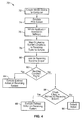
FIG. 4 shows a flow diagram of the application association logic in accordance with the present invention. -
FIG. 5 illustrates originating system conditions in that are mapped by the application association logic ofFIG. 4 . -
FIG. 6 illustrates exception conditions that may be mapped by the application association logic ofFIG. 4 . -
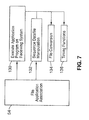
FIG. 7 is a diagram of the receiving actions in the association database of the present invention. - Referring more specifically to the drawings, for illustrative purposes the present invention is embodied in the apparatus generally shown in FIG. and
FIG. 3 through FIG. 7 . It will be appreciated that the apparatus may vary as to configuration and as to details of the parts, and that the method may vary as to the specific steps and sequence, without departing from the basic concepts as disclosed herein. -
FIG. 1 illustrates animage recognition system 10 in accordance with the present invention.System 10 includes a mobile device (PDA) 12 having ascreen 14 coupled to acomputer 16 withdisplay 18,keyboard 34 andmouse 36. The connection between themobile device 12 and thecomputer 16 can be a local medium, such asUSB connection 28 connectingports wireless antennas remote connection 26 using network connections to the common network infrastructure, such as an Internet based file synchronization service. -
FIG. 3 illustrates a schematic diagram of thesystem 50 of the present invention. PC emulation module orsoftware 52, which may be loaded inmemory 58 on the PC 16,memory 46 mobile ofdevice 12, or both, provides an emulatedPDA screen 20 on the screen of the connectedcomputer 16. Anapplication program 44 may be run on themobile device 12 such that a document (or other window) is displayed for viewing/processing/editing and itsscreen image 20 is replicated on thecomputer screen 18. - When the user performs certain operations, the document opened by the
mobile device 12application program 44 is saved as a file, and automatically transferred from the mobile devicestorage file system 46 to the computerstorage file system 58. Applicationassociation logic module 54 is configured to launch predefined equivalentPC application software 60 viaprocessor 68 on thecomputer 18, wherein the copied computer file is opened viauser interface 64 on thecomputer screen 28 in awindow 62 outside or overlapping to the mobile devicescreen emulation window 20. Theapplication association logic 54 is configured to find theequivalent PC application 60 for themobile device application 44 of the selected file. For example, themobile device 12 may have Mobile Outlook or Mobile Office (e.g. Mobile Word, Mobile Excel, and Mobile PowerPoint) loaded in memory. Thus, if a word document is selected, theapplication association logic 54 seeks the equivalent PC application 60 (MS Word) to the mobile device application 44 (Mobile Word). - When the computer processing of the file is completed, the file is transferred back to the
memory 46 of themobile device 12.File synchronization module 56 is configured to synchronize files that may be stored inmemory 46 ofdevice 12 ormemory 58 of thecomputer 16, and update either of the files stored on themobile device 12 orcomputer 16 if the file has been operated on either themobile device 12 orcomputer 16 while not coupled to each other. Theapplication association logic 54 and/orfile synchronization module 56 are preferably configured to save the file on themobile device memory 46 in a format that is readable by associated the mobiledevice application program 44. - User operation can be various types of user interfaces. For example, a user may perform a mouse drag/drop of the opened document rendition from/to the emulated
mobile screen 20 on thecomputer display 18 to the other areas of the computer screen outside of the mobile devicescreen emulation window 20, e.g. the desktop or another window displayed onscreen 18. The user may also perform equivalent GUI user operations on themobile device screen 14. The user may also invoke GUI based menus or buttons of theemulation window 20. Furthermore, if themobile device 12 is capable of detecting physical movements of the device body by means of, but not limited to, enclosed accelerometers (not shown) etc., swinging or movements mimicking the action of throwing the device contents to outside may be used to initiate file transfer initiation. - File transfer operations to/from the
mobile device 12 from/to the 16 computer can be processed automatically by the initiation of user operations described above, or can cause prompting for confirmation of the file transfer between the devices, as well as special instructions such as the non-standard locations of the storage file structures (folders, etc.). Other special instructions may also be implemented, such as file synchronization of copies of the document or file that are stored on both devices. - The function of the
application association logic 54 is detailed in themethod 70 illustrated inFIG. 4 . The determination of the application software selection upon transition of the processing subject from themobile device 12 to thecomputer 16 or visa versa is processed in theapplication association logic 54. It is appreciated that the bulk of processing of the following method is performed via the computer processor 68 (to take advantage of the generally higher processing power of the computer). However, some or all of the processing may also be achieved via theprocessor 48 of themobile device 12. - In
step 72, themobile device 12 is coupled to thecomputer 16 via eitherwireless connection 26 or wiredconnection 28. Atstep 74, the PDA screen is emulated, and upon selection of aPDA software application 44, theapplication association software 54 is initiated instep 76. - The
application association logic 54 preferably comprises an algorithm that maps the originating system conditions to the receiving system actions to fileapplication association database 66 atstep 78. In a typical situation, the originating system is thePDA 12, and the receiving system is thePC 16. However, it is appreciated that these roles may be reversed based on the desired function of the user.Database 66 is shown inFIG. 3 to be located or stored at the PC'smemory 58. However, it is appreciated that the database may also be stored or cached on thePDA memory 46. - The originating
system conditions 100, detailed further inFIG. 5 , are a combination of parameters 102-110. For example, the originatingsystem conditions 100 comprise application software type/identifier 102 and thefile type 104 of the user data being processed in the originatingapplication software 44. - An additional operating system condition may optionally comprise mode or
status 106 of the application program, such as read-only viewing, open for modification, etc. - An optional operating system condition may comprise the status of the opened document data file 108. For example, criteria may comprise whether the document or file opened without exclusivity and has not been modified, opened with exclusivity and has not been modified, opened without exclusivity and modified unsaved, opened with exclusivity and modified unsaved, etc. Some information (e.g. 106, 108) may not be available for all application programs.
- Optional parameters may also comprise
exception conditions 110 detailed inFIG. 6 .Exception conditions 110 may be one or more of the system or usage conditions not directly derived from the file types or the application program. Examples may befile size 112, or remainingavailable storage capacity 114 of the originating and/or receiving system. Remaining capacity definitions can be either the absolute data size, or the relative value to the total capacity of the file system. - Additional exception conditions may comprise network connection status/
availability 116 between systems, presence of the operating systems or other underlying middle-waredata synchronization facilities 118, time, day of the week, andother scheduling status 120, orphysical location information 122 obtained from the geographical location detection sensors on either systems, such as GPS receivers, etc., or schedule information from PIM application or subsystem that has location information attached. - Referring back to
FIG. 4 , the algorithm atstep 80 looks up the receiving system action output from thedatabase 66 by the current subject document/application software program on the originating system. If a matching condition is found (step 82), the defined action is executed on the receiving system, atstep 84. If not (i.e. no matching conditions), the receiving system algorithm checks atstep 86 if application association of the originating data file is defined by the receiving system's operating systems layer. If the application association for the originating data file is found, the defined action is executed on the receiving system atstep 88. If no match is found or defined in the operating systems layer, a default action is taken atstep 90. The default action my comprise opening the operating systems' general purpose file manager (e.g, Windows Explorer on the computer system) for the destination folder of the receiving system, or do nothing. - Referring to
FIG. 7 , receiving actions from the fileapplication association logic 54 andassociation database 66 may include executing an application program on the receiving system with the received data file atstep 130, or sequencing of the data file manipulation steps at step 182. Sequencing steps may comprise: copying/moving of the data file that has been automatically synchronized by the operating systems layer or separate data synchronization middle-ware, opening the file with an application program for processing, and updating the related synchronization folders of the processed/updated data file. - At least part of the sequences in
steps conversion utility processing 134 if the file format of the originating system can be better handled in an application program on the receiving system, or timing functions 136, such as delay for a defined duration of the time, or on condition such as the size of the completed file transfer by absolute data size or relative value to the total file size being transferred, etc. - It is appreciated that in all of the previously described embodiments, the data file may be substituted to the network contents/objects by referencing in Universal Resource Identifiers or URL's.
- The
association database 66 definitions may be predefined before the installation of thedevice 12, or they may be user-configurable, or upgradeable by the manufacturer or the administrator, or any combination of the above. In addition, the system may be configured so that the application association logic can be turned on or off, permanently or temporarily, by the user. - Embodiments of the present invention are described with reference to flowchart illustrations of methods and systems according to embodiments of the invention. These methods and systems can also be implemented as computer program products. In this regard, each block or step of a flowchart, and combinations of blocks (and/or steps) in a flowchart, can be implemented by various means, such as hardware, firmware, and/or software including one or more computer program instructions embodied in computer-readable program code logic. As will be appreciated, any such computer program instructions may be loaded onto a computer, including without limitation a general purpose computer or special purpose computer, or other programmable processing apparatus to produce a machine, such that the computer program instructions which execute on the computer or other programmable processing apparatus create means for implementing the functions specified in the block(s) of the flowchart(s).
- Accordingly, blocks of the flowcharts support combinations of means for performing the specified functions, combinations of steps for performing the specified functions, and computer program instructions, such as embodied in computer-readable program code logic means, for performing the specified functions. It will also be understood that each block of the flowchart illustrations, and combinations of blocks in the flowchart illustrations, can be implemented by special purpose hardware-based computer systems which perform the specified functions or steps, or combinations of special purpose hardware and computer-readable program code logic means.
- Furthermore, these computer program instructions, such as embodied in computer-readable program code logic, may also be stored in a computer-readable memory that can direct a computer or other programmable processing apparatus to function in a particular manner, such that the instructions stored in the computer-readable memory produce an article of manufacture including instruction means which implement the function specified in the block(s) of the flowchart(s). The computer program instructions may also be loaded onto a computer or other programmable processing apparatus to cause a series of operational steps to be performed on the computer or other programmable processing apparatus to produce a computer-implemented process such that the instructions which execute on the computer or other programmable processing apparatus provide steps for implementing the functions specified in the block(s) of the flowchart(s).
- As can be seen, therefore, the present invention includes the following embodiments among others:
- 1. An interface system for coupling a mobile device to a PC, comprising: a PC emulation module; said PC emulation module configured to emulate the screen of a mobile device in a first window on the display of a PC coupled to the mobile device; a file application association module; the file application association module configured to open an application associated with a file located in memory on the mobile device and display the application in a second window on the PC display; and a processor for operating the PC emulation module and file application association module.
- 2. An interface system as recited in
embodiment 1, wherein the file application association module is configured to open the associated application in a second window overlapping or outside the first window. - 3. An interface system as recited in embodiment 2, further comprising:
- a file synchronization module for synchronizing the file to be stored in memory
- on the mobile device and the PC.
- 4. An interface system as recited in
embodiment 3, wherein: the file application association module is configured to open a PC application stored on the PC to operate said file; wherein the PC application is associated with an application stored on the mobile device; and wherein the PC application is opened in the second window. - 5. An interface system as recited in embodiment 4, wherein file application association module is configured to operate the PC application using the PC's processor.
- 6. An interface system as recited in embodiment 4, wherein file application association module is configured to map one or more mobile device conditions to one or more PC actions in a database located on either the PC or mobile device.
- 7. An interface system as recited in embodiment 6, wherein the mobile device conditions comprise a mobile device application software identifier.
- 8. An interface system as recited in embodiment 7, wherein the mobile device conditions further comprise a file type associated with the mobile device application software.
- 9. An interface system as recited in embodiment 6, wherein the one or more PC actions comprises executing the PC application with the file.
- 10. An interface system for coupling a mobile device to a PC, comprising: a PC having a processor for executing a PC application stored in memory on the PC, and a display for displaying the executed PC application; a mobile device having a processor for executing a mobile device application stored in memory on the mobile device, and a display for displaying the executed mobile device application; a PC emulation module; said PC emulation module configured to emulate the screen of the mobile device in a first window on the display of the PC; a file application association module; wherein the file application association module is configured to execute a file on the mobile device with a PC application that is associated with said file and a mobile device application stored in memory on the mobile device; wherein the file application association module is configured to display the executed PC application in a second window on the PC display.
- 11. An interface system as recited in
embodiment 10, wherein the file application association logic is configured to execute the PC application in a second window overlapping or outside the first window. - 12. An interface system as recited in
embodiment 10, further comprising: a file synchronization module for synchronizing the file to be stored in memory on the mobile device and the PC. - 13. An interface system as recited in
embodiment 10, wherein file application association module is configured to execute the PC application using the PC's processor. - 14. An interface system as recited in
embodiment 10, further comprising a database coupled to the file application association module; wherein file application association module is configured to map one or more mobile device conditions to one or more PC actions in the database. - 15. An interface system as recited in
embodiment 14, wherein the mobile device conditions comprise a mobile device application software identifier. - 16. An interface system as recited in embodiment 15, wherein the mobile device conditions further comprise a file type associated with the mobile device application software.
- 17. An interface system as recited in embodiment 15, wherein the one or more PC actions comprises executing the PC application with the file.
- 18. An method for interfacing between a mobile device to a PC, comprising: coupling a mobile device to a PC; the PC having a processor for executing a PC application stored in memory on the PC, and a display for displaying the executed PC application; emulating the screen of the mobile device in a first window on the display of the PC; executing a file on the mobile device using a PC application that is associated with said file and a mobile device application stored in memory on the mobile device; and displaying the executed PC application in a second window on the PC display.
- 19. A method as recited in
embodiment 18, wherein the executed PC application is displayed in a second window overlapping or outside the first window. - 20. A method as recited in embodiment 19, further comprising:
- synchronizing the file between memory on the mobile device and the PC.
- 21. A method as recited in embodiment 19, wherein the PC application is executed using the PC's processor.
- 22. A method as recited in
embodiment 18, wherein executing the PC application comprises selecting PC application software compatible with said file and associated mobile device application. - 23. A method as recite in
embodiment 22, wherein selecting PC application software comprises: mapping one or more mobile device conditions to one or more PC actions. - 24. A method as recited in embodiment 23, wherein the mobile device conditions comprise a mobile device application software identifier and a file type associated with the mobile device application software.
- 25. A method as recited in
embodiment 24, wherein the mobile device conditions additionally comprise on or more of the following: status of the PC application, status of the opened file, or exception conditions. - 26. A method as recited in embodiment 23, wherein selecting the PC application software further comprises: looking up a receiving system action from a database according to the selected file and its associated application software.
- 27. A method as recited in embodiment 23, wherein the receiving system action comprises executing the PC application, the method further comprising:
- executing the receiving system action to execute the PC application and corresponding file.
- Although the description above contains many details, these should not be construed as limiting the scope of the invention but as merely providing illustrations of some of the presently preferred embodiments of this invention. Therefore, it will be appreciated that the scope of the present invention fully encompasses other embodiments which may become obvious to those skilled in the art, and that the scope of the present invention is accordingly to be limited by nothing other than the appended claims, in which reference to an element in the singular is not intended to mean "one and only one" unless explicitly so stated, but rather "one or more." All structural, chemical, and functional equivalents to the elements of the above-described preferred embodiment that are known to those of ordinary skill in the art are expressly incorporated herein by reference and are intended to be encompassed by the present claims. Moreover, it is not necessary for a device or method to address each and every problem sought to be solved by the present invention, for it to be encompassed by the present claims. Furthermore, no element, component, or method step in the present disclosure is intended to be dedicated to the public regardless of whether the element, component, or method step is explicitly recited in the claims. In so far as the embodiments of the invention described above are implemented, at least in part, using software-controlled data processing apparatus, it will be appreciated that a computer program providing such software control and a transmission, storage or other medium by which such a computer program is provided are envisaged as aspects of the present invention.
Claims (15)
- An interface system for coupling a mobile device to a personal computer (PC), comprising:a PC emulation module which is configured to emulate the screen of a mobile device in a first window on the display of a PC coupled to the mobile device;a file application association module;said file application association module configured to open an application associated with a file located in memory on the mobile device and display the application in a second window on the PC display; anda processor for operating the PC emulation module and file application association module.
- An interface system as recited in claim 1, wherein the file application association module is configured to open the associated application in a second window overlapping or outside the first window.
- An interface system as recited in claim 2, further comprising:a file synchronization module for synchronizing the file to be stored in memory on the mobile device and the PC.
- An interface system as recited in claim 3:wherein the file application association module is configured to open a PC application stored on the PC to operate said file;wherein the PC application is associated with an application stored on the mobile device; andwherein the PC application is opened in the second window.
- An interface system as recited in claim 4, wherein file application association module is configured to operate the PC application within the processor of the PC.
- An interface system as recited in claim 4, wherein file application association module is configured to map one or more mobile device conditions to one or more PC actions in a database located on either the PC or mobile device.
- An interface system as recited in claim 6, wherein the mobile device conditions comprise a mobile device application software identifier.
- An interface system as recited in claim 7, wherein the mobile device conditions further comprise a file type associated with the mobile device application software.
- An interface system as recited in claim 6, wherein the one or more PC actions comprises executing the PC application with the file.
- A system for coupling a mobile device to a personal computer (PC), comprising:a PC having a processor for executing a PC application stored in memory on the PC, and a display for displaying the executed PC application;a mobile device having a processor for executing a mobile device application stored in memory on the mobile device, and a display for displaying the executed mobile device application; andan interface system according to any one of claims 1, 2, 3, 5 or 7, 8 or 9.
- A system as recited in claim 10, wherein file application association module is configured to execute the PC application within the processor of the PC.
- A system as recited in claim 10, further comprising:a database coupled to the file application association module;wherein file application association module is configured to map one or more mobile device conditions to one or more PC actions in the database.
- A system as recited in claim 12, wherein the mobile device conditions comprise a mobile device application software identifier.
- A system as recited in claim 13, wherein the mobile device conditions further comprise a file type associated with the mobile device application software.
- A system as recited in claim 13, wherein the one or more PC actions comprises executing the PC application with the file.
Applications Claiming Priority (1)
| Application Number | Priority Date | Filing Date | Title |
|---|---|---|---|
| US12/616,676 US20110112819A1 (en) | 2009-11-11 | 2009-11-11 | User interface systems and methods between a portable device and a computer |
Publications (1)
| Publication Number | Publication Date |
|---|---|
| EP2330513A1 true EP2330513A1 (en) | 2011-06-08 |
Family
ID=43530007
Family Applications (1)
| Application Number | Title | Priority Date | Filing Date |
|---|---|---|---|
| EP10190031A Ceased EP2330513A1 (en) | 2009-11-11 | 2010-11-04 | User interface systems and methods between a portable device and computer |
Country Status (7)
| Country | Link |
|---|---|
| US (1) | US20110112819A1 (en) |
| EP (1) | EP2330513A1 (en) |
| JP (1) | JP5441013B2 (en) |
| KR (1) | KR20110052457A (en) |
| CN (1) | CN102063463A (en) |
| RU (1) | RU2506634C2 (en) |
| TW (1) | TWI451287B (en) |
Cited By (2)
| Publication number | Priority date | Publication date | Assignee | Title |
|---|---|---|---|---|
| EP3019966A4 (en) * | 2013-07-12 | 2017-06-28 | Samsung Electronics Co., Ltd. | Remote operation of applications using received data |
| US9721102B2 (en) | 2012-12-14 | 2017-08-01 | International Business Machines Corporation | Boot mechanisms for bring your own management |
Families Citing this family (39)
| Publication number | Priority date | Publication date | Assignee | Title |
|---|---|---|---|---|
| US20130104062A1 (en) | 2011-09-27 | 2013-04-25 | Z124 | Unified desktop input segregation in an application manager |
| US9749176B2 (en) | 2010-06-29 | 2017-08-29 | Nokia Technologies Oy | Systems, methods, and apparatuses for providing adaptive user notifications |
| CN103155425B (en) * | 2010-08-13 | 2015-07-29 | Lg电子株式会社 | Mobile terminal, display device and control method thereof |
| US9594711B2 (en) * | 2010-12-24 | 2017-03-14 | Lenovo (Singapore) Pte. Ltd. | Systems and methods for achieving continuation of experience between components in a hybrid environment |
| KR101080674B1 (en) * | 2011-03-09 | 2011-11-08 | (주)자람테크놀로지 | USB device providing an input interface and a method of providing the interface |
| US20120265516A1 (en) * | 2011-04-12 | 2012-10-18 | Microsoft Corporation | Peripheral device simulation |
| US20130104051A1 (en) * | 2011-09-27 | 2013-04-25 | Z124 | Unified desktop big brother application pools |
| US11416131B2 (en) | 2011-09-27 | 2022-08-16 | Z124 | Unified desktop input segregation in an application manager |
| CN103092495B (en) * | 2011-11-01 | 2017-07-28 | 茂杰国际股份有限公司 | Synchronous operation system and method of touch device |
| WO2013097895A1 (en) * | 2011-12-28 | 2013-07-04 | Nokia Corporation | Provision of an open instance of an application |
| CN103197963A (en) * | 2012-01-05 | 2013-07-10 | 宏碁股份有限公司 | Method and system for seamless working state transition |
| KR101951477B1 (en) * | 2012-01-06 | 2019-02-22 | 엘지전자 주식회사 | display device |
| KR102011834B1 (en) * | 2012-01-06 | 2019-08-19 | 엘지전자 주식회사 | display device |
| CN102609192B (en) * | 2012-01-17 | 2015-05-27 | 华为终端有限公司 | Mobile terminal operating method by computer and mobile terminal |
| KR101861822B1 (en) | 2012-04-02 | 2018-05-29 | 삼성전자주식회사 | Method for providing social networking service using a phone book and mobile terminal thereof |
| CN103377005A (en) * | 2012-04-20 | 2013-10-30 | 中兴通讯股份有限公司 | Data synchronization method and device |
| US9743017B2 (en) * | 2012-07-13 | 2017-08-22 | Lattice Semiconductor Corporation | Integrated mobile desktop |
| KR101522621B1 (en) * | 2012-07-31 | 2015-05-26 | 최윤혁 | Auxiliary Device of Smartphone And Smartphone Having The Same |
| KR102098815B1 (en) | 2013-05-20 | 2020-04-08 | 삼성전자주식회사 | Electronic device for operating application |
| KR102090745B1 (en) * | 2013-05-23 | 2020-04-14 | 삼성전자주식회사 | Method and apparatus for performing multi-tasking using external display device in electronic device |
| CN103744810B (en) * | 2013-12-23 | 2016-09-21 | 西安酷派软件科技有限公司 | Terminal, electronic equipment, synchronous display system and method |
| TW201525858A (en) * | 2013-12-31 | 2015-07-01 | Ibm | Baseboard management controller and method of load firmware thereof |
| KR102367551B1 (en) * | 2014-06-10 | 2022-02-25 | 삼성전자 주식회사 | Method and apparatus for processing information of electronic devices |
| CN104298451B (en) * | 2014-09-24 | 2019-06-21 | 上海斐讯数据通信技术有限公司 | A text input system and method |
| CN104618499B (en) * | 2015-02-13 | 2019-03-29 | 联想(北京)有限公司 | A kind of information processing method and electronic equipment |
| US10136247B2 (en) * | 2015-10-20 | 2018-11-20 | Microsoft Technology Licensing, Llc | Physical and virtual phone mobility |
| US10430040B2 (en) * | 2016-01-18 | 2019-10-01 | Microsoft Technology Licensing, Llc | Method and an apparatus for providing a multitasking view |
| WO2018227398A1 (en) | 2017-06-13 | 2018-12-20 | 华为技术有限公司 | Display method and apparatus |
| KR102049059B1 (en) | 2017-11-07 | 2020-01-08 | 엔에이치엔 주식회사 | Apparatus and mehtod for operating mobile game |
| US20190347069A1 (en) * | 2018-05-11 | 2019-11-14 | Nathan Park | Accessing a desktop computer with proprioception |
| WO2020017767A1 (en) | 2018-07-16 | 2020-01-23 | Samsung Electronics Co., Ltd. | Method and device for controlling access of application |
| KR102249521B1 (en) * | 2018-11-14 | 2021-05-07 | 아이알링크 주식회사 | Personal computer interface apparatus and method synchronized with smart phone |
| JP7264225B2 (en) * | 2019-05-15 | 2023-04-25 | カシオ計算機株式会社 | Program, emulation method, and information processing device |
| US11599322B1 (en) * | 2019-09-26 | 2023-03-07 | Apple Inc. | Systems with overlapped displays |
| CN111327769B (en) * | 2020-02-25 | 2022-04-08 | 北京小米移动软件有限公司 | Multi-screen interactive method and device, and storage medium |
| US11625155B2 (en) * | 2020-03-23 | 2023-04-11 | Ricoh Company, Ltd. | Information processing system, user terminal, method of processing information |
| US11907495B2 (en) * | 2021-10-19 | 2024-02-20 | Motorola Mobility Llc | Electronic devices and corresponding methods utilizing ultra-wideband communication signals for user interface enhancement |
| US11606456B1 (en) | 2021-10-19 | 2023-03-14 | Motorola Mobility Llc | Electronic devices and corresponding methods utilizing ultra-wideband communication signals for user interface enhancement |
| US11503358B1 (en) | 2021-10-19 | 2022-11-15 | Motorola Mobility Llc | Electronic devices and corresponding methods utilizing ultra-wideband communication signals for user interface enhancement |
Citations (1)
| Publication number | Priority date | Publication date | Assignee | Title |
|---|---|---|---|---|
| US20090182546A1 (en) * | 2006-07-25 | 2009-07-16 | Nxp B.V. | Mobile device comprising an operating system emulator |
Family Cites Families (20)
| Publication number | Priority date | Publication date | Assignee | Title |
|---|---|---|---|---|
| JP3746378B2 (en) * | 1997-08-26 | 2006-02-15 | シャープ株式会社 | Electronic memo processing device, electronic memo processing method, and computer-readable recording medium recording electronic memo processing program |
| US6681243B1 (en) * | 1999-07-27 | 2004-01-20 | Intel Corporation | Network environment supporting mobile agents with permissioned access to resources |
| US20020103881A1 (en) * | 2000-09-11 | 2002-08-01 | Francois Granade | Method and system for integrating applications and mobile networks |
| US20020087300A1 (en) * | 2001-01-04 | 2002-07-04 | Srinivas Patwari | Method of interactive image creation for device emulator |
| US7155381B2 (en) * | 2001-03-12 | 2006-12-26 | Sun Microsystems, Inc. | Module for developing wireless device applications using an integrated emulator |
| JP2003006112A (en) * | 2001-06-20 | 2003-01-10 | Sanyo Electric Co Ltd | Method for giving and receiving information, and server and program capable of utilizing the method |
| JP2003280630A (en) * | 2002-03-20 | 2003-10-02 | Toshiba Corp | Information processing apparatus and display control method used in the information processing apparatus |
| US7139559B2 (en) * | 2002-12-09 | 2006-11-21 | Qualcomm Inc. | System and method for handshaking between wireless devices and servers |
| JP2005161592A (en) * | 2003-12-01 | 2005-06-23 | Canon Inc | Printing device |
| JP2005202454A (en) * | 2004-01-13 | 2005-07-28 | Sony Corp | Information processing apparatus and method, and program |
| US7512402B2 (en) * | 2004-05-14 | 2009-03-31 | International Business Machines Corporation | Centralized display for mobile devices |
| US20070174429A1 (en) * | 2006-01-24 | 2007-07-26 | Citrix Systems, Inc. | Methods and servers for establishing a connection between a client system and a virtual machine hosting a requested computing environment |
| KR100816286B1 (en) * | 2006-05-18 | 2008-03-24 | 삼성전자주식회사 | Display device and method using mobile terminal and external device |
| TWI308723B (en) * | 2006-07-21 | 2009-04-11 | Sunplus Technology Co Ltd | System for simulating mobile phone and method thereof |
| TWI319540B (en) * | 2006-11-15 | 2010-01-11 | Inventec Appliances Corp | Interaction system and method |
| US8060074B2 (en) * | 2007-07-30 | 2011-11-15 | Mobile Iron, Inc. | Virtual instance architecture for mobile device management systems |
| EP2283421B1 (en) * | 2008-05-20 | 2019-08-14 | Citrix Systems, Inc. | Methods and systems for using external display devices with a mobile computing device |
| US20100083189A1 (en) * | 2008-09-30 | 2010-04-01 | Robert Michael Arlein | Method and apparatus for spatial context based coordination of information among multiple devices |
| US9241062B2 (en) * | 2009-05-20 | 2016-01-19 | Citrix Systems, Inc. | Methods and systems for using external display devices with a mobile computing device |
| US20110088002A1 (en) * | 2009-10-13 | 2011-04-14 | Carl Johan Freer | Method and platform for gestural transfer of digital content for mobile devices |
-
2009
- 2009-11-11 US US12/616,676 patent/US20110112819A1/en not_active Abandoned
-
2010
- 2010-07-26 TW TW099124542A patent/TWI451287B/en active
- 2010-10-15 KR KR1020100100705A patent/KR20110052457A/en not_active Ceased
- 2010-10-28 JP JP2010242240A patent/JP5441013B2/en not_active Expired - Fee Related
- 2010-11-03 RU RU2010145182/08A patent/RU2506634C2/en active
- 2010-11-04 EP EP10190031A patent/EP2330513A1/en not_active Ceased
- 2010-11-11 CN CN2010105457316A patent/CN102063463A/en active Pending
Patent Citations (1)
| Publication number | Priority date | Publication date | Assignee | Title |
|---|---|---|---|---|
| US20090182546A1 (en) * | 2006-07-25 | 2009-07-16 | Nxp B.V. | Mobile device comprising an operating system emulator |
Cited By (2)
| Publication number | Priority date | Publication date | Assignee | Title |
|---|---|---|---|---|
| US9721102B2 (en) | 2012-12-14 | 2017-08-01 | International Business Machines Corporation | Boot mechanisms for bring your own management |
| EP3019966A4 (en) * | 2013-07-12 | 2017-06-28 | Samsung Electronics Co., Ltd. | Remote operation of applications using received data |
Also Published As
| Publication number | Publication date |
|---|---|
| TW201120683A (en) | 2011-06-16 |
| RU2506634C2 (en) | 2014-02-10 |
| US20110112819A1 (en) | 2011-05-12 |
| JP2011103119A (en) | 2011-05-26 |
| KR20110052457A (en) | 2011-05-18 |
| JP5441013B2 (en) | 2014-03-12 |
| RU2010145182A (en) | 2012-05-10 |
| CN102063463A (en) | 2011-05-18 |
| TWI451287B (en) | 2014-09-01 |
Similar Documents
| Publication | Publication Date | Title |
|---|---|---|
| EP2330513A1 (en) | User interface systems and methods between a portable device and computer | |
| US20140082136A1 (en) | Method and system for transmission of application status between different devices | |
| US20100251122A1 (en) | Method and apparatus for controlling presentation slides | |
| WO2013159447A1 (en) | Method for performing batch management on desktop icon and digital mobile device | |
| CN114647350A (en) | Application sharing method, electronic device and storage medium | |
| KR20100049474A (en) | A method for remote user interface session migration to other device | |
| KR102482324B1 (en) | Apparatus and method for transtting and receiving file in wireless communication system supporting cloud storage service | |
| CN102957751B (en) | Document transmission method, device and terminal equipment between terminal equipment and the webserver | |
| CN104199723A (en) | Camera mapping method based on virtual equipment | |
| US20250211627A1 (en) | User Interface Content State Synchronization Across Devices | |
| WO2008124793A3 (en) | Graphical user interface for electronic file sharing | |
| EP2991312A1 (en) | Electronic device and method for providing ip network service | |
| CN103853430A (en) | Application assembly dismounting display method and device | |
| CN103902645B (en) | Method for controlling file name and electronic device thereof | |
| JP2022522658A (en) | Systems, methods, computer programs, mobile devices, and kits for operating low-computational devices | |
| WO2017063350A1 (en) | Data operation control method and system thereof, and user terminal | |
| CN110287187A (en) | Tables of data synchronous updating method, system and storage medium in multiple servers | |
| CN102541326B (en) | Data sending and receiving method for touch screen system | |
| CN104506718A (en) | System and method for remote assistance between smart phones | |
| CN106293339B (en) | A kind of Application Program Interface display methods, system and electric terminal | |
| CN105511787B (en) | Input method, electronic equipment and input system | |
| WO2013016949A1 (en) | User interface content state synchronization across devices | |
| WO2025001287A1 (en) | Service conflict prompting method and related apparatus | |
| HK1157469A (en) | User interface systems and methods between a portable device and a computer | |
| CN104077143A (en) | System and method for showing slides |
Legal Events
| Date | Code | Title | Description |
|---|---|---|---|
| PUAI | Public reference made under article 153(3) epc to a published international application that has entered the european phase |
Free format text: ORIGINAL CODE: 0009012 |
|
| AK | Designated contracting states |
Kind code of ref document: A1 Designated state(s): AL AT BE BG CH CY CZ DE DK EE ES FI FR GB GR HR HU IE IS IT LI LT LU LV MC MK MT NL NO PL PT RO RS SE SI SK SM TR |
|
| AX | Request for extension of the european patent |
Extension state: BA ME |
|
| 17P | Request for examination filed |
Effective date: 20111207 |
|
| 17Q | First examination report despatched |
Effective date: 20131014 |
|
| STAA | Information on the status of an ep patent application or granted ep patent |
Free format text: STATUS: THE APPLICATION HAS BEEN REFUSED |
|
| 18R | Application refused |
Effective date: 20180502 |