EP2306298A2 - Multi-function device - Google Patents
Multi-function device Download PDFInfo
- Publication number
- EP2306298A2 EP2306298A2 EP10007940A EP10007940A EP2306298A2 EP 2306298 A2 EP2306298 A2 EP 2306298A2 EP 10007940 A EP10007940 A EP 10007940A EP 10007940 A EP10007940 A EP 10007940A EP 2306298 A2 EP2306298 A2 EP 2306298A2
- Authority
- EP
- European Patent Office
- Prior art keywords
- command
- unit
- electronic mail
- information
- function device
- Prior art date
- Legal status (The legal status is an assumption and is not a legal conclusion. Google has not performed a legal analysis and makes no representation as to the accuracy of the status listed.)
- Granted
Links
Images

Classifications
-
- H—ELECTRICITY
- H04—ELECTRIC COMMUNICATION TECHNIQUE
- H04L—TRANSMISSION OF DIGITAL INFORMATION, e.g. TELEGRAPHIC COMMUNICATION
- H04L51/00—User-to-user messaging in packet-switching networks, transmitted according to store-and-forward or real-time protocols, e.g. e-mail
- H04L51/07—User-to-user messaging in packet-switching networks, transmitted according to store-and-forward or real-time protocols, e.g. e-mail characterised by the inclusion of specific contents
- H04L51/08—Annexed information, e.g. attachments
-
- G—PHYSICS
- G06—COMPUTING OR CALCULATING; COUNTING
- G06F—ELECTRIC DIGITAL DATA PROCESSING
- G06F3/00—Input arrangements for transferring data to be processed into a form capable of being handled by the computer; Output arrangements for transferring data from processing unit to output unit, e.g. interface arrangements
- G06F3/12—Digital output to print unit, e.g. line printer, chain printer
- G06F3/1201—Dedicated interfaces to print systems
- G06F3/1202—Dedicated interfaces to print systems specifically adapted to achieve a particular effect
- G06F3/1203—Improving or facilitating administration, e.g. print management
- G06F3/1204—Improving or facilitating administration, e.g. print management resulting in reduced user or operator actions, e.g. presetting, automatic actions, using hardware token storing data
-
- G—PHYSICS
- G06—COMPUTING OR CALCULATING; COUNTING
- G06F—ELECTRIC DIGITAL DATA PROCESSING
- G06F3/00—Input arrangements for transferring data to be processed into a form capable of being handled by the computer; Output arrangements for transferring data from processing unit to output unit, e.g. interface arrangements
- G06F3/12—Digital output to print unit, e.g. line printer, chain printer
- G06F3/1201—Dedicated interfaces to print systems
- G06F3/1223—Dedicated interfaces to print systems specifically adapted to use a particular technique
- G06F3/1237—Print job management
- G06F3/126—Job scheduling, e.g. queuing, determine appropriate device
-
- G—PHYSICS
- G06—COMPUTING OR CALCULATING; COUNTING
- G06F—ELECTRIC DIGITAL DATA PROCESSING
- G06F3/00—Input arrangements for transferring data to be processed into a form capable of being handled by the computer; Output arrangements for transferring data from processing unit to output unit, e.g. interface arrangements
- G06F3/12—Digital output to print unit, e.g. line printer, chain printer
- G06F3/1201—Dedicated interfaces to print systems
- G06F3/1278—Dedicated interfaces to print systems specifically adapted to adopt a particular infrastructure
- G06F3/1291—Pool of printer devices: self-managing printing devices in a network, e.g. without a server
-
- H—ELECTRICITY
- H04—ELECTRIC COMMUNICATION TECHNIQUE
- H04N—PICTORIAL COMMUNICATION, e.g. TELEVISION
- H04N1/00—Scanning, transmission or reproduction of documents or the like, e.g. facsimile transmission; Details thereof
- H04N1/00127—Connection or combination of a still picture apparatus with another apparatus, e.g. for storage, processing or transmission of still picture signals or of information associated with a still picture
- H04N1/00204—Connection or combination of a still picture apparatus with another apparatus, e.g. for storage, processing or transmission of still picture signals or of information associated with a still picture with a digital computer or a digital computer system, e.g. an internet server
Definitions
- the present specification discloses a multi-function device comprising an electronic mail communication function and a print function.
- An Internet facsimile device (multi-function device) comprising an electronic mail communication function and a print function is known. If a received electronic mail includes an attached file, the Internet facsimile device performs print process to an image described by the attached file.
- the multi-function device may comprise a receiving unit, an analyzing unit, a supplying unit and a file sending unit.
- the receiving unit may be configured to receive a first electronic mail including a first attached file.
- the analyzing unit may be configured to analyze the first electronic mail.
- the supplying unit may be configured to supply an image described by the first attached file to a print performing unit in a case where the analyzing unit analyzes that the first electronic mail includes first command information including a first sort of a command and first designation information designating the first attached file.
- the file sending unit may be configured to send the first attached file to an other device in a case where the analyzing unit analyzes that the first electronic mail includes second command information including a second sort of a command different from the first sort of the command and the first designation information.
- the multi-function device may perform different processes to the attached file designated with the command information according to the sort of command included in the command information. That is, the sender of the electronic mail only sends an electronic mail including the command information, the multi-function device may perform the process that is desired by the sender of the electronic mail to the attached file included in the electronic mail. For example, if the sender of the electronic mail wishes for the multi-function device to perform the print process to the first attached file, the sender of the electronic mail may send the first electronic mail including the first command information to the multi-function device. If the first command information is included in the first electronic mail, the multi-function device supplies the first attached file to the print performing unit.
- the sender of the electronic mail may send the first electronic mail including the second command information to the multi-function device. If the second command information is included in the first electronic mail, the multi-function device sends the first attached file to the other device.
- the file sending unit may be configured to send the first attached file to the other device corresponding to the destination information.
- the multi-function device may send the first attached file to the other device that is designated by the sender of the first electronic mail.
- the first electronic mail may further include a second attached file.
- the analyzing unit analyzes that the first electronic mail includes third command information including the first sort of the command and second designation information designating the second attached file
- the supplying unit may be further configured to supply an image described by the second attached file to the print performing unit.
- the file sending unit may be further configured to send the second attached file to an other device. According to the foregoing configuration, if a plurality of attached files are included in one electronic mail, the multi-function device may perform the respective process that is desired by the sender of the electronic mail specifically for each attached file.
- the multi-function device may be configured to communicate with an administration server storing a command for the multi-function device.
- the multi-function device may further comprise a command acquiring unit.
- the command acquiring unit may be configured to acquire a particular command from the administration server in a case where the analyzing unit analyzes that the first electronic mail includes fifth command information including a third sort of a command and the first designation information.
- the supplying unit may be further configured to supply the image described by the first attached file to the print performing unit.
- the file sending unit may be further configured to send the first attached file to another device.
- the multi-function device may acquire a command stored in the administration server, and perform a process to the first attached file according to the acquired command.
- the administration server may be configured to store, for each of a plurality of commands, an association of the command and identification information for identifying the command.
- the command acquiring unit may be configured to acquire from the administration server the particular command associated with the particular identification information by sending the particular identification information to the administration server.
- the multi-function device may acquire a particular command among a plurality of commands stored in the administration server.
- the first electronic mail may include a body area including a sender inputting area in which a text input by the sender of the first electronic mail is described and a command area in which the command information is described.
- the supplying unit may be configured to supply data corresponding to the text described in the sender inputting area to the print performing unit and not to supply data corresponding to the command information described in the command area to the print performing unit.
- the multi-function device may print only the text (message) that was input by the sender without printing the command information included in the body area.
- the supplying unit may be configured to supply the image described by the first attached file to the print performing unit.
- the multi-function device may be configured to communicate with a mail server storing the first electronic mail.
- the receiving unit may be configured to receive the first electronic mail from a first folder of the mail server.
- the multi-function device may further comprise a transferring unit.
- the transferring unit may be configured to transfer the first electronic mail from the first folder of the mail server to a second folder of the mail server. According to the foregoing configuration, the multi-function device may sort the electronic mails that it did not receive and the electronic mails that it received in different folders and store the same in the mail server.
- the multi-function device may further comprise a permitting unit, a generating unit and a mail sending unit.
- the permitting unit may be configured to permit a user to select a file, select a process for the selected file, and input a destination.
- the generating unit may be configured to generate a second electronic mail in a case where a particular file is selected and a particular process is selected, the second electronic mail including the particular file as an attached file and sixth command information including a command corresponding to the particular process and particular designation information designating the particular file.
- the mail sending unit may be configured to send the second electronic mail to a device corresponding to the inputted destination. According to the foregoing configuration, the user of the multi-function device may cause the destination device of the second electronic mail to perform process desired by the user of the multi-function device to the attached file included in the second electronic mail.
- the generating unit may be further configured to generate a third electronic mail including the particular file as the attached file and seventh command information including the first sort of the command and the particular designation information.
- the sending unit may be further configured to send the third electronic mail to a device corresponding to the inputted destination.
- control method, computer program and non-transitory recording medium storing such computer program for realizing the multi-function device are also novel and useful.
- system comprising the multi-function device and the device that is capable of communicating electronic mails with the multi-function device is also novel and useful.
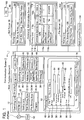
- Fig. 1 shows an example of a configuration of a communication system.
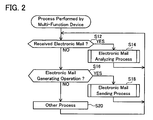
- Fig. 2 shows a flowchart of a process that is performed by a multi-function device.
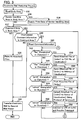
- Fig. 3 shows a flowchart of an electronic mail analyzing process that is performed by the multi-function device.
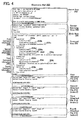
- Fig. 4 shows an example of a configuration of the electronic mail that is received by the multi-function device.
- Fig. 5 shows a flowchart of an electronic mail sending process that is performed by the multi-function device.
- a communication system 2 comprises a multi-function device 10, a facsimile device (hereinafter abbreviated as "FAX" in the drawings and the ensuing explanation) 82, a mail server 90, a PC 100, a command administration server 110, a file server 120, and a multi-function device 130.
- the multi-function device 10 is communicably connected to the FAX 82 via a PSTN (Public Switched Telephone Network) 80.
- PSTN Public Switched Telephone Network
- the multi-function device 10 is also communicably connected to the respective devices 90, 110, 120, 130 via a LAN 4.
- the LAN 4 may be a wireless LAN or a wired LAN.
- the multi-function device 10 comprises an operating unit 12, a print performing unit 14, a PSTN interface (hereinafter abbreviated as "PSTN I/F” in the drawings and the ensuing explanation) 16, a LAN interface (hereinafter abbreviated as “LAN I/F” in the drawings and the ensuing explanation) 18, a storing unit 20, a controlling unit 28, a displaying unit 48, and so on.
- PSTN I/F PSTN interface
- LAN I/F LAN interface
- the operating unit 12 comprises a plurality of keys (e.g., a numerical keypad and a start key). A user may cause the multi-function device 10 to perform various processes by operating the operating unit 12.
- the print performing unit 14 comprises an inkjet head. The print performing unit 14 prints the image supplied from a supplying unit 36 described later on a print medium such as paper.
- the PSTN I/F 16 is an interface for communicating with an external device (e.g., the FAX 82) via the PSTN 80.
- the LAN I/F 18 is an interface for communicating with an external device (e.g., the respective devices 90, 110, 120, 130) via the LAN 4.
- the storing unit 20 comprises a mail storing area 22, a file storing area 24, and so on.
- the mail storing area 22 temporarily stores the electronic mail received from the mail server 90.
- the file storing area 24 stores data files.
- the file storing area 24 stores data files that were created by a scanner unit (not shown) scanning documents and the like, and data files that were received from an external device.
- the storing unit 20 additionally stores a program 26.
- the program 26 includes a basic function program for performing the basic functions of the multi-function device 10 such as the print process, display process, electronic mail communication process, and other processes.
- the controlling unit 28 is configured from a CPU (not shown).
- the controlling unit 28 performs various processes according to the program 26 stored in the storing unit 20.
- the functions of a receiving unit 30, an analyzing unit 32, a command acquiring unit 34, a supplying unit 36, a file sending unit 38, a transferring unit 40, a permitting unit 42, a generating unit 44 and a mail sending unit 46 are realized.
- the displaying unit 48 is a display for displaying various types of information including a process selection screen 50 described later.
- the mail server 90 relays the communication of electronic mails between the devices (e.g., the multi-function device 10 and the PC 100) that are communicably connected to itself. For example, in a case where the PC 100 that is communicably connected to the mail server 90 is to send an electronic mail upon designating the multi-function device 10 as the destination, the electronic mail sent from the PC 100 is received by the mail server 90.
- the mail server 90 stores the received electronic mail in a first mail folder 96 of a mail storing area 94 described later.
- the multi-function device 10 receives the electronic mail stored in the first mail folder 96.
- the mail server 90 comprises a storing unit 92.
- the storing unit 92 comprises a mail storing area 94.
- the mail storing area 94 comprises the first mail folder 96 and a second mail folder 98.
- the first mail folder 96 stores electronic mails in which the multi-function device 10 is designated as the destination.
- the second mail folder 98 stores electronic mails that is transferred from the first mail folder 96 as a result of the multi-function device 10 performing an electronic mail analyzing process (refer to Fig. 3 ) described later.
- the solid line between the mail server 90 and the PC 100 shows that the mail server 90 and the PC 100 are communicably connected.
- the mail server 90 and the PC 100 may be connected by wire or connected wirelessly.
- the PC 100 may be a desktop PC, a laptop PC, or a portable terminal.
- the mail server 90 uses IMAP (Internet Message Access Protocol) to perform the communication of electronic mails.
- IMAP Internet Message Access Protocol
- the multi-function device 10 may erase the electronic mails stored in the first mail folder 96, transfer the electronic mails stored in the first mail folder 96 to a different mail folder (e.g., the second mail folder 98), newly create a mail folder in the mail storing area 94, delete the mail folder of the mail storing area 94, and so on.
- IMAP Internet Message Access Protocol
- the command administration server 110 is communicably connected to the multi-function device 10 via the LAN 4.
- the command administration server 110 comprises a storing unit 112.
- the storing unit 112 comprises a command storing area 114.
- the command storing area 114 stores a command list 116 capable of recording a plurality of pieces of combination information 116a, 116b.
- the command list 116 is used by the multi-function device 10 when the multi-function device 10 performs the electronic mail analyzing process described later (refer to Fig. 3 ).
- Each piece of combination information 116a, 116b is information in which a URI (Uniform Resource Identifier) 118a and a command combination 118b are associated.
- the URI 118a is identification information for identifying the command combination 118b.
- a Function 118c In the command combination 118b, a Function 118c, a Destination 118d and the like are associated.
- the Function 118c records commands to be performed by the multi-function device 10.
- the Destination 118d records destination information in cases where the multi-function device 10 sends data files to another device according to the Function 118c.
- the file server 120 is communicably connected to the multi-function device 10 via the LAN 4.
- the file server 120 comprises a storing unit 122.
- the storing unit 122 comprises a file storing area 124.
- the file storing area 124 comprises a first file folder 126 and a second file folder 128.
- the respective file folders 126, 128 may store data files.
- the multi-function device 130 comprises the same configuration as the multi-function device 10.
- the receiving unit 30 of the multi-function device 10 monitors the reception of electronic mails (S12). Specifically, when the user performs prescribed operations with the operating unit 12, the receiving unit 30 communicates with the mail server 90 and determines whether an electronic mail is stored in the first mail folder 96 of the mail server 90. If the foregoing prescribed operations are not performed, the receiving unit 30 communicates with the mail server 90 at predetermined intervals and determines whether an electronic mail is stored in the first mail folder 96. If an electronic mail is stored in the first mail folder 96, the receiving unit 30 receives such electronic mail (YES at S12).
- the receiving unit 30 temporarily stores the received electronic mail (electronic mail 200) in the mail storing area 22. Meanwhile, if an electronic mail is not stored in the first mail folder 96, the receiving unit 30 does not receive an electronic mail (NO at S12).
- the controlling unit 28 performs an electronic mail analyzing process (S14), and returns to S12. If the determination is NO at S12, the generating unit 44 monitors whether an operation described later for causing the multi-function device 10 to generate an electronic mail has been performed by the user with the operating unit 12 (S16). If the determination is YES at S16, the controlling unit 28 performs an electronic mail sending process (S18), and returns to S12. If the determination is NO at S16, the controlling unit 28 performs other processes corresponding to the operation performed by the user with the operating unit 12 or signals received via the LAN 4 (S20), and returns to S12.
- the PC 100 is the sending device of the electronic mail 200 that was received by the receiving unit 30.
- the electronic mail 200 comprises a header area 202, a body area 204, and attached files 210 to 216.
- the header area 202 includes the date and time that the electronic mail 200 was sent, sender information (name of sender of the electronic mail 200, electronic mail address of the PC 100, and so on), destination information (device name of the multi-function device 10, electronic mail address, and so on), and the like.
- the body area 204 includes a sender inputting area 206 and a command area 208.
- the sender inputting area 206 includes a text that was input by the sender of the electronic mail 200.
- the command area 208 includes four pieces of command information 208a to 208d.
- Each piece of command information 208a to 208d is information that is described in the area from the line indicated with ⁇ operation> to the line indicated with ⁇ /operation>.
- the first command information 208a includes designation information 209a that designates the attached file, a command 209b, and destination information 209c showing the destination of the attached file.
- the second command information 208b includes designation information 209d that designates the attached file, a command 209e, protocol information 209f, and destination information 209g showing the destination of the attached file.
- the third command information 208c includes designation information 209h that designates the attached file, a command 209i, and identification information 209j.
- the fourth command information 208d includes designation information 209k that designates the attached file, and a command 2091.
- the analyzing unit 32 determines that the sender inputting area 206 is included (YES at S34) in a case where text is described in the area between the line indicated with "Content-Transfer-Encoding" and the line indicated with the attached file. Meanwhile, if text is not described in the foregoing areas, the analyzing unit 32 determines that the sender inputting area 206 is not included (NO at S34).
- the routine proceeds to S37. Meanwhile, if the determination is YES at S34, the supplying unit 36 (refer to Fig. 1 ) of the multi-function device 10 supplies print data corresponding to the text described in the sender inputting area 206 to the print performing unit 14 (refer to Fig. 1 ) of the multi-function device 10 (S36), and proceeds to S37.
- the print performing unit 14 performs printing on the paper that is set in the multi-function device 10 based on the print data.
- the analyzing unit 32 determines whether the command area 208 is included in the body area 204.
- the supplying unit 36 supplies the images described by all attached files 210 to 216 that are attached to the electronic mail 200 to the print performing unit 14 (S38), and proceeds to S64.
- the print performing unit 14 prints the supplied images on paper.
- the analyzing unit 32 reads and analyzes each piece of command information 208a to 208d included in the command area 208 in the order that they were described in the command area 208.
- the analyzing unit 32 determines whether command information that has not been read; that is, command information that has not been performed by the multi-function device 10, is included in the command area 208 (S40). If the determination is YES at S40, the analyzing unit 32 reads the command information that was described at the uppermost part among the command information that has not yet been processed (S42). Subsequently, the analyzing unit 32 determines whether "fax" is designated in the command included in the read command information; that is, whether " ⁇ function>fax" is described in the command information (S44). In this embodiment, if the first command information 208a is read at S42, the analyzing unit 32 determines YES at S44.
- the file sending unit 38 (refer to Fig. 1 ) of the multi-function device 10 sends the first attached file 210 designated with the designation information 209a included in the first command information 208a to the FAX (e.g., FAX 82) corresponding to the facsimile number designated with the destination information 209c included in the first command information 208a (S46).
- the FAX e.g., FAX 82
- the analyzing unit 32 determines whether "ifax" is designated in the command; that is, whether " ⁇ function>ifax" is described in the command information (S48). If the determination is YES at S48, the file sending unit 38 sends the attached file designated with the designation information included in the command information to the device (e.g., the multi-function device 130) corresponding to the address designated with the destination information included in the command information (S50).
- the device e.g., the multi-function device 130
- the analyzing unit 32 determines whether "print” is designated in the command; that is, whether " ⁇ function>print” is described in the command information (S52). In this embodiment, if the fourth command information 208d is read at S42, the analyzing unit 32 determines YES at S52. If the determination is YES at S52, the supplying unit 36 supplies the image described by the fourth attached file 216 designated with the designation information 209k included in the fourth command information 208d to the print performing unit 14 (S54). The print performing unit 14 prints the supplied image on paper.
- the analyzing unit 32 determines whether "upload” is designated in the command; that is, whether " ⁇ function>upload” is described in the command information (S56). In this embodiment, if the second command information 208b is read at S42, the analyzing unit 32 determines YES at S56. If the determination is YES at S56, the file sending unit 38 uploads the second attached file 212 designated with the designation information 209d included in the second command information 208b to the folder (first file folder 126 or second file folder 128) of the file server 120 corresponding to the address designated with the destination information 209g included in the second command information 208b (S58). The file sending unit 38 uses the protocol designated with the protocol information 209f to upload the second attached file 212 to the file server 120.
- the analyzing unit 32 determines whether "server” is designated in the command; that is, whether " ⁇ function>server” is described in the command information (S60). In this embodiment, if the third command information 208c is read at S42, the analyzing unit 32 determines YES at S60. If the determination is YES at S60, the command acquiring unit 34 (refer to Fig. 1 ) of the multi-function device 10 acquires, from the command administration server 110, the command combination 118b that is associated with the identification information 209j included in the third command information 208c (S62), and returns to S44. Specifically, the command acquiring unit 34 accesses the combination information 116b of the command administration server 110 indicated with the URI designated with the identification information 209j, and acquires the associated command combination 118b.
- the analyzing unit 32 analyzes the command combination 118b acquired from the command administration server 110.
- the case where the command acquiring unit 34 acquires the command combination 118b included in the combination information 116a at S62 is foremost explained.
- the case where the command acquiring unit 34 acquires the command combination 118b included in the combination information 116b at S62 is explained. If the command combination 118b included in the combination information 116a is acquired, the analyzing unit 32 determines that "print" is designated in the Function 118c of the command combination 118b (NO at S44 and S48, YES at S52). Subsequently, the supplying unit 36 supplies the image of the third attached file 214 designated with the designation information 209h included in the third command information 208d to the print performing unit 14 (S54).
- the analyzing unit 32 determines that "fax" is designated in the Function 118c of the command combination 118b (YES at S44).
- the file sending unit 38 sends the third attached file 214 designated with the designation information 209h included in the third command information 208d to the FAX (e.g., the FAX 82) corresponding to the facsimile number designated with the destination 118c (S46).
- the analyzing unit 32 determines NO at S40, and proceeds to S64.
- the transferring unit 40 (refer to Fig. 1 ) of the multi-function device 10 transfers the electronic mail 200 stored in the first mail folder 96 of the mail server 90 to the second mail folder 98, and ends the process. Specifically, the transferring unit 40 erases the electronic mail 200 stored in the first mail folder 96 and stores the electronic mail 200 in the second mail folder 98. Here, the transferring unit 40 erases the electronic mail 200 stored in the mail storing area 22.
- the electronic mail sending process that is performed by the controlling unit 28 of the multi-function device 10 is now explained in detail.
- the operation to be performed by the user with the operating unit 12 for generating an electronic mail at S16 of Fig. 2 is foremost explained.
- the user foremost performs a prescribed operation with the operating unit 12 (e.g., operating the mail generation key provided to the operating unit 12) in order to cause the multi-function device 10 to generate an electronic mail.
- the permitting unit 42 (refer to Fig. 1 ) of the multi-function device 10 permits the user to select the data file.
- the permitting unit 42 displays, on the displaying unit 48 of the multi-function device 10, the list of file names corresponding to the data files stored in the file storing area 24 (refer to Fig. 1 ) of the multi-function device 10, the list of files names corresponding to the data files stored in the first file folder 126 of the file server 120, and the list of file names corresponding to the data files stored in the second file folder 128.
- the user may select the file name corresponding to the desired data file to be attached to the electronic mail from the lists displayed on the displaying unit 48. The user thereby may select the data file to be attached to the electronic mail.
- the permitting unit 42 may also permit the user to select the multi-function device 10 performing the scan process.
- the permitting unit 42 determines that the data file created by the scan process has been selected by the user.
- the permitting unit 42 stores the file identifying information of the selected data file (e.g., position information and file name showing the area or the like where the file is stored) in a prescribed storing area of the storing unit 20 (refer to Fig. 1 ) of the multi-function device 10.
- the permitting unit 42 displays the process selection screen 50 (refer to Fig. 1 ) on the displaying unit 48. A case where the user selected three data files is explained below.
- the permitting unit 42 permits the user to select the data file for which the process is to be selected. Specifically, the permitting unit 42 displays, on the process selection screen 50, three tabs 52 displaying the file names of the selected three data files. The permitting unit 42 permits the user to select one tab 52 among the three tabs 52. By operating the operating unit 12, the user may select one tab 52 among the three tabs 52. When one tab 52 is selected by the user, the permitting unit 42 permits the user to select a process for the data file corresponding to the file name that is displayed on the selected tab 52.
- the permitting unit 42 permits the user to select one process among a plurality of processes 54, 56, 58, 60, 62 displayed on the process selection screen 50. By operating the operating unit 12, the user may select one process among the processes 54, 56, 58, 60, 62. If the process 54 is selected by the user, the permitting unit 42 permits the user to input the facsimile number of a facsimile destination of the data file in the input column 64. If the process 56 is selected by the user, the permitting unit 42 permits the user to input a destination address of the data file in the input column 66.
- the permitting unit 42 permits the user to input a server address of a upload destination of the data file in the input column 68, and permits the user to select a protocol 69 to be used upon uploading the data file to the server. If the process 62 is selected by the user, the permitting unit 42 permits the user to input the URI of the command combination 118b to be acquired by the multi-function device of the electronic mail destination in the input column 70.
- the permitting unit 42 also permits the user to select one of the buttons 74, 76. By operating the operating unit 12, the user is able to select one of the buttons 74, 76. If the button 74 is selected by the user, the permitting unit 42 determines that the user selected not to select a process for any of the selected three data files. Or, if the button 76 is selected by the user in a state where a process is not selected for any of the selected three data files, the permitting unit 42 determines that the user selected not to select a process for any of the plurality of data files.
- the permitting unit 42 determines that the user selected not to select a process for the data file other than the data files for which the process was selected. If the user selects one of the buttons 74, 76, the permitting unit 42 permits the user to input destination information of the electronic mail to be generated in the electronic mail sending process described later.
- the permitting unit 42 stores, in a prescribed storing area of the storing unit 20, the combination information in which the foregoing file specifying information and the selection result of the process of the data file specified in the file specifying information are associated, and the destination information of the electronic mail.
- the generating unit 44 thereafter specifies the data file that is specified by one piece of file specifying information among the three pieces of file specifying information stored in the storing unit 20 (S72).
- the generating unit 44 determines whether the process selection result is stored in the storing unit 20 upon being associated with the file specifying information of the specified data file (S74). If the determination is YES at S74, the generating unit 44 generates command information in the body area of the electronic mail according to the selected process (S76).
- the generating unit 44 generates command information in which the file name corresponding to the data file specified at S72 is described in the designation information. Moreover, if the process 54 is selected by the user, the generating unit 44 generates command information in which "fax" is described in the command and the facsimile number input into the input column 64 is described in the destination information. If the process 56 is selected, the generating unit 44 generates command information in which "ifax" is described in the command, and the address input into the input column 66 is described in the destination information.
- the generating unit 44 If the process 58 is selected, the generating unit 44 generates command information in which "upload” is described in the command, the server address input into the input column 68 is described in the sending information, and the protocol selected by the user is described in the protocol information. If the process 60 is selected, the generating unit 44 generates command information in which "print” is described as the command. If the process 62 is selected, the generating unit 44 generates command information in which "server” is described in the command, and the URI input into the input column 70 is described in the destination information.
- the generating unit 44 generates command information in which the file name corresponding to the data file specified at S72 is described in the designation information, and "print" is described in the command (S78), and proceeds to S80.
- the generating unit 44 determines whether there is a data file for which command information has not been generated among the data files selected by the user. If the determination is YES at S80, the routine returns to S72. If the determination is NO at S80, the generating unit 44 attaches the data file to the body area including the command information and creates an electronic mail (S82). Subsequently, the mail sending unit 46 sends the created electronic mail to the device corresponding to the destination address that was input by the user (S84), and ends the process.
- the multi-function device 10 performs the processes (e.g., print process, facsimile communicating process, upload process to the file server 120 and so on) corresponding to the commands included in the command information 208a to 208d to the attached files 210 to 216 that are specified with the command information 208a to 208d included in the received electronic mail.
- the multi-function device 10 may perform the appropriate process to the attached file included in the electronic mail.
- the user of the PC 100 as the sender of the electronic mail 200 may cause the multi-function device 10 to perform the process desired by the user of the PC 100 to the attached files 210 to 216.
- the multi-function device 10 when the multi-function device 10 receives an electronic mail 200 including a plurality of attached files 210 to 216 and a plurality of pieces of command information 208a to 208d designating the plurality of attached files, it performs, to each of the attached files 210 to 216, the respective processes corresponding to the commands 209b, 209e, 209i, 2091 included in the command information 208a to 208d designating such attached files. According to the foregoing configuration, if a plurality of attached files are included in one electronic mail, the multi-function device 10 may perform a different process to each of the plurality of attached files.
- the third command information 208c of the electronic mail 200 includes a command 209i designating the "server.”
- the command acquiring unit 34 of the multi-function device 10 acquires, from the command list 116 of the command administration server 110, the command combination 118b including the Function 118c that is associated with the identification information 209j included in the third command information 208c.
- the multi-function device 10 may acquire the command combination 118b stored in the command administration server 110 and perform the processes according to the acquired command combination 118b.
- the multi-function device 10 may acquire a particular command combination among a plurality of command combinations 118a, 118b stored in command the administration server 110.
- the body area 204 of the electronic mail 200 includes the sender inputting area 206 and the command area 208. Described in the command area 208 is the command information 208a to 208d for causing the multi-function device 10 to perform the processes. Accordingly, in many cases, the user of the multi-function device 10 is not required to know the contents of the command area 208. Meanwhile, the sender inputting area 206 includes a message input by the sender of the electronic mail 200 for the user of the multi-function device 10. Thus, the user of the multi-function device 10 will want to know the contents of the sender inputting area 206.
- the supplying unit 36 of the multi-function device 10 supplies, of the sender inputting area 206 and the command area 208 included in the body area 204 of the electronic mail 200, the print data corresponding to the text described in the sender inputting area 206 to the print performing unit 14, and does not supply to the print performing unit 14 the print data corresponding to the text that is described in the command area 208 (S36 of Fig. 3 ).
- the multi-function device 10 may print only the contents which the user wishes to know.
- the supplying unit 36 of the multi-function device 10 supplies the attached file included in the electronic mail to the print performing unit 14 (S38 of Fig. 3 ). According to the foregoing configuration, if the sender of the electronic mail did not designate a process for the attached file, the multi-function device 10 may perform an appropriate process to the attached file.
- the transferring unit 40 of the multi-function device 10 transfers the electronic mail 200 included in the first mail folder 96 of the mail server 90 to the second mail folder 98 (S64 of Fig. 3 ).
- the multi-function device 10 may sort the electronic mails that have not been processed and the electronic mails that have been processed in different folders and store them in the mail server 90.
- the permitting unit 42 of the multi-function device 10 permits the user to select the data file, select a process for the selected data file, and input the destination information of the electronic mail.
- the generating unit 44 of the multi-function device 10 generates command information (S76 and S78 of Fig. 5 ), and generates an electronic mail including the generated command information (S82 of Fig. 5 ) based on the information input by the user.
- the mail sending unit 46 of the multi-function device 10 sends the generated electronic mail to the device corresponding to the destination information that was input by the user.
- the user of the multi-function device 10 may use the multi-function device 10 and cause the destination device of the electronic mail to perform the appropriate process to the attached file that is attached to the electronic mail.
- the command 2091 is an example of the "first sort of command” and the fourth command information 208b is an example of the "first command information” and the "third command information.”
- the commands 209b, 209e are examples of the "second sort of command” and the command information 208a, 208b is an example of the "second command information” and the "fourth command information.”
- the command 209i is an example of the "third sort of command” and the third command information 208c is an example of the "fifth command information.”
- the FAX 82, the file server 120 and the multi-function device 130 are examples of “another device.”
- the Function 118c is an example of the "particular command.”
- the URI 118a is an example of the “identification information.”
- the identification information 209j is an example of the "particular identification information.”
- the storing unit 20 of the multi-function device 10 may store an association the command ("fax,” “ifax,” “upload”) and the destination information. For example, if the command of the command information included in the electronic mail received by the multi-function device 10 is "fax" and the destination information ( ⁇ destination>) is not included in that command information, the file sending unit 38 of the multi-function device 10 may send the data file designated with the command information to the device corresponding to the destination information which is associated with "fax" and stored in the storing unit 20.
- the file sending unit 38 may send the file designated with the command information to the device corresponding to the destination information which is associated with "ifax" or "upload” and stored in the storing unit 20.
- the print performing unit 14 of the multi-function device 10 includes an inkjet head.
- a laser mechanism photoreceptor, exposure unit of a laser printer may be included.
- the combination information 116a, 116b in which the function 118c is "print” and "fax” is registered in the command list 116 of the command administration server 110.
- the combination information in which the function 118c is "ifax” and "upload” may also be registered in the command list 116.
- the combination information in which the function 118c is "upload” may include a protocol to be used upon uploading the attached file in addition to the destination 118d.
- the supplying unit 36 of the multi-function device 10 supplies the images described by the attached files 210 to 216 included in the electronic mail 200 to the print performing unit 14. Nevertheless, if an attached file that is not designated with the command information is included, the supplying unit 36 may also supply the image described by such attached file to the print performing unit 14.
- the permitting unit 42 of the multi-function device 10 may also permit the user to input an arbitrary text.
- the permitting unit 42 may display a message display screen on the displaying unit 48 of the multi-function device 10.
- the user may be permitted to input the text.
- the transferring unit 40 of the multi-function device 10 transfers the electronic mail 200 from the first mail folder 96 to the second mail folder 98 (S64 of Fig. 3 ) after the multi-function device 10 performs the processes to all attached files 210 to 216 attached to the electronic mail 200 (NO at S38 and S40 of Fig. 3 ).
- the transferring unit 40 may also transfer the electronic mail 200 from the first mail folder 96 to the second mail folder 98 when the receiving unit 30 of the multi-function device 10 receives the electronic mail 200, and the electronic mail 200 may be transferred at a prescribed timing (e.g., upon reading the body area 204 (S34 of Fig. 3 )) after the receiving unit 30 receives the electronic mail 200.
- the multi-function device 10 may sort the electronic mails that it did not receive and the electronic mails that it received in different folders and store them in the mail server 90.
- the supplying unit 36 of the multi-function device 10 supplies the print data corresponding to the text described in the sender inputting area 206 to the print performing unit 14 of the multi-function device 10 when the sender inputting area 206 is included in the body area 204 of the received electronic mail 200 (S34 of Fig. 3 ). Nevertheless, the supplying unit 36 may also permit the user of the multi-function device 10 to select whether to print the text described in the sender inputting area 206 when the sender inputting area 206 is included in the body area 204.
- the supplying unit 36 may supply the print data corresponding to the text described in the sender inputting area 206 to the print performing unit 14 of the multi-function device 10.
- respective units 30 to 46 are realized as a result of the controlling unit 28 performing the processes according to the program 26. Nevertheless, at least one unit of the respective units 30 to 46 may alternately be realized by a hardware resource such as a logic circuit.
Landscapes
- Engineering & Computer Science (AREA)
- Theoretical Computer Science (AREA)
- General Engineering & Computer Science (AREA)
- Human Computer Interaction (AREA)
- Physics & Mathematics (AREA)
- General Physics & Mathematics (AREA)
- Signal Processing (AREA)
- Multimedia (AREA)
- Computing Systems (AREA)
- Computer Networks & Wireless Communication (AREA)
- Information Transfer Between Computers (AREA)
- Facsimiles In General (AREA)
- Accessory Devices And Overall Control Thereof (AREA)
Abstract
Description
- The present specification discloses a multi-function device comprising an electronic mail communication function and a print function.
- An Internet facsimile device (multi-function device) comprising an electronic mail communication function and a print function is known. If a received electronic mail includes an attached file, the Internet facsimile device performs print process to an image described by the attached file.
- There are cases where a sender of the electronic mail wishes for a multi-function device to perform the print process to the attached file included in the electronic mail, and there are cases where the sender of the electronic mail wishes for the multi-function device to perform processes other than the print process to the attached file included in the electronic mail. This specification discloses a multi-function device that is capable of performing the process that is desired by the sender of the electronic mail to the attached file included in the received electronic mail.
- This specification discloses a multi-function device comprising an electronic mail communication function and a print function. The multi-function device may comprise a receiving unit, an analyzing unit, a supplying unit and a file sending unit. The receiving unit may be configured to receive a first electronic mail including a first attached file. The analyzing unit may be configured to analyze the first electronic mail. The supplying unit may be configured to supply an image described by the first attached file to a print performing unit in a case where the analyzing unit analyzes that the first electronic mail includes first command information including a first sort of a command and first designation information designating the first attached file. The file sending unit may be configured to send the first attached file to an other device in a case where the analyzing unit analyzes that the first electronic mail includes second command information including a second sort of a command different from the first sort of the command and the first designation information.
- According to the foregoing configuration, the multi-function device may perform different processes to the attached file designated with the command information according to the sort of command included in the command information. That is, the sender of the electronic mail only sends an electronic mail including the command information, the multi-function device may perform the process that is desired by the sender of the electronic mail to the attached file included in the electronic mail. For example, if the sender of the electronic mail wishes for the multi-function device to perform the print process to the first attached file, the sender of the electronic mail may send the first electronic mail including the first command information to the multi-function device. If the first command information is included in the first electronic mail, the multi-function device supplies the first attached file to the print performing unit. Meanwhile, if the sender of the electronic mail wishes for the multi-function device to perform the process of sending the first attached file to the other device, the sender of the electronic mail may send the first electronic mail including the second command information to the multi-function device. If the second command information is included in the first electronic mail, the multi-function device sends the first attached file to the other device.
- In a case where the analyzing unit analyzes that the first electronic mail includes the second command information including the second sort of the command, the first designation information, and destination information indicating a destination of the first attached file, the file sending unit may be configured to send the first attached file to the other device corresponding to the destination information. According to the foregoing configuration, the multi-function device may send the first attached file to the other device that is designated by the sender of the first electronic mail.
- The first electronic mail may further include a second attached file. In a case where the analyzing unit analyzes that the first electronic mail includes third command information including the first sort of the command and second designation information designating the second attached file, the supplying unit may be further configured to supply an image described by the second attached file to the print performing unit. In a case where the analyzing unit analyzes that the first electronic mail includes fourth command information including the second sort of the command and the second designation information, the file sending unit may be further configured to send the second attached file to an other device. According to the foregoing configuration, if a plurality of attached files are included in one electronic mail, the multi-function device may perform the respective process that is desired by the sender of the electronic mail specifically for each attached file.
- The multi-function device may be configured to communicate with an administration server storing a command for the multi-function device. The multi-function device may further comprise a command acquiring unit. The command acquiring unit may be configured to acquire a particular command from the administration server in a case where the analyzing unit analyzes that the first electronic mail includes fifth command information including a third sort of a command and the first designation information. In a case where the particular command indicates the first sort of the command, the supplying unit may be further configured to supply the image described by the first attached file to the print performing unit. In a case where the particular command indicates the second sort of the command, the file sending unit may be further configured to send the first attached file to another device. According to the foregoing configuration, the multi-function device may acquire a command stored in the administration server, and perform a process to the first attached file according to the acquired command.
- The administration server may be configured to store, for each of a plurality of commands, an association of the command and identification information for identifying the command. In a case where the analyzing unit analyzes that the first electronic mail includes the fifth command information including the third sort of the command, the first designation information and particular identification information, the command acquiring unit may be configured to acquire from the administration server the particular command associated with the particular identification information by sending the particular identification information to the administration server. According to the foregoing configuration, the multi-function device may acquire a particular command among a plurality of commands stored in the administration server.
- The first electronic mail may include a body area including a sender inputting area in which a text input by the sender of the first electronic mail is described and a command area in which the command information is described. The supplying unit may be configured to supply data corresponding to the text described in the sender inputting area to the print performing unit and not to supply data corresponding to the command information described in the command area to the print performing unit. According to the foregoing configuration, the multi-function device may print only the text (message) that was input by the sender without printing the command information included in the body area.
- In a case where the analyzing unit analyzes that the first electronic mail does not include the command information, the supplying unit may be configured to supply the image described by the first attached file to the print performing unit.
- The multi-function device may be configured to communicate with a mail server storing the first electronic mail. The receiving unit may be configured to receive the first electronic mail from a first folder of the mail server. The multi-function device may further comprise a transferring unit. The transferring unit may be configured to transfer the first electronic mail from the first folder of the mail server to a second folder of the mail server. According to the foregoing configuration, the multi-function device may sort the electronic mails that it did not receive and the electronic mails that it received in different folders and store the same in the mail server.
- The multi-function device may further comprise a permitting unit, a generating unit and a mail sending unit. The permitting unit may be configured to permit a user to select a file, select a process for the selected file, and input a destination. The generating unit may be configured to generate a second electronic mail in a case where a particular file is selected and a particular process is selected, the second electronic mail including the particular file as an attached file and sixth command information including a command corresponding to the particular process and particular designation information designating the particular file. The mail sending unit may be configured to send the second electronic mail to a device corresponding to the inputted destination. According to the foregoing configuration, the user of the multi-function device may cause the destination device of the second electronic mail to perform process desired by the user of the multi-function device to the attached file included in the second electronic mail.
- In a case where the particular file is selected and the particular process is not selected, the generating unit may be further configured to generate a third electronic mail including the particular file as the attached file and seventh command information including the first sort of the command and the particular designation information. The sending unit may be further configured to send the third electronic mail to a device corresponding to the inputted destination.
- Incidentally, the control method, computer program and non-transitory recording medium storing such computer program for realizing the multi-function device are also novel and useful. Moreover, the system comprising the multi-function device and the device that is capable of communicating electronic mails with the multi-function device is also novel and useful.
-
Fig. 1 shows an example of a configuration of a communication system. -
Fig. 2 shows a flowchart of a process that is performed by a multi-function device. -
Fig. 3 shows a flowchart of an electronic mail analyzing process that is performed by the multi-function device. -
Fig. 4 shows an example of a configuration of the electronic mail that is received by the multi-function device. -
Fig. 5 shows a flowchart of an electronic mail sending process that is performed by the multi-function device. - An embodiment is now explained with reference to the drawings. As shown in
Fig. 1 , acommunication system 2 comprises a multi-function device 10, a facsimile device (hereinafter abbreviated as "FAX" in the drawings and the ensuing explanation) 82, amail server 90, a PC 100, acommand administration server 110, afile server 120, and amulti-function device 130. The multi-function device 10 is communicably connected to theFAX 82 via a PSTN (Public Switched Telephone Network) 80. The multi-function device 10 is also communicably connected to therespective devices LAN 4. Incidentally, there is no limitation in the number of FAXes, PCs, and multi-function devices that configure thecommunication system 2. Moreover, theLAN 4 may be a wireless LAN or a wired LAN. - The multi-function device 10 comprises an
operating unit 12, aprint performing unit 14, a PSTN interface (hereinafter abbreviated as "PSTN I/F" in the drawings and the ensuing explanation) 16, a LAN interface (hereinafter abbreviated as "LAN I/F" in the drawings and the ensuing explanation) 18, astoring unit 20, a controllingunit 28, a displayingunit 48, and so on. - The
operating unit 12 comprises a plurality of keys (e.g., a numerical keypad and a start key). A user may cause the multi-function device 10 to perform various processes by operating the operatingunit 12. Theprint performing unit 14 comprises an inkjet head. Theprint performing unit 14 prints the image supplied from a supplyingunit 36 described later on a print medium such as paper. The PSTN I/F 16 is an interface for communicating with an external device (e.g., the FAX 82) via the PSTN 80. The LAN I/F 18 is an interface for communicating with an external device (e.g., therespective devices LAN 4. - The storing
unit 20 comprises amail storing area 22, afile storing area 24, and so on. Themail storing area 22 temporarily stores the electronic mail received from themail server 90. Thefile storing area 24 stores data files. For example, thefile storing area 24 stores data files that were created by a scanner unit (not shown) scanning documents and the like, and data files that were received from an external device. The storingunit 20 additionally stores aprogram 26. Theprogram 26 includes a basic function program for performing the basic functions of the multi-function device 10 such as the print process, display process, electronic mail communication process, and other processes. - The controlling
unit 28 is configured from a CPU (not shown). The controllingunit 28 performs various processes according to theprogram 26 stored in the storingunit 20. As a result of the controllingunit 28 performing the processes according to theprogram 26, the functions of a receivingunit 30, an analyzingunit 32, acommand acquiring unit 34, a supplyingunit 36, afile sending unit 38, a transferringunit 40, a permittingunit 42, a generating unit 44 and amail sending unit 46 are realized. - The displaying
unit 48 is a display for displaying various types of information including aprocess selection screen 50 described later. - The
mail server 90 relays the communication of electronic mails between the devices (e.g., the multi-function device 10 and the PC 100) that are communicably connected to itself. For example, in a case where thePC 100 that is communicably connected to themail server 90 is to send an electronic mail upon designating the multi-function device 10 as the destination, the electronic mail sent from thePC 100 is received by themail server 90. Themail server 90 stores the received electronic mail in afirst mail folder 96 of amail storing area 94 described later. The multi-function device 10 receives the electronic mail stored in thefirst mail folder 96. Themail server 90 comprises a storingunit 92. The storingunit 92 comprises amail storing area 94. Themail storing area 94 comprises thefirst mail folder 96 and asecond mail folder 98. Thefirst mail folder 96 stores electronic mails in which the multi-function device 10 is designated as the destination. Thesecond mail folder 98 stores electronic mails that is transferred from thefirst mail folder 96 as a result of the multi-function device 10 performing an electronic mail analyzing process (refer toFig. 3 ) described later. The solid line between themail server 90 and thePC 100 shows that themail server 90 and thePC 100 are communicably connected. Themail server 90 and thePC 100 may be connected by wire or connected wirelessly. Incidentally, thePC 100 may be a desktop PC, a laptop PC, or a portable terminal. - The
mail server 90 uses IMAP (Internet Message Access Protocol) to perform the communication of electronic mails. With themail server 90, the electronic mails stored in thefirst mail folder 96 will not be erased from thefirst mail folder 96 even when they are received by the multi-function device 10. By communicating with themail server 90, the multi-function device 10 may erase the electronic mails stored in thefirst mail folder 96, transfer the electronic mails stored in thefirst mail folder 96 to a different mail folder (e.g., the second mail folder 98), newly create a mail folder in themail storing area 94, delete the mail folder of themail storing area 94, and so on. - The
command administration server 110 is communicably connected to the multi-function device 10 via theLAN 4. Thecommand administration server 110 comprises a storing unit 112. The storing unit 112 comprises acommand storing area 114. Thecommand storing area 114 stores acommand list 116 capable of recording a plurality of pieces ofcombination information command list 116 is used by the multi-function device 10 when the multi-function device 10 performs the electronic mail analyzing process described later (refer toFig. 3 ). Each piece ofcombination information command combination 118b are associated. TheURI 118a is identification information for identifying thecommand combination 118b. In thecommand combination 118b, aFunction 118c, aDestination 118d and the like are associated. TheFunction 118c records commands to be performed by the multi-function device 10. TheDestination 118d records destination information in cases where the multi-function device 10 sends data files to another device according to theFunction 118c. - The
file server 120 is communicably connected to the multi-function device 10 via theLAN 4. Thefile server 120 comprises astoring unit 122. The storingunit 122 comprises afile storing area 124. Thefile storing area 124 comprises afirst file folder 126 and asecond file folder 128. Therespective file folders - The
multi-function device 130 comprises the same configuration as the multi-function device 10. - The processes performed by the multi-function device 10 are now explained in detail. As shown in
FIG. 2 , the receivingunit 30 of the multi-function device 10 monitors the reception of electronic mails (S12). Specifically, when the user performs prescribed operations with the operatingunit 12, the receivingunit 30 communicates with themail server 90 and determines whether an electronic mail is stored in thefirst mail folder 96 of themail server 90. If the foregoing prescribed operations are not performed, the receivingunit 30 communicates with themail server 90 at predetermined intervals and determines whether an electronic mail is stored in thefirst mail folder 96. If an electronic mail is stored in thefirst mail folder 96, the receivingunit 30 receives such electronic mail (YES at S12). If the determination is YES at S12, the receivingunit 30 temporarily stores the received electronic mail (electronic mail 200) in themail storing area 22. Meanwhile, if an electronic mail is not stored in thefirst mail folder 96, the receivingunit 30 does not receive an electronic mail (NO at S12). - If the determination is YES at S12, the controlling
unit 28 performs an electronic mail analyzing process (S14), and returns to S12. If the determination is NO at S12, the generating unit 44 monitors whether an operation described later for causing the multi-function device 10 to generate an electronic mail has been performed by the user with the operating unit 12 (S16). If the determination is YES at S16, the controllingunit 28 performs an electronic mail sending process (S18), and returns to S12. If the determination is NO at S16, the controllingunit 28 performs other processes corresponding to the operation performed by the user with the operatingunit 12 or signals received via the LAN 4 (S20), and returns to S12. - The electronic mail analyzing process that is performed at S14 of
Fig. 2 is now explained in detail. In this embodiment, thePC 100 is the sending device of theelectronic mail 200 that was received by the receivingunit 30. - The configuration of the
electronic mail 200 is foremost explained. As shown inFig. 4 , theelectronic mail 200 comprises aheader area 202, abody area 204, and attachedfiles 210 to 216. Theheader area 202 includes the date and time that theelectronic mail 200 was sent, sender information (name of sender of theelectronic mail 200, electronic mail address of thePC 100, and so on), destination information (device name of the multi-function device 10, electronic mail address, and so on), and the like. Thebody area 204 includes asender inputting area 206 and acommand area 208. Thesender inputting area 206 includes a text that was input by the sender of theelectronic mail 200. Thecommand area 208 includes four pieces ofcommand information 208a to 208d. Each piece ofcommand information 208a to 208d is information that is described in the area from the line indicated with <operation> to the line indicated with </operation>. Thefirst command information 208a includesdesignation information 209a that designates the attached file, acommand 209b, anddestination information 209c showing the destination of the attached file. Thesecond command information 208b includesdesignation information 209d that designates the attached file, acommand 209e,protocol information 209f, anddestination information 209g showing the destination of the attached file. The third command information 208c includesdesignation information 209h that designates the attached file, acommand 209i, andidentification information 209j. Thefourth command information 208d includesdesignation information 209k that designates the attached file, and acommand 2091. - As shown in
Fig. 3 , the analyzing unit 32 (refer toFig. 1 ) of the multi-function device 10 analyzes theelectronic mail 200 that was received at S12 ofFig. 2 , and reads the body area 204 (S32). Subsequently, the analyzingunit 32 determines whether thesender inputting area 206 is included in the body area 204 (S34). The analyzingunit 32 determines that thesender inputting area 206 is included (YES at S34) in a case where text is described in the area between the line indicated with "Content-Transfer-Encoding..." and the line indicated with "<?xml version="1.0"..." which are included in thebody area 204. Otherwise, if "<?xml version="1.0"..." is not indicated in thebody area 204, the analyzingunit 32 determines that thesender inputting area 206 is included (YES at S34) in a case where text is described in the area between the line indicated with "Content-Transfer-Encoding" and the line indicated with the attached file. Meanwhile, if text is not described in the foregoing areas, the analyzingunit 32 determines that thesender inputting area 206 is not included (NO at S34). - If the determination is NO at S34, the routine proceeds to S37. Meanwhile, if the determination is YES at S34, the supplying unit 36 (refer to
Fig. 1 ) of the multi-function device 10 supplies print data corresponding to the text described in thesender inputting area 206 to the print performing unit 14 (refer toFig. 1 ) of the multi-function device 10 (S36), and proceeds to S37. Theprint performing unit 14 performs printing on the paper that is set in the multi-function device 10 based on the print data. At S37, the analyzingunit 32 determines whether thecommand area 208 is included in thebody area 204. In this embodiment, the analyzingunit 32 determines that thecommand area 208 is included (YES at S37) in a case where "<?xml version="1.0"..." is described in the area between the line indicated with "Content-Transfer-Encoding..." and the line indicated with the attached file, and determines that thecommand area 208 is not included (NO at S37) when the "<?xml version="1.0"..." is not described. - If the determination is NO at S37, the supplying
unit 36 supplies the images described by all attachedfiles 210 to 216 that are attached to theelectronic mail 200 to the print performing unit 14 (S38), and proceeds to S64. Theprint performing unit 14 prints the supplied images on paper. Meanwhile, if the determination is YES at S37, the analyzingunit 32 reads and analyzes each piece ofcommand information 208a to 208d included in thecommand area 208 in the order that they were described in thecommand area 208. - The analyzing
unit 32 determines whether command information that has not been read; that is, command information that has not been performed by the multi-function device 10, is included in the command area 208 (S40). If the determination is YES at S40, the analyzingunit 32 reads the command information that was described at the uppermost part among the command information that has not yet been processed (S42). Subsequently, the analyzingunit 32 determines whether "fax" is designated in the command included in the read command information; that is, whether "<function>fax" is described in the command information (S44). In this embodiment, if thefirst command information 208a is read at S42, the analyzingunit 32 determines YES at S44. If the determination is YES at S44, the file sending unit 38 (refer toFig. 1 ) of the multi-function device 10 sends the first attachedfile 210 designated with thedesignation information 209a included in thefirst command information 208a to the FAX (e.g., FAX 82) corresponding to the facsimile number designated with thedestination information 209c included in thefirst command information 208a (S46). - If the determination is NO at S44, the analyzing
unit 32 determines whether "ifax" is designated in the command; that is, whether "<function>ifax" is described in the command information (S48). If the determination is YES at S48, thefile sending unit 38 sends the attached file designated with the designation information included in the command information to the device (e.g., the multi-function device 130) corresponding to the address designated with the destination information included in the command information (S50). - If the determination is NO at S48, the analyzing
unit 32 determines whether "print" is designated in the command; that is, whether "<function>print" is described in the command information (S52). In this embodiment, if thefourth command information 208d is read at S42, the analyzingunit 32 determines YES at S52. If the determination is YES at S52, the supplyingunit 36 supplies the image described by the fourth attachedfile 216 designated with thedesignation information 209k included in thefourth command information 208d to the print performing unit 14 (S54). Theprint performing unit 14 prints the supplied image on paper. - If the determination is NO at S52, the analyzing
unit 32 determines whether "upload" is designated in the command; that is, whether "<function>upload" is described in the command information (S56). In this embodiment, if thesecond command information 208b is read at S42, the analyzingunit 32 determines YES at S56. If the determination is YES at S56, thefile sending unit 38 uploads the second attachedfile 212 designated with thedesignation information 209d included in thesecond command information 208b to the folder (first file folder 126 or second file folder 128) of thefile server 120 corresponding to the address designated with thedestination information 209g included in thesecond command information 208b (S58). Thefile sending unit 38 uses the protocol designated with theprotocol information 209f to upload the second attachedfile 212 to thefile server 120. - If the determination is NO at S56, the analyzing
unit 32 determines whether "server" is designated in the command; that is, whether "<function>server" is described in the command information (S60). In this embodiment, if the third command information 208c is read at S42, the analyzingunit 32 determines YES at S60. If the determination is YES at S60, the command acquiring unit 34 (refer toFig. 1 ) of the multi-function device 10 acquires, from thecommand administration server 110, thecommand combination 118b that is associated with theidentification information 209j included in the third command information 208c (S62), and returns to S44. Specifically, thecommand acquiring unit 34 accesses thecombination information 116b of thecommand administration server 110 indicated with the URI designated with theidentification information 209j, and acquires the associatedcommand combination 118b. - In the process to be performed subsequent to S62, the analyzing
unit 32 analyzes thecommand combination 118b acquired from thecommand administration server 110. Here, the case where thecommand acquiring unit 34 acquires thecommand combination 118b included in thecombination information 116a at S62 is foremost explained. Next, the case where thecommand acquiring unit 34 acquires thecommand combination 118b included in thecombination information 116b at S62 is explained. If thecommand combination 118b included in thecombination information 116a is acquired, the analyzingunit 32 determines that "print" is designated in theFunction 118c of thecommand combination 118b (NO at S44 and S48, YES at S52). Subsequently, the supplyingunit 36 supplies the image of the third attachedfile 214 designated with thedesignation information 209h included in thethird command information 208d to the print performing unit 14 (S54). - If the
command combination 118b included in thecombination information 116b is acquired, the analyzingunit 32 determines that "fax" is designated in theFunction 118c of thecommand combination 118b (YES at S44). In the foregoing case, thefile sending unit 38 sends the third attachedfile 214 designated with thedesignation information 209h included in thethird command information 208d to the FAX (e.g., the FAX 82) corresponding to the facsimile number designated with thedestination 118c (S46). - When all command
information 208a to 208d included in theelectronic mail 200 is processed, the analyzingunit 32 determines NO at S40, and proceeds to S64. At S64, the transferring unit 40 (refer toFig. 1 ) of the multi-function device 10 transfers theelectronic mail 200 stored in thefirst mail folder 96 of themail server 90 to thesecond mail folder 98, and ends the process. Specifically, the transferringunit 40 erases theelectronic mail 200 stored in thefirst mail folder 96 and stores theelectronic mail 200 in thesecond mail folder 98. Here, the transferringunit 40 erases theelectronic mail 200 stored in themail storing area 22. - The electronic mail sending process that is performed by the controlling
unit 28 of the multi-function device 10 is now explained in detail. The operation to be performed by the user with the operatingunit 12 for generating an electronic mail at S16 ofFig. 2 is foremost explained. The user foremost performs a prescribed operation with the operating unit 12 (e.g., operating the mail generation key provided to the operating unit 12) in order to cause the multi-function device 10 to generate an electronic mail. When the foregoing prescribed operation is performed by the user using theoperating unit 12, the permitting unit 42 (refer toFig. 1 ) of the multi-function device 10 permits the user to select the data file. Specifically, when the foregoing prescribed operation is performed, the permittingunit 42 displays, on the displayingunit 48 of the multi-function device 10, the list of file names corresponding to the data files stored in the file storing area 24 (refer toFig. 1 ) of the multi-function device 10, the list of files names corresponding to the data files stored in thefirst file folder 126 of thefile server 120, and the list of file names corresponding to the data files stored in thesecond file folder 128. By operating the operatingunit 12, the user may select the file name corresponding to the desired data file to be attached to the electronic mail from the lists displayed on the displayingunit 48. The user thereby may select the data file to be attached to the electronic mail. The permittingunit 42 may also permit the user to select the multi-function device 10 performing the scan process. In the foregoing case, the permittingunit 42 determines that the data file created by the scan process has been selected by the user. When the data file is selected by the user, the permittingunit 42 stores the file identifying information of the selected data file (e.g., position information and file name showing the area or the like where the file is stored) in a prescribed storing area of the storing unit 20 (refer toFig. 1 ) of the multi-function device 10. - When the user selects the data file to be attached to the electronic mail, the permitting
unit 42 displays the process selection screen 50 (refer toFig. 1 ) on the displayingunit 48. A case where the user selected three data files is explained below. - Among the three data files selected by the user, the permitting
unit 42 permits the user to select the data file for which the process is to be selected. Specifically, the permittingunit 42 displays, on theprocess selection screen 50, threetabs 52 displaying the file names of the selected three data files. The permittingunit 42 permits the user to select onetab 52 among the threetabs 52. By operating the operatingunit 12, the user may select onetab 52 among the threetabs 52. When onetab 52 is selected by the user, the permittingunit 42 permits the user to select a process for the data file corresponding to the file name that is displayed on the selectedtab 52. - The permitting
unit 42 permits the user to select one process among a plurality ofprocesses process selection screen 50. By operating the operatingunit 12, the user may select one process among theprocesses process 54 is selected by the user, the permittingunit 42 permits the user to input the facsimile number of a facsimile destination of the data file in theinput column 64. If theprocess 56 is selected by the user, the permittingunit 42 permits the user to input a destination address of the data file in theinput column 66. If theprocess 58 is selected by the user, the permittingunit 42 permits the user to input a server address of a upload destination of the data file in theinput column 68, and permits the user to select aprotocol 69 to be used upon uploading the data file to the server. If theprocess 62 is selected by the user, the permittingunit 42 permits the user to input the URI of thecommand combination 118b to be acquired by the multi-function device of the electronic mail destination in theinput column 70. - The permitting
unit 42 also permits the user to select one of thebuttons unit 12, the user is able to select one of thebuttons button 74 is selected by the user, the permittingunit 42 determines that the user selected not to select a process for any of the selected three data files. Or, if thebutton 76 is selected by the user in a state where a process is not selected for any of the selected three data files, the permittingunit 42 determines that the user selected not to select a process for any of the plurality of data files. Moreover, if thebutton 76 is selected by the user in a state where the process for one or two data files is only selected among the selected three data files, the permittingunit 42 determines that the user selected not to select a process for the data file other than the data files for which the process was selected. If the user selects one of thebuttons unit 42 permits the user to input destination information of the electronic mail to be generated in the electronic mail sending process described later. The permittingunit 42 stores, in a prescribed storing area of the storingunit 20, the combination information in which the foregoing file specifying information and the selection result of the process of the data file specified in the file specifying information are associated, and the destination information of the electronic mail. - The generating unit 44 thereafter specifies the data file that is specified by one piece of file specifying information among the three pieces of file specifying information stored in the storing unit 20 (S72). The generating unit 44 determines whether the process selection result is stored in the storing
unit 20 upon being associated with the file specifying information of the specified data file (S74). If the determination is YES at S74, the generating unit 44 generates command information in the body area of the electronic mail according to the selected process (S76). - At S76, the generating unit 44 generates command information in which the file name corresponding to the data file specified at S72 is described in the designation information. Moreover, if the
process 54 is selected by the user, the generating unit 44 generates command information in which "fax" is described in the command and the facsimile number input into theinput column 64 is described in the destination information. If theprocess 56 is selected, the generating unit 44 generates command information in which "ifax" is described in the command, and the address input into theinput column 66 is described in the destination information. If theprocess 58 is selected, the generating unit 44 generates command information in which "upload" is described in the command, the server address input into theinput column 68 is described in the sending information, and the protocol selected by the user is described in the protocol information. If theprocess 60 is selected, the generating unit 44 generates command information in which "print" is described as the command. If theprocess 62 is selected, the generating unit 44 generates command information in which "server" is described in the command, and the URI input into theinput column 70 is described in the destination information. - Meanwhile, if the determination is NO at S74, the generating unit 44 generates command information in which the file name corresponding to the data file specified at S72 is described in the designation information, and "print" is described in the command (S78), and proceeds to S80. At S80, the generating unit 44 determines whether there is a data file for which command information has not been generated among the data files selected by the user. If the determination is YES at S80, the routine returns to S72. If the determination is NO at S80, the generating unit 44 attaches the data file to the body area including the command information and creates an electronic mail (S82). Subsequently, the
mail sending unit 46 sends the created electronic mail to the device corresponding to the destination address that was input by the user (S84), and ends the process. - The multi-function device 10 of this embodiment was explained in detail above. In this embodiment, the multi-function device 10 performs the processes (e.g., print process, facsimile communicating process, upload process to the
file server 120 and so on) corresponding to the commands included in thecommand information 208a to 208d to the attachedfiles 210 to 216 that are specified with thecommand information 208a to 208d included in the received electronic mail. According to the foregoing configuration, the multi-function device 10 may perform the appropriate process to the attached file included in the electronic mail. By sending theelectronic mail 200 to the multi-function device 10, the user of thePC 100 as the sender of theelectronic mail 200 may cause the multi-function device 10 to perform the process desired by the user of thePC 100 to the attachedfiles 210 to 216. - Moreover, when the multi-function device 10 receives an
electronic mail 200 including a plurality of attachedfiles 210 to 216 and a plurality of pieces ofcommand information 208a to 208d designating the plurality of attached files, it performs, to each of the attachedfiles 210 to 216, the respective processes corresponding to thecommands command information 208a to 208d designating such attached files. According to the foregoing configuration, if a plurality of attached files are included in one electronic mail, the multi-function device 10 may perform a different process to each of the plurality of attached files. - The third command information 208c of the
electronic mail 200 includes acommand 209i designating the "server." In the foregoing case, thecommand acquiring unit 34 of the multi-function device 10 acquires, from thecommand list 116 of thecommand administration server 110, thecommand combination 118b including theFunction 118c that is associated with theidentification information 209j included in the third command information 208c. According to the foregoing configuration, the multi-function device 10 may acquire thecommand combination 118b stored in thecommand administration server 110 and perform the processes according to the acquiredcommand combination 118b. Furthermore, according to the foregoing configuration, the multi-function device 10 may acquire a particular command combination among a plurality ofcommand combinations administration server 110. - The
body area 204 of theelectronic mail 200 includes thesender inputting area 206 and thecommand area 208. Described in thecommand area 208 is thecommand information 208a to 208d for causing the multi-function device 10 to perform the processes. Accordingly, in many cases, the user of the multi-function device 10 is not required to know the contents of thecommand area 208. Meanwhile, thesender inputting area 206 includes a message input by the sender of theelectronic mail 200 for the user of the multi-function device 10. Thus, the user of the multi-function device 10 will want to know the contents of thesender inputting area 206. The supplyingunit 36 of the multi-function device 10 supplies, of thesender inputting area 206 and thecommand area 208 included in thebody area 204 of theelectronic mail 200, the print data corresponding to the text described in thesender inputting area 206 to theprint performing unit 14, and does not supply to theprint performing unit 14 the print data corresponding to the text that is described in the command area 208 (S36 ofFig. 3 ). According to the foregoing configuration, the multi-function device 10 may print only the contents which the user wishes to know. - If a command area is not included in the electronic mail received by the multi-function device 10 (NO at S37 of
Fig. 3 ), the supplyingunit 36 of the multi-function device 10 supplies the attached file included in the electronic mail to the print performing unit 14 (S38 ofFig. 3 ). According to the foregoing configuration, if the sender of the electronic mail did not designate a process for the attached file, the multi-function device 10 may perform an appropriate process to the attached file. - If the multi-function device 10 performs the processes to all attached
files 210 to 216 according to thecommand information 208a to 208d included in the electronic mail 200 (NO at S38 and S40 ofFig. 3 ), the transferringunit 40 of the multi-function device 10 transfers theelectronic mail 200 included in thefirst mail folder 96 of themail server 90 to the second mail folder 98 (S64 ofFig. 3 ). According to the foregoing configuration, the multi-function device 10 may sort the electronic mails that have not been processed and the electronic mails that have been processed in different folders and store them in themail server 90. - The permitting
unit 42 of the multi-function device 10 permits the user to select the data file, select a process for the selected data file, and input the destination information of the electronic mail. The generating unit 44 of the multi-function device 10 generates command information (S76 and S78 ofFig. 5 ), and generates an electronic mail including the generated command information (S82 ofFig. 5 ) based on the information input by the user. Themail sending unit 46 of the multi-function device 10 sends the generated electronic mail to the device corresponding to the destination information that was input by the user. According to the foregoing configuration, the user of the multi-function device 10 may use the multi-function device 10 and cause the destination device of the electronic mail to perform the appropriate process to the attached file that is attached to the electronic mail. - It is clear form above description, the
command 2091 is an example of the "first sort of command" and thefourth command information 208b is an example of the "first command information" and the "third command information." Thecommands command information command 209i is an example of the "third sort of command" and the third command information 208c is an example of the "fifth command information." TheFAX 82, thefile server 120 and themulti-function device 130 are examples of "another device." TheFunction 118c is an example of the "particular command." TheURI 118a is an example of the "identification information." Theidentification information 209j is an example of the "particular identification information." - (1) The storing
unit 20 of the multi-function device 10 may store an association the command ("fax," "ifax," "upload") and the destination information. For example, if the command of the command information included in the electronic mail received by the multi-function device 10 is "fax" and the destination information (<destination>) is not included in that command information, thefile sending unit 38 of the multi-function device 10 may send the data file designated with the command information to the device corresponding to the destination information which is associated with "fax" and stored in the storingunit 20. Similarly, if the command of the command information included in the electronic mail received by the multi-function device 10 is "ifax" or "upload" and the destination information (<destination>) is not included in that command information, thefile sending unit 38 may send the file designated with the command information to the device corresponding to the destination information which is associated with "ifax" or "upload" and stored in the storingunit 20. - (2) In the foregoing embodiment, the
print performing unit 14 of the multi-function device 10 includes an inkjet head. However, as an alternative, a laser mechanism (photoreceptor, exposure unit) of a laser printer may be included. - (3) In the foregoing embodiment, the
combination information function 118c is "print" and "fax" is registered in thecommand list 116 of thecommand administration server 110. Nevertheless, the combination information in which thefunction 118c is "ifax" and "upload" may also be registered in thecommand list 116. The combination information in which thefunction 118c is "upload" may include a protocol to be used upon uploading the attached file in addition to thedestination 118d. - (4) In the foregoing embodiment, if the
command area 208 is not included in theelectronic mail 200, the supplyingunit 36 of the multi-function device 10 supplies the images described by the attachedfiles 210 to 216 included in theelectronic mail 200 to theprint performing unit 14. Nevertheless, if an attached file that is not designated with the command information is included, the supplyingunit 36 may also supply the image described by such attached file to theprint performing unit 14. - (5) The permitting
unit 42 of the multi-function device 10 may also permit the user to input an arbitrary text. For example, the permittingunit 42 may display a message display screen on the displayingunit 48 of the multi-function device 10. In the foregoing case, by operating the operatingunit 12 of the multi-function device 10, the user may be permitted to input the text. - (6) In the foregoing embodiment, the transferring
unit 40 of the multi-function device 10 transfers theelectronic mail 200 from thefirst mail folder 96 to the second mail folder 98 (S64 ofFig. 3 ) after the multi-function device 10 performs the processes to all attachedfiles 210 to 216 attached to the electronic mail 200 (NO at S38 and S40 ofFig. 3 ). Nevertheless, the transferringunit 40 may also transfer theelectronic mail 200 from thefirst mail folder 96 to thesecond mail folder 98 when the receivingunit 30 of the multi-function device 10 receives theelectronic mail 200, and theelectronic mail 200 may be transferred at a prescribed timing (e.g., upon reading the body area 204 (S34 ofFig. 3 )) after the receivingunit 30 receives theelectronic mail 200. According to the foregoing configuration, the multi-function device 10 may sort the electronic mails that it did not receive and the electronic mails that it received in different folders and store them in themail server 90. - (7) In the foregoing embodiment, the supplying
unit 36 of the multi-function device 10 supplies the print data corresponding to the text described in thesender inputting area 206 to theprint performing unit 14 of the multi-function device 10 when thesender inputting area 206 is included in thebody area 204 of the received electronic mail 200 (S34 ofFig. 3 ). Nevertheless, the supplyingunit 36 may also permit the user of the multi-function device 10 to select whether to print the text described in thesender inputting area 206 when thesender inputting area 206 is included in thebody area 204. In the foregoing case, if the user selects to print the text described in thesender inputting area 206, the supplyingunit 36 may supply the print data corresponding to the text described in thesender inputting area 206 to theprint performing unit 14 of the multi-function device 10. - (8) In the foregoing embodiment,
respective units 30 to 46 are realized as a result of the controllingunit 28 performing the processes according to theprogram 26. Nevertheless, at least one unit of therespective units 30 to 46 may alternately be realized by a hardware resource such as a logic circuit.
Claims (10)
- A multi-function device (10) comprising an electronic mail communication function and a print function, the multi-function device comprising:a receiving unit (30) configured to receive a first electronic mail (200) including a first attached file (210, 212, 214, 216);an analyzing unit (32) configured to analyze the first electronic mail (200);a supplying unit (36) configured to supply an image described by the first attached file (216) to a print performing unit (14) in a case where the analyzing unit (32) analyzes that the first electronic mail (200) includes first command information (208d) including a first sort of a command (2091) and first designation information (209k) designating the first attached file (216); anda file sending unit (38) configured to send the first attached file (210, 212) to an other device (82, 120, 130) in a case where the analyzing unit (32) analyzes that the first electronic mail (200) includes second command information (208a, 208b) including a second sort of a command (209b, 209e) different from the first sort of the command (2091) and the first designation information (209a, 209d).
- The multi-function device (10) as in claim 1, wherein
in a case where the analyzing unit (32) analyzes that the first electronic mail (200) includes the second command information (208a, 208b) including the second sort of the command (209b, 209e), the first designation information (209a, 209d), and destination information (209c, 209g) indicating a destination of the first attached file (210, 212), the file sending unit (38) is configured to send the first attached file (210, 212) to the other device (82, 120, 130) corresponding to the destination information (209c, 209g). - The multi-function device (10) as in claim 1 or 2, wherein
the first electronic mail (200) further includes a second attached file (210, 212, 214, 216),
in a case where the analyzing unit (32) analyzes that the first electronic mail (200) includes third command information (208d) including the first sort of the command (2091) and second designation information (209k) designating the second attached file (216), the supplying unit (36) is further configured to supply an image described by the second attached file (216) to the print performing unit (14), and
in a case where the analyzing unit (32) analyzes that the first electronic mail (200) includes fourth command information (208a, 208b) including the second sort of the command (209b, 209e) and the second designation information (209a, 209d), the file sending unit (38) is further configured to send the second attached file (210, 212) to an other device (82, 120, 130). - The multi-function device (10) as in one of claims 1 to 3, wherein
the multi-function device (10) is configured to communicate with an administration server (110) storing a command (116a, 116b) for the multi-function device (10),
the multi-function device (10) further comprises a command acquiring unit (34) configured to acquire a particular command (116a, 116b) from the administration server (110) in a case where the analyzing unit (32) analyzes that the first electronic mail (200) includes fifth command information (208c) including a third sort of a command (209i) and the first designation information (209h),
in a case where the particular command (116a) indicates the first sort of the command, the supplying unit (36) is further configured to supply the image described by the first attached file (214) to the print performing unit (14), and
in a case where the particular command (116b) indicates the second sort of the command, the file sending unit (38) is further configured to send the first attached file (214) to an other device (82, 120, 130). - The multi-function device (10) as in claim 4, wherein
the administration server (110) is configured to store, for each of a plurality of commands (116a, 116b), an association of the command (118b) and identification information (118a) for identifying the command (118b), and
in a case where the analyzing unit (32) analyzes that the first electronic mail (200) includes the fifth command information (208c) including the third sort of the command (209i), the first designation information (209h) and particular identification information (209g), the command acquiring unit (34) is configured to acquire from the administration server (110) the particular command (116a, 116b) associated with the particular identification information (209g) by sending the particular identification information (209g) to the administration server (110). - The multi-function device (10) as in one of claims 1 to 5, wherein
the first electronic mail (200) includes a body area (204) including a sender inputting area (206) in which a text input by the sender of the first electronic mail (200) is described and a command area (208) in which the command information (208a, 208b, 208c, 208d) is described, and
the supplying unit (36) is configured to supply data corresponding to the text described in the sender inputting area (206) to the print performing unit (14) and not to supply data corresponding to the command information (208a, 208b, 208c, 208d) described in the command area (208) to the print performing unit (14). - The multi-function device (10) as in one of claims 1 to 6, wherein
in a case where the analyzing unit (32) analyzes that the first electronic mail (200) does not include the command information (208a, 208b, 208c, 208d), the supplying unit (36) is configured to supply the image described by the first attached file (210, 212, 214, 216) to the print performing unit (14). - The multi-function device (10) as in one of claims 1 to 7, wherein
the multi-function device (10) is configured to communicate with a mail server (90) storing the first electronic mail (200),
the receiving unit (30) is configured to receive the first electronic mail (200) from a first folder (96) of the mail server (90), and
the multi-function device (10) further comprises a transferring unit (40) configured to transfer the first electronic mail (200) from the first folder (96) of the mail server (90) to a second folder (98) of the mail server (90). - The multi-function device (10) as in one of claims 1 to 8, further comprising:a permitting unit (42) configured to permit a user to select a file, select a process for the selected file, and input a destination;a generating unit (44) configured to generate a second electronic mail in a case where a particular file is selected and a particular process is selected, the second electronic mail including the particular file as an attached file and sixth command information including a command corresponding to the particular process and particular designation information designating the particular file; anda mail sending unit (46) configured to send the second electronic mail to a device corresponding to the inputted destination.
- The multi-function device (10) as in claim 9, wherein
in a case where the particular file is selected and the particular process is not selected, the generating unit (44) is further configured to generate a third electronic mail including the particular file as the attached file and seventh command information including the first sort of the command and the particular designation information, and
the sending unit (46) is further configured to send the third electronic mail to a device corresponding to the inputted destination.
Applications Claiming Priority (1)
| Application Number | Priority Date | Filing Date | Title |
|---|---|---|---|
| JP2009223516A JP5499598B2 (en) | 2009-09-28 | 2009-09-28 | Multi-function machine |
Publications (3)
| Publication Number | Publication Date |
|---|---|
| EP2306298A2 true EP2306298A2 (en) | 2011-04-06 |
| EP2306298A3 EP2306298A3 (en) | 2012-01-25 |
| EP2306298B1 EP2306298B1 (en) | 2018-05-02 |
Family
ID=42710565
Family Applications (1)
| Application Number | Title | Priority Date | Filing Date |
|---|---|---|---|
| EP10007940.9A Active EP2306298B1 (en) | 2009-09-28 | 2010-07-29 | Multi-function device |
Country Status (4)
| Country | Link |
|---|---|
| US (2) | US8554850B2 (en) |
| EP (1) | EP2306298B1 (en) |
| JP (1) | JP5499598B2 (en) |
| CN (1) | CN102035975B (en) |
Families Citing this family (3)
| Publication number | Priority date | Publication date | Assignee | Title |
|---|---|---|---|---|
| KR20150077591A (en) * | 2013-12-27 | 2015-07-08 | 삼성전자주식회사 | Method for controlling data and an electronic device thereof |
| US11708910B2 (en) * | 2018-12-31 | 2023-07-25 | Saint-Gobain Performance Plastics Corporation | Seals |
| KR102764540B1 (en) | 2020-07-09 | 2025-02-07 | 삼성디스플레이 주식회사 | Cover window protective film and display device including the same |
Family Cites Families (33)
| Publication number | Priority date | Publication date | Assignee | Title |
|---|---|---|---|---|
| JP3307855B2 (en) * | 1997-06-30 | 2002-07-24 | 松下電送システム株式会社 | Facsimile-type e-mail device, information terminal device, and method for transferring e-mail data of facsimile-type e-mail device |
| JPH11212884A (en) | 1998-01-22 | 1999-08-06 | Internatl Business Mach Corp <Ibm> | Electronic mail transmission apparatus and method |
| CN1221122C (en) | 1998-02-27 | 2005-09-28 | 佳能株式会社 | Internet facsimile machine and method of controlling Internet facsimile communication using the facsimile machine |
| JPH11252301A (en) | 1998-02-27 | 1999-09-17 | Canon Inc | Internet facsimile apparatus and method of controlling internet facsimile communication by the apparatus |
| JP2000339239A (en) | 1999-05-28 | 2000-12-08 | Nec Corp | Email system and processing method |
| JP2001175551A (en) * | 1999-12-10 | 2001-06-29 | Internatl Business Mach Corp <Ibm> | Maintenance management system, remote maintenance management method, sheet member processing apparatus, and printer remote maintenance management method |
| WO2001048615A1 (en) * | 1999-12-27 | 2001-07-05 | Fujitsu Limited | Printer apparatus and control method, and computer-readable storage medium containing printer control program |
| JP2002027194A (en) * | 2000-07-13 | 2002-01-25 | Matsushita Graphic Communication Systems Inc | Internet facsimile apparatus and printing method |
| US20020019851A1 (en) * | 2000-07-26 | 2002-02-14 | Jordan Pollack | System and method for the electronic mail based management and manipulation of stored files |
| JP4595228B2 (en) * | 2000-08-24 | 2010-12-08 | ソニー株式会社 | Reception device and method, transmission device and method, recording medium, and communication system |
| JP2002236568A (en) * | 2000-12-05 | 2002-08-23 | Canon Inc | Printer, printing method, printer management method, print program, printer management program, storage medium storing print program, and storage medium storing printer management program |
| JP3565167B2 (en) * | 2001-01-16 | 2004-09-15 | 村田機械株式会社 | Internet facsimile machine |
| US6993562B2 (en) * | 2002-03-21 | 2006-01-31 | Peerless Systems Corporation | Method and system to print via email |
| US7321437B2 (en) * | 2001-09-28 | 2008-01-22 | Hewlett-Packard Development Company, L.P. | E-mail to job retention |
| JP2003242093A (en) * | 2001-12-03 | 2003-08-29 | Canon Inc | Image forming device |
| EP1318448B1 (en) * | 2001-12-04 | 2007-04-04 | Ricoh Company, Ltd. | Printing system, printing apparatus, printing method and program |
| CA2419435A1 (en) * | 2002-02-13 | 2003-08-13 | Peter T. O'brien | Sender-initiated print-on receipt functionality in an electronic messaging environment |
| US8051131B2 (en) * | 2002-06-12 | 2011-11-01 | Hewlett-Packard Development Company, L.P. | E-mail addressing and document management |
| JP3906785B2 (en) * | 2002-11-25 | 2007-04-18 | 村田機械株式会社 | Image communication method, image communication system, image communication apparatus, and computer program |
| US20040184060A1 (en) * | 2003-03-18 | 2004-09-23 | Xerox Corporation | Automated electronic mail document printing |
| US20050010646A1 (en) * | 2003-07-08 | 2005-01-13 | Toshio Shiina | E-mail management server, attachment file output system, attachment file output method, recording medium, and program data signal |
| JP2005268921A (en) * | 2004-03-16 | 2005-09-29 | Ricoh Co Ltd | A system consisting of a facsimile machine and an information processing machine |
| JP2006072752A (en) * | 2004-09-02 | 2006-03-16 | Fuji Xerox Co Ltd | System and apparatus for electronic mail communication, and methods and program thereof |
| KR100693348B1 (en) * | 2005-01-10 | 2007-03-09 | 삼성전자주식회사 | Image forming apparatus and method for supporting e-mail sending and receiving function |
| JP2006202032A (en) * | 2005-01-20 | 2006-08-03 | Fuji Xerox Co Ltd | E-mail printer and system, and confirmation notification method and program |
| US20060242247A1 (en) * | 2005-04-21 | 2006-10-26 | Richardson Ric B | Methods and systems for integrating physical mail with electronic mail |
| JP4086877B2 (en) * | 2006-01-20 | 2008-05-14 | キヤノン株式会社 | Communication apparatus and communication method |
| JP2008269404A (en) * | 2007-04-23 | 2008-11-06 | Ricoh Co Ltd | Image forming apparatus, program, and storage medium |
| JP2008288792A (en) * | 2007-05-16 | 2008-11-27 | Murata Mach Ltd | Image processing system, controller and its control program |
| JP4591792B2 (en) * | 2008-02-26 | 2010-12-01 | ブラザー工業株式会社 | Printing device |
| US8179549B1 (en) * | 2008-08-04 | 2012-05-15 | Intuit Inc. | Method and system for email-based printing |
| CN101782839A (en) * | 2009-01-16 | 2010-07-21 | 鸿富锦精密工业(深圳)有限公司 | Printing system and printing method |
| CN102736869A (en) * | 2011-01-21 | 2012-10-17 | 精工爱普生株式会社 | Print control server, print controlling method, and print control program |
-
2009
- 2009-09-28 JP JP2009223516A patent/JP5499598B2/en active Active
-
2010
- 2010-07-29 EP EP10007940.9A patent/EP2306298B1/en active Active
- 2010-08-18 US US12/859,171 patent/US8554850B2/en not_active Expired - Fee Related
- 2010-09-28 CN CN201010297247.6A patent/CN102035975B/en active Active
-
2013
- 2013-09-04 US US14/018,098 patent/US9537803B2/en not_active Expired - Fee Related
Non-Patent Citations (1)
| Title |
|---|
| None |
Also Published As
| Publication number | Publication date |
|---|---|
| EP2306298B1 (en) | 2018-05-02 |
| JP5499598B2 (en) | 2014-05-21 |
| US8554850B2 (en) | 2013-10-08 |
| EP2306298A3 (en) | 2012-01-25 |
| CN102035975B (en) | 2014-08-27 |
| JP2011071933A (en) | 2011-04-07 |
| US20110078261A1 (en) | 2011-03-31 |
| US20140006532A1 (en) | 2014-01-02 |
| US9537803B2 (en) | 2017-01-03 |
| CN102035975A (en) | 2011-04-27 |
Similar Documents
| Publication | Publication Date | Title |
|---|---|---|
| US20150229787A1 (en) | Electronic document delivery | |
| CN102238169B (en) | Communication device and control method thereof | |
| JP3998012B2 (en) | Image output apparatus, control method therefor, and computer program | |
| JP2008302629A (en) | Image formation device, image formation method and image forming program | |
| JP6812783B2 (en) | Image processing device | |
| EP2306298B1 (en) | Multi-function device | |
| US8531694B2 (en) | Appending restriction information to a job before transmission | |
| US11388309B2 (en) | Communication job record display device, control method therefor, and storage medium storing control program therefor | |
| US8891139B2 (en) | Image reading system, image reading device and image reading method | |
| JP4558009B2 (en) | Image output apparatus, control method therefor, and computer program | |
| US9813571B2 (en) | Communication apparatus, method of controlling the communication apparatus, and storage medium | |
| JP5322615B2 (en) | Image processing apparatus, workflow execution method, and program | |
| JP2019057146A (en) | Information processing apparatus, information processing system, and program | |
| JP7422471B2 (en) | Information processing device, control method for information processing device, and program | |
| JP2003304370A (en) | Image storage program and image forming apparatus | |
| JP6812814B2 (en) | Communication equipment and programs | |
| JP5298963B2 (en) | Information processing apparatus, setting method, and setting program | |
| JP2025008190A (en) | Image processing device, method for controlling image processing device, and program | |
| JPH11306104A (en) | Communication device | |
| JP2017076194A (en) | Image forming system and image forming method | |
| JP2006050464A (en) | Data transmission device, data transmission system, data transmission method, data transmission program, and recording medium recording the program | |
| US20080043594A1 (en) | Data transmission apparatus, data transmission method and recording medium | |
| JP2020160502A (en) | Information processing system, information processing device and program | |
| JP2018019130A (en) | Information processing device, control method of information processing device, and program | |
| JP2006092164A (en) | Data processing method, data processing program and data processing system |
Legal Events
| Date | Code | Title | Description |
|---|---|---|---|
| PUAI | Public reference made under article 153(3) epc to a published international application that has entered the european phase |
Free format text: ORIGINAL CODE: 0009012 |
|
| AK | Designated contracting states |
Kind code of ref document: A2 Designated state(s): AL AT BE BG CH CY CZ DE DK EE ES FI FR GB GR HR HU IE IS IT LI LT LU LV MC MK MT NL NO PL PT RO SE SI SK SM TR |
|
| AX | Request for extension of the european patent |
Extension state: BA ME RS |
|
| PUAL | Search report despatched |
Free format text: ORIGINAL CODE: 0009013 |
|
| AK | Designated contracting states |
Kind code of ref document: A3 Designated state(s): AL AT BE BG CH CY CZ DE DK EE ES FI FR GB GR HR HU IE IS IT LI LT LU LV MC MK MT NL NO PL PT RO SE SI SK SM TR |
|
| AX | Request for extension of the european patent |
Extension state: BA ME RS |
|
| RIC1 | Information provided on ipc code assigned before grant |
Ipc: G06F 3/12 20060101AFI20111222BHEP |
|
| 17P | Request for examination filed |
Effective date: 20120725 |
|
| STAA | Information on the status of an ep patent application or granted ep patent |
Free format text: STATUS: EXAMINATION IS IN PROGRESS |
|
| 17Q | First examination report despatched |
Effective date: 20170217 |
|
| GRAP | Despatch of communication of intention to grant a patent |
Free format text: ORIGINAL CODE: EPIDOSNIGR1 |
|
| STAA | Information on the status of an ep patent application or granted ep patent |
Free format text: STATUS: GRANT OF PATENT IS INTENDED |
|
| RIC1 | Information provided on ipc code assigned before grant |
Ipc: H04N 1/00 20060101ALI20171027BHEP Ipc: G06F 3/12 20060101AFI20171027BHEP Ipc: H04L 12/58 20060101ALI20171027BHEP |
|
| INTG | Intention to grant announced |
Effective date: 20171128 |
|
| GRAS | Grant fee paid |
Free format text: ORIGINAL CODE: EPIDOSNIGR3 |
|
| GRAA | (expected) grant |
Free format text: ORIGINAL CODE: 0009210 |
|
| STAA | Information on the status of an ep patent application or granted ep patent |
Free format text: STATUS: THE PATENT HAS BEEN GRANTED |
|
| AK | Designated contracting states |
Kind code of ref document: B1 Designated state(s): AL AT BE BG CH CY CZ DE DK EE ES FI FR GB GR HR HU IE IS IT LI LT LU LV MC MK MT NL NO PL PT RO SE SI SK SM TR |
|
| REG | Reference to a national code |
Ref country code: GB Ref legal event code: FG4D |
|
| REG | Reference to a national code |
Ref country code: CH Ref legal event code: EP Ref country code: AT Ref legal event code: REF Ref document number: 995961 Country of ref document: AT Kind code of ref document: T Effective date: 20180515 |
|
| REG | Reference to a national code |
Ref country code: DE Ref legal event code: R096 Ref document number: 602010050306 Country of ref document: DE |
|
| REG | Reference to a national code |
Ref country code: IE Ref legal event code: FG4D |
|
| REG | Reference to a national code |
Ref country code: FR Ref legal event code: PLFP Year of fee payment: 9 |
|
| REG | Reference to a national code |
Ref country code: NL Ref legal event code: MP Effective date: 20180502 |
|
| REG | Reference to a national code |
Ref country code: LT Ref legal event code: MG4D |
|
| PG25 | Lapsed in a contracting state [announced via postgrant information from national office to epo] |
Ref country code: LT Free format text: LAPSE BECAUSE OF FAILURE TO SUBMIT A TRANSLATION OF THE DESCRIPTION OR TO PAY THE FEE WITHIN THE PRESCRIBED TIME-LIMIT Effective date: 20180502 Ref country code: FI Free format text: LAPSE BECAUSE OF FAILURE TO SUBMIT A TRANSLATION OF THE DESCRIPTION OR TO PAY THE FEE WITHIN THE PRESCRIBED TIME-LIMIT Effective date: 20180502 Ref country code: ES Free format text: LAPSE BECAUSE OF FAILURE TO SUBMIT A TRANSLATION OF THE DESCRIPTION OR TO PAY THE FEE WITHIN THE PRESCRIBED TIME-LIMIT Effective date: 20180502 Ref country code: NO Free format text: LAPSE BECAUSE OF FAILURE TO SUBMIT A TRANSLATION OF THE DESCRIPTION OR TO PAY THE FEE WITHIN THE PRESCRIBED TIME-LIMIT Effective date: 20180802 Ref country code: SE Free format text: LAPSE BECAUSE OF FAILURE TO SUBMIT A TRANSLATION OF THE DESCRIPTION OR TO PAY THE FEE WITHIN THE PRESCRIBED TIME-LIMIT Effective date: 20180502 Ref country code: BG Free format text: LAPSE BECAUSE OF FAILURE TO SUBMIT A TRANSLATION OF THE DESCRIPTION OR TO PAY THE FEE WITHIN THE PRESCRIBED TIME-LIMIT Effective date: 20180802 |
|
| PG25 | Lapsed in a contracting state [announced via postgrant information from national office to epo] |
Ref country code: LV Free format text: LAPSE BECAUSE OF FAILURE TO SUBMIT A TRANSLATION OF THE DESCRIPTION OR TO PAY THE FEE WITHIN THE PRESCRIBED TIME-LIMIT Effective date: 20180502 Ref country code: GR Free format text: LAPSE BECAUSE OF FAILURE TO SUBMIT A TRANSLATION OF THE DESCRIPTION OR TO PAY THE FEE WITHIN THE PRESCRIBED TIME-LIMIT Effective date: 20180803 Ref country code: HR Free format text: LAPSE BECAUSE OF FAILURE TO SUBMIT A TRANSLATION OF THE DESCRIPTION OR TO PAY THE FEE WITHIN THE PRESCRIBED TIME-LIMIT Effective date: 20180502 Ref country code: NL Free format text: LAPSE BECAUSE OF FAILURE TO SUBMIT A TRANSLATION OF THE DESCRIPTION OR TO PAY THE FEE WITHIN THE PRESCRIBED TIME-LIMIT Effective date: 20180502 |
|
| REG | Reference to a national code |
Ref country code: AT Ref legal event code: MK05 Ref document number: 995961 Country of ref document: AT Kind code of ref document: T Effective date: 20180502 |
|
| PG25 | Lapsed in a contracting state [announced via postgrant information from national office to epo] |
Ref country code: PT Free format text: LAPSE BECAUSE OF FAILURE TO SUBMIT A TRANSLATION OF THE DESCRIPTION OR TO PAY THE FEE WITHIN THE PRESCRIBED TIME-LIMIT Effective date: 20180903 |
|
| PG25 | Lapsed in a contracting state [announced via postgrant information from national office to epo] |
Ref country code: SK Free format text: LAPSE BECAUSE OF FAILURE TO SUBMIT A TRANSLATION OF THE DESCRIPTION OR TO PAY THE FEE WITHIN THE PRESCRIBED TIME-LIMIT Effective date: 20180502 Ref country code: RO Free format text: LAPSE BECAUSE OF FAILURE TO SUBMIT A TRANSLATION OF THE DESCRIPTION OR TO PAY THE FEE WITHIN THE PRESCRIBED TIME-LIMIT Effective date: 20180502 Ref country code: CZ Free format text: LAPSE BECAUSE OF FAILURE TO SUBMIT A TRANSLATION OF THE DESCRIPTION OR TO PAY THE FEE WITHIN THE PRESCRIBED TIME-LIMIT Effective date: 20180502 Ref country code: PL Free format text: LAPSE BECAUSE OF FAILURE TO SUBMIT A TRANSLATION OF THE DESCRIPTION OR TO PAY THE FEE WITHIN THE PRESCRIBED TIME-LIMIT Effective date: 20180502 Ref country code: AT Free format text: LAPSE BECAUSE OF FAILURE TO SUBMIT A TRANSLATION OF THE DESCRIPTION OR TO PAY THE FEE WITHIN THE PRESCRIBED TIME-LIMIT Effective date: 20180502 Ref country code: EE Free format text: LAPSE BECAUSE OF FAILURE TO SUBMIT A TRANSLATION OF THE DESCRIPTION OR TO PAY THE FEE WITHIN THE PRESCRIBED TIME-LIMIT Effective date: 20180502 Ref country code: DK Free format text: LAPSE BECAUSE OF FAILURE TO SUBMIT A TRANSLATION OF THE DESCRIPTION OR TO PAY THE FEE WITHIN THE PRESCRIBED TIME-LIMIT Effective date: 20180502 |
|
| REG | Reference to a national code |
Ref country code: DE Ref legal event code: R097 Ref document number: 602010050306 Country of ref document: DE |
|
| PG25 | Lapsed in a contracting state [announced via postgrant information from national office to epo] |
Ref country code: IT Free format text: LAPSE BECAUSE OF FAILURE TO SUBMIT A TRANSLATION OF THE DESCRIPTION OR TO PAY THE FEE WITHIN THE PRESCRIBED TIME-LIMIT Effective date: 20180502 Ref country code: SM Free format text: LAPSE BECAUSE OF FAILURE TO SUBMIT A TRANSLATION OF THE DESCRIPTION OR TO PAY THE FEE WITHIN THE PRESCRIBED TIME-LIMIT Effective date: 20180502 |
|
| REG | Reference to a national code |
Ref country code: CH Ref legal event code: PL |
|
| PLBE | No opposition filed within time limit |
Free format text: ORIGINAL CODE: 0009261 |
|
| STAA | Information on the status of an ep patent application or granted ep patent |
Free format text: STATUS: NO OPPOSITION FILED WITHIN TIME LIMIT |
|
| PG25 | Lapsed in a contracting state [announced via postgrant information from national office to epo] |
Ref country code: MC Free format text: LAPSE BECAUSE OF FAILURE TO SUBMIT A TRANSLATION OF THE DESCRIPTION OR TO PAY THE FEE WITHIN THE PRESCRIBED TIME-LIMIT Effective date: 20180502 Ref country code: LU Free format text: LAPSE BECAUSE OF NON-PAYMENT OF DUE FEES Effective date: 20180729 |
|
| REG | Reference to a national code |
Ref country code: BE Ref legal event code: MM Effective date: 20180731 |
|
| 26N | No opposition filed |
Effective date: 20190205 |
|
| PG25 | Lapsed in a contracting state [announced via postgrant information from national office to epo] |
Ref country code: CH Free format text: LAPSE BECAUSE OF NON-PAYMENT OF DUE FEES Effective date: 20180731 Ref country code: LI Free format text: LAPSE BECAUSE OF NON-PAYMENT OF DUE FEES Effective date: 20180731 |
|
| REG | Reference to a national code |
Ref country code: IE Ref legal event code: MM4A |
|
| PG25 | Lapsed in a contracting state [announced via postgrant information from national office to epo] |
Ref country code: SI Free format text: LAPSE BECAUSE OF FAILURE TO SUBMIT A TRANSLATION OF THE DESCRIPTION OR TO PAY THE FEE WITHIN THE PRESCRIBED TIME-LIMIT Effective date: 20180502 Ref country code: BE Free format text: LAPSE BECAUSE OF NON-PAYMENT OF DUE FEES Effective date: 20180731 |
|
| PG25 | Lapsed in a contracting state [announced via postgrant information from national office to epo] |
Ref country code: IE Free format text: LAPSE BECAUSE OF NON-PAYMENT OF DUE FEES Effective date: 20180729 |
|
| PG25 | Lapsed in a contracting state [announced via postgrant information from national office to epo] |
Ref country code: AL Free format text: LAPSE BECAUSE OF FAILURE TO SUBMIT A TRANSLATION OF THE DESCRIPTION OR TO PAY THE FEE WITHIN THE PRESCRIBED TIME-LIMIT Effective date: 20180502 |
|
| PG25 | Lapsed in a contracting state [announced via postgrant information from national office to epo] |
Ref country code: MT Free format text: LAPSE BECAUSE OF NON-PAYMENT OF DUE FEES Effective date: 20180729 |
|
| PG25 | Lapsed in a contracting state [announced via postgrant information from national office to epo] |
Ref country code: TR Free format text: LAPSE BECAUSE OF FAILURE TO SUBMIT A TRANSLATION OF THE DESCRIPTION OR TO PAY THE FEE WITHIN THE PRESCRIBED TIME-LIMIT Effective date: 20180502 |
|
| PG25 | Lapsed in a contracting state [announced via postgrant information from national office to epo] |
Ref country code: HU Free format text: LAPSE BECAUSE OF FAILURE TO SUBMIT A TRANSLATION OF THE DESCRIPTION OR TO PAY THE FEE WITHIN THE PRESCRIBED TIME-LIMIT; INVALID AB INITIO Effective date: 20100729 |
|
| PG25 | Lapsed in a contracting state [announced via postgrant information from national office to epo] |
Ref country code: MK Free format text: LAPSE BECAUSE OF NON-PAYMENT OF DUE FEES Effective date: 20180502 Ref country code: CY Free format text: LAPSE BECAUSE OF FAILURE TO SUBMIT A TRANSLATION OF THE DESCRIPTION OR TO PAY THE FEE WITHIN THE PRESCRIBED TIME-LIMIT Effective date: 20180502 |
|
| PG25 | Lapsed in a contracting state [announced via postgrant information from national office to epo] |
Ref country code: IS Free format text: LAPSE BECAUSE OF FAILURE TO SUBMIT A TRANSLATION OF THE DESCRIPTION OR TO PAY THE FEE WITHIN THE PRESCRIBED TIME-LIMIT Effective date: 20180902 |
|
| P01 | Opt-out of the competence of the unified patent court (upc) registered |
Effective date: 20230529 |
|
| PGFP | Annual fee paid to national office [announced via postgrant information from national office to epo] |
Ref country code: DE Payment date: 20250616 Year of fee payment: 16 |
|
| PGFP | Annual fee paid to national office [announced via postgrant information from national office to epo] |
Ref country code: GB Payment date: 20260608 Year of fee payment: 17 |
|
| PGFP | Annual fee paid to national office [announced via postgrant information from national office to epo] |
Ref country code: FR Payment date: 20260608 Year of fee payment: 17 |