EP2306154A2 - Navigation device and program - Google Patents
Navigation device and program Download PDFInfo
- Publication number
- EP2306154A2 EP2306154A2 EP10170697A EP10170697A EP2306154A2 EP 2306154 A2 EP2306154 A2 EP 2306154A2 EP 10170697 A EP10170697 A EP 10170697A EP 10170697 A EP10170697 A EP 10170697A EP 2306154 A2 EP2306154 A2 EP 2306154A2
- Authority
- EP
- European Patent Office
- Prior art keywords
- icon
- facility
- searched
- map
- unit
- Prior art date
- Legal status (The legal status is an assumption and is not a legal conclusion. Google has not performed a legal analysis and makes no representation as to the accuracy of the status listed.)
- Withdrawn
Links
Images




Classifications
-
- G—PHYSICS
- G01—MEASURING; TESTING
- G01C—MEASURING DISTANCES, LEVELS OR BEARINGS; SURVEYING; NAVIGATION; GYROSCOPIC INSTRUMENTS; PHOTOGRAMMETRY OR VIDEOGRAMMETRY
- G01C21/00—Navigation; Navigational instruments not provided for in groups G01C1/00 - G01C19/00
- G01C21/26—Navigation; Navigational instruments not provided for in groups G01C1/00 - G01C19/00 specially adapted for navigation in a road network
- G01C21/34—Route searching; Route guidance
- G01C21/36—Input/output arrangements for on-board computers
- G01C21/3664—Details of the user input interface, e.g. buttons, knobs or sliders, including those provided on a touch screen; remote controllers; input using gestures
-
- G—PHYSICS
- G01—MEASURING; TESTING
- G01C—MEASURING DISTANCES, LEVELS OR BEARINGS; SURVEYING; NAVIGATION; GYROSCOPIC INSTRUMENTS; PHOTOGRAMMETRY OR VIDEOGRAMMETRY
- G01C21/00—Navigation; Navigational instruments not provided for in groups G01C1/00 - G01C19/00
- G01C21/26—Navigation; Navigational instruments not provided for in groups G01C1/00 - G01C19/00 specially adapted for navigation in a road network
- G01C21/34—Route searching; Route guidance
- G01C21/36—Input/output arrangements for on-board computers
- G01C21/3605—Destination input or retrieval
- G01C21/3614—Destination input or retrieval through interaction with a road map, e.g. selecting a POI icon on a road map
-
- G—PHYSICS
- G01—MEASURING; TESTING
- G01C—MEASURING DISTANCES, LEVELS OR BEARINGS; SURVEYING; NAVIGATION; GYROSCOPIC INSTRUMENTS; PHOTOGRAMMETRY OR VIDEOGRAMMETRY
- G01C21/00—Navigation; Navigational instruments not provided for in groups G01C1/00 - G01C19/00
- G01C21/26—Navigation; Navigational instruments not provided for in groups G01C1/00 - G01C19/00 specially adapted for navigation in a road network
- G01C21/34—Route searching; Route guidance
- G01C21/36—Input/output arrangements for on-board computers
- G01C21/3679—Retrieval, searching and output of POI information, e.g. hotels, restaurants, shops, filling stations, parking facilities
- G01C21/3682—Retrieval, searching and output of POI information, e.g. hotels, restaurants, shops, filling stations, parking facilities output of POI information on a road map
-
- G—PHYSICS
- G09—EDUCATION; CRYPTOGRAPHY; DISPLAY; ADVERTISING; SEALS
- G09B—EDUCATIONAL OR DEMONSTRATION APPLIANCES; APPLIANCES FOR TEACHING, OR COMMUNICATING WITH, THE BLIND, DEAF OR MUTE; MODELS; PLANETARIA; GLOBES; MAPS; DIAGRAMS
- G09B29/00—Maps; Plans; Charts; Diagrams, e.g. route diagram
- G09B29/10—Map spot or coordinate position indicators; Map reading aids
- G09B29/106—Map spot or coordinate position indicators; Map reading aids using electronic means
Definitions
- the present invention relates to a navigation device and a program that display an icon such as a mark together with a map. Especially, the present invention relates to a navigation device and a program, in which a specific function is executed by operating the icon on the map.
- a host vehicle position is calculated in real time by using various types of sensors in a vehicle and a GPS (Global Positioning System) satellite.
- the calculated host vehicle position is displayed on an electronic map.
- the navigation devices have a function to provide guidance on a route to a destination when a user has designated the destination.
- the navigation devices of this kind are common also as portable terminals for pedestrian, besides the terminals for vehicle.
- Japanese Patent Application No. JP-A-2002-323332 suggests a navigation device, in which facilities meeting conditions designated by the user are displayed on a list, a map centered on a facility selected by the user from the list is displayed, and a destination can be set on the displayed map.
- Japanese Patent Application No. JP-A-2002-323332 suggests a navigation device, in which facilities meeting conditions designated by the user are displayed on a list, a map centered on a facility selected by the user from the list is displayed, and a destination can be set on the displayed map.
- JP-A-2002-328028 suggests a navigation device, in which, a departure point, a destination, a waypoint, and the like can be designated in a manner such that a button object associated with specific processing is displayed together with the map, and when the button object and a coordinate on the map are designated on a touch panel, a mark is generated and displayed at a position on the map corresponding to the designated coordinate.
- the destination is set on the map after the map of the vicinity of the facility searched by the user is displayed. Therefore, it is possible to set as the destination not only the facility searched by the user but also an arbitrary point in the vicinity of the searched facility. Also, it is referable to display the map of the vicinity of the selected facility because the vicinity situation can be confirmed before setting the destination.
- the destination and the like are displayed with icons on a display, and the destination and the like of the navigation device are set by a drag operation that the user selects and moves an icon with a finger touched on the touch panel. The user can perform a movement looking at the icon displayed on a screen, which enables an intuitive operation.
- the icon can be off the accurate position of the searched facility although the user intended to move the icon to the position of the searched facility. Further, if there are many roads in the vicinity of the searched facility and the destination is set off the position due to the mis-located icon, a route to reach a different road may be searched as a guidance route for navigation.
- respective functions are assigned to the respective icons displayed on a map screen, and when the user moves one of the icons, the function of the icon is executed with the position or based on the position after the movement, called hereinafter "post-movement position".
- the navigation device includes: a recording unit 11 that records information data such as facility information, map information, and the like; a display unit 12 that performs displays of the information and guidance information such as the icon and the like; a central processing unit 17 that performs various processing for the navigation.
- a facility search unit 17a performs facility search based on search conditions, and a display control part 17b displays the map of the vicinity of the searched facility on the display unit 12.
- the result is displayed on a list to make the user select a desired facility, and a facility selected by the user is displayed as the searched facility on the map.
- the icons are displayed together with the map.
- an operation detection unit 17c detects a movement direction and a movement amplitude of the icon and specifies a post-movement position of the icon.
- the respective functions such as destination setting, memory point setting, or the like are set to the respective icons.
- an operation control unit 17d sets a lead-in area in the vicinity of the searched facility, in which specific behaviours can be defined : If the position of the icon after the movement that was detected by the operation detection unit 17c is within the lead-in area, the operation control unit 17d executes the function of the icon with the position of the searched facility (as if it were located at the position of the searched facility), judging that the icon was moved to the position of the searched facility. If the detected position of the icon after the movement is not within the lead-in area, the operation control unit 17d executes the function of the icon with the position of the icon after the movement.
- the destination for the navigation is set when the user moves a destination icon.
- the destination icon is to set the position, where the icon was moved, as the destination for the navigation. If the position of the destination icon after the movement is within the lead-in area, the operation control unit 17d sets the position of the searched facility as the destination, judging that the destination icon was moved to the position of the searched facility.
- the navigation device includes a touch panel unit 12b to perform an input by a finger's touch.
- the operation detection, unit 17c detects the drag operation by the user based on the input from the touch panel unit 12b. If the position of the icon subjected to the drag operation is within the lead-in area, the operation control unit 17d executes the function of the icon with the position of the searched facility, judging that the icon was moved to the position of the searched facility.
- a program causes a computer, which comprises a recording unit that records map information and facility information and a display unit that displays a map and an icon, to execute the steps of searching for a desired facility; displaying on the display unit a map of a vicinity of a searched facility searched in the facility search step; detecting a movement of the icon by a user; wherein a predetermined area from a position of the searched facility is set as a lead-in area, and a function based on a position of the icon after a movement of the icon, or 'post-movement position', is assigned to said icon.
- the program further causes the computer to execute a step of executing, when the map of the vicinity of the searched facility is displayed on the display unit in the display step, if the icon is moved, and if the post-movement position, detected in the detection step, is within the lead-in area, the function assigned to the icon based on the position of the searched facility.
- the navigation device sets the lead-in area to lead the icon in the vicinity of the searched facility searched by the user, and executes the function of the icon with the position of the searched facility searched by the user if the icon was moved to within the lead-in area. Consequently, when the user moves the icon to the position of the searched facility, it is not necessary to move the icon to the accurate position, but it is only necessary to move the icon to the vicinity of the searched facility; therefore, the operation for selecting the searched facility becomes easy.
- the lead-in area is limited to the vicinity of the searched facility; therefore, the user can perform movement in a usual manner if the user desires to move the icon to another position than the searched facility.
- the navigation device is to set the destination by moving the icon. Therefore, the operation becomes easy as the first aspect of the present invention.
- the navigation device is to move the icon by performing the drag operation by a finger on the touch panel. Therefore, intuitive icon operation becomes possible in addition to the effects of the first aspect of the present invention.
- the computer reads the program to set the lead-in, area to lead the icon in the vicinity of the searched facility searched by the user, and if the icon is moved in the lead-in area, executes the function of the icon with the position of the searched facility searched by the user. Consequently, when the user moves the icon to the position of the searched facility, it is not necessary to move the icon to the accurate position, but it is only necessary to move the icon to the vicinity of the searched facility; therefore, the operation for selecting the searched facility becomes easy.
- the lead-in area is limited to the vicinity of the searched facility; therefore, the user can perform movement in a usual manner if the user desires to move the icon to another position than the searched facility.
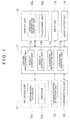
- FIG. 1 shows a block diagram showing an overall structure including a part of function expression of a navigation device according to an embodiment of the present invention.
- FIG. 2 is an explanatory drawing of a facility selection screen of the navigation device according to the embodiment of the present invention.
- FIG. 3 is an explanatory drawing of a map display screen of the navigation device according to the embodiment of the present invention.
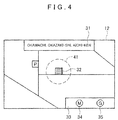
- FIG. 4 is an explanatory drawing of a lead-in area of the navigation device according to the embodiment of the present invention.
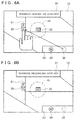
- FIGS. 5A and 5B are explanatory drawings of a destination setting method of the navigation device according to the embodiment of the present invention.
- FIGS. 6A and 6B are explanatory drawings of the destination setting method of the navigation device according to the embodiment of the present invention.
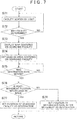
- FIG. 7 is a flowchart of the navigation device according to the embodiment of the present invention.
- FIG. 8 is an explanatory drawing of the destination setting method of the navigation device according to another embodiment of the present invention.
- FIG 9 shows an example of a display screen for a destination that was set in the destination setting method of FIG. 8 .
- FIG. 10 is an explanatory drawing of a map display method of the navigation device according to another embodiment of the present invention.
- FIG. 11 shows an example of the display screen that was displayed in the map display method of FIG. 10 .
- FIG. 1 is a block diagram showing a system structure of a navigation device according to the present embodiment.
- the navigation device which is installed in a vehicle in case of for vehicle or carried by a user in case of for pedestrian, is provided with a recording unit 11.
- a recording unit 11 an display unit 12, an input unit 13, an audio output unit 14, a current position detection unit 15, a communication unit 16. and a central processing unit 17.
- the recording unit 11 which is a recording medium that records information necessary for a navigation function, includes an optical disk such as a DVD, a magnetic disk such as a hard disk, a semiconductor memory such as a memory card, and the like.
- the recording unit 11 records data such as an information database 11a to record information, a program 11b to execute various functions of the navigation device, and the like.
- the information database 11a records road data representing a connection relation of roads, facility data representing a name and a position of a facility, guidance data necessary for route guidance, map data used in various types of functions for navigation, and the like.
- the program 11b records an operation program that performs an operation according to a manipulation of the user, a search program that performs search for the facility, a display control program that controls information to display, and the like.
- the information database 11a and the program 11b may be recorded in different recording media.
- the program 11b may be included in the recording unit 11 of the navigation device, and the information database 11a may be recorded in the recording unit 11 of an external server and the information may be acquired through communication via the communication unit 16.
- the display unit 12 which is a display device that outputs image information for the navigation, includes a liquid crystal display provided in the navigation device or the vehicle, and the like.
- the display unit 12 mainly operates as a guidance information display unit 12a that displays various kinds of guidance information. However, if the display unit 12 has a function as an input device, the display unit 12 is provided with a touch panel unit 12b that detects a touch of a finger of the user.
- the guidance information display unit 12a displays information necessary for various kinds of operation and guidance of the navigation device such as map information, facility information, an icon, a menu, and the like.
- the touch panel unit 12b detects a touch position of the finger of the user when the display unit 12 operates as the input device.
- the input unit 13 which is the input device that operates the navigation device, includes a button, a mouse, a microphone for performing an audio input by the user, and the like.
- the touch panel unit 12b of the display unit 12 operates as the input unit 13.
- the audio output unit 14 which is an audio output device that outputs audio information for navigation, includes a speaker provided in the navigation device or the vehicle, and the like.
- the audio output unit 14 provides the user with the navigation function, for example, by outputting route guidance such as a right/left turn at an intersection by audio.
- the current position detection unit 15 which corresponds to various kinds of antennas and sensors that detect a current position of the vehicle and the navigation device, includes a GPS receiver, a beacon receiver, an absolute direction sensor, a relative direction sensor, a distance sensor, and the like.
- An electronic device such as a personal computer having a function to set the destination on the map and output the guidance information of a route and the like is also a kind of the navigation device. However, such device may not include the current position detection unit 15.
- the communication unit 16 which, corresponds to various kinds of antennas, communication devices, and the like that transmit and receive information stored in the navigation device and the vehicle, receives road information transmitted from a broadcasting station and a beacon, and acquires information necessary for the user by performing communication with external centers.
- the central processing unit 17 includes a CPU that executes various kinds of computing processing according to the program, a RAM that is used as a working memory when the CPU executes the various kinds of computing processing, and the like.
- the central processing unit 17 performs overall control of the navigation device.
- the central processing unit 17 includes: a facility search unit 17a that searches for the facility from the information database 11a based on the conditions inputted by the user with the input unit 13; a display control unit 17b that displays the map of a vicinity of a searched facility including the facility searched by the user; an operation detection unit 17c that detects a movement volume and a movement direction of the icon when the user operates the icon displayed on the guidance information display unit 12a; an operation control unit 17d that executes a function determined based on an operation volume and the movement direction of the icon that were detected by the operation detection unit 17c.
- the button, the mouse, or the touch panel unit 12b as the input unit 13 is used.
- the icon is moved for example by moving a displayed cursor to over the icon with a cross key, selecting the icon by pressing the button, moving the icon with the cross key, and canceling the selection.
- a merit of an operation with the button is that the operation can be performed at a position far from the navigation device with use of a remote controller or the like.
- the displayed icon is moved for example by a drag operation.
- a merit of an operation with the mouse is that the operation is easier than the operation with the button.
- the touch panel the icon is moved for example by touching the displayed icon with a finger and performing the drag operation.
- a merit of an operation with the touch panel is that the operation can be intuitively performed.
- FIG. 2 shows an example of a facility selection screen of the navigation device according to the embodiment of the present invention.
- Search functions such as an address search, a category search, a telephone number search, and the like are included as search methods of the facility.
- a name search by a facility name is performed.
- facility search processing is executed by the facility search unit 17a and a facility search result is displayed on the display unit 12.
- a facility list 23 including "AAA" in names is displayed as the facility search result.
- information such as "AAA” that was inputted as the search term, a hit number "5 facilities” as a result of the facility search, and the like is also displayed in a search term display column 21 and a hit number display column 22 respectively.
- a search result display column 24 where "AA-A Okazaki" as the destination is displayed, the map centered on the "AAA Okazaki” as the searched facility is called by the display control unit 17b and displayed on the display unit 12.
- the touch panel to directly touch the display unit 12 is utilized when selecting a facility from the facility list 23.
- another input unit 13 such as the button, the remote control, or the like may be utilized in the same manner.
- FIG. 3 shows a screen example that the map centered on "AAA Okazaki 32" as the searched facility is displayed on the display unit 12.
- the "AAA Okazaki 32" is displayed at the center of the screen of the display unit 12.
- an address of the vicinity of the map displayed on the screen is displayed in an address display column 31, and icons such as a memory point icon 34, a destination icon 35, and the like are displayed in a function icon column 33.
- a function is assigned to each of the icons displayed in the function icon columns 33.
- the assigned function is executed with the position after the movement.
- the function to register the position after the movement as a memory point is assigned to the memory point icon 34, and the position registered as the memory point will be easily called in the map or the like.
- the function to set the position after the movement as the destination is assigned to a destination icon 35, and the route to the position set as the destination is searched by the central processing unit 17.
- the user moves the destination icon 35 to the position of the "AAA Okazaki 32". In this operation, it is difficult to accurately move the destination icon 35 to the position of the "AAA Okazaki 32". If the position of the destination icon 32 is off the position of the "AAA Okazaki 32", the destination is set to a position that is different from the position of the "AAA Okazaki 32". In some cases, a route to a road that is not adjacent to the "AAA Okazaki 32" is searched. In order to prevent such inconvenience, in the present invention, a lead-in area to judge that the icon such as the destination icon or the like was moved to the searched facility is set in the vicinity of the searched facility.
- FIG. 4 shows an idea of the lead-in area.
- a lead-in area 41 is set in the vicinity of the "AAA Okazaki 32" as the searched facility.
- the lead-in area 41 is set for example to a circle with a 100-meter radius centered on the "AAA Okazaki 32".
- FIGS. 5A and 5B show an operation in case of moving the destination icon 35 to within the lead-in area.
- the operation control unit 17d judges that the destination icon 35 was moved to the position of the "AAA Okazaki 32" and the destination icon 35 is set to the position of the "AAA Okazaki 32" as shown in FIG. 5B .
- FIGS. 6A and 6B show an operation in case of moving the destination icon 35 to outside the lead-in area.
- the destination icon 35 if the position after the movement is outside the lead-in area 41 as shown in FIG. 6A , the destination icon 35 is directly set to the moved position as shown in FIG. 6B .
- the destination icon 35 is moved to a position of a parking lot 61: therefore, the position of the parking lot 61 is set as the destination.
- FIG. 7 is a flowchart relating to the navigation device according to the present embodiment. The flowchart is called during execution of a main program of the navigation device.
- the facility search unit 17a performs the search (Step S71) and the search result is displayed on the list as shown in FIG. 2 .
- Step S72 When the user determines the facility as the destination from the list (Step S72: YES), the map centered on the determined facility is displayed (Step S73) and the lead-in area centered on the searched facility is set (Step S74). If the user does not select a facility but gives an instruction to go back because the facility desired for the destination is not listed or there are too many facilities to be displayed on the list, the procedure returns to a search menu (Step S72: NO).
- Step S75 When the user selects and moves the destination icon from the function icon column 33 (Step S75: YES), the operation detection unit 17c detects the moved position of the destination icon and the operation control unit 17d judges whether or not the moved position of the destination icon is within the lead-in area (Step S76). If the moved position of the destination icon is within the lead-in area, the operation control unit 17d leads the destination icon in the position of the selected facility and sets the selected facility as the destination (Step S77). If the moved position of the destination icon is outside the lead-in area, the destination is directly set to the moved position (Step S78).
- the facility search processing is executed by the facility search unit 17a and the facility search result is displayed on the display unit 12, as shown in FIGS. 8 and 10 .
- the facility list 23 including "AAA” in names is displayed as the facility search result.
- the information such as "AAA” that was inputted as the search term, the hit number "5 facilities” as a result of the facility search, and the like is also displayed in the search term display column 21 and the hit number display column 22 respectively.
- a function icon column 81 is displayed at the lower-right part of the display unit 12.
- the memory point icon 34 includes a function to register as the memory point the position on the map of the searched facility that corresponds to a facility name (the facility information) displayed at the position in the facility list 23 where the memory point icon 34 was moved, and the position registered as the memory point will be easily called in the map or the like.
- the destination icon 35 includes a function to set as the destination the position on the map of the facility that corresponds to the facility name (the facility information) displayed at the position in the facility list 23 where the destination icon 35 was moved, and the route to the position set as the destination will be searched by the central processing unit 17.
- an address of the vicinity of the map displayed on the screen is displayed in the address display column 31, and the memory point icon 34 is displayed in the function icon column 33. That- is, if the destination icon 35 is moved to the desired facility "AAA Okazaki/ Okazaki-shi, Aichi-ken" in the facility list 23, the destination icon 35 is moved to the position of the desired facility "AAA Okazaki 32".
- the map display icon 83 includes a function to display on the display unit 12 the map of the vicinity of the searched facility that corresponds to the facility name (the facility information) displayed at the position in the facility list 23 where the map display icon 83 was moved.
- the user can easily display on the display unit 12 and confirm the map of the vicinity centered on the searched facility that corresponds to the facility name displayed in the corresponding search result display column 24.
- the destination icon 35 is accurately displayed at the position on the map of the searched facility, and a right route to the searched facility is searched.
- the user can easily display on the display unit 12 and confirm the map of the vicinity centered on the searched facility that corresponds to the facility name displayed in the corresponding search result display column 24.
- icons such as the memory point icon 34 and the destination icon 35 are displayed on the display unit 12, and destination or the like can be quickly set by operating the destination icon 35 or the like.
Landscapes
- Engineering & Computer Science (AREA)
- Radar, Positioning & Navigation (AREA)
- Remote Sensing (AREA)
- Physics & Mathematics (AREA)
- General Physics & Mathematics (AREA)
- Automation & Control Theory (AREA)
- Theoretical Computer Science (AREA)
- Human Computer Interaction (AREA)
- Mathematical Physics (AREA)
- Business, Economics & Management (AREA)
- Educational Administration (AREA)
- Educational Technology (AREA)
- Navigation (AREA)
- Instructional Devices (AREA)
- User Interface Of Digital Computer (AREA)
Abstract
Description
- The present invention relates to a navigation device and a program that display an icon such as a mark together with a map. Especially, the present invention relates to a navigation device and a program, in which a specific function is executed by operating the icon on the map.
- In conventional navigation devices for vehicle, a host vehicle position is calculated in real time by using various types of sensors in a vehicle and a GPS (Global Positioning System) satellite. The calculated host vehicle position is displayed on an electronic map. Further, the navigation devices have a function to provide guidance on a route to a destination when a user has designated the destination. The navigation devices of this kind are common also as portable terminals for pedestrian, besides the terminals for vehicle.
- As navigation devices of this kind, technologies of Japanese Patent Application No.
JP-A-2002-323332 JP-A-2002-328028
Japanese Patent Application No.JP-A-2002-323332
Japanese Patent Application No.JP-A-2002-328028 - In the technology of Japanese Patent Application No.
JP-A-2002-323332
In the technology of Japanese Patent Application No.JP-A-2002-328028 - However, after displaying the map of the vicinity of the searched facility as suggested in Japanese Patent Application No.
JP-A-2002-323332 JP-A-2002-328028 - It is an object of the present invention to provide a navigation device and a program, in which a position setting can be accurately performed when operating the icon on the map.
- In the navigation device according to a first aspect of the present invention, respective functions are assigned to the respective icons displayed on a map screen, and when the user moves one of the icons, the function of the icon is executed with the position or based on the position after the movement, called hereinafter "post-movement position".
The navigation device includes: arecording unit 11 that records information data such as facility information, map information, and the like; adisplay unit 12 that performs displays of the information and guidance information such as the icon and the like; acentral processing unit 17 that performs various processing for the navigation. When the user searches for a desired facility, afacility search unit 17a performs facility search based on search conditions, and adisplay control part 17b displays the map of the vicinity of the searched facility on thedisplay unit 12. If a plurality of facilities have been acquired as a result of the facility search, the result is displayed on a list to make the user select a desired facility, and a facility selected by the user is displayed as the searched facility on the map.
On thedisplay unit 12, the icons are displayed together with the map. When the user moves an icon, anoperation detection unit 17c detects a movement direction and a movement amplitude of the icon and specifies a post-movement position of the icon. The respective functions such as destination setting, memory point setting, or the like are set to the respective icons.
When the searched facility is displayed on the map, anoperation control unit 17d sets a lead-in area in the vicinity of the searched facility, in which specific behaviours can be defined : If the position of the icon after the movement that was detected by theoperation detection unit 17c is within the lead-in area, theoperation control unit 17d executes the function of the icon with the position of the searched facility (as if it were located at the position of the searched facility), judging that the icon was moved to the position of the searched facility. If the detected position of the icon after the movement is not within the lead-in area, theoperation control unit 17d executes the function of the icon with the position of the icon after the movement. - In the navigation device according to a second aspect of the present invention, the destination for the navigation is set when the user moves a destination icon. The destination icon is to set the position, where the icon was moved, as the destination for the navigation. If the position of the destination icon after the movement is within the lead-in area, the
operation control unit 17d sets the position of the searched facility as the destination, judging that the destination icon was moved to the position of the searched facility. - The navigation device according to a third aspect of the present invention includes a
touch panel unit 12b to perform an input by a finger's touch. The operation detection,unit 17c detects the drag operation by the user based on the input from thetouch panel unit 12b. If the position of the icon subjected to the drag operation is within the lead-in area, theoperation control unit 17d executes the function of the icon with the position of the searched facility, judging that the icon was moved to the position of the searched facility. - A program according to a fourth aspect of the present invention causes a computer, which comprises a recording unit that records map information and facility information and a display unit that displays a map and an icon, to execute the steps of searching for a desired facility; displaying on the display unit a map of a vicinity of a searched facility searched in the facility search step; detecting a movement of the icon by a user; wherein a predetermined area from a position of the searched facility is set as a lead-in area, and a function based on a position of the icon after a movement of the icon, or 'post-movement position', is assigned to said icon.
The program further causes the computer to execute a step of executing, when the map of the vicinity of the searched facility is displayed on the display unit in the display step, if the icon is moved, and if the post-movement position, detected in the detection step, is within the lead-in area, the function assigned to the icon based on the position of the searched facility. - The navigation device according to the first aspect of the present invention sets the lead-in area to lead the icon in the vicinity of the searched facility searched by the user, and executes the function of the icon with the position of the searched facility searched by the user if the icon was moved to within the lead-in area.
Consequently, when the user moves the icon to the position of the searched facility, it is not necessary to move the icon to the accurate position, but it is only necessary to move the icon to the vicinity of the searched facility; therefore, the operation for selecting the searched facility becomes easy. In addition, the lead-in area is limited to the vicinity of the searched facility; therefore, the user can perform movement in a usual manner if the user desires to move the icon to another position than the searched facility. - The navigation device according to the second aspect of the present invention is to set the destination by moving the icon. Therefore, the operation becomes easy as the first aspect of the present invention.
- The navigation device according to the third aspect off the present invention is to move the icon by performing the drag operation by a finger on the touch panel. Therefore, intuitive icon operation becomes possible in addition to the effects of the first aspect of the present invention.
- In the program according to the fourth aspect of the present invention, the computer reads the program to set the lead-in, area to lead the icon in the vicinity of the searched facility searched by the user, and if the icon is moved in the lead-in area, executes the function of the icon with the position of the searched facility searched by the user.
Consequently, when the user moves the icon to the position of the searched facility, it is not necessary to move the icon to the accurate position, but it is only necessary to move the icon to the vicinity of the searched facility; therefore, the operation for selecting the searched facility becomes easy. In addition, the lead-in area is limited to the vicinity of the searched facility; therefore, the user can perform movement in a usual manner if the user desires to move the icon to another position than the searched facility. -
FIG. 1 shows a block diagram showing an overall structure including a part of function expression of a navigation device according to an embodiment of the present invention. -
FIG. 2 is an explanatory drawing of a facility selection screen of the navigation device according to the embodiment of the present invention. -
FIG. 3 is an explanatory drawing of a map display screen of the navigation device according to the embodiment of the present invention. -
FIG. 4 is an explanatory drawing of a lead-in area of the navigation device according to the embodiment of the present invention. -
FIGS. 5A and 5B are explanatory drawings of a destination setting method of the navigation device according to the embodiment of the present invention. -
FIGS. 6A and 6B are explanatory drawings of the destination setting method of the navigation device according to the embodiment of the present invention. -
FIG. 7 is a flowchart of the navigation device according to the embodiment of the present invention. -
FIG. 8 is an explanatory drawing of the destination setting method of the navigation device according to another embodiment of the present invention. -
FIG 9 shows an example of a display screen for a destination that was set in the destination setting method ofFIG. 8 . -
FIG. 10 is an explanatory drawing of a map display method of the navigation device according to another embodiment of the present invention. -
FIG. 11 shows an example of the display screen that was displayed in the map display method ofFIG. 10 . - The present invention is described in further detail below with reference to embodiments in conjunction with the accompanying drawings. In the embodiments, the same symbols and signs in the drawings refer to the same or corresponding function parts; therefore, overlapped explanation is omitted.
-
FIG. 1 is a block diagram showing a system structure of a navigation device according to the present embodiment. The navigation device, which is installed in a vehicle in case of for vehicle or carried by a user in case of for pedestrian, is provided with arecording unit 11. andisplay unit 12, aninput unit 13, anaudio output unit 14, a currentposition detection unit 15, acommunication unit 16. and acentral processing unit 17. - The
recording unit 11, which is a recording medium that records information necessary for a navigation function, includes an optical disk such as a DVD, a magnetic disk such as a hard disk, a semiconductor memory such as a memory card, and the like. Therecording unit 11 records data such as aninformation database 11a to record information, aprogram 11b to execute various functions of the navigation device, and the like. Theinformation database 11a records road data representing a connection relation of roads, facility data representing a name and a position of a facility, guidance data necessary for route guidance, map data used in various types of functions for navigation, and the like. Theprogram 11b records an operation program that performs an operation according to a manipulation of the user, a search program that performs search for the facility, a display control program that controls information to display, and the like. Theinformation database 11a and theprogram 11b may be recorded in different recording media. For example, theprogram 11b may be included in therecording unit 11 of the navigation device, and theinformation database 11a may be recorded in therecording unit 11 of an external server and the information may be acquired through communication via thecommunication unit 16. - The
display unit 12, which is a display device that outputs image information for the navigation, includes a liquid crystal display provided in the navigation device or the vehicle, and the like. Thedisplay unit 12 mainly operates as a guidanceinformation display unit 12a that displays various kinds of guidance information. However, if thedisplay unit 12 has a function as an input device, thedisplay unit 12 is provided with atouch panel unit 12b that detects a touch of a finger of the user. The guidanceinformation display unit 12a displays information necessary for various kinds of operation and guidance of the navigation device such as map information, facility information, an icon, a menu, and the like. Thetouch panel unit 12b detects a touch position of the finger of the user when thedisplay unit 12 operates as the input device. - The
input unit 13, which is the input device that operates the navigation device, includes a button, a mouse, a microphone for performing an audio input by the user, and the like. In addition, thetouch panel unit 12b of thedisplay unit 12 operates as theinput unit 13. These members instruct various kinds of processing to thecentral processing unit 17 upon an input operation of the user, such as setting the destination and performing a scroll operation of a map. - The
audio output unit 14, which is an audio output device that outputs audio information for navigation, includes a speaker provided in the navigation device or the vehicle, and the like. Theaudio output unit 14 provides the user with the navigation function, for example, by outputting route guidance such as a right/left turn at an intersection by audio. - The current
position detection unit 15, which corresponds to various kinds of antennas and sensors that detect a current position of the vehicle and the navigation device, includes a GPS receiver, a beacon receiver, an absolute direction sensor, a relative direction sensor, a distance sensor, and the like. An electronic device such as a personal computer having a function to set the destination on the map and output the guidance information of a route and the like is also a kind of the navigation device. However, such device may not include the currentposition detection unit 15. - The
communication unit 16, which, corresponds to various kinds of antennas, communication devices, and the like that transmit and receive information stored in the navigation device and the vehicle, receives road information transmitted from a broadcasting station and a beacon, and acquires information necessary for the user by performing communication with external centers. - The
central processing unit 17 includes a CPU that executes various kinds of computing processing according to the program, a RAM that is used as a working memory when the CPU executes the various kinds of computing processing, and the like. Thecentral processing unit 17 performs overall control of the navigation device.
In the present embodiment, thecentral processing unit 17 includes: afacility search unit 17a that searches for the facility from theinformation database 11a based on the conditions inputted by the user with theinput unit 13; adisplay control unit 17b that displays the map of a vicinity of a searched facility including the facility searched by the user; anoperation detection unit 17c that detects a movement volume and a movement direction of the icon when the user operates the icon displayed on the guidanceinformation display unit 12a; anoperation control unit 17d that executes a function determined based on an operation volume and the movement direction of the icon that were detected by theoperation detection unit 17c.
When the user performs a movement operation of the icon displayed on the guidanceinformation display unit 12a, the button, the mouse, or thetouch panel unit 12b as theinput unit 13 is used. In case of using the button, the icon is moved for example by moving a displayed cursor to over the icon with a cross key, selecting the icon by pressing the button, moving the icon with the cross key, and canceling the selection. A merit of an operation with the button is that the operation can be performed at a position far from the navigation device with use of a remote controller or the like. In case of using the mouse, the displayed icon is moved for example by a drag operation. A merit of an operation with the mouse is that the operation is easier than the operation with the button. In case of using the touch panel, the icon is moved for example by touching the displayed icon with a finger and performing the drag operation. A merit of an operation with the touch panel is that the operation can be intuitively performed. -
FIG. 2 shows an example of a facility selection screen of the navigation device according to the embodiment of the present invention. Hereinafter, a case in which the user sets a facility "AAA Okazaki" as the destination is described with reference to the drawing. Search functions such as an address search, a category search, a telephone number search, and the like are included as search methods of the facility. In the present embodiment, a name search by a facility name is performed. When the user inputs "AAA" as a search term, facility search processing is executed by thefacility search unit 17a and a facility search result is displayed on thedisplay unit 12. Specifically, afacility list 23 including "AAA" in names is displayed as the facility search result. In addition, information such as "AAA" that was inputted as the search term, a hit number "5 facilities" as a result of the facility search, and the like is also displayed in a searchterm display column 21 and a hitnumber display column 22 respectively. - When the user selects from the facility list 23 a search
result display column 24 where "AA-A Okazaki" as the destination is displayed, the map centered on the "AAA Okazaki" as the searched facility is called by thedisplay control unit 17b and displayed on thedisplay unit 12. In the present embodiment, the touch panel to directly touch thedisplay unit 12 is utilized when selecting a facility from thefacility list 23. However, anotherinput unit 13 such as the button, the remote control, or the like may be utilized in the same manner. -
FIG. 3 shows a screen example that the map centered on "AAA Okazaki 32" as the searched facility is displayed on thedisplay unit 12. The "AAA Okazaki 32" is displayed at the center of the screen of thedisplay unit 12. In addition, an address of the vicinity of the map displayed on the screen is displayed in anaddress display column 31, and icons such as amemory point icon 34, adestination icon 35, and the like are displayed in afunction icon column 33. - A function is assigned to each of the icons displayed in the
function icon columns 33. When the user selects one of the icons and moves on the screen, the assigned function is executed with the position after the movement. For example, the function to register the position after the movement as a memory point is assigned to thememory point icon 34, and the position registered as the memory point will be easily called in the map or the like. In addition, the function to set the position after the movement as the destination is assigned to adestination icon 35, and the route to the position set as the destination is searched by thecentral processing unit 17. - In case of setting the "
AAA Okazaki 32" as the destination using thedestination icon 35, the user moves thedestination icon 35 to the position of the "AAA Okazaki 32". In this operation, it is difficult to accurately move thedestination icon 35 to the position of the "AAA Okazaki 32". If the position of thedestination icon 32 is off the position of the "AAA Okazaki 32", the destination is set to a position that is different from the position of the "AAA Okazaki 32". In some cases, a route to a road that is not adjacent to the "AAA Okazaki 32" is searched. In order to prevent such inconvenience, in the present invention, a lead-in area to judge that the icon such as the destination icon or the like was moved to the searched facility is set in the vicinity of the searched facility. -
FIG. 4 shows an idea of the lead-in area. In the present embodiment, a lead-inarea 41 is set in the vicinity of the "AAA Okazaki 32" as the searched facility. The lead-inarea 41 is set for example to a circle with a 100-meter radius centered on the "AAA Okazaki 32". -
FIGS. 5A and 5B show an operation in case of moving thedestination icon 35 to within the lead-in area. When the user has moved thedestination icon 35, if the position after the movement is inside the lead-inarea 41 as shown inFIG. 5A , theoperation control unit 17d judges that thedestination icon 35 was moved to the position of the "AAA Okazaki 32" and thedestination icon 35 is set to the position of the "AAA Okazaki 32" as shown inFIG. 5B . In this manner, it is only necessary to move thedestination icon 35 to the vicinity of the "AAA Okazaki 32" in case of desiring to set the destination to the "AAA Okazaki 32"; therefore, the operation becomes easy for the user. -
FIGS. 6A and 6B show an operation in case of moving thedestination icon 35 to outside the lead-in area. When the user has moved thedestination icon 35, if the position after the movement is outside the lead-inarea 41 as shown inFIG. 6A , thedestination icon 35 is directly set to the moved position as shown inFIG. 6B . In case ofFIGS. 6A and 6B , thedestination icon 35 is moved to a position of a parking lot 61: therefore, the position of theparking lot 61 is set as the destination. -
FIG. 7 is a flowchart relating to the navigation device according to the present embodiment. The flowchart is called during execution of a main program of the navigation device. When the user inputs search conditions and performs facility search, thefacility search unit 17a performs the search (Step S71) and the search result is displayed on the list as shown inFIG. 2 . - When the user determines the facility as the destination from the list (Step S72: YES), the map centered on the determined facility is displayed (Step S73) and the lead-in area centered on the searched facility is set (Step S74). If the user does not select a facility but gives an instruction to go back because the facility desired for the destination is not listed or there are too many facilities to be displayed on the list, the procedure returns to a search menu (Step S72: NO).
- When the user selects and moves the destination icon from the function icon column 33 (Step S75: YES), the
operation detection unit 17c detects the moved position of the destination icon and theoperation control unit 17d judges whether or not the moved position of the destination icon is within the lead-in area (Step S76). If the moved position of the destination icon is within the lead-in area, theoperation control unit 17d leads the destination icon in the position of the selected facility and sets the selected facility as the destination (Step S77). If the moved position of the destination icon is outside the lead-in area, the destination is directly set to the moved position (Step S78). - Next, another embodiment of the facility selection screen in
FIG. 2 is described. - For example, when the user inputs "AAA" as the search term, the facility search processing is executed by the
facility search unit 17a and the facility search result is displayed on thedisplay unit 12, as shown inFIGS. 8 and10 . Specifically, thefacility list 23 including "AAA" in names is displayed as the facility search result. In addition, the information such as "AAA" that was inputted as the search term, the hit number "5 facilities" as a result of the facility search, and the like is also displayed in the searchterm display column 21 and the hitnumber display column 22 respectively. - Here, a
function icon column 81 is displayed at the lower-right part of thedisplay unit 12. In thefunction icon column 81, thememory point icon 34, thedestination icon 35, and amap display icon 83 are displayed. Thememory point icon 34 includes a function to register as the memory point the position on the map of the searched facility that corresponds to a facility name (the facility information) displayed at the position in thefacility list 23 where thememory point icon 34 was moved, and the position registered as the memory point will be easily called in the map or the like. - The
destination icon 35 includes a function to set as the destination the position on the map of the facility that corresponds to the facility name (the facility information) displayed at the position in thefacility list 23 where thedestination icon 35 was moved, and the route to the position set as the destination will be searched by thecentral processing unit 17. - For example, as shown in
FIGS. 8 and 9 , if thedestination icon 35 is moved onto the "AAA Okazaki/ Okazaki*shi, Aichi-ken" displayed in the search result,displays column 24 in thefacility list 23, the searched facility "AAA Okazaki 32" corresponding to the "AAA Okazaki/ Qkazaki-shi, Aichi-ken" is set as the destination. And, the map centered on the searched facility "AAA Okazaki 32" as the destination is displayed on thedisplay unit 12, and also thedestination icon 35 is accurately displayed at the position of the "AAA Okazaki 32". Then, a route to the "AAA Okazaki 32" is searched. - In addition, an address of the vicinity of the map displayed on the screen is displayed in the
address display column 31, and thememory point icon 34 is displayed in thefunction icon column 33. That- is, if thedestination icon 35 is moved to the desired facility "AAA Okazaki/ Okazaki-shi, Aichi-ken" in thefacility list 23, thedestination icon 35 is moved to the position of the desired facility "AAA Okazaki 32". - If information of the vicinity of the "
AAA Okazaki 32" is required, when moving themap display icon 83 onto thefacility list 23, the map centered on the "AAA Okazaki 32" is displayed, as shown inFIG. 3 . Themap display icon 83 includes a function to display on thedisplay unit 12 the map of the vicinity of the searched facility that corresponds to the facility name (the facility information) displayed at the position in thefacility list 23 where themap display icon 83 was moved. - For example, as shown in
FIGS. 10 and 11 , if themap display icon 83 is moved onto the "AAA Okazaki/ Okazaki-shi, Alchi-ken" displayed in the searchresult display column 24 in thefacility list 23, the map centered on the searched facility "AAA Okazaki 32" that corresponds to the "AAA Okazaki/ Okazaki-shi, Aichl-ken" is displayed on thedisplay unit 12. In addition, an address of the vicinity of the map displayed on the screen is displayed in theaddress display column 31, and icons such as thememory point icon 34 and thedestination icon 35 are displayed in thefunction icon column 33. That is, the same state as the aforementionedFIG. 3 is given. The subsequent operation are also the same; therefore, the description is omitted. - Thus, by moving the
destination icon 35 displayed in thefunction icon column 81 onto the desired facility name in thefacility list 23, the user can easily display on thedisplay unit 12 and confirm the map of the vicinity centered on the searched facility that corresponds to the facility name displayed in the corresponding searchresult display column 24. At the same time, thedestination icon 35 is accurately displayed at the position on the map of the searched facility, and a right route to the searched facility is searched. - In addition, by moving the
map display icon 83 displayed in thefunction icon column 81 onto the desired facility name in thefacility list 23, the user can easily display on thedisplay unit 12 and confirm the map of the vicinity centered on the searched facility that corresponds to the facility name displayed in the corresponding searchresult display column 24. Further, icons such as thememory point icon 34 and thedestination icon 35 are displayed on thedisplay unit 12, and destination or the like can be quickly set by operating thedestination icon 35 or the like. - While various features have been described in conjunction with the example outlined above, various alternatives, modifications, variations, and/or improvements of those features and/or example may be possible. Accordingly, the example, as set forth above, are intended to be illustrative. Various changes may be made without departing from the broad spirit and scope of the underlying principles.
Claims (4)
- A navigation device characterized by comprising:a recording unit (11) that records map information and facility information;a display unit (12) that displays a map and an icon (35), a function based on a position of the icon after a movement of the icon, or 'post-movement position', being assigned to said icon;a facility search unit (17a) that searches for a desired facility;a display control unit (17b) that displays on the display unit a map of a vicinity of a searched facility searched by the facility search unit;an operation detection unit (17c) that detects a movement, of the icon by a user; andan operation control unit (17d), that sets a predetermined area from a position of the searched facility as a lead-in area, and which, when the map of the vicinity of the searched facility is displayed on the display unit, if the icon is moved, and if the post-movement position is within the lead-in area, executes the function of the icon based on the position of the searched facility.
- The navigation device according to claim 1, wherein
the icon is a destination icon to set the post-movement position of the icon as a destination, and the operation control unit sets the position of the searched facility as the destination if the post-movement position of the destination icon is within the lead-in area. - The navigation device according to claim 1, wherein:the display unit has a touch panel unit to perform an input by a touch of a finger: the operation detection unit detects a drag operation by the user based on the input from the touch panel unit; and the operation control unit executes the function of the icon with the position of the searched facility if the icon was subjected, to the drag operation and moved to within the lead-in area.
- A program causing a computer, which comprises a recording unit that records map information and facility information, and a display unit that displays a map and an icon, to execute the steps of:searching for a desired facility;displaying on the display unit a map of a vicinity of a searched facility searched in the facility search step; anddetecting a movement, of the icon by a user;wherein a predetermined area from a position of the searched facility is set as a lead-in area, and a function based on a position of the icon after a movement of the icon, or 'post-movement position', is assigned to said icon,
said program further causing said computer to further execute the step ofexecuting, when the map of the vicinity of the searched facility is displayed on the display unit in the display step, if` the icon is moved, and if the post-movement position, detected in the detection step, is within the lead-in area, the function assigned to the icon based on the position of the searched facility.
Applications Claiming Priority (2)
| Application Number | Priority Date | Filing Date | Title |
|---|---|---|---|
| JP2009226984 | 2009-09-30 | ||
| JP2010074055A JP2011095238A (en) | 2009-09-30 | 2010-03-29 | Navigation device and program |
Publications (2)
| Publication Number | Publication Date |
|---|---|
| EP2306154A2 true EP2306154A2 (en) | 2011-04-06 |
| EP2306154A3 EP2306154A3 (en) | 2014-06-04 |
Family
ID=43494987
Family Applications (1)
| Application Number | Title | Priority Date | Filing Date |
|---|---|---|---|
| EP10170697.6A Withdrawn EP2306154A3 (en) | 2009-09-30 | 2010-07-23 | Navigation device and program |
Country Status (4)
| Country | Link |
|---|---|
| US (1) | US20110077850A1 (en) |
| EP (1) | EP2306154A3 (en) |
| JP (1) | JP2011095238A (en) |
| CN (1) | CN102032908A (en) |
Families Citing this family (20)
| Publication number | Priority date | Publication date | Assignee | Title |
|---|---|---|---|---|
| JP5381691B2 (en) * | 2009-12-25 | 2014-01-08 | アイシン・エィ・ダブリュ株式会社 | Map display device, map display method and program |
| JP5761556B2 (en) * | 2011-03-22 | 2015-08-12 | ソニー株式会社 | Information processing terminal, information processing method, and program |
| US8788203B2 (en) * | 2011-05-23 | 2014-07-22 | Microsoft Corporation | User-driven navigation in a map navigation tool |
| JP5925495B2 (en) * | 2012-01-18 | 2016-05-25 | 株式会社ナビタイムジャパン | Information processing apparatus, information processing system, information processing method, and information processing program |
| JP5804956B2 (en) * | 2012-01-26 | 2015-11-04 | Kddi株式会社 | User interface device emulating parameter setting unit, parameter setting method and program |
| WO2012103840A2 (en) | 2012-03-29 | 2012-08-09 | 华为技术有限公司 | Method and terminal device for filtering objects |
| CN102855068B (en) * | 2012-08-16 | 2018-07-17 | 优视科技有限公司 | Interface operation control method, device and electronic equipment |
| US9200915B2 (en) | 2013-06-08 | 2015-12-01 | Apple Inc. | Mapping application with several user interfaces |
| US9317813B2 (en) | 2013-03-15 | 2016-04-19 | Apple Inc. | Mobile device with predictive routing engine |
| US9303997B2 (en) | 2013-03-15 | 2016-04-05 | Apple Inc. | Prediction engine |
| US20140365459A1 (en) | 2013-06-08 | 2014-12-11 | Apple Inc. | Harvesting Addresses |
| US10242114B2 (en) * | 2013-12-30 | 2019-03-26 | Microsoft Technology Licensing, Llc | Point of interest tagging from social feeds |
| US20160366546A1 (en) * | 2015-06-09 | 2016-12-15 | Google Inc. | Systems and Methods for Disambiguation of Location Entities Associated with the Current Geographic Location of a Mobile Device |
| JP5957744B1 (en) * | 2015-07-31 | 2016-07-27 | パナソニックIpマネジメント株式会社 | Driving support device, driving support system, driving support method, driving support program, and autonomous driving vehicle |
| CN109432766B (en) * | 2015-12-24 | 2021-06-25 | 网易(杭州)网络有限公司 | Game control method and device |
| CN107155168B (en) * | 2016-03-04 | 2019-09-10 | 滴滴(中国)科技有限公司 | Illustrate bootstrap technique, apparatus and system |
| CN108519080B (en) * | 2018-03-14 | 2020-10-13 | 维沃移动通信有限公司 | A navigation route planning method and terminal |
| US10876853B2 (en) * | 2018-07-06 | 2020-12-29 | Honda Motor Co., Ltd. | Information presentation device, information presentation method, and storage medium |
| KR102273999B1 (en) * | 2019-08-13 | 2021-07-06 | 이시완 | System for providing guidance interface based on touch gesture and the method thereof |
| CN113961019B (en) * | 2021-12-22 | 2022-03-04 | 广州成至智能机器科技有限公司 | Path planning method, control device, shooting device and unmanned aerial vehicle |
Citations (2)
| Publication number | Priority date | Publication date | Assignee | Title |
|---|---|---|---|---|
| JP2002323332A (en) | 2001-04-24 | 2002-11-08 | Matsushita Electric Ind Co Ltd | Route guidance device |
| JP2002328028A (en) | 2001-05-01 | 2002-11-15 | Sony Corp | Navigation device, information display device, object generation method, storage medium |
Family Cites Families (10)
| Publication number | Priority date | Publication date | Assignee | Title |
|---|---|---|---|---|
| KR100235240B1 (en) * | 1995-10-31 | 1999-12-15 | 모리 하루오 | Navigation apparatus |
| US6209104B1 (en) * | 1996-12-10 | 2001-03-27 | Reza Jalili | Secure data entry and visual authentication system and method |
| JP3475123B2 (en) * | 1999-05-24 | 2003-12-08 | アイシン・エィ・ダブリュ株式会社 | Navigation device and storage medium |
| JP2001249023A (en) * | 2000-03-03 | 2001-09-14 | Clarion Co Ltd | Information processing apparatus and method and record medium having software recorded for processing information |
| US6487495B1 (en) * | 2000-06-02 | 2002-11-26 | Navigation Technologies Corporation | Navigation applications using related location-referenced keywords |
| JP3967218B2 (en) * | 2002-07-17 | 2007-08-29 | アルパイン株式会社 | Navigation device |
| KR20070113018A (en) * | 2006-05-24 | 2007-11-28 | 엘지전자 주식회사 | Touch screen device and its execution method |
| US7991545B2 (en) * | 2006-12-22 | 2011-08-02 | Alpine Electronics, Inc. | Method and apparatus for selecting POI by brand icon |
| JP4732421B2 (en) * | 2007-11-06 | 2011-07-27 | 本田技研工業株式会社 | Navigation device |
| US8380366B1 (en) * | 2008-03-12 | 2013-02-19 | Garmin International, Inc. | Apparatus for touch screen avionic device |
-
2010
- 2010-03-29 JP JP2010074055A patent/JP2011095238A/en active Pending
- 2010-07-23 EP EP10170697.6A patent/EP2306154A3/en not_active Withdrawn
- 2010-07-23 US US12/842,083 patent/US20110077850A1/en not_active Abandoned
- 2010-07-30 CN CN2010102434613A patent/CN102032908A/en active Pending
Patent Citations (2)
| Publication number | Priority date | Publication date | Assignee | Title |
|---|---|---|---|---|
| JP2002323332A (en) | 2001-04-24 | 2002-11-08 | Matsushita Electric Ind Co Ltd | Route guidance device |
| JP2002328028A (en) | 2001-05-01 | 2002-11-15 | Sony Corp | Navigation device, information display device, object generation method, storage medium |
Also Published As
| Publication number | Publication date |
|---|---|
| CN102032908A (en) | 2011-04-27 |
| US20110077850A1 (en) | 2011-03-31 |
| JP2011095238A (en) | 2011-05-12 |
| EP2306154A3 (en) | 2014-06-04 |
Similar Documents
| Publication | Publication Date | Title |
|---|---|---|
| EP2306154A2 (en) | Navigation device and program | |
| US9477400B2 (en) | Method and apparatus for navigation system for selecting icons and application area by hand drawing on map image | |
| JP5311990B2 (en) | Parking information display device | |
| JP4450003B2 (en) | Navigation device | |
| EP2306155B1 (en) | Navigation device with multitouch icon selection | |
| EP2431855B1 (en) | Touch screen operation device, touch screen operation method, and corresponding computer program product | |
| JP2002328028A (en) | Navigation device, information display device, object generation method, storage medium | |
| JP2008180786A (en) | Navigation system and navigation device | |
| JPWO2008038499A1 (en) | Display control apparatus, display control method, display control program, and recording medium | |
| US20170308268A1 (en) | Map presentation system and navigation system | |
| JP2011080828A (en) | Input position setting device | |
| JP4725731B2 (en) | Car navigation system | |
| JP2007003328A (en) | Car navigation system | |
| JP2012113096A (en) | Map display device, map display method and computer program | |
| JP3743312B2 (en) | Map display device, program | |
| JP2012133245A (en) | Map display device, map display method, and computer program | |
| JP4894336B2 (en) | Intersection search device and intersection search method | |
| JP5868082B2 (en) | Map display device | |
| CN101813487B (en) | Navigation device and display method thereof | |
| JP6275450B2 (en) | Navigation device | |
| JP2012159451A (en) | Map display device, map display method and computer program | |
| JP4134423B2 (en) | Vehicle information display device and recording medium of the device | |
| JP2012190231A (en) | Touch panel type operation device, method for operating touch panel, and computer program | |
| JP2010032280A (en) | Route display apparatus | |
| JP2010122128A (en) | Navigation apparatus and method of searching road in navigation apparatus |
Legal Events
| Date | Code | Title | Description |
|---|---|---|---|
| PUAI | Public reference made under article 153(3) epc to a published international application that has entered the european phase |
Free format text: ORIGINAL CODE: 0009012 |
|
| AK | Designated contracting states |
Kind code of ref document: A2 Designated state(s): AL AT BE BG CH CY CZ DE DK EE ES FI FR GB GR HR HU IE IS IT LI LT LU LV MC MK MT NL NO PL PT RO SE SI SK SM TR |
|
| AX | Request for extension of the european patent |
Extension state: BA ME RS |
|
| PUAL | Search report despatched |
Free format text: ORIGINAL CODE: 0009013 |
|
| AK | Designated contracting states |
Kind code of ref document: A3 Designated state(s): AL AT BE BG CH CY CZ DE DK EE ES FI FR GB GR HR HU IE IS IT LI LT LU LV MC MK MT NL NO PL PT RO SE SI SK SM TR |
|
| AX | Request for extension of the european patent |
Extension state: BA ME RS |
|
| RIC1 | Information provided on ipc code assigned before grant |
Ipc: G09B 29/10 20060101ALI20140425BHEP Ipc: G01C 21/36 20060101AFI20140425BHEP |
|
| STAA | Information on the status of an ep patent application or granted ep patent |
Free format text: STATUS: THE APPLICATION IS DEEMED TO BE WITHDRAWN |
|
| 18D | Application deemed to be withdrawn |
Effective date: 20141205 |