EP2269147B1 - User translated sites after provisioning - Google Patents
User translated sites after provisioning Download PDFInfo
- Publication number
- EP2269147B1 EP2269147B1 EP09755303.6A EP09755303A EP2269147B1 EP 2269147 B1 EP2269147 B1 EP 2269147B1 EP 09755303 A EP09755303 A EP 09755303A EP 2269147 B1 EP2269147 B1 EP 2269147B1
- Authority
- EP
- European Patent Office
- Prior art keywords
- site
- language
- content
- application content
- translated
- Prior art date
- Legal status (The legal status is an assumption and is not a legal conclusion. Google has not performed a legal analysis and makes no representation as to the accuracy of the status listed.)
- Active
Links
Images


Classifications
-
- G—PHYSICS
- G06—COMPUTING OR CALCULATING; COUNTING
- G06F—ELECTRIC DIGITAL DATA PROCESSING
- G06F9/00—Arrangements for program control, e.g. control units
- G06F9/06—Arrangements for program control, e.g. control units using stored programs, i.e. using an internal store of processing equipment to receive or retain programs
- G06F9/44—Arrangements for executing specific programs
- G06F9/451—Execution arrangements for user interfaces
- G06F9/454—Multi-language systems; Localisation; Internationalisation
Definitions
- Businesses often create sites to allow collaboration of team members working on various projects. These sites provide the team members a collaborative place to share ideas and work on projects together. Using these sites, team members typically share information and documents, generate ideas, respond to other team member's ideas, and track the progress of the projects. While the team members may be more comfortable using their native languages, the sites are provisioned with a default language with which they use to communicate on the site.
- US 2005/0198573 A1 describes a tool for finding and accurately translating matching English text fragments within web pages into a specified language from pre-translated texts stored in a database table.
- the tool uses intelligent search patterns, like code prefixes and suffixes to, accurately find the matching text patterns and replace them.
- the algorithm pays special attention to sentence structure, syntax and vocabulary and to finding a suitable foreign language sentence or word corresponding to the matched English text. These text fragments could be labels, messages, titles or descriptions within the pages.
- the process looks through each and every file, which may have particular file extensions, and translates matched English language texts into the specified target language. It then makes copies of newly translated files into directories with the same structure which can be used for a specific client and language.
- US 2005/137873 A1 discloses a method and system to allow a user to select a web site home page in a desired language.
- the method comprises the steps of identifying within a web address request a directional information item, providing a web page associated with the web address to a second web site corresponding to said directional information item, wherein the second web site includes a language translator, translating the web page textual information in accordance with the language translator and returning the translated web page to the user.
- the method further comprises the steps of accessing a control table to determine a status of the web page and obtaining a version of the web page stored locally on the second site, when said status indicates said web page is locally stored and valid, otherwise obtaining a current version of the web page; and translating the obtained web page.
- the object of the present invention is to provide a system and a method for changing the display language of a site to alternate languages by users of the site at any time. This object is solved by the invention as claimed in the independent claims.
- the display language of a site may be changed to alternate languages by users of a site at any time. For example, a first user may access the site in its default language (i.e. English) and a second user may access the same site using their preferred language (i.e. French) even though the default language of the site is different from their preferred language.
- the language of the site may be changed from one language to another language at any time while a user is accessing the site.
- Application content changes are identified by the site helping to ensure consistency between the default language and the translations to the alternate languages.
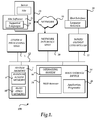
- FIGURE 1 and the corresponding discussion are intended to provide a brief, general description of a suitable computing environment in which embodiments may be implemented.
- program modules include routines, programs, components, data structures, and other types of structures that perform particular tasks or implement particular abstract data types.
- Other computer system configurations may also be used, including hand-held devices, multiprocessor systems, microprocessor-based or programmable consumer electronics, minicomputers, mainframe computers, and the like.
- Distributed computing environments may also be used where tasks are performed by remote processing devices that are linked through a communications network.
- program modules may be located in both local and remote memory storage devices.
- Computer 100 is generally illustrated as a client computing device, computer 100 may be configured as a client, a server, mobile device, or any other computing device that is used to provide and/or interact with a web site.
- Computer 100 includes a central processing unit 5 ("CPU"), a system memory 7, including a random access memory 9 (“RAM”) and a read-only memory (“ROM”) 10, and a system bus 12 that couples the memory to the CPU 5.
- CPU central processing unit
- RAM random access memory 9
- ROM read-only memory
- the computer 100 further includes a mass storage device 14 for storing an operating system 16, application programs 24, and other program modules, which will be described in greater detail below.
- the mass storage device 14 is connected to the CPU 5 through a mass storage controller (not shown) connected to the bus 12.
- the mass storage device 14 and its associated computer-readable media provide non-volatile storage for the computer 100.
- computer-readable media can be any available media that can be accessed by the computer 100.
- Computer-readable media may comprise computer storage media and communication media.
- Computer storage media includes volatile and non-volatile, removable and non-removable media implemented in any method or technology for storage of information such as computer-readable instructions, data structures, program modules or other data.
- Computer storage media includes, but is not limited to, RAM, ROM, EPROM, EEPROM, flash memory or other solid state memory technology, CD-ROM, digital versatile disks ("DVD”), or other optical storage, magnetic cassettes, magnetic tape, magnetic disk storage or other magnetic storage devices, or any other medium which can be used to store the desired information and which can be accessed by the computer 100.
- computer 100 may operate in a networked environment using logical connections to remote computers through a network 18, such as the Internet.
- the computer 100 may connect to the network 18 through a network interface unit 20 connected to the bus 12.
- the network connection may be wireless and/or wired.
- the network interface unit 20 may also be utilized to connect to other types of networks and remote computer systems.
- the computer 100 may also include an input/output controller 22 for receiving and processing input from a number of other devices, including a keyboard, mouse, or electronic stylus (not shown in FIGURE 1 ).
- an input/output controller 22 may provide output to a display screen that includes a user interface 28, a printer, or other type of output device.
- Computer 100 may also be coupled to data source(s) (not shown) through a network connection 18, and/or some other connection.
- a number of program modules and data files may be stored in the mass storage device 14 and RAM 9 of the computer 100, including an operating system 16 suitable for controlling the operation of a networked personal computer, such as the WINDOWS VISTA® operating system from MICROSOFT CORPORATION of Redmond, Washington.
- the mass storage device 14 and RAM 9 may also store one or more program modules.
- the mass storage device 14 and the RAM 9 may store one or more application programs 26, such as a web browser application 24.
- browser program 24 may be the MICROSOFT INTERNET EXPLORER® application.
- Server 23 is configured to provide site services for computer 100.
- server 23 includes site software 25 that is configured to provide a site that is accessed through browser application 24 on client 100.
- the site software such as MICROSOFT SHAREPOINT SERVICES® may be used to provide collaboration tools, document storage tools and workflow tools that are associated with a site.
- a site may be created that provides users (team members) with ways to share documents; share calendar or event information; generate and discuss ideas about a project; and adding, assigning, and tracking tasks concerning a project.
- the site may be configured as an Internet Site, Extranet Site, and/or an Intranet site or any other site that is accessible to users.
- Site software 25 is configured to provide the same site to users using different supported languages 29.
- the supported languages 29 are provided in language packs that allow a user to view the site in different languages.
- a language is selected by a user for the display of the site, the navigation and pages for that site are displayed to that user in the selected language.
- one user of the site may view the site using a first language
- a second user may view the same site using a second language
- a third user may view the same site using a third language, and the like.
- User interface (UI) 28 is designed to provide a user with a visual way to view the site and to select a language of the site in which to view the site.
- UI 28 may be used to select a language from one of the available supported languages in language packs 29.
- the language of the site may be changed at any time. For example, a user may change the site from a default language to an alternate language and back to the default language during one visit to the site.
- UI 28 may also be used to make modifications/additions to the content of the site.
- Site software 25 includes tools to help maintain the consistency of the site's languages when changes are made in one language that may affect the other languages (see below).
- FIGURE 2 shows a system for translating sites from a default language to alternate languages.
- system 200 includes site 41, supported languages 29, content table 46, document library 47, content 48, User 1 43, User 2 (44), User N (45) and browser 24.
- the language specified when a site is created controls the language used in the site itself. For example, if the site was provisioned in French, all of the toolbars, navigation bars, list and form pages, and so on, appear in French. If the site was created in Arabic, the text is in Arabic, and the default left-to-right orientation of the site is changed to right-to-left to properly display Arabic text.
- User 1 uploads documents to the Documents Library 47, creates a number of tasks in the Task List, and sets up a recurring meeting with the users using the Team Site Calendar using site tools 42.
- User 1 performs these operations using the default language of English.
- User 2 would prefer to view site 41 in their native language of French. Since French is one of the supported languages 29 on this site he goes ahead and changes the language of the site to French using a user interface that is provided by the site in browser 24 of User 2's display.
- the language of the site may be automatically changed to another language based on a language setting.
- the language selected may be based on the user's browser's settings, or some other setting that indicates a language preference.
- Application content 48 for site 41 is now displayed in French.
- Application content includes, but is not limited to help items, menu bars, links, titles, descriptions and the like.
- application content is content that describes the user interface (UI) for the site.
- the application content is the strings that represent the UI controls, help items, titles and descriptions relating to the site.
- Content that is not translated after provisioning the site is considered user content.
- This user content may include items such as documents in document library, titles and properties of documents/list items, or other content that is loaded onto the site by a user.
- User content is displayed in the language in which it is uploaded. For example, the documents uploaded to the document library in the example would be displayed in the default language of English to User 2 even though the rest of the site is displayed in the alternate selected language of French.
- Each piece of application content 48 (e.g. column name, list title etc.) includes an identifier in content table 46 that indicates whether that piece of application content has been translated between the default language and a particular alternate language. This identifier is set and reset automatically by site 41 when a user adds or modifies application content in either the default or alternate languages.
- a user may decide to add other new application content to the site at any time. For example, the user may add a new list or add a new column to an existing list. The user can make such an addition to the site using the default language or add the new application content in one of the alternate languages.
- the content in the alternate language(s) is added in the default language. In this case the application content for all alternate languages is marked as un-translated internally.
- the content in the default language is also added. All other alternate languages will be missing translations and thus fallback to the strings just added in the default language.
- a warning is displayed stating that the content should be added using the default language and then translated into the supported alternate languages.
- a user may decide to modify the content 48 of a site. For example, the user may change the title or description of a list, the title or description of a site, the name or description of a column, and the like.
- the content may be modified using the default language or using one of the other supported alternate language(s).
- a modification of the content using the default language is treated as changing the content whereas a modification using one of the alternate languages is treated as translating the content.
- the modification is treated as a translation of the content since there is no easy way to determine the nature of the change.
- a translation setting in site 41 determines how modifications to content using the default language are treated by the supported alternate languages.
- This translation setting may be predefined when the site is initially provisioned and/or changed at a later time through the user interface.
- the alternate language content string is replaced by the new default language string or the alternate language application content string remains unchanged.
- the content for all alternate languages is internally marked as un-translated within content table 46.
- each independent string in the application content includes an identifier that indicates whether the string is translated or un-translated.
- Marking the content as un-translated makes it easy for a user to locate the un-translated content such that translations may be provided for the modified content.
- the user may access all of the un-translated strings and provide a translation of the content in the supported alternate languages. This may be done in many different ways. For example, each supported language may have a separate file that is modified and then imported into the site or all of the strings for each of the languages may be included in a single file.
- the content in the default language and any other alternate languages is unchanged.
- This type of change by a user is treated as a translation and thus is limited to the alternate language the user is working in.
- the default language values and the other alternate language values are not changed.
- the modified content is marked as translated within the strings for the alternate language.
- User 2 In addition to translating the title and description strings, User 2 also wants to change the name of an existing column on the newly created Document Library. Again, because User 2 is viewing the site using the French UI he edits the column name and changes the French string value to a new French string value. Should User 2 want User 1 (or other users) to view the name change in other languages that string has to be translated for the other languages. One way to make these changes is for User 2 to change the language of the site from French to the default language of English and make the corresponding change in the English UI. The name of the column is now the same between the two languages. User 2 could also perform this operation for the other supported alternate languages.
- While translations may be done one at a time, a user may also query the site using an Application Programming Interface (API), the UI, or access a file that includes the strings, to determine the changes made that require a translation.
- API Application Programming Interface
- UI User 1
- any user can export the strings needing translation.
- the un-translated strings are exported to an XML file.
- all of the strings could be exported to the file.
- the strings that need translating are identifiable since the strings are marked as un-translated. A user could then send the strings off to be localized for their language or make the translations themselves and import the changed file.
- the user also is provided the option of importing all the strings associated with any modified or new application content for any of the alternate languages available on the site.
- This importing and exporting may be accomplished many different ways. For example, an Application Programming Interface (API) may be used and/or the UI of the site may be used. In this way, the functionality may be accessed programmatically and/or manually through a user interface.
- API Application Programming Interface
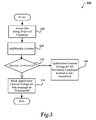
- FIGURE 3 an illustrative process for translating sites after provisioning is described.
- the process 300 flows to operation 310 where a user accesses a site.
- a user accesses a site.
- the user may navigate to a site that provides collaboration tools for team members working on a project.
- the site may be accessed by the user in a default language or in any of the other supported alternate languages.
- the user decides to modify content that is associated with the site. For example, the user may decide to add new application content to the site or modify existing application content of the site. For example, the user may decide to modify a description of a title of a column, a title of a documents folder, a description of a button and/or add a column, list, document folder and the like that is associated with the site.
- any modification that is made in the default language is considered a change to the site that affects the translation of the corresponding strings in the alternate supported languages whereas any modification in one of the alternate languages is considered a translation of the string.
- any strings that are associated with the content change are marked as un-translated. For example, if a user makes a change to a title in the default language, then the alternate language strings representing the translation of the title are marked as un-translated indicating that those strings need to be translated into the alternate language.
- the changed string is marked as translated indicating that the string has been translated for the alternate language.
- the strings representing the underlying default language string remain un-translated.
- the process then flows to an end operation and returns to processing other actions.
- FIGURE 4 shows a process for exporting/importing strings into a site.
- process 400 flows to operation 410 where the strings marked as translated/un-translated are obtained.
- the strings may be obtained programmatically using an API and/or obtained manually. For example, a user may access a file containing the strings and/or query the site to obtain a list of the strings. Other methods may also be used.
- translations of the strings are provided.
- the translations may be obtained many different ways.
- the strings could be sent to a translation service to be localized to the supported alternate languages or the user could provide the translations by changing the strings within the export file.
- the user imports the translated strings into the site.
- the importing may be performed manually or programmatically.
- the user could replace the appropriate file(s) or the user could use an API to insert the translations into the correct location for the site.
- the process then flows to an end operation and returns to processing other actions.
Landscapes
- Engineering & Computer Science (AREA)
- Software Systems (AREA)
- Theoretical Computer Science (AREA)
- Human Computer Interaction (AREA)
- Physics & Mathematics (AREA)
- General Engineering & Computer Science (AREA)
- General Physics & Mathematics (AREA)
- Machine Translation (AREA)
- Information Transfer Between Computers (AREA)
- Document Processing Apparatus (AREA)
- Digital Computer Display Output (AREA)
Description
- Businesses often create sites to allow collaboration of team members working on various projects. These sites provide the team members a collaborative place to share ideas and work on projects together. Using these sites, team members typically share information and documents, generate ideas, respond to other team member's ideas, and track the progress of the projects. While the team members may be more comfortable using their native languages, the sites are provisioned with a default language with which they use to communicate on the site.
-
US 2005/0198573 A1 describes a tool for finding and accurately translating matching English text fragments within web pages into a specified language from pre-translated texts stored in a database table. The tool uses intelligent search patterns, like code prefixes and suffixes to, accurately find the matching text patterns and replace them. The algorithm pays special attention to sentence structure, syntax and vocabulary and to finding a suitable foreign language sentence or word corresponding to the matched English text. These text fragments could be labels, messages, titles or descriptions within the pages. The process looks through each and every file, which may have particular file extensions, and translates matched English language texts into the specified target language. It then makes copies of newly translated files into directories with the same structure which can be used for a specific client and language. -
US 2005/137873 A1 discloses a method and system to allow a user to select a web site home page in a desired language. The method comprises the steps of identifying within a web address request a directional information item, providing a web page associated with the web address to a second web site corresponding to said directional information item, wherein the second web site includes a language translator, translating the web page textual information in accordance with the language translator and returning the translated web page to the user. The method further comprises the steps of accessing a control table to determine a status of the web page and obtaining a version of the web page stored locally on the second site, when said status indicates said web page is locally stored and valid, otherwise obtaining a current version of the web page; and translating the obtained web page. - The object of the present invention is to provide a system and a method for changing the display language of a site to alternate languages by users of the site at any time. This object is solved by the invention as claimed in the independent claims.
- Preferred embodiments are specified in the dependent claims.
- This Summary is provided to introduce a selection of concepts in a simplified form that are further described below in the Detailed Description. This Summary is not intended to identify key features or essential features of the claimed subject matter, nor is it intended to be used as an aid in determining the scope of the claimed subject matter.
- The display language of a site may be changed to alternate languages by users of a site at any time. For example, a first user may access the site in its default language (i.e. English) and a second user may access the same site using their preferred language (i.e. French) even though the default language of the site is different from their preferred language. The language of the site may be changed from one language to another language at any time while a user is accessing the site. Application content changes are identified by the site helping to ensure consistency between the default language and the translations to the alternate languages.
-
-
FIGURE 1 illustrates an exemplary computing system; -
FIGURE 2 shows a system for translating sites from a default language to alternate languages; -
FIGURE 3 illustrates a process for translating sites after provisioning; and -
FIGURE 4 shows a process for exporting/importing strings into a site. - Referring now to the drawings, in which like numerals represent like elements, various embodiments will be described. In particular,
FIGURE 1 and the corresponding discussion are intended to provide a brief, general description of a suitable computing environment in which embodiments may be implemented. - Generally, program modules include routines, programs, components, data structures, and other types of structures that perform particular tasks or implement particular abstract data types. Other computer system configurations may also be used, including hand-held devices, multiprocessor systems, microprocessor-based or programmable consumer electronics, minicomputers, mainframe computers, and the like. Distributed computing environments may also be used where tasks are performed by remote processing devices that are linked through a communications network. In a distributed computing environment, program modules may be located in both local and remote memory storage devices.
- Referring now to
FIGURE 1 , an illustrative computer architecture for acomputer 100 utilized in the various embodiments will be described. Whilecomputer 100 is generally illustrated as a client computing device,computer 100 may be configured as a client, a server, mobile device, or any other computing device that is used to provide and/or interact with a web site.Computer 100 includes a central processing unit 5 ("CPU"), asystem memory 7, including a random access memory 9 ("RAM") and a read-only memory ("ROM") 10, and asystem bus 12 that couples the memory to theCPU 5. A basic input/output system containing the basic routines that help to transfer information between elements within the computer, such as during startup, is stored in theROM 10. Thecomputer 100 further includes amass storage device 14 for storing anoperating system 16,application programs 24, and other program modules, which will be described in greater detail below. - The
mass storage device 14 is connected to theCPU 5 through a mass storage controller (not shown) connected to thebus 12. Themass storage device 14 and its associated computer-readable media provide non-volatile storage for thecomputer 100. Although the description of computer-readable media contained herein refers to a mass storage device, such as a hard disk or CD-ROM drive, the computer-readable media can be any available media that can be accessed by thecomputer 100. - By way of example, and not limitation, computer-readable media may comprise computer storage media and communication media. Computer storage media includes volatile and non-volatile, removable and non-removable media implemented in any method or technology for storage of information such as computer-readable instructions, data structures, program modules or other data. Computer storage media includes, but is not limited to, RAM, ROM, EPROM, EEPROM, flash memory or other solid state memory technology, CD-ROM, digital versatile disks ("DVD"), or other optical storage, magnetic cassettes, magnetic tape, magnetic disk storage or other magnetic storage devices, or any other medium which can be used to store the desired information and which can be accessed by the
computer 100. - According to various embodiments,
computer 100 may operate in a networked environment using logical connections to remote computers through anetwork 18, such as the Internet. Thecomputer 100 may connect to thenetwork 18 through anetwork interface unit 20 connected to thebus 12. The network connection may be wireless and/or wired. Thenetwork interface unit 20 may also be utilized to connect to other types of networks and remote computer systems. Thecomputer 100 may also include an input/output controller 22 for receiving and processing input from a number of other devices, including a keyboard, mouse, or electronic stylus (not shown inFIGURE 1 ). Similarly, an input/output controller 22 may provide output to a display screen that includes auser interface 28, a printer, or other type of output device.Computer 100 may also be coupled to data source(s) (not shown) through anetwork connection 18, and/or some other connection. - As mentioned briefly above, a number of program modules and data files may be stored in the
mass storage device 14 and RAM 9 of thecomputer 100, including anoperating system 16 suitable for controlling the operation of a networked personal computer, such as the WINDOWS VISTA® operating system from MICROSOFT CORPORATION of Redmond, Washington. Themass storage device 14 and RAM 9 may also store one or more program modules. In particular, themass storage device 14 and the RAM 9 may store one ormore application programs 26, such as aweb browser application 24. For example,browser program 24 may be the MICROSOFT INTERNET EXPLORER® application. -
Server 23 is configured to provide site services forcomputer 100. As illustrated,server 23 includessite software 25 that is configured to provide a site that is accessed throughbrowser application 24 onclient 100. According to one embodiment, the site software, such as MICROSOFT SHAREPOINT SERVICES® may be used to provide collaboration tools, document storage tools and workflow tools that are associated with a site. For example, a site may be created that provides users (team members) with ways to share documents; share calendar or event information; generate and discuss ideas about a project; and adding, assigning, and tracking tasks concerning a project. The site may be configured as an Internet Site, Extranet Site, and/or an Intranet site or any other site that is accessible to users.Site software 25 is configured to provide the same site to users using different supportedlanguages 29. According to one embodiment, the supportedlanguages 29 are provided in language packs that allow a user to view the site in different languages. When a language is selected by a user for the display of the site, the navigation and pages for that site are displayed to that user in the selected language. In this way, one user of the site may view the site using a first language, a second user may view the same site using a second language, a third user may view the same site using a third language, and the like. - User interface (UI) 28 is designed to provide a user with a visual way to view the site and to select a language of the site in which to view the site. For example,
UI 28 may be used to select a language from one of the available supported languages in language packs 29. According to one embodiment, once a user selects a language to view the site that language will remain selected for that user until changed. In this way, different team members may view the site in their preferred language. The language of the site may be changed at any time. For example, a user may change the site from a default language to an alternate language and back to the default language during one visit to the site.UI 28 may also be used to make modifications/additions to the content of the site.Site software 25 includes tools to help maintain the consistency of the site's languages when changes are made in one language that may affect the other languages (see below). -
FIGURE 2 shows a system for translating sites from a default language to alternate languages. As illustrated,system 200 includessite 41, supportedlanguages 29, content table 46,document library 47, content 48, User 1 43, User 2 (44), User N (45) andbrowser 24. - For illustration purposes, and not intended to be limiting, an example of providing a display of the same site in different languages to different users will be described. Suppose that user 1 (43) and user 2 (44) both work at the same company, and routinely collaborate on projects and interact with one another. For a project, suppose that user 1 creates a
site 41 that will be worked on by a group of users including User 1,User 2 through User N. User 1 initially provisions the default language of thesite 41 to be English. Some of the users have a different preferred language as compared to the default language. User 1 could have initially provisioned the site using any of the supportedlanguages 29. The language that is initially chosen for provisioning the site is considered the default language for the site and all of the other supported languages for the site are considered alternate languages. Generally, the language specified when a site is created controls the language used in the site itself. For example, if the site was provisioned in French, all of the toolbars, navigation bars, list and form pages, and so on, appear in French. If the site was created in Arabic, the text is in Arabic, and the default left-to-right orientation of the site is changed to right-to-left to properly display Arabic text. - Continuing with the example, User 1 uploads documents to the
Documents Library 47, creates a number of tasks in the Task List, and sets up a recurring meeting with the users using the Team Site Calendar usingsite tools 42. User 1 performs these operations using the default language of English.User 2, however, would prefer to viewsite 41 in their native language of French. Since French is one of the supportedlanguages 29 on this site he goes ahead and changes the language of the site to French using a user interface that is provided by the site inbrowser 24 ofUser 2's display. According to one embodiment, the language of the site may be automatically changed to another language based on a language setting. For example, the language selected may be based on the user's browser's settings, or some other setting that indicates a language preference. In the current example, once French is selected, the application content 48 forsite 41 is now displayed in French. Application content includes, but is not limited to help items, menu bars, links, titles, descriptions and the like. Generally, application content is content that describes the user interface (UI) for the site. According to one embodiment, the application content is the strings that represent the UI controls, help items, titles and descriptions relating to the site. Content that is not translated after provisioning the site is considered user content. This user content may include items such as documents in document library, titles and properties of documents/list items, or other content that is loaded onto the site by a user. User content is displayed in the language in which it is uploaded. For example, the documents uploaded to the document library in the example would be displayed in the default language of English toUser 2 even though the rest of the site is displayed in the alternate selected language of French. - Suppose now that User 1 decides to add a new Document Library to keep track of expense reports associated with the project. User 1 creates the new Document Library on the site using the UI. Since User 1 is working in the default language (English UI) the Title and Description of the Document Library are made in English. When User 1 adds the new content, the title and description strings entered for the new document library are automatically marked by the site as un-translated for the other supported alternate languages (in this case the title and the description strings in French are marked as un-translated) in content table 46. Each piece of application content 48 (e.g. column name, list title etc.) includes an identifier in content table 46 that indicates whether that piece of application content has been translated between the default language and a particular alternate language. This identifier is set and reset automatically by
site 41 when a user adds or modifies application content in either the default or alternate languages. - A user may decide to add other new application content to the site at any time. For example, the user may add a new list or add a new column to an existing list. The user can make such an addition to the site using the default language or add the new application content in one of the alternate languages. When a user adds new application content in the default language the content in the alternate language(s) is added in the default language. In this case the application content for all alternate languages is marked as un-translated internally. When a user adds new application content in the alternate language, the content in the default language is also added. All other alternate languages will be missing translations and thus fallback to the strings just added in the default language. According to one embodiment, when a user attempts to add content using an alternate language a warning is displayed stating that the content should be added using the default language and then translated into the supported alternate languages.
- Instead of adding content to
site 41, a user may decide to modify the content 48 of a site. For example, the user may change the title or description of a list, the title or description of a site, the name or description of a column, and the like. The content may be modified using the default language or using one of the other supported alternate language(s). According to one embodiment, a modification of the content using the default language is treated as changing the content whereas a modification using one of the alternate languages is treated as translating the content. According to one embodiment, the modification is treated as a translation of the content since there is no easy way to determine the nature of the change. - A translation setting in
site 41 determines how modifications to content using the default language are treated by the supported alternate languages. This translation setting may be predefined when the site is initially provisioned and/or changed at a later time through the user interface. Depending on the state of the translation setting, the alternate language content string is replaced by the new default language string or the alternate language application content string remains unchanged. In both of these cases the content for all alternate languages is internally marked as un-translated within content table 46. According to one embodiment, each independent string in the application content includes an identifier that indicates whether the string is translated or un-translated. - Marking the content as un-translated makes it easy for a user to locate the un-translated content such that translations may be provided for the modified content. According to one embodiment, the user may access all of the un-translated strings and provide a translation of the content in the supported alternate languages. This may be done in many different ways. For example, each supported language may have a separate file that is modified and then imported into the site or all of the strings for each of the languages may be included in a single file.
- When a user modifies the content using one of the alternate languages, the content in the default language and any other alternate languages is unchanged. This type of change by a user is treated as a translation and thus is limited to the alternate language the user is working in. The default language values and the other alternate language values are not changed. When the change is made using one of the alternate languages, the modified content is marked as translated within the strings for the alternate language.
- Returning to the example, when User 2 (using the alternate language French UI) navigates to the newly created Document Library created by User 1 he sees the Title and Description of the Document Library are in English.
User 2 decides to translate the Title and Description right away by navigating to the List Settings page and changing the English string values for the Title and Description fields to French. The English strings for these fields which User 1 sees are not affected byUser 2's change. OnceUser 2 makes these changes thestrings User 2 modified are marked as translated indicating that the default language string(s) have been translated to this supported language. - In addition to translating the title and description strings,
User 2 also wants to change the name of an existing column on the newly created Document Library. Again, becauseUser 2 is viewing the site using the French UI he edits the column name and changes the French string value to a new French string value. ShouldUser 2 want User 1 (or other users) to view the name change in other languages that string has to be translated for the other languages. One way to make these changes is forUser 2 to change the language of the site from French to the default language of English and make the corresponding change in the English UI. The name of the column is now the same between the two languages.User 2 could also perform this operation for the other supported alternate languages. - While translations may be done one at a time, a user may also query the site using an Application Programming Interface (API), the UI, or access a file that includes the strings, to determine the changes made that require a translation. For example, suppose that User 1 completes a number of customizations over some period of time to the existing site using the default language (English). This could include the creation of new lists, additions of new columns, modification of list titles, modification of column names etc. Since these changes will cause the alternate languages to contain a mixture of the default language and the alternate language translations should be provided to make navigation in the alternate language easier. Rather than having
User 2 manually select each change in the French UI and make the corresponding translations, any user can export the strings needing translation. Alternatively, a predefined user could have access to the strings needing translation. According to one embodiment, the un-translated strings are exported to an XML file. Alternatively, all of the strings could be exported to the file. According to one embodiment, the strings that need translating are identifiable since the strings are marked as un-translated. A user could then send the strings off to be localized for their language or make the translations themselves and import the changed file. - The user also is provided the option of importing all the strings associated with any modified or new application content for any of the alternate languages available on the site. This importing and exporting may be accomplished many different ways. For example, an Application Programming Interface (API) may be used and/or the UI of the site may be used. In this way, the functionality may be accessed programmatically and/or manually through a user interface.
- Referring now to
FIGURE 3 , an illustrative process for translating sites after provisioning is described. - When reading the discussion of the routines presented herein, it should be appreciated that the logical operations of various embodiments are implemented (1) as a sequence of computer implemented acts or program modules running on a computing system and/or (2) as interconnected machine logic circuits or circuit modules within the computing system. The implementation is a matter of choice dependent on the performance requirements of the computing system implementing the invention. Accordingly, the logical operations illustrated and making up the embodiments described herein are referred to variously as operations, structural devices, acts or modules. These operations, structural devices, acts and modules may be implemented in software, in firmware, in special purpose digital logic, and any combination thereof.
- After a start operation, the
process 300 flows tooperation 310 where a user accesses a site. For example, the user may navigate to a site that provides collaboration tools for team members working on a project. The site may be accessed by the user in a default language or in any of the other supported alternate languages. - Moving to
operation 320, the user decides to modify content that is associated with the site. For example, the user may decide to add new application content to the site or modify existing application content of the site. For example, the user may decide to modify a description of a title of a column, a title of a documents folder, a description of a button and/or add a column, list, document folder and the like that is associated with the site. - Flowing to
decision operation 330, a determination is made as to whether the user is making the change using the default language of the site or if the user is using an alternate language that is supported by the site to make the modification. Generally, any modification that is made in the default language is considered a change to the site that affects the translation of the corresponding strings in the alternate supported languages whereas any modification in one of the alternate languages is considered a translation of the string. - When the user is making the change(s) using the default language, then the process flows to
operation 340 where any strings that are associated with the content change are marked as un-translated. For example, if a user makes a change to a title in the default language, then the alternate language strings representing the translation of the title are marked as un-translated indicating that those strings need to be translated into the alternate language. - When the user makes the change to the content using one of the alternate languages then the changed string is marked as translated indicating that the string has been translated for the alternate language. In this case, the strings representing the underlying default language string remain un-translated.
- The process then flows to an end operation and returns to processing other actions.
-
FIGURE 4 shows a process for exporting/importing strings into a site. - After a start operation,
process 400 flows tooperation 410 where the strings marked as translated/un-translated are obtained. The strings may be obtained programmatically using an API and/or obtained manually. For example, a user may access a file containing the strings and/or query the site to obtain a list of the strings. Other methods may also be used. - Moving to
operation 420, translations of the strings are provided. The translations may be obtained many different ways. For example, the strings could be sent to a translation service to be localized to the supported alternate languages or the user could provide the translations by changing the strings within the export file. - Flowing to
operation 430, the user imports the translated strings into the site. As with the exporting of the strings, the importing may be performed manually or programmatically. For example, the user could replace the appropriate file(s) or the user could use an API to insert the translations into the correct location for the site. - The process then flows to an end operation and returns to processing other actions.
- The above specification, examples and data provide a complete description of the manufacture and use of the composition of the invention. Since many embodiments of the invention can be made without departing from the scope of the invention, the invention resides in the claims hereinafter appended.
Claims (13)
- A method for providing a translation of a site, comprising:accessing a site that is supported by a server from a client (310); wherein the site is initially supplied using a default language;wherein the site supports viewing of content at any time in an alternate language that is different from the default language (43, 29), wherein the content includes application content and user content (48), wherein the application content is content that is associated with site software of the site that is used to provide a user interface that is associated with the site and the user content is content uploaded to the site that is not related to the user interface of the site, wherein the application content includes strings to describe controls of the user interface;displaying the application content of the site using the default language (310);receiving from the user interface a selection that indicates to display the site using the alternate language (44, 45);translating the site from the default language to the alternate language (420); wherein translating the site includes changing the strings of the user interface of the site from the default language to the alternate language;changing the display of the site from the default language to a display of the site using the alternate language;determining when the application content associated with the site is modified, either in the default language or in an alternate language;determining the language used to modify the application content, whereinwhen the language used to modify the application content is in an alternate language, the content in the default language and any other alternate languages is not modified, andwhen the language used to modify the application content is the default language, the modified application content for all the alternate languages is added in the default language; andsetting an identifier for the modified application content, whereinwhen the language used to modify the application content is the alternate language, the identifier of the alternate language indicates that the application content is translated, andwhen the modification is made using the default language, the identifier of all the alternate languages indicates that the application content is un-translated.
- The method of Claim 1, wherein maintaining the identifier for the changed application content includes maintaining a separate identifier for each of the strings that are associated with the user interface for the site.
- The method of Claim 1, wherein determining when the content is modified comprises determining when the modification is made in the default language and when the modification is made in the alternate language and updating the identifier for the modified content depending on what language was used to make the modification.
- The method of Claim 3, further comprising setting the identifier for the modified content as translated when the change is made using the alternate language.
- The method of Claim 3, further comprising setting the identifier for the modified content as un-translated when the modification is made in the default language.
- The method of Claim 4, further comprising displaying a warning in the alternate language when the modification to the application content is an addition to the application content using the default language and marking the application content to un-translated when the addition to the application content is made using the default language.
- The method of Claim 3, further comprising exporting each string in the application content that is identified as un-translated to a file for translation.
- The method of Claim 7, further comprising importing translated strings into the site and identifying the replaced strings in the site as translated.
- A computer-readable storage medium having computer-executable instructions for providing a translation of a site according to the method of at least one of claims 1 to 8.
- The computer-readable storage medium of Claim 9, wherein setting the identifier for the modified application content includes setting an identifier for strings that are associated with the modified application content.
- The computer-readable storage medium of Claim 9, wherein setting the identifier comprising setting the identifier to un-translated when the modification is made using the default language and setting the identifier as translated when the modification is made using the alternate language, and/or
further comprising exporting un-translated application content to a file for translation, and/or
further comprising importing translated application content into the site and identifying the associated strings in the site as translated. - A system for providing a translation of a site; comprising:a client computing device comprising a display (28); a processor (5) a memory (7) and a computer-readable medium (14); an operating environment (16) stored on the computer-readable medium and executing on the processor; a network connection (20) coupled to a network and a browser application;a server computing device (23) that comprises:a processor (5) a memory (7) and a computer-readable medium (14);an operating environment (16) stored on the computer-readable medium and executing on the processor;a data source that is configured to store content (48) including application content and user content; wherein the application content includes strings (46) that identify functionality of a user interface that is associated with the site and wherein the user content is not translated;an application (25) that is configured to perform the method of at least one of claims 1 to 8.
- The system of Claim 12, further comprising exporting un-translated application content to a file for translation and importing the translated application content into the application content for the site.
Applications Claiming Priority (2)
| Application Number | Priority Date | Filing Date | Title |
|---|---|---|---|
| US12/059,429 US8515729B2 (en) | 2008-03-31 | 2008-03-31 | User translated sites after provisioning |
| PCT/US2009/034646 WO2009145940A1 (en) | 2008-03-31 | 2009-02-20 | User translated sites after provisioning |
Publications (3)
| Publication Number | Publication Date |
|---|---|
| EP2269147A1 EP2269147A1 (en) | 2011-01-05 |
| EP2269147A4 EP2269147A4 (en) | 2011-04-20 |
| EP2269147B1 true EP2269147B1 (en) | 2016-11-23 |
Family
ID=41118464
Family Applications (1)
| Application Number | Title | Priority Date | Filing Date |
|---|---|---|---|
| EP09755303.6A Active EP2269147B1 (en) | 2008-03-31 | 2009-02-20 | User translated sites after provisioning |
Country Status (11)
| Country | Link |
|---|---|
| US (1) | US8515729B2 (en) |
| EP (1) | EP2269147B1 (en) |
| KR (1) | KR101525279B1 (en) |
| CN (1) | CN101981567B (en) |
| AU (1) | AU2009251762B2 (en) |
| BR (1) | BRPI0907780A2 (en) |
| MX (1) | MX2010010777A (en) |
| RU (1) | RU2498403C2 (en) |
| TW (1) | TWI477988B (en) |
| WO (1) | WO2009145940A1 (en) |
| ZA (1) | ZA201005929B (en) |
Families Citing this family (15)
| Publication number | Priority date | Publication date | Assignee | Title |
|---|---|---|---|---|
| EP2593884A2 (en) | 2010-07-13 | 2013-05-22 | Motionpoint Corporation | Dynamic language translation of web site content |
| US8515977B2 (en) | 2010-09-10 | 2013-08-20 | International Business Machines Corporation | Delta language translation |
| US8670973B2 (en) | 2010-09-16 | 2014-03-11 | International Business Machines Corporation | Language translation reuse in different systems |
| US20140081618A1 (en) * | 2012-09-17 | 2014-03-20 | Salesforce.Com, Inc. | Designing a website to be displayed in multiple languages |
| US9355176B2 (en) * | 2013-03-15 | 2016-05-31 | The Nielsen Company (Us), Llc | Methods and apparatus to supplement web crawling with cached data from distributed devices |
| WO2016018004A1 (en) * | 2014-07-31 | 2016-02-04 | Samsung Electronics Co., Ltd. | Method, apparatus, and system for providing translated content |
| US9900302B2 (en) | 2016-06-22 | 2018-02-20 | FinancialForce.com, Inc. | Seamless authentication for an application development platform |
| US10984359B2 (en) | 2016-06-23 | 2021-04-20 | FinancialForce.com, Inc. | Combining batch and queueable technologies in a salesforce platform for large volume parallel processing |
| US10496741B2 (en) | 2016-09-21 | 2019-12-03 | FinancialForce.com, Inc. | Dynamic intermediate templates for richly formatted output |
| US11038689B2 (en) | 2018-03-01 | 2021-06-15 | FinancialForce.com, Inc. | Efficient block chain generation |
| US10846481B2 (en) | 2018-06-29 | 2020-11-24 | FinancialForce.com, Inc. | Method and system for bridging disparate platforms to automate a natural language interface |
| US10846471B2 (en) * | 2018-07-03 | 2020-11-24 | FinancialForce.com, Inc. | Artificial intelligence and crowdsourced translation platform |
| US11200143B2 (en) | 2019-01-08 | 2021-12-14 | FinancialForce.com, Inc. | Software development framework for a cloud computing platform |
| US10922485B2 (en) | 2019-07-10 | 2021-02-16 | FinancialForce.com, Inc. | Platform interpretation of user input converted into standardized input |
| US11455286B2 (en) | 2019-08-06 | 2022-09-27 | FinancialForce.com, Inc. | History of slowly changing dimensions |
Family Cites Families (47)
| Publication number | Priority date | Publication date | Assignee | Title |
|---|---|---|---|---|
| US4864503A (en) * | 1987-02-05 | 1989-09-05 | Toltran, Ltd. | Method of using a created international language as an intermediate pathway in translation between two national languages |
| US6470306B1 (en) * | 1996-04-23 | 2002-10-22 | Logovista Corporation | Automated translation of annotated text based on the determination of locations for inserting annotation tokens and linked ending, end-of-sentence or language tokens |
| US5944790A (en) | 1996-07-19 | 1999-08-31 | Lucent Technologies Inc. | Method and apparatus for providing a web site having a home page that automatically adapts to user language and customs |
| US6623529B1 (en) | 1998-02-23 | 2003-09-23 | David Lakritz | Multilingual electronic document translation, management, and delivery system |
| US6735759B1 (en) * | 1999-07-28 | 2004-05-11 | International Business Machines Corporation | Editing system for translating displayed user language using a wrapper class |
| US20060116865A1 (en) * | 1999-09-17 | 2006-06-01 | Www.Uniscape.Com | E-services translation utilizing machine translation and translation memory |
| US7016977B1 (en) | 1999-11-05 | 2006-03-21 | International Business Machines Corporation | Method and system for multilingual web server |
| US7149964B1 (en) | 2000-02-09 | 2006-12-12 | Microsoft Corporation | Creation and delivery of customized content |
| KR100450881B1 (en) | 2000-03-16 | 2004-10-01 | 주식회사 유니소프트 | System and Method for multi language translation |
| US20020055868A1 (en) * | 2000-05-24 | 2002-05-09 | Dusevic Angela G. | System and method for providing a task-centric online environment |
| US6839742B1 (en) | 2000-06-14 | 2005-01-04 | Hewlett-Packard Development Company, L.P. | World wide contextual navigation |
| JP4011268B2 (en) | 2000-07-05 | 2007-11-21 | 株式会社アイアイエス | Multilingual translation system |
| US6964014B1 (en) | 2001-02-15 | 2005-11-08 | Networks Associates Technology, Inc. | Method and system for localizing Web pages |
| AUPR329501A0 (en) * | 2001-02-22 | 2001-03-22 | Worldlingo, Inc | Translation information segment |
| US7027973B2 (en) * | 2001-07-13 | 2006-04-11 | Hewlett-Packard Development Company, L.P. | System and method for converting a standard generalized markup language in multiple languages |
| EP1470501B1 (en) * | 2002-01-11 | 2015-03-11 | Enrico Maim | Methods and systems for searching and associating information resources such as web pages |
| JP2003296223A (en) | 2002-03-29 | 2003-10-17 | Fuji Xerox Co Ltd | Method and device, and program for providing web page information |
| US20040044518A1 (en) | 2002-08-27 | 2004-03-04 | Reed John E. | Method and system for multilingual display generation |
| GB2395029A (en) * | 2002-11-06 | 2004-05-12 | Alan Wilkinson | Translation of electronically transmitted messages |
| US7209875B2 (en) * | 2002-12-04 | 2007-04-24 | Microsoft Corporation | System and method for machine learning a confidence metric for machine translation |
| FR2850473A1 (en) * | 2003-01-28 | 2004-07-30 | France Telecom | Method for providing automatic translation of web pages, comprises insertion of beacons giving type/theme in document, interception and use of appropriate translation server before return to user |
| EA012691B1 (en) * | 2003-07-08 | 2009-12-30 | Юэс Линкс Элэлси | AUTOMATED PUBLISHING SYSTEM, WHICH PROVIDES THE POSSIBILITY OF JOINT EDITING AND REPORTING WITH THE USE OF ARCHITECTURE OF VIRTUAL DOCUMENT |
| US7464408B1 (en) * | 2003-08-29 | 2008-12-09 | Solidcore Systems, Inc. | Damage containment by translation |
| US7496497B2 (en) | 2003-12-18 | 2009-02-24 | Taiwan Semiconductor Manufacturing Co., Ltd. | Method and system for selecting web site home page by extracting site language cookie stored in an access device to identify directional information item |
| US20050198573A1 (en) | 2004-02-24 | 2005-09-08 | Ncr Corporation | System and method for translating web pages into selected languages |
| US20050227218A1 (en) * | 2004-03-06 | 2005-10-13 | Dinesh Mehta | Learning system based on metadata framework and indexed, distributed and fragmented content |
| US7742582B2 (en) * | 2005-02-17 | 2010-06-22 | Core Systems (Ni) Limited | Offender message delivery system |
| US7543189B2 (en) * | 2005-06-29 | 2009-06-02 | International Business Machines Corporation | Automated multilingual software testing method and apparatus |
| JP2007122509A (en) * | 2005-10-28 | 2007-05-17 | Rozetta Corp | Device, method and program for determining naturalness of phrase sequence |
| CN101030198A (en) | 2006-03-02 | 2007-09-05 | 王启亨 | Method and system for realizing cross-language communication in Internet application |
| US20070219782A1 (en) * | 2006-03-14 | 2007-09-20 | Qing Li | User-supported multi-language online dictionary |
| US20070233456A1 (en) * | 2006-03-31 | 2007-10-04 | Microsoft Corporation | Document localization |
| US7954052B2 (en) * | 2006-07-07 | 2011-05-31 | International Business Machines Corporation | Method for processing a web page for display in a wiki environment |
| US8775930B2 (en) * | 2006-07-07 | 2014-07-08 | International Business Machines Corporation | Generic frequency weighted visualization component |
| TW200805090A (en) * | 2006-07-12 | 2008-01-16 | Inventec Corp | Real-time vocabulary translating system and method |
| US7886267B2 (en) * | 2006-09-27 | 2011-02-08 | Symantec Corporation | Multiple-developer architecture for facilitating the localization of software applications |
| US7913228B2 (en) * | 2006-09-29 | 2011-03-22 | Rockwell Automation Technologies, Inc. | Translation viewer for project documentation and editing |
| US8606607B2 (en) * | 2007-01-03 | 2013-12-10 | Vistaprint Schweiz Gmbh | Translation processing using a translation memory |
| US8606606B2 (en) * | 2007-01-03 | 2013-12-10 | Vistaprint Schweiz Gmbh | System and method for translation processing |
| US20090326913A1 (en) * | 2007-01-10 | 2009-12-31 | Michel Simard | Means and method for automatic post-editing of translations |
| JP4396994B2 (en) * | 2007-02-09 | 2010-01-13 | インターナショナル・ビジネス・マシーンズ・コーポレーション | Resource file translation verification method, apparatus, and program |
| US8326392B2 (en) * | 2007-02-27 | 2012-12-04 | Nonin Medical, Inc. | Foldable sensor device and method of using same |
| US20080244740A1 (en) * | 2007-03-06 | 2008-10-02 | Wetpaint.Com, Inc. | Browser-independent editing of content |
| WO2008111049A2 (en) * | 2007-03-09 | 2008-09-18 | Ghost, Inc. | System and method for a virtual hosted operating system |
| US8527260B2 (en) * | 2007-09-06 | 2013-09-03 | International Business Machines Corporation | User-configurable translations for electronic documents |
| US9594748B2 (en) * | 2007-10-25 | 2017-03-14 | Disney Enterprises, Inc. | System and method for localization of assets using dictionary file build |
| US10176827B2 (en) * | 2008-01-15 | 2019-01-08 | Verint Americas Inc. | Active lab |
-
2008
- 2008-03-31 US US12/059,429 patent/US8515729B2/en active Active
-
2009
- 2009-02-20 WO PCT/US2009/034646 patent/WO2009145940A1/en not_active Ceased
- 2009-02-20 KR KR1020107021906A patent/KR101525279B1/en not_active Expired - Fee Related
- 2009-02-20 EP EP09755303.6A patent/EP2269147B1/en active Active
- 2009-02-20 CN CN200980112494XA patent/CN101981567B/en active Active
- 2009-02-20 MX MX2010010777A patent/MX2010010777A/en active IP Right Grant
- 2009-02-20 BR BRPI0907780-4A patent/BRPI0907780A2/en not_active IP Right Cessation
- 2009-02-20 AU AU2009251762A patent/AU2009251762B2/en not_active Ceased
- 2009-02-20 RU RU2010140071/08A patent/RU2498403C2/en active
- 2009-02-26 TW TW098106210A patent/TWI477988B/en not_active IP Right Cessation
-
2010
- 2010-08-19 ZA ZA2010/05929A patent/ZA201005929B/en unknown
Also Published As
| Publication number | Publication date |
|---|---|
| EP2269147A4 (en) | 2011-04-20 |
| ZA201005929B (en) | 2011-10-26 |
| RU2498403C2 (en) | 2013-11-10 |
| KR20100135769A (en) | 2010-12-27 |
| CN101981567B (en) | 2013-07-31 |
| WO2009145940A9 (en) | 2010-09-16 |
| EP2269147A1 (en) | 2011-01-05 |
| KR101525279B1 (en) | 2015-06-02 |
| AU2009251762A1 (en) | 2009-12-03 |
| RU2010140071A (en) | 2012-04-10 |
| TW200947238A (en) | 2009-11-16 |
| US8515729B2 (en) | 2013-08-20 |
| AU2009251762B2 (en) | 2014-03-20 |
| US20090248393A1 (en) | 2009-10-01 |
| TWI477988B (en) | 2015-03-21 |
| MX2010010777A (en) | 2010-10-26 |
| BRPI0907780A2 (en) | 2015-07-14 |
| WO2009145940A1 (en) | 2009-12-03 |
| CN101981567A (en) | 2011-02-23 |
Similar Documents
| Publication | Publication Date | Title |
|---|---|---|
| US8515729B2 (en) | User translated sites after provisioning | |
| RU2399950C2 (en) | Management and use of data in created computer document | |
| JP4869630B2 (en) | Method and system for mapping content between a start template and a target template | |
| JP5911594B2 (en) | Providing translation support for application localization | |
| EP1258819A2 (en) | System and method for providing a file in multiple languages | |
| US20100146483A1 (en) | Dynamic software documentation | |
| US7720885B2 (en) | Generating a word-processing document from database content | |
| US7720814B2 (en) | Repopulating a database with document content | |
| WO2015184534A1 (en) | System and method for generating task-embedded documents | |
| WO2009145941A1 (en) | Simultaneous collaborative review of a document | |
| WO2008137341A1 (en) | Document translation system | |
| US20080178076A1 (en) | Method and apparatus for spellchecking electronic documents | |
| WO2012116355A2 (en) | Named object view over multiple files | |
| JP2006302242A (en) | Retrievable task-based interface to control panel function | |
| US10592598B1 (en) | Book version mapping | |
| CN113392070B (en) | Online document management method, device, system, equipment and storage medium | |
| US10162877B1 (en) | Automated compilation of content | |
| EP2980708A1 (en) | Method and system for assigning a content item as a link target to a managed object | |
| JP5459877B2 (en) | Message creation support apparatus, message creation support method, and program | |
| JP2006302243A (en) | Task-based interface with underlying extensible framework | |
| Chandra et al. | Starting RQDA | |
| Leung | Supporting Multiple Languages | |
| Overfield et al. | Building Page Layouts and Publishing Pages | |
| Negrino et al. | Dreamweaver CC: Visual Quickstart Guide |
Legal Events
| Date | Code | Title | Description |
|---|---|---|---|
| PUAI | Public reference made under article 153(3) epc to a published international application that has entered the european phase |
Free format text: ORIGINAL CODE: 0009012 |
|
| 17P | Request for examination filed |
Effective date: 20101022 |
|
| AK | Designated contracting states |
Kind code of ref document: A1 Designated state(s): AT BE BG CH CY CZ DE DK EE ES FI FR GB GR HR HU IE IS IT LI LT LU LV MC MK MT NL NO PL PT RO SE SI SK TR |
|
| AX | Request for extension of the european patent |
Extension state: AL BA RS |
|
| REG | Reference to a national code |
Ref country code: DE Ref legal event code: R079 Ref document number: 602009042626 Country of ref document: DE Free format text: PREVIOUS MAIN CLASS: G06F0017280000 Ipc: G06F0009440000 Ref country code: DE Ref legal event code: R079 Free format text: PREVIOUS MAIN CLASS: G06F0017280000 Ipc: G06F0009440000 |
|
| A4 | Supplementary search report drawn up and despatched |
Effective date: 20110323 |
|
| RIC1 | Information provided on ipc code assigned before grant |
Ipc: G06F 9/44 20060101AFI20110317BHEP |
|
| DAX | Request for extension of the european patent (deleted) | ||
| RAP1 | Party data changed (applicant data changed or rights of an application transferred) |
Owner name: MICROSOFT TECHNOLOGY LICENSING, LLC |
|
| 17Q | First examination report despatched |
Effective date: 20150605 |
|
| GRAP | Despatch of communication of intention to grant a patent |
Free format text: ORIGINAL CODE: EPIDOSNIGR1 |
|
| INTG | Intention to grant announced |
Effective date: 20160610 |
|
| GRAS | Grant fee paid |
Free format text: ORIGINAL CODE: EPIDOSNIGR3 |
|
| GRAA | (expected) grant |
Free format text: ORIGINAL CODE: 0009210 |
|
| AK | Designated contracting states |
Kind code of ref document: B1 Designated state(s): AT BE BG CH CY CZ DE DK EE ES FI FR GB GR HR HU IE IS IT LI LT LU LV MC MK MT NL NO PL PT RO SE SI SK TR |
|
| REG | Reference to a national code |
Ref country code: GB Ref legal event code: FG4D |
|
| REG | Reference to a national code |
Ref country code: CH Ref legal event code: EP |
|
| REG | Reference to a national code |
Ref country code: IE Ref legal event code: FG4D |
|
| REG | Reference to a national code |
Ref country code: AT Ref legal event code: REF Ref document number: 848485 Country of ref document: AT Kind code of ref document: T Effective date: 20161215 |
|
| REG | Reference to a national code |
Ref country code: DE Ref legal event code: R096 Ref document number: 602009042626 Country of ref document: DE |
|
| REG | Reference to a national code |
Ref country code: FR Ref legal event code: PLFP Year of fee payment: 9 |
|
| REG | Reference to a national code |
Ref country code: NL Ref legal event code: FP |
|
| PG25 | Lapsed in a contracting state [announced via postgrant information from national office to epo] |
Ref country code: LV Free format text: LAPSE BECAUSE OF FAILURE TO SUBMIT A TRANSLATION OF THE DESCRIPTION OR TO PAY THE FEE WITHIN THE PRESCRIBED TIME-LIMIT Effective date: 20161123 |
|
| REG | Reference to a national code |
Ref country code: LT Ref legal event code: MG4D |
|
| REG | Reference to a national code |
Ref country code: AT Ref legal event code: MK05 Ref document number: 848485 Country of ref document: AT Kind code of ref document: T Effective date: 20161123 |
|
| PG25 | Lapsed in a contracting state [announced via postgrant information from national office to epo] |
Ref country code: SE Free format text: LAPSE BECAUSE OF FAILURE TO SUBMIT A TRANSLATION OF THE DESCRIPTION OR TO PAY THE FEE WITHIN THE PRESCRIBED TIME-LIMIT Effective date: 20161123 Ref country code: GR Free format text: LAPSE BECAUSE OF FAILURE TO SUBMIT A TRANSLATION OF THE DESCRIPTION OR TO PAY THE FEE WITHIN THE PRESCRIBED TIME-LIMIT Effective date: 20170224 Ref country code: NO Free format text: LAPSE BECAUSE OF FAILURE TO SUBMIT A TRANSLATION OF THE DESCRIPTION OR TO PAY THE FEE WITHIN THE PRESCRIBED TIME-LIMIT Effective date: 20170223 Ref country code: LT Free format text: LAPSE BECAUSE OF FAILURE TO SUBMIT A TRANSLATION OF THE DESCRIPTION OR TO PAY THE FEE WITHIN THE PRESCRIBED TIME-LIMIT Effective date: 20161123 |
|
| PG25 | Lapsed in a contracting state [announced via postgrant information from national office to epo] |
Ref country code: BE Free format text: LAPSE BECAUSE OF NON-PAYMENT OF DUE FEES Effective date: 20170228 Ref country code: ES Free format text: LAPSE BECAUSE OF FAILURE TO SUBMIT A TRANSLATION OF THE DESCRIPTION OR TO PAY THE FEE WITHIN THE PRESCRIBED TIME-LIMIT Effective date: 20161123 Ref country code: FI Free format text: LAPSE BECAUSE OF FAILURE TO SUBMIT A TRANSLATION OF THE DESCRIPTION OR TO PAY THE FEE WITHIN THE PRESCRIBED TIME-LIMIT Effective date: 20161123 Ref country code: AT Free format text: LAPSE BECAUSE OF FAILURE TO SUBMIT A TRANSLATION OF THE DESCRIPTION OR TO PAY THE FEE WITHIN THE PRESCRIBED TIME-LIMIT Effective date: 20161123 Ref country code: PL Free format text: LAPSE BECAUSE OF FAILURE TO SUBMIT A TRANSLATION OF THE DESCRIPTION OR TO PAY THE FEE WITHIN THE PRESCRIBED TIME-LIMIT Effective date: 20161123 Ref country code: PT Free format text: LAPSE BECAUSE OF FAILURE TO SUBMIT A TRANSLATION OF THE DESCRIPTION OR TO PAY THE FEE WITHIN THE PRESCRIBED TIME-LIMIT Effective date: 20170323 Ref country code: HR Free format text: LAPSE BECAUSE OF FAILURE TO SUBMIT A TRANSLATION OF THE DESCRIPTION OR TO PAY THE FEE WITHIN THE PRESCRIBED TIME-LIMIT Effective date: 20161123 |
|
| PG25 | Lapsed in a contracting state [announced via postgrant information from national office to epo] |
Ref country code: SK Free format text: LAPSE BECAUSE OF FAILURE TO SUBMIT A TRANSLATION OF THE DESCRIPTION OR TO PAY THE FEE WITHIN THE PRESCRIBED TIME-LIMIT Effective date: 20161123 Ref country code: CZ Free format text: LAPSE BECAUSE OF FAILURE TO SUBMIT A TRANSLATION OF THE DESCRIPTION OR TO PAY THE FEE WITHIN THE PRESCRIBED TIME-LIMIT Effective date: 20161123 Ref country code: EE Free format text: LAPSE BECAUSE OF FAILURE TO SUBMIT A TRANSLATION OF THE DESCRIPTION OR TO PAY THE FEE WITHIN THE PRESCRIBED TIME-LIMIT Effective date: 20161123 Ref country code: RO Free format text: LAPSE BECAUSE OF FAILURE TO SUBMIT A TRANSLATION OF THE DESCRIPTION OR TO PAY THE FEE WITHIN THE PRESCRIBED TIME-LIMIT Effective date: 20161123 Ref country code: DK Free format text: LAPSE BECAUSE OF FAILURE TO SUBMIT A TRANSLATION OF THE DESCRIPTION OR TO PAY THE FEE WITHIN THE PRESCRIBED TIME-LIMIT Effective date: 20161123 |
|
| REG | Reference to a national code |
Ref country code: DE Ref legal event code: R097 Ref document number: 602009042626 Country of ref document: DE |
|
| PG25 | Lapsed in a contracting state [announced via postgrant information from national office to epo] |
Ref country code: IT Free format text: LAPSE BECAUSE OF FAILURE TO SUBMIT A TRANSLATION OF THE DESCRIPTION OR TO PAY THE FEE WITHIN THE PRESCRIBED TIME-LIMIT Effective date: 20161123 Ref country code: BE Free format text: LAPSE BECAUSE OF FAILURE TO SUBMIT A TRANSLATION OF THE DESCRIPTION OR TO PAY THE FEE WITHIN THE PRESCRIBED TIME-LIMIT Effective date: 20161123 Ref country code: BG Free format text: LAPSE BECAUSE OF FAILURE TO SUBMIT A TRANSLATION OF THE DESCRIPTION OR TO PAY THE FEE WITHIN THE PRESCRIBED TIME-LIMIT Effective date: 20170223 |
|
| PG25 | Lapsed in a contracting state [announced via postgrant information from national office to epo] |
Ref country code: MC Free format text: LAPSE BECAUSE OF FAILURE TO SUBMIT A TRANSLATION OF THE DESCRIPTION OR TO PAY THE FEE WITHIN THE PRESCRIBED TIME-LIMIT Effective date: 20161123 |
|
| PLBE | No opposition filed within time limit |
Free format text: ORIGINAL CODE: 0009261 |
|
| REG | Reference to a national code |
Ref country code: CH Ref legal event code: PL |
|
| STAA | Information on the status of an ep patent application or granted ep patent |
Free format text: STATUS: NO OPPOSITION FILED WITHIN TIME LIMIT |
|
| PG25 | Lapsed in a contracting state [announced via postgrant information from national office to epo] |
Ref country code: LI Free format text: LAPSE BECAUSE OF NON-PAYMENT OF DUE FEES Effective date: 20170228 Ref country code: CH Free format text: LAPSE BECAUSE OF NON-PAYMENT OF DUE FEES Effective date: 20170228 |
|
| 26N | No opposition filed |
Effective date: 20170824 |
|
| REG | Reference to a national code |
Ref country code: IE Ref legal event code: MM4A |
|
| PG25 | Lapsed in a contracting state [announced via postgrant information from national office to epo] |
Ref country code: SI Free format text: LAPSE BECAUSE OF FAILURE TO SUBMIT A TRANSLATION OF THE DESCRIPTION OR TO PAY THE FEE WITHIN THE PRESCRIBED TIME-LIMIT Effective date: 20161123 |
|
| PG25 | Lapsed in a contracting state [announced via postgrant information from national office to epo] |
Ref country code: LU Free format text: LAPSE BECAUSE OF NON-PAYMENT OF DUE FEES Effective date: 20170220 |
|
| REG | Reference to a national code |
Ref country code: FR Ref legal event code: PLFP Year of fee payment: 10 |
|
| PG25 | Lapsed in a contracting state [announced via postgrant information from national office to epo] |
Ref country code: IE Free format text: LAPSE BECAUSE OF NON-PAYMENT OF DUE FEES Effective date: 20170220 |
|
| PG25 | Lapsed in a contracting state [announced via postgrant information from national office to epo] |
Ref country code: MT Free format text: LAPSE BECAUSE OF NON-PAYMENT OF DUE FEES Effective date: 20170220 |
|
| PG25 | Lapsed in a contracting state [announced via postgrant information from national office to epo] |
Ref country code: HU Free format text: LAPSE BECAUSE OF FAILURE TO SUBMIT A TRANSLATION OF THE DESCRIPTION OR TO PAY THE FEE WITHIN THE PRESCRIBED TIME-LIMIT; INVALID AB INITIO Effective date: 20090220 |
|
| PG25 | Lapsed in a contracting state [announced via postgrant information from national office to epo] |
Ref country code: CY Free format text: LAPSE BECAUSE OF NON-PAYMENT OF DUE FEES Effective date: 20161123 |
|
| PG25 | Lapsed in a contracting state [announced via postgrant information from national office to epo] |
Ref country code: MK Free format text: LAPSE BECAUSE OF FAILURE TO SUBMIT A TRANSLATION OF THE DESCRIPTION OR TO PAY THE FEE WITHIN THE PRESCRIBED TIME-LIMIT Effective date: 20161123 |
|
| PG25 | Lapsed in a contracting state [announced via postgrant information from national office to epo] |
Ref country code: TR Free format text: LAPSE BECAUSE OF FAILURE TO SUBMIT A TRANSLATION OF THE DESCRIPTION OR TO PAY THE FEE WITHIN THE PRESCRIBED TIME-LIMIT Effective date: 20161123 |
|
| PG25 | Lapsed in a contracting state [announced via postgrant information from national office to epo] |
Ref country code: IS Free format text: LAPSE BECAUSE OF FAILURE TO SUBMIT A TRANSLATION OF THE DESCRIPTION OR TO PAY THE FEE WITHIN THE PRESCRIBED TIME-LIMIT Effective date: 20170323 |
|
| P01 | Opt-out of the competence of the unified patent court (upc) registered |
Effective date: 20230505 |
|
| PGFP | Annual fee paid to national office [announced via postgrant information from national office to epo] |
Ref country code: NL Payment date: 20240123 Year of fee payment: 16 |
|
| PGFP | Annual fee paid to national office [announced via postgrant information from national office to epo] |
Ref country code: FR Payment date: 20240123 Year of fee payment: 16 |
|
| REG | Reference to a national code |
Ref country code: NL Ref legal event code: MM Effective date: 20250301 |
|
| PG25 | Lapsed in a contracting state [announced via postgrant information from national office to epo] |
Ref country code: NL Free format text: LAPSE BECAUSE OF NON-PAYMENT OF DUE FEES Effective date: 20250301 |
|
| PG25 | Lapsed in a contracting state [announced via postgrant information from national office to epo] |
Ref country code: FR Free format text: LAPSE BECAUSE OF NON-PAYMENT OF DUE FEES Effective date: 20250228 |
|
| PGFP | Annual fee paid to national office [announced via postgrant information from national office to epo] |
Ref country code: GB Payment date: 20260121 Year of fee payment: 18 |
|
| PGFP | Annual fee paid to national office [announced via postgrant information from national office to epo] |
Ref country code: DE Payment date: 20260121 Year of fee payment: 18 |