EP2226716A2 - Method for interacting with a list of items - Google Patents
Method for interacting with a list of items Download PDFInfo
- Publication number
- EP2226716A2 EP2226716A2 EP10167231A EP10167231A EP2226716A2 EP 2226716 A2 EP2226716 A2 EP 2226716A2 EP 10167231 A EP10167231 A EP 10167231A EP 10167231 A EP10167231 A EP 10167231A EP 2226716 A2 EP2226716 A2 EP 2226716A2
- Authority
- EP
- European Patent Office
- Prior art keywords
- items
- character
- list
- display device
- item
- Prior art date
- Legal status (The legal status is an assumption and is not a legal conclusion. Google has not performed a legal analysis and makes no representation as to the accuracy of the status listed.)
- Withdrawn
Links
Images






Classifications
-
- G—PHYSICS
- G06—COMPUTING OR CALCULATING; COUNTING
- G06F—ELECTRIC DIGITAL DATA PROCESSING
- G06F3/00—Input arrangements for transferring data to be processed into a form capable of being handled by the computer; Output arrangements for transferring data from processing unit to output unit, e.g. interface arrangements
- G06F3/01—Input arrangements or combined input and output arrangements for interaction between user and computer
- G06F3/048—Interaction techniques based on graphical user interfaces [GUI]
- G06F3/0487—Interaction techniques based on graphical user interfaces [GUI] using specific features provided by the input device, e.g. functions controlled by the rotation of a mouse with dual sensing arrangements, or of the nature of the input device, e.g. tap gestures based on pressure sensed by a digitiser
- G06F3/0488—Interaction techniques based on graphical user interfaces [GUI] using specific features provided by the input device, e.g. functions controlled by the rotation of a mouse with dual sensing arrangements, or of the nature of the input device, e.g. tap gestures based on pressure sensed by a digitiser using a touch-screen or digitiser, e.g. input of commands through traced gestures
- G06F3/04883—Interaction techniques based on graphical user interfaces [GUI] using specific features provided by the input device, e.g. functions controlled by the rotation of a mouse with dual sensing arrangements, or of the nature of the input device, e.g. tap gestures based on pressure sensed by a digitiser using a touch-screen or digitiser, e.g. input of commands through traced gestures for inputting data by handwriting, e.g. gesture or text
-
- G—PHYSICS
- G06—COMPUTING OR CALCULATING; COUNTING
- G06F—ELECTRIC DIGITAL DATA PROCESSING
- G06F3/00—Input arrangements for transferring data to be processed into a form capable of being handled by the computer; Output arrangements for transferring data from processing unit to output unit, e.g. interface arrangements
- G06F3/01—Input arrangements or combined input and output arrangements for interaction between user and computer
- G06F3/048—Interaction techniques based on graphical user interfaces [GUI]
- G06F3/0481—Interaction techniques based on graphical user interfaces [GUI] based on specific properties of the displayed interaction object or a metaphor-based environment, e.g. interaction with desktop elements like windows or icons, or assisted by a cursor's changing behaviour or appearance
- G06F3/0482—Interaction with lists of selectable items, e.g. menus
-
- G—PHYSICS
- G06—COMPUTING OR CALCULATING; COUNTING
- G06F—ELECTRIC DIGITAL DATA PROCESSING
- G06F3/00—Input arrangements for transferring data to be processed into a form capable of being handled by the computer; Output arrangements for transferring data from processing unit to output unit, e.g. interface arrangements
- G06F3/01—Input arrangements or combined input and output arrangements for interaction between user and computer
- G06F3/048—Interaction techniques based on graphical user interfaces [GUI]
- G06F3/0487—Interaction techniques based on graphical user interfaces [GUI] using specific features provided by the input device, e.g. functions controlled by the rotation of a mouse with dual sensing arrangements, or of the nature of the input device, e.g. tap gestures based on pressure sensed by a digitiser
- G06F3/0488—Interaction techniques based on graphical user interfaces [GUI] using specific features provided by the input device, e.g. functions controlled by the rotation of a mouse with dual sensing arrangements, or of the nature of the input device, e.g. tap gestures based on pressure sensed by a digitiser using a touch-screen or digitiser, e.g. input of commands through traced gestures
- G06F3/04886—Interaction techniques based on graphical user interfaces [GUI] using specific features provided by the input device, e.g. functions controlled by the rotation of a mouse with dual sensing arrangements, or of the nature of the input device, e.g. tap gestures based on pressure sensed by a digitiser using a touch-screen or digitiser, e.g. input of commands through traced gestures by partitioning the display area of the touch-screen or the surface of the digitising tablet into independently controllable areas, e.g. virtual keyboards or menus
Definitions
- Embodiments of the present invention relate to searching.
- they relate to an apparatus, method, computer program and a user interface for searching through items in a list by re-ordering the list.
- the increase in the number of features has been accompanied by an increase in the amount of data that is stored in a single apparatus.
- a user may wish to sort through the data stored by the apparatus using an appropriate searching method.
- an apparatus comprising: a user output device configured to display a first plurality of items from a list of items, each item having data portions in fields; a user input device configured to enable a user to select at least one character from a plurality of selectable characters and to associate the selected at least one character with a field, and processing circuitry configured to control the user output device to display a second plurality of items, the second plurality of items being selected from the list of items, wherein the selection is in dependence upon a comparison between the selected at least one character and the data portion that each item has in the associated field.
- a method comprising: displaying a first plurality of items from a list of items, each item having data portions in fields; detecting the selection of at least one character from a plurality of selectable characters, the selection associating the selected character with a field; comparing the detected at least one character with the data portion that each item has in the associated field; and displaying a second plurality of items, the second plurality of items being selected from the list of items, the selection and ordering being in dependence upon the comparison.
- an apparatus comprising: means for displaying a first plurality of items from a list of items, each item having data portions in fields; means for enabling a user to select at least one character from a plurality of selectable characters and to associate the at least one selected character with a field; and control means, for controlling the means for displaying to display a second plurality of items, the second plurality of items being selected from the list of items, wherein the selection is in dependence upon a comparison between the selected at least one character and the data portion that each item has in the associated field.
- a computer program comprising: instructions for displaying a first plurality of items from a list of items, each item having data portions in fields; instructions for detecting the selection of at least one character from a plurality of selectable characters, the selection associating the selected character with a field; instructions for comparing the detected at least one character with the data portion that each item has in the associated field; and instructions for displaying a second plurality of items, the second plurality of items being selected from the list of items, the selection and ordering being in dependence upon the comparison.
- a graphical user interface comprising: a user output device configured to display a first plurality of items from a list of items, each item having data portions in fields; a user input device configured to enable a user to select at least one character from a plurality of selectable characters, and to enable the user to associate the selected at least one character with a field, wherein in response to the selection of the at least one character, the user output device displays a second plurality of items, the second plurality of items being selected from the list of items, in dependence upon the selected at least one character and the data portion that each item has in the associated field.
- the Figures illustrate an apparatus 10, comprising: means, such as a user output device 20, configured to display a first plurality of items from a list of items 275, each item having data portions in fields; means, such as a user input device 18, configured to enable a user to select at least one character from a plurality of selectable characters and to associate the selected at least one character with a field, and control means, such as processing circuitry 12, configured to control the user output device 20 to display a second plurality of items, the second plurality of items being selected from the list of items 275, wherein the selection and ordering is in dependence upon a comparison between the selected at least one character and the data portion that each item has in the associated field.
- means such as a user output device 20, configured to display a first plurality of items from a list of items 275, each item having data portions in fields
- means such as a user input device 18, configured to enable a user to select at least one character from a plurality of selectable characters and to associate the selected at least one character with a field
- a character may be an alphanumeric character or a symbol, or may be any shape, including shapes created by a drawing action, manual movement or a manual gesture detect by the user input device 18. Movements and gestures, in particular, but also other characters may be associated as shortcuts for particular inputs. For example, a particular gesture may be interpreted as a shortcut for entering an associated name.
- Fig. 1 illustrates a schematic of an apparatus 10.
- the apparatus 10 may, for example, be a hand portable electronic device such as a mobile radiotelephone.
- the apparatus 10 comprises processing circuitry 12, a storage device 14, a radio transceiver 16, a user input device 18 and a user output device 20.
- the processing circuitry 12 may be any type of processing circuitry.
- the processing circuitry 12 may be a programmable processor that interprets computer program instructions 13 and processes data.
- the processing circuitry 12 may be, for example, programmable hardware with embedded firmware.
- the processing circuitry 12 may be a single integrated circuit or a set of integrated circuits (i.e. a chipset).
- the processing circuitry 12 may also be a hardwired, application-specific integrated circuit (ASIC).
- ASIC application-specific integrated circuit
- the processing circuitry 12 is operable to receive an input from and provide an output to the radio transceiver 16.
- the radio transceiver 16 is configured to transmit and receive cellular telephone signals and enables the apparatus 10 to operate as a mobile cellular radiotelephone.
- the processing circuitry 12 is connected to write to and read from the storage device 14.
- the storage device 14 may be a single memory unit or a plurality of memory units.
- the storage device 14 may store computer program instructions 13 that control the operation of the apparatus 10 when loaded into processing circuitry.
- the computer program instructions 13 may provide the logic and routines that enables the apparatus to perform the method illustrated in Fig 2 .
- the computer program instructions 13 may arrive at the apparatus 10 via an electromagnetic carrier signal or be copied from a physical entity 15 such as a computer program product, a memory device or a record medium such as a CD-ROM or DVD.
- a physical entity 15 such as a computer program product, a memory device or a record medium such as a CD-ROM or DVD.
- the computer program instructions provide: instructions for displaying a first plurality of items from a list of items, each item having data portions in fields; instructions for detecting the selection of at least one character from a plurality of selectable characters, the selection associating the selected character with a field; instructions for comparing the detected at least one character with the data portion that each item has in the associated field; and instructions for displaying a second plurality of items, the second plurality of items being selected from the list of items, the selection being in dependence upon the comparison.
- the processing circuitry 12 is connected to receive an input from the user input device 18.
- the processing circuitry 12 is also connected to provide an output to the user output device 20.
- the user output device 20 is for conveying information to a user and may be, for example, a display device.
- the user input device 18 and the user output device 20 together form a user interface 22.
- the user interface 22 may be provided as a single unit, such as a touch screen display device. For example, a user may provide an input to the touch screen display device using a digit or a stylus.
- the user interface 22 is described as being a touch screen display device 22 for ease of explanation.
- Many touch screen technologies are known. These include technologies based on resistive, inductive and impactive techniques. Some touch screens only recognize taps (often by means of a stylus) as means of selection or input. Others will respond to movement as well as actuation at a single point, thus allowing gestures and movement to be used. So called multi-touch screens can be touched in multiple locations at the same time. For example, a user can press the screen with two fingers, simultaneously, and both presses are detected and used as part of the input.
- a touch screen display device 22 need not be used and instead an alternative user input device 18 and/or an alternative user output device 20 may be used.
- the user input device 18 may be a keypad and the user output device 20 may be a display device without a touch input feature.
- Fig. 2 illustrates a block diagram of a method.
- the blocks 310, 320, 330, 340 and 350 illustrated in Fig 2 may represent steps in a method and/or sections of code in the computer program 13.
- the illustration of a particular order to the blocks does not necessarily imply that there is a required or preferred order for the blocks and the order and arrangement of the blocks may be varied.
- a user indicates that he wishes to access an email application stored in the storage device 14 of the apparatus 10 by making an appropriate selection using the touch screen display device 22.
- the processing circuitry 12 detects the selection of the email application by the user.
- the processing circuitry 12 retrieves the email application from the storage device 14 and controls the touch screen display device 22 to display an inbox relating to the email application.
- Fig. 3 illustrates a plurality of items 201-206 being displayed on the touch screen display device 22 in a list 240.
- Each item 201-206 relates to an email that has been received by the apparatus 10 and is stored in the storage device 14.
- Each item includes a data portion in each one of a plurality of fields 210, 212, 214.
- the fields displayed as icons on the display device 22 are "From” 210, "Subject” 212 and “Received” 214.
- item 201 has a data portion 201 a corresponding to the text "Smith, Jim” in the "From” field 210, which relates the sender of the email.
- Item 201 has a data portion 201 b corresponding to "Email System” in the "Subject” field 212, which relates to the subject of the email.
- Item 201 has a data portion 201 c corresponding to the text "2/13/2007 6:42PM" in the "Received" field 214, which relates to the date and time that the email was received by the apparatus 10.
- the data portions of the other items/emails may be numbered with corresponding reference numerals. However, for clarity, only the reference numerals 201 a, 201 b, 201 c and 206a, 206b and 206c are shown in Fig. 3 .
- the plurality of items 201-206 are displayed as a list 240 on the display device 22.
- Text corresponding to the data portions 201a-206a in the "From" field 210 is displayed by the display device 22 beneath a "From" icon 211.
- text corresponding to the data portions 201b-206b in the "Subject” field 212 is displayed beneath a "Subject” icon 213 and text corresponding to the data portions 201 c-206c in the "Received” field 214 is displayed beneath a "Received” icon 215.
- a field may include other data representing other types of information, such as an image, picture or symbol.
- the plurality of items 201-206 is ordered in a list 240 according to when they were received by the apparatus 10.
- the uppermost item, item 201 was received at a later point in time than any of the other items 202-206.
- the later the time of receipt the higher in the displayed list 240 an item is positioned.
- the plurality of items 201-206 that are illustrated as being displayed on the display device 22 may be a subset of a larger, underlying list 275 of items/emails.
- Fig. 4 illustrates the underlying list 275 of items.
- the underlying list 275 forms the basis of the displayed list 240.
- the underlying list 275 includes all of the items in the displayed list 240 and may include further items that are not in the displayed list 240. In the illustrated example, the underlying list 275 includes two further items 207, 208.
- the proportion of the total number of items in the underlying list that are displayed in the displayed list 240 by the display device 22 at any one point in time may depend upon a number of factors, including the size of the underlying list 275, the size of the display device 22 and the settings of the apparatus 10 (e.g. relating to the size of displayed text).
- item 201 is the uppermost item in the displayed list 240.
- Downwards movement of a scroll tab 221 within a scroll bar 220 results in items from the upper part of the displayed list 240 sequentially ceasing to be displayed (i.e. items disappear from the displayed list 240 in the order 201 to 206), and being replaced by other items 207, 208 from the underlying list 275.
- the underlying list 275 only includes eight items 201-208. However, in practice the underlying list 275 may include hundreds or even thousands of items. A user may wish to search through the items to find a particular item, which may, for example, be included in the underlying list 275 but not the displayed list 240.
- Embodiments of the invention provide a method in which a user may search through the items in the underlying list 275 by writing on the surface of the touch screen display device 22 to input data in the form of alphanumeric characters, which may be alphanumeric or of other types, as noted above.
- Fig. 5 is a schematic illustrating boxes 260, 270 and 280 indicating which parts of the surface area of the touch screen display device 22 the user may write on to re-order the items in the underlying list 275 when the display device 22 is displaying the field information illustrated in Fig. 3 .
- the surface area encompassed by the boxes 260, 270 and 280 may or may not be indicated on the display device 22.
- the surface area encompassed by the boxes 260, 270 and 280 may display a different background color to the rest of the surface area of the display device 22.
- the surface area covered by box 260 relates to the "From" field 210, and encompasses the area corresponding to the "From” icon 211 and the text for data portions 201 a, 202a, 203a, 204a, 205a and 206a.
- the surface area covered by box 270 relates to the "Subject” field 212 and encompasses the area corresponding to the "Subject” icon 213 and the text for data portions 201 a, 202b, 203b, 204b, 205b and 206b.
- the surface area covered by box 280 relates to the "Received" field 214 and encompasses the area corresponding to the "Received” icon 215 and the text for data portions 201 c, 202c, 203c, 204c, 205c and 206c.
- the processing circuitry 12 detects selection of at least one character and associates it with a field.
- a user of the apparatus 10 may choose to input any alphanumeric character from a plurality of selectable alphanumeric characters.
- the plurality of selectable alphanumeric characters may comprise, for example, letters from the Latin/Roman alphabet and Arabic numerals.
- the plurality of selectable alphanumeric characters may comprise letters and/or numbers from any language.
- the plurality of alphanumeric selectable characters may include characters that are not from the Latin/Roman alphabet and are not Arabic numerals, such as characters of Chinese origin, including: traditional Chinese characters, simplified Chinese characters, and characters used in Kanji, Kana, Hangul and Hanja.
- a user may choose to input another type of character. Examples include symbols or shapes created by a drawing action of the user's finger or a stylus. Shapes or symbols could be created by a manual movement or gesture, such as a movement in a particular direction.
- the processing circuitry 12 is configured to detect alphanumeric characters including letters from the Latin/Roman alphabet and Arabic numerals.
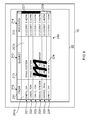
- the user selects to input the letter "m” by drawing an "m" shape 224 on the touch screen display device 22 using a stylus or a digit.
- the portion of the display device 22 that the shape 224 has been drawn in corresponds to the surface area covered by box 270 in Fig. 6 .
- the drawing of the shape 224 may or may not result in the shape 224 being displayed on the display as shown in Fig. 6 .
- the processing circuitry 12 compares the detected at least one alphanumeric character with data portions in a field.
- the processing circuitry 12 orders and selects a second plurality of items from the underlying list 275, and in dependence upon the comparison, controls the display device 22 to display a plurality of items in a list 240.
- the processing circuitry 12 In response to the drawing of the shape 224 on the touch screen display device 22, the processing circuitry 12 detects the selected character by comparing the drawn shape 224 with the shape of known alphanumeric characters and determines that the shape 224 corresponds to the letter "m". The processing circuitry 12 also determines which portion of the touch screen display device 22 the shape 224 has been drawn in. In this example, the shape 224 has been drawn in the surface area covered by box 270, so the processing circuitry 12 associates the shape 224 (and therefore the determined character, which in this case is the letter "m") with the "Subject" field 212. The user has therefore simultaneously selected the character that he wishes to input and the field that he wishes to associate the selected character with.
- the processing circuitry 12 selects items from the underlying list 275 to be displayed in the displayed list 240. The selection depends upon a comparison between the selected character and the data portion that each item has in a particular field.
- the processing circuitry 12 has detected the selection of the character "m" and associated it with the "Subject" field 212. This provides the processing circuitry 22 with a first criterion for ordering the items and selecting the items that are to be displayed.
- the processing circuitry 12 uses the data portions 201 c-208c of the items 201-208 in the "Received field" 214 (i.e. the time of receipt) as a second criterion for ordering and selecting the items following the detection of the selected character "m" and its association with the "Subject" field 212.
- the processing circuitry 12 determines which items 201-208 in the underlying list 275 of items has a data portion corresponding to the character "m" in its "Subject" field 212. In this example, the processing circuitry 12 finds that items 201, 202, 204, 207 and 208 have a data portion corresponding to the character "m” anywhere in their respective "Subject" fields 212. In an alternative example, the processing circuitry 12 may instead determine which items have a data portion corresponding to text that begins with the character "m" in the "Subject" field 212 (e.g. item 208). Other techniques for searching could be devised, particularly for use with characters which are not alphanumeric, such as gestures.
- the processing circuitry 12 then applies the second criterion to the items 201, 202, 204, 207 and 208 that fulfill the first criterion. It orders the underlying list 275 by placing all of the items 201, 202, 204, 207 and 208 that fulfill the first criterion in the order in which they were received (i.e. the second criterion), the uppermost item in the underlying list 275 being the item that was received last by the apparatus 10. The uppermost item in the re-ordered list 275 is therefore item 201, followed in descending order by items 202, 204, 207 and 208.
- Items 203, 205 and 206 do not have a data portion corresponding to the character "m" in their "Subject" field 212.
- the processing circuitry 22 may omit these terms entirely from the display. Alternatively, the processing circuitry 22 may order these items according to the secondary criteria and place them beneath items 202, 204, 207 and 208 in the underlying list 275.
- Item 203 was received by the apparatus 10 before item 205, which was received before item 206.
- the order of the items in the underlying list 275 following the detection of the selection of the character "m" and its association with the "Subject” field 212 therefore becomes 201, 202, 204, 207, 208, 203, 205, 206.
- the processing circuitry 12 stores the revised underlying list 275 as data in the storage device 14.
- the settings of the apparatus 10 and/or the size of the display device 22 means that only six items can be displayed at any one time.
- the processing circuitry 12 selects the six uppermost items in the revised underlying list 275 (items 201, 202, 204, 207, 208 and 203) and controls the display device 22 to display them as a list 240.
- the processing circuitry 12 may control the display to display items 205 and 206, removing items 201 and 202 from being displayed in the process.
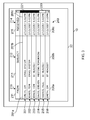
- Fig. 7 illustrates the apparatus 10 displaying items 201, 202, 204, 207, 208, 203 of the re-ordered underlying list 275.
- the processing circuitry 12 may order the items 201, 202, 204, 207 and 208 that have an "m" in their "Subject” field 212 in dependence upon the text that follows the "m” in the "Subject” field 212 (e.g. alphabetically), rather than according to the time and date that the items 201, 202, 204, 207 and 208 were received by the apparatus 10.
- the alphabetic ordering of the text that follows the selected character(s) is the second criterion.
- a third criterion of the time and date of receipt may be used to establish the order of items when an order cannot be established using the first and second criteria (e.g. because items have identical subject fields). In this example, the uppermost item would be item 201, followed in descending order by items 202, 208, 204, 207, 203, 205 and 206.
- the processing circuitry 12 may use a different second criterion for selecting and ordering the items. For example, it may use data portions 201 a-208a in the "From" field 210 as secondary criteria rather than data portions 201 c-208c in the "Received" field 214. For example, the processing circuitry 12 may order the items alphabetically according to surname and/or forename.
- the processing circuitry 12 orders the items according to surname (and in the case of identical surnames the forename is considered)
- the uppermost item of the items 201, 202, 204, 207 and 208 including an "m" in their "Subject" field 212 is 207, followed in descending order by items 204, 208, 202, 201.
- the items 203, 205 and 206 that do not include an "m" in their subject field would be 205, 203, 206. These may be omitted or included after the items which do include an "m” making the order of the complete list 275 from top to bottom: 207, 204, 208, 202, 201, 205, 203, 206.
- the list that is displayed on the display device 22 following the revision of the underlying list 275 may include all, some, or none of the items that were displayed before the underlying list 275 was revised, depending upon, for example, the criteria used to revise the list and the proportion of the underlying list 275 that is displayed on the display device 22 at any one time.
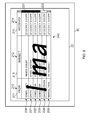
- Fig. 8 illustrates a situation in which the user has drawn the letters "m” and "a” on the surface area of the display device 22 corresponding to box 270, relating to the "Subject” field 212. This provides the first criterion for re-ordering the underlying list 275.
- the items that have a data portion in the subject field 212 that relates to the character string "ma" are determined by the processing circuitry 12 as being items 201, 202 and 208.
- the processing circuitry 12 orders the items that fulfill the first criterion according to the second criterion, which, in this example is time and date of arrival at the apparatus 10.
- the second criterion which, in this example is time and date of arrival at the apparatus 10.
- the items that do not have a data portion in the subject field that relates to the text "ma" are items 203, 204, 202, 206 and 207.
- the processing circuitry 12 may omit these from further display, or may order these items according to the second criterion, making the order of the underlying list 275 from top to bottom: 201, 202, 208, 203, 204, 205, 206, 207.
- the revised underlying list 275 is determined by the processing circuitry 12 by selection or re-ordering, it stores the revised underlying list as data in the storage device 14.
- Items 201, 202, 208, 203, 204, 205 are displayed on the display device 22 when the scroll tab 221 is at its uppermost location in the scroll bar 220, as shown in Fig. 8 .
- the processing circuitry 12 may order the items 201, 202, 204, 207 and 208 that have an "ma" in their "Subject” field 212 in dependence upon the text that follows the character string "ma" in the "Subject” field 212 (e.g. alphabetically), rather than according to the time and date that the items 201, 202, 204, 207 and 208 were received by the apparatus 10.
- the alphabetic ordering of the text that follows the selected characters is the second criterion.
- a third criterion of the time and date of receipt may be used to establish the order of items when an order cannot be established using the first and second criteria (e.g. because items have identical subject fields). In this example, the ordering of the items would be the same as that illustrated in Fig. 8 .
- the processing circuitry 12 when the user draws a first alphanumeric character on the display device 22, the processing circuitry 12 responds by comparing the data portion that each item has in the field associated with the first alphanumeric character, and selecting an appropriate plurality of items from the list 275 for display in a displayed list 240.
- Fig. 7 illustrates a situation in which the first alphanumeric character is the letter "m", and the associated field is the "Subject" field 212.
- the processing circuitry 12 responds by comparing the data portion that each item has in the field associated with the first and second alphanumeric characters and selecting an appropriate plurality of items for display in a displayed list 240.
- Fig. 8 illustrates a situation in which the first and second alphanumeric characters are "m" and "a", and the associated field is the "Subject" field 212. Images of these inputs remain visible to the user, as a reminder.
- Fig. 9 illustrates a situation in which the user has drawn the characters "m” and "a” on the surface area of the display device 22 corresponding to box 270, relating to the "Subject” field 212, and has drawn the letter "I” (i.e. the lower case version of the letter “L”) on the surface area of the display device 22 corresponding to box 260, relating to the "From” field 210.
- the first criterion is for an item to have a data portion in the "Subject" field 213 that relates to the character string "ma” and the second criterion is for an item to have a data portion in the "From" field 211 that relates to the character "I”.
- the processing circuitry 12 determines that the only item that fulfills the first and second criteria is item 208. Item 208 is therefore selected as the only item for display or is placed at the top of the underlying list 275 by the processing circuitry 12.
- the processing circuitry 12 also determines that items 201 and 202 provide a partial match in that they fulfill the first criterion but not the second criterion. In this example, if they are not omitted these items 201, 202 are placed in the underlying list 275 beneath item 208 by the processing circuitry 12. In the embodiment illustrated in Fig. 9 , the processing circuitry 12 uses the third criterion of time and date of arrival at the apparatus 10 to determine the order that the items 201, 202 should be placed in the underlying list 275. As the item 201 was received at the apparatus 10 after item 202, item 201 is placed in the second place in the underlying list 275, above item 203. The third criterion is therefore used to determine how items that match the user's character selections to the same extent should be ordered in the underlying list 275.
- the processing circuitry 12 uses the third criterion of time and date of arrival at the apparatus 10 to determine which order the items 203 to 207 should be placed in the underlying list 275.
- the order of the items in the underlying list 275 in the embodiment illustrated in Fig. 9 is therefore 208, 201, 202, 203, 204, 205, 206, 207.
- the settings of the apparatus 10 and/or the size of the display device 22 mean that only six items can be displayed at any one time.
- the processing circuitry 12 selects the six uppermost items in the underlying list 275 (items 208, 201, 202, 203, 204, and 205) and controls the display device 22 to display them in a list 240. If the user moves the scroll tab 221 downwards, in the manner discussed in relation to Figs 3 and 4 , the processing circuitry 12 may control the display to display items 206 and 207, removing items 208 and 201 from display in the process.
- the processing circuitry 12 may be configured to determine which items fulfill the first criterion or the second criterion but not both the first and second criteria, and then omit them, or order all of those items on the basis of a third criterion (e.g. time and date of arrival at the apparatus 10), irrespective of whether the first criterion or the second criterion was fulfilled.
- a third criterion e.g. time and date of arrival at the apparatus 10
- the processing circuitry 12 may be configured to determine which portion of the surface area of the display device 22 was drawn in first by the user, and then treat the criterion relating to that portion of the surface area to be the primary criterion. For example, in a situation where a user draws the characters "m" and "a” on the surface area of the display device 22 corresponding to box 270, and then subsequently draws the letter "I" on the surface area of the display device 22 corresponding to box 260, relating to the "From" field 211, the first criterion mentioned above is used as the primary criterion and the second criterion mentioned above is used as the secondary criterion.
- a tertiary criterion e.g. time and date of receipt by the apparatus 10.
- Items that fulfill the primary criterion but not the secondary criterion may be omitted or positioned underneath the items that fulfill the primary and second criteria in the underlying list 275. If there is more than one item that fulfills the primary criterion but not the secondary criterion, the third criterion is used to determine the order of the items fulfilling the primary criterion but not the secondary criterion in the underlying list 275.
- Items that fulfill the secondary criterion but not the primary criterion may be omitted or positioned underneath the items that fulfill the primary criterion but not the secondary criterion in the underlying list 275. If there is more than one item that fulfills the secondary criterion but not the primary criterion, the tertiary criterion is used to determine the order of the items fulfilling the secondary criterion but not the primary criterion in the underlying list 275.
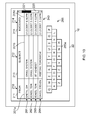
- Fig. 10 illustrates an embodiment of the invention in which the display device 22 displays a QWERTY keyboard 285.
- a user may drag an icon from the displayed keyboard to an appropriate portion of the display 22 in order to select a character for input. For example, dragging the "m" character icon 285a into the portion of the display device 22 encompassed by box 270 will cause the processing circuitry 12 to respond by controlling the display device 22 to display the list 240 illustrated in Fig. 7 , in the same manner as that described in relation to Fig. 7 .
- the user input serves to select a character, and also to associate the character with one of the available fields. These input parameters are then used to select items from the list. This selection may be by discarding, for display purposes, all items which are not selected by the input of the characters, or by re-ordering the underlying list of items to put the selected items first in the display, or by moving to an appropriate position in a list, whose contents remain in the same order (such as to select an initial letter in an alphabetic list).
- an apparatus comprising: a user output device configured to display a first plurality of items from a list of items, each item having data portions in fields; a user input device configured to enable a user to select at least one character from a plurality of selectable alphanumeric characters and to associate the selected at least one character with a field; and processing circuitry configured to control the user output device to display a second plurality of items, the second plurality of items being selected from the list of items, wherein the selection is in dependence upon a comparison between the selected at least one character and the data portion that each item has in the associated field.
- the displayed second plurality of items might not include any of the items from the displayed first plurality of items.
- the displayed second plurality of items may include at least one item from the displayed first plurality of items.
- the user input device may be configured to enable a user to simultaneously select the at least one character and associate it with a field.
- the processing circuitry may be configured to compare the data portion that each item has in the associated field with the first input character.
- the processing circuitry may be configured to compare the data portion that each item has in the associated field with the first and second input characters.
- the user input device and the user output device may be comprised in a touch screen display device.
- the touch screen display device may be configured to enable a user to select the at least one character by writing the at least one character on the touch screen display device.
- the processing circuitry may be configured to associate each field with a portion of the surface area of the touch screen display device.
- the processing circuitry may be configured to determine which field the selected at least one character is associated with in dependence upon the portion of the surface area of the touch screen display device that the selected at least one character is written on.
- the touch screen display device may be configured to enable a user to select at the least one character by selecting at least one character icon from a plurality of character icons displayed on the touch screen display device.
- Individual characters may be selected by dragging a character icon displayed on the touch screen display device from one portion of the surface area of the touch screen display device to another.
- the processing circuitry may be configured to associate each field with a portion of the surface area of the touch screen display device.
- the processing circuitry may be configured to determine which at least one character is being selected and which field the selected at least one character is associated with in dependence upon the portion of the surface area of the touch screen display device that an character icon dragged to.
- At least one of the selectable characters may be included in the set of alphanumeric characters, symbols, shapes, manual movements and gestures.
- Each item of the plurality of items may relate to an email.
- the apparatus may be configured to be operable as a mobile telephone.
- a method comprising: displaying a first plurality of items from a list of items, each item having data portions in fields; detecting the selection of at least one character from a plurality of selectable characters, the selection associating the selected character being with a field; comparing the detected at least one character with the data portion that each item has in the associated field; and displaying a second plurality of items, the second plurality of items being selected from the list of items, the selection being in dependence upon the comparison.
- an apparatus comprising: means for displaying a first plurality of items from a list of items, each item having data portions in fields; means for enabling a user to select at least one character from a plurality of selectable characters and to associate the selected at least one character with a field; and control means, for controlling the means for displaying to display a second plurality of items, the second plurality of items being selected from the list of items, wherein the selection is in dependence upon a comparison between the selected at least one character and the data portion that each item has in the associated field.
- a computer program comprising: instructions for displaying a first plurality of items from a list of items, each item having data portions in fields; instructions for detecting the selection of at least one character from a plurality of selectable characters, the selection associating the selected character with a field; instructions for comparing the detected at least one character with the data portion that each item has in the associated field; and instructions for displaying a second plurality of items, the second plurality of items being selected from the list of items, the selection being in dependence upon the comparison.
- a graphical user interface comprising: a user output device configured to display a first plurality of items from a list of items, each item having data portions in fields; a user input device configured to enable a user to select at least one character from a plurality of selectable characters, and to enable the user to associate the selected at least one character with a field, wherein in response to the selection of the at least one character, the user output device displays a second plurality of items, the second plurality of items being selected from the list of items and ordered, in dependence upon the selected at least one character and the data portion that each item has in the associated field.
Landscapes
- Engineering & Computer Science (AREA)
- General Engineering & Computer Science (AREA)
- Theoretical Computer Science (AREA)
- Human Computer Interaction (AREA)
- Physics & Mathematics (AREA)
- General Physics & Mathematics (AREA)
- User Interface Of Digital Computer (AREA)
- Position Input By Displaying (AREA)
Abstract
Description
- Embodiments of the present invention relate to searching. In particular, they relate to an apparatus, method, computer program and a user interface for searching through items in a list by re-ordering the list.
- The number of features that are integrated into a single electronic apparatus has been increasing in recent years. This has been particularly evident in the case of mobile radiotelephones and computers.
- The increase in the number of features has been accompanied by an increase in the amount of data that is stored in a single apparatus. In order to access a particular portion of the stored data, a user may wish to sort through the data stored by the apparatus using an appropriate searching method.
- According to various embodiments of the invention there is provided an apparatus, comprising: a user output device configured to display a first plurality of items from a list of items, each item having data portions in fields; a user input device configured to enable a user to select at least one character from a plurality of selectable characters and to associate the selected at least one character with a field, and processing circuitry configured to control the user output device to display a second plurality of items, the second plurality of items being selected from the list of items, wherein the selection is in dependence upon a comparison between the selected at least one character and the data portion that each item has in the associated field.
- According to various embodiments of the invention there is provided a method, comprising: displaying a first plurality of items from a list of items, each item having data portions in fields; detecting the selection of at least one character from a plurality of selectable characters, the selection associating the selected character with a field; comparing the detected at least one character with the data portion that each item has in the associated field; and displaying a second plurality of items, the second plurality of items being selected from the list of items, the selection and ordering being in dependence upon the comparison.
- According to various embodiments of the invention there is provided an apparatus, comprising: means for displaying a first plurality of items from a list of items, each item having data portions in fields; means for enabling a user to select at least one character from a plurality of selectable characters and to associate the at least one selected character with a field; and control means, for controlling the means for displaying to display a second plurality of items, the second plurality of items being selected from the list of items, wherein the selection is in dependence upon a comparison between the selected at least one character and the data portion that each item has in the associated field.
- According to various embodiments of the invention there is provided a computer program, comprising: instructions for displaying a first plurality of items from a list of items, each item having data portions in fields; instructions for detecting the selection of at least one character from a plurality of selectable characters, the selection associating the selected character with a field; instructions for comparing the detected at least one character with the data portion that each item has in the associated field; and instructions for displaying a second plurality of items, the second plurality of items being selected from the list of items, the selection and ordering being in dependence upon the comparison.
- According to various embodiments of the invention there is provided a graphical user interface, comprising: a user output device configured to display a first plurality of items from a list of items, each item having data portions in fields; a user input device configured to enable a user to select at least one character from a plurality of selectable characters, and to enable the user to associate the selected at least one character with a field, wherein in response to the selection of the at least one character, the user output device displays a second plurality of items, the second plurality of items being selected from the list of items, in dependence upon the selected at least one character and the data portion that each item has in the associated field.
- For a better understanding of various embodiments of the present invention reference will now be made by way of example only to the accompanying drawings in which:
-
Fig. 1 illustrates an apparatus; -
Fig. 2 illustrates a block diagram of a method; -
Fig. 3 illustrates the apparatus displaying a list of items from an underlying list on a touch screen display device; -
Fig. 4 illustrates the underlying list; -
Fig. 5 illustrates portions of the surface of the touch screen display device relating to fields; -
Fig. 6 illustrates writing on the touch screen display device to select a character and associate it with a field; -
Fig. 7 illustrates the apparatus displaying a list of items in dependence upon a selected character and its associated field; -
Fig. 8 illustrates the apparatus displaying a list of items in dependence upon first and second selected characters and their associated field; -
Fig. 9 illustrates the apparatus displaying a list of items in dependence upon first, second and third selected characters and their associated fields; and -
Fig. 10 illustrates the apparatus displaying a list of items and a virtual keyboard. - The Figures illustrate an
apparatus 10, comprising: means, such as auser output device 20, configured to display a first plurality of items from a list ofitems 275, each item having data portions in fields; means, such as a user input device 18, configured to enable a user to select at least one character from a plurality of selectable characters and to associate the selected at least one character with a field, and control means, such asprocessing circuitry 12, configured to control theuser output device 20 to display a second plurality of items, the second plurality of items being selected from the list ofitems 275, wherein the selection and ordering is in dependence upon a comparison between the selected at least one character and the data portion that each item has in the associated field. - A character may be an alphanumeric character or a symbol, or may be any shape, including shapes created by a drawing action, manual movement or a manual gesture detect by the user input device 18. Movements and gestures, in particular, but also other characters may be associated as shortcuts for particular inputs. For example, a particular gesture may be interpreted as a shortcut for entering an associated name.
-
Fig. 1 illustrates a schematic of anapparatus 10. Theapparatus 10 may, for example, be a hand portable electronic device such as a mobile radiotelephone. Theapparatus 10 comprisesprocessing circuitry 12, a storage device 14, aradio transceiver 16, a user input device 18 and auser output device 20. - The
processing circuitry 12 may be any type of processing circuitry. For example, theprocessing circuitry 12 may be a programmable processor that interpretscomputer program instructions 13 and processes data. Alternatively, theprocessing circuitry 12 may be, for example, programmable hardware with embedded firmware. Theprocessing circuitry 12 may be a single integrated circuit or a set of integrated circuits (i.e. a chipset). Theprocessing circuitry 12 may also be a hardwired, application-specific integrated circuit (ASIC). - The
processing circuitry 12 is operable to receive an input from and provide an output to theradio transceiver 16. Theradio transceiver 16 is configured to transmit and receive cellular telephone signals and enables theapparatus 10 to operate as a mobile cellular radiotelephone. - The
processing circuitry 12 is connected to write to and read from the storage device 14. The storage device 14 may be a single memory unit or a plurality of memory units. - The storage device 14 may store
computer program instructions 13 that control the operation of theapparatus 10 when loaded into processing circuitry. Thecomputer program instructions 13 may provide the logic and routines that enables the apparatus to perform the method illustrated inFig 2 . - The
computer program instructions 13 may arrive at theapparatus 10 via an electromagnetic carrier signal or be copied from aphysical entity 15 such as a computer program product, a memory device or a record medium such as a CD-ROM or DVD. - The computer program instructions provide: instructions for displaying a first plurality of items from a list of items, each item having data portions in fields; instructions for detecting the selection of at least one character from a plurality of selectable characters, the selection associating the selected character with a field; instructions for comparing the detected at least one character with the data portion that each item has in the associated field; and instructions for displaying a second plurality of items, the second plurality of items being selected from the list of items, the selection being in dependence upon the comparison.
- The
processing circuitry 12 is connected to receive an input from the user input device 18. Theprocessing circuitry 12 is also connected to provide an output to theuser output device 20. Theuser output device 20 is for conveying information to a user and may be, for example, a display device. The user input device 18 and theuser output device 20 together form auser interface 22. Theuser interface 22 may be provided as a single unit, such as a touch screen display device. For example, a user may provide an input to the touch screen display device using a digit or a stylus. - In the description below, the
user interface 22 is described as being a touchscreen display device 22 for ease of explanation. Many touch screen technologies are known. These include technologies based on resistive, inductive and impactive techniques. Some touch screens only recognize taps (often by means of a stylus) as means of selection or input. Others will respond to movement as well as actuation at a single point, thus allowing gestures and movement to be used. So called multi-touch screens can be touched in multiple locations at the same time. For example, a user can press the screen with two fingers, simultaneously, and both presses are detected and used as part of the input. However, it will be recognized by the person skilled in the art that in various embodiments of the invention, a touchscreen display device 22 need not be used and instead an alternative user input device 18 and/or an alternativeuser output device 20 may be used. For example, the user input device 18 may be a keypad and theuser output device 20 may be a display device without a touch input feature. -
Fig. 2 illustrates a block diagram of a method. Theblocks Fig 2 may represent steps in a method and/or sections of code in thecomputer program 13. The illustration of a particular order to the blocks does not necessarily imply that there is a required or preferred order for the blocks and the order and arrangement of the blocks may be varied. - At
block 310, a user indicates that he wishes to access an email application stored in the storage device 14 of theapparatus 10 by making an appropriate selection using the touchscreen display device 22. Theprocessing circuitry 12 detects the selection of the email application by the user. - At
block 320, theprocessing circuitry 12 retrieves the email application from the storage device 14 and controls the touchscreen display device 22 to display an inbox relating to the email application. -
Fig. 3 illustrates a plurality of items 201-206 being displayed on the touchscreen display device 22 in alist 240. Each item 201-206 relates to an email that has been received by theapparatus 10 and is stored in the storage device 14. - Each item includes a data portion in each one of a plurality of
fields Fig. 3 , the fields displayed as icons on thedisplay device 22 are "From" 210, "Subject" 212 and "Received" 214. For example,item 201 has adata portion 201 a corresponding to the text "Smith, Jim" in the "From"field 210, which relates the sender of the email.Item 201 has adata portion 201 b corresponding to "Email System" in the "Subject"field 212, which relates to the subject of the email.Item 201 has adata portion 201 c corresponding to the text "2/13/2007 6:42PM" in the "Received"field 214, which relates to the date and time that the email was received by theapparatus 10. The data portions of the other items/emails may be numbered with corresponding reference numerals. However, for clarity, only thereference numerals Fig. 3 . - The plurality of items 201-206 are displayed as a
list 240 on thedisplay device 22. Text corresponding to thedata portions 201a-206a in the "From"field 210 is displayed by thedisplay device 22 beneath a "From"icon 211. Similarly, text corresponding to thedata portions 201b-206b in the "Subject"field 212 is displayed beneath a "Subject"icon 213 and text corresponding to thedata portions 201 c-206c in the "Received"field 214 is displayed beneath a "Received"icon 215. - In
Fig. 3 , the data in each field is text. In this, and any other examples, a field may include other data representing other types of information, such as an image, picture or symbol. - In
Fig. 3 , the plurality of items 201-206 is ordered in alist 240 according to when they were received by theapparatus 10. The uppermost item,item 201, was received at a later point in time than any of the other items 202-206. The later the time of receipt, the higher in the displayedlist 240 an item is positioned. - The plurality of items 201-206 that are illustrated as being displayed on the
display device 22 may be a subset of a larger,underlying list 275 of items/emails.Fig. 4 illustrates theunderlying list 275 of items. - The
underlying list 275 forms the basis of the displayedlist 240. Theunderlying list 275 includes all of the items in the displayedlist 240 and may include further items that are not in the displayedlist 240. In the illustrated example, theunderlying list 275 includes twofurther items list 240 by thedisplay device 22 at any one point in time may depend upon a number of factors, including the size of theunderlying list 275, the size of thedisplay device 22 and the settings of the apparatus 10 (e.g. relating to the size of displayed text). - In the example illustrated in
Figs 3 and4 ,item 201 is the uppermost item in the displayedlist 240. Downwards movement of ascroll tab 221 within ascroll bar 220 results in items from the upper part of the displayedlist 240 sequentially ceasing to be displayed (i.e. items disappear from the displayedlist 240 in theorder 201 to 206), and being replaced byother items underlying list 275. - For example, if the user scrolls downwards such that item 201 (for which Jim Smith is the sender) is no longer displayed by the
display device 22,item 201 will be removed from the displayedlist 240 and another item 207 (for which Andrew Cox is the sender) will be added to the displayedlist 240 from theunderlying list 275. Downwards movement of thescroll tab 221 will result initem 207 being displayed at the bottom of the displayedlist 240 beneathitem 206, and each of the remaining items 202-206 being displayed at a position on thedisplay device 22 that is above the position that it occupies in theFig. 3 illustration. That is,item 202 will be displayed in the position ofitem 201 in theFig. 3 illustration,item 203 will be displayed in the position ofitem 202, and so on. Scrolling upwards may be provided in a similar manner. - The
underlying list 275 only includes eight items 201-208. However, in practice theunderlying list 275 may include hundreds or even thousands of items. A user may wish to search through the items to find a particular item, which may, for example, be included in theunderlying list 275 but not the displayedlist 240. - Embodiments of the invention provide a method in which a user may search through the items in the
underlying list 275 by writing on the surface of the touchscreen display device 22 to input data in the form of alphanumeric characters, which may be alphanumeric or of other types, as noted above. -
Fig. 5 is aschematic illustrating boxes screen display device 22 the user may write on to re-order the items in theunderlying list 275 when thedisplay device 22 is displaying the field information illustrated inFig. 3 . The surface area encompassed by theboxes display device 22. For example, the surface area encompassed by theboxes display device 22. - The surface area covered by
box 260 relates to the "From"field 210, and encompasses the area corresponding to the "From"icon 211 and the text fordata portions box 270 relates to the "Subject"field 212 and encompasses the area corresponding to the "Subject"icon 213 and the text fordata portions box 280 relates to the "Received"field 214 and encompasses the area corresponding to the "Received"icon 215 and the text fordata portions - At
block 330 of the method illustrated inFig. 2 , theprocessing circuitry 12 detects selection of at least one character and associates it with a field. - In one example, a user of the
apparatus 10 may choose to input any alphanumeric character from a plurality of selectable alphanumeric characters. The plurality of selectable alphanumeric characters may comprise, for example, letters from the Latin/Roman alphabet and Arabic numerals. The plurality of selectable alphanumeric characters may comprise letters and/or numbers from any language. For example, the plurality of alphanumeric selectable characters may include characters that are not from the Latin/Roman alphabet and are not Arabic numerals, such as characters of Chinese origin, including: traditional Chinese characters, simplified Chinese characters, and characters used in Kanji, Kana, Hangul and Hanja. - In other examples, a user may choose to input another type of character. Examples include symbols or shapes created by a drawing action of the user's finger or a stylus. Shapes or symbols could be created by a manual movement or gesture, such as a movement in a particular direction.
- In the illustration provided in
Fig. 6 , theprocessing circuitry 12 is configured to detect alphanumeric characters including letters from the Latin/Roman alphabet and Arabic numerals. In this example, the user selects to input the letter "m" by drawing an "m"shape 224 on the touchscreen display device 22 using a stylus or a digit. The portion of thedisplay device 22 that theshape 224 has been drawn in corresponds to the surface area covered bybox 270 inFig. 6 . The drawing of theshape 224 may or may not result in theshape 224 being displayed on the display as shown inFig. 6 . - At
block 340 ofFig. 2 , theprocessing circuitry 12 compares the detected at least one alphanumeric character with data portions in a field. Atblock 350 ofFig. 2 , theprocessing circuitry 12 orders and selects a second plurality of items from theunderlying list 275, and in dependence upon the comparison, controls thedisplay device 22 to display a plurality of items in alist 240. - In response to the drawing of the
shape 224 on the touchscreen display device 22, theprocessing circuitry 12 detects the selected character by comparing the drawnshape 224 with the shape of known alphanumeric characters and determines that theshape 224 corresponds to the letter "m". Theprocessing circuitry 12 also determines which portion of the touchscreen display device 22 theshape 224 has been drawn in. In this example, theshape 224 has been drawn in the surface area covered bybox 270, so theprocessing circuitry 12 associates the shape 224 (and therefore the determined character, which in this case is the letter "m") with the "Subject"field 212. The user has therefore simultaneously selected the character that he wishes to input and the field that he wishes to associate the selected character with. - In response to detecting the selection of a character and associating the selected character with a field, the
processing circuitry 12 selects items from theunderlying list 275 to be displayed in the displayedlist 240. The selection depends upon a comparison between the selected character and the data portion that each item has in a particular field. - In this particular example, the
processing circuitry 12 has detected the selection of the character "m" and associated it with the "Subject"field 212. This provides theprocessing circuitry 22 with a first criterion for ordering the items and selecting the items that are to be displayed. - As mentioned above, before the input of the character "m" by the user, the
underlying list 275 is ordered according to the time and date that the items/emails 201-208 were received by theapparatus 10. In this example, theprocessing circuitry 12 uses thedata portions 201 c-208c of the items 201-208 in the "Received field" 214 (i.e. the time of receipt) as a second criterion for ordering and selecting the items following the detection of the selected character "m" and its association with the "Subject"field 212. - The
processing circuitry 12 determines which items 201-208 in theunderlying list 275 of items has a data portion corresponding to the character "m" in its "Subject"field 212. In this example, theprocessing circuitry 12 finds thatitems processing circuitry 12 may instead determine which items have a data portion corresponding to text that begins with the character "m" in the "Subject" field 212 (e.g. item 208). Other techniques for searching could be devised, particularly for use with characters which are not alphanumeric, such as gestures. - The
processing circuitry 12 then applies the second criterion to theitems underlying list 275 by placing all of theitems underlying list 275 being the item that was received last by theapparatus 10. The uppermost item in there-ordered list 275 is thereforeitem 201, followed in descending order byitems -
Items field 212. Theprocessing circuitry 22 may omit these terms entirely from the display. Alternatively, theprocessing circuitry 22 may order these items according to the secondary criteria and place them beneathitems underlying list 275.Item 203 was received by theapparatus 10 beforeitem 205, which was received beforeitem 206. The order of the items in theunderlying list 275 following the detection of the selection of the character "m" and its association with the "Subject"field 212 therefore becomes 201, 202, 204, 207, 208, 203, 205, 206. Once the new selection of theunderlying list 275 is determined by theprocessing circuitry 12, it stores the revisedunderlying list 275 as data in the storage device 14. - As indicated above, in the embodiments of the invention described, the settings of the
apparatus 10 and/or the size of thedisplay device 22 means that only six items can be displayed at any one time. In a situation where thescroll tab 221 is at its uppermost location in thescroll bar 220, theprocessing circuitry 12 selects the six uppermost items in the revised underlying list 275 (items display device 22 to display them as alist 240. - If the user moves the
scroll tab 221 downwards, in the manner discussed in relation toFigs 3 and4 , theprocessing circuitry 12 may control the display to displayitems items Fig. 7 illustrates theapparatus 10 displayingitems underlying list 275. - In an alternative embodiment, the
processing circuitry 12 may order theitems field 212 in dependence upon the text that follows the "m" in the "Subject" field 212 (e.g. alphabetically), rather than according to the time and date that theitems apparatus 10. In this embodiment, the alphabetic ordering of the text that follows the selected character(s) (in this example, "m") is the second criterion. A third criterion of the time and date of receipt may be used to establish the order of items when an order cannot be established using the first and second criteria (e.g. because items have identical subject fields). In this example, the uppermost item would beitem 201, followed in descending order byitems - In a further alternative embodiment, the
processing circuitry 12 may use a different second criterion for selecting and ordering the items. For example, it may usedata portions 201 a-208a in the "From"field 210 as secondary criteria rather thandata portions 201 c-208c in the "Received"field 214. For example, theprocessing circuitry 12 may order the items alphabetically according to surname and/or forename. For instance, if theprocessing circuitry 12 orders the items according to surname (and in the case of identical surnames the forename is considered), the uppermost item of theitems field 212 is 207, followed in descending order byitems - The
items complete list 275 from top to bottom: 207, 204, 208, 202, 201, 205, 203, 206. - It will be apparent to the person skilled in the art that the list that is displayed on the
display device 22 following the revision of theunderlying list 275 may include all, some, or none of the items that were displayed before theunderlying list 275 was revised, depending upon, for example, the criteria used to revise the list and the proportion of theunderlying list 275 that is displayed on thedisplay device 22 at any one time. -
Fig. 8 illustrates a situation in which the user has drawn the letters "m" and "a" on the surface area of thedisplay device 22 corresponding tobox 270, relating to the "Subject"field 212. This provides the first criterion for re-ordering theunderlying list 275. - In this example, the items that have a data portion in the
subject field 212 that relates to the character string "ma" (i.e. text including an "m" followed immediately by an "a") are determined by theprocessing circuitry 12 as beingitems processing circuitry 12 orders the items that fulfill the first criterion according to the second criterion, which, in this example is time and date of arrival at theapparatus 10. Asitem 201 was received afteritems underlying list 275, followed in descending order byitems - The items that do not have a data portion in the subject field that relates to the text "ma" are
items processing circuitry 12 may omit these from further display, or may order these items according to the second criterion, making the order of theunderlying list 275 from top to bottom: 201, 202, 208, 203, 204, 205, 206, 207. Once the revisedunderlying list 275 is determined by theprocessing circuitry 12 by selection or re-ordering, it stores the revised underlying list as data in the storage device 14.Items display device 22 when thescroll tab 221 is at its uppermost location in thescroll bar 220, as shown inFig. 8 . - In an alternative embodiment, the
processing circuitry 12 may order theitems field 212 in dependence upon the text that follows the character string "ma" in the "Subject" field 212 (e.g. alphabetically), rather than according to the time and date that theitems apparatus 10. In this embodiment, the alphabetic ordering of the text that follows the selected characters (in this example, "ma") is the second criterion. A third criterion of the time and date of receipt may be used to establish the order of items when an order cannot be established using the first and second criteria (e.g. because items have identical subject fields). In this example, the ordering of the items would be the same as that illustrated inFig. 8 . - According to some embodiments of the invention, when the user draws a first alphanumeric character on the
display device 22, theprocessing circuitry 12 responds by comparing the data portion that each item has in the field associated with the first alphanumeric character, and selecting an appropriate plurality of items from thelist 275 for display in a displayedlist 240.Fig. 7 illustrates a situation in which the first alphanumeric character is the letter "m", and the associated field is the "Subject"field 212. - When the user draws the second alphanumeric character on the
display device 22, theprocessing circuitry 12 responds by comparing the data portion that each item has in the field associated with the first and second alphanumeric characters and selecting an appropriate plurality of items for display in a displayedlist 240.Fig. 8 illustrates a situation in which the first and second alphanumeric characters are "m" and "a", and the associated field is the "Subject"field 212. Images of these inputs remain visible to the user, as a reminder. -
Fig. 9 illustrates a situation in which the user has drawn the characters "m" and "a" on the surface area of thedisplay device 22 corresponding tobox 270, relating to the "Subject"field 212, and has drawn the letter "I" (i.e. the lower case version of the letter "L") on the surface area of thedisplay device 22 corresponding tobox 260, relating to the "From"field 210. - In this example, the first criterion is for an item to have a data portion in the "Subject"
field 213 that relates to the character string "ma" and the second criterion is for an item to have a data portion in the "From"field 211 that relates to the character "I". - The
processing circuitry 12 determines that the only item that fulfills the first and second criteria isitem 208.Item 208 is therefore selected as the only item for display or is placed at the top of theunderlying list 275 by theprocessing circuitry 12. - The
processing circuitry 12 also determines thatitems items underlying list 275 beneathitem 208 by theprocessing circuitry 12. In the embodiment illustrated inFig. 9 , theprocessing circuitry 12 uses the third criterion of time and date of arrival at theapparatus 10 to determine the order that theitems underlying list 275. As theitem 201 was received at theapparatus 10 afteritem 202,item 201 is placed in the second place in theunderlying list 275, aboveitem 203. The third criterion is therefore used to determine how items that match the user's character selections to the same extent should be ordered in theunderlying list 275. -
Items processing circuitry 12 uses the third criterion of time and date of arrival at theapparatus 10 to determine which order theitems 203 to 207 should be placed in theunderlying list 275. The order of the items in theunderlying list 275 in the embodiment illustrated inFig. 9 is therefore 208, 201, 202, 203, 204, 205, 206, 207. Once the new order of theunderlying list 275 is determined by theprocessing circuitry 12, it stores the re-orderedunderlying list 275 as data in the storage device 14. - As discussed above, the settings of the
apparatus 10 and/or the size of thedisplay device 22 mean that only six items can be displayed at any one time. In a situation where thescroll tab 221 is at its uppermost location in thescroll bar 220, theprocessing circuitry 12 selects the six uppermost items in the underlying list 275 (items display device 22 to display them in alist 240. If the user moves thescroll tab 221 downwards, in the manner discussed in relation toFigs 3 and4 , theprocessing circuitry 12 may control the display to displayitems items - In the example illustrated in
Fig. 9 , there are no items that fulfill the second criterion but not the first criterion. However, it will be appreciated that this may be the case in some examples. In some embodiments of the invention, theprocessing circuitry 12 may be configured to determine which items fulfill the first criterion or the second criterion but not both the first and second criteria, and then omit them, or order all of those items on the basis of a third criterion (e.g. time and date of arrival at the apparatus 10), irrespective of whether the first criterion or the second criterion was fulfilled. - In alternative embodiments, the
processing circuitry 12 may be configured to determine which portion of the surface area of thedisplay device 22 was drawn in first by the user, and then treat the criterion relating to that portion of the surface area to be the primary criterion. For example, in a situation where a user draws the characters "m" and "a" on the surface area of thedisplay device 22 corresponding tobox 270, and then subsequently draws the letter "I" on the surface area of thedisplay device 22 corresponding tobox 260, relating to the "From"field 211, the first criterion mentioned above is used as the primary criterion and the second criterion mentioned above is used as the secondary criterion. - If there is more than one item that fulfills the primary and secondary criteria, a tertiary criterion (e.g. time and date of receipt by the apparatus 10) is used to determine the order of the items fulfilling both the primary and secondary criteria in the
underlying list 275. - Items that fulfill the primary criterion but not the secondary criterion may be omitted or positioned underneath the items that fulfill the primary and second criteria in the
underlying list 275. If there is more than one item that fulfills the primary criterion but not the secondary criterion, the third criterion is used to determine the order of the items fulfilling the primary criterion but not the secondary criterion in theunderlying list 275. - Items that fulfill the secondary criterion but not the primary criterion may be omitted or positioned underneath the items that fulfill the primary criterion but not the secondary criterion in the
underlying list 275. If there is more than one item that fulfills the secondary criterion but not the primary criterion, the tertiary criterion is used to determine the order of the items fulfilling the secondary criterion but not the primary criterion in theunderlying list 275. - Any items that do not fulfill the primary or the secondary criterion may be omitted or positioned underneath the items that fulfill the secondary criterion but not the primary criterion in the
underlying list 275. If there is more than one item that does not fulfill the primary criterion or the secondary criterion, the tertiary criterion is used to determine the order of the items that do not fulfill the primary criterion or the secondary criterion in theunderlying list 275.Fig. 10 illustrates an embodiment of the invention in which thedisplay device 22 displays aQWERTY keyboard 285. In this embodiment, instead of or in addition to being able to draw characters on thedisplay device 22, a user may drag an icon from the displayed keyboard to an appropriate portion of thedisplay 22 in order to select a character for input. For example, dragging the "m"character icon 285a into the portion of thedisplay device 22 encompassed bybox 270 will cause theprocessing circuitry 12 to respond by controlling thedisplay device 22 to display thelist 240 illustrated inFig. 7 , in the same manner as that described in relation toFig. 7 . - In other examples, a selection of other characters, such as symbols, could be provided for user selection.
- In all of these examples, the user input serves to select a character, and also to associate the character with one of the available fields. These input parameters are then used to select items from the list. This selection may be by discarding, for display purposes, all items which are not selected by the input of the characters, or by re-ordering the underlying list of items to put the selected items first in the display, or by moving to an appropriate position in a list, whose contents remain in the same order (such as to select an initial letter in an alphabetic list).
- Although embodiments of the present invention have been described in the preceding paragraphs with reference to various examples, it should be appreciated that modifications to the examples given can be made without departing from the scope of the invention as claimed. For example, embodiments of the invention have been described in the context of an inbox of an email application. However, it will be apparent that embodiments of the invention may be applied in other contexts. For example, they may be applied to a "sent items" box in an email application, to an inbox or "sent items" box in a text message (SMS) application. Embodiments of the invention could also be used to search through other types of content such as music files or photographic images.
- Features described in the preceding description may be used in combinations other than the combinations explicitly described.
- Whilst endeavoring in the foregoing specification to draw attention to those features of the invention believed to be of particular importance it should be understood that the Applicant claims protection in respect of any patentable feature or combination of features hereinbefore referred to and/or shown in the drawings whether or not particular emphasis has been placed thereon.
- According to some, but not necessarily all, embodiments of the invention, there is provided an apparatus, comprising: a user output device configured to display a first plurality of items from a list of items, each item having data portions in fields; a user input device configured to enable a user to select at least one character from a plurality of selectable alphanumeric characters and to associate the selected at least one character with a field; and processing circuitry configured to control the user output device to display a second plurality of items, the second plurality of items being selected from the list of items, wherein the selection is in dependence upon a comparison between the selected at least one character and the data portion that each item has in the associated field.
- It may be that only the second plurality of items is displayed.
- The displayed second plurality of items might not include any of the items from the displayed first plurality of items. Alternatively, the displayed second plurality of items may include at least one item from the displayed first plurality of items.
- The user input device may be configured to enable a user to simultaneously select the at least one character and associate it with a field.
- In response to selection of a first individual character, the processing circuitry may be configured to compare the data portion that each item has in the associated field with the first input character.
- In response to input of a second individual character, the processing circuitry may be configured to compare the data portion that each item has in the associated field with the first and second input characters.
- The user input device and the user output device may be comprised in a touch screen display device.
- The touch screen display device may be configured to enable a user to select the at least one character by writing the at least one character on the touch screen display device.
- The processing circuitry may be configured to associate each field with a portion of the surface area of the touch screen display device. The processing circuitry may be configured to determine which field the selected at least one character is associated with in dependence upon the portion of the surface area of the touch screen display device that the selected at least one character is written on.
- The touch screen display device may be configured to enable a user to select at the least one character by selecting at least one character icon from a plurality of character icons displayed on the touch screen display device.
- Individual characters may be selected by dragging a character icon displayed on the touch screen display device from one portion of the surface area of the touch screen display device to another.
- The processing circuitry may be configured to associate each field with a portion of the surface area of the touch screen display device. The processing circuitry may be configured to determine which at least one character is being selected and which field the selected at least one character is associated with in dependence upon the portion of the surface area of the touch screen display device that an character icon dragged to.
- At least one of the selectable characters may be included in the set of alphanumeric characters, symbols, shapes, manual movements and gestures.
- Each item of the plurality of items may relate to an email.
- The apparatus may be configured to be operable as a mobile telephone.
- According to some, but not necessarily all, embodiments of the invention, there is provided a method, comprising: displaying a first plurality of items from a list of items, each item having data portions in fields; detecting the selection of at least one character from a plurality of selectable characters, the selection associating the selected character being with a field; comparing the detected at least one character with the data portion that each item has in the associated field; and displaying a second plurality of items, the second plurality of items being selected from the list of items, the selection being in dependence upon the comparison.
- According to some, but not necessarily all, embodiments of the invention, there is provided an apparatus, comprising: means for displaying a first plurality of items from a list of items, each item having data portions in fields; means for enabling a user to select at least one character from a plurality of selectable characters and to associate the selected at least one character with a field; and control means, for controlling the means for displaying to display a second plurality of items, the second plurality of items being selected from the list of items, wherein the selection is in dependence upon a comparison between the selected at least one character and the data portion that each item has in the associated field.
- According to some, but not necessarily all, embodiments of the invention, there is provided a computer program, comprising: instructions for displaying a first plurality of items from a list of items, each item having data portions in fields; instructions for detecting the selection of at least one character from a plurality of selectable characters, the selection associating the selected character with a field; instructions for comparing the detected at least one character with the data portion that each item has in the associated field; and instructions for displaying a second plurality of items, the second plurality of items being selected from the list of items, the selection being in dependence upon the comparison.
- According to some, but not necessarily all, embodiments of the invention, there is provided a graphical user interface, comprising: a user output device configured to display a first plurality of items from a list of items, each item having data portions in fields; a user input device configured to enable a user to select at least one character from a plurality of selectable characters, and to enable the user to associate the selected at least one character with a field, wherein in response to the selection of the at least one character, the user output device displays a second plurality of items, the second plurality of items being selected from the list of items and ordered, in dependence upon the selected at least one character and the data portion that each item has in the associated field.
Claims (15)
- A method, comprising:detecting a character drawn on a touch screen display device;controlling the touch screen display device to display a plurality of items, including the detected character, in a list;detecting a further character drawn over the list displayed on the touch screen display device; andcontrolling the touch screen display device to display at least one item, including the detected character and the detected further character, from the plurality of items.
- A method as claimed in claim 1, wherein the list displayed after detection of the character includes at least one item, including the detected character, which was not displayed on the touch screen display device prior to detection of the character.
- A method as claimed in claim 1 or 2, wherein a plurality of items is displayed in a list on the touch screen display device prior to the detection of the character, and the detected character is drawn over that list.
- A method as claimed in claim 3, wherein after the character is detected at least one item, not including the detected character and displayed in the list prior to the character being detected, is removed from the displayed list.
- A method as claimed in any of the preceding claims, further comprising:controlling the touch screen display device to display the drawn character.
- A method as claimed in any of the preceding claims, further comprising:controlling the touch screen display device to display the drawn further character over the list.
- A computer program comprising computer program instructions that, when executed by processing circuitry, cause the method as claimed in any of the preceding claims to be performed.
- An apparatus, comprising:processing circuitry; andat least one memory storing computer program instructions, wherein the processing circuitry is configured to execute the computer program instructions to perform:detecting a character drawn on a touch screen display device;controlling the touch screen display device to display a plurality of items, including the detected character, in a list;detecting a further character drawn over the list displayed on the touch screen display device; andcontrolling the touch screen display device to display at least one item, including the detected character and the detected further character, from the plurality of items.
- An apparatus as claimed in claim 8, wherein the list displayed after detection of the character includes at least one item, including the detected character, which was not displayed on the touch screen display device prior to detection of the character.
- An apparatus as claimed in claim 8 or 9, wherein a plurality of items is displayed in a list on the touch screen display device prior to the detection of the character, and the detected character is drawn over that list.
- An apparatus as claimed in claim 10, wherein after the character is detected at least one item, not including the detected character and displayed in the list prior to the character being detected, is removed from the displayed list.
- An apparatus as claimed in any of the preceding claims, wherein the processing circuitry is further configured to control the touch screen display device to display the drawn character.
- An apparatus as claimed in any of the preceding claims, wherein the processing circuitry is further configured to control the touch screen display device to display the drawn further character over the list.
- An apparatus as claimed in any of the preceding claims, further comprising the touch screen display device.
- An apparatus as claimed in any of the preceding claims, wherein the apparatus is a hand portable electronic device.
Applications Claiming Priority (2)
| Application Number | Priority Date | Filing Date | Title |
|---|---|---|---|
| US11/844,717 US8296681B2 (en) | 2007-08-24 | 2007-08-24 | Searching a list based upon user input |
| EP08786593A EP2191356B1 (en) | 2007-08-24 | 2008-07-29 | Method for interacting with a list of items |
Related Parent Applications (1)
| Application Number | Title | Priority Date | Filing Date |
|---|---|---|---|
| EP08786593.7 Division | 2008-07-29 |
Publications (2)
| Publication Number | Publication Date |
|---|---|
| EP2226716A2 true EP2226716A2 (en) | 2010-09-08 |
| EP2226716A3 EP2226716A3 (en) | 2010-10-27 |
Family
ID=39731452
Family Applications (2)
| Application Number | Title | Priority Date | Filing Date |
|---|---|---|---|
| EP08786593A Active EP2191356B1 (en) | 2007-08-24 | 2008-07-29 | Method for interacting with a list of items |
| EP10167231A Withdrawn EP2226716A3 (en) | 2007-08-24 | 2008-07-29 | Method for interacting with a list of items |
Family Applications Before (1)
| Application Number | Title | Priority Date | Filing Date |
|---|---|---|---|
| EP08786593A Active EP2191356B1 (en) | 2007-08-24 | 2008-07-29 | Method for interacting with a list of items |
Country Status (10)
| Country | Link |
|---|---|
| US (1) | US8296681B2 (en) |
| EP (2) | EP2191356B1 (en) |
| JP (1) | JP2010537289A (en) |
| KR (1) | KR20100051105A (en) |
| CN (1) | CN101821706B (en) |
| CA (1) | CA2696585A1 (en) |
| PL (1) | PL2191356T3 (en) |
| RU (1) | RU2010111037A (en) |
| TW (1) | TW200912726A (en) |
| WO (1) | WO2009027165A1 (en) |
Families Citing this family (31)
| Publication number | Priority date | Publication date | Assignee | Title |
|---|---|---|---|---|
| KR101639074B1 (en) * | 2009-07-31 | 2016-07-12 | 삼성전자주식회사 | Apparatus and method for character recognition and input using touch screen |
| KR101611302B1 (en) * | 2009-08-10 | 2016-04-11 | 엘지전자 주식회사 | Mobile terminal capable of receiving gesture input and control method thereof |
| US8341558B2 (en) * | 2009-09-16 | 2012-12-25 | Google Inc. | Gesture recognition on computing device correlating input to a template |
| US8786559B2 (en) * | 2010-01-06 | 2014-07-22 | Apple Inc. | Device, method, and graphical user interface for manipulating tables using multi-contact gestures |
| CN102147696B (en) * | 2010-02-10 | 2014-08-20 | 宏达国际电子股份有限公司 | Data management method and system for handheld devices |
| US9015175B2 (en) | 2010-05-01 | 2015-04-21 | Timothy David Gill | Method and system for filtering an information resource displayed with an electronic device |
| US8922489B2 (en) * | 2011-03-24 | 2014-12-30 | Microsoft Corporation | Text input using key and gesture information |
| USD699735S1 (en) * | 2011-06-16 | 2014-02-18 | Samsung Electronics Co., Ltd. | Display screen or portion thereof with a graphical user interface |
| DE102011110974A1 (en) * | 2011-08-18 | 2013-02-21 | Volkswagen Aktiengesellschaft | Method and device for operating an electronic device and / or applications |
| DE102011110978B4 (en) * | 2011-08-18 | 2026-03-26 | Volkswagen Aktiengesellschaft | Method for operating an electronic device or application and corresponding apparatus |
| US9229568B2 (en) * | 2011-09-30 | 2016-01-05 | Oracle International Corporation | Touch device gestures |
| KR101972924B1 (en) | 2011-11-11 | 2019-08-23 | 삼성전자주식회사 | Method and apparatus for designating enire area using partial area touch in a portable equipment |
| USD711398S1 (en) * | 2011-12-22 | 2014-08-19 | Workshare, Ltd. | Graphical user interface for a display screen or portion thereof |
| CN104160361A (en) | 2012-02-06 | 2014-11-19 | 迈克尔·K·科尔比 | string completion |
| JP5942477B2 (en) | 2012-02-29 | 2016-06-29 | 富士ゼロックス株式会社 | Setting device and program |
| CN102739873B (en) * | 2012-07-13 | 2017-01-18 | 上海触乐信息科技有限公司 | System and method for sliding operation auxiliary information input control function of portable terminal equipment |
| JP6036123B2 (en) * | 2012-10-01 | 2016-11-30 | 富士ゼロックス株式会社 | Information display device and program |
| US8640046B1 (en) * | 2012-10-23 | 2014-01-28 | Google Inc. | Jump scrolling |
| CN104023113A (en) * | 2013-03-01 | 2014-09-03 | 联想(北京)有限公司 | Method for information processing and electronic equipment |
| KR102203885B1 (en) * | 2013-04-26 | 2021-01-15 | 삼성전자주식회사 | User terminal device and control method thereof |
| KR102157270B1 (en) * | 2013-04-26 | 2020-10-23 | 삼성전자주식회사 | User terminal device with a pen and control method thereof |
| JP5845217B2 (en) * | 2013-07-31 | 2016-01-20 | 京セラドキュメントソリューションズ株式会社 | Search program and search device |
| EP2829962A3 (en) * | 2013-07-24 | 2015-05-27 | Kyocera Document Solutions Inc. | Retrieval device for retrieving data specific information used for identifying data of data group |
| JP5898141B2 (en) * | 2013-07-24 | 2016-04-06 | 京セラドキュメントソリューションズ株式会社 | Search program and search device |
| KR102063103B1 (en) * | 2013-08-23 | 2020-01-07 | 엘지전자 주식회사 | Mobile terminal |
| JP5969441B2 (en) * | 2013-08-30 | 2016-08-17 | 京セラドキュメントソリューションズ株式会社 | Search program and search device |
| EP2930051B1 (en) * | 2014-04-08 | 2020-01-01 | Volkswagen Aktiengesellschaft | Method and device for providing a graphical user interface in a vehicle |
| JP6044965B2 (en) | 2014-05-28 | 2016-12-14 | インターナショナル・ビジネス・マシーンズ・コーポレーションInternational Business Machines Corporation | Information processing apparatus, program, and method |
| CN104657074A (en) * | 2015-01-27 | 2015-05-27 | 中兴通讯股份有限公司 | A method, device and mobile terminal for realizing recording |
| US20160259488A1 (en) * | 2015-03-06 | 2016-09-08 | Alibaba Group Holding Limited | Navigation user interface for compact mobile devices |
| EP3296851A4 (en) * | 2015-05-08 | 2018-05-09 | Fujitsu Limited | Input reception method, input reception program, and terminal device |
Family Cites Families (11)
| Publication number | Priority date | Publication date | Assignee | Title |
|---|---|---|---|---|
| US5848187A (en) * | 1991-11-18 | 1998-12-08 | Compaq Computer Corporation | Method and apparatus for entering and manipulating spreadsheet cell data |
| DE60003177T2 (en) * | 1999-03-18 | 2004-05-06 | 602531 British Columbia Ltd., Vancouver | DATA ENTRY FOR PERSONNEL COMPUTER DEVICES |
| US6590568B1 (en) * | 2000-11-20 | 2003-07-08 | Nokia Corporation | Touch screen drag and drop input technique |
| US7187801B2 (en) * | 2003-03-31 | 2007-03-06 | Microsoft Corporation | Multiple handwriting recognition engine selection |
| US7130846B2 (en) * | 2003-06-10 | 2006-10-31 | Microsoft Corporation | Intelligent default selection in an on-screen keyboard |
| WO2005003944A1 (en) | 2003-07-01 | 2005-01-13 | Nokia Corporation | Method and device for operating a user-input area on an electronic display device |
| US7372993B2 (en) * | 2004-07-21 | 2008-05-13 | Hewlett-Packard Development Company, L.P. | Gesture recognition |
| US20060227065A1 (en) | 2005-04-08 | 2006-10-12 | Matsushita Electric Industrial Co. Ltd. | Human machine interface system for automotive application |
| US20060262103A1 (en) | 2005-04-08 | 2006-11-23 | Matsushita Electric Industrial Co., Ltd. | Human machine interface method and device for cellular telephone operation in automotive infotainment systems |
| US8060841B2 (en) * | 2007-03-19 | 2011-11-15 | Navisense | Method and device for touchless media searching |
| US20080301542A1 (en) * | 2007-06-01 | 2008-12-04 | Mcgee David | Digital paper-enabled spreadsheet systems |
-
2007
- 2007-08-24 US US11/844,717 patent/US8296681B2/en active Active
-
2008
- 2008-07-29 JP JP2010521378A patent/JP2010537289A/en not_active Withdrawn
- 2008-07-29 PL PL08786593T patent/PL2191356T3/en unknown
- 2008-07-29 EP EP08786593A patent/EP2191356B1/en active Active
- 2008-07-29 CA CA2696585A patent/CA2696585A1/en not_active Abandoned
- 2008-07-29 EP EP10167231A patent/EP2226716A3/en not_active Withdrawn
- 2008-07-29 CN CN200880110401.5A patent/CN101821706B/en active Active
- 2008-07-29 KR KR1020107006267A patent/KR20100051105A/en not_active Ceased
- 2008-07-29 WO PCT/EP2008/059958 patent/WO2009027165A1/en not_active Ceased
- 2008-07-29 RU RU2010111037/08A patent/RU2010111037A/en not_active Application Discontinuation
- 2008-08-22 TW TW097132173A patent/TW200912726A/en unknown
Non-Patent Citations (1)
| Title |
|---|
| None |
Also Published As
| Publication number | Publication date |
|---|---|
| US20090055771A1 (en) | 2009-02-26 |
| WO2009027165A1 (en) | 2009-03-05 |
| KR20100051105A (en) | 2010-05-14 |
| US8296681B2 (en) | 2012-10-23 |
| EP2226716A3 (en) | 2010-10-27 |
| CA2696585A1 (en) | 2009-03-05 |
| EP2191356B1 (en) | 2013-02-13 |
| JP2010537289A (en) | 2010-12-02 |
| RU2010111037A (en) | 2011-09-27 |
| PL2191356T3 (en) | 2013-06-28 |
| EP2191356A1 (en) | 2010-06-02 |
| CN101821706A (en) | 2010-09-01 |
| CN101821706B (en) | 2015-05-27 |
| TW200912726A (en) | 2009-03-16 |
Similar Documents
| Publication | Publication Date | Title |
|---|---|---|
| US8296681B2 (en) | Searching a list based upon user input | |
| US20170329511A1 (en) | Input device, wearable terminal, mobile terminal, method of controlling input device, and control program for controlling operation of input device | |
| CN102428429B (en) | Searching Method Of A List And Portable Device Using The Same | |
| JP4797104B2 (en) | Electronic device and method for symbol input | |
| EP2738654B1 (en) | Touch screen operation method and terminal | |
| EP2372517A2 (en) | Touch screen apparatus and method for processing input of touch screen apparatus | |
| EP2720134A2 (en) | Apparatus and method for displaying information in a portable terminal device | |
| EP2708997B1 (en) | Display device, user interface method, and program | |
| US9189154B2 (en) | Information processing apparatus, information processing method, and program | |
| JP2013526171A (en) | Virtual keyboard with auxiliary key strip | |
| EP2474894A1 (en) | Electronic device and method of controlling same | |
| CN101849220A (en) | Method, device and computer program product for providing an adaptive keypad on a touch display device | |
| CN103631490B (en) | Carry out data processing equipment and the method processed corresponding to the data of gesture operation | |
| US20190196712A1 (en) | Systems and Methods for Facilitating Data Entry into Small Screen Electronic Devices | |
| TWI497397B (en) | Method, electronic device and computer program product for controlling list scroll | |
| KR20160004590A (en) | Method for display window in electronic device and the device thereof | |
| JP6430198B2 (en) | Electronic device, method and program | |
| JP5881831B2 (en) | Character input device and character input method in portable terminal | |
| US10416870B2 (en) | Display control device and non-transitory computer-readable storage medium having program recorded thereon | |
| JP2014016948A (en) | User interface device, user interface method, and program | |
| JP5345609B2 (en) | Touch panel terminal, word deletion method and program | |
| CN102096544B (en) | Method and electronic device for controlling list scrolling | |
| US20140189571A1 (en) | Display control device, display control method, and recording medium | |
| US10558356B2 (en) | Display control device and non-transitory computer-readable storage medium having program recorded thereon | |
| JP6430199B2 (en) | Electronic device, method and program |
Legal Events
| Date | Code | Title | Description |
|---|---|---|---|
| PUAI | Public reference made under article 153(3) epc to a published international application that has entered the european phase |
Free format text: ORIGINAL CODE: 0009012 |
|
| AC | Divisional application: reference to earlier application |
Ref document number: 2191356 Country of ref document: EP Kind code of ref document: P |
|
| AK | Designated contracting states |
Kind code of ref document: A2 Designated state(s): AT BE BG CH CY CZ DE DK EE ES FI FR GB GR HR HU IE IS IT LI LT LU LV MC MT NL NO PL PT RO SE SI SK TR |
|
| AX | Request for extension of the european patent |
Extension state: AL BA MK RS |
|
| PUAL | Search report despatched |
Free format text: ORIGINAL CODE: 0009013 |
|
| RTI1 | Title (correction) |
Free format text: METHOD FOR INTERACTING WITH A LIST OF ITEMS |
|
| AK | Designated contracting states |
Kind code of ref document: A3 Designated state(s): AT BE BG CH CY CZ DE DK EE ES FI FR GB GR HR HU IE IS IT LI LT LU LV MC MT NL NO PL PT RO SE SI SK TR |
|
| AX | Request for extension of the european patent |
Extension state: AL BA MK RS |
|
| STAA | Information on the status of an ep patent application or granted ep patent |
Free format text: STATUS: THE APPLICATION IS DEEMED TO BE WITHDRAWN |
|
| 18D | Application deemed to be withdrawn |
Effective date: 20110428 |