EP2204977A1 - An apparatus, method and computer program for indicating to a user that a contact has uploaded data to a remote server - Google Patents
An apparatus, method and computer program for indicating to a user that a contact has uploaded data to a remote server Download PDFInfo
- Publication number
- EP2204977A1 EP2204977A1 EP09180775A EP09180775A EP2204977A1 EP 2204977 A1 EP2204977 A1 EP 2204977A1 EP 09180775 A EP09180775 A EP 09180775A EP 09180775 A EP09180775 A EP 09180775A EP 2204977 A1 EP2204977 A1 EP 2204977A1
- Authority
- EP
- European Patent Office
- Prior art keywords
- widget
- item
- update information
- received
- display
- Prior art date
- Legal status (The legal status is an assumption and is not a legal conclusion. Google has not performed a legal analysis and makes no representation as to the accuracy of the status listed.)
- Withdrawn
Links
Images


Classifications
-
- G—PHYSICS
- G06—COMPUTING OR CALCULATING; COUNTING
- G06F—ELECTRIC DIGITAL DATA PROCESSING
- G06F3/00—Input arrangements for transferring data to be processed into a form capable of being handled by the computer; Output arrangements for transferring data from processing unit to output unit, e.g. interface arrangements
- G06F3/14—Digital output to display device ; Cooperation and interconnection of the display device with other functional units
- G06F3/1423—Digital output to display device ; Cooperation and interconnection of the display device with other functional units controlling a plurality of local displays, e.g. CRT and flat panel display
- G06F3/1431—Digital output to display device ; Cooperation and interconnection of the display device with other functional units controlling a plurality of local displays, e.g. CRT and flat panel display using a single graphics controller
-
- H—ELECTRICITY
- H04—ELECTRIC COMMUNICATION TECHNIQUE
- H04N—PICTORIAL COMMUNICATION, e.g. TELEVISION
- H04N1/00—Scanning, transmission or reproduction of documents or the like, e.g. facsimile transmission; Details thereof
- H04N1/0035—User-machine interface; Control console
- H04N1/00405—Output means
- H04N1/00408—Display of information to the user, e.g. menus
- H04N1/00464—Display of information to the user, e.g. menus using browsers, i.e. interfaces based on mark-up languages
-
- G—PHYSICS
- G06—COMPUTING OR CALCULATING; COUNTING
- G06F—ELECTRIC DIGITAL DATA PROCESSING
- G06F8/00—Arrangements for software engineering
- G06F8/60—Software deployment
- G06F8/65—Updates
-
- H—ELECTRICITY
- H04—ELECTRIC COMMUNICATION TECHNIQUE
- H04N—PICTORIAL COMMUNICATION, e.g. TELEVISION
- H04N1/00—Scanning, transmission or reproduction of documents or the like, e.g. facsimile transmission; Details thereof
- H04N1/00127—Connection or combination of a still picture apparatus with another apparatus, e.g. for storage, processing or transmission of still picture signals or of information associated with a still picture
- H04N1/00204—Connection or combination of a still picture apparatus with another apparatus, e.g. for storage, processing or transmission of still picture signals or of information associated with a still picture with a digital computer or a digital computer system, e.g. an internet server
- H04N1/00244—Connection or combination of a still picture apparatus with another apparatus, e.g. for storage, processing or transmission of still picture signals or of information associated with a still picture with a digital computer or a digital computer system, e.g. an internet server with a server, e.g. an internet server
-
- H—ELECTRICITY
- H04—ELECTRIC COMMUNICATION TECHNIQUE
- H04N—PICTORIAL COMMUNICATION, e.g. TELEVISION
- H04N1/00—Scanning, transmission or reproduction of documents or the like, e.g. facsimile transmission; Details thereof
- H04N1/00127—Connection or combination of a still picture apparatus with another apparatus, e.g. for storage, processing or transmission of still picture signals or of information associated with a still picture
- H04N1/00347—Connection or combination of a still picture apparatus with another apparatus, e.g. for storage, processing or transmission of still picture signals or of information associated with a still picture with another still picture apparatus, e.g. hybrid still picture apparatus
-
- H—ELECTRICITY
- H04—ELECTRIC COMMUNICATION TECHNIQUE
- H04N—PICTORIAL COMMUNICATION, e.g. TELEVISION
- H04N1/00—Scanning, transmission or reproduction of documents or the like, e.g. facsimile transmission; Details thereof
- H04N1/0035—User-machine interface; Control console
- H04N1/00405—Output means
- H04N1/00408—Display of information to the user, e.g. menus
- H04N1/0044—Display of information to the user, e.g. menus for image preview or review, e.g. to help the user position a sheet
- H04N1/00442—Simultaneous viewing of a plurality of images, e.g. using a mosaic display arrangement of thumbnails
- H04N1/00445—Simultaneous viewing of a plurality of images, e.g. using a mosaic display arrangement of thumbnails arranged in a one dimensional array
- H04N1/00448—Simultaneous viewing of a plurality of images, e.g. using a mosaic display arrangement of thumbnails arranged in a one dimensional array horizontally
-
- H—ELECTRICITY
- H04—ELECTRIC COMMUNICATION TECHNIQUE
- H04N—PICTORIAL COMMUNICATION, e.g. TELEVISION
- H04N1/00—Scanning, transmission or reproduction of documents or the like, e.g. facsimile transmission; Details thereof
- H04N1/0035—User-machine interface; Control console
- H04N1/00405—Output means
- H04N1/00408—Display of information to the user, e.g. menus
- H04N1/0044—Display of information to the user, e.g. menus for image preview or review, e.g. to help the user position a sheet
- H04N1/00461—Display of information to the user, e.g. menus for image preview or review, e.g. to help the user position a sheet marking or otherwise tagging one or more displayed image, e.g. for selective reproduction
-
- H—ELECTRICITY
- H04—ELECTRIC COMMUNICATION TECHNIQUE
- H04N—PICTORIAL COMMUNICATION, e.g. TELEVISION
- H04N2201/00—Indexing scheme relating to scanning, transmission or reproduction of documents or the like, and to details thereof
- H04N2201/0008—Connection or combination of a still picture apparatus with another apparatus
- H04N2201/0034—Details of the connection, e.g. connector, interface
- H04N2201/0037—Topological details of the connection
- H04N2201/0039—Connection via a network
Definitions
- Embodiments of the present invention relate to an apparatus, method and computer program.
- they relate to an apparatus, method and computer program in a mobile cellular telephone.
- Apparatus such as mobile cellular telephones, may enable a user to upload and download data to and from a remote server via a network. Users of such apparatus may share data with one another that they have uploaded to the remote server. However, users may be unaware of when their contacts (for example, friends, relatives and colleagues) have uploaded data to the remote server and may consequently not download the data.
- a method comprising: displaying a widget having an area; receiving contemporaneous update information indicative that a contact has uploaded data; and automatically displaying an item, associated with the contact, in the area of the displayed widget using the received contemporaneous update information.
- the item may be automatically displayed in response to the received contemporaneous update information.
- the method may further comprise periodically determining whether contemporaneous update information has been received and automatically displaying the item if contemporaneous update information has been received.
- the method may further comprise requesting contact information for a plurality of contacts in response to at least a portion of the widget being selected by a user.
- the method may further comprise requesting the uploaded data in response to the item being selected by a user.
- the method may further comprise removing a displayed item from the area of the widget if the received contemporaneous update information, associated with the displayed item, was received at a time outside of a predetermined threshold period of time.
- the method may further comprise configuring the widget to include zero, one or a plurality of items in the area.
- the method may further comprise displaying one or more other widgets adjacent the widget, the one or more other widgets being configured to provide different functions to the widget.
- the uploaded data may be uploaded to a remote server.
- the uploaded data may be uploaded image data.
- the item displayed in the area of the widget may be an image associated with the contact.
- an apparatus comprising: a processor configured to control a display to display a widget having an area; receive contemporaneous update information indicative that a contact has uploaded data; and automatically control the display to display an item, associated with the contact, in the area of the displayed widget using the received contemporaneous update information.
- the apparatus may be for wireless communication.
- the item may be automatically displayed in response to the received contemporaneous update information.
- the processor may be configured to periodically determine whether contemporaneous update information has been received and to automatically control the display to display the item if contemporaneous update information has been received.
- the processor may be configured to request contact information for a plurality of contacts in response to at least a portion of the widget being selected by a user.
- the processor may be configured to request the uploaded data in response to the item being selected by a user.
- the processor may be configured to control the display to remove a displayed item from the area of the widget if the received contemporaneous update information, associated with the displayed item, was received at a time outside of a predetermined threshold period of time.
- the processor may be configured to control the display to configure the widget to include zero, one or a plurality of items in the area.
- the processor may be configured to control the display to display one or more other widgets adjacent the widget, the one or more other widgets being configured to provide different functions to the widget.
- the uploaded data may be uploaded to a remote server.
- the uploaded data may be uploaded image data.
- the item displayed in the area of the widget may be an image associated with the contact.
- a computer readable storage medium encoded with instructions that, when executed by a processor, perform: displaying a widget having an area; receiving contemporaneous update information indicative that a contact has uploaded data; and automatically displaying an item, associated with the contact, in the area of the displayed widget using the received contemporaneous update information.
- the computer readable storage medium may be encoded with instructions that, when executed by a processor, further perform: requesting contact information for a plurality of contacts in response to at least a portion of the widget being selected by a user.
- the computer readable storage medium may be encoded with instructions that, when executed by a processor, further perform: requesting the uploaded data in response to the item being selected by a user.
- the computer readable storage medium may be encoded with instructions that, when executed by a processor, further perform: removing a displayed item from the area of the widget if the received contemporaneous update information, associated with the displayed item, was received at a time outside of a predetermined threshold period of time.
- a computer program that, when run on a computer, performs: displaying a widget having an area; receiving contemporaneous update information indicative that a contact has uploaded data; and automatically displaying an item, associated with the contact, in the area of the displayed widget using the received contemporaneous update information.
- the computer program when run on a computer, may further perform: requesting contact information for a plurality of contacts in response to at least a portion of the widget being selected by a user.
- the computer program when run on a computer, may further perform: requesting the uploaded data in response to the item being selected by a user.
- the computer program when run on a computer, may further perform: removing a displayed item from the area of the widget if the received contemporaneous update information, associated with the displayed item, was received at a time outside of a predetermined threshold period of time.
- an apparatus comprising: means for displaying a widget having an area; means for receiving contemporaneous update information indicative that a contact has uploaded data; and means for automatically displaying an item, associated with the contact, in the area of the displayed widget using the received contemporaneous update information.
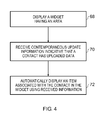
- Figure 4 illustrates a method comprising: displaying a widget 52 having an area 54; receiving contemporaneous update information indicative that a contact has uploaded data; and automatically displaying an item 56, associated with the contact, in the area 54 of the displayed widget 52 using the received contemporaneous update information.
- Figure 1 illustrates a schematic diagram of a system 10 including a first apparatus 12, a server 14 and a second apparatus 16 which are connected to one another via a network 18 such as the internet.
- the first apparatus 12, the server 14 and the second apparatus 16 are configured to be able to communicate with one via the network 18 and thereby exchange data between one another.
- the first apparatus 12, the server 14 and the second apparatus 16 may be connected to the network 18 via a wired link or via a wireless link.
- the first apparatus 12 includes a processor 20, a memory 22, a display 24, an audio output device 26, an audio input device 28, a transceiver 30, an antenna arrangement 32 and a user input device 34.
- the first apparatus 12 may be any portable apparatus and may be, for example, a mobile cellular telephone, a personal digital assistant (PDA), a palmtop computer or a laptop computer. It should be appreciated that at least some of the above features may or may not be included in other apparatus according to embodiments of the present invention.
- PDA personal digital assistant
- the processor 20 may be any suitable processor and may be a microprocessor for example.
- the implementation of the processor 20 can be in hardware alone (for example, a circuit), have certain aspects in software including firmware alone or can be a combination of hardware and software (including firmware).
- the processor 20 may be implemented using instructions that enable hardware functionality, for example, by using executable computer program instructions in a general-purpose or special-purpose processor that may be stored on a computer readable storage medium (disk, memory etc) to be executed by such a processor.
- a general-purpose or special-purpose processor that may be stored on a computer readable storage medium (disk, memory etc) to be executed by such a processor.
- the processor 20 is configured to read from and write to the memory 22.
- the processor 20 may also comprise an output interface 36 via which data and/or commands are output by the processor 20 and an input interface 38 via which data and/or commands are input to the processor 20.
- the memory 22 may be any suitable memory and may, for example be permanent built-in memory such as flash memory or it may be a removable memory such as a hard disk, secure digital (SD) card or a micro-drive.
- the memory 22 stores a computer program 40 comprising computer program instructions that control the operation of the first apparatus 12 when loaded into the processor 20.
- the computer program instructions 40 provide the logic and routines that enables the first apparatus 12 to perform the method illustrated in Fig. 4 .
- the processor 20 by reading the memory 22 is able to load and execute the computer program 40.
- the computer program instructions 40 provide: computer readable program means for displaying a widget having an area; computer readable program means for receiving contemporaneous update information indicative that a contact has uploaded data; and computer readable program means for automatically displaying an item, associated with the contact, in the area of the displayed widget using the received contemporaneous update information.
- the computer program 40 may arrive at the first apparatus 12 via any suitable delivery mechanism 42.
- the delivery mechanism 42 may be, for example, a computer-readable storage medium, a computer program product, a memory device, a record medium such as a Blue-ray disc, CD-ROM, DVD or an article of manufacture that tangibly embodies the computer program 40.
- the delivery mechanism may be a signal configured to reliably transfer the computer program 40.
- the first apparatus 12 may propagate or transmit the computer program 40 as a computer data signal.
- memory 22 is illustrated as a single component it may be implemented as one or more separate components some or all of which may be integrated/removable and/or may provide permanent/semi-permanent/dynamic/cached storage.
- references to 'computer-readable storage medium', 'computer program product', 'tangibly embodied computer program' etc. or a 'controller', 'computer', 'processor' etc. should be understood to encompass not only computers having different architectures such as single/multi- processor architectures and sequential (Von Neumann)/parallel architectures but also specialized circuits such as field-programmable gate arrays (FPGA), application specific circuits (ASIC), signal processing devices and other devices.
- References to computer program, instructions, code etc. should be understood to encompass software for a programmable processor or firmware such as, for example, the programmable content of a hardware device whether instructions for a processor, or configuration settings for a fixed-function device, gate array or programmable logic device etc.
- the display 24 is configured to receive and display data from the processor 20.
- the processor 20 may read data from the memory 22 and provide it to the display 24 for display to a user of the first apparatus 12.
- the display 24 may be any suitable display and may be, for example, a thin film transistor (TFT) display, a liquid crystal display (LCD) or a light emitting diode (LED) display (for example, an organic light emitting diode (OLED) display).
- TFT thin film transistor
- LCD liquid crystal display
- LED light emitting diode
- OLED organic light emitting diode
- the display 24 may be a touch screen display and include one or more sensors (not illustrated) for sensing the application of force by a user and for providing a control signal to the processor 20.
- the processor 20 may be configured to control the display 24 using control signals received from the one or more sensors.
- the processor 20 is configured to provide audio data to the audio output device 26.
- the audio output device 26 is configured to convert the audio data into acoustic waves, audible to the user of the first apparatus 12.
- the audio output device 26 may be a loud speaker for example.
- the audio input device 28 is configured to convert acoustic waves (a voice of a user for example) into an electrical signal for input to the processor 20.
- the audio input device 28 may be a microphone for example.
- the transceiver 30 is connected to the antenna arrangement 32 and to the processor 20.
- the processor 20 is configured to provide data to the transceiver 30.
- the transceiver 30 is configured to encode the data and provide it to the antenna arrangement 32 for transmission.
- the antenna arrangement 32 is configured to transmit the encoded data as a radio signal.
- the antenna arrangement 32 is also configured to receive a radio signal.
- the transceiver 30 receives the radio signal from the antenna arrangement 32 and decodes the radio signal into data.
- the radio signal may have a frequency within a licensed cellular frequency band (for example, within a Global System for Mobile communications (GSM) frequency band (for example, 900 MHz)).
- GSM Global System for Mobile communications
- the user input device 34 (which may for example include one or more keys) may be operable by a user to provide control signals to the processor 20.
- the user input device 34 may enable a user to control all aspects of a graphical user interface displayed on the first apparatus 12 or may (where the display 24 is a touch screen display) be used to supplement the control provided by the touch screen display 24.
- the server 14 includes a processor 44 and a memory 46.
- the processor 44 and the memory 46 may be similar to the processor 20 and the memory 22 respectively and will consequently not be discussed in any greater detail.
- the second apparatus 16 may be any suitable portable apparatus and may have a similar structure to the first apparatus 12. Consequently, the second apparatus 16 will not be discussed in any greater detail.
- the memory 46 of the server 14 stores a plurality of profiles, including a profile 48 for a user of the first apparatus 12 and a profile 50 for a user of the second apparatus 16.
- Each profile may include information that is relatively personal to the user associated with the profile.
- a profile may include image data (for example, digital photographs and digital videos), audio data (for example, samples of the user's favorite songs) and data which includes contact information for each of that user's contacts (for example, names, addresses, telephone numbers and e-mail addresses of the user's friends, relatives and colleagues).
- the users of the first apparatus 12 and the second apparatus 16 are able to upload data to the server 14 using their respective apparatus 12, 16.
- the user of the second apparatus 16 may upload image data (a photograph for example) to his profile 50 stored on the memory 46 using the second apparatus 16.
- the processor 20 is configured to control the display 24 to display a widget 52 having an area 54 and including items 56, an indicator 58 and a selectable portion 60 within the area 54.
- the widget 52 is a portion of a graphical user interface (GUI) that enables the user of the first apparatus 12 to view which of his contacts (as stored in the profile 48) have recently uploaded data to their profiles stored on the memory 46 of the server 14.
- GUI graphical user interface
- the widget 52 may be displayed while the first apparatus 12 is in an idle mode (this is a mode in which the first apparatus 12 has not received an input from the user since a predetermined time before the present) and may also be displayed while the user is providing inputs to the first apparatus 12.
- the widget 52 automatically updates, whether in idle mode or not, to show which of the user's contacts have uploaded data (image data for example) to their profiles on the server 14.
- the processor 20 is also configured to control the display 24 to display one or more other widgets 53 which are configured to provide different functions to the widget 52.
- the one or more other widgets 53 may enable a user to view and edit image data, video data and/or text data which he has uploaded to his profile 48 on the server 14.
- the widget 52 is configurable to include zero, one or a plurality of items 56 1 , 56 2 which are associated with contacts of the user (i.e. friends, relatives, and colleagues of the user).
- An item 56 is indicative that the contact associated with that item has recently uploaded data to the memory 46 of the server 14.
- the items 56 may include images of their associated contact (for example, a thumbnail portrait photograph of that contact) or may include images which are associated with the contacts (for example, the contact may be represented by an image of some scenery).
- the user of the first apparatus 12 may control the user input device 34 and/or the touch screen display 24 to select one of the items 56 1 , 56 2 .
- the processor 20 sends a request to the server 14 for a copy of the uploaded data.
- the processor 44 of the server 14 accesses the memory 46 and transmits a copy of the uploaded data to the first apparatus 12.
- the processor 20 controls the display 24 to display the uploaded data (a digital photograph for example).
- the server 14 may transmit to the first apparatus 12 a copy of at least a portion of the selected contacts profile which includes a link to the uploaded data.
- the indicator 58 is configured to indicate that the user's contacts have recently uploaded data to the server 14. For example, if a user's contacts have uploaded digital photographs to their profiles, the indicator 58 may include the text "New Photos".
- the processor 20 may determine whether any items 56 are displayed in the area 54 of the widget 52. If the processor 20 determines that items 56 are displayed in the widget 52, then the processor 20 controls the display 24 to display the indicator 58 in the widget 52. If the processor 20 determines that there are no items displayed in the widget 52, then the indicator 58 is not displayed in the widget 52.
- the user of the first apparatus 12 may control the user input device 34 and/or the touch screen display 24 to select the selectable portion 60.
- the processor 20 sends a request to the server 14 for contact information for a plurality of contacts (stored in the user's profile).
- the processor 44 of the server 14 accesses the memory 46 and transmits contact information for the plurality of contacts to the first apparatus 12.
- the processor 20 controls the display 24 to display the contact information for the plurality of contacts (for example, the display 24 may display a plurality of thumbnail digital photographs that provide a link to detailed contact information).
- the selectable portion 60 of the widget 52 may be a portion of the area 54 of the widget 52 or be substantially all of the area 54 of the widget 52.
- the selectable portion 60 may include an image and/or text which indicates the presence of the selectable portion 60 to the user.
- the processor 44 of the server 14 receives uploaded data from the second apparatus 16 and stores the uploaded data in the profile 50 in the memory 46.
- the uploaded data is uploaded image data.
- the uploaded data may be uploaded text data or uploaded audio data.
- the processor 44 determines whether the uploaded image data is from a contact of the user of the first apparatus 12. For example, the processor 44 may review the profile 50 of the user of the second apparatus 16 and determine that since the contact information of the user of the first apparatus 12 is stored in the profile 50, that the user of the second apparatus 16 is a contact of the user of the first apparatus 12.
- the server 14 transmits contemporaneous update information to the first apparatus 12 that is indicative that the user of the second apparatus 16 has uploaded image data to the server 14.
- the update information transmitted by the server 14 to the first apparatus 12 is contemporaneous with the reception of the uploaded image data from the second apparatus 16.
- the processor 20 controls the display 24 to display the widget 52.
- the processor 20 receives the contemporaneous update information which is indicative that the user of the second apparatus 16 has uploaded image data to the server 14.
- the processor 20 automatically controls the display 24 to display an item 56 3 (please see fig. 2B which illustrates the widget 52 including the new item 56 3 ) that is associated with the user of the second apparatus 16 (who is a contact of the user of the first apparatus 12) using the received contemporaneous information.
- the use of the word 'automatically' means that the processor 20 does not require any input from the user of the first apparatus 12 in order to display the item 56 3 in the widget 52. Consequently, the processor 20 is able to control the display 24 to display the item 56 3 when the first apparatus 12 is in an idle mode and has not received any input from the user.
- the processor 20 may automatically control the display 24 to display the item 56 3 in response to receiving the contemporaneous update information. In other embodiments, the processor 20 may periodically determine whether contemporaneous update information has been received and if update information has been received, the processor 20 automatically controls the display 24 to display the item 56 3 .
- the processor 20 may periodically determine whether the received contemporaneous update information, associated with a displayed item, was received over a predetermined time ago (for example, it may determine whether the received update information was received over one week ago). If the received update information is determined to have been received over a predetermined time ago, the processor 20 controls the display 24 to remove the item 56 from the area 54 of the widget 52. Additionally or alternatively, the widget 52 may only include a maximum number of items 56 (three for example) and the processor 20 may control the display 24 to replace the oldest item 56 with a new item 56.
- Embodiments of the present invention may provide several advantages.
- One such advantage is that the widget 52 may allow the user of the first apparatus 12 to determine whether or not his contacts have recently uploaded data onto the server 14. Since the widget 52 may be updated while the first apparatus 12 is in an idle mode, the user does not need to interact with the first apparatus 12 (for example, by providing an input to the first apparatus 12) to determine whether a contact has updated their profile (for example, with new photographs) on the server 14. This may result in the user being able to more discreetly check whether a contact has updated their profile and may also result in the first apparatus 12 being easier to operate.
- the blocks illustrated in the Figs 3 and 4 may represent steps in a method and/or sections of code in the computer program 40.
- the illustration of a particular order to the blocks does not necessarily imply that there is a required or preferred order for the blocks and the order and arrangement of the block may be varied. Furthermore, it may be possible for some steps to be omitted.
Landscapes
- Engineering & Computer Science (AREA)
- Multimedia (AREA)
- Signal Processing (AREA)
- Human Computer Interaction (AREA)
- General Engineering & Computer Science (AREA)
- Theoretical Computer Science (AREA)
- Computing Systems (AREA)
- Physics & Mathematics (AREA)
- General Physics & Mathematics (AREA)
- Software Systems (AREA)
- Computer Graphics (AREA)
- Computer Security & Cryptography (AREA)
- Information Transfer Between Computers (AREA)
Abstract
Description
- Embodiments of the present invention relate to an apparatus, method and computer program. In particular, they relate to an apparatus, method and computer program in a mobile cellular telephone.
- Apparatus, such as mobile cellular telephones, may enable a user to upload and download data to and from a remote server via a network. Users of such apparatus may share data with one another that they have uploaded to the remote server. However, users may be unaware of when their contacts (for example, friends, relatives and colleagues) have uploaded data to the remote server and may consequently not download the data.
- It would therefore be desirable to provide an alternative apparatus.
- According to various, but not necessarily all, embodiments of the invention there is provided a method comprising: displaying a widget having an area; receiving contemporaneous update information indicative that a contact has uploaded data; and automatically displaying an item, associated with the contact, in the area of the displayed widget using the received contemporaneous update information.
- The item may be automatically displayed in response to the received contemporaneous update information.
- The method may further comprise periodically determining whether contemporaneous update information has been received and automatically displaying the item if contemporaneous update information has been received.
- The method may further comprise requesting contact information for a plurality of contacts in response to at least a portion of the widget being selected by a user.
- The method may further comprise requesting the uploaded data in response to the item being selected by a user.
- The method may further comprise removing a displayed item from the area of the widget if the received contemporaneous update information, associated with the displayed item, was received at a time outside of a predetermined threshold period of time.
- The method may further comprise configuring the widget to include zero, one or a plurality of items in the area.
- The method may further comprise displaying one or more other widgets adjacent the widget, the one or more other widgets being configured to provide different functions to the widget.
- The uploaded data may be uploaded to a remote server.
- The uploaded data may be uploaded image data.
- The item displayed in the area of the widget may be an image associated with the contact.
- According to various, but not necessarily all, embodiments of the invention there is provided an apparatus comprising: a processor configured to control a display to display a widget having an area; receive contemporaneous update information indicative that a contact has uploaded data; and automatically control the display to display an item, associated with the contact, in the area of the displayed widget using the received contemporaneous update information.
- The apparatus may be for wireless communication.
- The item may be automatically displayed in response to the received contemporaneous update information.
- The processor may be configured to periodically determine whether contemporaneous update information has been received and to automatically control the display to display the item if contemporaneous update information has been received.
- The processor may be configured to request contact information for a plurality of contacts in response to at least a portion of the widget being selected by a user.
- The processor may be configured to request the uploaded data in response to the item being selected by a user.
- The processor may be configured to control the display to remove a displayed item from the area of the widget if the received contemporaneous update information, associated with the displayed item, was received at a time outside of a predetermined threshold period of time.
- The processor may be configured to control the display to configure the widget to include zero, one or a plurality of items in the area.
- The processor may be configured to control the display to display one or more other widgets adjacent the widget, the one or more other widgets being configured to provide different functions to the widget.
- The uploaded data may be uploaded to a remote server.
- The uploaded data may be uploaded image data.
- The item displayed in the area of the widget may be an image associated with the contact.
- According to various, but not necessarily all, embodiments of the invention there is provided a computer readable storage medium encoded with instructions that, when executed by a processor, perform: displaying a widget having an area; receiving contemporaneous update information indicative that a contact has uploaded data; and automatically displaying an item, associated with the contact, in the area of the displayed widget using the received contemporaneous update information.
- The computer readable storage medium may be encoded with instructions that, when executed by a processor, further perform: requesting contact information for a plurality of contacts in response to at least a portion of the widget being selected by a user.
- The computer readable storage medium may be encoded with instructions that, when executed by a processor, further perform: requesting the uploaded data in response to the item being selected by a user.
- The computer readable storage medium may be encoded with instructions that, when executed by a processor, further perform: removing a displayed item from the area of the widget if the received contemporaneous update information, associated with the displayed item, was received at a time outside of a predetermined threshold period of time.
- According to various, but not necessarily all, embodiments of the invention there is provided a computer program that, when run on a computer, performs: displaying a widget having an area; receiving contemporaneous update information indicative that a contact has uploaded data; and automatically displaying an item, associated with the contact, in the area of the displayed widget using the received contemporaneous update information.
- The computer program, when run on a computer, may further perform: requesting contact information for a plurality of contacts in response to at least a portion of the widget being selected by a user.
- The computer program, when run on a computer, may further perform: requesting the uploaded data in response to the item being selected by a user.
- The computer program, when run on a computer, may further perform: removing a displayed item from the area of the widget if the received contemporaneous update information, associated with the displayed item, was received at a time outside of a predetermined threshold period of time.
- According to various, but not necessarily all, embodiments of the invention there is provided a computer program that, when run on a computer performs a method as described in any of the preceding paragraphs.
- According to various, but not necessarily all, embodiments of the invention there is provided an apparatus comprising: means for displaying a widget having an area; means for receiving contemporaneous update information indicative that a contact has uploaded data; and means for automatically displaying an item, associated with the contact, in the area of the displayed widget using the received contemporaneous update information.
- For a better understanding of various examples of embodiments of the present invention reference will now be made by way of example only to the accompanying drawings in which:
-
Fig. 1 illustrates a schematic diagram of a system according to various embodiments of the present invention; -
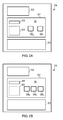
Fig. 2A illustrates a schematic diagram of a widget according to various embodiments of the present invention; -
Fig. 2B illustrates a schematic diagram of the widget illustrated infig. 2A with an additional item associated with a contact who has recently uploaded data; -
Fig. 3 illustrates a flow diagram of a method according to various embodiments of the present invention; and -
Fig. 4 illustrates a flow diagram of a method according to various embodiments of the present invention. -
Figure 4 illustrates a method comprising: displaying awidget 52 having anarea 54; receiving contemporaneous update information indicative that a contact has uploaded data; and automatically displaying an item 56, associated with the contact, in thearea 54 of the displayedwidget 52 using the received contemporaneous update information. - In the following description, the wording 'connect' and 'couple' and their derivatives mean operationally connected/coupled. It should be appreciated that any number or combination of intervening components can exist (including no intervening components).
-
Figure 1 illustrates a schematic diagram of asystem 10 including a first apparatus 12, aserver 14 and asecond apparatus 16 which are connected to one another via anetwork 18 such as the internet. The first apparatus 12, theserver 14 and thesecond apparatus 16 are configured to be able to communicate with one via thenetwork 18 and thereby exchange data between one another. The first apparatus 12, theserver 14 and thesecond apparatus 16 may be connected to thenetwork 18 via a wired link or via a wireless link. - The first apparatus 12 includes a
processor 20, a memory 22, adisplay 24, anaudio output device 26, anaudio input device 28, atransceiver 30, anantenna arrangement 32 and auser input device 34. - The first apparatus 12 may be any portable apparatus and may be, for example, a mobile cellular telephone, a personal digital assistant (PDA), a palmtop computer or a laptop computer. It should be appreciated that at least some of the above features may or may not be included in other apparatus according to embodiments of the present invention.
- The
processor 20 may be any suitable processor and may be a microprocessor for example. The implementation of theprocessor 20 can be in hardware alone (for example, a circuit), have certain aspects in software including firmware alone or can be a combination of hardware and software (including firmware). - The
processor 20 may be implemented using instructions that enable hardware functionality, for example, by using executable computer program instructions in a general-purpose or special-purpose processor that may be stored on a computer readable storage medium (disk, memory etc) to be executed by such a processor. - The
processor 20 is configured to read from and write to the memory 22. Theprocessor 20 may also comprise anoutput interface 36 via which data and/or commands are output by theprocessor 20 and aninput interface 38 via which data and/or commands are input to theprocessor 20. - The memory 22 may be any suitable memory and may, for example be permanent built-in memory such as flash memory or it may be a removable memory such as a hard disk, secure digital (SD) card or a micro-drive. The memory 22 stores a
computer program 40 comprising computer program instructions that control the operation of the first apparatus 12 when loaded into theprocessor 20. Thecomputer program instructions 40 provide the logic and routines that enables the first apparatus 12 to perform the method illustrated inFig. 4 . Theprocessor 20 by reading the memory 22 is able to load and execute thecomputer program 40. - The
computer program instructions 40 provide: computer readable program means for displaying a widget having an area; computer readable program means for receiving contemporaneous update information indicative that a contact has uploaded data; and computer readable program means for automatically displaying an item, associated with the contact, in the area of the displayed widget using the received contemporaneous update information. - The
computer program 40 may arrive at the first apparatus 12 via anysuitable delivery mechanism 42. Thedelivery mechanism 42 may be, for example, a computer-readable storage medium, a computer program product, a memory device, a record medium such as a Blue-ray disc, CD-ROM, DVD or an article of manufacture that tangibly embodies thecomputer program 40. The delivery mechanism may be a signal configured to reliably transfer thecomputer program 40. The first apparatus 12 may propagate or transmit thecomputer program 40 as a computer data signal. - Although the memory 22 is illustrated as a single component it may be implemented as one or more separate components some or all of which may be integrated/removable and/or may provide permanent/semi-permanent/dynamic/cached storage.
- References to 'computer-readable storage medium', 'computer program product', 'tangibly embodied computer program' etc. or a 'controller', 'computer', 'processor' etc. should be understood to encompass not only computers having different architectures such as single/multi- processor architectures and sequential (Von Neumann)/parallel architectures but also specialized circuits such as field-programmable gate arrays (FPGA), application specific circuits (ASIC), signal processing devices and other devices. References to computer program, instructions, code etc. should be understood to encompass software for a programmable processor or firmware such as, for example, the programmable content of a hardware device whether instructions for a processor, or configuration settings for a fixed-function device, gate array or programmable logic device etc.
- The
display 24 is configured to receive and display data from theprocessor 20. Theprocessor 20 may read data from the memory 22 and provide it to thedisplay 24 for display to a user of the first apparatus 12. Thedisplay 24 may be any suitable display and may be, for example, a thin film transistor (TFT) display, a liquid crystal display (LCD) or a light emitting diode (LED) display (for example, an organic light emitting diode (OLED) display). - The
display 24 may be a touch screen display and include one or more sensors (not illustrated) for sensing the application of force by a user and for providing a control signal to theprocessor 20. Theprocessor 20 may be configured to control thedisplay 24 using control signals received from the one or more sensors. - The
processor 20 is configured to provide audio data to theaudio output device 26. Theaudio output device 26 is configured to convert the audio data into acoustic waves, audible to the user of the first apparatus 12. Theaudio output device 26 may be a loud speaker for example. - The
audio input device 28 is configured to convert acoustic waves (a voice of a user for example) into an electrical signal for input to theprocessor 20. Theaudio input device 28 may be a microphone for example. - The
transceiver 30 is connected to theantenna arrangement 32 and to theprocessor 20. Theprocessor 20 is configured to provide data to thetransceiver 30. Thetransceiver 30 is configured to encode the data and provide it to theantenna arrangement 32 for transmission. Theantenna arrangement 32 is configured to transmit the encoded data as a radio signal. Theantenna arrangement 32 is also configured to receive a radio signal. Thetransceiver 30 receives the radio signal from theantenna arrangement 32 and decodes the radio signal into data. The radio signal may have a frequency within a licensed cellular frequency band (for example, within a Global System for Mobile communications (GSM) frequency band (for example, 900 MHz)). - The user input device 34 (which may for example include one or more keys) may be operable by a user to provide control signals to the
processor 20. Theuser input device 34 may enable a user to control all aspects of a graphical user interface displayed on the first apparatus 12 or may (where thedisplay 24 is a touch screen display) be used to supplement the control provided by thetouch screen display 24. - The
server 14 includes aprocessor 44 and amemory 46. Theprocessor 44 and thememory 46 may be similar to theprocessor 20 and the memory 22 respectively and will consequently not be discussed in any greater detail. - The
second apparatus 16 may be any suitable portable apparatus and may have a similar structure to the first apparatus 12. Consequently, thesecond apparatus 16 will not be discussed in any greater detail. - The
memory 46 of theserver 14 stores a plurality of profiles, including aprofile 48 for a user of the first apparatus 12 and aprofile 50 for a user of thesecond apparatus 16. Each profile may include information that is relatively personal to the user associated with the profile. For example, a profile may include image data (for example, digital photographs and digital videos), audio data (for example, samples of the user's favorite songs) and data which includes contact information for each of that user's contacts (for example, names, addresses, telephone numbers and e-mail addresses of the user's friends, relatives and colleagues). - The users of the first apparatus 12 and the
second apparatus 16 are able to upload data to theserver 14 using theirrespective apparatus 12, 16. For example, the user of thesecond apparatus 16 may upload image data (a photograph for example) to hisprofile 50 stored on thememory 46 using thesecond apparatus 16. - With reference to
fig. 2A , theprocessor 20 is configured to control thedisplay 24 to display awidget 52 having anarea 54 and including items 56, anindicator 58 and aselectable portion 60 within thearea 54. Thewidget 52 is a portion of a graphical user interface (GUI) that enables the user of the first apparatus 12 to view which of his contacts (as stored in the profile 48) have recently uploaded data to their profiles stored on thememory 46 of theserver 14. Thewidget 52 may be displayed while the first apparatus 12 is in an idle mode (this is a mode in which the first apparatus 12 has not received an input from the user since a predetermined time before the present) and may also be displayed while the user is providing inputs to the first apparatus 12. Thewidget 52 automatically updates, whether in idle mode or not, to show which of the user's contacts have uploaded data (image data for example) to their profiles on theserver 14. - The
processor 20 is also configured to control thedisplay 24 to display one or moreother widgets 53 which are configured to provide different functions to thewidget 52. For example, the one or moreother widgets 53 may enable a user to view and edit image data, video data and/or text data which he has uploaded to hisprofile 48 on theserver 14. - The
widget 52 is configurable to include zero, one or a plurality of items 561, 562 which are associated with contacts of the user (i.e. friends, relatives, and colleagues of the user). An item 56 is indicative that the contact associated with that item has recently uploaded data to thememory 46 of theserver 14. The items 56 may include images of their associated contact (for example, a thumbnail portrait photograph of that contact) or may include images which are associated with the contacts (for example, the contact may be represented by an image of some scenery). - The user of the first apparatus 12 may control the
user input device 34 and/or thetouch screen display 24 to select one of the items 561, 562. In response to the selection, theprocessor 20 sends a request to theserver 14 for a copy of the uploaded data. In response to the request, theprocessor 44 of theserver 14 accesses thememory 46 and transmits a copy of the uploaded data to the first apparatus 12. Upon receipt of the copy of the uploaded data, theprocessor 20 controls thedisplay 24 to display the uploaded data (a digital photograph for example). It should be appreciated that in some embodiments, theserver 14 may transmit to the first apparatus 12 a copy of at least a portion of the selected contacts profile which includes a link to the uploaded data. - The
indicator 58 is configured to indicate that the user's contacts have recently uploaded data to theserver 14. For example, if a user's contacts have uploaded digital photographs to their profiles, theindicator 58 may include the text "New Photos". In operation, theprocessor 20 may determine whether any items 56 are displayed in thearea 54 of thewidget 52. If theprocessor 20 determines that items 56 are displayed in thewidget 52, then theprocessor 20 controls thedisplay 24 to display theindicator 58 in thewidget 52. If theprocessor 20 determines that there are no items displayed in thewidget 52, then theindicator 58 is not displayed in thewidget 52. - The user of the first apparatus 12 may control the
user input device 34 and/or thetouch screen display 24 to select theselectable portion 60. In response to the selection of theportion 60, theprocessor 20 sends a request to theserver 14 for contact information for a plurality of contacts (stored in the user's profile). In response to the request, theprocessor 44 of theserver 14 accesses thememory 46 and transmits contact information for the plurality of contacts to the first apparatus 12. Upon receipt of the contact information, theprocessor 20 controls thedisplay 24 to display the contact information for the plurality of contacts (for example, thedisplay 24 may display a plurality of thumbnail digital photographs that provide a link to detailed contact information). - The
selectable portion 60 of thewidget 52 may be a portion of thearea 54 of thewidget 52 or be substantially all of thearea 54 of thewidget 52. Theselectable portion 60 may include an image and/or text which indicates the presence of theselectable portion 60 to the user. - A method of uploading data to the
server 14 and of updating thewidget 52 according to various embodiments of the present invention will now be described with reference tofigures 3 and4 . - With reference to
fig. 3 , at block 62 theprocessor 44 of theserver 14 receives uploaded data from thesecond apparatus 16 and stores the uploaded data in theprofile 50 in thememory 46. In this embodiment, the uploaded data is uploaded image data. However, in other embodiments the uploaded data may be uploaded text data or uploaded audio data. - At
block 64, theprocessor 44 determines whether the uploaded image data is from a contact of the user of the first apparatus 12. For example, theprocessor 44 may review theprofile 50 of the user of thesecond apparatus 16 and determine that since the contact information of the user of the first apparatus 12 is stored in theprofile 50, that the user of thesecond apparatus 16 is a contact of the user of the first apparatus 12. - If the
processor 44 determines that the user of thesecond apparatus 16 is a contact of the user of the first apparatus 12, theserver 14 transmits contemporaneous update information to the first apparatus 12 that is indicative that the user of thesecond apparatus 16 has uploaded image data to theserver 14. The update information transmitted by theserver 14 to the first apparatus 12 is contemporaneous with the reception of the uploaded image data from thesecond apparatus 16. - With reference to
fig. 4 , atblock 68 theprocessor 20 controls thedisplay 24 to display thewidget 52. Atblock 70, theprocessor 20 receives the contemporaneous update information which is indicative that the user of thesecond apparatus 16 has uploaded image data to theserver 14. Atblock 72, theprocessor 20 automatically controls thedisplay 24 to display an item 563 (please seefig. 2B which illustrates thewidget 52 including the new item 563) that is associated with the user of the second apparatus 16 (who is a contact of the user of the first apparatus 12) using the received contemporaneous information. - It should be appreciated that the use of the word 'automatically' means that the
processor 20 does not require any input from the user of the first apparatus 12 in order to display the item 563 in thewidget 52. Consequently, theprocessor 20 is able to control thedisplay 24 to display the item 563 when the first apparatus 12 is in an idle mode and has not received any input from the user. - In various embodiments, the
processor 20 may automatically control thedisplay 24 to display the item 563 in response to receiving the contemporaneous update information. In other embodiments, theprocessor 20 may periodically determine whether contemporaneous update information has been received and if update information has been received, theprocessor 20 automatically controls thedisplay 24 to display the item 563. - In order to prevent items 56 from remaining on the
widget 52 for too long, theprocessor 20 may periodically determine whether the received contemporaneous update information, associated with a displayed item, was received over a predetermined time ago (for example, it may determine whether the received update information was received over one week ago). If the received update information is determined to have been received over a predetermined time ago, theprocessor 20 controls thedisplay 24 to remove the item 56 from thearea 54 of thewidget 52. Additionally or alternatively, thewidget 52 may only include a maximum number of items 56 (three for example) and theprocessor 20 may control thedisplay 24 to replace the oldest item 56 with a new item 56. - Embodiments of the present invention may provide several advantages. One such advantage is that the
widget 52 may allow the user of the first apparatus 12 to determine whether or not his contacts have recently uploaded data onto theserver 14. Since thewidget 52 may be updated while the first apparatus 12 is in an idle mode, the user does not need to interact with the first apparatus 12 (for example, by providing an input to the first apparatus 12) to determine whether a contact has updated their profile (for example, with new photographs) on theserver 14. This may result in the user being able to more discreetly check whether a contact has updated their profile and may also result in the first apparatus 12 being easier to operate. - The blocks illustrated in the
Figs 3 and4 may represent steps in a method and/or sections of code in thecomputer program 40. The illustration of a particular order to the blocks does not necessarily imply that there is a required or preferred order for the blocks and the order and arrangement of the block may be varied. Furthermore, it may be possible for some steps to be omitted. - Although embodiments of the present invention have been described in the preceding paragraphs with reference to various examples, it should be appreciated that modifications to the examples given can be made without departing from the scope of the invention as claimed.
- Features described in the preceding description may be used in combinations other than the combinations explicitly described.
- Although functions have been described with reference to certain features, those functions may be performable by other features whether described or not.
- Although features have been described with reference to certain embodiments, those features may also be present in other embodiments whether described or not.
- Whilst endeavoring in the foregoing specification to draw attention to those features of the invention believed to be of particular importance it should be understood that the Applicant claims protection in respect of any patentable feature or combination of features hereinbefore referred to and/or shown in the drawings whether or not particular emphasis has been placed thereon.
Claims (15)
- A method comprising:displaying a widget having an area;receiving contemporaneous update information indicative that a contact has uploaded data; andautomatically displaying an item, associated with the contact, in the area of the displayed widget using the received contemporaneous update information.
- A method as claimed in claim 1, wherein the item is automatically displayed in response to the received contemporaneous update information or wherein the method further comprises periodically determining whether contemporaneous update information has been received and automatically displaying the item if contemporaneous update information has been received.
- A method as claimed in claim 1 or 2, further comprising requesting contact information for a plurality of contacts in response to at least a portion of the widget being selected by a user.
- A method as claimed in any of the preceding claims, further comprising requesting the uploaded data in response to the item being selected by a user.
- A method as claimed in any of the preceding claims, further comprising removing a displayed item from the area of the widget if the received contemporaneous update information, associated with the displayed item, was received at a time outside of a predetermined threshold period of time.
- A method as claimed in any of the preceding claims, further comprising configuring the widget to include zero, one or a plurality of items in the area.
- A method as claimed in any of the preceding claims, further comprising displaying one or more other widgets adjacent the widget, the one or more other widgets being configured to provide different functions to the widget.
- A method as claimed in any of the preceding claims, wherein the uploaded data is uploaded to a remote server.
- A method as claimed in any of the preceding claims, wherein the uploaded data is uploaded image data.
- A method as claimed in any of the preceding claims, wherein the item displayed in the area of the widget is an image associated with the contact.
- An apparatus comprising:a processor configured to control a display to display a widget having an area; receive contemporaneous update information indicative that a contact has uploaded data; and automatically control the display to display an item, associated with the contact, in the area of the displayed widget using the received contemporaneous update information.
- An apparatus as claimed in claim 11, wherein the item is automatically displayed in response to the received contemporaneous update information or wherein the processor is configured to periodically determine whether contemporaneous update information has been received and to automatically control the display to display the item if contemporaneous update information has been received.
- An apparatus as claimed in claim 11 or 12, wherein the processor is configured to request contact information for a plurality of contacts in response to at least a portion of the widget being selected by a user.
- An apparatus as claimed in any of claims 11 to 13, wherein the processor is configured to control the display to remove a displayed item from the area of the widget if the received contemporaneous update information, associated with the displayed item, was received at a time outside of a predetermined threshold period of time.
- A computer program that, when run on a computer performs the method of any of claims 1 to 10.
Applications Claiming Priority (1)
| Application Number | Priority Date | Filing Date | Title |
|---|---|---|---|
| IN3346CH2008 | 2008-12-31 |
Publications (1)
| Publication Number | Publication Date |
|---|---|
| EP2204977A1 true EP2204977A1 (en) | 2010-07-07 |
Family
ID=42041692
Family Applications (1)
| Application Number | Title | Priority Date | Filing Date |
|---|---|---|---|
| EP09180775A Withdrawn EP2204977A1 (en) | 2008-12-31 | 2009-12-24 | An apparatus, method and computer program for indicating to a user that a contact has uploaded data to a remote server |
Country Status (8)
| Country | Link |
|---|---|
| US (1) | US20100211898A1 (en) |
| EP (1) | EP2204977A1 (en) |
| JP (2) | JP2010198604A (en) |
| KR (2) | KR20100080472A (en) |
| CN (1) | CN101801087A (en) |
| CA (1) | CA2688806A1 (en) |
| SG (2) | SG162688A1 (en) |
| TW (1) | TW201031161A (en) |
Families Citing this family (8)
| Publication number | Priority date | Publication date | Assignee | Title |
|---|---|---|---|---|
| CN102984181B (en) * | 2011-09-02 | 2016-05-11 | 北京三星通信技术研究有限公司 | Social network communication-based method and device |
| US10248293B2 (en) | 2011-09-30 | 2019-04-02 | Nokia Technologies Oy | Method, apparatus, computer program and user interface |
| US10088986B2 (en) | 2012-11-15 | 2018-10-02 | Samsung Electronics Co., Ltd. | User function operation method and electronic device supporting the same |
| US20140229862A1 (en) * | 2013-02-14 | 2014-08-14 | Luke St. Clair | Launching Friends |
| US10216996B2 (en) * | 2014-09-29 | 2019-02-26 | Sony Interactive Entertainment Inc. | Schemes for retrieving and associating content items with real-world objects using augmented reality and object recognition |
| CN106201211A (en) * | 2016-07-15 | 2016-12-07 | 乐视控股(北京)有限公司 | A kind of screen display method and device |
| US11829593B2 (en) | 2021-04-30 | 2023-11-28 | Bytemix Corp. | Method for providing contents by using widget in mobile electronic device and system thereof |
| KR102307543B1 (en) * | 2021-04-30 | 2021-09-30 | 주식회사 바이츠믹스 | Method for providing contents by using widget in portable electronic device and system thereof |
Citations (9)
| Publication number | Priority date | Publication date | Assignee | Title |
|---|---|---|---|---|
| US20060095397A1 (en) * | 2004-11-01 | 2006-05-04 | Microsoft Corporation | Dynamic content change notification |
| US20070168544A1 (en) * | 2005-12-19 | 2007-07-19 | Sciammarella Eduardo A | System, method, and article of manufacture for a user interface for a network media channel |
| GB2434720A (en) * | 2006-01-31 | 2007-08-01 | Sonaptic Ltd | Electronic information device with event notification |
| US20080040673A1 (en) * | 2006-08-11 | 2008-02-14 | Mark Zuckerberg | System and method for dynamically providing a news feed about a user of a social network |
| US20080109306A1 (en) * | 2005-06-15 | 2008-05-08 | Maigret Robert J | Media marketplaces |
| US20080178230A1 (en) * | 2006-12-05 | 2008-07-24 | Crackle, Inc. | Video sharing platform providing for public and private sharing and distributed downloads of videos |
| US20080222295A1 (en) * | 2006-11-02 | 2008-09-11 | Addnclick, Inc. | Using internet content as a means to establish live social networks by linking internet users to each other who are simultaneously engaged in the same and/or similar content |
| US20080228887A1 (en) * | 1997-11-02 | 2008-09-18 | Robertson Brian D | Social networking system |
| US20080282174A1 (en) * | 2007-05-10 | 2008-11-13 | Microsoft Corporation | Signing up to a person or entity |
Family Cites Families (11)
| Publication number | Priority date | Publication date | Assignee | Title |
|---|---|---|---|---|
| US3840970A (en) * | 1973-07-23 | 1974-10-15 | H Hawkins | Oil well tooling positioning apparatus and method |
| US5923845A (en) * | 1996-07-26 | 1999-07-13 | Nec Corporation | Integrated electronic information system |
| WO2003010672A1 (en) * | 2001-07-23 | 2003-02-06 | Sony Corporation | Information processing system, information processing apparatus, and method |
| JP2003186792A (en) * | 2001-12-14 | 2003-07-04 | Kengo Inoue | Method for displaying message and its server and client |
| US7250955B1 (en) * | 2003-06-02 | 2007-07-31 | Microsoft Corporation | System for displaying a notification window from completely transparent to intermediate level of opacity as a function of time to indicate an event has occurred |
| EP1782281A4 (en) * | 2004-06-18 | 2007-10-24 | Pictothink Corp | Network content organization tool |
| US20060020904A1 (en) * | 2004-07-09 | 2006-01-26 | Antti Aaltonen | Stripe user interface |
| US20060282795A1 (en) * | 2004-09-13 | 2006-12-14 | Network Solutions, Llc | Domain bar |
| US10740722B2 (en) * | 2005-04-25 | 2020-08-11 | Skyword Inc. | User-driven media system in a computer network |
| US7970657B2 (en) * | 2007-02-02 | 2011-06-28 | Facebook, Inc. | Giving gifts and displaying assets in a social network environment |
| US8171128B2 (en) * | 2006-08-11 | 2012-05-01 | Facebook, Inc. | Communicating a newsfeed of media content based on a member's interactions in a social network environment |
-
2009
- 2009-12-14 SG SG200908309-8A patent/SG162688A1/en unknown
- 2009-12-14 SG SG2012048195A patent/SG182973A1/en unknown
- 2009-12-18 CA CA2688806A patent/CA2688806A1/en not_active Abandoned
- 2009-12-23 JP JP2009291577A patent/JP2010198604A/en active Pending
- 2009-12-24 EP EP09180775A patent/EP2204977A1/en not_active Withdrawn
- 2009-12-30 KR KR1020090134409A patent/KR20100080472A/en not_active Ceased
- 2009-12-30 CN CN200910265694A patent/CN101801087A/en active Pending
- 2009-12-30 TW TW098145834A patent/TW201031161A/en unknown
- 2009-12-30 US US12/649,400 patent/US20100211898A1/en not_active Abandoned
-
2012
- 2012-02-29 KR KR1020120021393A patent/KR20120042785A/en not_active Ceased
- 2012-09-25 JP JP2012210368A patent/JP5421441B2/en not_active Expired - Fee Related
Patent Citations (9)
| Publication number | Priority date | Publication date | Assignee | Title |
|---|---|---|---|---|
| US20080228887A1 (en) * | 1997-11-02 | 2008-09-18 | Robertson Brian D | Social networking system |
| US20060095397A1 (en) * | 2004-11-01 | 2006-05-04 | Microsoft Corporation | Dynamic content change notification |
| US20080109306A1 (en) * | 2005-06-15 | 2008-05-08 | Maigret Robert J | Media marketplaces |
| US20070168544A1 (en) * | 2005-12-19 | 2007-07-19 | Sciammarella Eduardo A | System, method, and article of manufacture for a user interface for a network media channel |
| GB2434720A (en) * | 2006-01-31 | 2007-08-01 | Sonaptic Ltd | Electronic information device with event notification |
| US20080040673A1 (en) * | 2006-08-11 | 2008-02-14 | Mark Zuckerberg | System and method for dynamically providing a news feed about a user of a social network |
| US20080222295A1 (en) * | 2006-11-02 | 2008-09-11 | Addnclick, Inc. | Using internet content as a means to establish live social networks by linking internet users to each other who are simultaneously engaged in the same and/or similar content |
| US20080178230A1 (en) * | 2006-12-05 | 2008-07-24 | Crackle, Inc. | Video sharing platform providing for public and private sharing and distributed downloads of videos |
| US20080282174A1 (en) * | 2007-05-10 | 2008-11-13 | Microsoft Corporation | Signing up to a person or entity |
Also Published As
| Publication number | Publication date |
|---|---|
| CA2688806A1 (en) | 2010-06-30 |
| SG182973A1 (en) | 2012-08-30 |
| US20100211898A1 (en) | 2010-08-19 |
| JP2013041594A (en) | 2013-02-28 |
| JP5421441B2 (en) | 2014-02-19 |
| KR20100080472A (en) | 2010-07-08 |
| CN101801087A (en) | 2010-08-11 |
| SG162688A1 (en) | 2010-07-29 |
| KR20120042785A (en) | 2012-05-03 |
| JP2010198604A (en) | 2010-09-09 |
| TW201031161A (en) | 2010-08-16 |
Similar Documents
| Publication | Publication Date | Title |
|---|---|---|
| EP2204977A1 (en) | An apparatus, method and computer program for indicating to a user that a contact has uploaded data to a remote server | |
| CN105027057B (en) | Social Dashboard | |
| US10248278B2 (en) | Method and apparatus for intuitive multitasking | |
| CA2816271C (en) | Responding to the receipt of zoom commands | |
| CN105122739B (en) | Lock screen with social apps | |
| CN109643843B (en) | Electronic device and its grip recognition method | |
| US9167146B2 (en) | Method of receiving connection information from mobile communication device, computer-readable storage medium having recorded thereon the method, and digital image-capturing apparatus | |
| KR102090745B1 (en) | Method and apparatus for performing multi-tasking using external display device in electronic device | |
| WO2016011743A1 (en) | Storage space saving method and apparatus | |
| CN104679536A (en) | Method and device for starting application program and electronic device | |
| WO2017088580A1 (en) | Image display method and apparatus | |
| CN108052368B (en) | Application display interface control method and mobile terminal | |
| CN105517189B (en) | Method and device for realizing WIFI connection | |
| CN108475165B (en) | Electronic device and control method thereof | |
| CN110377235B (en) | Data processing method and device, mobile terminal and computer readable storage medium | |
| CN107113374A (en) | Camera activation and illumination | |
| US20170264510A1 (en) | Content prioritization based on packet size | |
| KR20150051078A (en) | Lock screen display method of electronic apparatus and electronic appparatus thereof | |
| KR102203131B1 (en) | Method for management file and electronic device thereof | |
| US9904864B2 (en) | Method for recommending one or more images and electronic device thereof | |
| US10678836B2 (en) | Slide show-providing system and method | |
| CN108494851B (en) | Application program recommended method, device and server | |
| KR102142699B1 (en) | Method for operating application and electronic device thereof | |
| CN106068506B (en) | Apparatus and method for increasing loading time in an electronic device | |
| CN104243596A (en) | Software management method and device and mobile terminal |
Legal Events
| Date | Code | Title | Description |
|---|---|---|---|
| PUAI | Public reference made under article 153(3) epc to a published international application that has entered the european phase |
Free format text: ORIGINAL CODE: 0009012 |
|
| AK | Designated contracting states |
Kind code of ref document: A1 Designated state(s): AT BE BG CH CY CZ DE DK EE ES FI FR GB GR HR HU IE IS IT LI LT LU LV MC MK MT NL NO PL PT RO SE SI SK SM TR |
|
| AX | Request for extension of the european patent |
Extension state: AL BA RS |
|
| RIN1 | Information on inventor provided before grant (corrected) |
Inventor name: LEHTO, SONJA Inventor name: VETELAEINEN, ALTTI Inventor name: SUBRAMANIAM, NARAYAN VENKATA Inventor name: BHOJANI, BHAVESH |
|
| 17P | Request for examination filed |
Effective date: 20110107 |
|
| RAP1 | Party data changed (applicant data changed or rights of an application transferred) |
Owner name: NOKIA CORPORATION |
|
| 17Q | First examination report despatched |
Effective date: 20141117 |
|
| STAA | Information on the status of an ep patent application or granted ep patent |
Free format text: STATUS: THE APPLICATION IS DEEMED TO BE WITHDRAWN |
|
| 18D | Application deemed to be withdrawn |
Effective date: 20150328 |