EP2175350A1 - Multi-touch motion simulation using a non-touch screen computer input device - Google Patents
Multi-touch motion simulation using a non-touch screen computer input device Download PDFInfo
- Publication number
- EP2175350A1 EP2175350A1 EP09172367A EP09172367A EP2175350A1 EP 2175350 A1 EP2175350 A1 EP 2175350A1 EP 09172367 A EP09172367 A EP 09172367A EP 09172367 A EP09172367 A EP 09172367A EP 2175350 A1 EP2175350 A1 EP 2175350A1
- Authority
- EP
- European Patent Office
- Prior art keywords
- touch motion
- touch
- motion
- simulated
- sub
- Prior art date
- Legal status (The legal status is an assumption and is not a legal conclusion. Google has not performed a legal analysis and makes no representation as to the accuracy of the status listed.)
- Withdrawn
Links
Images




Classifications
-
- H—ELECTRICITY
- H01—ELECTRIC ELEMENTS
- H01H—ELECTRIC SWITCHES; RELAYS; SELECTORS; EMERGENCY PROTECTIVE DEVICES
- H01H13/00—Switches having rectilinearly-movable operating part or parts adapted for pushing or pulling in one direction only, e.g. push-button switch
- H01H13/70—Switches having rectilinearly-movable operating part or parts adapted for pushing or pulling in one direction only, e.g. push-button switch having a plurality of operating members associated with different sets of contacts, e.g. keyboard
- H01H13/82—Switches having rectilinearly-movable operating part or parts adapted for pushing or pulling in one direction only, e.g. push-button switch having a plurality of operating members associated with different sets of contacts, e.g. keyboard characterised by contact space venting means
-
- G—PHYSICS
- G06—COMPUTING OR CALCULATING; COUNTING
- G06F—ELECTRIC DIGITAL DATA PROCESSING
- G06F3/00—Input arrangements for transferring data to be processed into a form capable of being handled by the computer; Output arrangements for transferring data from processing unit to output unit, e.g. interface arrangements
- G06F3/01—Input arrangements or combined input and output arrangements for interaction between user and computer
- G06F3/048—Interaction techniques based on graphical user interfaces [GUI]
- G06F3/0487—Interaction techniques based on graphical user interfaces [GUI] using specific features provided by the input device, e.g. functions controlled by the rotation of a mouse with dual sensing arrangements, or of the nature of the input device, e.g. tap gestures based on pressure sensed by a digitiser
- G06F3/0488—Interaction techniques based on graphical user interfaces [GUI] using specific features provided by the input device, e.g. functions controlled by the rotation of a mouse with dual sensing arrangements, or of the nature of the input device, e.g. tap gestures based on pressure sensed by a digitiser using a touch-screen or digitiser, e.g. input of commands through traced gestures
-
- G—PHYSICS
- G06—COMPUTING OR CALCULATING; COUNTING
- G06F—ELECTRIC DIGITAL DATA PROCESSING
- G06F2203/00—Indexing scheme relating to G06F3/00 - G06F3/048
- G06F2203/048—Indexing scheme relating to G06F3/048
- G06F2203/04808—Several contacts: gestures triggering a specific function, e.g. scrolling, zooming, right-click, when the user establishes several contacts with the surface simultaneously; e.g. using several fingers or a combination of fingers and pen
Definitions
- the present disclosure relates to a simulator for portable electronic devices including touchscreen display devices and a method of simulation of a multi-touch motion using a non-touchscreen computer input device.
- Portable electronic devices have gained widespread use and can provide a variety of functions including, for example, telephonic, electronic messaging and other personal information manager (PIM) application functions.
- Portable electronic devices can include several types of devices including mobile stations such as simple cellular telephones, smart telephones, wireless PDAs, and laptop computers with wireless 802.11 or Bluetooth capabilities. These devices run on a wide variety of networks from data-only networks such as Mobitex and DataTAC to complex voice and data networks such as GSM/GPRS, CDMA, EDGE, UMTS and CDMA2000 networks.
- Portable electronic devices such as PDAs or smart telephones are generally intended for handheld use and ease of portability. Smaller devices are generally desirable for portability.
- a touchscreen display for input and output is particularly useful on such handheld devices as such handheld devices are small and are therefore limited in space available for user input and output devices.
- the screen content on the touchscreen display devices can be modified depending on the functions and operations being performed. Even still, these devices have a limited area for rendering content on the touchscreen display and for rendering features or icons, for example, for user interaction. With continued demand for decreased size of portable electronic devices, touchscreen displays continue to decrease in size.
- a method of multi-touch motion simulation using a non-touchscreen computer input device comprises entering a multi-touch simulation mode; recording a first touch motion and a second touch motion using the non-touchscreen computer input device; rendering the recorded first touch motion and second touch motion as a simulated simultaneous multi-touch motion; and, generating a sub-routine associated with the simulated simultaneous multi-touch motion.
- the sub-routine may be generated automatically upon rendering the simulated simultaneous multi-touch motion.
- the first touch motion and the second touch motion are independent and arbitrary relative to one another.
- the sub-routine executes a task associated with simulated simultaneous multi-touch motion.
- the simulated simultaneous multi-touch motion defines a multi-touch motion on a portable electronic device having a touchscreen display.
- the sub-routine associated with the simulated simultaneous multi-touch motion may be generated in a pre-determined programming language supported by the portable electronic device.
- the multi-touch motion on the portable electronic device corresponds to a swipe motion; a circular motion; an arc motion; a rotate motion, or a pinch motion.
- the sub-routine associated with the simulated simultaneous multi-touch motion is a first sub-routine and the method further comprises: recording a third touch motion using the non-touchscreen computer input device; rendering the simulated simultaneous multi-touch motion and the recorded third touch motion as a simulated sequential multi-touch motion; and, generating a second sub-routine associated with the simulated sequential multi-touch motion.
- the third touch motion may be independent and arbitrary relative to the first touch motion and the second touch motion.
- the second sub-routine associated with the simulated sequential multi-touch motion may execute a task associated with the simulated sequential multi-touch motion.
- the task associated with the simulated sequential multi-touch motion may be a sequential combination or an arbitrary combination of tasks associated with one or more simulated simultaneous multi-touch motions.
- a simulator to simulate a multi-touch motion using a non-touchscreen computer input device.
- the simulator comprises an input module, a recorder, a rendering module, and a sub-routine generator.
- the input module receives a first touch motion and a second touch motion from the non-touchscreen computer input device.
- the recorder records the first touch motion and the second touch motion and the rendering module renders the recorded first touch motion and the second touch motion as a simulated simultaneous multi-touch motion.
- the sub-routine generator generates a sub-routine associated with the simulated simultaneous multi-touch motion.
- the sub-routine associated with the simulated simultaneous multi-touch motion is a first sub-routine.
- the input module of the simulator further receives a third touch motion from the non-touchscreen computer input device; the recorder records the third touch motion; the rendering module renders the simulated simultaneous multi-touch motion and the recorded third touch motion as a simulated sequential multi-touch motion; and, the sub-routine generator generates a second sub-routine associated with the simulated sequential multi-touch motion.
- a system for simulating a multi-touch motion comprises a non-touchscreen computer input device, a recorder, a display logic including a display and a sub-routine generator.
- a first touch motion and a second touch motion are input using the non-touchscreen computer input device.
- the recorder records the first touch motion and the second touch motion.
- the display logic renders the recorded first touch motion and the second touch motions as a simulated simultaneous multi-touch motion on a display.
- the sub-routine generator generates a sub-routine associated with the simulated simultaneous multi-touch motion.
- a computer-readable medium has computer-readable code embodied therein for execution by a processor to carry out a method of multi-touch motion simulation using a non-touchscreen computer input device.
- the method comprises entering a multi-touch simulation mode; recording a first touch motion and a second touch motion using the non-touchscreen computer input device; rendering the recorded first and second touch motions as a simulated simultaneous multi-touch motion; and generating a sub-routine associated with the simulated simultaneous multi-touch motion.
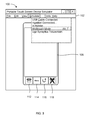
- Figure 1 is a schematic representation of a multi-touch simulation using a non-touchscreen input device according to one example
- Figure 2 is a flow chart showing a method of a multi-touch portable electronic device simulation using a non-touchscreen computer input device according to an example embodiment
- Figure 3 is a schematic representation of step 202 of Figure 2 ;
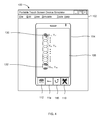
- Figure 4 is a schematic representation of step 204 of Figure 2 according to a first example
- Figure 5 is a schematic representation of step 206 of Figure 2 according to the first example
- Figure 6 is a schematic representation of steps 204 and 206 of Figure 2 according to a second example
- Figure 7 is a schematic representation of steps 204 and 206 of Figure 2 according to a third example
- Figure 8 is a schematic representation of a multi-touch motion simulator according to one example.
- Figure 9 is a schematic representation of a system for multi-touch motion simulation according to another example.
- the example embodiments described herein generally relate to a portable electronic device including a touchscreen display and multi-touch portable electronic device simulation using a non-touchscreen computer input device.
- portable electronic devices include mobile, or handheld, wireless communication devices such as pagers, cellular phones, cellular smart-phones, wireless organizers, personal digital assistants, wirelessly enabled notebook computers and the like.
- the portable electronic device may be a two-way communication device with advanced data communication capabilities including the capability to communicate with other portable electronic devices or computer systems through a network of transceiver stations.
- the portable electronic device may also have the capability to allow voice communication.
- it may be referred to as a data messaging device, a two-way pager, a cellular telephone with data messaging capabilities, a wireless Internet appliance, or a data communication device (with or without telephony capabilities).
- the portable electronic device may also be a portable device without wireless communication capabilities as a handheld electronic game device, digital photograph album, digital camera and the like.
- the multi-touch portable electronic device simulation can be a module of a portable touchscreen device simulator 100.
- the portable touchscreen device simulator 100 can be used in a desktop environment as a developer's tool for product development and/or troubleshooting of a portable electronic device having a touchscreen display.
- the portable touchscreen device simulator 100 can comprise multiple modules, generally depicted as pull down menu items by reference numeral 102 in Figure 1 .
- the modules include, for example, a file module (which may be implemented as a File menu providing file functions), an edit module (which may be implemented as an Edit menu providing editing functions), a view module (which may be implemented as a View menu providing view functions), a simulation module (which may be implemented as a Simulate menu providing simulation functions), a tool modules (which may be implemented as a Tools menu providing tool functions), and a help module (which may be implemented as a Help menu providing help functions).
- the portable touchscreen device simulator 100 is typically displayed on a desktop monitor attached to a desktop computer along with its peripheral input device and output devices (all not shown here).
- the desktop input device can be non-touchscreen input devices, for example, a mouse, keyboard, joystick, trackball, pen, stylus, laser device and the like. For clarity, example embodiments are described herein using a mouse as the non-touchscreen input device.
- Figure 1 also shows a simulated view of a portable electronic device 104 having a touchscreen display or a touch-sensitive display 106 and four physical buttons 112, 114, 116, 118 for user-selection for performing functions or operations including an "off-hook" button 112 for placing an outgoing cellular telephone call or receiving an incoming cellular telephone call, a Menu button 114 for displaying a context-sensitive menu or submenu, an escape button 116 for returning to a previous screen or exiting an application, and an "on-hook" button 118 for ending a cellular telephone call.
- the physical buttons 112, 114, 116, and 118 are simulated buttons in the portable touchscreen device simulator 100.
- the portable electronic device typically has a number of virtual input keys or buttons for user interaction, which are not shown in Figure 1 for clarity.
- Portable electronic devices having a multi-touch touchscreen display are capable of detecting or tracking two or more touch events or motions (also referred to as gestures) simultaneously and generate a sequence of events, such as for example zooming in or out, rotating, enlarging, selecting, and highlighting in response to the gestures.
- developers typically use a desktop environment for product development and/or troubleshooting of a portable electronic device. Under such circumstances, developers may not always have access to touchscreen displays (including touchscreen displays having multi-touch capabilities) for developing and/or testing sub-routines relating to various gestures.
- the portable touchscreen device simulator 100 can be used in a desktop environment as a developer's tool for product development and/or troubleshooting of a portable electronic device having a touchscreen display. Therefore, it is desirable to simulate such simultaneous gestures or multi-touch events in a desktop environment for application development and/or trouble shooting.
- desktop environment is used herein to describe a development/troubleshooting environment where the development and/or troubleshooting is performed, and can include desktop computers, laptop computers and the like.
- sub-routine is used herein to refer to a procedure, a method, or a function which is part of a larger program, and performs a specific task and is relatively independent of the larger program.
- a touch event is detected upon user touching of the touchscreen display.
- Such a touch event can be determined upon a user's touch at the touchscreen display for selection of, for example, a feature in a list, such as a message or other feature for scrolling in the list or selecting a virtual input key.
- Signals are sent from the touch-sensitive overlay to the controller when a touch is detected.
- signals are sent from the touch sensitive overlay to the controller when a suitable object such as a finger or other conductive object held in the bare hand of a user, is detected.
- a suitable object such as a finger or other conductive object held in the bare hand of a user
- the X and Y location of a touch event are both determined with the X location determined by a signal generated as a result of capacitive coupling with one of the touch sensor layers and the Y location determined by the signal generated as a result of capacitive coupling with the other of the touch sensor layers.
- Each of the touch-sensor layers provides a signal to the controller as a result of capacitive coupling with a suitable object such as a finger of a user or a conductive object held in a bare hand of a user resulting in a change in the electric field of each of the touch sensor layers.
- the signals represent the respective X and Y touch location values. It will be appreciated that other attributes of the user's touch on the touchscreen display can be determined. For example, the size and the shape of the touch on the touchscreen display can be determined in addition to the location (X and Y values) based on the signals received at the controller from the touch sensor layers.
- the X and Y locations corresponding to simultaneous multiple touch events can be similarly determined.
- Such portable electronic devices generate a sequence of events in response to the user interaction by way of multi-touch gestures such as a straight swipe motion, a circular motion, an arc motion, a rotation motion or a pinch motion.
- the sequence of events in response to the user's gesture can be the invocation of a sub-routine associated with a specific task, for example, zoom-in and zoom-out function in response to a swipe motion or a pinch motion, respectively.
- a touch motion or a touch event can also occur when the user slides his/her finger over to the touchscreen from an initial location and lifts the finger at the another location corresponding to the end of the touch event.
- the initial touch location and the "lift-off" location along with the intermediate touch locations can then be used define the gesture input by the user, for example, a circular motion gesture or a pinch gesture (in a two-touch event) etc.
- the input devices typically used in a desktop environment for non-textual input is a mouse or a joystick, which have one pointer capable of clicking in one location (X, Y coordinates) within the simulation screen at a given time, unlike the multi-touchscreen portable electronic device that can detect, for example, two touches in different locations simultaneously. It is therefore, desirable to provide a multi-touch portable electronic device simulation using a non-touchscreen computer input device.
- the method includes entering a multi-touch simulation mode (step 202); recording a first touch motion (step 204) and a second touch motion (step 206) using the non-touchscreen computer input device; rendering the recorded first touch motion and the second touch motion as a simulated simultaneous multi-touch motion (step 208); and generating a sub-routine associated with the simulated simultaneous multi-touch motion (step 210).
- step 202 The step of entering the multi-touch simulation mode (step 202) is further illustrated in Figure 3 .
- the user or developer using the portable touchscreen device simulator 100 can select, from the simulation module pull down "Simulate” menu, the "Multitouch Mode” as shown in Figure 3 .
- the user can "record” or simulate touch motion or event.
- a gesture of user making a parallel straight swipe motion using two fingers (corresponding to a simultaneous touch event using two touches) is illustrated in Figures 4 and 5 .
- the two simultaneous touch events can be simulated by "recording" two individual straight swipe motions and then rendering the two individual events as a single simultaneous multi-touch event.
- Figure 4 illustrates the recording of the first touch event (step 204).
- the initial touch occurs at the location 130, corresponding to the coordinates, X 11 -Y 11 . This can be, for instance, the location within the simulated touchscreen display window 106, where the user initially clicked using the desktop non-touchscreen input device, for example a mouse.
- Figure 5 illustrates the recording of the second touch event (step 204).
- the initial touch occurs at the location 140, corresponding to the coordinates, X 21 -Y 21 .
- the user then drags the mouse through a number of points (or locations) on the simulated touchscreen display 106, generally depicted by coordinates X 2i -Y 2i , and then releases the mouse button at the end location 140', corresponding to the coordinates, X 2m -Y 2m , to complete the second touch event.
- the simulation module of the portable touchscreen device simulator 100 then combines the two individual touch events to render the gesture of the user making a parallel straight swipe motion using two fingers as a single simultaneous multi-touch event.
- an user is able to select a portion of text by simultaneously touching the end-points corresponding to the desired portion of the text; for example, end-points of a straight line or two points along a diagonal of a text block.
- the selected portion of the text may be defined by a rectangle with coordinates X 11 -Y 11 , X 21 -Y 21 , X 1n -Y 1n , and X 1m -Y 1m .
- the selected portion of the text is then available for processing events such as cut, copy, format (e.g., bold, underline, italic) etc.
- a "pinch motion” gesture is depicted in Figure 6 , corresponding to two simultaneous touch events that bring the user's fingers touching the touchscreen display in the "pinch motion".
- the two simultaneous touch events can be simulated by "recording" two individual diagonal swipe motions and then rendering the two individual events as a single simultaneous multi-touch event corresponding to a pinch gesture.
- the initial touch for the first touch motion occurs at location 150 and for the second touch motion occurs at location160, corresponding to the coordinates, X 31 -Y 31 and X 41 -Y 41 , respectively.
- the user drags the mouse through a number of points (or locations) on the simulated touchscreen display 106, generally depicted by coordinates X 3i -Y 3i , and then releases the mouse button at the end location 150', corresponding to the coordinates, X 3n -Y 3n , to complete the first touch motion.
- the user drags the mouse through a number of points (or locations) on the simulated touchscreen display 106, generally depicted by coordinates X 4i -Y 4i , and then releases the mouse button at the end location 160', corresponding to the coordinates, X 4m -Y 4m , to complete the second touch motion.
- coordinates X 3n -Y 3n and X 4m -Y 4m are relatively close to each other on the simulated touchscreen display 106.
- the simulation module of the portable touchscreen device simulator 100 then combines or plays back simultaneously the two individual touch events or motions to render the "pinch" gesture using two fingers as a single simultaneous multi-touch event.
- a sub-routine associated with the simulated simultaneous multi-touch motion, i.e., the pinch gesture, to execute a zoom-out function, for example, can then be generated by the simulation module.
- a gesture corresponding to simultaneous touch events that take a user's fingers away for example, from initial coordinates X 3n -Y 3n and X 4m -Y 4m to X 31 -Y 31 and X 41 -Y 41 can be rendered and associated with a sub-routine for executing a zoom-in function.
- a "circular motion” or an "arc motion” gesture is depicted in Figure 7 , corresponding to two simultaneous touch events that bring the user's fingers touching the touchscreen display in a clockwise "circular motion.”
- the two simultaneous touch events can be simulated by "recording" two individual arc motions and then rendering the two individual events as a single simultaneous multi-touch event corresponding to a circular motion gesture.
- the initial touch for the first touch motion occurs at location 170 and for the second touch motion occurs at Iocation180, corresponding to the coordinates, X 51 -Y 51 and X 61 -Y 61 , respectively.
- the user drags the mouse through a number of points (or locations) on the simulated touchscreen display 106, generally depicted by coordinates X 5i -Y 5i , and then releases the mouse button at the end location 170', corresponding to the coordinates, X 5n -Y 5n , to complete the first touch motion.
- the user drags the mouse through a number of points (or locations) on the simulated touchscreen display 106, generally depicted by coordinates X 6i -Y 6i , and then releases the mouse button at the end location 180', corresponding to the coordinates, X 6m -Y 6m , to complete the second touch motion.
- coordinates X 5n Y 5n and X 61 -Y 61 are relatively close to each other on the simulated touchscreen display 106.
- the simulation module of the portable touchscreen device simulator 100 then combines or plays back simultaneously the two individual touch events or motions to render the "circle" gesture using two fingers as a single simultaneous multi-touch event.
- a sub-routine associated with the simulated simultaneous multi-touch motion, i.e., the circle gesture, to execute a clockwise rotate function, for example, can then be generated by the simulation module.
- a gesture corresponding to simultaneous touch events that depicts a counterclockwise circle gesture for example, from initial coordinates X 5n -Y 5n and X 6m -Y 6m to X 51 -Y 51 and X 61 -Y 61 can be rendered and associated with a sub-routine for executing a counterclockwise rotation function.
- the two touch motions may be completely independent and arbitrary relative to one another to generate any arbitrary gesture to be used by the developer in an application.
- the simulated simultaneous multi-touch motion or gesture can be used define a multi-touch motion on a portable electronic device having a touchscreen display.
- the sub-routine associated with the simulated simultaneous multi-touch motion may be generated in a pre-determined programming language supported by the portable electronic device for which the application is being developed.
- FIG. 8 is a schematic representation of a multi-touch motion simulator according to an aspect.
- the multi-touch motion simulator 800 comprises an input module 810, a recorder 820, a rendering module 830, and a sub-routine generator 840.
- the input module receives a touch motion inputs 801, for example, a first touch motion and a second touch motion from the non-touchscreen computer input device (not shown).
- the recorder 820 records the first touch motion and the second touch motion and the rendering module 830 renders the recorded first touch motion and the second touch motion as a simulated simultaneous multi-touch motion.
- the sub-routine generator 840 generates a sub-routine 850 associated with the simulated simultaneous multi-touch motion.
- the simulator can record and render simulated sequential multi-touch motions.
- an application may require a user to perform two gestures in sequence, such as a rotate function followed by a zoom function.
- the input module 810 can further receive a third touch motion from the non-touchscreen computer input device.
- the recorder 820 then records the third touch motion and the rendering module 830 renders the simulated simultaneous multi-touch motion and the recorded third touch motion as a simulated sequential multi-touch motion.
- the sub-routine generator 840 further generates a second sub-routine associated with the simulated sequential multi-touch motion.
- the second sub-routine associated with the simulated sequential multi-touch motion may execute a task associated with the simulated sequential multi-touch motion. For example, a file open function followed by a rotate function.
- the task associated with the simulated sequential multi-touch motion may be a sequential combination as described above.
- the task associated with the simulated sequential multi-touch motion may be an arbitrary combination of tasks associated with one or more simulated simultaneous multi-touch motions. For example, in a gaming application, an clockwise circle gesture followed by a pinch gesture could invoke a shortcut to execute an "about-turn and temporarily disappear" function or the like.
- FIG. 9 is a schematic representation of a system for multi-touch motion simulation in accordance with another aspect.
- the system 900 comprises a non-touchscreen computer input device 910, a recorder 920, a display logic (not shown) including a display 930 and a sub-routine generator 940.
- a first touch motion and a second touch motion are input using the non-touchscreen computer input device 910.
- the recorder 920 records the first touch motion and the second touch motion.
- the display logic renders the recorded first touch motion and the second touch motions as a simulated simultaneous multi-touch motion on the display 930.
- the sub-routine generator 940 generates a sub-routine associated with the simulated simultaneous multi-touch motion.
- the display logic, the recorder 920, and the sub-routine generator 940 can be a part of the central processing unit 950 of the computer system 900.
- the portable touchscreen device simulator 100 allows the user or developer to simulate any number of multi-touch gestures.
- the simulated multi-touch gesture can then be attributed to a set or sequence of events, such as for example zooming in or out, rotating, enlarging, selecting and highlighting, that will be performed by the portable electronic device in response to that multi-touch gesture or for troubleshooting purposes.
- the portable touchscreen simulator 100 can generate operating system level input events corresponding to any simulated multi-touch event, which can be used by user interface developers for attributing a sequence of response events to be performed by the processor of the portable electronic device upon detecting the multi-touch event.
- any number of multi-touch events corresponding to any number of gestures may be simulated, recognized, and a suitable response may be developed.
- Example embodiments of the invention may be represented as a software product stored in a machine-readable medium (also referred to as a computer-readable medium, a processor-readable medium, or a computer usable medium having a computer readable program code embodied therein).
- the machine-readable medium may be any suitable tangible medium, including magnetic, optical, or electrical storage medium including a diskette, compact disk read only memory (CD-ROM), memory device (volatile or nonvolatile), or similar storage mechanism.
- the machine-readable medium may contain various sets of instructions, code sequences, configuration information, or other data, which, when executed, cause a processor to perform steps in a method according to an example embodiment of the invention.
- Those of ordinary skill in the art will appreciate that other instructions and operations necessary to implement the described invention may also be stored on the machine-readable medium.
- Software running from the machine-readable medium may interface with circuitry to perform the described tasks.
Landscapes
- Engineering & Computer Science (AREA)
- General Engineering & Computer Science (AREA)
- Theoretical Computer Science (AREA)
- Human Computer Interaction (AREA)
- Physics & Mathematics (AREA)
- General Physics & Mathematics (AREA)
- Telephone Set Structure (AREA)
- Push-Button Switches (AREA)
- Transmitters (AREA)
- User Interface Of Digital Computer (AREA)
Abstract
Description
- The present disclosure relates to a simulator for portable electronic devices including touchscreen display devices and a method of simulation of a multi-touch motion using a non-touchscreen computer input device.
- Electronic devices, including portable electronic devices, have gained widespread use and can provide a variety of functions including, for example, telephonic, electronic messaging and other personal information manager (PIM) application functions. Portable electronic devices can include several types of devices including mobile stations such as simple cellular telephones, smart telephones, wireless PDAs, and laptop computers with wireless 802.11 or Bluetooth capabilities. These devices run on a wide variety of networks from data-only networks such as Mobitex and DataTAC to complex voice and data networks such as GSM/GPRS, CDMA, EDGE, UMTS and CDMA2000 networks.
- Portable electronic devices such as PDAs or smart telephones are generally intended for handheld use and ease of portability. Smaller devices are generally desirable for portability. A touchscreen display for input and output is particularly useful on such handheld devices as such handheld devices are small and are therefore limited in space available for user input and output devices. Further, the screen content on the touchscreen display devices can be modified depending on the functions and operations being performed. Even still, these devices have a limited area for rendering content on the touchscreen display and for rendering features or icons, for example, for user interaction. With continued demand for decreased size of portable electronic devices, touchscreen displays continue to decrease in size.
- Improvements in touchscreen devices are therefore desirable.
- According to one aspect, there is provided a method of multi-touch motion simulation using a non-touchscreen computer input device. The method comprises entering a multi-touch simulation mode; recording a first touch motion and a second touch motion using the non-touchscreen computer input device; rendering the recorded first touch motion and second touch motion as a simulated simultaneous multi-touch motion; and, generating a sub-routine associated with the simulated simultaneous multi-touch motion. The sub-routine may be generated automatically upon rendering the simulated simultaneous multi-touch motion.
- In an example embodiment, the first touch motion and the second touch motion are independent and arbitrary relative to one another.
- In another example embodiment, the sub-routine executes a task associated with simulated simultaneous multi-touch motion.
- In yet another example embodiment, the simulated simultaneous multi-touch motion defines a multi-touch motion on a portable electronic device having a touchscreen display. The sub-routine associated with the simulated simultaneous multi-touch motion may be generated in a pre-determined programming language supported by the portable electronic device.
- In an example embodiment, the multi-touch motion on the portable electronic device corresponds to a swipe motion; a circular motion; an arc motion; a rotate motion, or a pinch motion.
- In another example embodiment, the sub-routine associated with the simulated simultaneous multi-touch motion is a first sub-routine and the method further comprises: recording a third touch motion using the non-touchscreen computer input device; rendering the simulated simultaneous multi-touch motion and the recorded third touch motion as a simulated sequential multi-touch motion; and, generating a second sub-routine associated with the simulated sequential multi-touch motion.
- The third touch motion may be independent and arbitrary relative to the first touch motion and the second touch motion.
- Furthermore, the second sub-routine associated with the simulated sequential multi-touch motion may execute a task associated with the simulated sequential multi-touch motion. The task associated with the simulated sequential multi-touch motion may be a sequential combination or an arbitrary combination of tasks associated with one or more simulated simultaneous multi-touch motions.
- According to another aspect, there is provided a simulator to simulate a multi-touch motion using a non-touchscreen computer input device. The simulator comprises an input module, a recorder, a rendering module, and a sub-routine generator. The input module receives a first touch motion and a second touch motion from the non-touchscreen computer input device. The recorder records the first touch motion and the second touch motion and the rendering module renders the recorded first touch motion and the second touch motion as a simulated simultaneous multi-touch motion. The sub-routine generator generates a sub-routine associated with the simulated simultaneous multi-touch motion.
- In an example embodiment, the sub-routine associated with the simulated simultaneous multi-touch motion is a first sub-routine. The input module of the simulator further receives a third touch motion from the non-touchscreen computer input device; the recorder records the third touch motion; the rendering module renders the simulated simultaneous multi-touch motion and the recorded third touch motion as a simulated sequential multi-touch motion; and, the sub-routine generator generates a second sub-routine associated with the simulated sequential multi-touch motion.
- According to another aspect, there is provided a system for simulating a multi-touch motion. The system comprises a non-touchscreen computer input device, a recorder, a display logic including a display and a sub-routine generator. A first touch motion and a second touch motion are input using the non-touchscreen computer input device. The recorder records the first touch motion and the second touch motion. The display logic renders the recorded first touch motion and the second touch motions as a simulated simultaneous multi-touch motion on a display. The sub-routine generator generates a sub-routine associated with the simulated simultaneous multi-touch motion.
- According to another aspect, there is provided a computer-readable medium. The computer-readable medium has computer-readable code embodied therein for execution by a processor to carry out a method of multi-touch motion simulation using a non-touchscreen computer input device. The method comprises entering a multi-touch simulation mode; recording a first touch motion and a second touch motion using the non-touchscreen computer input device; rendering the recorded first and second touch motions as a simulated simultaneous multi-touch motion; and generating a sub-routine associated with the simulated simultaneous multi-touch motion.
- BRIEF DESCRIPTION OF THE DRAWINGS
- Embodiments of the present disclosure will now be described, by way of example only, with reference to the attached Figures, wherein:
-
Figure 1 is a schematic representation of a multi-touch simulation using a non-touchscreen input device according to one example; -
Figure 2 is a flow chart showing a method of a multi-touch portable electronic device simulation using a non-touchscreen computer input device according to an example embodiment; -
Figure 3 is a schematic representation ofstep 202 ofFigure 2 ; -
Figure 4 is a schematic representation of step 204 ofFigure 2 according to a first example; -
Figure 5 is a schematic representation of step 206 ofFigure 2 according to the first example; -
Figure 6 is a schematic representation of steps 204 and 206 ofFigure 2 according to a second example; -
Figure 7 is a schematic representation of steps 204 and 206 ofFigure 2 according to a third example; -
Figure 8 is a schematic representation of a multi-touch motion simulator according to one example; and, -
Figure 9 is a schematic representation of a system for multi-touch motion simulation according to another example. - It will be appreciated that for simplicity and clarity of illustration, where considered appropriate, reference numerals may be repeated among the figures to indicate corresponding or analogous elements. In addition, numerous specific details are set forth in order to provide a thorough understanding of the example embodiments described herein. However, it will be understood by those of ordinary skill in the art that the example embodiments described herein may be practiced without these specific details. In other instances, well-known methods, procedures and components have not been described in detail so as not to obscure the example embodiments described herein. Also, the description is not to be considered as limiting the scope of the embodiments described herein.
- The example embodiments described herein generally relate to a portable electronic device including a touchscreen display and multi-touch portable electronic device simulation using a non-touchscreen computer input device. Examples of portable electronic devices include mobile, or handheld, wireless communication devices such as pagers, cellular phones, cellular smart-phones, wireless organizers, personal digital assistants, wirelessly enabled notebook computers and the like.
- The portable electronic device may be a two-way communication device with advanced data communication capabilities including the capability to communicate with other portable electronic devices or computer systems through a network of transceiver stations. The portable electronic device may also have the capability to allow voice communication. Depending on the functionality provided by the portable electronic device, it may be referred to as a data messaging device, a two-way pager, a cellular telephone with data messaging capabilities, a wireless Internet appliance, or a data communication device (with or without telephony capabilities). The portable electronic device may also be a portable device without wireless communication capabilities as a handheld electronic game device, digital photograph album, digital camera and the like.
- Referring first to
Figure 1 , there is shown a schematic representation of a multi-touch portable electronic device simulation using a non-touchscreen computer input device. The multi-touch portable electronic device simulation can be a module of a portabletouchscreen device simulator 100. The portabletouchscreen device simulator 100 can be used in a desktop environment as a developer's tool for product development and/or troubleshooting of a portable electronic device having a touchscreen display. The portabletouchscreen device simulator 100 can comprise multiple modules, generally depicted as pull down menu items byreference numeral 102 inFigure 1 . The modules include, for example, a file module (which may be implemented as a File menu providing file functions), an edit module (which may be implemented as an Edit menu providing editing functions), a view module (which may be implemented as a View menu providing view functions), a simulation module (which may be implemented as a Simulate menu providing simulation functions), a tool modules (which may be implemented as a Tools menu providing tool functions), and a help module (which may be implemented as a Help menu providing help functions). The portabletouchscreen device simulator 100 is typically displayed on a desktop monitor attached to a desktop computer along with its peripheral input device and output devices (all not shown here). The desktop input device can be non-touchscreen input devices, for example, a mouse, keyboard, joystick, trackball, pen, stylus, laser device and the like. For clarity, example embodiments are described herein using a mouse as the non-touchscreen input device. -
Figure 1 also shows a simulated view of a portableelectronic device 104 having a touchscreen display or a touch-sensitive display 106 and fourphysical buttons button 112 for placing an outgoing cellular telephone call or receiving an incoming cellular telephone call, aMenu button 114 for displaying a context-sensitive menu or submenu, anescape button 116 for returning to a previous screen or exiting an application, and an "on-hook"button 118 for ending a cellular telephone call. Of course, thephysical buttons touchscreen device simulator 100. The portable electronic device typically has a number of virtual input keys or buttons for user interaction, which are not shown inFigure 1 for clarity. - Portable electronic devices having a multi-touch touchscreen display are capable of detecting or tracking two or more touch events or motions (also referred to as gestures) simultaneously and generate a sequence of events, such as for example zooming in or out, rotating, enlarging, selecting, and highlighting in response to the gestures. For ease of use, developers typically use a desktop environment for product development and/or troubleshooting of a portable electronic device. Under such circumstances, developers may not always have access to touchscreen displays (including touchscreen displays having multi-touch capabilities) for developing and/or testing sub-routines relating to various gestures. As described earlier, the portable
touchscreen device simulator 100 can be used in a desktop environment as a developer's tool for product development and/or troubleshooting of a portable electronic device having a touchscreen display. Therefore, it is desirable to simulate such simultaneous gestures or multi-touch events in a desktop environment for application development and/or trouble shooting. - It is to be noted that the term desktop environment is used herein to describe a development/troubleshooting environment where the development and/or troubleshooting is performed, and can include desktop computers, laptop computers and the like. Furthermore, the term "sub-routine" is used herein to refer to a procedure, a method, or a function which is part of a larger program, and performs a specific task and is relatively independent of the larger program.
- In a typical portable electronic device having a multi-touch touchscreen, a touch event is detected upon user touching of the touchscreen display. Such a touch event can be determined upon a user's touch at the touchscreen display for selection of, for example, a feature in a list, such as a message or other feature for scrolling in the list or selecting a virtual input key. Signals are sent from the touch-sensitive overlay to the controller when a touch is detected. For capacitive touchscreen, for example, signals are sent from the touch sensitive overlay to the controller when a suitable object such as a finger or other conductive object held in the bare hand of a user, is detected. Thus, the touch event is detected and the X and Y location of the touch are determined.
- In one example, the X and Y location of a touch event are both determined with the X location determined by a signal generated as a result of capacitive coupling with one of the touch sensor layers and the Y location determined by the signal generated as a result of capacitive coupling with the other of the touch sensor layers. Each of the touch-sensor layers provides a signal to the controller as a result of capacitive coupling with a suitable object such as a finger of a user or a conductive object held in a bare hand of a user resulting in a change in the electric field of each of the touch sensor layers. The signals represent the respective X and Y touch location values. It will be appreciated that other attributes of the user's touch on the touchscreen display can be determined. For example, the size and the shape of the touch on the touchscreen display can be determined in addition to the location (X and Y values) based on the signals received at the controller from the touch sensor layers.
- In multi-touch enabled portable electronic devices, the X and Y locations corresponding to simultaneous multiple touch events can be similarly determined. Such portable electronic devices generate a sequence of events in response to the user interaction by way of multi-touch gestures such as a straight swipe motion, a circular motion, an arc motion, a rotation motion or a pinch motion. The sequence of events in response to the user's gesture can be the invocation of a sub-routine associated with a specific task, for example, zoom-in and zoom-out function in response to a swipe motion or a pinch motion, respectively.
- A touch motion or a touch event can also occur when the user slides his/her finger over to the touchscreen from an initial location and lifts the finger at the another location corresponding to the end of the touch event. The initial touch location and the "lift-off" location along with the intermediate touch locations can then be used define the gesture input by the user, for example, a circular motion gesture or a pinch gesture (in a two-touch event) etc.
- The input devices typically used in a desktop environment for non-textual input is a mouse or a joystick, which have one pointer capable of clicking in one location (X, Y coordinates) within the simulation screen at a given time, unlike the multi-touchscreen portable electronic device that can detect, for example, two touches in different locations simultaneously. It is therefore, desirable to provide a multi-touch portable electronic device simulation using a non-touchscreen computer input device.
- Generally, according to one aspect, there is provided a method of multi-touch motion simulation using a non-touchscreen computer input device. As illustrated in
Figure 2 , the method includes entering a multi-touch simulation mode (step 202); recording a first touch motion (step 204) and a second touch motion (step 206) using the non-touchscreen computer input device; rendering the recorded first touch motion and the second touch motion as a simulated simultaneous multi-touch motion (step 208); and generating a sub-routine associated with the simulated simultaneous multi-touch motion (step 210). - The step of entering the multi-touch simulation mode (step 202) is further illustrated in
Figure 3 . The user or developer using the portabletouchscreen device simulator 100, can select, from the simulation module pull down "Simulate" menu, the "Multitouch Mode" as shown inFigure 3 . - Upon entering the multi-touch simulation mode (step 202), the user can "record" or simulate touch motion or event. In an example embodiment, a gesture of user making a parallel straight swipe motion using two fingers (corresponding to a simultaneous touch event using two touches) is illustrated in
Figures 4 and5 . The two simultaneous touch events can be simulated by "recording" two individual straight swipe motions and then rendering the two individual events as a single simultaneous multi-touch event.Figure 4 illustrates the recording of the first touch event (step 204). The initial touch occurs at thelocation 130, corresponding to the coordinates, X11-Y11. This can be, for instance, the location within the simulatedtouchscreen display window 106, where the user initially clicked using the desktop non-touchscreen input device, for example a mouse. The user then drags the mouse (without releasing the initial click) through a number of points (or locations) on thesimulated touchscreen display 106, generally depicted by coordinates X1i-Y1i, and then releases the mouse button at the end location 130', corresponding to the coordinates, X1n-Y1n, to complete the first touch event. -
Figure 5 illustrates the recording of the second touch event (step 204). The initial touch occurs at thelocation 140, corresponding to the coordinates, X21-Y21. The user then drags the mouse through a number of points (or locations) on thesimulated touchscreen display 106, generally depicted by coordinates X2i-Y2i, and then releases the mouse button at the end location 140', corresponding to the coordinates, X2m-Y2m, to complete the second touch event. - The simulation module of the portable
touchscreen device simulator 100 then combines the two individual touch events to render the gesture of the user making a parallel straight swipe motion using two fingers as a single simultaneous multi-touch event. In an exemplary embodiment, an user is able to select a portion of text by simultaneously touching the end-points corresponding to the desired portion of the text; for example, end-points of a straight line or two points along a diagonal of a text block. In the example shown inFigures 4 and5 , the selected portion of the text may be defined by a rectangle with coordinates X11-Y11, X21-Y21, X1n-Y1n, and X1m-Y1m. The selected portion of the text is then available for processing events such as cut, copy, format (e.g., bold, underline, italic) etc. - A "pinch motion" gesture is depicted in
Figure 6 , corresponding to two simultaneous touch events that bring the user's fingers touching the touchscreen display in the "pinch motion". Again, in the portabletouchscreen device simulator 100, the two simultaneous touch events can be simulated by "recording" two individual diagonal swipe motions and then rendering the two individual events as a single simultaneous multi-touch event corresponding to a pinch gesture. - The initial touch for the first touch motion occurs at
location 150 and for the second touch motion occurs at location160, corresponding to the coordinates, X31-Y31 and X41-Y41, respectively. In the first touch motion, the user drags the mouse through a number of points (or locations) on thesimulated touchscreen display 106, generally depicted by coordinates X3i-Y3i, and then releases the mouse button at the end location 150', corresponding to the coordinates, X3n-Y3n, to complete the first touch motion. Similarly, in the second touch motion, the user drags the mouse through a number of points (or locations) on thesimulated touchscreen display 106, generally depicted by coordinates X4i-Y4i, and then releases the mouse button at the end location 160', corresponding to the coordinates, X4m-Y4m, to complete the second touch motion. It is noted that in this example, coordinates X3n-Y3n and X4m-Y4m are relatively close to each other on thesimulated touchscreen display 106. The simulation module of the portabletouchscreen device simulator 100 then combines or plays back simultaneously the two individual touch events or motions to render the "pinch" gesture using two fingers as a single simultaneous multi-touch event. A sub-routine associated with the simulated simultaneous multi-touch motion, i.e., the pinch gesture, to execute a zoom-out function, for example, can then be generated by the simulation module. - Similarly, a gesture corresponding to simultaneous touch events that take a user's fingers away, for example, from initial coordinates X3n-Y3n and X4m-Y4m to X31-Y31 and X41-Y41 can be rendered and associated with a sub-routine for executing a zoom-in function.
- A "circular motion" or an "arc motion" gesture is depicted in
Figure 7 , corresponding to two simultaneous touch events that bring the user's fingers touching the touchscreen display in a clockwise "circular motion." Again, in the portabletouchscreen device simulator 100, the two simultaneous touch events can be simulated by "recording" two individual arc motions and then rendering the two individual events as a single simultaneous multi-touch event corresponding to a circular motion gesture. - The initial touch for the first touch motion occurs at
location 170 and for the second touch motion occurs at Iocation180, corresponding to the coordinates, X51-Y51 and X61-Y61, respectively. In the first touch motion, the user drags the mouse through a number of points (or locations) on thesimulated touchscreen display 106, generally depicted by coordinates X5i-Y5i, and then releases the mouse button at the end location 170', corresponding to the coordinates, X5n-Y5n, to complete the first touch motion. Similarly, in the second touch motion, the user drags the mouse through a number of points (or locations) on thesimulated touchscreen display 106, generally depicted by coordinates X6i-Y6i, and then releases the mouse button at the end location 180', corresponding to the coordinates, X6m-Y6m, to complete the second touch motion. It is noted that in this example, coordinates X5n Y5n and X61-Y61 are relatively close to each other on thesimulated touchscreen display 106. The simulation module of the portabletouchscreen device simulator 100 then combines or plays back simultaneously the two individual touch events or motions to render the "circle" gesture using two fingers as a single simultaneous multi-touch event. A sub-routine associated with the simulated simultaneous multi-touch motion, i.e., the circle gesture, to execute a clockwise rotate function, for example, can then be generated by the simulation module. - Similarly, a gesture corresponding to simultaneous touch events that depicts a counterclockwise circle gesture, for example, from initial coordinates X5n-Y5n and X6m-Y6m to X51-Y51 and X61-Y61 can be rendered and associated with a sub-routine for executing a counterclockwise rotation function.
- Although, in the above examples, the first and second touch motions are related to one another, the two touch motions may be completely independent and arbitrary relative to one another to generate any arbitrary gesture to be used by the developer in an application. The simulated simultaneous multi-touch motion or gesture can be used define a multi-touch motion on a portable electronic device having a touchscreen display. The sub-routine associated with the simulated simultaneous multi-touch motion may be generated in a pre-determined programming language supported by the portable electronic device for which the application is being developed.
-
Figure 8 is a schematic representation of a multi-touch motion simulator according to an aspect. Themulti-touch motion simulator 800 comprises aninput module 810, arecorder 820, arendering module 830, and asub-routine generator 840. The input module receives atouch motion inputs 801, for example, a first touch motion and a second touch motion from the non-touchscreen computer input device (not shown). Therecorder 820 records the first touch motion and the second touch motion and therendering module 830 renders the recorded first touch motion and the second touch motion as a simulated simultaneous multi-touch motion. Thesub-routine generator 840 generates a sub-routine 850 associated with the simulated simultaneous multi-touch motion. - In addition to simulating simultaneous multi-touch motions, the simulator can record and render simulated sequential multi-touch motions. For example, an application may require a user to perform two gestures in sequence, such as a rotate function followed by a zoom function.
- An example of simulating a sequential multi-touch motion is described with respect to
Figure 8 . Continuing from the earlier description of thesimulator 800, theinput module 810 can further receive a third touch motion from the non-touchscreen computer input device. Therecorder 820 then records the third touch motion and therendering module 830 renders the simulated simultaneous multi-touch motion and the recorded third touch motion as a simulated sequential multi-touch motion. Thesub-routine generator 840 further generates a second sub-routine associated with the simulated sequential multi-touch motion. - The second sub-routine associated with the simulated sequential multi-touch motion may execute a task associated with the simulated sequential multi-touch motion. For example, a file open function followed by a rotate function.
- The task associated with the simulated sequential multi-touch motion may be a sequential combination as described above. Alternatively, the task associated with the simulated sequential multi-touch motion may be an arbitrary combination of tasks associated with one or more simulated simultaneous multi-touch motions. For example, in a gaming application, an clockwise circle gesture followed by a pinch gesture could invoke a shortcut to execute an "about-turn and temporarily disappear" function or the like.
-
Figure 9 is a schematic representation of a system for multi-touch motion simulation in accordance with another aspect. Thesystem 900 comprises a non-touchscreencomputer input device 910, arecorder 920, a display logic (not shown) including adisplay 930 and asub-routine generator 940. As described earlier, a first touch motion and a second touch motion are input using the non-touchscreencomputer input device 910. Therecorder 920 records the first touch motion and the second touch motion. The display logic renders the recorded first touch motion and the second touch motions as a simulated simultaneous multi-touch motion on thedisplay 930. Thesub-routine generator 940 generates a sub-routine associated with the simulated simultaneous multi-touch motion. The display logic, therecorder 920, and thesub-routine generator 940 can be a part of thecentral processing unit 950 of thecomputer system 900. - Thus, the portable
touchscreen device simulator 100 allows the user or developer to simulate any number of multi-touch gestures. The simulated multi-touch gesture can then be attributed to a set or sequence of events, such as for example zooming in or out, rotating, enlarging, selecting and highlighting, that will be performed by the portable electronic device in response to that multi-touch gesture or for troubleshooting purposes. For example, theportable touchscreen simulator 100 can generate operating system level input events corresponding to any simulated multi-touch event, which can be used by user interface developers for attributing a sequence of response events to be performed by the processor of the portable electronic device upon detecting the multi-touch event. Thus, any number of multi-touch events corresponding to any number of gestures may be simulated, recognized, and a suitable response may be developed. - In the following description, for purposes of explanation, numerous details are set forth in order to provide a thorough understanding of the present invention. However, it will be apparent to one skilled in the art that these specific details are not required in order to practice the present invention. In other instances, well-known electrical structures and circuits are shown in block diagram form in order not to obscure the present invention. For example, specific details are not provided as to whether the example embodiments of the invention described herein are implemented as a software routine, hardware circuit, firmware, or a combination thereof.
- Example embodiments of the invention may be represented as a software product stored in a machine-readable medium (also referred to as a computer-readable medium, a processor-readable medium, or a computer usable medium having a computer readable program code embodied therein). The machine-readable medium may be any suitable tangible medium, including magnetic, optical, or electrical storage medium including a diskette, compact disk read only memory (CD-ROM), memory device (volatile or nonvolatile), or similar storage mechanism. The machine-readable medium may contain various sets of instructions, code sequences, configuration information, or other data, which, when executed, cause a processor to perform steps in a method according to an example embodiment of the invention. Those of ordinary skill in the art will appreciate that other instructions and operations necessary to implement the described invention may also be stored on the machine-readable medium. Software running from the machine-readable medium may interface with circuitry to perform the described tasks.
- While the example embodiments described herein are directed to particular implementations of the portable electronic device and the method of controlling the portable electronic device, it will be understood that modifications and variations may occur to those skilled in the art. All such modifications and variations are believed to be within the sphere and scope of the present disclosure.
Claims (15)
- A method of multi-touch motion simulation using a non-touchscreen computer input device, the method comprising:entering a multi-touch simulation mode (202);recording a first touch motion and a second touch motion using the non-touchscreen computer input device (204, 206);rendering the recorded first touch motion and the recorded second touch motion as a simulated simultaneous multi-touch motion (208); and,generating a sub-routine associated with the simulated simultaneous multi-touch motion (210).
- The method of claim 1, wherein the first touch motion and the second touch motion are independent relative to one another.
- The method of claim 1 or claim 2, wherein the sub-routine executes a task associated with the simulated simultaneous multi-touch motion.
- The method of any one of claims 1 to 3, wherein the simulated simultaneous multi-touch motion defines a multi-touch motion on a portable electronic device having a touchscreen display.
- The method of claim 4, wherein the multi-touch motion on the portable electronic device corresponds to a swipe motion; a circular motion; an arc motion; a rotate motion or a pinch motion.
- The method of claim 4 or claim 5, wherein the sub-routine is generated in a pre-determined programming language supported by the portable electronic device.
- The method of any one of the preceding claims, wherein the sub-routine associated with the simulated simultaneous multi-touch motion is a first sub-routine and the method further comprising:recording a third touch motion using the non-touchscreen computer input device;rendering the simulated simultaneous multi-touch motion and the recorded third touch motion as a simulated sequential multi-touch motion; and,generating a second sub-routine associated with the simulated sequential multi-touch motion.
- The method of claim 7, wherein the third touch motion is independent relative to the first touch motion and the second touch motion.
- The method of claim 7 or claim 8, wherein the second sub-routine associated with the simulated sequential multi-touch motion executes a task associated with the simulated sequential multi-touch motion.
- The method of claim 9, wherein the task associated with the simulated sequential multi-touch motion is a sequential combination of tasks associated with one or more simulated simultaneous multi-touch motions.
- The method of claim 9, wherein the task associated with the simulated sequential multi-touch motion is an arbitrary combination of tasks associated with one or more simulated simultaneous multi-touch motions.
- A simulator (800) to simulate a multi-touch motion using a non-touchscreen computer input device, the simulator comprising:an input module (810) to receive a first touch motion and a second touch motion from the non-touchscreen computer input device (801);a recorder (820) to record the first touch motion and the second touch motion;a rendering module (830) to render the recorded first touch motion and the recorded second touch motion as a simulated simultaneous multi-touch motion;
and,a sub-routine generator (840) to generate a sub-routine (850) associated with the simulated simultaneous multi-touch motion. - The simulator of claim 12, wherein the sub-routine associated with the simulated simultaneous multi-touch motion is a first sub-routine and the input module receives a third touch motion from the non-touchscreen computer input device;the recorder records the third touch motion;the rendering module renders the simulated simultaneous multi-touch motion and the recorded third touch motion as a simulated sequential multi-touch motion; and,the sub-routine generator generates a second sub-routine associated with the simulated sequential multi-touch motion.
- A system (900) for simulating a multi-touch motion comprising:a non-touchscreen computer input device (910) to input a first touch motion and a second touch motion and a simulator according to claim 12 or claim 13.
- A computer-readable medium having computer-readable code embodied therein for execution by a processor to carry out a method of multi-touch motion simulation using a non-touchscreen computer input device according to any one claims 1-11.
Applications Claiming Priority (1)
| Application Number | Priority Date | Filing Date | Title |
|---|---|---|---|
| US10348108P | 2008-10-07 | 2008-10-07 |
Publications (1)
| Publication Number | Publication Date |
|---|---|
| EP2175350A1 true EP2175350A1 (en) | 2010-04-14 |
Family
ID=40602537
Family Applications (2)
| Application Number | Title | Priority Date | Filing Date |
|---|---|---|---|
| EP09153829A Active EP2175465B1 (en) | 2008-10-07 | 2009-02-26 | Sealed dome switch for mobile electronic device |
| EP09172367A Withdrawn EP2175350A1 (en) | 2008-10-07 | 2009-10-06 | Multi-touch motion simulation using a non-touch screen computer input device |
Family Applications Before (1)
| Application Number | Title | Priority Date | Filing Date |
|---|---|---|---|
| EP09153829A Active EP2175465B1 (en) | 2008-10-07 | 2009-02-26 | Sealed dome switch for mobile electronic device |
Country Status (4)
| Country | Link |
|---|---|
| US (2) | US8089017B2 (en) |
| EP (2) | EP2175465B1 (en) |
| AT (1) | ATE496381T1 (en) |
| DE (1) | DE602009000633D1 (en) |
Cited By (5)
| Publication number | Priority date | Publication date | Assignee | Title |
|---|---|---|---|---|
| WO2012170426A3 (en) * | 2011-06-05 | 2013-04-25 | Apple Inc. | Devices, methods, and graphical user interfaces for providing control of a touch-based user interface absent physical touch capabilities |
| CN103324424A (en) * | 2012-03-23 | 2013-09-25 | 百度在线网络技术(北京)有限公司 | Remote simulation multi-point touch method and system |
| EP2802967A1 (en) * | 2012-01-09 | 2014-11-19 | Movea | Command of a device by gesture emulation of touch gestures |
| US10986252B2 (en) | 2015-06-07 | 2021-04-20 | Apple Inc. | Touch accommodation options |
| US11947792B2 (en) | 2011-12-29 | 2024-04-02 | Apple Inc. | Devices, methods, and graphical user interfaces for providing multitouch inputs and hardware-based features using a single touch input |
Families Citing this family (8)
| Publication number | Priority date | Publication date | Assignee | Title |
|---|---|---|---|---|
| JP5656599B2 (en) * | 2010-12-09 | 2015-01-21 | キヤノン株式会社 | Switch unit |
| CN204498512U (en) * | 2014-06-17 | 2015-07-22 | 中兴通讯股份有限公司 | Terminal side switch water-tight device and terminal |
| US9748057B2 (en) | 2016-01-04 | 2017-08-29 | Gyrus Acmi, Inc. | Device with movable buttons or switches |
| WO2017172082A1 (en) | 2016-03-31 | 2017-10-05 | GYRUS ACMI, INC. (d/b/a OLYMPUS SURGICAL TECHNOLOGIES AMERICA) | Disengagement mechanism for electrosurgical forceps |
| KR101830964B1 (en) * | 2016-06-17 | 2018-04-04 | 엘지전자 주식회사 | Mobile terminal |
| US10610291B2 (en) | 2016-09-26 | 2020-04-07 | Gyrus Acmi, Inc. | Reconfigurable instrument |
| US11896285B2 (en) | 2018-03-14 | 2024-02-13 | Gyrus Acmi, Inc. | Device with movable buttons or switches and visual indicator |
| US11361918B2 (en) | 2019-03-25 | 2022-06-14 | Gyrus Acmi, Inc. | Device with movable buttons or switches and tactile identifier |
Citations (1)
| Publication number | Priority date | Publication date | Assignee | Title |
|---|---|---|---|---|
| US20050219210A1 (en) | 2004-03-31 | 2005-10-06 | The Neil Squire Society | Pointer interface for handheld devices |
Family Cites Families (18)
| Publication number | Priority date | Publication date | Assignee | Title |
|---|---|---|---|---|
| JPS573317A (en) * | 1980-06-09 | 1982-01-08 | Shinetsu Polymer Co | Pushbutton controlling member |
| JPS5810335U (en) * | 1981-07-15 | 1983-01-22 | 信越ポリマ−株式会社 | Thin keyboard device |
| JPS58123529U (en) | 1982-02-16 | 1983-08-23 | アルプス電気株式会社 | keyboard switch |
| US4449024A (en) * | 1983-05-03 | 1984-05-15 | Kb Denver, Inc. | Backlighted illuminated keyboard |
| AT381814B (en) | 1985-06-14 | 1986-12-10 | Siemens Ag Oesterreich | KEY DIALING BLOCK |
| US4771139A (en) * | 1986-06-27 | 1988-09-13 | Desmet Gregory L | Keyboard with metal cover and improved switches |
| EP0322515A3 (en) | 1987-12-30 | 1990-09-12 | Hewlett-Packard Company | Keyboard venting |
| US4916275A (en) * | 1988-04-13 | 1990-04-10 | Square D Company | Tactile membrane switch assembly |
| US4885443A (en) * | 1988-11-29 | 1989-12-05 | Tokheim Corporation | Sealed backlit switch assembly |
| US4977298A (en) * | 1989-09-08 | 1990-12-11 | Matsushita Electric Industrial Co., Ltd. | Panel switch |
| US5694124A (en) * | 1996-01-31 | 1997-12-02 | Texas Instruments Incorporated | Portable computer with integrated circuit board and keyboard |
| US5717429A (en) * | 1996-04-03 | 1998-02-10 | Texas Instruments Incorporated | Low profile, light weight keyboard |
| US6617536B2 (en) * | 2000-11-29 | 2003-09-09 | Yazaki Corporation | Dome switch |
| JP2002245895A (en) | 2001-02-14 | 2002-08-30 | Yazaki Corp | Dome switch |
| JP4417588B2 (en) | 2001-06-07 | 2010-02-17 | 株式会社フジクラ | Metal dome sheet |
| KR100464975B1 (en) * | 2002-09-23 | 2005-01-05 | 엘지전자 주식회사 | A metal dome sheet and keypad for a mobile phone |
| JP2006294429A (en) | 2005-04-12 | 2006-10-26 | Matsushita Electric Ind Co Ltd | Movable contact body and panel switch configured using the same |
| JP4352178B2 (en) | 2005-06-09 | 2009-10-28 | 株式会社カシオ日立モバイルコミュニケーションズ | Pushbutton switch waterproof structure and electronic device |
-
2009
- 2009-02-26 AT AT09153829T patent/ATE496381T1/en not_active IP Right Cessation
- 2009-02-26 US US12/393,384 patent/US8089017B2/en active Active
- 2009-02-26 DE DE602009000633T patent/DE602009000633D1/en active Active
- 2009-02-26 EP EP09153829A patent/EP2175465B1/en active Active
- 2009-10-06 EP EP09172367A patent/EP2175350A1/en not_active Withdrawn
-
2011
- 2011-11-25 US US13/304,548 patent/US8507820B2/en active Active
Patent Citations (1)
| Publication number | Priority date | Publication date | Assignee | Title |
|---|---|---|---|---|
| US20050219210A1 (en) | 2004-03-31 | 2005-10-06 | The Neil Squire Society | Pointer interface for handheld devices |
Cited By (13)
| Publication number | Priority date | Publication date | Assignee | Title |
|---|---|---|---|---|
| US10732829B2 (en) | 2011-06-05 | 2020-08-04 | Apple Inc. | Devices, methods, and graphical user interfaces for providing control of a touch-based user interface absent physical touch capabilities |
| US9513799B2 (en) | 2011-06-05 | 2016-12-06 | Apple Inc. | Devices, methods, and graphical user interfaces for providing control of a touch-based user interface absent physical touch capabilities |
| US10120566B2 (en) | 2011-06-05 | 2018-11-06 | Apple Inc. | Devices, methods, and graphical user interfaces for providing control of a touch-based user interface absent physical touch capabilities |
| WO2012170426A3 (en) * | 2011-06-05 | 2013-04-25 | Apple Inc. | Devices, methods, and graphical user interfaces for providing control of a touch-based user interface absent physical touch capabilities |
| AU2020230308B2 (en) * | 2011-06-05 | 2022-01-13 | Apple Inc. | Devices, methods, and graphical user interfaces for providing control of a touch-based user interface absent physical touch capabilities |
| US11354032B2 (en) | 2011-06-05 | 2022-06-07 | Apple Inc. | Devices, methods, and graphical user interfaces for providing control of a touch-based user interface absent physical touch capabilities |
| US11775169B2 (en) | 2011-06-05 | 2023-10-03 | Apple Inc. | Devices, methods, and graphical user interfaces for providing control of a touch-based user interface absent physical touch capabilities |
| US11947792B2 (en) | 2011-12-29 | 2024-04-02 | Apple Inc. | Devices, methods, and graphical user interfaces for providing multitouch inputs and hardware-based features using a single touch input |
| EP2802967A1 (en) * | 2012-01-09 | 2014-11-19 | Movea | Command of a device by gesture emulation of touch gestures |
| US9841827B2 (en) | 2012-01-09 | 2017-12-12 | Movea | Command of a device by gesture emulation of touch gestures |
| CN103324424A (en) * | 2012-03-23 | 2013-09-25 | 百度在线网络技术(北京)有限公司 | Remote simulation multi-point touch method and system |
| US10986252B2 (en) | 2015-06-07 | 2021-04-20 | Apple Inc. | Touch accommodation options |
| US11470225B2 (en) | 2015-06-07 | 2022-10-11 | Apple Inc. | Touch accommodation options |
Also Published As
| Publication number | Publication date |
|---|---|
| US20120067712A1 (en) | 2012-03-22 |
| EP2175465B1 (en) | 2011-01-19 |
| DE602009000633D1 (en) | 2011-03-03 |
| US8089017B2 (en) | 2012-01-03 |
| US8507820B2 (en) | 2013-08-13 |
| ATE496381T1 (en) | 2011-02-15 |
| US20100084254A1 (en) | 2010-04-08 |
| EP2175465A1 (en) | 2010-04-14 |
Similar Documents
| Publication | Publication Date | Title |
|---|---|---|
| US20100095234A1 (en) | Multi-touch motion simulation using a non-touch screen computer input device | |
| EP2175350A1 (en) | Multi-touch motion simulation using a non-touch screen computer input device | |
| JP7606580B2 (en) | SYSTEM, METHOD, AND USER INTERFACE FOR INTERACTING WITH MULTIPLE APPLICATION WINDOWS - Patent application | |
| US11947782B2 (en) | Device, method, and graphical user interface for manipulating workspace views | |
| EP4439259A2 (en) | Navigating user interfaces using hand gestures | |
| US20210034233A1 (en) | Devices, methods, and graphical user interfaces for providing multitouch inputs and hardware-based features using a single touch input | |
| KR101624791B1 (en) | Device, method, and graphical user interface for configuring restricted interaction with a user interface | |
| JP5658765B2 (en) | Apparatus and method having multiple application display modes, including a mode with display resolution of another apparatus | |
| US9052894B2 (en) | API to replace a keyboard with custom controls | |
| JP2024105240A (en) | Gestural Graphical User Interface for Managing Simultaneously Open Software Applications - Patent application | |
| US8786639B2 (en) | Device, method, and graphical user interface for manipulating a collection of objects | |
| US20260119006A1 (en) | Systems, Methods, and User Interfaces for Interacting with Multiple Application Views | |
| EP2357556A1 (en) | Automatically displaying and hiding an on-screen keyboard | |
| US20120036460A1 (en) | Device, Method, and Graphical User Interface for Creating a New Folder | |
| JP2023166446A (en) | Device, method, and graphical user interface for navigating between user interfaces, displaying dock, and displaying system user interface element | |
| KR20180030603A (en) | Device and method for processing touch input based on intensity | |
| KR20130105879A (en) | Managing workspaces in a user interface | |
| WO2022246060A1 (en) | Navigating user interfaces using hand gestures | |
| HK1161375A (en) | Automatically displaying and hiding an on-screen keyboard | |
| HK1160956A (en) | Apparatus and method having multiple application display modes including mode with display resolution of another apparatus | |
| HK1161376A (en) | Api to replace a keyboard with custom controls |
Legal Events
| Date | Code | Title | Description |
|---|---|---|---|
| PUAI | Public reference made under article 153(3) epc to a published international application that has entered the european phase |
Free format text: ORIGINAL CODE: 0009012 |
|
| 17P | Request for examination filed |
Effective date: 20091006 |
|
| AK | Designated contracting states |
Kind code of ref document: A1 Designated state(s): AT BE BG CH CY CZ DE DK EE ES FI FR GB GR HR HU IE IS IT LI LT LU LV MC MK MT NL NO PL PT RO SE SI SK SM TR |
|
| AX | Request for extension of the european patent |
Extension state: AL BA RS |
|
| RAP1 | Party data changed (applicant data changed or rights of an application transferred) |
Owner name: BLACKBERRY LIMITED |
|
| RAP1 | Party data changed (applicant data changed or rights of an application transferred) |
Owner name: BLACKBERRY LIMITED |
|
| 17Q | First examination report despatched |
Effective date: 20140130 |
|
| STAA | Information on the status of an ep patent application or granted ep patent |
Free format text: STATUS: THE APPLICATION IS DEEMED TO BE WITHDRAWN |
|
| 18D | Application deemed to be withdrawn |
Effective date: 20140611 |