EP2169991A1 - Wireless communication device, method for wireless connection, and program therefor - Google Patents
Wireless communication device, method for wireless connection, and program therefor Download PDFInfo
- Publication number
- EP2169991A1 EP2169991A1 EP09252275A EP09252275A EP2169991A1 EP 2169991 A1 EP2169991 A1 EP 2169991A1 EP 09252275 A EP09252275 A EP 09252275A EP 09252275 A EP09252275 A EP 09252275A EP 2169991 A1 EP2169991 A1 EP 2169991A1
- Authority
- EP
- European Patent Office
- Prior art keywords
- wireless
- password
- communication device
- wireless communication
- control unit
- Prior art date
- Legal status (The legal status is an assumption and is not a legal conclusion. Google has not performed a legal analysis and makes no representation as to the accuracy of the status listed.)
- Granted
Links
Images





Classifications
-
- H—ELECTRICITY
- H04—ELECTRIC COMMUNICATION TECHNIQUE
- H04W—WIRELESS COMMUNICATION NETWORKS
- H04W12/00—Security arrangements; Authentication; Protecting privacy or anonymity
- H04W12/02—Protecting privacy or anonymity, e.g. protecting personally identifiable information [PII]
-
- H—ELECTRICITY
- H04—ELECTRIC COMMUNICATION TECHNIQUE
- H04L—TRANSMISSION OF DIGITAL INFORMATION, e.g. TELEGRAPHIC COMMUNICATION
- H04L63/00—Network architectures or network communication protocols for network security
- H04L63/08—Network architectures or network communication protocols for network security for authentication of entities
- H04L63/083—Network architectures or network communication protocols for network security for authentication of entities using passwords
-
- H—ELECTRICITY
- H04—ELECTRIC COMMUNICATION TECHNIQUE
- H04L—TRANSMISSION OF DIGITAL INFORMATION, e.g. TELEGRAPHIC COMMUNICATION
- H04L63/00—Network architectures or network communication protocols for network security
- H04L63/10—Network architectures or network communication protocols for network security for controlling access to devices or network resources
- H04L63/105—Multiple levels of security
-
- H—ELECTRICITY
- H04—ELECTRIC COMMUNICATION TECHNIQUE
- H04L—TRANSMISSION OF DIGITAL INFORMATION, e.g. TELEGRAPHIC COMMUNICATION
- H04L63/00—Network architectures or network communication protocols for network security
- H04L63/04—Network architectures or network communication protocols for network security for providing a confidential data exchange among entities communicating through data packet networks
- H04L63/0428—Network architectures or network communication protocols for network security for providing a confidential data exchange among entities communicating through data packet networks wherein the data content is protected, e.g. by encrypting or encapsulating the payload
-
- H—ELECTRICITY
- H04—ELECTRIC COMMUNICATION TECHNIQUE
- H04L—TRANSMISSION OF DIGITAL INFORMATION, e.g. TELEGRAPHIC COMMUNICATION
- H04L63/00—Network architectures or network communication protocols for network security
- H04L63/16—Implementing security features at a particular protocol layer
- H04L63/162—Implementing security features at a particular protocol layer at the data link layer
-
- H—ELECTRICITY
- H04—ELECTRIC COMMUNICATION TECHNIQUE
- H04W—WIRELESS COMMUNICATION NETWORKS
- H04W12/00—Security arrangements; Authentication; Protecting privacy or anonymity
- H04W12/60—Context-dependent security
- H04W12/67—Risk-dependent, e.g. selecting a security level depending on risk profiles
-
- H—ELECTRICITY
- H04—ELECTRIC COMMUNICATION TECHNIQUE
- H04W—WIRELESS COMMUNICATION NETWORKS
- H04W88/00—Devices specially adapted for wireless communication networks, e.g. terminals, base stations or access point devices
- H04W88/02—Terminal devices
Definitions
- the present invention relates to a wireless communication device to be connected to a network and a method to connect the wireless communication device with a network.
- a wireless LAN local area network
- the wireless LAN will be referred to as a wireless network.
- security in the wireless network is enhanced by authorization and encryption; a wireless communication device to be connected to the wireless network is required to be authorized, and information exchanged in the wireless network is encrypted.
- Methods for authorization include, for example, Shared-key authorization, WPA (Wi-Fi Protected Access)-PSK (Pre-Shared Key), and WPA2-PSK.
- the wireless network may operate in "open authorization" method, in which no authorization is required for communication.
- Methods for encryption include, for example, WEP (Wired Equivalent Privacy), TKIP (Temporal Key Integrity Protocol), and AES (Advanced Encryption Standard).
- WEP Wired Equivalent Privacy
- TKIP Temporal Key Integrity Protocol
- AES Advanced Encryption Standard
- the wireless network may operate in "no encryption" method, in which no encryption is required for communication.
- the wireless communication device When a wireless communication device is connected with the wireless network, the wireless communication device is required to have predetermined wireless settings installed. If the wireless network is protected by authorization and/or encryption, the wireless communication device is required to have the settings for the authorization/encryption methods installed.
- Wi-Fi Protected Setup Wi-Fi Protected Setup
- Wi-Fi Alliance Wi-Fi Protected Setup
- the present invention is advantageous in that a wireless communication device, which can be connected to the wireless network easily with reduced burden on users, is provided. Further, a method to connect the wireless communication device to the wireless network easily is provided. Furthermore, a computer program product to control the wireless communication device to be connected with the wireless network is provided.
- a wireless communication device to be wirelessly connected to a wireless network includes a password obtainer configured to obtain a password designated by a user for connecting the wireless communication device to the wireless network, and a wireless connector configured to connect the wireless communication device to the wireless network with the use of the obtained password.
- the wireless connecter sequentially selects one set from two or more sets, and sequentially attempts to connect the wireless communication device to the wireless network with the use of the sequentially selected one set.
- Each set of the two or more sets has an authorization method and an encryption method.
- the wireless communication device may not necessarily be a single device, but may include, for example, two wireless communication units.
- the two or more sets include a first set having a first authorization method and a first encryption method and a second set having the first authorization method and a second encryption method with its security level being lower than the first encryption method.
- the wireless connector selects the first set prior to the second set.
- the two or more sets include a first set having a first authorization method and a first encryption method and a second set having a second authorization method with its security level being lower than the first authorization method and the first encryption method.
- the wireless connector selects the first set prior to the second set.
- the wireless connector examines a character count of the obtained password. If the wireless connector determines that the character count of the password is a predetermined number, the wireless connector selects the two or more sets among a plurality of sets. The two or more sets does not include a predetermined set included in the plurality of sets.
- a number of sets to be adopted can be reduced.
- the predetermined sets of authorization methods and encryption methods which are unsuitable settings for a password with a specific character count, can be prevented from being used in the attempt to establish connection.
- the authorization methods and the encryption methods included in the predetermined sets cannot be adopted to be used along with the password with the specific character count in the attempt to establish connection with the wireless network.
- the wireless connector examines a character count of the obtained password. If the wireless connector determines that the character count of the password is other than zero, the wireless connector selects the two or more sets in turn.
- sets of authorization methods and encryption methods which are suitable settings for a password with a specific character count, can be used in the attempt to establish connection with the wireless network.
- the wireless connector examines a character count of the obtained password. If the wireless connector determines that the character count of the password is zero, the wireless connector selects a specified set having open authorization as the authorization method and no encryption as the encryption method and attempts to connect the wireless communication device to the wireless network with the use of the specified set.
- the wireless communication device includes a network identifier obtainer configured to obtain a network identifier designated by the user.
- the network identifier identifies the wireless network.
- the wireless connector connects the wireless communication device to the wireless network identified by the network identifier.
- a set of an authorization method and an encryption method for the wireless network specified by the user can be adopted.
- the password obtainer obtains the password designated by the user regardless of whether a password is utilized in the wireless network.
- a method to connect the wireless communication device configured as above is provided.
- the authorization method and the encryption method to establish connection between the wireless communication device and the wireless network can be automatically adopted.
- a computer program product to control the wireless communication device to be connected to a wireless network.
- the wireless communication device is controlled to adopt the authorization method and the encryption method to establish connection between the wireless communication device and the wireless network.
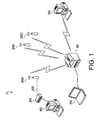
- the wireless network 10 includes an access point 300A and an MFP (multifunction peripheral) 100.
- the MFP 100 is equipped with a plurality of functions to, for example, print, scan, and/or copy images.
- the MFP 100 is connected to a PC (personal computer) 400 within the wireless network 10 through the access point 300A, a wired LAN 600, and a hub 620.
- the MFP 100 can receive print data transmitted from the PC 400 to print and transmits image data representing a scanned image to the PC 400.
- the MFP 100 is further connected with a PC 200 through an USB (universal serial bus) interface (I/F) 180 (see Fig. 2 ).
- the PC 200 can process the wireless settings which are to be installed in the MFP 100.
- the connection between the MFP 100 and the PC 200 is not limited to the USB interfaces 180, 250 (see Fig. 2 ), but may be achieved through, for example, a wired LAN cable.
- the connection may be achieved through ad-hoc wireless communication.
- the wireless network 10 further has a plurality of access points, including access points 300B and 300C in addition to the access point 300A. Furthermore, a PC 500 having a wireless interface is wirelessly connected with the wireless network 10.
- a communication mode for wireless connection achieved through the access points 300A, 300B, and 300C will be referred to as infrastructure mode.
- a communication mode for wireless connection achieved by two devices, which communicate with each other directly will be referred to as ad-hoc mode.
- Fig. 1 for example, when the PC 500 and the MFP 100 communicate directly with each other, and when print data transmitted from the PC 500 is received by the MFP 100, the communication mode for the data transmission is ad-hoc mode.
- the access points 300B, 300C are configured to have same functionalities as the access point 300A and therefore serve similarly to the access point 300A in the network system. Therefore, detailed description and illustration of the access points 300B, 300C are represented by those of the access point 300A.
- the PCs 400 and 500 are configured substantially similarly to the PC 200; therefore, description and illustration of the PCs 400 and 500 are represented by those of the PC 200.
- the configuration of the MFP 100 will be described.
- the MFP 100 includes a control unit 110, a wireless interface (I/F) 120, a storage unit 130, a printer unit 140, a scanner unit 150, an operation unit 160, a display unit 170, and a USB interface 180.
- the control unit 110 controls behaviors of the MFP 100 itself.
- the control unit 110 includes, for example, a CPU being an arithmetic processor, a ROM to store various programs to manipulate the MFP 100, and a RAM being a workspace for the processor.
- the CPU runs a program stored in the ROM, operations to manipulate the MFP 100 are performed.
- various data for example, data exchanged with an external device through the wireless interface 120 and entered through the operation unit 160, is stored in the RAM.
- the stored data is processed by the CPU which accesses the RAM.
- the CPU develops the programs stored in the ROM in the RAM to run so that the MFP 100 is controlled to provide its functions to the user.
- the wireless interface 120 in the MFP 100 is an interface to connect the MFP 100 to, for example, the access point 300A wirelessly in the infrastructure mode and to the PC 500 wirelessly in the ad-hoc mode.
- the storage unit 130 is a data storage to store information concerning wireless communication settings of the MFP 100 and may be a non-volatile storage (e.g., an EEPROM) and a hard disk.
- the printer unit 140 prints an image according to image data, for example, transmitted from the PC 400 or entered through the scanner unit 150.
- the scanner unit 150 scans an image formed on an original document which is placed on a document holder (not shown).
- the operation unit 160 provides an interface for data input to a user and includes, for example, input keys such as direction keys, numerical keys, an enter key, and a cancel key.
- the display unit 170 displays various information concerning operations in the MFP 100.
- the USB interface (I/F) 180 provides an interface to other USB-enabled devices to be connected with the MFP 100.
- the MFP 100 is configured to support a plurality of authorization methods, which are open authorization, shared-key authorization, WPA-PSK, and WPA2-PSK, and a plurality of encryption methods, which are WEP, TKIP, and AES.
- the MFP 100 is also capable of communicating with an external device without encryption.
- Table 1 provided below indicates correspondence of the available authorization method with the encryption methods, allowable lengths of passwords, and supporting wireless communication modes.
- Table 1 Authorization Method Encryption Method Length of Password (available character count) Communication Mode
- WPA-PSK AES TKIP 8 ⁇ character count ⁇ 63 infrastructure Shared-Key WEP 5/10/13/26 infrastructure Open none WEP Open/WEP: 5/10/13/26 Open/none: 0 infrastructure/ ad-hoc
- a lowermost line indicates available encryption methods, allowable lengths of password, and supporting communication modes in open authorization method and when the communication is provided without authorization.
- Indication “none” in the right half section in the encryption column of the lowermost line refers to that no encryption is required or that encryption is invalidated.
- the allowable length of a password for Shared-key authorization and WEP encryption may be, in addition to 5, 10, 13, and 26 as indicated in Table 1, 16 or 32. However, description for those cases, in which passwords including 16 or 32 characters are used, will be omitted.
- the infrastructure mode can be employed in any of the authorization methods listed in Table 1, whilst the ad-hoc mode can be employed in the case when no authorization method is required.
- the authorization methods “WPA-PSK” and “WPA2-PSK” will be also referred to as “WPA” and "WPA2" respectively.
- the configuration of the PC 200 will be described.
- the PC 200 is a known personal computer and includes a control unit 210, a storage unit 220, an operation unit 230, a display unit 240, a USB interface 250, and a wireless interface (I/F) 260.
- the control unit 210 includes, for example, a CPU, a ROM, and a RAM and controls behaviors of the PC 200 itself.
- the storage unit 220 is a data storage to store programs 224 which are run to install the wireless settings of the PC 200.
- the storage unit 220 may be, for example, a hard disk.
- the CPU in the control unit 210 processes data, which is entered through the USB interface 250 and the operation unit 230, stored in the ROM, and develops the programs 224 stored in the storage unit 220 in the RAM to run, the PC 200 is controlled to provide its functions to the user.
- the operation unit 230 provides an input interface to the user entering instructions for running the programs 224 to the PC 200.
- the operation unit 230 includes, for example, a keyboard and a mouse.
- the display unit 240 displays information concerning operations performed in the PC 200.
- the USB interface 250 provides an interface to connect the PC 200 to USB-enabled external devices.
- the PC 200 includes the wireless interface 260, which provides an interface to connect the PC 200 with external devices wirelessly in the infrastructure mode or in ad-hoc mode.
- the access point 300A is a known access point and includes a control unit 310, a wireless interface (I/F) 320, a storage unit 330, and a wired interface (I/F) 340.
- the control unit 310 includes a CPU, a ROM, and a RAM and controls behaviors of the access point 300A.
- the wireless interface 320 provides an interface to external devices to be wirelessly connected with the access point 300A. Data to be exchanged with the external devices is transmitted and received through the wireless interface 320.
- the storage unit 330 is a data storage to store information concerning wireless communication settings of the access point 300A.
- the information to be stored includes an SSID (Service Set Identifier) being an identifier to identify the wireless network, a valid authentication method, an encryption method, and a password for the network.
- the storage unit 330 may be, for example, an EEPROM.
- the wired interface 340 is an interface to connect the access point 300A with wired LAN 600.
- Wireless connection between the access point 300A and the MFP 100 is established when any of these processes completes.
- the MFP 100 is allowed to communicate with the PC 400 to receive, for example, print data transmitted from the PC 400 to print and transmit image data scanned by the scanner unit 150 of the MFP 100 to the PC 400.
- a first embodiment of a wireless settings installation process to be executed in the MFP 100 will be described with reference to Fig. 3 .
- the control unit 110 detects the instruction and starts the process.
- the control unit 110 obtains the instruction.
- the control unit 110 manipulates the wireless interface 120 to search for external devices (e.g., the access points 300A-300C and the PC 500) which are provided in the vicinity of the MFP 100 within the wireless networks.
- the control unit 110 receives SSIDs which are provided from the external devices.
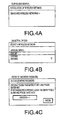
- the control unit 110 displays status (see Fig. 4A ) indicating that the MFP 100 is in progress to detect the wireless networks in the display unit 170 of the MFP 100.
- the control unit 110 collects the SSIDs received through the wireless interface 120, in S104, the control unit 110 presents a list including the collected SSIDs to the user through the display unit 170 (see Fig. 4B ).
- the user is prompted to select one of the SSIDs of a wireless network, to which the MFP 100 should be connected.
- the control unit 110 waits until the user selects one of the SSIDs. In this regard, the user may directly enter an SSID to which the MFP 100 should be connected.
- the control unit 110 obtains the selected SSID. Thereafter, in S108, the control unit 110 displays a user interface (see Fig. 4C ) to prompt the user to enter a password in the display unit 170.
- the password is a predetermined character string which allows the communication devices to be connected with the wireless network.
- the user is not specifically required to enter a password.
- the user is prompted to merely enter confirmation through the operation unit 160 without entering any character.
- a message to prompt the user to confirm the entry is displayed. In the present embodiment, as shown in Fig. 4C , the password "ABCDEFG" is entered.
- the control unit 110 obtains the entered password.
- the user did not enter any password in S108, in S110 information indicating no entry of password is obtained.
- a character count for a password is zero (0).
- the user interface to prompt the user to enter the password is displayed regardless of presence or absence of an encryption method employed in the wireless network, and a password entered by the user through the user interface is obtained regardless of its character count even when the character count is zero.
- control unit 110 attempts to establish connection with an external device included in the wireless network, which is represented by the selected SSID, according to the authorization methods and the encryption methods supported by the MFP 100. A detailed behavior of the control unit 110 in S112 to establish connection will be described later.
- result of the attempts is presented to the user through the display unit 170. That is, when connection between the MFP 100 and the external device is established, the successful establishment is indicated to the user through the display unit 170. When attempts to establish connection with the external device fail, the failure of the attempts is indicated to the user through the display unit 170. Meanwhile, the control unit 110 repeats S112 and the succeeding steps in a background operation. When the attempts to establish connection continue to fail, the flow may be terminated. Additionally or alternatively, presentation of the message indicating the attempted result of the connection establishment through the display unit 170 in S114 may be replaced with presenting the message on a sheet of paper by manipulating the printer unit 140 (i.e., printing the message on the recording sheet to present to the user).
- control unit 110 attempts to establish connection with the external device in the wireless network, which is identified by the selected SSID, according to the authorization methods and the encryption methods supported in the MFP 100. Specifically, the control unit 110 attempts to establish connection with the external device in each set of the authorization method and the encryption method, which are indicated in Table 1.
- the flow in S112 will be also referred to as Process #1.
- the control unit 110 examines as to whether a character count of the password obtained in S110 is zero.
- the character count of the password is zero when the user enters no password but confirms absence of the password through the operation unit 160 in S110 (see Fig. 3 ).
- the control unit 110 adopts a set of the authorization method being "open” and the encryption method being "none.”
- the control unit 110 attempts to establish connection with the external device according to the authorization method "open” and the encryption method "none” and the SSID obtained in S106.
- it is examined as to whether the connection is established. When the connection is established (S204: YES), the flow proceeds to S238.
- the control unit 110 examines as to whether the wireless network represented by the SSID, which was obtained in S106, operates in the infrastructure mode. In this step, the control unit 110 specifically examines information appended to the SSID, which was obtained from the external device in S102 through the wireless interface 120. The appended information indicates the communication mode of the wireless network, which is one of the infrastructure mode and the ad-hoc mode.
- the control unit 110 determines that the communication mode is not the infrastructure mode but the ad-hoc mode (S200: NO)
- the control unit 110 examines as to whether the character count of the password is any of 5, 10, 13, and 26.
- the wireless network identified by the SSID is determined to operate in the ad-hoc mode (S206: NO).
- the wireless network identified by the SSID is determined to operate in the infrastructure mode (S206: YES).
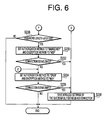
- the control unit 110 examines as to whether the character count of the password, which was obtained in S110 ( Fig. 3 ), is greater than or equal to 8, or smaller than or equal to 63. For example, when the password includes 5 characters (S210: NO), sets of "WPA2 and AES,” “WPA2 and TKIP,” “WPA and AES” and “WPA and TKIP” are omitted from the wireless settings in which the control unit 110 should attempt to establish connection. In other words, when 5 characters are included in the password, the flow proceeds to S228 ( Fig. 6 ), and the control unit attempts to establish connection with the external device in the wireless settings of sets: "Shared-key and WEP" and “open and WEP.”
- control unit 110 determines that the character count of the password is greater than or equal to 8, or smaller than or equal to 63 (S210: YES), in S212, the control unit 110 adopts the set "WPA2 and AES" for the authorization method and the encryption method to be the wireless settings, in which the control unit 110 will attempt to establish connection with the external device.
- the control unit 110 attempts to establish connection with the external device according to the wireless settings, which are the authorization method (i.e., WPA2) and the encryption method (i.e., AES), the SSID obtained in S106, and the password obtained in S110.
- WPA2 the authorization method
- AES encryption method
- the control unit 110 adopts the next set of the authorization method and the encryption method: "WPA2 and TKIP.”
- the control unit 110 attempts to establish connection with the external device according to the wireless settings, which are the authorization method (i.e., WPA2) and the encryption method (i.e., TKIP), the SSID obtained in S106, and the password obtained in S110.
- WPA2 the authorization method
- TKIP the encryption method
- the control unit 110 adopts the next set of the authorization method and the encryption method: "WPA and AES.”
- the control unit 110 attempts to establish connection with the external device according to the wireless settings, which are the authorization method (i.e., WPA) and the encryption method (i.e., AES), the SSID obtained in S106, and the password obtained in S110.
- the wireless settings which are the authorization method (i.e., WPA) and the encryption method (i.e., AES), the SSID obtained in S106, and the password obtained in S110.
- it is examined as to whether the connection is established.
- the control unit 110 adopts the next set of the authorization method and the encryption method: "WPA and TKIP" and attempts to establish connection with the external device according to the wireless settings, which are the authorization method (i.e., WPA) and the encryption method (i.e., TKIP), the SSID obtained in S106, and the password obtained in S110.
- WPA the authorization method
- TKIP the encryption method
- S228 the flow proceeds to S228 (see Fig. 6 ).
- control unit 110 examines the character count of the password to determine as to whether the character count of the password is any of 5, 10, 13, and 26, similarly to the examination in S208. If the character count is none of 5, 10, 13, or 26 (S228: NO), the control unit 110 terminates Process #1. When the character count is any of 5, 10, 13, and 26 (S228: YES), the flow proceeds to S230.
- control unit 110 adopts the next set of the authorization method and the encryption method: "Shared-key and WEP.”
- the control unit 110 attempts to establish connection with the external device according to wireless settings, which are the authorization method (i.e., Shared-key) and the encryption method (i.e., WEP), the SSID obtained in S106, and the password obtained in S112.
- wireless settings which are the authorization method (i.e., Shared-key) and the encryption method (i.e., WEP), the SSID obtained in S106, and the password obtained in S112.
- it is examined as to whether the connection is established.
- the control unit 110 adopts the next set of the authorization method and the encryption method: "open and WEP.”
- the control unit 110 attempts to establish connection with the external device according to wireless settings, which are the authorization method (i.e., open) and the encryption method (i.e., WEP), the SSID obtained in S106, and the password obtained in S110.
- it is examined as to whether the connection is established.
- the control unit 110 terminates Process #1. If connection is established in either of S232 (S232: YES) and S236 (S236: YES), the flow proceeds to S238.
- control unit 110 terminates Process #1. In the background operation, however, the control unit 110 repeats S212-S238. If connection is established during the background attempts (S214: YES, S218: YES, S222: YES, S226: YES, S232: YES, or S236: YES), the flow proceeds to S238, and the control unit 110 presents the successful establishment to the user through the display unit 170 in S 114 ( Fig. 3 ).
- control unit 110 saves the wireless settings of the authorization method and the encryption method, the SSID, and the password, in which the control unit 110 was successful to establish connection with the external device, in the storage unit 130 and terminates Process #1.
- the information indicating the communication mode (i.e., the infrastructure mode or the ad-hoc mode) of the wireless network is also saved.
- the control unit 110 of the MFP 100 can attempt to establish connection with the external device in the wireless network, which is selected by the user, based on different sets of wireless settings (i.e., the authorization methods and the encryption methods supported in the MFP 100 itself), the SSID representing the wireless network, and the password entered by the user.
- the different sets of the authorization method and the encryption method are attempted successively in a predetermined order so that the wireless settings in which the control unit 110 successfully established connection with the external devices are saved in the storage unit 130 (see S238). Therefore, the MFP 100 can be connected in the wireless network whilst the user is not required to specify the correct set of the authorization method and the encryption method employed in the wireless network.
- Process #1 in S 112 is repeated in the background operation so that establishment of connection with the external device can be retried.
- the connection may be established in the second or later attempt. Therefore, even when establishment of connection fails in the first attempt due to an accidental cause, the cause may be resolved whilst the attempts are repeated, and the connection may be established in the second or later attempt.
- the second embodiment of the wireless settings installation process is carried out in cooperation of the MFP 100 and the PC 200 connected to the MFP 100 via the USB interfaces 180, 250.
- the MFP 100 installs the wireless settings in the MFP 100 itself according to instructions provided by the PC 200.
- the control unit 210 of the PC 200 detects the instruction and activates a program 224 stored in the storage unit 220. Further, the control unit 210 presents predetermined information to the user through the display unit 240.
- the control unit 210 obtains the instruction. Thereafter, in S302, the control unit 210 manipulates the USB interface 250 to transmit a request to search for SSIDs representing available wireless networks to the MFP 100. After transmitting the search request, and until a searched result is received in the PC 200, the control unit 210 displays status (see Fig. 4A ) indicating that the search is in progress in the display unit 240 of the PC 200.
- control unit 110 of the MFP 100 manipulates the USB interface 180 to receive the search request for SSIDs transmitted from the PC 200. Thereafter, in S400, the control unit 110 controls the wireless interface 120 and searches for available external devices (i.e., the access points 300A-300C and the PC 500). The external devices are detected when the SSIDs output from the external devices are received through the wireless interface 120.
- available external devices i.e., the access points 300A-300C and the PC 500.
- the control unit 210 of the PC 200 waits for the SSID search result to be transmitted from the MFP 100. After a predetermined length of period, in S303, the control unit 210 transmits a request for the SSID search result to the MFP 100. In S402, the control unit 110 of the MFP 100 receiving the request for SSID search result controls the USB interface 180 to transmit the collected search result to the PC 200.
- the control unit 210 of the PC 200 controls the USB interface 250 to receive the search result with the appended information. Further, in S304, the control unit 210 presents a list including the collected SSIDs to the user through the display unit 240 (see Fig. 4B ). The user is prompted to select one of the SSIDs of a wireless network, to which the MFP 100 should be connected. The control unit 210 waits until the user selects one of the SSIDs. In this regard, the user may directly enter an SSID to which the MFP 100 should be connected.
- the control unit 210 obtains the selected SSID. Thereafter, in S306, the control unit 210 displays a user interface (see Fig. 4C ) to prompt the user to enter a password in the display unit 240.
- a user interface see Fig. 4C
- the user is not specifically required to enter a password.
- the user is prompted to merely enter confirmation through the operation unit 230 without entering any character. According to the present embodiment, a message to prompt the user to confirm the entry is displayed.
- the control unit 210 obtains the entered password.
- information indicating no entry of password is obtained.
- a character count for a password is zero (0).
- the control unit 210 manipulates the USB interface 250 to transmit a request to attempt establishing connection with the wireless network identified by the SSID obtained in S306 to the MFP 100.
- the control unit 110 of the MFP 100 manipulates the USB interface 180 to receive the connection request. Thereafter, in S404, the control unit 110 attempts to establish connection with an external device included in the wireless network, which is represented by the selected SSID, according the authorization methods and the encryption methods supported in the MFP 100 in the round-robin attempts.
- the round-robin attempts to establish connection with the external device in S404 is identical to Process #1 in S 112 in the wireless settings installation process according to the first embodiment and shown in Fig. 3 and Figs. 5-6 ; therefore, description of S404 is omitted.
- the control unit 210 of the PC 200 waits for a predetermined length of period after the transmission of the connection request to the MFP 100. After the predetermined length of period, in S313, the control unit 210 transmits a request for result of the attempts to establish connection with the external device to the MFP 100. In S406, the control unit 110 of the MFP 100 receiving the request for result of the attempts controls the USB interface 180 to transmit the result of the attempts to the PC 200. The control unit 210 of the PC 200 receives the result in S314 and presents the result to the user through the display unit 240. The flow ends thereafter.
- the connection request transmitted from the PC 200 in S312 to the MFP 100 includes the SSID representing the wireless network to which the MFP 100 should be connected.
- the SSID may not necessarily be included in the connection request.
- the MFP 100 may append identifying information which represents the SSIDs respectively to the SSIDs so that the PC 200 include the identifying information corresponding to the selected SSID in the connection request in place of the SSID.
- the control unit 110 of the MFP 100 can identify the SSID based on the identifying information and attempt to establish connection with the external device represented by the SSID.
- the user can input selection of the SSID or directly enter the preferred SSID in S304 through the operation unit 230 of the PC 200, which has improved operability.
- the password is entered through the operation unit 230 of the PC 200.
- operability of the operation unit 230 of the PC 200 is generally better than operability of the operation unit 160 of the MFP 100. Therefore, the user's selection of the SSID and the password can be easily entered in the PC 200.
- the collected SSIDs and the result of the attempts to establish connection are presented to the user through the display unit 240 of the PC 200, which has better visibility, in S314.
- the third embodiment of the wireless settings installation process is carried out in cooperation of the MFP 100 and the PC 200 connected to the MFP 100 via the USB interfaces 180, 250.
- the MFP 100 installs the wireless settings in the MFP 100 itself according to instructions provided by the PC 200.
- the round-robin adoptions in S404 carried out in the MFP 100 in the second embodiment are mainly carried out by the PC 200.
- the MFP 100 attempts to establish connection based on instructions from the PC 200 and transmits result of the attempt to the PC 200 on the basis of the attempt.
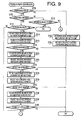
- Fig. 8 is a flowchart to illustrate the wireless settings installation process according to the third embodiment of the present invention.
- the steps S500-S510 are identical with the steps S300-S310 in the wireless settings installation process according to the second embodiment and shown in Fig. 7 ; therefore, description of those is omitted.
- the steps S600 and S602 are identical with the steps S400 and S402 in the wireless settings installation process according to the second embodiment and shown in Fig. 7 ; therefore, description of those is omitted.
- the control unit 210 of the PC 200 receiving the password, which was entered in S510 by the user through the operation unit 230, manipulates the USB interface 250 to transmit connection requests to the MFP 100 and requests the MFP 100 to attempt establish connection with the external device in the wireless network represented by the SSID, which was obtained in S506.
- the control unit 210 requests the MFP 100 to attempt establishing connection with the external device according to the respective sets of the wireless settings, i.e., the authorization method and the encryption method, the SSID obtained in S506, and the password obtained in S510.
- the control unit 210 in S512 will be described later.
- the control unit 110 of the MFP 100 receiving the connection request performs a process to attempt establishing connection with the external device in S604, i.e., Process #3, which will be described later in detail.
- the control unit 110 manipulates the USB interface 180 to transmit result of the attempt in Process #3 in S604 to the PC 200.
- the control unit 210 of the PC 200 presents the result to the user through the display unit 240. The flow ends thereafter.
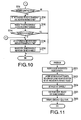
- control unit 210 of the PC 200 in S512 The detailed behaviors of the control unit 210 of the PC 200 in S512 will be described with reference to Figs. 9 and 10 .
- the flow of behaviors in S512 will be also referred to as Process #2 in the present embodiment.
- the control unit 210 examines as to whether a character count of the password obtained in S510 is zero (0). According to the present embodiment, a character count being zero indicates that the user confirmed absence of a password in S508.
- the control unit 210 adopts a set of the authorization method being "open” and the encryption method being “none.” Further, the control unit 210 transmits a connection request to the MFP 100 through the USB interface 250 so that the MFP 100 should attempt to establish connection with the external device in the wireless network, which is represented by the SSID obtained in S506, in the wireless settings (i.e., the authorization method: "open” and the encryption method: "none.")
- the MFP 100 receiving the connection request performs a process to attempt establishing connection with the external device in S604, which will be described later in detail.
- the control unit 210 transmits a request for result of the attempt to the MFP 100 and receives the result.
- the flow in Process #2 ends thereafter. If the result received in S704 indicates failure of the attempt to establish connection with the external device, the control unit 210 repeats the flow in S702-S704 to transmit the connection request with the identical wireless settings for a predetermined number of times. If the flow in S702-704 is repeated for the predetermined number of times, but result indicating successful establishment of connection is not received, the control unit 210 terminates Process #2. If result indicating successful establishment of connection is received within the predetermined number of times of attempts, it is determined that the attempt is successful.
- the control unit 210 examines as to whether the wireless network represented by the SSID, which was obtained in S506, operates in the infrastructure mode. In this step, the control unit 210 specifically examines information appended to the SSID, which was obtained by the control unit 110 of the MFP 100 from the external device in S602 through the wireless interface 120.
- the appended information indicates the communication mode of the wireless network, which is one of the infrastructure mode and the ad-hoc mode.
- the appended information is passed to the PC 200 along with the SSID when the search result is transmitted to the PC 200 in S602.
- control unit 210 refers to the appended information in order to determine the communication mode of the wireless network represented by the SSID obtained in S506.
- the control unit 210 determines that the communication mode is the ad-hoc mode (S708: NO)
- the flow proceeds to S710.
- the control unit 210 examines as to whether the character count of the password is any of 5, 10, 13, and 26. If the character count is none of 5, 10, 13, or 26 (S710: NO), the control unit 210 terminates Process #2.
- the character count is any of 5, 10, 13, and 26 (S710: YES)
- the flow proceeds to S746 ( Fig. 10 ).
- control unit 210 examines as to whether the character count of the password, which was obtained in S510, is greater than or equal to 8, or smaller than or equal to 63.
- Methods to examine the character counts in S710 and S712 are identical with S208 and S210 in the wireless settings installation process according to the first embodiment and shown in Fig. 5 ; therefore, description of those is omitted.
- control unit 210 determines that the character count of the password is not greater than or equal to 8, or smaller than or equal to 63 (S712: NO)
- the flow proceeds to S738 ( Fig. 10 ).
- the control unit 210 determines that the character count of the password is greater than or equal to 8, or smaller than or equal to 63 (S712: YES)
- the control unit 210 adopts the set: "WPA2 and AES" for the authorization method and the encryption method to be the wireless settings, in which the control unit 110 of the MFP 100 will attempt to establish connection with the external device.
- control unit 210 transmits a connection request to the MFP 100 through the USB interface 250 so that the MFP 100 will attempt to establish connection with the external device according to the wireless settings: i.e., the authorization method being WPA2, the encryption method being AES, the SSID obtained in S506, and the password obtained in S510. Thereafter, in S716, the control unit 210 transmits a request for result of the attempt to the MFP 100 and receives the result. In S718, it is examined as to whether the connection is established.
- the control unit 210 adopts the next set of the authorization method and the encryption method: "WPA2 and TKIP.” Further, the control unit 210 transmits a connection request to the MFP 100 to attempt establishing connection with the external device according to the wireless settings (i.e., the authorization method being WPA2, the encryption method being TKIP, the SSID obtained in S506, and the password obtained in S510). Thereafter, in S722, the control unit 210 transmits a request for result of the attempt to the MFP 100 and receives the result. In S724, it is examined as to whether the connection is established.
- the control unit 210 adopts the next set of the authorization method and the encryption method: "WPA and AES.” Further, the control unit 210 transmits a connection request to the MFP 100 to attempt establishing connection with the external device according to the wireless settings (i.e., the authorization method being WPA, the encryption method being AES, the SSID obtained in S506, and the password obtained in S510). Thereafter, in S728, the control unit 210 transmits a request for result of the attempt to the MFP 100 and receives the result. In S730, it is examined as to whether the connection is established.
- the control unit 210 adopts the next set of the authorization method and the encryption method: "WPA and TKIP.” Further, the control unit 210 transmits a connection request to the MFP 100 to attempt establishing connection with the external device according to the wireless settings (i.e., the authorization method being WPA, the encryption method being TKIP, the SSID obtained in S506, and the password obtained in S510). Thereafter, in S734, the control unit 210 transmits a request for result of the attempt to the MFP 100 and receives the result.
- the authorization method being WPA
- the encryption method being TKIP the SSID obtained in S506, and the password obtained in S510
- S736 it is examined as to whether the connection is established.
- the control unit 210 examines as to whether the character count of the password is any of 5, 10, 13, and 26. If the character count is none of 5, 10, 13, or 26 (S738: NO), the control unit 210 terminates Process #2. When the character count is any of 5, 10, 13, and 26 (S738: YES), the flow proceeds to S740.
- the control unit 210 adopts the next set of the authorization method and the encryption method: "Shared-key and WEP.” Further, the control unit 210 transmits a connection request to the MFP 100 to attempt establishing connection with the external device according to the wireless settings (i.e., the authorization method being Shared-key, the encryption method being WEP, the SSID obtained in S506, and the password obtained in S510). Thereafter, in S742, the control unit 210 transmits a request for result of the attempt to the MFP 100 and receives the result. In S744, it is examined as to whether the connection is established.
- the control unit 210 adopts the next set of the authorization method and the encryption method: "open and WEP.” Further, the control unit 210 transmits a connection request to the MFP 100 to attempt establishing connection with the external device according to the wireless settings (i.e., the authorization method being open, the encryption method being WEP, the SSID obtained in S506, and the password obtained in S510). Thereafter, in S748, the control unit 210 transmits a request for result of the attempt to the MFP 100 and receives the result. The flow in Process #2 ends thereafter.
- control unit 210 repeats S714 and the succeeding steps in the background operation. In this regard, the control unit 210 carries out S514 to present a message indicating the failure of the attempt to the user through the display unit 240.
- connection with the external device S718: YES, S724: YES, S730: YES, S736: YES, or S744: YES
- the control unit 210 present a message indicating successful establishment of the connection to the user through the display unit 240.
- the connection request at least includes the set of the authorization method and the encryption method, and the password.
- the connection request may include the SSID.
- the SSID may not necessarily be included in the connection request.
- the connection request includes identifying information which identifies the SSID.
- control unit 110 of the MFP 100 receives and obtains the connection request, which is transmitted from the PC 200 in one of S714, S712, S726, S732, S740, and S746, through the USB interface 180.
- the control unit 110 attempts to establish connection with the external device in the wireless network according to the wireless settings (i.e., the authorization method and the encryption method obtained in S800, the SSID obtained in S506, and the password obtained in S510).
- the control unit 110 obtains result of the attempt.
- the control unit 110 determines the result of the attempt based on, for example, data transmitted from the external device. When no response is transmitted from the external device within a predetermined length of period, the control unit 110 may determine that the attempt failed. When the connection is established, the control unit 110 reserves the wireless settings used in the attempt in the storage unit 130.
- control unit 110 manipulates the USB interface 180 to receive the request for the result of the attempt, which is transmitted from the PC 200 in one of S704, S716, S722, S728, S734 ( Fig. 9 ), S742, and S748 ( Fig. 10 ). In S806, the control unit 110 transmits the result of the attempt to the PC 200. Process #3 ends thereafter.
- the PC 200 connected to the MFP 100 via the USB interfaces 180, 250 adopts the set of the authorization method and the encryption method to be attempted for connection establishment.
- the connection request which requests for establishment of connection in the wireless settings of the adopted set including the authorization method and the encryption method, is passed to the MFP 100 (S512 and S604).
- the MFP 100 is required to attempt establishing connection according to the ready-adopted wireless settings; therefore, the MFP 100 is released from the workload to select the wireless settings for the attempts.
- the sets of the authorization method and the encryption method are attempted in the order of "WPA2 and AES,” “WPA2 and TKIP,” “WPA and AES,” “WPA and TKIP,” “Shared-key and WEP,” and “open and WEP.”
- the authorization method and the encryption method are adopted sequentially on the basis of the authorization method rather than the encryption method.
- a set having an encryption method with security of a higher level is adopted earlier than a set having an encryption method with security of a lower level between the sets having the same authorization method.
- the set “WPA2 and AES” is adopted preferentially over the set "WPA” and TKIP.”
- the set may be adopted on the basis of the encryption method rather than the authorization method.
- the sets may be adopted in the order of "WPA2 and AES,” “WPA and AES,” “WPA2 and TKIP,” and “WPA and TKIP.”
- a set having an authorization method with higher-leveled security is adopted earlier than a set having an authorization method with lower-leveled security between the sets having the same encryption method.
- the set “WPA2 and AES” is adopted preferentially over the set "WPA” and AES.”
- the order may be therefore determined based on preferences.
- the access point when an access point is capable of operating in a plurality of sets of authorization methods and encryption methods, the access point is generally configured to establish communication according to the set of wireless settings with higher-leveled security. Therefore, if the attempts to establish connection with the access point in the order of security levels (i.e., higher to lower), it is likely that the connection is established earlier compared to attempts to establish connection in the reverse order.
- the sets of authorization method and encryption method “WPA2 and AES,” “WPA2 and TKIP,” “WPA and AES,” and “WPA and TKIP” are adopted in the order given when the character count of the obtained password is in the range from 8 to 63. Further, the sets “Shared-key and WEP” and “open and WEP” are adopted when the character count of the password is any of 5, 10, 13, and 26. Alternatively, the steps S210 and S228 may be omitted.
- the sets "WPA2 and AES,” “WPA2 and TKIP,” “WPA and AES,” “WPA and TKIP,” “Shared-key and WEP,” and “open and WEP” can be sequentially adopted to be the wireless settings in which the MFP 100 should attempt to establish connection with the external device.
Landscapes
- Engineering & Computer Science (AREA)
- Computer Security & Cryptography (AREA)
- Computer Networks & Wireless Communication (AREA)
- Signal Processing (AREA)
- Computer Hardware Design (AREA)
- Computing Systems (AREA)
- General Engineering & Computer Science (AREA)
- Mobile Radio Communication Systems (AREA)
Abstract
Description
- The present invention relates to a wireless communication device to be connected to a network and a method to connect the wireless communication device with a network.
- A wireless LAN (local area network) has been widespread and utilized in network computing environment. Hereinafter, the wireless LAN will be referred to as a wireless network. Specifically in the wireless network, security of information exchanged therein is often threatened. Therefore, in many cases, security in the wireless network is enhanced by authorization and encryption; a wireless communication device to be connected to the wireless network is required to be authorized, and information exchanged in the wireless network is encrypted. Methods for authorization include, for example, Shared-key authorization, WPA (Wi-Fi Protected Access)-PSK (Pre-Shared Key), and WPA2-PSK. Alternatively to these methods, the wireless network may operate in "open authorization" method, in which no authorization is required for communication. Methods for encryption include, for example, WEP (Wired Equivalent Privacy), TKIP (Temporal Key Integrity Protocol), and AES (Advanced Encryption Standard). Alternatively to these methods, the wireless network may operate in "no encryption" method, in which no encryption is required for communication.
- When a wireless communication device is connected with the wireless network, the wireless communication device is required to have predetermined wireless settings installed. If the wireless network is protected by authorization and/or encryption, the wireless communication device is required to have the settings for the authorization/encryption methods installed.
- The settings for authorization and encryption in the wireless network are often complicated and difficult for users to deal with. Therefore, easier methods to connect a wireless communication device with the wireless network have been sought. For example, WPS (Wi-Fi Protected Setup), which is a known technology to install wireless settings fully automatically, is suggested by Wi-Fi Alliance. The full-automatic installation reduces burden on users but requires the wireless communication device to be complied with the methods for automatic settings such as WPS. Various other methods are disclosed in, for example, Japanese Patent Provisional Publications Nos.
2006-141012 2004-180010 2007-151195 - Thus, methods to easily install the settings for wireless communication, which require less burden on users, have yet been sought in the widespread wireless network environment.
- In view of the above, the present invention is advantageous in that a wireless communication device, which can be connected to the wireless network easily with reduced burden on users, is provided. Further, a method to connect the wireless communication device to the wireless network easily is provided. Furthermore, a computer program product to control the wireless communication device to be connected with the wireless network is provided.
- According to the present invention, a wireless communication device to be wirelessly connected to a wireless network is provided. The wireless communication device includes a password obtainer configured to obtain a password designated by a user for connecting the wireless communication device to the wireless network, and a wireless connector configured to connect the wireless communication device to the wireless network with the use of the obtained password. The wireless connecter sequentially selects one set from two or more sets, and sequentially attempts to connect the wireless communication device to the wireless network with the use of the sequentially selected one set. Each set of the two or more sets has an authorization method and an encryption method.
- According to the above configuration, the authorization method and the encryption method to establish connection between the wireless communication device and the wireless network can be automatically adopted. The wireless communication device may not necessarily be a single device, but may include, for example, two wireless communication units.
- Optionally, the two or more sets include a first set having a first authorization method and a first encryption method and a second set having the first authorization method and a second encryption method with its security level being lower than the first encryption method. The wireless connector selects the first set prior to the second set.
- According to the above configuration, wireless settings with higher-leveled security can be adopted effectively.
- Optionally, the two or more sets include a first set having a first authorization method and a first encryption method and a second set having a second authorization method with its security level being lower than the first authorization method and the first encryption method. The wireless connector selects the first set prior to the second set.
- According to the above configuration, wireless settings with higher-leveled security can be adopted effectively.
- Optionally, the wireless connector examines a character count of the obtained password. If the wireless connector determines that the character count of the password is a predetermined number, the wireless connector selects the two or more sets among a plurality of sets. The two or more sets does not include a predetermined set included in the plurality of sets.
- According to the above configuration, a number of sets to be adopted can be reduced. In particular, the predetermined sets of authorization methods and encryption methods, which are unsuitable settings for a password with a specific character count, can be prevented from being used in the attempt to establish connection. The authorization methods and the encryption methods included in the predetermined sets cannot be adopted to be used along with the password with the specific character count in the attempt to establish connection with the wireless network.
- Optionally, the wireless connector examines a character count of the obtained password. If the wireless connector determines that the character count of the password is other than zero, the wireless connector selects the two or more sets in turn.
- According to the above configuration, sets of authorization methods and encryption methods, which are suitable settings for a password with a specific character count, can be used in the attempt to establish connection with the wireless network.
- Optionally, the wireless connector examines a character count of the obtained password. If the wireless connector determines that the character count of the password is zero, the wireless connector selects a specified set having open authorization as the authorization method and no encryption as the encryption method and attempts to connect the wireless communication device to the wireless network with the use of the specified set.
- According to the above configuration, wireless connection can be established effectively.
- Optionally, the wireless communication device includes a network identifier obtainer configured to obtain a network identifier designated by the user. The network identifier identifies the wireless network. The wireless connector connects the wireless communication device to the wireless network identified by the network identifier.
- According to the above configuration, a set of an authorization method and an encryption method for the wireless network specified by the user can be adopted.
- Optionally, the password obtainer obtains the password designated by the user regardless of whether a password is utilized in the wireless network.
- According to the present invention, a method to connect the wireless communication device configured as above is provided.
- According to the above method, the authorization method and the encryption method to establish connection between the wireless communication device and the wireless network can be automatically adopted.
- According to the present invention, a computer program product to control the wireless communication device to be connected to a wireless network is provided.
- According to the above program product, the wireless communication device is controlled to adopt the authorization method and the encryption method to establish connection between the wireless communication device and the wireless network.
-
-
Fig. 1 is a schematic diagram to illustrate anetwork system 10 according to a first embodiment of the present invention. -
Fig. 2 is a block diagram to illustrate thenetwork system 10 with device components according to the first embodiment of the present invention. -
Fig. 3 is a flowchart to illustrate a wireless settings installation process according to the first embodiment of the present invention. -
Figs. 4A-4C are illustrative views of user interfaces to be presented to a user in the wireless settings installation process according to the first embodiment of the present invention. -
Fig. 5 is a flowchart to illustrate a detailed flow of round-robin attempts to establish connection between an MFP (multifunction peripheral) 100 and an external device within thenetwork system 10 according to the first embodiment of the present invention. -
Fig. 6 is a flowchart to illustrate the detailed flow of round-robin attempts to establish connection between theMFP 100 and the external device within thenetwork system 10 according to the first embodiment of the present invention. -
Fig. 7 is a flowchart to illustrate the wireless settings installation process according to a second embodiment of the present invention. -
Fig. 8 is a flowchart to illustrate the wireless settings installation process according to a third embodiment of the present invention. -
Fig. 9 is a flowchart to illustrate a detailed flow of issuing round-robin requests for establishing connection to theMFP 100 according to the third embodiment of the present invention. -
Fig. 10 a flowchart to illustrate the detailed flow of issuing round-robin requests for establishing connection to theMFP 100 according to the third embodiment of the present invention. -
Fig. 11 is a flowchart to illustrate a detailed flow of attempt to establishing connection between theMFP 100 and the external device within thewireless network 10 according to the third embodiment of the present invention. - Hereinafter, a first embodiment according to an aspect of the present invention will be described with reference to the accompanying drawings.
- Firstly, an overall configuration of a network system including a
wireless network 10 according to the embodiment of the present invention will be described. Thewireless network 10 includes anaccess point 300A and an MFP (multifunction peripheral) 100. TheMFP 100 is equipped with a plurality of functions to, for example, print, scan, and/or copy images. TheMFP 100 is connected to a PC (personal computer) 400 within thewireless network 10 through theaccess point 300A, a wiredLAN 600, and ahub 620. TheMFP 100 can receive print data transmitted from thePC 400 to print and transmits image data representing a scanned image to thePC 400. - The
MFP 100 is further connected with aPC 200 through an USB (universal serial bus) interface (I/F) 180 (seeFig. 2 ). ThePC 200 can process the wireless settings which are to be installed in theMFP 100. The connection between theMFP 100 and thePC 200 is not limited to the USB interfaces 180, 250 (seeFig. 2 ), but may be achieved through, for example, a wired LAN cable. When thePC 200 is equipped with a wireless interface, for another example, the connection may be achieved through ad-hoc wireless communication. - The
wireless network 10 further has a plurality of access points, includingaccess points access point 300A. Furthermore, aPC 500 having a wireless interface is wirelessly connected with thewireless network 10. In the following description, a communication mode for wireless connection achieved through theaccess points Fig. 1 , for example, when thePC 500 and theMFP 100 communicate directly with each other, and when print data transmitted from thePC 500 is received by theMFP 100, the communication mode for the data transmission is ad-hoc mode. - Referring to
Fig. 2 , the device components in thenetwork system 10 according to the present embodiment will be described. According to the present embodiment, theaccess points access point 300A and therefore serve similarly to theaccess point 300A in the network system. Therefore, detailed description and illustration of theaccess points access point 300A. ThePCs PC 200; therefore, description and illustration of thePCs PC 200. - The configuration of the
MFP 100 will be described. TheMFP 100 includes acontrol unit 110, a wireless interface (I/F) 120, astorage unit 130, aprinter unit 140, ascanner unit 150, an operation unit 160, adisplay unit 170, and aUSB interface 180. Thecontrol unit 110 controls behaviors of theMFP 100 itself. Thecontrol unit 110 includes, for example, a CPU being an arithmetic processor, a ROM to store various programs to manipulate theMFP 100, and a RAM being a workspace for the processor. When the CPU runs a program stored in the ROM, operations to manipulate theMFP 100 are performed. In this regard, various data, for example, data exchanged with an external device through thewireless interface 120 and entered through the operation unit 160, is stored in the RAM. The stored data is processed by the CPU which accesses the RAM. The CPU develops the programs stored in the ROM in the RAM to run so that theMFP 100 is controlled to provide its functions to the user. - The
wireless interface 120 in theMFP 100 is an interface to connect theMFP 100 to, for example, theaccess point 300A wirelessly in the infrastructure mode and to thePC 500 wirelessly in the ad-hoc mode. Thestorage unit 130 is a data storage to store information concerning wireless communication settings of theMFP 100 and may be a non-volatile storage (e.g., an EEPROM) and a hard disk. Theprinter unit 140 prints an image according to image data, for example, transmitted from thePC 400 or entered through thescanner unit 150. Thescanner unit 150 scans an image formed on an original document which is placed on a document holder (not shown). The operation unit 160 provides an interface for data input to a user and includes, for example, input keys such as direction keys, numerical keys, an enter key, and a cancel key. Thedisplay unit 170 displays various information concerning operations in theMFP 100. The USB interface (I/F) 180 provides an interface to other USB-enabled devices to be connected with theMFP 100. - The
MFP 100 according to the present embodiment is configured to support a plurality of authorization methods, which are open authorization, shared-key authorization, WPA-PSK, and WPA2-PSK, and a plurality of encryption methods, which are WEP, TKIP, and AES. TheMFP 100 is also capable of communicating with an external device without encryption. - Table 1 provided below indicates correspondence of the available authorization method with the encryption methods, allowable lengths of passwords, and supporting wireless communication modes.
Table 1 Authorization Method Encryption Method Length of Password (available character count) Communication Mode WPA2-PSK AES TKIP 8≤character count≤63 infrastructure WPA-PSK AES TKIP 8≤character count≤63 infrastructure Shared- Key WEP 5/10/13/26 infrastructure Open none WEP Open/WEP: 5/10/13/26 Open/none: 0 infrastructure/ ad-hoc - In Table 1, a lowermost line indicates available encryption methods, allowable lengths of password, and supporting communication modes in open authorization method and when the communication is provided without authorization. Indication "none" in the right half section in the encryption column of the lowermost line refers to that no encryption is required or that encryption is invalidated. In the third line, the allowable length of a password for Shared-key authorization and WEP encryption may be, in addition to 5, 10, 13, and 26 as indicated in Table 1, 16 or 32. However, description for those cases, in which passwords including 16 or 32 characters are used, will be omitted. The infrastructure mode can be employed in any of the authorization methods listed in Table 1, whilst the ad-hoc mode can be employed in the case when no authorization method is required. In the following description, the authorization methods "WPA-PSK" and "WPA2-PSK" will be also referred to as "WPA" and "WPA2" respectively.
- The configuration of the
PC 200 will be described. ThePC 200 is a known personal computer and includes a control unit 210, astorage unit 220, anoperation unit 230, adisplay unit 240, aUSB interface 250, and a wireless interface (I/F) 260. The control unit 210 includes, for example, a CPU, a ROM, and a RAM and controls behaviors of thePC 200 itself. Thestorage unit 220 is a data storage tostore programs 224 which are run to install the wireless settings of thePC 200. Thestorage unit 220 may be, for example, a hard disk. The CPU in the control unit 210 processes data, which is entered through theUSB interface 250 and theoperation unit 230, stored in the ROM, and develops theprograms 224 stored in thestorage unit 220 in the RAM to run, thePC 200 is controlled to provide its functions to the user. - The
operation unit 230 provides an input interface to the user entering instructions for running theprograms 224 to thePC 200. Theoperation unit 230 includes, for example, a keyboard and a mouse. Thedisplay unit 240 displays information concerning operations performed in thePC 200. TheUSB interface 250 provides an interface to connect thePC 200 to USB-enabled external devices. Further, ThePC 200 includes thewireless interface 260, which provides an interface to connect thePC 200 with external devices wirelessly in the infrastructure mode or in ad-hoc mode. - The configuration of the
access point 300A will be described. Theaccess point 300A is a known access point and includes acontrol unit 310, a wireless interface (I/F) 320, astorage unit 330, and a wired interface (I/F) 340. Thecontrol unit 310 includes a CPU, a ROM, and a RAM and controls behaviors of theaccess point 300A. Thewireless interface 320 provides an interface to external devices to be wirelessly connected with theaccess point 300A. Data to be exchanged with the external devices is transmitted and received through thewireless interface 320. Thestorage unit 330 is a data storage to store information concerning wireless communication settings of theaccess point 300A. The information to be stored includes an SSID (Service Set Identifier) being an identifier to identify the wireless network, a valid authentication method, an encryption method, and a password for the network. Thestorage unit 330 may be, for example, an EEPROM. Thewired interface 340 is an interface to connect theaccess point 300A with wiredLAN 600. - Hereinafter, three embodiments of processes concerning installation of the wireless settings in the
MFP 100 will be described. Wireless connection between theaccess point 300A and theMFP 100 is established when any of these processes completes. Thereafter, theMFP 100 is allowed to communicate with thePC 400 to receive, for example, print data transmitted from thePC 400 to print and transmit image data scanned by thescanner unit 150 of theMFP 100 to thePC 400. - A first embodiment of a wireless settings installation process to be executed in the
MFP 100 will be described with reference toFig. 3 . When a user enters an instruction to start the process through the operation unit 160, thecontrol unit 110 detects the instruction and starts the process. In particular, when the user enters the instruction in theMFP 100 through the operation unit 160 to search for wireless networks, in S100, thecontrol unit 110 obtains the instruction. Thereafter, in S102, thecontrol unit 110 manipulates thewireless interface 120 to search for external devices (e.g., the access points 300A-300C and the PC 500) which are provided in the vicinity of theMFP 100 within the wireless networks. In particular, in S102, thecontrol unit 110 receives SSIDs which are provided from the external devices. During the search, the control unit displays status (seeFig. 4A ) indicating that theMFP 100 is in progress to detect the wireless networks in thedisplay unit 170 of theMFP 100. When thecontrol unit 110 collects the SSIDs received through thewireless interface 120, in S104, thecontrol unit 110 presents a list including the collected SSIDs to the user through the display unit 170 (seeFig. 4B ). The user is prompted to select one of the SSIDs of a wireless network, to which theMFP 100 should be connected. Thecontrol unit 110 waits until the user selects one of the SSIDs. In this regard, the user may directly enter an SSID to which theMFP 100 should be connected. - When the user's selection is entered through the operation unit 160, in S106, the
control unit 110 obtains the selected SSID. Thereafter, in S108, thecontrol unit 110 displays a user interface (seeFig. 4C ) to prompt the user to enter a password in thedisplay unit 170. The password is a predetermined character string which allows the communication devices to be connected with the wireless network. When communication in the wireless network identified by the selected SSID is not encrypted, the user is not specifically required to enter a password. The user is prompted to merely enter confirmation through the operation unit 160 without entering any character. According to the present embodiment, a message to prompt the user to confirm the entry is displayed. In the present embodiment, as shown inFig. 4C , the password "ABCDEFG" is entered. - When the user enters the password through the operation unit 160, in 110, the
control unit 110 obtains the entered password. When the user did not enter any password in S108, in S110, information indicating no entry of password is obtained. In this regard, a character count for a password is zero (0). According to the present embodiment, thus, the user interface to prompt the user to enter the password is displayed regardless of presence or absence of an encryption method employed in the wireless network, and a password entered by the user through the user interface is obtained regardless of its character count even when the character count is zero. - Thereafter, in S112, the
control unit 110 attempts to establish connection with an external device included in the wireless network, which is represented by the selected SSID, according to the authorization methods and the encryption methods supported by theMFP 100. A detailed behavior of thecontrol unit 110 in S112 to establish connection will be described later. - In S114, result of the attempts is presented to the user through the
display unit 170. That is, when connection between theMFP 100 and the external device is established, the successful establishment is indicated to the user through thedisplay unit 170. When attempts to establish connection with the external device fail, the failure of the attempts is indicated to the user through thedisplay unit 170. Meanwhile, thecontrol unit 110 repeats S112 and the succeeding steps in a background operation. When the attempts to establish connection continue to fail, the flow may be terminated. Additionally or alternatively, presentation of the message indicating the attempted result of the connection establishment through thedisplay unit 170 in S114 may be replaced with presenting the message on a sheet of paper by manipulating the printer unit 140 (i.e., printing the message on the recording sheet to present to the user). - Next, a detailed flow of behaviors of the
control unit 110 of theMFP 100 in S112 mentioned above will be described with reference toFigs. 5 and6 . In this flow, thecontrol unit 110 attempts to establish connection with the external device in the wireless network, which is identified by the selected SSID, according to the authorization methods and the encryption methods supported in theMFP 100. Specifically, thecontrol unit 110 attempts to establish connection with the external device in each set of the authorization method and the encryption method, which are indicated in Table 1. The flow in S112 will be also referred to asProcess # 1. - When the flow in
Process # 1 starts, in S200, thecontrol unit 110 examines as to whether a character count of the password obtained in S110 is zero. The character count of the password is zero when the user enters no password but confirms absence of the password through the operation unit 160 in S110 (seeFig. 3 ). When the character count is zero (S200: YES), thecontrol unit 110 adopts a set of the authorization method being "open" and the encryption method being "none." In S202, thecontrol unit 110 attempts to establish connection with the external device according to the authorization method "open" and the encryption method "none" and the SSID obtained in S106. In S204, it is examined as to whether the connection is established. When the connection is established (S204: YES), the flow proceeds to S238. When the attempt to establish connection fails (S204: NO), the flow repeats to attempt establishing connection with the external device in the same wireless settings for a predetermined number of times. When all the attempts fail (S204: NO), thecontrol unit 110 terminates the flow. When connection is established during the repeated attempts (S204: YES), the flow proceeds to S238. - In S200, when the character count is other than zero (S200: NO), in S206, the
control unit 110 examines as to whether the wireless network represented by the SSID, which was obtained in S106, operates in the infrastructure mode. In this step, thecontrol unit 110 specifically examines information appended to the SSID, which was obtained from the external device in S102 through thewireless interface 120. The appended information indicates the communication mode of the wireless network, which is one of the infrastructure mode and the ad-hoc mode. When thecontrol unit 110 determines that the communication mode is not the infrastructure mode but the ad-hoc mode (S200: NO), in S208, thecontrol unit 110 examines as to whether the character count of the password is any of 5, 10, 13, and 26. If the character count is none of 5, 10, 13, or 26 (S208: NO), thecontrol unit 110 terminatesProcess # 1. When the character count is any of 5, 10, 13, and 26 (S208: YES), the flow proceeds to S234 (Fig. 6 ). According to the present embodiment, sets of an authorization method and an encryption method adoptable to the wireless network operating in the ad-hoc mode are: "open and WEP" and "open and none." Further, acceptable character counts for a password for the set "open and WEP" are 5, 10, 13, and 26 (see Table 1). (When the set of authorization method and encryption method is "open and none," an acceptable character count is zero.) According to thecommunication system 10 shown inFig. 1 , when an SSID provided by thePC 500 is selected in S110, the wireless network identified by the SSID is determined to operate in the ad-hoc mode (S206: NO). When an SSID provided by one of the access points 300A-300C is selected, the wireless network identified by the SSID is determined to operate in the infrastructure mode (S206: YES). - When the communication mode is the infrastructure mode (S206: YES), the flow proceeds to S210. In S210, the
control unit 110 examines as to whether the character count of the password, which was obtained in S110 (Fig. 3 ), is greater than or equal to 8, or smaller than or equal to 63. For example, when the password includes 5 characters (S210: NO), sets of "WPA2 and AES," "WPA2 and TKIP," "WPA and AES" and "WPA and TKIP" are omitted from the wireless settings in which thecontrol unit 110 should attempt to establish connection. In other words, when 5 characters are included in the password, the flow proceeds to S228 (Fig. 6 ), and the control unit attempts to establish connection with the external device in the wireless settings of sets: "Shared-key and WEP" and "open and WEP." - In S210, if the
control unit 110 determines that the character count of the password is greater than or equal to 8, or smaller than or equal to 63 (S210: YES), in S212, thecontrol unit 110 adopts the set "WPA2 and AES" for the authorization method and the encryption method to be the wireless settings, in which thecontrol unit 110 will attempt to establish connection with the external device. In S212, further, thecontrol unit 110 attempts to establish connection with the external device according to the wireless settings, which are the authorization method (i.e., WPA2) and the encryption method (i.e., AES), the SSID obtained in S106, and the password obtained in S110. In S214, it is examined as to whether the connection is established. When the attempt to establish connection fails (S214: NO), in S216, thecontrol unit 110 adopts the next set of the authorization method and the encryption method: "WPA2 and TKIP." In S216, thecontrol unit 110 attempts to establish connection with the external device according to the wireless settings, which are the authorization method (i.e., WPA2) and the encryption method (i.e., TKIP), the SSID obtained in S106, and the password obtained in S110. In S218, it is examined as to whether the connection is established. When the attempt to establish connection fails (S218: NO), in S220, thecontrol unit 110 adopts the next set of the authorization method and the encryption method: "WPA and AES." In S220, thecontrol unit 110 attempts to establish connection with the external device according to the wireless settings, which are the authorization method (i.e., WPA) and the encryption method (i.e., AES), the SSID obtained in S106, and the password obtained in S110. In S222, it is examined as to whether the connection is established. When the attempt to establish connection fails (S222: NO), in S224, thecontrol unit 110 adopts the next set of the authorization method and the encryption method: "WPA and TKIP" and attempts to establish connection with the external device according to the wireless settings, which are the authorization method (i.e., WPA) and the encryption method (i.e., TKIP), the SSID obtained in S106, and the password obtained in S110. In S226, it is examined as to whether the connection is established. When the attempt to establish connection fails (S226: NO), the flow proceeds to S228 (seeFig. 6 ). In the above flow, if connection is established in any of S214 (S214: YES), S218 (S218: YES), S222 (S222: YES), and S226 (S226: YES), the flow proceeds to S238 (seeFig. 6 ). - In S228, the
control unit 110 examines the character count of the password to determine as to whether the character count of the password is any of 5, 10, 13, and 26, similarly to the examination in S208. If the character count is none of 5, 10, 13, or 26 (S228: NO), thecontrol unit 110 terminatesProcess # 1. When the character count is any of 5, 10, 13, and 26 (S228: YES), the flow proceeds to S230. In S230, thecontrol unit 110 adopts the next set of the authorization method and the encryption method: "Shared-key and WEP." In S230, thecontrol unit 110 attempts to establish connection with the external device according to wireless settings, which are the authorization method (i.e., Shared-key) and the encryption method (i.e., WEP), the SSID obtained in S106, and the password obtained in S112. In S232, it is examined as to whether the connection is established. When the attempt to establish connection fails (S232: NO), in S234, thecontrol unit 110 adopts the next set of the authorization method and the encryption method: "open and WEP." In S234, thecontrol unit 110 attempts to establish connection with the external device according to wireless settings, which are the authorization method (i.e., open) and the encryption method (i.e., WEP), the SSID obtained in S106, and the password obtained in S110. In S236, it is examined as to whether the connection is established. When the attempt to establish connection fails (S236: NO), thecontrol unit 110 terminatesProcess # 1. If connection is established in either of S232 (S232: YES) and S236 (S236: YES), the flow proceeds to S238. In S236, if the attempt to establish connection fails (S236: NO), thecontrol unit 110 terminatesProcess # 1. In the background operation, however, thecontrol unit 110 repeats S212-S238. If connection is established during the background attempts (S214: YES, S218: YES, S222: YES, S226: YES, S232: YES, or S236: YES), the flow proceeds to S238, and thecontrol unit 110 presents the successful establishment to the user through thedisplay unit 170 in S 114 (Fig. 3 ). - In S238, the
control unit 110 saves the wireless settings of the authorization method and the encryption method, the SSID, and the password, in which thecontrol unit 110 was successful to establish connection with the external device, in thestorage unit 130 and terminatesProcess # 1. The information indicating the communication mode (i.e., the infrastructure mode or the ad-hoc mode) of the wireless network is also saved. - According to the above flows, the
control unit 110 of theMFP 100 can attempt to establish connection with the external device in the wireless network, which is selected by the user, based on different sets of wireless settings (i.e., the authorization methods and the encryption methods supported in theMFP 100 itself), the SSID representing the wireless network, and the password entered by the user. Specifically, the different sets of the authorization method and the encryption method are attempted successively in a predetermined order so that the wireless settings in which thecontrol unit 110 successfully established connection with the external devices are saved in the storage unit 130 (see S238). Therefore, theMFP 100 can be connected in the wireless network whilst the user is not required to specify the correct set of the authorization method and the encryption method employed in the wireless network. - When the
control unit 110 fails to establish connection with the external device inS 112,Process # 1 inS 112 is repeated in the background operation so that establishment of connection with the external device can be retried. Thus, the connection may be established in the second or later attempt. Therefore, even when establishment of connection fails in the first attempt due to an accidental cause, the cause may be resolved whilst the attempts are repeated, and the connection may be established in the second or later attempt. - Next, a second embodiment of the wireless settings installation process to be executed in the
MFP 100 and thePC 200 will be described with reference toFig. 7 . The second embodiment of the wireless settings installation process is carried out in cooperation of theMFP 100 and thePC 200 connected to theMFP 100 via the USB interfaces 180, 250. In particular, theMFP 100 installs the wireless settings in theMFP 100 itself according to instructions provided by thePC 200. - When the user enters an instruction to start the process through the
operation unit 230 of thePC 200, the control unit 210 of thePC 200 detects the instruction and activates aprogram 224 stored in thestorage unit 220. Further, the control unit 210 presents predetermined information to the user through thedisplay unit 240. When the user enters an instruction in thePC 200 through theoperation unit 230 to search for wireless networks, in S300, the control unit 210 obtains the instruction. Thereafter, in S302, the control unit 210 manipulates theUSB interface 250 to transmit a request to search for SSIDs representing available wireless networks to theMFP 100. After transmitting the search request, and until a searched result is received in thePC 200, the control unit 210 displays status (seeFig. 4A ) indicating that the search is in progress in thedisplay unit 240 of thePC 200. - Meanwhile, the
control unit 110 of theMFP 100 manipulates theUSB interface 180 to receive the search request for SSIDs transmitted from thePC 200. Thereafter, in S400, thecontrol unit 110 controls thewireless interface 120 and searches for available external devices (i.e., the access points 300A-300C and the PC 500). The external devices are detected when the SSIDs output from the external devices are received through thewireless interface 120. - The control unit 210 of the
PC 200 waits for the SSID search result to be transmitted from theMFP 100. After a predetermined length of period, in S303, the control unit 210 transmits a request for the SSID search result to theMFP 100. In S402, thecontrol unit 110 of theMFP 100 receiving the request for SSID search result controls theUSB interface 180 to transmit the collected search result to thePC 200. - In S304, the control unit 210 of the
PC 200 controls theUSB interface 250 to receive the search result with the appended information. Further, in S304, the control unit 210 presents a list including the collected SSIDs to the user through the display unit 240 (seeFig. 4B ). The user is prompted to select one of the SSIDs of a wireless network, to which theMFP 100 should be connected. The control unit 210 waits until the user selects one of the SSIDs. In this regard, the user may directly enter an SSID to which theMFP 100 should be connected. - When the user's selection is entered through the
operation unit 230, in S306, the control unit 210 obtains the selected SSID. Thereafter, in S306, the control unit 210 displays a user interface (seeFig. 4C ) to prompt the user to enter a password in thedisplay unit 240. When communication in the wireless network identified by the selected SSID is not encrypted, the user is not specifically required to enter a password. The user is prompted to merely enter confirmation through theoperation unit 230 without entering any character. According to the present embodiment, a message to prompt the user to confirm the entry is displayed. - When the user enters the password through the
operation unit 230, in 310, the control unit 210 obtains the entered password. When the user did not enter any password in S308, in S310, information indicating no entry of password is obtained. In this regard, a character count for a password is zero (0). Thereafter, in S312, the control unit 210 manipulates theUSB interface 250 to transmit a request to attempt establishing connection with the wireless network identified by the SSID obtained in S306 to theMFP 100. - The
control unit 110 of theMFP 100 manipulates theUSB interface 180 to receive the connection request. Thereafter, in S404, thecontrol unit 110 attempts to establish connection with an external device included in the wireless network, which is represented by the selected SSID, according the authorization methods and the encryption methods supported in theMFP 100 in the round-robin attempts. The round-robin attempts to establish connection with the external device in S404 is identical toProcess # 1 inS 112 in the wireless settings installation process according to the first embodiment and shown inFig. 3 andFigs. 5-6 ; therefore, description of S404 is omitted. - The control unit 210 of the
PC 200 waits for a predetermined length of period after the transmission of the connection request to theMFP 100. After the predetermined length of period, in S313, the control unit 210 transmits a request for result of the attempts to establish connection with the external device to theMFP 100. In S406, thecontrol unit 110 of theMFP 100 receiving the request for result of the attempts controls theUSB interface 180 to transmit the result of the attempts to thePC 200. The control unit 210 of thePC 200 receives the result in S314 and presents the result to the user through thedisplay unit 240. The flow ends thereafter. - In the above flow, the connection request transmitted from the
PC 200 in S312 to theMFP 100 includes the SSID representing the wireless network to which theMFP 100 should be connected. However, the SSID may not necessarily be included in the connection request. For example, when the SSIDs are provided to thePC 200 in S402, theMFP 100 may append identifying information which represents the SSIDs respectively to the SSIDs so that thePC 200 include the identifying information corresponding to the selected SSID in the connection request in place of the SSID. Thecontrol unit 110 of theMFP 100 can identify the SSID based on the identifying information and attempt to establish connection with the external device represented by the SSID. - According to the above flow, specifically, the user can input selection of the SSID or directly enter the preferred SSID in S304 through the
operation unit 230 of thePC 200, which has improved operability. Further, the password is entered through theoperation unit 230 of thePC 200. It is to be noted that operability of theoperation unit 230 of thePC 200 is generally better than operability of the operation unit 160 of theMFP 100. Therefore, the user's selection of the SSID and the password can be easily entered in thePC 200. Further, the collected SSIDs and the result of the attempts to establish connection are presented to the user through thedisplay unit 240 of thePC 200, which has better visibility, in S314. - Next, a third embodiment of the wireless settings installation process to be executed in the
MFP 100 and thePC 200 will be described with reference toFigs. 8-11 . The third embodiment of the wireless settings installation process is carried out in cooperation of theMFP 100 and thePC 200 connected to theMFP 100 via the USB interfaces 180, 250. In particular, theMFP 100 installs the wireless settings in theMFP 100 itself according to instructions provided by thePC 200. However, the round-robin adoptions in S404 carried out in theMFP 100 in the second embodiment are mainly carried out by thePC 200. TheMFP 100 attempts to establish connection based on instructions from thePC 200 and transmits result of the attempt to thePC 200 on the basis of the attempt. -
Fig. 8 is a flowchart to illustrate the wireless settings installation process according to the third embodiment of the present invention. The steps S500-S510 are identical with the steps S300-S310 in the wireless settings installation process according to the second embodiment and shown inFig. 7 ; therefore, description of those is omitted. Further, the steps S600 and S602 are identical with the steps S400 and S402 in the wireless settings installation process according to the second embodiment and shown inFig. 7 ; therefore, description of those is omitted. - In S512, the control unit 210 of the
PC 200 receiving the password, which was entered in S510 by the user through theoperation unit 230, manipulates theUSB interface 250 to transmit connection requests to theMFP 100 and requests theMFP 100 to attempt establish connection with the external device in the wireless network represented by the SSID, which was obtained in S506. In this step, the control unit 210 requests theMFP 100 to attempt establishing connection with the external device according to the respective sets of the wireless settings, i.e., the authorization method and the encryption method, the SSID obtained in S506, and the password obtained in S510. Detailed behavior of the control unit 210 in S512 will be described later. - The
control unit 110 of theMFP 100 receiving the connection request performs a process to attempt establishing connection with the external device in S604, i.e.,Process # 3, which will be described later in detail. Thecontrol unit 110 manipulates theUSB interface 180 to transmit result of the attempt inProcess # 3 in S604 to thePC 200. When the result of attempts is received by the control unit 210 of thePC 200 in S512, the flow proceeds to S514. In S514, the control unit 210 of thePC 200 presents the result to the user through thedisplay unit 240. The flow ends thereafter. - The detailed behaviors of the control unit 210 of the
PC 200 in S512 will be described with reference toFigs. 9 and10 . The flow of behaviors in S512 will be also referred to asProcess # 2 in the present embodiment. When the flow starts, in S700, the control unit 210 examines as to whether a character count of the password obtained in S510 is zero (0). According to the present embodiment, a character count being zero indicates that the user confirmed absence of a password in S508. Therefore, when the character count of the password is zero (S700: YES), in S702, the control unit 210 adopts a set of the authorization method being "open" and the encryption method being "none." Further, the control unit 210 transmits a connection request to theMFP 100 through theUSB interface 250 so that theMFP 100 should attempt to establish connection with the external device in the wireless network, which is represented by the SSID obtained in S506, in the wireless settings (i.e., the authorization method: "open" and the encryption method: "none.") TheMFP 100 receiving the connection request performs a process to attempt establishing connection with the external device in S604, which will be described later in detail. In S704, the control unit 210 transmits a request for result of the attempt to theMFP 100 and receives the result. The flow inProcess # 2 ends thereafter. If the result received in S704 indicates failure of the attempt to establish connection with the external device, the control unit 210 repeats the flow in S702-S704 to transmit the connection request with the identical wireless settings for a predetermined number of times. If the flow in S702-704 is repeated for the predetermined number of times, but result indicating successful establishment of connection is not received, the control unit 210 terminatesProcess # 2. If result indicating successful establishment of connection is received within the predetermined number of times of attempts, it is determined that the attempt is successful. - In S700, when the character count of the password is other than zero (S700: NO), in S708, the control unit 210 examines as to whether the wireless network represented by the SSID, which was obtained in S506, operates in the infrastructure mode. In this step, the control unit 210 specifically examines information appended to the SSID, which was obtained by the
control unit 110 of theMFP 100 from the external device in S602 through thewireless interface 120. The appended information indicates the communication mode of the wireless network, which is one of the infrastructure mode and the ad-hoc mode. The appended information is passed to thePC 200 along with the SSID when the search result is transmitted to thePC 200 in S602. Therefore, the control unit 210 refers to the appended information in order to determine the communication mode of the wireless network represented by the SSID obtained in S506. When the control unit 210 determines that the communication mode is the ad-hoc mode (S708: NO), the flow proceeds to S710. In S710, the control unit 210 examines as to whether the character count of the password is any of 5, 10, 13, and 26. If the character count is none of 5, 10, 13, or 26 (S710: NO), the control unit 210 terminatesProcess # 2. When the character count is any of 5, 10, 13, and 26 (S710: YES), the flow proceeds to S746 (Fig. 10 ). - In S712, the control unit 210 examines as to whether the character count of the password, which was obtained in S510, is greater than or equal to 8, or smaller than or equal to 63. Methods to examine the character counts in S710 and S712 are identical with S208 and S210 in the wireless settings installation process according to the first embodiment and shown in
Fig. 5 ; therefore, description of those is omitted. - In S712, if the control unit 210 determines that the character count of the password is not greater than or equal to 8, or smaller than or equal to 63 (S712: NO), the flow proceeds to S738 (
Fig. 10 ). If the control unit 210 determines that the character count of the password is greater than or equal to 8, or smaller than or equal to 63 (S712: YES), in S714, the control unit 210 adopts the set: "WPA2 and AES" for the authorization method and the encryption method to be the wireless settings, in which thecontrol unit 110 of theMFP 100 will attempt to establish connection with the external device. Further, the control unit 210 transmits a connection request to theMFP 100 through theUSB interface 250 so that theMFP 100 will attempt to establish connection with the external device according to the wireless settings: i.e., the authorization method being WPA2, the encryption method being AES, the SSID obtained in S506, and the password obtained in S510. Thereafter, in S716, the control unit 210 transmits a request for result of the attempt to theMFP 100 and receives the result. In S718, it is examined as to whether the connection is established. When the result indicates failure of the attempt (S718: NO), in S720, the control unit 210 adopts the next set of the authorization method and the encryption method: "WPA2 and TKIP." Further, the control unit 210 transmits a connection request to theMFP 100 to attempt establishing connection with the external device according to the wireless settings (i.e., the authorization method being WPA2, the encryption method being TKIP, the SSID obtained in S506, and the password obtained in S510). Thereafter, in S722, the control unit 210 transmits a request for result of the attempt to theMFP 100 and receives the result. In S724, it is examined as to whether the connection is established. When the result indicates failure of the attempt (S724: NO), in S726, the control unit 210 adopts the next set of the authorization method and the encryption method: "WPA and AES." Further, the control unit 210 transmits a connection request to theMFP 100 to attempt establishing connection with the external device according to the wireless settings (i.e., the authorization method being WPA, the encryption method being AES, the SSID obtained in S506, and the password obtained in S510). Thereafter, in S728, the control unit 210 transmits a request for result of the attempt to theMFP 100 and receives the result. In S730, it is examined as to whether the connection is established. When the result indicates failure of the attempt (S730: NO), in S732, the control unit 210 adopts the next set of the authorization method and the encryption method: "WPA and TKIP." Further, the control unit 210 transmits a connection request to theMFP 100 to attempt establishing connection with the external device according to the wireless settings (i.e., the authorization method being WPA, the encryption method being TKIP, the SSID obtained in S506, and the password obtained in S510). Thereafter, in S734, the control unit 210 transmits a request for result of the attempt to theMFP 100 and receives the result. - In S736, it is examined as to whether the connection is established. When the result indicates failure of the attempt (S736: NO), in S738 (
Fig. 11 ), the control unit 210 examines as to whether the character count of the password is any of 5, 10, 13, and 26. If the character count is none of 5, 10, 13, or 26 (S738: NO), the control unit 210 terminatesProcess # 2. When the character count is any of 5, 10, 13, and 26 (S738: YES), the flow proceeds to S740. In S740, the control unit 210 adopts the next set of the authorization method and the encryption method: "Shared-key and WEP." Further, the control unit 210 transmits a connection request to theMFP 100 to attempt establishing connection with the external device according to the wireless settings (i.e., the authorization method being Shared-key, the encryption method being WEP, the SSID obtained in S506, and the password obtained in S510). Thereafter, in S742, the control unit 210 transmits a request for result of the attempt to theMFP 100 and receives the result. In S744, it is examined as to whether the connection is established. When the result indicates failure of the attempt (S744: NO), in S746, the control unit 210 adopts the next set of the authorization method and the encryption method: "open and WEP." Further, the control unit 210 transmits a connection request to theMFP 100 to attempt establishing connection with the external device according to the wireless settings (i.e., the authorization method being open, the encryption method being WEP, the SSID obtained in S506, and the password obtained in S510). Thereafter, in S748, the control unit 210 transmits a request for result of the attempt to theMFP 100 and receives the result. The flow inProcess # 2 ends thereafter. Meanwhile, in any of S718, S724, S730, S736, and S744, if the result of attempt to establish connection with the external device indicates successful establishment of connection (S718: YES, S724: YES, S730: YES, S736: YES, or S744: YES),Process # 2 in S512 (Fig. 8 ) ends and proceeds to S514. - In S748, if the result of attempt to establish connection indicates failure of the attempt, the control unit 210 repeats S714 and the succeeding steps in the background operation. In this regard, the control unit 210 carries out S514 to present a message indicating the failure of the attempt to the user through the
display unit 240. When connection with the external device is established (S718: YES, S724: YES, S730: YES, S736: YES, or S744: YES) or the result of attempt in S748 indicates successful establishment of connection whilst the flow in S714-S748 is repeated in the background operation, in S514, the control unit 210 present a message indicating successful establishment of the connection to the user through thedisplay unit 240. In the above embodiment, the connection request at least includes the set of the authorization method and the encryption method, and the password. In this regard, the connection request may include the SSID. However, the SSID may not necessarily be included in the connection request. When the SSID is not included, similarly to the connection request described in the second embodiment, the connection request includes identifying information which identifies the SSID. - Next, detailed behavior of the
control unit 110 of theMFP 100 in S604 will be described with reference toFig. 11 . The flow of behaviors in S604 will be also referred to asProcess # 3. When the flow starts, in S800, thecontrol unit 110 of theMFP 100 receives and obtains the connection request, which is transmitted from thePC 200 in one of S714, S712, S726, S732, S740, and S746, through theUSB interface 180. In S802, thecontrol unit 110 attempts to establish connection with the external device in the wireless network according to the wireless settings (i.e., the authorization method and the encryption method obtained in S800, the SSID obtained in S506, and the password obtained in S510). In S804, thecontrol unit 110 obtains result of the attempt. Thecontrol unit 110 determines the result of the attempt based on, for example, data transmitted from the external device. When no response is transmitted from the external device within a predetermined length of period, thecontrol unit 110 may determine that the attempt failed. When the connection is established, thecontrol unit 110 reserves the wireless settings used in the attempt in thestorage unit 130. - In S805, the
control unit 110 manipulates theUSB interface 180 to receive the request for the result of the attempt, which is transmitted from thePC 200 in one of S704, S716, S722, S728, S734 (Fig. 9 ), S742, and S748 (Fig. 10 ). In S806, thecontrol unit 110 transmits the result of the attempt to thePC 200.Process # 3 ends thereafter. - According to the above embodiment, specifically, the
PC 200 connected to theMFP 100 via the USB interfaces 180, 250 adopts the set of the authorization method and the encryption method to be attempted for connection establishment. Thus, the connection request, which requests for establishment of connection in the wireless settings of the adopted set including the authorization method and the encryption method, is passed to the MFP 100 (S512 and S604). TheMFP 100 is required to attempt establishing connection according to the ready-adopted wireless settings; therefore, theMFP 100 is released from the workload to select the wireless settings for the attempts. - Although examples of carrying out the invention has been described, those skilled in the art will appreciate that there are numerous variations and permutations of the wireless communication device, the method and the program to connect the wireless communication device that fall within the spirit and scope of the invention as set forth in the appended claims. It is to be understood that the subject matter defined in the appended claims is not necessarily limited to the specific features or act described above. Rather, the specific features and acts described above are disclosed as example forms of implementing the claims.
- For example, in the above embodiments, the sets of the authorization method and the encryption method are attempted in the order of "WPA2 and AES," "WPA2 and TKIP," "WPA and AES," "WPA and TKIP," "Shared-key and WEP," and "open and WEP." In this order, the authorization method and the encryption method are adopted sequentially on the basis of the authorization method rather than the encryption method. In particular, a set having an encryption method with security of a higher level is adopted earlier than a set having an encryption method with security of a lower level between the sets having the same authorization method. For example, between "WPA2 and AES" and "WPA" and TKIP", the set "WPA2 and AES" is adopted preferentially over the set "WPA" and TKIP."
- However, the set may be adopted on the basis of the encryption method rather than the authorization method. For example, the sets may be adopted in the order of "WPA2 and AES," "WPA and AES," "WPA2 and TKIP," and "WPA and TKIP." In this order, a set having an authorization method with higher-leveled security is adopted earlier than a set having an authorization method with lower-leveled security between the sets having the same encryption method. For example, between "WPA2 and AES" and "WPA" and AES", the set "WPA2 and AES" is adopted preferentially over the set "WPA" and AES."
- The order may be therefore determined based on preferences. However, for example, when an access point is capable of operating in a plurality of sets of authorization methods and encryption methods, the access point is generally configured to establish communication according to the set of wireless settings with higher-leveled security. Therefore, if the attempts to establish connection with the access point in the order of security levels (i.e., higher to lower), it is likely that the connection is established earlier compared to attempts to establish connection in the reverse order.
- In the above embodiments, the sets of authorization method and encryption method "WPA2 and AES," "WPA2 and TKIP," "WPA and AES," and "WPA and TKIP" are adopted in the order given when the character count of the obtained password is in the range from 8 to 63. Further, the sets "Shared-key and WEP" and "open and WEP" are adopted when the character count of the password is any of 5, 10, 13, and 26. Alternatively, the steps S210 and S228 may be omitted. In this regard, when the character count of the password is greater than zero, the sets "WPA2 and AES," "WPA2 and TKIP," "WPA and AES," "WPA and TKIP," "Shared-key and WEP," and "open and WEP" can be sequentially adopted to be the wireless settings in which the
MFP 100 should attempt to establish connection with the external device.
Claims (11)
- A wireless communication device to be wirelessly connected to a wireless network, comprising:a password obtainer configured to obtain a password designated by a user for connecting the wireless communication device to the wireless network; anda wireless connector configured to connect the wireless communication device to the wireless network with the use of the obtained password,wherein the wireless connecter is configured to select sequentially one set from two or more sets, and to attempt sequentially to connect the wireless communication device to the wireless network with the use of the sequentially selected one set, each set of the two or more sets having an authorization method and an encryption method.
- The wireless communication device according to claim 1,
wherein the two or more sets include:a first set having a first authorization method and a first encryption method; anda second set having the first authorization method and a second encryption method with its security level being lower than the first encryption method; andwherein the wireless connector is configured to select the first set prior to the second set. - The wireless communication device according to claim 1,
wherein the two or more sets include:a first set having a first authorization method and a first encryption method; anda second set having a second authorization method with its security level being lower than the first authorization method and the first encryption method,wherein the wireless connector is configured to select the first set prior to the second set. - The wireless communication device according to any of claims 1 through 3,
wherein the wireless connector is configured to examine a character count of the obtained password; and
wherein if the wireless connector determines that the character count of the password is a predetermined number, the wireless connector selects the two or more sets among a plurality of sets, wherein the two or more sets does not include a predetermined set included in the plurality of sets. - The wireless communication device according to any of claims 1 through 3,
wherein the wireless connector is configured to examine a character count of the obtained password; and
wherein if the wireless connector determines that the character count of the password is other than zero, the wireless connector selects the two or more sets in turn. - The wireless communication device according to any of claims 1 through 5,
wherein the wireless connector is configured to examine a character count of the obtained password; and
wherein if the wireless connector determines that the character count of the password is zero, the wireless connector selects a specified set having open authorization as the authorization method and no encryption as the encryption method and attempts to connect the wireless communication device to the wireless network with the use of the specified set. - The wireless communication device according to any of claims 1 through 6, further comprising:a network identifier obtainer configured to obtain a network identifier designated by the user, the network identifier identifying the wireless network,wherein the wireless connector is configured to connect the wireless communication device to the wireless network identified by the network identifier.
- The wireless communication device according to claim 1,
wherein the password obtainer is configured to obtain the password designated by the user regardless of whether a password is utilized in the wireless network. - A method to connect the wireless communication device according to any of claims 1 through 8 to a wireless network.
- A method to connect the wireless communication device according to any of claims 1 through 8 to a wireless network wherein the method includes:obtaining a password designated by a user for connecting the wireless communication device to the wireless network;connecting the wireless communication device to the wireless network with the use of the obtained password;selecting sequentially one set from two or more sets, each set of the two or more sets having an authorization method and an encryption method; andattempting sequentially to connect the wireless communication device to the wireless network with the use of the sequentially selected one set.
- A computer program product to control the wireless communication device to be connected to a wireless network according to the method of claim 9 or 10.
Applications Claiming Priority (1)
| Application Number | Priority Date | Filing Date | Title |
|---|---|---|---|
| JP2008255586A JP4844611B2 (en) | 2008-09-30 | 2008-09-30 | Wireless communication apparatus, connection method and program |
Publications (2)
| Publication Number | Publication Date |
|---|---|
| EP2169991A1 true EP2169991A1 (en) | 2010-03-31 |
| EP2169991B1 EP2169991B1 (en) | 2011-09-21 |
Family
ID=41404630
Family Applications (1)
| Application Number | Title | Priority Date | Filing Date |
|---|---|---|---|
| EP09252275A Active EP2169991B1 (en) | 2008-09-30 | 2009-09-25 | Wireless communication device, method for wireless connection, and program therefor |
Country Status (5)
| Country | Link |
|---|---|
| US (1) | US8351607B2 (en) |
| EP (1) | EP2169991B1 (en) |
| JP (1) | JP4844611B2 (en) |
| CN (1) | CN101715184B (en) |
| AT (1) | ATE525872T1 (en) |
Cited By (1)
| Publication number | Priority date | Publication date | Assignee | Title |
|---|---|---|---|---|
| EP4096158A1 (en) * | 2021-05-26 | 2022-11-30 | Canon Kabushiki Kaisha | Communication apparatus, control method for communication apparatus, and program |
Families Citing this family (17)
| Publication number | Priority date | Publication date | Assignee | Title |
|---|---|---|---|---|
| JP4977229B2 (en) * | 2010-03-30 | 2012-07-18 | 株式会社バッファロー | Apparatus, method, and program for relaying communication |
| JP5418394B2 (en) | 2010-04-28 | 2014-02-19 | ブラザー工業株式会社 | Wireless communication device |
| US8464061B2 (en) * | 2010-08-30 | 2013-06-11 | Apple Inc. | Secure wireless link between two devices using probes |
| JP5950556B2 (en) * | 2011-12-07 | 2016-07-13 | キヤノン株式会社 | Printing apparatus having wireless communication function, printing apparatus control method, and program |
| JP5954024B2 (en) * | 2012-07-27 | 2016-07-20 | ブラザー工業株式会社 | Communication device |
| WO2014047890A1 (en) * | 2012-09-28 | 2014-04-03 | 华为技术有限公司 | Wireless local area network access method, base station controller and user equipment |
| JP6399743B2 (en) * | 2013-12-02 | 2018-10-03 | キヤノン株式会社 | Image forming apparatus, control method therefor, and program |
| CN104144034B (en) | 2013-12-04 | 2016-04-13 | 腾讯科技(深圳)有限公司 | Password is shared and acquisition methods and device |
| JP6335516B2 (en) * | 2014-01-15 | 2018-05-30 | キヤノン株式会社 | COMMUNICATION DEVICE, ITS CONTROL METHOD, AND PROGRAM |
| JP6355424B2 (en) * | 2014-05-20 | 2018-07-11 | キヤノン株式会社 | COMMUNICATION DEVICE, ITS CONTROL METHOD, PROGRAM |
| CN104507089A (en) * | 2014-11-20 | 2015-04-08 | 重庆蓝岸通讯技术有限公司 | Wireless network automatic access control method |
| JP6184580B1 (en) * | 2016-01-29 | 2017-08-23 | キヤノン株式会社 | Information processing apparatus, control method, and program |
| JP2018033003A (en) * | 2016-08-24 | 2018-03-01 | キヤノン株式会社 | Information processing device, control method thereof, and program |
| CN108449754A (en) * | 2018-03-16 | 2018-08-24 | 丘佳珏 | The method that smart machine is surfed the Internet by wireless routing |
| JP7258626B2 (en) * | 2019-03-27 | 2023-04-17 | シチズン時計株式会社 | electronic clock |
| JP7526029B2 (en) * | 2020-05-11 | 2024-07-31 | キヤノン株式会社 | COMMUNICATION DEVICE, CONTROL METHOD FOR COMMUNICATION DEVICE, AND PROGRAM |
| JP7703339B2 (en) * | 2021-03-08 | 2025-07-07 | キヤノン株式会社 | COMMUNICATION DEVICE, CONTROL METHOD, AND PROGRAM |
Citations (3)
| Publication number | Priority date | Publication date | Assignee | Title |
|---|---|---|---|---|
| EP1657855A1 (en) * | 2004-11-12 | 2006-05-17 | Hewlett-Packard Development Company, L.P. | System and method for setting up a peripheral device for use in a wireless network |
| US20080086760A1 (en) * | 2006-10-05 | 2008-04-10 | Microsoft Corporation | Extensible network discovery |
| WO2009011055A1 (en) * | 2007-07-19 | 2009-01-22 | Panasonic Corporation | Wireless terminal device, wireless connection method, and program |
Family Cites Families (15)
| Publication number | Priority date | Publication date | Assignee | Title |
|---|---|---|---|---|
| US5513263A (en) | 1994-11-30 | 1996-04-30 | Motorola, Inc. | Method for establishing classes within a communication network |
| US5912959A (en) | 1996-12-27 | 1999-06-15 | Mci Communications Corporation | Method of and system for password protection in a telecommunications network |
| US6084968A (en) * | 1997-10-29 | 2000-07-04 | Motorola, Inc. | Security token and method for wireless applications |
| US7058806B2 (en) * | 2000-10-17 | 2006-06-06 | Telefonaktiebolaget Lm Ericsson (Publ) | Method and apparatus for secure leveled access control |
| JP2004023365A (en) * | 2002-06-14 | 2004-01-22 | Kddi Corp | Authentication method for roaming |
| JP2004180010A (en) | 2002-11-27 | 2004-06-24 | Canon Inc | Wireless communication terminal |
| US7505596B2 (en) | 2003-12-05 | 2009-03-17 | Microsoft Corporation | Automatic detection of wireless network type |
| US7769837B2 (en) | 2003-12-12 | 2010-08-03 | Brother Kogyo Kabushiki Kaisha | Wireless LAN setting system and communication terminal |
| JP3948455B2 (en) * | 2003-12-12 | 2007-07-25 | ブラザー工業株式会社 | Setting processing program, setting processing device, and network device |
| JP2005346310A (en) * | 2004-06-01 | 2005-12-15 | Canon Inc | Information processing apparatus and method, and information processing system |
| JP4622627B2 (en) * | 2005-03-30 | 2011-02-02 | ブラザー工業株式会社 | COMMUNICATION DEVICE, COMMUNICATION SYSTEM, AND PROGRAM |
| JP4656637B2 (en) * | 2005-04-27 | 2011-03-23 | キヤノン株式会社 | COMMUNICATION DEVICE, COMMUNICATION SYSTEM AND COMMUNICATION PARAMETER SETTING METHOD |
| CN1327663C (en) * | 2005-08-12 | 2007-07-18 | 华为技术有限公司 | Method of user access radio communication network and radio network cut in control device |
| JP4946429B2 (en) * | 2006-12-27 | 2012-06-06 | ブラザー工業株式会社 | Information processing apparatus and information processing program |
| JP2007151195A (en) | 2007-03-12 | 2007-06-14 | Brother Ind Ltd | Wireless LAN system, communication terminal and communication program |
-
2008
- 2008-09-30 JP JP2008255586A patent/JP4844611B2/en active Active
-
2009
- 2009-09-23 US US12/565,202 patent/US8351607B2/en active Active
- 2009-09-25 AT AT09252275T patent/ATE525872T1/en not_active IP Right Cessation
- 2009-09-25 EP EP09252275A patent/EP2169991B1/en active Active
- 2009-09-30 CN CN2009102040445A patent/CN101715184B/en active Active
Patent Citations (3)
| Publication number | Priority date | Publication date | Assignee | Title |
|---|---|---|---|---|
| EP1657855A1 (en) * | 2004-11-12 | 2006-05-17 | Hewlett-Packard Development Company, L.P. | System and method for setting up a peripheral device for use in a wireless network |
| US20080086760A1 (en) * | 2006-10-05 | 2008-04-10 | Microsoft Corporation | Extensible network discovery |
| WO2009011055A1 (en) * | 2007-07-19 | 2009-01-22 | Panasonic Corporation | Wireless terminal device, wireless connection method, and program |
Non-Patent Citations (2)
| Title |
|---|
| JIANG LI ET AL: "Encryption as an Effective Tool in Reducing Wireless LAN Vulnerabilities", INFORMATION TECHNOLOGY: NEW GENERATIONS, 2008. ITNG 2008. FIFTH INTERNATIONAL CONFERENCE ON, IEEE, PISCATAWAY, NJ, USA, 7 April 2008 (2008-04-07), pages 557 - 562, XP031244370, ISBN: 978-0-7695-3099-4 * |
| WI-FI ALLIANCE: "Wi-Fi CERTIFIED for Wi-Fi Protected Setup: Easing the User Experience for Home and Small Office Wi-Fi Networks", 2007, pages 1 - 14, XP002567243, Retrieved from the Internet <URL:http://www.wi-fi.org/wp/wifi-protected-setup> [retrieved on 201002] * |
Cited By (2)
| Publication number | Priority date | Publication date | Assignee | Title |
|---|---|---|---|---|
| EP4096158A1 (en) * | 2021-05-26 | 2022-11-30 | Canon Kabushiki Kaisha | Communication apparatus, control method for communication apparatus, and program |
| US12069476B2 (en) | 2021-05-26 | 2024-08-20 | Canon Kabushiki Kaisha | Communication apparatus, control method for communication apparatus, and storage medium storing program |
Also Published As
| Publication number | Publication date |
|---|---|
| EP2169991B1 (en) | 2011-09-21 |
| CN101715184B (en) | 2013-06-26 |
| US20100082999A1 (en) | 2010-04-01 |
| JP2010087908A (en) | 2010-04-15 |
| US8351607B2 (en) | 2013-01-08 |
| ATE525872T1 (en) | 2011-10-15 |
| JP4844611B2 (en) | 2011-12-28 |
| CN101715184A (en) | 2010-05-26 |
Similar Documents
| Publication | Publication Date | Title |
|---|---|---|
| EP2169991B1 (en) | Wireless communication device, method for wireless connection, and program therefor | |
| EP2169990B1 (en) | Wireless communication device, method for wireless connection, and program therefor | |
| US20100067406A1 (en) | Wireless communication device, method to output identifier, and computer usable medium therefor | |
| EP2194749B1 (en) | Wireless communication device and program for obtaining and outputting an identifier of the wireless network | |
| US7986642B2 (en) | Wireless network system, and wireless device included in the system | |
| US8428262B2 (en) | Method to connect wireless communication device, wireless communication device, and computer usable medium therefor | |
| US8103003B2 (en) | Method for setting communication parameters and communication device | |
| KR100701495B1 (en) | Encryption Key Setting System, Access Point and Encryption Key Setting Method | |
| US20150249923A1 (en) | Communication control apparatus, system, and method therefor | |
| CN102833752B (en) | Wireless communication device | |
| US20060104238A1 (en) | Wireless communication device and setup method | |
| JP7706898B2 (en) | Information processing device, control method thereof, and program | |
| JP5158229B2 (en) | Wireless communication apparatus, identifier output method and program | |
| CN102256335A (en) | Wireless communication device | |
| CN101945371B (en) | Communication apparatus and control method of communication apparatus | |
| CN102158375A (en) | Information processing apparatus, communication apparatus, wireless diagnosis method and program | |
| JP7682646B2 (en) | Information processing device, control method thereof, and program | |
| JP2007135146A (en) | System and method for wireless lan communication | |
| KR20050050497A (en) | Method for notifying print information according to approach of user in wireless image formation device | |
| JP5545433B2 (en) | Portable electronic device and operation control method for portable electronic device | |
| JP2023162062A (en) | Communication device, control method for the same, and program | |
| TWI355183B (en) | Wireless device and key exchange method thereof |
Legal Events
| Date | Code | Title | Description |
|---|---|---|---|
| PUAI | Public reference made under article 153(3) epc to a published international application that has entered the european phase |
Free format text: ORIGINAL CODE: 0009012 |
|
| AK | Designated contracting states |
Kind code of ref document: A1 Designated state(s): AT BE BG CH CY CZ DE DK EE ES FI FR GB GR HR HU IE IS IT LI LT LU LV MC MK MT NL NO PL PT RO SE SI SK SM TR |
|
| AX | Request for extension of the european patent |
Extension state: AL BA RS |
|
| 17P | Request for examination filed |
Effective date: 20100930 |
|
| GRAP | Despatch of communication of intention to grant a patent |
Free format text: ORIGINAL CODE: EPIDOSNIGR1 |
|
| GRAS | Grant fee paid |
Free format text: ORIGINAL CODE: EPIDOSNIGR3 |
|
| GRAA | (expected) grant |
Free format text: ORIGINAL CODE: 0009210 |
|
| AK | Designated contracting states |
Kind code of ref document: B1 Designated state(s): AT BE BG CH CY CZ DE DK EE ES FI FR GB GR HR HU IE IS IT LI LT LU LV MC MK MT NL NO PL PT RO SE SI SK SM TR |
|
| REG | Reference to a national code |
Ref country code: GB Ref legal event code: FG4D |
|
| REG | Reference to a national code |
Ref country code: CH Ref legal event code: EP |
|
| REG | Reference to a national code |
Ref country code: IE Ref legal event code: FG4D |
|
| REG | Reference to a national code |
Ref country code: DE Ref legal event code: R096 Ref document number: 602009002689 Country of ref document: DE Effective date: 20111201 |
|
| REG | Reference to a national code |
Ref country code: NL Ref legal event code: VDEP Effective date: 20110921 |
|
| PG25 | Lapsed in a contracting state [announced via postgrant information from national office to epo] |
Ref country code: FI Free format text: LAPSE BECAUSE OF FAILURE TO SUBMIT A TRANSLATION OF THE DESCRIPTION OR TO PAY THE FEE WITHIN THE PRESCRIBED TIME-LIMIT Effective date: 20110921 Ref country code: SE Free format text: LAPSE BECAUSE OF FAILURE TO SUBMIT A TRANSLATION OF THE DESCRIPTION OR TO PAY THE FEE WITHIN THE PRESCRIBED TIME-LIMIT Effective date: 20110921 Ref country code: HR Free format text: LAPSE BECAUSE OF FAILURE TO SUBMIT A TRANSLATION OF THE DESCRIPTION OR TO PAY THE FEE WITHIN THE PRESCRIBED TIME-LIMIT Effective date: 20110921 Ref country code: NO Free format text: LAPSE BECAUSE OF FAILURE TO SUBMIT A TRANSLATION OF THE DESCRIPTION OR TO PAY THE FEE WITHIN THE PRESCRIBED TIME-LIMIT Effective date: 20111221 Ref country code: LT Free format text: LAPSE BECAUSE OF FAILURE TO SUBMIT A TRANSLATION OF THE DESCRIPTION OR TO PAY THE FEE WITHIN THE PRESCRIBED TIME-LIMIT Effective date: 20110921 |
|
| LTIE | Lt: invalidation of european patent or patent extension |
Effective date: 20110921 |
|
| PG25 | Lapsed in a contracting state [announced via postgrant information from national office to epo] |
Ref country code: CY Free format text: LAPSE BECAUSE OF FAILURE TO SUBMIT A TRANSLATION OF THE DESCRIPTION OR TO PAY THE FEE WITHIN THE PRESCRIBED TIME-LIMIT Effective date: 20110921 Ref country code: GR Free format text: LAPSE BECAUSE OF FAILURE TO SUBMIT A TRANSLATION OF THE DESCRIPTION OR TO PAY THE FEE WITHIN THE PRESCRIBED TIME-LIMIT Effective date: 20111222 Ref country code: SI Free format text: LAPSE BECAUSE OF FAILURE TO SUBMIT A TRANSLATION OF THE DESCRIPTION OR TO PAY THE FEE WITHIN THE PRESCRIBED TIME-LIMIT Effective date: 20110921 Ref country code: AT Free format text: LAPSE BECAUSE OF FAILURE TO SUBMIT A TRANSLATION OF THE DESCRIPTION OR TO PAY THE FEE WITHIN THE PRESCRIBED TIME-LIMIT Effective date: 20110921 Ref country code: LV Free format text: LAPSE BECAUSE OF FAILURE TO SUBMIT A TRANSLATION OF THE DESCRIPTION OR TO PAY THE FEE WITHIN THE PRESCRIBED TIME-LIMIT Effective date: 20110921 |
|
| REG | Reference to a national code |
Ref country code: AT Ref legal event code: MK05 Ref document number: 525872 Country of ref document: AT Kind code of ref document: T Effective date: 20110921 |
|
| PG25 | Lapsed in a contracting state [announced via postgrant information from national office to epo] |
Ref country code: BE Free format text: LAPSE BECAUSE OF FAILURE TO SUBMIT A TRANSLATION OF THE DESCRIPTION OR TO PAY THE FEE WITHIN THE PRESCRIBED TIME-LIMIT Effective date: 20110921 |
|
| PG25 | Lapsed in a contracting state [announced via postgrant information from national office to epo] |
Ref country code: MC Free format text: LAPSE BECAUSE OF NON-PAYMENT OF DUE FEES Effective date: 20110930 Ref country code: SK Free format text: LAPSE BECAUSE OF FAILURE TO SUBMIT A TRANSLATION OF THE DESCRIPTION OR TO PAY THE FEE WITHIN THE PRESCRIBED TIME-LIMIT Effective date: 20110921 Ref country code: CZ Free format text: LAPSE BECAUSE OF FAILURE TO SUBMIT A TRANSLATION OF THE DESCRIPTION OR TO PAY THE FEE WITHIN THE PRESCRIBED TIME-LIMIT Effective date: 20110921 Ref country code: IS Free format text: LAPSE BECAUSE OF FAILURE TO SUBMIT A TRANSLATION OF THE DESCRIPTION OR TO PAY THE FEE WITHIN THE PRESCRIBED TIME-LIMIT Effective date: 20120121 |
|
| PG25 | Lapsed in a contracting state [announced via postgrant information from national office to epo] |
Ref country code: PT Free format text: LAPSE BECAUSE OF FAILURE TO SUBMIT A TRANSLATION OF THE DESCRIPTION OR TO PAY THE FEE WITHIN THE PRESCRIBED TIME-LIMIT Effective date: 20120123 Ref country code: EE Free format text: LAPSE BECAUSE OF FAILURE TO SUBMIT A TRANSLATION OF THE DESCRIPTION OR TO PAY THE FEE WITHIN THE PRESCRIBED TIME-LIMIT Effective date: 20110921 Ref country code: PL Free format text: LAPSE BECAUSE OF FAILURE TO SUBMIT A TRANSLATION OF THE DESCRIPTION OR TO PAY THE FEE WITHIN THE PRESCRIBED TIME-LIMIT Effective date: 20110921 Ref country code: NL Free format text: LAPSE BECAUSE OF FAILURE TO SUBMIT A TRANSLATION OF THE DESCRIPTION OR TO PAY THE FEE WITHIN THE PRESCRIBED TIME-LIMIT Effective date: 20110921 Ref country code: RO Free format text: LAPSE BECAUSE OF FAILURE TO SUBMIT A TRANSLATION OF THE DESCRIPTION OR TO PAY THE FEE WITHIN THE PRESCRIBED TIME-LIMIT Effective date: 20110921 Ref country code: IT Free format text: LAPSE BECAUSE OF FAILURE TO SUBMIT A TRANSLATION OF THE DESCRIPTION OR TO PAY THE FEE WITHIN THE PRESCRIBED TIME-LIMIT Effective date: 20110921 |
|
| REG | Reference to a national code |
Ref country code: IE Ref legal event code: MM4A |
|
| PLBE | No opposition filed within time limit |
Free format text: ORIGINAL CODE: 0009261 |
|
| STAA | Information on the status of an ep patent application or granted ep patent |
Free format text: STATUS: NO OPPOSITION FILED WITHIN TIME LIMIT |
|
| PG25 | Lapsed in a contracting state [announced via postgrant information from national office to epo] |
Ref country code: DK Free format text: LAPSE BECAUSE OF FAILURE TO SUBMIT A TRANSLATION OF THE DESCRIPTION OR TO PAY THE FEE WITHIN THE PRESCRIBED TIME-LIMIT Effective date: 20110921 Ref country code: IE Free format text: LAPSE BECAUSE OF NON-PAYMENT OF DUE FEES Effective date: 20110925 |
|
| 26N | No opposition filed |
Effective date: 20120622 |
|
| REG | Reference to a national code |
Ref country code: DE Ref legal event code: R097 Ref document number: 602009002689 Country of ref document: DE Effective date: 20120622 |
|
| PG25 | Lapsed in a contracting state [announced via postgrant information from national office to epo] |
Ref country code: MK Free format text: LAPSE BECAUSE OF FAILURE TO SUBMIT A TRANSLATION OF THE DESCRIPTION OR TO PAY THE FEE WITHIN THE PRESCRIBED TIME-LIMIT Effective date: 20110921 Ref country code: MT Free format text: LAPSE BECAUSE OF FAILURE TO SUBMIT A TRANSLATION OF THE DESCRIPTION OR TO PAY THE FEE WITHIN THE PRESCRIBED TIME-LIMIT Effective date: 20110921 |
|
| PG25 | Lapsed in a contracting state [announced via postgrant information from national office to epo] |
Ref country code: ES Free format text: LAPSE BECAUSE OF FAILURE TO SUBMIT A TRANSLATION OF THE DESCRIPTION OR TO PAY THE FEE WITHIN THE PRESCRIBED TIME-LIMIT Effective date: 20120101 Ref country code: SM Free format text: LAPSE BECAUSE OF FAILURE TO SUBMIT A TRANSLATION OF THE DESCRIPTION OR TO PAY THE FEE WITHIN THE PRESCRIBED TIME-LIMIT Effective date: 20110921 |
|
| PG25 | Lapsed in a contracting state [announced via postgrant information from national office to epo] |
Ref country code: LU Free format text: LAPSE BECAUSE OF NON-PAYMENT OF DUE FEES Effective date: 20110925 |
|
| PG25 | Lapsed in a contracting state [announced via postgrant information from national office to epo] |
Ref country code: BG Free format text: LAPSE BECAUSE OF FAILURE TO SUBMIT A TRANSLATION OF THE DESCRIPTION OR TO PAY THE FEE WITHIN THE PRESCRIBED TIME-LIMIT Effective date: 20111221 |
|
| PG25 | Lapsed in a contracting state [announced via postgrant information from national office to epo] |
Ref country code: TR Free format text: LAPSE BECAUSE OF FAILURE TO SUBMIT A TRANSLATION OF THE DESCRIPTION OR TO PAY THE FEE WITHIN THE PRESCRIBED TIME-LIMIT Effective date: 20110921 |
|
| PG25 | Lapsed in a contracting state [announced via postgrant information from national office to epo] |
Ref country code: HU Free format text: LAPSE BECAUSE OF FAILURE TO SUBMIT A TRANSLATION OF THE DESCRIPTION OR TO PAY THE FEE WITHIN THE PRESCRIBED TIME-LIMIT Effective date: 20110921 |
|
| REG | Reference to a national code |
Ref country code: CH Ref legal event code: PL |
|
| PG25 | Lapsed in a contracting state [announced via postgrant information from national office to epo] |
Ref country code: CH Free format text: LAPSE BECAUSE OF NON-PAYMENT OF DUE FEES Effective date: 20130930 Ref country code: LI Free format text: LAPSE BECAUSE OF NON-PAYMENT OF DUE FEES Effective date: 20130930 |
|
| REG | Reference to a national code |
Ref country code: FR Ref legal event code: PLFP Year of fee payment: 8 |
|
| REG | Reference to a national code |
Ref country code: FR Ref legal event code: PLFP Year of fee payment: 9 |
|
| REG | Reference to a national code |
Ref country code: FR Ref legal event code: PLFP Year of fee payment: 10 |
|
| P01 | Opt-out of the competence of the unified patent court (upc) registered |
Effective date: 20230529 |
|
| PGFP | Annual fee paid to national office [announced via postgrant information from national office to epo] |
Ref country code: DE Payment date: 20250808 Year of fee payment: 17 |
|
| PGFP | Annual fee paid to national office [announced via postgrant information from national office to epo] |
Ref country code: GB Payment date: 20250814 Year of fee payment: 17 |
|
| PGFP | Annual fee paid to national office [announced via postgrant information from national office to epo] |
Ref country code: FR Payment date: 20250808 Year of fee payment: 17 |