EP2145474B1 - Methods, media, and devices for providing visual resources of video conference participants - Google Patents
Methods, media, and devices for providing visual resources of video conference participants Download PDFInfo
- Publication number
- EP2145474B1 EP2145474B1 EP08751350.3A EP08751350A EP2145474B1 EP 2145474 B1 EP2145474 B1 EP 2145474B1 EP 08751350 A EP08751350 A EP 08751350A EP 2145474 B1 EP2145474 B1 EP 2145474B1
- Authority
- EP
- European Patent Office
- Prior art keywords
- video
- participant
- degraded
- visual
- participants
- Prior art date
- Legal status (The legal status is an assumption and is not a legal conclusion. Google has not performed a legal analysis and makes no representation as to the accuracy of the status listed.)
- Active
Links
Images


Classifications
-
- H—ELECTRICITY
- H04—ELECTRIC COMMUNICATION TECHNIQUE
- H04N—PICTORIAL COMMUNICATION, e.g. TELEVISION
- H04N7/00—Television systems
- H04N7/14—Systems for two-way working
- H04N7/15—Conference systems
- H04N7/152—Multipoint control units therefor
Definitions
- the disclosed subject matter relates to methods, media, and devices for providing visual resources of video conference participants.
- Video conferencing systems are in wide-spread use and enable participants who may be in vastly different geographical locations to have face-to-face meetings without the need to travel great distances. When participating in such conferences, it is desirable to know when new participants join the conference, to see the video of the participants throughout the conference, and to be able to determine who is on the conference at any time during the conference.
- EP 1,465,424 A2 is directed towards a picture phone apparatus which substitutes one picture for another during a communication session in response to detection that brightness and/or spatial frequency data relating to the first image is outside of a limit.
- US 2001/037,508 A1 is directed towards a variable bandwidth communication system for handling visual resources requiring low bandwidth.
- methods for providing a visual resource of a participant to a video conference comprise: monitoring video of a participant using an endpoint during a video conference that includes other participants at a plurality of endpoints; determining that video of the participant associated with the endpoint is degraded from a connection between the endpoint and the device; accessing a visual resource that identifies the participant in response to determining that video of the participant associated with the endpoint is degraded; and presenting the visual resource to at least one other participant by replacing the video of the participant during the video conference in response to determining that the video is degraded.
- methods for providing a visual resource of a participant to a video conference comprise: determining whether video of the participant is degraded or not present; accessing a visual resource that corresponds to the participant when the video is degraded or not present; and presenting the visual resource to at least one other participant to the video conference.
- methods for providing visual resources of participants to a video conference comprise: waiting for a roll call to be initiated; creating a video roll call of the participants to the video conference that includes a visual resource for each of the participants; and displaying the video roll call.
- computer-readable media containing computer-executable instructions that, when executed by a processor, cause the processor to perform a method for providing a visual resource of a participant to a video conference.
- the method comprising: monitoring a participant using an endpoint during a video conference that includes other participants at a plurality of endpoints; determining that video of the participant associated with the endpoint is degraded; accessing a visual resource that identifies the participant in response to determining that video of the participant associated with the endpoint is degraded; and presenting the visual resource to at least one other participant by replacing the video of the participant during the video conference in response to determining that the video is degraded.
- computer-readable media containing computer-executable instructions that, when executed by a processor, cause the processor to perform a method for providing a visual resource of a participant to a video conference.
- the method comprising: determining whether video of the participant is degraded or not present; accessing a visual resource that corresponds to the participant when the video is degraded or not present; and presenting the visual resource to at least one other participant to the video conference.
- computer-readable media containing computer-executable instructions that, when executed by a processor, cause the processor to perform a method for providing visual resources of participants to a video conference.
- the method comprising: waiting for a roll call to be initiated; creating a video roll call of the participants to the video conference that includes a visual resource for each of the participants; and displaying the video roll call.
- devices for providing a visual resource of a participant to a video conference comprising: a processor that monitors video of a participant using an endpoint during a video conference that includes other participants at a plurality of other endpoint, determines that video of the participant associated with the endpoint is degraded from a connection between the endpoint and the device, accesses a visual resource that identifies the participant in response to the determination that video of the participant associated with the endpoint is degraded, and presents the visual resource to at least one other participant by replacing the video of the participant during the video conference in response to determining that the video is degraded.
- devices for providing a visual resource of a participant to a video conference comprising: a processor that determines whether video of the participant is degraded or not present, accesses a visual resource that corresponds to the participant when the video is degraded or not present, and presents the visual resource to at least one other participant to the video conference.
- devices for providing visual resources of participants to a video conference comprising: a processor that waits for a roll call to be initiated, creates a video roll call of the participants to the video conference that includes a visual resource for each of the participants, and causes the video roll call to be displayed.
- a visual resource may be a video clip, an image, an avatar, an icon, an animation, etc.
- a visual resource may be obtained from any suitable source.
- the visual resource may be an image or a video clip captured from a conference participant's end-point automatically or in response to a request from the participant.
- a user interface may indicate a count-down to when an image will be captured and may allow a participant to select from multiple captured images or clips.
- a visual resource of a participant may be presented upon the participant joining a conference. In some embodiments, a visual resource of a participant may be presented upon a video of the participant becoming degraded or not being present. In some embodiments, visual resources of one or more participants to a conference may be presented as part of a video roll call.
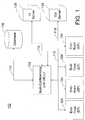
- system 100 may include a multi-conferencing unit (MCU) 102, end-points 104, a database 106, an internal server 108, an external server 110, and connections 112, 114, 116, and 118.
- MCU multi-conferencing unit
- Multi-conferencing unit (MCU) 102 may be any suitable device for hosting a video conference.
- MCU 102 may be embedded in one of end-points 104.
- MCU 102 may perform one or more of the functions described in connection with FIGS. 2-4 in addition or alternatively to other multi-conferencing unit functions.
- MCU 102 may be implemented using any suitable equipment, such as dedicated hardware or a general purpose computer, and may include one or more processors and interfaces.
- End-points 104 may be any suitable devices for providing a user interface for a voice or video conference. Some of end-points 104 may be only capable of hosting the voice portion of a conference, or a part of the video portion of a conference (e.g., only display images of remote participants but not transmit an image of a local participant, or only transmit an image of a local participant but not display images of remote participants). At least one of end-points 104 may have the ability to display visual resources that are part of a video conference hosted by MCU 102.
- Each of database 106, internal server 108, and external server 110 may be any suitable devices for storing visual resources. These visual resources may be accessed by MCU 102 and used as part of a video conference, as described below.
- Database 106 may be any suitable storage device, such as memory (e.g., random access memory, read only memory, FLASH memory, etc.), a disk drive, an optical media drive (e.g., compact disc, digital video disc, etc.), and may incorporate any suitable logic for enabling MCU 102 to access visual resources stored thereon.
- Database 106 may be incorporated into or separate from MCU 102, and may be coupled to MCU 102 by connection 114, which may be any suitable mechanism for connecting database 106 to MCU 102 (such as one or more wires, a computer network, a communication network, etc.).
- Internal server 108 and/or external server 110 may be a digital processing device (such as a computer, a server, a network appliance, etc.) containing any suitable storage device, such as memory (e.g., random access memory, read only memory, FLASH memory, etc.), a disk drive, an optical media drive (e.g., compact disc, digital video disc, etc.), and may incorporate any suitable logic for enabling MCU 102 to access visual resources stored thereon.
- Internal server 108 may be incorporated into MCU 102, and connected to MCU by connection 116.
- External server 110 may be external to MCU 102 and connected to MCU by connection 118. Connections 116 and/or 118 may be any suitable mechanism for connecting server 108 or 110 to MCU 102 (such as one or more wires, a computer network, a communication network, etc.).
- end-points 104 may include any suitable storage device, such as memory (e.g., random access memory, read only memory, FLASH memory, etc.), a disk drive, an optical media drive (e.g., compact disc, digital video disc, etc.), and may incorporate any suitable logic for enabling MCU 102 to access visual resources stored thereon.
- memory e.g., random access memory, read only memory, FLASH memory, etc.
- disk drive e.g., compact disc, digital video disc, etc.
- optical media drive e.g., compact disc, digital video disc, etc.
- a process 200 for indicating that a new participant is joining or leaving a conference in accordance with some embodiments is shown.
- the participant may be joining or leaving the conference using any suitable end-point 104, such as a voice-only endpoint 104 or a voice-and-video end-point 104.
- process 200 may wait for the participant to join or leave. Any suitable delay may be used in waiting, or 202 may be omitted in some embodiments.
- process 200 may determine whether the participant has joined or left. This determination may be made using any suitable mechanism. For example, process 200 may determine that a participant has joined or left based on a participant code, user identification code, personal identification number, etc. entered by the participant, a telephone number from which the participant is calling into the conference (e.g., using "caller id"), an Internet Protocol (IP) address of the participant, a resource indication passed as a URL or file name, and/or any other suitable mechanism.
- IP Internet Protocol
- process 200 may loop back to 202 and once again wait for a participant to join or leave. If process 200 determines that a participant has joined or left, however, then process 200 may access a visual resource associated with the participant at 206.
- the visual resource may be any suitable mechanism for identifying the participant visually to other participants on the video conference.
- a visual resource may be a video clip, an image, an avatar, an icon, an animation, etc.
- the visual resource may be stored on one or more of a database (such as database 102), an internal server (such as server 108), an external server (such as server 110), and/or any other suitable storage mechanism. The particular visual resource selected for a participant may be selected based on any suitable mechanism.
- the visual resource may be selected based on a participant code, user identification code, personal identification number, etc. entered by the participant, a telephone number from which the participant is calling into the conference (e.g., using "caller id"), an Internet Protocol (IP) address of the participant, and/or any other suitable mechanism.
- other criterion or criteria may be used to select the visual resource, such as who the participant is conferencing with, what the conference is about, when the conference is taking place, etc.
- a different visual resource may be selected when the participant is talking to colleagues from work versus personal friends.
- the visual resource may be determined based on a subject or title associated with the conference.
- the visual resource may be determined based on whether the conference is taking place during business hours or not.
- the visual resource may be presented to other participants at 208.
- the visual resource Prior to be presented, the visual resource may be resized, reformatted, etc.
- an image of the participant may be presented along with an identifier of the participant's status, such as the words "now joining" or "now departing.”
- This window may be presented on the entire display of one or more end-points 104 or may be presented on only a portion of the displays of end-points 104.
- the window may have an opaque background (so as to obscure other images that are part of the conference), or may be any suitable level of transparency.
- the visual resource may additionally or alternatively include an identifier of the participant.
- the identifier may be the name, nick name, company name, telephone number, IP address, etc. of the participant and/or any other suitable identifier.
- the identifier may indicate "Jane is now joining.”
- An audio identifier may additionally or alternatively be presented with the visual resource. The audio identifier may present through audio the identifier for the participant (e.g., a spoken name for the participant).
- the window may be present until any suitable period of time has passed (e.g., 1 second) or until any suitable action has occurred (e.g., a viewer acknowledging the new participant by pressing a button).
- process 200 may loop back to 202 to wait for more participants.
- FIG. 3 illustrates a process 300 for presenting a visual resource when a participant's video has become degraded or is not present in accordance with some embodiments.
- process 300 monitors participant video(s).
- process 300 determines whether a participant's video is degraded or not present. For example, as shown at 306, a participant's video may be degraded so that it causes the picture to look unsatisfactory. Such a degradation may occur for various reasons, including noise on the connection between the participant's end-point 104 and MCU 102 or technical problems with the participant's end-point 104.
- a participant's video may not be present because the participant has turned-off video at the participant's end-point, because the participant's end-point has no video capability, because of poor lighting at the participant's location, because of technical problems with the participant's end-point 104, and/or because of any other reason.
- process 300 may access a visual resource at 308.
- the visual resource accessed at 308 may be the same or substantially the same as the visual resource described above in connection with 206 of FIG. 2 , and the visual resource may be selected in the same or substantially the same manner as that described above in connection with 206 of FIG. 2 .
- the visual resource may be presented to other participants at 310 instead of the participant's video.
- the visual resource Prior to be presented, the visual resource may be resized, reformatted, etc. For example, as shown in window 312, an image of the participant may be presented along with the words "(Video Interrupted)."
- This window may be presented on the entire display of one or more end-points 104 (e.g., when full screen video is used for a speaking participant) or may be presented on only a portion of the displays of end-points 104 (e.g., as a portion of a composite video when multiple participants are simultaneously displayed in the composite video (e.g., in a "Hollywood Squares" manner).
- the visual resource may also include an identifier of the participant.
- the identifier may be the name, nick name, company name, telephone number, IP address, etc. of the participant and/or any other suitable identifier.
- An audio identifier may additionally or alternatively be presented with the visual resource. The audio identifier may present through audio the identifier for the participant (e.g., a spoken name for the participant).
- process 300 may loop back to 302 to continue monitoring the participant's video.
- process 300 may restore the video if necessary (e.g., if a visual resource is being displayed instead of the participant's video) and loop back to 302.
- Process 300 may be implemented as a thread for each participant, or process 300 may monitor the video of each participant.
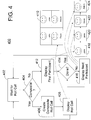
- FIG. 4 illustrates a process 400 for implementing a video roll call in accordance with some embodiments.
- a video roll call may be used to identify the participants to a conference using visual resources.
- process 400 may wait for a roll call to be initiated.
- a roll call may be initiated automatically at the beginning of a conference, may be initiated in response to a participant request for a roll call, may be initiated when a participant joins or leaves a conference subsequent to the beginning of the conference, and/or based upon any other suitable criterion or criteria.
- process 400 may determine whether the video roll call is to be presented in a composite fashion. If the video roll call is to be presented in a composite fashion, then process 400 may create a composite roll call at 406 and then display the composite roll call at 408. As shown in window 410, the composite roll call may display visual resources of the participants to a conference in a grid (e.g., in a "Hollywood Squares" manner). Prior to be included in the composite roll call, the visual resources may be resized, reformatted, etc. The visual resources included in the composite roll call may be the same or substantially the same as the visual resources described above in connection with 206 of FIG. 2 , and may be selected in the same or substantially the same manner as described above in connection with 206 of FIG. 2 .
- the composite roll call may also include identifiers of the participants.
- the identifiers may be the names, nick names, company names, telephone numbers, IP addresses, etc. of the participants and/or any other suitable identifiers.
- An audio identifier may additionally or alternatively be presented with the composite roll call. The audio identifier may present through audio the identifier for each participant (e.g., a spoken name for each participant).
- the composite roll call may be displayed until any suitable period of time has passed (e.g., 1 second) or until any suitable action has occurred (e.g., a viewer pressing a button). After the composite roll call is displayed at 408, process 400 may loop back to 402.
- process 400 may display a visual resource of a first participant at 412.
- process 400 may determine whether the roll call is done (e.g., because the visual resources of all participants have been displayed). If it is determined that the roll call is not done, then the visual resource of the next participant may be displayed at 416 and process 400 may loop back to 414. If it is determined at 414 that the roll call is done, process 400 may loop back to 402.
- the visual resources displayed at 412 and 416 may be the same or substantially the same as the visual resources described above in connection with 206 of FIG. 2 , and may be selected in the same or substantially the same manner as described above in connection with 206 of FIG. 2 . Prior to be displayed, the visual resource may be resized, reformatted, etc. The visual resources displayed at 412 and 416 may each be displayed until any suitable period of time has passed (e.g., 1 second) or until any suitable action has occurred (e.g., a viewer pressing a button).
- FIG. 418 An example of a video roll call that may be presented in accordance with 412, 414, and 416 is shown in windows 418, 420, 422, and 424.
- a visual resource for a first participant is displayed.
- This visual resource may also include an identifier for the participant as described above in connection with 410.
- An audio identifier may additionally or alternatively be provided as also described in connection with 410.
- the visual resources for other participants may be displayed in sequence.
- Windows 418, 420, 422, and 424 may be presented on the entire display of one or more end-points 104 or may be presented on only a portion of the displays of end-points 104.
- the windows may have opaque backgrounds (so as to obscure other images that are part of the conference), or may be any suitable level of transparency.
- the windows may be present until any suitable period of time has passed (e.g., 1 second) or until any suitable action has occurred (e.g., a viewer pressing a button).
Landscapes
- Engineering & Computer Science (AREA)
- Multimedia (AREA)
- Signal Processing (AREA)
- Two-Way Televisions, Distribution Of Moving Picture Or The Like (AREA)
- Telephonic Communication Services (AREA)
Description
- The disclosed subject matter relates to methods, media, and devices for providing visual resources of video conference participants.
- Video conferencing systems are in wide-spread use and enable participants who may be in vastly different geographical locations to have face-to-face meetings without the need to travel great distances. When participating in such conferences, it is desirable to know when new participants join the conference, to see the video of the participants throughout the conference, and to be able to determine who is on the conference at any time during the conference.
- In prior systems, new participants to a call have been announced using the audio portion of the conference. While this can be an effective way to announce who is joining, it can also be very distracting to those who are listening to a speaking participant. Also, in prior systems, when the video of a participant became degraded or was not present, the video would simply be displayed in degraded form or omitted entirely. In many case, this made it impossible to determine who was speaking when a listener was not familiar with a speaker's voice. Similarly to new-participant announcements, when a roll call was performed in prior systems, the participants would be announced in the audio portion of the conference, which, as described above, can be distracting to listening participants.
- Therefore, in accordance with various embodiments, it is desirable to provide video conferencing systems which overcome these limitations of prior systems.
-
EP 1,465,424 A2 is directed towards a picture phone apparatus which substitutes one picture for another during a communication session in response to detection that brightness and/or spatial frequency data relating to the first image is outside of a limit. -
US 2001/037,508 A1 is directed towards a variable bandwidth communication system for handling visual resources requiring low bandwidth. - Methods, media, and devices for providing visual resources of video conference participants are provided. In some embodiments, methods for providing a visual resource of a participant to a video conference comprise: monitoring video of a participant using an endpoint during a video conference that includes other participants at a plurality of endpoints; determining that video of the participant associated with the endpoint is degraded from a connection between the endpoint and the device; accessing a visual resource that identifies the participant in response to determining that video of the participant associated with the endpoint is degraded; and presenting the visual resource to at least one other participant by replacing the video of the participant during the video conference in response to determining that the video is degraded.
- In some embodiments, methods for providing a visual resource of a participant to a video conference comprise: determining whether video of the participant is degraded or not present; accessing a visual resource that corresponds to the participant when the video is degraded or not present; and presenting the visual resource to at least one other participant to the video conference.
- In some embodiments, methods for providing visual resources of participants to a video conference comprise: waiting for a roll call to be initiated; creating a video roll call of the participants to the video conference that includes a visual resource for each of the participants; and displaying the video roll call.
- In some embodiments, computer-readable media containing computer-executable instructions that, when executed by a processor, cause the processor to perform a method for providing a visual resource of a participant to a video conference. The method comprising: monitoring a participant using an endpoint during a video conference that includes other participants at a plurality of endpoints; determining that video of the participant associated with the endpoint is degraded; accessing a visual resource that identifies the participant in response to determining that video of the participant associated with the endpoint is degraded; and presenting the visual resource to at least one other participant by replacing the video of the participant during the video conference in response to determining that the video is degraded.
- In some embodiments, computer-readable media containing computer-executable instructions that, when executed by a processor, cause the processor to perform a method for providing a visual resource of a participant to a video conference. The method comprising: determining whether video of the participant is degraded or not present; accessing a visual resource that corresponds to the participant when the video is degraded or not present; and presenting the visual resource to at least one other participant to the video conference.
- In some embodiments, computer-readable media containing computer-executable instructions that, when executed by a processor, cause the processor to perform a method for providing visual resources of participants to a video conference. The method comprising: waiting for a roll call to be initiated; creating a video roll call of the participants to the video conference that includes a visual resource for each of the participants; and displaying the video roll call.
- In some embodiments, devices for providing a visual resource of a participant to a video conference, comprising: a processor that monitors video of a participant using an endpoint during a video conference that includes other participants at a plurality of other endpoint, determines that video of the participant associated with the endpoint is degraded from a connection between the endpoint and the device, accesses a visual resource that identifies the participant in response to the determination that video of the participant associated with the endpoint is degraded, and presents the visual resource to at least one other participant by replacing the video of the participant during the video conference in response to determining that the video is degraded.
- In some embodiments, devices for providing a visual resource of a participant to a video conference, comprising: a processor that determines whether video of the participant is degraded or not present, accesses a visual resource that corresponds to the participant when the video is degraded or not present, and presents the visual resource to at least one other participant to the video conference.
- In some embodiments, devices for providing visual resources of participants to a video conference, comprising: a processor that waits for a roll call to be initiated, creates a video roll call of the participants to the video conference that includes a visual resource for each of the participants, and causes the video roll call to be displayed.
-
-
FIG. 1 is a block diagram of a system that may be used in accordance with some embodiments. -
FIG. 2 is a diagram of a process that may be used to indicate when a new participant has joined a conference in accordance with some embodiments. -
FIG. 3 is a diagram of a process that may be used when the video of a participant becomes degraded or is not present in accordance with some embodiments. -
FIG. 4 is a diagram of a process that may be used to implement a video roll call in accordance with some embodiments. - Methods, media, and devices for providing visual resources of video conference participants are provided. These indications may include one or more visual resources, which may be any suitable mechanism for visually identifying the participant in a video conference to other participants in the video conference. For example, a visual resource may be a video clip, an image, an avatar, an icon, an animation, etc. A visual resource may be obtained from any suitable source. For example, the visual resource may be an image or a video clip captured from a conference participant's end-point automatically or in response to a request from the participant. In some embodiments, a user interface may indicate a count-down to when an image will be captured and may allow a participant to select from multiple captured images or clips.
- In some embodiments of the disclosed subject matter, a visual resource of a participant may be presented upon the participant joining a conference. In some embodiments, a visual resource of a participant may be presented upon a video of the participant becoming degraded or not being present. In some embodiments, visual resources of one or more participants to a conference may be presented as part of a video roll call.
- Turning to
FIG. 1 , asystem 100 for implementing various embodiments of the invention is shown. As illustrated,system 100 may include a multi-conferencing unit (MCU) 102, end-points 104, adatabase 106, aninternal server 108, anexternal server 110, andconnections - Multi-conferencing unit (MCU) 102 may be any suitable device for hosting a video conference. In some embodiments, MCU 102 may be embedded in one of end-
points 104. As described below, MCU 102 may perform one or more of the functions described in connection withFIGS. 2-4 in addition or alternatively to other multi-conferencing unit functions. MCU 102 may be implemented using any suitable equipment, such as dedicated hardware or a general purpose computer, and may include one or more processors and interfaces. - End-
points 104 may be any suitable devices for providing a user interface for a voice or video conference. Some of end-points 104 may be only capable of hosting the voice portion of a conference, or a part of the video portion of a conference (e.g., only display images of remote participants but not transmit an image of a local participant, or only transmit an image of a local participant but not display images of remote participants). At least one of end-points 104 may have the ability to display visual resources that are part of a video conference hosted by MCU 102. - Each of
database 106,internal server 108, andexternal server 110 may be any suitable devices for storing visual resources. These visual resources may be accessed by MCU 102 and used as part of a video conference, as described below. -
Database 106, for example, may be any suitable storage device, such as memory (e.g., random access memory, read only memory, FLASH memory, etc.), a disk drive, an optical media drive (e.g., compact disc, digital video disc, etc.), and may incorporate any suitable logic for enablingMCU 102 to access visual resources stored thereon.Database 106 may be incorporated into or separate from MCU 102, and may be coupled toMCU 102 byconnection 114, which may be any suitable mechanism for connectingdatabase 106 to MCU 102 (such as one or more wires, a computer network, a communication network, etc.). -
Internal server 108 and/orexternal server 110, for example, may be a digital processing device (such as a computer, a server, a network appliance, etc.) containing any suitable storage device, such as memory (e.g., random access memory, read only memory, FLASH memory, etc.), a disk drive, an optical media drive (e.g., compact disc, digital video disc, etc.), and may incorporate any suitable logic for enablingMCU 102 to access visual resources stored thereon.Internal server 108 may be incorporated intoMCU 102, and connected to MCU byconnection 116.External server 110 may be external toMCU 102 and connected to MCU byconnection 118.Connections 116 and/or 118 may be any suitable mechanism for connectingserver - Additionally or alternatively, visual resources may be stored in end-
points 104. In such case, end-points 104 may include any suitable storage device, such as memory (e.g., random access memory, read only memory, FLASH memory, etc.), a disk drive, an optical media drive (e.g., compact disc, digital video disc, etc.), and may incorporate any suitable logic for enablingMCU 102 to access visual resources stored thereon. - Referring to
FIG. 2 , aprocess 200 for indicating that a new participant is joining or leaving a conference in accordance with some embodiments is shown. The participant may be joining or leaving the conference using any suitable end-point 104, such as a voice-only endpoint 104 or a voice-and-video end-point 104. - As shown, at 202,
process 200 may wait for the participant to join or leave. Any suitable delay may be used in waiting, or 202 may be omitted in some embodiments. Next, at 204,process 200 may determine whether the participant has joined or left. This determination may be made using any suitable mechanism. For example,process 200 may determine that a participant has joined or left based on a participant code, user identification code, personal identification number, etc. entered by the participant, a telephone number from which the participant is calling into the conference (e.g., using "caller id"), an Internet Protocol (IP) address of the participant, a resource indication passed as a URL or file name, and/or any other suitable mechanism. - If
process 200 determines that a participant has not joined or left,process 200 may loop back to 202 and once again wait for a participant to join or leave. Ifprocess 200 determines that a participant has joined or left, however, then process 200 may access a visual resource associated with the participant at 206. As described above, the visual resource may be any suitable mechanism for identifying the participant visually to other participants on the video conference. For example, a visual resource may be a video clip, an image, an avatar, an icon, an animation, etc. The visual resource may be stored on one or more of a database (such as database 102), an internal server (such as server 108), an external server (such as server 110), and/or any other suitable storage mechanism. The particular visual resource selected for a participant may be selected based on any suitable mechanism. For example, the visual resource may be selected based on a participant code, user identification code, personal identification number, etc. entered by the participant, a telephone number from which the participant is calling into the conference (e.g., using "caller id"), an Internet Protocol (IP) address of the participant, and/or any other suitable mechanism. Additionally or alternatively, other criterion or criteria may be used to select the visual resource, such as who the participant is conferencing with, what the conference is about, when the conference is taking place, etc. For example, a different visual resource may be selected when the participant is talking to colleagues from work versus personal friends. As another example, the visual resource may be determined based on a subject or title associated with the conference. As yet another example, the visual resource may be determined based on whether the conference is taking place during business hours or not. - After the visual resource has been accessed at 206, the visual resource may be presented to other participants at 208. Prior to be presented, the visual resource may be resized, reformatted, etc. For example, as shown in
window 210, an image of the participant may be presented along with an identifier of the participant's status, such as the words "now joining" or "now departing." This window may be presented on the entire display of one or more end-points 104 or may be presented on only a portion of the displays of end-points 104. The window may have an opaque background (so as to obscure other images that are part of the conference), or may be any suitable level of transparency. The visual resource may additionally or alternatively include an identifier of the participant. For example, the identifier may be the name, nick name, company name, telephone number, IP address, etc. of the participant and/or any other suitable identifier. As a more particular example, the identifier may indicate "Jane is now joining." An audio identifier may additionally or alternatively be presented with the visual resource. The audio identifier may present through audio the identifier for the participant (e.g., a spoken name for the participant). - The window may be present until any suitable period of time has passed (e.g., 1 second) or until any suitable action has occurred (e.g., a viewer acknowledging the new participant by pressing a button).
- After the visual resource is presented at 208,
process 200 may loop back to 202 to wait for more participants. -
FIG. 3 illustrates aprocess 300 for presenting a visual resource when a participant's video has become degraded or is not present in accordance with some embodiments. As shown, at 302,process 300 monitors participant video(s). Next, at 304,process 300 determines whether a participant's video is degraded or not present. For example, as shown at 306, a participant's video may be degraded so that it causes the picture to look unsatisfactory. Such a degradation may occur for various reasons, including noise on the connection between the participant's end-point 104 andMCU 102 or technical problems with the participant's end-point 104. As another example, a participant's video may not be present because the participant has turned-off video at the participant's end-point, because the participant's end-point has no video capability, because of poor lighting at the participant's location, because of technical problems with the participant's end-point 104, and/or because of any other reason. - If it is determined at 304 that a participant's video is degraded or not present, then process 300 may access a visual resource at 308. The visual resource accessed at 308 may be the same or substantially the same as the visual resource described above in connection with 206 of
FIG. 2 , and the visual resource may be selected in the same or substantially the same manner as that described above in connection with 206 ofFIG. 2 . - After the visual resource has been accessed at 308, the visual resource may be presented to other participants at 310 instead of the participant's video. Prior to be presented, the visual resource may be resized, reformatted, etc. For example, as shown in
window 312, an image of the participant may be presented along with the words "(Video Interrupted)." This window may be presented on the entire display of one or more end-points 104 (e.g., when full screen video is used for a speaking participant) or may be presented on only a portion of the displays of end-points 104 (e.g., as a portion of a composite video when multiple participants are simultaneously displayed in the composite video (e.g., in a "Hollywood Squares" manner). The visual resource may also include an identifier of the participant. For example, the identifier may be the name, nick name, company name, telephone number, IP address, etc. of the participant and/or any other suitable identifier. An audio identifier may additionally or alternatively be presented with the visual resource. The audio identifier may present through audio the identifier for the participant (e.g., a spoken name for the participant). - After the visual resource is presented at 310,
process 300 may loop back to 302 to continue monitoring the participant's video. - If it is determined at 304 that the participant's video is not degraded and is present, then process 300 may restore the video if necessary (e.g., if a visual resource is being displayed instead of the participant's video) and loop back to 302.
-
Process 300 may be implemented as a thread for each participant, orprocess 300 may monitor the video of each participant. -
FIG. 4 illustrates aprocess 400 for implementing a video roll call in accordance with some embodiments. A video roll call may be used to identify the participants to a conference using visual resources. As shown, at 402,process 400 may wait for a roll call to be initiated. For example, a roll call may be initiated automatically at the beginning of a conference, may be initiated in response to a participant request for a roll call, may be initiated when a participant joins or leaves a conference subsequent to the beginning of the conference, and/or based upon any other suitable criterion or criteria. - At 404,
process 400 may determine whether the video roll call is to be presented in a composite fashion. If the video roll call is to be presented in a composite fashion, then process 400 may create a composite roll call at 406 and then display the composite roll call at 408. As shown inwindow 410, the composite roll call may display visual resources of the participants to a conference in a grid (e.g., in a "Hollywood Squares" manner). Prior to be included in the composite roll call, the visual resources may be resized, reformatted, etc. The visual resources included in the composite roll call may be the same or substantially the same as the visual resources described above in connection with 206 ofFIG. 2 , and may be selected in the same or substantially the same manner as described above in connection with 206 ofFIG. 2 . As shown, the composite roll call may also include identifiers of the participants. For example, the identifiers may be the names, nick names, company names, telephone numbers, IP addresses, etc. of the participants and/or any other suitable identifiers. An audio identifier may additionally or alternatively be presented with the composite roll call. The audio identifier may present through audio the identifier for each participant (e.g., a spoken name for each participant). - The composite roll call may be displayed until any suitable period of time has passed (e.g., 1 second) or until any suitable action has occurred (e.g., a viewer pressing a button). After the composite roll call is displayed at 408,
process 400 may loop back to 402. - If it is determined at 404 that the video roll call is not a composite roll call, then process 400 may display a visual resource of a first participant at 412. Next, at 414,
process 400 may determine whether the roll call is done (e.g., because the visual resources of all participants have been displayed). If it is determined that the roll call is not done, then the visual resource of the next participant may be displayed at 416 andprocess 400 may loop back to 414. If it is determined at 414 that the roll call is done,process 400 may loop back to 402. - The visual resources displayed at 412 and 416 may be the same or substantially the same as the visual resources described above in connection with 206 of
FIG. 2 , and may be selected in the same or substantially the same manner as described above in connection with 206 ofFIG. 2 . Prior to be displayed, the visual resource may be resized, reformatted, etc. The visual resources displayed at 412 and 416 may each be displayed until any suitable period of time has passed (e.g., 1 second) or until any suitable action has occurred (e.g., a viewer pressing a button). - An example of a video roll call that may be presented in accordance with 412, 414, and 416 is shown in
windows window 418, a visual resource for a first participant is displayed. This visual resource may also include an identifier for the participant as described above in connection with 410. An audio identifier may additionally or alternatively be provided as also described in connection with 410. Next, as shown inwindows -
Windows points 104 or may be presented on only a portion of the displays of end-points 104. The windows may have opaque backgrounds (so as to obscure other images that are part of the conference), or may be any suitable level of transparency. The windows may be present until any suitable period of time has passed (e.g., 1 second) or until any suitable action has occurred (e.g., a viewer pressing a button). - Although the invention has been described and illustrated in the foregoing illustrative embodiments, it is understood that the present disclosure has been made only by way of example, and that numerous changes in the details of implementation of the invention can be made without departing from the scope of the invention, which is only limited by the claims which follow.
Claims (15)
- A method for providing visual resources of participants during video conferences, comprising:
in a device (102):monitoring (302) video of a participant using an endpoint (104) during a video conference that includes other participants at a plurality of endpoints (104);
determining (304) that the video of the participant associated with the endpoint (104) is degraded from a connection between the endpoint (104) and the device (102);accessing (308) a visual resource that identifies the participant in response to determining that video of the participant associated with the endpoint (104) is degraded; andpresenting (310) the visual resource to at least one other participant by replacing the video of the participant during the video conference in response to determining that the video is degraded. - The method of claim 1, wherein the visual resource is one of: an image, a video clip, and an avatar.
- The method of claim 1, further comprising modifying the visual resource.
- The method of claim 1, further comprising:determining (304) whether video of the participant is degraded or not present;accessing (308) the visual resource that corresponds to the participant when the video is degraded or not present.
- The method of claim 1, further comprising:waiting (402) for a roll call to be initiated;creating (406) a video roll call of the participants to the video conference that includes a visual resource for each of the participants; anddisplaying (408) the video roll call.
- The method of claim 5, wherein the video roll call is a composite roll call.
- The method of claim 5, wherein the video roll call is a sequential display of the visual resources.
- A device (102) for providing visual resources of participants during video conferences, comprising:
a processor configured to monitor video of a participant using an endpoint (104) during a video conference that includes other participants at a plurality of endpoints (104), to determine that video of the participant associated with the endpoint (104) is degraded from a connection between the endpoint (104) and the device (102), to access a visual resource that identifies the participant in response to the determination that video of the participant associated with the endpoint (104) is degraded, and to present the visual resource to at least one other participant by replacing the video of the participant during the video conference in response to determining that the video is degraded. - The device of claim 8, wherein the visual resource is one of: an image, a video clip, and an avatar.
- The device of claim 8, wherein the processor is further configured to modify the visual resource.
- The device of claim 8, wherein the processor is further configured to determine whether video of the participant is degraded or not present and access the visual resource that corresponds to the participant when the video is degraded or not present.
- The device of claim 8, wherein the processor is further configured to wait for a roll call to be initiated, create a video roll call of the participants to the video conference that includes a visual resource for each of the participants, and cause the video roll call to be displayed.
- The device of claim 12, wherein the video roll call is a composite roll call.
- The device of claim 12, wherein the video roll call is a sequential display of the visual resources.
- A computer-readable medium containing computer-executable instructions that, when executed by a processor, cause the processor to perform a method for providing visual resources of participants during video conferences, the method comprising:monitoring (302) video of a participant using an endpoint (104) during a video conference that includes other participants at a plurality of endpoints (104);
determining (304) that the video of the participant associated with the endpoint (104) is degraded from a connectyion between the endpoint (104) and the device (102);accessing (308) a visual resource that identifies the participant in response to determining that video of the participant associated with the endpoint (104) is degraded; andpresenting (310) the visual resource to at least one other participant by replacing the video of the participant during the video conference in response to determining that the video is degraded.
Applications Claiming Priority (2)
| Application Number | Priority Date | Filing Date | Title |
|---|---|---|---|
| US11/803,608 US8212856B2 (en) | 2007-05-15 | 2007-05-15 | Methods, media, and devices for providing visual resources of video conference participants |
| PCT/IL2008/000660 WO2008139471A1 (en) | 2007-05-15 | 2008-05-13 | Methods, media, and devices for providing visual resources of video conference participants |
Publications (2)
| Publication Number | Publication Date |
|---|---|
| EP2145474A1 EP2145474A1 (en) | 2010-01-20 |
| EP2145474B1 true EP2145474B1 (en) | 2019-10-23 |
Family
ID=39679348
Family Applications (1)
| Application Number | Title | Priority Date | Filing Date |
|---|---|---|---|
| EP08751350.3A Active EP2145474B1 (en) | 2007-05-15 | 2008-05-13 | Methods, media, and devices for providing visual resources of video conference participants |
Country Status (5)
| Country | Link |
|---|---|
| US (1) | US8212856B2 (en) |
| EP (1) | EP2145474B1 (en) |
| JP (1) | JP5297449B2 (en) |
| CN (1) | CN101731009B (en) |
| WO (1) | WO2008139471A1 (en) |
Families Citing this family (22)
| Publication number | Priority date | Publication date | Assignee | Title |
|---|---|---|---|---|
| US8954178B2 (en) | 2007-09-30 | 2015-02-10 | Optical Fusion, Inc. | Synchronization and mixing of audio and video streams in network-based video conferencing call systems |
| US8243119B2 (en) * | 2007-09-30 | 2012-08-14 | Optical Fusion Inc. | Recording and videomail for video conferencing call systems |
| CN101888521A (en) * | 2010-06-29 | 2010-11-17 | 上海紫南信息技术有限公司 | Roll-call method for video conference |
| US20120030595A1 (en) * | 2010-07-29 | 2012-02-02 | Seiko Epson Corporation | Information storage medium, terminal apparatus, and image generation method |
| CN102098379A (en) * | 2010-12-17 | 2011-06-15 | 惠州Tcl移动通信有限公司 | Terminal as well as method and device for acquiring real-time video images of terminal |
| US8599236B2 (en) * | 2011-05-11 | 2013-12-03 | Cisco Technology, Inc. | Utilizing a video image from a video communication session as contact information |
| WO2013121455A1 (en) * | 2012-02-13 | 2013-08-22 | 日立コンシューマエレクトロニクス株式会社 | Projector, graphical input/display device, portable terminal and program |
| US8830296B1 (en) * | 2012-06-26 | 2014-09-09 | Google Inc. | Endpoint device-specific stream control for multimedia conferencing |
| US8970656B2 (en) * | 2012-12-20 | 2015-03-03 | Verizon Patent And Licensing Inc. | Static and dynamic video calling avatars |
| CN103226766A (en) * | 2013-04-08 | 2013-07-31 | 明基电通有限公司 | Display method and electronic device using the method |
| US9609272B2 (en) | 2013-05-02 | 2017-03-28 | Avaya Inc. | Optimized video snapshot |
| US8982177B2 (en) * | 2013-07-08 | 2015-03-17 | Avaya Inc. | System and method for whiteboard collaboration |
| CN104427293B (en) * | 2013-08-23 | 2018-10-02 | 南京中兴新软件有限责任公司 | A kind of method, apparatus and video terminal for establishing video conference interface |
| CN104469254B (en) * | 2013-09-12 | 2018-04-10 | 杭州华为企业通信技术有限公司 | Meeting roll-call processing method, device and conference system |
| US9948893B2 (en) | 2015-11-18 | 2018-04-17 | Avaya Inc. | Background replacement based on attribute of remote user or endpoint |
| US9911193B2 (en) | 2015-11-18 | 2018-03-06 | Avaya Inc. | Semi-background replacement based on rough segmentation |
| US9532004B1 (en) | 2016-05-12 | 2016-12-27 | Google Inc. | Animated user identifiers |
| US9942517B1 (en) | 2016-10-04 | 2018-04-10 | Avaya Inc. | Multi-mode video conferencing system |
| US10165159B2 (en) | 2016-10-04 | 2018-12-25 | Avaya Inc. | System and method for enhancing video conferencing experience via a moving camera |
| CN108111798A (en) * | 2016-11-24 | 2018-06-01 | 北京中创视讯科技有限公司 | Participant's treating method and apparatus |
| CN111093049B (en) * | 2019-12-31 | 2020-12-01 | 精英数智科技股份有限公司 | Video roll call method, device, system and storage medium |
| US12401699B2 (en) * | 2020-07-14 | 2025-08-26 | Sony Group Corporation | Information processing device and information processing method for managing a video call |
Citations (4)
| Publication number | Priority date | Publication date | Assignee | Title |
|---|---|---|---|---|
| US20010037508A1 (en) * | 1997-10-09 | 2001-11-01 | Debby Hindus | Variable bandwidth communication systems and methods |
| EP1465424A2 (en) * | 2003-03-24 | 2004-10-06 | Nec Corporation | Picture phone apparatus and system which checks validity of picture data |
| US20050015444A1 (en) * | 2003-07-15 | 2005-01-20 | Darwin Rambo | Audio/video conferencing system |
| US20050264648A1 (en) * | 2004-05-25 | 2005-12-01 | Victor Ivashin | Local video loopback method for a multi-participant conference system using a back-channel video interface |
Family Cites Families (17)
| Publication number | Priority date | Publication date | Assignee | Title |
|---|---|---|---|---|
| US7185054B1 (en) | 1993-10-01 | 2007-02-27 | Collaboration Properties, Inc. | Participant display and selection in video conference calls |
| CA2204001C (en) | 1995-08-31 | 2007-08-21 | Gideon Martin Reinier Weishut | Terminal |
| GB2351216B (en) | 1999-01-20 | 2002-12-04 | Canon Kk | Computer conferencing apparatus |
| US6948131B1 (en) | 2000-03-08 | 2005-09-20 | Vidiator Enterprises Inc. | Communication system and method including rich media tools |
| US8934382B2 (en) | 2001-05-10 | 2015-01-13 | Polycom, Inc. | Conference endpoint controlling functions of a remote device |
| US8947487B2 (en) | 2001-12-31 | 2015-02-03 | Polycom, Inc. | Method and apparatus for combining speakerphone and video conference unit operations |
| US7742588B2 (en) | 2001-12-31 | 2010-06-22 | Polycom, Inc. | Speakerphone establishing and using a second connection of graphics information |
| US20040128350A1 (en) | 2002-03-25 | 2004-07-01 | Lou Topfl | Methods and systems for real-time virtual conferencing |
| US7349000B2 (en) | 2002-04-30 | 2008-03-25 | Tandberg Telecom As | Method and system for display of video device status information |
| JP2004274128A (en) * | 2003-03-05 | 2004-09-30 | Mitsubishi Electric Corp | Communication service equipment |
| US7092002B2 (en) | 2003-09-19 | 2006-08-15 | Applied Minds, Inc. | Systems and method for enhancing teleconferencing collaboration |
| US8081205B2 (en) | 2003-10-08 | 2011-12-20 | Cisco Technology, Inc. | Dynamically switched and static multiple video streams for a multimedia conference |
| NO318868B1 (en) | 2003-10-24 | 2005-05-18 | Tandberg Telecom As | Video conferencing with enhanced multimedia capabilities |
| JP2006060421A (en) * | 2004-08-18 | 2006-03-02 | Nec Commun Syst Ltd | Multipoint conference system and meeting participant confirmation method |
| US20060126812A1 (en) | 2004-12-09 | 2006-06-15 | International Business Machines Corporation | Method and system for sharing one or more graphics images between devices using profiles |
| US20060168529A1 (en) | 2004-12-20 | 2006-07-27 | International Business Machines Corporation | Integrated management of in-person and virtual meeting attendence |
| US8861701B2 (en) | 2005-04-28 | 2014-10-14 | Apple Inc. | Multi-participant conference adjustments |
-
2007
- 2007-05-15 US US11/803,608 patent/US8212856B2/en active Active
-
2008
- 2008-05-13 WO PCT/IL2008/000660 patent/WO2008139471A1/en not_active Ceased
- 2008-05-13 JP JP2010508029A patent/JP5297449B2/en not_active Expired - Fee Related
- 2008-05-13 CN CN2008800214766A patent/CN101731009B/en not_active Expired - Fee Related
- 2008-05-13 EP EP08751350.3A patent/EP2145474B1/en active Active
Patent Citations (4)
| Publication number | Priority date | Publication date | Assignee | Title |
|---|---|---|---|---|
| US20010037508A1 (en) * | 1997-10-09 | 2001-11-01 | Debby Hindus | Variable bandwidth communication systems and methods |
| EP1465424A2 (en) * | 2003-03-24 | 2004-10-06 | Nec Corporation | Picture phone apparatus and system which checks validity of picture data |
| US20050015444A1 (en) * | 2003-07-15 | 2005-01-20 | Darwin Rambo | Audio/video conferencing system |
| US20050264648A1 (en) * | 2004-05-25 | 2005-12-01 | Victor Ivashin | Local video loopback method for a multi-participant conference system using a back-channel video interface |
Also Published As
| Publication number | Publication date |
|---|---|
| JP2010527212A (en) | 2010-08-05 |
| CN101731009A (en) | 2010-06-09 |
| JP5297449B2 (en) | 2013-09-25 |
| EP2145474A1 (en) | 2010-01-20 |
| WO2008139471A1 (en) | 2008-11-20 |
| CN101731009B (en) | 2013-12-04 |
| US8212856B2 (en) | 2012-07-03 |
| US20080284841A1 (en) | 2008-11-20 |
Similar Documents
| Publication | Publication Date | Title |
|---|---|---|
| US8212856B2 (en) | Methods, media, and devices for providing visual resources of video conference participants | |
| US9686497B1 (en) | Video annotation and dynamic video call display for multi-camera devices | |
| US6414707B1 (en) | Apparatus and method for incorporating virtual video conferencing environments | |
| US6151619A (en) | Method and apparatus for maintaining configuration information of a teleconference and identification of endpoint during teleconference | |
| US8842153B2 (en) | Automatically customizing a conferencing system based on proximity of a participant | |
| US9020120B2 (en) | Timeline interface for multi-modal collaboration | |
| JP5303578B2 (en) | Technology to generate visual composition for multimedia conference events | |
| US7730411B2 (en) | Re-creating meeting context | |
| US9749588B2 (en) | Facilitating multi-party conferences, including allocating resources needed for conference while establishing connections with participants | |
| US7797383B2 (en) | Techniques for managing multi-window video conference displays | |
| EP2538611A1 (en) | Conferencing and collaboration | |
| CN101917586B (en) | Joining method and equipment for conference | |
| US20130027505A1 (en) | Automatically Moving a Conferencing Based on Proximity of a Participant | |
| US20130198635A1 (en) | Managing Multiple Participants at the Same Location in an Online Conference | |
| US20100271457A1 (en) | Advanced Video Conference | |
| US11647157B2 (en) | Multi-device teleconferences | |
| CN101689365A (en) | Method of controlling a video conference | |
| EP1966715A2 (en) | Methods and apparatuses for dynamically sharing a portion of a display for application based screen sampling | |
| CN104427293A (en) | Method and device for establishing video conference interface and video terminal | |
| JP2023530151A (en) | COMMUNICATION METHOD, APPARATUS AND ELECTRONIC DEVICE | |
| CN108337535B (en) | Client video forwarding method, device, device and storage medium | |
| US20260100858A1 (en) | Creation of real-time communication session recordings by joining as an endpoint | |
| US8861702B2 (en) | Conference assistance system and method | |
| US20120200661A1 (en) | Reserved Space in a Videoconference Layout | |
| CN106797339A (en) | Video picker |
Legal Events
| Date | Code | Title | Description |
|---|---|---|---|
| PUAI | Public reference made under article 153(3) epc to a published international application that has entered the european phase |
Free format text: ORIGINAL CODE: 0009012 |
|
| 17P | Request for examination filed |
Effective date: 20091109 |
|
| AK | Designated contracting states |
Kind code of ref document: A1 Designated state(s): AT BE BG CH CY CZ DE DK EE ES FI FR GB GR HR HU IE IS IT LI LT LU LV MC MT NL NO PL PT RO SE SI SK TR |
|
| AX | Request for extension of the european patent |
Extension state: AL BA MK RS |
|
| 17Q | First examination report despatched |
Effective date: 20100625 |
|
| DAX | Request for extension of the european patent (deleted) | ||
| RAP1 | Party data changed (applicant data changed or rights of an application transferred) |
Owner name: AVAYA INC. |
|
| STAA | Information on the status of an ep patent application or granted ep patent |
Free format text: STATUS: EXAMINATION IS IN PROGRESS |
|
| GRAP | Despatch of communication of intention to grant a patent |
Free format text: ORIGINAL CODE: EPIDOSNIGR1 |
|
| STAA | Information on the status of an ep patent application or granted ep patent |
Free format text: STATUS: GRANT OF PATENT IS INTENDED |
|
| INTG | Intention to grant announced |
Effective date: 20190514 |
|
| GRAS | Grant fee paid |
Free format text: ORIGINAL CODE: EPIDOSNIGR3 |
|
| GRAA | (expected) grant |
Free format text: ORIGINAL CODE: 0009210 |
|
| STAA | Information on the status of an ep patent application or granted ep patent |
Free format text: STATUS: THE PATENT HAS BEEN GRANTED |
|
| AK | Designated contracting states |
Kind code of ref document: B1 Designated state(s): AT BE BG CH CY CZ DE DK EE ES FI FR GB GR HR HU IE IS IT LI LT LU LV MC MT NL NO PL PT RO SE SI SK TR |
|
| REG | Reference to a national code |
Ref country code: GB Ref legal event code: FG4D |
|
| REG | Reference to a national code |
Ref country code: CH Ref legal event code: EP |
|
| REG | Reference to a national code |
Ref country code: IE Ref legal event code: FG4D |
|
| REG | Reference to a national code |
Ref country code: DE Ref legal event code: R096 Ref document number: 602008061478 Country of ref document: DE |
|
| REG | Reference to a national code |
Ref country code: AT Ref legal event code: REF Ref document number: 1195003 Country of ref document: AT Kind code of ref document: T Effective date: 20191115 |
|
| REG | Reference to a national code |
Ref country code: NL Ref legal event code: MP Effective date: 20191023 |
|
| REG | Reference to a national code |
Ref country code: LT Ref legal event code: MG4D |
|
| PG25 | Lapsed in a contracting state [announced via postgrant information from national office to epo] |
Ref country code: GR Free format text: LAPSE BECAUSE OF FAILURE TO SUBMIT A TRANSLATION OF THE DESCRIPTION OR TO PAY THE FEE WITHIN THE PRESCRIBED TIME-LIMIT Effective date: 20200124 Ref country code: NO Free format text: LAPSE BECAUSE OF FAILURE TO SUBMIT A TRANSLATION OF THE DESCRIPTION OR TO PAY THE FEE WITHIN THE PRESCRIBED TIME-LIMIT Effective date: 20200123 Ref country code: PL Free format text: LAPSE BECAUSE OF FAILURE TO SUBMIT A TRANSLATION OF THE DESCRIPTION OR TO PAY THE FEE WITHIN THE PRESCRIBED TIME-LIMIT Effective date: 20191023 Ref country code: LT Free format text: LAPSE BECAUSE OF FAILURE TO SUBMIT A TRANSLATION OF THE DESCRIPTION OR TO PAY THE FEE WITHIN THE PRESCRIBED TIME-LIMIT Effective date: 20191023 Ref country code: ES Free format text: LAPSE BECAUSE OF FAILURE TO SUBMIT A TRANSLATION OF THE DESCRIPTION OR TO PAY THE FEE WITHIN THE PRESCRIBED TIME-LIMIT Effective date: 20191023 Ref country code: NL Free format text: LAPSE BECAUSE OF FAILURE TO SUBMIT A TRANSLATION OF THE DESCRIPTION OR TO PAY THE FEE WITHIN THE PRESCRIBED TIME-LIMIT Effective date: 20191023 Ref country code: LV Free format text: LAPSE BECAUSE OF FAILURE TO SUBMIT A TRANSLATION OF THE DESCRIPTION OR TO PAY THE FEE WITHIN THE PRESCRIBED TIME-LIMIT Effective date: 20191023 Ref country code: SE Free format text: LAPSE BECAUSE OF FAILURE TO SUBMIT A TRANSLATION OF THE DESCRIPTION OR TO PAY THE FEE WITHIN THE PRESCRIBED TIME-LIMIT Effective date: 20191023 Ref country code: BG Free format text: LAPSE BECAUSE OF FAILURE TO SUBMIT A TRANSLATION OF THE DESCRIPTION OR TO PAY THE FEE WITHIN THE PRESCRIBED TIME-LIMIT Effective date: 20200123 Ref country code: FI Free format text: LAPSE BECAUSE OF FAILURE TO SUBMIT A TRANSLATION OF THE DESCRIPTION OR TO PAY THE FEE WITHIN THE PRESCRIBED TIME-LIMIT Effective date: 20191023 Ref country code: PT Free format text: LAPSE BECAUSE OF FAILURE TO SUBMIT A TRANSLATION OF THE DESCRIPTION OR TO PAY THE FEE WITHIN THE PRESCRIBED TIME-LIMIT Effective date: 20200224 |
|
| PG25 | Lapsed in a contracting state [announced via postgrant information from national office to epo] |
Ref country code: IS Free format text: LAPSE BECAUSE OF FAILURE TO SUBMIT A TRANSLATION OF THE DESCRIPTION OR TO PAY THE FEE WITHIN THE PRESCRIBED TIME-LIMIT Effective date: 20200224 Ref country code: HR Free format text: LAPSE BECAUSE OF FAILURE TO SUBMIT A TRANSLATION OF THE DESCRIPTION OR TO PAY THE FEE WITHIN THE PRESCRIBED TIME-LIMIT Effective date: 20191023 |
|
| REG | Reference to a national code |
Ref country code: DE Ref legal event code: R097 Ref document number: 602008061478 Country of ref document: DE |
|
| PG2D | Information on lapse in contracting state deleted |
Ref country code: IS |
|
| PG25 | Lapsed in a contracting state [announced via postgrant information from national office to epo] |
Ref country code: DK Free format text: LAPSE BECAUSE OF FAILURE TO SUBMIT A TRANSLATION OF THE DESCRIPTION OR TO PAY THE FEE WITHIN THE PRESCRIBED TIME-LIMIT Effective date: 20191023 Ref country code: EE Free format text: LAPSE BECAUSE OF FAILURE TO SUBMIT A TRANSLATION OF THE DESCRIPTION OR TO PAY THE FEE WITHIN THE PRESCRIBED TIME-LIMIT Effective date: 20191023 Ref country code: RO Free format text: LAPSE BECAUSE OF FAILURE TO SUBMIT A TRANSLATION OF THE DESCRIPTION OR TO PAY THE FEE WITHIN THE PRESCRIBED TIME-LIMIT Effective date: 20191023 Ref country code: CZ Free format text: LAPSE BECAUSE OF FAILURE TO SUBMIT A TRANSLATION OF THE DESCRIPTION OR TO PAY THE FEE WITHIN THE PRESCRIBED TIME-LIMIT Effective date: 20191023 Ref country code: IS Free format text: LAPSE BECAUSE OF FAILURE TO SUBMIT A TRANSLATION OF THE DESCRIPTION OR TO PAY THE FEE WITHIN THE PRESCRIBED TIME-LIMIT Effective date: 20200223 |
|
| REG | Reference to a national code |
Ref country code: AT Ref legal event code: MK05 Ref document number: 1195003 Country of ref document: AT Kind code of ref document: T Effective date: 20191023 |
|
| PLBE | No opposition filed within time limit |
Free format text: ORIGINAL CODE: 0009261 |
|
| STAA | Information on the status of an ep patent application or granted ep patent |
Free format text: STATUS: NO OPPOSITION FILED WITHIN TIME LIMIT |
|
| PG25 | Lapsed in a contracting state [announced via postgrant information from national office to epo] |
Ref country code: IT Free format text: LAPSE BECAUSE OF FAILURE TO SUBMIT A TRANSLATION OF THE DESCRIPTION OR TO PAY THE FEE WITHIN THE PRESCRIBED TIME-LIMIT Effective date: 20191023 Ref country code: SK Free format text: LAPSE BECAUSE OF FAILURE TO SUBMIT A TRANSLATION OF THE DESCRIPTION OR TO PAY THE FEE WITHIN THE PRESCRIBED TIME-LIMIT Effective date: 20191023 |
|
| 26N | No opposition filed |
Effective date: 20200724 |
|
| PG25 | Lapsed in a contracting state [announced via postgrant information from national office to epo] |
Ref country code: SI Free format text: LAPSE BECAUSE OF FAILURE TO SUBMIT A TRANSLATION OF THE DESCRIPTION OR TO PAY THE FEE WITHIN THE PRESCRIBED TIME-LIMIT Effective date: 20191023 Ref country code: AT Free format text: LAPSE BECAUSE OF FAILURE TO SUBMIT A TRANSLATION OF THE DESCRIPTION OR TO PAY THE FEE WITHIN THE PRESCRIBED TIME-LIMIT Effective date: 20191023 |
|
| PG25 | Lapsed in a contracting state [announced via postgrant information from national office to epo] |
Ref country code: CH Free format text: LAPSE BECAUSE OF NON-PAYMENT OF DUE FEES Effective date: 20200531 Ref country code: MC Free format text: LAPSE BECAUSE OF FAILURE TO SUBMIT A TRANSLATION OF THE DESCRIPTION OR TO PAY THE FEE WITHIN THE PRESCRIBED TIME-LIMIT Effective date: 20191023 Ref country code: LI Free format text: LAPSE BECAUSE OF NON-PAYMENT OF DUE FEES Effective date: 20200531 |
|
| REG | Reference to a national code |
Ref country code: BE Ref legal event code: MM Effective date: 20200531 |
|
| PG25 | Lapsed in a contracting state [announced via postgrant information from national office to epo] |
Ref country code: LU Free format text: LAPSE BECAUSE OF NON-PAYMENT OF DUE FEES Effective date: 20200513 |
|
| PG25 | Lapsed in a contracting state [announced via postgrant information from national office to epo] |
Ref country code: FR Free format text: LAPSE BECAUSE OF NON-PAYMENT OF DUE FEES Effective date: 20200531 Ref country code: IE Free format text: LAPSE BECAUSE OF NON-PAYMENT OF DUE FEES Effective date: 20200513 |
|
| PG25 | Lapsed in a contracting state [announced via postgrant information from national office to epo] |
Ref country code: BE Free format text: LAPSE BECAUSE OF NON-PAYMENT OF DUE FEES Effective date: 20200531 |
|
| PG25 | Lapsed in a contracting state [announced via postgrant information from national office to epo] |
Ref country code: TR Free format text: LAPSE BECAUSE OF FAILURE TO SUBMIT A TRANSLATION OF THE DESCRIPTION OR TO PAY THE FEE WITHIN THE PRESCRIBED TIME-LIMIT Effective date: 20191023 Ref country code: MT Free format text: LAPSE BECAUSE OF FAILURE TO SUBMIT A TRANSLATION OF THE DESCRIPTION OR TO PAY THE FEE WITHIN THE PRESCRIBED TIME-LIMIT Effective date: 20191023 Ref country code: CY Free format text: LAPSE BECAUSE OF FAILURE TO SUBMIT A TRANSLATION OF THE DESCRIPTION OR TO PAY THE FEE WITHIN THE PRESCRIBED TIME-LIMIT Effective date: 20191023 |
|
| PGFP | Annual fee paid to national office [announced via postgrant information from national office to epo] |
Ref country code: GB Payment date: 20220527 Year of fee payment: 15 |
|
| GBPC | Gb: european patent ceased through non-payment of renewal fee |
Effective date: 20230513 |
|
| PG25 | Lapsed in a contracting state [announced via postgrant information from national office to epo] |
Ref country code: GB Free format text: LAPSE BECAUSE OF NON-PAYMENT OF DUE FEES Effective date: 20230513 |
|
| PGFP | Annual fee paid to national office [announced via postgrant information from national office to epo] |
Ref country code: DE Payment date: 20250529 Year of fee payment: 18 |