EP2116947A1 - Equipment management device, equipment management system, equipment management method, and recording medium - Google Patents
Equipment management device, equipment management system, equipment management method, and recording medium Download PDFInfo
- Publication number
- EP2116947A1 EP2116947A1 EP09158671A EP09158671A EP2116947A1 EP 2116947 A1 EP2116947 A1 EP 2116947A1 EP 09158671 A EP09158671 A EP 09158671A EP 09158671 A EP09158671 A EP 09158671A EP 2116947 A1 EP2116947 A1 EP 2116947A1
- Authority
- EP
- European Patent Office
- Prior art keywords
- equipment
- license
- management device
- authentication
- software
- Prior art date
- Legal status (The legal status is an assumption and is not a legal conclusion. Google has not performed a legal analysis and makes no representation as to the accuracy of the status listed.)
- Granted
Links
Images










Classifications
-
- G—PHYSICS
- G06—COMPUTING OR CALCULATING; COUNTING
- G06F—ELECTRIC DIGITAL DATA PROCESSING
- G06F21/00—Security arrangements for protecting computers, components thereof, programs or data against unauthorised activity
- G06F21/10—Protecting distributed programs or content, e.g. vending or licensing of copyrighted material ; Digital rights management [DRM]
- G06F21/105—Arrangements for software license management or administration, e.g. for managing licenses at corporate level
-
- G—PHYSICS
- G06—COMPUTING OR CALCULATING; COUNTING
- G06F—ELECTRIC DIGITAL DATA PROCESSING
- G06F21/00—Security arrangements for protecting computers, components thereof, programs or data against unauthorised activity
- G06F21/10—Protecting distributed programs or content, e.g. vending or licensing of copyrighted material ; Digital rights management [DRM]
Definitions
- This invention relates to an equipment management device and method for managing equipment, including image input/output devices (e.g., image forming devices, such as printers, copiers, fax machines, and image reading devices, such as scanners).
- image input/output devices e.g., image forming devices, such as printers, copiers, fax machines, and image reading devices, such as scanners.
- Japanese Laid-Open Patent Application No. 2007-034389 discloses the composition of license authentication.
- Japanese Laid-Open Patent Application No. 2005-321850 discloses the composition of license authentication.
- the composition according to the related art is to perform activation or deactivation of license authentication (including re-use permission of a product key used at a time of activating license authentication) for the equipment by means of an operation part thereof.
- the equipment management method according to the related art has to perform, for each of one or more pieces of the equipment, activation or deactivation of license authentication of software installed in the equipment, which is time-consuming and inconvenient for the user.
- the user When two or more pieces of the equipment exist, it is demanded that the user is able to perform collectively activation or deactivation of the license authentication for all the pieces of the equipment. It is also demanded that the user is able to perform activation or deactivation of the license authentication remotely from a terminal (e.g., a personal computer).
- a terminal e.g., a personal computer
- the present disclosure provides an improved equipment management device and method in which the above-described problems are eliminated.
- the present disclosure provides an equipment management device, an equipment management method, and a computer-readable recording medium, which are adapted to improve convenience for the user in performing activation and/or deactivation of the license authentication for one or more pieces of the equipment.
- the present disclosure provides an equipment management device which manages one or more pieces of equipment which are connected to the equipment management device via a network, the equipment management device comprising: a determining unit configured to determine whether a non-authenticated software item exists in each of the one or more pieces of equipment; and a license management unit configured to perform license management of one or more software items installed in each of the one or more pieces of equipment, based on a result of the determination by the determining unit.
- the present disclosure provides an equipment management method for use in an equipment management system in which one or more pieces of equipment and an equipment management device to manage the one or more pieces of equipment are connected via a network, the equipment management method comprising: causing the equipment management device to determine whether a non-authenticated software item exists in each of the one or more pieces of equipment; causing the equipment management device to acquire equipment information from a corresponding piece of the equipment which installs a non-authenticated software item; causing the equipment management device to generate a license code based on both a predetermined product key and the acquired equipment information; causing the equipment management device to transmit a request of license authentication with the generated license code to the corresponding piece of the equipment when it is determined that a non-authenticated software item exists in the corresponding piece of the equipment; and causing the corresponding piece of the equipment to perform license authentication based on the license code received from the equipment management device.
- the present disclosure provides a computer-readable recording medium storing a program which, when executed by a computer of an equipment management device which manages one or more pieces of equipment which are connected to the equipment management device via a network, causes the computer to perform an equipment management method, the equipment management method comprising: determining whether a non-authenticated software item exists in each of the one or more pieces of equipment; and performing license management of one or more software items installed in each of the one or more pieces of equipment, based on a result of the determination.
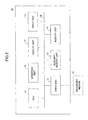
- FIG. 1 shows the composition of an equipment management system 1 of this embodiment.
- the equipment management system 1 includes a host computer 10, a license server 20, and two or more pieces of equipment 30 (30a and 30b). These components are interconnected by a network 40, such as a LAN (local area network), so that the components can communicate with each other via the network 40.
- a network 40 such as a LAN (local area network)
- the host computer 10 is an equipment management device which manages the equipment 30, and the host computer 10 is constituted by an information processing device, such as a PC or a workstation.
- the host computer 10 may be constituted by a client computer or a print server.
- a client computer may be a web client (or a Web server, a web browser, etc.) of a print server which provides a printing service.
- the license server 20 is an authentication management device, and this license server 20 is constituted by an information processing device having the composition which is the same as that of the host computer 10.
- the pieces of equipment 30 are image input/output devices (for example, image forming devices or image reading devices) which operate based on the software components, such as application programs.
- FIG. 2 shows the hardware composition of the host computer 10 of this embodiment.
- the host computer 10 includes a drive unit 11, an auxiliary memory unit 13, a memory unit 14, a CPU (central processing unit) 15, an interface unit 16, a display unit 17, and an input unit 18, which are interconnected by a bus B.
- a bus B bus
- a program which carries out processing of the host computer 10 is supplied by using a recording medium 12.
- the recording medium 12 in which the program is recorded is set in the drive unit 11, the program from the recording medium 12 is installed in the auxiliary memory unit 13 through the drive unit 11.
- the auxiliary memory unit 13 stores the necessary files, data, etc. and stores the installed program.
- the program When a program starting request is received, the program is read from the auxiliary memory unit 13, and the program is stored in the memory unit 14.
- the CPU 15 carries out a predetermined function (including the function according to the invention) of the host computer 10 in accordance with the program stored in the memory unit 14.
- the interface unit 16 is used as an interface for connecting the host computer 10 to the network 40.
- the display unit 17 displays a GUI (graphical user interface), a web browser, etc. in accordance with the program.
- the input unit 18 includes a keyboard, a mouse, etc., and the input unit 18 is used to input various kinds of operation requests.
- the recording medium 12 to install the program is not necessarily requested.
- the program may be downloaded from another computer to the host computer 10 through the network 40.
- the license server 20 may be constituted to have the hardware composition which is the same as that of the host computer 10. However, when operation of the license server 20 is remotely controlled through the network 40, the display unit 17 and the input unit 18 are not necessarily requested.
- the license server 20 is capable of carrying out the functions to serve as a license code generating unit and a license code transmitting unit, which will be described below.
- the controller provided in the equipment 30 may be constituted to have the hardware composition which is the same as that of the host computer 10.
- the equipment 30 in this case is provided with an operation panel as the hardware corresponding to the display unit 17 and the input unit 18.
- the equipment 30 in this case is provided with the hardware specific to the image processing device, such as a scanner (an imaging part) and a plotter (a printing part).
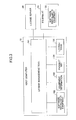
- FIG. 3 shows the software composition of the host computer 10 of this embodiment.
- the host computer 10 includes a license management tool 101.
- the license management tool 101 performs activation and/or deactivation of license authentication of software 102 installed in the equipment 30 for the equipment 30.
- the license management tool 101 is also capable of performing installation/uninstallation of the software 102 in the equipment 30 for the equipment 30.
- the program program of the software 102 installed in the equipment 30 selected as installation software is stored in the auxiliary memory unit 13 of the host computer 10.
- equipment information 103 is information which is acquired from the equipment 30 by the license management tool 101.
- the acquired equipment information 103 includes information specific to the equipment 30, such as a model name, a machine identifier, an IP address, etc., and such information is stored into the auxiliary memory unit 13.
- a product key 104 is information which is purchased (or prepared) beforehand in association with the software 102 installed in the equipment 30, and such information is stored into the auxiliary memory unit 13.
- the product key 104 is information which is used when generating a license code 105, which will be described below.
- license code 105 is information which is used when performing license authentication of the software 102 installed in the equipment 30.
- the license code 105 is generated by the license management tool 101 or acquired from the license server 20 by the license management tool 101.
- the license code 105 is generated based on the above-mentioned equipment information 103 and the above-mentioned product key 104.
- the license code 105 after the acquisition or the generation is stored into the auxiliary memory unit 13.
- the license server 20 has license information which is used to manage activation and/or deactivation of license authentication (for the purpose of license management).
- This license information is associated with the equipment information 103 of the equipment 30, the product key 104 corresponding to the software 102 installed in the equipment 30, and the license code 105 generated based on the equipment information 103 and the product key 104.
- the software 102 may be installed beforehand. In such a case, it is not necessary to install the software 102 in the equipment 30 by using the license management tool 101. Moreover, in such a case, execution of the software 102 installed beforehand in the equipment is permitted when activation of license authentication of the software is performed by the license management tool 101, and inhibited when deactivation of the license authentication is performed by the license management tool 101.
- operation of the license management tool 101 is started in response to receiving an operation starting request input by the user through the input unit 18.
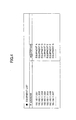
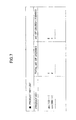
- an equipment list screen as shown in FIG. 4 is displayed on the display unit 17 in the host computer 10.
- FIG. 4 shows an example of the equipment list screen of this embodiment.
- the license management tool 101 uses the equipment list screen to receive selection of a piece of equipment to be managed. For example, selection of the equipment 30 is performed by directly inputting an IP address or by selecting one from among the pieces of equipment in the equipment list. After the selection of a piece of equipment is received, the license management tool 101 registers (or adds) the selected piece of the equipment 30 as the management object equipment.
- another method of registering the equipment 30 may be used in which the license management tool 101 reads out a data file that defines the information of the equipment 30.
- the information defined in the data file includes two or more pieces of the equipment 30, a batch registration process may be performed for all the defined pieces of the equipment 30.
- the license management tool 101 updates the contents of the equipment list and displays the resulting equipment list.
- the license management tool 101 displays an installation setting screen, as shown in FIG. 5 , when an installation request of the software 102 is received.
- FIG. 5 shows an example of the installation setting screen of this embodiment.
- the license management tool 101 uses the installation setting screen to receive selection of the software 102 to be installed and selection of the equipment 30 of the installation place. For example, selection of the software 102 is performed by directly inputting a program name or by selecting one from among the programs in the software list. Selection of the installation place is performed by directly inputting an IP address or by selecting one from among the pieces of the equipment in the equipment list.
- the license management tool 101 acquires the latest equipment information 103 from the selected equipment 30, and performs the updating of the equipment information.
- the license management tool 101 may be arranged to receive selection of two or more pieces of the equipment 30 as the installation place. When the selection of two or more pieces of the equipment 30 is received, the latest equipment information 103 is acquired from each of the selected pieces of the equipment 30.
- the license management tool 101 transmits a request for installation of the software 102 to the selected piece of the equipment 30.
- installation of the selected software 102 is performed by the selected piece of the equipment 30.
- the license management tool 101 transmits the selected program to the equipment 30 of the installation place and causes the equipment 30 to perform installation of the software 102.
- the equipment 30 performs installation of the software in the equipment 30 based on the selected program received.
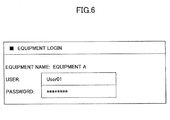
- an equipment login screen as shown in FIG. 6 is displayed on the display unit 17 provided in the host computer 10.
- FIG. 6 shows an example of the equipment login screen of this embodiment.
- the license management tool 101 is arranged to transmit the program of the software 102 to the equipment 30 only when the equipment login screen is displayed and the user access to the equipment 30 is attested.
- the display of the equipment login screen is not necessarily provided even when the equipment 30 has a user authentication function. For example, when user authentication is performed previously, it is not necessary to display the equipment login screen subsequently.
- the license management tool 101 displays a product key list screen, as shown in FIG. 7 , when performing license authentication of the software 102 installed in the equipment 30.
- FIG. 7 shows an example of the product key list screen of this embodiment.
- the license management tool 101 uses the product key list screen to receive selection of a product key 104 corresponding to the software 102 the license authentication of which is to be performed. For example, selection of the product key 104 is performed by selecting one from among the product keys in the product key list. Because the product key 104 is the information which is purchased (or prepared) beforehand in association with the software 102 in the equipment 30 as described above, the user selects a suitable product key 104 from the product key list screen in accordance with the association.
- the license management tool 101 displays a license authentication setting screen as shown in FIG. 8 .
- the license management tool 101 in this embodiment displays the license authentication setting screen even when license authentication of the software 102 which operates in the management object equipment is not yet carried out.
- the license management tool 101 may be arranged so that a license authentication setting screen is displayed only when the license authentication is not carried out and two or more applicable items of the software 102 exist.
- FIG. 8 shows an example of the license authentication setting screen of this embodiment.
- the license management tool 101 uses this license authentication setting screen to receive selection of the equipment 30 (or the equipment 30 for which license authentication is to be performed) in which the software 102 the license authentication of which is to be performed operates. Selection of the equipment 30 is performed by directly inputting an IP address or by selecting one from among the pieces of the equipment in the equipment list.
- the license management tool 101 After the selection of the equipment 30 for which license authentication is to be performed is received, the license management tool 101 acquires the latest equipment information 103 from the selected equipment 30 and performs updating of the equipment information.
- the license management tool 101 may be arranged to receive selection of two or more pieces of the equipment 30 for which license authentication is to be performed. When the selection of two or more pieces of the equipment 30 is received, the license management tool 101 acquires the latest equipment information 103 from each of the selected pieces of the equipment 30.
- the license management tool 101 requests license authentication of the software 102 to the selected equipment 30.
- license authentication of the software 102 is performed by the equipment 30.
- the license management tool 101 requests the license authentication of the software 102 by transmitting a license code 105 and a predetermined request command to the equipment 30.
- the equipment 30 performs the license authentication based on the license code 105 received in response to the request.
- the license management tool 101 When the license management tool 101 has the function to generate a license code 105, the license management tool 101 generates a license code 105 based on the acquired equipment information 103 and the selected product key 104, and transmits the license code 105 to the equipment 30.
- the license management tool 101 transmits to the license server 20 the acquired equipment information 103 and the selected product key 104, and requests generation of a license code 105 to the license server 20.
- a server login screen is displayed on the display unit 17 in the host computer 10.
- FIG. 9 shows an example of the server login screen of this embodiment. If this server login screen is displayed, the license management tool 101 receives the license code 105 from the license server 20 only when the user access is attested in the license server 20. Then, the license management tool 101 transmits the received license code 105 to the equipment 30.
- the display of the server login screen is not necessarily provided even when the license server 20 has a user authentication function. Similar to the equipment login screen mentioned above, when user authentication is performed previously, it is not necessary to display the server login screen subsequently.
- the license management tool 101 When the software 102 for which license authentication is to be performed includes two or more programs, such as plug-ins, the license management tool 101 generates or acquires a license code 105 for every program (or for every corresponding product key 104).
- the license management tool 101 When the selection of two or more pieces of the equipment 30 for which license authentication is to be performed is received, the license management tool 101 generates or acquires a corresponding number of license codes 105 for the number of the selected pieces of the equipment 30.
- the maximum number of license codes 105 that can be generated or acquired in this case is equal to the number of non-used license codes 105 among the license codes 105 which can be generated from the product key 104.
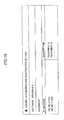
- the license management tool 101 displays a license authentication deactivation setting screen as shown in FIG. 10.
- FIG. 10 shows an example of the license authentication deactivation setting screen of this embodiment.
- the license management tool 101 uses the license authentication deactivation setting screen to receive selection of the equipment 30 in which the software 102 for which license authentication is to be canceled operates (or selection of the equipment 30 for which license authentication is to be canceled). Selection of the equipment 30 in this case is the same as the selection of the equipment 30 at the time of performing license authentication, and a description thereof will be omitted.
- the license management tool 101 After the selection of the equipment 30 for which license authentication is to be canceled is received, the license management tool 101 requests deactivation of license authentication by transmitting a predetermined request command to the equipment 30. As a result, the equipment 30 performs deactivation of license authentication of the software 102 selected in response to the request.
- the license management tool 101 changes the contents of registration of the product key 104 corresponding to the software 102 the license authentication of which is canceled, based on the result of operation in the equipment 30.
- the license management tool 101 When the license management tool 101 has a function to change the contents of registration of the product key 104, the license management tool 101 changes the contents of registration managed by the license management tool 101. On the other hand, when he license server 20 has the function to change the contents of registration of the product key 104, the license management tool 101 requests changing of the contents of registration to the license server 20.
- the license server 20 has a user authentication function, the above-described server login screen is displayed.
- the license management tool 101 displays an uninstallation setting screen, as shown in FIG. 11.
- FIG. 11 shows an example of the uninstallation setting screen of this embodiment.
- the license management tool 101 uses the uninstallation setting screen to receive selection of the software 102 to be uninstalled and the equipment 30 in which uninstallation of the software 102 is to be performed. Selection of the software 102 and the equipment 30 is the same as the software equipment selection at the time of installation, and a description thereof will be omitted.
- the license management tool 101 requests uninstallation of the selected software 102 to the selected equipment 30.
- the equipment 30 performs uninstallation of the selected software 102.
- two kinds of equipment management systems 1 are considered.
- One is the system in which the host computer 10 and the license server 20 are separately arranged as shown in FIG. 1 .
- the other is the system in which the host computer 10 having the function of the license server 20 is arranged (or the host computer 10 and the license server 20 are constituted by a single device).
- the processes concerning the license management are performed by the equipment management system 1 in which the host computer 10 having the function of the license server 20 is arranged.
- FIG. 12 is a flowchart for explaining a license authentication process of the first embodiment.
- the license management tool 101 of the host computer 10 starts performing the process of FIG. 12 .
- the license management tool 101 of the host computer 10 acquires the information of the software 102 installed in the equipment 30 (software information) from the equipment 30 (step S11). At this time, the license management tool 101 transmits a predetermined request command to the equipment 30 to request the information acquisition.
- the equipment 30 transmits the software information to the host computer 10. Data transmission and reception between the equipment 30 and the host computer 10 is performed through the network 40.
- the license management tool 101 determines whether a non-authenticated item of the software 102 exists among the items of the software 102 installed in the equipment 30 (step S12).
- step S12 When it is determined in step S12 that a non-authenticated software item does not exist, the process is terminated. On the other hand, when it is determined in step S12 that a non-authenticated software item exists, the license management tool 101 acquires the equipment information 103 from a corresponding piece of the equipment 30 which installs the non-authenticated software item (step S13).
- the license management tool 101 generates a license code 105 based on the acquired equipment information 103 and the predetermined product key 104 corresponding to the non-authenticated item of the software 102 (step S14).
- the license management tool 101 transmits the generated license code 105 to the corresponding piece of the equipment 30, and requests the corresponding piece of the equipment 30 to perform license authentication of the non-authenticated software item (step S15). At this time, the license management tool 101 transmits a predetermined license authentication request command with the license code 105 to the corresponding piece of the equipment 30.
- the corresponding piece of the equipment 30 performs license authentication of the non-authenticated item of the software 102, based on the license code 105 received from the license management tool 101, and execution of the software item is permitted by the license authentication.
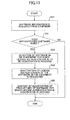
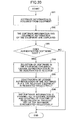
- FIG. 13 is a flowchart for explaining a license authentication deactivation process of the first embodiment.
- the license management tool 101 of the host computer 10 starts the process of FIG. 13 .
- the license management tool 101 of the host computer 10 acquires software information of the software 102 from the equipment 30 (step S21).
- the license management tool 101 determines whether an authenticated item of the software 102 exists among the items of the software 102 installed in the equipment 30, based on the acquired software information (step S22).
- step S12 When it is determined in step S12 that an authenticated software item does not exist, the process is terminated.
- step S22 when it is determined in step S22 that an authenticated software item exists, the license management tool 101 displays the above-described license authentication deactivation setting screen, and receives selection of the item of the software 102 for which the license authentication is to be deactivated (step S23).
- the above-described license authentication deactivation setting screen may be displayed when two or more authenticated items of the software 102 in the equipment 30 exist.
- a deactivation request check and selection screen (not shown) may be displayed instead.
- the license management tool 101 requests the equipment 30 to deactivate the license authentication of the selected software item (step S24). At this time, the license management tool 101 transmits a predetermined deactivation request command to the equipment 30 to request deactivation of the license authentication of the selected software item.
- the equipment 30 performs deactivation of the authenticated item of the software 102 in response to the request, and execution of the software item is inhibited.
- the license management tool 101 updates the contents of registration of the product key 104 corresponding to the canceled software item based on the acquired software information (step S25). Namely, at step S25, the license information is updated to indicate that re-use of the product key 104 used at the time of license authentication is allowed.
- the processes concerning the license management (activation and/or deactivation of license authentication) to the software 102 installed in the equipment 30 can be performed remotely from the host computer 10 via the network 40.
- the user does not need to perform license management for each of the pieces of the equipment 30, and does not need to operate license management through the operation panel. It is possible to improve convenience for the user in performing the license management for two or more pieces of the equipment.
- the host computer 10 and the license server 20 are constituted by different devices in the equipment management system 1 to perform the processes concerning the license management.
- FIG. 14 is a flowchart for explaining a license authentication process of the second embodiment.
- steps S31-S33 shown in FIG. 14 are the same as the steps S11-S13 shown in FIG. 12 , and a description thereof will be omitted. A description will be given of step S34 and subsequent steps in the process shown in FIG. 14 .
- the license management tool 101 of the host computer 10 transmits the equipment information 103 acquired in step S33 and a predetermined product key 104 corresponding to the software 102, to the license server 20 (step S34).
- the license server 20 generates a license code 105 based on the equipment information 103 and the product key 104 which are received, and transmits the license code 105 to the host computer 10. Data transmission and reception between the license server 20 and the host computer 10 is performed through the network 40.
- the license management tool 101 receives the license code 105 from the license server 20 (step S35).
- the license management tool 101 transmits the received license code 105 to the corresponding piece of the equipment 30, and requests execution of license authentication (step S36).
- the corresponding piece of the equipment 30 performs license authentication of the non-authenticated item of the software 102 based on the license code 105 received in response to the request, and execution of the software item in the equipment 30 is permitted.
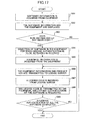
- FIG. 15 is a flowchart for explaining a license authentication deactivation process of the second embodiment.
- steps S41-S44 shown in FIG. 15 are the same as the steps S21-S24 shown in FIG. 13 , and a description thereof will be omitted. A description will be given of step S45 in the process shown in FIG. 15 .
- the license management tool 101 of the host computer 10 requests the license server 20 to perform the updating of the contents of registration of the product key 104 corresponding to the canceled software item (step S45).
- the license management tool 101 transmits to the license server 20 the software information of the software 102 (the canceled software item) which is selected in step S43 and a predetermined deactivation request command, to request the license server 20 to perform the updating of the contents of registration of the product key 104.
- the license server 20 performs the updating of the contents of registration of the product key 104 corresponding to the canceled software item based on the software information received in response to the request. Namely, the license information managed by the license server 20 is updated to indicate that re-use of the product key 104 used at the time of license authentication is allowed.
- the same effect as in the first embodiment can be obtained. It is not necessary for the host computer 10 to hold the information concerning the license authentication, and the processes concerning the license authentication can be carried out by the license server 20 collectively. Namely, instead of the host computer 10 which is used directly by the user, the license server 20 has a license management function, and the license information can be managed with good confidentiality. A general user who has no administrator authority can also carry out the processes concerning the license management of the software 102.
- FIG. 16 is a flowchart for explaining a license authentication deactivation process of the second embodiment.
- steps S51 and S52 shown in FIG. 16 are the same as the steps S41 and S42 shown in FIG. 15 , and a description thereof will be omitted. A description will be given of step S53 and subsequent steps in the process shown in FIG. 16 .
- the process shown in FIG. 16 differs from the process shown in FIG. 15 in that a switching control is performed to select one of a first operation mode in which the updating of the contents of registration of the product key 104 is performed after the equipment 30 is requested to perform deactivation of the license authentication, and a second operation mode in which the updating of the contents of registration of the product key 104 is performed before the equipment 30 is requested to perform deactivation of the license authentication.
- step S52 When it is determined in step S52 that an authenticated software item exists, the license management tool 101 of the host computer 10 uses the above-described license authentication deactivation setting screen to receive selection of the item of the software 102 for which the license authentication is to be canceled (step S53).
- the license management tool 101 determines whether the desired mode of deactivation of the license authentication is the first operation mode or the second operation mode (step S54).
- the desired mode of deactivation of the license authentication can be set up by the user using the license authentication deactivation setting screen displayed on the display unit 17.
- a desired one of the first operation mode and the second operation mode can be selected by the user using the license authentication deactivation setting screen.
- the first operation mode when the first operation mode is selected, the updating of the contents of registration of the product key 104 is performed after the equipment 30 is requested to perform deactivation of the license authentication.
- the second operation mode when the second operation mode is selected, the updating of the contents of registration of the product key 104 is performed before the equipment 30 is requested to perform deactivation of the license authentication.
- step S54 When it is determined in step S54 that the desired mode of the deactivation is the first operation mode, the license management tool 101 transmits a request of deactivation of the license authentication of the selected software item to the equipment 30 (step S55).
- the license management tool 101 transmits the software information of the selected software item to the license server 20, and requests the license server 20 to perform the updating of the contents of registration of the product key 104 corresponding to the canceled software item (step S56).
- the license management tool 101 transmits, to the license server 20, the software information of the selected software item, and requests the license server 20 to perform the updating of the contents of registration of the product key 104 corresponding to the canceled software item (step S57).
- the license management tool 101 requests the corresponding piece of the equipment 30 to perform deactivation of the license authentication of the selected software item (step S58).
- Determination as to which one of the first operation mode or the second operation mode should be selected as the desired mode of deactivation of the license authentication described above will be made for the purpose of the actual license management to the software 102 installed in the equipment 30. For example, when the second operation mode is selected, reuse of the product key 104 will be allowed before the equipment 30 is requested to perform deactivation of the license authentication. This will promote prevention of an error of the updating of the license information including the contents of registration of the product key 104, and it is possible to improve convenience for the user.
- the equipment 30 When the first operation mode is selected, after the equipment 30 is requested to perform deactivation of the license authentication, re-use the product key 104 is allowed. It is possible to prevent the unauthorized use of the software item as described above.
- the license management of the second embodiment it is possible to control the license authentication deactivation process in accordance with the purpose of the actual license management to the software 102 installed in the equipment 30 (the prevention of unauthorized use of the software 102 or the improvement of convenience for the user).
- activation and/or deactivation of the license authentication is performed collectively for two or more selected pieces of the software 102.
- FIG. 17 is a flowchart for explaining a license authentication process of the third embodiment.
- the license management tool 101 of the host computer 10 acquires the software information from the equipment 30 (step S61).
- the license management tool 101 displays the acquired software information as a list with the information of the equipment 30 of the acquisition place (step S62).
- the information of the equipment 30 displayed at this time may include the equipment information 103 acquired at the time of registration of the equipment 30.
- the license management tool 101 determines whether a non-authenticated item of the software 102 exists among the items of the software 102 installed in the equipment 30 (step S63).
- step S63 When it is determined in step S63 that a non-authenticated software item does not exist, the process is terminated.
- the license management tool 101 displays the above-described license authentication setting screen, and receives selection of one or more items of the software 102 for which the license authentication is to be activated (step S64). Namely, the user selects one or more items of the software 102 for which the license authentication is to be activated from among the non-authenticated items of the software 102 which are displayed in the license authentication setting screen. Two or more non-authenticated items of the software 102 may be selected or all the non-authenticated items of the software 102 may be selected collectively.
- the license management tool 101 acquires the equipment information 103 from the equipment 30 (step S65).
- the license management tool 101 transmits the acquired equipment information 103 and one or more predetermined product keys 104 corresponding to the selected software items, to the license server 20 (step S66).
- the license server 20 generates one or more license codes 105 based on the equipment information 103 and the product keys 104 which are received, and transmits the license codes 105 to the host computer 10.
- the license management tool 101 receives the one or more license codes 105 from the license server 20 (step S67).
- the license management tool 101 transmits the received license codes 105 to the corresponding piece of the equipment 30, and requests the corresponding piece of the equipment 30 to perform the license authentication (step S68).
- the corresponding piece of the equipment 30 performs the license authentication of the non-authenticated software item, and execution of the software item is permitted.
- the license management tool 101 determines whether the license authentication of all the selected software items is completed (step S69).
- step S69 When it is determined in step S69 that the license authentication of all the selected software items is not completed, the license management tool 101 repeats performing the above-mentioned steps S66-S68. On the other hand, when it is determined in step S69 that the license authentication of all the selected software items is completed, the license management tool 101 terminates the process of FIG. 17 .
- the license management tool 101 repeatedly performs the license authentication process until the license authentication of all the selected software items is completed (the number of repetitions corresponding to the number of license codes 105 generated by the license server 20).
- FIG. 18 is a flowchart for explaining a license authentication deactivation process of the third embodiment.
- the license management tool 101 of the host computer 10 acquires the software information from the equipment 30 (step S71).
- the license management tool 101 displays the acquired software information as a list with the information of the equipment 30 of the acquisition place (step S72).
- the license management tool 101 determines whether an authenticated item of the software 102 exists among the items of the software 102 installed in the equipment 30 (step S73).
- step S73 When it is determined in step S73 that an authenticated software item does not exist, the process is terminated.
- the license management tool 101 displays the above-described license authentication deactivation setting screen, and receives selection of one or more items of the software 102 for which the license authentication is to be deactivated (step S74). Namely, the user selects one or more items of the software 102 for which the license authentication is to be deactivated from among the authenticated items of the software 102 which are displayed in the license authentication deactivation setting screen. Two or more authenticated items of the software 102 may be selected or all the authenticated items of the software 102 may be selected collectively.
- the license management tool 101 requests the corresponding piece of the equipment 30 to perform deactivation of the license authentication of the selected software items (step S75).
- the corresponding piece of the equipment 30 performs deactivation of the license authentication of the selected software item in response to the request, and execution of the software item is inhibited.
- the license management tool 101 requests the license server 20 to perform the updating of the contents of registration of the product key 104 corresponding to the canceled software item (step S76).
- the license server 20 performs the updating of the contents of registration of the product key 104 corresponding to the canceled software item based on the software information received in response to the request. Namely, the license information managed by the license server 20 is updated to indicate that re-use of the product key 104 used at the time of license authentication is allowed.
- the license management tool 101 determines whether deactivation of the license authentication of all the selected software items is completed (step S77).
- step S77 When it is determined in step S77 that the deactivation of the license authentication of all the selected software items is not completed, the license management tool 101 repeats performing the above-mentioned steps S75 and S76. On the other hand, when it is determined in step S77 that the deactivation of the license authentication of all the selected software items is completed, the license management tool 101 terminates the process of FIG. 18 .
- the license management tool 101 repeatedly performs the license authentication deactivation process until deactivation of the license authentication of all the selected software items is completed.
- steps S74-S76 in the process of FIG. 18 may be the same as the steps S54-S58 in the process of FIG. 16 .
- the same effect as in the second embodiment can be obtained.
- the processes concerning the license management (activation and/or deactivation of license authentication) of two or more items of the software 102 for the two or more pieces of the equipment 30 can be performed from the host computer 10 collectively. It is possible to improve convenience for the user.
- the user is able to perform the license management for two or more items of the software 102 installed in the equipment 30 in accordance with the need for the license management.
- activation and/or deactivation of the license authentication is performed collectively for two or more pieces of equipment 30 in which the selected item of the software 102 operates.
- FIG. 19 is a flowchart for explaining a license authentication process of the fourth embodiment.
- the license management tool 101 of the host computer 10 acquires the software information from the equipment 30 (step S81).
- the license management tool 101 displays the acquired software information as a list with the information of the equipment 30 of the acquisition place (step S82).
- the license management tool 101 determines whether a non-authenticated item of the software 102 exists among the items of the software 102 installed in the equipment 30 (step S83).
- step S83 When it is determined in step S83 that a non-authenticated software item does not exist, the process is terminated.
- the license management tool 101 displays the above-described license authentication setting screen, and receives selection of one or more items of the software 102 for which the license authentication is to be activated (step S84). Namely, the user selects one or more items of the software 102 for which the license authentication is to be activated from among the non-authenticated items of the software 102 which are displayed in the license authentication setting screen. Two or more non-authenticated items of the software 102 may be selected or all the non-authenticated items of the software 102 may be selected collectively.
- the license management tool 101 acquires the equipment information 103 from all the pieces of the equipment 30 (two or more pieces of equipment) in which the selected software item operates (step S85).
- the license management tool 101 transmits the acquired equipment information (two or more items of equipment information) 103 and the predetermined product key 104 corresponding to the selected software item, to the license server 20 (step S86).
- the license server 20 generates one or more license codes 105 based on the equipment information 103 and the product key 104 which are received, and transmits the license codes 105 to the host computer 10.
- the license management tool 101 receives the one or more license codes 105 from the license server 20 (step S87).
- the license management tool 101 transmits the received license codes 105 to the corresponding piece of the equipment 30 collectively, and requests all the corresponding pieces of the equipment 30 to perform license authentication of the selected software item (step S88).
- each of the corresponding pieces of the equipment 30 performs license authentication of the selected software item based on each license code 105 received in response to the request, and execution of the software item is permitted.
- the same effect as in the second embodiment can be acquired.
- activation of the license authentication of the software items can be performed collectively. It is possible to improve convenience for the user.
- a combination of the third embodiment and the fourth embodiment described above enables the user to perform collectively license authentication of the two or more items of the software 102 to the two or more pieces of the equipment 30 from the remote host computer 10. Thus, it is possible to further improve convenience for the user.
- FIG. 20 is a flowchart for explaining a license authentication deactivation process of the fourth embodiment.
- the license management tool 101 of the host computer 10 acquires the software information from the equipment 30 (step S91).
- the license management tool 101 displays the acquired software information as a list with the information of the equipment 30 of the acquisition place (step S92).
- the license management tool 101 determines whether an authenticated software item exists among the items of the software 102 installed in the equipment 30, based on the acquired software information (step S93).
- step S93 When it is determined in step S93 that an authenticated software item does not exist, the process is terminated.
- the license management tool 101 displays the above-described license authentication deactivation setting screen, and receives selection of one or more items of the software 102 for which the license authentication is to be deactivated (step S94). Namely, the user selects one or more items of the software 102 for which the license authentication is to be deactivated from among the authenticated items of the software 102 which are displayed in the license authentication deactivation setting screen. At this time, two or more authenticated items of the software 102 may be selected or all the authenticated items of the software 102 may be selected collectively.
- the license management tool 101 requests all the pieces of the equipment 30 that install the selected software item to perform deactivation of the license authentication of the selected software item collectively (step S95).
- the corresponding piece of the equipment 30 performs deactivation of the license authentication of the selected software item in response to the request, and execution of the software item is inhibited.
- the license management tool 101 requests the license server 20 to perform the updating of the contents of registration of the product key 104 corresponding to the canceled software item collectively (step S96).
- the license server 20 updates the contents of registration of the product key 104 corresponding to the deactivated software item, based on the software information received in response to the request. Namely, the license information (the contents of registration of the product key 104) managed by the license server 20 is updated to indicate that re-use of the product key 104 used at the time of license authentication is allowed.
- steps S94-S96 shown in FIG. 20 may be the same as the steps S54-S58 shown in FIG. 16 .
- the same effect as in the second or third embodiment can be obtained.
- deactivation of the license authentication of the software items can be performed collectively. It is possible to improve convenience for the user.
- a combination of the third embodiment and the fourth embodiment enables the user to perform collectively deactivation of the license authentication of the two or more pieces of the software 102 to the two or more pieces of the equipment 30 from the remote host computer 10. Thus, it is possible to further improve convenience for the user.
- the processes concerning the license management of each of the above-described embodiments may be carried out by executing the program coded with the programming language appropriate for the operating environment (platform) by a computer.
- the above-described program may be stored in the computer-readable recording medium 12. Examples of the recording medium 12 may include a floppy disk, a CD (compact disk), a DVD (digital versatile disk), etc.
- the above program in the recording medium 12 may be installed into the host computer (equipment management device) 10 by using the drive unit 11 which can read the program from the recording medium 12.
- the recording medium 12 may be replaced with an external storage, such as an SD (secure digital) memory card or a USB (universal serial bus) memory.
- an external storage such as an SD (secure digital) memory card or a USB (universal serial bus) memory.
- the above program in the external storage may be installed into the host computer 10 by using a predetermined I/F unit (not illustrated) which can read the program from the external storage.
- the host computer 10 includes the interface unit 16 which is connectable with the data transmission line, such as the network 40, the above program may be downloaded from the network 50 and may be installed in the host computer 10.
Landscapes
- Engineering & Computer Science (AREA)
- Software Systems (AREA)
- Theoretical Computer Science (AREA)
- Multimedia (AREA)
- Technology Law (AREA)
- Computer Hardware Design (AREA)
- Computer Security & Cryptography (AREA)
- Physics & Mathematics (AREA)
- General Engineering & Computer Science (AREA)
- General Physics & Mathematics (AREA)
- Management, Administration, Business Operations System, And Electronic Commerce (AREA)
- Stored Programmes (AREA)
Abstract
Description
- This invention relates to an equipment management device and method for managing equipment, including image input/output devices (e.g., image forming devices, such as printers, copiers, fax machines, and image reading devices, such as scanners).
- It is known that application programs (software) are installed in some types of equipment, such as image input/output devices, to perform a predetermined function and a method of managing license authentication is used to manage execution of each application program. Management of license authentication is to manage the booting permission (use permission) of the software installed in the equipment by performing license authentication (activation) of the software or canceling the license authentication (deactivation) of the software.
- For example, Japanese Laid-Open Patent Application No.
2007-034389 2005-321850 3540506 - However, the composition according to the related art is to perform activation or deactivation of license authentication (including re-use permission of a product key used at a time of activating license authentication) for the equipment by means of an operation part thereof. For this reason, the equipment management method according to the related art has to perform, for each of one or more pieces of the equipment, activation or deactivation of license authentication of software installed in the equipment, which is time-consuming and inconvenient for the user.
- When two or more pieces of the equipment exist, it is demanded that the user is able to perform collectively activation or deactivation of the license authentication for all the pieces of the equipment. It is also demanded that the user is able to perform activation or deactivation of the license authentication remotely from a terminal (e.g., a personal computer).
- In one aspect of the invention, the present disclosure provides an improved equipment management device and method in which the above-described problems are eliminated.
- In one aspect of the invention, the present disclosure provides an equipment management device, an equipment management method, and a computer-readable recording medium, which are adapted to improve convenience for the user in performing activation and/or deactivation of the license authentication for one or more pieces of the equipment.
- In an embodiment of the invention which solves or reduces one or more of the above-mentioned problems, the present disclosure provides an equipment management device which manages one or more pieces of equipment which are connected to the equipment management device via a network, the equipment management device comprising: a determining unit configured to determine whether a non-authenticated software item exists in each of the one or more pieces of equipment; and a license management unit configured to perform license management of one or more software items installed in each of the one or more pieces of equipment, based on a result of the determination by the determining unit.
- In an embodiment of the invention which solves or reduces one or more of the above-mentioned problems, the present disclosure provides an equipment management method for use in an equipment management system in which one or more pieces of equipment and an equipment management device to manage the one or more pieces of equipment are connected via a network, the equipment management method comprising: causing the equipment management device to determine whether a non-authenticated software item exists in each of the one or more pieces of equipment; causing the equipment management device to acquire equipment information from a corresponding piece of the equipment which installs a non-authenticated software item; causing the equipment management device to generate a license code based on both a predetermined product key and the acquired equipment information; causing the equipment management device to transmit a request of license authentication with the generated license code to the corresponding piece of the equipment when it is determined that a non-authenticated software item exists in the corresponding piece of the equipment; and causing the corresponding piece of the equipment to perform license authentication based on the license code received from the equipment management device.
- In an embodiment of the invention which solves or reduces one or more of the above-mentioned problems, the present disclosure provides a computer-readable recording medium storing a program which, when executed by a computer of an equipment management device which manages one or more pieces of equipment which are connected to the equipment management device via a network, causes the computer to perform an equipment management method, the equipment management method comprising: determining whether a non-authenticated software item exists in each of the one or more pieces of equipment; and performing license management of one or more software items installed in each of the one or more pieces of equipment, based on a result of the determination.
- Other objects, features and advantages of the invention will become more apparent from the following detailed description when read in conjunction with the accompanying drawings.
-
-
FIG. 1 is a block diagram showing the composition of an equipment management system of an embodiment of the invention. -
FIG. 2 is a block diagram showing the hardware composition of a host computer of an embodiment of the invention. -
FIG. 3 is a block diagram showing the software composition of a host computer of an embodiment of the invention. -
FIG. 4 is a diagram showing an example of an equipment list screen of an embodiment of the invention. -
FIG. 5 is a diagram showing an example of an installation setting screen of an embodiment of the invention. -
FIG. 6 is a diagram showing an example of an equipment login screen of an embodiment of the invention. -
FIG. 7 is a diagram showing an example of a product key list screen of an embodiment of the invention. -
FIG. 8 is a diagram showing an example of a license authentication setting screen of an embodiment of the invention. -
FIG. 9 is a diagram showing an example of a server login screen of an embodiment of the invention. -
FIG. 10 is a diagram showing an example of a license authentication deactivation setting screen of an embodiment of the invention. -
FIG. 11 is a diagram showing an example of an uninstallation setting screen of an embodiment of the invention. -
FIG. 12 is a flowchart for explaining a license authentication process of a first embodiment of the invention. -
FIG. 13 is a flowchart for explaining a license authentication deactivation process of the first embodiment of the invention. -
FIG. 14 is a flowchart for explaining a license authentication process of a second embodiment of the invention. -
FIG. 15 is a flowchart for explaining a license authentication deactivation process of the second embodiment of the invention. -
FIG. 16 is a flowchart for explaining a license authentication deactivation process of the second embodiment of the invention. -
FIG. 17 is a flowchart for explaining a license authentication process of a third embodiment of the invention. -
FIG. 18 is a flowchart for explaining a license authentication deactivation process of the third embodiment of the invention. -
FIG. 19 is a flowchart for explaining a license authentication process of a fourth embodiment of the invention. -
FIG. 20 is a flowchart for explaining a license authentication deactivation process of the fourth embodiment of the invention. - A description will be given of embodiments of the invention with reference to the accompanying drawings.
- The composition of an equipment management system of an embodiment of the invention will be described with reference to
FIG. 1. FIG. 1 shows the composition of anequipment management system 1 of this embodiment. - The
equipment management system 1 includes ahost computer 10, alicense server 20, and two or more pieces of equipment 30 (30a and 30b). These components are interconnected by anetwork 40, such as a LAN (local area network), so that the components can communicate with each other via thenetwork 40. - The
host computer 10 is an equipment management device which manages theequipment 30, and thehost computer 10 is constituted by an information processing device, such as a PC or a workstation.
Thehost computer 10 may be constituted by a client computer or a print server. In a case in which the composition of a print server system is used, a client computer may be a web client (or a Web server, a web browser, etc.) of a print server which provides a printing service. - The
license server 20 is an authentication management device, and thislicense server 20 is constituted by an information processing device having the composition which is the same as that of thehost computer 10. - The pieces of
equipment 30 are image input/output devices (for example, image forming devices or image reading devices) which operate based on the software components, such as application programs. - Next, the hardware composition of the
host computer 10 of an embodiment of the invention will be described with reference toFIG. 2. FIG. 2 shows the hardware composition of thehost computer 10 of this embodiment. - The
host computer 10 includes adrive unit 11, anauxiliary memory unit 13, a memory unit 14, a CPU (central processing unit) 15, aninterface unit 16, adisplay unit 17, and aninput unit 18, which are interconnected by a bus B. - A program which carries out processing of the
host computer 10 is supplied by using arecording medium 12. When therecording medium 12 in which the program is recorded is set in thedrive unit 11, the program from therecording medium 12 is installed in theauxiliary memory unit 13 through thedrive unit 11. Theauxiliary memory unit 13 stores the necessary files, data, etc. and stores the installed program. - When a program starting request is received, the program is read from the
auxiliary memory unit 13, and the program is stored in the memory unit 14. TheCPU 15 carries out a predetermined function (including the function according to the invention) of thehost computer 10 in accordance with the program stored in the memory unit 14. - Furthermore, in the composition of
FIG. 2 , theinterface unit 16 is used as an interface for connecting thehost computer 10 to thenetwork 40. Thedisplay unit 17 displays a GUI (graphical user interface), a web browser, etc. in accordance with the program. Theinput unit 18 includes a keyboard, a mouse, etc., and theinput unit 18 is used to input various kinds of operation requests. - Using the
recording medium 12 to install the program is not necessarily requested. Alternatively, the program may be downloaded from another computer to thehost computer 10 through thenetwork 40. - Next, the hardware composition of the
license server 20 and theequipment 30 of this embodiment will be described - As described above, the
license server 20 may be constituted to have the hardware composition which is the same as that of thehost computer 10. However, when operation of thelicense server 20 is remotely controlled through thenetwork 40, thedisplay unit 17 and theinput unit 18 are not necessarily requested. Thelicense server 20 is capable of carrying out the functions to serve as a license code generating unit and a license code transmitting unit, which will be described below. - When an image processing device is used as the
equipment 30, the controller provided in theequipment 30 may be constituted to have the hardware composition which is the same as that of thehost computer 10. Theequipment 30 in this case is provided with an operation panel as the hardware corresponding to thedisplay unit 17 and theinput unit 18. Theequipment 30 in this case is provided with the hardware specific to the image processing device, such as a scanner (an imaging part) and a plotter (a printing part). - Next, the software composition of the
host computer 10 of this embodiment will be described with reference toFIG. 3 . A process according to each program which constitutes the software is performed actually by theCPU 15 which operates in accordance with the program. However, for the sake of convenience, it is assumed that each program performs a process. In the following description, it is assumed that a program performs a certain process. -
FIG. 3 shows the software composition of thehost computer 10 of this embodiment. As shown inFIG. 3 , thehost computer 10 includes alicense management tool 101. - The
license management tool 101 performs activation and/or deactivation of license authentication ofsoftware 102 installed in theequipment 30 for theequipment 30. Thelicense management tool 101 is also capable of performing installation/uninstallation of thesoftware 102 in theequipment 30 for theequipment 30. At this time, the program (program of thesoftware 102 installed in the equipment 30) selected as installation software is stored in theauxiliary memory unit 13 of thehost computer 10. - In the composition of
FIG. 3 ,equipment information 103 is information which is acquired from theequipment 30 by thelicense management tool 101. The acquiredequipment information 103 includes information specific to theequipment 30, such as a model name, a machine identifier, an IP address, etc., and such information is stored into theauxiliary memory unit 13. Aproduct key 104 is information which is purchased (or prepared) beforehand in association with thesoftware 102 installed in theequipment 30, and such information is stored into theauxiliary memory unit 13. Theproduct key 104 is information which is used when generating alicense code 105, which will be described below. - In the composition of
FIG. 3 ,license code 105 is information which is used when performing license authentication of thesoftware 102 installed in theequipment 30. Thelicense code 105 is generated by thelicense management tool 101 or acquired from thelicense server 20 by thelicense management tool 101. Thelicense code 105 is generated based on the above-mentionedequipment information 103 and the above-mentionedproduct key 104. Thelicense code 105 after the acquisition or the generation is stored into theauxiliary memory unit 13. - Next, the software composition of the
license server 20 and theequipment 30 of this embodiment will be described. - The
license server 20 has license information which is used to manage activation and/or deactivation of license authentication (for the purpose of license management). This license information is associated with theequipment information 103 of theequipment 30, theproduct key 104 corresponding to thesoftware 102 installed in theequipment 30, and thelicense code 105 generated based on theequipment information 103 and theproduct key 104. - In the
equipment 30, thesoftware 102 may be installed beforehand. In such a case, it is not necessary to install thesoftware 102 in theequipment 30 by using thelicense management tool 101. Moreover, in such a case, execution of thesoftware 102 installed beforehand in the equipment is permitted when activation of license authentication of the software is performed by thelicense management tool 101, and inhibited when deactivation of the license authentication is performed by thelicense management tool 101. - Next, the functions of the
license management tool 101 of this embodiment will be described with reference toFIGS. 4 to 9 . - For example, operation of the
license management tool 101 is started in response to receiving an operation starting request input by the user through theinput unit 18. Upon starting of thelicense management tool 101, an equipment list screen as shown inFIG. 4 is displayed on thedisplay unit 17 in thehost computer 10. -
FIG. 4 shows an example of the equipment list screen of this embodiment. Thelicense management tool 101 uses the equipment list screen to receive selection of a piece of equipment to be managed. For example, selection of theequipment 30 is performed by directly inputting an IP address or by selecting one from among the pieces of equipment in the equipment list. After the selection of a piece of equipment is received, thelicense management tool 101 registers (or adds) the selected piece of theequipment 30 as the management object equipment. - Alternatively, another method of registering the
equipment 30 may be used in which thelicense management tool 101 reads out a data file that defines the information of theequipment 30. When the information defined in the data file includes two or more pieces of theequipment 30, a batch registration process may be performed for all the defined pieces of theequipment 30. - After the information of the
new equipment 30 is registered in this way, thelicense management tool 101 updates the contents of the equipment list and displays the resulting equipment list. - The
license management tool 101 displays an installation setting screen, as shown inFIG. 5 , when an installation request of thesoftware 102 is received.FIG. 5 shows an example of the installation setting screen of this embodiment. - The
license management tool 101 uses the installation setting screen to receive selection of thesoftware 102 to be installed and selection of theequipment 30 of the installation place. For example, selection of thesoftware 102 is performed by directly inputting a program name or by selecting one from among the programs in the software list. Selection of the installation place is performed by directly inputting an IP address or by selecting one from among the pieces of the equipment in the equipment list. - After the selection of the
equipment 30 of the installation place is received, thelicense management tool 101 acquires thelatest equipment information 103 from the selectedequipment 30, and performs the updating of the equipment information. - The
license management tool 101 may be arranged to receive selection of two or more pieces of theequipment 30 as the installation place. When the selection of two or more pieces of theequipment 30 is received, thelatest equipment information 103 is acquired from each of the selected pieces of theequipment 30. - Subsequently, the
license management tool 101 transmits a request for installation of thesoftware 102 to the selected piece of theequipment 30. As a result, installation of the selectedsoftware 102 is performed by the selected piece of theequipment 30. At this time, thelicense management tool 101 transmits the selected program to theequipment 30 of the installation place and causes theequipment 30 to perform installation of thesoftware 102. Theequipment 30 performs installation of the software in theequipment 30 based on the selected program received. - When the
equipment 30 to which the software installation request is to be transmitted has a user authentication function on the user access, an equipment login screen as shown inFIG. 6 is displayed on thedisplay unit 17 provided in thehost computer 10. -
FIG. 6 shows an example of the equipment login screen of this embodiment. Thelicense management tool 101 is arranged to transmit the program of thesoftware 102 to theequipment 30 only when the equipment login screen is displayed and the user access to theequipment 30 is attested. - The display of the equipment login screen is not necessarily provided even when the
equipment 30 has a user authentication function. For example, when user authentication is performed previously, it is not necessary to display the equipment login screen subsequently. - The
license management tool 101 displays a product key list screen, as shown inFIG. 7 , when performing license authentication of thesoftware 102 installed in theequipment 30.FIG. 7 shows an example of the product key list screen of this embodiment. - The
license management tool 101 uses the product key list screen to receive selection of aproduct key 104 corresponding to thesoftware 102 the license authentication of which is to be performed. For example, selection of theproduct key 104 is performed by selecting one from among the product keys in the product key list. Because theproduct key 104 is the information which is purchased (or prepared) beforehand in association with thesoftware 102 in theequipment 30 as described above, the user selects a suitable product key 104 from the product key list screen in accordance with the association. - When a license authentication request is received, the
license management tool 101 displays a license authentication setting screen as shown inFIG. 8 . Thelicense management tool 101 in this embodiment displays the license authentication setting screen even when license authentication of thesoftware 102 which operates in the management object equipment is not yet carried out. Alternatively, thelicense management tool 101 may be arranged so that a license authentication setting screen is displayed only when the license authentication is not carried out and two or more applicable items of thesoftware 102 exist. -
FIG. 8 shows an example of the license authentication setting screen of this embodiment.
Thelicense management tool 101 uses this license authentication setting screen to receive selection of the equipment 30 (or theequipment 30 for which license authentication is to be performed) in which thesoftware 102 the license authentication of which is to be performed operates. Selection of theequipment 30 is performed by directly inputting an IP address or by selecting one from among the pieces of the equipment in the equipment list. - After the selection of the
equipment 30 for which license authentication is to be performed is received, thelicense management tool 101 acquires thelatest equipment information 103 from the selectedequipment 30 and performs updating of the equipment information. - The
license management tool 101 may be arranged to receive selection of two or more pieces of theequipment 30 for which license authentication is to be performed. When the selection of two or more pieces of theequipment 30 is received, thelicense management tool 101 acquires thelatest equipment information 103 from each of the selected pieces of theequipment 30. - Subsequently, the
license management tool 101 requests license authentication of thesoftware 102 to the selectedequipment 30. As a result, license authentication of thesoftware 102 is performed by theequipment 30. At this time, thelicense management tool 101 requests the license authentication of thesoftware 102 by transmitting alicense code 105 and a predetermined request command to theequipment 30. Theequipment 30 performs the license authentication based on thelicense code 105 received in response to the request. - When the
license management tool 101 has the function to generate alicense code 105, thelicense management tool 101 generates alicense code 105 based on the acquiredequipment information 103 and the selectedproduct key 104, and transmits thelicense code 105 to theequipment 30. - On the other hand, when the
license server 20 has the function to generate alicense code 105, thelicense management tool 101 transmits to thelicense server 20 the acquiredequipment information 103 and the selectedproduct key 104, and requests generation of alicense code 105 to thelicense server 20. At this time, if thelicense server 20 has a user authentication function, a server login screen, as shown inFIG. 9 , is displayed on thedisplay unit 17 in thehost computer 10. -
FIG. 9 shows an example of the server login screen of this embodiment. If this server login screen is displayed, thelicense management tool 101 receives thelicense code 105 from thelicense server 20 only when the user access is attested in thelicense server 20. Then, thelicense management tool 101 transmits the receivedlicense code 105 to theequipment 30. - The display of the server login screen is not necessarily provided even when the
license server 20 has a user authentication function. Similar to the equipment login screen mentioned above, when user authentication is performed previously, it is not necessary to display the server login screen subsequently. - When the
software 102 for which license authentication is to be performed includes two or more programs, such as plug-ins, thelicense management tool 101 generates or acquires alicense code 105 for every program (or for every corresponding product key 104). - When the selection of two or more pieces of the
equipment 30 for which license authentication is to be performed is received, thelicense management tool 101 generates or acquires a corresponding number oflicense codes 105 for the number of the selected pieces of theequipment 30. The maximum number oflicense codes 105 that can be generated or acquired in this case is equal to the number ofnon-used license codes 105 among thelicense codes 105 which can be generated from theproduct key 104. - When a deactivation request of license authentication is received, the
license management tool 101 displays a license authentication deactivation setting screen as shown inFIG. 10. FIG. 10 shows an example of the license authentication deactivation setting screen of this embodiment. - The
license management tool 101 uses the license authentication deactivation setting screen to receive selection of theequipment 30 in which thesoftware 102 for which license authentication is to be canceled operates (or selection of theequipment 30 for which license authentication is to be canceled). Selection of theequipment 30 in this case is the same as the selection of theequipment 30 at the time of performing license authentication, and a description thereof will be omitted. - After the selection of the
equipment 30 for which license authentication is to be canceled is received, thelicense management tool 101 requests deactivation of license authentication by transmitting a predetermined request command to theequipment 30. As a result, theequipment 30 performs deactivation of license authentication of thesoftware 102 selected in response to the request. - Moreover, the
license management tool 101 changes the contents of registration of theproduct key 104 corresponding to thesoftware 102 the license authentication of which is canceled, based on the result of operation in theequipment 30. - When the
license management tool 101 has a function to change the contents of registration of theproduct key 104, thelicense management tool 101 changes the contents of registration managed by thelicense management tool 101. On the other hand, when he licenseserver 20 has the function to change the contents of registration of theproduct key 104, thelicense management tool 101 requests changing of the contents of registration to thelicense server 20. When thelicense server 20 has a user authentication function, the above-described server login screen is displayed. - When an uninstallation request of the
software 102 installed in theequipment 30 is received, thelicense management tool 101 displays an uninstallation setting screen, as shown inFIG. 11. FIG. 11 shows an example of the uninstallation setting screen of this embodiment. - The
license management tool 101 uses the uninstallation setting screen to receive selection of thesoftware 102 to be uninstalled and theequipment 30 in which uninstallation of thesoftware 102 is to be performed. Selection of thesoftware 102 and theequipment 30 is the same as the software equipment selection at the time of installation, and a description thereof will be omitted. - Subsequently, the
license management tool 101 requests uninstallation of the selectedsoftware 102 to the selectedequipment 30. Theequipment 30 performs uninstallation of the selectedsoftware 102. - Taking into consideration the above-described functions of the
license management tool 101, a description will be given of various processes concerning the license management (activation and/or deactivation of license authentication) performed by theequipment management system 1 with reference toFIGs. 12 to 20 . - In the following, two kinds of
equipment management systems 1 are considered. One is the system in which thehost computer 10 and thelicense server 20 are separately arranged as shown inFIG. 1 . The other is the system in which thehost computer 10 having the function of thelicense server 20 is arranged (or thehost computer 10 and thelicense server 20 are constituted by a single device). - In the following, it is assumed that the
software 102 for license management is installed in theequipment 30, and theequipment 30 and thelicense server 20 have no user authentication function. - A description will be given of a first embodiment of the invention. In the first embodiment, the processes concerning the license management are performed by the
equipment management system 1 in which thehost computer 10 having the function of thelicense server 20 is arranged. -
FIG. 12 is a flowchart for explaining a license authentication process of the first embodiment. - For example, when an update request of the information of the
license code 105 corresponding to theproduct key 104 of thesoftware 102 installed in theequipment 30 is received (or when a request for execution of the license authentication of thesoftware 102 is received), thelicense management tool 101 of thehost computer 10 starts performing the process ofFIG. 12 . - Upon start of the process of
FIG. 12 , thelicense management tool 101 of thehost computer 10 acquires the information of thesoftware 102 installed in the equipment 30 (software information) from the equipment 30 (step S11). At this time, thelicense management tool 101 transmits a predetermined request command to theequipment 30 to request the information acquisition. - In response to the request, the
equipment 30 transmits the software information to thehost computer 10. Data transmission and reception between theequipment 30 and thehost computer 10 is performed through thenetwork 40. - Then, based on the acquired software information, the
license management tool 101 determines whether a non-authenticated item of thesoftware 102 exists among the items of thesoftware 102 installed in the equipment 30 (step S12). - When it is determined in step S12 that a non-authenticated software item does not exist, the process is terminated. On the other hand, when it is determined in step S12 that a non-authenticated software item exists, the
license management tool 101 acquires theequipment information 103 from a corresponding piece of theequipment 30 which installs the non-authenticated software item (step S13). - The
license management tool 101 generates alicense code 105 based on the acquiredequipment information 103 and thepredetermined product key 104 corresponding to the non-authenticated item of the software 102 (step S14). - The
license management tool 101 transmits the generatedlicense code 105 to the corresponding piece of theequipment 30, and requests the corresponding piece of theequipment 30 to perform license authentication of the non-authenticated software item (step S15). At this time, thelicense management tool 101 transmits a predetermined license authentication request command with thelicense code 105 to the corresponding piece of theequipment 30. - As a result, the corresponding piece of the
equipment 30 performs license authentication of the non-authenticated item of thesoftware 102, based on thelicense code 105 received from thelicense management tool 101, and execution of the software item is permitted by the license authentication. -
FIG. 13 is a flowchart for explaining a license authentication deactivation process of the first embodiment. - For example, when a request of deactivation of the license authentication of the
software 102 installed in theequipment 30 is received, thelicense management tool 101 of thehost computer 10 starts the process ofFIG. 13 . - Upon start of the process of
FIG. 13 , thelicense management tool 101 of thehost computer 10 acquires software information of thesoftware 102 from the equipment 30 (step S21). - Then, the
license management tool 101 determines whether an authenticated item of thesoftware 102 exists among the items of thesoftware 102 installed in theequipment 30, based on the acquired software information (step S22). - When it is determined in step S12 that an authenticated software item does not exist, the process is terminated. On the other hand, when it is determined in step S22 that an authenticated software item exists, the
license management tool 101 displays the above-described license authentication deactivation setting screen, and receives selection of the item of thesoftware 102 for which the license authentication is to be deactivated (step S23). - Alternatively, at this time, the above-described license authentication deactivation setting screen may be displayed when two or more authenticated items of the
software 102 in theequipment 30 exist. When only one authenticated software item exists, a deactivation request check and selection screen (not shown) may be displayed instead. - The
license management tool 101 requests theequipment 30 to deactivate the license authentication of the selected software item (step S24). At this time, thelicense management tool 101 transmits a predetermined deactivation request command to theequipment 30 to request deactivation of the license authentication of the selected software item. - As a result, the
equipment 30 performs deactivation of the authenticated item of thesoftware 102 in response to the request, and execution of the software item is inhibited. - Then, the
license management tool 101 updates the contents of registration of theproduct key 104 corresponding to the canceled software item based on the acquired software information (step S25). Namely, at step S25, the license information is updated to indicate that re-use of theproduct key 104 used at the time of license authentication is allowed. - As described above, according to the license management of the first embodiment, the processes concerning the license management (activation and/or deactivation of license authentication) to the
software 102 installed in theequipment 30 can be performed remotely from thehost computer 10 via thenetwork 40. Thereby, the user does not need to perform license management for each of the pieces of theequipment 30, and does not need to operate license management through the operation panel. It is possible to improve convenience for the user in performing the license management for two or more pieces of the equipment. - A description will be given of a second embodiment of the invention. In the second embodiment, the
host computer 10 and thelicense server 20 are constituted by different devices in theequipment management system 1 to perform the processes concerning the license management. -
FIG. 14 is a flowchart for explaining a license authentication process of the second embodiment. - The steps S31-S33 shown in
FIG. 14 are the same as the steps S11-S13 shown inFIG. 12 , and a description thereof will be omitted. A description will be given of step S34 and subsequent steps in the process shown inFIG. 14 . - The
license management tool 101 of thehost computer 10 transmits theequipment information 103 acquired in step S33 and apredetermined product key 104 corresponding to thesoftware 102, to the license server 20 (step S34). - As a result, the
license server 20 generates alicense code 105 based on theequipment information 103 and theproduct key 104 which are received, and transmits thelicense code 105 to thehost computer 10. Data transmission and reception between thelicense server 20 and thehost computer 10 is performed through thenetwork 40. - Subsequently, the
license management tool 101 receives thelicense code 105 from the license server 20 (step S35). - Then, the
license management tool 101 transmits the receivedlicense code 105 to the corresponding piece of theequipment 30, and requests execution of license authentication (step S36). - As a result, the corresponding piece of the
equipment 30 performs license authentication of the non-authenticated item of thesoftware 102 based on thelicense code 105 received in response to the request, and execution of the software item in theequipment 30 is permitted. -
FIG. 15 is a flowchart for explaining a license authentication deactivation process of the second embodiment. - The steps S41-S44 shown in
FIG. 15 are the same as the steps S21-S24 shown inFIG. 13 , and a description thereof will be omitted. A description will be given of step S45 in the process shown inFIG. 15 . - After a request of deactivation request of license authentication is transmitted in step S44, the
license management tool 101 of thehost computer 10 requests thelicense server 20 to perform the updating of the contents of registration of theproduct key 104 corresponding to the canceled software item (step S45). At this time, thelicense management tool 101 transmits to thelicense server 20 the software information of the software 102 (the canceled software item) which is selected in step S43 and a predetermined deactivation request command, to request thelicense server 20 to perform the updating of the contents of registration of theproduct key 104. - As a result, the
license server 20 performs the updating of the contents of registration of theproduct key 104 corresponding to the canceled software item based on the software information received in response to the request. Namely, the license information managed by thelicense server 20 is updated to indicate that re-use of theproduct key 104 used at the time of license authentication is allowed. - As described above, according to the license management function of the second embodiment, the same effect as in the first embodiment can be obtained. It is not necessary for the
host computer 10 to hold the information concerning the license authentication, and the processes concerning the license authentication can be carried out by thelicense server 20 collectively. Namely, instead of thehost computer 10 which is used directly by the user, thelicense server 20 has a license management function, and the license information can be managed with good confidentiality. A general user who has no administrator authority can also carry out the processes concerning the license management of thesoftware 102. -
FIG. 16 is a flowchart for explaining a license authentication deactivation process of the second embodiment. - The steps S51 and S52 shown in
FIG. 16 are the same as the steps S41 and S42 shown inFIG. 15 , and a description thereof will be omitted. A description will be given of step S53 and subsequent steps in the process shown inFIG. 16 . - The process shown in
FIG. 16 differs from the process shown inFIG. 15 in that a switching control is performed to select one of a first operation mode in which the updating of the contents of registration of theproduct key 104 is performed after theequipment 30 is requested to perform deactivation of the license authentication, and a second operation mode in which the updating of the contents of registration of theproduct key 104 is performed before theequipment 30 is requested to perform deactivation of the license authentication. - When it is determined in step S52 that an authenticated software item exists, the
license management tool 101 of thehost computer 10 uses the above-described license authentication deactivation setting screen to receive selection of the item of thesoftware 102 for which the license authentication is to be canceled (step S53). - Then, the
license management tool 101 determines whether the desired mode of deactivation of the license authentication is the first operation mode or the second operation mode (step S54). The desired mode of deactivation of the license authentication can be set up by the user using the license authentication deactivation setting screen displayed on thedisplay unit 17. - A desired one of the first operation mode and the second operation mode can be selected by the user using the license authentication deactivation setting screen. As described above, when the first operation mode is selected, the updating of the contents of registration of the
product key 104 is performed after theequipment 30 is requested to perform deactivation of the license authentication. On the other hand, when the second operation mode is selected, the updating of the contents of registration of theproduct key 104 is performed before theequipment 30 is requested to perform deactivation of the license authentication. - When it is determined in step S54 that the desired mode of the deactivation is the first operation mode, the
license management tool 101 transmits a request of deactivation of the license authentication of the selected software item to the equipment 30 (step S55). - Then, the
license management tool 101 transmits the software information of the selected software item to thelicense server 20, and requests thelicense server 20 to perform the updating of the contents of registration of theproduct key 104 corresponding to the canceled software item (step S56). - On the other hand, when it is determined in step S54 that the desired mode of the deactivation is the second operation mode, the
license management tool 101 transmits, to thelicense server 20, the software information of the selected software item, and requests thelicense server 20 to perform the updating of the contents of registration of theproduct key 104 corresponding to the canceled software item (step S57). - Then, the
license management tool 101 requests the corresponding piece of theequipment 30 to perform deactivation of the license authentication of the selected software item (step S58). - Determination as to which one of the first operation mode or the second operation mode should be selected as the desired mode of deactivation of the license authentication described above will be made for the purpose of the actual license management to the
software 102 installed in theequipment 30. For example, when the second operation mode is selected, reuse of theproduct key 104 will be allowed before theequipment 30 is requested to perform deactivation of the license authentication. This will promote prevention of an error of the updating of the license information including the contents of registration of theproduct key 104, and it is possible to improve convenience for the user. - However, in this case, there is a possibility that the license authentication of a certain item of the
software 102 installed in another piece of theequipment 30 is performed by using thereusable product key 104. In such a case, execution of the item of thesoftware 102 is permitted for two or more pieces of theequipment 30, which leads to unauthorized use of the software item. - When the first operation mode is selected, after the
equipment 30 is requested to perform deactivation of the license authentication, re-use theproduct key 104 is allowed. It is possible to prevent the unauthorized use of the software item as described above. - As described above, according to the license management of the second embodiment, it is possible to control the license authentication deactivation process in accordance with the purpose of the actual license management to the
software 102 installed in the equipment 30 (the prevention of unauthorized use of thesoftware 102 or the improvement of convenience for the user). - A description will be given of the third embodiment of the invention. In the third embodiment, the processes concerning the license management are performed by the
equipment management system 1 which is the same as in the second embodiment. - In the processes concerning the license management in the third embodiment, activation and/or deactivation of the license authentication is performed collectively for two or more selected pieces of the
software 102. -
FIG. 17 is a flowchart for explaining a license authentication process of the third embodiment. - Upon start of the process of
FIG. 17 , thelicense management tool 101 of thehost computer 10 acquires the software information from the equipment 30 (step S61). - Then, the
license management tool 101 displays the acquired software information as a list with the information of theequipment 30 of the acquisition place (step S62). For example, the information of theequipment 30 displayed at this time may include theequipment information 103 acquired at the time of registration of theequipment 30. - Then, based on the acquired software information, the
license management tool 101 determines whether a non-authenticated item of thesoftware 102 exists among the items of thesoftware 102 installed in the equipment 30 (step S63). - When it is determined in step S63 that a non-authenticated software item does not exist, the process is terminated. On the other hand, when it is determined in step S63 that a non-authenticated software item exists, the
license management tool 101 displays the above-described license authentication setting screen, and receives selection of one or more items of thesoftware 102 for which the license authentication is to be activated (step S64). Namely, the user selects one or more items of thesoftware 102 for which the license authentication is to be activated from among the non-authenticated items of thesoftware 102 which are displayed in the license authentication setting screen. Two or more non-authenticated items of thesoftware 102 may be selected or all the non-authenticated items of thesoftware 102 may be selected collectively. - Then, the
license management tool 101 acquires theequipment information 103 from the equipment 30 (step S65). Thelicense management tool 101 transmits the acquiredequipment information 103 and one or morepredetermined product keys 104 corresponding to the selected software items, to the license server 20 (step S66). - As a result, the
license server 20 generates one ormore license codes 105 based on theequipment information 103 and theproduct keys 104 which are received, and transmits thelicense codes 105 to thehost computer 10. - Subsequently, the
license management tool 101 receives the one ormore license codes 105 from the license server 20 (step S67). - Then, the
license management tool 101 transmits the receivedlicense codes 105 to the corresponding piece of theequipment 30, and requests the corresponding piece of theequipment 30 to perform the license authentication (step S68). - As a result, based on the
license codes 105 received in response to the request, the corresponding piece of theequipment 30 performs the license authentication of the non-authenticated software item, and execution of the software item is permitted. - Finally, the
license management tool 101 determines whether the license authentication of all the selected software items is completed (step S69). - When it is determined in step S69 that the license authentication of all the selected software items is not completed, the
license management tool 101 repeats performing the above-mentioned steps S66-S68. On the other hand, when it is determined in step S69 that the license authentication of all the selected software items is completed, thelicense management tool 101 terminates the process ofFIG. 17 . - Thus, the
license management tool 101 repeatedly performs the license authentication process until the license authentication of all the selected software items is completed (the number of repetitions corresponding to the number oflicense codes 105 generated by the license server 20). -
FIG. 18 is a flowchart for explaining a license authentication deactivation process of the third embodiment. - Upon start of the process of
FIG. 18 , thelicense management tool 101 of thehost computer 10 acquires the software information from the equipment 30 (step S71). - Then, the
license management tool 101 displays the acquired software information as a list with the information of theequipment 30 of the acquisition place (step S72). - Then, based on the acquired software information, the
license management tool 101 determines whether an authenticated item of thesoftware 102 exists among the items of thesoftware 102 installed in the equipment 30 (step S73). - When it is determined in step S73 that an authenticated software item does not exist, the process is terminated. On the other hand, when it is determined in step S73 that an authenticated software item exists, the
license management tool 101 displays the above-described license authentication deactivation setting screen, and receives selection of one or more items of thesoftware 102 for which the license authentication is to be deactivated (step S74). Namely, the user selects one or more items of thesoftware 102 for which the license authentication is to be deactivated from among the authenticated items of thesoftware 102 which are displayed in the license authentication deactivation setting screen. Two or more authenticated items of thesoftware 102 may be selected or all the authenticated items of thesoftware 102 may be selected collectively. - Then, the
license management tool 101 requests the corresponding piece of theequipment 30 to perform deactivation of the license authentication of the selected software items (step S75). - As a result, the corresponding piece of the
equipment 30 performs deactivation of the license authentication of the selected software item in response to the request, and execution of the software item is inhibited. - Then, the
license management tool 101 requests thelicense server 20 to perform the updating of the contents of registration of theproduct key 104 corresponding to the canceled software item (step S76). - As a result, the
license server 20 performs the updating of the contents of registration of theproduct key 104 corresponding to the canceled software item based on the software information received in response to the request. Namely, the license information managed by thelicense server 20 is updated to indicate that re-use of theproduct key 104 used at the time of license authentication is allowed. - Finally, the
license management tool 101 determines whether deactivation of the license authentication of all the selected software items is completed (step S77). - When it is determined in step S77 that the deactivation of the license authentication of all the selected software items is not completed, the
license management tool 101 repeats performing the above-mentioned steps S75 and S76. On the other hand, when it is determined in step S77 that the deactivation of the license authentication of all the selected software items is completed, thelicense management tool 101 terminates the process ofFIG. 18 . - Thus, the
license management tool 101 repeatedly performs the license authentication deactivation process until deactivation of the license authentication of all the selected software items is completed. - Alternatively, the above steps S74-S76 in the process of
FIG. 18 may be the same as the steps S54-S58 in the process ofFIG. 16 . - As described above, according to the license management function of the third embodiment, the same effect as in the second embodiment can be obtained. When purchasing two or more licenses, such as a volume license, the processes concerning the license management (activation and/or deactivation of license authentication) of two or more items of the
software 102 for the two or more pieces of theequipment 30 can be performed from thehost computer 10 collectively. It is possible to improve convenience for the user. - Because the processes concerning the license management can be performed for two or more selected software items, the user is able to perform the license management for two or more items of the
software 102 installed in theequipment 30 in accordance with the need for the license management. - A description will be given of the fourth embodiment of the invention. In the fourth embodiment, the processes concerning the license management are performed by the
equipment management system 1 which is the same as in the second embodiment. - In the processing concerning the license management in the fourth embodiment, activation and/or deactivation of the license authentication is performed collectively for two or more pieces of
equipment 30 in which the selected item of thesoftware 102 operates. -
FIG. 19 is a flowchart for explaining a license authentication process of the fourth embodiment. - Upon start of the process of
FIG. 19 , thelicense management tool 101 of thehost computer 10 acquires the software information from the equipment 30 (step S81). - Then, the
license management tool 101 displays the acquired software information as a list with the information of theequipment 30 of the acquisition place (step S82). - Then, based on the acquired software information, the
license management tool 101 determines whether a non-authenticated item of thesoftware 102 exists among the items of thesoftware 102 installed in the equipment 30 (step S83). - When it is determined in step S83 that a non-authenticated software item does not exist, the process is terminated. On the other hand, when it is determined in step S83 that a non-authenticated software item exists, the
license management tool 101 displays the above-described license authentication setting screen, and receives selection of one or more items of thesoftware 102 for which the license authentication is to be activated (step S84). Namely, the user selects one or more items of thesoftware 102 for which the license authentication is to be activated from among the non-authenticated items of thesoftware 102 which are displayed in the license authentication setting screen. Two or more non-authenticated items of thesoftware 102 may be selected or all the non-authenticated items of thesoftware 102 may be selected collectively. - Then, the
license management tool 101 acquires theequipment information 103 from all the pieces of the equipment 30 (two or more pieces of equipment) in which the selected software item operates (step S85). - The
license management tool 101 transmits the acquired equipment information (two or more items of equipment information) 103 and thepredetermined product key 104 corresponding to the selected software item, to the license server 20 (step S86). - As a result, the
license server 20 generates one ormore license codes 105 based on theequipment information 103 and theproduct key 104 which are received, and transmits thelicense codes 105 to thehost computer 10. - Subsequently, the
license management tool 101 receives the one ormore license codes 105 from the license server 20 (step S87). - Then, the
license management tool 101 transmits the receivedlicense codes 105 to the corresponding piece of theequipment 30 collectively, and requests all the corresponding pieces of theequipment 30 to perform license authentication of the selected software item (step S88). - As a result, each of the corresponding pieces of the
equipment 30 performs license authentication of the selected software item based on eachlicense code 105 received in response to the request, and execution of the software item is permitted. - As described above, according to the license authentication process of the fourth embodiment, the same effect as in the second embodiment can be acquired. When two or more non-authenticated items of the
software 102 installed in theequipment 30 exist, activation of the license authentication of the software items can be performed collectively. It is possible to improve convenience for the user. - A combination of the third embodiment and the fourth embodiment described above enables the user to perform collectively license authentication of the two or more items of the
software 102 to the two or more pieces of theequipment 30 from theremote host computer 10. Thus, it is possible to further improve convenience for the user. -
FIG. 20 is a flowchart for explaining a license authentication deactivation process of the fourth embodiment. - Upon start of the process of
FIG. 20 , thelicense management tool 101 of thehost computer 10 acquires the software information from the equipment 30 (step S91). - Then, the
license management tool 101 displays the acquired software information as a list with the information of theequipment 30 of the acquisition place (step S92). - Then, the
license management tool 101 determines whether an authenticated software item exists among the items of thesoftware 102 installed in theequipment 30, based on the acquired software information (step S93). - When it is determined in step S93 that an authenticated software item does not exist, the process is terminated. On the other hand, when it is determined in step S93 that an authenticated software item exists, the
license management tool 101 displays the above-described license authentication deactivation setting screen, and receives selection of one or more items of thesoftware 102 for which the license authentication is to be deactivated (step S94). Namely, the user selects one or more items of thesoftware 102 for which the license authentication is to be deactivated from among the authenticated items of thesoftware 102 which are displayed in the license authentication deactivation setting screen. At this time, two or more authenticated items of thesoftware 102 may be selected or all the authenticated items of thesoftware 102 may be selected collectively. - Then, the
license management tool 101 requests all the pieces of theequipment 30 that install the selected software item to perform deactivation of the license authentication of the selected software item collectively (step S95). - As a result, the corresponding piece of the
equipment 30 performs deactivation of the license authentication of the selected software item in response to the request, and execution of the software item is inhibited. - Then, the
license management tool 101 requests thelicense server 20 to perform the updating of the contents of registration of theproduct key 104 corresponding to the canceled software item collectively (step S96). - As a result, the
license server 20 updates the contents of registration of theproduct key 104 corresponding to the deactivated software item, based on the software information received in response to the request. Namely, the license information (the contents of registration of the product key 104) managed by thelicense server 20 is updated to indicate that re-use of theproduct key 104 used at the time of license authentication is allowed. - Alternatively, the above steps S94-S96 shown in
FIG. 20 may be the same as the steps S54-S58 shown inFIG. 16 . - As described above, according to the license authentication deactivation process of the fourth embodiment, the same effect as in the second or third embodiment can be obtained. When two or more items of the
software 102 installed in theequipment 30 exists, deactivation of the license authentication of the software items can be performed collectively. It is possible to improve convenience for the user. - A combination of the third embodiment and the fourth embodiment enables the user to perform collectively deactivation of the license authentication of the two or more pieces of the
software 102 to the two or more pieces of theequipment 30 from theremote host computer 10. Thus, it is possible to further improve convenience for the user. - The processes concerning the license management of each of the above-described embodiments may be carried out by executing the program coded with the programming language appropriate for the operating environment (platform) by a computer. The above-described program may be stored in the computer-
readable recording medium 12. Examples of therecording medium 12 may include a floppy disk, a CD (compact disk), a DVD (digital versatile disk), etc. Thus, the above program in therecording medium 12 may be installed into the host computer (equipment management device) 10 by using thedrive unit 11 which can read the program from therecording medium 12. - Alternatively, the
recording medium 12 may be replaced with an external storage, such as an SD (secure digital) memory card or a USB (universal serial bus) memory. In such a case, the above program in the external storage may be installed into thehost computer 10 by using a predetermined I/F unit (not illustrated) which can read the program from the external storage. - Because the
host computer 10 includes theinterface unit 16 which is connectable with the data transmission line, such as thenetwork 40, the above program may be downloaded from the network 50 and may be installed in thehost computer 10. - According to the present invention, it is possible to improve convenience for the user in performing activation and/or deactivation of the license authentication for one or more pieces of equipment collectively.
Claims (15)
- An equipment management device which manages one or more pieces of equipment which are connected to the equipment management device via a network, comprising:a determining unit configured to determine whether a non-authenticated software item exists in each of the one or more pieces of equipment; anda license management unit configured to perform license management of one or more software items installed in each of the one or more pieces of equipment, based on a result of the determination by the determining unit.
- The equipment management device according to claim 1, wherein the license management unit comprises a license authentication request unit configured to transmit a request of license authentication to a corresponding piece of the equipment when the determining unit determines that a non-authenticated software item exists.
- The equipment management device according to claim 2, wherein, when the determining unit determines that two or more non-authenticated software items exist, the license authentication request unit transmits to the corresponding piece of the equipment a request of license authentication of respective software items selected as a license authentication object from among the two or more non-authenticated software items.
- The equipment management device according to claim 2, wherein, when two or more pieces of the equipment exist which install one or more software items determined as being the non-authenticated software item by the determining unit, the license authentication request unit transmits a request of license authentication to all corresponding pieces of the equipment which install one or more software items selected as a license authentication object from among the one or more non-authenticated software items.
- The equipment management device according to claim 2, further comprising:an equipment information acquiring unit configured to acquire equipment information from a corresponding piece of the equipment which installs a non-authenticated software item; anda license code generating unit configured to generate a license code based on both a predetermined product key and the equipment information acquired by the equipment information acquiring unit,wherein the license authentication request unit transmits a request of license authentication with the license code generated by the license code generating unit, to the corresponding piece of the equipment.
- The equipment management device according to claim 2, further comprising:an equipment information acquiring unit configured to acquire equipment information from a corresponding piece of the equipment which installs a non-authenticated software item; anda license code acquiring unit configured to acquire a license code from an authentication management device, based on both a predetermined product key and the equipment information acquired by the equipment information acquiring unit,wherein the license authentication request unit transmits a request of license authentication with the license code acquired by the license code acquiring unit, to the corresponding piece of the equipment.
- The equipment management device according to claim 1, further comprising a second determining unit configured to determine whether an authenticated software item exists in each of the one or more pieces of equipment,
the license management unit comprising:a license authentication deactivation request unit configured to transmit a request of deactivation of license authentication to a corresponding piece of the equipment when the second determining unit determines that an authenticated software item exists in the corresponding piece of the equipment; andan update unit configured to update contents of registration of a product key corresponding to the authenticated software item installed in the corresponding piece of the equipment, the contents of registration of the product key being managed by the equipment management device. - The equipment management device according to claim 1, further comprising a second determining unit configured to determine whether an authenticated software item exists in each of the one or more pieces of equipment,
the license management unit comprising:a license authentication deactivation request unit configured to transmit a request of deactivation of license authentication to a corresponding piece of the equipment when the second determining unit determines that an authenticated software item exists in the corresponding piece of the equipment; andan update request unit configured to transmit to an authentication management device a request for updating contents of registration of a product key corresponding to the authenticated software item installed in the corresponding piece of the equipment. - The equipment management device according to claim 8, further comprising a software information acquiring unit configured to acquire from the corresponding piece of the equipment software information of each of one or more software items installed in the corresponding piece of the equipment,
wherein the update request unit requests the authentication management device to update the contents of registration of the product key by transmitting the software information acquired by the software information acquiring unit to the authentication management device. - The equipment management device according to claim 7, wherein the license management unit comprises a control unit configured to perform switching control to select one of a first operation mode in which the update unit is caused to update the contents of registration of the product key after the license authentication deactivation request unit is caused to transmit the request of deactivation of license authentication to the corresponding piece of the equipment, and a second operation mode in which the update unit is caused to update the contents of registration of the product key before the license authentication deactivation request unit is caused to transmit the request of deactivation of license authentication to the corresponding piece of the equipment.
- An equipment management method for use in an equipment management system in which one or more pieces of equipment and an equipment management device to manage the one or more pieces of equipment are connected via a network, the equipment management method comprising:causing the equipment management device to determine whether a non-authenticated software item exists in each of the one or more pieces of equipment;causing the equipment management device to acquire equipment information from a corresponding piece of the equipment which installs a non-authenticated software item;causing the equipment management device to generate a license code based on both a predetermined product key and the acquired equipment information;causing the equipment management device to transmit a request of license authentication with the generated license code to the corresponding piece of the equipment when it is determined that a non-authenticated software item exists in the corresponding piece of the equipment; andcausing the corresponding piece of the equipment to perform license authentication based on the license code received from the equipment management device.
- The equipment management method according to claim 11, wherein an authentication management device to manage license authentication of software is connected to the equipment management device via the network in the equipment management system, the equipment management method further comprising:causing the equipment management device to acquire a license code from the authentication management device based on both the acquired equipment information and a predetermined product key;causing the equipment management device to transmit a request of license authentication with the acquired license code to the corresponding piece of the equipment when it is determined that a non-authenticated software item exists in the corresponding piece of the equipment;causing the authentication management device to generate a license code based on the equipment information and the product key received from the equipment management device; andcausing the authentication management device to transmit the generated license code to the equipment management device.
- The equipment management method according to claim 11, further comprising:causing the equipment management device to determine whether an authenticated software item exists in each of the one or more pieces of equipment;causing the equipment management device to transmit a request of deactivation of license authentication to a corresponding piece of the equipment when it is determined that an authenticated software item exists in the corresponding piece of the equipment;causing the equipment management device to update contents of registration of a product key corresponding to the authenticated software item installed in the corresponding piece of the equipment, the contents of registration of the product key being managed by the equipment management device; andcausing the corresponding piece of the equipment to deactivate license authentication of the software item in response to the request received from the equipment management device.
- The equipment management method according to claim 12, further comprising:causing the equipment management device to determine whether an authenticated software item exists in each of the one or more pieces of equipment;causing the equipment management device to acquire from a corresponding piece of the equipment software information of each of one or more software items installed in the corresponding piece of the equipment;causing the equipment management device to transmit a request of deactivation of license authentication to the corresponding piece of the equipment when it is determined that an authenticated software item exists in the corresponding piece of the equipment;causing the equipment management device to transmit to the authentication management device a request for updating contents of registration of a product key corresponding to the authenticated software item installed in the corresponding piece of the equipment, based on the acquired software information;causing the authentication management device to update, in response to the request from the equipment management device, the contents of registration of the product key, the updated contents of registration of the product key being managed by the authentication management device; andcausing the corresponding piece of the equipment to deactivate license authentication of the software item in response to the request received from the equipment management device.
- A computer-readable recording medium storing a program which, when executed by a computer of an equipment management device which manages one or more pieces of equipment which are connected to the equipment management device via a network, causes the computer to perform an equipment management method, the equipment management method comprising:determining whether a non-authenticated software item exists in each of the one or more pieces of equipment; andperforming license management of one or more software items installed in each of the one or more pieces of equipment, based on a result of the determination.
Applications Claiming Priority (3)
| Application Number | Priority Date | Filing Date | Title |
|---|---|---|---|
| JP2008122427 | 2008-05-08 | ||
| JP2008125161 | 2008-05-12 | ||
| JP2009038186A JP5359355B2 (en) | 2008-05-08 | 2009-02-20 | Device management apparatus, device management system, device management method, program, and recording medium |
Publications (2)
| Publication Number | Publication Date |
|---|---|
| EP2116947A1 true EP2116947A1 (en) | 2009-11-11 |
| EP2116947B1 EP2116947B1 (en) | 2017-08-30 |
Family
ID=40678972
Family Applications (1)
| Application Number | Title | Priority Date | Filing Date |
|---|---|---|---|
| EP09158671.9A Active EP2116947B1 (en) | 2008-05-08 | 2009-04-24 | Equipment management device, equipment management system, equipment management method, and recording medium |
Country Status (3)
| Country | Link |
|---|---|
| US (1) | US9009280B2 (en) |
| EP (1) | EP2116947B1 (en) |
| JP (1) | JP5359355B2 (en) |
Cited By (1)
| Publication number | Priority date | Publication date | Assignee | Title |
|---|---|---|---|---|
| EP2558933A4 (en) * | 2010-04-14 | 2015-10-14 | Microsoft Technology Licensing Llc | Shared resource computing |
Families Citing this family (14)
| Publication number | Priority date | Publication date | Assignee | Title |
|---|---|---|---|---|
| US9596090B1 (en) * | 2001-04-05 | 2017-03-14 | Dj Inventions, Llc | Method for controlling data acquisition for a plurality of field devices |
| JP2011060237A (en) | 2009-09-14 | 2011-03-24 | Ricoh Co Ltd | Device and system for supporting program introduction, method and program for controlling display, and recording medium with the program recorded |
| JP5509929B2 (en) * | 2010-03-02 | 2014-06-04 | 株式会社リコー | Information processing apparatus, information processing method and program, and license management system |
| JP5531819B2 (en) * | 2010-06-28 | 2014-06-25 | 株式会社リコー | Management device, license management server, electronic device, electronic device management system, management method, program, and recording medium |
| JP5557330B2 (en) * | 2010-12-02 | 2014-07-23 | Necシステムテクノロジー株式会社 | Unauthorized software detection system, unauthorized software detection method, and unauthorized software detection program |
| JP2013171388A (en) * | 2012-02-20 | 2013-09-02 | Azbil Corp | Management system and system management method |
| DE102012112835A1 (en) * | 2012-12-21 | 2014-06-26 | Robert Bosch Gmbh | System with a central license management unit and a tool device |
| US10656800B2 (en) | 2013-03-29 | 2020-05-19 | Microsoft Technology Licensing, Llc | Visual configuration and activation |
| US10452222B2 (en) * | 2013-05-29 | 2019-10-22 | Microsoft Technology Licensing, Llc | Coordination of system readiness tasks |
| US10372104B2 (en) | 2015-02-27 | 2019-08-06 | Rockwell Automation Technologies, Inc. | Industrial automation control system content protection |
| US10581854B2 (en) * | 2015-09-14 | 2020-03-03 | Ricoh Company, Ltd. | Information processing system, information processing apparatus, information processing method, and recording medium |
| JP7024375B2 (en) * | 2017-12-18 | 2022-02-24 | 株式会社リコー | Information processing equipment and information processing system |
| CN112667973B (en) * | 2020-11-30 | 2023-12-26 | 新华三技术有限公司 | Method and device for activating management software of network equipment |
| JP7379400B2 (en) * | 2021-02-25 | 2023-11-14 | 株式会社東芝 | Information processing system, server device, information processing method and program |
Citations (7)
| Publication number | Priority date | Publication date | Assignee | Title |
|---|---|---|---|---|
| EP0852349A2 (en) * | 1997-01-06 | 1998-07-08 | Isogon Corporation | Software license verification process and apparatus |
| US20010011253A1 (en) * | 1998-08-04 | 2001-08-02 | Christopher D. Coley | Automated system for management of licensed software |
| JP3540506B2 (en) | 1996-05-29 | 2004-07-07 | 三洋電機株式会社 | Software license management system |
| US6859793B1 (en) * | 2002-12-19 | 2005-02-22 | Networks Associates Technology, Inc. | Software license reporting and control system and method |
| JP2005321850A (en) | 2004-05-06 | 2005-11-17 | Ipl:Kk | License authentication system, method, and program |
| JP2007034389A (en) | 2005-07-22 | 2007-02-08 | Casio Comput Co Ltd | License authentication apparatus and license authentication method |
| EP1883032A1 (en) * | 2006-07-27 | 2008-01-30 | Canon Kabushiki Kaisha | Information processing method, information processing apparatus, computer program and storage medium |
Family Cites Families (14)
| Publication number | Priority date | Publication date | Assignee | Title |
|---|---|---|---|---|
| US5792117A (en) | 1994-07-22 | 1998-08-11 | Raya Systems, Inc. | Apparatus for optically determining and electronically recording injection doses in syringes |
| JPH10301786A (en) * | 1997-04-28 | 1998-11-13 | Nec Corp | Automatic install system for software through network |
| JP2000200195A (en) * | 1999-01-08 | 2000-07-18 | Toppan Printing Co Ltd | License management system |
| JP2001142689A (en) * | 1999-11-11 | 2001-05-25 | Oki Electric Ind Co Ltd | License management system, license managing method and recording medium |
| JP2001222424A (en) | 2000-02-08 | 2001-08-17 | Fujitsu Ltd | Software license management device, software license management method, and software license management program recording medium |
| JP2003084852A (en) * | 2001-09-12 | 2003-03-19 | Toshiba Corp | License management server and license management method |
| JP2003202988A (en) | 2002-01-07 | 2003-07-18 | Nec Corp | Method and system for software management service and program |
| JP4121344B2 (en) * | 2002-09-26 | 2008-07-23 | 株式会社リコー | License management apparatus, method and program |
| US20050010532A1 (en) * | 2003-07-09 | 2005-01-13 | Bea Systems, Inc. | Self-service customer license management application using software license bank |
| JP2006018744A (en) * | 2004-07-05 | 2006-01-19 | Hitachi Ltd | Software distribution management method, software distribution management terminal, and software distribution terminal |
| US8264717B2 (en) | 2005-07-11 | 2012-09-11 | Ricoh Company, Ltd. | Image forming apparatus, information processing apparatus, information processing method, information processing program and storage medium |
| JP2007048270A (en) | 2005-07-11 | 2007-02-22 | Ricoh Co Ltd | Image forming apparatus, information processing apparatus, information processing method, information processing program, and recording medium |
| JP4826175B2 (en) * | 2005-08-26 | 2011-11-30 | 日本電気株式会社 | License management system, method, license server, transfer license server, and program |
| JP5090790B2 (en) * | 2006-06-07 | 2012-12-05 | 株式会社リコー | Device, License Management Method, License Management Program, and License Management System |
-
2009
- 2009-02-20 JP JP2009038186A patent/JP5359355B2/en not_active Expired - Fee Related
- 2009-04-21 US US12/426,989 patent/US9009280B2/en not_active Expired - Fee Related
- 2009-04-24 EP EP09158671.9A patent/EP2116947B1/en active Active
Patent Citations (7)
| Publication number | Priority date | Publication date | Assignee | Title |
|---|---|---|---|---|
| JP3540506B2 (en) | 1996-05-29 | 2004-07-07 | 三洋電機株式会社 | Software license management system |
| EP0852349A2 (en) * | 1997-01-06 | 1998-07-08 | Isogon Corporation | Software license verification process and apparatus |
| US20010011253A1 (en) * | 1998-08-04 | 2001-08-02 | Christopher D. Coley | Automated system for management of licensed software |
| US6859793B1 (en) * | 2002-12-19 | 2005-02-22 | Networks Associates Technology, Inc. | Software license reporting and control system and method |
| JP2005321850A (en) | 2004-05-06 | 2005-11-17 | Ipl:Kk | License authentication system, method, and program |
| JP2007034389A (en) | 2005-07-22 | 2007-02-08 | Casio Comput Co Ltd | License authentication apparatus and license authentication method |
| EP1883032A1 (en) * | 2006-07-27 | 2008-01-30 | Canon Kabushiki Kaisha | Information processing method, information processing apparatus, computer program and storage medium |
Non-Patent Citations (1)
| Title |
|---|
| MICROSOFT CORPORATION: "Operations Guide: Microsoft Systems Managaement Server 2003", INTERNET CITATION, XP002439673, Retrieved from the Internet <URL:http://www.e-consultancy.com/knowledge/whitepapers/88549/operations-guide-microsoft-systems-management-server-2003--scalable-management-for-windows--basedsystems.html> [retrieved on 20070627] * |
Cited By (1)
| Publication number | Priority date | Publication date | Assignee | Title |
|---|---|---|---|---|
| EP2558933A4 (en) * | 2010-04-14 | 2015-10-14 | Microsoft Technology Licensing Llc | Shared resource computing |
Also Published As
| Publication number | Publication date |
|---|---|
| US20090282146A1 (en) | 2009-11-12 |
| JP2009301535A (en) | 2009-12-24 |
| US9009280B2 (en) | 2015-04-14 |
| EP2116947B1 (en) | 2017-08-30 |
| JP5359355B2 (en) | 2013-12-04 |
Similar Documents
| Publication | Publication Date | Title |
|---|---|---|
| EP2116947B1 (en) | Equipment management device, equipment management system, equipment management method, and recording medium | |
| US9135407B2 (en) | License management apparatus, license management method, and storage medium | |
| US9131169B2 (en) | Apparatus, license determining method, recording medium | |
| US20110066972A1 (en) | Information processing apparatus, program introduction assistance system and computer readable information recording medium | |
| US9118789B2 (en) | Application management system for restricting application concurrent execution depending on an image processing device that operates the application | |
| US8402459B2 (en) | License management system, license management computer, license management method, and license management program embodied on computer readable medium | |
| US20100110485A1 (en) | Image processing apparatus and image processing apparatus control method | |
| US8973103B2 (en) | Image forming apparatus, license server, terminal apparatus, method for installing application, and method for providing application file | |
| JP6638498B2 (en) | Information processing apparatus, program, and printing system | |
| US20120096465A1 (en) | Image forming apparatus, log management method, and storage medium | |
| US20100212026A1 (en) | Image forming apparatus, license management system and license management method | |
| JP4745657B2 (en) | Data processing apparatus, authentication processing method, and computer program | |
| WO2014103975A1 (en) | Terminal apparatus, output system, and output method | |
| US11553101B2 (en) | Computer-readable medium, information processing device, and system for setting up program on each terminal device | |
| US9881181B2 (en) | Device-installation-information distribution apparatus and system | |
| US9813588B2 (en) | Image processing apparatus authentication system and image processing apparatus | |
| JP2003233544A (en) | Information processing system, server, peripheral device, information processing system control method, server control method, peripheral device control method, information processing system control program, server control program, peripheral device control program, and storage medium | |
| KR100648926B1 (en) | Multifunction device with user identification information additional function and method | |
| US10255013B2 (en) | Uploading screenshots to an application store for multifunction peripherals | |
| US11765295B2 (en) | Computer-readable medium, information processing device, and system for setting up program on each of terminal devices | |
| JP6838653B2 (en) | Image forming system, image forming device and terminal device | |
| US20090249346A1 (en) | Image forming apparatus, information processing apparatus and information processing method | |
| US7546296B2 (en) | Information processing apparatus started from a program recorded on a recording medium with well-maintained security, and a recording medium storing such a program and a producing method of such a recording medium | |
| EP3557467A1 (en) | Information processing device, image forming device, image forming system and virus check method | |
| JP2009303117A (en) | Image forming apparatus, key management server apparatus, and activation system |
Legal Events
| Date | Code | Title | Description |
|---|---|---|---|
| PUAI | Public reference made under article 153(3) epc to a published international application that has entered the european phase |
Free format text: ORIGINAL CODE: 0009012 |
|
| 17P | Request for examination filed |
Effective date: 20090424 |
|
| AK | Designated contracting states |
Kind code of ref document: A1 Designated state(s): AT BE BG CH CY CZ DE DK EE ES FI FR GB GR HR HU IE IS IT LI LT LU LV MC MK MT NL NO PL PT RO SE SI SK TR |
|
| 17Q | First examination report despatched |
Effective date: 20120202 |
|
| REG | Reference to a national code |
Ref country code: DE Ref legal event code: R079 Ref document number: 602009048014 Country of ref document: DE Free format text: PREVIOUS MAIN CLASS: G06F0021000000 Ipc: G06F0021100000 |
|
| GRAP | Despatch of communication of intention to grant a patent |
Free format text: ORIGINAL CODE: EPIDOSNIGR1 |
|
| RIC1 | Information provided on ipc code assigned before grant |
Ipc: G06F 21/10 20130101AFI20170228BHEP |
|
| INTG | Intention to grant announced |
Effective date: 20170320 |
|
| GRAS | Grant fee paid |
Free format text: ORIGINAL CODE: EPIDOSNIGR3 |
|
| GRAA | (expected) grant |
Free format text: ORIGINAL CODE: 0009210 |
|
| AK | Designated contracting states |
Kind code of ref document: B1 Designated state(s): AT BE BG CH CY CZ DE DK EE ES FI FR GB GR HR HU IE IS IT LI LT LU LV MC MK MT NL NO PL PT RO SE SI SK TR |
|
| REG | Reference to a national code |
Ref country code: GB Ref legal event code: FG4D |
|
| REG | Reference to a national code |
Ref country code: CH Ref legal event code: EP |
|
| REG | Reference to a national code |
Ref country code: AT Ref legal event code: REF Ref document number: 924232 Country of ref document: AT Kind code of ref document: T Effective date: 20170915 |
|
| REG | Reference to a national code |
Ref country code: IE Ref legal event code: FG4D |
|
| REG | Reference to a national code |
Ref country code: DE Ref legal event code: R096 Ref document number: 602009048014 Country of ref document: DE |
|
| REG | Reference to a national code |
Ref country code: NL Ref legal event code: MP Effective date: 20170830 |
|
| REG | Reference to a national code |
Ref country code: LT Ref legal event code: MG4D |
|
| REG | Reference to a national code |
Ref country code: AT Ref legal event code: MK05 Ref document number: 924232 Country of ref document: AT Kind code of ref document: T Effective date: 20170830 |
|
| PG25 | Lapsed in a contracting state [announced via postgrant information from national office to epo] |
Ref country code: HR Free format text: LAPSE BECAUSE OF FAILURE TO SUBMIT A TRANSLATION OF THE DESCRIPTION OR TO PAY THE FEE WITHIN THE PRESCRIBED TIME-LIMIT Effective date: 20170830 Ref country code: SE Free format text: LAPSE BECAUSE OF FAILURE TO SUBMIT A TRANSLATION OF THE DESCRIPTION OR TO PAY THE FEE WITHIN THE PRESCRIBED TIME-LIMIT Effective date: 20170830 Ref country code: FI Free format text: LAPSE BECAUSE OF FAILURE TO SUBMIT A TRANSLATION OF THE DESCRIPTION OR TO PAY THE FEE WITHIN THE PRESCRIBED TIME-LIMIT Effective date: 20170830 Ref country code: NO Free format text: LAPSE BECAUSE OF FAILURE TO SUBMIT A TRANSLATION OF THE DESCRIPTION OR TO PAY THE FEE WITHIN THE PRESCRIBED TIME-LIMIT Effective date: 20171130 Ref country code: LT Free format text: LAPSE BECAUSE OF FAILURE TO SUBMIT A TRANSLATION OF THE DESCRIPTION OR TO PAY THE FEE WITHIN THE PRESCRIBED TIME-LIMIT Effective date: 20170830 Ref country code: AT Free format text: LAPSE BECAUSE OF FAILURE TO SUBMIT A TRANSLATION OF THE DESCRIPTION OR TO PAY THE FEE WITHIN THE PRESCRIBED TIME-LIMIT Effective date: 20170830 |
|
| PG25 | Lapsed in a contracting state [announced via postgrant information from national office to epo] |
Ref country code: LV Free format text: LAPSE BECAUSE OF FAILURE TO SUBMIT A TRANSLATION OF THE DESCRIPTION OR TO PAY THE FEE WITHIN THE PRESCRIBED TIME-LIMIT Effective date: 20170830 Ref country code: ES Free format text: LAPSE BECAUSE OF FAILURE TO SUBMIT A TRANSLATION OF THE DESCRIPTION OR TO PAY THE FEE WITHIN THE PRESCRIBED TIME-LIMIT Effective date: 20170830 Ref country code: IS Free format text: LAPSE BECAUSE OF FAILURE TO SUBMIT A TRANSLATION OF THE DESCRIPTION OR TO PAY THE FEE WITHIN THE PRESCRIBED TIME-LIMIT Effective date: 20171230 Ref country code: GR Free format text: LAPSE BECAUSE OF FAILURE TO SUBMIT A TRANSLATION OF THE DESCRIPTION OR TO PAY THE FEE WITHIN THE PRESCRIBED TIME-LIMIT Effective date: 20171201 Ref country code: BG Free format text: LAPSE BECAUSE OF FAILURE TO SUBMIT A TRANSLATION OF THE DESCRIPTION OR TO PAY THE FEE WITHIN THE PRESCRIBED TIME-LIMIT Effective date: 20171130 |
|
| PG25 | Lapsed in a contracting state [announced via postgrant information from national office to epo] |
Ref country code: NL Free format text: LAPSE BECAUSE OF FAILURE TO SUBMIT A TRANSLATION OF THE DESCRIPTION OR TO PAY THE FEE WITHIN THE PRESCRIBED TIME-LIMIT Effective date: 20170830 |
|
| REG | Reference to a national code |
Ref country code: FR Ref legal event code: PLFP Year of fee payment: 10 |
|
| PG25 | Lapsed in a contracting state [announced via postgrant information from national office to epo] |
Ref country code: PL Free format text: LAPSE BECAUSE OF FAILURE TO SUBMIT A TRANSLATION OF THE DESCRIPTION OR TO PAY THE FEE WITHIN THE PRESCRIBED TIME-LIMIT Effective date: 20170830 Ref country code: RO Free format text: LAPSE BECAUSE OF FAILURE TO SUBMIT A TRANSLATION OF THE DESCRIPTION OR TO PAY THE FEE WITHIN THE PRESCRIBED TIME-LIMIT Effective date: 20170830 Ref country code: DK Free format text: LAPSE BECAUSE OF FAILURE TO SUBMIT A TRANSLATION OF THE DESCRIPTION OR TO PAY THE FEE WITHIN THE PRESCRIBED TIME-LIMIT Effective date: 20170830 Ref country code: CZ Free format text: LAPSE BECAUSE OF FAILURE TO SUBMIT A TRANSLATION OF THE DESCRIPTION OR TO PAY THE FEE WITHIN THE PRESCRIBED TIME-LIMIT Effective date: 20170830 |
|
| PG25 | Lapsed in a contracting state [announced via postgrant information from national office to epo] |
Ref country code: IT Free format text: LAPSE BECAUSE OF FAILURE TO SUBMIT A TRANSLATION OF THE DESCRIPTION OR TO PAY THE FEE WITHIN THE PRESCRIBED TIME-LIMIT Effective date: 20170830 Ref country code: EE Free format text: LAPSE BECAUSE OF FAILURE TO SUBMIT A TRANSLATION OF THE DESCRIPTION OR TO PAY THE FEE WITHIN THE PRESCRIBED TIME-LIMIT Effective date: 20170830 Ref country code: SK Free format text: LAPSE BECAUSE OF FAILURE TO SUBMIT A TRANSLATION OF THE DESCRIPTION OR TO PAY THE FEE WITHIN THE PRESCRIBED TIME-LIMIT Effective date: 20170830 |
|
| REG | Reference to a national code |
Ref country code: DE Ref legal event code: R097 Ref document number: 602009048014 Country of ref document: DE |
|
| PLBE | No opposition filed within time limit |
Free format text: ORIGINAL CODE: 0009261 |
|
| STAA | Information on the status of an ep patent application or granted ep patent |
Free format text: STATUS: NO OPPOSITION FILED WITHIN TIME LIMIT |
|
| 26N | No opposition filed |
Effective date: 20180531 |
|
| PG25 | Lapsed in a contracting state [announced via postgrant information from national office to epo] |
Ref country code: SI Free format text: LAPSE BECAUSE OF FAILURE TO SUBMIT A TRANSLATION OF THE DESCRIPTION OR TO PAY THE FEE WITHIN THE PRESCRIBED TIME-LIMIT Effective date: 20170830 |
|
| PG25 | Lapsed in a contracting state [announced via postgrant information from national office to epo] |
Ref country code: MC Free format text: LAPSE BECAUSE OF FAILURE TO SUBMIT A TRANSLATION OF THE DESCRIPTION OR TO PAY THE FEE WITHIN THE PRESCRIBED TIME-LIMIT Effective date: 20170830 |
|
| REG | Reference to a national code |
Ref country code: CH Ref legal event code: PL |
|
| REG | Reference to a national code |
Ref country code: BE Ref legal event code: MM Effective date: 20180430 |
|
| REG | Reference to a national code |
Ref country code: IE Ref legal event code: MM4A |
|
| PG25 | Lapsed in a contracting state [announced via postgrant information from national office to epo] |
Ref country code: LU Free format text: LAPSE BECAUSE OF NON-PAYMENT OF DUE FEES Effective date: 20180424 |
|
| PG25 | Lapsed in a contracting state [announced via postgrant information from national office to epo] |
Ref country code: LI Free format text: LAPSE BECAUSE OF NON-PAYMENT OF DUE FEES Effective date: 20180430 Ref country code: CH Free format text: LAPSE BECAUSE OF NON-PAYMENT OF DUE FEES Effective date: 20180430 Ref country code: BE Free format text: LAPSE BECAUSE OF NON-PAYMENT OF DUE FEES Effective date: 20180430 |
|
| PG25 | Lapsed in a contracting state [announced via postgrant information from national office to epo] |
Ref country code: IE Free format text: LAPSE BECAUSE OF NON-PAYMENT OF DUE FEES Effective date: 20180424 |
|
| PG25 | Lapsed in a contracting state [announced via postgrant information from national office to epo] |
Ref country code: MT Free format text: LAPSE BECAUSE OF NON-PAYMENT OF DUE FEES Effective date: 20180424 |
|
| PG25 | Lapsed in a contracting state [announced via postgrant information from national office to epo] |
Ref country code: TR Free format text: LAPSE BECAUSE OF FAILURE TO SUBMIT A TRANSLATION OF THE DESCRIPTION OR TO PAY THE FEE WITHIN THE PRESCRIBED TIME-LIMIT Effective date: 20170830 |
|
| PG25 | Lapsed in a contracting state [announced via postgrant information from national office to epo] |
Ref country code: PT Free format text: LAPSE BECAUSE OF FAILURE TO SUBMIT A TRANSLATION OF THE DESCRIPTION OR TO PAY THE FEE WITHIN THE PRESCRIBED TIME-LIMIT Effective date: 20170830 Ref country code: HU Free format text: LAPSE BECAUSE OF FAILURE TO SUBMIT A TRANSLATION OF THE DESCRIPTION OR TO PAY THE FEE WITHIN THE PRESCRIBED TIME-LIMIT; INVALID AB INITIO Effective date: 20090424 |
|
| PG25 | Lapsed in a contracting state [announced via postgrant information from national office to epo] |
Ref country code: CY Free format text: LAPSE BECAUSE OF FAILURE TO SUBMIT A TRANSLATION OF THE DESCRIPTION OR TO PAY THE FEE WITHIN THE PRESCRIBED TIME-LIMIT Effective date: 20170830 Ref country code: MK Free format text: LAPSE BECAUSE OF NON-PAYMENT OF DUE FEES Effective date: 20170830 |
|
| PGFP | Annual fee paid to national office [announced via postgrant information from national office to epo] |
Ref country code: FR Payment date: 20220421 Year of fee payment: 14 Ref country code: DE Payment date: 20220420 Year of fee payment: 14 |
|
| REG | Reference to a national code |
Ref country code: DE Ref legal event code: R119 Ref document number: 602009048014 Country of ref document: DE |
|
| PG25 | Lapsed in a contracting state [announced via postgrant information from national office to epo] |
Ref country code: FR Free format text: LAPSE BECAUSE OF NON-PAYMENT OF DUE FEES Effective date: 20230430 Ref country code: DE Free format text: LAPSE BECAUSE OF NON-PAYMENT OF DUE FEES Effective date: 20231103 |
|
| PGFP | Annual fee paid to national office [announced via postgrant information from national office to epo] |
Ref country code: GB Payment date: 20260306 Year of fee payment: 18 |