EP2112590A2 - Image processing system, printer driver, scanner driver, printing device, and reading device - Google Patents
Image processing system, printer driver, scanner driver, printing device, and reading device Download PDFInfo
- Publication number
- EP2112590A2 EP2112590A2 EP09003884A EP09003884A EP2112590A2 EP 2112590 A2 EP2112590 A2 EP 2112590A2 EP 09003884 A EP09003884 A EP 09003884A EP 09003884 A EP09003884 A EP 09003884A EP 2112590 A2 EP2112590 A2 EP 2112590A2
- Authority
- EP
- European Patent Office
- Prior art keywords
- setting
- unit
- sheet material
- independent
- Prior art date
- Legal status (The legal status is an assumption and is not a legal conclusion. Google has not performed a legal analysis and makes no representation as to the accuracy of the status listed.)
- Ceased
Links
Images






Classifications
-
- G—PHYSICS
- G06—COMPUTING OR CALCULATING; COUNTING
- G06F—ELECTRIC DIGITAL DATA PROCESSING
- G06F3/00—Input arrangements for transferring data to be processed into a form capable of being handled by the computer; Output arrangements for transferring data from processing unit to output unit, e.g. interface arrangements
- G06F3/12—Digital output to print unit, e.g. line printer, chain printer
- G06F3/1201—Dedicated interfaces to print systems
- G06F3/1278—Dedicated interfaces to print systems specifically adapted to adopt a particular infrastructure
- G06F3/1285—Remote printer device, e.g. being remote from client or server
-
- G—PHYSICS
- G06—COMPUTING OR CALCULATING; COUNTING
- G06F—ELECTRIC DIGITAL DATA PROCESSING
- G06F3/00—Input arrangements for transferring data to be processed into a form capable of being handled by the computer; Output arrangements for transferring data from processing unit to output unit, e.g. interface arrangements
- G06F3/12—Digital output to print unit, e.g. line printer, chain printer
- G06F3/1201—Dedicated interfaces to print systems
- G06F3/1202—Dedicated interfaces to print systems specifically adapted to achieve a particular effect
- G06F3/1203—Improving or facilitating administration, e.g. print management
- G06F3/1204—Improving or facilitating administration, e.g. print management resulting in reduced user or operator actions, e.g. presetting, automatic actions, using hardware token storing data
-
- G—PHYSICS
- G06—COMPUTING OR CALCULATING; COUNTING
- G06F—ELECTRIC DIGITAL DATA PROCESSING
- G06F3/00—Input arrangements for transferring data to be processed into a form capable of being handled by the computer; Output arrangements for transferring data from processing unit to output unit, e.g. interface arrangements
- G06F3/12—Digital output to print unit, e.g. line printer, chain printer
- G06F3/1201—Dedicated interfaces to print systems
- G06F3/1202—Dedicated interfaces to print systems specifically adapted to achieve a particular effect
- G06F3/1203—Improving or facilitating administration, e.g. print management
- G06F3/1208—Improving or facilitating administration, e.g. print management resulting in improved quality of the output result, e.g. print layout, colours, workflows, print preview
-
- G—PHYSICS
- G06—COMPUTING OR CALCULATING; COUNTING
- G06F—ELECTRIC DIGITAL DATA PROCESSING
- G06F3/00—Input arrangements for transferring data to be processed into a form capable of being handled by the computer; Output arrangements for transferring data from processing unit to output unit, e.g. interface arrangements
- G06F3/12—Digital output to print unit, e.g. line printer, chain printer
- G06F3/1201—Dedicated interfaces to print systems
- G06F3/1223—Dedicated interfaces to print systems specifically adapted to use a particular technique
- G06F3/1237—Print job management
- G06F3/1242—Image or content composition onto a page
-
- H—ELECTRICITY
- H04—ELECTRIC COMMUNICATION TECHNIQUE
- H04N—PICTORIAL COMMUNICATION, e.g. TELEVISION
- H04N1/00—Scanning, transmission or reproduction of documents or the like, e.g. facsimile transmission; Details thereof
- H04N1/00962—Input arrangements for operating instructions or parameters, e.g. updating internal software
-
- H—ELECTRICITY
- H04—ELECTRIC COMMUNICATION TECHNIQUE
- H04N—PICTORIAL COMMUNICATION, e.g. TELEVISION
- H04N2201/00—Indexing scheme relating to scanning, transmission or reproduction of documents or the like, and to details thereof
- H04N2201/0077—Types of the still picture apparatus
- H04N2201/0094—Multifunctional device, i.e. a device capable of all of reading, reproducing, copying, facsimile transception, file transception
-
- H—ELECTRICITY
- H04—ELECTRIC COMMUNICATION TECHNIQUE
- H04N—PICTORIAL COMMUNICATION, e.g. TELEVISION
- H04N2201/00—Indexing scheme relating to scanning, transmission or reproduction of documents or the like, and to details thereof
- H04N2201/32—Circuits or arrangements for control or supervision between transmitter and receiver or between image input and image output device, e.g. between a still-image camera and its memory or between a still-image camera and a printer device
- H04N2201/333—Mode signalling or mode changing; Handshaking therefor
- H04N2201/33307—Mode signalling or mode changing; Handshaking therefor of a particular mode
- H04N2201/33314—Mode signalling or mode changing; Handshaking therefor of a particular mode of reading or reproducing mode
-
- H—ELECTRICITY
- H04—ELECTRIC COMMUNICATION TECHNIQUE
- H04N—PICTORIAL COMMUNICATION, e.g. TELEVISION
- H04N2201/00—Indexing scheme relating to scanning, transmission or reproduction of documents or the like, and to details thereof
- H04N2201/32—Circuits or arrangements for control or supervision between transmitter and receiver or between image input and image output device, e.g. between a still-image camera and its memory or between a still-image camera and a printer device
- H04N2201/333—Mode signalling or mode changing; Handshaking therefor
- H04N2201/33307—Mode signalling or mode changing; Handshaking therefor of a particular mode
- H04N2201/33314—Mode signalling or mode changing; Handshaking therefor of a particular mode of reading or reproducing mode
- H04N2201/33335—Presentation, e.g. orientation, simplex, duplex
Definitions
- Systems, devices, and computer readable media consistent with the present invention relate to reading and printing of double-sided media.
- Printing devices such as a printer having a double-sided print function and a multifunction machine, have hitherto been known.
- a user specifies various print conditions by way of; for instance, a computer, and commands printing.
- a printer driver generates print data in accordance with the specified print conditions; the print data are supplied to the printing device; and printing is performed.
- Print conditions include items; for instance, color/monochrome (and/or a number of colors), a resolution, an enlargement/reduction ratio, and the like.
- the front side and the back side of a recording medium are printed using the same print conditions.
- a printing device having a function of reading both the front side and the back side of an original to acquire image data is also known.
- double-sided reading is performed by such a reader, the user specifies various read conditions, and the front side and the back side of the original are read using the same read conditions (see JP-A-10-222328 )
- Illustrative aspects of the present invention seek to enhance the convenience when double-sided printing or double-sided reading is performed.
- an image processing system comprising: an operation unit which inputs commands; a setting unit which performs setting processing for setting, in accordance with commands input from the operation unit, a performance condition comprising an independent setting item, the independent setting item comprising a first field and a second field for setting different values, respectively, for the front side and the back side of a sheet material; and a performance unit which performs printing or reading the front side and the back side of the sheet material in accordance with the performance condition set by the setting unit.
- a computer readable medium storing a printer driver for configuring a printing device, the printer driver comprising an acquisition module and a print module.
- the acquisition module acquiring a value of a print condition comprising an independent setting item that enables independent setting of different values respectively for the front side and the back side of a sheet material.
- the print module generating print data for causing the printing device to perform double-sided printing in accordance with the set value of the print condition.
- a computer readable medium storing a scanner driver for configuring an information processing device, the scanner driver comprising an acquisition module and a scan module.
- the acquisition module acquiring a value of a read condition comprising an independent setting item that enables independent setting of different values respectively for the front side and the back side of a sheet material.
- the scan module generating a read command for causing the reading device to read the front side and the back side of the sheet material in accordance with the acquired value of the read condition.
- a printing device comprising: a print unit that performs double-sided printing on a sheet material; an operation unit that inputs commands; a setting unit that performs, in accordance with a command input to the operation unit, processing for setting a print condition comprising an independent setting item, the independent setting item comprising a first field and a second field for setting different values, respectively, for the front side and the back side of a sheet material; and a control unit that controls the print unit to perform double-sided printing in accordance with the print condition set by the setting unit.
- a reading device comprising: a read unit that acquires image data by reading front and back sides of a sheet material; an operation unit that inputs a command; a setting unit that performs, in accordance with a command input to the operation unit, processing for setting the read condition comprising an independent setting item, the independent setting item comprising a first field and a second field for setting different values, respectively, for the front side and the back side of a sheet material; and a control unit that controls the read unit to read the front and back sides of a sheet material in accordance with the read condition set by the setting unit.
- conditions for performing printing or reading operation include an independent setting item that enables setting of different set values respectively for the front side and the back side, and printing or reading can be performed in accordance with performance conditions set respectively for the front side and the back side of a sheet, and hence convenience is enhanced. Moreover, as compared with a case where printing or reading is separately performed by changing the performance conditions for each side, operation can be readily performed.
- Fig. 1 is a block diagram showing an example of an electrical configuration of a print system according to a first exemplary embodiment of the present invention
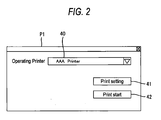
- Fig. 2 is a view showing an example of a print command screen
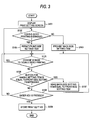
- Fig. 3 is a flowchart showing an example of print setting processing
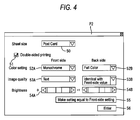
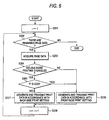
- Figs. 4 and 5 are views showing examples of a print setting screen
- Fig. 6 is a flowchart showing an example of print processing
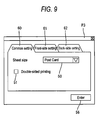
- Figs. 7 to 9 are views showing an example of a print setting screen according to a modification of the first exemplary embodiment
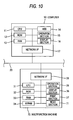
- Fig. 10 is a block diagram showing an example of an electrical configuration of a reading system according to a second exemplary embodiment of the present invention.
- Fig. 11 is a flowchart showing an example of read setting processing
- Fig. 12 is a view showing an example of a read setting screen.
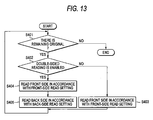
- Fig. 13 is a flowchart showing an example of read processing.
- FIG. 1 A first exemplary embodiment of the present invention will now be described by reference to Figs. 1 through 6 .
- Fig. 1 is a block diagram showing an example of an electrical configuration of a print system.
- the print system includes a computer 10 (an example of an information processing device) and a printer 30 (an example of an execution unit and an example of a printing device).
- the computer 10 comprises a Central Processing Unit (CPU) 11 (an example of a setting unit); a Read Only Memory (ROM) 12; a Random Access Memory (RAM) 13; a hard disk drive 14; an operation section 15 (an example of an operation unit) having a keyboard or a mouse, a pointing device, and the like; a display section 16 (an example of a display unit) having a liquid-crystal display, and the like; a network interface 17 coupled to a communication line 20; and others.
- Various programs such as an Operating System (OS), application software that enables the generation of print data, a printer driver for controlling the printer 30, and the like, are stored in the hard disk drive 14.
- OS Operating System
- the printer 30 (an example of a performance unit) comprises a CPU 31, ROM 32, RAM 33, Nonvolatile Random Access Memory (NVRAM) 34, an operation section 35, a display section 36, a print section 37, a network interface 38, and the like.
- Various programs for controlling operation of the printer 30 are stored in the ROM 32.
- the CPU 31 controls operation of the printer 30 while storing processing results into the RAM 33 and the NVRAM 34.
- the operation section 35 has a plurality of buttons and enables various input operations, such as inputting a command for starting to print.
- the display section 36 has a liquid-crystal display, a lamp, and the like; and can display various setting screens, an operating state of the printer 30, and the like.
- the print section 37 has a function of subjecting the front side and the back side of a recording medium, such as a sheet, to printing.
- the network interface 38 is coupled to an external computer 10, and the like, by way of the communication line 20 and can establish mutual data communication.
- Fig. 2 is a view showing an example of a print command screen P1
- Fig. 3 is a flowchart showing an example of print setting processing
- Figs. 4 and 5 are views showing examples of a print setting screen P2
- Fig. 6 is a flowchart showing an example of print processing.
- the CPU 11 When a print command is input in application software that handles an original, an image, and the like, by way of the operation section 15 of the computer 10, the CPU 11 causes the display section 16 to display; for instance, a print command screen P1, such as that shown in Fig. 2 .
- the print command screen P1 has a printer selection section 40 for selecting a printer to be used, a print setting button 41, and a print start button 42.
- the printer selection section 40 displays a list of names of printers compatible with printer drivers installed in the computer 10 and permits the selection of one of the printers as a working printer.
- the CPU 11 When the print setting button 41 is activated using the operation section 15 of the computer 10, the CPU 11 starts a printer driver corresponding to the printer selected by the printer selection section 40, thereby performing print setting processing corresponding to the printer driver corresponding to the selected working printer.
- the printer driver according to an exemplary embodiment of the present invention is started, the CPU 11 performs the print setting processing described in Fig. 3 .
- the CPU 11 first, for instance, displays a print setting screen P2, such as that shown in Fig. 4 , on the display section 16 (S101).
- the print setting screen P2 has fields for designating values of various setting items included in print conditions, such as a sheet size designation section 50, a double-sided print designation section 51, color designation sections 52A and 52B, image quality designation sections 53A and 53B, brightness designation sections 54A and 54B, and the like. Further, the print setting screen P2 is provided with a global command button 55 and an ENTER button 56.
- the printer driver includes, as setting items of print conditions, independent setting items that enable setting of different values for the front side and the back side when double-sided printing is performed.
- items pertaining to a color e.g., a number of colors
- image quality e.g., a resolution
- brightness e.g., a color adjustment
- Each of the color designation sections 52A and 52B, the image quality designation sections 53A and 53B, and the brightness designation sections 54A and 54B for designating values of the respective independent setting items is divided into a first field (indicated by a symbol A) for designating a set value used for printing the front side and a second field (indicated by a symbol B) for designating a set value used for printing the back side.
- the printer driver includes, as setting items of the print conditions, common setting items that enable setting of a single value for the front side and the back side at all times when double-sided printing is performed.
- the common setting items include items pertaining to a sheet size and items pertaining to double-sided printing.
- the sheet size designation section 50 for designating a sheet size is not divided into a front-side size and a back-side size; hence, a value common to both the front side and the back side can be globally designated.
- the double-sided print designation section 51 can designate whether to enable or disable double-sided printing (i.e., whether to perform double-sided printing or single-sided printing).
- the configuration of the print setting screen and the setting items of the print conditions are examples and can be changed as needed.
- items pertaining to an enlargement/reduction ratio, integrated printing, a watermark, and others may also be provided as independent setting items.
- items pertaining to, for instance, trays (e.g., a sheet feed tray and a sheet exit tray) used for stacking sheets in the printer 30, the number of prints, and confidential printing (e.g., secure printing), and the like may also be provided as the common setting items.
- the CPU 11 determines whether or not double-sided printing is enabled in the double-sided print designation section 51 (S102). If it is determined that double-sided printing remains disabled (No in S102), inputs pertaining to the respective back-side independent setting items are prohibited (S103) and processing continues to S105. As shown in Fig. 5 , the color designation section 52B, the image quality designation section 53B, the brightness designation section 54B, and the global command button 55 are displayed in a grayed out state. The CPU 11 enters a state of not accepting inputs to the designation sections 52B, 53B, and 54B and the global command button 55 from the operation section 15. Therefore, in a state where double-sided printing is disabled, values may be designated solely for front-side items among the independent setting items.
- the CPU 11 completes print setting processing performed by the printer driver, and closes the print setting screen P2 of the display section 16.
- the print start button 42 is activated on the print command screen P1
- the CPU 11 starts print processing shown in Fig. 6 using the printer driver selected by the printer selection section 40.
- the CPU 11 first sets to one a parameter "i" showing the number of print pages (S201). A determination is made as to whether or not unprinted pages are included in page data pertaining to a print target prepared by application software (S202). If it is determined that the unprinted pages are not included (No in S202), the processing ends. If it is determined that the unprinted pages are included (Yes in S202), page data pertaining to one page are acquired from the application software (S203).
- the thus-generated print data are data that are prepared by converting page data pertaining to a print target into, for instance, a printer description language (PDL) format, and that include setting information about print conditions as well as image data.
- PDL printer description language
- the printer 30 receives the print data transmitted from the computer 10 by way of the network interface 38, the print data are subjected to bitmap expansion under control of the CPU 31 of the printer 30, and the thus-expanded data are sent to the print section 37, where printing is performed. At this time, printing operation is performed in accordance with the setting information about print conditions included in the print data. When double-sided printing is set, printing is performed in accordance with the print conditions set respectively for the front side and the back side of the sheet.
- the print conditions include independent setting items that enable setting of different set values for the front side and the back side. Printing can be carried out in accordance with print conditions set respectively for the front side and the back side; hence, convenience is enhanced. Moreover, when compared with a case where printing is separately carried out while the print conditions are changed for each side, operation can be more simply performed.
- a related art printer subjects both the front side and the back side to double-sided printing with color settings.
- processing involves consumption of much time and/or an excessive amount of color ink as compared with a case where the back side is subjected to printing with monochrome settings; hence, cost increases. Since print conditions appropriate respectively for the print contents of the front side and print contents of the back side can be set, a processing time can be shortened and cost may be curtailed.
- Set values of the independent setting items for the front side and set values of the independent setting items for the back side are displayed on a single screen; namely, the print setting screen P2. Therefore, it is easier to ascertain a setting status by comparing both the setting values with each other.
- Items such as the number of colors, a resolution, color adjustment, enlargement and reduction ratios, integrated printing, and a watermark, are taken as independent setting items, thereby making it possible to set different values for the front side and the back side. As a result, printing can be performed under conditions appropriate respectively for print contents of the front side and print contents of the back side.
- the print setting screen displayed on the display section 16 can also be configured as shown in Figs. 7 through 9 .
- a print setting screen P3 has three tabs 60 to 62 (display screens), and the CPU 11 displays one of the tabs by switching the three tabs 60 to 62 pursuant to a command from the operation section 15.
- the tab 60 is provided with designation sections for setting the common setting items (e.g., the sheet size designation section 50 and the double-sided print designation section 51); the tab 61 is provided with designation sections for setting the front-side independent setting items (the color designation section 52A, the image quality designation section 53A, the brightness designation section 54A, and the like); and the tab 62 is provided with the back-side independent setting items (the color designation section 52B, the image quality designation section 53B, and the brightness designation section 54B).
- the tab 62 is displayed as grayed out and in a state of not accepting inputs for the back-side independent setting items (the color designation section 52B, the image quality designation section 53B, and the brightness designation section 54B) from the operation section 15.
- the common setting items are displayed on a screen differing from the screen on which the front-side and back-side independent setting items are displayed. Therefore, it is easier to grasp the common setting items as items whose functions differ from functions of the independent setting items.
- FIG. 10 is a block diagram showing an example of an electrical configuration of a reading system having the computer 10 and a multifunction machine 70.
- Fig. 11 is a flowchart showing an example of read setting processing;
- Fig. 12 is a view showing an example of a read setting screen; and
- Fig. 13 is a flowchart showing read processing.
- the multifunction machine 70 is realized by addition of a read section 71 to the printer 30 of the first exemplary embodiment and is analogous to the printer of the first exemplary embodiment, in other respects, in terms of a configuration. Configurational elements identical with those of the first exemplary embodiment are assigned the same reference numerals, and their explanations are omitted.
- a read section 71 has a tray (not shown) that enables inputting of a plurality of originals; conveys the originals set on the tray one at a time; and reads the originals, to thus acquire image data pertaining to the respective originals.
- the read section 71 can perform an operation for reading only the front side of an original and an operation for reading both the front side and the back side of an original. At the time of a double-sided reading operation, the original is read in sequence of the front side and the back side.
- Application software compatible with TWAIN and a scanner driver for causing the printer 30 to perform network scan are stored in the hard disk drive 14 of the computer 10.
- An original is set on the read section 71 of the multifunction machine 70 and a command for invoking the scanner driver is input by way of the operation section 15 and by means of TWAIN-compatible application software executed by the computer 10, whereupon the CPU 11 starts the scanner driver, to thus commence read setting processing shown in Fig. 11 .
- the CPU 11 first displays a read setting screen P4, such as that shown in Fig. 12 , on the display section 16 (S301).
- the read setting screen P4 has fields for designating values to be set on various setting items included in read conditions, such as a document size designation section 80, a double-sided read designation section 81, color designation sections 82A and 82B, image quality designation sections 83A and 83B, and brightness designation sections 84A and 84B.
- the read setting screen P4 is additionally provided with a global command button 85 and a read start button 86.
- the read conditions include independent setting items that enable setting of different values for the front side and the back side when double-sided reading is performed and common setting items that enable setting of the same values for the front side and the back side at all times.
- items pertaining to colors e.g., a number of colors
- image quality e.g., a resolution
- brightness e.g., a color adjustment
- Each of the color designation sections 82A and 82B, the image quality designation sections 83A and 83B, and the brightness designation sections 84A and 84B corresponding to the respective items is divided into a front-side field and a back-side field.
- items pertaining to an original size and items pertaining to double-sided reading are available as common setting items.
- the original size designation section 80 for setting an original size is not divided into a front-side designation section and a back-side designation section, and hence a value common to both the front side and the back side can be globally designated.
- the double-sided read designation section 81 can designate whether to enable or disable double-sided reading (whether to perform double-sided reading or single-sided reading).
- the CPU 11 determines whether or not double-sided reading is enabled in the double-sided reading designation section 81 (S302). If it is determined that double-sided reading is disabled (No in S302), inputs pertaining to the respective back-side independent setting items are prohibited (S303), and processing proceeds to S305.
- the color designation section 82B, the image quality designation section 83B, the brightness designation section 84B, and the global command button 85 are displayed in a grayed out state at this time, and the CPU 11 is in a state of not accepting inputs for these designation sections 82B, 83B, and 84B and the global command button 85 from the operation section 15.
- the multifunction machine 70 Upon receipt of the read command by way of the network interface 38, the multifunction machine 70 starts read processing shown in Fig. 13 under control of the CPU 31.
- the CPU 31 first determines whether or not originals are present on the tray of the read section 71 (S401). If it is determined that no originals are present on the tray (No in S401), the process ends. On the other hand, if it is determined that originals are present (Yes in S401), a determination is made as to whether or not double-sided reading in the read command is set in an enabled position (S402).
- the CPU 11 waits for receiving image data after completion of read setting processing.
- image data are received, contents of the image data are displayed by means of the TWAIN-compatible application software.
- the read conditions include independent setting items that enable setting of different set values for the front side and the back side. Since reading can be performed in accordance with the read conditions set respectively for the front side and the back side, convenience is enhanced. Moreover, when compared with the case where reading is separately performed by changing read conditions for each side, operation can be readily performed.
- a system that performs printing and reading by way of a network is provided.
- the present inventive concept can also be applied to a single printer or a single reader.
- the printer (multifunction machine) 70 shown in Fig. 10 when data acquired as a result of the read section 71 reading an original are printed or when data read from an external storage medium, such as USB memory, are printed, print conditions may be designated for the front side and the back side by use of the operation section 35 and the display section 36 under control of the CPU 31, thereby performing double-sided printing in accordance with the thus-set print conditions.
- the reading device (the multifunction machine) 70 of Fig. 10 may also allow designation of read conditions for the front side and the back side by use of the operation section 35 and the display section 36, to thus perform double-sided reading in accordance with the thus-set read conditions.
Landscapes
- Engineering & Computer Science (AREA)
- Theoretical Computer Science (AREA)
- Human Computer Interaction (AREA)
- Physics & Mathematics (AREA)
- General Engineering & Computer Science (AREA)
- General Physics & Mathematics (AREA)
- Multimedia (AREA)
- Signal Processing (AREA)
- Quality & Reliability (AREA)
- Accessory Devices And Overall Control Thereof (AREA)
- Facsimiles In General (AREA)
- Dot-Matrix Printers And Others (AREA)
- Control Or Security For Electrophotography (AREA)
Abstract
Description
- This application claims priority from Japanese Patent Application No.
2008-115671, filed on April 25, 2008 - Systems, devices, and computer readable media consistent with the present invention relate to reading and printing of double-sided media.
- Printing devices, such as a printer having a double-sided print function and a multifunction machine, have hitherto been known. When printing is performed by such a printing device, a user specifies various print conditions by way of; for instance, a computer, and commands printing. Then, a printer driver generates print data in accordance with the specified print conditions; the print data are supplied to the printing device; and printing is performed. Print conditions include items; for instance, color/monochrome (and/or a number of colors), a resolution, an enlargement/reduction ratio, and the like. At the time of double-sided printing, the front side and the back side of a recording medium are printed using the same print conditions.
- Additionally, a printing device having a function of reading both the front side and the back side of an original to acquire image data is also known. When double-sided reading is performed by such a reader, the user specifies various read conditions, and the front side and the back side of the original are read using the same read conditions (see
JP-A-10-222328 - Illustrative aspects of the present invention seek to enhance the convenience when double-sided printing or double-sided reading is performed.
- According to an illustrative aspect of the present invention, there is provided an image processing system comprising: an operation unit which inputs commands; a setting unit which performs setting processing for setting, in accordance with commands input from the operation unit, a performance condition comprising an independent setting item, the independent setting item comprising a first field and a second field for setting different values, respectively, for the front side and the back side of a sheet material; and a performance unit which performs printing or reading the front side and the back side of the sheet material in accordance with the performance condition set by the setting unit.
- According to another illustrative aspect of the present invention, there is provided a computer readable medium storing a printer driver for configuring a printing device, the printer driver comprising an acquisition module and a print module. The acquisition module acquiring a value of a print condition comprising an independent setting item that enables independent setting of different values respectively for the front side and the back side of a sheet material. The print module generating print data for causing the printing device to perform double-sided printing in accordance with the set value of the print condition.
- According to another illustrative aspect of the present invention, there is provided a computer readable medium storing a scanner driver for configuring an information processing device, the scanner driver comprising an acquisition module and a scan module. The acquisition module acquiring a value of a read condition comprising an independent setting item that enables independent setting of different values respectively for the front side and the back side of a sheet material. The scan module generating a read command for causing the reading device to read the front side and the back side of the sheet material in accordance with the acquired value of the read condition.
- According to another illustrative aspect of the present invention, there is provided a printing device comprising: a print unit that performs double-sided printing on a sheet material; an operation unit that inputs commands; a setting unit that performs, in accordance with a command input to the operation unit, processing for setting a print condition comprising an independent setting item, the independent setting item comprising a first field and a second field for setting different values, respectively, for the front side and the back side of a sheet material; and a control unit that controls the print unit to perform double-sided printing in accordance with the print condition set by the setting unit.
- According to another illustrative aspect of the present invention, there is provided a reading device comprising: a read unit that acquires image data by reading front and back sides of a sheet material; an operation unit that inputs a command; a setting unit that performs, in accordance with a command input to the operation unit, processing for setting the read condition comprising an independent setting item, the independent setting item comprising a first field and a second field for setting different values, respectively, for the front side and the back side of a sheet material; and a control unit that controls the read unit to read the front and back sides of a sheet material in accordance with the read condition set by the setting unit.
- According to the above configuration, conditions for performing printing or reading operation include an independent setting item that enables setting of different set values respectively for the front side and the back side, and printing or reading can be performed in accordance with performance conditions set respectively for the front side and the back side of a sheet, and hence convenience is enhanced. Moreover, as compared with a case where printing or reading is separately performed by changing the performance conditions for each side, operation can be readily performed.
-
Fig. 1 is a block diagram showing an example of an electrical configuration of a print system according to a first exemplary embodiment of the present invention; -
Fig. 2 is a view showing an example of a print command screen; -
Fig. 3 is a flowchart showing an example of print setting processing; -
Figs. 4 and5 are views showing examples of a print setting screen; -
Fig. 6 is a flowchart showing an example of print processing; -
Figs. 7 to 9 are views showing an example of a print setting screen according to a modification of the first exemplary embodiment; -
Fig. 10 is a block diagram showing an example of an electrical configuration of a reading system according to a second exemplary embodiment of the present invention; -
Fig. 11 is a flowchart showing an example of read setting processing; -
Fig. 12 is a view showing an example of a read setting screen; and -
Fig. 13 is a flowchart showing an example of read processing. - A first exemplary embodiment of the present invention will now be described by reference to
Figs. 1 through 6 . -
Fig. 1 is a block diagram showing an example of an electrical configuration of a print system. The print system includes a computer 10 (an example of an information processing device) and a printer 30 (an example of an execution unit and an example of a printing device). - The
computer 10 comprises a Central Processing Unit (CPU) 11 (an example of a setting unit); a Read Only Memory (ROM) 12; a Random Access Memory (RAM) 13; ahard disk drive 14; an operation section 15 (an example of an operation unit) having a keyboard or a mouse, a pointing device, and the like; a display section 16 (an example of a display unit) having a liquid-crystal display, and the like; anetwork interface 17 coupled to acommunication line 20; and others. Various programs, such as an Operating System (OS), application software that enables the generation of print data, a printer driver for controlling theprinter 30, and the like, are stored in thehard disk drive 14. - The printer 30 (an example of a performance unit) comprises a
CPU 31,ROM 32,RAM 33, Nonvolatile Random Access Memory (NVRAM) 34, anoperation section 35, adisplay section 36, aprint section 37, anetwork interface 38, and the like. Various programs for controlling operation of theprinter 30 are stored in theROM 32. In accordance with a program read from theROM 32, theCPU 31 controls operation of theprinter 30 while storing processing results into theRAM 33 and theNVRAM 34. - The
operation section 35 has a plurality of buttons and enables various input operations, such as inputting a command for starting to print. Thedisplay section 36 has a liquid-crystal display, a lamp, and the like; and can display various setting screens, an operating state of theprinter 30, and the like. Theprint section 37 has a function of subjecting the front side and the back side of a recording medium, such as a sheet, to printing. Thenetwork interface 38 is coupled to anexternal computer 10, and the like, by way of thecommunication line 20 and can establish mutual data communication. - Operations performed when the
printer 30 performs printing under control of thecomputer 10 will now be described.Fig. 2 is a view showing an example of a print command screen P1, andFig. 3 is a flowchart showing an example of print setting processing.Figs. 4 and5 are views showing examples of a print setting screen P2, andFig. 6 is a flowchart showing an example of print processing. - When a print command is input in application software that handles an original, an image, and the like, by way of the
operation section 15 of thecomputer 10, theCPU 11 causes thedisplay section 16 to display; for instance, a print command screen P1, such as that shown inFig. 2 . The print command screen P1 has aprinter selection section 40 for selecting a printer to be used, aprint setting button 41, and aprint start button 42. Theprinter selection section 40 displays a list of names of printers compatible with printer drivers installed in thecomputer 10 and permits the selection of one of the printers as a working printer. - When the
print setting button 41 is activated using theoperation section 15 of thecomputer 10, theCPU 11 starts a printer driver corresponding to the printer selected by theprinter selection section 40, thereby performing print setting processing corresponding to the printer driver corresponding to the selected working printer. When the printer driver according to an exemplary embodiment of the present invention is started, theCPU 11 performs the print setting processing described inFig. 3 . - The
CPU 11 first, for instance, displays a print setting screen P2, such as that shown inFig. 4 , on the display section 16 (S101). The print setting screen P2 has fields for designating values of various setting items included in print conditions, such as a sheetsize designation section 50, a double-sidedprint designation section 51,color designation sections quality designation sections brightness designation sections global command button 55 and anENTER button 56. - The printer driver includes, as setting items of print conditions, independent setting items that enable setting of different values for the front side and the back side when double-sided printing is performed. In the first exemplary embodiment, items pertaining to a color (e.g., a number of colors), image quality (e.g., a resolution), and brightness (e.g., a color adjustment) are available as independent setting items. Each of the
color designation sections quality designation sections brightness designation sections - The printer driver includes, as setting items of the print conditions, common setting items that enable setting of a single value for the front side and the back side at all times when double-sided printing is performed. In the first exemplary embodiment, the common setting items include items pertaining to a sheet size and items pertaining to double-sided printing. The sheet
size designation section 50 for designating a sheet size is not divided into a front-side size and a back-side size; hence, a value common to both the front side and the back side can be globally designated. The double-sidedprint designation section 51 can designate whether to enable or disable double-sided printing (i.e., whether to perform double-sided printing or single-sided printing). - The configuration of the print setting screen and the setting items of the print conditions are examples and can be changed as needed. In addition, for instance, items pertaining to an enlargement/reduction ratio, integrated printing, a watermark, and others, may also be provided as independent setting items. In addition, items pertaining to, for instance, trays (e.g., a sheet feed tray and a sheet exit tray) used for stacking sheets in the
printer 30, the number of prints, and confidential printing (e.g., secure printing), and the like, may also be provided as the common setting items. - In the
color designation section 52B and the imagequality designation section 53B for designating values of back-side independent setting items, it is possible to select a command (displayed as "identical with a front-side value") for holding a value equal to a corresponding value of the front-side independent setting item (a value of thecolor designation section 52A and a value of the imagequality designation section 53A, respectively) in place of the set value. Specifically, for instance, when the value of the front-side imagequality designation section 53A is "text" and when "identical with a front-side value" is designated on the back-side imagequality designation section 53B, a setting identical with the setting achieved at the time of designation of "text" is set. When the value of the front-side imagequality designation section 53A is changed to "photo" from text, a setting identical with the setting achieved at the time of designation of "photo" is set, without making a change to the value in the back-side imagequality designation section 53B. - After displaying the print setting screen P2 in S101 of
Fig. 3 , theCPU 11 determines whether or not double-sided printing is enabled in the double-sided print designation section 51 (S102). If it is determined that double-sided printing remains disabled (No in S102), inputs pertaining to the respective back-side independent setting items are prohibited (S103) and processing continues to S105. As shown inFig. 5 , thecolor designation section 52B, the imagequality designation section 53B, thebrightness designation section 54B, and theglobal command button 55 are displayed in a grayed out state. TheCPU 11 enters a state of not accepting inputs to thedesignation sections global command button 55 from theoperation section 15. Therefore, in a state where double-sided printing is disabled, values may be designated solely for front-side items among the independent setting items. - On the other hand, if it is determined that double-sided printing is enabled (Yes in S102), inputs pertaining to the respective back-side independent setting items are permitted in S102 (S104). Thereby, all of the
color designation sections quality designation sections brightness designation sections operation section 15. - It is then determined whether or not a change has been made to a value of the double-sided
print designation section 15 in S105. If it is determine that a change is made to the value of the double-sided print designation section 15 (Yes in S105), processing returns to S102, where the input pertaining to the respective back-side independent setting item is switched between an input-permitted state and an input-prohibited state, in accordance with the nature of the changed value. - If it is determined that a change has not been made to a value of the double-sided print designation section 15 (No in S105), it is then determined whether the button for making a setting item equal to the front-side setting item is pressed in S106. If it is determined that the
global command button 55 is clicked (Yes in S106), values of the plurality of back-side independent setting items are globally made equal to corresponding values of front-side independent setting items (S107), and processing returns to S105. Specifically, when theglobal command button 55 is clicked while the front-side value of thecolor designation section 52A is set to "monochrome," the value of the front-side imagequality designation section 53A is set to "text," the value of the back-sidecolor designation section 52B is set to "full color," and the value of the back-side imagequality designation section 53B is set to "a value equal to a front-side value," the value of the back-sidecolor designation section 52B is changed to "monochrome" along with a display, and the value of the imagequality designation section 53B is changed to "text." There may also be adopted a configuration in which, when theglobal command button 55 is clicked, a plurality of back-side independent setting items assume "values equal to front-side values." - If it is determined that the
global command button 55 is not clicked (No in S106), then it is determined whether theENTER button 56 is pressed at S108. If it is determined that theENTER button 56 is not clicked (No in S108), the process returns to S105. On the other hand, if it is determined that theENTER button 56 is clicked (Yes in S108), the values designated in connection with therespective designation sections 50 to 54 are stored as set values of print conditions in the RAM 13 (S109), and the process ends. Thus, theCPU 11 completes print setting processing performed by the printer driver, and closes the print setting screen P2 of thedisplay section 16. When theprint start button 42 is activated on the print command screen P1, theCPU 11 starts print processing shown inFig. 6 using the printer driver selected by theprinter selection section 40. - The
CPU 11 first sets to one a parameter "i" showing the number of print pages (S201). A determination is made as to whether or not unprinted pages are included in page data pertaining to a print target prepared by application software (S202). If it is determined that the unprinted pages are not included (No in S202), the processing ends. If it is determined that the unprinted pages are included (Yes in S202), page data pertaining to one page are acquired from the application software (S203). - Subsequently, a determination is made whether double sided printing is enabled at S204. If it is determined that a setting of double-sided printing is enabled (Yes in S204), a determination is made whether the value of the parameter "i" is odd in S205. If it is determined that the double sided printing is not enabled (No in S204) or if it is determined that the number of print pages "i" is odd (Yes in S205), print data are generated in the
RAM 13 in accordance with the set front-side print conditions, and the print data are transmitted to theprinter 30 by way of the network interface 17 (S206). The thus-generated print data are data that are prepared by converting page data pertaining to a print target into, for instance, a printer description language (PDL) format, and that include setting information about print conditions as well as image data. - If it is determined that double-sided printing is set in an enabled state (Yes in S204) and that the number of print pages "i" is even (No in S205), print data are generated from the set back-side print conditions, and the print data are transmitted to the printer 30 (S207). After having transmitted the print data in S206 or S207, the
CPU 11 increments the number of print pages "i" by one and returns to S202, where the processing is iterated. Thereby, when double-sided printing is designated, front-side print data based on the front-side print settings and back-side print data based on the back-side print settings are alternately transmitted. In S202, if it is determined that print data are generated or transmitted in connection with page data pertaining to all print targets (No in S202), theCPU 11 completes print processing performed by the printer driver. - Accordingly, when the
printer 30 receives the print data transmitted from thecomputer 10 by way of thenetwork interface 38, the print data are subjected to bitmap expansion under control of theCPU 31 of theprinter 30, and the thus-expanded data are sent to theprint section 37, where printing is performed. At this time, printing operation is performed in accordance with the setting information about print conditions included in the print data. When double-sided printing is set, printing is performed in accordance with the print conditions set respectively for the front side and the back side of the sheet. - In the print system according to the first exemplary embodiment of the present invention, the print conditions include independent setting items that enable setting of different set values for the front side and the back side. Printing can be carried out in accordance with print conditions set respectively for the front side and the back side; hence, convenience is enhanced. Moreover, when compared with a case where printing is separately carried out while the print conditions are changed for each side, operation can be more simply performed.
- For instance, when a color image is desired to be printed on the front side of a sheet and when a monochrome (black) image is desired to be printed on the back side, a related art printer subjects both the front side and the back side to double-sided printing with color settings. However, when printing is performed in this way, processing involves consumption of much time and/or an excessive amount of color ink as compared with a case where the back side is subjected to printing with monochrome settings; hence, cost increases. Since print conditions appropriate respectively for the print contents of the front side and print contents of the back side can be set, a processing time can be shortened and cost may be curtailed.
- At the time of processing for setting print conditions, it is possible to input a command for holding set values of the independent setting items for the back side (the
color designation section 52B and the imagequality designation section 53B) equal to corresponding set values of the independent setting items for the front side. When the set values of the independent setting items for the front side and the set values of the independent setting items for the back side are matched to each other, the set values for one side synchronously becomes equal to the set values for the other side by inputting the command. Therefore, it becomes unnecessary to be aware of the set values for one side, and operation for setting print conditions becomes facilitated. - It is also possible to issue a global command for globally making set values of the plurality of independent setting items pertaining to the back side (the
color designation sections 52B, the imagequality designation section 53B, and thebrightness designation section 54B) equal to corresponding set values of the front side.
Hence, the set values of both front and back sides can be more simply made equal to each other. - When performance of single-sided printing is selected as the print conditions, inputs pertaining to set values of independent setting items pertaining to the back side that is not subjected to processing (the
color designation section 52B, the imagequality designation section 53B, and thebrightness designation section 54B) are not accepted. Accordingly, an opportunity for mistake, which would otherwise be caused during setting operation, can be prevented. - Set values of the independent setting items for the front side and set values of the independent setting items for the back side are displayed on a single screen; namely, the print setting screen P2. Therefore, it is easier to ascertain a setting status by comparing both the setting values with each other.
- Further, it is possible to globally input set values of the common setting items that assume the same values for both the front side and the back side (the sheet
size designation section 50 and the double-sided print designation section 51). Hence, as compared with the case where the set values are separately input, setting operation becomes facilitated. - Items that would cause problems when assuming different set values for the front side and the back side, such as the size of a recording medium like a sheet, a tray, the number of prints, and confidential printing, are taken as common setting items, thereby preventing occurrence of inconvenience, which would otherwise be caused by discrepancy between the set values for the front side and the set values for the back side.
- Items, such as the number of colors, a resolution, color adjustment, enlargement and reduction ratios, integrated printing, and a watermark, are taken as independent setting items, thereby making it possible to set different values for the front side and the back side. As a result, printing can be performed under conditions appropriate respectively for print contents of the front side and print contents of the back side.
- In print setting processing, the print setting screen displayed on the
display section 16 can also be configured as shown inFigs. 7 through 9 . A print setting screen P3 has threetabs 60 to 62 (display screens), and theCPU 11 displays one of the tabs by switching the threetabs 60 to 62 pursuant to a command from theoperation section 15. - The
tab 60 is provided with designation sections for setting the common setting items (e.g., the sheetsize designation section 50 and the double-sided print designation section 51); thetab 61 is provided with designation sections for setting the front-side independent setting items (thecolor designation section 52A, the imagequality designation section 53A, thebrightness designation section 54A, and the like); and thetab 62 is provided with the back-side independent setting items (thecolor designation section 52B, the imagequality designation section 53B, and thebrightness designation section 54B). When double-sided printing is disabled as shown inFig. 9 , thetab 62 is displayed as grayed out and in a state of not accepting inputs for the back-side independent setting items (thecolor designation section 52B, the imagequality designation section 53B, and thebrightness designation section 54B) from theoperation section 15. - As mentioned above, according to the modification of the first exemplary embodiment, the common setting items are displayed on a screen differing from the screen on which the front-side and back-side independent setting items are displayed. Therefore, it is easier to grasp the common setting items as items whose functions differ from functions of the independent setting items.
- A second exemplary embodiment of the present invention will now be described by reference to
Figs. 10 to 12 .Fig. 10 is a block diagram showing an example of an electrical configuration of a reading system having thecomputer 10 and amultifunction machine 70.Fig. 11 is a flowchart showing an example of read setting processing;Fig. 12 is a view showing an example of a read setting screen; andFig. 13 is a flowchart showing read processing. - The
multifunction machine 70 is realized by addition of aread section 71 to theprinter 30 of the first exemplary embodiment and is analogous to the printer of the first exemplary embodiment, in other respects, in terms of a configuration. Configurational elements identical with those of the first exemplary embodiment are assigned the same reference numerals, and their explanations are omitted. Aread section 71 has a tray (not shown) that enables inputting of a plurality of originals; conveys the originals set on the tray one at a time; and reads the originals, to thus acquire image data pertaining to the respective originals. Theread section 71 can perform an operation for reading only the front side of an original and an operation for reading both the front side and the back side of an original. At the time of a double-sided reading operation, the original is read in sequence of the front side and the back side. - Application software compatible with TWAIN and a scanner driver for causing the
printer 30 to perform network scan are stored in thehard disk drive 14 of thecomputer 10. An original is set on theread section 71 of themultifunction machine 70 and a command for invoking the scanner driver is input by way of theoperation section 15 and by means of TWAIN-compatible application software executed by thecomputer 10, whereupon theCPU 11 starts the scanner driver, to thus commence read setting processing shown inFig. 11 . - The
CPU 11 first displays a read setting screen P4, such as that shown inFig. 12 , on the display section 16 (S301). The read setting screen P4 has fields for designating values to be set on various setting items included in read conditions, such as a documentsize designation section 80, a double-sidedread designation section 81,color designation sections quality designation sections brightness designation sections global command button 85 and aread start button 86. - In the scanner driver, the read conditions include independent setting items that enable setting of different values for the front side and the back side when double-sided reading is performed and common setting items that enable setting of the same values for the front side and the back side at all times. In the second exemplary embodiment, items pertaining to colors (e.g., a number of colors), image quality (e.g., a resolution), and brightness (e.g., a color adjustment) are available as independent setting items. Each of the
color designation sections quality designation sections brightness designation sections - In the second exemplary embodiment, items pertaining to an original size and items pertaining to double-sided reading are available as common setting items. The original
size designation section 80 for setting an original size is not divided into a front-side designation section and a back-side designation section, and hence a value common to both the front side and the back side can be globally designated. Further, the double-sidedread designation section 81 can designate whether to enable or disable double-sided reading (whether to perform double-sided reading or single-sided reading). - After displaying the read setting screen P4 in S301 of
Fig. 11 , theCPU 11 determines whether or not double-sided reading is enabled in the double-sided reading designation section 81 (S302). If it is determined that double-sided reading is disabled (No in S302), inputs pertaining to the respective back-side independent setting items are prohibited (S303), and processing proceeds to S305. Thecolor designation section 82B, the imagequality designation section 83B, thebrightness designation section 84B, and theglobal command button 85 are displayed in a grayed out state at this time, and theCPU 11 is in a state of not accepting inputs for thesedesignation sections global command button 85 from theoperation section 15. - On the other hand, if it is determined that double-sided reading is enabled (Yes in S302), inputs for the respective back-side independent setting items are permitted (S304).
- It is then determined whether a change is made to double sided reading in S305. If it is determined that a change is made to the value of the double-sided reading designation section 81 (Yes in S305), processing returns to S302, and inputs for the respective back-side independent setting items are switched between an input-permitted state and an input-prohibited state in accordance with the nature of the changed value. If it is determined that a change is not made to the value of the double-sided reading designation section 81 (No in S305), it is determined whether the button for making a setting item equal to a front-side setting item is pressed in S306. If it is determined that the
global command button 85 is clicked (Yes in S306), values of the respective back-side independent setting items are globally made equal to values for corresponding front-side independent setting items (S307), and processing returns to S305. - A determination is then made whether a scan start button is pressed in S308. If it is determined that the
scan start button 86 is clicked (Yes in S308), theCPU 11 generates a read command including the values designated by therespective designation sections 80 to 84B as set information, and the read command is transmitted to themultifunction machine 70 by way of the network interface 17 (S309), and read setting processing is completed. If it is determined that thescan start button 86 is not clicked (No in S308), the process returns to S305. - Upon receipt of the read command by way of the
network interface 38, themultifunction machine 70 starts read processing shown inFig. 13 under control of theCPU 31. TheCPU 31 first determines whether or not originals are present on the tray of the read section 71 (S401). If it is determined that no originals are present on the tray (No in S401), the process ends. On the other hand, if it is determined that originals are present (Yes in S401), a determination is made as to whether or not double-sided reading in the read command is set in an enabled position (S402). - If it is determined that double-sided reading is disabled (No in S402), only the front side of an original is read in accordance with front-side read conditions included in the read command (S403), and acquired image data are transmitted to the
computer 10 by way of thenetwork interface 38. On the other hand, if it is determined that double-sided reading is enabled (Yes in S402), the front side of the original is first read in accordance with settings of the front-side read conditions included in the read command (S404). Subsequently, the back side of the original is read in accordance with the setting of the back-side read conditions (S405), and the thus-acquired image data are sequentially transmitted to thecomputer 10. - After reading has been performed in S403 or S405, processing returns to S401, and similar processing is iterated until originals on the tray become empty. When the originals on the tray have become empty (No in S401), reading processing is completed.
- In the
computer 10, theCPU 11 waits for receiving image data after completion of read setting processing. When image data are received, contents of the image data are displayed by means of the TWAIN-compatible application software. - As mentioned above, according to the second exemplary embodiment, the read conditions include independent setting items that enable setting of different set values for the front side and the back side. Since reading can be performed in accordance with the read conditions set respectively for the front side and the back side, convenience is enhanced. Moreover, when compared with the case where reading is separately performed by changing read conditions for each side, operation can be readily performed.
- The present invention is not limited to the exemplary embodiments described. For instance, exemplary embodiments, such as those provided below, also fall within the technical scope of the present invention, and are included in the appended claims.
- For example, in the exemplary embodiments described above, a system that performs printing and reading by way of a network is provided. However, the present inventive concept can also be applied to a single printer or a single reader. Specifically, in, for instance, the printer (multifunction machine) 70 shown in
Fig. 10 , when data acquired as a result of theread section 71 reading an original are printed or when data read from an external storage medium, such as USB memory, are printed, print conditions may be designated for the front side and the back side by use of theoperation section 35 and thedisplay section 36 under control of theCPU 31, thereby performing double-sided printing in accordance with the thus-set print conditions. Likewise, under control of theCPU 31, the reading device (the multifunction machine) 70 ofFig. 10 may also allow designation of read conditions for the front side and the back side by use of theoperation section 35 and thedisplay section 36, to thus perform double-sided reading in accordance with the thus-set read conditions.
Claims (14)
- An image processing system comprising:an operation unit which inputs commands;a setting unit which performs setting processing for setting, in accordance with commands input from the operation unit, a performance condition comprising an independent setting item, the independent setting item comprising a first field and a second field for setting different values, respectively, for the front side and the back side of a sheet material; anda performance unit which performs printing or reading the front side and the back side of the sheet material in accordance with the performance condition set by the setting unit.
- The image processing system according to claim 1, wherein the operation unit comprises a keyboard and a mouse.
- The image processing system according to claim 1, wherein the operation unit sends to the setting unit, at a time of the setting processing, a command for setting one of the first field and the second field of the independent setting item equal to the other of the first field and the second field.
- The image processing system according any one of claims 1 to 3, wherein the performance condition comprises a plurality of independent setting items; andthe operation unit sends to the setting unit a global command for globally setting the first field of each one of the plurality of independent setting items equal to the corresponding second field of the independent setting item, or vice versa.
- The image processing system according to any one of claims 1 to 4, wherein the performance unit performs double-sided processing for processing both sides of the sheet material or single-sided processing for processing only one side of the sheet material;the operation unit inputs a command for performing either double-sided processing or single-sided processing; andthe setting unit sets the performance condition for both the front and back sides at the time of setting processing when the command indicates that double-sided processing is to be performed, and sets the performance condition for a side to be processed but not for a side not to be processed when the command indicates that single-sided processing is to be performed.
- The image processing system according to any one of claims 1 to 5, further comprising:a display unit, whereinthe setting unit displays on a single screen of the display unit the first field and the second field of the independent setting item.
- The image processing system according to any one of claims 1 to 6, wherein the performance condition further comprises a common setting item for setting only a single value for both the front side and the back side; andthe operation unit inputs a command for globally setting the single value of the common setting item.
- The image processing system according to any one of claims 1 to 5, further comprising:a display unit, whereinthe performance condition comprises a common setting item for setting only a single value for both the front side and the back side;the operation unit inputs a command for globally setting the single value of the common setting item; andthe setting unit displays a plurality of setting screens, which are switchable according to a command from the operation unit, on the display unit at a time of the setting processing and displays the common setting item on a setting screen of the plurality of setting screens that differs from the setting screen on which the first field and the second field of the independent setting item are displayed.
- The image processing system according to claim 7 or 8, wherein the performance unit performs printing, andthe common setting item comprises at least one of a size of the sheet material, a tray on which the sheet material is stacked, a number of prints, and confidential printing.
- The image processing system according to any one of claims 1 to 9, wherein the performance unit performs printing, andthe independent setting item comprises at least one of a number of colors, a resolution, a color adjustment, an enlargement/reduction ratio, an integrated printing, and a watermark.
- A computer readable medium storing a printer driver for configuring a printing device, the printer driver comprising an acquisition module and a print module,the acquisition module acquiring a value of a print condition comprising an independent setting item that enables independent setting of different values respectively for the front side and the back side of a sheet material; andthe print module generating print data for causing the printing device to perform double-sided printing in accordance with the set value of the print condition.
- A computer readable medium storing a scanner driver for configuring an information processing device, the scanner driver comprising an acquisition module and a scan module,the acquisition module acquiring a value of a read condition comprising an independent setting item that enables independent setting of different values respectively for the front side and the back side of a sheet material; andthe scan module generating a read command for causing the reading device to read the front side and the back side of the sheet material in accordance with the acquired value of the read condition.
- A printing device comprising:a print unit that performs double-sided printing on a sheet material;an operation unit that inputs commands;a setting unit that performs, in accordance with a command input to the operation unit, processing for setting a print condition comprising an independent setting item, the independent setting item comprising a first field and a second field for setting different values, respectively, for the front side and the back side of a sheet material; anda control unit that controls the print unit to perform double-sided printing in accordance with the print condition set by the setting unit.
- A reading device comprising:a read unit that acquires image data by reading front and back sides of a sheet material;an operation unit that inputs a command;a setting unit that performs, in accordance with a command input to the operation unit, processing for setting the read condition comprising an independent setting item, the independent setting item comprising a first field and a second field for setting different values, respectively, for the front side and the back side of a sheet material; anda control unit that controls the read unit to read the front and back sides of a sheet material in accordance with the read condition set by the setting unit.
Applications Claiming Priority (1)
| Application Number | Priority Date | Filing Date | Title |
|---|---|---|---|
| JP2008115671A JP4596283B2 (en) | 2008-04-25 | 2008-04-25 | Image processing system, printer driver, scanner driver, printing apparatus, and reading apparatus |
Publications (2)
| Publication Number | Publication Date |
|---|---|
| EP2112590A2 true EP2112590A2 (en) | 2009-10-28 |
| EP2112590A3 EP2112590A3 (en) | 2010-09-15 |
Family
ID=40822911
Family Applications (1)
| Application Number | Title | Priority Date | Filing Date |
|---|---|---|---|
| EP09003884A Ceased EP2112590A3 (en) | 2008-04-25 | 2009-03-18 | Image processing system, printer driver, scanner driver, printing device, and reading device |
Country Status (4)
| Country | Link |
|---|---|
| US (1) | US8279473B2 (en) |
| EP (1) | EP2112590A3 (en) |
| JP (1) | JP4596283B2 (en) |
| CN (1) | CN101566935B (en) |
Families Citing this family (11)
| Publication number | Priority date | Publication date | Assignee | Title |
|---|---|---|---|---|
| CN101794234A (en) * | 2010-02-04 | 2010-08-04 | 中兴通讯股份有限公司 | Wireless data card, communication method between same and computer side and system thereof |
| CN102694936B (en) * | 2011-03-21 | 2014-09-03 | 山东新北洋信息技术股份有限公司 | Control method and apparatus for composite scanning device and composite scanning system |
| JP5732954B2 (en) * | 2011-03-25 | 2015-06-10 | セイコーエプソン株式会社 | Printing system and printer driver |
| CN104339841B (en) * | 2013-08-06 | 2016-09-21 | 北大方正集团有限公司 | Printed on both sides parameter generates method, double-sided printing process, Apparatus and system |
| JP6257307B2 (en) * | 2013-12-18 | 2018-01-10 | キヤノン株式会社 | Information processing method and paper size setting method |
| JP6561855B2 (en) * | 2016-01-20 | 2019-08-21 | セイコーエプソン株式会社 | Electronic equipment, electronic equipment control program |
| US10194038B2 (en) * | 2016-09-15 | 2019-01-29 | Ricoh Company, Ltd. | Information processing apparatus, information processing method, and information processing system |
| JP7419048B2 (en) * | 2019-12-11 | 2024-01-22 | キヤノン株式会社 | image forming device |
| JP7898888B2 (en) * | 2022-03-25 | 2026-08-03 | キヤノン株式会社 | Image forming apparatus, inspection apparatus, information processing method, inspection system, and program |
| US12143552B1 (en) | 2023-11-13 | 2024-11-12 | Ricoh Company, Ltd. | Print scaling correction mechanism |
| CN119603405B (en) * | 2024-11-29 | 2026-06-26 | 广州众诺微电子有限公司 | Imaging chips, imaging methods and imaging devices |
Citations (2)
| Publication number | Priority date | Publication date | Assignee | Title |
|---|---|---|---|---|
| JPH10222328A (en) | 1997-02-12 | 1998-08-21 | Fuji Xerox Co Ltd | Printing condition specification device |
| WO2008117807A1 (en) * | 2007-03-26 | 2008-10-02 | Canon Kabushiki Kaisha | Print control device and method |
Family Cites Families (8)
| Publication number | Priority date | Publication date | Assignee | Title |
|---|---|---|---|---|
| JP3661308B2 (en) | 1996-10-11 | 2005-06-15 | 富士ゼロックス株式会社 | Image forming apparatus |
| JP2000221749A (en) | 1999-02-02 | 2000-08-11 | Minolta Co Ltd | Image forming device |
| JP2003107842A (en) | 2001-09-27 | 2003-04-09 | Konica Corp | Image forming device |
| JP2003223033A (en) | 2002-01-30 | 2003-08-08 | Canon Inc | Color image forming equipment |
| JP4165868B2 (en) * | 2002-12-17 | 2008-10-15 | キヤノン株式会社 | Printing control method and apparatus |
| JP2005186335A (en) * | 2003-12-24 | 2005-07-14 | Konica Minolta Business Technologies Inc | Image forming apparatus |
| JP2006091141A (en) | 2004-09-21 | 2006-04-06 | Konica Minolta Business Technologies Inc | Color image forming apparatus and color image forming method |
| JP2007200304A (en) * | 2005-12-28 | 2007-08-09 | Brother Ind Ltd | Information processing apparatus, information processing method, and program |
-
2008
- 2008-04-25 JP JP2008115671A patent/JP4596283B2/en active Active
-
2009
- 2009-03-18 EP EP09003884A patent/EP2112590A3/en not_active Ceased
- 2009-03-20 US US12/408,079 patent/US8279473B2/en not_active Expired - Fee Related
- 2009-03-26 CN CN200910129845.XA patent/CN101566935B/en not_active Expired - Fee Related
Patent Citations (2)
| Publication number | Priority date | Publication date | Assignee | Title |
|---|---|---|---|---|
| JPH10222328A (en) | 1997-02-12 | 1998-08-21 | Fuji Xerox Co Ltd | Printing condition specification device |
| WO2008117807A1 (en) * | 2007-03-26 | 2008-10-02 | Canon Kabushiki Kaisha | Print control device and method |
Also Published As
| Publication number | Publication date |
|---|---|
| JP2009266002A (en) | 2009-11-12 |
| US20090268237A1 (en) | 2009-10-29 |
| EP2112590A3 (en) | 2010-09-15 |
| CN101566935A (en) | 2009-10-28 |
| US8279473B2 (en) | 2012-10-02 |
| CN101566935B (en) | 2011-09-28 |
| JP4596283B2 (en) | 2010-12-08 |
Similar Documents
| Publication | Publication Date | Title |
|---|---|---|
| US8279473B2 (en) | Image processing system, printer driver, scanner driver, printing device and reading device | |
| JP4631925B2 (en) | Image processing apparatus, image processing method, and image processing program | |
| US7978362B2 (en) | Image forming apparatus for printing image data in removable storage | |
| US8305592B2 (en) | Image forming system and apparatus that displays a setting item, and control method thereof | |
| JP2006041940A (en) | Image forming apparatus setting program, image forming apparatus setting apparatus, image reading apparatus setting program, and image reading apparatus setting apparatus | |
| US8913278B2 (en) | Image forming apparatus, control method thereof, and storage medium | |
| US10891091B2 (en) | Image-forming apparatus and image-forming method | |
| CN110895454A (en) | Printing system, information processing apparatus, external apparatus, control method therefor, and medium | |
| US8619301B2 (en) | Image forming apparatus with informing function | |
| US20170066263A1 (en) | Image forming apparatus | |
| US20080278758A1 (en) | Image processing system, computer program product, and image processing method | |
| US6621993B2 (en) | Image processing apparatus, image-forming apparatus, image forming system, and image-job linking method | |
| US8804167B2 (en) | Image scanning apparatus and method thereof | |
| US8405861B2 (en) | Information processing apparatus, device operation setting method and recording medium | |
| US8279482B2 (en) | Method of printing multiple magnifications of pages per sheet in N-up printing | |
| JP7806555B2 (en) | Image forming apparatus and program | |
| US20030043404A1 (en) | Control panels for multifunction devices | |
| JP7016667B2 (en) | Image processing device and control method and program of the image processing device | |
| JP2004341697A (en) | Printer setting display structure and computer-readable recording medium | |
| JP7263575B2 (en) | JOB EXECUTION DEVICE, CONTROL METHOD AND PROGRAM OF JOB EXECUTION DEVICE | |
| KR100509458B1 (en) | Overlapping printing method in printer | |
| US8599443B2 (en) | Image forming apparatus with N-in-one printing | |
| US8149425B2 (en) | Image processing apparatus for designating reading conditions | |
| EP3544279B1 (en) | Image processing apparatus | |
| JP2011025481A (en) | Data processing system, program and printing device |
Legal Events
| Date | Code | Title | Description |
|---|---|---|---|
| PUAI | Public reference made under article 153(3) epc to a published international application that has entered the european phase |
Free format text: ORIGINAL CODE: 0009012 |
|
| AK | Designated contracting states |
Kind code of ref document: A2 Designated state(s): AT BE BG CH CY CZ DE DK EE ES FI FR GB GR HR HU IE IS IT LI LT LU LV MC MK MT NL NO PL PT RO SE SI SK TR |
|
| AX | Request for extension of the european patent |
Extension state: AL BA RS |
|
| PUAL | Search report despatched |
Free format text: ORIGINAL CODE: 0009013 |
|
| AK | Designated contracting states |
Kind code of ref document: A3 Designated state(s): AT BE BG CH CY CZ DE DK EE ES FI FR GB GR HR HU IE IS IT LI LT LU LV MC MK MT NL NO PL PT RO SE SI SK TR |
|
| AX | Request for extension of the european patent |
Extension state: AL BA RS |
|
| 17P | Request for examination filed |
Effective date: 20110315 |
|
| AKX | Designation fees paid |
Designated state(s): DE FR GB |
|
| 17Q | First examination report despatched |
Effective date: 20130123 |
|
| STAA | Information on the status of an ep patent application or granted ep patent |
Free format text: STATUS: THE APPLICATION HAS BEEN REFUSED |
|
| 18R | Application refused |
Effective date: 20151027 |