EP2077655A2 - Method for routing user inputs between applications - Google Patents
Method for routing user inputs between applications Download PDFInfo
- Publication number
- EP2077655A2 EP2077655A2 EP08170836A EP08170836A EP2077655A2 EP 2077655 A2 EP2077655 A2 EP 2077655A2 EP 08170836 A EP08170836 A EP 08170836A EP 08170836 A EP08170836 A EP 08170836A EP 2077655 A2 EP2077655 A2 EP 2077655A2
- Authority
- EP
- European Patent Office
- Prior art keywords
- embedded system
- network
- user interface
- input events
- interface input
- Prior art date
- Legal status (The legal status is an assumption and is not a legal conclusion. Google has not performed a legal analysis and makes no representation as to the accuracy of the status listed.)
- Granted
Links
Images


Classifications
-
- H—ELECTRICITY
- H04—ELECTRIC COMMUNICATION TECHNIQUE
- H04L—TRANSMISSION OF DIGITAL INFORMATION, e.g. TELEGRAPHIC COMMUNICATION
- H04L67/00—Network arrangements or protocols for supporting network services or applications
- H04L67/01—Protocols
- H04L67/08—Protocols specially adapted for terminal emulation, e.g. Telnet
-
- H—ELECTRICITY
- H04—ELECTRIC COMMUNICATION TECHNIQUE
- H04L—TRANSMISSION OF DIGITAL INFORMATION, e.g. TELEGRAPHIC COMMUNICATION
- H04L67/00—Network arrangements or protocols for supporting network services or applications
- H04L67/01—Protocols
- H04L67/02—Protocols based on web technology, e.g. hypertext transfer protocol [HTTP]
-
- H—ELECTRICITY
- H04—ELECTRIC COMMUNICATION TECHNIQUE
- H04L—TRANSMISSION OF DIGITAL INFORMATION, e.g. TELEGRAPHIC COMMUNICATION
- H04L67/00—Network arrangements or protocols for supporting network services or applications
- H04L67/01—Protocols
- H04L67/131—Protocols for games, networked simulations or virtual reality
-
- H—ELECTRICITY
- H04—ELECTRIC COMMUNICATION TECHNIQUE
- H04M—TELEPHONIC COMMUNICATION
- H04M1/00—Substation equipment, e.g. for use by subscribers
- H04M1/247—Telephone sets including user guidance or feature selection means facilitating their use
- H04M1/2473—Telephone terminals interfacing a personal computer, e.g. using an API (Application Programming Interface)
-
- H—ELECTRICITY
- H04—ELECTRIC COMMUNICATION TECHNIQUE
- H04M—TELEPHONIC COMMUNICATION
- H04M1/00—Substation equipment, e.g. for use by subscribers
- H04M1/72—Mobile telephones; Cordless telephones, i.e. devices for establishing wireless links to base stations without route selection
- H04M1/724—User interfaces specially adapted for cordless or mobile telephones
- H04M1/72403—User interfaces specially adapted for cordless or mobile telephones with means for local support of applications that increase the functionality
- H04M1/72409—User interfaces specially adapted for cordless or mobile telephones with means for local support of applications that increase the functionality by interfacing with external accessories
-
- H—ELECTRICITY
- H04—ELECTRIC COMMUNICATION TECHNIQUE
- H04M—TELEPHONIC COMMUNICATION
- H04M1/00—Substation equipment, e.g. for use by subscribers
- H04M1/72—Mobile telephones; Cordless telephones, i.e. devices for establishing wireless links to base stations without route selection
- H04M1/724—User interfaces specially adapted for cordless or mobile telephones
- H04M1/72403—User interfaces specially adapted for cordless or mobile telephones with means for local support of applications that increase the functionality
- H04M1/72409—User interfaces specially adapted for cordless or mobile telephones with means for local support of applications that increase the functionality by interfacing with external accessories
- H04M1/72412—User interfaces specially adapted for cordless or mobile telephones with means for local support of applications that increase the functionality by interfacing with external accessories using two-way short-range wireless interfaces
Definitions
- the invention relates in general to computer systems, and more particularly to a method for routing user inputs from a first to one or more additional applications.
- An embedded system is a special-purpose computer system designed to perform one or a few dedicated functions. It is usually embedded as part of a complete device including hardware and mechanical parts. In contrast, a general-purpose computer, such as a personal computer (PC), can do many different tasks depending on programming. Embedded systems have become very important today as they control many common devices in everyday use.
- Products are also known in the art for controlling PCs from a remote location, such as Windows Remote Desktop and VNC. Such products locally construct a representation of a remote target, which requires a tremendous amount of information to be transmitted, and demand significant processing power to generate a virtual representation for interfacing with the remote target.
- PC input devices such as keyboards and mice
- embedded systems such as IP phones
- US 7,212,629 describes the coupling of a computer mouse directly to a phone for control of features
- US 5,631,954 describes connecting a keyboard to an IP phone.
- the design of the PC input devices is customized for connection to the IP phone.
- the input device stimuli are mapped to functionality that is transmitted across various different types of networks (i.e. Ethernet, analog, etc.), rather than simply transmitting the actual device stimuli.
- a method for routing PC input device signals across a network (e.g. LAN) from one application to another application hosted on an embedded system (e.g. PDA, IP phone, cell phone, etc.)
- a network e.g. LAN
- an embedded system e.g. PDA, IP phone, cell phone, etc.
- the PC input device stimuli are transmitted between the systems rather than the actual functionality.
- the PC input devices may be off-the-shelf components. There is no need to customize or modify the devices to control the embedded system.
- a single PC keyboard or computer mouse for example, may be used to control a plurality of embedded systems, either at the same time or individually.
- FIG. 1 is a block diagram of an exemplary communication network 10 having a call server 11, IP phone 12, PC 13, router 14 and another generic embedded device 15, all communicating over a LAN 16, in a well known manner.
- PC 13 includes a keyboard 19 and mouse interface 20.
- a PDA 17 is connected to PC 13 via cradle interface, Bluetooth or other suitable means.
- the communication system 10 will include additional IP phones and PCs although for ease of explanation only one PC 13 and IP phone 12 are illustrated. Moreover, any combination and numbers of embedded systems (IP phones, cell phones, etc.) is possible.
- the network shown is wired but can be a wireless network or a mix of wired and wireless networks. For example, the network 10 is shown communicating with the Internet via a router 14 that, in turn, communicates with a wireless or cellular phone 18 via a wireless network.
- FIG. 2 a screen shot is depicted of a display of PC 13 running a software application using a conventional operating system (e.g. Windows, Unix, MacOS, etc.).
- a user programs one or more hotkeys (e.g. Ctrl-C) on keyboard 19 which, according to the method illustrated in Figure 3 , maps the keyboard 19 and mouse 20 user inputs to one or multiple embedded systems, such as IP phone 12, embedded device 15 or PDA 17.
- the PC software application routes the keyboard and mouse inputs to the mapped embedded system(s) via LAN 16.
- keyboard and mouse inputs are transmitted via the LAN 16, rather than command functionality to be invoked by the application.
- These keyboard and mouse inputs are contextual to the application running on the mapped embedded system and are interpreted by it.
- steps are depicted of an exemplary method for routing user inputs.
- an application is launched on PC 13, by right-clicking on an icon in a Windows system tray 22, as depicted in the screen shot illustrated in Figure 2 , in response to which a contextual menu 24 presents the user with a series of choices.
- the contextual menu can be used to invoke a GUI dialog (a settings sub-menu in the screenshot) for configuring hotkeys, as discussed in greater detail below with reference to Figure 4 .
- GUI dialog a settings sub-menu in the screenshot
- an icon 23 appears on the computer screen of PC 13 representing the active application.
- a keyboard hotkey combination (e.g. Alt+ ⁇ ) is programmed by the user to map inputs from the PC keyboard 19 and mouse 20 to a connected embedded device such as, for example, IP phone 12 or embedded device 15, etc. Additional hotkey combinations may then be configured (step 34) for further embedded systems. Thereafter, keyboard 19 and mouse 20 events are captured (step 35).
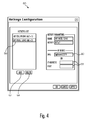
- Figure 4 shows a graphical user interface (GUI) dialog box 50 for configuring hotkeys.
- GUI graphical user interface
- the GUI presents the user with buttons 52 and 54 for adding new hotkeys and deleting existing hotkeys, respectively.
- the GUI also displays a list 56 of existing hotkeys.
- Adding a new hotkey creates a blank entry in the list for the user to configure.
- the user selects a hotkey in the list 56 and identifies the appropriate IP address/port in field 58, or DNS name in field 60 (e.g. IpPhone63379). Capturing the DNS of a device is preferred to capturing the IP address since device IP addresses may be transient (e.g. the IP address of a device may change at any time based on network rules whereas DNS names are static).
- the GUI dialog box 50 may also include an authentication field for entering a password for connecting to the embedded device.
- the input events are then optionally formatted (step 36) and transported over the LAN 16 to the selected embedded system (step 37), using IP addresses, or URL, or other addressing methodology. More particularly, since keyboard input events are UNICODE characters, they are passed to the embedded device without any formatting. Mouse events, on the other hand, require translation or formatting. For instance, a left- button click is represented by different values depending on what operating system is being used (e.g. Windows defines a mouse click differently than Unix). Thus, a Windows mouse left-button click is translated into a well known value defined in the transport protocol between the Windows operating system and the embedded device (i.e. the protocol on the transport layer of the OSI model). The embedded device then further translates the received value to the value required by its operating system or graphical engine, in a well known manner. Encryption may also be used when transporting the input events across the network (e.g. Open SSL communication over a secure socket).
- IP addresses e.g. Open SSL communication over a secure socket
- a client-server session is established between the PC (client) and embedded system (server) using OpenSSL, according to the following pseudocode:
- the embedded device which functions as a driver for injecting the input events into an RTOS/Graphic engine of the embedded system (step 38).
- the embedded device operates as a server, listening for connection requests from the PC. More particularly, a software component within the embedded device (server) runs as a driver for accessing the operating system and/or graphic engine of the device.
- the server receives and authenticates a request from the PC (using Open SSL, password, etc.), it starts receiving input events, translates them if necessary (e.g. left-button clicks) and injects them into the RTOS/Graphic engine of the embedded system, which in turn translates the input events for calling the appropriate API (function calls) of the RTOS/Graphic engine.
- the embedded system responds directly to the user inputs from PC 13 to navigate from field to field, capture data or copy/paste information from PC 13 to the phone 12. If a predetermined further key (e.g. Esc) is pressed (step 39), or the user executes a mouse right-click and selects the "Stop Capture” option identified by reference 24 in Figure 2 , the user's mouse and keyboard revert to controlling PC 13 (step 40).
- a predetermined further key e.g. Esc
Landscapes
- Engineering & Computer Science (AREA)
- Signal Processing (AREA)
- Computer Networks & Wireless Communication (AREA)
- Human Computer Interaction (AREA)
- Computer Vision & Pattern Recognition (AREA)
- Mobile Radio Communication Systems (AREA)
- User Interface Of Digital Computer (AREA)
- Telephonic Communication Services (AREA)
- Computer And Data Communications (AREA)
- Data Exchanges In Wide-Area Networks (AREA)
Abstract
Description
- The invention relates in general to computer systems, and more particularly to a method for routing user inputs from a first to one or more additional applications.
- An embedded system is a special-purpose computer system designed to perform one or a few dedicated functions. It is usually embedded as part of a complete device including hardware and mechanical parts. In contrast, a general-purpose computer, such as a personal computer (PC), can do many different tasks depending on programming. Embedded systems have become very important today as they control many common devices in everyday use.
- It is known in the art to provide user interfaces to many types of embedded systems, such as IP phones, personal digital assistants (PDAs), etc. For example, large graphic displays may be provided with large numbers of hardware buttons for accessing data and features on an IP phone. However, traditional user interfaces to such embedded systems, such as softkeys, buttons, touch screens, trackballs, etc., are often inadequate for invoking applications/functionality and capturing/accessing data. For example, large numbers of hardware buttons mapped to given areas of a display are costly, give rise to industrial design challenges, and are not well suited to capturing text. Touch screens are also expensive and prone to failure.
- Products are also known in the art for controlling PCs from a remote location, such as Windows Remote Desktop and VNC. Such products locally construct a representation of a remote target, which requires a tremendous amount of information to be transmitted, and demand significant processing power to generate a virtual representation for interfacing with the remote target.
- Furthermore, it is also known in the art to connect PC input devices (such as keyboards and mice) to embedded systems (such as IP phones). For example,
US 7,212,629 describes the coupling of a computer mouse directly to a phone for control of features, andUS 5,631,954 describes connecting a keyboard to an IP phone. In these prior art arrangements, the design of the PC input devices is customized for connection to the IP phone. The input device stimuli are mapped to functionality that is transmitted across various different types of networks (i.e. Ethernet, analog, etc.), rather than simply transmitting the actual device stimuli. - According to an aspect of this invention, a method is described for routing PC input device signals across a network (e.g. LAN) from one application to another application hosted on an embedded system (e.g. PDA, IP phone, cell phone, etc.) In contrast with
US patents 7,212,629 andUS 5,631,954 , the PC input device stimuli are transmitted between the systems rather than the actual functionality. Also, the PC input devices may be off-the-shelf components. There is no need to customize or modify the devices to control the embedded system. Moreover, there is no requirement for physical interfaces between the PC input devices and the embedded system. Thus, a single PC keyboard or computer mouse, for example, may be used to control a plurality of embedded systems, either at the same time or individually. - These together with other aspects and advantages which will be subsequently apparent, reside in the details of construction and operation as more fully hereinafter described and claimed, reference being had to the accompanying drawings forming a part hereof, wherein like numerals refer to like parts throughout, of which:
-
Figure 1 is a block diagram of an exemplary network; -
Figure 2 is a screen shot of a computer system for implementing a method for routing user inputs, according to an exemplary embodiment; -
Figure 3 is a flowchart showing a method for routing user inputs, according to an exemplary embodiment; and -
Figure 4 is a screen shot of a GUI dialog for adding and deleting keyboard hotkeys to initiate routing of user inputs according to the method ofFigure 3 . -
Figure 1 is a block diagram of anexemplary communication network 10 having acall server 11,IP phone 12, PC 13,router 14 and another generic embeddeddevice 15, all communicating over aLAN 16, in a well known manner. PC 13 includes akeyboard 19 andmouse interface 20. APDA 17 is connected to PC 13 via cradle interface, Bluetooth or other suitable means. - Often, the
communication system 10 will include additional IP phones and PCs although for ease of explanation only one PC 13 andIP phone 12 are illustrated. Moreover, any combination and numbers of embedded systems (IP phones, cell phones, etc.) is possible. Also, the network shown is wired but can be a wireless network or a mix of wired and wireless networks. For example, thenetwork 10 is shown communicating with the Internet via arouter 14 that, in turn, communicates with a wireless orcellular phone 18 via a wireless network. - Turning to
Figure 2 , a screen shot is depicted of a display of PC 13 running a software application using a conventional operating system (e.g. Windows, Unix, MacOS, etc.). In operation, a user programs one or more hotkeys (e.g. Ctrl-C) onkeyboard 19 which, according to the method illustrated inFigure 3 , maps thekeyboard 19 andmouse 20 user inputs to one or multiple embedded systems, such asIP phone 12, embeddeddevice 15 orPDA 17. Once the programmed hotkey is pressed, the PC software application routes the keyboard and mouse inputs to the mapped embedded system(s) viaLAN 16. - In contrast with prior art systems, the actual keyboard and mouse inputs are transmitted via the
LAN 16, rather than command functionality to be invoked by the application. These keyboard and mouse inputs are contextual to the application running on the mapped embedded system and are interpreted by it. - With combined reference to
Figures 2 and3 , steps are depicted of an exemplary method for routing user inputs. Atstep 30, an application is launched on PC 13, by right-clicking on an icon in a Windowssystem tray 22, as depicted in the screen shot illustrated inFigure 2 , in response to which acontextual menu 24 presents the user with a series of choices. For example, the contextual menu can be used to invoke a GUI dialog (a settings sub-menu in the screenshot) for configuring hotkeys, as discussed in greater detail below with reference toFigure 4 . Upon launching the application, anicon 23 appears on the computer screen of PC 13 representing the active application. - Preferably, the application is implemented as a DLL, but can also be implemented as a standalone application. At
step 32, a keyboard hotkey combination (e.g. Alt+∼) is programmed by the user to map inputs from thePC keyboard 19 andmouse 20 to a connected embedded device such as, for example,IP phone 12 or embeddeddevice 15, etc. Additional hotkey combinations may then be configured (step 34) for further embedded systems. Thereafter,keyboard 19 andmouse 20 events are captured (step 35). As indicated briefly above,Figure 4 shows a graphical user interface (GUI)dialog box 50 for configuring hotkeys. The GUI presents the user withbuttons list 56 of existing hotkeys. Adding a new hotkey creates a blank entry in the list for the user to configure. In order to configure a hotkey, the user selects a hotkey in thelist 56 and identifies the appropriate IP address/port infield 58, or DNS name in field 60 (e.g. IpPhone63379). Capturing the DNS of a device is preferred to capturing the IP address since device IP addresses may be transient (e.g. the IP address of a device may change at any time based on network rules whereas DNS names are static). Optionally, theGUI dialog box 50 may also include an authentication field for entering a password for connecting to the embedded device. - The input events are then optionally formatted (step 36) and transported over the
LAN 16 to the selected embedded system (step 37), using IP addresses, or URL, or other addressing methodology. More particularly, since keyboard input events are UNICODE characters, they are passed to the embedded device without any formatting. Mouse events, on the other hand, require translation or formatting. For instance, a left- button click is represented by different values depending on what operating system is being used (e.g. Windows defines a mouse click differently than Unix). Thus, a Windows mouse left-button click is translated into a well known value defined in the transport protocol between the Windows operating system and the embedded device (i.e. the protocol on the transport layer of the OSI model). The embedded device then further translates the received value to the value required by its operating system or graphical engine, in a well known manner. Encryption may also be used when transporting the input events across the network (e.g. Open SSL communication over a secure socket). - In one embodiment, a client-server session is established between the PC (client) and embedded system (server) using OpenSSL, according to the following pseudocode:
- Server side (embedded system)
- Create OpenSSL Socket
- Wait For A Connection Request
- Accept Connection Request
- REPEAT until connection is terminated by client
- Receive packet
- Extract input event
- IF necessary, translate input event
- Inject input event into RTOS/GraphicEngine
- Client side (PC)
- Create OpenSSL Socket
- Connect to server
- When connection authenticated
- REPEAT until end user exits remote control of an embedded system
- Wait for any PC input
- IF necessary, translate input event to communication protocol type
- Transmit packet
- From the foregoing, it will be appreciated that input events on the
LAN 16 are received by the embedded device, which functions as a driver for injecting the input events into an RTOS/Graphic engine of the embedded system (step 38). As indicated above, the embedded device operates as a server, listening for connection requests from the PC. More particularly, a software component within the embedded device (server) runs as a driver for accessing the operating system and/or graphic engine of the device. Once the server receives and authenticates a request from the PC (using Open SSL, password, etc.), it starts receiving input events, translates them if necessary (e.g. left-button clicks) and injects them into the RTOS/Graphic engine of the embedded system, which in turn translates the input events for calling the appropriate API (function calls) of the RTOS/Graphic engine. - Thereafter, the embedded system responds directly to the user inputs from
PC 13 to navigate from field to field, capture data or copy/paste information fromPC 13 to thephone 12. If a predetermined further key (e.g. Esc) is pressed (step 39), or the user executes a mouse right-click and selects the "Stop Capture" option identified byreference 24 inFigure 2 , the user's mouse and keyboard revert to controlling PC 13 (step 40). - A person of ordinary skill in the art will appreciate that the method of
Figure 3 is not limited to controllingIP phone 12, but may be applied to any embedded system ordevice 15,PDA 17,cellular telephone 18, etc. - The many features and advantages of the method set forth herein will be apparent from the detailed specification and, thus, it is intended by the appended claims to cover all such features and advantages. Most PC input devices currently use Bluetooth, USB and PS2 connectivity. Keyboards with IP connectivity may be interfaced directly to embedded systems via an appropriate IP broadcast service server, such as network printers. The method set forth herein is applicable to any embedded systems where the form factor limits the choice of man-machine interfaces, including connectors such as USB and PS2. Further, since numerous modifications and changes will readily occur to those skilled in the art, it is not desired to limit the claims to the exact construction and operation illustrated and described, and accordingly all suitable modifications and equivalents may be resorted to, falling within the scope of the claims.
Claims (15)
- A method for routing user inputs from a PC to at least one embedded system over a network, comprising:creating a communication session between said PC and said at least one embedded system according to a predetermined transport protocol;capturing and transmitting user interface input events over said network from said PC to said at least one embedded system according to a predetermined transport protocol; andinjecting said user interface input events into one of either an operating system or RTOS/Graphic engine of said at least one embedded system.
- The method of claim 1, wherein said user interface input events are formatted for transmission over said network.
- The method of claim 2, wherein said user interface input events are encrypted for transmission over said network.
- The method of claim 1 or 2, further comprising configuring at least one hotkey combination for initiating creation of said communication session between said PC and said at least one embedded system.
- The method of claim 4, wherein said at least one hotkey combination is mapped to said at least one embedded system via an IP address and port.
- A method according to any preceding claim, wherein said at least one embedded system is one of an IP phone, a personal digital assistant and a cellular phone.
- A method according to any preceding claim, wherein said network is a local area network.
- A method according to any of claims 1 to 6, wherein said wherein said network is the Internet.
- A method according to any of claims 1 to 7, wherein said network is a wireless network.
- A method according to any preceding claim, wherein said wherein said user interface input events are generated at a keyboard connected to said PC.
- A method according to any of claims 1 to 9, wherein said user interface input events are generated at a computer mouse connected to said PC.
- The method of claim 4, wherein said at least one hotkey combination is mapped to said at least one embedded system via a DNS name.
- A method according to any preceding claim, wherein said PC is authenticated by said at least one embedded system prior to creating said communication session.
- A method according to any preceding claim, wherein said at least one embedded system translates said user interface input events prior to injection into said one of either said operating system or RTOS/Graphic engine.
- Apparatus for routing user inputs from a PC to at least one embedded system over a network, comprising:means for capturing and transmitting user interface input events over said network from said PC to said at least one embedded system according to a predetermined transport protocol; andmeans for injecting said user interface input events into one of either an operating system or RTOS/Graphic engine of said at least one embedded system.
Applications Claiming Priority (1)
| Application Number | Priority Date | Filing Date | Title |
|---|---|---|---|
| US12/006,608 US7925734B2 (en) | 2008-01-04 | 2008-01-04 | Method for routing user inputs between applications |
Publications (3)
| Publication Number | Publication Date |
|---|---|
| EP2077655A2 true EP2077655A2 (en) | 2009-07-08 |
| EP2077655A3 EP2077655A3 (en) | 2011-08-31 |
| EP2077655B1 EP2077655B1 (en) | 2014-07-09 |
Family
ID=40568514
Family Applications (1)
| Application Number | Title | Priority Date | Filing Date |
|---|---|---|---|
| EP08170836.4A Active EP2077655B1 (en) | 2008-01-04 | 2008-12-05 | Method for routing user inputs between applications |
Country Status (4)
| Country | Link |
|---|---|
| US (1) | US7925734B2 (en) |
| EP (1) | EP2077655B1 (en) |
| CN (1) | CN101478561B (en) |
| CA (1) | CA2635394C (en) |
Families Citing this family (4)
| Publication number | Priority date | Publication date | Assignee | Title |
|---|---|---|---|---|
| US8156203B2 (en) * | 2008-09-15 | 2012-04-10 | Microsoft Corporation | Dye injected request generation |
| US8363589B2 (en) * | 2009-12-29 | 2013-01-29 | Nokia Corporation | Method and apparatus for generating and utilizing communications shortcuts |
| US8478855B1 (en) * | 2011-06-29 | 2013-07-02 | Amazon Technologies, Inc. | Application control translation |
| US8572178B1 (en) | 2011-07-01 | 2013-10-29 | Amazon Technologies, Inc. | Executing applications in remotely emulated computing devices |
Citations (2)
| Publication number | Priority date | Publication date | Assignee | Title |
|---|---|---|---|---|
| US5631954A (en) | 1994-12-27 | 1997-05-20 | Mitel Corporation | Method and apparatus for controlling a telephone |
| US7212629B2 (en) | 2002-06-07 | 2007-05-01 | Mitel Networks Corporation | Mouse enabled phone |
Family Cites Families (6)
| Publication number | Priority date | Publication date | Assignee | Title |
|---|---|---|---|---|
| US5771354A (en) * | 1993-11-04 | 1998-06-23 | Crawford; Christopher M. | Internet online backup system provides remote storage for customers using IDs and passwords which were interactively established when signing up for backup services |
| US20050021870A1 (en) * | 1998-08-06 | 2005-01-27 | Jason Carnahan | Modular presentation device with network connection for use with PDA's and Smartphones |
| US7596791B2 (en) * | 2000-12-19 | 2009-09-29 | Emc Corporation | Methods and techniques for delivering rich Java applications over thin-wire connections with high performance and scalability |
| US20020154161A1 (en) * | 2001-02-01 | 2002-10-24 | Friedman Michael A. | Method and system for providing universal remote control of computing devices |
| US6959380B2 (en) * | 2001-03-13 | 2005-10-25 | International Business Machines Corporation | Seamless computer system remote control |
| US8185838B2 (en) * | 2003-11-03 | 2012-05-22 | Bomers Florian U | Universal computer input event translator |
-
2008
- 2008-01-04 US US12/006,608 patent/US7925734B2/en active Active
- 2008-06-19 CA CA2635394A patent/CA2635394C/en active Active
- 2008-12-05 EP EP08170836.4A patent/EP2077655B1/en active Active
- 2008-12-12 CN CN2008101840379A patent/CN101478561B/en not_active Expired - Fee Related
Patent Citations (2)
| Publication number | Priority date | Publication date | Assignee | Title |
|---|---|---|---|---|
| US5631954A (en) | 1994-12-27 | 1997-05-20 | Mitel Corporation | Method and apparatus for controlling a telephone |
| US7212629B2 (en) | 2002-06-07 | 2007-05-01 | Mitel Networks Corporation | Mouse enabled phone |
Also Published As
| Publication number | Publication date |
|---|---|
| EP2077655B1 (en) | 2014-07-09 |
| CN101478561B (en) | 2013-11-13 |
| CA2635394C (en) | 2011-10-04 |
| CN101478561A (en) | 2009-07-08 |
| CA2635394A1 (en) | 2009-07-04 |
| US20090177795A1 (en) | 2009-07-09 |
| EP2077655A3 (en) | 2011-08-31 |
| US7925734B2 (en) | 2011-04-12 |
Similar Documents
| Publication | Publication Date | Title |
|---|---|---|
| US10362614B2 (en) | Authentication and pairing of devices using a machine readable code | |
| US9069377B2 (en) | System and method for interfacing between a mobile device and a personal computer | |
| EP2419807B1 (en) | Server-side computing from a remote client device | |
| EP4038827A1 (en) | System and method for authentication session transfer using application download links | |
| CN102685196A (en) | Method and virtual application system for improving user experience in virtual application environment | |
| US20030061279A1 (en) | Application serving apparatus and method | |
| US10924931B2 (en) | External sharing with improved security | |
| KR20060134925A (en) | Methods and apparatus for scalable secure remote desktop access | |
| EP2813960B1 (en) | Method and system for allowing any language to be used as password | |
| CA2635394C (en) | Method for routing user inputs between applications | |
| US20220382430A1 (en) | Shortcut keys for virtual keyboards | |
| EP1779689A1 (en) | Method for the monitoring of system security in electronic devices | |
| US10911408B2 (en) | Identifying and displaying application dependencies | |
| KR20170052589A (en) | Mapping account information to server authentication | |
| US11042714B2 (en) | Synchronizing the language of a remote session with a client's language | |
| JP2007251630A (en) | Remote desktop displaying method | |
| US11003463B2 (en) | Virtual desktop | |
| US12613944B2 (en) | Portal application as authenticator | |
| Kadner et al. | Integration of distributed user input to extend interaction possibilities with local applications | |
| JP5131884B1 (en) | A computer program downloaded from a download site on the Internet to a mobile device | |
| CN116599955A (en) | Remote desktop control method and device | |
| CN121071858A (en) | Account login method, related device, equipment and storage medium | |
| JP6988125B2 (en) | Files used to set up the accounting information system, how to connect the accounting information system, and the accounting information system | |
| CN104951284A (en) | Special handheld electronic device for Skype communication | |
| KR101140417B1 (en) | Screen image interception method for mobile telephone on the remote control using icon |
Legal Events
| Date | Code | Title | Description |
|---|---|---|---|
| PUAI | Public reference made under article 153(3) epc to a published international application that has entered the european phase |
Free format text: ORIGINAL CODE: 0009012 |
|
| AK | Designated contracting states |
Kind code of ref document: A2 Designated state(s): AT BE BG CH CY CZ DE DK EE ES FI FR GB GR HR HU IE IS IT LI LT LU LV MC MT NL NO PL PT RO SE SI SK TR |
|
| AX | Request for extension of the european patent |
Extension state: AL BA MK RS |
|
| PUAL | Search report despatched |
Free format text: ORIGINAL CODE: 0009013 |
|
| AK | Designated contracting states |
Kind code of ref document: A3 Designated state(s): AT BE BG CH CY CZ DE DK EE ES FI FR GB GR HR HU IE IS IT LI LT LU LV MC MT NL NO PL PT RO SE SI SK TR |
|
| AX | Request for extension of the european patent |
Extension state: AL BA MK RS |
|
| RIC1 | Information provided on ipc code assigned before grant |
Ipc: H04M 1/247 20060101ALI20110725BHEP Ipc: H04L 29/06 20060101ALI20110725BHEP Ipc: H04L 29/08 20060101AFI20110725BHEP |
|
| 17P | Request for examination filed |
Effective date: 20111101 |
|
| AKX | Designation fees paid |
Designated state(s): AT BE BG CH CY CZ DE DK EE ES FI FR GB GR HR HU IE IS IT LI LT LU LV MC MT NL NO PL PT RO SE SI SK TR |
|
| 17Q | First examination report despatched |
Effective date: 20130610 |
|
| GRAP | Despatch of communication of intention to grant a patent |
Free format text: ORIGINAL CODE: EPIDOSNIGR1 |
|
| RIC1 | Information provided on ipc code assigned before grant |
Ipc: H04L 29/08 20060101AFI20140121BHEP Ipc: H04L 29/06 20060101ALI20140121BHEP Ipc: H04M 1/725 20060101ALI20140121BHEP Ipc: H04M 1/247 20060101ALI20140121BHEP |
|
| INTG | Intention to grant announced |
Effective date: 20140205 |
|
| GRAS | Grant fee paid |
Free format text: ORIGINAL CODE: EPIDOSNIGR3 |
|
| GRAA | (expected) grant |
Free format text: ORIGINAL CODE: 0009210 |
|
| AK | Designated contracting states |
Kind code of ref document: B1 Designated state(s): AT BE BG CH CY CZ DE DK EE ES FI FR GB GR HR HU IE IS IT LI LT LU LV MC MT NL NO PL PT RO SE SI SK TR |
|
| REG | Reference to a national code |
Ref country code: GB Ref legal event code: FG4D |
|
| REG | Reference to a national code |
Ref country code: AT Ref legal event code: REF Ref document number: 676912 Country of ref document: AT Kind code of ref document: T Effective date: 20140715 Ref country code: CH Ref legal event code: EP |
|
| REG | Reference to a national code |
Ref country code: IE Ref legal event code: FG4D |
|
| REG | Reference to a national code |
Ref country code: DE Ref legal event code: R082 Ref document number: 602008033179 Country of ref document: DE Representative=s name: VENNER SHIPLEY LLP, GB |
|
| REG | Reference to a national code |
Ref country code: DE Ref legal event code: R096 Ref document number: 602008033179 Country of ref document: DE Effective date: 20140821 |
|
| REG | Reference to a national code |
Ref country code: AT Ref legal event code: MK05 Ref document number: 676912 Country of ref document: AT Kind code of ref document: T Effective date: 20140709 |
|
| REG | Reference to a national code |
Ref country code: NL Ref legal event code: VDEP Effective date: 20140709 |
|
| REG | Reference to a national code |
Ref country code: LT Ref legal event code: MG4D |
|
| PG25 | Lapsed in a contracting state [announced via postgrant information from national office to epo] |
Ref country code: GR Free format text: LAPSE BECAUSE OF FAILURE TO SUBMIT A TRANSLATION OF THE DESCRIPTION OR TO PAY THE FEE WITHIN THE PRESCRIBED TIME-LIMIT Effective date: 20141010 Ref country code: PT Free format text: LAPSE BECAUSE OF FAILURE TO SUBMIT A TRANSLATION OF THE DESCRIPTION OR TO PAY THE FEE WITHIN THE PRESCRIBED TIME-LIMIT Effective date: 20141110 Ref country code: SE Free format text: LAPSE BECAUSE OF FAILURE TO SUBMIT A TRANSLATION OF THE DESCRIPTION OR TO PAY THE FEE WITHIN THE PRESCRIBED TIME-LIMIT Effective date: 20140709 Ref country code: BG Free format text: LAPSE BECAUSE OF FAILURE TO SUBMIT A TRANSLATION OF THE DESCRIPTION OR TO PAY THE FEE WITHIN THE PRESCRIBED TIME-LIMIT Effective date: 20141009 Ref country code: NO Free format text: LAPSE BECAUSE OF FAILURE TO SUBMIT A TRANSLATION OF THE DESCRIPTION OR TO PAY THE FEE WITHIN THE PRESCRIBED TIME-LIMIT Effective date: 20141009 Ref country code: ES Free format text: LAPSE BECAUSE OF FAILURE TO SUBMIT A TRANSLATION OF THE DESCRIPTION OR TO PAY THE FEE WITHIN THE PRESCRIBED TIME-LIMIT Effective date: 20140709 Ref country code: FI Free format text: LAPSE BECAUSE OF FAILURE TO SUBMIT A TRANSLATION OF THE DESCRIPTION OR TO PAY THE FEE WITHIN THE PRESCRIBED TIME-LIMIT Effective date: 20140709 Ref country code: LT Free format text: LAPSE BECAUSE OF FAILURE TO SUBMIT A TRANSLATION OF THE DESCRIPTION OR TO PAY THE FEE WITHIN THE PRESCRIBED TIME-LIMIT Effective date: 20140709 |
|
| PG25 | Lapsed in a contracting state [announced via postgrant information from national office to epo] |
Ref country code: IS Free format text: LAPSE BECAUSE OF FAILURE TO SUBMIT A TRANSLATION OF THE DESCRIPTION OR TO PAY THE FEE WITHIN THE PRESCRIBED TIME-LIMIT Effective date: 20141109 Ref country code: PL Free format text: LAPSE BECAUSE OF FAILURE TO SUBMIT A TRANSLATION OF THE DESCRIPTION OR TO PAY THE FEE WITHIN THE PRESCRIBED TIME-LIMIT Effective date: 20140709 Ref country code: HR Free format text: LAPSE BECAUSE OF FAILURE TO SUBMIT A TRANSLATION OF THE DESCRIPTION OR TO PAY THE FEE WITHIN THE PRESCRIBED TIME-LIMIT Effective date: 20140709 Ref country code: LV Free format text: LAPSE BECAUSE OF FAILURE TO SUBMIT A TRANSLATION OF THE DESCRIPTION OR TO PAY THE FEE WITHIN THE PRESCRIBED TIME-LIMIT Effective date: 20140709 Ref country code: NL Free format text: LAPSE BECAUSE OF FAILURE TO SUBMIT A TRANSLATION OF THE DESCRIPTION OR TO PAY THE FEE WITHIN THE PRESCRIBED TIME-LIMIT Effective date: 20140709 Ref country code: AT Free format text: LAPSE BECAUSE OF FAILURE TO SUBMIT A TRANSLATION OF THE DESCRIPTION OR TO PAY THE FEE WITHIN THE PRESCRIBED TIME-LIMIT Effective date: 20140709 Ref country code: CY Free format text: LAPSE BECAUSE OF FAILURE TO SUBMIT A TRANSLATION OF THE DESCRIPTION OR TO PAY THE FEE WITHIN THE PRESCRIBED TIME-LIMIT Effective date: 20140709 |
|
| REG | Reference to a national code |
Ref country code: DE Ref legal event code: R097 Ref document number: 602008033179 Country of ref document: DE |
|
| PG25 | Lapsed in a contracting state [announced via postgrant information from national office to epo] |
Ref country code: IT Free format text: LAPSE BECAUSE OF FAILURE TO SUBMIT A TRANSLATION OF THE DESCRIPTION OR TO PAY THE FEE WITHIN THE PRESCRIBED TIME-LIMIT Effective date: 20140709 Ref country code: CZ Free format text: LAPSE BECAUSE OF FAILURE TO SUBMIT A TRANSLATION OF THE DESCRIPTION OR TO PAY THE FEE WITHIN THE PRESCRIBED TIME-LIMIT Effective date: 20140709 Ref country code: RO Free format text: LAPSE BECAUSE OF FAILURE TO SUBMIT A TRANSLATION OF THE DESCRIPTION OR TO PAY THE FEE WITHIN THE PRESCRIBED TIME-LIMIT Effective date: 20140709 Ref country code: SK Free format text: LAPSE BECAUSE OF FAILURE TO SUBMIT A TRANSLATION OF THE DESCRIPTION OR TO PAY THE FEE WITHIN THE PRESCRIBED TIME-LIMIT Effective date: 20140709 Ref country code: DK Free format text: LAPSE BECAUSE OF FAILURE TO SUBMIT A TRANSLATION OF THE DESCRIPTION OR TO PAY THE FEE WITHIN THE PRESCRIBED TIME-LIMIT Effective date: 20140709 Ref country code: EE Free format text: LAPSE BECAUSE OF FAILURE TO SUBMIT A TRANSLATION OF THE DESCRIPTION OR TO PAY THE FEE WITHIN THE PRESCRIBED TIME-LIMIT Effective date: 20140709 |
|
| PLBE | No opposition filed within time limit |
Free format text: ORIGINAL CODE: 0009261 |
|
| STAA | Information on the status of an ep patent application or granted ep patent |
Free format text: STATUS: NO OPPOSITION FILED WITHIN TIME LIMIT |
|
| 26N | No opposition filed |
Effective date: 20150410 |
|
| PG25 | Lapsed in a contracting state [announced via postgrant information from national office to epo] |
Ref country code: BE Free format text: LAPSE BECAUSE OF NON-PAYMENT OF DUE FEES Effective date: 20141231 |
|
| PG25 | Lapsed in a contracting state [announced via postgrant information from national office to epo] |
Ref country code: LU Free format text: LAPSE BECAUSE OF FAILURE TO SUBMIT A TRANSLATION OF THE DESCRIPTION OR TO PAY THE FEE WITHIN THE PRESCRIBED TIME-LIMIT Effective date: 20141205 |
|
| REG | Reference to a national code |
Ref country code: CH Ref legal event code: PL |
|
| REG | Reference to a national code |
Ref country code: IE Ref legal event code: MM4A |
|
| PG25 | Lapsed in a contracting state [announced via postgrant information from national office to epo] |
Ref country code: LI Free format text: LAPSE BECAUSE OF NON-PAYMENT OF DUE FEES Effective date: 20141231 Ref country code: CH Free format text: LAPSE BECAUSE OF NON-PAYMENT OF DUE FEES Effective date: 20141231 Ref country code: IE Free format text: LAPSE BECAUSE OF NON-PAYMENT OF DUE FEES Effective date: 20141205 |
|
| REG | Reference to a national code |
Ref country code: FR Ref legal event code: PLFP Year of fee payment: 8 |
|
| PG25 | Lapsed in a contracting state [announced via postgrant information from national office to epo] |
Ref country code: SI Free format text: LAPSE BECAUSE OF FAILURE TO SUBMIT A TRANSLATION OF THE DESCRIPTION OR TO PAY THE FEE WITHIN THE PRESCRIBED TIME-LIMIT Effective date: 20140709 |
|
| PG25 | Lapsed in a contracting state [announced via postgrant information from national office to epo] |
Ref country code: MC Free format text: LAPSE BECAUSE OF FAILURE TO SUBMIT A TRANSLATION OF THE DESCRIPTION OR TO PAY THE FEE WITHIN THE PRESCRIBED TIME-LIMIT Effective date: 20140709 |
|
| PG25 | Lapsed in a contracting state [announced via postgrant information from national office to epo] |
Ref country code: BE Free format text: LAPSE BECAUSE OF FAILURE TO SUBMIT A TRANSLATION OF THE DESCRIPTION OR TO PAY THE FEE WITHIN THE PRESCRIBED TIME-LIMIT Effective date: 20140709 Ref country code: HU Free format text: LAPSE BECAUSE OF FAILURE TO SUBMIT A TRANSLATION OF THE DESCRIPTION OR TO PAY THE FEE WITHIN THE PRESCRIBED TIME-LIMIT; INVALID AB INITIO Effective date: 20081205 Ref country code: TR Free format text: LAPSE BECAUSE OF FAILURE TO SUBMIT A TRANSLATION OF THE DESCRIPTION OR TO PAY THE FEE WITHIN THE PRESCRIBED TIME-LIMIT Effective date: 20140709 Ref country code: MT Free format text: LAPSE BECAUSE OF FAILURE TO SUBMIT A TRANSLATION OF THE DESCRIPTION OR TO PAY THE FEE WITHIN THE PRESCRIBED TIME-LIMIT Effective date: 20140709 |
|
| REG | Reference to a national code |
Ref country code: FR Ref legal event code: PLFP Year of fee payment: 9 |
|
| REG | Reference to a national code |
Ref country code: FR Ref legal event code: PLFP Year of fee payment: 10 |
|
| REG | Reference to a national code |
Ref country code: DE Ref legal event code: R082 Ref document number: 602008033179 Country of ref document: DE Representative=s name: VENNER SHIPLEY GERMANY LLP, DE Ref country code: DE Ref legal event code: R082 Ref document number: 602008033179 Country of ref document: DE Representative=s name: VENNER SHIPLEY LLP, DE |
|
| REG | Reference to a national code |
Ref country code: DE Ref legal event code: R079 Ref document number: 602008033179 Country of ref document: DE Free format text: PREVIOUS MAIN CLASS: H04L0029080000 Ipc: H04L0065000000 |
|
| PGFP | Annual fee paid to national office [announced via postgrant information from national office to epo] |
Ref country code: FR Payment date: 20250930 Year of fee payment: 18 |
|
| PGFP | Annual fee paid to national office [announced via postgrant information from national office to epo] |
Ref country code: DE Payment date: 20250930 Year of fee payment: 18 |
|
| PGFP | Annual fee paid to national office [announced via postgrant information from national office to epo] |
Ref country code: GB Payment date: 20251001 Year of fee payment: 18 |