EP2009885A1 - Device configuration - Google Patents
Device configuration Download PDFInfo
- Publication number
- EP2009885A1 EP2009885A1 EP08102733A EP08102733A EP2009885A1 EP 2009885 A1 EP2009885 A1 EP 2009885A1 EP 08102733 A EP08102733 A EP 08102733A EP 08102733 A EP08102733 A EP 08102733A EP 2009885 A1 EP2009885 A1 EP 2009885A1
- Authority
- EP
- European Patent Office
- Prior art keywords
- role
- keys
- user
- key
- labelling
- Prior art date
- Legal status (The legal status is an assumption and is not a legal conclusion. Google has not performed a legal analysis and makes no representation as to the accuracy of the status listed.)
- Granted
Links
Images


Classifications
-
- H—ELECTRICITY
- H04—ELECTRIC COMMUNICATION TECHNIQUE
- H04M—TELEPHONIC COMMUNICATION
- H04M1/00—Substation equipment, e.g. for use by subscribers
- H04M1/247—Telephone sets including user guidance or feature selection means facilitating their use
- H04M1/2471—Configurable and interactive telephone terminals with subscriber controlled features modifications, e.g. with ADSI capability [Analog Display Services Interface]
- H04M1/2472—Configurable and interactive telephone terminals with subscriber controlled features modifications, e.g. with ADSI capability [Analog Display Services Interface] with programmable function keys
-
- H—ELECTRICITY
- H04—ELECTRIC COMMUNICATION TECHNIQUE
- H04M—TELEPHONIC COMMUNICATION
- H04M1/00—Substation equipment, e.g. for use by subscribers
- H04M1/72—Mobile telephones; Cordless telephones, i.e. devices for establishing wireless links to base stations without route selection
- H04M1/724—User interfaces specially adapted for cordless or mobile telephones
- H04M1/72466—User interfaces specially adapted for cordless or mobile telephones with selection means, e.g. keys, having functions defined by the mode or the status of the device
Definitions
- the invention relates to an application for use with a user input device, to a method of configuring a device, and to a method of configuring a telephone.
- the invention relates non-exclusively to the presentation of information on a telephone appliance.
- S 6,816,589 sets forth a communication system wherein a plurality of user data files are provided for respective users, each user data file including at least one role identifier; a plurality of communication groups having respective group name identifiers for associating predetermined roles with the groups and respective group phone numbers; and a role list data file for automatically associating respective ones of the users with a predetermined one or more of the communication groups according to their role identifiers.
- US 6,075,851 sets forth a communication system with a database representing a plurality of relationships of organization roles, including names of first persons filling the roles, names of temporary persons to fill at least some specific roles, directory numbers associated with respective ones of the first and temporary persons, and call features associated with respective specific roles.
- a method is disclosed for looking up in the database an alternative directory number of the person temporarily associated with the specific role, and processing the call to the alternate directory number instead of the particular directory number, but with call features associated with the specific role.
- a telephone set user may perform multiple roles within an organization, and that those roles may change throughout the course of a typical business day. These roles may include: managerial responsibilities; participation in a committee or working group; consultant or subject matter expert; parent/spouse/friend; team organizer; and many other roles. It is also known in the art for such a person to use programmable keys on their telephone to make/receive calls and invoke related features. However, such making/xeceiving of calls and invoking of features is done without consideration to which role the user is filling.
- PLM adjunct programmable key module
- a 'Hot Desking' capability can be used to overlay the programmable keys associated with a particular role onto a telephone set (e.g. activated by user login to the phone).
- a telephone set e.g. activated by user login to the phone.
- only programmable keys configured for the logged in user/role are available.
- Role Associated Keys are available for configuration associated with each Role Key (excluding the Prime Line). Selection of a Role Key on the telephone set results in the normally configured programmable key behaviour and, additionally, overlays the associated Role Associated Keys on designated programmable keys of the telephone set.
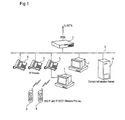
- an exemplary communication system comprising a communication switch such as an IP PBX otherwise known as an iPBX 1 (e.g. Mitel 3300 ICP or Mitel SX-200 ICP) connected to a local area network (LAN 3) and to the Public Switched Telephone Network (PSTN).
- IP PBX otherwise known as an iPBX 1
- PSTN Public Switched Telephone Network
- a plurality of telephone devices such as IP phones 5 and desktop computers 7 running phone applications, etc. are connected to the LAN 3, as well as wireless phones 9 and an application server 11, such as a contact information server.
- Figure 1 is representative of a typical converged communication network, and that numerous variations in configuration, components, etc. are possible.
- FIG. 2 shows an IP phone (e.g. a 5340 device manufactured by Mitel Networks Corporation) having a Prime Line key 19 representing the default 'role' for the user at extension 2334; four non-self-labelling keys 17 (for activating well known system features such as Redial, Forwarding, Music On and Messaging); and sixteen self-labelling programmable keys.
- the bottom six self-labelling programmable keys 19, 21, 31, 91, 101 and 111 are designated as Role Keys
- the middle six keys 41, 51, 61, 121, 131 and 141 are designated as Role Associated Keys
- the remaining (top) four keys 71, 81, 151 and 161 are designated as Role Independent Keys.
- This designation may be specified in a Role Layout configuration that is specific to a given device/DN/user or is applied to all devices/DNs/users with the feature enabled.
- the actual numbers of keys can be any combination or order, system configuration selected, or limited to a choice of specific combinations.
- Table 1 shows an exemplary system configuration for assignment of Role Keys for an exemplary telephone system, wherein each "Button #" configured within the PBX corresponds to a "Key #" on the telephone set of Figure 2 .
- TABLE 1 TABLE 1 Key # Button # Role Key Type 21 2 Role Key Allowed 31 3 Role Key Allowed 41 4 Role Associated Key 51 5 Role Associated Key 61 6 Role Associated Key 71 7 Role independent Key 81 8 Role independent Key 91 9 Role Key Allowed 101 10 Role Key Allowed 111 11 Role Key Allowed 121 12 Role Associated Key 131 13 Role Associated Key 141 14 Role Associated Key 151 15 Role independent Key 161 16 Role independent Key
- Role Keys 21, 31, 91, 101 and 111 may be selected by the user depending on what role the user is performing at any given time.
- Role keys can be existing DN/line appearances/speedcalls/etc and provide their existing behaviour in addition to causing presentation of associated Role Associated programmable keys, as set forth below.
- the user may configure Role Associated programmable keys 41, 51, 61, 121, 131 and 141 to perform certain functions that are useful for the selected role. Selection of a Role Key on the telephone set results in the normally configured programmable key behaviour and, additionally, overlays the selected Role Key's associated Role Associated Keys on the designated programmable keys 41, 51, 61, 121, 131 and 141.
- role key 91 performs its usual function of a single line key
- programmable keys 41 and 51 are blank (not programmed)
- key 61 is a speed call to 'HR Representative'
- key 121 is a speed call to 'CWS Manager'
- key 131 is a speed call to ' FZA Manager'
- key 141 is a speed call to 'Marketing Contact'.
- the layout of Role Keys, Role Associated Keys and Role Independent Keys is configured from an allowed/supported choice of layouts (that can be specific to a particular telephone set's capabilities) or as a tailored layout based on user preference.
- Role-independent keys 71, 81, 151 and 161 may be programmed by the user for activation of Do Not Disturb (DND), Admin Assistant (speed call), Phone Home (speed call) and Security (speed call), in a well-known manner.
- DND Do Not Disturb
- Admin Assistant speed call
- Phone Home speed call
- Security speed call
- Table 2 shows non-limiting example of a system configuration for assignment of Role Keys for the user 'Eldon Smith' at prime line extension 2334 on the exemplary telephone device of Figure 2 .
- Table 2 Mutline Sel 2334 (Edson Smith) Button Label Line Type DH Role Key Enabled Associated Button and Role (Informational Read-Only) 2 L2A Manager Key System 2374 Yes Role Key Candidate (buttons 49-54) 3 Speedcal Speedcal 3423 No Role Key Candidate (buttons 55-60) 4 Peer Reviewer Speedcal 2335 (blank- not alowed) 4- Defaut Role (2334) 5 Collogue User Speedcall (blank) (blank- not alowed) 5 - Defaut Role (2334) 6 Collaborator User Speedcall ***** (blank-not alowed) 6-Defaut Role (2334) 7 Do Not Disturb DND Feature (blank) (blank- not alowed) Role Independent 8 Admin Assistant Speed
- Buttons 2-16 represent the configuration of self-labelling keys for the Prime Line default role, with additional pages of Role Associated Keys 41, 51, 61, 121, 131 and 141 (corresponding to buttons 4, 5, 6, 12, 13 and 14, respectively) for each selected Role of "L2A Manager” (Role Key 21, “Speedcall” (Role Key 31), "Head of Widget R&D” (active Role Key 91 shown in Figure 2 ), “Quality Assurance” (Role Key 101) and “Fitness Instructor” (Role Key 111).
- the Role Associated Keys may be programmed for system or user speed call, key system, or other function useful to the user's selected role.
- the PBX 1 preferably begins numbering of the additional keys after all other keys on the set (including PKM keys, if applicable), and as a result of configuration changes to the user-selected role layout or associated telephone set (button count) and PKM configuration.
- Role Associated Keys 41, 51, 61, 121, 131 and 141 are configured, similar to other programmable keys, using a Desktop Config or Group Admin tool (e.g. Enterprise Systems Management (ESM)) which visually displays the association between a Role Key and its corresponding Role Associated Keys.
- ESM Enterprise Systems Management
- the user can configure the Role Associated Keys using a Settings Shutter or similar application in the telephone 5 (that also clearly displays the association to the user).
- the Role Associated Keys 41, 51, 61, 121, 131 and 141 for the Prime Line (key 19) of the telephone set comprise the normally-configured programmable keys (i.e. not new Role Associated Keys). By default, or after selecting the Prime Line 19, the normally-configured programmable keys are available as Role Associated Keys (thereby maintaining existing telephone set behaviour).
- the corresponding Role Associated Keys 41, 51, 61, 121, 131 and 141 effectively 'overlay' the normally-configured programmable keys on the telephone 5.
- This functionality is performed by a Role Management application (operative ideally in the telephone 5; alternatively as a proxy in the iPBX 1).
- the Role Management application continually manages all Role Associated Keys as though these keys are always available physically on the telephone 5.
- the labels/leds/behaviours associated with each Role Associated Key 41, 51, 61, 121, 131 and 141 is updated by the Role Management application to reflect the corresponding button number for the Role Associated Key of the "active" Role as selected by the user.
- An explicit/specific user action may optionally be involved, in addition to selecting a Role Key, prior to updating the Role Associated Keys.
- the configuration of a colour associated with each Role Key label may be used by the Role Management application such that the background display colour for programmable key labels on the telephone set designated as Role Associated Keys are updated to match the "active" Role Key label (which may selectively display the colour background).
- the background colour of the Role Key label may optionally be altered to reflect activity that is occurring on Role Associated Keys that are not displayed with the selected Role, for example by increasing hue and/or brightness.
- FIG. 3 a flowchart for a portion of the Role Management application method sets forth steps for configuring programmable keys associated with the Prime Line key 19 of the exemplary telephone of Figure 2 .
- the application determines the first key on that page (step 310). If that key is a Role Associated Key 41, 51, 61, 121, 131 or 141 (i.e. a "Yes" at step 320), the application determines the active role and dereferences the corresponding programmable key for the Role Associated Key and active role combination (step 330). If the first key is not a Role Associated Key (i.e.
- step 320 the application dereferences the normal programmable key configuration (step 340).
- step 350 the application sends the configuration for the corresponding programmable key to the telephone.
- the application determines the next key on the page (step 360), and if there is a key to send (i.e. a "Yes” at step 370), re-executes step 320. Otherwise, the method ends (step 380).
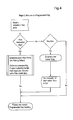
- FIG 4 is a flowchart showing method steps of the Role Management application responsive to user selection of a programmed key at the exemplary telephone of Figure 2 .
- the application determines whether the pressed key is a Role Associated Key (i.e. a "Yes" at step 410), in response to which the application determines the active role for the telephone and dereferences the corresponding programmable key for the pressed Role Associated Key and role combination (step 420).
- the application determines whether the pressed key is a Role Key (step 430). If it is, the application determines the new active role (step 440) and sends an indication of the new active role to the telephone (step 450) and the method ends (step 460). If the pressed key is a Role Key (i.e. a "No" at step 430), the process simply ends (step 460).
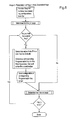
- FIG. 5 is a flowchart showing method steps for configuring Role Associated Keys associated with an active Role Key of the telephone shown in Figure 2 .
- the application determines the first key on that page (step 510). If that key is a Role Associated Key 41, 51, 61, 121, 131 or 141 (i.e. a "Yes" at step 520), the application determines the active role and dereferences the corresponding programmable key for the Role Associated Key and active role combination (step 530), and at step 540, sends the configuration for the corresponding programmable key to the telephone. If either the first key is not a Role Associated Key (i.e.
- step 520 determines the next key on the page (step 550), and if there is a key to send (i.e. a "Yes” at step 560), re-executes step 520. Otherwise, the method ends (step 570).
Landscapes
- Engineering & Computer Science (AREA)
- Computer Vision & Pattern Recognition (AREA)
- Human Computer Interaction (AREA)
- Signal Processing (AREA)
- Telephone Function (AREA)
Abstract
Description
- The invention relates to an application for use with a user input device, to a method of configuring a device, and to a method of configuring a telephone. The invention relates non-exclusively to the presentation of information on a telephone appliance.
- S 6,816,589 (Pinard) sets forth a communication system wherein a plurality of user data files are provided for respective users, each user data file including at least one role identifier; a plurality of communication groups having respective group name identifiers for associating predetermined roles with the groups and respective group phone numbers; and a role list data file for automatically associating respective ones of the users with a predetermined one or more of the communication groups according to their role identifiers.
-
US 6,075,851 (Pinard ) sets forth a communication system with a database representing a plurality of relationships of organization roles, including names of first persons filling the roles, names of temporary persons to fill at least some specific roles, directory numbers associated with respective ones of the first and temporary persons, and call features associated with respective specific roles. In response to a request to complete a call to a particular directory number associated with one of the specific roles, a method is disclosed for looking up in the database an alternative directory number of the person temporarily associated with the specific role, and processing the call to the alternate directory number instead of the particular directory number, but with call features associated with the specific role. - From the foregoing, it is known in the prior art that a telephone set user may perform multiple roles within an organization, and that those roles may change throughout the course of a typical business day. These roles may include: managerial responsibilities; participation in a committee or working group; consultant or subject matter expert; parent/spouse/friend; team organizer; and many other roles. It is also known in the art for such a person to use programmable keys on their telephone to make/receive calls and invoke related features. However, such making/xeceiving of calls and invoking of features is done without consideration to which role the user is filling.
- Since the number or programmable keys presented on a telephone set is limited, the user typically only configures features, speed dial buttons, etc. that are most often used (or necessary) regardless of what role the user is filling.
- It is possible to increase the number of available programmable keys on a telephone set by introducing tabs and other navigation elements to allow paging between groups of programmable keys. It is also possible for the user to decide which features, speed dial, etc. to configure, and then group them logically within the layout of programmable keys supported by the telephone set. Another option often used by secretarial/sub-attendants is to also use an adjunct programmable key module (PKM) to increase the available number of programmable keys.
- However, in the context of a user filling multiple roles the increase in number of available programmable keys increases the complexity of user selection of a feature related to a role. For example, important programmable keys may not be available when desired, as a result of having a different tab visible (i.e. managerial DN/line appeaxance/etc.)
- Additionally, a 'Hot Desking' capability can be used to overlay the programmable keys associated with a particular role onto a telephone set (e.g. activated by user login to the phone). However, only programmable keys configured for the logged in user/role are available.
- It is an aim of an aspect of this specification to set forth a programmable key configuration for designating groupings of programmable keys as Role Keys, Role Associated Keys and Role Independent Keys. Role Associated Keys are available for configuration associated with each Role Key (excluding the Prime Line). Selection of a Role Key on the telephone set results in the normally configured programmable key behaviour and, additionally, overlays the associated Role Associated Keys on designated programmable keys of the telephone set.
- These together with other aspects and advantages which will be subsequently apparent, reside in the details of construction and operation as more fully hereinafter described and claimed, reference being had to the accompanying drawings forming a part hereof, wherein like numerals refer to like parts throughout.
- In the drawings:
-
Figure 1 is a block diagram of an exemplary communication system; -
Figure 2 shows an exemplary telephone appliance in accordance with an aspect of an embodiment; -
Figure 3 is a flowchart showing method steps for configuring programmable keys associated with a Prime Line of the telephone appliance ofFigure 2 , according to an aspect of an embodiment; -
Figure 4 is a flowchart showing method steps responsive to user selection of a programmed key at the telephone appliance ofFigure 2 , according to another aspect of an embodiment; and -
Figure 5 is a flowchart showing method steps for configuring Role Associated Keys associated with an active Role Key of the telephone appliance ofFigure 2 , according to an aspect of an embodiment. - With reference to
Figure 1 , an exemplary communication system is shown comprising a communication switch such as an IP PBX otherwise known as an iPBX 1 (e.g. Mitel 3300 ICP or Mitel SX-200 ICP) connected to a local area network (LAN 3) and to the Public Switched Telephone Network (PSTN). A plurality of telephone devices such asIP phones 5 anddesktop computers 7 running phone applications, etc. are connected to theLAN 3, as well aswireless phones 9 and anapplication server 11, such as a contact information server. - A person of skill in the art will appreciate that the configuration of
Figure 1 is representative of a typical converged communication network, and that numerous variations in configuration, components, etc. are possible. -
Figure 2 shows an IP phone (e.g. a 5340 device manufactured by Mitel Networks Corporation) having a PrimeLine key 19 representing the default 'role' for the user atextension 2334; four non-self-labelling keys 17 (for activating well known system features such as Redial, Forwarding, Music On and Messaging); and sixteen self-labelling programmable keys. The bottom six self-labellingprogrammable keys keys keys - Table 1 shows an exemplary system configuration for assignment of Role Keys for an exemplary telephone system, wherein each "Button #" configured within the PBX corresponds to a "Key #" on the telephone set of
Figure 2 .TABLE 1 TABLE 1 Key # Button # Role Key Type 21 2 Role Key Allowed 31 3 Role Key Allowed 41 4 Role Associated Key 51 5 Role Associated Key 61 6 Role Associated Key 71 7 Role independent Key 81 8 Role independent Key 91 9 Role Key Allowed 101 10 Role Key Allowed 111 11 Role Key Allowed 121 12 Role Associated Key 131 13 Role Associated Key 141 14 Role Associated Key 151 15 Role independent Key 161 16 Role independent Key - Thus, in the exemplary embodiment of
Figure 2 , Role Keys 21, 31, 91, 101 and 111 may be selected by the user depending on what role the user is performing at any given time. Role keys can be existing DN/line appearances/speedcalls/etc and provide their existing behaviour in addition to causing presentation of associated Role Associated programmable keys, as set forth below. - For each selected role (except for the Prime Line), the user may configure Role Associated
programmable keys programmable keys Figure 2 , wherein the 'Head of Widget R&D' role is active,role key 91 performs its usual function of a single line key,programmable keys key 61 is a speed call to 'HR Representative',key 121 is a speed call to 'CWS Manager',key 131 is a speed call to ' FZA Manager', andkey 141 is a speed call to 'Marketing Contact'. The layout of Role Keys, Role Associated Keys and Role Independent Keys is configured from an allowed/supported choice of layouts (that can be specific to a particular telephone set's capabilities) or as a tailored layout based on user preference. - Role-
independent keys - Table 2 shows non-limiting example of a system configuration for assignment of Role Keys for the user 'Eldon Smith' at
prime line extension 2334 on the exemplary telephone device ofFigure 2 .Table 2: Mutline Sel 2334 (Edson Smith) Button Label Line Type DH Role Key Enabled Associated Button and Role (Informational Read-Only) 2 L2A Manager Key System 2374 Yes Role Key Candidate (buttons 49-54) 3 Speedcal Speedcal 3423 No Role Key Candidate (buttons 55-60) 4 Peer Reviewer Speedcal 2335 (blank- not alowed) 4- Defaut Role (2334) 5 Collogue User Speedcall (blank) (blank- not alowed) 5 - Defaut Role (2334) 6 Collaborator User Speedcall ***** (blank-not alowed) 6-Defaut Role (2334) 7 Do Not Disturb DND Feature (blank) (blank- not alowed) Role Independent 8 Admin Assistant Speedcal 2335 (blank- not alowed) Role Independent 9 Head or Wingen R&D Single Line 4279 Yes Role Key Candidate (buttons 61-66) 10 Quality Assurance Key System 2352 Yes Role Key Candidate (buttons 67-72) 11 Fitness instructor Single Line 5123 Yes Role Key Candidate. (buttons 73-78) 12 Team Lead Key System 2361 (blank- not alowed) 12- Default Role 13 Team Manager Speedcall 2344 (blank-not alowed) 13-Defaut Role 14 Marketing Contact User Speedcall ***** (blank-not alowed) 14-Defuat Role 15 Phone Home User Speedcall ***** (blank-not alowed) Role Independant 16 Security System Speedcall 4444 (blank- not alowed) Role Independent <Additional Pages of Programmable Keys ie. 2 pages of 16> 49 L2A Team Member 1Speedcall 2378 (blank-not alowed) 4-L2A Manager 50 L2A Team Member 2Speedcall 2364 (blank- not alowed) 5-L2A Manager 51 L2A Product Support Speedcall 3927 (blank- not alowed) 6-L2A Manager 52 not assigned (blank) (blank- not alowed) 12-L2A Manager 53 not assigned (blank) (blank- not alowed) 13-L2A Manager 54 not assigned (blank) (blank-not alowed) 14 - L2A Manager 55 not assigned (blank) (blank-not alowed) 4 - (not avalable) 56 not assigned (blank) (blank-not alowed) 5 - (not avalable) 57 not assigned (blank) (blank-not alowed) 6 - (not avalable) 58 not assigned (blank) (blank-not alowed) 12-(not avalable) 59 not assigned (blank) (blank- not alowed) 13 -(not avalable) 60 not assigned (blank) (blank-not alowed) 14-(not avalable) 61 not assigned (blank) (blank-not alowed) 4-Head of Widget R&D 62 not assigned (blank) (blank-not alowed) 5-Head of Widget R&D 63 HR Representative User Speedcell ***** (blank-not alowed) 6-Head of Widget R&D 64 CWS Manager Key System 2312 (blank-not alowed) 12-Head of Widget R&D 65 FZA Manager Key System 2368 (blank-not alowed) 13-Head of Widget R&D 66 Marketing Contact User Speedcell ***** (blank-not alowed) 14-Head of Widget R&D 67 not assigned (blank) (blank-not alowed) 4-Quality Assurance 68 not assigned (blank) (blank-not alowed) 5-Quality Assurance 69 not assigned (blank) (blank-not alowed) 6-Quality Assurance 70 not assigned (blank) (blank-not alowed) 12 - Quality Assurance 71 not assigned (blank) (blank-not alowed) 13-Quality Assurance 72 not assigned (blank) (blank- not alowed) 14- Quality Assurance 73 not sesigned (blank) (blank-not alowed) 4- Finess Instructor 74 not assigned (blank) (blank-not alowed) 5 - Finess Instructor 75 not assigned (blank) (blank-not alowed) 6-Finess Instructor 76 not assigned (blank) (blank- not alewed} 12-Finess Instructor 77 not assigned (blank) (blank-not alowed) 13-Finess Instructor 78 not assigned (blank) (blank-not allowed) 14-Finess Instructor - Thus, in Table 2, Buttons 2-16 represent the configuration of self-labelling keys for the Prime Line default role, with additional pages of Role Associated Keys 41, 51, 61, 121, 131 and 141 (corresponding to
buttons active Role Key 91 shown inFigure 2 ), "Quality Assurance" (Role Key 101) and "Fitness Instructor" (Role Key 111). The Role Associated Keys may be programmed for system or user speed call, key system, or other function useful to the user's selected role. - As shown in Table 2, the
PBX 1 preferably begins numbering of the additional keys after all other keys on the set (including PKM keys, if applicable), and as a result of configuration changes to the user-selected role layout or associated telephone set (button count) and PKM configuration. - Role Associated Keys 41, 51, 61, 121, 131 and 141 are configured, similar to other programmable keys, using a Desktop Config or Group Admin tool (e.g. Enterprise Systems Management (ESM)) which visually displays the association between a Role Key and its corresponding Role Associated Keys. Alternatively, the user can configure the Role Associated Keys using a Settings Shutter or similar application in the telephone 5 (that also clearly displays the association to the user).
- A person of skill in the art will appreciate that configuration of the programmable keys that are designated as Role Keys 21, 31, 91, 101 and 111 and Role Independent Keys 71, 81, 151 and 161, is not normally affected by the inventive system set forth herein. Additional pages/tabs of keys will continue to be supported using the existing configuration of programmable keys (as Role Independent Keys) and numerically precede all Role Associated Keys (e.g. the button numbering for the Role Associated Keys of Table 2 begins with 49).
- Also, a person of skill in the art will appreciate that navigation between pages/tabs of keys is not affected by the introduction of Role Associated Keys that are available dependent on the "active" Role. However, when navigation returns to the page/tab that contains the Role Keys and Role Associated Keys, determination of which Role Associated Keys are presented may be a result of a different "active" Role than previously presented.
- The Role Associated Keys 41, 51, 61, 121, 131 and 141 for the Prime Line (key 19) of the telephone set comprise the normally-configured programmable keys (i.e. not new Role Associated Keys). By default, or after selecting the Prime Line 19, the normally-configured programmable keys are available as Role Associated Keys (thereby maintaining existing telephone set behaviour).
- However, when a different Role Key (21, 31, 91, 101 or 111), is selected the corresponding Role Associated Keys 41, 51, 61, 121, 131 and 141 effectively 'overlay' the normally-configured programmable keys on the
telephone 5. This functionality is performed by a Role Management application (operative ideally in thetelephone 5; alternatively as a proxy in the iPBX 1). The Role Management application continually manages all Role Associated Keys as though these keys are always available physically on thetelephone 5. - The labels/leds/behaviours associated with each Role
Associated Key - Additionally, the configuration of a colour associated with each Role Key label (e.g. as selected by the user in a Settings Shutter application) may be used by the Role Management application such that the background display colour for programmable key labels on the telephone set designated as Role Associated Keys are updated to match the "active" Role Key label (which may selectively display the colour background). The background colour of the Role Key label may optionally be altered to reflect activity that is occurring on Role Associated Keys that are not displayed with the selected Role, for example by increasing hue and/or brightness.
- Turning to
Figure 3 , a flowchart for a portion of the Role Management application method sets forth steps for configuring programmable keys associated with the PrimeLine key 19 of the exemplary telephone ofFigure 2 . Upon receipt of a request for the first page (prime line) of key configurations from the telephone 5 (step 300), the application determines the first key on that page (step 310). If that key is aRole Associated Key -
Figure 4 is a flowchart showing method steps of the Role Management application responsive to user selection of a programmed key at the exemplary telephone ofFigure 2 . Upon receipt of a key press indication at the telephone (step 400, the application determines whether the pressed key is a Role Associated Key (i.e. a "Yes" at step 410), in response to which the application determines the active role for the telephone and dereferences the corresponding programmable key for the pressed Role Associated Key and role combination (step 420). - If the pressed key is not a Role Associated Key (i.e. a "No" at step 410), the application determines whether the pressed key is a Role Key (step 430). If it is, the application determines the new active role (step 440) and sends an indication of the new active role to the telephone (step 450) and the method ends (step 460). If the pressed key is a Role Key (i.e. a "No" at step 430), the process simply ends (step 460).
-
Figure 5 is a flowchart showing method steps for configuring Role Associated Keys associated with an active Role Key of the telephone shown inFigure 2 . Upon receipt of a request for Role Associated key configurations from the telephone 5 (step 500), the application determines the first key on that page (step 510). If that key is aRole Associated Key - The present invention has been described with respect to a preferred embodiment. Other embodiments, variations and applications of the invention are possible. For example, the designation of Role Keys, Role Associated Keys and Role Independent Keys can be extended to additional user input mechanisms (in addition to telephone programmable keys). In addition to use for telephone sets with self-labelling programmable keys, the principle set forth herein can be applied to touch screen user input devices. Designations may also be applied on individual keys rather than on groups of keys.
- As well, the principles set forth herein may be applied to other devices (non-telephony) with a number of Roles that can be user-selected resulting in associated context affected and context independent keys.
- The many features and advantages of the invention are apparent from the detailed specification and, thus, it is intended by the appended claims to cover all such features and advantages of the invention that fall within the scope of the invention. Further, since numerous modifications and changes will readily occur to those skilled in the art, it is not desired to limit the invention to the exact construction and operation illustrated and described, and accordingly all suitable modifications and equivalents may be resorted to, falling within the scope of the invention.
Claims (11)
- An application for use with a user input device, the application being for configuring at least one programmable input to represent a user role and for configuring at least one further programmable input associated with said one programmable input such that upon user selection of said one programmable input said at least one further programmable input is presented to said user for invoking a feature associated with said user role.
- The application of claim 1, wherein said user input device is a telephone, and optionally wherein said feature is a telephony feature.
- The application of claim 1, wherein said user input device is a telephone and wherein said at least one programmable input comprises a self - labelling Role Key on said telephone for selecting said user role, and optionally wherein said feature is a telephony feature.
- The application of claim 2, wherein said at least one further programmable input comprises a self - labelling Role Associated Key on said telephone for invoking said feature associated with said user role, and optionally wherein said self - labelling Role Key comprises a programmable feature key on said telephone, and optionally wherein said programmable feature key is selected from the group comprising directory number, line appearance, and speed call.
- The application of claim 1, wherein said at least one further programmable input comprises a self - labelling Role Associated Key on said telephone for invoking said feature associated with said user role and wherein for each said self - labelling Role Key a plurality of self - labelling Role Associated Keys are configured for invoking respective features associated with said user role.
- A method of configuring a device, comprising:configuring at least one programmable input to represent a user role; andconfiguring at least one further programmable input associated with said one programmable input such that upon user selection of said one programmable input said at least one further programmable input is presented to said user for invoking a feature associated with said user role.
- The method of claim 6, wherein said feature is a telephony feature.
- The method of claim 7, wherein said telephony feature is selected from the group comprising directory number, line appearance, and speed call, or wherein said user role is indicated by illuminating said at least one programmable input with a predetermined colour.
- A method of configuring a telephone, comprising:configuring a plurality of self - labelling Role Keys to represent respective user roles; andconfiguring a plurality of self - labelling Role Associated Keys associated with respective ones of said self - labelling Role Keys such that upon user selection of one of said self - labelling Role Keys representing a predetermined user role said plurality of self - labelling Role Associated Keys are presented to said user for invoking respective features associated with said user role.
- The method of claim 9, wherein said self - labelling Role Keys comprise programmable feature keys on said telephone, and optionally wherein said programmable feature key is selected from the group comprising directory number, line appearance, and speed call.
- The method of claim 9, wherein for each of said self - labelling Role Keys said plurality of self - labelling Role Associated Keys are presented on said telephone as an overlay of said programmable feature keys configured for a prime line of said telephone, or wherein said user roles are indicated by illuminating said self - labelling Role Keys with respective colours.
Applications Claiming Priority (1)
| Application Number | Priority Date | Filing Date | Title |
|---|---|---|---|
| US11/770,435 US8059810B2 (en) | 2007-06-28 | 2007-06-28 | Role-based programmable telephone keys |
Publications (2)
| Publication Number | Publication Date |
|---|---|
| EP2009885A1 true EP2009885A1 (en) | 2008-12-31 |
| EP2009885B1 EP2009885B1 (en) | 2016-05-04 |
Family
ID=39859132
Family Applications (1)
| Application Number | Title | Priority Date | Filing Date |
|---|---|---|---|
| EP08102733.6A Active EP2009885B1 (en) | 2007-06-28 | 2008-03-18 | Device configuration |
Country Status (4)
| Country | Link |
|---|---|
| US (1) | US8059810B2 (en) |
| EP (1) | EP2009885B1 (en) |
| CN (1) | CN101335777A (en) |
| CA (1) | CA2613799C (en) |
Cited By (1)
| Publication number | Priority date | Publication date | Assignee | Title |
|---|---|---|---|---|
| EP2475155A1 (en) * | 2011-01-06 | 2012-07-11 | Mitel Networks Corporation | Programming keys on a digital telephony device by extracting user context information |
Families Citing this family (4)
| Publication number | Priority date | Publication date | Assignee | Title |
|---|---|---|---|---|
| US8214904B1 (en) | 2011-12-21 | 2012-07-03 | Kaspersky Lab Zao | System and method for detecting computer security threats based on verdicts of computer users |
| US8209758B1 (en) * | 2011-12-21 | 2012-06-26 | Kaspersky Lab Zao | System and method for classifying users of antivirus software based on their level of expertise in the field of computer security |
| US8214905B1 (en) * | 2011-12-21 | 2012-07-03 | Kaspersky Lab Zao | System and method for dynamically allocating computing resources for processing security information |
| US10171472B2 (en) * | 2016-03-02 | 2019-01-01 | Microsoft Technology Licensing, Llc | Role-specific service customization |
Citations (6)
| Publication number | Priority date | Publication date | Assignee | Title |
|---|---|---|---|---|
| US6075851A (en) | 1996-03-11 | 2000-06-13 | Mitel Corporation | Organization chart based call information routing |
| US6453179B1 (en) * | 1996-11-22 | 2002-09-17 | Nokia Mobile Phones Ltd. | User interface for a radio telephone |
| WO2005112408A1 (en) * | 2004-05-14 | 2005-11-24 | Nokia Corporation | Softkey configuration |
| US20060128437A1 (en) * | 2004-12-09 | 2006-06-15 | Lg Electronics Inc. | Mobile terminal having user assignable hot keys and method for using same |
| US20070042764A1 (en) * | 2002-03-28 | 2007-02-22 | Bellsouth Intellectual Property Corporation | Telephone with dynamically programmable push buttons for access to advanced applications |
| US20070218956A1 (en) * | 2006-03-17 | 2007-09-20 | Nokia Corporation | Mobile communication terminal and method therefore |
Family Cites Families (10)
| Publication number | Priority date | Publication date | Assignee | Title |
|---|---|---|---|---|
| US5412713A (en) * | 1993-04-13 | 1995-05-02 | At&T Corp. | Display for a telephone terminal |
| US5790652A (en) * | 1996-03-12 | 1998-08-04 | Intergrated Systems, Inc. | Telephone station equipment employing rewriteable display keys |
| CA2243781C (en) | 1997-08-22 | 2006-08-01 | Mitel Corporation | Dynamic communications group |
| US6989820B1 (en) | 1999-03-19 | 2006-01-24 | Avaya Technology Corp. | Automated administration system for state-based control of a terminal user interface |
| DE10024895A1 (en) | 2000-05-19 | 2001-11-22 | Thomson Brandt Gmbh | System for operating electronic entertainment equipment has several menus with different numbers and/or types of menu points stored in memory and optionally called up for operation |
| US6892083B2 (en) * | 2001-09-05 | 2005-05-10 | Vocera Communications Inc. | Voice-controlled wireless communications system and method |
| DE102004046856A1 (en) | 2004-09-27 | 2006-04-06 | Siemens Ag | Method for displaying selection options on a communication terminal |
| US7953448B2 (en) * | 2006-05-31 | 2011-05-31 | Research In Motion Limited | Keyboard for mobile device |
| US7676498B2 (en) * | 2006-06-05 | 2010-03-09 | International Business Machines Corporation | Method and data processing system for managing user roles |
| US9549064B2 (en) * | 2006-08-28 | 2017-01-17 | Tp Lab Inc. | System and method to customize a telephone |
-
2007
- 2007-06-28 US US11/770,435 patent/US8059810B2/en active Active
- 2007-12-06 CA CA2613799A patent/CA2613799C/en active Active
-
2008
- 2008-03-18 EP EP08102733.6A patent/EP2009885B1/en active Active
- 2008-06-30 CN CNA2008101260388A patent/CN101335777A/en active Pending
Patent Citations (6)
| Publication number | Priority date | Publication date | Assignee | Title |
|---|---|---|---|---|
| US6075851A (en) | 1996-03-11 | 2000-06-13 | Mitel Corporation | Organization chart based call information routing |
| US6453179B1 (en) * | 1996-11-22 | 2002-09-17 | Nokia Mobile Phones Ltd. | User interface for a radio telephone |
| US20070042764A1 (en) * | 2002-03-28 | 2007-02-22 | Bellsouth Intellectual Property Corporation | Telephone with dynamically programmable push buttons for access to advanced applications |
| WO2005112408A1 (en) * | 2004-05-14 | 2005-11-24 | Nokia Corporation | Softkey configuration |
| US20060128437A1 (en) * | 2004-12-09 | 2006-06-15 | Lg Electronics Inc. | Mobile terminal having user assignable hot keys and method for using same |
| US20070218956A1 (en) * | 2006-03-17 | 2007-09-20 | Nokia Corporation | Mobile communication terminal and method therefore |
Cited By (2)
| Publication number | Priority date | Publication date | Assignee | Title |
|---|---|---|---|---|
| EP2475155A1 (en) * | 2011-01-06 | 2012-07-11 | Mitel Networks Corporation | Programming keys on a digital telephony device by extracting user context information |
| US8315371B2 (en) | 2011-01-06 | 2012-11-20 | Mitel Networks Corporation | Automatic key programming |
Also Published As
| Publication number | Publication date |
|---|---|
| CN101335777A (en) | 2008-12-31 |
| US20090003581A1 (en) | 2009-01-01 |
| CA2613799A1 (en) | 2008-12-28 |
| CA2613799C (en) | 2011-10-18 |
| EP2009885B1 (en) | 2016-05-04 |
| US8059810B2 (en) | 2011-11-15 |
Similar Documents
| Publication | Publication Date | Title |
|---|---|---|
| US5852783A (en) | Information tools with multi-functional information key | |
| US7375730B2 (en) | Graphic entries for interactive directory | |
| US7720218B2 (en) | Telephone with enhanced function display and selection ability | |
| US20020063732A1 (en) | Electronic calendar system | |
| EP2009885B1 (en) | Device configuration | |
| WO2008035831A1 (en) | Celluar phones having a function of dialing with a searched name | |
| US20020073207A1 (en) | Communication management system for managing multiple incoming communications, such as from one graphical user interface | |
| JPH10290275A (en) | Telephone set displaying various function menus | |
| US7894597B2 (en) | Categorization of telephone calls | |
| US9509841B2 (en) | Directory features in a distributed telephony system | |
| US5373551A (en) | Selectable display for a telephone terminal | |
| EP2475155B1 (en) | Programming keys on a digital telephony device by extracting user context information | |
| US5412713A (en) | Display for a telephone terminal | |
| JP4741958B2 (en) | Communication terminal and program | |
| US8565398B2 (en) | Intelligent calling pattern recognition and adaptive user dialing interface | |
| US9807228B1 (en) | Systems and methods for improved call handling | |
| EP3264733B1 (en) | Method of providing a recent event list, software product, telecommunications device and system | |
| US6807264B1 (en) | Computer telephony integration | |
| CN106936968B (en) | A kind of audio communication method | |
| CN101300819B (en) | Method, terminal device and communication system for programming a button of a communication terminal device | |
| CN101083680B (en) | Incoming caller information on self-labelling telephone keys | |
| KR100766019B1 (en) | Phone number storage device using display of mobile terminal and call method using same | |
| JP3246466B2 (en) | Telephone equipment | |
| JP2007129777A (en) | Telephone set | |
| JP2004266759A (en) | Telephone set |
Legal Events
| Date | Code | Title | Description |
|---|---|---|---|
| PUAI | Public reference made under article 153(3) epc to a published international application that has entered the european phase |
Free format text: ORIGINAL CODE: 0009012 |
|
| AK | Designated contracting states |
Kind code of ref document: A1 Designated state(s): AT BE BG CH CY CZ DE DK EE ES FI FR GB GR HR HU IE IS IT LI LT LU LV MC MT NL NO PL PT RO SE SI SK TR |
|
| AX | Request for extension of the european patent |
Extension state: AL BA MK RS |
|
| 17P | Request for examination filed |
Effective date: 20090224 |
|
| 17Q | First examination report despatched |
Effective date: 20090325 |
|
| AKX | Designation fees paid |
Designated state(s): DE FR GB |
|
| REG | Reference to a national code |
Ref country code: DE Ref legal event code: R079 Ref document number: 602008043945 Country of ref document: DE Free format text: PREVIOUS MAIN CLASS: H04M0001725000 Ipc: H04M0001247000 |
|
| GRAP | Despatch of communication of intention to grant a patent |
Free format text: ORIGINAL CODE: EPIDOSNIGR1 |
|
| RIC1 | Information provided on ipc code assigned before grant |
Ipc: H04M 1/247 20060101AFI20151029BHEP Ipc: H04M 1/725 20060101ALI20151029BHEP |
|
| INTG | Intention to grant announced |
Effective date: 20151119 |
|
| GRAS | Grant fee paid |
Free format text: ORIGINAL CODE: EPIDOSNIGR3 |
|
| GRAA | (expected) grant |
Free format text: ORIGINAL CODE: 0009210 |
|
| AK | Designated contracting states |
Kind code of ref document: B1 Designated state(s): DE FR GB |
|
| REG | Reference to a national code |
Ref country code: GB Ref legal event code: FG4D |
|
| REG | Reference to a national code |
Ref country code: DE Ref legal event code: R096 Ref document number: 602008043945 Country of ref document: DE |
|
| REG | Reference to a national code |
Ref country code: DE Ref legal event code: R097 Ref document number: 602008043945 Country of ref document: DE |
|
| REG | Reference to a national code |
Ref country code: FR Ref legal event code: PLFP Year of fee payment: 10 |
|
| PLBE | No opposition filed within time limit |
Free format text: ORIGINAL CODE: 0009261 |
|
| STAA | Information on the status of an ep patent application or granted ep patent |
Free format text: STATUS: NO OPPOSITION FILED WITHIN TIME LIMIT |
|
| 26N | No opposition filed |
Effective date: 20170207 |
|
| REG | Reference to a national code |
Ref country code: FR Ref legal event code: PLFP Year of fee payment: 11 |
|
| REG | Reference to a national code |
Ref country code: DE Ref legal event code: R082 Ref document number: 602008043945 Country of ref document: DE Representative=s name: VENNER SHIPLEY GERMANY LLP, DE Ref country code: DE Ref legal event code: R082 Ref document number: 602008043945 Country of ref document: DE Representative=s name: VENNER SHIPLEY LLP, DE |
|
| PGFP | Annual fee paid to national office [announced via postgrant information from national office to epo] |
Ref country code: FR Payment date: 20251231 Year of fee payment: 19 |
|
| PGFP | Annual fee paid to national office [announced via postgrant information from national office to epo] |
Ref country code: GB Payment date: 20260106 Year of fee payment: 19 |
|
| PGFP | Annual fee paid to national office [announced via postgrant information from national office to epo] |
Ref country code: DE Payment date: 20260102 Year of fee payment: 19 |