EP1962180A2 - Optimized document printing - Google Patents
Optimized document printing Download PDFInfo
- Publication number
- EP1962180A2 EP1962180A2 EP08101612A EP08101612A EP1962180A2 EP 1962180 A2 EP1962180 A2 EP 1962180A2 EP 08101612 A EP08101612 A EP 08101612A EP 08101612 A EP08101612 A EP 08101612A EP 1962180 A2 EP1962180 A2 EP 1962180A2
- Authority
- EP
- European Patent Office
- Prior art keywords
- user
- printing
- document
- mode
- printer
- Prior art date
- Legal status (The legal status is an assumption and is not a legal conclusion. Google has not performed a legal analysis and makes no representation as to the accuracy of the status listed.)
- Withdrawn
Links
Images
Classifications
-
- G—PHYSICS
- G06—COMPUTING OR CALCULATING; COUNTING
- G06F—ELECTRIC DIGITAL DATA PROCESSING
- G06F3/00—Input arrangements for transferring data to be processed into a form capable of being handled by the computer; Output arrangements for transferring data from processing unit to output unit, e.g. interface arrangements
- G06F3/12—Digital output to print unit, e.g. line printer, chain printer
- G06F3/1201—Dedicated interfaces to print systems
- G06F3/1202—Dedicated interfaces to print systems specifically adapted to achieve a particular effect
- G06F3/1203—Improving or facilitating administration, e.g. print management
- G06F3/1204—Improving or facilitating administration, e.g. print management resulting in reduced user or operator actions, e.g. presetting, automatic actions, using hardware token storing data
-
- G—PHYSICS
- G06—COMPUTING OR CALCULATING; COUNTING
- G06F—ELECTRIC DIGITAL DATA PROCESSING
- G06F3/00—Input arrangements for transferring data to be processed into a form capable of being handled by the computer; Output arrangements for transferring data from processing unit to output unit, e.g. interface arrangements
- G06F3/12—Digital output to print unit, e.g. line printer, chain printer
- G06F3/1201—Dedicated interfaces to print systems
- G06F3/1202—Dedicated interfaces to print systems specifically adapted to achieve a particular effect
- G06F3/1203—Improving or facilitating administration, e.g. print management
- G06F3/1207—Improving or facilitating administration, e.g. print management resulting in the user being informed about print result after a job submission
-
- G—PHYSICS
- G06—COMPUTING OR CALCULATING; COUNTING
- G06F—ELECTRIC DIGITAL DATA PROCESSING
- G06F3/00—Input arrangements for transferring data to be processed into a form capable of being handled by the computer; Output arrangements for transferring data from processing unit to output unit, e.g. interface arrangements
- G06F3/12—Digital output to print unit, e.g. line printer, chain printer
- G06F3/1201—Dedicated interfaces to print systems
- G06F3/1223—Dedicated interfaces to print systems specifically adapted to use a particular technique
- G06F3/1237—Print job management
- G06F3/1259—Print job monitoring, e.g. job status
-
- G—PHYSICS
- G06—COMPUTING OR CALCULATING; COUNTING
- G06F—ELECTRIC DIGITAL DATA PROCESSING
- G06F3/00—Input arrangements for transferring data to be processed into a form capable of being handled by the computer; Output arrangements for transferring data from processing unit to output unit, e.g. interface arrangements
- G06F3/12—Digital output to print unit, e.g. line printer, chain printer
- G06F3/1201—Dedicated interfaces to print systems
- G06F3/1278—Dedicated interfaces to print systems specifically adapted to adopt a particular infrastructure
- G06F3/1285—Remote printer device, e.g. being remote from client or server
-
- H—ELECTRICITY
- H04—ELECTRIC COMMUNICATION TECHNIQUE
- H04N—PICTORIAL COMMUNICATION, e.g. TELEVISION
- H04N1/00—Scanning, transmission or reproduction of documents or the like, e.g. facsimile transmission; Details thereof
- H04N1/32—Circuits or arrangements for control or supervision between transmitter and receiver or between image input and image output device, e.g. between a still-image camera and its memory or between a still-image camera and a printer device
- H04N1/32502—Circuits or arrangements for control or supervision between transmitter and receiver or between image input and image output device, e.g. between a still-image camera and its memory or between a still-image camera and a printer device in systems having a plurality of input or output devices
-
- H—ELECTRICITY
- H04—ELECTRIC COMMUNICATION TECHNIQUE
- H04N—PICTORIAL COMMUNICATION, e.g. TELEVISION
- H04N1/00—Scanning, transmission or reproduction of documents or the like, e.g. facsimile transmission; Details thereof
- H04N1/32—Circuits or arrangements for control or supervision between transmitter and receiver or between image input and image output device, e.g. between a still-image camera and its memory or between a still-image camera and a printer device
- H04N1/32502—Circuits or arrangements for control or supervision between transmitter and receiver or between image input and image output device, e.g. between a still-image camera and its memory or between a still-image camera and a printer device in systems having a plurality of input or output devices
- H04N1/32523—Circuits or arrangements for control or supervision between transmitter and receiver or between image input and image output device, e.g. between a still-image camera and its memory or between a still-image camera and a printer device in systems having a plurality of input or output devices a plurality of output devices
- H04N1/32529—Circuits or arrangements for control or supervision between transmitter and receiver or between image input and image output device, e.g. between a still-image camera and its memory or between a still-image camera and a printer device in systems having a plurality of input or output devices a plurality of output devices of different type, e.g. internal and external devices
-
- H—ELECTRICITY
- H04—ELECTRIC COMMUNICATION TECHNIQUE
- H04N—PICTORIAL COMMUNICATION, e.g. TELEVISION
- H04N1/00—Scanning, transmission or reproduction of documents or the like, e.g. facsimile transmission; Details thereof
- H04N1/32—Circuits or arrangements for control or supervision between transmitter and receiver or between image input and image output device, e.g. between a still-image camera and its memory or between a still-image camera and a printer device
- H04N1/333—Mode signalling or mode changing; Handshaking therefor
- H04N1/33307—Mode signalling or mode changing; Handshaking therefor prior to start of transmission, input or output of the picture signal only
-
- H—ELECTRICITY
- H04—ELECTRIC COMMUNICATION TECHNIQUE
- H04N—PICTORIAL COMMUNICATION, e.g. TELEVISION
- H04N2201/00—Indexing scheme relating to scanning, transmission or reproduction of documents or the like, and to details thereof
- H04N2201/0077—Types of the still picture apparatus
- H04N2201/0082—Image hardcopy reproducer
-
- H—ELECTRICITY
- H04—ELECTRIC COMMUNICATION TECHNIQUE
- H04N—PICTORIAL COMMUNICATION, e.g. TELEVISION
- H04N2201/00—Indexing scheme relating to scanning, transmission or reproduction of documents or the like, and to details thereof
- H04N2201/0077—Types of the still picture apparatus
- H04N2201/0094—Multifunctional device, i.e. a device capable of all of reading, reproducing, copying, facsimile transception, file transception
-
- H—ELECTRICITY
- H04—ELECTRIC COMMUNICATION TECHNIQUE
- H04N—PICTORIAL COMMUNICATION, e.g. TELEVISION
- H04N2201/00—Indexing scheme relating to scanning, transmission or reproduction of documents or the like, and to details thereof
- H04N2201/32—Circuits or arrangements for control or supervision between transmitter and receiver or between image input and image output device, e.g. between a still-image camera and its memory or between a still-image camera and a printer device
- H04N2201/333—Mode signalling or mode changing; Handshaking therefor
- H04N2201/33307—Mode signalling or mode changing; Handshaking therefor of a particular mode
- H04N2201/33378—Type or format of data, e.g. colour or B/W, halftone or binary, computer image file or facsimile data
Definitions
- the present invention relates to document printing and particularly printing of documents in page or sheets in an office or enterprise environment where the user maintains several different types of copying machines, such as, for example, machines having monochromatic or black and white printers and color printers of various types.
- a method of automatically optimizing document printing/copying comprises:
- the present invention addresses the above described problem and describes a method of printing or copying of documents, typically in sheet form, that enables the user to load a document which may include a combination of colored sheets and black and white sheets, and select from a multifunction display/device or input panel a desired mode of copying, and the system proceeds to automatically determine where each page should be printed as among different copiers in different locations.
- the user can choose from various modes of copying including the lowest cost monochromatic or black and white, the fastest copying, the highest quality color, the lowest cost color or from the printer located nearest to the user, irrespective of the printer capability. If the user fails to make a selection, the system defaults to the nearest printer.
- the method of the present disclosure thus takes into account the criterion for the mode of copying selected by the user and automatically sends the sheets to the appropriate printer for carrying out the selected mode of printing and advises the user of the location of the printer used for the job.
- the method of the present disclosure is implemented by the system indicated generally at 10 in which the user loads in the document to be printed at the user input station at step 12; and the document is electronically scanned.
- the invention is also applicable to the printing of electronically generated documents, for example supplied directly from a word processing package or other electronic document store.
- the user selects the mode of printing desired at a multifunctional display/device (MFD) at step 14.
- MFD multifunctional display/device
- the system automatically inputs the user selection of printing mode to an electronic control unit (ECU) at step 16 which automatically selects the appropriate printer.
- ECU electronice control unit
- the manner whereby the system makes the printer selection is described with respect to the drawing.
- the system asks the question at step 18 as to whether the user has selected the Highest Quality mode of printing; and, if the answer is affirmative, the print job is sent to a laser color printer at step 20. If the determination at step 18 is in the negative, the system returns to step 16.
- step 16 then proceeds to ask the question at step 20 if the user has selected the Fastest Copy mode of printing; and, if the answer is affirmative, the print job is sent to a monochromatic or black and white laser printer at step 22. If the determination of step 20 is negative, the system returns to step 16.
- step 16 the system proceeds to step 24 and makes the inquiry as to whether the user has selected the Lowest Cost Monochromatic or black and white printing mode; and, if the determination at step 24 is in the affirmative, the system proceeds to send the printing job to the monochromatic laser printer at step 22.
- step 24 determines whether the determination at step 24 is in the negative. If the determination at step 24 is in the negative, the system returns to step 16 and proceeds to make the inquiry at step 26 as to whether the user has selected the Lowest Cost Color mode of printing; and, if the determination at step 26 is in the affirmative, the system proceeds to send the printing job to a solid ink color printer at step 28. If the determination at step 26 is in the negative, the system returns to step 16. The system then proceeds to make the inquiry at step 30 as to whether the user has selected a Custom mode of printing or the nearest printer to the user; and, the system responds to an affirmative determination at step 30 by sending the printing job to the closest printer at step 32. However, if the determination at step 30 is negative, the system defaults to the closest printer identified in step 32.
- step 14 If the determination at step 14 is negative, the system defaults, at step 42, to send the job to the printer closest to the document loading position as in step 32.
- the ECU proceeds at step 40 to provide an indication to the user at the MFD of the location of the printer to be used for the job.
- the method described in the present disclosure thus enables a user to load a printing or copying job into a loading station and select a desired mode of printing from a multifunction display or input and have the system respond to automatically determine which printer will execute the job based upon the mode of printing selected by the user without further input from the user.
- the method of the present invention thus automatically optimizes the printing or copying in facilities where the various printers are located at different locations and would otherwise cause loss of time and inconvenience for completing the copying job in the desired mode.
- this example describes the handling of complete documents, it can also process individual sheets or combinations of sheets within the same document.
- the user via the input station, defines a separate printing mode for each sheet or sheet combination.
Landscapes
- Engineering & Computer Science (AREA)
- Theoretical Computer Science (AREA)
- Human Computer Interaction (AREA)
- Physics & Mathematics (AREA)
- General Engineering & Computer Science (AREA)
- General Physics & Mathematics (AREA)
- Multimedia (AREA)
- Signal Processing (AREA)
- Accessory Devices And Overall Control Thereof (AREA)
- Facsimiles In General (AREA)
- Record Information Processing For Printing (AREA)
Abstract
Description
- The present invention relates to document printing and particularly printing of documents in page or sheets in an office or enterprise environment where the user maintains several different types of copying machines, such as, for example, machines having monochromatic or black and white printers and color printers of various types.
- Heretofore, where it was desired to print multiple copies of documents which included a combination of black and white printed sheets and color printed sheets, it has been necessary to remove the colored sheets from the document in order to print the document economically, in as much as it is wasteful to print the black and white sheets on a color printer in terms of ink consumption. Furthermore, where it has been desired to make copies of colored sheets, the quality of the color desired may not require the print job to be run on a high quality color printer; and, particularly where speed of processing is more important than the quality of the color.
- Thus, it has been desired to provide a way or means of printing or copying documents which may include a combination of black and white sheets and colored sheets in the most expeditious and economical manner, without the user being required to separate the sheets and perform the printing job individually on separate printers. This type of printing job can be particularly time consuming where the different printers are in different locations within the facilities available to the user.
- In accordance with the present invention, a method of automatically optimizing document printing/copying comprises:
- (a) connecting a plurality of document printers of differing types to a remote user document input station;
- (b) scanning the document to be printed and creating an electronic image of the document;
- (c) prompting the user to select the mode for the printing job; and,
- (d) inputting the user selection to a controller and assigning the printing to one of a plurality of different printers based upon the user selected mode.
- The present invention addresses the above described problem and describes a method of printing or copying of documents, typically in sheet form, that enables the user to load a document which may include a combination of colored sheets and black and white sheets, and select from a multifunction display/device or input panel a desired mode of copying, and the system proceeds to automatically determine where each page should be printed as among different copiers in different locations. The user can choose from various modes of copying including the lowest cost monochromatic or black and white, the fastest copying, the highest quality color, the lowest cost color or from the printer located nearest to the user, irrespective of the printer capability. If the user fails to make a selection, the system defaults to the nearest printer. The method of the present disclosure thus takes into account the criterion for the mode of copying selected by the user and automatically sends the sheets to the appropriate printer for carrying out the selected mode of printing and advises the user of the location of the printer used for the job.
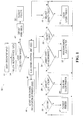
- An example of a method according to the present invention will now be described with reference to
Figure 1 which is a block flow diagram. - Referring to
Figure 1 , the method of the present disclosure is implemented by the system indicated generally at 10 in which the user loads in the document to be printed at the user input station atstep 12; and the document is electronically scanned. The invention is also applicable to the printing of electronically generated documents, for example supplied directly from a word processing package or other electronic document store. The user selects the mode of printing desired at a multifunctional display/device (MFD) atstep 14. The system automatically inputs the user selection of printing mode to an electronic control unit (ECU) atstep 16 which automatically selects the appropriate printer. - The manner whereby the system makes the printer selection is described with respect to the drawing. The system asks the question at
step 18 as to whether the user has selected the Highest Quality mode of printing; and, if the answer is affirmative, the print job is sent to a laser color printer atstep 20. If the determination atstep 18 is in the negative, the system returns tostep 16. - The controller at
step 16 then proceeds to ask the question atstep 20 if the user has selected the Fastest Copy mode of printing; and, if the answer is affirmative, the print job is sent to a monochromatic or black and white laser printer atstep 22. If the determination ofstep 20 is negative, the system returns tostep 16. - At
step 16, the system proceeds tostep 24 and makes the inquiry as to whether the user has selected the Lowest Cost Monochromatic or black and white printing mode; and, if the determination atstep 24 is in the affirmative, the system proceeds to send the printing job to the monochromatic laser printer atstep 22. - If the determination at
step 24 is in the negative, the system returns tostep 16 and proceeds to make the inquiry atstep 26 as to whether the user has selected the Lowest Cost Color mode of printing; and, if the determination atstep 26 is in the affirmative, the system proceeds to send the printing job to a solid ink color printer atstep 28. If the determination atstep 26 is in the negative, the system returns tostep 16. The system then proceeds to make the inquiry atstep 30 as to whether the user has selected a Custom mode of printing or the nearest printer to the user; and, the system responds to an affirmative determination atstep 30 by sending the printing job to the closest printer atstep 32. However, if the determination atstep 30 is negative, the system defaults to the closest printer identified instep 32. - If the determination at
step 14 is negative, the system defaults, atstep 42, to send the job to the printer closest to the document loading position as instep 32. - When the user has made a selection of a desired mode of printing at
step 14, the ECU proceeds atstep 40 to provide an indication to the user at the MFD of the location of the printer to be used for the job. - The method described in the present disclosure thus enables a user to load a printing or copying job into a loading station and select a desired mode of printing from a multifunction display or input and have the system respond to automatically determine which printer will execute the job based upon the mode of printing selected by the user without further input from the user. The method of the present invention thus automatically optimizes the printing or copying in facilities where the various printers are located at different locations and would otherwise cause loss of time and inconvenience for completing the copying job in the desired mode.
- Although this example describes the handling of complete documents, it can also process individual sheets or combinations of sheets within the same document. The user, via the input station, defines a separate printing mode for each sheet or sheet combination.
Claims (7)
- A method of automatically optimizing document printing/copying comprising:(a) connecting a plurality of document printers of differing types to a remote user document input station;(b) scanning the document to be printed and creating an electronic image of the document;(c) prompting the user to select the mode for the printing job; and,(d) inputting the user selection to a controller and assigning the printing to one of a plurality of different printers based upon the user selected mode.
- The method defined in claim 1, wherein the step of user selecting includes selecting one mode of printing from the group of lowest cost color, lowest cost monochromatic, fastest copying, highest quality color and nearest.
- The method defined in claim 1 or claim 2, wherein the step of assigning to one of the different printers includes assigning to a monochromatic printer when the user selects one of the lowest cost monochromatic or fastest copy modes of printing.
- The method defined in any of the preceding claims, wherein the step of assigning to one of the different printers includes assigning to a solid ink printer when the user selects the lowest cost mode of printing.
- The method defined in any of the preceding claims, wherein the step of inputting the user selection includes defaulting to the closest printer if the user elects not to select a mode of printing.
- The method defined in any of the preceding claims, further comprising indicating to the user the location of the printer used for the job.
- A method according to any of the preceding claims, wherein the user selects different modes of printing for each sheet or group of sheets within a document.
Applications Claiming Priority (1)
| Application Number | Priority Date | Filing Date | Title |
|---|---|---|---|
| US11/708,187 US20080198400A1 (en) | 2007-02-20 | 2007-02-20 | Optimized document printing |
Publications (2)
| Publication Number | Publication Date |
|---|---|
| EP1962180A2 true EP1962180A2 (en) | 2008-08-27 |
| EP1962180A3 EP1962180A3 (en) | 2009-09-23 |
Family
ID=39386457
Family Applications (1)
| Application Number | Title | Priority Date | Filing Date |
|---|---|---|---|
| EP08101612A Withdrawn EP1962180A3 (en) | 2007-02-20 | 2008-02-14 | Optimized document printing |
Country Status (3)
| Country | Link |
|---|---|
| US (1) | US20080198400A1 (en) |
| EP (1) | EP1962180A3 (en) |
| JP (1) | JP2008204447A (en) |
Families Citing this family (2)
| Publication number | Priority date | Publication date | Assignee | Title |
|---|---|---|---|---|
| KR20120017263A (en) * | 2010-08-18 | 2012-02-28 | 삼성전자주식회사 | Image forming system for printing the content of the widget application running on the terminal |
| JP7639526B2 (en) * | 2021-04-21 | 2025-03-05 | コニカミノルタ株式会社 | Programs and servers |
Citations (1)
| Publication number | Priority date | Publication date | Assignee | Title |
|---|---|---|---|---|
| US20020041386A1 (en) | 2000-09-19 | 2002-04-11 | Fuji Xerox Co., Ltd. | Image input and output system, method and recording medium |
Family Cites Families (2)
| Publication number | Priority date | Publication date | Assignee | Title |
|---|---|---|---|---|
| US6552813B2 (en) * | 1996-06-11 | 2003-04-22 | Sun Microsystems, Inc. | Directing print jobs in a network printing system |
| US8077333B2 (en) * | 2002-09-09 | 2011-12-13 | Canon Kabushiki Kaisha | Printing control apparatus and printing control method |
-
2007
- 2007-02-20 US US11/708,187 patent/US20080198400A1/en not_active Abandoned
-
2008
- 2008-02-06 JP JP2008026040A patent/JP2008204447A/en not_active Withdrawn
- 2008-02-14 EP EP08101612A patent/EP1962180A3/en not_active Withdrawn
Patent Citations (1)
| Publication number | Priority date | Publication date | Assignee | Title |
|---|---|---|---|---|
| US20020041386A1 (en) | 2000-09-19 | 2002-04-11 | Fuji Xerox Co., Ltd. | Image input and output system, method and recording medium |
Also Published As
| Publication number | Publication date |
|---|---|
| US20080198400A1 (en) | 2008-08-21 |
| JP2008204447A (en) | 2008-09-04 |
| EP1962180A3 (en) | 2009-09-23 |
Similar Documents
| Publication | Publication Date | Title |
|---|---|---|
| EP1374155B1 (en) | Controlling a printing system using the print queue | |
| KR101375961B1 (en) | Control apparatus, control method, and storage medium | |
| US7023571B2 (en) | Image processing apparatus and method | |
| US8285168B2 (en) | Image forming apparatus | |
| JP2019162827A (en) | Image formation apparatus and control program | |
| US20080198400A1 (en) | Optimized document printing | |
| CN108081771B (en) | Printing device and control method | |
| EP2148250A2 (en) | Image forming apparatus and print instruction apparatus | |
| JP2002132478A (en) | Printing system, controller for printing system, printing machine for printing system, control method for controller for printing system, recording medium and program | |
| CN105058996A (en) | Print control apparatus and method | |
| JP2005008360A (en) | Paper feeding cassette choice control device for printer | |
| JP5540606B2 (en) | Image forming apparatus, program, and method | |
| JP2008052115A (en) | Printing apparatus, printing execution method thereof, and printing execution program | |
| US20080186543A1 (en) | Image forming apparatus and image forming method | |
| JP2004314386A (en) | Image forming device | |
| JP2006186415A (en) | Image forming apparatus | |
| US20250199736A1 (en) | Information processing apparatus, information processing system, information processing method, image forming system, image forming method, and storage medium | |
| US20060133842A1 (en) | Printing apparatus | |
| JP2009229902A (en) | Image forming device | |
| JP6557756B2 (en) | Image display device and control program | |
| JP2006040103A (en) | Image processing system and image processor | |
| JP2005215043A (en) | Image forming apparatus | |
| JPH11352842A (en) | Recording medium, printer, printer server, printing system and printing method | |
| EP1571544B1 (en) | Coordinated concurrent printing of print jobs containing pages that are incompatible with a single printer | |
| JP6058615B2 (en) | Image forming apparatus and image forming method |
Legal Events
| Date | Code | Title | Description |
|---|---|---|---|
| PUAI | Public reference made under article 153(3) epc to a published international application that has entered the european phase |
Free format text: ORIGINAL CODE: 0009012 |
|
| AK | Designated contracting states |
Kind code of ref document: A2 Designated state(s): AT BE BG CH CY CZ DE DK EE ES FI FR GB GR HR HU IE IS IT LI LT LU LV MC MT NL NO PL PT RO SE SI SK TR |
|
| AX | Request for extension of the european patent |
Extension state: AL BA MK RS |
|
| PUAL | Search report despatched |
Free format text: ORIGINAL CODE: 0009013 |
|
| AK | Designated contracting states |
Kind code of ref document: A3 Designated state(s): AT BE BG CH CY CZ DE DK EE ES FI FR GB GR HR HU IE IS IT LI LT LU LV MC MT NL NO PL PT RO SE SI SK TR |
|
| AX | Request for extension of the european patent |
Extension state: AL BA MK RS |
|
| 17P | Request for examination filed |
Effective date: 20100323 |
|
| AKX | Designation fees paid |
Designated state(s): DE FR GB |
|
| 17Q | First examination report despatched |
Effective date: 20100526 |
|
| STAA | Information on the status of an ep patent application or granted ep patent |
Free format text: STATUS: THE APPLICATION IS DEEMED TO BE WITHDRAWN |
|
| 18D | Application deemed to be withdrawn |
Effective date: 20120901 |