EP1947558A2 - Electronic device with touch screen and method of displaying information using the same - Google Patents
Electronic device with touch screen and method of displaying information using the same Download PDFInfo
- Publication number
- EP1947558A2 EP1947558A2 EP07014006A EP07014006A EP1947558A2 EP 1947558 A2 EP1947558 A2 EP 1947558A2 EP 07014006 A EP07014006 A EP 07014006A EP 07014006 A EP07014006 A EP 07014006A EP 1947558 A2 EP1947558 A2 EP 1947558A2
- Authority
- EP
- European Patent Office
- Prior art keywords
- information
- distance
- electronic device
- touch screen
- size
- Prior art date
- Legal status (The legal status is an assumption and is not a legal conclusion. Google has not performed a legal analysis and makes no representation as to the accuracy of the status listed.)
- Withdrawn
Links
Images


Classifications
-
- G—PHYSICS
- G06—COMPUTING OR CALCULATING; COUNTING
- G06F—ELECTRIC DIGITAL DATA PROCESSING
- G06F3/00—Input arrangements for transferring data to be processed into a form capable of being handled by the computer; Output arrangements for transferring data from processing unit to output unit, e.g. interface arrangements
- G06F3/01—Input arrangements or combined input and output arrangements for interaction between user and computer
- G06F3/048—Interaction techniques based on graphical user interfaces [GUI]
- G06F3/0487—Interaction techniques based on graphical user interfaces [GUI] using specific features provided by the input device, e.g. functions controlled by the rotation of a mouse with dual sensing arrangements, or of the nature of the input device, e.g. tap gestures based on pressure sensed by a digitiser
- G06F3/0488—Interaction techniques based on graphical user interfaces [GUI] using specific features provided by the input device, e.g. functions controlled by the rotation of a mouse with dual sensing arrangements, or of the nature of the input device, e.g. tap gestures based on pressure sensed by a digitiser using a touch-screen or digitiser, e.g. input of commands through traced gestures
- G06F3/04883—Interaction techniques based on graphical user interfaces [GUI] using specific features provided by the input device, e.g. functions controlled by the rotation of a mouse with dual sensing arrangements, or of the nature of the input device, e.g. tap gestures based on pressure sensed by a digitiser using a touch-screen or digitiser, e.g. input of commands through traced gestures for inputting data by handwriting, e.g. gesture or text
-
- G—PHYSICS
- G06—COMPUTING OR CALCULATING; COUNTING
- G06F—ELECTRIC DIGITAL DATA PROCESSING
- G06F3/00—Input arrangements for transferring data to be processed into a form capable of being handled by the computer; Output arrangements for transferring data from processing unit to output unit, e.g. interface arrangements
- G06F3/01—Input arrangements or combined input and output arrangements for interaction between user and computer
- G06F3/048—Interaction techniques based on graphical user interfaces [GUI]
- G06F3/0484—Interaction techniques based on graphical user interfaces [GUI] for the control of specific functions or operations, e.g. selecting or manipulating an object, an image or a displayed text element, setting a parameter value or selecting a range
-
- G—PHYSICS
- G06—COMPUTING OR CALCULATING; COUNTING
- G06F—ELECTRIC DIGITAL DATA PROCESSING
- G06F3/00—Input arrangements for transferring data to be processed into a form capable of being handled by the computer; Output arrangements for transferring data from processing unit to output unit, e.g. interface arrangements
- G06F3/14—Digital output to display device ; Cooperation and interconnection of the display device with other functional units
-
- G—PHYSICS
- G06—COMPUTING OR CALCULATING; COUNTING
- G06F—ELECTRIC DIGITAL DATA PROCESSING
- G06F2203/00—Indexing scheme relating to G06F3/00 - G06F3/048
- G06F2203/041—Indexing scheme relating to G06F3/041 - G06F3/045
- G06F2203/04104—Multi-touch detection in digitiser, i.e. details about the simultaneous detection of a plurality of touching locations, e.g. multiple fingers or pen and finger
Definitions
- This present invention relates to an electronic device with a touch screen, and more particularly, to an electronic device with a touch screen capable of magnifying or reducing a size of an image displayed using device characteristics of the touch screen.
- an electronic device with a touch screen allows a user to directly touch a touch screen to enter a desired menu or information, offering easy information accessibility.
- the user must manipulate a direction key to change the size of information displayed on the screen.
- the direction key must be used to control a display magnification, such as when the user wishes to scale up or down the displayed information.
- a function icon having a magnification function is provided at the touch screen of the related art electronic device to control the size of the displayed information, touching operations must be performed in two or more stages.
- the related art electronic device with the touch screen is problematic because it fails to utilize device characteristics of the touch screen to change the size of displayed information.
- the present invention is directed to displaying information on a touch screen of an electronic device.
- the present invention is embodied in a method for displaying information on a touch screen of an electronic device, the method comprising displaying information on a touch screen, sensing at least two points on the touch screen being touched, resizing the information displayed according to a distance between the at least two touched points, and displaying the resized information on the touch screen.
- the information comprises at least one of image data, video data, map data, text data, and webpage data.
- the information is resized according to a comparison of the distance between the at least two touched points and a reference distance.
- the size of the information is enlarged when the distance between the at least two touched points is greater than the reference distance.
- the size of the information is uniformly enlarged for any distance between the at least two touched points greater than the reference distance.
- the size of the information is proportionally enlarged according to a ratio of the distance between the at least two touched points and the reference distance. In one aspect of the invention, the size of the information is proportionally enlarged discretely.
- the size of the information is reduced when the distance between the at least two touched points is lesser than a reference distance.
- the size of the information is uniformly reduced for any distance between the at least two touched points lesser than the reference distance.
- the size of the information is proportionally reduced according to a ratio of the distance between the at least two touched points and the reference distance. In one aspect of the invention, the size of the information is proportionally reduced discretely.
- the information is resized according to a reference table in which a plurality of sizes are respectively matched to a plurality of distances between the at least two touched points.
- the reference table is provided by the electronic device.
- the plurality of sizes respectively matched to the plurality of distances in the reference table are determined by a user.
- the reference distance is provided by the electronic device.
- the reference distance is determined by a user.
- the method further comprises displaying an indicator for indicating the reference distance on the touch screen.
- the information is resized upon sensing the at least two points being touched N times within a certain time period, where N is an integer greater than 1.
- N is an integer greater than 1.
- the information is displayed on a portion of the touch screen and the at least two touched points are sensed on the entire touch screen.
- the information is displayed on a portion of the touch screen and the at least two touched points are sensed on the portion of the touch screen.
- an electronic device for displaying information comprises a touch screen for displaying information and a controller for sensing at least two points on the touch screen being touched, resizing the information displayed according to a distance between the at least two touched points, and displaying the resized information on the touch screen.
- the information comprises at least one of image data, video data, map data, text data, and webpage data.
- the information is resized according to a comparison of the distance between the at least two touched points and a reference distance.
- the size of the information is enlarged when the distance between the at least two touched points is greater than the reference distance.
- the size of the information is uniformly enlarged for any distance between the at least two touched points greater than the reference distance.
- the size of the information is proportionally enlarged according to a ratio of the distance between the at least two touched points and the reference distance. In one aspect of the invention, the size of the information is proportionally enlarged discretely.
- the size of the information is reduced when the distance between the at least two touched points is lesser than a reference distance.
- the size of the information is uniformly reduced for any distance between the at least two touched points lesser than the reference distance.
- the size of the information is proportionally reduced according to a ratio of the distance between the at least two touched points and the reference distance. In one aspect of the invention, the size of the information is proportionally reduced discretely.
- the information is resized according to a reference table in which a plurality of sizes are respectively matched to a plurality of distances between the at least two touched points.
- the reference table is provided by the electronic device.
- the plurality of sizes respectively matched to the plurality of distances in the reference table are determined by a user.
- the reference distance is provided by the electronic device.
- the reference distance is determined by a user.
- the touch screen displays an indicator for indicating the reference distance.
- the information is resized upon the controller sensing the two points being touched N times within a certain time period, where N is an integer greater than 1.
- the information is displayed on a portion of the touch screen and the at least two touched points are sensed on the entire touch screen.
- the information is displayed on a portion of the touch screen and the at least two touched points are sensed on the portion of the touch screen.
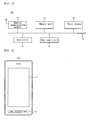
- FIG. 1 is a block diagram illustrating an electronic device in accordance with one embodiment of the present invention.
- FIG. 2 is a drawing illustrating an exterior of a mobile terminal in accordance with one embodiment of the present invention.
- FIG. 3 is a flow chart illustrating a method of displaying information using an electronic device with a touch screen in accordance with one embodiment of the present invention.
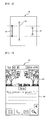
- FIG. 4 is a drawing illustrating two particular points on a touch screen being simultaneously touched in accordance with one embodiment of the present invention.
- FIG. 5 is a drawing illustrating a magnified screen image of a subway line map of FIG. 4 in accordance with one embodiment of the present invention.
- FIG. 6 is a drawing illustrating a comparison between a reference distance and a touch distance in accordance with one embodiment of the present invention.
- FIG. 7 is a drawing of a screen image showing a multitasking function being performed in accordance with one embodiment of the present invention.
- the present invention relates to a method for displaying information on a touch screen of an electronic device.
- the present invention may be applied to devices having touch screens such as a computer, a PDA, a mobile phone, and the like.
- touch screens such as a computer, a PDA, a mobile phone, and the like.
- FIG. 1 is a block diagram illustrating an electronic device in accordance with one embodiment of the present invention.
- FIG. 2 is a drawing illustrating an exterior of a mobile terminal in accordance with one embodiment of the present invention.
- an electronic device 100 with a touch screen comprises a mobile communication module 10, a memory unit 11, a touch screen 12, a key input unit 13, and a controller 14.
- the respective elements are connected by a bus 15.
- the mobile communication module 10 is a wireless communication device for transmitting and receiving data to and from a mobile communication network. For example, a call or message can be transmitted and received through the mobile communication module 10.
- the memory unit 11 stores programs for controlling a general operation of the electronic device 100, data inputted and outputted during general operation of the electronic device 100, and various processed data.
- the memory unit 11 may store various types of information, such as video data, image data, and text data, which can be displayed on the touch screen 12.
- the touch screen 12 performs two types of functions. During a display function, the touch screen 12 may display a state of the electronic device 100 and various types of information via a control signal outputted from the controller 14. During an input function, the touch screen 12 may receive various information or commands from a user.
- the key input unit 13 serves to receive various information and commands from the user.
- the key input unit 13 comprises at least one key having a specific function, such as a function for inputting a number or direction.
- the controller 14 controls the above-described elements and general operation of the electronic device according to the present invention.
- the electronic device 100 with the touch screen may also include at least one of a broadcast reception module for receiving a broadcast signal from a broadcasting network, a communication module for communicating with the wireless Internet, a camera module, a vibration module for generating vibration, and various sensors.
- FIG. 3 is a flow chart illustrating a method of displaying information using the electronic device with the touch screen in accordance with one embodiment of the present invention.
- FIG. 4 is a drawing illustrating two particular points being simultaneously touched on the touch screen in accordance with one embodiment of the present invention.
- FIG. 5 is a drawing illustrating a magnified screen image of a subway line map of FIG. 4 in accordance with one embodiment of the present invention.
- FIG. 6 is a drawing illustrating a comparison between a reference distance and a touch distance in accordance with one embodiment of the present invention.
- FIG. 7 is a drawing of a screen image showing a multitasking function being performed in accordance with one embodiment of the present invention.
- the touch screen 12 displays particular information according to a control signal of the controller 14 (S300). It is contemplated that the particular information may comprise all types of information capable of being displayed on the touch screen 12. For example, the particular information may include image data, text data, video data, animated data, etc. In addition, if a particular Web page is connected through the Internet, various information provided by the particular Web page may be displayed on the touch screen 12, for example. Referring to FIG. 4 , a subway line map is displayed on the touch screen 12.
- the controller 14 may display information such that the information is displayed only on a portion of an entire displayable region of the touch screen 12. For example, the controller 14 may not display information on a region of the touch screen 12 reserved for displaying an indicator for indicating a current state of the electronic device 100.
- the indicator region at least one of the following is preferably displayed: an indicator indicating strength of a radio signal received through the mobile communication module 10, an indicator indicating reception of a message, an indicator indicating whether or not vibration has been set, an indicator indicating a remaining battery capacity, and a current time.
- the subway line map is not displayed in the indicator region.
- the controller 14 senses when two different points on the touch screen 12 are simultaneously touched (S310 of FIG. 3 ).
- the two different points will be referred to as “point A” and “point B”.
- the event occurring when the two different points are simultaneously touched will be referred to as a "simultaneous touch”.
- a simultaneous touch occurs when a user touches two particular points on the subway line map displayed on the touch screen 12 with two fingers.
- the simultaneous touch is not limited to when the point A and the point B are touched exactly at the same time. It is contemplated that the simultaneous touch may also occur when the point A is first touched, and the point B is subsequently touched within a certain time while the point A remains touched. The two different points may be touched one time or N number of times within a certain time period, wherein "N" is an integer greater than 1.
- the controller 14 scales up or down the size of the information displayed on the touch screen 12 at a certain magnification determined according to a distance between the two touched points.
- the distance between the two touched points will be referred to as a "touch distance”.
- the image of the subway line map is magnified as displayed on the touch screen 12 of FIG. 5 .
- the magnification may be determined by comparing a reference distance and the touch distance. For example, when the touch distance is greater than the reference distance, the magnification is determined to be greater than 1. When the touch distance is less than the reference distance, the magnification is determined to be less than 1.
- the reference distance and the touch distance may be measured by various units, and compared by the measured units.
- a unit of the reference distance and the touch distance may be a pixel unit or a unit of weights and measures.
- the unit of the reference distance and the touch distance includes every unit recognized and processed by the controller 14.
- reference numeral 60 denotes a reference distance.
- Reference numeral 61 denotes a touch distance for magnifying and displaying the information.
- Reference numeral 62 denotes a touch distance for reducing and displaying the information.
- the degree of magnification is respectively uniform when the touch distance is greater or lesser than the reference distance. For example, as shown in FIG. 6 , if a touch distance for magnifying the displayed information is greater than the touch distance denoted by the reference numeral 61, the degree of magnification is the same as the degree of magnification associated with the touch distance denoted by the reference numeral 61. Similarly, if the touch distance for reducing the displayed information is less than the touch distance denoted by the reference numeral 62, the degree of reduced magnification is the same as the degree of reduced magnification associated with the touch distance denoted by the reference numeral 62.
- the degree of magnification corresponds to a ratio between the reference distance and the touch distance. For example, as shown in FIG. 6 , if the touch distance for magnifying the displayed information is greater than the touch distance denoted by the reference numeral 61, the degree of magnification is proportionally greater than the degree of magnification associated with the touch distance denoted by the reference numeral 61. Similarly, if the touch distance for reducing the displayed information is less than the touch distance denoted by the reference numeral 62, the reduced magnification is proportionally less than the degree of reduced magnification associated with the touch distance denoted by the reference numeral 62.
- the degree of magnification is directly proportional to a ratio between the touch distance and the reference distance, or corresponds to a ratio between the reference distance and the touch distance.
- the magnification is determined stepwise according to the ratio of the touch distance to the reference distance. For example, if the reference distance is 1.5 cm, and the touch distance is within the range of 1.5 cm to 2.5 cm, then the magnification is 2. If the touch distance is within the range of 2.5 cm to 3.5 cm, then the magnification is 3.
- the degree of magnification may not be necessarily determined according to the above-described manner.
- the memory unit 11 may store a table in which a plurality of magnifications are respectively matched to a plurality of touch distances.
- the degree of magnification is determined with reference to the table stored in the memory unit 11.
- the controller 14 may calculate the touch distance by using coordinate values of the points A and B transferred from the touch screen 12. The controller 14 may then scale up or down the information displayed on the touch screen 12 according to the magnification matched to the calculated touch distance in the stored table.
- the controller 14 displays a mark (or sign) indicating the reference distance on the touch screen 12. Upon seeing the mark indicating the reference distance, the user may recognize at which distance the two points are to be touched in order to scale up or down the displayed information.
- the mark indicating the reference distance can be displayed on the touch screen 12 in various forms.
- the mark indicating the reference distance can be displayed as denoted by the reference numeral 60 in FIG. 6 .
- the controller 14 may control such that the mark denoted by the reference numeral 60 in FIG. 6 is transparent in an OSD (On Screen Display) type on the information displayed on the touch screen 12.
- OSD On Screen Display
- the mark indicating the reference distance may also be displayed in the form of an image or icon.
- FIG. 7 scaling up or down the size of information displayed on a certain region of the touch screen 12 will now be described in accordance with one embodiment of the present invention.
- a particular image is displayed in a first region 70 and a screen image for creating a memo is displayed in a second region 80. That is, in FIG. 7 , the electronic device 100 is in a multitasking mode in which an application for providing the image displaying function and an application for providing a memory creating function are simultaneously performed.
- the user wants to scale up the size of the particular image displayed in the first region 70. Accordingly, the user may simultaneously touch two different points existing within the first region 70 to scale up the particular image, or may simultaneously touch two different points existing within the entire displayable region of the touch screen 12 without discriminating the first region 70 and the second region 80.
- the two different touch points according to the preferred embodiments of the present invention may exist within the entire region or within the portion of the entire region.
- the discrimination of the regions for performing the process S320 of FIG. 3 may be set or changed by the user.
- the number of required touches in the process S310 of FIG. 3 to perform the process S320 of FIG. 3 can be set or changed variably. For example, assuming that the number of touches is set as "N" ("N" is an integer greater than or equal to 1), if a touch event with respect to the points A and B transferred from the touch screen 12 occurs by the pre-set N number of times, the controller 14 scales up or down the displayed information according to a magnification determined by the touch distance between the points A and B.
- the electronic device with the touch screen and the method of displaying information using the same is advantageous because the size of the information displayed can be conveniently scaled up or down by using the device characteristics of the touch screen.
Landscapes
- Engineering & Computer Science (AREA)
- Theoretical Computer Science (AREA)
- General Engineering & Computer Science (AREA)
- Human Computer Interaction (AREA)
- Physics & Mathematics (AREA)
- General Physics & Mathematics (AREA)
- User Interface Of Digital Computer (AREA)
- Position Input By Displaying (AREA)
Abstract
Description
- This present invention relates to an electronic device with a touch screen, and more particularly, to an electronic device with a touch screen capable of magnifying or reducing a size of an image displayed using device characteristics of the touch screen.
- In general, an electronic device with a touch screen allows a user to directly touch a touch screen to enter a desired menu or information, offering easy information accessibility.
- However, in a related art electronic device with the touch screen, the user must manipulate a direction key to change the size of information displayed on the screen. Specifically, the direction key must be used to control a display magnification, such as when the user wishes to scale up or down the displayed information. Moreover, even when a function icon having a magnification function is provided at the touch screen of the related art electronic device to control the size of the displayed information, touching operations must be performed in two or more stages.
- Thus, the related art electronic device with the touch screen is problematic because it fails to utilize device characteristics of the touch screen to change the size of displayed information.
- The present invention is directed to displaying information on a touch screen of an electronic device.
- Additional features and advantages of the invention will be set forth in the description which follows, and in part will be apparent from the description, or may be learned by practice of the invention. The objectives and other advantages of the invention will be realized and attained by the structure particularly pointed out in the written description and claims hereof as well as the appended drawings.
- To achieve these and other advantages and in accordance with the purpose of the present invention, as embodied and broadly described, the present invention is embodied in a method for displaying information on a touch screen of an electronic device, the method comprising displaying information on a touch screen, sensing at least two points on the touch screen being touched, resizing the information displayed according to a distance between the at least two touched points, and displaying the resized information on the touch screen.
- Preferably, the information comprises at least one of image data, video data, map data, text data, and webpage data. In one aspect of the invention, the information is resized according to a comparison of the distance between the at least two touched points and a reference distance.
- Preferably, the size of the information is enlarged when the distance between the at least two touched points is greater than the reference distance. Alternatively, the size of the information is uniformly enlarged for any distance between the at least two touched points greater than the reference distance. Alternatively, the size of the information is proportionally enlarged according to a ratio of the distance between the at least two touched points and the reference distance. In one aspect of the invention, the size of the information is proportionally enlarged discretely.
- Preferably, the size of the information is reduced when the distance between the at least two touched points is lesser than a reference distance. Alternatively, the size of the information is uniformly reduced for any distance between the at least two touched points lesser than the reference distance. Alternatively, the size of the information is proportionally reduced according to a ratio of the distance between the at least two touched points and the reference distance. In one aspect of the invention, the size of the information is proportionally reduced discretely.
- In another aspect of the invention, the information is resized according to a reference table in which a plurality of sizes are respectively matched to a plurality of distances between the at least two touched points. Preferably, the reference table is provided by the electronic device. Preferably, the plurality of sizes respectively matched to the plurality of distances in the reference table are determined by a user.
- In one aspect of the invention, the reference distance is provided by the electronic device. Alternatively, the reference distance is determined by a user.
- In accordance with the present invention, the method further comprises displaying an indicator for indicating the reference distance on the touch screen.
- Preferably, the information is resized upon sensing the at least two points being touched N times within a certain time period, where N is an integer greater than 1. Preferably, the information is displayed on a portion of the touch screen and the at least two touched points are sensed on the entire touch screen. Alternatively, the information is displayed on a portion of the touch screen and the at least two touched points are sensed on the portion of the touch screen.
- In accordance with another embodiment of the present invention, an electronic device for displaying information comprises a touch screen for displaying information and a controller for sensing at least two points on the touch screen being touched, resizing the information displayed according to a distance between the at least two touched points, and displaying the resized information on the touch screen.
- Preferably, the information comprises at least one of image data, video data, map data, text data, and webpage data. In one aspect of the invention, the information is resized according to a comparison of the distance between the at least two touched points and a reference distance.
- Preferably, the size of the information is enlarged when the distance between the at least two touched points is greater than the reference distance. Alternatively, the size of the information is uniformly enlarged for any distance between the at least two touched points greater than the reference distance. Alternatively, the size of the information is proportionally enlarged according to a ratio of the distance between the at least two touched points and the reference distance. In one aspect of the invention, the size of the information is proportionally enlarged discretely.
- Preferably, the size of the information is reduced when the distance between the at least two touched points is lesser than a reference distance. Alternatively, the size of the information is uniformly reduced for any distance between the at least two touched points lesser than the reference distance. Alternatively, the size of the information is proportionally reduced according to a ratio of the distance between the at least two touched points and the reference distance. In one aspect of the invention, the size of the information is proportionally reduced discretely.
- In another aspect of the invention, the information is resized according to a reference table in which a plurality of sizes are respectively matched to a plurality of distances between the at least two touched points. Preferably, the reference table is provided by the electronic device. Preferably, the plurality of sizes respectively matched to the plurality of distances in the reference table are determined by a user.
- In one aspect of the invention, the reference distance is provided by the electronic device. Alternatively, the reference distance is determined by a user.
- In accordance with the present invention, the touch screen displays an indicator for indicating the reference distance. Preferably, the information is resized upon the controller sensing the two points being touched N times within a certain time period, where N is an integer greater than 1.
- Preferably, the information is displayed on a portion of the touch screen and the at least two touched points are sensed on the entire touch screen. Alternatively, the information is displayed on a portion of the touch screen and the at least two touched points are sensed on the portion of the touch screen.
- It is to be understood that both the foregoing general description and the following detailed description of the present invention are exemplary and explanatory and are intended to provide further explanation of the invention as claimed.
- The accompanying drawings, which are included to provide a further understanding of the invention and are incorporated in and constitute a part of this specification, illustrate embodiments of the invention and together with the description serve to explain the principles of the invention. Features, elements, and aspects of the invention that are referenced by the same numerals in different figures represent the same, equivalent, or similar features, elements, or aspects in accordance with one or more embodiments.
-
FIG. 1 is a block diagram illustrating an electronic device in accordance with one embodiment of the present invention. -
FIG. 2 is a drawing illustrating an exterior of a mobile terminal in accordance with one embodiment of the present invention. -
FIG. 3 is a flow chart illustrating a method of displaying information using an electronic device with a touch screen in accordance with one embodiment of the present invention. -
FIG. 4 is a drawing illustrating two particular points on a touch screen being simultaneously touched in accordance with one embodiment of the present invention. -
FIG. 5 is a drawing illustrating a magnified screen image of a subway line map ofFIG. 4 in accordance with one embodiment of the present invention. -
FIG. 6 is a drawing illustrating a comparison between a reference distance and a touch distance in accordance with one embodiment of the present invention. -
FIG. 7 is a drawing of a screen image showing a multitasking function being performed in accordance with one embodiment of the present invention. - The present invention relates to a method for displaying information on a touch screen of an electronic device. Hereinafter, preferred embodiments of the present invention will be described in detail with reference to the attached drawings.
- In the present invention, various types of electronic devices with touch screens may be used. For example, the present invention may be applied to devices having touch screens such as a computer, a PDA, a mobile phone, and the like. An electronic device with a touch screen according to an embodiment of the present invention will now be described.
-
FIG. 1 is a block diagram illustrating an electronic device in accordance with one embodiment of the present invention.FIG. 2 is a drawing illustrating an exterior of a mobile terminal in accordance with one embodiment of the present invention. - Referring to
FIG. 1 , anelectronic device 100 with a touch screen comprises amobile communication module 10, amemory unit 11, atouch screen 12, akey input unit 13, and acontroller 14. The respective elements are connected by abus 15. Preferably, themobile communication module 10 is a wireless communication device for transmitting and receiving data to and from a mobile communication network. For example, a call or message can be transmitted and received through themobile communication module 10. - The
memory unit 11 stores programs for controlling a general operation of theelectronic device 100, data inputted and outputted during general operation of theelectronic device 100, and various processed data. In particular, thememory unit 11 may store various types of information, such as video data, image data, and text data, which can be displayed on thetouch screen 12. - The
touch screen 12 performs two types of functions. During a display function, thetouch screen 12 may display a state of theelectronic device 100 and various types of information via a control signal outputted from thecontroller 14. During an input function, thetouch screen 12 may receive various information or commands from a user. - The
key input unit 13 serves to receive various information and commands from the user. Preferably, thekey input unit 13 comprises at least one key having a specific function, such as a function for inputting a number or direction. Thecontroller 14 controls the above-described elements and general operation of the electronic device according to the present invention. - In addition to the above-described elements, the
electronic device 100 with the touch screen may also include at least one of a broadcast reception module for receiving a broadcast signal from a broadcasting network, a communication module for communicating with the wireless Internet, a camera module, a vibration module for generating vibration, and various sensors. - A method of displaying information using the electronic device with the touch screen according to one embodiment of the present invention can be performed in the
electronic device 100 as described above with reference toFIG. 1 .FIG. 3 is a flow chart illustrating a method of displaying information using the electronic device with the touch screen in accordance with one embodiment of the present invention.FIG. 4 is a drawing illustrating two particular points being simultaneously touched on the touch screen in accordance with one embodiment of the present invention.FIG. 5 is a drawing illustrating a magnified screen image of a subway line map ofFIG. 4 in accordance with one embodiment of the present invention.FIG. 6 is a drawing illustrating a comparison between a reference distance and a touch distance in accordance with one embodiment of the present invention.FIG. 7 is a drawing of a screen image showing a multitasking function being performed in accordance with one embodiment of the present invention. The electronic device with the touch screen and the method of displaying information using the same according to preferred embodiments of the present invention will now be described in detail. - Referring to
FIG. 3 , thetouch screen 12 displays particular information according to a control signal of the controller 14 (S300). It is contemplated that the particular information may comprise all types of information capable of being displayed on thetouch screen 12. For example, the particular information may include image data, text data, video data, animated data, etc. In addition, if a particular Web page is connected through the Internet, various information provided by the particular Web page may be displayed on thetouch screen 12, for example. Referring toFIG. 4 , a subway line map is displayed on thetouch screen 12. - In one aspect of the invention, the
controller 14 may display information such that the information is displayed only on a portion of an entire displayable region of thetouch screen 12. For example, thecontroller 14 may not display information on a region of thetouch screen 12 reserved for displaying an indicator for indicating a current state of theelectronic device 100. In the indicator region, at least one of the following is preferably displayed: an indicator indicating strength of a radio signal received through themobile communication module 10, an indicator indicating reception of a message, an indicator indicating whether or not vibration has been set, an indicator indicating a remaining battery capacity, and a current time. As shown inFIG. 4 , the subway line map is not displayed in the indicator region. - In accordance with the present invention, the
controller 14 senses when two different points on thetouch screen 12 are simultaneously touched (S310 ofFIG. 3 ). Hereinafter, the two different points will be referred to as "point A" and "point B". Moreover, the event occurring when the two different points are simultaneously touched will be referred to as a "simultaneous touch". As shown inFIG. 4 , a simultaneous touch occurs when a user touches two particular points on the subway line map displayed on thetouch screen 12 with two fingers. - In accordance with the present invention, the simultaneous touch is not limited to when the point A and the point B are touched exactly at the same time. It is contemplated that the simultaneous touch may also occur when the point A is first touched, and the point B is subsequently touched within a certain time while the point A remains touched. The two different points may be touched one time or N number of times within a certain time period, wherein "N" is an integer greater than 1.
- In accordance with the present invention, the
controller 14 scales up or down the size of the information displayed on thetouch screen 12 at a certain magnification determined according to a distance between the two touched points. Hereinafter, the distance between the two touched points will be referred to as a "touch distance". For example, when the user simultaneously touches two points as shown inFIG. 4 , the image of the subway line map is magnified as displayed on thetouch screen 12 ofFIG. 5 . - The magnification may be determined by comparing a reference distance and the touch distance. For example, when the touch distance is greater than the reference distance, the magnification is determined to be greater than 1. When the touch distance is less than the reference distance, the magnification is determined to be less than 1.
- The reference distance and the touch distance may be measured by various units, and compared by the measured units. For example, a unit of the reference distance and the touch distance may be a pixel unit or a unit of weights and measures. Preferably, the unit of the reference distance and the touch distance includes every unit recognized and processed by the
controller 14. - Referring to
FIG. 6 ,reference numeral 60 denotes a reference distance.Reference numeral 61 denotes a touch distance for magnifying and displaying the information.Reference numeral 62 denotes a touch distance for reducing and displaying the information. - In accordance with one embodiment of the present invention, the degree of magnification is respectively uniform when the touch distance is greater or lesser than the reference distance. For example, as shown in
FIG. 6 , if a touch distance for magnifying the displayed information is greater than the touch distance denoted by thereference numeral 61, the degree of magnification is the same as the degree of magnification associated with the touch distance denoted by thereference numeral 61. Similarly, if the touch distance for reducing the displayed information is less than the touch distance denoted by thereference numeral 62, the degree of reduced magnification is the same as the degree of reduced magnification associated with the touch distance denoted by thereference numeral 62. - In accordance with another embodiment of the present invention, the degree of magnification corresponds to a ratio between the reference distance and the touch distance. For example, as shown in
FIG. 6 , if the touch distance for magnifying the displayed information is greater than the touch distance denoted by thereference numeral 61, the degree of magnification is proportionally greater than the degree of magnification associated with the touch distance denoted by thereference numeral 61. Similarly, if the touch distance for reducing the displayed information is less than the touch distance denoted by thereference numeral 62, the reduced magnification is proportionally less than the degree of reduced magnification associated with the touch distance denoted by thereference numeral 62. - In accordance with another embodiment of the present invention, the degree of magnification is directly proportional to a ratio between the touch distance and the reference distance, or corresponds to a ratio between the reference distance and the touch distance. Namely, the magnification is determined stepwise according to the ratio of the touch distance to the reference distance. For example, if the reference distance is 1.5 cm, and the touch distance is within the range of 1.5 cm to 2.5 cm, then the magnification is 2. If the touch distance is within the range of 2.5 cm to 3.5 cm, then the magnification is 3.
- In accordance with another embodiment of the present invention, the degree of magnification may not be necessarily determined according to the above-described manner. For example, the
memory unit 11 may store a table in which a plurality of magnifications are respectively matched to a plurality of touch distances. Hence, the degree of magnification is determined with reference to the table stored in thememory unit 11. In one aspect of the invention, thecontroller 14 may calculate the touch distance by using coordinate values of the points A and B transferred from thetouch screen 12. Thecontroller 14 may then scale up or down the information displayed on thetouch screen 12 according to the magnification matched to the calculated touch distance in the stored table. - In accordance with the present invention, the
controller 14 displays a mark (or sign) indicating the reference distance on thetouch screen 12. Upon seeing the mark indicating the reference distance, the user may recognize at which distance the two points are to be touched in order to scale up or down the displayed information. - The mark indicating the reference distance can be displayed on the
touch screen 12 in various forms. For example, the mark indicating the reference distance can be displayed as denoted by thereference numeral 60 inFIG. 6 . In this case, thecontroller 14 may control such that the mark denoted by thereference numeral 60 inFIG. 6 is transparent in an OSD (On Screen Display) type on the information displayed on thetouch screen 12. - In addition, for example, the mark indicating the reference distance may be displayed on a certain region of the
touch screen 12 in text form, such as "C = 2cm". The mark indicating the reference distance may also be displayed in the form of an image or icon. - Referring to
FIG. 7 , scaling up or down the size of information displayed on a certain region of thetouch screen 12 will now be described in accordance with one embodiment of the present invention. InFIG. 7 , a particular image is displayed in afirst region 70 and a screen image for creating a memo is displayed in asecond region 80. That is, inFIG. 7 , theelectronic device 100 is in a multitasking mode in which an application for providing the image displaying function and an application for providing a memory creating function are simultaneously performed. - In this state, it is assumed that the user wants to scale up the size of the particular image displayed in the
first region 70. Accordingly, the user may simultaneously touch two different points existing within thefirst region 70 to scale up the particular image, or may simultaneously touch two different points existing within the entire displayable region of thetouch screen 12 without discriminating thefirst region 70 and thesecond region 80. - In accordance with the present invention, when information displayed on a portion of an entire region of the
touch screen 12 is intended to be scaled up or down, the two different touch points according to the preferred embodiments of the present invention may exist within the entire region or within the portion of the entire region. The discrimination of the regions for performing the process S320 ofFIG. 3 may be set or changed by the user. - In accordance with the present invention, the number of required touches in the process S310 of
FIG. 3 to perform the process S320 ofFIG. 3 can be set or changed variably. For example, assuming that the number of touches is set as "N" ("N" is an integer greater than or equal to 1), if a touch event with respect to the points A and B transferred from thetouch screen 12 occurs by the pre-set N number of times, thecontroller 14 scales up or down the displayed information according to a magnification determined by the touch distance between the points A and B. - As described above, the electronic device with the touch screen and the method of displaying information using the same is advantageous because the size of the information displayed can be conveniently scaled up or down by using the device characteristics of the touch screen.
- While the invention has been described in connection with what is presently considered to be practical exemplary embodiments, it is to be understood that the invention is not limited to the disclosed embodiments, but, on the contrary, is intended to cover various modifications and equivalent arrangements included within the spirit and scope of the appended claims.
Claims (40)
- A method for displaying information on a touch screen of an electronic device, the method comprising:displaying information on a touch screen;sensing at least two points on the touch screen being touched;resizing the information displayed according to a distance between the at least two touched points; anddisplaying the resized information on the touch screen.
- The method of claim 1, wherein the information comprises at least one of:image data;video data;map data;text data; andwebpage data.
- The method of claim 1, wherein the information is resized according to a comparison of the distance between the at least two touched points and a reference distance.
- The method of claim 1, wherein the size of the information is enlarged when the distance between the at least two touched points is greater than the reference distance.
- The method of claim 4, wherein the size of the information is uniformly enlarged for any distance between the at least two touched points greater than the reference distance.
- The method of claim 4, wherein the size of the information is proportionally enlarged according to a ratio of the distance between the at least two touched points and the reference distance.
- The method of claim 6, wherein the size of the information is proportionally enlarged discretely.
- The method of claim 1, wherein the size of the information is reduced when the distance between the at least two touched points is lesser than a reference distance.
- The method of claim 8, wherein the size of the information is uniformly reduced for any distance between the at least two touched points lesser than the reference distance.
- The method of claim 8, wherein the size of the information is proportionally reduced according to a ratio of the distance between the at least two touched points and the reference distance.
- The method of claim 10, wherein the size of the information is proportionally reduced discretely.
- The method of claim 1, wherein the information is resized according to a reference table in which a plurality of sizes are respectively matched to a plurality of distances between the at least two touched points.
- The method of claim 12, wherein the reference table is provided by the electronic device.
- The method of claim 12, wherein the plurality of sizes respectively matched to the plurality of distances in the reference table are determined by a user.
- The method of claim 3, wherein the reference distance is provided by the electronic device.
- The method of claim 3, wherein the reference distance is determined by a user.
- The method of claim 3, further comprising displaying an indicator for indicating the reference distance on the touch screen.
- The method of claim 1, wherein the information is resized upon sensing the at least two points being touched N times within a certain time period, where N is an integer greater than 1.
- The method of claim 1, wherein the information is displayed on a portion of the touch screen and the at least two touched points are sensed on the entire touch screen.
- The method of claim 1, wherein the information is displayed on a portion of the touch screen and the at least two touched points are sensed on the portion of the touch screen.
- An electronic device for displaying information, the electric device comprising:a touch screen for displaying information; anda controller for sensing at least two points on the touch screen being touched, resizing the information displayed according to a distance between the at least two touched points, and displaying the resized information on the touch screen.
- The electronic device of claim 21, wherein the information comprises at least one of:image data;video data;map data;text data; andwebpage data.
- The electronic device of claim 21, wherein the information is resized according to a comparison of the distance between the at least two touched points and a reference distance.
- The electronic device of claim 21, wherein the size of the information is enlarged when the distance between the at least two touched points is greater than a reference distance.
- The electronic device of claim 24, wherein the size of the information is uniformly enlarged for any distance between the at least two touched points greater than the reference distance.
- The electronic device of claim 24, wherein the size of the information is proportionally enlarged according to a ratio of the distance between the at least two touched points and the reference distance.
- The electronic device of claim 26, wherein the size of the information is proportionally enlarged discretely.
- The electronic device of claim 21, wherein the size of the information is reduced when the distance between the at least two touched points is lesser than a reference distance.
- The electronic device of claim 28, wherein the size of the information is uniformly reduced for any distance between the at least two touched points lesser.than the reference distance.
- The electronic device of claim 28, wherein the size of the information is proportionally reduced according to a ratio of the distance between the at least two touched points and the reference distance.
- The electronic device of claim 30, wherein the size of the information is proportionally reduced discretely.
- The electronic device of claim 21, wherein the information is resized according to a reference table in which a plurality of sizes are respectively matched to a plurality of distances between the two touched points.
- The electronic device of claim 32, wherein the reference table is provided by the electronic device.
- The electronic device of claim 32, wherein the plurality of sizes respectively matched to the plurality of distances in the reference table are determined by a user.
- The electronic device of claim 23, wherein the reference distance is provided by the electronic device.
- The electronic device of claim 23, wherein the reference distance is determined by a user.
- The electronic device of claim 23, wherein the touch screen displays an indicator for indicating the reference distance.
- The electronic device of claim 21, wherein the information is resized upon the controller sensing the two points being touched N times within a certain time period, where N is an integer greater than 1.
- The electronic device of claim 21, wherein the information is displayed on a portion of the touch screen and the at least two touched points are sensed on the entire touch screen.
- The electronic device of claim 21, wherein the information is displayed on a portion of the touch screen and the at least two touched points are sensed on the portion of the touch screen.
Applications Claiming Priority (1)
| Application Number | Priority Date | Filing Date | Title |
|---|---|---|---|
| KR1020070006383A KR100892966B1 (en) | 2007-01-20 | 2007-01-20 | Electronic device having a touch screen and information display method using the same |
Publications (2)
| Publication Number | Publication Date |
|---|---|
| EP1947558A2 true EP1947558A2 (en) | 2008-07-23 |
| EP1947558A3 EP1947558A3 (en) | 2012-02-08 |
Family
ID=39233068
Family Applications (1)
| Application Number | Title | Priority Date | Filing Date |
|---|---|---|---|
| EP07014006A Withdrawn EP1947558A3 (en) | 2007-01-20 | 2007-07-17 | Electronic device with touch screen and method of displaying information using the same |
Country Status (4)
| Country | Link |
|---|---|
| US (1) | US7986309B2 (en) |
| EP (1) | EP1947558A3 (en) |
| KR (1) | KR100892966B1 (en) |
| CN (1) | CN101226452B (en) |
Cited By (4)
| Publication number | Priority date | Publication date | Assignee | Title |
|---|---|---|---|---|
| EP2711829A1 (en) * | 2012-09-24 | 2014-03-26 | Kyocera Document Solutions Inc. | Display input device as well as electronic apparatus and image forming apparatus having the display input device |
| EP2637088A3 (en) * | 2012-03-07 | 2017-08-09 | Canon Kabushiki Kaisha | Information processing apparatus, control method thereof, and program |
| EP2192477B1 (en) * | 2008-11-20 | 2018-01-24 | Samsung Electronics Co., Ltd. | Portable terminal with touch screen and method for displaying tags in the portable terminal |
| EP3690628A4 (en) * | 2017-09-29 | 2021-06-09 | Furuno Electric Co., Ltd. | NAUTICAL CHART DISPLAY DEVICE, NAUTICAL CHART DISPLAY PROCESS AND NAUTICAL CHART DISPLAY PROGRAM |
Families Citing this family (42)
| Publication number | Priority date | Publication date | Assignee | Title |
|---|---|---|---|---|
| JP5586826B2 (en) | 2007-09-28 | 2014-09-10 | 京セラ株式会社 | Portable electronic devices |
| US8532346B2 (en) * | 2009-03-11 | 2013-09-10 | Sony Corporation | Device, method and computer program product |
| US8723988B2 (en) | 2009-07-17 | 2014-05-13 | Sony Corporation | Using a touch sensitive display to control magnification and capture of digital images by an electronic device |
| US20110043538A1 (en) * | 2009-08-18 | 2011-02-24 | Sony Ericsson Mobile Communications Ab | Method and Arrangement for Zooming on a Display |
| KR100941927B1 (en) | 2009-08-21 | 2010-02-18 | 이성호 | Method and device for detecting touch input |
| JP2011227854A (en) * | 2009-09-30 | 2011-11-10 | Aisin Aw Co Ltd | Information display device |
| TWI412966B (en) * | 2009-11-10 | 2013-10-21 | Benq Corp | Multi-display control method |
| KR20110054852A (en) * | 2009-11-18 | 2011-05-25 | 삼성전자주식회사 | Terminal with touch screen and method for measuring geometric data in terminal |
| CN102087571B (en) * | 2009-12-07 | 2015-03-04 | 联想(北京)有限公司 | Method for operational control of operation object and terminal device |
| KR101059098B1 (en) | 2009-12-24 | 2011-08-24 | 이성호 | Touch cell structure of touch panel, touch panel and touch input detection method using same |
| KR101361410B1 (en) * | 2010-08-16 | 2014-02-10 | 라쿠텐 인코포레이티드 | Web management device, web management method, computer readable recording medium for recording web management program, and web system |
| KR101685529B1 (en) | 2010-08-20 | 2016-12-12 | 삼성전자주식회사 | Method for configurating screen, user device, and storage medium thereof |
| US10485490B2 (en) * | 2010-11-11 | 2019-11-26 | Zoll Medical Corporation | Acute care treatment systems dashboard |
| CN102023803A (en) * | 2010-12-04 | 2011-04-20 | 鸿富锦精密工业(深圳)有限公司 | Electronic reading device and preview method thereof |
| CN102890611B (en) * | 2011-07-21 | 2016-03-30 | 华为技术有限公司 | A kind of method and device that file project information is provided based on touching type operation |
| US9146665B2 (en) * | 2011-09-30 | 2015-09-29 | Paypal, Inc. | Systems and methods for enhancing user interaction with displayed information |
| CN102508616B (en) * | 2011-11-28 | 2014-02-12 | 明基电通有限公司 | Picture display method for touch screen |
| KR20130064458A (en) * | 2011-12-08 | 2013-06-18 | 삼성전자주식회사 | Display apparatus for displaying screen divided by a plurallity of area and method thereof |
| KR20130082352A (en) * | 2012-01-11 | 2013-07-19 | 삼성전자주식회사 | Apparatus and method for zooming touch screen in electronic device |
| CN102609196A (en) * | 2012-01-17 | 2012-07-25 | 埃派克森微电子(上海)股份有限公司 | Image display control device and image display control method for portable electronic device |
| CN103309596B (en) * | 2012-03-13 | 2016-12-14 | 深圳市世纪光速信息技术有限公司 | The method of adjustment of a kind of entering method keyboard and mobile terminal thereof |
| KR20200067956A (en) * | 2012-03-21 | 2020-06-12 | 김시환 | Information display method in the smartphone display |
| KR101690261B1 (en) | 2012-04-02 | 2016-12-27 | 삼성전자주식회사 | Digital image processing apparatus and controlling method thereof |
| CN103455267A (en) * | 2012-06-04 | 2013-12-18 | 联想(北京)有限公司 | Information processing method and electronic device |
| CN102819389B (en) * | 2012-07-19 | 2016-03-09 | 宇龙计算机通信科技(深圳)有限公司 | A kind of mobile terminal and the method at mobile terminal displaying contents |
| CN102880422A (en) * | 2012-09-27 | 2013-01-16 | 深圳Tcl新技术有限公司 | Method and device for processing words of touch screen by aid of intelligent equipment |
| KR20140058006A (en) * | 2012-11-05 | 2014-05-14 | 삼성전기주식회사 | Electronic pen input sysme and input method using the same |
| KR101407329B1 (en) * | 2012-11-16 | 2014-06-16 | 선문대학교 산학협력단 | Display apparatus having touch screen and screen control method thereof |
| GB2509541A (en) | 2013-01-08 | 2014-07-09 | Ibm | Display tool with a magnifier with a crosshair tool. |
| CN103209236A (en) * | 2013-02-28 | 2013-07-17 | 广东欧珀移动通信有限公司 | Method for adjusting transparency of dial pad and touch-type mobile communication terminal thereof |
| CN104065988A (en) * | 2013-03-18 | 2014-09-24 | 珠海扬智电子科技有限公司 | Multi-screen interaction control method and multi-screen interaction system thereof |
| KR102094013B1 (en) | 2013-04-02 | 2020-03-26 | 삼성전자주식회사 | Method and apparatus for transmitting message in an electronic device |
| CN103440104A (en) * | 2013-08-22 | 2013-12-11 | 广东欧珀移动通信有限公司 | Scaling method and system for display content |
| CN103645855A (en) * | 2013-11-29 | 2014-03-19 | 东莞宇龙通信科技有限公司 | Touch reading method and device |
| TWI511026B (en) * | 2014-01-29 | 2015-12-01 | Acer Inc | Mobile device and method for adjusting its window size |
| JP6559403B2 (en) * | 2014-05-19 | 2019-08-14 | シャープ株式会社 | Content display device, content display method, and program |
| TWI575441B (en) * | 2016-01-13 | 2017-03-21 | 佳世達科技股份有限公司 | Display device |
| JP6914582B2 (en) * | 2016-12-06 | 2021-08-04 | 日本無線株式会社 | Map display device and program |
| WO2021202213A2 (en) | 2020-03-30 | 2021-10-07 | Zoll Medical Corporation | Medical device system and hardware for sensor data acquisition |
| CN111951353A (en) * | 2020-07-29 | 2020-11-17 | 广州华多网络科技有限公司 | Synthesis method, device, device and storage medium of electronic album |
| EP4648059A3 (en) | 2020-09-04 | 2025-12-24 | ZOLL Medical Corporation | Medical treatment system with companion device |
| CN112000274B (en) * | 2020-10-09 | 2021-02-09 | 蘑菇车联信息科技有限公司 | Zooming method, device and equipment for screen of vehicle-mounted intelligent equipment |
Citations (1)
| Publication number | Priority date | Publication date | Assignee | Title |
|---|---|---|---|---|
| US20060026521A1 (en) | 2004-07-30 | 2006-02-02 | Apple Computer, Inc. | Gestures for touch sensitive input devices |
Family Cites Families (8)
| Publication number | Priority date | Publication date | Assignee | Title |
|---|---|---|---|---|
| EP0622722B1 (en) * | 1993-04-30 | 2002-07-17 | Xerox Corporation | Interactive copying system |
| JPH104531A (en) * | 1996-06-14 | 1998-01-06 | Nikon Corp | Information processing device |
| JP2003173237A (en) * | 2001-09-28 | 2003-06-20 | Ricoh Co Ltd | Information input / output system, program and storage medium |
| US7366995B2 (en) * | 2004-02-03 | 2008-04-29 | Roland Wescott Montague | Combination tool that zooms in, zooms out, pans, rotates, draws, or manipulates during a drag |
| CN100483319C (en) * | 2004-06-17 | 2009-04-29 | 皇家飞利浦电子股份有限公司 | Use of a two finger input on touch screens |
| KR100644636B1 (en) * | 2004-10-07 | 2006-11-15 | 삼성전자주식회사 | Screen magnification apparatus and method of information processing terminal |
| KR100627666B1 (en) * | 2004-12-29 | 2006-09-25 | (주)멜파스 | Method for controlling display unit using a sensor input and system of enabling the method |
| JP2009522669A (en) * | 2005-12-30 | 2009-06-11 | アップル インコーポレイテッド | Portable electronic device with multi-touch input |
-
2007
- 2007-01-20 KR KR1020070006383A patent/KR100892966B1/en not_active Expired - Fee Related
- 2007-07-17 EP EP07014006A patent/EP1947558A3/en not_active Withdrawn
- 2007-07-17 US US11/778,882 patent/US7986309B2/en not_active Expired - Fee Related
- 2007-07-19 CN CN2007101386663A patent/CN101226452B/en not_active Expired - Fee Related
Patent Citations (1)
| Publication number | Priority date | Publication date | Assignee | Title |
|---|---|---|---|---|
| US20060026521A1 (en) | 2004-07-30 | 2006-02-02 | Apple Computer, Inc. | Gestures for touch sensitive input devices |
Cited By (6)
| Publication number | Priority date | Publication date | Assignee | Title |
|---|---|---|---|---|
| EP2192477B1 (en) * | 2008-11-20 | 2018-01-24 | Samsung Electronics Co., Ltd. | Portable terminal with touch screen and method for displaying tags in the portable terminal |
| EP2637088A3 (en) * | 2012-03-07 | 2017-08-09 | Canon Kabushiki Kaisha | Information processing apparatus, control method thereof, and program |
| EP2711829A1 (en) * | 2012-09-24 | 2014-03-26 | Kyocera Document Solutions Inc. | Display input device as well as electronic apparatus and image forming apparatus having the display input device |
| US20140085671A1 (en) * | 2012-09-24 | 2014-03-27 | Kyocera Document Solutions Inc. | Display input device as well as electronic apparatus and image forming apparatus having the display input device |
| EP3690628A4 (en) * | 2017-09-29 | 2021-06-09 | Furuno Electric Co., Ltd. | NAUTICAL CHART DISPLAY DEVICE, NAUTICAL CHART DISPLAY PROCESS AND NAUTICAL CHART DISPLAY PROGRAM |
| US11592296B2 (en) | 2017-09-29 | 2023-02-28 | Furuno Electric Co., Ltd. | Nautical chart display device, nautical chart display method, and nautical chart display program |
Also Published As
| Publication number | Publication date |
|---|---|
| US7986309B2 (en) | 2011-07-26 |
| KR20080068782A (en) | 2008-07-24 |
| CN101226452A (en) | 2008-07-23 |
| CN101226452B (en) | 2012-08-29 |
| US20080174563A1 (en) | 2008-07-24 |
| KR100892966B1 (en) | 2009-04-10 |
| EP1947558A3 (en) | 2012-02-08 |
Similar Documents
| Publication | Publication Date | Title |
|---|---|---|
| US7986309B2 (en) | Electronic device with touch screen and method of displaying information using the same | |
| US20180292966A1 (en) | Apparatus and method for providing an interface in a device with touch screen | |
| US9372614B2 (en) | Automatic enlargement of viewing area with selectable objects | |
| KR100617810B1 (en) | Data display device and method | |
| KR101451999B1 (en) | Data scroll method and apparatus | |
| US8300017B2 (en) | Mobile electronic apparatus with touch input device and display method using the same | |
| EP1970799B1 (en) | Electronic device and method of controlling mode thereof and mobile communication terminal | |
| EP2462501B1 (en) | Method and device for enhancing scrolling operations in a display device | |
| RU2500016C2 (en) | User interface, device and method for displaying special locations on map | |
| JP6068797B2 (en) | Apparatus and method for controlling output screen of portable terminal | |
| US20090002324A1 (en) | Method, Apparatus and Computer Program Product for Providing a Scrolling Mechanism for Touch Screen Devices | |
| CN111880712B (en) | Page display method and device, electronic equipment and storage medium | |
| EP2116926A2 (en) | Configurable icon sizing and placement for wireless and other devices | |
| US20120169670A1 (en) | Mobile terminal and touch recognizing method therein | |
| EP2908212A2 (en) | Electronic map touch method and device | |
| EP2132621A2 (en) | Methods of displaying information at different zoom settings and related devices and computer program products | |
| US20140192022A1 (en) | Display control device, display control method and program | |
| CN104615336A (en) | Information processing method and electronic equipment | |
| EP2442240A1 (en) | Mobile terminal and method for controlling the same | |
| US20140317541A1 (en) | Electronic device having touch screen and method for zooming in | |
| US20110102466A1 (en) | System and method for zooming images | |
| US9570045B2 (en) | Terminal apparatus and display control method | |
| EP2573663A1 (en) | Method for selecting area of content for enlargement, and apparatus and system for providing content | |
| KR20130082352A (en) | Apparatus and method for zooming touch screen in electronic device | |
| CN114969588A (en) | A document browsing method, device, electronic device and storage medium |
Legal Events
| Date | Code | Title | Description |
|---|---|---|---|
| PUAI | Public reference made under article 153(3) epc to a published international application that has entered the european phase |
Free format text: ORIGINAL CODE: 0009012 |
|
| AK | Designated contracting states |
Kind code of ref document: A2 Designated state(s): AT BE BG CH CY CZ DE DK EE ES FI FR GB GR HU IE IS IT LI LT LU LV MC MT NL PL PT RO SE SI SK TR |
|
| AX | Request for extension of the european patent |
Extension state: AL BA HR MK RS |
|
| RAP1 | Party data changed (applicant data changed or rights of an application transferred) |
Owner name: LG ELECTRONICS INC. |
|
| PUAL | Search report despatched |
Free format text: ORIGINAL CODE: 0009013 |
|
| AK | Designated contracting states |
Kind code of ref document: A3 Designated state(s): AT BE BG CH CY CZ DE DK EE ES FI FR GB GR HU IE IS IT LI LT LU LV MC MT NL PL PT RO SE SI SK TR |
|
| AX | Request for extension of the european patent |
Extension state: AL BA HR MK RS |
|
| RIC1 | Information provided on ipc code assigned before grant |
Ipc: G06F 3/048 20060101AFI20111230BHEP |
|
| 17P | Request for examination filed |
Effective date: 20120618 |
|
| AKX | Designation fees paid |
Designated state(s): AT BE BG CH CY CZ DE DK EE ES FI FR GB GR HU IE IS IT LI LT LU LV MC MT NL PL PT RO SE SI SK TR |
|
| STAA | Information on the status of an ep patent application or granted ep patent |
Free format text: STATUS: EXAMINATION IS IN PROGRESS |
|
| 17Q | First examination report despatched |
Effective date: 20170306 |
|
| STAA | Information on the status of an ep patent application or granted ep patent |
Free format text: STATUS: THE APPLICATION IS DEEMED TO BE WITHDRAWN |
|
| 18D | Application deemed to be withdrawn |
Effective date: 20190409 |