EP1933231A2 - Speed dependent displaying of information items in a graphical user interface - Google Patents
Speed dependent displaying of information items in a graphical user interface Download PDFInfo
- Publication number
- EP1933231A2 EP1933231A2 EP07018236A EP07018236A EP1933231A2 EP 1933231 A2 EP1933231 A2 EP 1933231A2 EP 07018236 A EP07018236 A EP 07018236A EP 07018236 A EP07018236 A EP 07018236A EP 1933231 A2 EP1933231 A2 EP 1933231A2
- Authority
- EP
- European Patent Office
- Prior art keywords
- information items
- string
- path
- speed
- display screen
- Prior art date
- Legal status (The legal status is an assumption and is not a legal conclusion. Google has not performed a legal analysis and makes no representation as to the accuracy of the status listed.)
- Granted
Links
Images

Classifications
-
- G—PHYSICS
- G06—COMPUTING OR CALCULATING; COUNTING
- G06F—ELECTRIC DIGITAL DATA PROCESSING
- G06F3/00—Input arrangements for transferring data to be processed into a form capable of being handled by the computer; Output arrangements for transferring data from processing unit to output unit, e.g. interface arrangements
- G06F3/01—Input arrangements or combined input and output arrangements for interaction between user and computer
- G06F3/048—Interaction techniques based on graphical user interfaces [GUI]
- G06F3/0484—Interaction techniques based on graphical user interfaces [GUI] for the control of specific functions or operations, e.g. selecting or manipulating an object, an image or a displayed text element, setting a parameter value or selecting a range
- G06F3/0485—Scrolling or panning
-
- G—PHYSICS
- G06—COMPUTING OR CALCULATING; COUNTING
- G06F—ELECTRIC DIGITAL DATA PROCESSING
- G06F3/00—Input arrangements for transferring data to be processed into a form capable of being handled by the computer; Output arrangements for transferring data from processing unit to output unit, e.g. interface arrangements
- G06F3/01—Input arrangements or combined input and output arrangements for interaction between user and computer
- G06F3/048—Interaction techniques based on graphical user interfaces [GUI]
- G06F3/0481—Interaction techniques based on graphical user interfaces [GUI] based on specific properties of the displayed interaction object or a metaphor-based environment, e.g. interaction with desktop elements like windows or icons, or assisted by a cursor's changing behaviour or appearance
- G06F3/0482—Interaction with lists of selectable items, e.g. menus
-
- G—PHYSICS
- G06—COMPUTING OR CALCULATING; COUNTING
- G06F—ELECTRIC DIGITAL DATA PROCESSING
- G06F3/00—Input arrangements for transferring data to be processed into a form capable of being handled by the computer; Output arrangements for transferring data from processing unit to output unit, e.g. interface arrangements
- G06F3/01—Input arrangements or combined input and output arrangements for interaction between user and computer
- G06F3/048—Interaction techniques based on graphical user interfaces [GUI]
- G06F3/0481—Interaction techniques based on graphical user interfaces [GUI] based on specific properties of the displayed interaction object or a metaphor-based environment, e.g. interaction with desktop elements like windows or icons, or assisted by a cursor's changing behaviour or appearance
- G06F3/04812—Interaction techniques based on cursor appearance or behaviour, e.g. being affected by the presence of displayed objects
-
- H—ELECTRICITY
- H04—ELECTRIC COMMUNICATION TECHNIQUE
- H04M—TELEPHONIC COMMUNICATION
- H04M1/00—Substation equipment, e.g. for use by subscribers
- H04M1/72—Mobile telephones; Cordless telephones, i.e. devices for establishing wireless links to base stations without route selection
- H04M1/724—User interfaces specially adapted for cordless or mobile telephones
- H04M1/72469—User interfaces specially adapted for cordless or mobile telephones for operating the device by selecting functions from two or more displayed items, e.g. menus or icons
Definitions
- the present invention relates to user interfaces of apparatus, in particular to user interfaces of apparatus that include a display screen on which a plurality of information items can be moved along a path under user control through the use of a navigational input device.
- Increased processing power has made it easier to manipulate information items on a display of a mobile electronic device, for example through presence of improved graphics accelerators.
- Several attempts have been made to put this increase processing power to use in improving the user-friendliness of graphical UIs. For example, it is now possible to show three dimensional objects on mobile electronic devices and to show two-dimensional objects in a three-dimensional UI space. However, these attempts have mainly cluttered the user interface for the normal user when effects steal the attention from the tasks to be performed. This is a new situation in mobile electronic devices. Solutions for more intuitive UI graphics are needed. Thus, there is a desire for more flexible and intuitive ways of UI navigation visualizations.
- One way of fulfilling the object is by displaying a string of information items on a display screen along a path, allowing the user to control the speed of movement of the information items along the path through a navigational input means and changing the shape of the path in relation to the speed of movement of the string of items along the path.
- the changing shape of the path provides the user with an optical feedback and thereby improves the feeling of control over the speed of movement of the items in the string.
- user confidence is improved and the acceptance of the technology is increased.
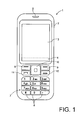
- Fig. 1 illustrates a first embodiment of a mobile terminal according to the invention in the form of a mobile telephone by a front view.
- the mobile phone 1 comprises a user interface having a housing 2, a display 3, an on/off button (not shown), a speaker 5 (only the opening is shown), and a microphone 6 (not visible in Fig. 1).
- the phone 1 according to the first preferred embodiment is adapted for communication via a cellular network, such as the GSM 900/1800 MHz network, but could just as well be adapted for use with a Code Division Multiple Access (CDMA) network, a 3G network, or a TCP/IP-based network to cover a possible VoIP-network (e.g. via WLAN, WIMAX or similar) or a mix of VoIP and Cellular such as UMA (Universal Mobile Access).
- CDMA Code Division Multiple Access
- 3G Wireless Fidelity
- TCP/IP-based network to cover a possible VoIP-network (e.g. via WLAN, WIMAX or similar) or
- the keypad 7 has a first group of keys 8 as alphanumeric keys, by means of which the user can enter a telephone number, write a text message (SMS), write a name (associated with the phone number), etc.
- Each of the twelve alphanumeric keys 8 is provided with a figure "0-9" or a sign "#” or "*", respectively.
- each key is associated with a number of letters and special signs used in the text editing.
- the keypad 2 has additionally a second group of keys comprising two softkeys 9, two call handling keys (offhook key 11 and onhook key 12), and a 5-way navigation key 10 (up, down, left, right and center: select/activate).
- the function of the softkeys 9 depends on the state of the phone, and navigation in the menu is performed by using the navigation-key 10.
- the present function of the softkeys 9 is shown in separate fields (soft labels) in a dedicated area 4 of the display 3, just above the softkeys 9.
- the two call handling keys 11,12 are used for establishing a call or a conference call, terminating a call or rejecting an incoming call. This key layout is characteristic for e.g. the Nokia 6230i TM phone.
- the navigation key 10 is a four- or five-way key which can be used for cursor movement, scrolling and selecting (five-way key) and is placed centrally on the front surface of the phone between the display 3 and the group of alphanumeric keys 7.
- a releasable rear cover gives access to the SIM card (not shown), and the battery pack (not shown) in the back of the phone that supplies electrical power for the electronic components of the mobile phone 1.
- the mobile phone 1 has a flat display 3 that is typically made of an LCD with optional back lighting, such as a TFT matrix capable of displaying color images.
- a touch screen may be used instead of a conventional LCD display.
- Fig. 2 illustrates in block diagram form the general architecture of the mobile phone 1 constructed in accordance with the present invention.
- the processor 18 controls the operation of the terminal and has an integrated digital signal processor 17 and an integrated RAM 15.
- the processor 18 controls the communication with the cellular network via the transmitter/receiver circuit 19 and an internal antenna 20.
- a microphone 6 coupled to the processor 18 via voltage regulators 21 transforms the user's speech into analogue signals, the analogue signals formed thereby are A/D converted in an A/D converter (not shown) before the speech is encoded in the DSP 17 that is included in the processor 18.
- the encoded speech signal is transferred to the processor 18, which e.g. supports the GSM terminal software.
- the digital signal-processing unit 17 speech-decodes the signal, which is transferred from the processor 18 to the speaker 5 via a D/A converter (not shown).
- the voltage regulators 21 form the interface for the speaker 5, the microphone 6, the LED drivers 91 (for the LEDS backlighting the keypad 7 and the display 3), the SIM card 22, battery 24, the bottom connector 27, the DC jack 31 (for connecting to the charger 33) and the audio amplifier 32 that drives the (hands-free) loudspeaker 25.
- the processor 18 also forms the interface for some of the peripheral units of the device, including a (Flash) ROM memory 16, the graphical display 3, the keypad 7, the ringing tone selection unit 26, an incoming call detection unit 28, a music data recording medium 36, a music player 37 and a music reproduction unit 38.
- a (Flash) ROM memory 16 the graphical display 3
- the keypad 7 the ringing tone selection unit 26
- an incoming call detection unit 28 a music data recording medium 36
- a music player 37 and a music reproduction unit 38.
- the processor 18 may include a graphics accelerator, such as a 3D graphics accelerator, or the graphics accelerator may be a separate processor (not shown).
- a graphics accelerator such as a 3D graphics accelerator
- the graphics accelerator may be a separate processor (not shown).
- the software in the RAM 15 and/or in the flash ROM 16 contains instructions for the processor 18 to perform a plurality of different applications and functions.
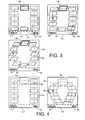
- Fig. 3 illustrates an embodiment of the invention by three screenshots of a gallery application in which thumbnails of pictures stored in the memory of the mobile phone 1 are displayed as a string of information items 43 on the display screen 3.
- the left softkey label 41 and the right softkey label 42 are displayed on the lower part of the display screen 3, and allow the user to access and options related menu via the left softkey 9 an to leave the gallery application via the right softkey 9.
- the string of information items 43 is not moving and the information items are arranged in the string in accordance with a substantially rectangular path 45.
- the processor 18 will start to move the stream of information items along the path 45.
- One of the information items 43 is highlighted by a box 46, and the highlighted information item can be selected by centrally pressing the navigation key 10.
- the information item is a picture, the picture associated with the thumbnail will be shown on the display screen 3 when the information item is selected).
- the information items can be other items than picture thumbnails.
- the following is a non-exhaustive list of types of information items that can be used in connection with the present invention: thumbnails of videos thumbnails (video stills), pictures of audio, such as album art, mp3-tagging (rock, pop, funk, house, classical, continue yourself), phonebook pictures/names, sms'es (text or pictures of the person sending them), radio stations (tag of music, picture), command buttons, and menu items.
- screenshot 3.2 the user has pressed the navigation key 10 on the right side, and the processor has started to move the information items 43 in the string along the path 45 in the direction of the arrow (pressing the left side of the navigation key 10 will result in a movement in the opposite direction).
- the path 45 had a substantially rectangular shape. Now that the string of information items 43 is moving at a relatively low speed, the corners of the path 45 are no longer sharp, but have become rounded off to form curved sections of the path 45, so that the rectangle has become a rounded rectangle. Further, the shape of the information items has changed from a rectangle to a parallelogram to indicate to the user that a certain amount of speed is associated with these information items 43.
- the processor 18 increases the speed of the movement of the string of information items for as long as the user keeps pressing the navigation key 10. According to an embodiment the processor limits the maximum speed of movement of the string information items, so after a while there will be no further increase in speed when the user keeps on pressing the navigation key 10.
- screenshot 3.3 the user has pressed the navigation key 10 on the right side for a longer period of time, and the string of information items moves at a higher speed. This is indicated to the user by the fact that the path 45 has become more curved and the path 45 now includes only curved sections with the overall shape of the path resembling an ellipse. Further, the parallelogram shape of the information items has been further changed with more slanting sides.
- Fig. 3 equally applies to strings of information items with another nature, such as menu items in a menu application, virtual command buttons and other graphical user interface objects.
- Fig. 4 illustrates another embodiment of the invention by two screenshots of a gallery application in which thumbnails of pictures stored in the memory of the mobile phone 1 are displayed as a string of information items 43 on the display screen 3.
- the left softkey label 41 and the right softkey label 42 are displayed on the lower part of the display screen 3, and allow the user to access an options related menu via the left softkey 9 and to leave the gallery application via the right softkey 9.
- the string of information items 43 is not moving and the information items 43 are arranged in the string in accordance with a substantially rectangular path 45.
- the processor 18 will start moving the string of information items along a path 45.
- the path 45 does not fit within the display screen 3, and thus, when the string of information items is moving, new information items 43 are added to the string at one end and removed from the string at the other end to create an endless loop of information items.
- One of the information items 43 is highlighted by having an enlarged size 46', and the highlighted information item can be selected by centrally pressing the navigation key 10.
- the user has pressed the navigation key 10 on the right side for a longer period of time and the processor 18 moves the information items 43 in the string along the path 45 in the direction of the arrow at a relatively high speed.
- the processor 18 has adapted the shape of the path 45 to the high speed, so that the path 45 has become curved and resembles a horseshoe. Further, the processor 18 has reduced the distance between neighboring information items, and neighboring information items partially overlap one another.
- the change in the shape of the path and the change in the distance between the neighboring information items can be can be gradual with increasing or decreasing speed of movement of the string of information items or stepwise with increasing and decreasing speed of the string of information items. Also in this embodiment the speed of movement is controlled by the length of continuously pressing the navigation key 10.
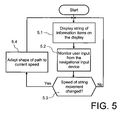
- step 5.1 the processor 18 displays the string of information items 43 on the display screen 3.
- the string of information items is initially displayed statically on a predetermined path 45.
- step 5.2 the processor monitors the user input from the navigational input device 10.
- the processor 18 controls the speed of the movement of the string of information items along the predetermined path 45 in response to user input from the navigational input device 10.
- step 5.3 the processor determines if the speed of movement of the string of information items has changed. If the speed has not changed, the process returns to step 5.1 and the string of information item follows the same path 45 at the same speed.
- the processor 18 adapts the shape of the path 45 to the current speed in step 5.4.
- This change may be gradual or stepwise in accordance with one or more predetermined speed thresholds.
- a large plurality of different shapes for the path can be preprogrammed and associated to various levels of speed.
- the color of the information items can be changed in relation to the speed of movement of the string of information items along the path.
- the size of the information items can be changed in relation to the speed of movement of the string of information items along the path.
- the navigational input device for controlling the speed of the sting of information items can be a scrollbar, such as a touch sensitive scroll bar, a touch pad, a rotator, a scroll wheel, a touch wheel or a joystick.
- a scrollbar such as a touch sensitive scroll bar, a touch pad, a rotator, a scroll wheel, a touch wheel or a joystick.
- the invention has numerous advantages. Different embodiments or implementations may yield one or more of the following advantages. It should be noted that this is not an exhaustive list and there may be other advantages which are not described herein.
- One advantage of the invention is that a user will easily recognize at which speed the string of information items is moving. Another advantage is that the way of displaying information items according to the present invention is intuitive, since most things in real world react differently with speed.
- Another advantage of the present invention is that a rectangular path is visually good when there is no movement, using the maximum available space on of the small device screen, but for fast movement it is visually better to use a curved path shape, since it is easier to see items in fast movement when they move smoothly along a curved shape.
- the user interface according to the present invention feels more "alive” and realistic, which gives sophisticated feedback for user actions, thus making use of the device easier. Trust to the device is increased due to improved intuitive feedback. Another advantage is that the user receives additional information about navigation activities.
Landscapes
- Engineering & Computer Science (AREA)
- General Engineering & Computer Science (AREA)
- Theoretical Computer Science (AREA)
- Human Computer Interaction (AREA)
- Physics & Mathematics (AREA)
- General Physics & Mathematics (AREA)
- User Interface Of Digital Computer (AREA)
- Digital Computer Display Output (AREA)
Abstract
Description
- The present invention relates to user interfaces of apparatus, in particular to user interfaces of apparatus that include a display screen on which a plurality of information items can be moved along a path under user control through the use of a navigational input device.
- Increased processing power has made it easier to manipulate information items on a display of a mobile electronic device, for example through presence of improved graphics accelerators. Several attempts have been made to put this increase processing power to use in improving the user-friendliness of graphical UIs. For example, it is now possible to show three dimensional objects on mobile electronic devices and to show two-dimensional objects in a three-dimensional UI space. However, these attempts have mainly cluttered the user interface for the normal user when effects steal the attention from the tasks to be performed. This is a new situation in mobile electronic devices. Solutions for more intuitive UI graphics are needed. Thus, there is a desire for more flexible and intuitive ways of UI navigation visualizations.
- On the above background it is an object of the present invention to at least partially fulfill one or more of the above indicated desires.
- It is another object of the present invention to provide a more intuitive way of visualizing information items that are displayed on a display screen an electronic device.
- One way of fulfilling the object is by displaying a string of information items on a display screen along a path, allowing the user to control the speed of movement of the information items along the path through a navigational input means and changing the shape of the path in relation to the speed of movement of the string of items along the path.
- The changing shape of the path provides the user with an optical feedback and thereby improves the feeling of control over the speed of movement of the items in the string. Thus, user confidence is improved and the acceptance of the technology is increased.
- Further objects, features, advantages and properties of the apparatus, the user interface, the method and the software product, according to the invention will become apparent from the detailed description.
- In the following detailed portion of the present description, the invention will be explained in more detail with reference to the exemplary embodiments shown in the drawings, in which:
- Fig. 1 is a front view of a mobile electronic device according to an embodiment of the invention,
- Fig. 2 is a block diagram illustrating the general architecture of a mobile electronic of Fig. 1,
- Fig. 3 shows three screenshots illustrating an embodiment of a method of operating the user interface according to the present invention,
- Fig. 4 shows two screenshots illustrating another embodiment of a method of operating the user interface according to the present invention, and
- Fig. 5 is a flowchart illustrating the operation of the user interface according to an embodiment of the invention.
- In the following detailed description, the electronic device and the method according to the invention in the form of a personal computer, PDA, mobile terminal or a mobile communication terminal in the form of a cellular/mobile phone will be described by the preferred embodiments.
- Fig. 1 illustrates a first embodiment of a mobile terminal according to the invention in the form of a mobile telephone by a front view. The
mobile phone 1 comprises a user interface having ahousing 2, adisplay 3, an on/off button (not shown), a speaker 5 (only the opening is shown), and a microphone 6 (not visible in Fig. 1). Thephone 1 according to the first preferred embodiment is adapted for communication via a cellular network, such as the GSM 900/1800 MHz network, but could just as well be adapted for use with a Code Division Multiple Access (CDMA) network, a 3G network, or a TCP/IP-based network to cover a possible VoIP-network (e.g. via WLAN, WIMAX or similar) or a mix of VoIP and Cellular such as UMA (Universal Mobile Access). - The
keypad 7 has a first group ofkeys 8 as alphanumeric keys, by means of which the user can enter a telephone number, write a text message (SMS), write a name (associated with the phone number), etc. Each of the twelvealphanumeric keys 8 is provided with a figure "0-9" or a sign "#" or "*", respectively. In alpha mode each key is associated with a number of letters and special signs used in the text editing. - The
keypad 2 has additionally a second group of keys comprising twosoftkeys 9, two call handling keys (offhook key 11 and onhook key 12), and a 5-way navigation key 10 (up, down, left, right and center: select/activate). The function of thesoftkeys 9 depends on the state of the phone, and navigation in the menu is performed by using the navigation-key 10. The present function of thesoftkeys 9 is shown in separate fields (soft labels) in adedicated area 4 of thedisplay 3, just above thesoftkeys 9. The twocall handling keys - The
navigation key 10 is a four- or five-way key which can be used for cursor movement, scrolling and selecting (five-way key) and is placed centrally on the front surface of the phone between thedisplay 3 and the group ofalphanumeric keys 7. - A releasable rear cover (not shown) gives access to the SIM card (not shown), and the battery pack (not shown) in the back of the phone that supplies electrical power for the electronic components of the
mobile phone 1. - The
mobile phone 1 has aflat display 3 that is typically made of an LCD with optional back lighting, such as a TFT matrix capable of displaying color images. A touch screen may be used instead of a conventional LCD display. - Fig. 2 illustrates in block diagram form the general architecture of the
mobile phone 1 constructed in accordance with the present invention. Theprocessor 18 controls the operation of the terminal and has an integrateddigital signal processor 17 and an integratedRAM 15. Theprocessor 18 controls the communication with the cellular network via the transmitter/receiver circuit 19 and aninternal antenna 20. Amicrophone 6 coupled to theprocessor 18 viavoltage regulators 21 transforms the user's speech into analogue signals, the analogue signals formed thereby are A/D converted in an A/D converter (not shown) before the speech is encoded in theDSP 17 that is included in theprocessor 18. The encoded speech signal is transferred to theprocessor 18, which e.g. supports the GSM terminal software. The digital signal-processing unit 17 speech-decodes the signal, which is transferred from theprocessor 18 to thespeaker 5 via a D/A converter (not shown). - The
voltage regulators 21 form the interface for thespeaker 5, themicrophone 6, the LED drivers 91 (for the LEDS backlighting thekeypad 7 and the display 3), theSIM card 22,battery 24, thebottom connector 27, the DC jack 31 (for connecting to the charger 33) and theaudio amplifier 32 that drives the (hands-free)loudspeaker 25. - The
processor 18 also forms the interface for some of the peripheral units of the device, including a (Flash)ROM memory 16, thegraphical display 3, thekeypad 7, the ringing tone selection unit 26, an incoming call detection unit 28, a music data recording medium 36, a music player 37 and amusic reproduction unit 38. - The
processor 18 may include a graphics accelerator, such as a 3D graphics accelerator, or the graphics accelerator may be a separate processor (not shown). - The software in the
RAM 15 and/or in theflash ROM 16 contains instructions for theprocessor 18 to perform a plurality of different applications and functions. - Fig. 3 illustrates an embodiment of the invention by three screenshots of a gallery application in which thumbnails of pictures stored in the memory of the
mobile phone 1 are displayed as a string ofinformation items 43 on thedisplay screen 3. Theleft softkey label 41 and theright softkey label 42 are displayed on the lower part of thedisplay screen 3, and allow the user to access and options related menu via theleft softkey 9 an to leave the gallery application via theright softkey 9. - In screenshot 3.1 the string of
information items 43 is not moving and the information items are arranged in the string in accordance with a substantiallyrectangular path 45. When the user presses thenavigation key 10 on the left or on the right side theprocessor 18 will start to move the stream of information items along thepath 45. One of theinformation items 43 is highlighted by abox 46, and the highlighted information item can be selected by centrally pressing thenavigation key 10. When the information item is a picture, the picture associated with the thumbnail will be shown on thedisplay screen 3 when the information item is selected). - According to other embodiments, the information items can be other items than picture thumbnails. The following is a non-exhaustive list of types of information items that can be used in connection with the present invention: thumbnails of videos thumbnails (video stills), pictures of audio, such as album art, mp3-tagging (rock, pop, funk, house, classical, continue yourself), phonebook pictures/names, sms'es (text or pictures of the person sending them), radio stations (tag of music, picture), command buttons, and menu items.
- In screenshot 3.2 the user has pressed the
navigation key 10 on the right side, and the processor has started to move theinformation items 43 in the string along thepath 45 in the direction of the arrow (pressing the left side of thenavigation key 10 will result in a movement in the opposite direction). When the string was not moving, thepath 45 had a substantially rectangular shape. Now that the string ofinformation items 43 is moving at a relatively low speed, the corners of thepath 45 are no longer sharp, but have become rounded off to form curved sections of thepath 45, so that the rectangle has become a rounded rectangle. Further, the shape of the information items has changed from a rectangle to a parallelogram to indicate to the user that a certain amount of speed is associated with theseinformation items 43. - The
processor 18 increases the speed of the movement of the string of information items for as long as the user keeps pressing thenavigation key 10. According to an embodiment the processor limits the maximum speed of movement of the string information items, so after a while there will be no further increase in speed when the user keeps on pressing thenavigation key 10. - In screenshot 3.3 the user has pressed the
navigation key 10 on the right side for a longer period of time, and the string of information items moves at a higher speed. This is indicated to the user by the fact that thepath 45 has become more curved and thepath 45 now includes only curved sections with the overall shape of the path resembling an ellipse. Further, the parallelogram shape of the information items has been further changed with more slanting sides. - When the speed of the string of information items reduces the
information items 43 and thepath 45 reassume (gradually or stepwise) the shape that they had at low or no speed. - The embodiment of Fig. 3 equally applies to strings of information items with another nature, such as menu items in a menu application, virtual command buttons and other graphical user interface objects.
- Fig. 4 illustrates another embodiment of the invention by two screenshots of a gallery application in which thumbnails of pictures stored in the memory of the
mobile phone 1 are displayed as a string ofinformation items 43 on thedisplay screen 3. Theleft softkey label 41 and theright softkey label 42 are displayed on the lower part of thedisplay screen 3, and allow the user to access an options related menu via theleft softkey 9 and to leave the gallery application via theright softkey 9. - In screenshot 4.1 the string of
information items 43 is not moving and theinformation items 43 are arranged in the string in accordance with a substantiallyrectangular path 45. When the user presses thenavigation key 10 on the left or on the right side, theprocessor 18 will start moving the string of information items along apath 45. Thepath 45 does not fit within thedisplay screen 3, and thus, when the string of information items is moving,new information items 43 are added to the string at one end and removed from the string at the other end to create an endless loop of information items. - One of the
information items 43 is highlighted by having an enlarged size 46', and the highlighted information item can be selected by centrally pressing thenavigation key 10. - In screenshot 4.2 the user has pressed the
navigation key 10 on the right side for a longer period of time and theprocessor 18 moves theinformation items 43 in the string along thepath 45 in the direction of the arrow at a relatively high speed. Theprocessor 18 has adapted the shape of thepath 45 to the high speed, so that thepath 45 has become curved and resembles a horseshoe. Further, theprocessor 18 has reduced the distance between neighboring information items, and neighboring information items partially overlap one another. The change in the shape of the path and the change in the distance between the neighboring information items can be can be gradual with increasing or decreasing speed of movement of the string of information items or stepwise with increasing and decreasing speed of the string of information items. Also in this embodiment the speed of movement is controlled by the length of continuously pressing thenavigation key 10. - The method of operation of the user interface according to the present invention is further illustrated by the flowchart of Fig. 5. In step 5.1 the
processor 18 displays the string ofinformation items 43 on thedisplay screen 3. The string of information items is initially displayed statically on apredetermined path 45. In step 5.2 the processor monitors the user input from thenavigational input device 10. Theprocessor 18 controls the speed of the movement of the string of information items along thepredetermined path 45 in response to user input from thenavigational input device 10. In step 5.3 the processor determines if the speed of movement of the string of information items has changed. If the speed has not changed, the process returns to step 5.1 and the string of information item follows thesame path 45 at the same speed. If the speed has changed, theprocessor 18 adapts the shape of thepath 45 to the current speed in step 5.4. This change may be gradual or stepwise in accordance with one or more predetermined speed thresholds. A large plurality of different shapes for the path can be preprogrammed and associated to various levels of speed. - According to an embodiment, the color of the information items can be changed in relation to the speed of movement of the string of information items along the path.
- According to another embodiment, the size of the information items can be changed in relation to the speed of movement of the string of information items along the path.
- According to another embodiment (not shown) the navigational input device for controlling the speed of the sting of information items can be a scrollbar, such as a touch sensitive scroll bar, a touch pad, a rotator, a scroll wheel, a touch wheel or a joystick.
- The invention has numerous advantages. Different embodiments or implementations may yield one or more of the following advantages. It should be noted that this is not an exhaustive list and there may be other advantages which are not described herein. One advantage of the invention is that a user will easily recognize at which speed the string of information items is moving. Another advantage is that the way of displaying information items according to the present invention is intuitive, since most things in real world react differently with speed. Another advantage of the present invention is that a rectangular path is visually good when there is no movement, using the maximum available space on of the small device screen, but for fast movement it is visually better to use a curved path shape, since it is easier to see items in fast movement when they move smoothly along a curved shape. However, when navigating slowly, it is more effective to use the whole available space of the display screen. Further, the user interface according to the present invention feels more "alive" and realistic, which gives sophisticated feedback for user actions, thus making use of the device easier. Trust to the device is increased due to improved intuitive feedback. Another advantage is that the user receives additional information about navigation activities.
- The term "comprising" as used in the claims does not exclude other elements or steps. The term "a" or "an" as used in the claims does not exclude a plurality. The single processor or other unit may fulfill the functions of several means recited in the claims.
- Although the present invention has been described in detail for purpose of illustration, it is understood that such detail is solely for that purpose, and variations can be made therein by those skilled in the art without departing from the scope of the invention.
Claims (23)
- An apparatus with a graphical user interface, said apparatus comprising:a processor;a display screen coupled to said processor;a navigational input device coupled to said processor;said processor being configured to display a plurality of information items on the display screen,said processor being configured to position the information items on the display as a string of information items along a path;said processor being configured to move the string of information items along said path in response to user input from said navigational input device; andsaid processor being configured to change the shape of said path in relation to the speed at which the string of information item moves along the path.
- An apparatus according to claim 1, wherein said display has a substantially rectangular outline, wherein said path includes only straight sections at low or zero speed of movement of the string of information items, wherein said path becomes curved at high speeds of movement of the string of information items and vice versa.
- An apparatus according to claim 2, wherein the path becomes increasingly curved with increasing speed of movement of said string and vice versa.
- An apparatus according to claim 1, wherein the path is U-shaped or rectangular at low or zero speeds of movement of the string of intimation items, and wherein the path gradually or stepwise becomes substantially elliptic with increasing speed of movement of the string of information items and vice versa.
- An apparatus according to claim 1, wherein said processor is configured to equally space the information items in said string along said path at a distance that is varied in relation to the speed at which the string moves.
- An apparatus according to claim 5, wherein the distance between neighboring information items is decreased with increasing speed of movement of said string of information items and vice versa.
- An apparatus according to claim 6, wherein said neighboring information items do not overlap one another at zero or low speed of movement of said string of information items, and wherein said neighboring information items overlap one another at high speeds of movement of said string of information items.
- An apparatus according to claim 1, wherein the shape of the outline and/or the size and/or the color of at least one of the information items in said string of information items changes in relation to be speed of movement of said string of information items.
- An apparatus according to claim 1, wherein said path is a closed path that fits within the boundaries of the display screen, so that all information items in said string are displayed simultaneously on said display screen.
- An apparatus according to claim 1, wherein said path is a virtually closed path that does not fit within the boundaries of said display screen, and wherein only a portion of the information items in said string of information items is displayed at any given point of time on said display screen.
- An apparatus according to claim 1, wherein said information items are icons in a menu application or thumbnails of pictures in a gallery application.
- An apparatus according to claim 1, wherein one of said information items is highlighted for selection.
- An apparatus according to claim 1, wherein the highlighted information item is displayed larger than the other information items in the string.
- An apparatus according to claim 1, wherein the information items are selectable items.
- An apparatus according to claim 1, wherein the information items are objects of the graphical user interface.
- An apparatus according to claim 1, wherein the information items are menu items or virtual command buttons.
- An apparatus according to claim 1, wherein the navigational device is a navigation key, a navigation plus select key, a scrollbar, a touchpad, a scroll wheel, a rotator, a joystick or a touch sensitive scroll ring.
- A method for operating a graphical user interface of an apparatus that is provided with a display screen and a navigational input device, said method comprising:displaying a string of information items on the display screen along a path,moving said string of information items along said path in response to user input from said navigational input device, andchanging the shape of said path in relation to the speed at which the string of information item moves along the path.
- A method according to claim 18, wherein said path assumes an increasingly curved shape with increasing speed of said string of information items, and wherein said path assumes an increasingly straight shape with decreasing speed of said string of information items.
- A method according to claim 18, wherein the speed of movement of said string of information items is controlled by the user via the navigational input device.
- A method according to claim 18, wherein the contour or shape of the information items is changed in relation to the speed of the movement of said string of information items.
- A method according to claim 18, wherein the distance between neighboring information items in the string of information items is changed in relation to be speed of moments of the string of information items.
- A software product for use in an apparatus that is provided with a processor, a display screen and a navigational input device, said software code, comprising:software code for displaying a string of information items on the display screen along a path,software code for moving said string of information items along said path in response to user input from said navigational input device, andsoftware code for changing the shape of said path in relation to the speed at which the string of information item moves along the path.
Applications Claiming Priority (1)
| Application Number | Priority Date | Filing Date | Title |
|---|---|---|---|
| US11/535,104 US8832575B2 (en) | 2006-09-26 | 2006-09-26 | Speed dependent displaying of information items in a graphical user interface |
Publications (3)
| Publication Number | Publication Date |
|---|---|
| EP1933231A2 true EP1933231A2 (en) | 2008-06-18 |
| EP1933231A3 EP1933231A3 (en) | 2010-04-21 |
| EP1933231B1 EP1933231B1 (en) | 2014-10-22 |
Family
ID=39358148
Family Applications (1)
| Application Number | Title | Priority Date | Filing Date |
|---|---|---|---|
| EP07018236.5A Not-in-force EP1933231B1 (en) | 2006-09-26 | 2007-09-18 | Speed dependent displaying of information items in a graphical user interface |
Country Status (3)
| Country | Link |
|---|---|
| US (2) | US8832575B2 (en) |
| EP (1) | EP1933231B1 (en) |
| ES (1) | ES2526706T3 (en) |
Cited By (1)
| Publication number | Priority date | Publication date | Assignee | Title |
|---|---|---|---|---|
| EP2278447A1 (en) * | 2009-07-14 | 2011-01-26 | Pantech Co., Ltd. | Mobil terminal for displaying menu information on a trace according to a touch input signal |
Families Citing this family (45)
| Publication number | Priority date | Publication date | Assignee | Title |
|---|---|---|---|---|
| US7469381B2 (en) | 2007-01-07 | 2008-12-23 | Apple Inc. | List scrolling and document translation, scaling, and rotation on a touch-screen display |
| US8359548B2 (en) | 2005-06-10 | 2013-01-22 | T-Mobile Usa, Inc. | Managing subset of user contacts |
| US7685530B2 (en) | 2005-06-10 | 2010-03-23 | T-Mobile Usa, Inc. | Preferred contact group centric interface |
| US8370769B2 (en) * | 2005-06-10 | 2013-02-05 | T-Mobile Usa, Inc. | Variable path management of user contacts |
| US8370770B2 (en) | 2005-06-10 | 2013-02-05 | T-Mobile Usa, Inc. | Variable path management of user contacts |
| US8255281B2 (en) | 2006-06-07 | 2012-08-28 | T-Mobile Usa, Inc. | Service management system that enables subscriber-driven changes to service plans |
| US8140996B2 (en) * | 2007-04-17 | 2012-03-20 | QNX Software Systems Limtied | System for endless loop scrolling and display |
| USD636403S1 (en) | 2009-03-27 | 2011-04-19 | T-Mobile Usa, Inc. | Portion of a display screen with a user interface |
| US9195966B2 (en) | 2009-03-27 | 2015-11-24 | T-Mobile Usa, Inc. | Managing contact groups from subset of user contacts |
| US9369542B2 (en) | 2009-03-27 | 2016-06-14 | T-Mobile Usa, Inc. | Network-based processing of data requests for contact information |
| US8577350B2 (en) | 2009-03-27 | 2013-11-05 | T-Mobile Usa, Inc. | Managing communications utilizing communication categories |
| USD631890S1 (en) | 2009-03-27 | 2011-02-01 | T-Mobile Usa, Inc. | Portion of a display screen with a user interface |
| US9210247B2 (en) | 2009-03-27 | 2015-12-08 | T-Mobile Usa, Inc. | Managing contact groups from subset of user contacts |
| US8893025B2 (en) | 2009-03-27 | 2014-11-18 | T-Mobile Usa, Inc. | Generating group based information displays via template information |
| US9355382B2 (en) | 2009-03-27 | 2016-05-31 | T-Mobile Usa, Inc. | Group based information displays |
| USD631891S1 (en) | 2009-03-27 | 2011-02-01 | T-Mobile Usa, Inc. | Portion of a display screen with a user interface |
| US9230292B2 (en) | 2012-11-08 | 2016-01-05 | Uber Technologies, Inc. | Providing on-demand services through use of portable computing devices |
| US20110313804A1 (en) | 2009-12-04 | 2011-12-22 | Garrett Camp | System and method for arranging transport amongst parties through use of mobile devices |
| US8799816B2 (en) * | 2009-12-07 | 2014-08-05 | Motorola Mobility Llc | Display interface and method for displaying multiple items arranged in a sequence |
| JP2011248768A (en) * | 2010-05-28 | 2011-12-08 | Sony Corp | Information processing apparatus, information processing system, and program |
| US9075419B2 (en) * | 2010-11-19 | 2015-07-07 | Google Inc. | Systems and methods for a graphical user interface of a controller for an energy-consuming system having spatially related discrete display elements |
| GB2502957B (en) * | 2012-06-08 | 2014-09-24 | Samsung Electronics Co Ltd | Portable apparatus with a GUI |
| US9671233B2 (en) | 2012-11-08 | 2017-06-06 | Uber Technologies, Inc. | Dynamically providing position information of a transit object to a computing device |
| CN103870140B (en) * | 2012-12-13 | 2018-01-23 | 联想(北京)有限公司 | A kind of object processing method and device |
| US10275117B2 (en) | 2012-12-29 | 2019-04-30 | Apple Inc. | User interface object manipulations in a user interface |
| US10691230B2 (en) | 2012-12-29 | 2020-06-23 | Apple Inc. | Crown input for a wearable electronic device |
| CN103984493B (en) * | 2013-02-07 | 2018-06-19 | 腾讯科技(深圳)有限公司 | Control method by sliding and terminal |
| EP3042271B1 (en) | 2013-09-03 | 2020-03-18 | Apple Inc. | User interface object manipulations in a user interface |
| US12287962B2 (en) | 2013-09-03 | 2025-04-29 | Apple Inc. | User interface for manipulating user interface objects |
| US11068128B2 (en) | 2013-09-03 | 2021-07-20 | Apple Inc. | User interface object manipulations in a user interface |
| US10545657B2 (en) | 2013-09-03 | 2020-01-28 | Apple Inc. | User interface for manipulating user interface objects |
| US10503388B2 (en) | 2013-09-03 | 2019-12-10 | Apple Inc. | Crown input for a wearable electronic device |
| US10001817B2 (en) | 2013-09-03 | 2018-06-19 | Apple Inc. | User interface for manipulating user interface objects with magnetic properties |
| EP4036685A1 (en) | 2014-06-27 | 2022-08-03 | Apple Inc. | Reduced size user interface |
| TWI676127B (en) | 2014-09-02 | 2019-11-01 | 美商蘋果公司 | Method, system, electronic device and computer-readable storage medium regarding electronic mail user interface |
| US10073590B2 (en) | 2014-09-02 | 2018-09-11 | Apple Inc. | Reduced size user interface |
| TW201610758A (en) | 2014-09-02 | 2016-03-16 | 蘋果公司 | Button functionality |
| WO2016036510A1 (en) | 2014-09-02 | 2016-03-10 | Apple Inc. | Music user interface |
| KR102345343B1 (en) | 2014-12-12 | 2021-12-30 | 엘지전자 주식회사 | The Apparatus and Method for Portable Device displaying index information |
| US10026506B1 (en) | 2015-02-06 | 2018-07-17 | Brain Trust Innovations I, Llc | System, RFID chip, server and method for capturing vehicle data |
| US10365807B2 (en) | 2015-03-02 | 2019-07-30 | Apple Inc. | Control of system zoom magnification using a rotatable input mechanism |
| DK179896B1 (en) | 2018-09-11 | 2019-08-30 | Apple Inc. | Indholds-baserede taktile outputs |
| US11435830B2 (en) | 2018-09-11 | 2022-09-06 | Apple Inc. | Content-based tactile outputs |
| US12567415B2 (en) | 2023-05-09 | 2026-03-03 | Apple Inc. | Providing and controlling immersive three-dimensional environments |
| US20250265789A1 (en) * | 2024-02-16 | 2025-08-21 | Apple Inc. | Methods for performing operations to change an appearance of an environment |
Family Cites Families (18)
| Publication number | Priority date | Publication date | Assignee | Title |
|---|---|---|---|---|
| DE69321575T3 (en) * | 1993-03-22 | 2005-05-25 | Sony Deutschland Gmbh | Radio signal receiver |
| US5675752A (en) * | 1994-09-15 | 1997-10-07 | Sony Corporation | Interactive applications generator for an interactive presentation environment |
| US5592195A (en) * | 1994-11-21 | 1997-01-07 | International Business Machines Corporation | Information displaying device |
| JP3356667B2 (en) * | 1997-11-14 | 2002-12-16 | 松下電器産業株式会社 | Icon display device |
| US6243076B1 (en) * | 1998-09-01 | 2001-06-05 | Synthetic Environments, Inc. | System and method for controlling host system interface with point-of-interest data |
| JP4325075B2 (en) * | 2000-04-21 | 2009-09-02 | ソニー株式会社 | Data object management device |
| JP2002041276A (en) * | 2000-07-24 | 2002-02-08 | Sony Corp | Interactive operation support system, interactive operation support method, and storage medium |
| TWI238348B (en) * | 2002-05-13 | 2005-08-21 | Kyocera Corp | Portable information terminal, display control device, display control method, and recording media |
| US7966565B2 (en) * | 2002-06-19 | 2011-06-21 | Eastman Kodak Company | Method and system for sharing images over a communication network between multiple users |
| US7139006B2 (en) * | 2003-02-04 | 2006-11-21 | Mitsubishi Electric Research Laboratories, Inc | System and method for presenting and browsing images serially |
| EP1510911A3 (en) * | 2003-08-28 | 2006-03-22 | Sony Corporation | Information processing apparatus, information processing method, information processing program and storage medium containing information processing program |
| JP4727342B2 (en) * | 2004-09-15 | 2011-07-20 | ソニー株式会社 | Image processing apparatus, image processing method, image processing program, and program storage medium |
| US20070057951A1 (en) * | 2005-09-12 | 2007-03-15 | Microsoft Corporation | View animation for scaling and sorting |
| JP4817779B2 (en) * | 2005-09-14 | 2011-11-16 | ソニー株式会社 | Electronic device, display control method for electronic device, graphical user interface, and display control program |
| US7730425B2 (en) * | 2005-11-30 | 2010-06-01 | De Los Reyes Isabelo | Function-oriented user interface |
| US8060840B2 (en) * | 2005-12-29 | 2011-11-15 | Microsoft Corporation | Orientation free user interface |
| US7463270B2 (en) * | 2006-02-10 | 2008-12-09 | Microsoft Corporation | Physical-virtual interpolation |
| US8930834B2 (en) * | 2006-03-20 | 2015-01-06 | Microsoft Corporation | Variable orientation user interface |
-
2006
- 2006-09-26 US US11/535,104 patent/US8832575B2/en not_active Expired - Fee Related
-
2007
- 2007-09-18 EP EP07018236.5A patent/EP1933231B1/en not_active Not-in-force
- 2007-09-18 ES ES07018236.5T patent/ES2526706T3/en active Active
-
2014
- 2014-07-29 US US14/446,302 patent/US20140337798A1/en not_active Abandoned
Non-Patent Citations (1)
| Title |
|---|
| None |
Cited By (1)
| Publication number | Priority date | Publication date | Assignee | Title |
|---|---|---|---|---|
| EP2278447A1 (en) * | 2009-07-14 | 2011-01-26 | Pantech Co., Ltd. | Mobil terminal for displaying menu information on a trace according to a touch input signal |
Also Published As
| Publication number | Publication date |
|---|---|
| EP1933231A3 (en) | 2010-04-21 |
| EP1933231B1 (en) | 2014-10-22 |
| US8832575B2 (en) | 2014-09-09 |
| US20080288880A1 (en) | 2008-11-20 |
| ES2526706T3 (en) | 2015-01-14 |
| US20140337798A1 (en) | 2014-11-13 |
Similar Documents
| Publication | Publication Date | Title |
|---|---|---|
| EP1933231B1 (en) | Speed dependent displaying of information items in a graphical user interface | |
| US11567656B2 (en) | Information processing device, operation input method and operation input program | |
| KR101188857B1 (en) | Transparent layer application | |
| KR100746874B1 (en) | Apparatus and method for providing a service using a touch pad in a mobile terminal | |
| US20120019999A1 (en) | Touchpad | |
| KR101414766B1 (en) | A portable terminal and its operation control method | |
| CN102163126A (en) | Display method and electronic device using same | |
| JP2008515038A (en) | Mobile communication terminal with improved user interface and method therefor | |
| WO2008081290A2 (en) | Apparatus and method for identifying edges of documents | |
| CN104133632B (en) | Portable terminal and method for protecting displayed objects | |
| KR101818114B1 (en) | Mobile terminal and method for providing user interface thereof | |
| US10025483B2 (en) | Mobile terminal and method of controlling the mobile terminal | |
| CN109032547A (en) | Split screen processing method and device, storage medium and electronic equipment | |
| EP4177726B1 (en) | Information processing method and apparatus, and storage medium, and electronic device | |
| CN100483320C (en) | Input unit, mobile terminal unit, and content data manipulation method | |
| CN115705124A (en) | Application folder control method, device, terminal device and storage medium | |
| KR20140131262A (en) | Mobile terminal and method for controlling screen | |
| HK1115927B (en) | Speed dependent displaying of information items in a graphical user interface | |
| HK1115927A (en) | Speed dependent displaying of information items in a graphical user interface | |
| WO2021083134A1 (en) | File selection method and electronic device | |
| KR20200049737A (en) | List scroll bar control method and mobile apparatus | |
| KR101687550B1 (en) | Mobile terminal and operation method thereof | |
| WO2008055513A1 (en) | Wireless mobile communication terminal with adaptive user interface |
Legal Events
| Date | Code | Title | Description |
|---|---|---|---|
| PUAI | Public reference made under article 153(3) epc to a published international application that has entered the european phase |
Free format text: ORIGINAL CODE: 0009012 |
|
| AK | Designated contracting states |
Kind code of ref document: A2 Designated state(s): AT BE BG CH CY CZ DE DK EE ES FI FR GB GR HU IE IS IT LI LT LU LV MC MT NL PL PT RO SE SI SK TR |
|
| AX | Request for extension of the european patent |
Extension state: AL BA HR MK RS |
|
| REG | Reference to a national code |
Ref country code: HK Ref legal event code: DE Ref document number: 1115927 Country of ref document: HK |
|
| 17P | Request for examination filed |
Effective date: 20090730 |
|
| R17P | Request for examination filed (corrected) |
Effective date: 20090730 |
|
| PUAL | Search report despatched |
Free format text: ORIGINAL CODE: 0009013 |
|
| AK | Designated contracting states |
Kind code of ref document: A3 Designated state(s): AT BE BG CH CY CZ DE DK EE ES FI FR GB GR HU IE IS IT LI LT LU LV MC MT NL PL PT RO SE SI SK TR |
|
| AX | Request for extension of the european patent |
Extension state: AL BA HR MK RS |
|
| 17Q | First examination report despatched |
Effective date: 20101109 |
|
| AKX | Designation fees paid |
Designated state(s): AT BE BG CH CY CZ DE DK EE ES FI FR GB GR HU IE IS IT LI LT LU LV MC MT NL PL PT RO SE SI SK TR |
|
| RAP1 | Party data changed (applicant data changed or rights of an application transferred) |
Owner name: 2011 INTELLECTUAL PROPERTY ASSET TRUST |
|
| RAP1 | Party data changed (applicant data changed or rights of an application transferred) |
Owner name: CORE WIRELESS LICENSING S.A.R.L. |
|
| GRAP | Despatch of communication of intention to grant a patent |
Free format text: ORIGINAL CODE: EPIDOSNIGR1 |
|
| INTG | Intention to grant announced |
Effective date: 20140519 |
|
| GRAS | Grant fee paid |
Free format text: ORIGINAL CODE: EPIDOSNIGR3 |
|
| GRAA | (expected) grant |
Free format text: ORIGINAL CODE: 0009210 |
|
| AK | Designated contracting states |
Kind code of ref document: B1 Designated state(s): AT BE BG CH CY CZ DE DK EE ES FI FR GB GR HU IE IS IT LI LT LU LV MC MT NL PL PT RO SE SI SK TR |
|
| REG | Reference to a national code |
Ref country code: GB Ref legal event code: FG4D |
|
| REG | Reference to a national code |
Ref country code: CH Ref legal event code: EP |
|
| REG | Reference to a national code |
Ref country code: AT Ref legal event code: REF Ref document number: 692927 Country of ref document: AT Kind code of ref document: T Effective date: 20141115 |
|
| REG | Reference to a national code |
Ref country code: IE Ref legal event code: FG4D |
|
| REG | Reference to a national code |
Ref country code: DE Ref legal event code: R096 Ref document number: 602007038956 Country of ref document: DE Effective date: 20141204 |
|
| REG | Reference to a national code |
Ref country code: SE Ref legal event code: TRGR |
|
| REG | Reference to a national code |
Ref country code: ES Ref legal event code: FG2A Ref document number: 2526706 Country of ref document: ES Kind code of ref document: T3 Effective date: 20150114 |
|
| REG | Reference to a national code |
Ref country code: NL Ref legal event code: T3 |
|
| REG | Reference to a national code |
Ref country code: HK Ref legal event code: GR Ref document number: 1115927 Country of ref document: HK |
|
| REG | Reference to a national code |
Ref country code: AT Ref legal event code: MK05 Ref document number: 692927 Country of ref document: AT Kind code of ref document: T Effective date: 20141022 |
|
| REG | Reference to a national code |
Ref country code: LT Ref legal event code: MG4D |
|
| PG25 | Lapsed in a contracting state [announced via postgrant information from national office to epo] |
Ref country code: LT Free format text: LAPSE BECAUSE OF FAILURE TO SUBMIT A TRANSLATION OF THE DESCRIPTION OR TO PAY THE FEE WITHIN THE PRESCRIBED TIME-LIMIT Effective date: 20141022 Ref country code: IS Free format text: LAPSE BECAUSE OF FAILURE TO SUBMIT A TRANSLATION OF THE DESCRIPTION OR TO PAY THE FEE WITHIN THE PRESCRIBED TIME-LIMIT Effective date: 20150222 Ref country code: PT Free format text: LAPSE BECAUSE OF FAILURE TO SUBMIT A TRANSLATION OF THE DESCRIPTION OR TO PAY THE FEE WITHIN THE PRESCRIBED TIME-LIMIT Effective date: 20150223 |
|
| PG25 | Lapsed in a contracting state [announced via postgrant information from national office to epo] |
Ref country code: GR Free format text: LAPSE BECAUSE OF FAILURE TO SUBMIT A TRANSLATION OF THE DESCRIPTION OR TO PAY THE FEE WITHIN THE PRESCRIBED TIME-LIMIT Effective date: 20150123 Ref country code: CY Free format text: LAPSE BECAUSE OF FAILURE TO SUBMIT A TRANSLATION OF THE DESCRIPTION OR TO PAY THE FEE WITHIN THE PRESCRIBED TIME-LIMIT Effective date: 20141022 Ref country code: AT Free format text: LAPSE BECAUSE OF FAILURE TO SUBMIT A TRANSLATION OF THE DESCRIPTION OR TO PAY THE FEE WITHIN THE PRESCRIBED TIME-LIMIT Effective date: 20141022 Ref country code: PL Free format text: LAPSE BECAUSE OF FAILURE TO SUBMIT A TRANSLATION OF THE DESCRIPTION OR TO PAY THE FEE WITHIN THE PRESCRIBED TIME-LIMIT Effective date: 20141022 Ref country code: LV Free format text: LAPSE BECAUSE OF FAILURE TO SUBMIT A TRANSLATION OF THE DESCRIPTION OR TO PAY THE FEE WITHIN THE PRESCRIBED TIME-LIMIT Effective date: 20141022 |
|
| REG | Reference to a national code |
Ref country code: FR Ref legal event code: PLFP Year of fee payment: 9 |
|
| REG | Reference to a national code |
Ref country code: DE Ref legal event code: R097 Ref document number: 602007038956 Country of ref document: DE |
|
| PG25 | Lapsed in a contracting state [announced via postgrant information from national office to epo] |
Ref country code: CZ Free format text: LAPSE BECAUSE OF FAILURE TO SUBMIT A TRANSLATION OF THE DESCRIPTION OR TO PAY THE FEE WITHIN THE PRESCRIBED TIME-LIMIT Effective date: 20141022 Ref country code: EE Free format text: LAPSE BECAUSE OF FAILURE TO SUBMIT A TRANSLATION OF THE DESCRIPTION OR TO PAY THE FEE WITHIN THE PRESCRIBED TIME-LIMIT Effective date: 20141022 Ref country code: RO Free format text: LAPSE BECAUSE OF FAILURE TO SUBMIT A TRANSLATION OF THE DESCRIPTION OR TO PAY THE FEE WITHIN THE PRESCRIBED TIME-LIMIT Effective date: 20141022 Ref country code: DK Free format text: LAPSE BECAUSE OF FAILURE TO SUBMIT A TRANSLATION OF THE DESCRIPTION OR TO PAY THE FEE WITHIN THE PRESCRIBED TIME-LIMIT Effective date: 20141022 Ref country code: SK Free format text: LAPSE BECAUSE OF FAILURE TO SUBMIT A TRANSLATION OF THE DESCRIPTION OR TO PAY THE FEE WITHIN THE PRESCRIBED TIME-LIMIT Effective date: 20141022 |
|
| PLBE | No opposition filed within time limit |
Free format text: ORIGINAL CODE: 0009261 |
|
| STAA | Information on the status of an ep patent application or granted ep patent |
Free format text: STATUS: NO OPPOSITION FILED WITHIN TIME LIMIT |
|
| 26N | No opposition filed |
Effective date: 20150723 |
|
| PGFP | Annual fee paid to national office [announced via postgrant information from national office to epo] |
Ref country code: DE Payment date: 20150916 Year of fee payment: 9 Ref country code: GB Payment date: 20150916 Year of fee payment: 9 |
|
| PGFP | Annual fee paid to national office [announced via postgrant information from national office to epo] |
Ref country code: FR Payment date: 20150629 Year of fee payment: 9 |
|
| PG25 | Lapsed in a contracting state [announced via postgrant information from national office to epo] |
Ref country code: SI Free format text: LAPSE BECAUSE OF FAILURE TO SUBMIT A TRANSLATION OF THE DESCRIPTION OR TO PAY THE FEE WITHIN THE PRESCRIBED TIME-LIMIT Effective date: 20141022 |
|
| PG25 | Lapsed in a contracting state [announced via postgrant information from national office to epo] |
Ref country code: MC Free format text: LAPSE BECAUSE OF FAILURE TO SUBMIT A TRANSLATION OF THE DESCRIPTION OR TO PAY THE FEE WITHIN THE PRESCRIBED TIME-LIMIT Effective date: 20141022 Ref country code: LU Free format text: LAPSE BECAUSE OF FAILURE TO SUBMIT A TRANSLATION OF THE DESCRIPTION OR TO PAY THE FEE WITHIN THE PRESCRIBED TIME-LIMIT Effective date: 20150918 |
|
| REG | Reference to a national code |
Ref country code: CH Ref legal event code: PL |
|
| REG | Reference to a national code |
Ref country code: SE Ref legal event code: EUG |
|
| PG25 | Lapsed in a contracting state [announced via postgrant information from national office to epo] |
Ref country code: FI Free format text: LAPSE BECAUSE OF NON-PAYMENT OF DUE FEES Effective date: 20150918 Ref country code: SE Free format text: LAPSE BECAUSE OF NON-PAYMENT OF DUE FEES Effective date: 20150919 |
|
| REG | Reference to a national code |
Ref country code: NL Ref legal event code: MM Effective date: 20151001 |
|
| REG | Reference to a national code |
Ref country code: IE Ref legal event code: MM4A |
|
| PG25 | Lapsed in a contracting state [announced via postgrant information from national office to epo] |
Ref country code: LI Free format text: LAPSE BECAUSE OF NON-PAYMENT OF DUE FEES Effective date: 20150930 Ref country code: IE Free format text: LAPSE BECAUSE OF NON-PAYMENT OF DUE FEES Effective date: 20150918 Ref country code: CH Free format text: LAPSE BECAUSE OF NON-PAYMENT OF DUE FEES Effective date: 20150930 |
|
| PG25 | Lapsed in a contracting state [announced via postgrant information from national office to epo] |
Ref country code: NL Free format text: LAPSE BECAUSE OF NON-PAYMENT OF DUE FEES Effective date: 20151001 |
|
| REG | Reference to a national code |
Ref country code: ES Ref legal event code: FD2A Effective date: 20161202 |
|
| PG25 | Lapsed in a contracting state [announced via postgrant information from national office to epo] |
Ref country code: IT Free format text: LAPSE BECAUSE OF NON-PAYMENT OF DUE FEES Effective date: 20150918 |
|
| PG25 | Lapsed in a contracting state [announced via postgrant information from national office to epo] |
Ref country code: ES Free format text: LAPSE BECAUSE OF NON-PAYMENT OF DUE FEES Effective date: 20150919 |
|
| PG25 | Lapsed in a contracting state [announced via postgrant information from national office to epo] |
Ref country code: MT Free format text: LAPSE BECAUSE OF FAILURE TO SUBMIT A TRANSLATION OF THE DESCRIPTION OR TO PAY THE FEE WITHIN THE PRESCRIBED TIME-LIMIT Effective date: 20141022 |
|
| REG | Reference to a national code |
Ref country code: DE Ref legal event code: R119 Ref document number: 602007038956 Country of ref document: DE |
|
| GBPC | Gb: european patent ceased through non-payment of renewal fee |
Effective date: 20160918 |
|
| PG25 | Lapsed in a contracting state [announced via postgrant information from national office to epo] |
Ref country code: HU Free format text: LAPSE BECAUSE OF FAILURE TO SUBMIT A TRANSLATION OF THE DESCRIPTION OR TO PAY THE FEE WITHIN THE PRESCRIBED TIME-LIMIT; INVALID AB INITIO Effective date: 20070918 Ref country code: BG Free format text: LAPSE BECAUSE OF FAILURE TO SUBMIT A TRANSLATION OF THE DESCRIPTION OR TO PAY THE FEE WITHIN THE PRESCRIBED TIME-LIMIT Effective date: 20141022 |
|
| REG | Reference to a national code |
Ref country code: FR Ref legal event code: ST Effective date: 20170531 |
|
| PG25 | Lapsed in a contracting state [announced via postgrant information from national office to epo] |
Ref country code: BE Free format text: LAPSE BECAUSE OF NON-PAYMENT OF DUE FEES Effective date: 20150930 Ref country code: FR Free format text: LAPSE BECAUSE OF NON-PAYMENT OF DUE FEES Effective date: 20160930 Ref country code: DE Free format text: LAPSE BECAUSE OF NON-PAYMENT OF DUE FEES Effective date: 20170401 Ref country code: GB Free format text: LAPSE BECAUSE OF NON-PAYMENT OF DUE FEES Effective date: 20160918 |
|
| PG25 | Lapsed in a contracting state [announced via postgrant information from national office to epo] |
Ref country code: TR Free format text: LAPSE BECAUSE OF FAILURE TO SUBMIT A TRANSLATION OF THE DESCRIPTION OR TO PAY THE FEE WITHIN THE PRESCRIBED TIME-LIMIT Effective date: 20141022 |