EP1785803A2 - Monitor with reminder sound - Google Patents
Monitor with reminder sound Download PDFInfo
- Publication number
- EP1785803A2 EP1785803A2 EP06017999A EP06017999A EP1785803A2 EP 1785803 A2 EP1785803 A2 EP 1785803A2 EP 06017999 A EP06017999 A EP 06017999A EP 06017999 A EP06017999 A EP 06017999A EP 1785803 A2 EP1785803 A2 EP 1785803A2
- Authority
- EP
- European Patent Office
- Prior art keywords
- monitor
- button
- audio player
- signal
- sounds
- Prior art date
- Legal status (The legal status is an assumption and is not a legal conclusion. Google has not performed a legal analysis and makes no representation as to the accuracy of the status listed.)
- Ceased
Links
Images



Classifications
-
- G—PHYSICS
- G06—COMPUTING OR CALCULATING; COUNTING
- G06F—ELECTRIC DIGITAL DATA PROCESSING
- G06F1/00—Details not covered by groups G06F3/00 - G06F13/00 and G06F21/00
- G06F1/16—Constructional details or arrangements
- G06F1/1601—Constructional details related to the housing of computer displays, e.g. of CRT monitors, of flat displays
- G06F1/1605—Multimedia displays, e.g. with integrated or attached speakers, cameras, microphones
Definitions
- the present invention relates to a monitor, especially to a monitor with reminder sounds.
- LCD monitors have advantages of light weight, space saving, low radiation and low power consumption and thus becomes the mainstream on the market.
- buttons on electronic products In early days, most of the buttons is objective so that users need to apply force on the button for use. Due to different ways and strength of applying force, users may apply improper force or press the button for a long time. Thus not only the button becomes insensitive, the buttons as well as the electronic products are easy to get damage. Therefore, research and development staffs have invented a touch sensor button, replacing conventional substantial button. The probability of the button to damage is reduced, the appearance of the products is more esthetic, and the device brings users more convenience of use.
- monitors with touch sensor buttons are available now. Users only need to tap the touch sensor button easily for adjusting settings of the monitor. Sometimes users may touch the button with insufficient force, they need to press again. This makes users inconvenient. Sometimes, when users touch the touch-control button without any response immediately, they may press the button repeatedly. This causes users inconvenience.
- monitors may get damage or defect due to long-term use or inadequate operation. This leads to errors in signal input or output of the monitor or no image displayed on the monitor. Some users don't know how to deal with such condition so that they may behave weirdly such as knock the monitor or continuously press buttons on monitors. Thus not only the buttons are easy to get damage but the probability of damage of the monitors is reduced.
- the monitor is more convenient to use.
- the embodiment of the present invention includes a monitor, at least a button, and an audio player.
- the button and the audio player are disposed on the monitor.
- the button corresponding to functions of the monitor, is used to adjust the status of monitor and is connected to the audio player.
- the button initiates the monitor after receiving a touch signal and sends out a signal to the audio player so as to make the audio player generate sounds.
- the monitor further includes a detection module that detects an output image signal.
- the detection module sends a detection signal to the audio player so as to make the audio player produce the warning sounds.
- the warning signal warns the users that there is error on output signal of the monitor.
- a monitor with reminder sounds consists of a monitor 10, at least a button 20 and an audio player 30.
- the button 20 disposed on the monitor 10 can be a touch sensor button while the audio player 30 is also arranged on the monitor 10 and is connected to the button 20.
- the audio player 30 receives the signal and makes sounds so as to inform users for checking whether they press the button 20 intentionally or accidentally.
- the button 20 and the audio player 30 are disposed on the monitor 10.
- the button 20 consists of a power button 21, a function button 22, and at least a selection button 23 and is used for adjusting or setting the monitor 10 such as setting brightness, color contrast, size of the window, or on/off of the power.
- the audio player 30 is composed by a sound component 32 and a speaker 34.
- the sound component 32 connects to the button 20 while the speaker 34 connects to the sound component 32.
- the audio player 30 further includes a signal comparison unit 325 and an amplifier 33.
- the signal comparison unit 325 saves at least one sound file while the amplifier 33 electrically connects the sound component 32 with the speaker 34 for increasing the electrical output of an audio signal transmitted from the sound component 32 to the speaker 34.
- the button When users press the button 20, the button receives a touch signal, initiates the monitor and simultaneously sends a signal to the sound component 32. According to the received signal, the sound component 32 make the signal comparison unit 325 output a corresponding a sound file. Thus the sound component 32 outputs a signal to the amplifier 33 and the amplifier 33 increases the electrical output of an audio signal that is sent to the speaker 34.
- this embodiment further comprising at least a control chip 40 electrically connected with the button 20 for control the monitor 10.
- the control chip 40 is also electrically connected with the audio player 30.
- the audio player 30 alarms so as to remind the user to check.
- the monitor 10 further having a detection module 50 that is electrically connected with the control chip 40 for checking output image signal of an output end 15 of the monitor 10 and reminding users to deal with the problem when the monitor 10 is unable to output the image signal.
- the sound component 32 and the control chip 40 receives the signal. According to the signal, the sound component 32 makes the signal comparison unit 325 output a corresponding sound file. Thus the sound component 32 outputs an audio signal to the amplifier 33 and the amplifier 33 increases the electrical output of the audio signal that is sent to the speaker 34.
- the control chip 40 it sets up the monitor 10 or adjusts settings of the monitor 10. Once there is an error of output of the monitor 10, the detection module 50 detects the error and makes the control chip 40 send a detection signal to the audio player 30 to generate sounds.
- the audio player 30 make a sound while a function menu appears in a window of the monitor 10. Then users touch the selection button 23 and the audio player 30 again produces sounds. The user touch the selection button 23 to adjust the monitor 10 according to the content of the function menu and each touch make a sound.
- the control chip 40 is applied so as to make the functional menu of the monitor 10 have proper default value and warn users when there is improper setting of the monitor 10. For example, refer to brightness in the function menu for adjusting brightness of the image displayed in the monitor 10, some users like to adjust to the minimum or maximum brightness. With maximum brightness, lifetime of the monitor 10 is reduced while with minimum brightness, user's eyes are easy to get tired.
- the default brightness of general monitors ranges from 0 to 100.
- the detection module 50 detects the condition and makes the control chip 40 to send a detection signal to the audio player 30.
- the audio player 30 make sounds so as to warn the user that the monitor 10 is in abnormal output status.
- the difference between this embodiment and above one is in that: the detection module 50 is connected with the audio player 30.
- the detection module 50 immediately sends a detection signal that makes the audio player 30 to make a warning sound. Therefore, once there is an error on output of the monitor 10, the monitor 10 instantly produces an alarm sound so as to warn the user and make the user deal with the error as soon as possible.
- a monitor with reminder sounds includes a monitor, at least a button and an audio player.
- the button is connected with the audio player.
- the audio player receives a signal and make sounds.
- the monitor further having a detection module that checks an output image signal of the monitor.
- the detection module detects errors of the output image signal, it transmits a detection signal to the audio player so as to make the audio player generate sounds.
Landscapes
- Engineering & Computer Science (AREA)
- General Engineering & Computer Science (AREA)
- Theoretical Computer Science (AREA)
- Multimedia (AREA)
- Computer Hardware Design (AREA)
- Human Computer Interaction (AREA)
- Physics & Mathematics (AREA)
- General Physics & Mathematics (AREA)
- Electrically Operated Instructional Devices (AREA)
- User Interface Of Digital Computer (AREA)
Abstract
Description
- The present invention relates to a monitor, especially to a monitor with reminder sounds.
- By an increasing advancement and development of information technology, electronic products are updated rapidly in order to satisfy different requirements of people. Take a monitor as an example most of the monitors is CRT monitor in early days. Due to large volume, high power consumption, and radiation emission that may damage users' eyes after long-term use, the CRT monitors are gradually replaced by liquid crystal display (LCD) monitors. The LCD monitors has advantages of light weight, space saving, low radiation and low power consumption and thus becomes the mainstream on the market.
- Moreover, refer to buttons on electronic products. In early days, most of the buttons is objective so that users need to apply force on the button for use. Due to different ways and strength of applying force, users may apply improper force or press the button for a long time. Thus not only the button becomes insensitive, the buttons as well as the electronic products are easy to get damage. Therefore, research and development staffs have invented a touch sensor button, replacing conventional substantial button. The probability of the button to damage is reduced, the appearance of the products is more esthetic, and the device brings users more convenience of use.
- Furthermore, monitors with touch sensor buttons are available now. Users only need to tap the touch sensor button easily for adjusting settings of the monitor. Sometimes users may touch the button with insufficient force, they need to press again. This makes users inconvenient. Sometimes, when users touch the touch-control button without any response immediately, they may press the button repeatedly. This causes users inconvenience.
- In addition, monitors may get damage or defect due to long-term use or inadequate operation. This leads to errors in signal input or output of the monitor or no image displayed on the monitor. Some users don't know how to deal with such condition so that they may behave weirdly such as knock the monitor or continuously press buttons on monitors. Thus not only the buttons are easy to get damage but the probability of damage of the monitors is reduced.
- It is therefore a primary object of the present invention to provide a monitor with reminder sounds that displays warning signal while users press a button of the monitor for informing users and checking whether they press the button intentionally or accidentally. Thus the monitor is more convenient to use.
- It is another object of the present invention to provide a monitor with reminder sounds that detects wrong output signal generated from the monitor by the detection module and produces warning sounds by the audio player to inform the user to learn the abnormal status of the monitor.
- In order to achieve above objects, the embodiment of the present invention includes a monitor, at least a button, and an audio player. The button and the audio player are disposed on the monitor. The button, corresponding to functions of the monitor, is used to adjust the status of monitor and is connected to the audio player. When users press the button, the button initiates the monitor after receiving a touch signal and sends out a signal to the audio player so as to make the audio player generate sounds.
- According the embodiment of the present invention, the monitor further includes a detection module that detects an output image signal. When it detects an error in the output image signal, the detection module sends a detection signal to the audio player so as to make the audio player produce the warning sounds. Besides assisting and informing users to learn whether the button is pressed precisely, the warning signal warns the users that there is error on output signal of the monitor.
- The structure and the technical means adopted by the present invention to achieve the above and other objects can be best understood by referring to the following detailed description of the preferred embodiments and the accompanying drawings, wherein
- Fig. 1 is a block diagram of an embodiment in accordance with the present invention;
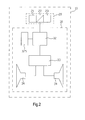
- Fig. 2 is a schematic drawing of an embodiment in accordance with the present invention;
- Fig. 3 is a schematic drawing of another embodiment in accordance with the present invention;
- Fig. 4 is a schematic drawing of a further embodiment in accordance with the present invention.
- Refer to Fig.1, a monitor with reminder sounds according to the present invention consists of a
monitor 10, at least abutton 20 and anaudio player 30. Thebutton 20 disposed on themonitor 10 can be a touch sensor button while theaudio player 30 is also arranged on themonitor 10 and is connected to thebutton 20. When users touch thebutton 20, theaudio player 30 receives the signal and makes sounds so as to inform users for checking whether they press thebutton 20 intentionally or accidentally. - Refer to Fig.2, the
button 20 and theaudio player 30 are disposed on themonitor 10. Thebutton 20 consists of apower button 21, afunction button 22, and at least aselection button 23 and is used for adjusting or setting themonitor 10 such as setting brightness, color contrast, size of the window, or on/off of the power. Theaudio player 30 is composed by asound component 32 and aspeaker 34. Thesound component 32 connects to thebutton 20 while thespeaker 34 connects to thesound component 32. Theaudio player 30 further includes asignal comparison unit 325 and anamplifier 33. Thesignal comparison unit 325 saves at least one sound file while theamplifier 33 electrically connects thesound component 32 with thespeaker 34 for increasing the electrical output of an audio signal transmitted from thesound component 32 to thespeaker 34. - When users press the
button 20, the button receives a touch signal, initiates the monitor and simultaneously sends a signal to thesound component 32. According to the received signal, thesound component 32 make thesignal comparison unit 325 output a corresponding a sound file. Thus thesound component 32 outputs a signal to theamplifier 33 and theamplifier 33 increases the electrical output of an audio signal that is sent to thespeaker 34. - Refer to Fig. 3, the difference between this embodiment and above one is in that: this embodiment further comprising at least a
control chip 40 electrically connected with thebutton 20 for control themonitor 10. Thecontrol chip 40 is also electrically connected with theaudio player 30. When users set themonitor 10 improperly or themonitor 10 is out of order, theaudio player 30 alarms so as to remind the user to check. Moreover, themonitor 10 further having adetection module 50 that is electrically connected with thecontrol chip 40 for checking output image signal of anoutput end 15 of themonitor 10 and reminding users to deal with the problem when themonitor 10 is unable to output the image signal. - When users press the
button 20 for adjusting settings of themonitor 10, thesound component 32 and thecontrol chip 40 receives the signal. According to the signal, thesound component 32 makes thesignal comparison unit 325 output a corresponding sound file. Thus thesound component 32 outputs an audio signal to theamplifier 33 and theamplifier 33 increases the electrical output of the audio signal that is sent to thespeaker 34. As to thecontrol chip 40, it sets up themonitor 10 or adjusts settings of themonitor 10. Once there is an error of output of themonitor 10, thedetection module 50 detects the error and makes thecontrol chip 40 send a detection signal to theaudio player 30 to generate sounds. - For example, when users touch the
function button 22 with intention to adjust or set themonitor 10, theaudio player 30 make a sound while a function menu appears in a window of themonitor 10. Then users touch theselection button 23 and theaudio player 30 again produces sounds. The user touch theselection button 23 to adjust themonitor 10 according to the content of the function menu and each touch make a sound. - In order to extend lifetime of the
monitor 10, or improving the quality of themonitor 10, thecontrol chip 40 is applied so as to make the functional menu of themonitor 10 have proper default value and warn users when there is improper setting of themonitor 10. For example, refer to brightness in the function menu for adjusting brightness of the image displayed in themonitor 10, some users like to adjust to the minimum or maximum brightness. With maximum brightness, lifetime of themonitor 10 is reduced while with minimum brightness, user's eyes are easy to get tired. The default brightness of general monitors ranges from 0 to 100. When users re-adjust the preset value that is over or under the default value of brightness, thecontrol chip 40 sends a signal to theaudio player 30 for generating sounds and reminding users to set properly. - Furthermore, when the
monitor 10 stops working or has a breakdown without any output image signal, thedetection module 50 detects the condition and makes thecontrol chip 40 to send a detection signal to theaudio player 30. Thus theaudio player 30 make sounds so as to warn the user that themonitor 10 is in abnormal output status. - Refer to Fig. 4, the difference between this embodiment and above one is in that: the
detection module 50 is connected with theaudio player 30. Thus thedetection module 50 immediately sends a detection signal that makes theaudio player 30 to make a warning sound. Therefore, once there is an error on output of themonitor 10, themonitor 10 instantly produces an alarm sound so as to warn the user and make the user deal with the error as soon as possible. - In summary, a monitor with reminder sounds includes a monitor, at least a button and an audio player. The button is connected with the audio player. When an user touches the button, the audio player receives a signal and make sounds. The monitor further having a detection module that checks an output image signal of the monitor. When the detection module detects errors of the output image signal, it transmits a detection signal to the audio player so as to make the audio player generate sounds. Thus the user is reminded that whether the button is pressed precisely. Moreover, when there is an error on output of the monitor, the user is warned by the reminder sound. Thus the present invention provides users more convenience of use.
- Additional advantages and modifications will readily occur to those skilled in the art. Therefore, the invention in its broader aspects is not limited to the specific details, and representative devices shown and described herein. Accordingly, various modifications may be made without departing from the spirit or scope of the general inventive concept as defined by the appended claims and their equivalents.
Claims (12)
- A monitor with reminder sounds comprising:a monitor;at least a button disposed on the monitor, corresponding to a function of the monitor; while receiving a touch signal, the button initiates the corresponding function;an audio player arranged on the monitor and connected with the button; when the button receives the touch signal and initiates the corresponding function, a signal is sent to the audio player so as to make the audio player make a sound correspondingly.
- The monitor with reminder sounds as claimed in claim 1, wherein the button is a touch sensor button.
- The monitor with reminder sounds as claimed in claim 1, wherein the audio player having
a sound component connected with the button; and
a speaker connected with the sound component. - The monitor with reminder sounds as claimed in claim 1, wherein the audio player having a signal comparison unit.
- The monitor with reminder sounds as claimed in claim 3, wherein the audio player further having an amplifier that is electrically connected with the sound component and the speaker.
- The monitor with reminder sounds as claimed in claim 1, wherein the monitor further having a control chip that is electrically connected with the button and the audio player for control functions of the monitor.
- The monitor with reminder sounds as claimed in claim 1, wherein the monitor further having a detection module.
- The monitor with reminder sounds as claimed in claim 1, wherein the button is used to adjust functions of monitor's images.
- The monitor with reminder sounds as claimed in claim 1, wherein the button having a power button.
- The monitor with reminder sounds as claimed in claim 1, wherein the button having a function button.
- The monitor with reminder sounds as claimed in claim 1, wherein the button having at least a selection button.
- The monitor with reminder sounds as claimed in claim 1, wherein the monitor further having a detection module for checking output image signals of the monitor, while detecting an error of the output image signal, the detection module sends a detection signal to the audio player so as to make the audio player produce a sound.
Applications Claiming Priority (1)
| Application Number | Priority Date | Filing Date | Title |
|---|---|---|---|
| CN2005101157152A CN1964606B (en) | 2005-11-09 | 2005-11-09 | Display with prompting sound effect |
Publications (2)
| Publication Number | Publication Date |
|---|---|
| EP1785803A2 true EP1785803A2 (en) | 2007-05-16 |
| EP1785803A3 EP1785803A3 (en) | 2010-01-20 |
Family
ID=37774790
Family Applications (1)
| Application Number | Title | Priority Date | Filing Date |
|---|---|---|---|
| EP06017999A Ceased EP1785803A3 (en) | 2005-11-09 | 2006-08-29 | Monitor with reminder sound |
Country Status (2)
| Country | Link |
|---|---|
| EP (1) | EP1785803A3 (en) |
| CN (1) | CN1964606B (en) |
Cited By (1)
| Publication number | Priority date | Publication date | Assignee | Title |
|---|---|---|---|---|
| CN109933687A (en) * | 2019-03-13 | 2019-06-25 | 联想(北京)有限公司 | Information processing method, device and electronic equipment |
Citations (2)
| Publication number | Priority date | Publication date | Assignee | Title |
|---|---|---|---|---|
| US3943500A (en) * | 1974-05-02 | 1976-03-09 | Dresser Europe S.A. | Seven-segment display arrangement and liquid fuel dispensing pump embodying the same |
| EP1172999A2 (en) * | 2000-07-12 | 2002-01-16 | Sharp Kabushiki Kaisha | Electronic apparatus having operation panel |
Family Cites Families (8)
| Publication number | Priority date | Publication date | Assignee | Title |
|---|---|---|---|---|
| US5767457A (en) * | 1995-11-13 | 1998-06-16 | Cirque Corporation | Apparatus and method for audible feedback from input device |
| US5801692A (en) * | 1995-11-30 | 1998-09-01 | Microsoft Corporation | Audio-visual user interface controls |
| KR100218476B1 (en) * | 1997-07-15 | 1999-09-01 | 구자홍 | Melody setting/generating apparatus and method for identifying input key |
| US6429846B2 (en) * | 1998-06-23 | 2002-08-06 | Immersion Corporation | Haptic feedback for touchpads and other touch controls |
| AU7354000A (en) * | 1999-09-07 | 2001-04-10 | Cirque Corporation | A miniature keyboard for a personal digital assistant and an integrated web browsing and data input device |
| GB2359177A (en) * | 2000-02-08 | 2001-08-15 | Nokia Corp | Orientation sensitive display and selection mechanism |
| WO2003038589A1 (en) * | 2001-10-30 | 2003-05-08 | Telefonaktiebolaget Lm Ericsson (Publ) | Display system |
| US20030128191A1 (en) * | 2002-01-07 | 2003-07-10 | Strasser Eric M. | Dynamically variable user operable input device |
-
2005
- 2005-11-09 CN CN2005101157152A patent/CN1964606B/en not_active Expired - Lifetime
-
2006
- 2006-08-29 EP EP06017999A patent/EP1785803A3/en not_active Ceased
Patent Citations (2)
| Publication number | Priority date | Publication date | Assignee | Title |
|---|---|---|---|---|
| US3943500A (en) * | 1974-05-02 | 1976-03-09 | Dresser Europe S.A. | Seven-segment display arrangement and liquid fuel dispensing pump embodying the same |
| EP1172999A2 (en) * | 2000-07-12 | 2002-01-16 | Sharp Kabushiki Kaisha | Electronic apparatus having operation panel |
Cited By (2)
| Publication number | Priority date | Publication date | Assignee | Title |
|---|---|---|---|---|
| CN109933687A (en) * | 2019-03-13 | 2019-06-25 | 联想(北京)有限公司 | Information processing method, device and electronic equipment |
| CN109933687B (en) * | 2019-03-13 | 2022-05-31 | 联想(北京)有限公司 | Information processing method and device and electronic equipment |
Also Published As
| Publication number | Publication date |
|---|---|
| EP1785803A3 (en) | 2010-01-20 |
| CN1964606A (en) | 2007-05-16 |
| CN1964606B (en) | 2010-10-27 |
Similar Documents
| Publication | Publication Date | Title |
|---|---|---|
| TWI400638B (en) | Touch display device, touch display system and method for adjusting touch area thereof | |
| EP2708988B1 (en) | Method for operating electronic device based on touch pressure and the device performing the method | |
| TWI461063B (en) | Display device, display system, and computer-readable recording medium in which luminance control program is stored | |
| CN100414965C (en) | Remote control with low battery indication | |
| US20100277437A1 (en) | Electronic device and controlling method thereof | |
| US7746729B2 (en) | Electronic device with working mode switching function and method of switching working mode | |
| US8427392B2 (en) | Circuit for detecting an external display device adapted to notebook computer and detecting method thereof | |
| US20060187195A1 (en) | Display system and displaying method capable of auto-adjusting display brightness | |
| KR20070064980A (en) | Display device | |
| CN101771805A (en) | Method for introducing function of remote controller keys and remote controller | |
| US7561061B2 (en) | Monitor with reminder sound | |
| WO2017185829A1 (en) | Display | |
| US20080165130A1 (en) | Wireless Mouse | |
| CN203576469U (en) | Self-service intelligent vision detector | |
| EP1722560A2 (en) | Display system and method for controlling rotation angle therefor | |
| EP1777950A3 (en) | Display apparatus | |
| CN111181218A (en) | Charging prompt method, electronic device and medium | |
| CN1964606B (en) | Display with prompting sound effect | |
| CN103377636B (en) | How to adjust the brightness of the backlight | |
| JPH11282404A (en) | Flat panel displays and notebook electronic devices | |
| CN201170537Y (en) | Display with lamp signal prompt and electronic device | |
| CN209374034U (en) | A kind of medical display | |
| EP1793597A1 (en) | Display system and displaying method capable of auto-adjusting display brightness | |
| CN102043499B (en) | Touch display device, touch display system and method for adjusting touch area | |
| CN206348607U (en) | A kind of special intelligent watch of driver |
Legal Events
| Date | Code | Title | Description |
|---|---|---|---|
| PUAI | Public reference made under article 153(3) epc to a published international application that has entered the european phase |
Free format text: ORIGINAL CODE: 0009012 |
|
| 17P | Request for examination filed |
Effective date: 20060829 |
|
| AK | Designated contracting states |
Kind code of ref document: A2 Designated state(s): AT BE BG CH CY CZ DE DK EE ES FI FR GB GR HU IE IS IT LI LT LU LV MC NL PL PT RO SE SI SK TR |
|
| AX | Request for extension of the european patent |
Extension state: AL BA HR MK YU |
|
| PUAL | Search report despatched |
Free format text: ORIGINAL CODE: 0009013 |
|
| AK | Designated contracting states |
Kind code of ref document: A3 Designated state(s): AT BE BG CH CY CZ DE DK EE ES FI FR GB GR HU IE IS IT LI LT LU LV MC NL PL PT RO SE SI SK TR |
|
| AX | Request for extension of the european patent |
Extension state: AL BA HR MK RS |
|
| 17Q | First examination report despatched |
Effective date: 20100302 |
|
| AKX | Designation fees paid |
Designated state(s): AT BE BG CH CY CZ DE DK EE ES FI FR GB GR HU IE IS IT LI LT LU LV MC NL PL PT RO SE SI SK TR |
|
| STAA | Information on the status of an ep patent application or granted ep patent |
Free format text: STATUS: THE APPLICATION HAS BEEN REFUSED |
|
| 18R | Application refused |
Effective date: 20131112 |