EP1727023A2 - Graphical user interface for presenting configurable parameters related to an item - Google Patents
Graphical user interface for presenting configurable parameters related to an item Download PDFInfo
- Publication number
- EP1727023A2 EP1727023A2 EP06114581A EP06114581A EP1727023A2 EP 1727023 A2 EP1727023 A2 EP 1727023A2 EP 06114581 A EP06114581 A EP 06114581A EP 06114581 A EP06114581 A EP 06114581A EP 1727023 A2 EP1727023 A2 EP 1727023A2
- Authority
- EP
- European Patent Office
- Prior art keywords
- item
- parameter
- providing
- labels
- operable
- Prior art date
- Legal status (The legal status is an assumption and is not a legal conclusion. Google has not performed a legal analysis and makes no representation as to the accuracy of the status listed.)
- Withdrawn
Links
Images

Classifications
-
- G—PHYSICS
- G06—COMPUTING OR CALCULATING; COUNTING
- G06F—ELECTRIC DIGITAL DATA PROCESSING
- G06F3/00—Input arrangements for transferring data to be processed into a form capable of being handled by the computer; Output arrangements for transferring data from processing unit to output unit, e.g. interface arrangements
- G06F3/01—Input arrangements or combined input and output arrangements for interaction between user and computer
- G06F3/048—Interaction techniques based on graphical user interfaces [GUI]
- G06F3/0484—Interaction techniques based on graphical user interfaces [GUI] for the control of specific functions or operations, e.g. selecting or manipulating an object, an image or a displayed text element, setting a parameter value or selecting a range
- G06F3/04847—Interaction techniques to control parameter settings, e.g. interaction with sliders or dials
-
- G—PHYSICS
- G06—COMPUTING OR CALCULATING; COUNTING
- G06F—ELECTRIC DIGITAL DATA PROCESSING
- G06F3/00—Input arrangements for transferring data to be processed into a form capable of being handled by the computer; Output arrangements for transferring data from processing unit to output unit, e.g. interface arrangements
- G06F3/12—Digital output to print unit, e.g. line printer, chain printer
- G06F3/1297—Printer code translation, conversion, emulation, compression; Configuration of printer parameters
Definitions
- the present disclosure relates to a method, system, and computer program product for presenting configurable parameter values relating to an item. More particularly, the present disclosure relates to a method, system, and computer program product for presenting configurable parameter values relating to an item using a condensed and scannable table showing multi-level parameters relating to the item.
- GUIs Graphical User Interfaces
- One technique involves creating a feature group for an item having multiple parameter values.
- the feature group can be presented as a set of parameter values with selectable objects such as option buttons, checkboxes, modifiable fields, or as a pull down menu having selectable option buttons and/or checkboxes.
- Another technique involves creating a standard table for an item that displays each modifiable parameter value for the item. When presented, the parameter values convey a current state of the parameter for the item. While these techniques enable a user to visualize and configure, such as modify or select, parameter values as necessary, they have considerable drawbacks.
- Another drawback is that a valuable amount of screen space is used by both techniques. Screen space is at a premium because it is often desirable to visually confirm that the parameter values as configured are indeed the desired parameter values. Seeing information about the context of an item also helps the user make decisions on how to configure the item.
- the amount of screen space used by a standard table is typically driven by the width of each column heading, or the longest entry in the column that designates the parameter being configured. Likewise, the selection of a parameter that initiates the opening of a new window uses a substantial amount of screen space.
- a method, system, and a computer program product for presenting configurable multi-level parameters relating to an item are provided.
- a condensed and scannable GUI of multilevel configurable parameter value is present for the item.
- the GUI enables a user to clearly and quickly discern the relationship between the parameters.
- the GUI can also reflect modifications to parameters that result from a selection of a parameter value related to the item.
- the GUI can be used to define options and related settings on a form or client GUI, such as a job ticket.
- the selectable objects are one of: a checkbox, a button, a dropdown menu and a textbox.
- Fig. 1 depicts an exemplary functional block diagram of a device in which the present disclosure can find application
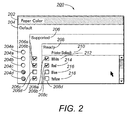
- Fig. 2 depicts an exemplary graphical user interface in accordance with the present disclosure.
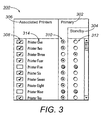
- Fig. 3 depicts an exemplary graphical user interface in accordance with the present disclosure.
- a method, system, and a computer program product for presenting configurable multi-level parameters relating to an item are provided.
- a condensed and scannable GUI of multilevel configurable parameter value is present for the item.
- Configuration of an item includes, but is not limited to, the selection, modification and input of a parameter value associated with the item to obtain performance in accordance with the parameter value.
- An item includes, but is not limited to, an operational control, a feature, a function, and an attribute of a system.
- the GUI enables a user to clearly and quickly discern the relationship between the parameters.
- the GUI can also reflect modifications to parameters that result from a selection of a parameter value related to the item.
- Fig. 1 is an exemplary block diagram of a system 100 in which the present technology may be implemented.
- the user system 100 may include CPU 102, connected by a bus 118 or other suitable interface means to system memory 108.
- CPU 102 is a microprocessor, such as an INTEL PENTIUM® or AMD® processor, but may be any processor that executes program instructions in order to carry out the functions disclosed herein.
- the network adapter 106 provides an interface between the system 100 and a network 110, such as the Internet.
- the user system 100 can also include input/output circuitry 104 and network adapter 106.
- Input/output device circuitry 104 enables interaction with and execution of instructions by user system 100 as directed by a user.
- the input/output circuitry 104 provides an interface for the selection and modification of parameters and output of GUIs in accordance with the techniques disclosed by the present disclosure.
- the input/output circuitry 104 includes input devices, such as trackball, mice, touchpads and keyboards, and output devices, such as printers and monitors.
- systems memory 108 is disposed in communication with CPU 102 through bus 118.
- Systems memory 108 includes GUI Program 112, operating system 114 and data 116.
- Operating system 114 provides overall system functionality.
- the GUI Program 112 enables the presentation and configuration of multi-level parameter values relating to an item in accordance with the present disclosure as discussed in detail herein below.
- the item can include, but is not limited to, an operational control and an attribute.
- the configuration of a parameter value includes, but is not limited to selection, editing and data entry.
- Fig. 2 depicts an exemplary graphical user interface in accordance with the disclosure.
- the GUI 200 is presented as a condensed table including an item label 202, parameter labels 204-208, parameter value labels 210-218, selectable objects 204a-204e, selectable objects 206a-206d, and selectable objects 208a-208d.
- An item label 202 identifies a type of item including, but not limited to, a system attribute and a system control.
- item label 202 identifies a printer attribute ("Paper Color") presented for configuration.
- the parameter labels 204-208 identify the parameters associated with the attribute.
- the parameters associated with the attribute "Paper Color” are "Default,” “Supported,” and “Ready.” These are the parameters that have a relationship with the attribute "Paper Color” and can be set automatically by the system 100 or manually by a user to control the use of paper color in system 100.
- the item label 202, and parameter labels 204-208 are stacked over one another and offset from each other a distance sufficient to place one or more selectable objects in a column under each of the parameter labels 204-208. The result is a condensed table having stacked and offset parameter labels 204-208 and selectable objects for the parameters forming the columns of the table.
- the parameter value labels 210-218 identify the parameter values associated with the attribute. As shown in Fig. 2, each parameter value label 212-218 is associated with each of the parameters labels 204-208 and parameter value label 210 is associated with parameter label 204. For example, the parameter value "White” is a parameter value for each of the parameter labels "Ready,” “Supported,” and "Default.”
- a set of selectable objects are provided in a column below each parameter label 204-208 and each selectable object in each set of selectable objects is adjacent to and associated with one of the parameter value labels 210-218.
- each selectable object that is associated with a parameter label is also associated with a parameter value label.
- selectable objects 204a, 206a and 208a are associated with the parameter value "White" and a respective one of the parameter value label 204, 206 and 208.
- a selectable object can be one of a checkbox, a button, a drop down menu or the like.
- a checkbox such as selectable objects 206a-206d and 208a-208d, can be selected or de-selected by a user. When a user positions the pointing device on a particular check box and clicks, the box toggles between a selected state, displayed as a box with a " ⁇ " in it, and a de-selected state, displayed as an empty box.
- Multiple checkboxes in a column can be simultaneously selected, and each checkbox can be selected or de-selected independent of the states of the other checkboxes in the column. In the Fig.
- selectable objects 206a, 206b, and 206d associated with parameter value labels 212, 214 and 218 have been selected for parameter label 206. This visually conveys the information that the values "White,” “Red,” and “Yellow” have been selected as “Supported” for the printer attribute "Paper Color.”
- selectable objects 208a and 208b associated with parameter value labels 212 and 214 have been selected for parameter label 208. This visually conveys the information that the values "White” and "Red” have been selected as "Ready” for the printer attribute "Paper Color.”
- a button such as selectable objects 204a-204e, can be selected or de-selected by a user.
- the button toggles between a selected state, displayed as a circle with a solid dot in it, and a de-selected state, displayed as an empty circle.
- only one button in a button column can be selected at any given time. In other words, if a user selects one button, all other buttons in the column are automatically de-selected.
- the states of the buttons are interdependent. Button columns are thus appropriate GUI controls for allowing a user to select a single item from among multiple mutually exclusive items.
- the availability of a button for selection or de-selection can be based on the selection of checkboxes, buttons and/or a combination thereof related to the attribute.
- a checkbox or button when a checkbox or button is not available for selection it can be displayed "Greyed Out," such as selectable objects 204c and 204d, and disabled for selection.
- the availability of selectable objects 204a-204d for selection is based on whether the selectable object, such as 206a, associated with a value, such as 212, is selected for both parameter labels, such as 206 and 208.
- the check boxes associated with the value "Red” and "White” have been selected as "Supported” and "Ready” making the selectable objects 204a and 204b for parameter label 204 available for selection.
- Fig. 3 depicts an exemplary graphical user interface in accordance with the present disclosure.
- the GUI 300 is presented as a condensed table including an item label 306, parameter labels 302-304, parameter value labels 314, and selectable objects 308-312.
- item label 306 identifies a printer control ("Associated Printers") presented for configuration.
- the parameter labels 302 and 304 identify the parameters associated with the printer control.
- the parameters associated with the printer control "Associated Printer” are "Primary” and “Standby.” These are the parameters that have a relationship with the printer control "Associated Printer” and can be set to control the use of printers associated with a queue.
- the parameter labels 302 and 304 are stacked over one another and offset from each other a distance sufficient to place selectable objects, such as 310 and 312, in a column under each of the parameter labels 302 and 304. The result is a condensed table having stacked and offset parameter labels 302-304 and selectable objects forming the columns of the table.
- the GUI enables each associated printer listed in the GUI to be designated as either "primary" or “standby.”
- the availability of a selectable object 310 and 312 is based on whether the selectable object 308 adjacent to selectable the object 310 and 312 have been selected.
- the selectable objects 310 and 312 corresponding to the same parameter value are made available for selection.
- the selectable object 310 corresponding to the same parameter value is automatically selected.
- the selectable object 312 corresponding to the same parameter value can be selected to alter the automatic selection.
Landscapes
- Engineering & Computer Science (AREA)
- General Engineering & Computer Science (AREA)
- Theoretical Computer Science (AREA)
- Human Computer Interaction (AREA)
- Physics & Mathematics (AREA)
- General Physics & Mathematics (AREA)
- User Interface Of Digital Computer (AREA)
- Digital Computer Display Output (AREA)
Abstract
Description
- The present disclosure relates to a method, system, and computer program product for presenting configurable parameter values relating to an item. More particularly, the present disclosure relates to a method, system, and computer program product for presenting configurable parameter values relating to an item using a condensed and scannable table showing multi-level parameters relating to the item.
- Graphical User Interfaces ("GUIs") are used to display and configure multi-level parameter values related to an item. Typically, configuring multi-level parameter values has been accomplished using two techniques. One technique involves creating a feature group for an item having multiple parameter values. The feature group can be presented as a set of parameter values with selectable objects such as option buttons, checkboxes, modifiable fields, or as a pull down menu having selectable option buttons and/or checkboxes. Another technique involves creating a standard table for an item that displays each modifiable parameter value for the item. When presented, the parameter values convey a current state of the parameter for the item. While these techniques enable a user to visualize and configure, such as modify or select, parameter values as necessary, they have considerable drawbacks.
- One drawback is the inability to easily scan the parameters presented using these techniques. It is often difficult to determine what parameter values relate to an item due to the parallax that is created when reading a GUI formatted as a table. Parallax is increase when there is a need to read multiple standard tables for an item.
- Another drawback is that a valuable amount of screen space is used by both techniques. Screen space is at a premium because it is often desirable to visually confirm that the parameter values as configured are indeed the desired parameter values. Seeing information about the context of an item also helps the user make decisions on how to configure the item. The amount of screen space used by a standard table is typically driven by the width of each column heading, or the longest entry in the column that designates the parameter being configured. Likewise, the selection of a parameter that initiates the opening of a new window uses a substantial amount of screen space.
- Another drawback is that of unnoticed parameter changes. There are occasions where the selection of a parameter value has an influence on what selections can be made following the selection of the parameter value or selections that were made prior to the selection of the parameter value. While GUIs reflect these changes, they can go unnoticed by the user and lead to unexpected results.
- Accordingly, there is a need for a method, system, and computer program product for presenting configurable parameters relating to an item. There is a need for the method, system, and computer program product for presenting configurable multi-level parameters relating to an item. There is also a need for the multi-level parameters to be presented in a condensed and logical manner. There is also a need for the multi-level parameters to be presented in a table format. There is a need for the multi-level parameters to be presented to preserve screen space. There is also a need for the multi-level parameters to be presented in a manner that maintains and makes it easy to discern a logical relationship between the parameters. There is also a need for the multi-level parameters to be presented in a manner that reflects modifications to parameter values as a result of the selection of a parameter value.
- According to embodiments of the present disclosure, a method, system, and a computer program product for presenting configurable multi-level parameters relating to an item are provided. To configure the item a condensed and scannable GUI of multilevel configurable parameter value is present for the item. The GUI enables a user to clearly and quickly discern the relationship between the parameters. The GUI can also reflect modifications to parameters that result from a selection of a parameter value related to the item. The GUI can be used to define options and related settings on a form or client GUI, such as a job ticket.
In one embodiment of the method according to claim 1, the selectable objects are one of: a checkbox, a button, a dropdown menu and a textbox. - The above described features and advantages of the present disclosure will be more fully appreciated with reference to the detailed description and appended figures in which:
- Fig. 1 depicts an exemplary functional block diagram of a device in which the present disclosure can find application;
- Fig. 2 depicts an exemplary graphical user interface in accordance with the present disclosure; and
- Fig. 3 depicts an exemplary graphical user interface in accordance with the present disclosure.
- The subject matter of the present disclosure is now described more fully hereinafter with reference to the accompanying drawings that show exemplary embodiments. The subject matter of the present disclosure, however, may be embodied in many different forms and should not be construed as limited to the embodiments set forth herein. Appropriately, these embodiments are provided so that this disclosure will be thorough and complete, and will fully convey the scope of the disclosed subject matter.
- According to embodiments of the present disclosure, a method, system, and a computer program product for presenting configurable multi-level parameters relating to an item are provided. To configure the item a condensed and scannable GUI of multilevel configurable parameter value is present for the item. Configuration of an item includes, but is not limited to, the selection, modification and input of a parameter value associated with the item to obtain performance in accordance with the parameter value. An item includes, but is not limited to, an operational control, a feature, a function, and an attribute of a system.
- The GUI enables a user to clearly and quickly discern the relationship between the parameters. The GUI can also reflect modifications to parameters that result from a selection of a parameter value related to the item.
- Fig. 1 is an exemplary block diagram of a
system 100 in which the present technology may be implemented. Theuser system 100 may includeCPU 102, connected by abus 118 or other suitable interface means tosystem memory 108. In the Fig. 1 embodiment of the present disclosure,CPU 102 is a microprocessor, such as an INTEL PENTIUM® or AMD® processor, but may be any processor that executes program instructions in order to carry out the functions disclosed herein. Thenetwork adapter 106 provides an interface between thesystem 100 and anetwork 110, such as the Internet. - The
user system 100 can also include input/output circuitry 104 andnetwork adapter 106. Input/output device circuitry 104 enables interaction with and execution of instructions byuser system 100 as directed by a user. The input/output circuitry 104 provides an interface for the selection and modification of parameters and output of GUIs in accordance with the techniques disclosed by the present disclosure. The input/output circuitry 104 includes input devices, such as trackball, mice, touchpads and keyboards, and output devices, such as printers and monitors. - As shown in Fig. 1, the various components of the
user system 100 communicate through a bus orsimilar architecture 118. Accordingly,systems memory 108 is disposed in communication withCPU 102 throughbus 118.Systems memory 108 includes GUIProgram 112,operating system 114 anddata 116.Operating system 114 provides overall system functionality. The GUIProgram 112 enables the presentation and configuration of multi-level parameter values relating to an item in accordance with the present disclosure as discussed in detail herein below. The item can include, but is not limited to, an operational control and an attribute. The configuration of a parameter value includes, but is not limited to selection, editing and data entry. - Fig. 2 depicts an exemplary graphical user interface in accordance with the disclosure. In the Fig. 2 embodiment of the present disclosure, the
GUI 200 is presented as a condensed table including anitem label 202, parameter labels 204-208, parameter value labels 210-218,selectable objects 204a-204e,selectable objects 206a-206d, andselectable objects 208a-208d. Anitem label 202 identifies a type of item including, but not limited to, a system attribute and a system control. In the Fig. 2 embodiment of the present disclosure,item label 202 identifies a printer attribute ("Paper Color") presented for configuration. - The parameter labels 204-208 identify the parameters associated with the attribute. In the Fig. 2 embodiment of the present disclosure, the parameters associated with the attribute "Paper Color" are "Default," "Supported," and "Ready." These are the parameters that have a relationship with the attribute "Paper Color" and can be set automatically by the
system 100 or manually by a user to control the use of paper color insystem 100. In the Fig. 2 embodiment of the present disclosure, theitem label 202, and parameter labels 204-208 are stacked over one another and offset from each other a distance sufficient to place one or more selectable objects in a column under each of the parameter labels 204-208. The result is a condensed table having stacked and offset parameter labels 204-208 and selectable objects for the parameters forming the columns of the table. - The parameter value labels 210-218 identify the parameter values associated with the attribute. As shown in Fig. 2, each parameter value label 212-218 is associated with each of the parameters labels 204-208 and
parameter value label 210 is associated withparameter label 204. For example, the parameter value "White" is a parameter value for each of the parameter labels "Ready," "Supported," and "Default." - In the Fig. 2 embodiment of the present disclosure, a set of selectable objects are provided in a column below each parameter label 204-208 and each selectable object in each set of selectable objects is adjacent to and associated with one of the parameter value labels 210-218. In the Fig. 2 embodiment of the present disclosure, each selectable object that is associated with a parameter label is also associated with a parameter value label. In the Fig. 2 embodiment of the present disclosure,
selectable objects parameter value label - A selectable object can be one of a checkbox, a button, a drop down menu or the like. A checkbox, such as
selectable objects 206a-206d and 208a-208d, can be selected or de-selected by a user. When a user positions the pointing device on a particular check box and clicks, the box toggles between a selected state, displayed as a box with a " æ" in it, and a de-selected state, displayed as an empty box. Multiple checkboxes in a column can be simultaneously selected, and each checkbox can be selected or de-selected independent of the states of the other checkboxes in the column. In the Fig. 2 embodiment of the present disclosure,selectable objects parameter label 206. This visually conveys the information that the values "White," "Red," and "Yellow" have been selected as "Supported" for the printer attribute "Paper Color." In the Fig. 2 embodiment of the present disclosure,selectable objects parameter label 208. This visually conveys the information that the values "White" and "Red" have been selected as "Ready" for the printer attribute "Paper Color." - A button, such as
selectable objects 204a-204e, can be selected or de-selected by a user. When the user positions the pointing device on a particular button and clicks, the button toggles between a selected state, displayed as a circle with a solid dot in it, and a de-selected state, displayed as an empty circle. In contrast with the check boxes, however, only one button in a button column can be selected at any given time. In other words, if a user selects one button, all other buttons in the column are automatically de-selected. Thus, the states of the buttons are interdependent. Button columns are thus appropriate GUI controls for allowing a user to select a single item from among multiple mutually exclusive items. - The availability of a button for selection or de-selection can be based on the selection of checkboxes, buttons and/or a combination thereof related to the attribute. In the Fig. 2 embodiment of the present disclosure, when a checkbox or button is not available for selection it can be displayed "Greyed Out," such as
selectable objects selectable objects 204a-204d for selection is based on whether the selectable object, such as 206a, associated with a value, such as 212, is selected for both parameter labels, such as 206 and 208. In the Fig. 2 embodiment of the present disclosure, the check boxes associated with the value "Red" and "White" have been selected as "Supported" and "Ready" making theselectable objects parameter label 204 available for selection. - Fig. 3 depicts an exemplary graphical user interface in accordance with the present disclosure. In the Fig. 3 embodiment of the present disclosure, the
GUI 300 is presented as a condensed table including anitem label 306, parameter labels 302-304, parameter value labels 314, and selectable objects 308-312. In the Fig. 3 embodiment of the present disclosure,item label 306 identifies a printer control ("Associated Printers") presented for configuration. - The parameter labels 302 and 304 identify the parameters associated with the printer control. In the Fig. 3 embodiment of the present disclosure, the parameters associated with the printer control "Associated Printer" are "Primary" and "Standby." These are the parameters that have a relationship with the printer control "Associated Printer" and can be set to control the use of printers associated with a queue. In the Fig. 3 embodiment of the present disclosure, the parameter labels 302 and 304 are stacked over one another and offset from each other a distance sufficient to place selectable objects, such as 310 and 312, in a column under each of the parameter labels 302 and 304. The result is a condensed table having stacked and offset parameter labels 302-304 and selectable objects forming the columns of the table.
- In the Fig. 3 embodiment, the GUI enables each associated printer listed in the GUI to be designated as either "primary" or "standby." In the Fig. 3 embodiment of the present disclosure, the availability of a
selectable object selectable object 308 adjacent to selectable theobject selectable object 308, theselectable objects selectable object 310 corresponding to the same parameter value is automatically selected. Theselectable object 312 corresponding to the same parameter value can be selected to alter the automatic selection.
Claims (10)
- A method of presenting configurable multi-level parameter values relating to an item of a printing apparatus, the method comprising:providing at least two parameter labels axially aligned in a stacked configuration and offset from each other; andproviding at least one selectable object below each of the parameter labels in a column;wherein the selectable objects are operable to configure an item.
- The method according to claim 1, further comprising providing an item label identifying the configurable item.
- The method according to claim 1, wherein the parameter label identifies a parameter associated with the configurable item.
- The method according to claim 3, further comprising providing a parameter value label adjacent the selectable objects.
- The method according to claim 4, wherein the parameter value label identifies a value associated with the parameter
- The method according to claim 2, wherein the printing apparatus is one of: a photocopier, a xerographic photocopier, a paper handler, a document finisher, a scanner, a printer, or a fax machine.
- A computer program product for presenting configurable multi-level parameter values relating to an item a printing apparatus comprising:a computer readable medium; andcomputer program instructions, recorded on the computer readable medium, executable by a processor, for performing the steps of:wherein the selectable objects are operable to configure an item.providing at least two parameter labels axially aligned in a stacked configuration and offset from each other; andproviding at least one selectable object below each of the parameter labels in a column;
- A printing apparatus comprising:a processor operable to execute computer program instructions; anda memory operable to store computer program instructions executable by the processor, for performing the steps of:wherein the selectable objects are operable to configure an item.providing at least two parameter labels axially aligned in a stacked configuration and offset from each other; andproviding at least one selectable object below each of the parameter labels in a column;
- A method of presenting configurable multi-level parameter values relating to an item, the method comprising:providing at least two parameter labels axially aligned in a stacked configuration and offset from each other; andproviding at least one selectable object below each of the parameter labels in a column;wherein the selectable objects are operable to configure an item.
- A system comprising:a processor operable to execute computer program instructions; anda memory operable to store computer program instructions executable by the processor, for performing the steps of:wherein the selectable objects are operable to configure an item.providing at least two parameter labels axially aligned in a stacked configuration and offset from each other; andproviding at least one selectable object below each of the parameter labels in a column;
Applications Claiming Priority (1)
| Application Number | Priority Date | Filing Date | Title |
|---|---|---|---|
| US11/138,311 US7421663B2 (en) | 2005-05-27 | 2005-05-27 | Graphical user interface design for multiple settings/values related to an item |
Publications (2)
| Publication Number | Publication Date |
|---|---|
| EP1727023A2 true EP1727023A2 (en) | 2006-11-29 |
| EP1727023A3 EP1727023A3 (en) | 2012-06-20 |
Family
ID=36648608
Family Applications (1)
| Application Number | Title | Priority Date | Filing Date |
|---|---|---|---|
| EP06114581A Withdrawn EP1727023A3 (en) | 2005-05-27 | 2006-05-26 | Graphical user interface for presenting configurable parameters related to an item |
Country Status (3)
| Country | Link |
|---|---|
| US (1) | US7421663B2 (en) |
| EP (1) | EP1727023A3 (en) |
| JP (1) | JP4709067B2 (en) |
Families Citing this family (12)
| Publication number | Priority date | Publication date | Assignee | Title |
|---|---|---|---|---|
| US9411903B2 (en) | 2007-03-05 | 2016-08-09 | Oracle International Corporation | Generalized faceted browser decision support tool |
| JP2008257345A (en) * | 2007-04-02 | 2008-10-23 | Fuji Xerox Co Ltd | Information processing apparatus, information processing program and image processing system |
| US8136120B2 (en) * | 2007-10-10 | 2012-03-13 | Xerox Corporation | Methods and systems of reconciling sources of print job processing information in a print processing environment |
| WO2012095978A1 (en) * | 2011-01-13 | 2012-07-19 | 三菱電機株式会社 | Network selection assistance method |
| US20130031497A1 (en) * | 2011-07-29 | 2013-01-31 | Nokia Corporation | Method and apparatus for enabling multi-parameter discovery and input |
| US8914423B2 (en) | 2012-10-30 | 2014-12-16 | International Business Machines Corporation | Mapping data elements in a user interface |
| US9183231B2 (en) * | 2012-11-29 | 2015-11-10 | Sap Se | Interactive table to present multi-level relationships between data items |
| US9253541B2 (en) * | 2013-02-26 | 2016-02-02 | Google Inc. | Method for one-click subscribing to multiple channels of information on a single topic |
| US9578382B2 (en) | 2013-06-26 | 2017-02-21 | Google Inc. | Subscribable channel collections |
| US10713699B1 (en) * | 2014-11-14 | 2020-07-14 | Andersen Corporation | Generation of guide materials |
| JP6880506B2 (en) * | 2017-09-15 | 2021-06-02 | ブラザー工業株式会社 | Print processing program |
| CN112130947B (en) * | 2020-09-23 | 2024-10-22 | 深圳开立生物医疗科技股份有限公司 | Ultrasonic measurement item attribute modification method, device, equipment and readable storage medium |
Citations (1)
| Publication number | Priority date | Publication date | Assignee | Title |
|---|---|---|---|---|
| US20030184788A1 (en) | 2002-03-20 | 2003-10-02 | Akira Watanabe | Image recording device, system, and method |
Family Cites Families (22)
| Publication number | Priority date | Publication date | Assignee | Title |
|---|---|---|---|---|
| FR2647239B1 (en) | 1989-05-22 | 1991-07-05 | Bull Sa | METHOD FOR GENERATING INTERFACES FOR USER APPLICATIONS VISUALIZABLE ON THE SCREEN OF A COMPUTER SYSTEM AND DEVICE FOR IMPLEMENTING SAID METHOD |
| US5533184A (en) | 1991-08-19 | 1996-07-02 | International Business Machines Corporation | Computer system for dynamically generating display screen panels providing interactive interfaces for application program steps |
| US5241624A (en) * | 1991-10-03 | 1993-08-31 | International Business Machines Corporation | Method for determining a user selected group of data objects for the propagation of attribute values |
| US5416895A (en) * | 1992-04-08 | 1995-05-16 | Borland International, Inc. | System and methods for improved spreadsheet interface with user-familiar objects |
| US5579446A (en) * | 1994-01-27 | 1996-11-26 | Hewlett-Packard Company | Manual/automatic user option for color printing of different types of objects |
| US5682510A (en) * | 1995-03-30 | 1997-10-28 | Microsoft Corporation | Method and system for adding application defined properties and application defined property sheet pages |
| US5764226A (en) | 1995-12-29 | 1998-06-09 | International Business Machine Corp. | Reusable and modifiable data entry interface part |
| US5963216A (en) * | 1996-04-25 | 1999-10-05 | Hewlett-Packard Company | Providing print preview of a print job using printing calls from a print driver |
| US5956031A (en) | 1996-08-02 | 1999-09-21 | Autodesk, Inc. | Method and apparatus for control of a parameter value using a graphical user interface |
| US6166736A (en) * | 1997-08-22 | 2000-12-26 | Natrificial Llc | Method and apparatus for simultaneously resizing and relocating windows within a graphical display |
| US6335795B1 (en) * | 1997-09-15 | 2002-01-01 | International Business Machines Corporation | Method for customizing print attribute choices based on selected model, media, and printer |
| US7039876B2 (en) * | 1997-10-06 | 2006-05-02 | Canon Kabushiki Kaisha | User interface for image acquisition devices |
| US6002398A (en) * | 1997-10-30 | 1999-12-14 | Novell, Inc. | Navigation between property pages with tabs and menus |
| US6230304B1 (en) | 1997-12-24 | 2001-05-08 | Magma Design Automation, Inc. | Method of designing a constraint-driven integrated circuit layout |
| US6362892B1 (en) * | 1998-01-31 | 2002-03-26 | Hewlett-Packard Company | System for providing useful summarized setting information for multi-layered user interface |
| US6535229B1 (en) * | 1999-06-29 | 2003-03-18 | International Business Machines Corporation | Graphical user interface for selection of options within mutually exclusive subsets |
| US7584427B2 (en) * | 2000-03-24 | 2009-09-01 | Fuji Xerox Co., Ltd. | Operating method and device, and image processing apparatus using the same |
| US6941523B1 (en) * | 2000-06-05 | 2005-09-06 | Sharp Laboratories Of America, Inc. | Printer driver with automatic inquiry of user preference |
| JP3411550B2 (en) * | 2000-09-12 | 2003-06-03 | 理想科学工業株式会社 | Printing control device, recording medium storing computer readable program, printing system |
| US7283257B2 (en) * | 2002-09-25 | 2007-10-16 | Xerox Corporation | Print job GUI |
| US20050057512A1 (en) * | 2003-07-17 | 2005-03-17 | Min-Wen Du | Browsing based Chinese input method |
| JP2005084992A (en) * | 2003-09-09 | 2005-03-31 | Seiko Epson Corp | User interface device, display method thereof, and program thereof |
-
2005
- 2005-05-27 US US11/138,311 patent/US7421663B2/en active Active
-
2006
- 2006-05-26 EP EP06114581A patent/EP1727023A3/en not_active Withdrawn
- 2006-05-29 JP JP2006148005A patent/JP4709067B2/en active Active
Patent Citations (1)
| Publication number | Priority date | Publication date | Assignee | Title |
|---|---|---|---|---|
| US20030184788A1 (en) | 2002-03-20 | 2003-10-02 | Akira Watanabe | Image recording device, system, and method |
Also Published As
| Publication number | Publication date |
|---|---|
| JP2006331430A (en) | 2006-12-07 |
| US20060271876A1 (en) | 2006-11-30 |
| EP1727023A3 (en) | 2012-06-20 |
| US7421663B2 (en) | 2008-09-02 |
| JP4709067B2 (en) | 2011-06-22 |
Similar Documents
| Publication | Publication Date | Title |
|---|---|---|
| JP4988403B2 (en) | Print job analysis method and apparatus | |
| US7079166B1 (en) | Graphical user interface with enhanced operations when changing display screen | |
| JP5101147B2 (en) | Print job management method and apparatus having grouping function | |
| US6642943B1 (en) | Data processing apparatus, data processing method, and storage medium storing computer-readable program | |
| JP4824615B2 (en) | Print management method and apparatus having a destination panel | |
| US7301662B2 (en) | Control system and control method for image processing apparatus | |
| US8019853B2 (en) | Data processing apparatus, data processing method, and storage medium storing computer-readable program | |
| EP0529818B1 (en) | Dialog filtering | |
| JP4896791B2 (en) | Print management method and apparatus having a destination panel | |
| US6697090B1 (en) | Device controller, method of displaying user interface, and recording medium in which computer program for displaying user interface is recorded | |
| US20050210408A1 (en) | Alternative, customizable, simplified device settings menu | |
| US8314969B2 (en) | Image processing apparatus and information display method used in the image processing apparatus | |
| US20080162629A1 (en) | Information Processing Apparatus, Method, and Program for Generating Setting Information for Electronic Device | |
| US7421663B2 (en) | Graphical user interface design for multiple settings/values related to an item | |
| US7900146B2 (en) | Image forming system, information processing apparatus and its control method | |
| JP4847168B2 (en) | Application management system, application management method and program | |
| US6941523B1 (en) | Printer driver with automatic inquiry of user preference | |
| CN101582966B (en) | Information processing apparatus | |
| US7698650B2 (en) | Computerized action tool for managing print parameters, queuing actions and archiving actions for a document output management system | |
| CN101616228B (en) | Print control device and print control method | |
| US10462314B2 (en) | Information processing apparatus and information processing method | |
| US8368919B2 (en) | Enhancements to job ticket handling during multiple job submission | |
| US7493569B2 (en) | System and method for visually encoding related functions on a multi-function document output device control interface | |
| US7518744B2 (en) | Printing based on user specified formatted print and according to capability of the printer | |
| JP2002091738A (en) | Information processing method, system suitable for applying the same and computer program element containing program code for applying the method |
Legal Events
| Date | Code | Title | Description |
|---|---|---|---|
| PUAI | Public reference made under article 153(3) epc to a published international application that has entered the european phase |
Free format text: ORIGINAL CODE: 0009012 |
|
| AK | Designated contracting states |
Kind code of ref document: A2 Designated state(s): AT BE BG CH CY CZ DE DK EE ES FI FR GB GR HU IE IS IT LI LT LU LV MC NL PL PT RO SE SI SK TR |
|
| AX | Request for extension of the european patent |
Extension state: AL BA HR MK YU |
|
| PUAL | Search report despatched |
Free format text: ORIGINAL CODE: 0009013 |
|
| AK | Designated contracting states |
Kind code of ref document: A3 Designated state(s): AT BE BG CH CY CZ DE DK EE ES FI FR GB GR HU IE IS IT LI LT LU LV MC NL PL PT RO SE SI SK TR |
|
| AX | Request for extension of the european patent |
Extension state: AL BA HR MK YU |
|
| RIC1 | Information provided on ipc code assigned before grant |
Ipc: G06F 3/048 20060101AFI20120516BHEP |
|
| 17P | Request for examination filed |
Effective date: 20121220 |
|
| AKX | Designation fees paid |
Designated state(s): DE FR GB |
|
| 17Q | First examination report despatched |
Effective date: 20161220 |
|
| STAA | Information on the status of an ep patent application or granted ep patent |
Free format text: STATUS: THE APPLICATION IS DEEMED TO BE WITHDRAWN |
|
| 18D | Application deemed to be withdrawn |
Effective date: 20171003 |