EP1643504A1 - Editing apparatus, editing method, and program - Google Patents
Editing apparatus, editing method, and program Download PDFInfo
- Publication number
- EP1643504A1 EP1643504A1 EP05256137A EP05256137A EP1643504A1 EP 1643504 A1 EP1643504 A1 EP 1643504A1 EP 05256137 A EP05256137 A EP 05256137A EP 05256137 A EP05256137 A EP 05256137A EP 1643504 A1 EP1643504 A1 EP 1643504A1
- Authority
- EP
- European Patent Office
- Prior art keywords
- motion
- image
- playback
- virtual coordinates
- effect
- Prior art date
- Legal status (The legal status is an assumption and is not a legal conclusion. Google has not performed a legal analysis and makes no representation as to the accuracy of the status listed.)
- Withdrawn
Links
Images


Classifications
-
- G—PHYSICS
- G11—INFORMATION STORAGE
- G11B—INFORMATION STORAGE BASED ON RELATIVE MOVEMENT BETWEEN RECORD CARRIER AND TRANSDUCER
- G11B27/00—Editing; Indexing; Addressing; Timing or synchronising; Monitoring; Measuring tape travel
- G11B27/02—Editing, e.g. varying the order of information signals recorded on, or reproduced from, record carriers
- G11B27/031—Electronic editing of digitised analogue information signals, e.g. audio or video signals
- G11B27/034—Electronic editing of digitised analogue information signals, e.g. audio or video signals on discs
-
- G—PHYSICS
- G11—INFORMATION STORAGE
- G11B—INFORMATION STORAGE BASED ON RELATIVE MOVEMENT BETWEEN RECORD CARRIER AND TRANSDUCER
- G11B27/00—Editing; Indexing; Addressing; Timing or synchronising; Monitoring; Measuring tape travel
- G11B27/10—Indexing; Addressing; Timing or synchronising; Measuring tape travel
- G11B27/102—Programmed access in sequence to addressed parts of tracks of operating record carriers
- G11B27/105—Programmed access in sequence to addressed parts of tracks of operating record carriers of operating discs
-
- G—PHYSICS
- G11—INFORMATION STORAGE
- G11B—INFORMATION STORAGE BASED ON RELATIVE MOVEMENT BETWEEN RECORD CARRIER AND TRANSDUCER
- G11B27/00—Editing; Indexing; Addressing; Timing or synchronising; Monitoring; Measuring tape travel
- G11B27/10—Indexing; Addressing; Timing or synchronising; Measuring tape travel
- G11B27/19—Indexing; Addressing; Timing or synchronising; Measuring tape travel by using information detectable on the record carrier
- G11B27/28—Indexing; Addressing; Timing or synchronising; Measuring tape travel by using information detectable on the record carrier by using information signals recorded by the same method as the main recording
- G11B27/32—Indexing; Addressing; Timing or synchronising; Measuring tape travel by using information detectable on the record carrier by using information signals recorded by the same method as the main recording on separate auxiliary tracks of the same or an auxiliary record carrier
- G11B27/327—Table of contents
- G11B27/329—Table of contents on a disc [VTOC]
-
- G—PHYSICS
- G11—INFORMATION STORAGE
- G11B—INFORMATION STORAGE BASED ON RELATIVE MOVEMENT BETWEEN RECORD CARRIER AND TRANSDUCER
- G11B27/00—Editing; Indexing; Addressing; Timing or synchronising; Monitoring; Measuring tape travel
- G11B27/10—Indexing; Addressing; Timing or synchronising; Measuring tape travel
- G11B27/34—Indicating arrangements
Definitions
- the present invention relates to an editing apparatus, editing method, and a program that apply an effect to a motion-image.
- motion tracking As a technique for applying an effect such as mosaic to a motion-image, so-called "motion tracking" has been available.
- the motion tracking automatically tracks a characteristic object in the motion-image and applies an effect to the track of the object.
- the motion tracking technique it is possible to easily apply an effect to the object moving on the screen.
- the present invention has been proposed in view of the above situation, and it seeks to provide an editing apparatus, editing method, and a program capable of freely and easily applying an effect.
- an editing apparatus including: a playback/display means for playing back and displaying a motion-image; a position designation means for designating the positions on the motion-image played back and displayed by the playback/display means; a coordinate conversion means for converting the positions designated by the position designation means into virtual coordinates on the motion image; a storage means for storing the virtual coordinates obtained by the coordinate conversion means in association with frames of the motion-image; and an effect application means for applying an effect to the motion-image based on the virtual coordinates stored in the storage means.
- an editing method including: a playback/display step of playing back and displaying a motion-image; a position designation step of designating the positions on the motion-image played back and displayed in the playback/display step; a coordinate conversion step of converting the positions designated in the position designation step into virtual coordinates on the motion image; a storage step of storing the virtual coordinates obtained in the coordinate conversion step in a storage means in association with frames of the motion-image; and an effect application step of applying an effect to the motion-image based on the virtual coordinates stored in the storage means.
- a program allowing a process of editing a motion-image to be executed, the program including: a playback/display step of playing back and displaying a motion-image; a position designation step of designating the positions on the motion-image played back and displayed in the playback/display step; a coordinate conversion step of converting the positions designated in the position designation step into virtual coordinates on the motion image; a storage step of storing the virtual coordinates obtained in the coordinate conversion step in a storage means in association with frames of the motion-image; and an effect application step of applying an effect to the motion-image based on the virtual coordinates stored in the storage means.
- a motion-image is played back and displayed to a user, the positions that are designated by the user are converted into virtual coordinates on the motion-image, and the obtained virtual coordinates are stored in association with frames of the motion-image.
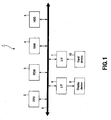
- FIG. 1 is a block diagram schematically showing an internal configuration of an editing apparatus 1.
- a CPU Central Processing Unit
- ROM Read Only Memory
- RAM Random Access Memory
- HDD Hard Disc Drive
- interface circuits 6, 7 are connected through a bus 8.
- a display device 9 and an input device 10 are connected to the bus 8 though the interface circuits 6, 7.
- the CPU 2 executes various processes according to a program stored in the ROM 3 or HDD 5. For example, the CPU 2 reads out a motion-image file from the HDD 5 as needed and allows the display device 9 to display the motion-image using GUI (Graphical User Interface). Further, the CPU 2 allows the display device 9 to display a point indicating the position on the screen according to an input operation through the input device such as a mouse.
- GUI Graphic User Interface
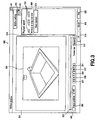
- step S201 a graphic 300 based on GUI as shown in FIG. 3 is displayed on the display device 9 through a user's predetermined operation.
- the graphic 300 is roughly constituted by a motion-image display area 301, a playback operation area 302, and a setting area 303.
- a motion-image 304 of a predetermined frame selected on the playback operation area 302 is displayed.
- the playback operation area 302 includes a slide button 305, a frame position display section 306, playback operation buttons 307 to 311, and a preview size setting section 312.
- the playback buttons 307 to 311 include a top frame moving button 307, a frame reverse button 308, a playback button 309, a frame advance button 310, and a final frame moving button 311 and are used for playing back the motion-image file at a desired frame position.
- the preview size setting section 312 is used for setting the size of the motion-image 304 to be displayed on the motion-image display area 301. This setting allows the motion-image 304 to be displayed in an enlarged manner on the entire motion-image display area 301.
- the setting area 303 has a playback speed selection radio button group 313 and a checkbox 314.
- the playback speed selection radio button group 313 has choices of playback speed in the drag operation. Although 1xSpeed, 1/2xSpeed, 1/4xSpeed are available as choices in this example, the choices are not limited to these three.
- the checkbox 314 is used for determining whether the playback operation is ended or not at the end time of the drag operation by making a user to mark the checkbox 314.
- a capture start button 315 allows a program for recording point coordinates in the drag operation (to be described later) to be executed.
- An open button 316 is used for opening the motion-image file to be edited. The use of the open button allows user's desired motion-image file to be read out.
- a save button 317 is used for saving a state of the motion-image file, playback speed, or the like.
- An OK button 318 which corresponds to the capture start button 315, is used for executing a track depiction program according to the drag operation (to be described later).
- a cancel button 319 is used for canceling the editing program and corresponds to a close button 321.
- a help button 320 is used for executing a program that gives explanations of terms, operations, and the like.
- step S202 various settings are made based on the graphic 300.
- the open button 316 is opened to read out a desired motion-image file
- the slide button 305 and playback operation buttons 307 to 311 are used to set the position of the frame that the user wants to apply an effect to.
- playback speed at which the track for applying an effect is depicted or whether playback operation is stopped or not at the end time of the drag operation of depicting the track is set.
- playback operation is stopped at the drag operation end time.
- the apparatus enters a state where it is possible to start the track depiction through a drag operation (step S203).
- the CPU 2 switches the display screen from the graphic 300 to a graphic 400 as shown in FIG. 4.
- the capture start button 315 on the graphic 300 which has been clicked in step S202, is changed into a capture pause button 415 for track depiction and the other buttons and the like are in an inactive state.
- the buttons and the like 401 to 420 (excluding 415) correspond to the buttons and the like 301 to 321 on the graphic 300 shown in FIG. 3 and the description thereof will be omitted.
- step S204 When the motion-image display area 401 shown in FIG. 4 is dragged with the input device 10 such as a mouse (step S204), playback operation is started from the predetermined frame position set in the step S202 (step S205). At the same time, the CPU 2 acquires frame numbers of the motion-image and point coordinates (step S206).
- FIG. 5 shows a relationship between the point coordinates and frame numbers of the motion-image acquired in step S206.
- the point coordinates on the motion-image display area 501 is stored in the RAM or the like in association with the frame number of the motion-image that is being played back. That is, the position that has been designated by the drag operation in step S206 is recorded for each frame of the motion-image that is being played back.
- point coordinates corresponding to the frame numbers 0 to 31 are stored.
- a track for applying an effect is obtained.
- the point coordinates on the motion-image display area 501 covers the outside area of the motion-image 504, so that even if a target object moves out of the frame for a moment, the point coordinates can continuously be acquired and recorded.
- the point coordinates of the drag operation can be acquired for each frame of the motion-image, so that the user can freely depict the track while viewing the motion-image.
- the point coordinates acquired in step S206 are converted into virtual plane coordinates on the motion-image (step S207) and recorded in the RAM 4 or the like in association with the frame numbers (step S208).
- step S209 The motion-image is played back until the drag operation has been completed. That is, the steps S205 to S208 are repeated until the drag operation has been completed to thereby acquire a motion path which is the track to which an effect is applied.
- step S209 the CPU 2 stops playback of the motion-image (step S210).
- a track 622 of the motion path as shown in FIG. 6 is displayed on the motion-image display area 601.
- the track 622 of the motion path from frame positions 0 to 38 is displayed.
- the buttons and the like 601 to 621 correspond to the buttons and the like 401 to 421 on the graphic 400 shown in FIG. 4 and the description thereof will be omitted.
- step S211 the click of the capture pause button 615 stops recording operation of the virtual plane coordinates (step S212).
- step S213 the following effect is applied based on the virtual plane coordinates on the motion-image recording through the above operation.
- the user can start the playback of the motion-image at a desired frame and freely depict the track and, therefore, he or she can reliably and easily apply an effect. Further, the playback of the motion-image is stopped simultaneously with the completion of the drag operation, so that it is possible to depict the track only on the frames that the user wants to apply an effect to. Further, selection of the playback speed allows the user to easily depict the track even under the condition that the movement of a target object is fast or complicated.
- FIG. 7 shows an example in which a pattern effect has been applied to the track 622 of the motion path.
- a graphic 700 in which a pattern effect has been applied is roughly constituted by a motion-image display area 701, a playback operation area 702, and a setting area 703.
- the motion-image display area 701 and playback operation area 702 respectively correspond to the motion-image display area 301 and playback operation area 302 shown in FIG. 3, and the description thereof will be omitted.
- the setting area 703 is displayed when a pattern is selected from an object selection menu 713 and includes an active check button 714, a pattern changeover menu 715, a pen width slider 716, a pen style menu 717, a painting type menu 718, a pen color menu 719, and a brush color menu 720.
- the pattern changeover menu 715 has choices such as circle, triangle, quadrangle, star, arrow, straight line, polygonal line, and polygon, from which the user can select a desired object.
- the pen width slider 716 is used for adjusting the width of the outline of the object.
- the pen style menu 717 has choices of the line type such as solid, dash, dot, dash-dot.
- the painting type menu 718 has choices such as solid color, blurring, blurring and inversion, mosaic, mosaic and inversion, background transparent.
- the pen color menu 719 presents the line colors of the outline of the pattern, and the brush color menu 720 presents the internal colors of the pattern.
- FIG. 8 shows an example in which a brush effect has been applied to the track 622 of the motion path.
- a graphic 800 in which a brush effect has been applied is roughly constituted by a motion-image display area 801, a playback operation area 802, and a setting area 803.
- the motion-image display area 801 and playback operation area 802 respectively correspond to the motion-image display area 301 and playback operation area 302 shown in FIG. 3, and the description thereof will be omitted.
- the setting area 803 is displayed when a brush is selected from an object selection menu 813 and includes an active check button 814, a brush shape changeover menu 815, a radius slide button 816, an interval slide button 817, a painting type menu 818, and a pen color menu 819.
- the brush shape changeover menu 815 has choices such as circle, circular blurring, quadrangle, quadrangular blurring, spray, crayon, from which the user can select a desired brush particle size.
- the radius slide button 816 is used for adjusting the radius of the brush particles.
- the interval slide button 817 is used for adjusting the interval between the particles selected on the brush shape changeover menu 815.
- the painting type menu 818 has choices such as solid color, blurring, blurring and inversion, mosaic, mosaic and inversion, background transparent.
- the pen color menu 819 presents the colors of the brush particles.
- Embodiments provide an editing apparatus, an editing method, and a program by which a user can freely and easily apply an effect while visually confirming a motion-image to be edited.
- the editing apparatus includes a playback/display unit that plays back and displays a motion-image, a position designation unit that designates the positions on the motion-image played back and displayed by the playback/display unit, a coordinate conversion unit that converts the positions designated by the position designation unit into virtual coordinates on the motion image, a storage unit that stores the virtual coordinates obtained by the coordinate conversion unit in association with frames of the motion-image, and an effect application unit that applies an effect to the motion-image based on the virtual coordinates stored in the storage unit.
Landscapes
- Engineering & Computer Science (AREA)
- Multimedia (AREA)
- Television Signal Processing For Recording (AREA)
- Processing Or Creating Images (AREA)
- Studio Circuits (AREA)
- Management Or Editing Of Information On Record Carriers (AREA)
- User Interface Of Digital Computer (AREA)
Abstract
Description
- The present invention relates to an editing apparatus, editing method, and a program that apply an effect to a motion-image.
- As a technique for applying an effect such as mosaic to a motion-image, so-called "motion tracking" has been available. The motion tracking automatically tracks a characteristic object in the motion-image and applies an effect to the track of the object. With the motion tracking technique, it is possible to easily apply an effect to the object moving on the screen.
- However, in the motion tracking, it is impossible to perform the application of an effect if there is no object to be tracked. Further, it is difficult to recognize an object with uncertain outline due to high-speed movement, one intersecting with other objects or backgrounds, one whose size varies, one that moves out of the motion-image once and moves in the motion-image again, so that an effect cannot reliably be applied to the target object.
- To cope with this problem, a technique that arranges still pictures on the editing portion of the motion-image in chronological order and displays them, and inserts selected effect images into the target still image to thereby display the still images to which an effect has been applied has been available (refer to, for example, Jpn. Pat. Appln. Laid-Open Publication No. 11-205673). However, the use of the selected effect image prevents an effect from being freely applied.
- The present invention has been proposed in view of the above situation, and it seeks to provide an editing apparatus, editing method, and a program capable of freely and easily applying an effect.
- According to one aspect of the present invention, there is provided an editing apparatus including: a playback/display means for playing back and displaying a motion-image; a position designation means for designating the positions on the motion-image played back and displayed by the playback/display means; a coordinate conversion means for converting the positions designated by the position designation means into virtual coordinates on the motion image; a storage means for storing the virtual coordinates obtained by the coordinate conversion means in association with frames of the motion-image; and an effect application means for applying an effect to the motion-image based on the virtual coordinates stored in the storage means.
- According to another aspect of the present invention, there is provided an editing method including: a playback/display step of playing back and displaying a motion-image; a position designation step of designating the positions on the motion-image played back and displayed in the playback/display step; a coordinate conversion step of converting the positions designated in the position designation step into virtual coordinates on the motion image; a storage step of storing the virtual coordinates obtained in the coordinate conversion step in a storage means in association with frames of the motion-image; and an effect application step of applying an effect to the motion-image based on the virtual coordinates stored in the storage means.
- According to another aspect of the present invention, there is provided a program allowing a process of editing a motion-image to be executed, the program including: a playback/display step of playing back and displaying a motion-image; a position designation step of designating the positions on the motion-image played back and displayed in the playback/display step; a coordinate conversion step of converting the positions designated in the position designation step into virtual coordinates on the motion image; a storage step of storing the virtual coordinates obtained in the coordinate conversion step in a storage means in association with frames of the motion-image; and an effect application step of applying an effect to the motion-image based on the virtual coordinates stored in the storage means.
- According to embodiments of the present invention, a motion-image is played back and displayed to a user, the positions that are designated by the user are converted into virtual coordinates on the motion-image, and the obtained virtual coordinates are stored in association with frames of the motion-image. With this configuration, the user can freely and easily apply an effect while visually confirming the motion-image.
- FIG. 1 is a block diagram showing an internal configuration of an editing apparatus according to an embodiment of the present invention;
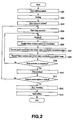
- FIG. 2 is a flowchart showing an editing method according to the embodiment;
- FIG. 3 is a view showing a graphic example based on GUI;
- FIG. 4 is a view showing a graphic example based on GUI;
- FIG. 5 is a view for explaining acquisition of point coordinates;
- FIG. 6 is a view showing a graphic example based on GUI;
- FIG. 7 is a view showing a graphic example based on GUI; and
- FIG. 8 is a view showing a graphic example based on GUI.
- Embodiments of the present invention will be described below in detail with reference to the accompanying drawings. FIG. 1 is a block diagram schematically showing an internal configuration of an
editing apparatus 1. In theediting apparatus 1, a CPU (Central Processing Unit) 2, a ROM (Read Only Memory) 3, a RAM (Random Access Memory) 4, an HDD (Hard Disc Drive) 5 andinterface circuits bus 8. Further, adisplay device 9 and aninput device 10 are connected to thebus 8 though theinterface circuits - When receiving an instruction to execute a predetermined process from the
input device 10 such as a mouse or keyboard through theinterface circuit 7, theCPU 2 executes various processes according to a program stored in theROM 3 orHDD 5. For example, theCPU 2 reads out a motion-image file from theHDD 5 as needed and allows thedisplay device 9 to display the motion-image using GUI (Graphical User Interface). Further, theCPU 2 allows thedisplay device 9 to display a point indicating the position on the screen according to an input operation through the input device such as a mouse. - Next, a method of editing a motion-image according to the embodiment will be described with reference to a flowchart of FIG.2. Firstly, in step S201, a
graphic 300 based on GUI as shown in FIG. 3 is displayed on thedisplay device 9 through a user's predetermined operation. - The
graphic 300 is roughly constituted by a motion-image display area 301, aplayback operation area 302, and asetting area 303. - On the motion-
image display area 301, a motion-image 304 of a predetermined frame selected on theplayback operation area 302 is displayed. - The
playback operation area 302 includes aslide button 305, a frameposition display section 306,playback operation buttons 307 to 311, and a previewsize setting section 312. On theslide button 305 and frameposition display section 306, the frame position of the motion-image data that is being displayed on the motion-image display area 301. Theplayback buttons 307 to 311 include a topframe moving button 307, aframe reverse button 308, aplayback button 309, aframe advance button 310, and a finalframe moving button 311 and are used for playing back the motion-image file at a desired frame position. The previewsize setting section 312 is used for setting the size of the motion-image 304 to be displayed on the motion-image display area 301. This setting allows the motion-image 304 to be displayed in an enlarged manner on the entire motion-image display area 301. - The
setting area 303 has a playback speed selectionradio button group 313 and acheckbox 314. The playback speed selectionradio button group 313 has choices of playback speed in the drag operation. Although 1xSpeed, 1/2xSpeed, 1/4xSpeed are available as choices in this example, the choices are not limited to these three. Thecheckbox 314 is used for determining whether the playback operation is ended or not at the end time of the drag operation by making a user to mark thecheckbox 314. - The use of a
capture start button 315 allows a program for recording point coordinates in the drag operation (to be described later) to be executed. Anopen button 316 is used for opening the motion-image file to be edited. The use of the open button allows user's desired motion-image file to be read out. Asave button 317 is used for saving a state of the motion-image file, playback speed, or the like. - An
OK button 318, which corresponds to thecapture start button 315, is used for executing a track depiction program according to the drag operation (to be described later). Acancel button 319 is used for canceling the editing program and corresponds to aclose button 321. Ahelp button 320 is used for executing a program that gives explanations of terms, operations, and the like. - Returning to FIG. 2, in step S202, various settings are made based on the
graphic 300. For example, theopen button 316 is opened to read out a desired motion-image file, and theslide button 305 andplayback operation buttons 307 to 311 are used to set the position of the frame that the user wants to apply an effect to. After that, on thesetting area 303, playback speed at which the track for applying an effect is depicted or whether playback operation is stopped or not at the end time of the drag operation of depicting the track is set. Hereinafter, it is assumed that the playback operation is stopped at the drag operation end time. - When the
capture start button 315 is clicked after the frame position or playback speed of the motion-image file to be edited is set in step S202, the apparatus enters a state where it is possible to start the track depiction through a drag operation (step S203). At this time, theCPU 2 switches the display screen from thegraphic 300 to agraphic 400 as shown in FIG. 4. In thisgraphic 400, thecapture start button 315 on thegraphic 300, which has been clicked in step S202, is changed into acapture pause button 415 for track depiction and the other buttons and the like are in an inactive state. The buttons and the like 401 to 420 (excluding 415) correspond to the buttons and the like 301 to 321 on the graphic 300 shown in FIG. 3 and the description thereof will be omitted. - When the motion-
image display area 401 shown in FIG. 4 is dragged with theinput device 10 such as a mouse (step S204), playback operation is started from the predetermined frame position set in the step S202 (step S205). At the same time, theCPU 2 acquires frame numbers of the motion-image and point coordinates (step S206). - FIG. 5 shows a relationship between the point coordinates and frame numbers of the motion-image acquired in step S206. As shown in FIG. 5, the point coordinates on the motion-
image display area 501 is stored in the RAM or the like in association with the frame number of the motion-image that is being played back. That is, the position that has been designated by the drag operation in step S206 is recorded for each frame of the motion-image that is being played back. For example, in FIG. 5, point coordinates corresponding to theframe numbers 0 to 31 are stored. When the point coordinates on theframe numbers 0 to 31 are connected to each other in chronological order, a track for applying an effect is obtained. The point coordinates on the motion-image display area 501 covers the outside area of the motion-image 504, so that even if a target object moves out of the frame for a moment, the point coordinates can continuously be acquired and recorded. As described above, the point coordinates of the drag operation can be acquired for each frame of the motion-image, so that the user can freely depict the track while viewing the motion-image. - The point coordinates acquired in step S206 are converted into virtual plane coordinates on the motion-image (step S207) and recorded in the
RAM 4 or the like in association with the frame numbers (step S208). - The motion-image is played back until the drag operation has been completed (step S209). That is, the steps S205 to S208 are repeated until the drag operation has been completed to thereby acquire a motion path which is the track to which an effect is applied. When the drag operation has been completed in step S209, the
CPU 2 stops playback of the motion-image (step S210). - As a result of the drag operation, a
track 622 of the motion path as shown in FIG. 6 is displayed on the motion-image display area 601. On a graphic 600 shown in FIG. 6, thetrack 622 of the motion path fromframe positions 0 to 38 is displayed. The buttons and the like 601 to 621 correspond to the buttons and the like 401 to 421 on the graphic 400 shown in FIG. 4 and the description thereof will be omitted. - In step S211, the click of the
capture pause button 615 stops recording operation of the virtual plane coordinates (step S212). In step S213, the following effect is applied based on the virtual plane coordinates on the motion-image recording through the above operation. - Through the above editing operation, the user can start the playback of the motion-image at a desired frame and freely depict the track and, therefore, he or she can reliably and easily apply an effect. Further, the playback of the motion-image is stopped simultaneously with the completion of the drag operation, so that it is possible to depict the track only on the frames that the user wants to apply an effect to. Further, selection of the playback speed allows the user to easily depict the track even under the condition that the movement of a target object is fast or complicated.
- Next, the application of an effect will be described with examples. FIG. 7 shows an example in which a pattern effect has been applied to the
track 622 of the motion path. Like the graphic 300 shown in FIG. 3, a graphic 700 in which a pattern effect has been applied is roughly constituted by a motion-image display area 701, aplayback operation area 702, and asetting area 703. The motion-image display area 701 andplayback operation area 702 respectively correspond to the motion-image display area 301 andplayback operation area 302 shown in FIG. 3, and the description thereof will be omitted. - The
setting area 703 is displayed when a pattern is selected from anobject selection menu 713 and includes anactive check button 714, apattern changeover menu 715, apen width slider 716, apen style menu 717, apainting type menu 718, apen color menu 719, and abrush color menu 720. - When the user wants to display the pattern selected on the
pattern changeover menu 715 on a motion-image 704, he or she checks theactive check button 714. Thepattern changeover menu 715 has choices such as circle, triangle, quadrangle, star, arrow, straight line, polygonal line, and polygon, from which the user can select a desired object. Thepen width slider 716 is used for adjusting the width of the outline of the object. Thepen style menu 717 has choices of the line type such as solid, dash, dot, dash-dot. Thepainting type menu 718 has choices such as solid color, blurring, blurring and inversion, mosaic, mosaic and inversion, background transparent. Thepen color menu 719 presents the line colors of the outline of the pattern, and thebrush color menu 720 presents the internal colors of the pattern. By freely making the above settings on thesetting area 703, the user can easily add a desirable pattern to thetrack 622. - FIG. 8 shows an example in which a brush effect has been applied to the
track 622 of the motion path. Like the graphic 300 shown in FIG. 3, a graphic 800 in which a brush effect has been applied is roughly constituted by a motion-image display area 801, aplayback operation area 802, and a setting area 803. The motion-image display area 801 andplayback operation area 802 respectively correspond to the motion-image display area 301 andplayback operation area 302 shown in FIG. 3, and the description thereof will be omitted. - The setting area 803 is displayed when a brush is selected from an
object selection menu 813 and includes anactive check button 814, a brushshape changeover menu 815, aradius slide button 816, aninterval slide button 817, apainting type menu 818, and apen color menu 819. - When the user wants to display the pattern selected on the
pattern changeover menu 715 on a motion-image 804, he or she checks theactive check button 814. The brushshape changeover menu 815 has choices such as circle, circular blurring, quadrangle, quadrangular blurring, spray, crayon, from which the user can select a desired brush particle size. Theradius slide button 816 is used for adjusting the radius of the brush particles. Theinterval slide button 817 is used for adjusting the interval between the particles selected on the brushshape changeover menu 815. Thepainting type menu 818 has choices such as solid color, blurring, blurring and inversion, mosaic, mosaic and inversion, background transparent. Thepen color menu 819 presents the colors of the brush particles. By making the above settings on the setting area 803, the user can easily and freely add a desirable type of the brush particle to thetrack 622. - As described above, according to embodiments of the present invention, it is possible to freely and easily apply an effect while playing back a motion-image to be edited at a desirable speed and visually confirming the motion-image.
- Embodiments provide an editing apparatus, an editing method, and a program by which a user can freely and easily apply an effect while visually confirming a motion-image to be edited. The editing apparatus includes a playback/display unit that plays back and displays a motion-image, a position designation unit that designates the positions on the motion-image played back and displayed by the playback/display unit, a coordinate conversion unit that converts the positions designated by the position designation unit into virtual coordinates on the motion image, a storage unit that stores the virtual coordinates obtained by the coordinate conversion unit in association with frames of the motion-image, and an effect application unit that applies an effect to the motion-image based on the virtual coordinates stored in the storage unit.
- In so far as the embodiments of the invention described above are implemented, at least in part, using software-controlled data processing apparatus, it will be appreciated that a computer program providing such software control and a transmission, storage or other medium by which such a computer program is provided are envisaged as aspects of the present invention.
- Although particular embodiments have been described herein, it will be appreciated that the invention is not limited thereto and that many modifications and additions thereto may be made within the scope of the invention. For example, various combinations of the features of the following dependent claims can be made with the features of the independent claims without departing from the scope of the present invention.
Claims (7)
- An editing apparatus comprising:playback/display means for playing back and displaying a motion-image;position designation means for designating the positions on the motion-image played back and displayed by the playback/display means;coordinate conversion means for converting the positions designated by the position designation means into virtual coordinates on the motion image;storage means for storing the virtual coordinates obtained by the coordinate conversion means in association with frames of the motion-image; andeffect application means for applying an effect to the motion-image based on the virtual coordinates stored in the storage means.
- The editing apparatus according to claim 1, wherein the playback/display means plays back and displays the motion-image while the position in a given area is designated by the position designation means.
- An editing method comprising:a playback/display step of playing back and displaying a motion-image;a position designation step of designating the positions on the motion-image played back and displayed in the playback/display step;a coordinate conversion step of converting the positions designated in the position designation step into virtual coordinates on the motion image;a storage step of storing the virtual coordinates obtained in the coordinate conversion step in storage means in association with frames of the motion-image; andan effect application step of applying an effect to the motion-image based on the virtual coordinates stored in the storage means.
- The editing method according to claim 3, wherein, in the playback/display step, the motion-image is played back and displayed while the position in a given area is designated in the position designation step.
- A program allowing a process of editing a motion-image to be executed, the program comprising:a playback/display step of playing back and displaying a motion-image;a position designation step of designating the positions on the motion-image played back and displayed in the playback/display step;a coordinate conversion step of converting the positions designated in the position designation step into virtual coordinates on the motion image;a storage step of storing the virtual coordinates obtained in the coordinate conversion step in storage means in association with frames of the motion-image; andan effect application step of applying an effect to the motion-image based on the virtual coordinates stored in the storage means.
- The program according to claim 5, wherein, in the playback/display step, the motion-image is played back and displayed while the position in a given area is designated in the position designation step.
- An editing apparatus comprising:a playback/display unit that plays back and displays a motion-image;a position designation unit that designates the positions on the motion-image played back and displayed by the playback/display unit;a coordinate conversion unit that converts the positions designated by the position designation unit into virtual coordinates on the motion image;a storage unit that stores the virtual coordinates obtained by the coordinate conversion unit in association with frames of the motion-image; andan effect application unit that applies an effect to the motion-image based on the virtual coordinates stored in the storage unit.
Applications Claiming Priority (1)
| Application Number | Priority Date | Filing Date | Title |
|---|---|---|---|
| JP2004290725A JP4200960B2 (en) | 2004-10-01 | 2004-10-01 | Editing apparatus, editing method, and program |
Publications (1)
| Publication Number | Publication Date |
|---|---|
| EP1643504A1 true EP1643504A1 (en) | 2006-04-05 |
Family
ID=35464082
Family Applications (1)
| Application Number | Title | Priority Date | Filing Date |
|---|---|---|---|
| EP05256137A Withdrawn EP1643504A1 (en) | 2004-10-01 | 2005-09-30 | Editing apparatus, editing method, and program |
Country Status (3)
| Country | Link |
|---|---|
| US (1) | US7505042B2 (en) |
| EP (1) | EP1643504A1 (en) |
| JP (1) | JP4200960B2 (en) |
Families Citing this family (3)
| Publication number | Priority date | Publication date | Assignee | Title |
|---|---|---|---|---|
| US20050248553A1 (en) * | 2004-05-04 | 2005-11-10 | Sharp Laboratories Of America, Inc. | Adaptive flicker and motion blur control |
| JP5550247B2 (en) * | 2009-03-18 | 2014-07-16 | キヤノン株式会社 | Image processing apparatus, control method and program thereof, and storage medium |
| WO2018136489A1 (en) * | 2017-01-17 | 2018-07-26 | Thika Holdings Llc | Method and system for data encoding from media for mechanical output |
Citations (3)
| Publication number | Priority date | Publication date | Assignee | Title |
|---|---|---|---|---|
| EP0863510A1 (en) * | 1996-09-20 | 1998-09-09 | Sony Corporation | Editing system, editing method, clip management apparatus, and clip management method |
| JPH11205673A (en) | 1998-01-16 | 1999-07-30 | Sony Corp | Editing apparatus and method, and providing medium |
| EP1211639A2 (en) * | 2000-07-26 | 2002-06-05 | Kabushiki Kaisha Toshiba | Method and apparatus for extracting object from video image |
Family Cites Families (5)
| Publication number | Priority date | Publication date | Assignee | Title |
|---|---|---|---|---|
| JP2001197366A (en) | 2000-01-12 | 2001-07-19 | Hitachi Ltd | Image composition method and recording medium recording image composition program |
| US6597443B2 (en) * | 2001-06-27 | 2003-07-22 | Duane Boman | Spatial tracking system |
| US7073127B2 (en) * | 2002-07-01 | 2006-07-04 | Arcsoft, Inc. | Video editing GUI with layer view |
| US7024054B2 (en) * | 2002-09-27 | 2006-04-04 | Eastman Kodak Company | Method and system for generating a foreground mask for a composite image |
| US7184022B2 (en) * | 2004-01-16 | 2007-02-27 | Avago Technologies Ecbu Ip (Singapore) Pte. Ltd. | Position determination and motion tracking |
-
2004
- 2004-10-01 JP JP2004290725A patent/JP4200960B2/en not_active Expired - Fee Related
-
2005
- 2005-09-16 US US11/227,926 patent/US7505042B2/en not_active Expired - Fee Related
- 2005-09-30 EP EP05256137A patent/EP1643504A1/en not_active Withdrawn
Patent Citations (3)
| Publication number | Priority date | Publication date | Assignee | Title |
|---|---|---|---|---|
| EP0863510A1 (en) * | 1996-09-20 | 1998-09-09 | Sony Corporation | Editing system, editing method, clip management apparatus, and clip management method |
| JPH11205673A (en) | 1998-01-16 | 1999-07-30 | Sony Corp | Editing apparatus and method, and providing medium |
| EP1211639A2 (en) * | 2000-07-26 | 2002-06-05 | Kabushiki Kaisha Toshiba | Method and apparatus for extracting object from video image |
Non-Patent Citations (5)
| Title |
|---|
| LUO H ET AL: "An interactive authoring system for video object segmentation and annotation", SIGNAL PROCESSING. IMAGE COMMUNICATION, ELSEVIER SCIENCE PUBLISHERS, AMSTERDAM, NL, vol. 17, no. 7, August 2002 (2002-08-01), pages 559 - 572, XP004372662, ISSN: 0923-5965 * |
| PATENT ABSTRACTS OF JAPAN vol. 1999, no. 12 29 October 1999 (1999-10-29) * |
| REHG J M ET AL: "Video editing using figure tracking and image-based rendering", IMAGE PROCESSING, 2000. PROCEEDINGS. 2000 INTERNATIONAL CONFERENCE ON SEPTEMBER 10-13, 2000, PISCATAWAY, NJ, USA,IEEE, vol. 2, 10 September 2000 (2000-09-10), pages 17 - 20, XP010529912, ISBN: 0-7803-6297-7 * |
| SEIKI INOUE: "AN OBJECT EXTRACTION METHOD FOR IMAGE SYNTHESIS", SYSTEMS & COMPUTERS IN JAPAN, WILEY, HOBOKEN, NJ, US, vol. 23, no. 9, January 1992 (1992-01-01), pages 67 - 77, XP000334341, ISSN: 0882-1666 * |
| TOKLU C ET AL: "Simultaneous alpha map generation and 2-D mesh tracking for multimedia applications", IMAGE PROCESSING, 1997. PROCEEDINGS., INTERNATIONAL CONFERENCE ON SANTA BARBARA, CA, USA 26-29 OCT. 1997, LOS ALAMITOS, CA, USA,IEEE COMPUT. SOC, US, vol. 1, 26 October 1997 (1997-10-26), pages 113 - 116, XP010254121, ISBN: 0-8186-8183-7 * |
Also Published As
| Publication number | Publication date |
|---|---|
| US7505042B2 (en) | 2009-03-17 |
| JP2006108943A (en) | 2006-04-20 |
| JP4200960B2 (en) | 2008-12-24 |
| US20060071935A1 (en) | 2006-04-06 |
Similar Documents
| Publication | Publication Date | Title |
|---|---|---|
| US20250037344A1 (en) | Software with motion recording feature to simplify animation | |
| US7561160B2 (en) | Data editing program, data editing method, data editing apparatus and storage medium | |
| US8612858B2 (en) | Condensing graphical representations of media clips in a composite display area of a media-editing application | |
| US6967666B1 (en) | Composite picture generating method | |
| CN110868631B (en) | Video editing method, device, terminal and storage medium | |
| US20120236027A1 (en) | Display control device, display control method, and program | |
| KR101428959B1 (en) | Method, system, and computer-readable medium for performing video context popups | |
| US7095413B2 (en) | Animation producing method and device, and recorded medium on which program is recorded | |
| CN113630547B (en) | Image display device, control method, and non-transitory computer-readable storage medium | |
| US9928665B2 (en) | Method and system for editing scene in three-dimensional space | |
| US20050200706A1 (en) | Generation of static image data from multiple image data | |
| CN114727022A (en) | Tracking objects of interest in omnidirectional video | |
| JP6617041B2 (en) | Program, work analysis apparatus, and work analysis method | |
| US12272382B2 (en) | Methods and systems for presenting media content with multiple media elements in an editing environment | |
| US11153657B1 (en) | Interface for editing multiple video clips | |
| US6473094B1 (en) | Method and system for editing digital information using a comparison buffer | |
| EP1643504A1 (en) | Editing apparatus, editing method, and program | |
| EP1081956A1 (en) | Interactive video object processing environment having concurrently active subordinate windows | |
| US6469702B1 (en) | Method and system for editing function curves in two dimensions | |
| Sohn et al. | Sketch-n-Stretch: sketching animations using cutouts | |
| CN112231040B (en) | Time sequence task editing method and device in software system | |
| JP2007336353A (en) | Information processing device | |
| JP5844697B2 (en) | Video playback device, video playback method, and video playback program | |
| JP2004013545A (en) | Information processing equipment | |
| JP2002010211A (en) | Reproduction control system for animation image |
Legal Events
| Date | Code | Title | Description |
|---|---|---|---|
| PUAI | Public reference made under article 153(3) epc to a published international application that has entered the european phase |
Free format text: ORIGINAL CODE: 0009012 |
|
| AK | Designated contracting states |
Kind code of ref document: A1 Designated state(s): AT BE BG CH CY CZ DE DK EE ES FI FR GB GR HU IE IS IT LI LT LU LV MC NL PL PT RO SE SI SK TR |
|
| AX | Request for extension of the european patent |
Extension state: AL BA HR MK YU |
|
| 17P | Request for examination filed |
Effective date: 20060919 |
|
| 17Q | First examination report despatched |
Effective date: 20061020 |
|
| AKX | Designation fees paid |
Designated state(s): DE FR GB |
|
| STAA | Information on the status of an ep patent application or granted ep patent |
Free format text: STATUS: THE APPLICATION IS DEEMED TO BE WITHDRAWN |
|
| 18D | Application deemed to be withdrawn |
Effective date: 20100401 |