EP1542400B1 - Selecting a wireless LAN access point based on a communication profile - Google Patents
Selecting a wireless LAN access point based on a communication profile Download PDFInfo
- Publication number
- EP1542400B1 EP1542400B1 EP20040026568 EP04026568A EP1542400B1 EP 1542400 B1 EP1542400 B1 EP 1542400B1 EP 20040026568 EP20040026568 EP 20040026568 EP 04026568 A EP04026568 A EP 04026568A EP 1542400 B1 EP1542400 B1 EP 1542400B1
- Authority
- EP
- European Patent Office
- Prior art keywords
- communication
- wireless relay
- profile
- wireless lan
- information
- Prior art date
- Legal status (The legal status is an assumption and is not a legal conclusion. Google has not performed a legal analysis and makes no representation as to the accuracy of the status listed.)
- Expired - Lifetime
Links
- 238000004891 communication Methods 0.000 title claims description 230
- 238000000034 method Methods 0.000 claims description 37
- 230000010365 information processing Effects 0.000 claims description 20
- 238000012545 processing Methods 0.000 claims description 6
- 230000006870 function Effects 0.000 description 18
- 230000002093 peripheral effect Effects 0.000 description 12
- 238000012544 monitoring process Methods 0.000 description 4
- 238000003672 processing method Methods 0.000 description 3
- 230000000694 effects Effects 0.000 description 2
- 230000008685 targeting Effects 0.000 description 2
- 238000012790 confirmation Methods 0.000 description 1
- 238000010586 diagram Methods 0.000 description 1
- 238000000060 site-specific infrared dichroism spectroscopy Methods 0.000 description 1
- 238000010200 validation analysis Methods 0.000 description 1
Images




Classifications
-
- H—ELECTRICITY
- H04—ELECTRIC COMMUNICATION TECHNIQUE
- H04W—WIRELESS COMMUNICATION NETWORKS
- H04W8/00—Network data management
- H04W8/18—Processing of user or subscriber data, e.g. subscribed services, user preferences or user profiles; Transfer of user or subscriber data
- H04W8/183—Processing at user equipment or user record carrier
-
- H—ELECTRICITY
- H04—ELECTRIC COMMUNICATION TECHNIQUE
- H04L—TRANSMISSION OF DIGITAL INFORMATION, e.g. TELEGRAPHIC COMMUNICATION
- H04L41/00—Arrangements for maintenance, administration or management of data switching networks, e.g. of packet switching networks
- H04L41/08—Configuration management of networks or network elements
- H04L41/0803—Configuration setting
- H04L41/0806—Configuration setting for initial configuration or provisioning, e.g. plug-and-play
-
- H—ELECTRICITY
- H04—ELECTRIC COMMUNICATION TECHNIQUE
- H04L—TRANSMISSION OF DIGITAL INFORMATION, e.g. TELEGRAPHIC COMMUNICATION
- H04L41/00—Arrangements for maintenance, administration or management of data switching networks, e.g. of packet switching networks
- H04L41/08—Configuration management of networks or network elements
- H04L41/085—Retrieval of network configuration; Tracking network configuration history
- H04L41/0853—Retrieval of network configuration; Tracking network configuration history by actively collecting configuration information or by backing up configuration information
-
- H—ELECTRICITY
- H04—ELECTRIC COMMUNICATION TECHNIQUE
- H04L—TRANSMISSION OF DIGITAL INFORMATION, e.g. TELEGRAPHIC COMMUNICATION
- H04L41/00—Arrangements for maintenance, administration or management of data switching networks, e.g. of packet switching networks
- H04L41/08—Configuration management of networks or network elements
- H04L41/085—Retrieval of network configuration; Tracking network configuration history
- H04L41/0853—Retrieval of network configuration; Tracking network configuration history by actively collecting configuration information or by backing up configuration information
- H04L41/0856—Retrieval of network configuration; Tracking network configuration history by actively collecting configuration information or by backing up configuration information by backing up or archiving configuration information
-
- H—ELECTRICITY
- H04—ELECTRIC COMMUNICATION TECHNIQUE
- H04L—TRANSMISSION OF DIGITAL INFORMATION, e.g. TELEGRAPHIC COMMUNICATION
- H04L41/00—Arrangements for maintenance, administration or management of data switching networks, e.g. of packet switching networks
- H04L41/12—Discovery or management of network topologies
-
- H—ELECTRICITY
- H04—ELECTRIC COMMUNICATION TECHNIQUE
- H04L—TRANSMISSION OF DIGITAL INFORMATION, e.g. TELEGRAPHIC COMMUNICATION
- H04L63/00—Network architectures or network communication protocols for network security
- H04L63/10—Network architectures or network communication protocols for network security for controlling access to devices or network resources
- H04L63/105—Multiple levels of security
-
- H—ELECTRICITY
- H04—ELECTRIC COMMUNICATION TECHNIQUE
- H04L—TRANSMISSION OF DIGITAL INFORMATION, e.g. TELEGRAPHIC COMMUNICATION
- H04L67/00—Network arrangements or protocols for supporting network services or applications
- H04L67/14—Session management
-
- H—ELECTRICITY
- H04—ELECTRIC COMMUNICATION TECHNIQUE
- H04W—WIRELESS COMMUNICATION NETWORKS
- H04W40/00—Communication routing or communication path finding
- H04W40/24—Connectivity information management, e.g. connectivity discovery or connectivity update
- H04W40/246—Connectivity information discovery
-
- H—ELECTRICITY
- H04—ELECTRIC COMMUNICATION TECHNIQUE
- H04W—WIRELESS COMMUNICATION NETWORKS
- H04W48/00—Access restriction; Network selection; Access point selection
- H04W48/20—Selecting an access point
-
- H—ELECTRICITY
- H04—ELECTRIC COMMUNICATION TECHNIQUE
- H04W—WIRELESS COMMUNICATION NETWORKS
- H04W84/00—Network topologies
- H04W84/02—Hierarchically pre-organised networks, e.g. paging networks, cellular networks, WLAN [Wireless Local Area Network] or WLL [Wireless Local Loop]
- H04W84/10—Small scale networks; Flat hierarchical networks
- H04W84/12—WLAN [Wireless Local Area Networks]
Definitions
- the present invention relates to an information processing apparatus and information processing method having a wireless communication function of performing network connection via a wireless relay apparatus.
- Recent compact information processing devices such as a notebook-type personal computer and PDA have a function of discovering a peripheral wireless LAN access point in a use environment and performing network connection via the access point. A function of visually monitoring a network is also implemented.
- the wireless LAN When the user carries and uses such a portable personal computer, PDA, or the like, the wireless LAN must be set with respect to a peripheral wireless device upon a change in communication environment each time the personal computer, PDA, or the like is moved. A long time and much labor are required when the wireless LAN setting is switched by user operation.
- a current automatic switching function for the wireless LAN setting as disclosed in Jpn. Pat. Appln. KOKAI Publication No. 2003-244167 provides only a fixed switching function for a given device. In this situation, demands have arisen for a user-friendly communication function considering the user's application purpose, environment, and the like.
- Document US2002/0118664 A1 discloses a communication setup method, wherein a wireless device detects a currently connectable network in accordance with a priority order of wireless network setups which are registered in advance and changes the connection setup in correspondance with the detected network, even when the network environment has changed.
- the present invention has been made in consideration of the above situation, and has as its object to provide an information processing apparatus, information processing method, and program capable of reflecting the user's application purpose, environment, and the like with respect to a peripheral wireless device and very conveniently setting a communication environment.
- an information processing apparatus according to claim 1 is provided.
- a method of connecting a network via a wireless relay apparatus according to claim 6 is provided.
- a program according to claim 12 is provided.
- a user-friendly communication environment in which the user's application purpose, environment, and the like are reflected can be set for a peripheral wireless device.
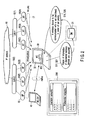
- FIG. 1 illustrates the state of a wireless LAN for explaining the outline of the operation according to the present invention.
- FIG. 1 shows a communication environment in which a plurality of wireless relay apparatuses (access points A, B, C, and D) 20(A), 20(B), 20(C), and 20(D) communicable with a personal computer (PC) 30 exist around the personal computer 30.
- the user can set one of the network name, communication speed, security level, communication channel, and radio field strength as a wireless LAN connection condition in the personal computer 30.
- the personal computer 30 has a wireless LAN card.
- the personal computer 30 receives beacons from the peripheral access points A, B, C, and D 20(A), 20(B), 20(C), and 20(D), and acquires their network names, the communication speeds of the communication devices, the security levels, the communication channels, and the radio field strengths.
- the access point A 20(A) has "SSID: A, radio field strength: 14 dB, communication standard: 802.11b, channel: 6, encryption: WEP".
- the access point B 20(B) has “SSID: B, radio field strength: 5 dB, communication standard: 802.11b, channel: 6, encryption: TKIP”.
- the access point C 20(C) has "SSID: C, radio field strength: 57 dB, communication standard: 802.11g, channel: 6, security: none".
- the access point D 20(D) has "SSID: D, radio field strength: 16 dB, communication standard: 802.11b, channel: 2, encryption: AES”.
- the SSID (extended service set identity) is identification information (ID) for grouping access points or the like.
- WEP is an abbreviation for "Wired Equivalently Privacy”
- TKIP is an abbreviation for "Temporary Key Integrity Protocol”
- AES is an abbreviation for "Advanced Encrypti
- the wireless LAN when "radio field strength" is set as an automatic switching condition for the wireless LAN setting in the personal computer 30, the wireless LAN is connected to an access point in a stronger radio field situation. In this case, the wireless LAN is automatically connected to the access point C 20(C) having the strongest radio field strength among the four access points A, B, C, and D 20(A), 20(B), 20(C), and 20(D).
- the wireless LAN When "security level" is set as an automatic switching condition for the wireless LAN setting, the wireless LAN is connected to an access point in a higher security situation. In this case, the wireless LAN is automatically connected to the access point D 20(D) which applies the highest-security-level AES among the four access points A, B, C, and D 20(A), 20 (B) , 20 (C) , and 20 (D) .
- the wireless LAN When “communication channel” is set as an automatic switching condition for the wireless LAN setting, the wireless LAN is connected to an access point using empty channels (smallest number of channels used). In the example shown in FIG. 1, the wireless LAN is automatically connected to the access point D 20(D) using the smallest number of channels among the four access points A, B, C, and D 20(A), 20(B), 20(C), and 20(D).
- the wireless LAN When “communication speed” is set as an automatic switching condition for the wireless LAN setting, the wireless LAN is connected to an access point having the highest communication speed.
- the wireless LAN is automatically connected to the access point C 20(C) serving as an access point of the communication standard 802.11g which provides a communication speed higher than that of the communication standard 802.11b, among the four access points A, B, C, and D 20(A), 20(B), 20(C), and 20(D).
- the wireless LAN setting is automatically switched in accordance with various communication conditions such as the communication speed of the communication device, the security level, the communication channel, and the radio field strength in a system having a wireless LAN card capable of setting a plurality of wireless LANs (setting communication profiles).
- the communication environment can always be automatically switched to the best one under a communication condition desired by the user without performing wireless LAN setting operation by the user upon a change in communication environment with respect to the access point 20.
- FIG. 2 shows an example of a system configuration for explaining the outline of the function of an information processing apparatus according to the embodiment of the present invention.
- a wireless LAN access area (W-LAN) 17 implements a communication network by LANs 15(1) and 15(2) which target specific areas, an IP network 10, and the like.
- each of the wireless LAN access area (W-LAN) 17 and the LANs 15(1) and 15(2) which target specific areas comprises a printer, network, file server, and various servers.
- the wireless LAN access area (W-LAN) 17 includes wireless LAN access points 20 for predetermined areas.
- a client terminal is implemented by, e.g., a portable personal computer 30.
- the personal computer 30 has a wireless LAN device such as a wireless LAN card, and a communication environment control program.
- the personal computer 30 has a communication function of connecting the personal computer 30 via the wireless LAN to the access point 20 within the wireless LAN access area 17 and performing network connection between the personal computer 30 and an arbitrary device via various servers and the IP network 10.
- the personal computer 30 incorporates a communication environment control program (140 in FIG. 3).
- the communication environment control program 140 has a display function and processing function (to be described later).
- the display function displays on a display 32 a setting window (initial setting window) 200 used to set a communication profile for enabling automatic wireless LAN setting (automatic access point switching), a priority condition for determining the priority of the wireless LAN, and the like.
- the processing function receives beacons from the peripheral access points 20, and discovers the access points 20.
- the processing function acquires and holds pieces of information such as the network names of the discovered access points 20, the communication speeds of the communication devices, the security levels, the communication channels, and the radio field strengths.
- a communication profile used in the wireless LAN is selected on the basis of the pieces of held information, and communication profiles (see FIG. 4) and wireless LAN priority conditions (see FIG. 10) which are set for a plurality of access points 20 by using the initial setting window 200 and held in a database 31.
- the communication environment can be automatically switched to the best one under a communication condition desired by the user. Functions realized by the communication environment control program will be described later with reference to FIGS. 4 to 10.
- the personal computer 30 can be connected to another wireless device (WL-DV) 40 via a wireless ad hoc network (Ad hoc).
- the system configuration of the personal computer 30 will be explained with reference to FIG. 3.
- the personal computer 30 comprises a CPU 101, host bridge 102, main memory 103, display controller 104, system controller 105, hard disk drive (HDD) 106, wired LAN device 107, wireless LAN device 108, BIOS-ROM 110, and embedded controller/keyboard controller IC (EC/KBC) 111.
- CPU 101 main memory 103
- display controller 104 system controller 105
- HDD hard disk drive
- 106 wired LAN device 107
- wireless LAN device 108 wireless LAN device
- BIOS-ROM 110 BIOS-ROM 110
- embedded controller/keyboard controller IC EC/keyboard controller IC
- the CPU 101 is a processor adopted to control the operation of the personal computer 30.
- the CPU 101 executes an operating system (OS) 129 and various application/utility programs which are loaded from the hard disk drive (HDD) 106 to the main memory 103 via the system controller 105 and host bridge 102.
- the CPU 101 also executes a BIOS (Basic Input Output System) which are stored in the BIOS-ROM 110.
- BIOS Basic Input Output System
- the CPU 101 executes a communication control program 130 stored in the main memory 103, in accordance with a predetermined setting condition (e.g., a predetermined time interval).
- the CPU 101 executes a predetermined application process associated with a communication service including monitoring and discovery of the peripheral access points 20, and acquisition of information (the network names of the access points, the communication speeds of the communication devices, the security levels, the communication channels, and the radio field strengths) of the discovered access points 20 (from which beacons are received).
- the CPU 101 executes the communication environment control program 140 stored in the main memory 103, in accordance with, e.g., an icon selected by user from the start menu or task tray.
- the CPU 101 enables, on the initial setting window 200, communication profile setting targeting a plurality of communication profiles, wireless LAN priority condition setting, automatic communication profile switching setting, and the like.
- a concrete example of the structure of the initial setting window 200 will be described later with reference to FIG. 8.
- the CPU 101 acquires pieces of information such as the network names of the discovered access points 20, the communication speeds of the communication devices, the security levels, the communication channels, and the radio field strengths in the process of the communication environment control program 140 based on the settings using the initial setting window 200.
- the CPU 101 holds a list of pieces of information as an access point list (AP list) 401 in the main memory 103.
- the CPU 101 selects a communication profile used in the wireless LAN on the basis of these pieces of information, and communication profiles and wireless LAN priority conditions which are set for a plurality of access points 20 by using the setting window 200 and held in the database 31. This realizes the processing function capable of automatically switching the communication environment to the best one under a communication condition desired by the user.
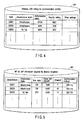
- FIG. 4 shows a concrete example of the structure of a communication profile list (wireless LAN setting list) 301 set for a plurality of communication profiles.
- FIG. 5 shows a concrete example of the AP list 401.
- FIG. 6 shows an example of a communication profile selection process sequence using these lists.
- FIG. 7 shows another example of the communication profile selection process sequence.
- FIG. 10 shows a concrete example of the structure of the wireless LAN priority condition setting window.
- the host bridge 102 is a bridge device which connects the CPU 101 and system controller 105.
- the host bridge 102 incorporates a memory controller (not shown) which controls access to the main memory 103.
- the display controller 104 controls the display (DISP) 32 which adopts, e.g., an LCD and is used as the display monitor of the personal computer 30.
- the display (DISP) 32 displays, under the control of the communication environment control program 140, the initial setting window 200 for allowing automatic switching of the wireless LAN (access point 20), as shown in FIG. 8, a communication profile setting window 210 as shown in FIG. 9, and a condition setting window 220 for setting a condition for selecting a wireless LAN (communication profile), as shown in FIG. 10.
- the system controller 105 controls devices on a PCI bus 126 and devices on an ISA bus 128.
- the system controller 105 incorporates an IDE controller (not shown) for controlling the hard disk drive (HDD) 106.
- the communication control program 130 is installed in advance as one of utility programs in the hard disk drive 106.
- the communication control program 130 receives beacons transmitted from the access points 20, and acquires pieces of access point information for the discovered access points (from which beacons are received).
- a list of pieces of information of the access points 20 that are acquired by reception of beacons is held as the AP list 401 in the database (DB) 31 of the hard disk drive 106.
- the AP list 401 held in the database 31 is updated at a predetermined time interval or upon occurrence of a predetermined event such as a change in communication environment or link-down at the access point. Every time the AP list 401 is updated, it is written in the main memory 103.
- the communication environment control program 140 is installed in advance as one of utility programs in the hard disk drive 106. As described above, the communication environment control program 140 is executed by, e.g., selecting an icon from the start menu or task tray by the user.
- the communication environment control program 140 provides the user with the initial setting window 200 for allowing automatic switching of the wireless LAN (access point 20), as shown in FIG. 8.
- the database 31 holds the wireless LAN setting list 301 which is set using the initial setting window 200 and serves as a list of the communication profiles of the access points 20. Further, the database 31 further holds a connection condition 402 which is set using the condition setting window 220 (FIG.
- the wireless LAN setting list 301, AP list 401, and connection condition 402 which are held in the database 31 are loaded to the main memory 103, and referred to in the subsequent communication profile selection process executed by the communication environment control program 140.
- the wired LAN device 107 is a device for connecting the personal computer 30 to a wired network. Although not shown, the wired LAN device 107 communicates with the wired network via a wired LAN cable connected to a LAN connector.
- the wireless LAN device 108 is a wireless network device such as a wireless LAN card for connecting the personal computer 30 to a wireless network.
- the wireless LAN device 108 is formed from a baseband unit and RF unit.
- the RF unit transmits/receives radio signals via an antenna (ANT) 109.
- the wireless LAN device 108 is so constructed as to execute wireless communication in accordance with the standard such as IEEE 802.11a, IEEE 802.11b, or IEEE 802.11g.
- the wireless LAN device 108 Upon reception of a beacon (RB) transmitted from the access point 20, the wireless LAN device 108 notifies the CPU 101 of a message to this effect, and executes acquisition of access point information and communication via the access point under the control of the CPU 101.
- RB beacon
- the embedded controller/keyboard controller IC (EC/KBC) 111 is a single-chip microcomputer in which an embedded controller for managing power and a keyboard controller for controlling a keyboard 112 are integrated.
- the embedded controller/keyboard controller IC (EC/KBC) 111 has a function of ON/OFF-controlling power of the personal computer 30 in accordance with the operation of the power button by the user.
- FIG. 4 shows an example of the wireless LAN setting list 301 serving as a list of communication profiles set for a plurality of access points 20 on the communication profile setting window 210 (FIG. 9) which is opened from the initial setting window 200.
- a network key, a key index, whether to automatically distribute a key, and whether to validate/invalidate IEEE 802.1X authentication are set as other pieces of information.
- FIG. 9 shows a concrete example of the structure of the communication profile setting window 210 used for this setting.
- the SSID is an identifier (ID) for grouping access points, and the ad hoc (Ad hoc) is
- the setting window 210 shown in FIG. 9 comprises a network name input box 211, wireless network key setting box 212, IEEE setting box 213, Ad hoc check button 214, Ad hoc channel setting button 215, OK button 216, and cancel button 217.
- the wireless network key setting box 212 comprises a network authentication setting box 212a, data encryption setting box 212b, network key input box 212c, network key confirmation input box 212d, key index setting box 212e, and automatic key distribution setting button 212f.
- the IEEE setting box 213 comprises an IEEE authentication validation setting button 213a, EPA type setting box 213b, and authentication configuration setting box 213c.
- the wireless LAN setting list 301 as shown in FIG. 4 is created by setting necessary input items by using the setting window 210 having this structure.
- a list of wireless LANs (access points 20) complying with the contents of the wireless LAN setting list 301 is displayed in a wireless LAN display column 205 within a "preferential network" setting area 203 on the initial setting window 200 shown in FIG. 8.
- FIG. 5 shows an example of the AP list 401 serving as a list of pieces of information of peripheral access points that are acquired by the monitoring process of the communication control program 130.
- the SSIDs/BSSIDs, infrastructure modes, key states, radio field strengths, channels, and communication methods of discovered access points 20 are set in the AP list 401.
- the BSSID (basic service set identify) is an ID for authenticating a communication terminal or the like in the MAC layer.
- the BSSID can be recognized by receiving a beacon (RB) transmitted from the access point 20, similar to the SSID.
- RB beacon
- a list of wireless LANs (access points) complying with the contents of the AP list 401 shown in FIG. 5 is displayed in a wireless LAN display column 204 within an "available network" setting area 202 on the initial setting window 200 shown in FIG. 8.
- FIG. 6 is a flowchart showing an example of the communication profile selection process sequence executed by the communication environment control program 140.
- the communication profile selection process is executed upon a change in communication environment with respect to the access point 20.
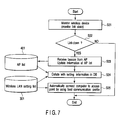
- FIG. 7 is a flowchart showing another example of the communication profile selection process sequence executed by the communication environment control program 140.
- the communication profile selection process is executed upon occurrence of link-down during communication.
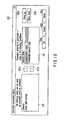
- FIG. 8 shows an example of the structure of the initial setting window 200 for allowing automatically switching the wireless LAN (access point).
- the initial setting window 200 comprises a "wireless LAN device" selection area 201, the "available network” setting area 202, the “preferential network” setting area 203, an OK button 206 for validating input contents, and a cancel button 207 for canceling input contents.
- the "wireless LAN device" selection area 201 allows selecting one of mounted wireless LAN devices when a plurality of wireless LAN devices (wireless LAN cards) are mounted.
- the wireless LAN display column 204 in the "available network” setting area 202 selectively displays a list of wireless LANs (access points 20) complying with the contents of the AP list 401 shown in FIG. 5.
- a wireless LAN (access point 20) is selected in the wireless LAN display column 204, a "configuration" button 204a in the "available network” setting area 202 is clicked, and then the communication profile setting window 210 shown in FIG. 9 is opened. By inputting necessary information using this window, the communication profile of the wireless LAN (access point 20) selected in the wireless LAN display column 204 can be created.
- the contents of the AP list 401 displayed in the wireless LAN display column 204 can be updated (the AP list 401 can be updated by rediscovering the access point 20).
- the wireless LAN display column 205 in the "preferential network" setting area 203 selectively displays a list of wireless LANs (access points 20) complying with the contents of the wireless LAN setting list 301 shown in FIG. 4.
- Whether to automatically switch wireless LAN connection can be set by an "automatically connect the computer to an available network in the order of the following list" check box 205a in the "preferential network” setting area 203.
- wireless LAN connection is automatically switched in accordance with the order (priorities) of wireless LANs (access points) displayed in the wireless LAN display column 205.
- the type (infrastructure mode) of network to be connected by the wireless LAN can be selected by selecting an "access point & Ad hoc" radio button 205b1 of a selection radio button 205b in the "preferential network” setting area 203.
- the priority in automatic switching of the wireless LAN setting can be changed with a "move up” button 205c and “move down” button 205d in the "preferential network” setting area 203.
- the communication profile setting window 210 shown in FIG. 9 can be opened to create a communication profile by clicking an "add” button 205e in the "preferential network” setting area 203.
- a wireless LAN selected from the wireless LAN list displayed in the wireless LAN display column 205 can be deleted by clicking a "delete” button 205f in the "preferential network” setting area 203.
- the communication profile setting window 210 shown in FIG. 9 can be opened, and a saved communication profile can be referred to and changed by clicking a "properties” button 205g in the "preferential network” setting area 203.
- a wireless LAN (access point 20) which is selected from the wireless LAN list displayed in the wireless LAN display column 205 and complies with the communication profile can be manually connected by clicking a "connect” button 205h in the "preferential network” setting area 203.
- an unkeyed peripheral access point 20 can be automatically connected regardless of the communication profile set in the wireless LAN setting list 301.
- the condition setting window 220 (FIG. 10) for setting a condition for selecting a wireless LAN (communication profile), i.e., automatically connecting the personal computer 30 to the access point 20 is opened by clicking an "automatic connection setting" button 205j in the "preferential network” setting area 203. Automatic connection can be set on the condition setting window 220.
- FIG. 9 shows an example of the structure of the communication profile setting window 210 opened on the initial setting window 200.
- Input items on the communication profile setting window 210 can be easily understood from the contents of the wireless LAN setting list 301 shown in FIG. 4 and existing communication profiles, and a description thereof will be omitted.
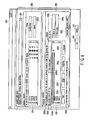
- FIG. 10 shows an example of the structure of the condition setting window (automatic connection setting window) 220 which is opened by clicking the "automatic connection setting" button 205j in the "preferential network” setting area 203 shown in FIG. 8 and is used to set a condition for selecting a communication profile, i.e., automatically connecting the personal computer 30 to the access point 20.
- the condition setting window 220 provides a left list box 221 and right list box 222. Available conditions in automatic switching of the wireless LAN (communication profile) are prepared in the left list box 221. Of various conditions prepared in the left list box 221, conditions used for automatic switching of the wireless LAN (communication profile) are set in the order of priority in the right list box 222.
- the radio field strength, security level, communication speed, channel, and the wireless LAN list displayed in the wireless LAN display column 205 are prepared in the left list box 221 as conditions for selecting a communication profile, i.e., automatically connecting the personal computer 30 to an access point.
- a condition for use is selected in the left list box 221, a ">" button 221a is clicked, and then the condition selected in the left list box 221 is moved (set) to the right list box 222.
- a condition is selected in the right list box 222, and a " ⁇ " button 221b is clicked, and the condition selected in the right list box 222 is returned to the left list box 221, thereby canceling the setting.
- a condition can be selected in the right list box 222 to raise the priority.
- a "move down” button 222b By clicking a "move down” button 222b, a condition can be selected in the right list box 222 to lower the priority.
- the condition setting window 220 comprises an OK button 223a for reflecting contents set in the right list box 222, a cancel button 223b for canceling set contents, and an apply button 223c for validating set contents.
- condition setting window 220 By using the condition setting window 220, a communication profile can be selected, in other words, one or a plurality of conditions for automatically connecting the personal computer 30 to the access point 20 can be set. At this time, setting conditions are set in the order of priority at a plurality of condition settings.
- the CPU 101 executes at, e.g., a predetermined time interval the communication control program 130 stored in the main memory 103, and monitors and discovers the peripheral access points 20(A), 20(B), 20(C), 20(D),....
- the CPU 101 executes a process of acquiring pieces of information (the network names of the access points, the communication speeds of the communication devices, the security levels, the communication channels, and the radio field strengths) of the discovered access points 20 (from which beacons are received).
- the CPU 101 executes the communication environment control program 140 stored in the main memory 103, in accordance with an instruction input for automatic wireless LAN connection by, e.g., selection of an icon by the user from the start menu or task tray.
- the CPU 101 executes the automatic communication profile selection process shown in FIG. 6 after a setting process based on the initial setting window 200.
- the communication control program 130 monitors the access points 20(A), 20(B), 20(C), 20(D),... which exist around the computer 30 and can communicate with the wireless LAN device 108. If a communicable access point is discovered, pieces of predetermined access point information such as the network name of the access point 20, the communication speed of the communication device, the security level, the communication channel, and the radio field strength are acquired and transferred to the communication environment control program 140 (step S11). The communication environment control program 140 updates the contents of the AP list 401 on the basis of the pieces of information of the discovered access point 20 (step S12).
- step S13 The contents of the updated AP list 401, pieces of information set in the wireless LAN setting list 301, and the connection condition 402 for selecting a communication profile are collated with each other (step S13). Whether a communication profile in the best communication environment which meets the connection condition much more than the current communication environment targeting the access point exists is determined (step S14). If no communication profile in the best communication environment which meets the connection condition much better than the current communication environment exists, the process ends without executing the automatic access point switching process by switching of the communication profile (NO in step S14). If a communication profile in the best communication environment which meets the connection condition exists (YES in step S14), the communication profile is selected from the wireless LAN setting list 301, and the communication profile for use is switched to the selected one to automatically switch the access point 20 (step S15).
- the automatic communication profile selection process by the communication environment control program 140 is not executed until the communication control program 130 detects a link-down state (step S21 and NO in step S22). If the communication control program 130 detects link-down, the communication environment control program 140 receives a notification to this effect, and updates the contents of the AP list 401 on the basis of information of the discovered access point 20 (step S23). The contents of the updated AP list 401, pieces of information set in the wireless LAN setting list 301, and the connection condition 402 for selecting a communication profile are collated with each other (step S24). A communication profile in the current best communication environment which targets the access point 20 and meets the connection condition is selected. The personal computer 30 is automatically connected to the access point 20 by using the selected communication profile (step S25) .
- the present invention can implement a user-friendly information processing apparatus and information processing method capable of reflecting the user's application purpose, environment, and the like with respect to a peripheral wireless device and automatically switching setting to an access point 20 in a preferable communication environment.
Landscapes
- Engineering & Computer Science (AREA)
- Computer Networks & Wireless Communication (AREA)
- Signal Processing (AREA)
- Computer Security & Cryptography (AREA)
- Databases & Information Systems (AREA)
- Computer Hardware Design (AREA)
- Computing Systems (AREA)
- General Engineering & Computer Science (AREA)
- Mobile Radio Communication Systems (AREA)
- Small-Scale Networks (AREA)
Description
- The present invention relates to an information processing apparatus and information processing method having a wireless communication function of performing network connection via a wireless relay apparatus.
- Recent compact information processing devices such as a notebook-type personal computer and PDA have a function of discovering a peripheral wireless LAN access point in a use environment and performing network connection via the access point. A function of visually monitoring a network is also implemented.
- When the user carries and uses such a portable personal computer, PDA, or the like, the wireless LAN must be set with respect to a peripheral wireless device upon a change in communication environment each time the personal computer, PDA, or the like is moved. A long time and much labor are required when the wireless LAN setting is switched by user operation. For example, a current automatic switching function for the wireless LAN setting as disclosed in Jpn. Pat. Appln. KOKAI Publication No.
2003-244167 - Document
US2002/0118664 A1 discloses a communication setup method, wherein a wireless device detects a currently connectable network in accordance with a priority order of wireless network setups which are registered in advance and changes the connection setup in correspondance with the detected network, even when the network environment has changed. - The present invention has been made in consideration of the above situation, and has as its object to provide an information processing apparatus, information processing method, and program capable of reflecting the user's application purpose, environment, and the like with respect to a peripheral wireless device and very conveniently setting a communication environment.
- According to a first aspect of the present invention, an information processing apparatus according to
claim 1 is provided. - According to a second aspect of the present invention, a method of connecting a network via a wireless relay apparatus according to
claim 6 is provided. - According to a third aspect of the present invention, a program according to claim 12 is provided.
- According to the present invention, a user-friendly communication environment in which the user's application purpose, environment, and the like are reflected can be set for a peripheral wireless device.
- This summary of the invention does not necessarily describe all necessary features so that the invention may also be a sub-combination of these described features.
- The invention can be more fully understood from the following detailed description when taken in conjunction with the accompanying drawings, in which:
- FIG. 1 is a conceptual view for explaining the outline of the operation of an information processing apparatus according to an embodiment of the present invention;
- FIG. 2 is a view showing a system configuration for explaining the outline of the function of the information processing apparatus according to the embodiment of the present invention;
- FIG. 3 is a block diagram showing the hardware configuration of the information processing apparatus according to the embodiment of the present invention;
- FIG. 4 is a view showing an example of the structure of a wireless LAN setting list;
- FIG. 5 is a view showing an example of the structure of an access point list;
- FIG. 6 is a flowchart showing an example of a communication profile selection process sequence applied to the information processing apparatus according to the embodiment of the present invention;
- FIG. 7 is a flowchart showing another example of the communication profile selection process sequence applied to the information processing apparatus according to the embodiment of the present invention;
- FIG. 8 is a schematic view showing an example of an initial setting window applied to the information processing apparatus according to the embodiment of the present invention;
- FIG. 9 is a schematic view showing an example of a communication profile setting window applied to the information processing apparatus according to the embodiment of the present invention; and
- FIG. 10 is a schematic view showing an example of an automatic connection setting window applied to the information processing apparatus according to the embodiment of the present invention.
- A preferred embodiment of the present invention will be described below with reference to the several views of the accompanying drawing.
- The outline of the operation according to the present invention will be explained with reference to FIG. 1.
- FIG. 1 illustrates the state of a wireless LAN for explaining the outline of the operation according to the present invention. FIG. 1 shows a communication environment in which a plurality of wireless relay apparatuses (access points A, B, C, and D) 20(A), 20(B), 20(C), and 20(D) communicable with a personal computer (PC) 30 exist around the
personal computer 30. The user can set one of the network name, communication speed, security level, communication channel, and radio field strength as a wireless LAN connection condition in thepersonal computer 30. - The
personal computer 30 has a wireless LAN card. Thepersonal computer 30 receives beacons from the peripheral access points A, B, C, and D 20(A), 20(B), 20(C), and 20(D), and acquires their network names, the communication speeds of the communication devices, the security levels, the communication channels, and the radio field strengths. - The access point A 20(A) has "SSID: A, radio field strength: 14 dB, communication standard: 802.11b, channel: 6, encryption: WEP". The access point B 20(B) has "SSID: B, radio field strength: 5 dB, communication standard: 802.11b, channel: 6, encryption: TKIP".
The access point C 20(C) has "SSID: C, radio field strength: 57 dB, communication standard: 802.11g, channel: 6, security: none". The access point D 20(D) has "SSID: D, radio field strength: 16 dB, communication standard: 802.11b, channel: 2, encryption: AES". The SSID (extended service set identity) is identification information (ID) for grouping access points or the like. WEP is an abbreviation for "Wired Equivalently Privacy", TKIP is an abbreviation for "Temporary Key Integrity Protocol", and AES is an abbreviation for "Advanced Encryption Standard". - In this communication environment, when "radio field strength" is set as an automatic switching condition for the wireless LAN setting in the
personal computer 30, the wireless LAN is connected to an access point in a stronger radio field situation. In this case, the wireless LAN is automatically connected to the access point C 20(C) having the strongest radio field strength among the four access points A, B, C, and D 20(A), 20(B), 20(C), and 20(D). - When "security level" is set as an automatic switching condition for the wireless LAN setting, the wireless LAN is connected to an access point in a higher security situation. In this case, the wireless LAN is automatically connected to the access point D 20(D) which applies the highest-security-level AES among the four access points A, B, C, and D 20(A), 20 (B) , 20 (C) , and 20 (D) .
- When "communication channel" is set as an automatic switching condition for the wireless LAN setting, the wireless LAN is connected to an access point using empty channels (smallest number of channels used). In the example shown in FIG. 1, the wireless LAN is automatically connected to the access point D 20(D) using the smallest number of channels among the four access points A, B, C, and D 20(A), 20(B), 20(C), and 20(D).
- When "communication speed" is set as an automatic switching condition for the wireless LAN setting, the wireless LAN is connected to an access point having the highest communication speed. In the example shown in FIG. 1, the wireless LAN is automatically connected to the access point C 20(C) serving as an access point of the communication standard 802.11g which provides a communication speed higher than that of the communication standard 802.11b, among the four access points A, B, C, and D 20(A), 20(B), 20(C), and 20(D).
- In this manner, according to the embodiment of the present invention, the wireless LAN setting is automatically switched in accordance with various communication conditions such as the communication speed of the communication device, the security level, the communication channel, and the radio field strength in a system having a wireless LAN card capable of setting a plurality of wireless LANs (setting communication profiles). The communication environment can always be automatically switched to the best one under a communication condition desired by the user without performing wireless LAN setting operation by the user upon a change in communication environment with respect to the
access point 20. - The embodiment of the present invention which implements the above communication function will be described below.
- FIG. 2 shows an example of a system configuration for explaining the outline of the function of an information processing apparatus according to the embodiment of the present invention.
- As shown in FIG. 2, a wireless LAN access area (W-LAN) 17 implements a communication network by LANs 15(1) and 15(2) which target specific areas, an
IP network 10, and the like. Although not shown, each of the wireless LAN access area (W-LAN) 17 and the LANs 15(1) and 15(2) which target specific areas comprises a printer, network, file server, and various servers. The wireless LAN access area (W-LAN) 17 includes wirelessLAN access points 20 for predetermined areas. - A client terminal is implemented by, e.g., a portable
personal computer 30. Thepersonal computer 30 has a wireless LAN device such as a wireless LAN card, and a communication environment control program. Thepersonal computer 30 has a communication function of connecting thepersonal computer 30 via the wireless LAN to theaccess point 20 within the wireless LAN access area 17 and performing network connection between thepersonal computer 30 and an arbitrary device via various servers and theIP network 10. - The
personal computer 30 incorporates a communication environment control program (140 in FIG. 3). The communicationenvironment control program 140 has a display function and processing function (to be described later). The display function displays on a display 32 a setting window (initial setting window) 200 used to set a communication profile for enabling automatic wireless LAN setting (automatic access point switching), a priority condition for determining the priority of the wireless LAN, and the like.
The processing function receives beacons from theperipheral access points 20, and discovers theaccess points 20. The processing function acquires and holds pieces of information such as the network names of the discoveredaccess points 20, the communication speeds of the communication devices, the security levels, the communication channels, and the radio field strengths. A communication profile used in the wireless LAN is selected on the basis of the pieces of held information, and communication profiles (see FIG. 4) and wireless LAN priority conditions (see FIG. 10) which are set for a plurality ofaccess points 20 by using theinitial setting window 200 and held in adatabase 31. The communication environment can be automatically switched to the best one under a communication condition desired by the user. Functions realized by the communication environment control program will be described later with reference to FIGS. 4 to 10. Thepersonal computer 30 can be connected to another wireless device (WL-DV) 40 via a wireless ad hoc network (Ad hoc). - The system configuration of the
personal computer 30 will be explained with reference to FIG. 3. - As shown in FIG. 3, the
personal computer 30 comprises aCPU 101,host bridge 102,main memory 103,display controller 104,system controller 105, hard disk drive (HDD) 106, wiredLAN device 107,wireless LAN device 108, BIOS-ROM 110, and embedded controller/keyboard controller IC (EC/KBC) 111. - The
CPU 101 is a processor adopted to control the operation of thepersonal computer 30. TheCPU 101 executes an operating system (OS) 129 and various application/utility programs which are loaded from the hard disk drive (HDD) 106 to themain memory 103 via thesystem controller 105 andhost bridge 102. TheCPU 101 also executes a BIOS (Basic Input Output System) which are stored in the BIOS-ROM 110. - The
CPU 101 executes acommunication control program 130 stored in themain memory 103, in accordance with a predetermined setting condition (e.g., a predetermined time interval). TheCPU 101 executes a predetermined application process associated with a communication service including monitoring and discovery of theperipheral access points 20, and acquisition of information (the network names of the access points, the communication speeds of the communication devices, the security levels, the communication channels, and the radio field strengths) of the discovered access points 20 (from which beacons are received). - The
CPU 101 executes the communicationenvironment control program 140 stored in themain memory 103, in accordance with, e.g., an icon selected by user from the start menu or task tray. TheCPU 101 enables, on theinitial setting window 200, communication profile setting targeting a plurality of communication profiles, wireless LAN priority condition setting, automatic communication profile switching setting, and the like. A concrete example of the structure of theinitial setting window 200 will be described later with reference to FIG. 8. - The
CPU 101 acquires pieces of information such as the network names of the discoveredaccess points 20, the communication speeds of the communication devices, the security levels, the communication channels, and the radio field strengths in the process of the communicationenvironment control program 140 based on the settings using theinitial setting window 200.
TheCPU 101 holds a list of pieces of information as an access point list (AP list) 401 in themain memory 103. TheCPU 101 selects a communication profile used in the wireless LAN on the basis of these pieces of information, and communication profiles and wireless LAN priority conditions which are set for a plurality ofaccess points 20 by using the settingwindow 200 and held in thedatabase 31. This realizes the processing function capable of automatically switching the communication environment to the best one under a communication condition desired by the user. FIG. 4 shows a concrete example of the structure of a communication profile list (wireless LAN setting list) 301 set for a plurality of communication profiles. FIG. 5 shows a concrete example of theAP list 401. FIG. 6 shows an example of a communication profile selection process sequence using these lists. FIG. 7 shows another example of the communication profile selection process sequence. FIG. 10 shows a concrete example of the structure of the wireless LAN priority condition setting window. - The
host bridge 102 is a bridge device which connects theCPU 101 andsystem controller 105.
Thehost bridge 102 incorporates a memory controller (not shown) which controls access to themain memory 103. - The
display controller 104 controls the display (DISP) 32 which adopts, e.g., an LCD and is used as the display monitor of thepersonal computer 30. In the embodiment, the display (DISP) 32 displays, under the control of the communicationenvironment control program 140, theinitial setting window 200 for allowing automatic switching of the wireless LAN (access point 20), as shown in FIG. 8, a communicationprofile setting window 210 as shown in FIG. 9, and acondition setting window 220 for setting a condition for selecting a wireless LAN (communication profile), as shown in FIG. 10. - The
system controller 105 controls devices on a PCI bus 126 and devices on an ISA bus 128. Thesystem controller 105 incorporates an IDE controller (not shown) for controlling the hard disk drive (HDD) 106. - The
communication control program 130 is installed in advance as one of utility programs in thehard disk drive 106. In the above-described monitoring process for theperipheral access points 20, thecommunication control program 130 receives beacons transmitted from the access points 20, and acquires pieces of access point information for the discovered access points (from which beacons are received). A list of pieces of information of the access points 20 that are acquired by reception of beacons is held as theAP list 401 in the database (DB) 31 of thehard disk drive 106. TheAP list 401 held in thedatabase 31 is updated at a predetermined time interval or upon occurrence of a predetermined event such as a change in communication environment or link-down at the access point. Every time theAP list 401 is updated, it is written in themain memory 103. - The communication
environment control program 140 is installed in advance as one of utility programs in thehard disk drive 106. As described above, the communicationenvironment control program 140 is executed by, e.g., selecting an icon from the start menu or task tray by the user. The communicationenvironment control program 140 provides the user with theinitial setting window 200 for allowing automatic switching of the wireless LAN (access point 20), as shown in FIG. 8. Together with theAP list 401, thedatabase 31 holds the wirelessLAN setting list 301 which is set using theinitial setting window 200 and serves as a list of the communication profiles of the access points 20. Further, thedatabase 31 further holds aconnection condition 402 which is set using the condition setting window 220 (FIG. 10) displayable from theinitial setting window 200 and is used to select a wireless LAN (communication profile) to be automatically connected. The wirelessLAN setting list 301,AP list 401, andconnection condition 402 which are held in thedatabase 31 are loaded to themain memory 103, and referred to in the subsequent communication profile selection process executed by the communicationenvironment control program 140. - The wired
LAN device 107 is a device for connecting thepersonal computer 30 to a wired network. Although not shown, the wiredLAN device 107 communicates with the wired network via a wired LAN cable connected to a LAN connector. - The
wireless LAN device 108 is a wireless network device such as a wireless LAN card for connecting thepersonal computer 30 to a wireless network.
Thewireless LAN device 108 is formed from a baseband unit and RF unit. The RF unit transmits/receives radio signals via an antenna (ANT) 109. Thewireless LAN device 108 is so constructed as to execute wireless communication in accordance with the standard such as IEEE 802.11a, IEEE 802.11b, or IEEE 802.11g. Upon reception of a beacon (RB) transmitted from theaccess point 20, thewireless LAN device 108 notifies theCPU 101 of a message to this effect, and executes acquisition of access point information and communication via the access point under the control of theCPU 101. - The embedded controller/keyboard controller IC (EC/KBC) 111 is a single-chip microcomputer in which an embedded controller for managing power and a keyboard controller for controlling a
keyboard 112 are integrated. The embedded controller/keyboard controller IC (EC/KBC) 111 has a function of ON/OFF-controlling power of thepersonal computer 30 in accordance with the operation of the power button by the user. - FIG. 4 shows an example of the wireless
LAN setting list 301 serving as a list of communication profiles set for a plurality ofaccess points 20 on the communication profile setting window 210 (FIG. 9) which is opened from theinitial setting window 200. An SSID for each available access point, an infrastructure mode (infrastructure/ad hoc), an authentication mode (OPEN/SHARED/WPA/WPA-PSK), security information (OPEN/SHARED = Disabled/WEP/AES, WPA/WPA-PSK = TKIP/AES), and the like are set in the wirelessLAN setting list 301. Also, a network key, a key index, whether to automatically distribute a key, and whether to validate/invalidate IEEE 802.1X authentication are set as other pieces of information. FIG. 9 shows a concrete example of the structure of the communicationprofile setting window 210 used for this setting. The SSID is an identifier (ID) for grouping access points, and the ad hoc (Ad hoc) is a network between computers. - More specifically, the setting
window 210 shown in FIG. 9 comprises a networkname input box 211, wireless networkkey setting box 212,IEEE setting box 213, Ad hoccheck button 214, Ad hocchannel setting button 215,OK button 216, and cancelbutton 217. The wireless networkkey setting box 212 comprises a networkauthentication setting box 212a, dataencryption setting box 212b, networkkey input box 212c, network keyconfirmation input box 212d, keyindex setting box 212e, and automatic keydistribution setting button 212f. TheIEEE setting box 213 comprises an IEEE authenticationvalidation setting button 213a, EPAtype setting box 213b, and authenticationconfiguration setting box 213c.
The wirelessLAN setting list 301 as shown in FIG. 4 is created by setting necessary input items by using the settingwindow 210 having this structure. - A list of wireless LANs (access points 20) complying with the contents of the wireless
LAN setting list 301 is displayed in a wirelessLAN display column 205 within a "preferential network" settingarea 203 on theinitial setting window 200 shown in FIG. 8. - FIG. 5 shows an example of the
AP list 401 serving as a list of pieces of information of peripheral access points that are acquired by the monitoring process of thecommunication control program 130.
The SSIDs/BSSIDs, infrastructure modes, key states, radio field strengths, channels, and communication methods of discoveredaccess points 20 are set in theAP list 401. The BSSID (basic service set identify) is an ID for authenticating a communication terminal or the like in the MAC layer. The BSSID can be recognized by receiving a beacon (RB) transmitted from theaccess point 20, similar to the SSID. - A list of wireless LANs (access points) complying with the contents of the
AP list 401 shown in FIG. 5 is displayed in a wirelessLAN display column 204 within an "available network" settingarea 202 on theinitial setting window 200 shown in FIG. 8. - FIG. 6 is a flowchart showing an example of the communication profile selection process sequence executed by the communication
environment control program 140. In the communication profile selection process shown in FIG. 6, the communication profile selection process is executed upon a change in communication environment with respect to theaccess point 20. - FIG. 7 is a flowchart showing another example of the communication profile selection process sequence executed by the communication
environment control program 140. In the communication profile selection process shown in FIG. 7, the communication profile selection process is executed upon occurrence of link-down during communication. - FIG. 8 shows an example of the structure of the
initial setting window 200 for allowing automatically switching the wireless LAN (access point). Theinitial setting window 200 comprises a "wireless LAN device"selection area 201, the "available network" settingarea 202, the "preferential network" settingarea 203, anOK button 206 for validating input contents, and a cancelbutton 207 for canceling input contents. - The "wireless LAN device"
selection area 201 allows selecting one of mounted wireless LAN devices when a plurality of wireless LAN devices (wireless LAN cards) are mounted. - The wireless
LAN display column 204 in the "available network" settingarea 202 selectively displays a list of wireless LANs (access points 20) complying with the contents of theAP list 401 shown in FIG. 5. A wireless LAN (access point 20) is selected in the wirelessLAN display column 204, a "configuration"button 204a in the "available network" settingarea 202 is clicked, and then the communicationprofile setting window 210 shown in FIG. 9 is opened. By inputting necessary information using this window, the communication profile of the wireless LAN (access point 20) selected in the wirelessLAN display column 204 can be created. By clicking an "update"button 204b in the "available network" settingarea 202, the contents of theAP list 401 displayed in the wirelessLAN display column 204 can be updated (theAP list 401 can be updated by rediscovering the access point 20). - The wireless
LAN display column 205 in the "preferential network" settingarea 203 selectively displays a list of wireless LANs (access points 20) complying with the contents of the wirelessLAN setting list 301 shown in FIG. 4. Whether to automatically switch wireless LAN connection can be set by an "automatically connect the computer to an available network in the order of the following list"check box 205a in the "preferential network" settingarea 203.
By checking thecheck box 205a, wireless LAN connection is automatically switched in accordance with the order (priorities) of wireless LANs (access points) displayed in the wirelessLAN display column 205. The type (infrastructure mode) of network to be connected by the wireless LAN can be selected by selecting an "access point & Ad hoc" radio button 205b1 of aselection radio button 205b in the "preferential network" settingarea 203. The priority in automatic switching of the wireless LAN setting can be changed with a "move up"button 205c and "move down"button 205d in the "preferential network" settingarea 203. The communicationprofile setting window 210 shown in FIG. 9 can be opened to create a communication profile by clicking an "add"button 205e in the "preferential network" settingarea 203. A wireless LAN selected from the wireless LAN list displayed in the wirelessLAN display column 205 can be deleted by clicking a "delete" button 205f in the "preferential network" settingarea 203. The communicationprofile setting window 210 shown in FIG. 9 can be opened, and a saved communication profile can be referred to and changed by clicking a "properties"button 205g in the "preferential network" settingarea 203. A wireless LAN (access point 20) which is selected from the wireless LAN list displayed in the wirelessLAN display column 205 and complies with the communication profile can be manually connected by clicking a "connect"button 205h in the "preferential network" settingarea 203. By checking an "automatically connect the computer to a non-preferential network"check box 205i in the "preferential network" settingarea 203, an unkeyedperipheral access point 20 can be automatically connected regardless of the communication profile set in the wirelessLAN setting list 301. - The condition setting window 220 (FIG. 10) for setting a condition for selecting a wireless LAN (communication profile), i.e., automatically connecting the
personal computer 30 to theaccess point 20 is opened by clicking an "automatic connection setting"button 205j in the "preferential network" settingarea 203. Automatic connection can be set on thecondition setting window 220. - FIG. 9 shows an example of the structure of the communication
profile setting window 210 opened on theinitial setting window 200. Input items on the communicationprofile setting window 210 can be easily understood from the contents of the wirelessLAN setting list 301 shown in FIG. 4 and existing communication profiles, and a description thereof will be omitted. - FIG. 10 shows an example of the structure of the condition setting window (automatic connection setting window) 220 which is opened by clicking the "automatic connection setting"
button 205j in the "preferential network" settingarea 203 shown in FIG. 8 and is used to set a condition for selecting a communication profile, i.e., automatically connecting thepersonal computer 30 to theaccess point 20. Thecondition setting window 220 provides aleft list box 221 andright list box 222. Available conditions in automatic switching of the wireless LAN (communication profile) are prepared in theleft list box 221. Of various conditions prepared in theleft list box 221, conditions used for automatic switching of the wireless LAN (communication profile) are set in the order of priority in theright list box 222. The radio field strength, security level, communication speed, channel, and the wireless LAN list displayed in the wirelessLAN display column 205 are prepared in theleft list box 221 as conditions for selecting a communication profile, i.e., automatically connecting thepersonal computer 30 to an access point. A condition for use is selected in theleft list box 221, a ">"button 221a is clicked, and then the condition selected in theleft list box 221 is moved (set) to theright list box 222. Also, a condition is selected in theright list box 222, and a "<"button 221b is clicked, and the condition selected in theright list box 222 is returned to theleft list box 221, thereby canceling the setting. By clicking a "move up"button 222a, a condition can be selected in theright list box 222 to raise the priority. By clicking a "move down"button 222b, a condition can be selected in theright list box 222 to lower the priority. - The
condition setting window 220 comprises anOK button 223a for reflecting contents set in theright list box 222, a cancelbutton 223b for canceling set contents, and an applybutton 223c for validating set contents. - By using the
condition setting window 220, a communication profile can be selected, in other words, one or a plurality of conditions for automatically connecting thepersonal computer 30 to theaccess point 20 can be set. At this time, setting conditions are set in the order of priority at a plurality of condition settings. - Various pieces of information for automatic wireless LAN switching that are set using the
initial setting window 200, communicationprofile setting window 210, andcondition setting window 220 shown in FIGS. 8, 9, and 10 are reflected in automatic communication profile selection, i.e., an automatic connection process to theaccess point 20 that is executed by the communicationenvironment control program 140. - An example of the automatic communication profile selection process will be explained with reference to the flowchart shown in FIG. 6.
- The
CPU 101 executes at, e.g., a predetermined time interval thecommunication control program 130 stored in themain memory 103, and monitors and discovers the peripheral access points 20(A), 20(B), 20(C), 20(D),.... TheCPU 101 executes a process of acquiring pieces of information (the network names of the access points, the communication speeds of the communication devices, the security levels, the communication channels, and the radio field strengths) of the discovered access points 20 (from which beacons are received). TheCPU 101 executes the communicationenvironment control program 140 stored in themain memory 103, in accordance with an instruction input for automatic wireless LAN connection by, e.g., selection of an icon by the user from the start menu or task tray. TheCPU 101 executes the automatic communication profile selection process shown in FIG. 6 after a setting process based on theinitial setting window 200. - In the process shown in FIG. 6, the
communication control program 130 monitors the access points 20(A), 20(B), 20(C), 20(D),... which exist around thecomputer 30 and can communicate with thewireless LAN device 108. If a communicable access point is discovered, pieces of predetermined access point information such as the network name of theaccess point 20, the communication speed of the communication device, the security level, the communication channel, and the radio field strength are acquired and transferred to the communication environment control program 140 (step S11). The communicationenvironment control program 140 updates the contents of theAP list 401 on the basis of the pieces of information of the discovered access point 20 (step S12). The contents of the updatedAP list 401, pieces of information set in the wirelessLAN setting list 301, and theconnection condition 402 for selecting a communication profile are collated with each other (step S13). Whether a communication profile in the best communication environment which meets the connection condition much more than the current communication environment targeting the access point exists is determined (step S14). If no communication profile in the best communication environment which meets the connection condition much better than the current communication environment exists, the process ends without executing the automatic access point switching process by switching of the communication profile (NO in step S14). If a communication profile in the best communication environment which meets the connection condition exists (YES in step S14), the communication profile is selected from the wirelessLAN setting list 301, and the communication profile for use is switched to the selected one to automatically switch the access point 20 (step S15). - Another example of the automatic communication profile selection process will be explained with reference to the flowchart shown in FIG. 7.
- In the process shown in FIG. 7, the automatic communication profile selection process by the communication
environment control program 140 is not executed until thecommunication control program 130 detects a link-down state (step S21 and NO in step S22). If thecommunication control program 130 detects link-down, the communicationenvironment control program 140 receives a notification to this effect, and updates the contents of theAP list 401 on the basis of information of the discovered access point 20 (step S23). The contents of the updatedAP list 401, pieces of information set in the wirelessLAN setting list 301, and theconnection condition 402 for selecting a communication profile are collated with each other (step S24). A communication profile in the current best communication environment which targets theaccess point 20 and meets the connection condition is selected. Thepersonal computer 30 is automatically connected to theaccess point 20 by using the selected communication profile (step S25) . - As has been described above, the present invention can implement a user-friendly information processing apparatus and information processing method capable of reflecting the user's application purpose, environment, and the like with respect to a peripheral wireless device and automatically switching setting to an
access point 20 in a preferable communication environment.
Claims (12)
- An information processing apparatus (30) having a communication apparatus (30) adapted to perform network connection via a wireless relay apparatus (20), said information processing apparatus (30) comprising:an information acquisition unit adapted to acquire information of discovered wireless relay apparatuses (20) by discovering the wireless relay apparatuses (20) communicable with the communication apparatus (30), wherein the information acquisition unit is adapted to discover the communicable wireless relay apparatuses (20) by receiving beacons from wireless relay apparatuses (20) present around the information processing apparatus, and to acquire at least one of a communication speed, a security level, a communication channel, and a radio field strength of each wireless relay apparatus (20) as the information of each wireless relay apparatus (20);a profile setting unit adapted to set communication profiles for the wireless relay apparatuses (20) discovered by the information acquisition unit;a priority condition setting unit adapted to set a priority condition for determining priorities of the communication profiles to be used by the communication apparatus (30), wherein the priority condition setting unit is adapted to set the priority condition on the basis of the communication speed, the security level, the communication channel, and/or the radio field strength;an order determination unit adapted to determine priorities for the communication profiles set by the profile setting unit on the basis of the priority condition set by the priority condition setting unit; anda profile determination unit adapted to determine a communication profile to be used by the communication apparatus (30) in accordance with the priorities determined by the order determination unit.
- An apparatus (30) according to claim 1, further comprising a storage device (31) adapted to store information acquired by the information acquisition unit.
- An apparatus (30) according to claim 1 further comprising:a connection determination unit adapted to determine whether to automatically connect the communication apparatus (30) to the wireless relay apparatus (20) in which the communication profile determined by the profile determination unit is set; anda connection processing unit adapted to, when the connection determination unit determines to automatically connect the communication apparatus (30) to the wireless relay apparatus (20), perform a connection process between the communication apparatus (30) and the wireless relay apparatus (20) in which the communication profile is set, by using the communication profile determined by the profile determination unit.
- An apparatus (30) according to claim 3, further comprising:a change recognition unit adapted to recognize a change in communication environment between the wireless relay apparatus (20) and the communication apparatus (30) on the basis of a communication content between the wireless relay apparatus (20) and the communication apparatus (30) which have undergone the connection process by the connection processing unit; anda profile change unit adapted to change a currently set communication profile to another communication profile in accordance with a content when the change recognition unit recognizes the change in the communication environment.
- An apparatus (30) according to claim 3, further comprising a profile change unit adapted to change a currently set communication profile to another communication profile when a fault occurs in the communication apparatus (30).
- A method of connecting a network (17) via a wireless relay apparatus (20) by using a communication apparatus (30), comprising:discovering wireless relay apparatuses (20) communicable with the communication apparatus (30) by receiving beacons from the wireless relay apparatuses (20) to acquire information of the discovered wireless relay apparatuses (20), the information including at least one of a communication speed, a security level, a communication channel, and a radio field strength of each wireless relay apparatus (20);setting communication profiles for the discovered wireless relay apparatuses (20);setting a priority condition for determining priorities of the communication profiles to be used by the communication apparatus (30) on the basis of the communication speed, the security level, the communication channel and/or the radio field strength;determining priorities for the set communication profiles on the basis of the set priority condition; anddetermining a communication profile to be used by the communication apparatus (30) in accordance with the determined priorities.
- A method according to claim 6, further comprising storing the acquired information in a storage device (31).
- A method according to claim 6, further comprising:determining whether to automatically connect the communication apparatus (30) to the wireless relay apparatus (20) in which the determined communication profile is set; andwhen the communication apparatus (30) is determined to be automatically connected to the wireless relay apparatus (20), performing a connection process between the communication apparatus (30) and the wireless relay apparatus (20) in which the communication profile is set, by using the determined communication profile.
- A method according to claim 8, further comprising:recognizing a change in communication environment between the wireless relay apparatus (20) and the communication apparatus (30) on the basis of a communication content between the wireless relay apparatus (20) and the communication apparatus (30) which have undergone the connection process; andchanging a currently set communication profile to another communication profile in accordance with a content when the change in the communication environment is recognized.
- A method according to claim 9, further comprising changing a currently set communication profile to another communication profile when a fault occurs in the communication apparatus (30).
- A program causing a computer (30), which controls a communication apparatus (30) for performing network connection via a wireless relay apparatus (20), to implement
discovering wireless relay apparatuses (20) communicable with the communication apparatus (20),
acquiring information of the discovered wireless relay apparatuses (20), the information including at least one of a communication speed, a security level, a communication channel, and a radio field strength of each wireless relay apparatus (20),
holding communication profiles set for the wireless relay apparatuses (20) which communicate with the communication apparatus (30),
holding a priority condition for determining priorities of the communication profiles to be used by the communication apparatus (30), the priority condition including the communication speed, the security level, the communication channel and/or the radio field strength, and
determining the communication profile to be used by the communication apparatus (30) on the basis of the pieces of acquired information of the wireless relay apparatuses (20), the communication profiles, and the priority condition. - A program according to claim 11, wherein the computer (30) is caused to implement performing a connection process between the communication apparatus (30) and the wireless relay apparatus (20) in which the determined communication profile is set.
Applications Claiming Priority (2)
| Application Number | Priority Date | Filing Date | Title |
|---|---|---|---|
| JP2003414595A JP2005176021A (en) | 2003-12-12 | 2003-12-12 | Information processing apparatus and program |
| JP2003414595 | 2003-12-12 |
Publications (3)
| Publication Number | Publication Date |
|---|---|
| EP1542400A2 EP1542400A2 (en) | 2005-06-15 |
| EP1542400A3 EP1542400A3 (en) | 2006-05-17 |
| EP1542400B1 true EP1542400B1 (en) | 2008-01-02 |
Family
ID=34510559
Family Applications (1)
| Application Number | Title | Priority Date | Filing Date |
|---|---|---|---|
| EP20040026568 Expired - Lifetime EP1542400B1 (en) | 2003-12-12 | 2004-11-09 | Selecting a wireless LAN access point based on a communication profile |
Country Status (6)
| Country | Link |
|---|---|
| US (1) | US7412237B2 (en) |
| EP (1) | EP1542400B1 (en) |
| JP (1) | JP2005176021A (en) |
| CN (1) | CN1701565A (en) |
| DE (1) | DE602004011008T2 (en) |
| WO (1) | WO2005057860A1 (en) |
Cited By (2)
| Publication number | Priority date | Publication date | Assignee | Title |
|---|---|---|---|---|
| CN101427528B (en) * | 2006-02-21 | 2013-09-18 | 思科技术公司 | System and method for selectively manipulating control traffic to improve network performance |
| CN102177759B (en) * | 2008-10-09 | 2014-07-02 | 株式会社日立制作所 | Mobile terminal |
Families Citing this family (84)
| Publication number | Priority date | Publication date | Assignee | Title |
|---|---|---|---|---|
| US20090222537A1 (en) * | 2003-12-04 | 2009-09-03 | Colligo Newworks, Inc., A Canadian Corporation | System And Method For Interactive Instant Networking |
| US7668508B2 (en) * | 2004-11-12 | 2010-02-23 | Sony Corporation | System and method for managing wireless connections in computer |
| JP2006238270A (en) * | 2005-02-28 | 2006-09-07 | Toshiba Corp | Information processing device |
| JP2006245681A (en) * | 2005-02-28 | 2006-09-14 | Toshiba Corp | Information processing apparatus and control method |
| US20060230279A1 (en) * | 2005-03-30 | 2006-10-12 | Morris Robert P | Methods, systems, and computer program products for establishing trusted access to a communication network |
| US20060223582A1 (en) * | 2005-03-31 | 2006-10-05 | Nokia Corporation | Switching device via power key initiated wizard |
| US7647048B2 (en) * | 2005-03-31 | 2010-01-12 | Alcatel-Lucent Usa Inc. | Selecting a hidden network to connect a user to a wireless local area network |
| US7433324B2 (en) * | 2005-04-01 | 2008-10-07 | Microsoft Corporation | User experience for collaborative ad-hoc networks |
| US11733958B2 (en) | 2005-05-05 | 2023-08-22 | Iii Holdings 1, Llc | Wireless mesh-enabled system, host device, and method for use therewith |
| US8019883B1 (en) * | 2005-05-05 | 2011-09-13 | Digital Display Innovations, Llc | WiFi peripheral mode display system |
| US7593730B2 (en) | 2005-06-17 | 2009-09-22 | Qualcomm Incorporated | System selection and acquisition for WWAN and WLAN systems |
| CN101243717B (en) * | 2005-06-17 | 2013-02-06 | 高通股份有限公司 | System selection and acquisition for WWAN and WLAN systems |
| US8724484B2 (en) | 2005-09-16 | 2014-05-13 | Microsoft Corporation | Connecting to different network types through a common user interface |
| JP4629573B2 (en) * | 2005-09-20 | 2011-02-09 | 富士通フロンテック株式会社 | Wireless system activation and its program |
| US7734290B2 (en) * | 2005-10-03 | 2010-06-08 | Kyocera Wireless Corp. | Method for managing acquisition lists for wireless local area networks |
| US7900817B2 (en) | 2006-01-26 | 2011-03-08 | Ricoh Company, Ltd. | Techniques for introducing devices to device families with paper receipt |
| JP4684908B2 (en) | 2006-02-15 | 2011-05-18 | 株式会社エヌ・ティ・ティ・ドコモ | Resource allocation manager, communication control system, and communication control method |
| US20070214283A1 (en) * | 2006-03-07 | 2007-09-13 | Metke Anthony R | Method and apparatus for automated infrastructure ad hoc mode and autonomous ad hoc mode selection |
| US7743094B2 (en) * | 2006-03-07 | 2010-06-22 | Motorola, Inc. | Method and apparatus for redirection of domain name service (DNS) packets |
| JP4902234B2 (en) * | 2006-03-17 | 2012-03-21 | 株式会社リコー | Wireless USB system |
| US9319967B2 (en) * | 2006-05-15 | 2016-04-19 | Boingo Wireless, Inc. | Network access point detection and use |
| US7646745B2 (en) * | 2006-06-30 | 2010-01-12 | T-Mobile Usa, Inc. | System and method for operating a mobile device, such as providing an out of box connection system for UMA type mobile devices |
| US8467784B2 (en) | 2006-07-14 | 2013-06-18 | Qualcomm Incorporated | WLAN system scanning and selection |
| US8245284B2 (en) * | 2006-10-05 | 2012-08-14 | Microsoft Corporation | Extensible network discovery |
| CA2607823C (en) | 2006-10-26 | 2014-07-29 | Research In Motion Limited | Transient wlan connection profiles |
| WO2008061351A1 (en) | 2006-11-21 | 2008-05-29 | Research In Motion Limted | Displaying a list of connection profiles of wireless local area networks |
| US20090016307A1 (en) * | 2007-07-13 | 2009-01-15 | Rohm Co., Ltd. | Information Communication Terminal, Radio Communication Apparatus, Radio Communication Network System and Program Product Capable of Performing Communication Corresponding to Purpose |
| JPWO2009011055A1 (en) | 2007-07-19 | 2010-09-09 | パナソニック株式会社 | Wireless terminal device, wireless connection method, and program |
| JP5144162B2 (en) * | 2007-08-01 | 2013-02-13 | キヤノン株式会社 | Communication apparatus and control method for acquiring communication parameters |
| US9398453B2 (en) | 2007-08-17 | 2016-07-19 | Qualcomm Incorporated | Ad hoc service provider's ability to provide service for a wireless network |
| US20090073943A1 (en) * | 2007-08-17 | 2009-03-19 | Qualcomm Incorporated | Heterogeneous wireless ad hoc network |
| US9392445B2 (en) | 2007-08-17 | 2016-07-12 | Qualcomm Incorporated | Handoff at an ad-hoc mobile service provider |
| US7958211B2 (en) * | 2007-10-22 | 2011-06-07 | Sony Corporation | Automatic configuration of wireless device for router |
| KR20090047035A (en) * | 2007-11-07 | 2009-05-12 | 삼성전자주식회사 | Network connection method of asynchronous mobile terminal |
| US9137527B2 (en) * | 2007-11-09 | 2015-09-15 | Sony Corporation | Communication signal strength display for TV internet adapter |
| US8468165B2 (en) * | 2007-12-02 | 2013-06-18 | Leviton Manufacturing Company, Inc. | Method for discovering network of home or building control devices |
| CN101188498B (en) * | 2007-12-19 | 2010-12-08 | 华为技术有限公司 | Communication terminal and communication method |
| JP5067866B2 (en) * | 2008-01-08 | 2012-11-07 | キヤノン株式会社 | Communication apparatus and control method |
| JP4618587B2 (en) | 2008-03-25 | 2011-01-26 | Necインフロンティア株式会社 | Method for securing communication path when wired LAN failure occurs, apparatus and program thereof |
| US8204528B2 (en) * | 2008-04-24 | 2012-06-19 | Research In Motion Limited | Apparatus, and associated method, for facilitating access to a home, or other public network |
| US8422686B2 (en) * | 2008-06-19 | 2013-04-16 | International Business Machines Corporation | Automated validation and execution of cryptographic key and certificate deployment and distribution |
| US8069232B2 (en) * | 2008-06-30 | 2011-11-29 | Microsoft Corporation | Wireless synchronization of media content and subscription content |
| JP4670946B2 (en) * | 2008-12-04 | 2011-04-13 | ブラザー工業株式会社 | Wireless communication apparatus and program |
| KR101521095B1 (en) * | 2009-01-12 | 2015-05-20 | 삼성전자주식회사 | Method and system for controlling wireless communication channel |
| JP2010177757A (en) * | 2009-01-27 | 2010-08-12 | Panasonic Corp | Wireless communication device and connection destination searching method |
| JP5385107B2 (en) * | 2009-03-19 | 2014-01-08 | 富士フイルム株式会社 | Radiation imaging system, radiation converter, processing device, radiation converter and processing device selection device, program, radiation converter and processing device selection method, and radiation image imaging method |
| US9179367B2 (en) | 2009-05-26 | 2015-11-03 | Qualcomm Incorporated | Maximizing service provider utility in a heterogeneous wireless ad-hoc network |
| JP5498199B2 (en) * | 2010-02-25 | 2014-05-21 | 任天堂株式会社 | Information processing system, information processing apparatus, and communication method |
| US8873401B2 (en) * | 2010-03-16 | 2014-10-28 | Futurewei Technologies, Inc. | Service prioritization in link state controlled layer two networks |
| JP5293659B2 (en) * | 2010-03-18 | 2013-09-18 | ブラザー工業株式会社 | Control device and computer program |
| JP5418394B2 (en) | 2010-04-28 | 2014-02-19 | ブラザー工業株式会社 | Wireless communication device |
| US8392465B2 (en) * | 2010-05-07 | 2013-03-05 | Microsoft Corporation | Dependency graphs for multiple domains |
| JP5533539B2 (en) * | 2010-10-13 | 2014-06-25 | セイコーエプソン株式会社 | Wireless communication apparatus, printing apparatus, communication partner candidate display method and program |
| CN101977382B (en) * | 2010-10-27 | 2013-07-10 | 福州星网视易信息系统有限公司 | Audio and video integrated control circuit and method for accessing access point |
| KR101730357B1 (en) * | 2010-11-22 | 2017-04-27 | 삼성전자주식회사 | Apparatus and method for connecting access point in portable terminal |
| US9794731B2 (en) | 2010-12-31 | 2017-10-17 | Google Technology Holdings LLC | Method and apparatus for providing secure communication in a self-organizing network |
| JP5628227B2 (en) | 2011-02-17 | 2014-11-19 | パナソニック株式会社 | Network connection apparatus and method |
| JP2012205252A (en) * | 2011-03-28 | 2012-10-22 | Panasonic Corp | Wireless communication terminal and method of controlling the same |
| US8732798B2 (en) | 2011-08-03 | 2014-05-20 | Blackberry Limited | Automatic disabling of enabled connection profile for wireless network |
| EP2555546B1 (en) * | 2011-08-03 | 2015-05-06 | BlackBerry Limited | Automatic disabling of enabled connection profile for wireless network |
| US9191699B2 (en) | 2011-12-29 | 2015-11-17 | Sonos, Inc. | Systems and methods for connecting an audio controller to a hidden audio network |
| US9247492B2 (en) | 2011-12-29 | 2016-01-26 | Sonos, Inc. | Systems and methods for multi-network audio control |
| JP2013143616A (en) * | 2012-01-10 | 2013-07-22 | Nec Access Technica Ltd | Radio communication terminal, information provision medium, access point, radio communication method, and program |
| JP6248937B2 (en) * | 2012-10-05 | 2017-12-20 | ソニー株式会社 | Content acquisition device, portable device, server, information processing device, and storage medium |
| US9179197B2 (en) | 2012-10-10 | 2015-11-03 | Sonos, Inc. | Methods and apparatus for multicast optimization |
| US9275005B2 (en) | 2012-12-13 | 2016-03-01 | Google Inc. | Device commissioning |
| CN103974293A (en) * | 2013-01-29 | 2014-08-06 | 中兴通讯股份有限公司 | Network processing method and device |
| JP6212883B2 (en) * | 2013-03-14 | 2017-10-18 | 株式会社バッファロー | WIRELESS COMMUNICATION DEVICE, METHOD FOR DETERMINING PRIORITY OF ACCESS POINTS USED, PROGRAM, AND RECORDING MEDIUM |
| CN103200652A (en) * | 2013-03-25 | 2013-07-10 | 广东欧珀移动通信有限公司 | WiFi access point sorting method, device and mobile terminal |
| KR102193359B1 (en) | 2013-06-04 | 2020-12-21 | 삼성전자주식회사 | User device and operating method thereof |
| JP2015012501A (en) * | 2013-06-28 | 2015-01-19 | 株式会社東芝 | Information processing device and method |
| JP6261913B2 (en) * | 2013-08-29 | 2018-01-17 | シャープ株式会社 | Wireless communication system, base station apparatus |
| CN104105169B (en) * | 2014-07-25 | 2015-10-14 | 小米科技有限责任公司 | From method and the device of the WLAN (wireless local area network) that is dynamically connected |
| CN104394263A (en) | 2014-09-30 | 2015-03-04 | 小米科技有限责任公司 | Accessing point list displaying method and device |
| JP6246142B2 (en) | 2015-01-14 | 2017-12-13 | キヤノン株式会社 | Information processing apparatus, information processing method, and program |
| CN104717653A (en) * | 2015-03-12 | 2015-06-17 | 惠州Tcl移动通信有限公司 | Network connection control method and system of mobile terminal |
| CN106488528B (en) * | 2015-09-01 | 2019-07-05 | 上海连尚网络科技有限公司 | For carrying out the method and apparatus of portrait analysis to wireless access point |
| CN106201833A (en) * | 2016-06-30 | 2016-12-07 | 北京小米移动软件有限公司 | The methods of exhibiting of WiFi signal icon, device and mobile terminal |
| US9769131B1 (en) * | 2016-08-02 | 2017-09-19 | Architecture Technology Corporation | Fast reconfiguring environment for mobile computing devices |
| JP6922462B2 (en) * | 2017-06-16 | 2021-08-18 | 富士フイルムビジネスイノベーション株式会社 | Information processing equipment and information processing programs |
| US10276175B1 (en) | 2017-11-28 | 2019-04-30 | Google Llc | Key phrase detection with audio watermarking |
| JP6673589B2 (en) * | 2017-12-12 | 2020-03-25 | Necプラットフォームズ株式会社 | Wireless LAN slave unit, wireless LAN slave unit communication control method, and wireless LAN slave unit communication control program |
| JP6978070B2 (en) * | 2018-08-06 | 2021-12-08 | Necプラットフォームズ株式会社 | Communication device, forwarding destination change method and forwarding destination change program |
| CN114598543B (en) * | 2019-01-16 | 2023-06-23 | 创新先进技术有限公司 | Network environment monitoring method, system, device and electronic equipment |
Family Cites Families (7)
| Publication number | Priority date | Publication date | Assignee | Title |
|---|---|---|---|---|
| JP2963424B2 (en) * | 1998-01-20 | 1999-10-18 | 日本電信電話株式会社 | Wireless base station selection method |
| EP1107512A1 (en) * | 1999-12-03 | 2001-06-13 | Sony International (Europe) GmbH | Communication device and software for operating multimedia applications |
| US6961762B1 (en) * | 2000-02-14 | 2005-11-01 | Sygate Technologies, Inc. | Automatic switching network points based on configuration profiles |
| US6591197B2 (en) | 2000-05-02 | 2003-07-08 | Sikorsky Aircraft Corporation | Fiber orientation verification for a composite article |
| US7103661B2 (en) * | 2000-07-12 | 2006-09-05 | John Raymond Klein | Auto configuration of portable computers for use in wireless local area networks |
| JP2002252620A (en) * | 2001-02-23 | 2002-09-06 | Toshiba Corp | Communication setting method and electronic device |
| JP2003244167A (en) | 2002-02-21 | 2003-08-29 | Matsushita Electric Ind Co Ltd | Wireless LAN terminal and access point search method |
-
2003
- 2003-12-12 JP JP2003414595A patent/JP2005176021A/en active Pending
-
2004
- 2004-11-09 DE DE200460011008 patent/DE602004011008T2/en not_active Expired - Fee Related
- 2004-11-09 EP EP20040026568 patent/EP1542400B1/en not_active Expired - Lifetime
- 2004-12-07 US US10/528,020 patent/US7412237B2/en not_active Expired - Fee Related
- 2004-12-07 CN CNA2004800011392A patent/CN1701565A/en active Pending
- 2004-12-07 WO PCT/JP2004/018532 patent/WO2005057860A1/en not_active Ceased
Cited By (2)
| Publication number | Priority date | Publication date | Assignee | Title |
|---|---|---|---|---|
| CN101427528B (en) * | 2006-02-21 | 2013-09-18 | 思科技术公司 | System and method for selectively manipulating control traffic to improve network performance |
| CN102177759B (en) * | 2008-10-09 | 2014-07-02 | 株式会社日立制作所 | Mobile terminal |
Also Published As
| Publication number | Publication date |
|---|---|
| CN1701565A (en) | 2005-11-23 |
| JP2005176021A (en) | 2005-06-30 |
| WO2005057860A1 (en) | 2005-06-23 |
| EP1542400A2 (en) | 2005-06-15 |
| US7412237B2 (en) | 2008-08-12 |
| US20060264227A1 (en) | 2006-11-23 |
| DE602004011008T2 (en) | 2009-01-29 |
| EP1542400A3 (en) | 2006-05-17 |
| DE602004011008D1 (en) | 2008-02-14 |
Similar Documents
| Publication | Publication Date | Title |
|---|---|---|
| EP1542400A2 (en) | Selecting a wireless LAN access point based on a communication profile | |
| KR101663011B1 (en) | Terminal and method for processing tethering service thereof | |
| US8934629B2 (en) | Communication apparatus, image input apparatus, image output apparatus, wireless communication circuit, method for controlling apparatus, and program | |
| US7995468B2 (en) | Communication apparatus and control method thereof | |
| US7120129B2 (en) | System and method for achieving zero-configuration wireless computing and computing device incorporating same | |
| JP3988585B2 (en) | Public wireless LAN service area notification apparatus and method | |
| US8131209B1 (en) | Repeater configuration and management | |
| US7941177B2 (en) | Wireless terminal apparatus for automatically changing WLAN standard and method thereof | |
| EP1589703B1 (en) | System and method for accessing a wireless network | |
| EP2645812A2 (en) | Communication device | |
| US20100124213A1 (en) | Wireless terminal device, communication method, and computer-readable recording medium | |
| CN102172061B (en) | Communicator and control method thereof | |
| US20130188628A1 (en) | Method and apparatus of scanning in wireless local area network system | |
| JP5781232B2 (en) | Communication apparatus and network connection method | |
| EP1562329B1 (en) | Wireless LAN communication system, wireless LAN communication method, and wireless LAN communication program | |
| KR20140010206A (en) | Apparatus and method for connecting wireless network in consideration of radio frequency band | |
| US7430183B2 (en) | Communication system for connecting a communication apparatus to a specific connecting apparatus | |
| WO2005081460A1 (en) | Unauthorized wireless station detecting system, apparatus used therein, and method therefor | |
| JP2007228630A (en) | Notification device and method in public wireless lan service area |
Legal Events
| Date | Code | Title | Description |
|---|---|---|---|
| PUAI | Public reference made under article 153(3) epc to a published international application that has entered the european phase |
Free format text: ORIGINAL CODE: 0009012 |
|
| 17P | Request for examination filed |
Effective date: 20041109 |
|
| AK | Designated contracting states |
Kind code of ref document: A2 Designated state(s): AT BE BG CH CY CZ DE DK EE ES FI FR GB GR HU IE IS IT LI LU MC NL PL PT RO SE SI SK TR |
|
| AX | Request for extension of the european patent |
Extension state: AL HR LT LV MK YU |
|
| PUAL | Search report despatched |
Free format text: ORIGINAL CODE: 0009013 |
|
| AK | Designated contracting states |
Kind code of ref document: A3 Designated state(s): AT BE BG CH CY CZ DE DK EE ES FI FR GB GR HU IE IS IT LI LU MC NL PL PT RO SE SI SK TR |
|
| AX | Request for extension of the european patent |
Extension state: AL HR LT LV MK YU |
|
| 17Q | First examination report despatched |
Effective date: 20060726 |
|
| AKX | Designation fees paid |
Designated state(s): DE FR GB |
|
| GRAP | Despatch of communication of intention to grant a patent |
Free format text: ORIGINAL CODE: EPIDOSNIGR1 |
|
| GRAS | Grant fee paid |
Free format text: ORIGINAL CODE: EPIDOSNIGR3 |
|
| GRAA | (expected) grant |
Free format text: ORIGINAL CODE: 0009210 |
|
| AK | Designated contracting states |
Kind code of ref document: B1 Designated state(s): DE FR GB |
|
| REG | Reference to a national code |
Ref country code: GB Ref legal event code: FG4D |
|
| REF | Corresponds to: |
Ref document number: 602004011008 Country of ref document: DE Date of ref document: 20080214 Kind code of ref document: P |
|
| ET | Fr: translation filed | ||
| PLBE | No opposition filed within time limit |
Free format text: ORIGINAL CODE: 0009261 |
|
| STAA | Information on the status of an ep patent application or granted ep patent |
Free format text: STATUS: NO OPPOSITION FILED WITHIN TIME LIMIT |
|
| 26N | No opposition filed |
Effective date: 20081003 |
|
| PGFP | Annual fee paid to national office [announced via postgrant information from national office to epo] |
Ref country code: DE Payment date: 20081107 Year of fee payment: 5 |
|
| PGFP | Annual fee paid to national office [announced via postgrant information from national office to epo] |
Ref country code: FR Payment date: 20081112 Year of fee payment: 5 |
|
| PGFP | Annual fee paid to national office [announced via postgrant information from national office to epo] |
Ref country code: GB Payment date: 20081105 Year of fee payment: 5 |
|
| GBPC | Gb: european patent ceased through non-payment of renewal fee |
Effective date: 20091109 |
|
| REG | Reference to a national code |
Ref country code: FR Ref legal event code: ST Effective date: 20100730 |
|
| PG25 | Lapsed in a contracting state [announced via postgrant information from national office to epo] |
Ref country code: FR Free format text: LAPSE BECAUSE OF NON-PAYMENT OF DUE FEES Effective date: 20091130 |
|
| PG25 | Lapsed in a contracting state [announced via postgrant information from national office to epo] |
Ref country code: DE Free format text: LAPSE BECAUSE OF NON-PAYMENT OF DUE FEES Effective date: 20100601 |
|
| PG25 | Lapsed in a contracting state [announced via postgrant information from national office to epo] |
Ref country code: GB Free format text: LAPSE BECAUSE OF NON-PAYMENT OF DUE FEES Effective date: 20091109 |