EP1503381A2 - Editing system and control method thereof - Google Patents
Editing system and control method thereof Download PDFInfo
- Publication number
- EP1503381A2 EP1503381A2 EP04254494A EP04254494A EP1503381A2 EP 1503381 A2 EP1503381 A2 EP 1503381A2 EP 04254494 A EP04254494 A EP 04254494A EP 04254494 A EP04254494 A EP 04254494A EP 1503381 A2 EP1503381 A2 EP 1503381A2
- Authority
- EP
- European Patent Office
- Prior art keywords
- video
- resolution video
- edit list
- edit
- audio
- Prior art date
- Legal status (The legal status is an assumption and is not a legal conclusion. Google has not performed a legal analysis and makes no representation as to the accuracy of the status listed.)
- Withdrawn
Links
Images






Classifications
-
- G—PHYSICS
- G11—INFORMATION STORAGE
- G11B—INFORMATION STORAGE BASED ON RELATIVE MOVEMENT BETWEEN RECORD CARRIER AND TRANSDUCER
- G11B27/00—Editing; Indexing; Addressing; Timing or synchronising; Monitoring; Measuring tape travel
- G11B27/02—Editing, e.g. varying the order of information signals recorded on, or reproduced from, record carriers
- G11B27/031—Electronic editing of digitised analogue information signals, e.g. audio or video signals
-
- G—PHYSICS
- G11—INFORMATION STORAGE
- G11B—INFORMATION STORAGE BASED ON RELATIVE MOVEMENT BETWEEN RECORD CARRIER AND TRANSDUCER
- G11B27/00—Editing; Indexing; Addressing; Timing or synchronising; Monitoring; Measuring tape travel
-
- G—PHYSICS
- G11—INFORMATION STORAGE
- G11B—INFORMATION STORAGE BASED ON RELATIVE MOVEMENT BETWEEN RECORD CARRIER AND TRANSDUCER
- G11B27/00—Editing; Indexing; Addressing; Timing or synchronising; Monitoring; Measuring tape travel
- G11B27/02—Editing, e.g. varying the order of information signals recorded on, or reproduced from, record carriers
- G11B27/031—Electronic editing of digitised analogue information signals, e.g. audio or video signals
- G11B27/034—Electronic editing of digitised analogue information signals, e.g. audio or video signals on discs
-
- G—PHYSICS
- G11—INFORMATION STORAGE
- G11B—INFORMATION STORAGE BASED ON RELATIVE MOVEMENT BETWEEN RECORD CARRIER AND TRANSDUCER
- G11B27/00—Editing; Indexing; Addressing; Timing or synchronising; Monitoring; Measuring tape travel
- G11B27/10—Indexing; Addressing; Timing or synchronising; Measuring tape travel
- G11B27/34—Indicating arrangements
-
- G—PHYSICS
- G11—INFORMATION STORAGE
- G11B—INFORMATION STORAGE BASED ON RELATIVE MOVEMENT BETWEEN RECORD CARRIER AND TRANSDUCER
- G11B2220/00—Record carriers by type
- G11B2220/40—Combinations of multiple record carriers
- G11B2220/41—Flat as opposed to hierarchical combination, e.g. library of tapes or discs, CD changer, or groups of record carriers that together store one title
- G11B2220/415—Redundant array of inexpensive disks [RAID] systems
Definitions
- This invention relates to an editing system and a control method thereof.
- Embodiments of the present invention are suitably applied to an on-air system which is used in a television broadcasting station, for example.
- an editing device which is used in an on-air system, we can create an edit list specifying edit details describing which clip and which clip are to be connected to create edited video and audio while visually confirming the video of desired video/audio material (hereinafter, referred to as clip). Then by processing and editing the video/audio data of specified clips based on the created edit list, edited video/audio based on the edit list can be created (for example, Japanese Patent Application Laid-Open No. 11-66816).
- an edit list (hereinafter, referred to as Edit Decision List (EDL)) is first created, which specifies edit details for only cut editing indicating which parts of which clips are connected in what order. Then based on the EDL, a final edit list is created by fine-adjusting desired parts of the connected clips and setting special effects.
- EDL Edit Decision List
- the editing device reads high-resolution video/audio data for on-air corresponding to required clips, from an AV server of a large capacity storing various clips obtained through coverage, etc., and creates an EDL and a final edit list by using the data.
- the high-resolution video/audio data for on-air of a large amount should be used for the creation of the EDL as well, which arises a problem in that it take a lot of time to create the EDL.
- Embodiments of the present invention seek to provide an editing system and control method thereof capable of significantly improving working efficiency of editing work.
- an editing system with: a first storage and retaining means for storing and retaining the high-resolution video data of edit material; a second storage and retaining means for storing and retaining the low-resolution video data of the edit material; a first edit list creation means for creating a first edit list specifying edit details for rough editing, by using the low-resolution video data; a second edit list creation means for creating a second edit list specifying the edit details of actual editing, by using the high-resolution video data; and a network for connecting the first edit list creation means and the second edit list creation means.
- the second edit list creation means reads the first edit list from the first edit list creation means over the network, so as to create the second edit list based on the first edit list.
- the low-resolution video data is used to create the first edit list, which reduces time to create the first edit list. Further, since the low-resolution video data and the high-resolution video data of the edit material are stored and retained, the creation of the second edit list with the high-resolution video data can be started in a short time after the first edit list is created by using the low-resolution video data, thus making it possible to realize an editing system capable of significantly improving working efficiency of editing work with reducing time to create the first and second edit lists.
- a control method of an editing system with: a first step of storing and retaining the high-resolution video data of edit material in a first storage and retaining means; a second step of storing and retaining the low-resolution video data of the edit material in a second storage and retaining means; a third step of creating a first edit list specifying edit details for rough editing by using the low-resolution video data in a first edit list creation means; and a fourth step of reading the first edit list from the first edit list creation means over a network and creating a second edit list specifying the edit details of actual editing by using the high-resolution video data based on the first edit list in a second edit list creation means.
- the low-resolution video data is used to create the first edit list, which can reduce time to create the first edit list.
- the creation of the second edit list with the high-resolution video data can be started in a short time after the first edit list is created with the low-resolution video data, thus making it possible to realize a control method of an editing system capable of significantly improving working efficiency of editing work with reducing time to create the first and second edit lists.
- edit material to be edited is video/audio material.
- This invention is not limited to this and can be applied to a case where edit material may be video material comprising only video.
- the above-described embodiment has described a case where the material server 3 and the proxy server 6 for storing video/audio data of each clip obtained by coverage are each comprising a plurality of RAIDS.
- This invention is not limited to this and the material server 3 has another construction.
- the above-described embodiment has described a case where the data I/O cache units 15 1 to 15 n for storing high-resolution video/audio data D1 read from the material server 3 each comprises a semiconductor memory.
- This invention is not limited to this and storage media other than semiconductor devices can be used, provided that the media have faster accessibility than the material server 3.
- the above-described embodiment has described a case where the editing terminal devices 9 1 to 9 n are constructed as shown in Fig. 2, which read and edit the high-resolution video/audio data D1 from the data I/O cache units 15 1 to 15 n based on selected edit lists to create edited video based on the edit lists.
- This invention is not limited to this and another construction can be widely applied.
- system control unit 5 for controlling the entire on-air system 1 is applied as a control means for controlling the material server 3 and the data I/O cache units 15 1 to 15 n .
- This invention is not limited to this and the functions of the system control unit 5 according to embodiments of this invention can be provided in the editing terminal devices 9 1 to 9 n .
- the above-described embodiment has described a case where, when the material server 3 reads the high-resolution video/audio data D1 of the video/audio part of each clip which is used in an imported EDL, the high-resolution video/audio data D1 around the edited point of the video/audio part is preferentially read in response to a readout request sent from the editing terminal device 9 1 to 9 n to the system control unit 5.
- This invention is not limited to this and a system can be designed so that only the system control unit 5 controls the preferential readout of the high-resolution video/audio data D1 around the edited points of a video/audio part and the editing terminal devices 9 1 to 9 n are not involved.
- the system may be designed so that an editing terminal device 9 1 to 9 n gives the system control unit 5 a readout request of the video/audio part of each clip which is used in the edit list, and the system control unit 5 controls the material server 3 so as to preferentially read the high-resolution video/audio data D1 around the edited points of the video/audio part.
- the above-described embodiment has described a case where an operator performs cut editing as rough editing and creates an EDL as a first edit list specifying the details of the cut editing, by using a proxy editing terminal device 8 1 to 8 n .
- This invention is not limited to this and simple video special effects in addition to the cut editing can be set as the rough editing and further, a first edit list specifying the details of such rough editing can be created with the proxy editing terminal device 8 1 to 8 n .
- an editing terminal device 9 1 to 9 n creates a final edit list as a second edit list specifying the edit details of the actual editing in a manner that an operator performs cut editing, setting of special effects and audio mixing and insertion of a title as the actual editing.
- This invention is not limited to this and other editing processes can be set as the actual editing in addition to the cut editing, the setting of the special effects and audio mixing, and the insertion of a title, and a second edit list specifying the details of such actual editing may be created with the editing terminal device 9 1 to 9 n .
- the above-described embodiment has described a case where the on-air system 1 is constructed of the material server 3 as a first storage and retaining means, the down-converter 4 and proxy server 6 as second storage and retaining means, the proxy editing terminal devices 8 1 to 8 n as first edit list creation means, and the editing terminal devices 9 1 to 9 n as second edit list creation means.
- This invention is not limited to this and the on-air system 1 can be constructed of other kinds of first storage and retaining means, second storage and retaining means, first edit list creation means, and second edit list creation means.
- a proxy editing terminal device creates an EDL with low-resolution video/audio data, resulting in reducing time to create the EDL. Further, the low-resolution video/audio data and high-resolution video/audio data having the same contents and different resolutions are previously stored, so that the creation of a final edit list with the high-resolution video/audio data based on the EDL can be started in a short time after the EDL is created with the low-resolution video/audio data. Thus working efficiency of the editing work can be significantly reduced with reducing time to create the EDL and the final edit list.
Landscapes
- Engineering & Computer Science (AREA)
- Multimedia (AREA)
- Television Signal Processing For Recording (AREA)
- Management Or Editing Of Information On Record Carriers (AREA)
Abstract
Description
- This invention relates to an editing system and a control method thereof. Embodiments of the present invention are suitably applied to an on-air system which is used in a television broadcasting station, for example.
- With an editing device which is used in an on-air system, we can create an edit list specifying edit details describing which clip and which clip are to be connected to create edited video and audio while visually confirming the video of desired video/audio material (hereinafter, referred to as clip). Then by processing and editing the video/audio data of specified clips based on the created edit list, edited video/audio based on the edit list can be created (for example, Japanese Patent Application Laid-Open No. 11-66816).
- By the way, conventionally, to create such an edit list, an edit list (hereinafter, referred to as Edit Decision List (EDL)) is first created, which specifies edit details for only cut editing indicating which parts of which clips are connected in what order. Then based on the EDL, a final edit list is created by fine-adjusting desired parts of the connected clips and setting special effects.
- In this case, the editing device reads high-resolution video/audio data for on-air corresponding to required clips, from an AV server of a large capacity storing various clips obtained through coverage, etc., and creates an EDL and a final edit list by using the data.
- Actually, the creation of an EDL does not require high-resolution video/audio data because the EDL just specifies cut editing, i.e., which parts of which clips are connected in what order.
- However, in such an editing device, if video/audio data to be used for the creation of an EDL and video/audio data to be used for the creation of a final edit list do not have the same resolution, the final edit list cannot be created based on the EDL.
- Therefore, to create the final edit list which requires high-resolution video/audio data for on-air, the high-resolution video/audio data for on-air of a large amount should be used for the creation of the EDL as well, which arises a problem in that it take a lot of time to create the EDL.
- Embodiments of the present invention seek to provide an editing system and control method thereof capable of significantly improving working efficiency of editing work.
- According to one aspect of the present invention there is provided an editing system with: a first storage and retaining means for storing and retaining the high-resolution video data of edit material; a second storage and retaining means for storing and retaining the low-resolution video data of the edit material; a first edit list creation means for creating a first edit list specifying edit details for rough editing, by using the low-resolution video data; a second edit list creation means for creating a second edit list specifying the edit details of actual editing, by using the high-resolution video data; and a network for connecting the first edit list creation means and the second edit list creation means. The second edit list creation means reads the first edit list from the first edit list creation means over the network, so as to create the second edit list based on the first edit list.
- Therefore, in this editing system, the low-resolution video data is used to create the first edit list, which reduces time to create the first edit list. Further, since the low-resolution video data and the high-resolution video data of the edit material are stored and retained, the creation of the second edit list with the high-resolution video data can be started in a short time after the first edit list is created by using the low-resolution video data, thus making it possible to realize an editing system capable of significantly improving working efficiency of editing work with reducing time to create the first and second edit lists.
- According to a second aspect of the present invention there is provided a control method of an editing system with: a first step of storing and retaining the high-resolution video data of edit material in a first storage and retaining means; a second step of storing and retaining the low-resolution video data of the edit material in a second storage and retaining means; a third step of creating a first edit list specifying edit details for rough editing by using the low-resolution video data in a first edit list creation means; and a fourth step of reading the first edit list from the first edit list creation means over a network and creating a second edit list specifying the edit details of actual editing by using the high-resolution video data based on the first edit list in a second edit list creation means.
- Therefore, in this control method of the editing system, the low-resolution video data is used to create the first edit list, which can reduce time to create the first edit list. In addition, since the low-resolution video data and high-resolution video data of the edit material are stored and retained, the creation of the second edit list with the high-resolution video data can be started in a short time after the first edit list is created with the low-resolution video data, thus making it possible to realize a control method of an editing system capable of significantly improving working efficiency of editing work with reducing time to create the first and second edit lists.
- Further particular and preferred aspects of the present invention are set out in the accompanying independent and dependent claims. Features of the dependent claims may be combined with features of the independent claims as appropriate, and in combinations other than those explicitly set out in the claims.
- The present invention will be described further, by way of example only, with reference to preferred embodiments thereof as illustrated in the accompanying drawings, in which:
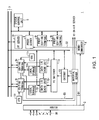
- Fig. 1 is a block diagram showing an entire construction of an on-air system according to this embodiment;
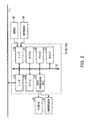
- Fig. 2 is a block diagram showing a construction of a proxy editing terminal device;
- Fig. 3 is a schematic diagram showing an EDL creation screen;
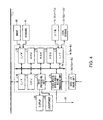
- Fig. 4 is a block diagram showing a construction of an editing terminal device;
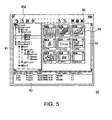
- Fig. 5 is a schematic diagram showing a project manager window;
- Fig. 6 is a schematic diagram showing a new project dialog;
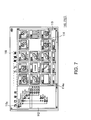
- Fig. 7 is a schematic diagram showing a clip explorer window;
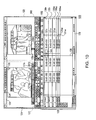
- Figs. 8 to 10 are schematic diagrams showing a time line editor window;
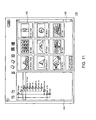
- Fig. 11 is a schematic diagram showing an FX explorer window;
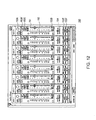
- Fig. 12 is a schematic diagram showing an audio mixer window;
- Fig. 13 is a schematic diagram showing an import EDL tool window; and
- Fig. 14 is a conceptual view explaining how to read each video/audio part used in an imported edit list.
-
- Preferred embodiments of this invention will be hereinafter described with reference to accompanying drawings:
- (1) Construction of on-air system according to this embodiment
Referring to Fig. 1,
reference numeral 1 shows an on-air system of this embodiment which is installed in a television broadcasting station or the like. Video/audio data (hereinafter, referred to as high-resolution video/audio data) D1 of resolution of 140 Mbps in an HDCAM (trademark of Sony Corporation) format is entered to amaterial server 3 and a down-converter 4 via arouter 2, the video/audio data D1 being transferred from a coverage site via a satellite communication circuit and the like or being reproduced from a coverage tape by a video tape recorder.Thematerial server 3 comprises an AV server of a large capacity composed of a plurality of Redundant Arrays of Independent Disks (RAID), and stores a series of the high-resolution video/audio data D1 received via therouter 2, in a form of a file under the control of asystem control unit 5 comprising a personal computer.The down-converter 4, on the other hand, converts the received high-resolution video/audio data D1 down to data of resolution of about 8 Mbps, compresses and encodes the resultant with the Motion Picture Experts Group (MPEG) format, and sends the obtained low-resolution video/audio data D2 to a proxy server 6.Similarly to thematerial server 3, theproxy server 6 comprises an AV server composed of a plurality of RAIDS, and stores a series of low-resolution video/audio data D2 received from the down-converter 4, in a form of a file under the control of thesystem control unit 5. In this way, this on-air system 1 records in theproxy server 6 low-resolution clips having the same contents as clips recorded in the material server 3.Then the low-resolution video/audio data D2 of clips being stored in theproxy server 6 can be read by using a desired proxyediting terminal device 81 to 8n or editing terminal device 91 to 9n being connected to theproxy server 6 via an Ethernet (trademark) 7. Then by using this data D2, the proxyediting terminal device 81 to 8n can create an EDL specifying edit details for only cut editing, i.e., which clips out of clips being stored in thematerial server 3 are to be connected in what order to create processed and edited video and audio (hereinafter, edited video and audio).In actual, in an EDL creation mode realized by running software dedicated to the EDL creation, when an operator selects one clip out of the clips being stored in theproxy server 6 and enters its playback command, a proxyediting terminal device 81 to 8n accesses thesystem control unit 5 via the Ethernet 7 and controls theproxy server 6 via thesystem control unit 5 so as to make theproxy server 6 read the low-resolution video/audio data D2 of the clip.The proxyediting terminal device 81 to 8n decodes the low-resolution video/audio data D2 read from theproxy server 6, and displays video based on the video/audio data of thus obtained baseband on a display. As a result, the operator can create an EDL which is an edit list for only cut editing while visually confirming the video being displayed on the display.The EDL data which is the data of thus created EDL can be transferred to a desired editing terminal device 91 to 9n via the Ethernet 7 from the proxyediting terminal device 81 to 8n according to operator's operation. The transferred EDL data is stored and managed by this editing terminal device 91 to 9n thereafter.On the other hand, the editing terminal devices 91 to 9n each comprises a nonlinear editing device with a video board capable of applying special effects to the high-resolution video/audio data D1 in real time. In an edit list creation mode realized by running dedicated software, when the operator selects one clip out of clips being stored in theproxy server 6 and enters its playback command, the editing terminal device 91 to 9n controls theproxy server 6 via thesystem control unit 5, so as to display the low-resolution video of the clip on the display, as in the case of the proxy editingterminal devices 81 to 8n.Thus, while visually confirming this video, the operator can create a final edit list including setting of video special effects and audio mixing, newly or by using an EDL created with a proxyediting terminal device 81 to 8n.Note that videtape recorders 111 to 11n andlocal storage units 121 to 12n such as hard disk drives are connected to the editing terminal devices 91 to 9n, respectively, so that video/audio material being recorded on video tapes or the like can be taken in thelocal storage units 121 to 12n as clips via thevideo tape recorders 111 to 11n and used for editing.In addition, during the creation of an edit list, every time when an IN-point and an OUT-point of a desired video/audio part in one clip are specified and arranged on a time line, the editing terminal device 91 to 9n accesses thesystem control unit 5 via the Ethernet 7 and controls thematerial server 3 via thesystem control unit 5 so as to sequentially read the high-resolution video/audio data D1 of the video/audio part being arranged on the time line.Then this high-resolution video/audio data D1 is converted into a prescribed format via agateway 13 under the control of thesystem control unit 5, and then is given and stored via afiber channel switcher 14 in a corresponding data I/O cache unit 151 to 15n which comprises a semiconductor memory of a storage capacity of 180 Giga bytes.When the operator enters a playback (preview) command for the high-resolution video based on the edit list thereafter, the editing terminal device 91 to 9n reads the required high-resolution video/audio data D1 from the corresponding data I/O cache unit 151 to 15n, creates edited video with the high-resolution video/audio data D1, and displays the video on the display.When the operator finishes to create the edit list and enters a command to execute this edit list, the editing terminal device 91 to 9n sequentially reads the corresponding high-resolution video/audio data D1 from the data I/O cache unit 151 to 15n based on the edit list, applies, if required, special effects and audio mixing to the high-resolution video/audio data D1, and sends thus obtained edited video/audio data D3 to thematerial server 3. As a result, this edited video/audio data D3 is recorded in thematerial server 3 in a form of a file under the control of the system control unit 5.Further, the edited video/audio data D3 recorded in thismaterial server 3 is transferred to an on-air server not shown, according to operator's operation, and is read from the on-air server according to a so-called play list which is created by a program producer for broadcasting.As described above, with this on-air system 1, a procedure from editing to on-air of edited video/audio obtained by the editing can be efficiently performed. - (2) Construction of proxy editing terminal device
Referring to Fig. 2, the proxy editing
terminal devices 81 to 8n are each composed of a Central Processing Unit (CPU) 20, a Read Only Memory (ROM) 21 storing various programs and parameters, a Random Access Memory (RAM) 22 serving as a work memory of theCPU 20, ahard disk drive 23 storing various software, adata processing unit 24 having various video data processing functions and audio data processing functions, andinterfaces CPU bus 27, and is connected to the Ethernet 7 via the interface 25.In addition, input devices such as amouse 28 and akeyboard 29 are connected to theinterface 26, and adisplay 30 and a loudspeaker 31 are connected to the data processing unit 24.TheCPU 20 reads screen data from thehard disk drive 23 according to necessity, and gives this to thedata processing unit 24, thereby displaying various screens and windows on thedisplay 30, which will be described later.In addition, theCPU 20 sends a command to the system control unit 5 (Fig. 1) via theinterface 25 and the Ethernet 7 according to necessity, thereby making the proxy server 6 (Fig. 1) be in a desired state, via the system control unit 5.As a result, for example, theCPU 20 takes in the low-resolution video/audio data D2 of a clip specified by the operator, which is transferred from theproxy server 6 via the Ethernet 7, via theinterface 25, and gives this to thedata processing unit 24, thereby displaying the video based on the low-resolution video/audio data D2 at a prescribed position on a corresponding screen or window.Further, when a cut editing command for the low-resolution video/audio data D2 is entered via themouse 28 or thekeyboard 29, theCPU 20 controls thedata processing unit 24 according to the cut editing command to perform the requested cut editing on the low-resolution video/audio data D2, and then outputs the resultant video and audio from thedisplay 30 and the loudspeaker 31. - (3) EDL creation procedure in proxy
editing terminal device 81 to 8n The EDL creation procedure in the proxy editingterminal devices 81 to 8n will be now described.Each proxyediting terminal device 81 to 8n is designed to be capable of creating an EDL by performing cut editing in which desired video/audio parts of desired clips being recorded in theproxy server 6 are specified and a sending order of the cut video is set by arranging these parts on a time line.In actual, to create an EDL, the operator runs corresponding software to display anEDL creation screen 40 as shown in Fig. 3 on the display 30 (Fig. 2).This EDLcreation screen 40 is composed of aclip explorer window 41, aclip viewer window 42, and a time line window 43.Theclip explorer window 41 is a window to display a list of clips read from theproxy server 6, and is composed of atree display part 44, a cliplist display part 45 and a preview display part 46.Thetree display part 44 of theclip explorer window 41 shows the storage locations (folders or the like) of clips read from theproxy server 6 in a form of a tree. The clip list displaypart 45 shows management information (clip name, IN-point and OUT-point) on each clip belonging to a folder being selected in thetree display part 44. When the operator clicks the management information on a desired clip out of the management information being displayed in the cliplist display part 45, the management information of the clip is selected by a select cursor 47. The preview displaypart 46 of theclip explorer window 41 displays the preview video of a clip being selected in the clip list display part 45.Theclip viewer window 42 is a window for extracting a desired part as a cut while allowing the video of a clip selected on theclip explorer window 41 to be visually confirmed, and is composed of a clipvideo display part 48, acut specifying part 49 and playback command buttons 50.After selecting a desired clip on theclip explorer window 41 and moving the select cursor 47 onto theclip viewer window 42 by drug and drop, the operator can extract a desired part of the clip as a cut.The clipvideo display part 48 of theclip viewer window 42 displays the video of a clip moved from theclip explorer window 41, and playbacks the video according to operation of theplayback command buttons 50. In addition, thecut specifying part 49 has an IN-point specifying button 51IN and an OUT-point specifying button 51OUT to specifying an IN-point and an OUT-point of the clip, and displays the times of the IN-point and OUT-point and the images of the times.The operator can specify an IN-point and an OUT-point of a clip with the IN-point specifying button 51IN and OUT-point specifying button 51OUT of thecut specifying part 49 by operating theplayback command buttons 50 while visually confirming the video of the clip being displayed in thevideo display part 48. Thus the operator can extract a desired part of a desired clip as a cut.When a desired part of a clip is specified as a cut on theclip viewer window 42 as described above, this clip is pasted on thetime line window 43. By repeating the above processes, plural clips can be arranged on the time line window 43.Thetime line window 43 is composed of atime line 52, atime line overview 53, a cutediting icon group 54, and a set time display part 55.Thetime line 52 of thistime line window 43 is provided with avideo track 56v andaudio tracks 56A1 .... On thevideo track 56v and theaudio tracks 56A1 ..., a colored area 57V and colored areas 57A1 ... each having the length of cut video of a clip or cut audio accompanied with the cut video are provided along a time scale 59.Fig. 3 shows a case where a clip pasted on thetime line window 43 is composed of one cut video and two cut audio accompanied with the cut video. Therefore, the colored area 57V indicating the cut video and the colored areas 57A1 and 57A2 indicating the cut audio are shown on thetime line 52. Note that thetime line 52 shows just part of the entire time line at a time. The other part of the time line can be displayed by slidingslide bars 601 and 602.Further, a reduced time line is displayed in thetime line overview 53, which allows the operator to visually confirm the entire time line.The cutediting icon group 54, on the other hand, is provided with icons for cut editing allowing cut editing commands to be entered easily. For example, even on thetime line window 43, an IN-point and an OUT-point can be specified by clicking an IN-point specifying icon 54IN and an OUT-point specifying icon 54OUT. The set time displaypart 55 displays the total time of the entire time line and the remaining time.The operator operates the cut editing icons of the cutediting icon group 54 and moves the colored areas 57V, 57A1 and 57A2 to desired positions with themouse 28 while visually confirming the colored area 57v and the colored areas 57A1 and 57A2 being displayed in thetime line 52, in order to perform the cut editing to connect cuts, as desired, thereby creating an EDL based on the cut editing.Thus with the proxy editing terminal device, the operator can perform desired cut editing on theEDL creation screen 40 and create an EDL based on the cut editing. - (4) Construction of editing terminal device 91 to 9n
Referring to Fig. 4, the editing terminal devices 91 to 9n
are each composed of a central processing unit (CPU) 70, a Read
Only Memory (ROM) 71, a Random Access Memory (RAM) 72, a hard
disk drive 73 storing various software, a data processing unit 74
with various video data processing functions and audio data
processing functions, a video special effect/audio
mixing processing unit 75 for applying specified video special effects and audio mixing to high-resolution video/audio data D1, and various interfaces 76 to 78, which are connected with aCPU bus 79, and is connected to the Ethernet 7 via the interface 76.In addition, input devices such as amouse 80 and akeyboard 81 are connected to the interface 77, and thevideo tape recorders 111 to 11n and thelocal storage units 121 to 12n are connected to the interface 78. Connected to the data processing unit 74 are adisplay 82 and a loudspeaker 83.The CPU 70 reads screen data from the hard disk drive 73, according to necessity, and gives it to the data processing unit, thereby displaying various windows and dialogs on thedisplay 82, which will be described later.In addition, the CPU 70 sends a command to the system control unit 5 (Fig. 1) via the interface 76 and the Ethernet 7 according to necessity, so as to control the material server 3 (Fig. 1), the proxy server 6 (Fig. 1), the FC switcher 14 (Fig. 1), and the data I/O cache units 151 to 15n (Fig. 1) via thesystem control unit 5 to make them be in desired states.As a result, for example, the CPU 70 takes in the low-resolution video/audio data D2 of a clip specified by the operator via the interface 76, which is transferred from theproxy server 6 via the Ethernet 7, and gives this to the data processing unit 74, thereby displaying the video based on the low-resolution video/audio data D2 at a prescribed position on a corresponding window or dialog. Further, the CPU 70 controls the video special effect/audiomixing processing unit 75 according to necessity, so as to make thisunit 75 read high-resolution video/audio data D1 from the corresponding data I/O cache unit 151 to 15n and apply special effects and audio mixing to the high-resolution video/audio data D1 according to necessity.Thus obtained edited video/audio data D3 is given to the data processing unit 74, thereby displaying on thedisplay 82 the edited video, which has been subjected to the special effects, and outputting from theloudspeaker 83 the edited audio, which has been subjected to the audio mixing, on the basis of the edited video/audio data D3.Further, the CPU 70 controls the video special effect/audiomixing processing unit 75 according to necessity, to send the edited video/audio data D3 to thematerial server 3, and controls thematerial server 3 via thesystem control unit 5 to store this edited video/audio data D3, resulting in registering the edited video/audio data D3 in thematerial server 3. - (5) Edit list creation procedure in editing terminal device 91 to
9n
The edit list creation procedure in the editing terminal
devices 91 to 9n will be now described.Each editing terminal device 91 to 9n creates a final edit
list by specifying desired video/audio parts of desired clips
being recorded in the
material server 3, setting a sending order of cut video by arranging the parts on a time line, and applying video special effects and audio mixing and inserting a title.Information (EDL information) on thus created edit list, such as the time codes of IN-point and OUT-point of each cut, the arrangement order of the cuts, the name of the edit list, the creator and the creation date and time, information on the video special effects and audio mixing set in this edit list, and various information on working environments at a time of creating the edit list are stored in one file and managed as "project".Therefore, a new project should be created when a new edit list is created. In this case, the operator runs corresponding software to display aproject manager window 90 shown in Fig. 5 on the display 82 (Fig. 4).Thisproject manager window 90 is a window to manage and view projects, and is composed of atree display part 91, aclip display part 92, and a project list display part 93.Thetree display part 91 of theproject manger window 90 shows the storage locations of all files containing projects (hereinafter, referred to as project files) in a form of a tree, the project files existing in the editing terminal device 91 to 9n and in theproject file server 10 which manages all project files. Theclip display part 92 shows a list of thumbnail images of clips belonging to a project being selected in thetree display part 91 as icons (hereinafter, referred to as clip icons) 94. The cliplist display part 93 shows a list of management information such as a storage drive name, a project name, and update date and time, for each project being displayed in the tree display part 91.In a case of creating a new project, the operator clicks anew creation button 95A out of a button group 95 being displayed at the upper part of theproject manager window 90, to display anew project dialog 100 shown in Fig. 6. Then the operator enters a desired project name in a projectname input box 101 of thenew project dialog 100, sets various attributes regarding this project in anattribute setting part 102, and then clicks an OK button 103.As a result, the new project is newly registered in the editing terminal device 91 to 9n and theproject file server 10, and a new folder and bin are automatically created in this project. This result is reflected in thetree display part 91 and the projectlist display part 93 of the project manager window 90 (Fig. 5).At this time, the display 82 (Fig. 4) displays aclip explorer window 110 shown in Fig. 7 and a serversite explorer window 111 having the same structure.Theclip explorer window 110 is a window to display and manage clips belonging to a project being open, and is composed of atree display part 112 and a clip display part 113.Thetree display part 112 of theclip explorer window 110 shows all projects and their contents (folders, bins) existing in the system in a form of a tree. Theclip display part 113 shows a list ofclip icons 114 for all clips belonging to a bin being selected in thetree display part 112. Since there is no clip belonging to a new project in the initial state just after the new project is created, theclip display part 113 of theclip explorer window 110 does not display any clip icon 114.The serversite explorer window 111, on the other hand, is a window to display a list of clips being recorded in thematerial server 3 and theproxy server 6, and is composed of atree display part 112 and aclip display part 113, similarly to the clip explorer window 110.Thetree display part 112 of the serversite explorer window 111 shows all folders, files and so on existing in thematerial server 3 and theproxy server 6 in a form of a tree. Theclip display part 113 shows theclip icons 114 for all clips being stored in a folder or the like being selected in thetree display part 112. To create a new edit list, the operator clicks a newsequence creation button 115A of thebutton group 115, which is positioned at the upper part of theclip explorer window 110, after creating the new project as described above. As a result, aclip icon 114NS for an edit list to be created is displayed in theclip display part 113 of theclip explorer window 110 and a timeline editor window 120 shown in Fig. 8 is also displayed on the display 82 (Fig. 4).The timeline editor window 120 is composed of asource viewer part 121 for extracting a desired part as a cut while visually confirming the video of a clip, atime line part 122 for setting edit details indicating how to arrange extracted cuts and which special effects are applied to the connecting parts of the cuts, and amaster viewer part 123 for confirming the edit details set in thetime line part 122, by using high-resolution video.Then the operator moves theclip icon 114 of a desired clip out of theclip icons 113 being displayed in theclip display part 113 of the server site explorer window 111 (Fig. 7) onto thesource viewer part 121 of the time line editor window 120 (Fig. 8) by drug and drop, thereby selecting this clip as a clip to be edited. By repeating these processes, plural clips can be selected. With the timeline editor window 120, the operator can display menu listing clips selected as described above, by clicking a clip selectmenu display button 124 locating at the upper part of thesource viewer part 121. Further, the operator can select a desired clip in this menu as a clip to be edited.For example, the video of the beginning frame of a clip being selected is displayed in thesource viewer part 121, the name of the clip is shown in aclip list box 125, and the time code of the frame of the clip being displayed in thesource viewer part 121 and the material length of the clip are shown in a time code display part 126.With the timeline editor window 120, the operator can playback video based on the low-resolution video/audio data D2 (Fig. 1) of a clip being selected to be edited, which is recorded in the proxy server 6 (Fig. 1), at a normal speed, frame by frame, or backwards frame by frame, by clicking a desired command button of acommand button group 127 locating at the lower part of the source viewer part 121.In actual, when a command button for normal playback, frame playback, or frame backward playback of thecommand button group 127 is clicked, the CPU 70 (Fig. 4) controls theproxy server 6 via the system control part 5 (Fig. 1) accordingly. Thereby the low-resolution video/audio data D2 of the video/audio part corresponding to the clip is read in the playback mode corresponding to the command button clicked. As a result, the low-resolution video based on the low-resolution video/audio data D2 is played back in the source viewer part 121 at a normal speed, frame by frame, or backwards frame by frame.Thus the operator can specify a start point (IN-point) and an end point (OUT-point) of a video/audio part to be used as a cut out of a clip by clicking a mark-in button 127IN and a mark-out button 127OUT of the command button group 127 in a situation where desired video is displayed, while visually confirming the video of the clip being displayed in the source viewer part 121.In addition, the operator can create an edit list in the following manner by using video/audio parts specified as described above as cuts of clips.First the operator specifies a range of a video/audio part of a clip to be used as a cut as described above, then moves a play line 128 being displayed in the time line part 122 to a desired position with the mouse with a time scale 129 locating at the lower part of the time line part 122 as an index, and clicks an overwrite button 127o or a splice IN button 127s of the command button group 127 locating at the lower part of the source viewer part 121.As a result, as shown in Fig. 9, by overwriting when the overwrite button 127o is clicked or by inserting when the splice IN button 127s is clicked, a colored area 131v having the material length of the video/audio part is arranged with its beginning position placed on the play line 128 on the video track 130V of the time line part 122.In a case where audio is accompanied with the video/audio part, colored areas 131A1 to 131A4 having the same length of the corresponding colored area 131V of the video track 130v are arranged with their beginning positions positioned on the play line 128 on the audio tracks 130A1 to 130A4 equal to the number of channels out of a plurality of the audio tracks 130A1 to 130A4 provided at the lower part of the video track 130V.At this time, the CPU 70 notifies the system control unit 5 of a command according to operator's operation. As a result, under the control of thesystem control unit 5, the high-resolution video/audio data D1 of the video/audio part of the corresponding clip is read from the material server 3 (Fig. 1), with margins of several seconds on the IN-point side and the OUT-point side. This data is then given and stored in the data I/O cache unit 151 to 15n corresponding to the editing terminal device 91 to 9n via the gateway 13 (Fig. 1) and FC switcher 14 (Fig. 1).When the operator desires output of audio other than audio accompanied with the video/audio part at a time of playback of the edited video/audio, he/she clicks the clip selectmenu display button 124 to select a previously registered clip for the audio from a list of clips being displayed, moves theplay line 128 of thetime line part 122 to a desired position, and clicks the above-describedoverwrite button 127o or splice INbutton 127s after specifying a desired audio track 130A1 to 130A4.In this case, a colored area 131A1 to 131A4 having the length corresponding to the material length of the clip is displayed with its beginning position positioned on theplay line 128 on the audio track 130A1 to 130A4 specified. And in a case where this clip has been recorded in thematerial server 3, its audio data is read from thematerial server 3 and stored in the data I/O cache unit 151 to 15n.Then the operator repeats operation including specifying a range of a video/audio part to be used as a cut as described above (determining a cut) and pasting the video/audio part to the time line part 122 (displaying colored areas 131v, 131A1 to 131A4 on the video track 130v and/or audio tracks 130A1 to 130A4), thereby sequentially displaying the colored areas 131V, 131A1 to 131A4 on the video track 130v and the audio tracks 130A1 to 130A4 so as to continue on thetime scale 129 for a desired period of time from the beginning ("00:00.00:00") of thetime scale 129 as shown in Fig. 10. Displaying the colored areas 131V, 131A1 to 131A4 on the video track 130V and the audio tracks 130A1 to 130A4 in thetime line part 122 means that video/audio are displayed/output based on the video/audio parts corresponding to the colored areas 131V, 131A1 to 131A4 at time specified by thetime scale 129 in the playback of edited video/audio. Therefore, an edit list specifying the order and contents of video/audio to be displayed/output as edited video/audio can be created.The numbers of video tracks 130V and audio tracks 130A1 to 130A4 to be displayed in thetime line part 122 can be set as desired. In a case where cuts or clips are pasted to plural video tracks 130V and audio tracks 130A1 to 130A4 provided, edited video is created by superimposing video existing at the same position on thetime scale 129 of the video tracks 130v, and edited audio is created by synthesizing audio existing at the same position on thetime scale 129 of the audio tracks 130A1 to 130A4.In creating an edit list as described above, when the operator desires to apply special effects to the connecting part of first cut video and second cut video, he/she can set desired video special effects in the following manner.First the preceding first cut and the next second cut are pasted to the video track 130V so as to continue on thetime scale 129, and then anFX explorer button 132FX is clicked out of thebutton group 132 locating at the upper part of thetime line part 122. As a result, anFX explorer window 140 as shown in Fig. 11 is displayed on the display 82 (Fig. 4).ThisFX explorer window 140 is composed of atree display part 141 and anicon display part 142. Thetree display part 141 displays various kinds of video special effects which can be applied by the editing terminal device 91 to 9n. Theicon display part 142 shows images subjected to the video special effects, in a form of icons.Next the operator pastes thespecial effect icon 143 for a desired video special effect out of the icons (hereinafter, referred to as special effect icons) 143 being displayed in theicon display part 142 of theFX explorer window 140, to the connecting part of the first and second cuts in the video track 130V of the timeline editor window 120 by drug and drop.As a result, in creating edited video, setting for applying the video special effect corresponding to the special effect icon, which has been pasted to thevideo track 130v as described above, at the switching time from the first cut video to the second cut video has been done.In a case where aspecial effect icon 143 is pasted to the video track 130V of the timeline editor window 120, amark 144 corresponding to thespecial effect icon 143 is displayed at the pasting position as shown in Fig. 10.In addition, when the operator creates an edit list, if he/she desires to apply audio mixing to audio of a cut or a clip pasted to an audio track 130A1 to 130A4, the desired audio mixing can be set in the following manner.First the operator moves the play line 128 being displayed in the time line part 122 of the time line editor window 120, to the colored area 131A1 to 131A4 corresponding to a desired cut or clip to be subjected to the audio mixing, out of the cuts or clips pasted to the audio tracks 130A1 to 130A4, and then clicks an audio mixer button 132MIX of the button group 132 locating at the upper part of the time line part 122.As a result, as shown in Fig. 12, an audio mixer window 150 is displayed in which a plurality of mixing parts 154 each having a volume 151, a level meter 152 and various setting buttons 153A to 153F are provided in correspondence with the audio tracks 130A1 to 130A4 of the time line part 122 of the time line editor window 120.Then the operator operates the volume 151 and the setting buttons 153A to 153F corresponding to a desired audio track 130A1 to 130A4 of the time line part 122 of the time line editor window 120 while visually confirming the level meter 152, the volume 151 and setting buttons 153A to 153F being displayed in the audio mixer window 150.Thereby, for outputting edited audio, such setting has been done that the audio mixing should be applied, based on the details set as described above, to the audio data at a time of playback of the audio part pasted to the audio track 130A1 to 130A4.Further, with the time line editor window 120 (Fig. 10), the operator moves the play line 128 of the time line part 122 to a desired position with the mouse after or while creating the edit list as described above, and clicks a preview button 160PV of a command button group 160 being displayed at the lower part of a master viewer part 123, thereby playing back the high-resolution edited video in the master viewer part 123 at a normal speed with the video/audio part corresponding to the play line 128 as a start point.In actual, when the preview button 160PV is clicked, the CPU 70 controls the video special effect/audio mixing processing unit 75 (Fig. 4) to read the high-resolution video/audio data D1 of the corresponding video/audio part from the data I/O cache unit 151 to 15n and to apply video special effects and audio mixing to the high-resolution video/audio data D1 according to necessity.As a result, the high-resolution edited video/audio data D3 subjected to the video special effects and the audio mixing is created and given to the data processing unit 74 (Fig. 4), thereby displaying and outputting edited video and audio based on the edited video/audio data D3 in the master viewer part 123 of the time line editor window 120 and from the loudspeaker 83 (Fig. 4).Therefore, the operator can create an edit list while occasionally viewing and confirming edit details based on the edited video being displayed in the master viewer part 123 of the time line editor window 120 or can confirm the contents of the created edit list.After creating the edit list as described above, the operator moves the clip icon 114NS corresponding to the edit list being displayed in the clip display part 113 of the clip explorer window 110 (Fig. 7) onto the clip display part 113 of the server site explorer window 111 (Fig. 7) by drug and drop, thereby registering the editing result based on the edit list in the material server 3 (Fig. 1).In actual, the CPU 70 controls the video special effect/audio mixing processing unit 75 (Fig. 4) based on a created edit list to create edited video/audio data D3 of edited video and audio based on the edit list by using high-resolution video/audio data D1 being stored in the data I/O cache unit 151 to 15n and sends it to the material server 3. As a result, this edited video/audio data D3 is registered in thematerial server 3 by being stored in a file of the above-described sequence clip. In addition, the data of this edit list (hereinafter, referred to as edit list data, simply) is given to thematerial server 3 via thesystem control unit 5 to be stored in the file of the sequence clip.As described above, with an editing terminal device 91 to 9n, the operator can create a desired edit list by using the timeline editor window 120 and further, create edited video and audio based on the edit list and register them in thematerial server 3. - (6) EDL import function
An EDL import function installed in this on-
air system 1 will be next described.With an editing terminal device 91 to 9n in the on-air system 1, not only a final edit list can be crated from the beginning but also the final edit list can be crated by taking in and using an EDL previously created with a proxyediting terminal device 81 to 8n.In actual, to import EDL data being stored and managed by a proxyediting terminal device 81 to 8n, the operator selects the file name of a desired EDL being displayed in thetree display part 112 of the clip explorer window 110 (Fig. 7), and then selects "EDL import" from a menu not shown, which appears by clicking the right button of the mouse 80 (Fig. 4). Thereby, an importEDL tool window 200 as shown in Fig. 13 can be displayed on the display 82 (Fig. 4) of the editing terminal device 91 to 9n.On this importEDL wool window 200, the folder name of a folder storing the EDL file being selected is displayed in a storagelocation display box 201. In addition, out of various files being stored in the folder, files of a type (EDL file type) being shown in a filetype display box 203 are displayed in a filelist display part 202, and the file name of the EDL file being selected at this time is displayed in a file name box 204.In addition, on the importEDL tool window 200, detailed information on the EDL is displayed in anEDL detail area 205, based on the management information of the EDL being managed by the proxyediting terminal device 81 to 8n which is an import source, the detailed information indicating which video/audio parts of which clips are used as cuts.To import the EDL, the operator just clicks anOK button 206 after confirming that the file name of the EDL is displayed in thefile name box 204. At this time, the EDL data of the EDL is transferred to and taken in the editing terminal device 91 to 9n via theEthernet 7 from the proxyediting terminal device 81 to 8n. The EDL file imported in this way is automatically opened, resulting in displaying the time line edit window 120 (Fig. 9) in which, for example, colored areas 131V, 131A1 ... based on the EDL are displayed in the time line part 122.As described above, with an editing terminal device 91 to 9n, a desired EDL out of EDLs being managed by the proxyediting terminal devices 81 to 8n can be imported. - (7) Automatic loading at a time of importing EDL
An automatic loading function at a time of importing an EDL,
which is installed in this on-
air system 1, will be next described.This on-air system 1 is composed of the data I/O cache units 151 to 15n each comprising a semiconductor memory which is accessible faster than the material server 3 (that is, high-resolution video/audio data D1 can be read and written faster), between thematerial server 3 and the editing terminal devices 91 to 9n, as described above. When a video/audio part extracted from a clip is pasted to the time line part 122 (Fig. 8) of the time line editor window 120 (Fig. 8) as described above with reference to Fig. 8 to Fig. 10, the high-resolution video/audio data D1 of the video/audio part is read from thematerial server 3 and stored in a corresponding data I/O cache unit 151 to 15n. As a result, edited video and audio based on the high-resolution video/audio data D1 of the video/audio part can be displayed and output immediately.When an EDL created with a proxyediting terminal device 81 to 8n is imported to an editing terminal device 91 to 9n to continue its creation work, the high-resolution video/audio data D1 of each video/audio part which is used in the EDL is not stored in the data I/O cache unit 151 to 15n corresponding to the editing terminal device 91 to 9n. Therefore, after this EDL is imported, the high-resolution edited video and audio based on the EDL cannot be viewed immediately, which is a problem.To solve this problem, this on-air system 1 is provided with an automatic loading function to immediately and automatically load the high-resolution video/audio data D1 of each video/audio part which is used in an EDL, in the corresponding data I/O cache unit 151 to 15n when the EDL data of the EDL is imported to the editing terminal device 91 to 9n and opened.In actual, when an editing terminal device 91 to 9n receives a command to import therein a desired EDL file by specifying an EDL file on the above-described import EDL tool window 200, it accesses the proxy editing terminal device 91 to 9n storing the EDL data of the specified EDL to display the time line editor window 120 displaying the obtained EDL thereon, on the display 82.In addition, simultaneously, the editing terminal device 91 to 9n accesses the system control unit 5 to confirm what clips the corresponding data I/O cache unit 151 to 15n stores, and determines based on its result and the EDL data whether there are clips which are used in the EDL but are not stored in the corresponding data I/O cache unit 151 to 15n.When the editing terminal device 91 to 9n determines that there are clips which are used in the EDL but are not stored in the corresponding data I/O cache unit 151 to 15n, it sends a readout request of the clips to the system control unit 5.The system control unit 5 controls the material server 3 based on the readout request received from the editing terminal device 91 to 9n to make the material server 3 read the high-resolution video/audio data D1 of each clip requested. As a result, the high-resolution video/audio data D1 is given to and stored in the corresponding data I/O cache unit 151 to 15n via thegateway 13 and theFC switcher 14 in order.Thus, when the command button group 160 (Fig. 10) of themaster viewer part 123 of the timeline editor window 120 being displayed is operated to send a playback command to the editing terminal device 91 to 9n, the device 91 to 9n reads the corresponding high-resolution video/audio data D1 from the data I/O cache unit 151 to 15n and displays the video based on the high-resolution video/audio data D1 in themaster viewer part 123. This allows the operator to view and listen to the high-resolution edited video and audio based on the EDL immediately.In this embodiment, when the editing terminal device 91 to 9n sends the system control unit 5 a readout request of high-resolution video/audio data D1 of a video/audio part of each clip which is used in an EDL, it gives the readout request to the system control unit 5 so that the high-resolution video/audio data D1 around the edited point (around the connecting part to another cut) of the video/audio part is preferentially transferred.That is, when the editing terminal device 91 to 9n sends the readout request to the system control unit 5, it first sends the system control unit 5 a readout request regarding the high-resolution video/audio data D1 of the video/audio parts PAIN and PAOUT for several seconds (for example, 2 - 10 seconds) on the IN-point side and OUT-point side, and then sends a readout request regarding the remaining part PAOT of the video/audio part.As a result, under the control of the system control unit 5 responding to this readout request, the high-resolution video/audio data D1 of the video/audio parts PAIN and PAOUT for several seconds on the IN-point side and OUT-point side of the video/audio part is first read from the material server 3 and stored in the corresponding data I/O cache unit 151 to 15n. Then the high-resolution video/audio data D1 of the remaining part PAOT of the video/audio part CUT is read from thematerial server 3 and stored in the data I/O cache unit 151 to 15n.As described above, in this on-air system 1, when an imported EDL file is opened, the editing terminal device 91 to 9n preferentially loads the high-resolution video/audio data D1 of the connecting parts of cuts, which are often previewed in the creation work of an edit list, in the data I/O cache unit 151 to 15n, so that the operator can start the creation work of the edit list just after the EDL is opened. - (8) Operation and effects of this embodiment
According to the above configuration, in this on-air system
1, high-resolution video/audio data to be used in editing is
stored as high-resolution video/audio data D1 in the material
server 3 and the high-resolution video/audio data D1 is converted
to low-resolution video/audio data D2 through the down conversion
and the compressing and encoding process, and the data D2 is
stored in the proxy server 6.Then with the low-resolution video/audio data D2, an EDL
for only cut editing, which can be created by using low-resolution
video/audio data, is created with a proxy editing
terminal device 81 to 8n.Then when a final edit list requiring high-resolution
video/audio data is created with an editing terminal device 91 to
9n, the device 91 to 9n imports therein an EDL created by the
proxy editing terminal device 81 to 8n via the Ethernet 7 and
reads the high-resolution video/audio data D1 corresponding to
the low-resolution video/audio data used at a time of creating
the EDL, from the material server 3 based on the EDL.Then the editing terminal device 91 to 9n creates the final
edit list with the high-resolution video/audio data D1 based on
the imported EDL.According to the above configuration, in the on-air system
1, the low-resolution video/audio data D2 of a smaller data
volume is used to create an EDL, resulting in reducing time to
create the EDL. In addition, the low-resolution video/audio data
D2 and the high-resolution video/audio data D1 having the same
contents and the different resolutions are stored in the
material server 3 and theproxy server 6, respectively, so that the creation of the final edit list with the high-resolution video/audio data D1 can be started based on an EDL in a short time after the EDL is created by using the low-resolution video/audio data, thus making it possible to significantly improve working efficiency of the editing work with reducing time to create the EDL and the final edit list.In addition, in this on-air system 1, an EDL is created by using low-resolution video/audio data D2 of a smaller data volume. Therefore, the proxyediting terminal devices 81 to 8n which create EDLs do not necessarily have processing capability as good as the editing terminal devices 91 to 9n. As a result, EDLs can be created with the proxyediting terminal devices 81 to 8n with a simple construction.In addition, in this on-air system 1, when the high-resolution video/audio data D1 of each video/audio part used in the EDL is loaded into a corresponding data I/O cache unit 151 to 15n as described above, the high-resolution video/audio data D1 of the video/audio parts PAIN and PAOUT for several seconds on the IN-point side and OUT-point side, which are often previewed out of the video/audio part, is first loaded, and then the remaining part PAOT of the video/audio part is loaded, resulting in significantly reducing time required for the editing work with efficiently reducing operator's waiting time. - (9) Other embodiments
Note that the above-described embodiment has described a
case where this invention is applied to the on-
air system 1 constructed as shown in Fig. 1. This invention, however, is not limited to this and can be widely applied to editing systems having various constructions.Further, the above-described embodiment has described a case where EDL data is imported in an editing terminal device 91 to 9n and its file is opened simultaneously. This invention, however, is not limited to this and the file may be opened when an open command is issued after the import. In this case, when the file is opened, the high-resolution video/audio data D1 of the video/audio part of each clip which is used in the EDL may be read from thematerial server 3. -
- Still further, the above-described embodiment has described a case where edit material to be edited is video/audio material. This invention, however, is not limited to this and can be applied to a case where edit material may be video material comprising only video.
- Still further, the above-described embodiment has described a case where the
material server 3 and theproxy server 6 for storing video/audio data of each clip obtained by coverage are each comprising a plurality of RAIDS. This invention, however, is not limited to this and thematerial server 3 has another construction. - Still further, the above-described embodiment has described a case where the data I/
O cache units 151 to 15n for storing high-resolution video/audio data D1 read from thematerial server 3 each comprises a semiconductor memory. This invention, however, is not limited to this and storage media other than semiconductor devices can be used, provided that the media have faster accessibility than thematerial server 3. - Still further, the above-described embodiment has described a case where the editing terminal devices 91 to 9n are constructed as shown in Fig. 2, which read and edit the high-resolution video/audio data D1 from the data I/
O cache units 151 to 15n based on selected edit lists to create edited video based on the edit lists. This invention, however, is not limited to this and another construction can be widely applied. - Still further, the above-described embodiment has described a case where the
system control unit 5 for controlling the entire on-air system 1 is applied as a control means for controlling thematerial server 3 and the data I/O cache units 151 to 15n. This invention, however, is not limited to this and the functions of thesystem control unit 5 according to embodiments of this invention can be provided in the editing terminal devices 91 to 9n. - Still further, the above-described embodiment has described a case where, when the
material server 3 reads the high-resolution video/audio data D1 of the video/audio part of each clip which is used in an imported EDL, the high-resolution video/audio data D1 around the edited point of the video/audio part is preferentially read in response to a readout request sent from the editing terminal device 91 to 9n to thesystem control unit 5. This invention, however, is not limited to this and a system can be designed so that only thesystem control unit 5 controls the preferential readout of the high-resolution video/audio data D1 around the edited points of a video/audio part and the editing terminal devices 91 to 9n are not involved. Specifically, for example, the system may be designed so that an editing terminal device 91 to 9n gives the system control unit 5 a readout request of the video/audio part of each clip which is used in the edit list, and thesystem control unit 5 controls thematerial server 3 so as to preferentially read the high-resolution video/audio data D1 around the edited points of the video/audio part. - Still further, the above-described embodiment has described a case where an operator performs cut editing as rough editing and creates an EDL as a first edit list specifying the details of the cut editing, by using a proxy
editing terminal device 81 to 8n. This invention, however, is not limited to this and simple video special effects in addition to the cut editing can be set as the rough editing and further, a first edit list specifying the details of such rough editing can be created with the proxyediting terminal device 81 to 8n. - Still further, the above-described embodiment has described a case where an editing terminal device 91 to 9n creates a final edit list as a second edit list specifying the edit details of the actual editing in a manner that an operator performs cut editing, setting of special effects and audio mixing and insertion of a title as the actual editing. This invention, however, is not limited to this and other editing processes can be set as the actual editing in addition to the cut editing, the setting of the special effects and audio mixing, and the insertion of a title, and a second edit list specifying the details of such actual editing may be created with the editing terminal device 91 to 9n.
- Still further, the above-described embodiment has described a case where the on-
air system 1 is constructed of thematerial server 3 as a first storage and retaining means, the down-converter 4 andproxy server 6 as second storage and retaining means, the proxyediting terminal devices 81 to 8n as first edit list creation means, and the editing terminal devices 91 to 9n as second edit list creation means. This invention, however, is not limited to this and the on-air system 1 can be constructed of other kinds of first storage and retaining means, second storage and retaining means, first edit list creation means, and second edit list creation means. - Hence, an editing system and control method thereof capable of significantly improving working efficiency of editing work is provided. A proxy editing terminal device creates an EDL with low-resolution video/audio data, resulting in reducing time to create the EDL. Further, the low-resolution video/audio data and high-resolution video/audio data having the same contents and different resolutions are previously stored, so that the creation of a final edit list with the high-resolution video/audio data based on the EDL can be started in a short time after the EDL is created with the low-resolution video/audio data. Thus working efficiency of the editing work can be significantly reduced with reducing time to create the EDL and the final edit list.
- In so far as the embodiments of the invention described above are implemented, at least in part, using software-controlled data processing apparatus, it will be appreciated that a computer program providing such software control and a storage medium by which such a computer program is stored are envisaged as aspects of the present invention.
- Although particular embodiments have been described herein, it will be appreciated that the invention is not limited thereto and that many modifications and additions thereto may be made within the scope of the invention. For example, various combinations of the features of the following dependent claims can be made with the features of the independent claims without departing from the scope of the present invention.
Claims (14)
- An editing system comprising:first storage and retaining means for storing and retaining high-resolution video data of edit material;second storage and retaining means for storing and retaining low-resolution video data of said edit material;first edit list creation means for creating a first edit list specifying edit details of rough editing by using said low-resolution video data;second edit list creation means for creating a second edit list specifying edit details of actual editing by using said high-resolution video data; anda network for connecting said first edit list creation means and said second edit list creation means, whereinsaid second edit list creation means reads said first edit list from said first edit list creation means via said network and creates said second edit list based on the first edit list.
- The editing system according to claim 1, wherein
said second edit list creation means makes said first storage and retaining means automatically read high-resolution video data corresponding to said low-resolution video data when reading said first edit list. - The editing system according to claim 1, wherein
said second edit list creation means makes said first storage and retaining means preferentially read high resolution video data around edited points of said edit material out of said high-resolution video data. - The editing system according to claim 2, wherein
said high-resolution video data automatically read from said first storage and retaining means is written in third storage and retaining means. - The editing system according to claim 3, wherein
said high-resolution video data preferentially read from said first storage and retaining means is written in third storage and retaining means. - The editing system according to claim 2, wherein
said second edit list creation means makes said first storage and retaining means preferentially read high-resolution video data around edited points of said edit material out of said high-resolution video data. - The editing system according to claim 6, wherein
said high-resolution video data preferentially read from said first storage and retaining means is written in third storage and retaining means. - A control method of an editing system, comprising:a first step of storing high-resolution video data of edit material in first storage and retaining means;a second step of storing low-resolution video data of said edit material in second storage and retaining means;a third step of creating a first edit list specifying edit details of rough editing by using said low-resolution video data in first edit list creation means; anda fourth step of reading said first edit list from said first edit list creation means via a network, and creating a second edit list specifying edit details of actual editing by using said high-resolution video data based on the first edit list in second edit list creation means.
- The control method according to claim 8, wherein
said fourth step makes said first storage and retaining means automatically read high-resolution video data corresponding to said low-resolution video data when reading said first edit list. - The control method according to claim 8, wherein
said fourth step makes said first storage and retaining means preferentially read high-resolution video data around edited points of said edit material out of said high-resolution video data. - The control method according to claim 9, wherein
said high resolution video data automatically read from said first storage and retaining means is written in third storage and retaining means. - The control method according to claim 10, wherein
said high-resolution video data preferentially read from said first storage and retaining means is written in third storage and retaining means. - The control method according to claim 9, wherein
said fourth step makes said first storage and retaining means preferentially read high-resolution video data around edited points of said edit material out of said high resolution video data. - The control method according to claim 13, wherein
said high-resolution video data preferentially read from said first storage and retaining means is written in third storage and retaining means.
Applications Claiming Priority (2)
| Application Number | Priority Date | Filing Date | Title |
|---|---|---|---|
| JP2003281141 | 2003-07-28 | ||
| JP2003281141A JP4117616B2 (en) | 2003-07-28 | 2003-07-28 | Editing system, control method thereof and editing apparatus |
Publications (2)
| Publication Number | Publication Date |
|---|---|
| EP1503381A2 true EP1503381A2 (en) | 2005-02-02 |
| EP1503381A3 EP1503381A3 (en) | 2006-02-01 |
Family
ID=33535656
Family Applications (1)
| Application Number | Title | Priority Date | Filing Date |
|---|---|---|---|
| EP04254494A Withdrawn EP1503381A3 (en) | 2003-07-28 | 2004-07-27 | Editing system and control method thereof |
Country Status (5)
| Country | Link |
|---|---|
| US (1) | US7769270B2 (en) |
| EP (1) | EP1503381A3 (en) |
| JP (1) | JP4117616B2 (en) |
| KR (1) | KR101053360B1 (en) |
| CN (1) | CN1302660C (en) |
Cited By (9)
| Publication number | Priority date | Publication date | Assignee | Title |
|---|---|---|---|---|
| EP1796095A1 (en) * | 2005-12-08 | 2007-06-13 | THOMSON Licensing | Method for editing media contents in a network environment, and device for cache storage of media data |
| EP1930901A3 (en) * | 2006-12-04 | 2009-02-18 | Sony Corporation | Method of distributing mashup data, mashup method, server apparatus for mashup data, and mashup apparatus |
| EP2164074A1 (en) * | 2008-09-16 | 2010-03-17 | Kabushiki Kaisha Toshiba | Video data processing system, video server, gateway server, and video data management method |
| FR2940481A1 (en) * | 2008-12-23 | 2010-06-25 | Thales Sa | METHOD, DEVICE AND SYSTEM FOR EDITING ENRICHED MEDIA |
| EP2584562A1 (en) * | 2011-10-18 | 2013-04-24 | Acer Incorporated | Real-time image editing method and electronic device |
| US9661047B2 (en) | 2012-04-30 | 2017-05-23 | Mobilatv Ltd. | Method and system for central utilization of remotely generated large media data streams despite network bandwidth limitations |
| EP3266104A4 (en) * | 2015-03-03 | 2018-12-19 | Openhd Pty Ltd | A system, content editing server, audio recording slave device and content editing interface for distributed live performance scheduled audio recording, cloud-based audio content editing and online content distribution of audio track and associated metadata |
| US10855731B2 (en) | 2013-04-11 | 2020-12-01 | Nec Corporation | Information processing apparatus, data processing method thereof, and program |
| US11599263B2 (en) | 2017-05-18 | 2023-03-07 | Sony Group Corporation | Information processing device, method, and program for generating a proxy image from a proxy file representing a moving image |
Families Citing this family (85)
| Publication number | Priority date | Publication date | Assignee | Title |
|---|---|---|---|---|
| US7529464B2 (en) * | 2004-10-13 | 2009-05-05 | Cyberlink Corp. | Method for implementing an adaptive mixing energy ratio in a music-selected video editing environment |
| KR100709666B1 (en) * | 2005-03-17 | 2007-04-19 | 주식회사 코난테크놀로지 | Client / server based video editor and video editing method |
| US9948882B2 (en) * | 2005-08-11 | 2018-04-17 | DISH Technologies L.L.C. | Method and system for toasted video distribution |
| JP2007150786A (en) * | 2005-11-29 | 2007-06-14 | Sony Corp | Transmission / reception system, information processing apparatus, information processing method, and program |
| JP4748030B2 (en) * | 2006-10-30 | 2011-08-17 | 日本電気株式会社 | Editing system and editing method |
| JP5086663B2 (en) * | 2007-02-28 | 2012-11-28 | 株式会社東芝 | Broadcast material management system and its material management method |
| CN101743533A (en) | 2007-04-12 | 2010-06-16 | 汤姆森特许公司 | Operational management solution for media production and distribution |
| CN101448094B (en) * | 2007-11-28 | 2012-06-06 | 新奥特(北京)视频技术有限公司 | Method for rapidly importing media material |
| CN101472087B (en) * | 2007-12-25 | 2013-03-06 | 新奥特(北京)视频技术有限公司 | Cue sheet and system and device for separating corresponding video and audio of the cue sheet |
| JP2010199781A (en) * | 2009-02-24 | 2010-09-09 | Nikon Corp | Device and method for editing moving image |
| JP5237174B2 (en) * | 2009-04-09 | 2013-07-17 | Kddi株式会社 | Content editing method, content server, system, and program for editing original content by portable terminal |
| US8818172B2 (en) * | 2009-04-14 | 2014-08-26 | Avid Technology, Inc. | Multi-user remote video editing |
| EP2460061A4 (en) | 2009-07-31 | 2013-09-25 | Citizenglobal Inc | SYSTEMS AND METHOD FOR RECALLING, PROCESSING AND ORGANIZING CONTENTS WITH VIDEO DATA |
| CN101867762B (en) * | 2010-06-12 | 2011-08-24 | 北京东方艾迪普科技发展有限公司 | Timing system of on line advertisement for television station and method thereof |
| WO2012141179A1 (en) * | 2011-04-11 | 2012-10-18 | 富士フイルム株式会社 | Video conversion device, photography system of video system employing same, video conversion method, and video conversion program |
| JP2013009218A (en) * | 2011-06-27 | 2013-01-10 | Sony Corp | Editing device, method, and program |
| US9557885B2 (en) | 2011-08-09 | 2017-01-31 | Gopro, Inc. | Digital media editing |
| GB2496414A (en) * | 2011-11-10 | 2013-05-15 | Sony Corp | Prioritising audio and/or video content for transmission over an IP network |
| US9032020B2 (en) | 2011-12-29 | 2015-05-12 | Google Inc. | Online video enhancement |
| US9116896B2 (en) | 2012-03-31 | 2015-08-25 | Bitcentral, Inc. | Nonlinear proxy-based editing system and method with improved media file ingestion and management |
| US9208819B1 (en) * | 2012-06-20 | 2015-12-08 | Google Inc. | Dynamic split-frame preview of video editing effects |
| US9185387B2 (en) | 2012-07-03 | 2015-11-10 | Gopro, Inc. | Image blur based on 3D depth information |
| US9251850B2 (en) * | 2012-12-19 | 2016-02-02 | Bitcentral Inc. | Nonlinear proxy-based editing system and method having improved audio level controls |
| US9754159B2 (en) | 2014-03-04 | 2017-09-05 | Gopro, Inc. | Automatic generation of video from spherical content using location-based metadata |
| WO2015153667A2 (en) * | 2014-03-31 | 2015-10-08 | Gopro, Inc. | Distributed video processing and selective video upload in a cloud environment |
| US20160026874A1 (en) | 2014-07-23 | 2016-01-28 | Gopro, Inc. | Activity identification in video |
| US9685194B2 (en) | 2014-07-23 | 2017-06-20 | Gopro, Inc. | Voice-based video tagging |
| US10534525B1 (en) * | 2014-12-09 | 2020-01-14 | Amazon Technologies, Inc. | Media editing system optimized for distributed computing systems |
| US9734870B2 (en) | 2015-01-05 | 2017-08-15 | Gopro, Inc. | Media identifier generation for camera-captured media |
| US9679605B2 (en) | 2015-01-29 | 2017-06-13 | Gopro, Inc. | Variable playback speed template for video editing application |
| WO2016187235A1 (en) | 2015-05-20 | 2016-11-24 | Gopro, Inc. | Virtual lens simulation for video and photo cropping |
| US9894393B2 (en) | 2015-08-31 | 2018-02-13 | Gopro, Inc. | Video encoding for reduced streaming latency |
| US10204273B2 (en) | 2015-10-20 | 2019-02-12 | Gopro, Inc. | System and method of providing recommendations of moments of interest within video clips post capture |
| US9721611B2 (en) | 2015-10-20 | 2017-08-01 | Gopro, Inc. | System and method of generating video from video clips based on moments of interest within the video clips |
| US9639560B1 (en) | 2015-10-22 | 2017-05-02 | Gopro, Inc. | Systems and methods that effectuate transmission of workflow between computing platforms |
| US10095696B1 (en) | 2016-01-04 | 2018-10-09 | Gopro, Inc. | Systems and methods for generating recommendations of post-capture users to edit digital media content field |
| US10109319B2 (en) | 2016-01-08 | 2018-10-23 | Gopro, Inc. | Digital media editing |
| US9871994B1 (en) | 2016-01-19 | 2018-01-16 | Gopro, Inc. | Apparatus and methods for providing content context using session metadata |
| US10078644B1 (en) | 2016-01-19 | 2018-09-18 | Gopro, Inc. | Apparatus and methods for manipulating multicamera content using content proxy |
| US9787862B1 (en) | 2016-01-19 | 2017-10-10 | Gopro, Inc. | Apparatus and methods for generating content proxy |
| US9812175B2 (en) | 2016-02-04 | 2017-11-07 | Gopro, Inc. | Systems and methods for annotating a video |
| US10129464B1 (en) | 2016-02-18 | 2018-11-13 | Gopro, Inc. | User interface for creating composite images |
| US9972066B1 (en) | 2016-03-16 | 2018-05-15 | Gopro, Inc. | Systems and methods for providing variable image projection for spherical visual content |
| US10402938B1 (en) | 2016-03-31 | 2019-09-03 | Gopro, Inc. | Systems and methods for modifying image distortion (curvature) for viewing distance in post capture |
| US9838730B1 (en) | 2016-04-07 | 2017-12-05 | Gopro, Inc. | Systems and methods for audio track selection in video editing |
| US9794632B1 (en) | 2016-04-07 | 2017-10-17 | Gopro, Inc. | Systems and methods for synchronization based on audio track changes in video editing |
| US9838731B1 (en) | 2016-04-07 | 2017-12-05 | Gopro, Inc. | Systems and methods for audio track selection in video editing with audio mixing option |
| US10229719B1 (en) | 2016-05-09 | 2019-03-12 | Gopro, Inc. | Systems and methods for generating highlights for a video |
| US9953679B1 (en) | 2016-05-24 | 2018-04-24 | Gopro, Inc. | Systems and methods for generating a time lapse video |
| US10388324B2 (en) | 2016-05-31 | 2019-08-20 | Dropbox, Inc. | Synchronizing edits to low- and high-resolution versions of digital videos |
| US9998769B1 (en) | 2016-06-15 | 2018-06-12 | Gopro, Inc. | Systems and methods for transcoding media files |
| US10250894B1 (en) | 2016-06-15 | 2019-04-02 | Gopro, Inc. | Systems and methods for providing transcoded portions of a video |
| US9967515B1 (en) | 2016-06-15 | 2018-05-08 | Gopro, Inc. | Systems and methods for bidirectional speed ramping |
| US9922682B1 (en) | 2016-06-15 | 2018-03-20 | Gopro, Inc. | Systems and methods for organizing video files |
| US10045120B2 (en) | 2016-06-20 | 2018-08-07 | Gopro, Inc. | Associating audio with three-dimensional objects in videos |
| US10185891B1 (en) | 2016-07-08 | 2019-01-22 | Gopro, Inc. | Systems and methods for compact convolutional neural networks |
| US10469909B1 (en) | 2016-07-14 | 2019-11-05 | Gopro, Inc. | Systems and methods for providing access to still images derived from a video |
| US10395119B1 (en) | 2016-08-10 | 2019-08-27 | Gopro, Inc. | Systems and methods for determining activities performed during video capture |
| US9953224B1 (en) | 2016-08-23 | 2018-04-24 | Gopro, Inc. | Systems and methods for generating a video summary |
| US9836853B1 (en) | 2016-09-06 | 2017-12-05 | Gopro, Inc. | Three-dimensional convolutional neural networks for video highlight detection |
| US10282632B1 (en) | 2016-09-21 | 2019-05-07 | Gopro, Inc. | Systems and methods for determining a sample frame order for analyzing a video |
| US10268898B1 (en) | 2016-09-21 | 2019-04-23 | Gopro, Inc. | Systems and methods for determining a sample frame order for analyzing a video via segments |
| US10044972B1 (en) | 2016-09-30 | 2018-08-07 | Gopro, Inc. | Systems and methods for automatically transferring audiovisual content |
| US10397415B1 (en) | 2016-09-30 | 2019-08-27 | Gopro, Inc. | Systems and methods for automatically transferring audiovisual content |
| US11106988B2 (en) | 2016-10-06 | 2021-08-31 | Gopro, Inc. | Systems and methods for determining predicted risk for a flight path of an unmanned aerial vehicle |
| US10002641B1 (en) | 2016-10-17 | 2018-06-19 | Gopro, Inc. | Systems and methods for determining highlight segment sets |
| US10284809B1 (en) | 2016-11-07 | 2019-05-07 | Gopro, Inc. | Systems and methods for intelligently synchronizing events in visual content with musical features in audio content |
| US10262639B1 (en) | 2016-11-08 | 2019-04-16 | Gopro, Inc. | Systems and methods for detecting musical features in audio content |
| US10534966B1 (en) | 2017-02-02 | 2020-01-14 | Gopro, Inc. | Systems and methods for identifying activities and/or events represented in a video |
| US9916863B1 (en) | 2017-02-24 | 2018-03-13 | Gopro, Inc. | Systems and methods for editing videos based on shakiness measures |
| US10339443B1 (en) | 2017-02-24 | 2019-07-02 | Gopro, Inc. | Systems and methods for processing convolutional neural network operations using textures |
| US10127943B1 (en) | 2017-03-02 | 2018-11-13 | Gopro, Inc. | Systems and methods for modifying videos based on music |
| US10185895B1 (en) | 2017-03-23 | 2019-01-22 | Gopro, Inc. | Systems and methods for classifying activities captured within images |
| US10083718B1 (en) | 2017-03-24 | 2018-09-25 | Gopro, Inc. | Systems and methods for editing videos based on motion |
| US10360663B1 (en) | 2017-04-07 | 2019-07-23 | Gopro, Inc. | Systems and methods to create a dynamic blur effect in visual content |
| US10187690B1 (en) | 2017-04-24 | 2019-01-22 | Gopro, Inc. | Systems and methods to detect and correlate user responses to media content |
| US10395122B1 (en) | 2017-05-12 | 2019-08-27 | Gopro, Inc. | Systems and methods for identifying moments in videos |
| US10614114B1 (en) | 2017-07-10 | 2020-04-07 | Gopro, Inc. | Systems and methods for creating compilations based on hierarchical clustering |
| US10402698B1 (en) | 2017-07-10 | 2019-09-03 | Gopro, Inc. | Systems and methods for identifying interesting moments within videos |
| US10402656B1 (en) | 2017-07-13 | 2019-09-03 | Gopro, Inc. | Systems and methods for accelerating video analysis |
| US10314469B1 (en) | 2018-05-02 | 2019-06-11 | Canon U.S.A., Inc. | Spectrally encoded probes |
| US12136445B2 (en) | 2019-04-01 | 2024-11-05 | Blackmagic Design Pty Ltd | User interface for video editing system |
| CN110992993B (en) | 2019-12-17 | 2022-12-09 | Oppo广东移动通信有限公司 | Video editing method, video editing device, terminal and readable storage medium |
| US12262115B2 (en) | 2022-01-28 | 2025-03-25 | Gopro, Inc. | Methods and apparatus for electronic image stabilization based on a lens polynomial |
| US12287826B1 (en) | 2022-06-29 | 2025-04-29 | Gopro, Inc. | Systems and methods for sharing media items capturing subjects |
Citations (3)
| Publication number | Priority date | Publication date | Assignee | Title |
|---|---|---|---|---|
| JPH1166816A (en) | 1997-08-15 | 1999-03-09 | Sony Corp | Editing device |
| US6211869B1 (en) | 1997-04-04 | 2001-04-03 | Avid Technology, Inc. | Simultaneous storage and network transmission of multimedia data with video host that requests stored data according to response time from a server |
| US6535686B1 (en) | 1997-04-06 | 2003-03-18 | Sony Corporation | Signal processor and signal processing method |
Family Cites Families (6)
| Publication number | Priority date | Publication date | Assignee | Title |
|---|---|---|---|---|
| GB9716033D0 (en) * | 1997-07-30 | 1997-10-01 | Discreet Logic Inc | Processing edit decision list data |
| JPH1188821A (en) | 1997-09-11 | 1999-03-30 | Sony Corp | Imaging device, editing device, and editing system |
| JP4681786B2 (en) * | 1999-12-16 | 2011-05-11 | イーストマン コダック カンパニー | Video editing workflow method and apparatus |
| JP2001238193A (en) * | 2000-02-18 | 2001-08-31 | Sony Corp | Video supply device and video supply method |
| JP2001268505A (en) * | 2000-03-17 | 2001-09-28 | Sony Tektronix Corp | Image edition system |
| US20020145622A1 (en) | 2001-04-09 | 2002-10-10 | International Business Machines Corporation | Proxy content editing system |
-
2003
- 2003-07-28 JP JP2003281141A patent/JP4117616B2/en not_active Expired - Fee Related
-
2004
- 2004-07-26 US US10/899,180 patent/US7769270B2/en active Active
- 2004-07-27 CN CNB2004100586508A patent/CN1302660C/en not_active Expired - Fee Related
- 2004-07-27 EP EP04254494A patent/EP1503381A3/en not_active Withdrawn
- 2004-07-27 KR KR1020040058636A patent/KR101053360B1/en not_active Expired - Fee Related
Patent Citations (3)
| Publication number | Priority date | Publication date | Assignee | Title |
|---|---|---|---|---|
| US6211869B1 (en) | 1997-04-04 | 2001-04-03 | Avid Technology, Inc. | Simultaneous storage and network transmission of multimedia data with video host that requests stored data according to response time from a server |
| US6535686B1 (en) | 1997-04-06 | 2003-03-18 | Sony Corporation | Signal processor and signal processing method |
| JPH1166816A (en) | 1997-08-15 | 1999-03-09 | Sony Corp | Editing device |
Cited By (15)
| Publication number | Priority date | Publication date | Assignee | Title |
|---|---|---|---|---|
| EP1796095A1 (en) * | 2005-12-08 | 2007-06-13 | THOMSON Licensing | Method for editing media contents in a network environment, and device for cache storage of media data |
| EP1930901A3 (en) * | 2006-12-04 | 2009-02-18 | Sony Corporation | Method of distributing mashup data, mashup method, server apparatus for mashup data, and mashup apparatus |
| US7956276B2 (en) | 2006-12-04 | 2011-06-07 | Sony Corporation | Method of distributing mashup data, mashup method, server apparatus for mashup data, and mashup apparatus |
| US8417087B2 (en) | 2008-09-16 | 2013-04-09 | Kabushiki Kaisha Toshiba | Video data processing system, video server, gateway server, and video data management method |
| EP2164074A1 (en) * | 2008-09-16 | 2010-03-17 | Kabushiki Kaisha Toshiba | Video data processing system, video server, gateway server, and video data management method |
| US8676043B2 (en) | 2008-09-16 | 2014-03-18 | Kabushiki Kaisha Toshiba | Video data processing system, video server, gateway server, and video data management method |
| FR2940481A1 (en) * | 2008-12-23 | 2010-06-25 | Thales Sa | METHOD, DEVICE AND SYSTEM FOR EDITING ENRICHED MEDIA |
| WO2010072747A3 (en) * | 2008-12-23 | 2010-09-16 | Thales | Method, device, and system for editing rich media |
| EP2584562A1 (en) * | 2011-10-18 | 2013-04-24 | Acer Incorporated | Real-time image editing method and electronic device |
| US9661047B2 (en) | 2012-04-30 | 2017-05-23 | Mobilatv Ltd. | Method and system for central utilization of remotely generated large media data streams despite network bandwidth limitations |
| US10123070B2 (en) | 2012-04-30 | 2018-11-06 | Mobilatv Ltd. | Method and system for central utilization of remotely generated large media data streams despite network bandwidth limitations |
| US10855731B2 (en) | 2013-04-11 | 2020-12-01 | Nec Corporation | Information processing apparatus, data processing method thereof, and program |
| EP3266104A4 (en) * | 2015-03-03 | 2018-12-19 | Openhd Pty Ltd | A system, content editing server, audio recording slave device and content editing interface for distributed live performance scheduled audio recording, cloud-based audio content editing and online content distribution of audio track and associated metadata |
| US11599263B2 (en) | 2017-05-18 | 2023-03-07 | Sony Group Corporation | Information processing device, method, and program for generating a proxy image from a proxy file representing a moving image |
| EP3627831B1 (en) * | 2017-05-18 | 2025-04-30 | Sony Group Corporation | Information processing device, information processing method and information processing program |
Also Published As
| Publication number | Publication date |
|---|---|
| JP4117616B2 (en) | 2008-07-16 |
| US20050025454A1 (en) | 2005-02-03 |
| CN1302660C (en) | 2007-02-28 |
| JP2005051491A (en) | 2005-02-24 |
| CN1578417A (en) | 2005-02-09 |
| KR101053360B1 (en) | 2011-08-01 |
| US7769270B2 (en) | 2010-08-03 |
| EP1503381A3 (en) | 2006-02-01 |
| KR20050013954A (en) | 2005-02-05 |
Similar Documents
| Publication | Publication Date | Title |
|---|---|---|
| US7769270B2 (en) | Editing system and control method thereof | |
| US7424202B2 (en) | Editing system and control method using a readout request | |
| US7903927B2 (en) | Editing apparatus and control method thereof, and program and recording medium | |
| US20060168521A1 (en) | Edition device and method | |
| US6674955B2 (en) | Editing device and editing method | |
| US6400378B1 (en) | Home movie maker | |
| US8972862B2 (en) | Method and system for providing remote digital media ingest with centralized editorial control | |
| CA2600207C (en) | Method and system for providing distributed editing and storage of digital media over a network | |
| US6211869B1 (en) | Simultaneous storage and network transmission of multimedia data with video host that requests stored data according to response time from a server | |
| AU716590B2 (en) | A multimedia production system | |
| US8977108B2 (en) | Digital media asset management system and method for supporting multiple users | |
| US20030091329A1 (en) | Editing system and editing method | |
| US20060098941A1 (en) | Video editor and editing method, recording medium, and program | |
| US20010012437A1 (en) | Editing apparatus and editing method | |
| JP4174718B2 (en) | Editing apparatus and editing method | |
| JP4588126B2 (en) | Editing system and editing method | |
| JPWO2001018811A1 (en) | Data recording/reproducing device and method | |
| JP3906922B2 (en) | Editing system | |
| JP4117617B2 (en) | Editing system and control method thereof | |
| JP4337034B2 (en) | Editing system and control method thereof | |
| JP4337033B2 (en) | Editing system and control method thereof | |
| JPWO1998047145A1 (en) | Editing system and editing method | |
| JP4348605B2 (en) | Editing system and control method thereof | |
| JP3287240B2 (en) | Video input / output device for video server | |
| JP2000308000A (en) | Editing device, data recording / reproducing device, and editing information creating method |
Legal Events
| Date | Code | Title | Description |
|---|---|---|---|
| PUAI | Public reference made under article 153(3) epc to a published international application that has entered the european phase |
Free format text: ORIGINAL CODE: 0009012 |
|
| AK | Designated contracting states |
Kind code of ref document: A2 Designated state(s): AT BE BG CH CY CZ DE DK EE ES FI FR GB GR HU IE IT LI LU MC NL PL PT RO SE SI SK TR |
|
| AX | Request for extension of the european patent |
Extension state: AL HR LT LV MK |
|
| PUAL | Search report despatched |
Free format text: ORIGINAL CODE: 0009013 |
|
| AK | Designated contracting states |
Kind code of ref document: A3 Designated state(s): AT BE BG CH CY CZ DE DK EE ES FI FR GB GR HU IE IT LI LU MC NL PL PT RO SE SI SK TR |
|
| AX | Request for extension of the european patent |
Extension state: AL HR LT LV MK |
|
| RIC1 | Information provided on ipc code assigned before grant |
Ipc: G11B 27/034 20060101ALI20051213BHEP Ipc: G11B 27/031 20060101AFI20051213BHEP |
|
| 17P | Request for examination filed |
Effective date: 20060717 |
|
| AKX | Designation fees paid |
Designated state(s): DE FR GB |
|
| 17Q | First examination report despatched |
Effective date: 20081031 |
|
| STAA | Information on the status of an ep patent application or granted ep patent |
Free format text: STATUS: THE APPLICATION IS DEEMED TO BE WITHDRAWN |
|
| 18D | Application deemed to be withdrawn |
Effective date: 20140201 |