EP1408402A2 - Image copy to a second display - Google Patents
Image copy to a second display Download PDFInfo
- Publication number
- EP1408402A2 EP1408402A2 EP20030007804 EP03007804A EP1408402A2 EP 1408402 A2 EP1408402 A2 EP 1408402A2 EP 20030007804 EP20030007804 EP 20030007804 EP 03007804 A EP03007804 A EP 03007804A EP 1408402 A2 EP1408402 A2 EP 1408402A2
- Authority
- EP
- European Patent Office
- Prior art keywords
- display
- display device
- image
- computing device
- copy
- Prior art date
- Legal status (The legal status is an assumption and is not a legal conclusion. Google has not performed a legal analysis and makes no representation as to the accuracy of the status listed.)
- Granted
Links
Images

Classifications
-
- G—PHYSICS
- G06—COMPUTING OR CALCULATING; COUNTING
- G06F—ELECTRIC DIGITAL DATA PROCESSING
- G06F3/00—Input arrangements for transferring data to be processed into a form capable of being handled by the computer; Output arrangements for transferring data from processing unit to output unit, e.g. interface arrangements
- G06F3/14—Digital output to display device ; Cooperation and interconnection of the display device with other functional units
- G06F3/1454—Digital output to display device ; Cooperation and interconnection of the display device with other functional units involving copying of the display data of a local workstation or window to a remote workstation or window so that an actual copy of the data is displayed simultaneously on two or more displays, e.g. teledisplay
-
- G—PHYSICS
- G06—COMPUTING OR CALCULATING; COUNTING
- G06F—ELECTRIC DIGITAL DATA PROCESSING
- G06F3/00—Input arrangements for transferring data to be processed into a form capable of being handled by the computer; Output arrangements for transferring data from processing unit to output unit, e.g. interface arrangements
- G06F3/14—Digital output to display device ; Cooperation and interconnection of the display device with other functional units
- G06F3/1423—Digital output to display device ; Cooperation and interconnection of the display device with other functional units controlling a plurality of local displays, e.g. CRT and flat panel display
-
- Y—GENERAL TAGGING OF NEW TECHNOLOGICAL DEVELOPMENTS; GENERAL TAGGING OF CROSS-SECTIONAL TECHNOLOGIES SPANNING OVER SEVERAL SECTIONS OF THE IPC; TECHNICAL SUBJECTS COVERED BY FORMER USPC CROSS-REFERENCE ART COLLECTIONS [XRACs] AND DIGESTS
- Y10—TECHNICAL SUBJECTS COVERED BY FORMER USPC
- Y10S—TECHNICAL SUBJECTS COVERED BY FORMER USPC CROSS-REFERENCE ART COLLECTIONS [XRACs] AND DIGESTS
- Y10S345/00—Computer graphics processing and selective visual display systems
- Y10S345/901—Electronic book with display
-
- Y—GENERAL TAGGING OF NEW TECHNOLOGICAL DEVELOPMENTS; GENERAL TAGGING OF CROSS-SECTIONAL TECHNOLOGIES SPANNING OVER SEVERAL SECTIONS OF THE IPC; TECHNICAL SUBJECTS COVERED BY FORMER USPC CROSS-REFERENCE ART COLLECTIONS [XRACs] AND DIGESTS
- Y10—TECHNICAL SUBJECTS COVERED BY FORMER USPC
- Y10S—TECHNICAL SUBJECTS COVERED BY FORMER USPC CROSS-REFERENCE ART COLLECTIONS [XRACs] AND DIGESTS
- Y10S345/00—Computer graphics processing and selective visual display systems
- Y10S345/905—Display device with housing structure
Definitions
- This invention relates to information display and, in particular, to image copy to a second display.
- a computer can be connected to two display devices, such as a desktop personal computer connected to two monitors or a laptop computer with an integrated LCD display and connected to a second monitor. Additionally, a laptop computer having a second display on the other side of the first display is difficult to use in traditional modes because it is not readily visible to a user of the device. Connecting a computer to two display devices typically requires two display drivers in the computer.
- Each display connected to a computer can be configured to display a different application, such as a text editor on one display and a Web page on the other.
- a different application such as a text editor on one display and a Web page on the other.
- a user can drag a display icon from the first display in the direction of the second display, or the second display can be accessed as a second device.
- the computer is shut down, the information displayed on the two displays is not available for reference by the user until the computer is again turned on and the displays are established.
- a computer system includes a first display device to display an image and includes an application program to copy the image displayed on the first display device to a second display device.
- a selectable control when selected, initiates that the application program copy the image displayed on the first display device to the second display device.
- a portable computing device includes a display device and a non-volatile display device.
- a selectable control when selected, initiates that an application program copy the image displayed on the display device to the non-volatile display device such that the image is maintained for display without power applied.
- Fig. 1 illustrates various components of an exemplary image copy system.
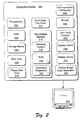
- Fig. 2 is block diagram that illustrates various components of an exemplary computing device.
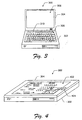
- Fig. 3 illustrates an exemplary portable computing device configured for an implementation of image copy to a second display.
- Fig. 4 further illustrates the exemplary portable computing device shown in Fig. 3.
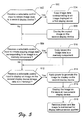
- Fig. 5 is a flow diagram that illustrates a method for image copy to a second display.
- Image copy to a second display is described in one implementation as a computer system that includes a first display device to display an image and an application program to copy the image displayed on the first display device to a second display device.
- a selectable control when selected, initiates that the application program copy the image displayed on the first display device to the second display device.
- a portable computing device in another image copy to a second display implementation, includes a display, such as an LCD, integrated into a first side of a housing lid for the computing device.
- the housing lid also includes a non-volatile display integrated into a second side of the housing lid.
- the non-volatile display is viewable when the housing lid is positioned over the housing base of the computing device, such as when the housing lid is folded down over the housing base.
- the portable computing device also includes a selectable control such as a push-button or programmable keyboard input that, when selected, initiates an application program to copy an image displayed on the display to the non-volatile display such that the image is maintained for display without power applied to the non-volatile display.
- the portable computing device with the non-volatile display provides that an image, such as a daily schedule, a photograph, a phone number directory, a map, identification information associated with the computing device and/or a user of the device, or any other combination of text and picture images, is maintained and viewable when the computer is shut-down and folded for transport.
- the viewable non-volatile display is a quick information reference for any traveler, business person, driver of a vehicle, and the like. Further, the information displayed on the non-volatile display is customizable as any combination of text and picture images for each individual as needed.
- a user of the portable computing device can select and customize the reference information on the first display device, initiate the image copy application, and have the selected information available for viewing on the non-volatile display after shutting down the computing device.
- Fig. 1 illustrates various components of an exemplary image copy system 100 in which image copy to a second display can be implemented.
- Image copy system 100 includes a computing device 102 connected to a first display device 104 via an image data transfer link 106, and the computing device 102 connected to a second display device 108 via an image data transfer link 110.
- computing device 102 can be a portable computer with an integrated display, such as an LCD, and a second integrated display or connected to a second independent display.
- Computing device 102 includes a selectable control 112 that, when selected by a user of the device, initiates an application program 114 to copy an image 116 displayed on the first display device 104 to the second display device 108.
- the copy of image 116 is identified as image 118 on the second display device 108.
- the selectable control 112 can be implemented as a push-button on computing device 102, as a programmed keyboard input, as a selectable interface control 120 displayed on the first display device 104, or as any other type of selectable control.
- the second display device 108 can be implemented to acquire the display signals communicated from a display controller (not shown) in computing device 102 which is utilized to generate display data for both the first display device 104 and for the second display device 108.
- a display controller not shown
- This provides a low-cost and straight-forward method to implement image copy to a second display with a single display controller for both display devices if the electrical signal format for both of the display devices is the same.
- Fig. 2 illustrates various components of an exemplary computing device 200 that can be utilized to implement image copy to a second display.
- Computing device 200 includes one or more processors 202 (e.g., microprocessors) which process various instructions to control the operation of computing device 200 and to communicate with other electronic and computing devices.
- processors 202 e.g., microprocessors
- Computing device 200 can be implemented with one or more memory components, examples of which include a random access memory (RAM) 204, an internal or external storage media 206, a disk drive 208, a floppy disk drive 210, a removable disc drive 212 (e.g., one of any CD and/or DVD formatted media standards), and a non-volatile memory 214 (e.g., ROM, Flash, EPROM, EEPROM, etc.) all of which provide data storage mechanisms for computing device 200.
- RAM random access memory
- RAM random access memory
- disk drive 208 e.g., an internal or external storage media 206
- a floppy disk drive 210 e.g., a magnetic tape
- a removable disc drive 212 e.g., one of any CD and/or DVD formatted media standards
- non-volatile memory 214 e.g., ROM, Flash, EPROM, EEPROM, etc.
- An operating system 216, BIOS 218, and one or more application programs 220 can be stored in non-volatile memory 214 and executed on a processor 202 to provide a runtime environment.
- a runtime environment facilitates extensibility of computing device 200 by defining interfaces that allow the one or more application programs 220 to interact with computing device 200.
- Examples of application programs 220 that can be implemented in computing device 200 include a Web browser (e.g., "World Wide Web"), an email program to facilitate electronic mail, and so on.
- a display image copy application 222 can be stored in non-volatile memory 214 and can be implemented as a software component of the BIOS 218 or as one of the application programs 220 that execute on a processor 202.
- the display image copy application 222 implements image copy to a second display.
- display image copy application 222 is illustrated and described as a single application configured to perform several functions of image copy to a second display, the display image copy application 222 can be implemented as several component applications distributed to each perform one or more functions in computing device 200.
- Computing device 200 further includes one or more communication interfaces 224 and a modem 226 that each provide a mechanism for computing device 200 to communicate with other electronic and computing devices.
- a communication interface 224 can be implemented as a serial and/or parallel interface, a universal serial bus (USB) interface, a wireless interface, as any one of many network interfaces, and/or as any other type of communication interface.
- a wireless interface enables computing device 200 to receive input commands and communicate information via infrared (IR), 802.11, Bluetooth, or similar RF communication link.
- IR infrared
- a network interface allows devices coupled to a common data communication network to communicate information with computing device 200.
- a serial and/or parallel interface provides a data communication path directly between computing device 200 and another electronic or computing device.
- Computing device 200 has integrated and/or external user input devices 228 which can include a keyboard, mouse, pointing device, and/or other input devices to interact with, and to input information to computing device 200.
- Computing device 200 may also communicate with and/or receive input information from other handheld input devices such as a personal digital assistant (PDA), handheld computer, wireless phone, and the like.
- PDA personal digital assistant
- Computing device 200 can include a display device 230, such as an integrated LCD for a portable or laptop computer, for a personal digital assistant (PDA), or for a similar mobile computing device.
- Display device 230 may also include a second integrated display device 232 and/or be connected to an external display device 234.
- a system bus typically connects the various components within computing device 200.
- a system bus can be implemented as one or more of any of several types of bus structures, including a memory bus or memory controller, a peripheral bus, an accelerated graphics port, or a local bus using any of a variety of bus architectures.
- computing device 200 General reference is made herein to computing device 200 and, although specific examples refer to a portable, or otherwise mobile, computing device having particular functionalities, such examples are not meant to limit the scope of the claims or the description, but are meant to provide a specific understanding of the described implementations.
- the described components of computing device 200 and the portable computing devices are merely exemplary, and are not intended to limit application of the claimed subject matter to devices that include only these components. Accordingly, other devices having components different from and/or in addition to those described herein can be used in implementing the described techniques and systems.
- Fig. 3 illustrates an example of a portable computing device 300 which can include one or more of the components of the exemplary computing device 200 (Fig. 2).
- Portable computing device 300 has a housing base 302 and a housing top 304 which are coupled together via a hinge or other flexible joint (not shown) to permit housing top 304 to fold down over housing base 302.
- a keyboard assembly 306 is mounted within housing base 302 and a flat panel display 308 is mounted within housing top 304.
- a selectable control 310 is shown as a push-button in housing base 302.
- display image copy application 222 (Fig. 2) is initiated to copy an image displayed on the flat panel display 308 to a second display device integrated into the housing top (shown in Fig. 4).
- the selectable control to initiate the display image copy application 222 can also be implemented as a programmed keyboard input with any one or combination of keys in keyboard assembly 306, or as a selectable interface control displayed on flat panel display 308.
- Fig. 4 further illustrates portable computing device 300 with the housing top 304 positioned over the housing base 302 to show a second display device 402 integrated into the housing top 304.
- the second display device 402 is viewable when the housing top 304 is folded down over the housing base 302.
- the second display device 402 can be implemented as a non-volatile display that maintains an image for display without power applied to the display device.
- Examples of a non-volatile display 402 are available from the E ⁇ Ink Corporation and are described by Jacobson in U.S. Patent No. 6,124,851 and by Albert et al. in U.S. Patent No. 6,017,584. Jacobson describes a page display that includes address lines and electronically addressable contrast media which may be bistable media such that text or images written to the page display can be maintained without the application of power.
- Portable computing device 300 also includes a second selectable control 404 that is accessible when the housing top 304 is positioned over the housing base 302.
- selectable control 404 initiates the display image copy application 222 (Fig. 2) to generate a second image for display on display device 402.
- Image data for the second image can be maintained by one or more of the memory components in exemplary computing device 200 (Fig. 2) and the image data can be retrieved for display.
- Computer-executable instructions include routines, programs, objects, components, data structures, and the like that perform particular functions or implement particular abstract data types.
- Fig. 5 illustrates a method 500 for image copy to a second display.
- the order in which the method is described is not intended to be construed as a limitation, and any number of the described method blocks can be combined in any order to implement the method.
- the method can be implemented in any suitable hardware, software, firmware, or combination thereof.
- a selectable control input is received to initiate image copy to a second display device.
- a user of computing device 102 (Fig. 1) initiates push-button selectable control 112 to initiate that application program 114 copy image 116 displayed on display device 104 to display device 108 which is shown as image 118.
- Selectable control 112 can be embodied as selectable interface control 120 displayed on display device 104, as push-button selectable control 310 in the housing base of portable computer 300 (Fig. 3), or as a programmed keyboard input with any one or combination of keys in keyboard assembly 306.
- image data corresponding to an image displayed on a first display device is copied.
- display image copy application 222 (Fig. 2) copies, or otherwise reads, each bit of image data corresponding to image 116 displayed on the first display device 104.
- the "copy" operation may be implemented by enabling the secondary display to acquire the display signals (e.g., image data) communicated from a single display controller utilized by both the first and second displays. This provides a low-cost and straight-forward method to implement image copy to a second display.
- the copied image is displayed on the second display device.
- display image copy application writes each bit of the image data to the second display device 108 to display image 118.
- Displaying the image data on the second display device includes maintaining the image for display without power applied.
- non-volatile display 402 (Fig. 4) maintains the displayed image without power applied (i.e., after the power has been removed, or otherwise turned off).
- a selectable control input is received to initiate copying image data corresponding to an image displayed on the first display device to a memory component.
- display image copy application 222 in computing device 200 can be implemented to copy each bit of image data corresponding to image 116 displayed on the first display device 104 (Fig. 1) to any one of the memory components in computing device 200.
- the image data is copied, or otherwise stored, in a memory component.
- a selectable control input is received to display an image on the second display device, where image data corresponding to the image is maintained with a memory component.
- a user of computing device 300 initiates selectable control 404 to initiate that display image copy application 222 read image data from a memory component in the computing device and display an image corresponding to the image data on non-volatile display 402.
- power is applied to generate the image for display on the second display device.
- computing device 300 may be shut off with the housing top folded over the housing base as illustrated in Fig. 4 while non-volatile display 402 maintains the displayed image without power applied.
- power is applied to computing device 300 to facilitate retrieving the image data from a memory component and generating the image for display.
- the image is displayed on the non-volatile display.
- the power is removed and the image is maintained for display on the non-volatile second display device without power applied.
Landscapes
- Engineering & Computer Science (AREA)
- Theoretical Computer Science (AREA)
- Human Computer Interaction (AREA)
- Physics & Mathematics (AREA)
- General Engineering & Computer Science (AREA)
- General Physics & Mathematics (AREA)
- User Interface Of Digital Computer (AREA)
- Digital Computer Display Output (AREA)
- Controls And Circuits For Display Device (AREA)
- Liquid Crystal Display Device Control (AREA)
- Control Of Indicators Other Than Cathode Ray Tubes (AREA)
Abstract
Description
- This invention relates to information display and, in particular, to image copy to a second display.
- A computer can be connected to two display devices, such as a desktop personal computer connected to two monitors or a laptop computer with an integrated LCD display and connected to a second monitor. Additionally, a laptop computer having a second display on the other side of the first display is difficult to use in traditional modes because it is not readily visible to a user of the device. Connecting a computer to two display devices typically requires two display drivers in the computer.
- Each display connected to a computer can be configured to display a different application, such as a text editor on one display and a Web page on the other. However, it is not intuitive to a user how to setup two different displays driven with a single computer. Conventionally, a user can drag a display icon from the first display in the direction of the second display, or the second display can be accessed as a second device. Further, when the computer is shut down, the information displayed on the two displays is not available for reference by the user until the computer is again turned on and the displays are established.
- In an implementation, a computer system includes a first display device to display an image and includes an application program to copy the image displayed on the first display device to a second display device. A selectable control, when selected, initiates that the application program copy the image displayed on the first display device to the second display device.
- In one implementation, a portable computing device includes a display device and a non-volatile display device. A selectable control, when selected, initiates that an application program copy the image displayed on the display device to the non-volatile display device such that the image is maintained for display without power applied.
- The same numbers are used throughout the drawings to reference like features and components.
- Fig. 1 illustrates various components of an exemplary image copy system.
- Fig. 2 is block diagram that illustrates various components of an exemplary computing device.
- Fig. 3 illustrates an exemplary portable computing device configured for an implementation of image copy to a second display.
- Fig. 4 further illustrates the exemplary portable computing device shown in Fig. 3.
- Fig. 5 is a flow diagram that illustrates a method for image copy to a second display.
- Image copy to a second display is described in one implementation as a computer system that includes a first display device to display an image and an application program to copy the image displayed on the first display device to a second display device. A selectable control, when selected, initiates that the application program copy the image displayed on the first display device to the second display device.
- In another image copy to a second display implementation, a portable computing device includes a display, such as an LCD, integrated into a first side of a housing lid for the computing device. The housing lid also includes a non-volatile display integrated into a second side of the housing lid. The non-volatile display is viewable when the housing lid is positioned over the housing base of the computing device, such as when the housing lid is folded down over the housing base. The portable computing device also includes a selectable control such as a push-button or programmable keyboard input that, when selected, initiates an application program to copy an image displayed on the display to the non-volatile display such that the image is maintained for display without power applied to the non-volatile display.
- The portable computing device with the non-volatile display provides that an image, such as a daily schedule, a photograph, a phone number directory, a map, identification information associated with the computing device and/or a user of the device, or any other combination of text and picture images, is maintained and viewable when the computer is shut-down and folded for transport. The viewable non-volatile display is a quick information reference for any traveler, business person, driver of a vehicle, and the like. Further, the information displayed on the non-volatile display is customizable as any combination of text and picture images for each individual as needed. A user of the portable computing device can select and customize the reference information on the first display device, initiate the image copy application, and have the selected information available for viewing on the non-volatile display after shutting down the computing device.
- Fig. 1 illustrates various components of an exemplary
image copy system 100 in which image copy to a second display can be implemented.Image copy system 100 includes acomputing device 102 connected to afirst display device 104 via an imagedata transfer link 106, and thecomputing device 102 connected to asecond display device 108 via an imagedata transfer link 110. In an implementation,computing device 102 can be a portable computer with an integrated display, such as an LCD, and a second integrated display or connected to a second independent display. -
Computing device 102 includes aselectable control 112 that, when selected by a user of the device, initiates anapplication program 114 to copy animage 116 displayed on thefirst display device 104 to thesecond display device 108. The copy ofimage 116 is identified asimage 118 on thesecond display device 108. Theselectable control 112 can be implemented as a push-button oncomputing device 102, as a programmed keyboard input, as aselectable interface control 120 displayed on thefirst display device 104, or as any other type of selectable control. - As an alternative to
application program 114 copying theimage 116, thesecond display device 108 can be implemented to acquire the display signals communicated from a display controller (not shown) incomputing device 102 which is utilized to generate display data for both thefirst display device 104 and for thesecond display device 108. This provides a low-cost and straight-forward method to implement image copy to a second display with a single display controller for both display devices if the electrical signal format for both of the display devices is the same. - Fig. 2 illustrates various components of an
exemplary computing device 200 that can be utilized to implement image copy to a second display.Computing device 200 includes one or more processors 202 (e.g., microprocessors) which process various instructions to control the operation ofcomputing device 200 and to communicate with other electronic and computing devices. -
Computing device 200 can be implemented with one or more memory components, examples of which include a random access memory (RAM) 204, an internal orexternal storage media 206, adisk drive 208, afloppy disk drive 210, a removable disc drive 212 (e.g., one of any CD and/or DVD formatted media standards), and a non-volatile memory 214 (e.g., ROM, Flash, EPROM, EEPROM, etc.) all of which provide data storage mechanisms forcomputing device 200. - An
operating system 216,BIOS 218, and one ormore application programs 220 can be stored innon-volatile memory 214 and executed on aprocessor 202 to provide a runtime environment. A runtime environment facilitates extensibility ofcomputing device 200 by defining interfaces that allow the one ormore application programs 220 to interact withcomputing device 200. Examples ofapplication programs 220 that can be implemented incomputing device 200 include a Web browser (e.g., "World Wide Web"), an email program to facilitate electronic mail, and so on. - Further, a display
image copy application 222 can be stored innon-volatile memory 214 and can be implemented as a software component of theBIOS 218 or as one of theapplication programs 220 that execute on aprocessor 202. The displayimage copy application 222 implements image copy to a second display. Although displayimage copy application 222 is illustrated and described as a single application configured to perform several functions of image copy to a second display, the displayimage copy application 222 can be implemented as several component applications distributed to each perform one or more functions incomputing device 200. -
Computing device 200 further includes one ormore communication interfaces 224 and amodem 226 that each provide a mechanism forcomputing device 200 to communicate with other electronic and computing devices. Acommunication interface 224 can be implemented as a serial and/or parallel interface, a universal serial bus (USB) interface, a wireless interface, as any one of many network interfaces, and/or as any other type of communication interface. A wireless interface enablescomputing device 200 to receive input commands and communicate information via infrared (IR), 802.11, Bluetooth, or similar RF communication link. A network interface allows devices coupled to a common data communication network to communicate information withcomputing device 200. Similarly, a serial and/or parallel interface provides a data communication path directly betweencomputing device 200 and another electronic or computing device. -
Computing device 200 has integrated and/or external user input devices 228 which can include a keyboard, mouse, pointing device, and/or other input devices to interact with, and to input information to computingdevice 200.Computing device 200 may also communicate with and/or receive input information from other handheld input devices such as a personal digital assistant (PDA), handheld computer, wireless phone, and the like. -
Computing device 200 can include adisplay device 230, such as an integrated LCD for a portable or laptop computer, for a personal digital assistant (PDA), or for a similar mobile computing device.Computing device 200 may also include a second integrateddisplay device 232 and/or be connected to anexternal display device 234. - Although not shown, a system bus typically connects the various components within
computing device 200. A system bus can be implemented as one or more of any of several types of bus structures, including a memory bus or memory controller, a peripheral bus, an accelerated graphics port, or a local bus using any of a variety of bus architectures. - General reference is made herein to computing
device 200 and, although specific examples refer to a portable, or otherwise mobile, computing device having particular functionalities, such examples are not meant to limit the scope of the claims or the description, but are meant to provide a specific understanding of the described implementations. Furthermore, the described components ofcomputing device 200 and the portable computing devices are merely exemplary, and are not intended to limit application of the claimed subject matter to devices that include only these components. Accordingly, other devices having components different from and/or in addition to those described herein can be used in implementing the described techniques and systems. - Fig. 3 illustrates an example of a
portable computing device 300 which can include one or more of the components of the exemplary computing device 200 (Fig. 2).Portable computing device 300 has ahousing base 302 and ahousing top 304 which are coupled together via a hinge or other flexible joint (not shown) to permithousing top 304 to fold down overhousing base 302. Akeyboard assembly 306 is mounted withinhousing base 302 and aflat panel display 308 is mounted withinhousing top 304. - A
selectable control 310 is shown as a push-button inhousing base 302. When selected, or otherwise pushed by a user of theportable computing device 300, display image copy application 222 (Fig. 2) is initiated to copy an image displayed on theflat panel display 308 to a second display device integrated into the housing top (shown in Fig. 4). As described above, the selectable control to initiate the displayimage copy application 222 can also be implemented as a programmed keyboard input with any one or combination of keys inkeyboard assembly 306, or as a selectable interface control displayed onflat panel display 308. - Fig. 4 further illustrates
portable computing device 300 with thehousing top 304 positioned over thehousing base 302 to show asecond display device 402 integrated into thehousing top 304. Thesecond display device 402 is viewable when thehousing top 304 is folded down over thehousing base 302. - The
second display device 402 can be implemented as a non-volatile display that maintains an image for display without power applied to the display device. Examples of anon-volatile display 402 are available from the E· Ink Corporation and are described by Jacobson in U.S. Patent No. 6,124,851 and by Albert et al. in U.S. Patent No. 6,017,584. Jacobson describes a page display that includes address lines and electronically addressable contrast media which may be bistable media such that text or images written to the page display can be maintained without the application of power. -
Portable computing device 300 also includes a secondselectable control 404 that is accessible when thehousing top 304 is positioned over thehousing base 302. When selected by a user ofcomputing device 300,selectable control 404 initiates the display image copy application 222 (Fig. 2) to generate a second image for display ondisplay device 402. Image data for the second image can be maintained by one or more of the memory components in exemplary computing device 200 (Fig. 2) and the image data can be retrieved for display. - Methods for image copy to a second display may be described in the general context of computer-executable instructions located in computer storage media, including memory storage devices. Generally, computer-executable instructions include routines, programs, objects, components, data structures, and the like that perform particular functions or implement particular abstract data types.
- Fig. 5 illustrates a
method 500 for image copy to a second display. The order in which the method is described is not intended to be construed as a limitation, and any number of the described method blocks can be combined in any order to implement the method. Furthermore, the method can be implemented in any suitable hardware, software, firmware, or combination thereof. - At
block 502, a selectable control input is received to initiate image copy to a second display device. For example, a user of computing device 102 (Fig. 1) initiates push-buttonselectable control 112 to initiate thatapplication program 114copy image 116 displayed ondisplay device 104 to displaydevice 108 which is shown asimage 118.Selectable control 112 can be embodied asselectable interface control 120 displayed ondisplay device 104, as push-buttonselectable control 310 in the housing base of portable computer 300 (Fig. 3), or as a programmed keyboard input with any one or combination of keys inkeyboard assembly 306. - At
block 504, image data corresponding to an image displayed on a first display device is copied. For example, display image copy application 222 (Fig. 2) copies, or otherwise reads, each bit of image data corresponding to image 116 displayed on thefirst display device 104. Alternatively, if the electrical signal format of the second display is the same as the first display device, then the "copy" operation may be implemented by enabling the secondary display to acquire the display signals (e.g., image data) communicated from a single display controller utilized by both the first and second displays. This provides a low-cost and straight-forward method to implement image copy to a second display. - At
block 506, the copied image is displayed on the second display device. For example, display image copy application writes each bit of the image data to thesecond display device 108 to displayimage 118. Displaying the image data on the second display device includes maintaining the image for display without power applied. For example, non-volatile display 402 (Fig. 4) maintains the displayed image without power applied (i.e., after the power has been removed, or otherwise turned off). - At
block 508, a selectable control input is received to initiate copying image data corresponding to an image displayed on the first display device to a memory component. For example, displayimage copy application 222 in computing device 200 (Fig. 2) can be implemented to copy each bit of image data corresponding to image 116 displayed on the first display device 104 (Fig. 1) to any one of the memory components incomputing device 200. Atblock 510, the image data is copied, or otherwise stored, in a memory component. - At
block 512, a selectable control input is received to display an image on the second display device, where image data corresponding to the image is maintained with a memory component. For example, a user of computing device 300 (Fig. 4) initiatesselectable control 404 to initiate that displayimage copy application 222 read image data from a memory component in the computing device and display an image corresponding to the image data onnon-volatile display 402. - At
block 514, power is applied to generate the image for display on the second display device. For example,computing device 300 may be shut off with the housing top folded over the housing base as illustrated in Fig. 4 whilenon-volatile display 402 maintains the displayed image without power applied. When receiving the selectable control input to display a next image, power is applied tocomputing device 300 to facilitate retrieving the image data from a memory component and generating the image for display. Atblock 516, the image is displayed on the non-volatile display. Atblock 518, the power is removed and the image is maintained for display on the non-volatile second display device without power applied. - Although the invention has been described in language specific to structural features and/or methods, it is to be understood that the invention defined in the appended claims is not necessarily limited to the specific features or methods described. Rather, the specific features and methods are disclosed as preferred forms of implementing the claimed invention.
Claims (10)
- A computer system (100), comprising:a first display device (104) configured to display an image (116);an application program (114) configured to copy the image (116) displayed on the first display device (104) to a second display device (108); anda selectable control (112) configured to initiate that the application program (114) copy the image (116) displayed on the first display device (104) to the second display device (108).
- A computer system (100) as recited in claim 1, further comprising:wherein the first display device (308) is integrated into the first side of the housing top (304); anda housing base (302);a housing top (304) connected to the housing base (302), the housing top (304) having at least a first side and a second side;
wherein the second display device (402) is integrated into the second side of the housing top (304) such that the second display device (402) is viewable when the housing top (304) is positioned over the housing base (302). - A computer system as recited in claim 2, wherein the second display device (402) is a non-volatile display configured to maintain the image (118) for display without power applied.
- A portable computing device (300), comprising:a display device (308) configured to display one or more images;a non-volatile display device (402) configured to display any of the one or more images, and further configured to maintain the one or more images for display without power applied; anda selectable control (310) configured to initiate that an image displayed on the display device (308) be duplicated on the non-volatile display device (402).
- A portable computing device (300) as recited in claim 4, further comprising:wherein the display device (308) is integrated into the first side of the housing top (304); anda housing base (302);a housing top (304) connected to the housing base (302), the housing top (304) having at least a first side and a second side;
wherein the non-volatile display device (402) is integrated into the second side of the housing top (304) such that the non-volatile display device (402) is viewable when the housing top (304) is positioned over the housing base (302). - A portable computing device-(300) as recited in claim 5, further comprising:wherein the second selectable control (404) is accessible when the housing top (304) is positioned over the housing base (302).a memory component (204) configured to maintain image data corresponding to a second image;a second selectable control (404) configured to initiate that a second image be generated for display on the non-volatile display device (402); and
- A method (500), comprising:receiving a selectable control input (502) to initiate image copy to a second display device (108);copying image data (504) corresponding to the image (116) displayed on a first display device (104); anddisplaying (506) the image (118) on the second display device (108).
- A method (500) as recited in claim 7, wherein displaying (506) includes maintaining the image (118) for display on the second display device (108) without power applied.
- A method (500) as recited in claim 7, wherein copying (504) includes acquiring the image data as it is communicated to the first display device (104) for display on the second display device (108).
- A method (500) as recited in claim 7, further comprising:receiving a second selectable control input (512) to display a second image on the second display device (108), wherein image data corresponding to the second image is maintained with a memory component (204);applying power (514) to generate the second image for display on the second display device (108); andremoving power (518) such that the second image display is maintained on the second display device (108) without power applied.
Applications Claiming Priority (2)
| Application Number | Priority Date | Filing Date | Title |
|---|---|---|---|
| US265837 | 2002-10-07 | ||
| US10/265,837 US7027035B2 (en) | 2002-10-07 | 2002-10-07 | Image copy to a second display |
Publications (3)
| Publication Number | Publication Date |
|---|---|
| EP1408402A2 true EP1408402A2 (en) | 2004-04-14 |
| EP1408402A3 EP1408402A3 (en) | 2009-07-08 |
| EP1408402B1 EP1408402B1 (en) | 2016-03-23 |
Family
ID=32030334
Family Applications (1)
| Application Number | Title | Priority Date | Filing Date |
|---|---|---|---|
| EP03007804.2A Expired - Lifetime EP1408402B1 (en) | 2002-10-07 | 2003-04-04 | Image copy to a second display |
Country Status (3)
| Country | Link |
|---|---|
| US (1) | US7027035B2 (en) |
| EP (1) | EP1408402B1 (en) |
| JP (1) | JP2004133936A (en) |
Cited By (4)
| Publication number | Priority date | Publication date | Assignee | Title |
|---|---|---|---|---|
| EP2151817A3 (en) * | 2008-08-07 | 2010-12-01 | Brother Kogyo Kabushiki Kaisha | Portable display devices and programs |
| EP2151733A3 (en) * | 2008-08-07 | 2010-12-01 | Brother Kogyo Kabushiki Kaisha | Portable display devices and programs |
| EP2151818A3 (en) * | 2008-08-07 | 2010-12-08 | Brother Kogyo Kabushiki Kaisha | Portable display devices and programs |
| EP2202632A3 (en) * | 2008-12-24 | 2011-05-11 | Brother Kogyo Kabushiki Kaisha | Display control apparatus, display control method, and computer-readable medium storing display control program |
Families Citing this family (24)
| Publication number | Priority date | Publication date | Assignee | Title |
|---|---|---|---|---|
| US20030160755A1 (en) * | 2002-02-28 | 2003-08-28 | Palm, Inc. | Detachable expandable flexible display |
| US7623892B2 (en) | 2003-04-02 | 2009-11-24 | Palm, Inc. | System and method for enabling a person to switch use of computing devices |
| JP4161814B2 (en) * | 2003-06-16 | 2008-10-08 | ソニー株式会社 | Input method and input device |
| US20040263424A1 (en) * | 2003-06-30 | 2004-12-30 | Okuley James M. | Display system and method |
| US8260857B2 (en) | 2003-10-23 | 2012-09-04 | Microsoft Corporation | One to many data projection system and method |
| US7716273B2 (en) * | 2003-10-24 | 2010-05-11 | Microsoft Corporation | Systems and methods for projecting content from computing devices |
| EP1898611A1 (en) * | 2004-01-19 | 2008-03-12 | Sharp Kabushiki Kaisha | Display of images and menu icons in a portable communication terminal |
| US7834819B2 (en) * | 2004-04-01 | 2010-11-16 | Polyvision Corporation | Virtual flip chart method and apparatus |
| US7948448B2 (en) | 2004-04-01 | 2011-05-24 | Polyvision Corporation | Portable presentation system and methods for use therewith |
| US20070044028A1 (en) * | 2004-04-01 | 2007-02-22 | Dunn Michael H | Virtual flip chart method and apparatus |
| US8681140B2 (en) * | 2004-05-21 | 2014-03-25 | Semiconductor Energy Laboratory Co., Ltd. | Display device and electronic apparatus having the same |
| JP2006039919A (en) * | 2004-07-27 | 2006-02-09 | Pioneer Electronic Corp | Image sharing display system, terminal with image sharing function, and computer program |
| CN101098355A (en) * | 2006-06-30 | 2008-01-02 | 鸿富锦精密工业(深圳)有限公司 | Mobile communication device capable of fast dialing and fast dialing method thereof |
| US8108782B2 (en) * | 2006-11-09 | 2012-01-31 | Motorola Mobility, Inc. | Display management for communication devices with multiple displays |
| DE102006057097B4 (en) * | 2006-12-04 | 2012-10-11 | Siemens Ag | Display device for displaying a plant condition |
| US20090106849A1 (en) * | 2008-12-28 | 2009-04-23 | Hengning Wu | Portable Computer |
| US20110191478A1 (en) * | 2010-01-29 | 2011-08-04 | International Business Organization Name Machines Corporation | Quick access display |
| US20140129725A1 (en) * | 2012-11-07 | 2014-05-08 | Panasonic Corporation Of North America | SmartLight Interaction System |
| US10139925B2 (en) * | 2013-03-04 | 2018-11-27 | Microsoft Technology Licensing, Llc | Causing specific location of an object provided to a device |
| US9250761B2 (en) * | 2013-04-30 | 2016-02-02 | Microsoft Technology Licensing, Llc | Auto-grouping of application windows |
| KR20150025584A (en) * | 2013-08-29 | 2015-03-11 | 삼성전자주식회사 | Method for screen sharing and an electronic device |
| US10264213B1 (en) | 2016-12-15 | 2019-04-16 | Steelcase Inc. | Content amplification system and method |
| US11853634B2 (en) * | 2017-02-21 | 2023-12-26 | Jeffrey E. Koziol | Detachable display system |
| KR102442492B1 (en) * | 2019-12-17 | 2022-09-13 | 주식회사 한글과컴퓨터 | Electronic terminal device for copying and pasting image objects between web documents based on image storage path information and method of operation thereof |
Citations (1)
| Publication number | Priority date | Publication date | Assignee | Title |
|---|---|---|---|---|
| WO1998038822A1 (en) | 1997-02-28 | 1998-09-03 | Motorola Inc. | Electronic device with display viewable from two opposite sides |
Family Cites Families (24)
| Publication number | Priority date | Publication date | Assignee | Title |
|---|---|---|---|---|
| JPH06195151A (en) * | 1992-12-17 | 1994-07-15 | Brother Ind Ltd | Display device |
| US5508720A (en) * | 1994-02-02 | 1996-04-16 | Copytele, Inc. | Portable telecommunication device with removable electrophoretic display |
| EP0737908A1 (en) | 1995-04-12 | 1996-10-16 | Hewlett-Packard Company | Computer system having remotely operated interactive display |
| US5592361A (en) | 1995-04-13 | 1997-01-07 | Hewlett-Packard Company | Electronic device with identification card receptacle |
| US5841418A (en) | 1995-06-07 | 1998-11-24 | Cirrus Logic, Inc. | Dual displays having independent resolutions and refresh rates |
| US6017584A (en) | 1995-07-20 | 2000-01-25 | E Ink Corporation | Multi-color electrophoretic displays and materials for making the same |
| US6124851A (en) | 1995-07-20 | 2000-09-26 | E Ink Corporation | Electronic book with multiple page displays |
| US6107997A (en) * | 1996-06-27 | 2000-08-22 | Ure; Michael J. | Touch-sensitive keyboard/mouse and computing device using the same |
| US5768164A (en) * | 1996-04-15 | 1998-06-16 | Hewlett-Packard Company | Spontaneous use display for a computing system |
| BR7703079U (en) * | 1997-12-17 | 1999-06-15 | Athos Comolatti | Micro laptop computer with two flat screens |
| US6115618A (en) * | 1998-02-24 | 2000-09-05 | Motorola, Inc. | Portable electronic device with removable display |
| US6295038B1 (en) * | 1998-04-16 | 2001-09-25 | Carlton S. Rebeske | Laptop computer |
| US6542721B2 (en) * | 1999-10-11 | 2003-04-01 | Peter V. Boesen | Cellular telephone, personal digital assistant and pager unit |
| US20010054986A1 (en) * | 1999-05-18 | 2001-12-27 | Michael V. Leman | Pen-based split computer display |
| JP3689843B2 (en) * | 1999-08-27 | 2005-08-31 | ミネベア株式会社 | Key switch |
| JP2001100702A (en) * | 1999-09-29 | 2001-04-13 | Minolta Co Ltd | Information reproducing device |
| JP2001103568A (en) * | 1999-09-30 | 2001-04-13 | Toshiba Corp | Communication system, mobile communication device, portable information processing device, and data communication method used in this communication system |
| US6859219B1 (en) * | 1999-10-08 | 2005-02-22 | Gateway, Inc. | Method and apparatus having multiple display devices |
| JP3824833B2 (en) * | 2000-02-21 | 2006-09-20 | シャープ株式会社 | Information display device |
| AU2001268069A1 (en) | 2000-05-19 | 2001-12-03 | Technology Innovations, Llc | Apparatus for the display of embedded information |
| US20020109662A1 (en) * | 2001-02-12 | 2002-08-15 | Miller Leighton Thomas | Dual-screen computer display |
| US6741456B2 (en) * | 2001-04-18 | 2004-05-25 | Hewlett-Packard Development Company, L.P. | System and method for pivotably securing display housing to computer system |
| JP2003087865A (en) * | 2001-09-13 | 2003-03-20 | Nec Corp | Mobile communication system, its information sharing method and its program |
| US6879842B2 (en) * | 2002-05-31 | 2005-04-12 | Lavaflow, Llp | Foldable wireless communication device functioning as a cellular telephone and a personal digital assistant |
-
2002
- 2002-10-07 US US10/265,837 patent/US7027035B2/en not_active Expired - Lifetime
-
2003
- 2003-04-04 EP EP03007804.2A patent/EP1408402B1/en not_active Expired - Lifetime
- 2003-10-07 JP JP2003347947A patent/JP2004133936A/en not_active Withdrawn
Patent Citations (1)
| Publication number | Priority date | Publication date | Assignee | Title |
|---|---|---|---|---|
| WO1998038822A1 (en) | 1997-02-28 | 1998-09-03 | Motorola Inc. | Electronic device with display viewable from two opposite sides |
Cited By (5)
| Publication number | Priority date | Publication date | Assignee | Title |
|---|---|---|---|---|
| EP2151817A3 (en) * | 2008-08-07 | 2010-12-01 | Brother Kogyo Kabushiki Kaisha | Portable display devices and programs |
| EP2151733A3 (en) * | 2008-08-07 | 2010-12-01 | Brother Kogyo Kabushiki Kaisha | Portable display devices and programs |
| EP2151818A3 (en) * | 2008-08-07 | 2010-12-08 | Brother Kogyo Kabushiki Kaisha | Portable display devices and programs |
| US8194091B2 (en) | 2008-08-07 | 2012-06-05 | Brother Kogyo Kabushiki Kaisha | Portable display devices and programs |
| EP2202632A3 (en) * | 2008-12-24 | 2011-05-11 | Brother Kogyo Kabushiki Kaisha | Display control apparatus, display control method, and computer-readable medium storing display control program |
Also Published As
| Publication number | Publication date |
|---|---|
| US7027035B2 (en) | 2006-04-11 |
| EP1408402A3 (en) | 2009-07-08 |
| US20040070553A1 (en) | 2004-04-15 |
| EP1408402B1 (en) | 2016-03-23 |
| JP2004133936A (en) | 2004-04-30 |
Similar Documents
| Publication | Publication Date | Title |
|---|---|---|
| US7027035B2 (en) | Image copy to a second display | |
| US5845282A (en) | Method and apparatus for remotely accessing files from a desktop computer using a personal digital assistant | |
| US7046213B2 (en) | Apparatus and method for direct manipulation of electronic information | |
| US8311733B2 (en) | Interactive key frame image mapping system and method | |
| US20030179243A1 (en) | Information-processing apparatus with virtual display function and display control method for use in the apparatus | |
| JPH1031571A (en) | Immediate use display for computer system | |
| US20130057572A1 (en) | Multiple Display Device Taskbars | |
| EP0835486A1 (en) | Electronic presentation system using portable storage media | |
| JP2005276189A (en) | Method and apparatus for enabling application program compatibility with display device having improved pixel density | |
| CN107230445B (en) | Method and device for configuring screen parameters | |
| CN101460905A (en) | Demo device with double displays | |
| JPH0863135A (en) | Information processing device | |
| US7009600B2 (en) | Data processing system display screen including an image alteration area | |
| US20030043110A1 (en) | System and architecture of a personal mobile display | |
| WO2005059885A1 (en) | Information display device | |
| US20080140959A1 (en) | One-touch backup system | |
| US8359452B2 (en) | Image forming apparatus and method of overwriting for storage unit in image forming apparatus | |
| EP3260947B1 (en) | Information processing device, method for inputting and program | |
| CN109857298B (en) | Application starting method, device, equipment and storage medium | |
| US20020101406A1 (en) | Touch-controlled hot key device | |
| US10768670B2 (en) | Control method, electronic device and non-transitory computer readable recording medium device | |
| JP2002268868A (en) | Multi-monitor system | |
| US7899778B1 (en) | Category based user interface for management of auxiliary storage on a portable computer system | |
| US6964054B1 (en) | Method and apparatus for posting a computer having multiple video adapters | |
| JP2002283623A (en) | Printing equipment |
Legal Events
| Date | Code | Title | Description |
|---|---|---|---|
| PUAI | Public reference made under article 153(3) epc to a published international application that has entered the european phase |
Free format text: ORIGINAL CODE: 0009012 |
|
| AK | Designated contracting states |
Kind code of ref document: A2 Designated state(s): AT BE BG CH CY CZ DE DK EE ES FI FR GB GR HU IE IT LI LU MC NL PT RO SE SI SK TR |
|
| AX | Request for extension of the european patent |
Extension state: AL LT LV MK |
|
| PUAL | Search report despatched |
Free format text: ORIGINAL CODE: 0009013 |
|
| AK | Designated contracting states |
Kind code of ref document: A3 Designated state(s): AT BE BG CH CY CZ DE DK EE ES FI FR GB GR HU IE IT LI LU MC NL PT RO SE SI SK TR |
|
| AX | Request for extension of the european patent |
Extension state: AL LT LV MK |
|
| 17P | Request for examination filed |
Effective date: 20091013 |
|
| 17Q | First examination report despatched |
Effective date: 20100202 |
|
| AKX | Designation fees paid |
Designated state(s): DE FR GB |
|
| GRAJ | Information related to disapproval of communication of intention to grant by the applicant or resumption of examination proceedings by the epo deleted |
Free format text: ORIGINAL CODE: EPIDOSDIGR1 |
|
| GRAC | Information related to communication of intention to grant a patent modified |
Free format text: ORIGINAL CODE: EPIDOSCIGR1 |
|
| GRAP | Despatch of communication of intention to grant a patent |
Free format text: ORIGINAL CODE: EPIDOSNIGR1 |
|
| INTG | Intention to grant announced |
Effective date: 20151120 |
|
| INTG | Intention to grant announced |
Effective date: 20151202 |
|
| GRAS | Grant fee paid |
Free format text: ORIGINAL CODE: EPIDOSNIGR3 |
|
| GRAA | (expected) grant |
Free format text: ORIGINAL CODE: 0009210 |
|
| AK | Designated contracting states |
Kind code of ref document: B1 Designated state(s): DE FR GB |
|
| REG | Reference to a national code |
Ref country code: GB Ref legal event code: FG4D |
|
| REG | Reference to a national code |
Ref country code: DE Ref legal event code: R096 Ref document number: 60348696 Country of ref document: DE |
|
| REG | Reference to a national code |
Ref country code: DE Ref legal event code: R097 Ref document number: 60348696 Country of ref document: DE |
|
| PLBE | No opposition filed within time limit |
Free format text: ORIGINAL CODE: 0009261 |
|
| REG | Reference to a national code |
Ref country code: FR Ref legal event code: ST Effective date: 20161230 |
|
| STAA | Information on the status of an ep patent application or granted ep patent |
Free format text: STATUS: NO OPPOSITION FILED WITHIN TIME LIMIT |
|
| PG25 | Lapsed in a contracting state [announced via postgrant information from national office to epo] |
Ref country code: FR Free format text: LAPSE BECAUSE OF NON-PAYMENT OF DUE FEES Effective date: 20160523 |
|
| 26N | No opposition filed |
Effective date: 20170102 |
|
| PGFP | Annual fee paid to national office [announced via postgrant information from national office to epo] |
Ref country code: GB Payment date: 20190325 Year of fee payment: 17 |
|
| PGFP | Annual fee paid to national office [announced via postgrant information from national office to epo] |
Ref country code: DE Payment date: 20181207 Year of fee payment: 17 |
|
| REG | Reference to a national code |
Ref country code: DE Ref legal event code: R119 Ref document number: 60348696 Country of ref document: DE |
|
| PG25 | Lapsed in a contracting state [announced via postgrant information from national office to epo] |
Ref country code: DE Free format text: LAPSE BECAUSE OF NON-PAYMENT OF DUE FEES Effective date: 20201103 |
|
| GBPC | Gb: european patent ceased through non-payment of renewal fee |
Effective date: 20200404 |
|
| PG25 | Lapsed in a contracting state [announced via postgrant information from national office to epo] |
Ref country code: GB Free format text: LAPSE BECAUSE OF NON-PAYMENT OF DUE FEES Effective date: 20200404 |
|
| GRAP | Despatch of communication of intention to grant a patent |
Free format text: ORIGINAL CODE: EPIDOSNIGR1 |