EP1394714A2 - Setting device parameters to values associated with selected device-performable task - Google Patents
Setting device parameters to values associated with selected device-performable task Download PDFInfo
- Publication number
- EP1394714A2 EP1394714A2 EP03254258A EP03254258A EP1394714A2 EP 1394714 A2 EP1394714 A2 EP 1394714A2 EP 03254258 A EP03254258 A EP 03254258A EP 03254258 A EP03254258 A EP 03254258A EP 1394714 A2 EP1394714 A2 EP 1394714A2
- Authority
- EP
- European Patent Office
- Prior art keywords
- parameters
- subset
- task
- user
- parameter
- Prior art date
- Legal status (The legal status is an assumption and is not a legal conclusion. Google has not performed a legal analysis and makes no representation as to the accuracy of the status listed.)
- Withdrawn
Links
Images



Classifications
-
- B—PERFORMING OPERATIONS; TRANSPORTING
- B41—PRINTING; LINING MACHINES; TYPEWRITERS; STAMPS
- B41J—TYPEWRITERS; SELECTIVE PRINTING MECHANISMS, i.e. MECHANISMS PRINTING OTHERWISE THAN FROM A FORME; CORRECTION OF TYPOGRAPHICAL ERRORS
- B41J2/00—Typewriters or selective printing mechanisms characterised by the printing or marking process for which they are designed
- B41J2/005—Typewriters or selective printing mechanisms characterised by the printing or marking process for which they are designed characterised by bringing liquid or particles selectively into contact with a printing material
- B41J2/01—Ink jet
- B41J2/17—Ink jet characterised by ink handling
- B41J2/175—Ink supply systems ; Circuit parts therefor
- B41J2/17503—Ink cartridges
-
- G—PHYSICS
- G06—COMPUTING OR CALCULATING; COUNTING
- G06F—ELECTRIC DIGITAL DATA PROCESSING
- G06F3/00—Input arrangements for transferring data to be processed into a form capable of being handled by the computer; Output arrangements for transferring data from processing unit to output unit, e.g. interface arrangements
- G06F3/12—Digital output to print unit, e.g. line printer, chain printer
- G06F3/1201—Dedicated interfaces to print systems
- G06F3/1202—Dedicated interfaces to print systems specifically adapted to achieve a particular effect
- G06F3/1203—Improving or facilitating administration, e.g. print management
- G06F3/1205—Improving or facilitating administration, e.g. print management resulting in increased flexibility in print job configuration, e.g. job settings, print requirements, job tickets
-
- G—PHYSICS
- G06—COMPUTING OR CALCULATING; COUNTING
- G06F—ELECTRIC DIGITAL DATA PROCESSING
- G06F3/00—Input arrangements for transferring data to be processed into a form capable of being handled by the computer; Output arrangements for transferring data from processing unit to output unit, e.g. interface arrangements
- G06F3/12—Digital output to print unit, e.g. line printer, chain printer
- G06F3/1201—Dedicated interfaces to print systems
- G06F3/1202—Dedicated interfaces to print systems specifically adapted to achieve a particular effect
- G06F3/1203—Improving or facilitating administration, e.g. print management
- G06F3/1208—Improving or facilitating administration, e.g. print management resulting in improved quality of the output result, e.g. print layout, colours, workflows, print preview
-
- G—PHYSICS
- G06—COMPUTING OR CALCULATING; COUNTING
- G06F—ELECTRIC DIGITAL DATA PROCESSING
- G06F3/00—Input arrangements for transferring data to be processed into a form capable of being handled by the computer; Output arrangements for transferring data from processing unit to output unit, e.g. interface arrangements
- G06F3/12—Digital output to print unit, e.g. line printer, chain printer
- G06F3/1201—Dedicated interfaces to print systems
- G06F3/1223—Dedicated interfaces to print systems specifically adapted to use a particular technique
- G06F3/1237—Print job management
- G06F3/1253—Configuration of print job parameters, e.g. using UI at the client
- G06F3/1255—Settings incompatibility, e.g. constraints, user requirements vs. device capabilities
-
- G—PHYSICS
- G06—COMPUTING OR CALCULATING; COUNTING
- G06F—ELECTRIC DIGITAL DATA PROCESSING
- G06F3/00—Input arrangements for transferring data to be processed into a form capable of being handled by the computer; Output arrangements for transferring data from processing unit to output unit, e.g. interface arrangements
- G06F3/12—Digital output to print unit, e.g. line printer, chain printer
- G06F3/1201—Dedicated interfaces to print systems
- G06F3/1278—Dedicated interfaces to print systems specifically adapted to adopt a particular infrastructure
- G06F3/1284—Local printer device
-
- G—PHYSICS
- G06—COMPUTING OR CALCULATING; COUNTING
- G06F—ELECTRIC DIGITAL DATA PROCESSING
- G06F3/00—Input arrangements for transferring data to be processed into a form capable of being handled by the computer; Output arrangements for transferring data from processing unit to output unit, e.g. interface arrangements
- G06F3/12—Digital output to print unit, e.g. line printer, chain printer
- G06F3/1201—Dedicated interfaces to print systems
- G06F3/1223—Dedicated interfaces to print systems specifically adapted to use a particular technique
- G06F3/1237—Print job management
- G06F3/1253—Configuration of print job parameters, e.g. using UI at the client
Definitions
- Printers as well as other image-forming devices and other types of devices, have become increasingly sophisticated and complex. For example, even a low-end inkjet printer can usually print high quality prints of photographs taken with a digital camera. The same printer may also be used to print high quality black-and-white text-oriented documents, as well as lower-quality draft documents to conserve ink.
- a user selects a desired task to be performed by a device from a number of such tasks (102).
- a task is generally and non-restrictively defined as a complete and specific operation to be performed by the device.
- the desired task may be to print a high quality borderless photograph, a lower quality draft document, another type of print job, and so on.
- a parameter that relates to the type of media to be printed on may have choices including inkjet paper, standard paper, photo paper, and glossy photo paper.
- the task of printing a black-and-white text document may have associated therewith for this parameter the values of inkjet paper and standard paper, and not the values of photo paper and glossy photo paper. This is because black-and-white text documents will not typically be printed on photo paper or glossy photo paper.
- each parameter of the subset of device parameters associated with the desired task is thus set to its initial value (104), which is one of the allowable parameter values associated with the desired task.
- the initial values may be those that have been predetermined as optimal for the device to perform the desired task, in one embodiment.
- the user optionally can change the initial values to which the parameters of the subset have been set, to other allowable parameter values associated with the desired task selected (106).
- the user may also optionally save the current values for the subset of parameters, as he or she may have changed them from their initial values, under a new task (108).
- the method 100 is concluded by the device in question performing the desired task selected (110). That is, the device performs the desired task after it has at least set the subset of device parameters associated with this task to values associated with this task. The user may have also thereafter changed one or more of these device parameters to other allowable values associated with the desired task, and may have saved the current device parameter values under or as a new task, for later selection.
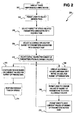
- the method 200 selects, or determines, for a subset of parameters associated with the desired task, initial parameter values for that task. This process is divided into 206, 208, 210. First, the method 200 selects, or determines, the subset of device-related parameters that are associated with the desired task selected, from all possible parameters of the device (206). That is, the method 200 selects the parameter subset based on the desired task selected, which may be the subset of parameters that are affected by performing the desired task with the device.
- the method 200 selects, or determines, allowable values for each of the device-related parameters of the subset, as associated with the desired task (208). That is, the method 200 selects the values that are allowable for each parameter of the subset of parameters, based on the desired task selected. Finally, of the allowable values for each parameter of the subset of parameters, the method 200 selects an initial, or default value (210). 206, 208, and 210 may be simultaneously performed by, for instance, looking up the desired task in a previously established database that lists the subset of parameters for the task, and the allowable values and the initial value for each of these parameters.
- the user is thus not encumbered with the ability to change all the parameters of the device among all the possible values for the parameters.
- the parameters tabbed frame 312 lists a subset of the parameters, based on the desired task that is to be performed by the device, and shows allowable values for each of these parameters, also based on the desired task that is to be performed by the device. Non-allowable combinations are eliminated and confusion and uncertainty on the part of the user are, therefore, preferably reduced, if not eliminated.
- the personal task area 418 permits the user to save under a new task the current values for the parameters within the areas 402, 404, 406, and 408, as one or more of which have been changed from their initial values.
- the default name of this new task is untitled, as indicated in the text box 420, but the user can and likely will enter his or her own name for the new task.
- the user selects the save button 422 to save the current values as the new task with the name given.
- FIG. 5 shows a system 500, according to an embodiment of the invention.
- the system 500 can be used to implement the methods 100 and 200 of FIGS. 1 and 2, respectively, as well as to implement the graphical user interface (GUI) of FIGs. 3 and 4, in one embodiment of the invention.
- the system 500 includes a computer 502 communicatively coupled to a device 504.
- the computer 502 may be a desktop computer, a laptop computer, or another type of computerized device.
- the device 504 may be a peripheral device for the computer 502, such as an image-forming device, like a laser, inkjet, or other type of printer, or another type of device.
- the computer 502 specifically includes a GUI component 506 and a device driver program 508.
- the GUI component 506 may be integrated with or separate from the device driver program 508.
- the GUI component 506, as is the device driver program 508, is a computer software program, made up of a number of computer software components, objects, sub-routines, modules, and so on.
- the GUI component 506 can be considered the means to perform its respective functionality.
- the GUI component 506, together with and/or separate from the driver program 508, may perform the methods of FIGs. 1 and 2, in one embodiment.
- the user interacts with the GUI component 506 to select a desired task to be performed using the device 504.
- the driver program 508 sets parameters of the device 504.
- a subset of parameters is non-uniquely based on the desired task selected by the user within the GUI component 506. That is, a given parameter may be in more than one subset for more than one task selectable by the user.
- the GUI component 506 may utilize the GUI windows of FIGs. 3 and 4, in one embodiment.
- the user may also interact with the GUI component 506 to change the specific values for the parameters of the subset that are allowed for the desired task selected by the user. As with the parameter subsets, specific values for the parameters may be allowable for more than one selectable task. Finally, the user may interact with the GUI component 506 to save the values for the parameters of the subset based on the desired task selected by the user under a new task, where the user has changed one or more of these values.
Landscapes
- Engineering & Computer Science (AREA)
- Theoretical Computer Science (AREA)
- Human Computer Interaction (AREA)
- Physics & Mathematics (AREA)
- General Engineering & Computer Science (AREA)
- General Physics & Mathematics (AREA)
- Quality & Reliability (AREA)
- Accessory Devices And Overall Control Thereof (AREA)
- Stored Programmes (AREA)
- Record Information Processing For Printing (AREA)
- User Interface Of Digital Computer (AREA)
Abstract
Description
Claims (10)
- A method (100) comprising:selecting by a user a desired task from a plurality of tasks performable by a device having a plurality of parameters (102); and,setting each of a subset of the plurality of parameters associated with the desired task to a value associated with the desired task (104).
- The method of claim 1, further comprising changing by the user one or more of the subset of the plurality of parameters to another value that is allowable for the device to perform the desired task (106).
- The method of claim 2, further comprising saving a current value of each of the subset of the plurality of parameters under an associated new task of the plurality of tasks performable using the device (108).
- The method of claim 1, further comprising performing the desired task by the device (110).
- A method (200) comprising:permitting a user to select a desired task from a plurality of tasks performable using a device (204);selecting a subset of device-related parameters from a plurality of device-related parameters based on the desired task selected (206);selecting a value for each device-related parameter of the subset of device-related parameters based on the desired task selected (210); and,configuring the device based on the value selected for each device related-parameter of the subset of device-related parameters (212).
- The method of claim 5, further initially comprising displaying the plurality of tasks performable using the device (202).
- The method of claim 5, further comprising, after selecting the value for each device-related parameter of the subset of device-related parameters,
selecting one or more allowable values, inclusive of the value selected, for each device-related parameter of the subset of device-related parameters, based on the desired task selected (208);
permitting the user to change the value selected for any device-related parameter of the subset of device-related parameter to any other of the one or more allowable values for the device-related parameter (218). - The method of claim 7, further comprising, prior to selecting the one or more allowable values, displaying the subset of device-related parameters (216).
- The method of claim 7, further comprising, after selecting the one or more allowable values,
displaying the one or more allowable values for each device-related parameter of the subset of device-related parameters (216); and,
highlighting the value selected for each device-related parameter of the subset of device-related parameters (216). - The method of claim 7, further comprising permitting the user to save the value selected for each device-related parameter of the subset of device-related parameters under an associated new task of the plurality of tasks performable using the device (220).
Applications Claiming Priority (2)
| Application Number | Priority Date | Filing Date | Title |
|---|---|---|---|
| US193196 | 2002-07-11 | ||
| US10/193,196 US20040008360A1 (en) | 2002-07-11 | 2002-07-11 | Setting device parameters to values associated with selected device-performable task |
Publications (2)
| Publication Number | Publication Date |
|---|---|
| EP1394714A2 true EP1394714A2 (en) | 2004-03-03 |
| EP1394714A3 EP1394714A3 (en) | 2004-04-07 |
Family
ID=30114477
Family Applications (1)
| Application Number | Title | Priority Date | Filing Date |
|---|---|---|---|
| EP03254258A Withdrawn EP1394714A3 (en) | 2002-07-11 | 2003-07-04 | Setting device parameters to values associated with selected device-performable task |
Country Status (2)
| Country | Link |
|---|---|
| US (1) | US20040008360A1 (en) |
| EP (1) | EP1394714A3 (en) |
Cited By (1)
| Publication number | Priority date | Publication date | Assignee | Title |
|---|---|---|---|---|
| CN1294478C (en) * | 2004-12-20 | 2007-01-10 | 北京北大方正电子有限公司 | Method of job submitting and parameter setting of printing server |
Families Citing this family (9)
| Publication number | Priority date | Publication date | Assignee | Title |
|---|---|---|---|---|
| JP4136817B2 (en) * | 2002-08-05 | 2008-08-20 | キヤノン株式会社 | Digital camera and printer |
| US20060039020A1 (en) * | 2004-08-20 | 2006-02-23 | Canon Kabushiki Kaisha | Image supply device, control method thereof and printing system |
| US7478265B2 (en) * | 2004-10-14 | 2009-01-13 | Hewlett-Packard Development Company, L.P. | Error recovery for input/output operations |
| US7882440B2 (en) * | 2005-10-28 | 2011-02-01 | Sap Ag | System and method of switching appearance of a graphical user interface |
| JP2010076355A (en) * | 2008-09-29 | 2010-04-08 | Seiko Epson Corp | Printing apparatus, program, and printer driver |
| SG2012070017A (en) * | 2012-09-20 | 2014-04-28 | Rockwell Automation Asia Pacific Business Ctr Pte Ltd | Systems, methods, and software for presenting parameter set(s) for industrial automation devices |
| US10423424B2 (en) * | 2012-09-28 | 2019-09-24 | Nvidia Corporation | Replicated stateless copy engine |
| US9383946B2 (en) * | 2013-04-15 | 2016-07-05 | Xerox Corporation | Providing reduced and non-print options using print |
| FR3023005B1 (en) * | 2014-06-26 | 2016-07-15 | Commissariat Energie Atomique | METHOD FOR DETERMINING OPERATING POINTS CHARACTERISTICS OF A BATTERY FROM INITIAL OPERATING POINTS ASSOCIATED WITH A STANDARD UNIT CELL OF THE TYPE FOR EQUIPPING THE BATTERY |
Family Cites Families (21)
| Publication number | Priority date | Publication date | Assignee | Title |
|---|---|---|---|---|
| JP2859499B2 (en) * | 1992-11-09 | 1999-02-17 | キヤノン株式会社 | Printing system and item setting method in the system |
| US6088120A (en) * | 1996-03-27 | 2000-07-11 | Fuji Xerox Co., Ltd. | Printer managing apparatus, printer system and printer setting method |
| US6147767A (en) * | 1997-09-05 | 2000-11-14 | Comtec Informations Systems, Inc. | Computer system for a printer which stores and operates multiple application programs |
| US7047490B1 (en) * | 1997-11-26 | 2006-05-16 | Adobe Systems Incorporated | Displaying the appearance of a printed and assembled document |
| JP3962496B2 (en) * | 1998-01-29 | 2007-08-22 | キヤノン株式会社 | Image processing method, apparatus, and recording medium |
| US6975425B1 (en) * | 1998-02-26 | 2005-12-13 | Canon Kabushiki Kaisha | Information processing apparatus and information processing method |
| US6762771B1 (en) * | 1998-08-18 | 2004-07-13 | Canon Kabushiki Kaisha | Printer driver having adaptable default mode |
| JP4355389B2 (en) * | 1999-04-12 | 2009-10-28 | セイコーエプソン株式会社 | Printing information setting apparatus and method, and recording medium |
| US6798530B1 (en) * | 1999-12-07 | 2004-09-28 | Xerox Corporation | Systems, methods and graphical user interfaces for printing object optimized images using virtual printers |
| JP2001169067A (en) * | 1999-12-10 | 2001-06-22 | Ricoh Co Ltd | IMAGE PROCESSING DEVICE, IMAGE INFORMATION MANAGEMENT METHOD, AND COMPUTER-READABLE STORAGE MEDIUM STORING PROGRAM FOR CAUSING COMPUTER TO EXECUTE THE METHOD |
| US6940614B2 (en) * | 2000-01-05 | 2005-09-06 | Hewlett-Packard Development Company, L.P. | Method for defining printer driver settings |
| US6850259B1 (en) * | 2000-01-19 | 2005-02-01 | Xerox Corporation | Systems and methods for providing original document orientation, tone reproduction curves and task specific user instructions based on displayed portions of a graphical user interface |
| US6741270B1 (en) * | 2000-01-19 | 2004-05-25 | Xerox Corporation | Systems and methods scaling a captured image using predetermined scale information |
| JP4136267B2 (en) * | 2000-04-21 | 2008-08-20 | 株式会社リコー | Document management method, storage medium storing program for implementing the method, and document management apparatus |
| JP3854786B2 (en) * | 2000-06-13 | 2006-12-06 | キヤノン株式会社 | Printing control apparatus and method |
| JP4136336B2 (en) * | 2000-06-27 | 2008-08-20 | キヤノン株式会社 | Printing system, printing processing method and information processing apparatus executed in printing system |
| US20030115167A1 (en) * | 2000-07-11 | 2003-06-19 | Imran Sharif | Web browser implemented in an Internet appliance |
| EP1176795A3 (en) * | 2000-07-25 | 2008-06-11 | Canon Kabushiki Kaisha | Information processing apparatus issuing job to peripheral device and method for issuing job to peripheral device |
| US6687527B1 (en) * | 2001-08-28 | 2004-02-03 | Koninklijke Philips Electronics, N.V. | System and method of user guidance in magnetic resonance imaging including operating curve feedback and multi-dimensional parameter optimization |
| US7213060B2 (en) * | 2002-04-23 | 2007-05-01 | Canon Kabushiki Kaisha | Web based creation of printer instances on a workstation |
| US20040218201A1 (en) * | 2003-04-30 | 2004-11-04 | Pierre Lermant | Methods and apparatus for dynamically configuring cluster printing systems |
-
2002
- 2002-07-11 US US10/193,196 patent/US20040008360A1/en not_active Abandoned
-
2003
- 2003-07-04 EP EP03254258A patent/EP1394714A3/en not_active Withdrawn
Cited By (1)
| Publication number | Priority date | Publication date | Assignee | Title |
|---|---|---|---|---|
| CN1294478C (en) * | 2004-12-20 | 2007-01-10 | 北京北大方正电子有限公司 | Method of job submitting and parameter setting of printing server |
Also Published As
| Publication number | Publication date |
|---|---|
| US20040008360A1 (en) | 2004-01-15 |
| EP1394714A3 (en) | 2004-04-07 |
Similar Documents
| Publication | Publication Date | Title |
|---|---|---|
| US7103849B2 (en) | Image processing apparatus, and method of controlling the image processing apparatus | |
| EP1394714A2 (en) | Setting device parameters to values associated with selected device-performable task | |
| JP4379577B2 (en) | Peripheral device control apparatus, peripheral device control method, and peripheral device control program | |
| US7835035B2 (en) | Intelligent toner saving for color printing | |
| US6295136B1 (en) | Printer control apparatus method of controlling printer and recording medium used therefor | |
| JP5573142B2 (en) | Prohibition management device and program | |
| JP4306367B2 (en) | Image processing device | |
| US20060204270A1 (en) | Printing control apparatus, printing control method, and program | |
| US20080024804A1 (en) | Image data output device, printing device, printing system, image data output program and its installation program | |
| GB2355826A (en) | Selective application of imaging related options to arbitrary pages of data | |
| US6941523B1 (en) | Printer driver with automatic inquiry of user preference | |
| JP4344921B2 (en) | UI control device, UI control method, UI control program, print control device, print control method, and print control program | |
| US20110097099A1 (en) | Printing control system and printing system | |
| US20030142350A1 (en) | Control of multipart print jobs | |
| US20040239955A1 (en) | Print job creation apparatus and print job creation method | |
| US6539181B2 (en) | Jam recovery when using ordered media | |
| JP3768654B2 (en) | Information processing apparatus, printing apparatus, and control method thereof | |
| EP1536318A1 (en) | Printing controller, printing control method, printing control program, medium on which printing control program is recorded, image processor, and image processing computer | |
| US20020101607A1 (en) | Method and apparatus of disposing of unused ordered media within a print job | |
| JP2010152936A (en) | Programming print order | |
| JP4010883B2 (en) | Image forming apparatus, image forming system, and image forming method | |
| JP3509549B2 (en) | Printer control device and method, and recording medium | |
| JP2001142667A (en) | Setting device, setting method, and storage medium | |
| JP2004171494A (en) | Print control information generation method | |
| US8081325B2 (en) | Image forming apparatus |
Legal Events
| Date | Code | Title | Description |
|---|---|---|---|
| PUAI | Public reference made under article 153(3) epc to a published international application that has entered the european phase |
Free format text: ORIGINAL CODE: 0009012 |
|
| PUAL | Search report despatched |
Free format text: ORIGINAL CODE: 0009013 |
|
| AK | Designated contracting states |
Kind code of ref document: A2 Designated state(s): AT BE BG CH CY CZ DE DK EE ES FI FR GB GR HU IE IT LI LU MC NL PT RO SE SI SK TR |
|
| AX | Request for extension of the european patent |
Extension state: AL LT LV MK |
|
| AK | Designated contracting states |
Kind code of ref document: A3 Designated state(s): AT BE BG CH CY CZ DE DK EE ES FI FR GB GR HU IE IT LI LU MC NL PT RO SE SI SK TR |
|
| AX | Request for extension of the european patent |
Extension state: AL LT LV MK |
|
| 17P | Request for examination filed |
Effective date: 20040609 |
|
| AKX | Designation fees paid |
Designated state(s): DE FR GB |
|
| 17Q | First examination report despatched |
Effective date: 20060720 |
|
| STAA | Information on the status of an ep patent application or granted ep patent |
Free format text: STATUS: THE APPLICATION IS DEEMED TO BE WITHDRAWN |
|
| 18D | Application deemed to be withdrawn |
Effective date: 20080201 |