EP1391806A1 - Portable electronic apparatus - Google Patents
Portable electronic apparatus Download PDFInfo
- Publication number
- EP1391806A1 EP1391806A1 EP02726473A EP02726473A EP1391806A1 EP 1391806 A1 EP1391806 A1 EP 1391806A1 EP 02726473 A EP02726473 A EP 02726473A EP 02726473 A EP02726473 A EP 02726473A EP 1391806 A1 EP1391806 A1 EP 1391806A1
- Authority
- EP
- European Patent Office
- Prior art keywords
- portable electronic
- electronic apparatus
- pointer
- screen
- operation unit
- Prior art date
- Legal status (The legal status is an assumption and is not a legal conclusion. Google has not performed a legal analysis and makes no representation as to the accuracy of the status listed.)
- Withdrawn
Links
Images








Classifications
-
- G—PHYSICS
- G06—COMPUTING OR CALCULATING; COUNTING
- G06F—ELECTRIC DIGITAL DATA PROCESSING
- G06F3/00—Input arrangements for transferring data to be processed into a form capable of being handled by the computer; Output arrangements for transferring data from processing unit to output unit, e.g. interface arrangements
- G06F3/01—Input arrangements or combined input and output arrangements for interaction between user and computer
- G06F3/048—Interaction techniques based on graphical user interfaces [GUI]
- G06F3/0481—Interaction techniques based on graphical user interfaces [GUI] based on specific properties of the displayed interaction object or a metaphor-based environment, e.g. interaction with desktop elements like windows or icons, or assisted by a cursor's changing behaviour or appearance
-
- G—PHYSICS
- G06—COMPUTING OR CALCULATING; COUNTING
- G06F—ELECTRIC DIGITAL DATA PROCESSING
- G06F1/00—Details not covered by groups G06F3/00 - G06F13/00 and G06F21/00
- G06F1/16—Constructional details or arrangements
- G06F1/1613—Constructional details or arrangements for portable computers
- G06F1/1626—Constructional details or arrangements for portable computers with a single-body enclosure integrating a flat display, e.g. Personal Digital Assistants [PDAs]
-
- G—PHYSICS
- G06—COMPUTING OR CALCULATING; COUNTING
- G06F—ELECTRIC DIGITAL DATA PROCESSING
- G06F1/00—Details not covered by groups G06F3/00 - G06F13/00 and G06F21/00
- G06F1/16—Constructional details or arrangements
- G06F1/1613—Constructional details or arrangements for portable computers
- G06F1/1633—Constructional details or arrangements of portable computers not specific to the type of enclosures covered by groups G06F1/1615 - G06F1/1626
- G06F1/1684—Constructional details or arrangements related to integrated I/O peripherals not covered by groups G06F1/1635 - G06F1/1675
- G06F1/169—Constructional details or arrangements related to integrated I/O peripherals not covered by groups G06F1/1635 - G06F1/1675 the I/O peripheral being an integrated pointing device, e.g. trackball in the palm rest area, mini-joystick integrated between keyboard keys, touch pads or touch stripes
-
- G—PHYSICS
- G06—COMPUTING OR CALCULATING; COUNTING
- G06F—ELECTRIC DIGITAL DATA PROCESSING
- G06F3/00—Input arrangements for transferring data to be processed into a form capable of being handled by the computer; Output arrangements for transferring data from processing unit to output unit, e.g. interface arrangements
- G06F3/01—Input arrangements or combined input and output arrangements for interaction between user and computer
- G06F3/03—Arrangements for converting the position or the displacement of a member into a coded form
- G06F3/033—Pointing devices displaced or positioned by the user, e.g. mice, trackballs, pens or joysticks; Accessories therefor
- G06F3/0338—Pointing devices displaced or positioned by the user, e.g. mice, trackballs, pens or joysticks; Accessories therefor with detection of limited linear or angular displacement of an operating part of the device from a neutral position, e.g. isotonic or isometric joysticks
-
- G—PHYSICS
- G06—COMPUTING OR CALCULATING; COUNTING
- G06F—ELECTRIC DIGITAL DATA PROCESSING
- G06F3/00—Input arrangements for transferring data to be processed into a form capable of being handled by the computer; Output arrangements for transferring data from processing unit to output unit, e.g. interface arrangements
- G06F3/01—Input arrangements or combined input and output arrangements for interaction between user and computer
- G06F3/048—Interaction techniques based on graphical user interfaces [GUI]
- G06F3/0484—Interaction techniques based on graphical user interfaces [GUI] for the control of specific functions or operations, e.g. selecting or manipulating an object, an image or a displayed text element, setting a parameter value or selecting a range
- G06F3/0485—Scrolling or panning
-
- H—ELECTRICITY
- H04—ELECTRIC COMMUNICATION TECHNIQUE
- H04M—TELEPHONIC COMMUNICATION
- H04M1/00—Substation equipment, e.g. for use by subscribers
- H04M1/72—Mobile telephones; Cordless telephones, i.e. devices for establishing wireless links to base stations without route selection
- H04M1/724—User interfaces specially adapted for cordless or mobile telephones
- H04M1/72469—User interfaces specially adapted for cordless or mobile telephones for operating the device by selecting functions from two or more displayed items, e.g. menus or icons
-
- G—PHYSICS
- G06—COMPUTING OR CALCULATING; COUNTING
- G06F—ELECTRIC DIGITAL DATA PROCESSING
- G06F2203/00—Indexing scheme relating to G06F3/00 - G06F3/048
- G06F2203/048—Indexing scheme relating to G06F3/048
- G06F2203/04806—Zoom, i.e. interaction techniques or interactors for controlling the zooming operation
-
- H—ELECTRICITY
- H04—ELECTRIC COMMUNICATION TECHNIQUE
- H04M—TELEPHONIC COMMUNICATION
- H04M1/00—Substation equipment, e.g. for use by subscribers
- H04M1/72—Mobile telephones; Cordless telephones, i.e. devices for establishing wireless links to base stations without route selection
- H04M1/724—User interfaces specially adapted for cordless or mobile telephones
Definitions
- the present invention relates to a portable electronic apparatus, which facilitates control or operation, such as zooming on displayed information, scrolling, moving of a cursor or selection of an icon.
- HTML Hyper Text Markup Language
- HTML HyperText Markup Language
- a personal computer or the like which is connected to a network such as the Internet specifies an Uniform Resource Locator (URL) having desired HTML content and sends a request to the network.
- a server corresponding to this URL obtains the HTML content specified by the personal computer from a database. The server then sends the HTML content thus obtained to the personal computer across the network.
- the personal computer receives this HTML content across the network, analyzes a tag or the like in the HTML content received and displays an image on its specified display unit based on a result of this analysis.
- a portable electronic apparatus functioning as a communication terminal for a portable telephone or a Personal Handy-phone System (PHS) or the like receives the content described in the structural description language through a network such as a portable telephone network.
- the portable electronic apparatuses display the image or the like by using the content received.
- Figs. 27-41 illustrate a map search using the communication terminal.
- body 1 of the apparatus includes display unit 2, numeric keypad 3 and confirmation key 4.
- Up arrow key 5 is disposed above confirmation key 4, while down arrow key 6 is disposed below confirmation key 4.
- Right arrow key 7 is disposed on the right of confirmation key 4, while left arrow key 8 is disposed on the left of confirmation key 4.
- the following description refers to a case where the content received across the network is utilized by such a structure.
- This description refers to the search for a map including a station and its vicinity through use of an "i-mode" service provided by NTT DoCoMo as an example of an information providing service utilizing the portable telephone terminal and the Internet.
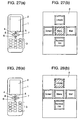
- a main menu screen such as shown in Fig. 27(b) is displayed on display unit 2 of Fig. 27(a).
- up arrow key 5 is operated to select an "i-mode" icon.
- Confirmation key 4 is operated as shown in Fig. 28(a) to confirm the selection of the "i-mode" icon shown in Fig. 28(b).
- This confirmation effects display of an "i-mode" menu screen on display unit 2 as shown in Fig. 29(b).
- cursor 9 appearing on this menu screen moves accordingly.
- the cursor is moved to select the sixth menu option, "Map”, as shown in Fig. 30(b).
- confirmation key 4 is operated as shown in Fig. 30(a) to confirm the selection of "Map” from the menu.
- a "Select Area” screen is displayed as shown in Fig. 31(b).
- Options "1"-"9" on this screen include respective area names in Japan.
- down arrow key 6 is operated as shown in Fig. 31(a) to move cursor 9.
- the Kansai area is selected as shown in Fig. 32(b).
- Confirmation key 4 is thereafter operated as shown in Fig. 32(a) to confirm the selection of the Kansai area.
- a "Select Search Method” screen is displayed as shown in Fig. 33(b).
- Confirmation key 4 is then operated as shown in Fig. 34(b), whereby the screen changes to an "Edit” screen shown in Fig. 35(b).
- Numeric keypad 3 is thereafter operated to input "Nishi Sanso" on this "Edit” screen as shown in Fig. 36(b).
- "Nishi Sanso” is the name of a station in Kadoma city of Osaka Prefecture lying in the Kansai area of Japan.
- This map can be scrolled with "1"-"4" keys and "6"-"9" keys of numeric keypad 3 shown in Fig. 38(a).
- a zoom in can be done.
- a zoom out can be done.
- a zoomed-in map is displayed as shown in Fig. 39(b).
- the "1" key of numeric keypad 3 is operated as shown in Fig. 39(a) to scroll the zoomed-in map in an upper-left direction, whereby a map shown in Fig. 40(b) is displayed.
- down arrow key 6 is operated as shown in Fig. 40(a) to move cursor 9 over "Top Menu”.
- Confirmation key 4 is then operated as shown in Fig. 40(c). Then the screen returns to the top menu screen shown in Fig. 41.
- numeric keypad 3 is used to input commands including the scroll, the zoom in and the zoom out.
- a user may need to memorize respective functions of the keys. Moreover, these keys increase finger motion of the user for operation. For this reason, the user may avert his/her eyes from the display screen for every input.
- the present invention aims to provide a portable electronic apparatus having excellent operability.
- This portable electronic apparatus is capable of many operations, including zooming, scrolling, moving a cursor and selecting an icon, with one operation unit.
- the portable electronic apparatus of this invention includes a display unit, the operation unit and a controller.
- the display unit displays information received or stored.
- the operation unit is used for those operations including moving of a pointer displayed on the display unit, the zooming and the scrolling of the information displayed on the display unit, the moving of the cursor and the selection of the icon.
- the controller executes the operations.
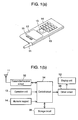
- Fig. 1 is a perspective view of a portable telephone, which is a typical example of a portable electronic apparatus, in accordance with the first embodiment of the present invention.
- Fig. 2 is a perspective view of a trackball device that includes a push switch and functions as an operation unit mounted to the same portable electronic apparatus.
- This trackball device including a push switch is a typical multidirectional input device including a push switch.
- the multidirectional input device mentioned here detects input operations corresponding to a plurality of directions, respectively.
- body 10 of the portable electronic apparatus includes antenna 11, display unit 12, operation unit 13, numeric keypad 14 and sound release hole 15.
- Display unit 12 is formed of a liquid crystal display or the like and provided at a front surface of apparatus body 10.
- Operation unit 13 is provided in the vicinity of display unit 12 at the front surface of apparatus body 10.
- Numeric keypad 14 is used for inputting a number and a character.
- Sound release hole 15 is provided above display unit 12 and lets out a sound produced by a sounding member placed inside apparatus body 10.
- Apparatus body 10 also includes required circuits including control circuit 34, storage circuit 36, a power circuit, and drive circuit 38 for display unit 12.
- Control circuit 38 detects an input signal from transmitter/receiver circuit 32 and an input signal produced by operation of operation unit 13 or numeric keypad 14, and controls an output signal from transmitter/receiver circuit 32.
- Control circuit 34 also controls storage circuit 36, drive circuit 38 for display unit 12 and others.
- the trackball device for example, is employed as operation unit 13 mentioned above.
- This trackball device has, for example, the following structure including the push switch.
- Case 16 also includes a control member for causing the switch, the encoder or the Hall element to operate as ball 17 is rolled.
- the controller detects the signal, which varies as ball 17 is rolled.
- the trackball device may have any known structure other than any one of the structures described above.
- At least one switch is a push switch. This push switch is used for confirmation (described later) and is switched on or off when the ball is pressed.
- Figs. 3-17 illustrate input operations and display screens.
- those hatched triangles 42 contacting track ball 17 each indicate a rolling direction of ball 17.
- ball 17 is rolled toward a vertex of triangle 42 that is at the opposite angle to the side contacting with ball 17.
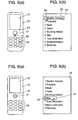
- a main menu screen including pointer 19 is displayed on display unit 12, as shown in Fig. 3(b).
- a menu screen is displayed as shown in Fig. 5(b).
- pointer 19 and cursor 20 are located at "Weather Forecast", the first menu option from the top.
- Ball 17 of operation unit 13 is thereafter rolled downward as indicated by triangle 42 in Fig. 5(a) to move pointer 19 downward.
- pointer 19 is placed on a "Map” icon, which is menu option "6", as shown in Fig. 6(b)
- ball 17 is pressed as shown in Fig. 6(a) for confirmation.
- cursor 20 too is located at "Map" selected.
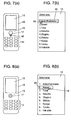
- a "Select an Area” screen is displayed as shown in Fig. 7(b).
- Options "1"-"9" displayed on this screen include respective area names in Japan.
- a "Select a Search Method” screen is displayed as shown in Fig. 9(b).
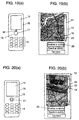
- Ball 17 is then rolled downward as indicated by triangle 42 in Fig. 9(a) to move pointer 19 to "Search by Station Name”.
- Ball 17 is thereafter pressed as shown in Fig. 10(a), whereby cursor 20 is moved to "Search by Station Name” as shown in Fig. 10(b). In this way, "Search by Station Name” is selected, and this selection is confirmed.
- This operation effects display of the map's zoomed-in portion, which pointer 19 has pointed at, as shown in Fig. 15(b).
- the zoom in may be performed on the center of the screen.
- zooming is performed by rolling ball 17 of the trackball device along the plane.
- the portable electronic apparatus obtained is thus easy to operate.
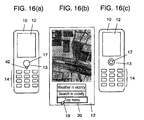
- Fig. 15(b) To scroll the zoomed-in map of Fig. 15(b), ball 17 is rolled in a direction indicated by triangle 42 shown in Fig. 15(a) toward a portion to be displayed, whereby the map's portion to be displayed is scrolled into view as shown in Fig. 16(b).
- display unit 12 displays "Weather in Vicinity", “Search in Vicinity” and "Top Menu” below the map.
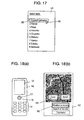
- Ball 17 is rolled downward as indicated by triangle 42 in Fig. 16(a) to place pointer 19 on "Top Menu”. Ball 17 is thereafter pressed, whereby cursor 20 is positioned at "Top Menu” for selection, and the selection of "Top Menu” is confirmed. Upon this confirmation, the display screen returns to the "Select an Area" screen shown in Fig. 17.
- a screen such as shown in Fig. 18(b), which includes "Zoom” and “Scroll” icons as well as the map, is displayed in place of the screen shown in Fig. 14(b).
- pointer 19 is moved over "Zoom”.
- Display unit 12 thus displays a zoomed-in center portion of the map as shown in Fig. 20(b).
- Ball 17 is thereafter pressed as shown in Fig. 23(c), whereby cursor 20 is located at "Top Menu” for selection, and the display screen returns to the top menu screen (i.e. the "Select Area” screen) shown in Fig. 24.
- a scroll bar may be displayed at an end of the display screen, and the scroll may be performed on the displayed information by pointing the pointer at a scroll box of the scroll bar and moving the scroll box.
- the first embodiment described above allows a user to perform many operations, including zooming, scrolling, moving the cursor, selecting the icon and confirming, with one operation unit 13.
- the apparatus obtained thus has excellent operability.
- operation unit 13 mounted to apparatus body 10 requires reduced space for those operations.
- the present embodiment is basically similar to the first exemplary embodiment.
- This embodiment differs from the first embodiment in that a multidirectional input device including a lever is employed as operation unit 13, and that an operation member is independently provided for displaying and erasing a pointer displayed on a display unit.
- the multidirectional input device mentioned here detects input operations corresponding to a plurality of directions, respectively.
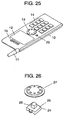
- Fig. 25 is a perspective view of a portable electronic apparatus in accordance with the second embodiment of the present invention.
- Fig. 26 is an exploded perspective view of the multidirectional input device functioning as the operation unit mounted to the same portable electronic apparatus.
- operation member 23 is provided in the vicinity of operation unit 13 of apparatus body 10 to display and erase the pointer.
- a typical push switch can be used as operation member 23.
- pointer 19 is erased from a screen.
- pointer 19 is displayed on the screen.
- pointer 19 is displayed only when necessary for display, and pointer 19 is not displayed when unnecessary, so that the display screen can be simplified.
- the multidirectional input device functioning as operation unit 13 has the following structure.
- a displacement detecting element is disposed inside case 24.
- Driving member 26 is configured to control the displacement detecting element, thereby to obtain an output.
- This driving member 26 is coupled to knob 27.
- an element which detects a change in pressure that is caused by driving member 26 when driving member 26 is tilted with knob 27, is employed as the displacement detecting element.
- the displacement detecting element may even be, for example, a Hall element.
- a magnet is attached to driving member 26, and the Hall element detects a magnetic field, which changes as driving member 26 is moved.
- the displacement detecting element may be configured, for example, to include switches corresponding to respective triangles of control 27 that represent respective outward directions from a circle.
- the triangle of control 27 that represents the direction is pressed to move pointer 19 or a cursor. Accordingly, pointer 19 or the cursor moves in that direction on the screen.
- a center portion of knob 27 is pressed. Accordingly, a push switch (not shown) disposed inside case 24 is switched on or off, whereby a signal indicative of the confirmation is generated.
- the ball is rolled along the plane for zooming in or out on the displayed image.
- the zoom in or out may be done in the second embodiment, for example, by allowing a user to move his/her finger clockwise or counterclockwise while pressing down control 27. Accordingly, the direction indicative of the input using the multidirectional input device changes continuously.
- Control circuit 34 detects the continuous change of direction that lasts a short time and interprets this operation as the zoom in or out.
- the multidirectional input device undergoes such a rolling operation along the plane for zooming.
- the user may move his/her finger from side to side or vertically while pressing down knob 27.
- the direction indicative of the input using the multidirectional input device undergoes a continuous change, which lasts a short time.
- the controller detects this change and interprets this operation as the zoom in or out.
- the operation unit is operated in one direction for zooming in and in another direction for zooming out.
- the portable electronic apparatus having such a structure has a usage pattern similar to that of the first embodiment mentioned earlier.
- This portable electronic apparatus differs from that of the first embodiment particularly in that pointer 19 can be displayed and erased. Thus, the pointer can be erased when unnecessary, thereby affording a clear view of the display.
- the portable electronic apparatus of the present invention is capable of operations, including zooming on the screen displayed on the display unit, scrolling, moving the cursor and selecting the icon, with one operation unit. These operations can be done without increasing finger movement from the operation unit. Accordingly, the user can focus his/her eyes on the display screen. In other words, this portable electronic apparatus has excellent operability.
- the portable electronic apparatus of the present invention can perform many functions.
- the portable electronic apparatus is easy to design.
Landscapes
- Engineering & Computer Science (AREA)
- Theoretical Computer Science (AREA)
- General Engineering & Computer Science (AREA)
- Human Computer Interaction (AREA)
- Physics & Mathematics (AREA)
- General Physics & Mathematics (AREA)
- Computer Hardware Design (AREA)
- Computer Networks & Wireless Communication (AREA)
- Signal Processing (AREA)
- Telephone Function (AREA)
- Position Input By Displaying (AREA)
- User Interface Of Digital Computer (AREA)
- Telephone Set Structure (AREA)
- Input From Keyboards Or The Like (AREA)
Abstract
A portable electronic apparatus disclosed has excellent operability, being
capable of zooming, scrolling, moving a cursor, selecting an icon and others with
one small operation unit. This portable electronic apparatus includes a display
unit, the operation unit and a controller. The display unit displays information
received or stored. The one operation unit is used for operations including
moving of a pointer displayed on the display unit, the zooming and the scrolling
of the information displayed on the display unit, the moving of the cursor and
the selection of the icon. The controller executes the operations in response to
operation of the operation unit.
Description
The present invention relates to a portable electronic apparatus, which
facilitates control or operation, such as zooming on displayed information,
scrolling, moving of a cursor or selection of an icon.
With widespread use of the Internet, content described in a structural
description language such as Hyper Text Markup Language (HTML) used by
the World Wide Web (WWW) has enjoyed a rapid distribution in recent years.
The content mentioned here refers to multimedia data including text, an
image and sound. The content described in a structural description language
such as HTML (hereinafter referred to simply as "HTML content") is distributed,
for example, in the following manner.
A personal computer or the like which is connected to a network such as
the Internet specifies an Uniform Resource Locator (URL) having desired
HTML content and sends a request to the network. A server corresponding to
this URL obtains the HTML content specified by the personal computer from a
database. The server then sends the HTML content thus obtained to the
personal computer across the network. The personal computer receives this
HTML content across the network, analyzes a tag or the like in the HTML
content received and displays an image on its specified display unit based on a
result of this analysis.
Recently, not only the personal computer but also a portable electronic
apparatus functioning as a communication terminal for a portable telephone or
a Personal Handy-phone System (PHS) or the like receives the content
described in the structural description language through a network such as a
portable telephone network. The portable electronic apparatuses display the
image or the like by using the content received.
Referring to the accompanying drawings, a description is hereinafter
provided of an example of a conventional display of the image on the portable
electronic apparatus, which functions as the communication terminal such as
the portable telephone or the PHS, by use of the content received thorough the
network.
Figs. 27-41 illustrate a map search using the communication terminal.
In Figs. 27-40, body 1 of the apparatus includes display unit 2, numeric
keypad 3 and confirmation key 4. Up arrow key 5 is disposed above
confirmation key 4, while down arrow key 6 is disposed below confirmation key
4. Right arrow key 7 is disposed on the right of confirmation key 4, while left
arrow key 8 is disposed on the left of confirmation key 4.
The following description refers to a case where the content received
across the network is utilized by such a structure.
This description refers to the search for a map including a station and its
vicinity through use of an "i-mode" service provided by NTT DoCoMo as an
example of an information providing service utilizing the portable telephone
terminal and the Internet.
When apparatus body 1 is powered on, a main menu screen such as
shown in Fig. 27(b) is displayed on display unit 2 of Fig. 27(a).
With the main menu screen displayed, up arrow key 5 is operated to
select an "i-mode" icon.
Up arrow key 5 hatched in Fig. 27(a) indicates that this key 5 is in
operation.
Some of the following drawings too have hatched keys to show that those
keys are in operation.
This confirmation effects display of an "i-mode" menu screen on display
unit 2 as shown in Fig. 29(b). As down arrow key 6 is operated as shown in Fig.
29(a), cursor 9 appearing on this menu screen moves accordingly. Here, the
cursor is moved to select the sixth menu option, "Map", as shown in Fig. 30(b).
When cursor 9 is positioned over "Map" in the menu, confirmation key 4 is
operated as shown in Fig. 30(a) to confirm the selection of "Map" from the menu.
As the selection from the menu is confirmed, a "Select Area" screen is
displayed as shown in Fig. 31(b). Options "1"-"9" on this screen include
respective area names in Japan.
Next, down arrow key 6 is operated as shown in Fig. 31(a) to move cursor
9. Here, the Kansai area is selected as shown in Fig. 32(b). Confirmation key
4 is thereafter operated as shown in Fig. 32(a) to confirm the selection of the
Kansai area.
As the selection of the Kansai area is confirmed, a "Select Search Method"
screen is displayed as shown in Fig. 33(b).
Subsequently, down arrow key 6 is operated as shown in Fig. 33(a) to
move cursor 9, and "Search by Station Name" is selected with cursor 9, as shown
in Fig. 34(b).
As shown in Fig. 36(a), the input of this station name is confirmed with
confirmation key 4.
Upon this confirmation, the "Select Search Method" screen including
input "Nishi Sanso" is displayed as shown in Fig. 37(b). Here, cursor 9 is
positioned at "Search". When confirmation key 4 is operated as shown in Fig.
37(a), a map showing "Nishi Sanso" and its surroundings is displayed as shown
in Fig. 38(b).
This map can be scrolled with "1"-"4" keys and "6"-"9" keys of numeric
keypad 3 shown in Fig. 38(a). With a "5" key, a zoom in can be done. With a
"0" key, a zoom out can be done. When the "5" key is operated as shown in Fig.
38(a), a zoomed-in map is displayed as shown in Fig. 39(b).
Next, the "1" key of numeric keypad 3 is operated as shown in Fig. 39(a)
to scroll the zoomed-in map in an upper-left direction, whereby a map shown in
Fig. 40(b) is displayed. After the map is confirmed, down arrow key 6 is
operated as shown in Fig. 40(a) to move cursor 9 over "Top Menu".
Confirmation key 4 is then operated as shown in Fig. 40(c). Then the screen
returns to the top menu screen shown in Fig. 41.
As described above, the conventional portable electronic apparatus
requires, besides the numeric keypad, at least five keys including confirmation
key 4, up arrow key 5, down arrow key 6, right arrow key 7 and left arrow key 8.
These keys take up a lot of space in the small portable electronic apparatus. In
addition, numeric keypad 3 is used to input commands including the scroll, the
zoom in and the zoom out.
Accordingly, a user may need to memorize respective functions of the keys.
Moreover, these keys increase finger motion of the user for operation. For this
reason, the user may avert his/her eyes from the display screen for every input.
The present invention aims to provide a portable electronic apparatus
having excellent operability. This portable electronic apparatus is capable of
many operations, including zooming, scrolling, moving a cursor and selecting an
icon, with one operation unit.
The portable electronic apparatus of this invention includes a display unit,
the operation unit and a controller.
The display unit displays information received or stored.
The operation unit is used for those operations including moving of a
pointer displayed on the display unit, the zooming and the scrolling of the
information displayed on the display unit, the moving of the cursor and the
selection of the icon.
In response to operation of the operation unit, the controller executes the
operations.
Exemplary embodiments of the present invention that include respective
structures and operations are demonstrated hereinafter with reference to the
accompanying drawings.
Referring to the accompanying drawings, a description is hereinafter
provided of the first exemplary embodiment of the present invention.
Fig. 1 is a perspective view of a portable telephone, which is a typical
example of a portable electronic apparatus, in accordance with the first
embodiment of the present invention.
Fig. 2 is a perspective view of a trackball device that includes a push
switch and functions as an operation unit mounted to the same portable
electronic apparatus.
This trackball device including a push switch is a typical multidirectional
input device including a push switch. The multidirectional input device
mentioned here detects input operations corresponding to a plurality of
directions, respectively.
In Figs. 1 and 2, body 10 of the portable electronic apparatus includes
antenna 11, display unit 12, operation unit 13, numeric keypad 14 and sound
release hole 15.
The trackball device, for example, is employed as operation unit 13
mentioned above. This trackball device has, for example, the following
structure including the push switch.
In the trackball device shown in Fig. 2, square case 16 is covered with
cover 18 and the device houses ball 17 with an upper portion of ball 17 exposed.
In square case 16, the followings are disposed, for example,
In each of the above-mentioned cases (1)-(3), the controller detects the
signal, which varies as ball 17 is rolled.
The trackball device may have any known structure other than any one of
the structures described above.
In each of the above-mentioned cases, at least one switch is a push switch.
This push switch is used for confirmation (described later) and is switched on or
off when the ball is pressed.
Referring to the accompanying drawings, a description is hereinafter
provided on how a map search is performed by the portable electronic apparatus
having the structure described above through use of content received across a
network.
This description refers to a case where an "i-mode" service provided by
NTT DoCoMo is utilized as an example of an information provision service using
the portable telephone terminal and the Internet.
Figs. 3-17 illustrate input operations and display screens.
In these drawings, those hatched triangles 42 contacting track ball 17
each indicate a rolling direction of ball 17. Here, ball 17 is rolled toward a
vertex of triangle 42 that is at the opposite angle to the side contacting with ball
17.
When apparatus body 10 is powered on, a main menu screen including
pointer 19 is displayed on display unit 12, as shown in Fig. 3(b).
As ball 17 of operation unit 13 is rolled upward as indicated by triangle 42
in Fig. 3(a) with the main menu screen displayed, pointer 19 moves upward
accordingly. Pointer 19 is thus placed on an "i-mode" icon as shown in Fig. 4(b).
With pointer 19 placed on the "i-mode" icon, ball 17 of operation unit 13 is
pressed as shown in Fig. 4(a) to confirm the selection of the "i-mode" icon.
As the selection of the "i-mode" icon is confirmed, a menu screen is
displayed as shown in Fig. 5(b). Here, pointer 19 and cursor 20 are located at
"Weather Forecast", the first menu option from the top.
As "Map" is selected, a "Select an Area" screen is displayed as shown in
Fig. 7(b). Options "1"-"9" displayed on this screen include respective area
names in Japan.
Here, ball 17 is rolled downward as indicated by triangle 42 in Fig. 7(a) to
move pointer 19 to a "Kansai" icon, which is option "2". Subsequently, ball 17 is
pressed as shown in Fig. 8(a), whereby the push switch (not shown) is switched
on. Here, the controller executes this confirmation, whereby cursor 20 is placed
at selected "Kansai" as shown in Fig. 8(b). In this way, the area is selected.
When the selection of the Kansai area is confirmed as described above, a
"Select a Search Method" screen is displayed as shown in Fig. 9(b). Ball 17 is
then rolled downward as indicated by triangle 42 in Fig. 9(a) to move pointer 19
to "Search by Station Name". Ball 17 is thereafter pressed as shown in Fig.
10(a), whereby cursor 20 is moved to "Search by Station Name" as shown in Fig.
10(b). In this way, "Search by Station Name" is selected, and this selection is
confirmed.
The above-described operation effects display of an "Edit" screen as
shown in Fig. 11(b). Ball 17 is again pressed as shown in Fig. 11(a), whereby
the "Edit" screen becomes available.
Subsequently, "Nishi Sanso", which is the name of a station, is input with
numeric keypad 14 for display on the "Edit" screen as shown in Fig. 12(b).
Thereafter, ball 17 is pressed as shown in Fig. 12(a) to confirm the input of
"Nishi Sanso".
This confirmation effects display of the "Select a Search Method" screen
including input "Nishi Sanso" as shown in Fig. 13(b). Pointer 19 is then placed
on "Search" next to "Search by Station Name".
Thereafter, ball 17 is pressed as shown in Fig. 13(a) to confirm the
"Search" for "Nishi Sanso", and consequently, a map showing Nishi Sanso
station and its surroundings is displayed as shown in Fig. 14(b).
In cases where this map provides an unclear view because of its broad
range, a zoomed-in display is obtained in the following manner.
This operation effects display of the map's zoomed-in portion, which
pointer 19 has pointed at, as shown in Fig. 15(b).
Conversely, rolling ball 17 counterclockwise along the plane effects
display of a zoomed-out map.
It is to be noted that irrespective of the position of pointer 19, the zoom in
may be performed on the center of the screen.
As described above, zooming is performed by rolling ball 17 of the
trackball device along the plane. The portable electronic apparatus obtained is
thus easy to operate.
To scroll the zoomed-in map of Fig. 15(b), ball 17 is rolled in a direction
indicated by triangle 42 shown in Fig. 15(a) toward a portion to be displayed,
whereby the map's portion to be displayed is scrolled into view as shown in Fig.
16(b). Here, display unit 12 displays "Weather in Vicinity", "Search in Vicinity"
and "Top Menu" below the map.
Next, ball 17 is rolled downward as indicated by triangle 42 in Fig. 16(a)
to place pointer 19 on "Top Menu". Ball 17 is thereafter pressed, whereby
cursor 20 is positioned at "Top Menu" for selection, and the selection of "Top
Menu" is confirmed. Upon this confirmation, the display screen returns to the
"Select an Area" screen shown in Fig. 17.
In a method different from the above-described method of operation, a
screen, such as shown in Fig. 18(b), which includes "Zoom" and "Scroll" icons as
well as the map, is displayed in place of the screen shown in Fig. 14(b). Here,
pointer 19 is moved over "Zoom".
Thereafter, ball 17 is pressed as shown in Fig. 18(a) to confirm the
selection of "Zoom". This effects display of zoom bar 21 representing "Zoom" on
the right of display unit 12 as shown in Fig. 19(b). Pointer 19 is then moved
over box 22 of this zoom bar 21.
Next, ball 17 is rolled upward as indicated by triangle 42 in Fig. 19(a),
whereby box 22 moves upward accordingly.
In this way, a zoom in is performed on the whole map. Display unit 12
thus displays a zoomed-in center portion of the map as shown in Fig. 20(b).
With the zoomed-in center portion displayed, ball 17 is pressed as shown
in Fig. 20(a) for confirmation.
This confirmation effects display of the "Zoom" and "Scroll" icons on the
zoomed-in map as shown in Fig. 21(b). Next, ball 17 is rolled to move pointer
19 over the "Scroll" icon. When ball 17 is thereafter pressed as shown in Fig.
21(a), the display screen includes pointer 19 on the zoomed-in map as shown in
Fig. 22(b).
Subsequently, ball 17 is rolled in a direction indicated by triangle 42 in
Fig. 22(a) to scroll the map in this direction. This effects display of a scrolled
map as shown in Fig. 23(b). Here, the screen has the "Weather in Vicinity",
"Search in Vicinity" and "Top Menu" icons displayed below the map.
After the map is confirmed, ball 17 is rolled downward as indicated by
triangle 42 in Fig. 23(a) to move pointer 19 over the "Top Menu" icon.
As is usually done, a scroll bar may be displayed at an end of the display
screen, and the scroll may be performed on the displayed information by
pointing the pointer at a scroll box of the scroll bar and moving the scroll box.
The first embodiment described above allows a user to perform many
operations, including zooming, scrolling, moving the cursor, selecting the icon
and confirming, with one operation unit 13. The apparatus obtained thus has
excellent operability. Moreover, operation unit 13 mounted to apparatus body
10 requires reduced space for those operations.
The second exemplary embodiment of the present invention is described
hereinafter.
The present embodiment is basically similar to the first exemplary
embodiment.
This embodiment differs from the first embodiment in that a
multidirectional input device including a lever is employed as operation unit 13,
and that an operation member is independently provided for displaying and
erasing a pointer displayed on a display unit.
The multidirectional input device mentioned here detects input
operations corresponding to a plurality of directions, respectively.
Fig. 25 is a perspective view of a portable electronic apparatus in
accordance with the second embodiment of the present invention.
Fig. 26 is an exploded perspective view of the multidirectional input
device functioning as the operation unit mounted to the same portable electronic
apparatus.
It is to be noted that elements similar to those in the first embodiment
have the same reference marks, and the descriptions of those elements are
omitted.
In Figs. 25 and 26, operation member 23 is provided in the vicinity of
operation unit 13 of apparatus body 10 to display and erase the pointer. A
typical push switch can be used as operation member 23.
When operation member 23 is pressed with display unit 12 displaying
pointer 19, pointer 19 is erased from a screen. When operation member 23 is
pressed with the pointer erased, pointer 19 is displayed on the screen.
In other words, pointer 19 is displayed only when necessary for display,
and pointer 19 is not displayed when unnecessary, so that the display screen can
be simplified.
The multidirectional input device functioning as operation unit 13 has the
following structure.
A displacement detecting element is disposed inside case 24. Cover 25,
which covers this case 24, holds driving member 26 so that drive member 26 can
be tilted. Driving member 26 is configured to control the displacement
detecting element, thereby to obtain an output. This driving member 26 is
coupled to knob 27.
Here, an element, which detects a change in pressure that is caused by
driving member 26 when driving member 26 is tilted with knob 27, is employed
as the displacement detecting element.
The displacement detecting element may even be, for example, a Hall
element. In this case, a magnet is attached to driving member 26, and the Hall
element detects a magnetic field, which changes as driving member 26 is moved.
Instead of being the Hall element, the displacement detecting element
may be configured, for example, to include switches corresponding to respective
triangles of control 27 that represent respective outward directions from a circle.
In the multidirectional input device using any one of such above-mentioned
displacement detecting elements, the triangle of control 27 that
represents the direction is pressed to move pointer 19 or a cursor. Accordingly,
pointer 19 or the cursor moves in that direction on the screen.
For the confirmation operation, a center portion of knob 27 is pressed.
Accordingly, a push switch (not shown) disposed inside case 24 is switched on or
off, whereby a signal indicative of the confirmation is generated.
In this way, the confirmation is performed with the push switch.
In the first embodiment, the ball is rolled along the plane for zooming in
or out on the displayed image. The zoom in or out may be done in the second
embodiment, for example, by allowing a user to move his/her finger clockwise or
counterclockwise while pressing down control 27. Accordingly, the direction
indicative of the input using the multidirectional input device changes
continuously. Control circuit 34 detects the continuous change of direction that
lasts a short time and interprets this operation as the zoom in or out.
In the manner described above, the multidirectional input device
undergoes such a rolling operation along the plane for zooming.
To zoom in or out, the user may move his/her finger from side to side or
vertically while pressing down knob 27.
In each of these cases, the direction indicative of the input using the
multidirectional input device undergoes a continuous change, which lasts a
short time. The controller detects this change and interprets this operation as
the zoom in or out.
In this way, the operation unit is operated in one direction for zooming in
and in another direction for zooming out.
The portable electronic apparatus having such a structure has a usage
pattern similar to that of the first embodiment mentioned earlier.
This portable electronic apparatus differs from that of the first
embodiment particularly in that pointer 19 can be displayed and erased. Thus,
the pointer can be erased when unnecessary, thereby affording a clear view of
the display.
As described above, the portable electronic apparatus of the present
invention is capable of operations, including zooming on the screen displayed on
the display unit, scrolling, moving the cursor and selecting the icon, with one
operation unit. These operations can be done without increasing finger
movement from the operation unit. Accordingly, the user can focus his/her eyes
on the display screen. In other words, this portable electronic apparatus has
excellent operability.
By being mounted with this one operation unit, the portable electronic
apparatus of the present invention can perform many functions. Thus, the
portable electronic apparatus is easy to design.
Claims (12)
- A portable electronic apparatus comprising:a display unit for displaying information received or stored;one operation unit used for operations including moving of a pointer displayed on the display unit, zooming and scrolling of the information displayed on the display unit, moving of a cursor and selection of an icon; anda controller for executing the operations in response to an operation of the operation unit.
- The portable electronic apparatus of claim 1, wherein the operation unit includes a multidirectional input device.
- The portable electronic apparatus of claim 1, wherein the operation unit includes a trackball device.
- The portable electronic apparatus of claim 1, wherein the portable electronic apparatus includes a confirmation function following at least one of the operations including the zooming, the scrolling, the moving of the cursor and the selection of the icon.
- The portable electronic apparatus of claim 4, wherein the operation unit includes a multidirectional input device including a push switch.
- The portable electronic apparatus of claim 4, wherein the operation unit includes a trackball device including a push switch.
- The portable electronic apparatus of claim 1, wherein the operation performed on the operation unit in one direction corresponds to a zoom in, and the operation performed on the operation unit in another direction corresponds to a zoom out.
- The portable electronic apparatus of claim 1, further comprising:another operation member for displaying and erasing the pointer displayed on the display unit.
- The portable electronic apparatus of claim 1, wherein the scrolling of the information displayed on a screen of the display unit is performed by placing the pointer on an end of the screen and moving the pointer.
- The portable electronic apparatus of claim 2, wherein the multidirectional input device undergoes a rolling operation along a plane to specify the zooming.
- The portable electronic apparatus of claim 3, wherein a ball of the trackball device is rolled along a plane to specify the zooming.
- The portable electronic apparatus of claim 1, wherein the zooming of the information displayed on a screen of the display unit is performed by placing the pointer on an end of the screen and moving the pointer.
Applications Claiming Priority (3)
| Application Number | Priority Date | Filing Date | Title |
|---|---|---|---|
| JP2001154959A JP2002351598A (en) | 2001-05-24 | 2001-05-24 | Portable electronic devices |
| JP2001154959 | 2001-05-24 | ||
| PCT/JP2002/005012 WO2002095564A1 (en) | 2001-05-24 | 2002-05-23 | Portable electronic apparatus |
Publications (2)
| Publication Number | Publication Date |
|---|---|
| EP1391806A1 true EP1391806A1 (en) | 2004-02-25 |
| EP1391806A4 EP1391806A4 (en) | 2010-01-27 |
Family
ID=18999220
Family Applications (1)
| Application Number | Title | Priority Date | Filing Date |
|---|---|---|---|
| EP02726473A Withdrawn EP1391806A4 (en) | 2001-05-24 | 2002-05-23 | PORTABLE ELECTRONIC APPARATUS |
Country Status (5)
| Country | Link |
|---|---|
| US (1) | US7274354B2 (en) |
| EP (1) | EP1391806A4 (en) |
| JP (1) | JP2002351598A (en) |
| CN (1) | CN1223925C (en) |
| WO (1) | WO2002095564A1 (en) |
Cited By (9)
| Publication number | Priority date | Publication date | Assignee | Title |
|---|---|---|---|---|
| WO2004100510A1 (en) * | 2003-05-08 | 2004-11-18 | Nokia Corporation | A mobile telephone having a rotator input device |
| US7154479B2 (en) | 2003-05-29 | 2006-12-26 | Nokia Corporation | Precision resolution |
| EP1840696A1 (en) * | 2006-03-29 | 2007-10-03 | BRITISH TELECOMMUNICATIONS public limited company | Viewing device |
| EP1894085A2 (en) * | 2005-06-03 | 2008-03-05 | Apple Inc. | Mouse with improved input mechanisms |
| WO2008025120A1 (en) | 2006-09-01 | 2008-03-06 | Research In Motion Limited | Method and apparatus for controlling a display in an electronic device |
| EP1981262A1 (en) * | 2007-04-02 | 2008-10-15 | Research In Motion Limited | Camera with multiple viewfinders |
| US7855714B2 (en) | 2006-09-01 | 2010-12-21 | Research In Motion Limited | Method and apparatus for controlling a display in an electronic device |
| US8154625B2 (en) | 2007-04-02 | 2012-04-10 | Research In Motion Limited | Camera with multiple viewfinders |
| US11153472B2 (en) | 2005-10-17 | 2021-10-19 | Cutting Edge Vision, LLC | Automatic upload of pictures from a camera |
Families Citing this family (32)
| Publication number | Priority date | Publication date | Assignee | Title |
|---|---|---|---|---|
| JP2003067120A (en) * | 2001-08-24 | 2003-03-07 | Pioneer Electronic Corp | How to use the numeric keypad |
| US7333092B2 (en) | 2002-02-25 | 2008-02-19 | Apple Computer, Inc. | Touch pad for handheld device |
| JP4179085B2 (en) * | 2003-07-16 | 2008-11-12 | 松下電器産業株式会社 | Electronics |
| US7499040B2 (en) * | 2003-08-18 | 2009-03-03 | Apple Inc. | Movable touch pad with added functionality |
| KR100664111B1 (en) * | 2004-02-06 | 2007-01-04 | 엘지전자 주식회사 | Cursor movement device, structure and method of mobile terminal |
| US7317449B2 (en) * | 2004-03-02 | 2008-01-08 | Microsoft Corporation | Key-based advanced navigation techniques |
| JP2005327000A (en) * | 2004-05-13 | 2005-11-24 | Sony Corp | User interface control device, user interface control method, and computer program |
| KR100780437B1 (en) * | 2006-08-22 | 2007-11-29 | 삼성전자주식회사 | Pointer control method of a mobile terminal having a pointing device |
| US8463315B2 (en) | 2004-06-21 | 2013-06-11 | Research In Motion Limited | Handheld wireless communication device |
| US20060031010A1 (en) * | 2004-08-04 | 2006-02-09 | Antje Friedrich | Method for one handed controlling of a digital map by use of a keyboard |
| JP2006092025A (en) * | 2004-09-21 | 2006-04-06 | Fujitsu Ltd | Electronic device, display screen control processing method, and display screen control processing program |
| CN100367171C (en) * | 2005-01-19 | 2008-02-06 | 光宝科技股份有限公司 | Displacement-controlled portable electronic device |
| US7724239B2 (en) * | 2005-02-22 | 2010-05-25 | Research In Motion Limited | Handheld electronic device, cursor positioning sub-system and method employing cursor scaling control |
| US7456849B2 (en) * | 2005-04-15 | 2008-11-25 | Microsoft Corporation | System and method for zooming an object through spiral interaction |
| US8265864B1 (en) * | 2005-09-12 | 2012-09-11 | Navteq B.V. | Method of providing geographic information for a navigation system |
| WO2007056449A2 (en) * | 2005-11-07 | 2007-05-18 | Google Inc. | Mapping in mobile devices |
| KR100754688B1 (en) * | 2006-01-09 | 2007-09-03 | 삼성전자주식회사 | How to use the key input unit of the mobile terminal as a pointing device |
| US8537117B2 (en) | 2006-02-13 | 2013-09-17 | Blackberry Limited | Handheld wireless communication device that selectively generates a menu in response to received commands |
| US8000741B2 (en) * | 2006-02-13 | 2011-08-16 | Research In Motion Limited | Handheld wireless communication device with chamfer keys |
| US7770118B2 (en) * | 2006-02-13 | 2010-08-03 | Research In Motion Limited | Navigation tool with audible feedback on a handheld communication device having a full alphabetic keyboard |
| US7903087B2 (en) * | 2006-02-13 | 2011-03-08 | Research In Motion Limited | Method for facilitating navigation and selection functionalities of a trackball incorporated upon a wireless handheld communication device |
| US8022935B2 (en) | 2006-07-06 | 2011-09-20 | Apple Inc. | Capacitance sensing electrode with integrated I/O mechanism |
| USD577014S1 (en) * | 2006-08-04 | 2008-09-16 | Research In Motion Limited | Handheld device |
| USD577015S1 (en) * | 2006-08-04 | 2008-09-16 | Research In Motion Limited | Handheld device |
| KR100800889B1 (en) * | 2006-08-08 | 2008-02-04 | 삼성전자주식회사 | Method for changing the configuration of the screen on which the function items of the mobile communication terminal and terminal for the same |
| US7683886B2 (en) * | 2006-09-05 | 2010-03-23 | Research In Motion Limited | Disambiguated text message review function |
| US8274479B2 (en) | 2006-10-11 | 2012-09-25 | Apple Inc. | Gimballed scroll wheel |
| US8502781B2 (en) * | 2008-03-20 | 2013-08-06 | ACCO Brands Corporation | 3-axis trackball |
| JP5622447B2 (en) * | 2010-06-11 | 2014-11-12 | 任天堂株式会社 | Information processing program, information processing apparatus, information processing system, and information processing method |
| CN102176731A (en) * | 2010-12-27 | 2011-09-07 | 华为终端有限公司 | Method for intercepting audio file or video file and mobile phone |
| CN108268202B (en) * | 2015-08-26 | 2021-05-11 | Oppo广东移动通信有限公司 | Control method of smart watch, smart watch and medium product |
| JP6727787B2 (en) * | 2015-10-20 | 2020-07-22 | 古野電気株式会社 | Display device and radar device |
Family Cites Families (17)
| Publication number | Priority date | Publication date | Assignee | Title |
|---|---|---|---|---|
| JPH01293423A (en) | 1988-05-20 | 1989-11-27 | Ricoh Co Ltd | Bitmap display device for data processing equipment |
| FI87871C (en) * | 1990-06-26 | 1995-05-16 | Nokia Mobile Phones Ltd | Device for searching menus in a telephone device |
| JP3454482B2 (en) * | 1993-10-26 | 2003-10-06 | キヤノン株式会社 | Portable information devices |
| JP2813728B2 (en) * | 1993-11-01 | 1998-10-22 | インターナショナル・ビジネス・マシーンズ・コーポレイション | Personal communication device with zoom / pan function |
| US6097371A (en) * | 1996-01-02 | 2000-08-01 | Microsoft Corporation | System and method of adjusting display characteristics of a displayable data file using an ergonomic computer input device |
| US6147674A (en) * | 1995-12-01 | 2000-11-14 | Immersion Corporation | Method and apparatus for designing force sensations in force feedback computer applications |
| US6067075A (en) | 1995-12-21 | 2000-05-23 | Eastman Kodak Company | Controller for medical image review station |
| US5841849A (en) * | 1996-10-31 | 1998-11-24 | Lucent Technologies Inc. | User interface for personal telecommunication devices |
| JPH10320115A (en) | 1997-05-22 | 1998-12-04 | Omron Corp | Track ball |
| JP4464471B2 (en) * | 1997-10-23 | 2010-05-19 | 富士通株式会社 | Mobile phone |
| JP3123490B2 (en) * | 1997-11-17 | 2001-01-09 | 日本電気株式会社 | Portable communication device and display information selection method |
| JP4179661B2 (en) * | 1998-04-24 | 2008-11-12 | 東芝医用システムエンジニアリング株式会社 | Medical image processing device |
| JP2001016635A (en) | 1999-06-30 | 2001-01-19 | Sanyo Electric Co Ltd | Mobile phone |
| GB2351561B (en) * | 1999-06-30 | 2003-10-22 | Nokia Mobile Phones Ltd | Joystick controller |
| US6844871B1 (en) * | 1999-11-05 | 2005-01-18 | Microsoft Corporation | Method and apparatus for computer input using six degrees of freedom |
| US6556222B1 (en) * | 2000-06-30 | 2003-04-29 | International Business Machines Corporation | Bezel based input mechanism and user interface for a smart watch |
| US6774890B2 (en) * | 2001-01-09 | 2004-08-10 | Tektronix, Inc. | Touch controlled zoom and pan of graphic displays |
-
2001
- 2001-05-24 JP JP2001154959A patent/JP2002351598A/en active Pending
-
2002
- 2002-05-23 CN CNB028018532A patent/CN1223925C/en not_active Expired - Fee Related
- 2002-05-23 EP EP02726473A patent/EP1391806A4/en not_active Withdrawn
- 2002-05-23 US US10/344,670 patent/US7274354B2/en not_active Expired - Fee Related
- 2002-05-23 WO PCT/JP2002/005012 patent/WO2002095564A1/en not_active Ceased
Cited By (16)
| Publication number | Priority date | Publication date | Assignee | Title |
|---|---|---|---|---|
| WO2004100510A1 (en) * | 2003-05-08 | 2004-11-18 | Nokia Corporation | A mobile telephone having a rotator input device |
| US7395081B2 (en) | 2003-05-08 | 2008-07-01 | Nokia Corporation | Mobile telephone having a rotator input device |
| US7154479B2 (en) | 2003-05-29 | 2006-12-26 | Nokia Corporation | Precision resolution |
| EP2485123A1 (en) * | 2005-06-03 | 2012-08-08 | Apple Inc. | Mouse with improved input mechanisms |
| EP1894085A2 (en) * | 2005-06-03 | 2008-03-05 | Apple Inc. | Mouse with improved input mechanisms |
| US8279176B2 (en) | 2005-06-03 | 2012-10-02 | Apple Inc. | Mouse with improved input mechanisms using touch sensors |
| US11818458B2 (en) | 2005-10-17 | 2023-11-14 | Cutting Edge Vision, LLC | Camera touchpad |
| US11153472B2 (en) | 2005-10-17 | 2021-10-19 | Cutting Edge Vision, LLC | Automatic upload of pictures from a camera |
| EP1840696A1 (en) * | 2006-03-29 | 2007-10-03 | BRITISH TELECOMMUNICATIONS public limited company | Viewing device |
| WO2008025120A1 (en) | 2006-09-01 | 2008-03-06 | Research In Motion Limited | Method and apparatus for controlling a display in an electronic device |
| US7855714B2 (en) | 2006-09-01 | 2010-12-21 | Research In Motion Limited | Method and apparatus for controlling a display in an electronic device |
| US8487868B2 (en) | 2006-09-01 | 2013-07-16 | Research In Motion Limited | Method and apparatus for controlling a display in an electronic device |
| EP2057621A4 (en) * | 2006-09-01 | 2010-10-20 | Research In Motion Ltd | Method and apparatus for controlling a display in an electronic device |
| US8154625B2 (en) | 2007-04-02 | 2012-04-10 | Research In Motion Limited | Camera with multiple viewfinders |
| EP2326079A3 (en) * | 2007-04-02 | 2011-06-22 | Research In Motion Limited | Camera with multiple viewfinders |
| EP1981262A1 (en) * | 2007-04-02 | 2008-10-15 | Research In Motion Limited | Camera with multiple viewfinders |
Also Published As
| Publication number | Publication date |
|---|---|
| EP1391806A4 (en) | 2010-01-27 |
| JP2002351598A (en) | 2002-12-06 |
| WO2002095564A1 (en) | 2002-11-28 |
| CN1463397A (en) | 2003-12-24 |
| US20040051695A1 (en) | 2004-03-18 |
| US7274354B2 (en) | 2007-09-25 |
| CN1223925C (en) | 2005-10-19 |
Similar Documents
| Publication | Publication Date | Title |
|---|---|---|
| US7274354B2 (en) | Portable electronic apparatus | |
| EP1246049B1 (en) | Display control method for information processing device | |
| KR100736195B1 (en) | Mobile phone and mobile phone control method | |
| EP1840520B1 (en) | User interface methods and apparatus for controlling the visual display of maps having selectable map elements in mobile communications devices | |
| EP0896315B1 (en) | Display unit for navigation apparatus | |
| JP5034931B2 (en) | Display device, program, and recording medium | |
| EP1293756B1 (en) | Navigation device | |
| US20020158908A1 (en) | Web browser user interface for low-resolution displays | |
| US20050001821A1 (en) | Option selector and electronic device including such an option selector | |
| KR20020067584A (en) | Information processing device and method, and information processing program | |
| CN102128633A (en) | Navigation device with touch screen | |
| US7991546B2 (en) | Display method and apparatus for navigation system for efficiently searching cities on map image | |
| US20040155890A1 (en) | Method and device for navigating inside an image | |
| JP2002215311A (en) | Portable terminal device, method for selecting screen information, and computer-readable recording medium | |
| JP4067374B2 (en) | Image processing device | |
| US20020082083A1 (en) | Information communication electronic device and information display method | |
| EP2407756B1 (en) | Navigation between a map dialog and button controls displayed outside the map | |
| US20060114224A1 (en) | Electronic apparatus, input control apparatus, and input control program storage medium | |
| KR100689785B1 (en) | Internet access device and method of navigation system | |
| JP2000292194A (en) | Method of scrolling car navigation screen | |
| JP2004348255A (en) | Browser device | |
| KR101849720B1 (en) | System and method for providing information in phases | |
| Chittaro et al. | Location-aware visualization of a 3D world to select tourist information on a mobile device | |
| KR20060015187A (en) | Display scroll device of mobile communication terminal | |
| KR100818974B1 (en) | How to control the display pointer position of a portable information terminal |
Legal Events
| Date | Code | Title | Description |
|---|---|---|---|
| PUAI | Public reference made under article 153(3) epc to a published international application that has entered the european phase |
Free format text: ORIGINAL CODE: 0009012 |
|
| 17P | Request for examination filed |
Effective date: 20030217 |
|
| AK | Designated contracting states |
Kind code of ref document: A1 Designated state(s): AT BE CH CY DE DK ES FI FR GB GR IE IT LI LU MC NL PT SE TR |
|
| RAP1 | Party data changed (applicant data changed or rights of an application transferred) |
Owner name: PANASONIC CORPORATION |
|
| A4 | Supplementary search report drawn up and despatched |
Effective date: 20091228 |
|
| STAA | Information on the status of an ep patent application or granted ep patent |
Free format text: STATUS: THE APPLICATION IS DEEMED TO BE WITHDRAWN |
|
| 18D | Application deemed to be withdrawn |
Effective date: 20100325 |