EP1357469A2 - Method and system for exporting menu objects to a peripheral device - Google Patents
Method and system for exporting menu objects to a peripheral device Download PDFInfo
- Publication number
- EP1357469A2 EP1357469A2 EP03251341A EP03251341A EP1357469A2 EP 1357469 A2 EP1357469 A2 EP 1357469A2 EP 03251341 A EP03251341 A EP 03251341A EP 03251341 A EP03251341 A EP 03251341A EP 1357469 A2 EP1357469 A2 EP 1357469A2
- Authority
- EP
- European Patent Office
- Prior art keywords
- page
- current
- menu
- user response
- data entry
- Prior art date
- Legal status (The legal status is an assumption and is not a legal conclusion. Google has not performed a legal analysis and makes no representation as to the accuracy of the status listed.)
- Withdrawn
Links
Images



Classifications
-
- G—PHYSICS
- G06—COMPUTING OR CALCULATING; COUNTING
- G06F—ELECTRIC DIGITAL DATA PROCESSING
- G06F9/00—Arrangements for program control, e.g. control units
- G06F9/06—Arrangements for program control, e.g. control units using stored programs, i.e. using an internal store of processing equipment to receive or retain programs
- G06F9/44—Arrangements for executing specific programs
- G06F9/451—Execution arrangements for user interfaces
Definitions
- the present invention generally concerns an exporting method for displaying a menu in a peripheral, preferably to exporting methods using a direct data entry structure.
- an input and output device such as an input and output "I/O" card (herein “card)
- data can be exported to a peripheral for display to users.
- the card generally includes a microprocessor for processing any commands from the peripheral memory for storing the processes and data and an interface for communicating with the peripheral.
- the most common data displayed to the user is configuration data, such as a setting for the default paper size, relating to the peripheral.
- the card could send only text strings, which are then displayed to the user by the peripheral.
- a strong is a sequence of data values (e.g., bytes), which typically stand for characters (e.g., 1 "character string").
- the mapping between values and characters is determined by the character set which is itself specified implicitly or explicitly by the environment in which the strong is being interpreted.
- the strings in the prior method are limited to user readable text, the menu display and flexibility is greatly limited.
- the peripheral is generally adapted to send only incremental commands, only one entry can be displayed at one time. As peripherals play a greater role in networking, it is becoming more common for the peripherals to be implemented with a server, resulting in a very long and complicated configuration menu.
- a typical menu would involve multiple pages, sections, subsections, and choices.
- the peripheral cannot display such complex menu without being a tedious task for the user, since only one entry can be displayed at a time.
- the present invention seeks to provide an improved method of and system for exporting menu objects to a peripheral device.
- the configuration data of a current setting of a peripheral is first collected, and a Direct Data Entry menu of the pages and elements is then created.
- the configuration data is stored into the created Direct Data Entry menu.
- the Direct Data Entry string for the requested element is then sent.
- the described embodiments provide a way to display complicated menu structures on peripherals, which are generally limited to text strings.
- a Direct Data Entry (“DDE") structure the peripheral is able to recognize a page, section, subsection or items. Users can easily navigate through the menu using the display panel on the peripheral. For example, users can navigate from a page with many sections (e.g., opens up to more choices) and items (e.g., selectable for configuration), and from a particular section with multiple subsections and items.
- DDE Direct Data Entry
- the configuration data of the current setting of a peripheral is first collected, and a Direct Data Entry menu of the pages and elements is then created.
- the configuration data is stored into the created Direct Data Entry menu.
- a Direct Data Entry string for the requested element is then sent.
- FIG. 1 A block diagram of a system according to an embodiment of the present invention is shown in FIG. 1, and indicated generally at 10.
- a peripheral 12 that generally includes a display panel 13 for displaying data to users, microprocessor 14 for processing data, a shared memory 16 for storing data, an interface chip 18 for communication with other devices, and a bus controller chip 20 for controlling the processing among the microprocessor.
- a card 22 is used as an input and output device for communicating with the peripheral 12.
- the card includes a microprocessor 24 for processing, memory 26 for storing data and an interface chip 28 for communicating with the peripheral.
- the card is a separate component (i.e., external) from the peripheral.
- the card can be inserted or extracted easily to and from the peripheral.
- the card 22 stores the configuration data, such as menu objects of a menu, for display on the peripheral 12. With the use of a display 13 on the peripheral, the card exports the menu to the user for configuration set up or revision. In this embodiment, the card 22 monitors and controls the navigation of a user session for configuring the menu.
- the peripheral monitoring and controlling the navigation are also contemplated, and these various implementations are within the scope of the present invention.
- This embodiment may be implemented in a variety of systems.
- the current embodiment uses a card as one of the many implementation variations. It can, nonetheless be implemented on any device that has the capability to store and process information.
- the system can be implemented in various computer codes, such as machine codes, and firmware.
- the system can be implemented with different types of data structures, such as a tree.
- data structures such as a tree.
- a page object-oriented data structure is used as the data structure according to one embodiment, and the system will be explained and described with a page object-oriented data structure implementation as the data structure.
- FIGS. 2A and 2B A general data structure 30 and an exemplary data structure 32 of a Direct Data Entry string according to an embodiment of the present invention are shown in FIGS. 2A and 2B.
- a Direct Data Entry (“DDE") string of an element is generated by the card 22 in response to commands sent from the peripheral 12.
- An element is defined as one of the items of data in an array (i.e., a collection of similarly typed data items distinguished by their indices or subscripts).
- an element can be a page, a selection and an item, and this is dependent on what type the element is defined as.
- elements are used to define menu objects (e.g., page, a selection and an item) in a menu with a specific structure
- the DDE string defines the configuration of the elements, which includes multiple attributes.
- An attribute is used as a named value or relationship that exists for some or all instances of some entity and is directly associated with that instance.
- the peripheral using these attributes, displays the menu objects according to their appropriate structure.
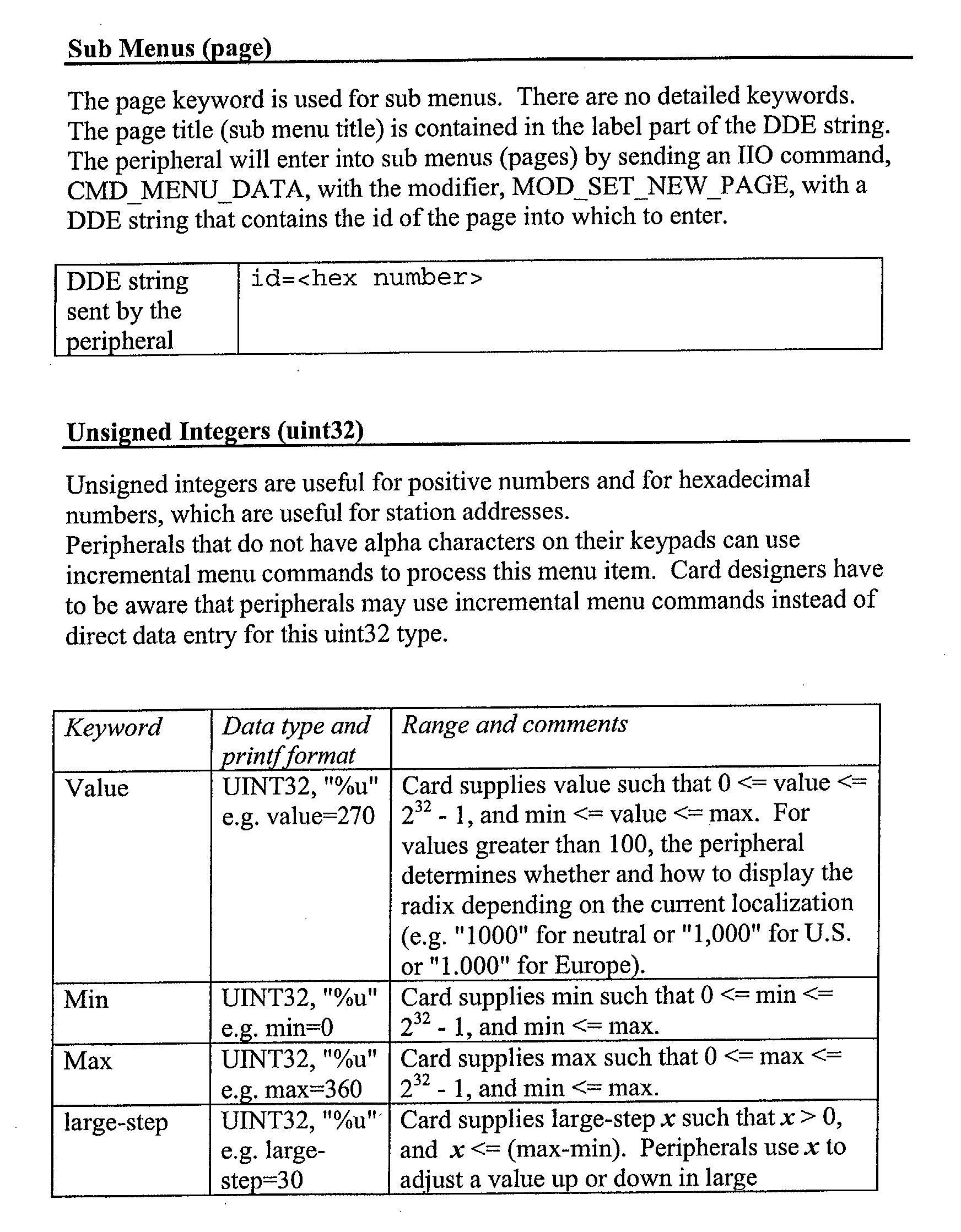
- an identification attribute for uniquely identifying the element in a page.
- the "0x01” does not necessarily indicate any specific order or structure of the menu.
- the menu objects e.g., elements
- the menu objects are displayed according to their structure in a given menu.
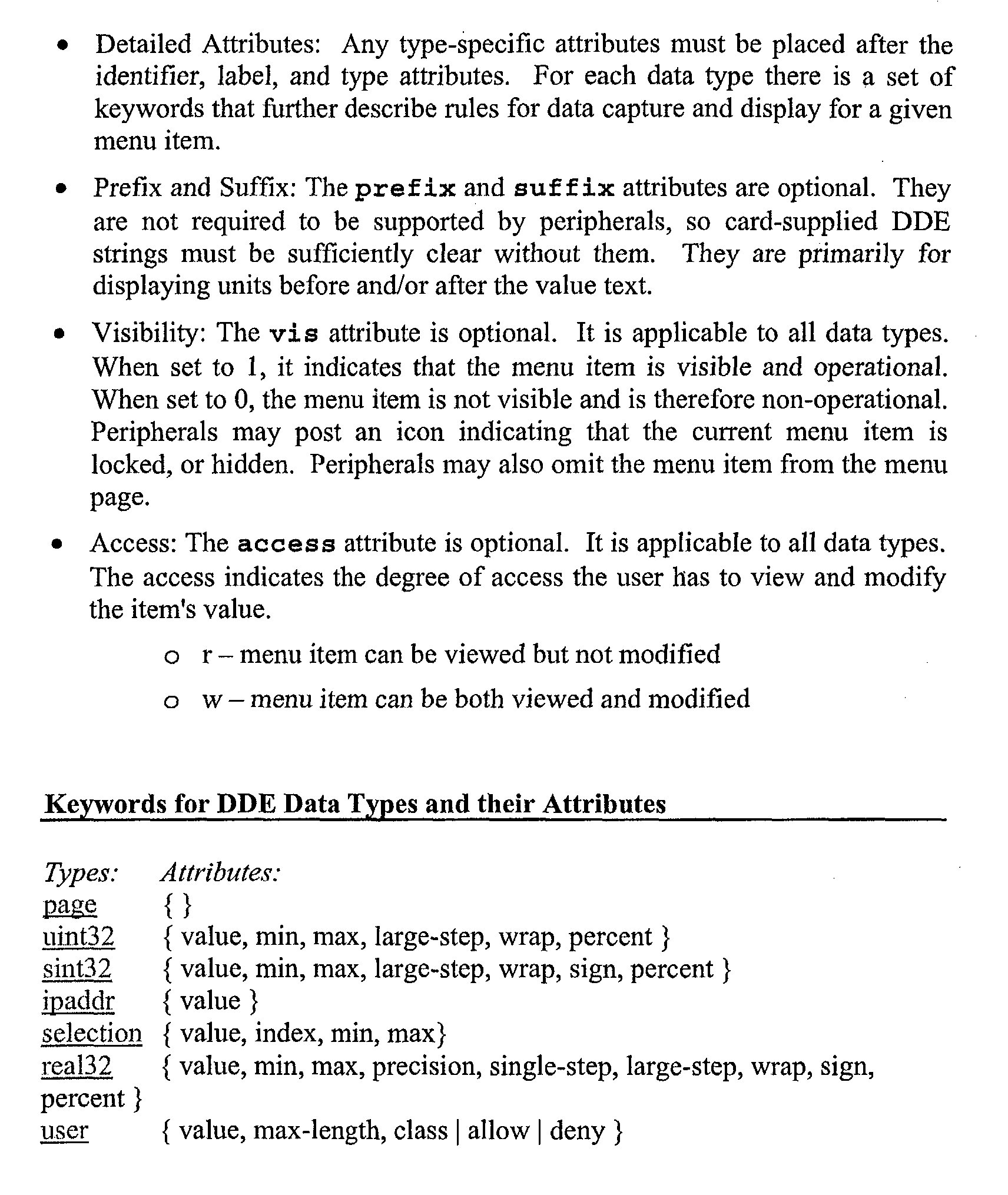
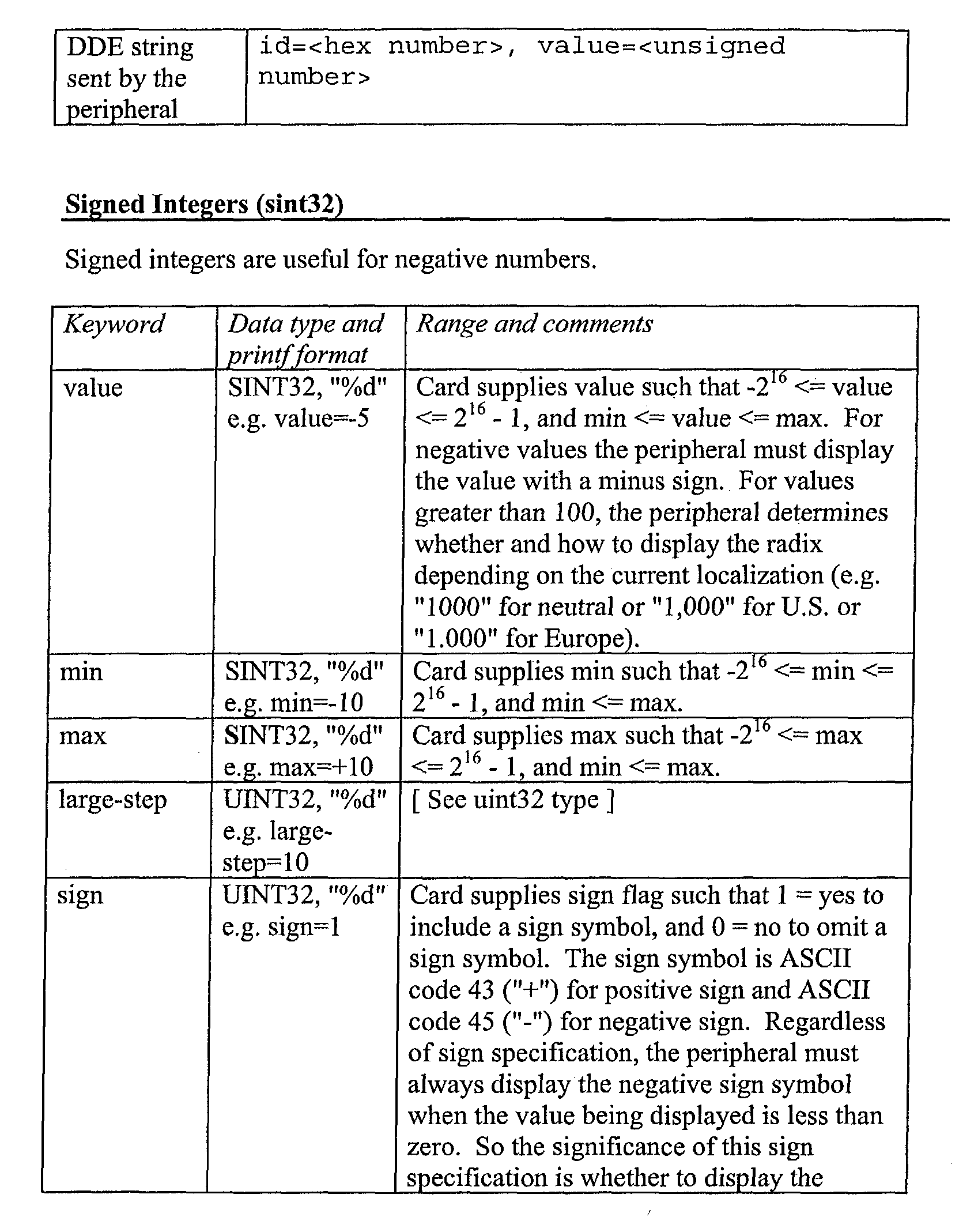
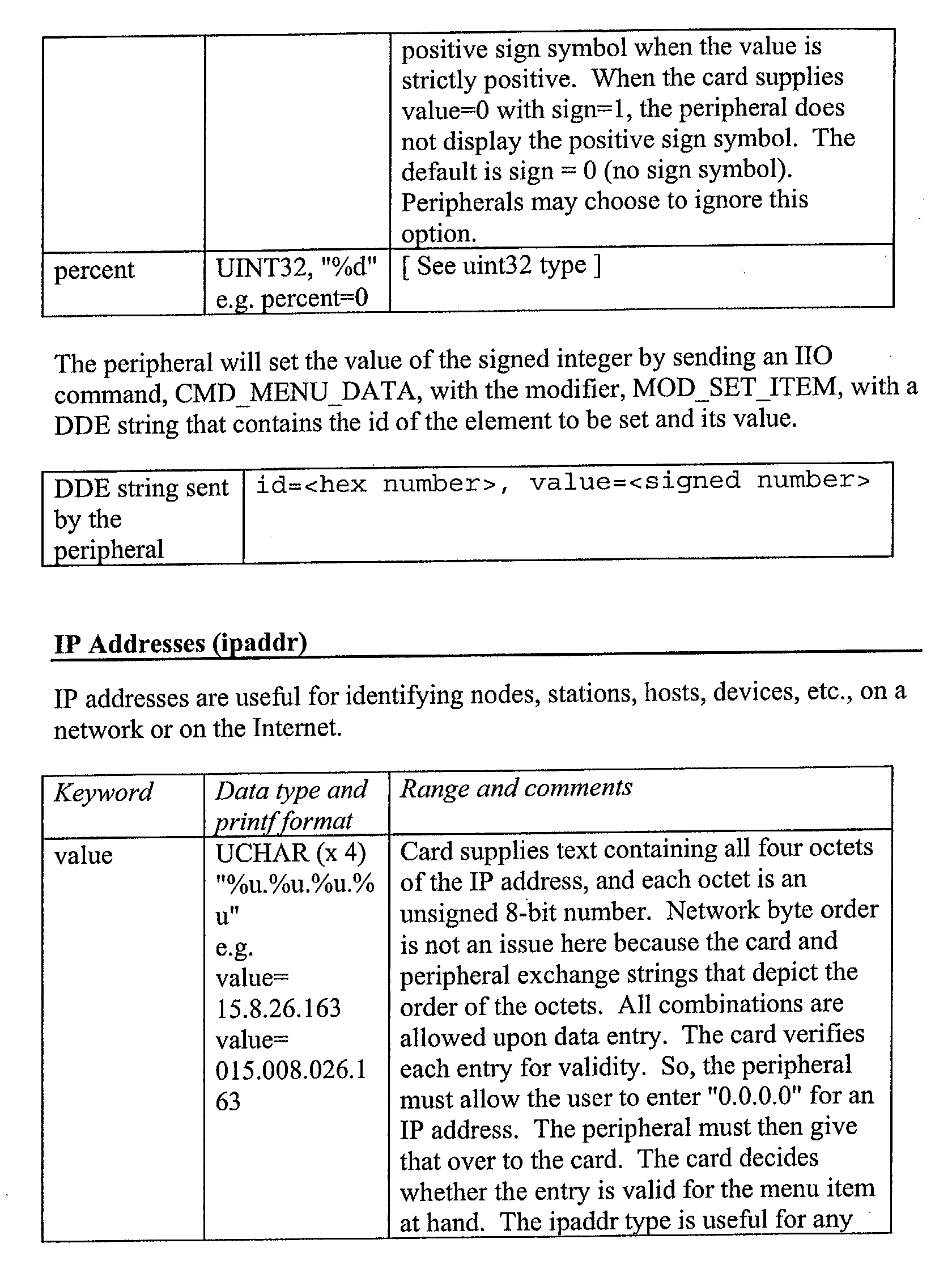
- attributes such as an element count attribute for defining the total number of elements for a page, a value attribute for indicating a value for the element, a title attribute for defining a title for the element, a label attribute for defining a description of the element, a vis attribute for indicating whether the element is visible and operational, and an access attribute for indicating the users' right to view or modify the element.
- an element count attribute for defining the total number of elements for a page
- a value attribute for indicating a value for the element
- a title attribute for defining a title for the element
- a label attribute for defining a description of the element
- a vis attribute for indicating whether the element is visible and operational
- an access attribute for indicating the users' right to view or modify the element.
- max-length attribute for defining the maximum length allowed for the value attribute
- allow attribute for indicating the allowed characters for the value attribute
- focus attribute for defining a previously selected element
- vis attribute for indicating whether the element is visible and operational
- access attribute for indicating the users' right to view or modify the element.
- a typical menu structure of the element "TCP/IP” has been shown, which includes a host name, an IP address, a subnet mask and a default gateway.
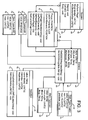
- a Direct Data Entry structure is shown in FIG. 3 and indicated generally at 40.
- the overall data structure is divided into a Session group 42, an Element group 44, a Page group 46 and a Selection group 48.
- the remaining groups of Elem TypeIpAddr 50, Elem TypeUint32 52, Elem Type Float32 54 and Elem TypeUser 56 are used to define the allowed configuration of elements of a specific type. Under each of the groups, the attribute and the commands are shown.
- session 42 includes attributes 58 of "-MyRoot: Page” for defining the root page as the first page, "MyLanguage: UNIT 32" for defining the default language and "MyCharacterSet: UNIT32” for defining the character and commands 60 of "Begin(): void” for beginning the session, "Cancel(): void” for canceling the session and "End() for ending the session.
- Page group 46 includes attributes 62 of "Focus: POSITION” for defining a previously selected element, "ListOf Elements: LIST” for defining the number of elements in the page and “CurrentElement: POSITION” for defining the current element being processed and commands 64 of "GetPageTitle(data:String): void” for getting the title of the page, "GetFirstElement(): void” for getting the first element in the page, “GetNextElement(): void” for getting the next element in the page, "SetNewPage(): void” for setting a new page and "ExitCurrentPage():void” for exiting the current page.
- the attributes 66 e.g., "MyId: UINT32", “MyLabel: String”, “MyType: String”, “MyVisibillty: BOOL” and “MyAccess: BOOL”
- commands 68 e.g., "GetDDEString(data:String): void” for getting the DDE String” and "SetDDEString(data:String): void” for setting the DDE String
- a selection group 48 is included for allowing the user to select elements from the menu.
- the selection group 48 similarly, includes a different set of attributes 70 (e.g., "value: String”, “currentIndex: UINT32", “minIndex: UINT32” and “MaxIndex: UINT32”) and commands 72 (e.g., "LookupIndex(index:UINT32,data:String) :void” and "SetIndex(index:UINT32): void” for looking up and setting the identification attribute of the selected element).
- attributes 70 e.g., "value: String”, “currentIndex: UINT32”, “minIndex: UINT32” and “MaxIndex: UINT32”
- commands 72 e.g., "LookupIndex(index:UINT32,data:String) :void” and "SetIndex(index:UINT32): void” for looking up and setting the identification attribute of the selected element).
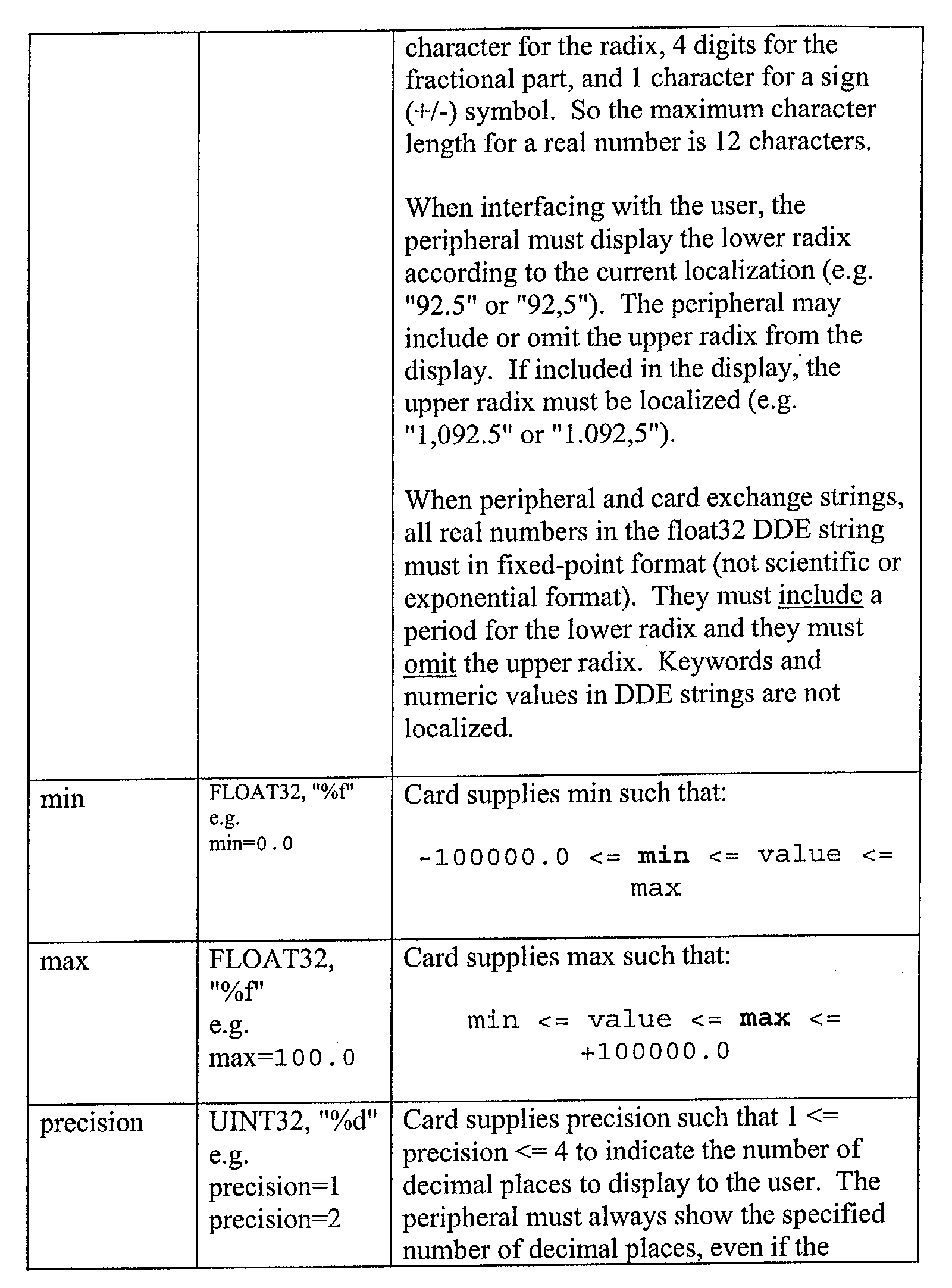
- Elem Type Float32" 54 and “Elem TypeUser” 56 includes similar attributes 78 (e.g., “value: FLOAT32", “min: FLOAT32”, “-max: FLOAT32” and “precision: UINT32”), 80 (e.g., “value: String”, “maxLength: UINT32", “allow: String” and “deny: String”).
- attributes 78 e.g., “value: FLOAT32", “min: FLOAT32”, “-max: FLOAT32” and “precision: UINT32”
- 80 e.g., “value: String”, “maxLength: UINT32", “allow: String” and “deny: String”
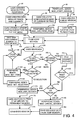
- FIG. 4 One embodiment of a method for exporting menu objects of a menu to the peripheral 12 in accordance with the invention is shown in FIG. 4.
- the method is initiated by a user, through the peripheral 12, by calling a command to start a menu session (block 90), and the peripheral accordingly sends a Mod_Start_Session command to the card (block 92).
- the card then creates a menu session on the display panel of the peripheral (block 94) and collects the configuration data of the current setting for the peripheral (block 96).
- the configuration is stored on the card, but the configuration data can also be stored on the peripheral.
- a DDE menu of the pages and elements is created (block 98) and stored with the current configuration data (block 100).
- the peripheral sends a Mod_Set_First_Page command to set the first page (block 102), and, in response, the card sets the root page as the current_page (block 104). After the root page is set as the current page (block 104), the page-load process is initiated for loading the currently set page (block 106), which is shown in FIG. 5.
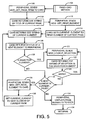
- the peripheral first sends a Mod_Get_Page_Title to the card for getting the title of the current page (block 108).
- the card returns a DDE string of the title of the current page (block 110).
- the peripheral sends a Mod_Get_First_Element command to get the first element of the current page (block 112).
- the card accordingly sets the first element in the current page as the current_element (block 114), and returns the DDE string of the current element (block 116).
- the card returns a status of a next element of the current page to the peripheral (block 118).
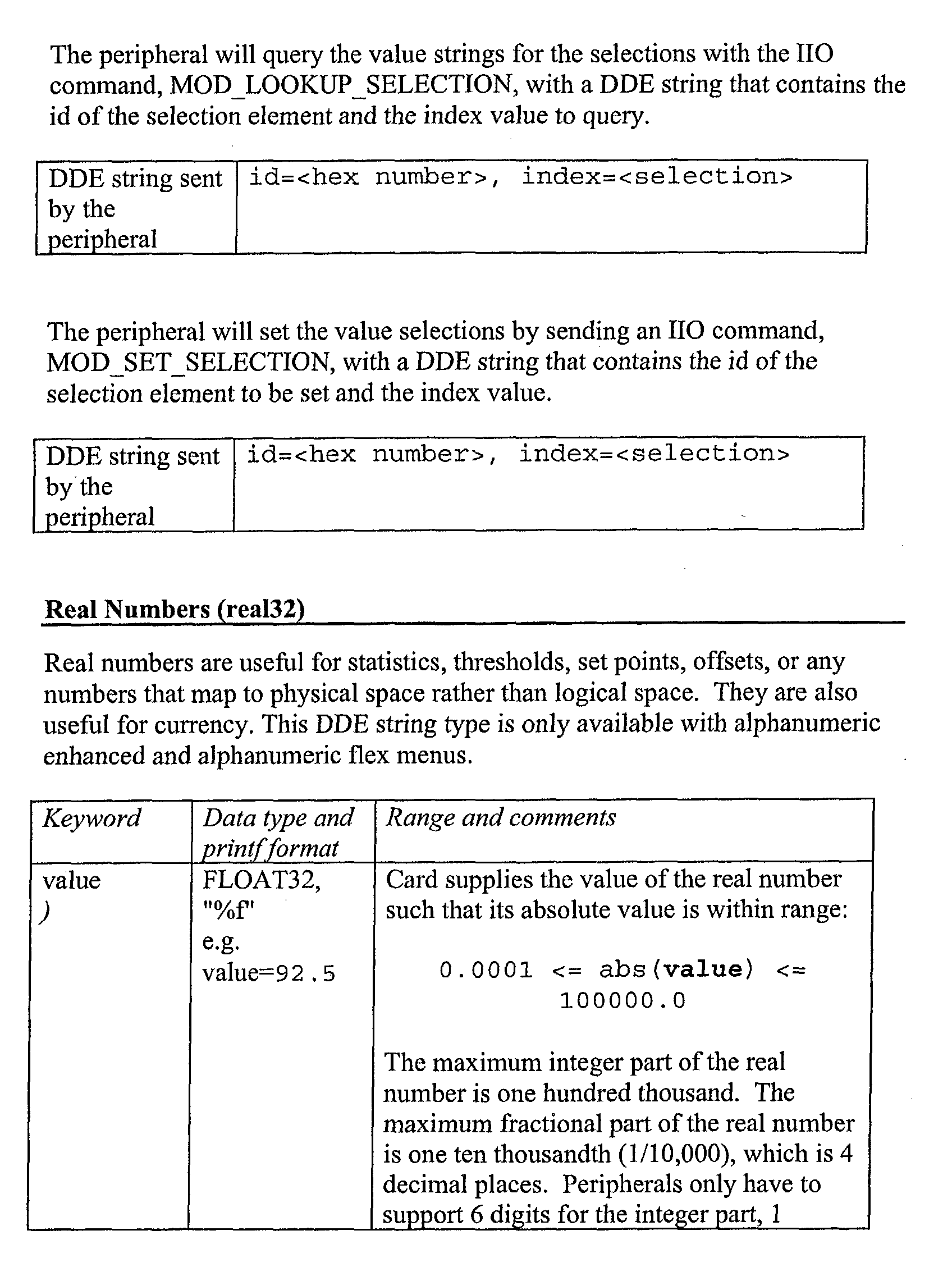
- the peripheral sends a Mod_Lookup_Selection command to request that an option in a selection element be returned by the card (block 121). As requested, the card returns a DDE string of the selection element to the peripheral (block 122). It is next determined whether there are more options in the selection element (block 124). If there is another option (block 124), the process reloops to the step of the peripheral sending the Mod_Lookup_Selection command for another request (Block 120). This subroutine is repeated until there are no more options in the selection element (block 124).
- the page-load process determines whether there is a next element in the current page (block 126). When there is a next element (block 126), the peripheral sends a Mod_Get_Next_Element command to get the next element for the current page (block 128). The card, in response, sets this next element as the current_element (block 130) and reloops to the step of returning the DDE string of the current element (block 116). The page-load method is restarted from this step. If, on the other hand, there is not a next element (block 126), the peripheral displays the page elements with the returned DDE string to the user (block 132) and returns to the method shown in FIG. 4 (block 134).
- a response is expected from the user (block 136). Once the user responds, it is determined whether the user's response is to set an element in the current page (block 138). If so, it is then determined whether the element is an item or a selection selected by the user (block 140). If the element is an item, the peripheral sends a Mod_Set_Item command for setting the item (block 142). Similarly, if the element is a selection, the peripheral sends a Mod_Set_Selection command for setting the user selection (block 144). Once the element has been set, it is determined whether the data sent to set the element is valid (block 146). If so, according to the current embodiment, the data for the current element is saved to the temporary memory (block 148). If the data fails the validity test (block 146), the process simply waits until there is another user response (block 136).
- the process Upon a response from the user, the process loops back to the step of determining whether the user response is to set an element in the current page (block 138). If the user response is to set an element, the process repeats. However, if the user response is not to set an element, it is then determined whether the user response is to go to the menu or a page in the menu (block 150). If the user response is to go to a page, a page-change method (block 152) shown in FIG. 6 is initiated to make such a page change.
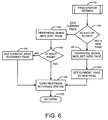
- the page-change method (block 152) shown in FIG. 6, it is determined whether the user response is to exit the current page or to set a new page (block 154). If the user response is to set a new page, the peripheral sends a Mod_Set_New_Page command to request that a new page be set (block 156), which is followed by the card setting the new page as the current_page (block 158). In addition, the card responds with a page status of this change to the peripheral (block 160). The page-change method ends and returns (block 162) to the method shown in FIG. 4.
- the peripheral would send a Mod_Exit_Page command to the card to make such a request (block 164).
- the card determines whether the current page is the root page (block 166). If so, the card simply responds with a status of the current page being the root page to the peripheral (block 160) and returns back to the method shown in FIG. 4. However, if the current page is not the root page, the card sets the current_page to a parent page of the page being requested for exit (block 168), and, again, the card sends a page status of the current page (block 160) and returns to method shown in FIG. 4 (block 162), and the page-change method ends at this point.
- the peripheral sends a Mod_End_Session command to the card for ending the session (block 174). In response, the card saves the data from the temporary memory to the permanent memory (block 176) and the session is ended (block 178). However, if it has been requested to cancel the session (block 172), the peripheral sends a Mod_Cancel_Session command to the card (block 180). In response to the command, the card discards the data from the temporary memory (block 182) and ends the session (block 178).
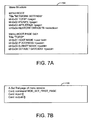
- FIGS. 7A, 7B, 7C, 7D, 7E, 7F, 7G and 7H Exemplary inputs and outputs given a defined menu structure is shown in FIGS. 7A, 7B, 7C, 7D, 7E, 7F, 7G and 7H.
- FIG. 7A an overall menu structure of the root page along with a specific example of the "TCP/IP” page under the root page is shown and indicated generally at 184.
- NETWORK SETTINGS there are 4 elements, specifically a TCP/IP page element, a IPX/SPX page element, a APPLETALK page element and a RESTORE DEFAULTS selection element.
- TCP/IP page element only the TCP/IP page element is shown, and it has 4 other elements under the TCP/IP page element, which are HOST NAME, IP ADDRESS, SUBNET MASK and DEFAULT GATEWAY.
- HOST NAME IP ADDRESS
- SUBNET MASK SUBNET MASK
- DEFAULT GATEWAY DEFAULT GATEWAY
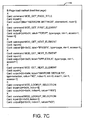
- a trace for setting the first page of the menu session is shown and indicated generally at 186.
- a trace is a utility that allows developers to see a list of inputs and outputs for the processing of the commands.
- the card receives the Mod_Set_First_Page from the peripheral, and there is no input or output from the card, since the root page is the first page by default.
- the card loads the currently set page, which is the root page, and the trace for loading the current page is shown in FIG. 7C.
- the trace for the page-load method is shown and indicated generally at 188.
- the first page is set as the current page being loaded, which is a root page from the example in FIG. 7A.
- the card For each command sent from the peripheral, the card outputs a DDE string for the command.
- the DDE string for the title is followed by each of the elements.
- the DDE string of the first element e.g., TCP/IP
- the peripheral may sent back a Mod_Lookup_Selection command if the user selects an element from the current page.
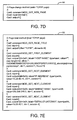
- a trace of the page-change method with a specified page of the TCP/IP page is shown in FIG. 7D and indicated generally at 190.
- FIG. 7E A trace of the page-load method for loading the TCP/IP page element is shown in FIG. 7E and indicated generally at 192.
- the peripheral From the DDE string of the title, the peripheral sends the Mod_Get_First_Element command and the Mod_Get_Next_Element command to obtain the elements in the TCP/IP page from the card.
- the card returns the DDE string of each element shown in FIG. 7A.
- the user can set an item, change the current page or set an selection, which is shown in FIGS. 7F, 7G and 7H and indicated generally at 194, 196, 198, respectively.
- the card does not output any string to the peripheral.
- the page-change method shown in FIG. 7G there is a Mod_Exit_Page, and there is no input or output to and from the card.
Landscapes
- Engineering & Computer Science (AREA)
- Software Systems (AREA)
- Theoretical Computer Science (AREA)
- Human Computer Interaction (AREA)
- Physics & Mathematics (AREA)
- General Engineering & Computer Science (AREA)
- General Physics & Mathematics (AREA)
- User Interface Of Digital Computer (AREA)
- Digital Computer Display Output (AREA)
Abstract
Description
- The present invention generally concerns an exporting method for displaying a menu in a peripheral, preferably to exporting methods using a direct data entry structure.
- Typically, using an input and output device, such as an input and output "I/O" card (herein "card"), data can be exported to a peripheral for display to users. The card generally includes a microprocessor for processing any commands from the peripheral memory for storing the processes and data and an interface for communicating with the peripheral. The most common data displayed to the user is configuration data, such as a setting for the default paper size, relating to the peripheral.
- However, in prior methods, the card could send only text strings, which are then displayed to the user by the peripheral. A strong is a sequence of data values (e.g., bytes), which typically stand for characters (e.g., 1 "character string"). The mapping between values and characters is determined by the character set which is itself specified implicitly or explicitly by the environment in which the strong is being interpreted. Because the strings in the prior method are limited to user readable text, the menu display and flexibility is greatly limited. In addition, since the peripheral is generally adapted to send only incremental commands, only one entry can be displayed at one time. As peripherals play a greater role in networking, it is becoming more common for the peripherals to be implemented with a server, resulting in a very long and complicated configuration menu. A typical menu would involve multiple pages, sections, subsections, and choices. With the limited use of text strings and incremental commands, the peripheral cannot display such complex menu without being a tedious task for the user, since only one entry can be displayed at a time. Furthermore, it would be difficult for the peripheral to recognize any menu structures that may be divided into pages, sections and subsection.
- The present invention seeks to provide an improved method of and system for exporting menu objects to a peripheral device.
- According to an aspect of the present invention, there is provided a method of exporting menu objects to a peripheral as specified in
claim 1. - According to another aspect of the present invention, there is provided a method of loading a current page of a menu in a peripheral as specified in
claim 10. - In the preferred embodiment, the configuration data of a current setting of a peripheral is first collected, and a Direct Data Entry menu of the pages and elements is then created. The configuration data is stored into the created Direct Data Entry menu. Upon a request for an element in the menu, the Direct Data Entry string for the requested element is then sent.
- Embodiments of the present invention are described below, by way of example only, with reference to the accompanying drawings in which:
- FIGURE 1 shows a block diagram of a system organized to implement an embodiment of the invention;
- FIGS. 2A and 2B show a general data structure and an exemplary data structure of the Direct Data Entry according to an embodiment of the present invention;
- FIG. 3 shows a Direct Data Entry structure according to an embodiment of the present invention;
- FIG. 4 is a flow chart according to an embodiment of the present invention illustrating the functionality of a method of the present invention;
- FIG. 5 is a flow chart according to an embodiment of the present invention illustrating the functionality of a page-load method shown in FIG. 4;
- FIG. 6 is a flow chart according to an embodiment of the present invention illustrating the functionality of a page-change method shown in FIG. 4; and,
- FIGS. 7A, 7B, 7C, 7D, 7E, 7F, 7G and 7H show exemplary inputs and outputs given a defined menu structure.
-
- The described embodiments provide a way to display complicated menu structures on peripherals, which are generally limited to text strings. With the use of a Direct Data Entry ("DDE") structure, the peripheral is able to recognize a page, section, subsection or items. Users can easily navigate through the menu using the display panel on the peripheral. For example, users can navigate from a page with many sections (e.g., opens up to more choices) and items (e.g., selectable for configuration), and from a particular section with multiple subsections and items.
- In this embodiment, the configuration data of the current setting of a peripheral is first collected, and a Direct Data Entry menu of the pages and elements is then created. The configuration data is stored into the created Direct Data Entry menu. Upon a request for an element in the menu, a Direct Data Entry string for the requested element is then sent.
- A block diagram of a system according to an embodiment of the present invention is shown in FIG. 1, and indicated generally at 10. As with most typical systems, there is a peripheral 12 that generally includes a
display panel 13 for displaying data to users,microprocessor 14 for processing data, a sharedmemory 16 for storing data, aninterface chip 18 for communication with other devices, and abus controller chip 20 for controlling the processing among the microprocessor. In this embodiment, acard 22 is used as an input and output device for communicating with the peripheral 12. Similarly, the card includes amicroprocessor 24 for processing,memory 26 for storing data and aninterface chip 28 for communicating with the peripheral. The card is a separate component (i.e., external) from the peripheral. For example, the card can be inserted or extracted easily to and from the peripheral. However, it is also contemplated to use the card or any input or output device that is internal to the peripheral. Thus, it should be understood that these various implementations are within the scope of the claims. - In this embodiment, the
card 22 stores the configuration data, such as menu objects of a menu, for display on the peripheral 12. With the use of adisplay 13 on the peripheral, the card exports the menu to the user for configuration set up or revision. In this embodiment, thecard 22 monitors and controls the navigation of a user session for configuring the menu. However, implementations of the peripheral monitoring and controlling the navigation are also contemplated, and these various implementations are within the scope of the present invention. - This embodiment may be implemented in a variety of systems. The current embodiment uses a card as one of the many implementation variations. It can, nonetheless be implemented on any device that has the capability to store and process information. However, it should also be understood that the system can be implemented in various computer codes, such as machine codes, and firmware.
- In addition, the system can be implemented with different types of data structures, such as a tree. As a result, it should be understood that others skilled in the art can appreciate the implementations of the various systems and configurations, and these implementations are within the scope of the claims. However, a page object-oriented data structure is used as the data structure according to one embodiment, and the system will be explained and described with a page object-oriented data structure implementation as the data structure.
- A
general data structure 30 and anexemplary data structure 32 of a Direct Data Entry string according to an embodiment of the present invention are shown in FIGS. 2A and 2B. In the current embodiment, a Direct Data Entry ("DDE") string of an element is generated by thecard 22 in response to commands sent from the peripheral 12. An element is defined as one of the items of data in an array (i.e., a collection of similarly typed data items distinguished by their indices or subscripts). In the present DDE data structure, an element can be a page, a selection and an item, and this is dependent on what type the element is defined as. In the current embodiment, elements are used to define menu objects (e.g., page, a selection and an item) in a menu with a specific structure, and the DDE string defines the configuration of the elements, which includes multiple attributes. An attribute is used as a named value or relationship that exists for some or all instances of some entity and is directly associated with that instance. The peripheral, using these attributes, displays the menu objects according to their appropriate structure. - In this embodiment, there is a type attribute (e.g., type=user) for defining a type for the element and an identification attribute for uniquely identifying the element in a page. Although the identification attribute is defined as "id=0x01", the "0x01" does not necessarily indicate any specific order or structure of the menu. Thus, for example, the identification attribute of "id=0x860020" would have also worked with the current implementation. It should be understood that any numbering of the identification attribute could have been chosen, depending on the implementation. As a result of the type attribute and the identification attribute, the menu objects (e.g., elements) are displayed according to their structure in a given menu. For example, a type attribute can be used to define a page (e.g., type=page), a host name (e.g., type=user), information relating to the network address of the peripheral (e.g., type=ipaddr), a selection defined by the user (e.g., type=selection), or any thing that may be appropriate to define menu objects in the menu structure.
- There are also other attributes, such as an element count attribute for defining the total number of elements for a page, a value attribute for indicating a value for the element, a title attribute for defining a title for the element, a label attribute for defining a description of the element, a vis attribute for indicating whether the element is visible and operational, and an access attribute for indicating the users' right to view or modify the element. Although not all the attributes have been shown in this example, a skilled artisan would appreciate that various attributes can be added, altered or deleted depending on the implementation. The various implementations with the use of different attributes are contemplated, and they are within the scope of the claims.
- As shown in the examples shown in FIG. 2B, the element entitled "TCP/IP" (e.g., title="TCP/IP") has a total of four elements (e.g., elements=4). The first element under "TCP/IP", which is a host name (e.g., label="HOST NAME") of "stargate" (e.g., value="stargate"), an identification attribute of "id=0x01" is used as an association to an element in the page. As shown, there may be other attributes, such as max-length attribute for defining the maximum length allowed for the value attribute, an allow attribute for indicating the allowed characters for the value attribute, a focus attribute for defining a previously selected element, as well as the vis attribute for indicating whether the element is visible and operational and an access attribute for indicating the users' right to view or modify the element. A typical menu structure of the element "TCP/IP" has been shown, which includes a host name, an IP address, a subnet mask and a default gateway.
- A Direct Data Entry structure according to an embodiment of the present invention is shown in FIG. 3 and indicated generally at 40. The overall data structure is divided into a
Session group 42, anElement group 44, aPage group 46 and aSelection group 48. The remaining groups ofElem TypeIpAddr 50,Elem TypeUint32 52,Elem Type Float32 54 andElem TypeUser 56 are used to define the allowed configuration of elements of a specific type. Under each of the groups, the attribute and the commands are shown. - For example,
session 42 includesattributes 58 of "-MyRoot: Page" for defining the root page as the first page, "MyLanguage:UNIT 32" for defining the default language and "MyCharacterSet: UNIT32" for defining the character and commands 60 of "Begin(): void" for beginning the session, "Cancel(): void" for canceling the session and "End() for ending the session.Page group 46, on the other hand, includesattributes 62 of "Focus: POSITION" for defining a previously selected element, "ListOf Elements: LIST" for defining the number of elements in the page and "CurrentElement: POSITION" for defining the current element being processed and commands 64 of "GetPageTitle(data:String): void" for getting the title of the page, "GetFirstElement(): void" for getting the first element in the page, "GetNextElement(): void" for getting the next element in the page, "SetNewPage(): void" for setting a new page and "ExitCurrentPage():void" for exiting the current page. - The attributes 66 (e.g., "MyId: UINT32", "MyLabel: String", "MyType: String", "MyVisibillty: BOOL" and "MyAccess: BOOL") and commands 68 (e.g., "GetDDEString(data:String): void" for getting the DDE String" and "SetDDEString(data:String): void" for setting the DDE String) of the
group element 44 are then used as a current element of the current page from thePage group 46. Lastly, aselection group 48 is included for allowing the user to select elements from the menu. Theselection group 48, similarly, includes a different set of attributes 70 (e.g., "value: String", "currentIndex: UINT32", "minIndex: UINT32" and "MaxIndex: UINT32") and commands 72 (e.g., "LookupIndex(index:UINT32,data:String) :void" and "SetIndex(index:UINT32): void" for looking up and setting the identification attribute of the selected element). - Because the group "Elem TypeIpAddr" 50, "Elem TypeUint32" 52, "Elem Type Float32" 54 and "Elem TypeUser" 56 are used to define the allowed configuration of elements of a specific type, they do not have any commands in the current embodiment. Rather, these elements inherent commands from their base class (e.g., group elements). Put differently, these elements are a specific instance(s) of the group element. "Elem TypeIpAddr" 50 includes an
attribute 74 of "value: IPADDR32" for defining the value of elements having IP Address as type (e.g., type=ipaddr), and "Elem TypeUint32" 52 includesattributes 76 "value: UINT32", "min: UINT32" and "max: UINT32" for defining the value of elements having an unassigned integer as type. Finally, "Elem Type Float32" 54 and "Elem TypeUser" 56 includes similar attributes 78 (e.g., "value: FLOAT32", "min: FLOAT32", "-max: FLOAT32" and "precision: UINT32"), 80 (e.g., "value: String", "maxLength: UINT32", "allow: String" and "deny: String"). Again, a skilled artisan would appreciate the flexibility in the implementation of the present invention, and it should be understood that the groups, attributes and/or commands may be changed. These various implementations are within the scope of the present invention. - One embodiment of a method for exporting menu objects of a menu to the peripheral 12 in accordance with the invention is shown in FIG. 4. The method is initiated by a user, through the peripheral 12, by calling a command to start a menu session (block 90), and the peripheral accordingly sends a Mod_Start_Session command to the card (block 92). However, it should be noted that automatic initiation by a computer program is also contemplated, depending on the design and needs of the implementation. The card then creates a menu session on the display panel of the peripheral (block 94) and collects the configuration data of the current setting for the peripheral (block 96). In the current embodiment, the configuration is stored on the card, but the configuration data can also be stored on the peripheral.
- Once the card finishes collecting the configuration data (block 96), a DDE menu of the pages and elements is created (block 98) and stored with the current configuration data (block 100). The peripheral sends a Mod_Set_First_Page command to set the first page (block 102), and, in response, the card sets the root page as the current_page (block 104). After the root page is set as the current page (block 104), the page-load process is initiated for loading the currently set page (block 106), which is shown in FIG. 5.
- Turning now to the page-load process (block 106) shown in FIG. 5, for the current_page (e.g., the root page), the peripheral first sends a Mod_Get_Page_Title to the card for getting the title of the current page (block 108). In response, the card returns a DDE string of the title of the current page (block 110). From which, the peripheral sends a Mod_Get_First_Element command to get the first element of the current page (block 112). The card accordingly sets the first element in the current page as the current_element (block 114), and returns the DDE string of the current element (block 116). In preparation for the next element in the current page, the card returns a status of a next element of the current page to the peripheral (block 118).
- It is then determined whether there is a selection element requested (block 120). If so, the peripheral sends a Mod_Lookup_Selection command to request that an option in a selection element be returned by the card (block 121). As requested, the card returns a DDE string of the selection element to the peripheral (block 122). It is next determined whether there are more options in the selection element (block 124). If there is another option (block 124), the process reloops to the step of the peripheral sending the Mod_Lookup_Selection command for another request (Block 120). This subroutine is repeated until there are no more options in the selection element (block 124). Once it is either determined that there is not a selection element (block 120) or there are no more options for the selection element (block 124), the page-load process then determines whether there is a next element in the current page (block 126). When there is a next element (block 126), the peripheral sends a Mod_Get_Next_Element command to get the next element for the current page (block 128). The card, in response, sets this next element as the current_element (block 130) and reloops to the step of returning the DDE string of the current element (block 116). The page-load method is restarted from this step. If, on the other hand, there is not a next element (block 126), the peripheral displays the page elements with the returned DDE string to the user (block 132) and returns to the method shown in FIG. 4 (block 134).
- Referring back to FIG. 4, after the elements of the current page are displayed to the user (block 132), a response is expected from the user (block 136). Once the user responds, it is determined whether the user's response is to set an element in the current page (block 138). If so, it is then determined whether the element is an item or a selection selected by the user (block 140). If the element is an item, the peripheral sends a Mod_Set_Item command for setting the item (block 142). Similarly, if the element is a selection, the peripheral sends a Mod_Set_Selection command for setting the user selection (block 144). Once the element has been set, it is determined whether the data sent to set the element is valid (block 146). If so, according to the current embodiment, the data for the current element is saved to the temporary memory (block 148). If the data fails the validity test (block 146), the process simply waits until there is another user response (block 136).
- Upon a response from the user, the process loops back to the step of determining whether the user response is to set an element in the current page (block 138). If the user response is to set an element, the process repeats. However, if the user response is not to set an element, it is then determined whether the user response is to go to the menu or a page in the menu (block 150). If the user response is to go to a page, a page-change method (block 152) shown in FIG. 6 is initiated to make such a page change.
- Turning now to the page-change method (block 152) shown in FIG. 6, it is determined whether the user response is to exit the current page or to set a new page (block 154). If the user response is to set a new page, the peripheral sends a Mod_Set_New_Page command to request that a new page be set (block 156), which is followed by the card setting the new page as the current_page (block 158). In addition, the card responds with a page status of this change to the peripheral (block 160). The page-change method ends and returns (block 162) to the method shown in FIG. 4. If, however, the user response is to exit the current page without indicating a new page (block 154), the peripheral would send a Mod_Exit_Page command to the card to make such a request (block 164). The card then determines whether the current page is the root page (block 166). If so, the card simply responds with a status of the current page being the root page to the peripheral (block 160) and returns back to the method shown in FIG. 4. However, if the current page is not the root page, the card sets the current_page to a parent page of the page being requested for exit (block 168), and, again, the card sends a page status of the current page (block 160) and returns to method shown in FIG. 4 (block 162), and the page-change method ends at this point.
- Referring again to FIG. 4, after the page-change method is finished processing and returns with a page status of the current_page (block 152), it is determined whether the current_page is beyond the root page (block 170). Put differently, it is determined whether the currently set current_page is past the root page (block 170). If the current_page is not beyond the root page (block 170), the process reloops to the page-load method (block 106), which is again initiated with the currently set current_page.
- If, on the other hand, the current_page is beyond the root page (block 170) or the earlier sent user response is to go back to the menu (block 150), it is next determined whether there is a request to end or cancel the session altogether (block 172). If a request to end the session has been submitted by the user (block 172), the peripheral sends a Mod_End_Session command to the card for ending the session (block 174). In response, the card saves the data from the temporary memory to the permanent memory (block 176) and the session is ended (block 178). However, if it has been requested to cancel the session (block 172), the peripheral sends a Mod_Cancel_Session command to the card (block 180). In response to the command, the card discards the data from the temporary memory (block 182) and ends the session (block 178).
- Exemplary inputs and outputs given a defined menu structure is shown in FIGS. 7A, 7B, 7C, 7D, 7E, 7F, 7G and 7H. Turning to FIG. 7A, an overall menu structure of the root page along with a specific example of the "TCP/IP" page under the root page is shown and indicated generally at 184. Under the root page entitled, "NETWORK SETTINGS," there are 4 elements, specifically a TCP/IP page element, a IPX/SPX page element, a APPLETALK page element and a RESTORE DEFAULTS selection element. In the example, only the TCP/IP page element is shown, and it has 4 other elements under the TCP/IP page element, which are HOST NAME, IP ADDRESS, SUBNET MASK and DEFAULT GATEWAY. Note that there is an unique identification attribute (e.g., id=0x01) for uniquely identifying each element in the page. Although TCP/IP and HOST NAME has the same identification attribute (e.g., id=0x01), the identification attribute is specific to each page element.
- Turning now to FIG. 7B, a trace for setting the first page of the menu session is shown and indicated generally at 186. A trace is a utility that allows developers to see a list of inputs and outputs for the processing of the commands. The card receives the Mod_Set_First_Page from the peripheral, and there is no input or output from the card, since the root page is the first page by default. Next, the card loads the currently set page, which is the root page, and the trace for loading the current page is shown in FIG. 7C.
- In FIG. 7C, the trace for the page-load method is shown and indicated generally at 188. From the previous example in FIG. 7B, the first page is set as the current page being loaded, which is a root page from the example in FIG. 7A. For each command sent from the peripheral, the card outputs a DDE string for the command. For example, for the Mod_Get_Page_Title command, the card outputs the DDE string of "[title= "NETWORK SETTINGS", elements=4, root=1]". The DDE string for the title is followed by each of the elements. The DDE string of the first element (e.g., TCP/IP) is returned with the Mod_Get_First_Element command. After all the elements for the current page have been returned and displayed on the peripheral, the peripheral may sent back a Mod_Lookup_Selection command if the user selects an element from the current page. In this case, the card receives the command along with an input of the identification attribute and the index attribute of the selection (e.g., input=[id=0x04, index=0]), and an output (e.g., output=[id=0x04, index=0, value="YES"]) that there is such a value is sent to the peripheral.
- A trace of the page-change method with a specified page of the TCP/IP page is shown in FIG. 7D and indicated generally at 190. The card receives the Mod_Set_New_Page command along with an input identifying the requested page using the identification attribute (e.g., input=[id=0x01]) from the peripheral, the card initiates the page-load method to load the TCP/IP page element, which is shown in FIG. 7E.
- A trace of the page-load method for loading the TCP/IP page element is shown in FIG. 7E and indicated generally at 192. Again, a Mod_Get_Page_Title command is received by the card, and a DDE string for the title (e.g., output=[title="TCP/IP", elements=4) is returned to the peripheral. From the DDE string of the title, the peripheral sends the Mod_Get_First_Element command and the Mod_Get_Next_Element command to obtain the elements in the TCP/IP page from the card. As shown, the card returns the DDE string of each element shown in FIG. 7A.
- With the TCP/IP page displayed, the user can set an item, change the current page or set an selection, which is shown in FIGS. 7F, 7G and 7H and indicated generally at 194, 196, 198, respectively. If the user requested to set an item in the TCP/IP page, the peripheral sends the Mod_Set_Item command with an input to identify the element and the value for the element (e.g., input=[id=0x01, value= "stargate"]). In this case, the card does not output any string to the peripheral. Similarly, the page-change method shown in FIG. 7G, there is a Mod_Exit_Page, and there is no input or output to and from the card. In FIG. 7H, the user can also set a selection, which again prompts the peripheral to send the Mod_Set_Item command along with an input (e.g., input=[id=0x04, index=0) to the card.
- From the foregoing description, it should be understood that an improved system and method for exporting menu objects of a menu in a peripheral using a direct data entry structure have been shown and described, which have many desirable attributes and advantages. The system and method enables menu objects and structure to be exported to a peripheral, allowing for user selection to configure these menu objects.
- While various embodiments have been shown and described, it should be understood that other modifications, substitutions and alternatives are apparent to one of ordinary skill in the art. Such modifications, substitutions and alternatives can be made without departing from the scope of the appended claims.
- The disclosures in United States patent application no. 10/127,242, from which this application claims priority, and in the abstract accompanying this application are incorporated herein by reference.






Claims (10)
- A method of exporting menu objects to a peripheral (12) in text form using a device (22) having a microprocessor (24), memory (26) and an interface chip (28) using a Direct Data Entry structure including a root page (58) for providing the first page of the menu, at least one element (44) for providing a menu object, a direct data entry string including at least one attribute for providing the configuration of said at least one element, a type attribute for providing a type of the element and an identification attribute for uniquely identifying a type of the element and an identification attribute for uniquely identifying the element in a page, said method including the steps of:collecting configuration data of the current setting (96);creating a Direct Data Entry menu of pages and elements (98);storing the configuration data into the Direct Data Entry menu (100); andsending a Direct Data Entry string for a requested element in the Direct Data Entry menu (102).
- A method according to claim 1, wherein said step of storing the configuration data into the Direct Data Entry menu (10)) includes the steps of:setting the root page as a current page (104);loading the current page (106); andwaiting for a user response (136).
- A method according to claim 2, wherein said step of loading the current page (106) includes the steps of:returning a Direct Data Entry string of a title of the current page (110);setting a first element to a current element of the current page (114); andreturning a Direct Data Entry string of the current element (116).
- A method according to claim 3, including the steps of:returning a status of a next element to the peripheral (118);determining whether there is a selection element requested (120);if there is a selection element requested, returning a Direct Data Entry string of the selection (122);determining whether there are more selections (124);if there are more selections, repeating from said step of returning a Direct Data Entry string of the selection (122);if the there is no selection element requested or there are no more selections, determining whether there is a next element in the current page (126);if there is a next element in the current page, setting the next element as the current element of the current page (130) and repeating from said step of returning a Direct Data Entry string of the current element (116);if there is not a text element in the current page, displaying at least one element using the returned Direct Data Entry string of the current page (132).
- A method according to claim 2, 3 or 4, wherein said step of waiting for a user response (136) includes the steps of:determining whether there is a user response to set an element in the current page (138);if there is a user response to set an element in the current page, determining whether the user response is to set an item or to set a selection (140); andif there is not a user response to set an element in the current page, determining whether the user response is to go to the menu or the page (150).
- A method according to claim 5, wherein said step of determining whether the user response is to set an item or a selection includes the steps of:if the user response is to set an item, determining whether the data for the item is valid (146);if the user response is to set a selection, determining whether the data for the selection is valid (146);if the data is valid, saving the data for the current element to memory (148) and repeating from said step of loading the current page (106);if the data is invalid, repeating from said step of waiting for a user response (136).
- A method according to claim 5, wherein said step of determining whether the user response is to go to the menu or the page (150) includes the steps of:if the user response is to go to a new page, changing to the new page (152);determining whether the new page is beyond the root page (170);if the new page is beyond the root page, repeating from said step of loading the current page (106); andif the new page is not beyond the root page or the user response is to go to the menu, determining whether the user response is to end or to cancel the session (172).
- A method according to claim 7, wherein said step of changing to the new page (152) includes the steps of:determining whether there is a user response to exit the current page or to set the new page (154);if there is a user response to exit the current page, determining whether the current page is the root page (166);if there is a user response to set a new page, setting the new page as the current page (158);if the current page is not the root page, setting a parent page as the current page (168); and ending the menu session.
- A method according to claim 7 or 8 wherein said step of determining whether the user response is to end or to cancel the session (172) includes the steps of:if the user response is to end the menu session, saving data to memory (176);if the user response is to cancel the menu session, discarding data from memory (182); andending the menu session.
- A method of loading a current page of a menu in a peripheral (12) using a device (22) having a microprocessor (24), memory (26) and an interface chip (28) using a Direct Data Entry structure including a root page (58) for providing the first page of the menu, at least one element (44) for providing the configuration of said at least one element, a type attribute for providing a type for the element and an identification attribute for uniquely identifying the element in a page, said method including the steps of:setting a first element as a current element of the current page (114);returning a Direct Data Entry string of the current element (116);determining whether there is a next element in the current page (126); if there is a next element in the current page, setting the next element as the current element of the current page (130) and repeating from said step of returning the Direct Data Entry string of the current element (116);if there is not a next element in the current page, displaying at least one element using the return Direct Data Entry string of the current page (132).
Applications Claiming Priority (2)
| Application Number | Priority Date | Filing Date | Title |
|---|---|---|---|
| US127242 | 2002-04-22 | ||
| US10/127,242 US7640504B2 (en) | 2002-04-22 | 2002-04-22 | Method and system for exporting menu objects to a peripheral using a direct data entry structure |
Publications (2)
| Publication Number | Publication Date |
|---|---|
| EP1357469A2 true EP1357469A2 (en) | 2003-10-29 |
| EP1357469A3 EP1357469A3 (en) | 2004-09-08 |
Family
ID=28790937
Family Applications (1)
| Application Number | Title | Priority Date | Filing Date |
|---|---|---|---|
| EP03251341A Withdrawn EP1357469A3 (en) | 2002-04-22 | 2003-03-06 | Method and system for exporting menu objects to a peripheral device |
Country Status (2)
| Country | Link |
|---|---|
| US (1) | US7640504B2 (en) |
| EP (1) | EP1357469A3 (en) |
Family Cites Families (27)
| Publication number | Priority date | Publication date | Assignee | Title |
|---|---|---|---|---|
| US6473609B1 (en) * | 1995-12-11 | 2002-10-29 | Openwave Systems Inc. | Method and architecture for interactive two-way communication devices to interact with a network |
| US6334157B1 (en) * | 1997-03-11 | 2001-12-25 | Microsoft Corporation | Programmatically providing direct access to user interface elements of an application program |
| JP3848455B2 (en) * | 1998-02-16 | 2006-11-22 | 富士通株式会社 | Information reading system, information terminal used for the system, and recording medium |
| US6173316B1 (en) * | 1998-04-08 | 2001-01-09 | Geoworks Corporation | Wireless communication device with markup language based man-machine interface |
| US6457060B1 (en) * | 1998-04-30 | 2002-09-24 | Openwave Systems Inc. | Method and apparatus for flexibly linking to remotely located content on a network server through use of aliases |
| US6509913B2 (en) * | 1998-04-30 | 2003-01-21 | Openwave Systems Inc. | Configurable man-machine interface |
| US6275853B1 (en) * | 1998-05-27 | 2001-08-14 | 3Com Corporation | System and method for extending communications features using generic management information base objects |
| US6421661B1 (en) * | 1998-06-15 | 2002-07-16 | International Business Machines Corporation | Hierarchical query syntax for inquiring and selecting among database objects |
| US6848108B1 (en) * | 1998-06-30 | 2005-01-25 | Microsoft Corporation | Method and apparatus for creating, sending, and using self-descriptive objects as messages over a message queuing network |
| US6292271B1 (en) * | 1998-09-03 | 2001-09-18 | Toshiba American Information Systems, Inc. | Soft labels for MFP panel display |
| US6195667B1 (en) * | 1998-10-16 | 2001-02-27 | Softbook Press, Inc. | On-line menu updating for an electronic book |
| US6272493B1 (en) * | 1999-01-21 | 2001-08-07 | Wired Solutions, Llc | System and method for facilitating a windows based content manifestation environment within a WWW browser |
| US20020054152A1 (en) * | 1999-08-23 | 2002-05-09 | Murugan Palaniappan | Menu infrastructure apparatus and method |
| US6578000B1 (en) * | 1999-09-03 | 2003-06-10 | Cisco Technology, Inc. | Browser-based arrangement for developing voice enabled web applications using extensible markup language documents |
| US6687745B1 (en) * | 1999-09-14 | 2004-02-03 | Droplet, Inc | System and method for delivering a graphical user interface of remote applications over a thin bandwidth connection |
| US6874143B1 (en) * | 2000-06-21 | 2005-03-29 | Microsoft Corporation | Architectures for and methods of providing network-based software extensions |
| US6717593B1 (en) * | 2000-09-12 | 2004-04-06 | Avaya Technology Corp. | Mark-up language implementation of graphical or non-graphical user interfaces |
| US6990654B2 (en) * | 2000-09-14 | 2006-01-24 | Bea Systems, Inc. | XML-based graphical user interface application development toolkit |
| US7069271B1 (en) * | 2000-11-03 | 2006-06-27 | Oracle International Corp. | Methods and apparatus for implementing internet storefronts to provide integrated functions |
| US6816864B2 (en) * | 2000-12-21 | 2004-11-09 | International Business Machines Corporation | System and method for handling set structured data through a computer network |
| US7024473B2 (en) * | 2001-01-05 | 2006-04-04 | Matsushita Electric Works, Ltd. | Web server for communicating with one or more electronic devices through a gateway computer |
| US20020129096A1 (en) * | 2001-02-14 | 2002-09-12 | Mansour Peter M. | Platform-independent distributed user interface client architecture |
| US7023989B1 (en) * | 2001-06-19 | 2006-04-04 | Cisco Technology, Inc. | Arrangement for delivering applications to a network enabled telephony device |
| US6983421B1 (en) * | 2001-06-22 | 2006-01-03 | I2 Technologies Us, Inc. | Using connectors to automatically update graphical user interface elements at a client system according to an updated state of a configuration |
| US8413205B2 (en) * | 2001-09-19 | 2013-04-02 | Tvworks, Llc | System and method for construction, delivery and display of iTV content |
| AU2003220423A1 (en) * | 2002-03-22 | 2003-10-13 | Sun Microsystems, Inc. | Mobile download system |
| US20050216060A1 (en) * | 2004-03-25 | 2005-09-29 | Mccarty Read | Pacifier |
-
2002
- 2002-04-22 US US10/127,242 patent/US7640504B2/en not_active Expired - Fee Related
-
2003
- 2003-03-06 EP EP03251341A patent/EP1357469A3/en not_active Withdrawn
Non-Patent Citations (1)
| Title |
|---|
| P. LE HEGARET: "Koala Object Markup Language. technical Notes"[Online] 18 December 1999 (1999-12-18), pages 1-3, XP002287811 Retrieved from the Internet: URL:http://koala.ilog.fr/koml/komltech.html> [retrieved on 2004-07-09] * |
Also Published As
| Publication number | Publication date |
|---|---|
| US7640504B2 (en) | 2009-12-29 |
| EP1357469A3 (en) | 2004-09-08 |
| US20030197741A1 (en) | 2003-10-23 |
Similar Documents
| Publication | Publication Date | Title |
|---|---|---|
| US5999948A (en) | Dynamic configuration forms in network management software | |
| US7539950B2 (en) | Method and system for displaying categorized information on a user interface | |
| JPH11161685A5 (en) | ||
| US6549217B1 (en) | System and method for computer system management using bookmarks | |
| US7051273B1 (en) | Customizing forms in an electronic mail system utilizing custom field behaviors and user defined operations | |
| JP2843763B2 (en) | Interface method and apparatus in object-oriented computer system | |
| US20030071860A1 (en) | System and method for managing graphical components | |
| US20040215740A1 (en) | Real-time data interface and method for browsers and the like | |
| EP1798639A2 (en) | Graphical user interface for generic listing of managed objects | |
| US20030233432A1 (en) | Web-based interface for building management systems | |
| EP0558224A1 (en) | Computer system with graphical user interface for window management | |
| EP0620521A2 (en) | Method for dynamically building dialog boxes | |
| US5668962A (en) | Window managing system for selecting a window in a user designated identifier list | |
| US7308678B2 (en) | Wizard framework | |
| US6904568B2 (en) | Method for customizing device menu structures | |
| US6570591B1 (en) | Visual syntax builder for space vehicle control | |
| US6775598B2 (en) | Method and device for producing a display and control environment of a human/machine interface | |
| US20040268258A1 (en) | Web-based user interface for performing provisioning | |
| EP1357469A2 (en) | Method and system for exporting menu objects to a peripheral device | |
| US7698291B2 (en) | Method and system for integrating user-defined objects into a business management application | |
| JPH06110593A (en) | Data processing method and apparatus | |
| CA2236244C (en) | Method and apparatus for monitoring and controlling real-time information in a building automation system | |
| WO2004107167A1 (en) | A method of customizing an object by parametrising an application program | |
| CN113703758B (en) | Method for quickly cloning configuration custom control | |
| CN1223428A (en) | Method and apparatus for monitoring and controlling real-time information in building automation system |
Legal Events
| Date | Code | Title | Description |
|---|---|---|---|
| PUAI | Public reference made under article 153(3) epc to a published international application that has entered the european phase |
Free format text: ORIGINAL CODE: 0009012 |
|
| AK | Designated contracting states |
Kind code of ref document: A2 Designated state(s): AT BE BG CH CY CZ DE DK EE ES FI FR GB GR HU IE IT LI LU MC NL PT RO SE SI SK TR |
|
| AX | Request for extension of the european patent |
Extension state: AL LT LV MK |
|
| PUAL | Search report despatched |
Free format text: ORIGINAL CODE: 0009013 |
|
| AK | Designated contracting states |
Kind code of ref document: A3 Designated state(s): AT BE BG CH CY CZ DE DK EE ES FI FR GB GR HU IE IT LI LU MC NL PT RO SE SI SK TR |
|
| AX | Request for extension of the european patent |
Extension state: AL LT LV MK |
|
| 17P | Request for examination filed |
Effective date: 20041122 |
|
| AKX | Designation fees paid |
Designated state(s): DE FR GB |
|
| 17Q | First examination report despatched |
Effective date: 20050614 |
|
| 17Q | First examination report despatched |
Effective date: 20050614 |
|
| STAA | Information on the status of an ep patent application or granted ep patent |
Free format text: STATUS: THE APPLICATION IS DEEMED TO BE WITHDRAWN |
|
| 18D | Application deemed to be withdrawn |
Effective date: 20080726 |