EP1316877A1 - A method for controlling the displaying of information in an electronic device - Google Patents
A method for controlling the displaying of information in an electronic device Download PDFInfo
- Publication number
- EP1316877A1 EP1316877A1 EP02396166A EP02396166A EP1316877A1 EP 1316877 A1 EP1316877 A1 EP 1316877A1 EP 02396166 A EP02396166 A EP 02396166A EP 02396166 A EP02396166 A EP 02396166A EP 1316877 A1 EP1316877 A1 EP 1316877A1
- Authority
- EP
- European Patent Office
- Prior art keywords
- electronic device
- distance
- information
- user
- size
- Prior art date
- Legal status (The legal status is an assumption and is not a legal conclusion. Google has not performed a legal analysis and makes no representation as to the accuracy of the status listed.)
- Withdrawn
Links
Images


Classifications
-
- G—PHYSICS
- G06—COMPUTING OR CALCULATING; COUNTING
- G06F—ELECTRIC DIGITAL DATA PROCESSING
- G06F1/00—Details not covered by groups G06F3/00 - G06F13/00 and G06F21/00
- G06F1/16—Constructional details or arrangements
- G06F1/1613—Constructional details or arrangements for portable computers
- G06F1/1626—Constructional details or arrangements for portable computers with a single-body enclosure integrating a flat display, e.g. Personal Digital Assistants [PDAs]
-
- G—PHYSICS
- G06—COMPUTING OR CALCULATING; COUNTING
- G06F—ELECTRIC DIGITAL DATA PROCESSING
- G06F1/00—Details not covered by groups G06F3/00 - G06F13/00 and G06F21/00
- G06F1/16—Constructional details or arrangements
- G06F1/1613—Constructional details or arrangements for portable computers
- G06F1/1633—Constructional details or arrangements of portable computers not specific to the type of enclosures covered by groups G06F1/1615 - G06F1/1626
- G06F1/1684—Constructional details or arrangements related to integrated I/O peripherals not covered by groups G06F1/1635 - G06F1/1675
- G06F1/1694—Constructional details or arrangements related to integrated I/O peripherals not covered by groups G06F1/1635 - G06F1/1675 the I/O peripheral being a single or a set of motion sensors for pointer control or gesture input obtained by sensing movements of the portable computer
-
- H—ELECTRICITY
- H04—ELECTRIC COMMUNICATION TECHNIQUE
- H04M—TELEPHONIC COMMUNICATION
- H04M1/00—Substation equipment, e.g. for use by subscribers
- H04M1/72—Mobile telephones; Cordless telephones, i.e. devices for establishing wireless links to base stations without route selection
- H04M1/724—User interfaces specially adapted for cordless or mobile telephones
- H04M1/72403—User interfaces specially adapted for cordless or mobile telephones with means for local support of applications that increase the functionality
-
- G—PHYSICS
- G06—COMPUTING OR CALCULATING; COUNTING
- G06F—ELECTRIC DIGITAL DATA PROCESSING
- G06F2200/00—Indexing scheme relating to G06F1/04 - G06F1/32
- G06F2200/16—Indexing scheme relating to G06F1/16 - G06F1/18
- G06F2200/163—Indexing scheme relating to constructional details of the computer
- G06F2200/1637—Sensing arrangement for detection of housing movement or orientation, e.g. for controlling scrolling or cursor movement on the display of an handheld computer
-
- G—PHYSICS
- G09—EDUCATION; CRYPTOGRAPHY; DISPLAY; ADVERTISING; SEALS
- G09G—ARRANGEMENTS OR CIRCUITS FOR CONTROL OF INDICATING DEVICES USING STATIC MEANS TO PRESENT VARIABLE INFORMATION
- G09G2340/00—Aspects of display data processing
- G09G2340/04—Changes in size, position or resolution of an image
- G09G2340/045—Zooming at least part of an image, i.e. enlarging it or shrinking it
-
- G—PHYSICS
- G09—EDUCATION; CRYPTOGRAPHY; DISPLAY; ADVERTISING; SEALS
- G09G—ARRANGEMENTS OR CIRCUITS FOR CONTROL OF INDICATING DEVICES USING STATIC MEANS TO PRESENT VARIABLE INFORMATION
- G09G5/00—Control arrangements or circuits for visual indicators common to cathode-ray tube indicators and other visual indicators
-
- H—ELECTRICITY
- H04—ELECTRIC COMMUNICATION TECHNIQUE
- H04M—TELEPHONIC COMMUNICATION
- H04M1/00—Substation equipment, e.g. for use by subscribers
- H04M1/72—Mobile telephones; Cordless telephones, i.e. devices for establishing wireless links to base stations without route selection
- H04M1/724—User interfaces specially adapted for cordless or mobile telephones
- H04M1/72403—User interfaces specially adapted for cordless or mobile telephones with means for local support of applications that increase the functionality
- H04M1/7243—User interfaces specially adapted for cordless or mobile telephones with means for local support of applications that increase the functionality with interactive means for internal management of messages
-
- H—ELECTRICITY
- H04—ELECTRIC COMMUNICATION TECHNIQUE
- H04M—TELEPHONIC COMMUNICATION
- H04M1/00—Substation equipment, e.g. for use by subscribers
- H04M1/72—Mobile telephones; Cordless telephones, i.e. devices for establishing wireless links to base stations without route selection
- H04M1/724—User interfaces specially adapted for cordless or mobile telephones
- H04M1/72448—User interfaces specially adapted for cordless or mobile telephones with means for adapting the functionality of the device according to specific conditions
- H04M1/72454—User interfaces specially adapted for cordless or mobile telephones with means for adapting the functionality of the device according to specific conditions according to context-related or environment-related conditions
-
- H—ELECTRICITY
- H04—ELECTRIC COMMUNICATION TECHNIQUE
- H04M—TELEPHONIC COMMUNICATION
- H04M2250/00—Details of telephonic subscriber devices
- H04M2250/12—Details of telephonic subscriber devices including a sensor for measuring a physical value, e.g. temperature or motion
Definitions
- the present invention relates to a method for controlling the displaying of information in an electronic device comprising means for displaying visual information.
- the invention also relates to an electronic device comprising means for displaying visual information.
- Electronic devices of various types are known, in which information is presented visually on a display or the like. This information is for example text-format information and/or image information.
- the size of the electronic device sets its own limits as to how large a display can be installed in the electronic device.
- portable electronic devices such as wireless stations, laptop PCs, palmtop PCs, or personal digital assistants (PDA)
- PDA personal digital assistants
- the information to be displayed can be so small that the user may have difficulties in deciphering the information.
- the user may have a need to view the information on the display when he/she is farther away from the electronic device. For example, when a call comes in a wireless station, the number of the calling telephone and/or the name data of the calling person are normally displayed on the display of the wireless station. If the user is not right next to the wireless station, he/she does not necessarily decipher who is calling. Thus, the user moves closer to check the number/name of the calling person and to decide whether to answer the call or not.
- the user may find him/herself in such a place, e . g . on a ladder, that he/she does not have the time or does not want to check the caller until the call attempt is disconnected, e.g. when the calling person cuts off or the call is transferred to an answering service. In such a situation, the user must afterwards find out from the incoming call data who tried to reach him/her.
- wireless stations which apply means for measuring a distance.
- such means are primarily called proximity sensors, but such means are also known as distance sensors.
- the aim of such means is to determine whether the user is close to the electronic device.
- the user can answer the call e.g. by waving his/her hand, wherein the call is switched on and the speaker function is activated, if necessary.
- the invention is based on the idea of measuring the distance between the user and the electronic device, and this distance information is used in the zooming of information to be displayed.
- the user can determine parameters to affect e.g. whether the information is enlarged or reduced when the distance between the user and the electronic device is changed.
- the method according to the present invention is primarily characterized in that the distance between the user and the electronic device is measured, and the size of information to be displayed is changed when the distance between the user and the electronic device is changed.
- the electronic device according to the invention is primarily characterized in that it also comprises means for measuring the distance between the user and the electronic device, and means for changing the size of displayed information when the distance between the user and the electronic device is changed.
- the present invention shows remarkable advantages over solutions of prior art.
- the size of displayed information can be changed according to the need, wherein the legibility of the information can be significantly improved in comparison with solutions of prior art.
- the user has a possibility to set the parameters, according to which the change in the information size is determined, wherein the user can improve the usability of the electronic device according to his/her own preferences.
- the method according to the invention is useful e.g. for such persons who find it difficult to read a small font.
- the information size can be enlarged, if necessary, when the user is close to the electronic device.
- sharp-sighted persons may utilize the property of zooming visual information according to the invention, for example by reducing the displayed information when the user is close to the electronic device. In this way, it is possible to increase the quantity of information displayed at a time. In a corresponding manner, when the user is farther away from the electronic device, the information size can be enlarged, and particularly sharp-sighted persons can still find the displayed information legible.
- an electronic device 1 as shown in Fig. 1, comprising means 2 for displaying visual information.
- these means 2 will below be called a display.
- the display consists of picture elements (pixels), whose brightness can be changed to display the desired visual information.
- the display 2 can be a colour display or a monochrome display, but this feature is not significant as such for the present invention.
- the electronic device 1 also comprises a control block 3 with at least one processor 4, such as a microcontroller unit (MCU), and possibly also a digital signal processing unit (DSP).
- the control block also comprises logic functions 5 as well as access logic 6 (Input/Output, IO), e.g. for communication between other functional units and the processor 4.
- IO access logic 6
- the electronic device 1 comprises a memory 7 which preferably contains at least a read only memory (ROM) 7a and a random access memory (RAM) 7b.
- the read only memory 7a can also be, either completely or in part, implemented by means of a non-volatile random-access memory, such as EEPROM or FLASH.
- the read only memory 7a is intended for the storage of e.g. control software, application software, permanent data and the like in the electronic device.
- the random access memory 7b can be used, for example, for the storage of changeable information required during the use of the electronic device 1.
- a part of the random access memory is implemented by using a non-volatile random access memory 7c, wherein it is possible to store in this memory, for example, information which does not need to be changed often, e.g. user profile data, telephone directory data, calendar data, etc.
- the user interface 9 of the wireless terminal 1 comprises means for presenting data, such as a display 2 and an earpiece/speaker 10, as well as means for entering data, such as one or more keypads 11 and a microphone 12.
- the electronic device comprises means 13, 14 for measuring a distance. These means 13, 14 for measuring a distance preferably comprise a proximity sensor 13 as well as measuring means 14 for measuring the signal of the proximity sensor 13.
- the measuring means 14 comprise, for example, an analog-to-digital converter or the like, whereby analog signal strength information is converted to digital format.
- Mobile station functions 8 comprise, for example, a transmitter and a receiver (not shown), by means of which the electronic device 1 can communicate with the mobile communication network in a way known as such. However, it should be mentioned that the present invention can also be applied in such electronic devices which do not comprise mobile station functions or other communication functions.
- the electronic device 1 used can be an electronic device equipped with data processing functions, such as a personal computer (PC), a laptop PC, a palmtop PC, a personal digital assistant (PDA), a wireless station, such as a mobile station or a communication device, or the like.
- a non-restrictive example used of the electronic device 1 is a communication device which comprises not only data processing functions but also mobile station functions 8.
- Proximity sensors are primarily based on the reflection of a signal transmitted by the proximity sensor from an object, such as the user.
- the proximity sensor measures the strength and/or propagation time of the reflected signal and, on the basis of this, forms an output signal proportional to the distance.
- the strength of the output signal is typically proportional to the distance.
- the output signal can directly indicate the propagation time, wherein, on the basis of it, it is possible to compute the distance, when the signal propagation rate in the medium (air) is known.
- the measuring signal of the proximity sensor is typically either an optical signal (laser/LED) or an audio signal (ultrasound).
- the measuring range is typically in the order of 0.3 m to 100 m for proximity sensors based on an optical signal and in the order of 0.05 m to 10 m for proximity sensors based on an audio signal.
- the type of the proximity sensor 13 used is not significant as such. More important criteria on selecting the proximity sensor 13 include e.g. weight, size, price, power consumption, reliability, failure probability, resistance to vibrations, and required operating voltages.
- the distance is measured by measuring the strength of the signal formed by the proximity sensor 13 and determining, on the basis of this signal strength, the distance between the user and the electronic device 1.
- proximity sensors which form an output signal which directly indicates the distance between the user and the electronic device 1. In this case, the distance information is obtained directly from this signal.
- the strength of the signal of the proximity sensor 13 is measured without steps of comparing signal strengths.
- the parameters related to the displaying of information can be set by the user, if necessary, or the original settings can be used. These settings are preferably stored in a non-volatile random access memory 7c, wherein previously stored parameters are available also later without a need to set them in connection with every start-up. These parameters can be set, for example, by enlarging the size of information to be displayed on the display 2 when the user moves farther away from the electronic device 1, or vice versa.
- Fig. 2a in which the user of the electronic device is close to the electronic device 1.
- the user turns on the electronic device 1, wherein the running of the start-up program is started in the processor 4.
- the strength of the signal formed by the proximity sensor 13 is determined by reading the measuring result of the measuring means 14.
- This measuring result is indicated by the measuring means 14 preferably in digital format, wherein it can be stored in the random access memory 7b.
- the processor 4 compares the measuring result stored at the start-up stage, i.e. the signal strength of the proximity sensor, with the updated signal strength, and determines, on the basis of the comparison (signal strengths), how far away the user is from the electronic device.
- This distance information does not necessarily need to indicate the real distance but a relative distance.
- a table is stored in the memory 7 of the electronic device, containing information about how the ratio between the signal strength at the start-up stage and the signal strength measured during the use is dependent on how far away the user is from the electronic device 1. If the proximity sensor 13 directly indicates this distance, this information can naturally be directly used.
- the processor 4 preferably examines if the distance has decreased or increased. If the distance has increased (e.g., the situation of Fig. 2b in comparison with Fig. 2a), the processor 4 changes the display parameters so that the information size is enlarged. This enlargement of the size may be proportional to the change in the distance, but also other principles can be applied.
- the enlargement of the information size means that all the information cannot be displayed on the display 2 simultaneously, wherein a choice must be made, which part of the information is to be left out.
- the display 2 preferably presents the information (name/phone number/image of calling person) which best fits in enlarged size on the display 2.
- Fig. 3b An advantageous example of this is shown in Fig. 3b, in which a part of the information of Fig. 3a is displayed in enlarged form on the display 2.
- the information size can be reduced, wherein also a greater part of the information to be displayed will fit simultaneously on the display 2.
- Fig. 4a shows the information of Fig. 4a zoomed to a smaller font size.
- the steps to be taken are largely similar to those presented above, except that the change in the font size is substantially reverse.
- the processor 4 compares the signal strength of the start-up stage with the most recent measuring result and, on the basis of this comparison, determines whether the distance has been changed. If the distance has been reduced, the information size is increased, and, in a corresponding manner, if the distance has been increased, the information size is reduced. This kind of an operation is useful particularly for weak-sighted persons, because the information size is relatively large when the user is close to the electronic device.
- the changes in the font size of displayed information can also be made in such a way that the direction of the change is not the same when the change in the distance is made in the same direction.
- a small font size can be used at closer distances and the font size can be increased when the distance is slightly increased.
- the information size can be reduced again.
- the processor compares the new measuring result with the measuring result stored at the start-up stage and thereby determines the distance. In some situations, it is also possible to compare the new measuring result with an earlier (e.g. preceding) measuring result during the use and to use this comparison data in determining the need to change the information font size.
- the change in the distance does not necessarily always cause a change in the information size.
- the user gives the command by e.g. uttering a voice command or by pressing a key of the keypad 11 when he/she wishes the distance measurement and possible changes on the information size to be performed.
- This kind of arrangement can be used e.g. for avoiding irritations and unintentional rescaling caused, for example, by other people passing by.
- the functions according to the invention can be largely implemented in the application software of the processor 4.
- the read only memory 7a and/or the non-volatile random access memory which is known as such.
- Such setting values include, for example, tables which are used in the measuring of the distance, etc.
Landscapes
- Engineering & Computer Science (AREA)
- Computer Hardware Design (AREA)
- Theoretical Computer Science (AREA)
- Human Computer Interaction (AREA)
- Physics & Mathematics (AREA)
- General Engineering & Computer Science (AREA)
- General Physics & Mathematics (AREA)
- Computer Networks & Wireless Communication (AREA)
- Signal Processing (AREA)
- User Interface Of Digital Computer (AREA)
- Controls And Circuits For Display Device (AREA)
Abstract
Description
- The present invention relates to a method for controlling the displaying of information in an electronic device comprising means for displaying visual information. The invention also relates to an electronic device comprising means for displaying visual information.
- Electronic devices of various types are known, in which information is presented visually on a display or the like. This information is for example text-format information and/or image information. However, the size of the electronic device sets its own limits as to how large a display can be installed in the electronic device. For example, portable electronic devices, such as wireless stations, laptop PCs, palmtop PCs, or personal digital assistants (PDA), have a display of a relatively small size. Thus, the information to be displayed can be so small that the user may have difficulties in deciphering the information. On the other hand, in some electronic devices, it is possible to enlarge details, for example the font size, wherein the information on the display becomes more legible to the user. However, the enlargement of details reduces the quantity of information that can be displayed at a time, which may complicate the understanding of the information. This kind of a situation may occur, for example, when the user is writing a text message, of which only a small part is visible at a time. In this case, when the user wishes to check such a part of the text mesage which is not visible on the display, he/she must search for the correct text portion. In some situations, this may be relatively difficult and significantly slow down the writing of the text message.
- In some cases, the user may have a need to view the information on the display when he/she is farther away from the electronic device. For example, when a call comes in a wireless station, the number of the calling telephone and/or the name data of the calling person are normally displayed on the display of the wireless station. If the user is not right next to the wireless station, he/she does not necessarily decipher who is calling. Thus, the user moves closer to check the number/name of the calling person and to decide whether to answer the call or not.
- However, the user may find him/herself in such a place, e.g. on a ladder, that he/she does not have the time or does not want to check the caller until the call attempt is disconnected, e.g. when the calling person cuts off or the call is transferred to an answering service. In such a situation, the user must afterwards find out from the incoming call data who tried to reach him/her.
- There are known wireless stations which apply means for measuring a distance. In this context, such means are primarily called proximity sensors, but such means are also known as distance sensors. The aim of such means is to determine whether the user is close to the electronic device. Thus, when a call comes in, it is determined whether there is a need to turn on the speaker function of the wireless station, if the user is father away from the phone but still within hearshot. The user can answer the call e.g. by waving his/her hand, wherein the call is switched on and the speaker function is activated, if necessary.
- It is an aim of the present invention to provide a function for zooming information to be displayed, based on the proximity of the user, as well as an electronic device in which displayed information can be zoomed on the basis of the distance between the user and the electronic device. The invention is based on the idea of measuring the distance between the user and the electronic device, and this distance information is used in the zooming of information to be displayed. The user can determine parameters to affect e.g. whether the information is enlarged or reduced when the distance between the user and the electronic device is changed. More precisely, the method according to the present invention is primarily characterized in that the distance between the user and the electronic device is measured, and the size of information to be displayed is changed when the distance between the user and the electronic device is changed. The electronic device according to the invention is primarily characterized in that it also comprises means for measuring the distance between the user and the electronic device, and means for changing the size of displayed information when the distance between the user and the electronic device is changed.
- The present invention shows remarkable advantages over solutions of prior art. When applying the method of the invention, the size of displayed information can be changed according to the need, wherein the legibility of the information can be significantly improved in comparison with solutions of prior art. Furthermore, the user has a possibility to set the parameters, according to which the change in the information size is determined, wherein the user can improve the usability of the electronic device according to his/her own preferences. The method according to the invention is useful e.g. for such persons who find it difficult to read a small font. Thus, the information size can be enlarged, if necessary, when the user is close to the electronic device. Also, sharp-sighted persons may utilize the property of zooming visual information according to the invention, for example by reducing the displayed information when the user is close to the electronic device. In this way, it is possible to increase the quantity of information displayed at a time. In a corresponding manner, when the user is farther away from the electronic device, the information size can be enlarged, and particularly sharp-sighted persons can still find the displayed information legible.
- In the following, the invention will be described in more detail with reference to the appended drawings, in which
- Fig. 1
- shows an electronic device according to a preferred embodiment of the invention in a reduced block chart,
- Fig. 2a
- illustrates an example situation, in which the user is close to the electronic device,
- Fig. 2b
- shows an example situation, in which the user is farther away from the electronic device than in the situation of Fig. 2a,
- Fig. 3a
- shows an example of information to be displayed on the display of the electronic device,
- Fig. 3b,
- shows the displayed information according to the example situation of Fig. 3a, when zoomed to a larger size,
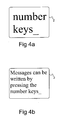
- Fig. 4a
- shows another example of information to be displayed on the display of the electronic device, and
- Fig. 4b
- shows the information according to Fig. 4a when zoomed to a smaller size.
- The following detailed description of the invention presents, as an example, an electronic device 1 as shown in Fig. 1, comprising means 2 for displaying visual information. For clarity, these means 2 will below be called a display. Typically, the display consists of picture elements (pixels), whose brightness can be changed to display the desired visual information. The
display 2 can be a colour display or a monochrome display, but this feature is not significant as such for the present invention. The electronic device 1 also comprises acontrol block 3 with at least oneprocessor 4, such as a microcontroller unit (MCU), and possibly also a digital signal processing unit (DSP). The control block also compriseslogic functions 5 as well as access logic 6 (Input/Output, IO), e.g. for communication between other functional units and theprocessor 4. Furthermore, the electronic device 1 comprises a memory 7 which preferably contains at least a read only memory (ROM) 7a and a random access memory (RAM) 7b. The read onlymemory 7a can also be, either completely or in part, implemented by means of a non-volatile random-access memory, such as EEPROM or FLASH. The read onlymemory 7a is intended for the storage of e.g. control software, application software, permanent data and the like in the electronic device. Therandom access memory 7b can be used, for example, for the storage of changeable information required during the use of the electronic device 1. In this preferred embodiment, a part of the random access memory is implemented by using a non-volatilerandom access memory 7c, wherein it is possible to store in this memory, for example, information which does not need to be changed often, e.g. user profile data, telephone directory data, calendar data, etc. The user interface 9 of the wireless terminal 1 comprises means for presenting data, such as adisplay 2 and an earpiece/speaker 10, as well as means for entering data, such as one or more keypads 11 and amicrophone 12. Furthermore, the electronic device comprises means 13, 14 for measuring a distance. These means 13, 14 for measuring a distance preferably comprise aproximity sensor 13 as well as measuring means 14 for measuring the signal of theproximity sensor 13. The measuring means 14 comprise, for example, an analog-to-digital converter or the like, whereby analog signal strength information is converted to digital format. Mobile station functions 8 comprise, for example, a transmitter and a receiver (not shown), by means of which the electronic device 1 can communicate with the mobile communication network in a way known as such. However, it should be mentioned that the present invention can also be applied in such electronic devices which do not comprise mobile station functions or other communication functions. - The electronic device 1 used can be an electronic device equipped with data processing functions, such as a personal computer (PC), a laptop PC, a palmtop PC, a personal digital assistant (PDA), a wireless station, such as a mobile station or a communication device, or the like. In the following, more detailed description of the invention, a non-restrictive example used of the electronic device 1 is a communication device which comprises not only data processing functions but also mobile station functions 8.
- Proximity sensors are primarily based on the reflection of a signal transmitted by the proximity sensor from an object, such as the user. The proximity sensor measures the strength and/or propagation time of the reflected signal and, on the basis of this, forms an output signal proportional to the distance. In proximity sensors based on signal strength, the strength of the output signal is typically proportional to the distance. In proximity sensors based on measuring the propagation time, the output signal can directly indicate the propagation time, wherein, on the basis of it, it is possible to compute the distance, when the signal propagation rate in the medium (air) is known. The measuring signal of the proximity sensor is typically either an optical signal (laser/LED) or an audio signal (ultrasound). The measuring range is typically in the order of 0.3 m to 100 m for proximity sensors based on an optical signal and in the order of 0.05 m to 10 m for proximity sensors based on an audio signal. In view of applying the present invention, the type of the
proximity sensor 13 used is not significant as such. More important criteria on selecting theproximity sensor 13 include e.g. weight, size, price, power consumption, reliability, failure probability, resistance to vibrations, and required operating voltages. - In the electronic device 1 according to a preferred embodiment of the invention, the distance is measured by measuring the strength of the signal formed by the
proximity sensor 13 and determining, on the basis of this signal strength, the distance between the user and the electronic device 1. There are also known proximity sensors which form an output signal which directly indicates the distance between the user and the electronic device 1. In this case, the distance information is obtained directly from this signal. In the start-up procedure, for example, the strength of the signal of theproximity sensor 13 is measured without steps of comparing signal strengths. - The parameters related to the displaying of information can be set by the user, if necessary, or the original settings can be used. These settings are preferably stored in a non-volatile
random access memory 7c, wherein previously stored parameters are available also later without a need to set them in connection with every start-up. These parameters can be set, for example, by enlarging the size of information to be displayed on thedisplay 2 when the user moves farther away from the electronic device 1, or vice versa. - We shall next describe the example situation of Fig. 2a, in which the user of the electronic device is close to the electronic device 1. The user turns on the electronic device 1, wherein the running of the start-up program is started in the
processor 4. In the start-up program, the strength of the signal formed by theproximity sensor 13 is determined by reading the measuring result of the measuring means 14. This measuring result is indicated by the measuring means 14 preferably in digital format, wherein it can be stored in therandom access memory 7b. After the running of the start-up program, the use of the electronic device 1 can be started. - In the electronic device 1, distance measurements are taken at intervals and, if necessary, a new measuring result is stored in place of the outdated measuring result. The
processor 4 compares the measuring result stored at the start-up stage, i.e. the signal strength of the proximity sensor, with the updated signal strength, and determines, on the basis of the comparison (signal strengths), how far away the user is from the electronic device. This distance information does not necessarily need to indicate the real distance but a relative distance. For example, a table is stored in the memory 7 of the electronic device, containing information about how the ratio between the signal strength at the start-up stage and the signal strength measured during the use is dependent on how far away the user is from the electronic device 1. If theproximity sensor 13 directly indicates this distance, this information can naturally be directly used. - Let us assume that the user has set the parameters so that the size of information displayed on the
display 2 is enlarged when the user moves farther away from the electronic device 1. Thus, after completion of the distance measuring result, it is examined if the distance has changed from the preceding measurement to such an extent that there is a need to change the size of information to be displayed on thedisplay 2. If there is a need for change, theprocessor 4 preferably examines if the distance has decreased or increased. If the distance has increased (e.g., the situation of Fig. 2b in comparison with Fig. 2a), theprocessor 4 changes the display parameters so that the information size is enlarged. This enlargement of the size may be proportional to the change in the distance, but also other principles can be applied. In some situations, the enlargement of the information size means that all the information cannot be displayed on thedisplay 2 simultaneously, wherein a choice must be made, which part of the information is to be left out. This may vary in different situations. For example, when there is an incoming call, thedisplay 2 preferably presents the information (name/phone number/image of calling person) which best fits in enlarged size on thedisplay 2. An advantageous example of this is shown in Fig. 3b, in which a part of the information of Fig. 3a is displayed in enlarged form on thedisplay 2. In a corresponding manner, when the distance is reduced, the information size can be reduced, wherein also a greater part of the information to be displayed will fit simultaneously on thedisplay 2. When the user writes e.g. a text message or makes a call, the distance is relatively small, wherein in this alternative, the information can be displayed in a relatively small font size. Thus, the user will see a large part of the text message simultaneously. Another example of such situations is shown in Fig. 4a, in which information is enlarged, and Fig. 4b shows the information of Fig. 4a zoomed to a smaller font size. - In such a case in which the user has set the display parameters so that the information size is enlarged when the distance is reduced, the steps to be taken are largely similar to those presented above, except that the change in the font size is substantially reverse. After the completion of a new measuring result, the
processor 4 compares the signal strength of the start-up stage with the most recent measuring result and, on the basis of this comparison, determines whether the distance has been changed. If the distance has been reduced, the information size is increased, and, in a corresponding manner, if the distance has been increased, the information size is reduced. This kind of an operation is useful particularly for weak-sighted persons, because the information size is relatively large when the user is close to the electronic device. In a corresponding manner, when the user is farther away from the electronic device, it is of less significance, what is displayed, wherein the information can be displayed in a relatively small font size. This is also useful for such a person who is far-sighted rather than short-sighted. Also a far-sighted person finds information with a large font size more legible at a close distance. In a corresponding manner, as the information size is reduced when the distance is slightly increased, the user's far-sightedness makes it possible for the user to still find the information with a smaller font size legible. - Due to the above-mentioned short- or far-sightedness, the changes in the font size of displayed information can also be made in such a way that the direction of the change is not the same when the change in the distance is made in the same direction. For example, for a short-sighted user, a small font size can be used at closer distances and the font size can be increased when the distance is slightly increased. When the distance is further increased so long that the displayed information is not legible even in the large font size, the information size can be reduced again.
- It has been presented above that the processor compares the new measuring result with the measuring result stored at the start-up stage and thereby determines the distance. In some situations, it is also possible to compare the new measuring result with an earlier (e.g. preceding) measuring result during the use and to use this comparison data in determining the need to change the information font size.
- The change in the distance does not necessarily always cause a change in the information size. For example, in a situation in which the distance is changed only slightly, it is not always sensible to change the information size on the
display 2 but first at the stage when the distance has been sufficiently changed. By means of the hysteresis produced in this way, too frequent changes are avoided and unnecessary loading of theprocessor 4 is reduced. - It is also possible to perform the distance measurement and change the information size by a certain command. Therefore, the user gives the command by e.g. uttering a voice command or by pressing a key of the keypad 11 when he/she wishes the distance measurement and possible changes on the information size to be performed. This kind of arrangement can be used e.g. for avoiding irritations and unintentional rescaling caused, for example, by other people passing by.
- The functions according to the invention can be largely implemented in the application software of the
processor 4. In the storage of some permanent setting values, it is possible to use the read onlymemory 7a and/or the non-volatile random access memory, which is known as such. Such setting values include, for example, tables which are used in the measuring of the distance, etc. - It is obvious that the present invention is not limited solely to the above-presented embodiments, but it can be modified within the scope of the appended claims.
Claims (13)
- A method for controlling the displaying of information in an electronic device (1) comprising means (2) for displaying visual information, characterized in that the distance between the user and the electronic device (1) is measured, and the size of information to be displayed on the display (2) is changed when the distance between the user and the electronic device (1) is changed.
- The method according to claim 1, characterized in that the first distance measurement is taken in connection with turning on of the electronic device (1), at least a second distance measurement is taken during the use of the electronic device (1), and that the change in the distance is determined from the ratio between the first distance measurement and said at least one second distance measurement.
- The method according to claim 1 or 2, characterized in that the measurement of the distance is based on measuring a change in signal strength.
- The method according to claim 1 or 2, characterized in that the measurement of the distance is based on measuring a signal propagation time.
- The method according to claim 1, 2, 3, or 4, characterized in that the size of information to be displayed on the display (2) is enlarged when the distance between the user and the electronic device (1) is increased.
- The method according to claim 1, 2, 3, or 4, characterized in that the size of information to be displayed on the display (2) is reduced when the distance between the user and the electronic device (1) is increased.
- An electronic device (1) comprising means (2) for displaying visual information, characterized in that it also comprises means (13, 14) for measuring the distance between the user and the electronic device (1), and means (4, 7) for changing the size of displayed information when the distance between the user and the electronic device (1) is changed.
- The electronic device (1) according to claim 7, characterized in that the means (13, 14) for measuring the distance of the user comprise a proximity sensor (13).
- The electronic device (1) according to claim 7 or 8, characterized in that it comprises means (4, 13, 14) for taking the first distance measurement in connection with turning on of the electronic device (1), means for taking at least one second distance measurement during the use of the electronic device (1), and means (4, 7) for determining a change in the distance from the ratio between the first distance measurement and said at least one second distance measurement.
- The electronic device (1) according to claim 7, 8 or 9, characterized in that it comprises means (4) for enlarging the size of information to be displayed on the display (2) when the distance between the user and the electronic device (1) is increased.
- The electronic device (1) according to claim 7, 8 or 9, characterized in that it comprises means (4) for reducing the size of information to be displayed on the display (2) when the distance between the user and the electronic device (1) is increased.
- The electronic device (1) according to any of the claims 7 to 11, characterized in that it comprises means (11, 12) for setting a correlation between the direction of change in the distance and the direction of change in the size of information to be displayed on the display (2).
- The electronic device (1) according to any of the claims 7 to 12, characterized in that it is a wireless station.
Applications Claiming Priority (2)
| Application Number | Priority Date | Filing Date | Title |
|---|---|---|---|
| FI20012209 | 2001-11-14 | ||
| FI20012209A FI20012209A7 (en) | 2001-11-14 | 2001-11-14 | Method for controlling the presentation of information in an electronic device and electronic device |
Publications (1)
| Publication Number | Publication Date |
|---|---|
| EP1316877A1 true EP1316877A1 (en) | 2003-06-04 |
Family
ID=8562252
Family Applications (1)
| Application Number | Title | Priority Date | Filing Date |
|---|---|---|---|
| EP02396166A Withdrawn EP1316877A1 (en) | 2001-11-14 | 2002-11-08 | A method for controlling the displaying of information in an electronic device |
Country Status (4)
| Country | Link |
|---|---|
| US (1) | US20030093600A1 (en) |
| EP (1) | EP1316877A1 (en) |
| CN (1) | CN1419230A (en) |
| FI (1) | FI20012209A7 (en) |
Cited By (14)
| Publication number | Priority date | Publication date | Assignee | Title |
|---|---|---|---|---|
| WO2003088013A3 (en) * | 2002-04-12 | 2004-07-29 | Motorola Inc | Method and system of managing a user interface of a communications device |
| EP1505819A1 (en) * | 2003-08-04 | 2005-02-09 | Sony Corporation | Portable terminal device and method of notifying an incoming call |
| WO2005071604A3 (en) * | 2004-01-20 | 2005-10-20 | Koninkl Philips Electronics Nv | Graphical user interface |
| EP1912109A1 (en) * | 2006-09-22 | 2008-04-16 | Research In Motion Limited | System and method for adjusting icons, text and images on an electronic device |
| WO2008122848A1 (en) * | 2007-04-10 | 2008-10-16 | Sony Ericsson Mobile Communications Ab | Adjustment of screen text size |
| WO2009081239A1 (en) * | 2007-12-20 | 2009-07-02 | Sony Ericsson Mobile Communications Ab | System and method for dynamically changing a display |
| EP2818994A1 (en) * | 2013-06-26 | 2014-12-31 | Honeywell International Inc. | Touch screen and method for adjusting touch sensitive object placement thereon |
| CN105334718A (en) * | 2014-06-27 | 2016-02-17 | 联想(北京)有限公司 | Display switching method and electronic apparatus |
| EP3019964A4 (en) * | 2013-07-10 | 2017-03-22 | LG Electronics Inc. | Mobile device, head mounted display and method of controlling therefor |
| EP3200439A1 (en) * | 2016-01-29 | 2017-08-02 | Kabushiki Kaisha Toshiba | Dynamic font size management system and method for multifunction devices |
| US9727296B2 (en) | 2014-06-27 | 2017-08-08 | Lenovo (Beijing) Co., Ltd. | Display switching method, information processing method and electronic device |
| US9880715B2 (en) | 2008-04-01 | 2018-01-30 | Litl Llc | System and method for streamlining user interaction with electronic content |
| US9927835B2 (en) | 2008-04-01 | 2018-03-27 | Litl Llc | Portable computer with multiple display configurations |
| US10684743B2 (en) | 2008-04-01 | 2020-06-16 | Litl Llc | Method and apparatus for managing digital media content |
Families Citing this family (33)
| Publication number | Priority date | Publication date | Assignee | Title |
|---|---|---|---|---|
| US7203911B2 (en) * | 2002-05-13 | 2007-04-10 | Microsoft Corporation | Altering a display on a viewing device based upon a user proximity to the viewing device |
| US8466893B2 (en) * | 2004-06-17 | 2013-06-18 | Adrea, LLC | Use of a two finger input on touch screens |
| WO2007007682A1 (en) * | 2005-07-08 | 2007-01-18 | Mitsubishi Electric Corporation | Touch panel display device and portable apparatus |
| TWI277848B (en) * | 2006-01-11 | 2007-04-01 | Ind Tech Res Inst | Apparatus for automatically adjusting display parameters relying on visual performance and method for the same |
| CN100533541C (en) * | 2006-01-19 | 2009-08-26 | 财团法人工业技术研究院 | Device and method for automatically adjusting display parameters by visual performance |
| CN101127202B (en) * | 2006-08-18 | 2011-07-27 | 鸿富锦精密工业(深圳)有限公司 | Display device parameter automatic regulation system and method |
| JP4310330B2 (en) * | 2006-09-26 | 2009-08-05 | キヤノン株式会社 | Display control apparatus and display control method |
| WO2009013744A2 (en) * | 2007-07-23 | 2009-01-29 | Humaneyes Technologies Ltd. | Multi view displays and methods for producing the same |
| US8203577B2 (en) * | 2007-09-25 | 2012-06-19 | Microsoft Corporation | Proximity based computer display |
| CN101587704A (en) * | 2008-05-20 | 2009-11-25 | 鸿富锦精密工业(深圳)有限公司 | Portable video unit and method for adjusting display font size thereof |
| US20120069027A1 (en) * | 2009-04-28 | 2012-03-22 | Wataru Yamazaki | Input device |
| US9183806B2 (en) * | 2011-06-23 | 2015-11-10 | Verizon Patent And Licensing Inc. | Adjusting font sizes |
| CN102271177B (en) * | 2011-07-18 | 2015-06-17 | 惠州Tcl移动通信有限公司 | Method and system for calibrating proximity sensor of mobile phone |
| US8754831B2 (en) * | 2011-08-02 | 2014-06-17 | Microsoft Corporation | Changing between display device viewing modes |
| CN103258491B (en) * | 2012-02-20 | 2016-06-01 | 联想(北京)有限公司 | Method for controlling electronic equipment and electronic equipment |
| KR101917685B1 (en) * | 2012-03-21 | 2018-11-13 | 엘지전자 주식회사 | Mobile terminal and control method thereof |
| US11068049B2 (en) * | 2012-03-23 | 2021-07-20 | Microsoft Technology Licensing, Llc | Light guide display and field of view |
| TWI498829B (en) * | 2012-04-18 | 2015-09-01 | Hon Hai Prec Ind Co Ltd | Electronic display device and method for selecting user interfaces |
| US8996767B2 (en) * | 2012-05-02 | 2015-03-31 | Qualcomm Incorporated | Mobile device control based on surface material detection |
| CN103677581A (en) * | 2012-09-19 | 2014-03-26 | 上海斐讯数据通信技术有限公司 | Mobile terminal and method for automatically controlling terminal display |
| DE102012224394A1 (en) * | 2012-12-27 | 2014-07-03 | Siemens Aktiengesellschaft | Distance-based control of display abstraction and interaction mode |
| CN103458115B (en) * | 2013-08-22 | 2016-04-13 | Tcl通讯(宁波)有限公司 | The processing method of mobile terminal automatic capture system font size and mobile terminal |
| CN103558971A (en) * | 2013-10-29 | 2014-02-05 | 小米科技有限责任公司 | Browsing method, browsing device and terminal device |
| CN103927966A (en) * | 2014-04-02 | 2014-07-16 | 北京智谷睿拓技术服务有限公司 | Display control method and display control device |
| CN105334955B (en) * | 2014-07-31 | 2019-02-05 | 联想(北京)有限公司 | A kind of information processing method and electronic equipment |
| US9507066B2 (en) | 2014-06-30 | 2016-11-29 | Microsoft Technology Licensing, Llc | Eyepiece for near eye display system |
| US9684948B2 (en) * | 2014-07-01 | 2017-06-20 | Echostar Uk Holdings Limited | Systems and methods for facilitating enhanced display characteristics based on viewer state |
| US20160048202A1 (en) * | 2014-08-13 | 2016-02-18 | Qualcomm Incorporated | Device parameter adjustment using distance-based object recognition |
| CN107820621A (en) * | 2015-06-25 | 2018-03-20 | 皇家飞利浦有限公司 | Method and apparatus for the operation of control electronics |
| CN106528013B (en) * | 2015-09-11 | 2019-11-22 | 艾默生电气公司 | The dynamic display information content on controller display |
| CN106200922B (en) * | 2016-06-28 | 2019-08-23 | Oppo广东移动通信有限公司 | Control method, control device and electronic device |
| CN113495661A (en) * | 2020-04-03 | 2021-10-12 | 阿里巴巴集团控股有限公司 | Display method and device of electronic device and computer storage medium |
| CN112967488B (en) * | 2021-04-09 | 2022-05-06 | 宁波奥克斯电气股份有限公司 | An air conditioner display control method and device, and an air conditioner |
Citations (4)
| Publication number | Priority date | Publication date | Assignee | Title |
|---|---|---|---|---|
| EP0405826A2 (en) * | 1989-06-30 | 1991-01-02 | Sony Corporation | Electronic filing systems and methods |
| WO2001027727A2 (en) * | 1999-10-13 | 2001-04-19 | Gateway, Inc. | A system and method utilizing motion input for manipulating a display of data |
| WO2001027735A1 (en) * | 1999-10-12 | 2001-04-19 | Myorigo Oy | Operation method of user interface of hand-held device |
| WO2002093331A1 (en) * | 2001-05-16 | 2002-11-21 | Myorigo Oy | Method and device for browsing information on a display |
Family Cites Families (4)
| Publication number | Priority date | Publication date | Assignee | Title |
|---|---|---|---|---|
| US4839838A (en) * | 1987-03-30 | 1989-06-13 | Labiche Mitchell | Spatial input apparatus |
| US5067167A (en) * | 1990-10-10 | 1991-11-19 | Cornell Research Foundation, Inc. | Apparatus and method for rotating of three-dimensional images |
| US5686940A (en) * | 1993-12-24 | 1997-11-11 | Rohm Co., Ltd. | Display apparatus |
| KR100404994B1 (en) * | 1995-02-13 | 2004-02-11 | 코닌클리케 필립스 일렉트로닉스 엔.브이. | Portable data processing unit with gravity-controlled sensors for screen and screen orientation |
-
2001
- 2001-11-14 FI FI20012209A patent/FI20012209A7/en not_active IP Right Cessation
-
2002
- 2002-11-08 EP EP02396166A patent/EP1316877A1/en not_active Withdrawn
- 2002-11-14 US US10/298,385 patent/US20030093600A1/en not_active Abandoned
- 2002-11-14 CN CN02150679A patent/CN1419230A/en active Pending
Patent Citations (4)
| Publication number | Priority date | Publication date | Assignee | Title |
|---|---|---|---|---|
| EP0405826A2 (en) * | 1989-06-30 | 1991-01-02 | Sony Corporation | Electronic filing systems and methods |
| WO2001027735A1 (en) * | 1999-10-12 | 2001-04-19 | Myorigo Oy | Operation method of user interface of hand-held device |
| WO2001027727A2 (en) * | 1999-10-13 | 2001-04-19 | Gateway, Inc. | A system and method utilizing motion input for manipulating a display of data |
| WO2002093331A1 (en) * | 2001-05-16 | 2002-11-21 | Myorigo Oy | Method and device for browsing information on a display |
Cited By (28)
| Publication number | Priority date | Publication date | Assignee | Title |
|---|---|---|---|---|
| WO2003088013A3 (en) * | 2002-04-12 | 2004-07-29 | Motorola Inc | Method and system of managing a user interface of a communications device |
| EP1505819A1 (en) * | 2003-08-04 | 2005-02-09 | Sony Corporation | Portable terminal device and method of notifying an incoming call |
| US7242952B2 (en) | 2003-08-04 | 2007-07-10 | Sony Corporation | Portable terminal device and method of generating call sound |
| CN100429913C (en) * | 2003-08-04 | 2008-10-29 | 索尼株式会社 | Portable terminal device and method of notifying an incoming call |
| WO2005071604A3 (en) * | 2004-01-20 | 2005-10-20 | Koninkl Philips Electronics Nv | Graphical user interface |
| EP1912109A1 (en) * | 2006-09-22 | 2008-04-16 | Research In Motion Limited | System and method for adjusting icons, text and images on an electronic device |
| WO2008122848A1 (en) * | 2007-04-10 | 2008-10-16 | Sony Ericsson Mobile Communications Ab | Adjustment of screen text size |
| WO2009081239A1 (en) * | 2007-12-20 | 2009-07-02 | Sony Ericsson Mobile Communications Ab | System and method for dynamically changing a display |
| US8209635B2 (en) | 2007-12-20 | 2012-06-26 | Sony Mobile Communications Ab | System and method for dynamically changing a display |
| US9880715B2 (en) | 2008-04-01 | 2018-01-30 | Litl Llc | System and method for streamlining user interaction with electronic content |
| US11604566B2 (en) | 2008-04-01 | 2023-03-14 | Litl Llc | System and method for streamlining user interaction with electronic content |
| US12591353B2 (en) | 2008-04-01 | 2026-03-31 | Litl Llc | Method and apparatus for managing digital media content |
| US12461557B2 (en) | 2008-04-01 | 2025-11-04 | Litl Llc | Portable computer with multiple display configurations |
| US12461646B2 (en) | 2008-04-01 | 2025-11-04 | Litl Llc | System and method for streamlining user interaction with electronic content |
| US11853118B2 (en) | 2008-04-01 | 2023-12-26 | Litl Llc | Portable computer with multiple display configurations |
| US9927835B2 (en) | 2008-04-01 | 2018-03-27 | Litl Llc | Portable computer with multiple display configurations |
| US11687212B2 (en) | 2008-04-01 | 2023-06-27 | Litl Llc | Method and apparatus for managing digital media content |
| US10289154B2 (en) | 2008-04-01 | 2019-05-14 | Litl Llc | Portable computer with multiple display configurations |
| EP2271977B1 (en) * | 2008-04-01 | 2019-09-11 | Litl, LLC | System and method for streamlining user interaction with electronic content |
| US10564818B2 (en) | 2008-04-01 | 2020-02-18 | Litl Llc | System and method for streamlining user interaction with electronic content |
| US10684743B2 (en) | 2008-04-01 | 2020-06-16 | Litl Llc | Method and apparatus for managing digital media content |
| US10782733B2 (en) | 2008-04-01 | 2020-09-22 | Litl Llc | Portable computer with multiple display configurations |
| EP2818994A1 (en) * | 2013-06-26 | 2014-12-31 | Honeywell International Inc. | Touch screen and method for adjusting touch sensitive object placement thereon |
| EP3019964A4 (en) * | 2013-07-10 | 2017-03-22 | LG Electronics Inc. | Mobile device, head mounted display and method of controlling therefor |
| CN105334718A (en) * | 2014-06-27 | 2016-02-17 | 联想(北京)有限公司 | Display switching method and electronic apparatus |
| CN105334718B (en) * | 2014-06-27 | 2018-06-01 | 联想(北京)有限公司 | Display changeover method and electronic equipment |
| US9727296B2 (en) | 2014-06-27 | 2017-08-08 | Lenovo (Beijing) Co., Ltd. | Display switching method, information processing method and electronic device |
| EP3200439A1 (en) * | 2016-01-29 | 2017-08-02 | Kabushiki Kaisha Toshiba | Dynamic font size management system and method for multifunction devices |
Also Published As
| Publication number | Publication date |
|---|---|
| CN1419230A (en) | 2003-05-21 |
| US20030093600A1 (en) | 2003-05-15 |
| FI20012209A7 (en) | 2003-06-24 |
| FI20012209A0 (en) | 2001-11-14 |
Similar Documents
| Publication | Publication Date | Title |
|---|---|---|
| EP1316877A1 (en) | A method for controlling the displaying of information in an electronic device | |
| KR100663528B1 (en) | How to Display Pop-ups on a Portable Terminal | |
| KR100420280B1 (en) | Menu display method of mobile terminal | |
| US20120011436A1 (en) | Devices and Methods of a User Interface for a Small Display Screen | |
| US6829494B2 (en) | Radio communication terminal and control method therefor | |
| US7834892B2 (en) | Mobile radio terminal apparatus | |
| US20080125184A1 (en) | Electronic device, incoming call notification control method, and incoming call notification control program | |
| KR100383610B1 (en) | Call service method of cellular phone | |
| US5774537A (en) | Method and apparatus for displaying multiple languages in key phone system | |
| JP2003174505A (en) | Mobile terminal and method for reducing power consumption thereof | |
| US20050081054A1 (en) | Wireless communication terminal having screen information protection function and method thereof | |
| US20100304704A1 (en) | Wireless Phone with Lanyard Antenna | |
| KR100424469B1 (en) | Voice alarm apparatus and method in mobile communication terminal equipment | |
| US20080280636A1 (en) | Method for altering communication mode and mobile communication terminal using the same | |
| CN108141496A (en) | A kind of call-waiting processing method | |
| KR20000073341A (en) | Terminal capable of receiving an image, image transmission service system and method there of | |
| JP2007150866A (en) | Mobile telephone set, visual field angle changing method of mobile telephone set, and visual field changing program of mobile telephone set | |
| JP2004128574A (en) | Mobile information terminal | |
| KR20030015472A (en) | System capable of reducing power consumption of personal portable terminal wiht communication functionality | |
| KR20020056976A (en) | Method for displaying magnification window on screen of display in portable terminal | |
| KR100557114B1 (en) | Portable terminal with phone number memo function and memo method | |
| JP2003244283A (en) | Terminal device and processing method thereof | |
| US20020060698A1 (en) | Method for forming an information element, and an electronic device | |
| KR20050034175A (en) | Method for inform new telephone number in wireless communication system | |
| KR20030047094A (en) | Method for displaying received message in short message service |
Legal Events
| Date | Code | Title | Description |
|---|---|---|---|
| PUAI | Public reference made under article 153(3) epc to a published international application that has entered the european phase |
Free format text: ORIGINAL CODE: 0009012 |
|
| AK | Designated contracting states |
Designated state(s): AT BE BG CH CY CZ DE DK EE ES FI FR GB GR IE IT LI LU MC NL PT SE SK TR |
|
| AX | Request for extension of the european patent |
Extension state: AL LT LV MK RO SI |
|
| 17P | Request for examination filed |
Effective date: 20031017 |
|
| AKX | Designation fees paid |
Designated state(s): AT BE BG CH CY CZ DE DK EE ES FI FR GB GR IE IT LI LU MC NL PT SE SK TR |
|
| 17Q | First examination report despatched |
Effective date: 20040312 |
|
| GRAP | Despatch of communication of intention to grant a patent |
Free format text: ORIGINAL CODE: EPIDOSNIGR1 |
|
| STAA | Information on the status of an ep patent application or granted ep patent |
Free format text: STATUS: THE APPLICATION IS DEEMED TO BE WITHDRAWN |
|
| 18D | Application deemed to be withdrawn |
Effective date: 20050720 |