EP1291751A2 - Keyboard display method - Google Patents
Keyboard display method Download PDFInfo
- Publication number
- EP1291751A2 EP1291751A2 EP02255786A EP02255786A EP1291751A2 EP 1291751 A2 EP1291751 A2 EP 1291751A2 EP 02255786 A EP02255786 A EP 02255786A EP 02255786 A EP02255786 A EP 02255786A EP 1291751 A2 EP1291751 A2 EP 1291751A2
- Authority
- EP
- European Patent Office
- Prior art keywords
- special
- displayed
- character
- keyboard
- characters
- Prior art date
- Legal status (The legal status is an assumption and is not a legal conclusion. Google has not performed a legal analysis and makes no representation as to the accuracy of the status listed.)
- Withdrawn
Links
Images


Classifications
-
- G—PHYSICS
- G06—COMPUTING OR CALCULATING; COUNTING
- G06F—ELECTRIC DIGITAL DATA PROCESSING
- G06F3/00—Input arrangements for transferring data to be processed into a form capable of being handled by the computer; Output arrangements for transferring data from processing unit to output unit, e.g. interface arrangements
- G06F3/01—Input arrangements or combined input and output arrangements for interaction between user and computer
- G06F3/02—Input arrangements using manually operated switches, e.g. using keyboards or dials
- G06F3/023—Arrangements for converting discrete items of information into a coded form, e.g. arrangements for interpreting keyboard generated codes as alphanumeric codes, operand codes or instruction codes
- G06F3/0233—Character input methods
-
- G—PHYSICS
- G06—COMPUTING OR CALCULATING; COUNTING
- G06F—ELECTRIC DIGITAL DATA PROCESSING
- G06F3/00—Input arrangements for transferring data to be processed into a form capable of being handled by the computer; Output arrangements for transferring data from processing unit to output unit, e.g. interface arrangements
- G06F3/01—Input arrangements or combined input and output arrangements for interaction between user and computer
- G06F3/02—Input arrangements using manually operated switches, e.g. using keyboards or dials
- G06F3/023—Arrangements for converting discrete items of information into a coded form, e.g. arrangements for interpreting keyboard generated codes as alphanumeric codes, operand codes or instruction codes
- G06F3/0233—Character input methods
- G06F3/0236—Character input methods using selection techniques to select from displayed items
-
- G—PHYSICS
- G06—COMPUTING OR CALCULATING; COUNTING
- G06F—ELECTRIC DIGITAL DATA PROCESSING
- G06F3/00—Input arrangements for transferring data to be processed into a form capable of being handled by the computer; Output arrangements for transferring data from processing unit to output unit, e.g. interface arrangements
- G06F3/01—Input arrangements or combined input and output arrangements for interaction between user and computer
- G06F3/02—Input arrangements using manually operated switches, e.g. using keyboards or dials
- G06F3/023—Arrangements for converting discrete items of information into a coded form, e.g. arrangements for interpreting keyboard generated codes as alphanumeric codes, operand codes or instruction codes
- G06F3/0238—Programmable keyboards
-
- G—PHYSICS
- G06—COMPUTING OR CALCULATING; COUNTING
- G06F—ELECTRIC DIGITAL DATA PROCESSING
- G06F3/00—Input arrangements for transferring data to be processed into a form capable of being handled by the computer; Output arrangements for transferring data from processing unit to output unit, e.g. interface arrangements
- G06F3/01—Input arrangements or combined input and output arrangements for interaction between user and computer
- G06F3/048—Interaction techniques based on graphical user interfaces [GUI]
- G06F3/0481—Interaction techniques based on graphical user interfaces [GUI] based on specific properties of the displayed interaction object or a metaphor-based environment, e.g. interaction with desktop elements like windows or icons, or assisted by a cursor's changing behaviour or appearance
Definitions
- the present invention relates to keyboard display methods, and more particularly relates to a keyboard display method for an apparatus for displaying a keyboard on a display screen and, in response to the operation (operation) of predetermined keys on the keyboard, entering characters assigned to the keys.
- a keyboard on a display screen (monitor) and, in response to the operation of predetermined keys on the keyboard, entering characters assigned to the keys.
- a navigation apparatus for giving vehicle traveling guidance so that the vehicle can reach a desired destination, it is necessary to enter a city name or a street name when specifying the destination by an address, an intersection, or a POI (Point Of Interest).
- a keyboard is displayed on a display screen, and predetermined keys on the keyboard are operated in sequence. As a result, the city name or the street name can be entered.
- the keyboard displayed on the display screen includes a normal character display area for displaying normal character keys, such as the alphabet and numerals, and a special key display area for displaying special character keys other than the normal characters. For example, a maximum of twelve special characters can be displayed in the special character display area. It is impossible to display more than twelve special characters.
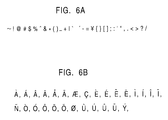
- the special characters include 33 symbols shown in Fig. 6A and the 28 accented characters displayed in Fig. 6B.
- accent symbols are displayed in the special character display area, and the accented characters can be entered by simultaneously operating the alphabet characters A, E, I, N, O, and U and the accent symbols.
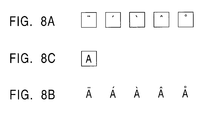
- Figs. 8A to 8C show a case in which the alphabet character A and the accent symbols are simultaneously operated to enter the alphabet character A with the accent symbols, namely, the accented characters.
- a keyboard display method displays normal character keys in a normal character display area of a keyboard displayed on a display screen and special character keys other than the normal characters in a special character display area of the keyboard.
- all the special characters are divided into a plurality of groups.
- the special character keys in each of the groups and a request key for requesting display of the special characters in the other group are displayed.
- the request key is operated, the special keys in the other group are displayed in the special character display area. Accordingly, all the special characters can be displayed and entered by a simple operation.
- Fig. 1 shows the schematic configuration of a navigation apparatus according to the present invention.
- a navigation controller 11 performs navigation control, such as map rendering control for rendering a map of the vicinity of the vehicle position, destination entering control, and path planning/guidance control. Also, the navigation controller 11 appropriately displays a keyboard when entering a destination and performs destination entering control.
- a DVD (Digital Versatile Disk) control unit 12 reads a desired map from a DVD 13 and inputs the map to the navigation controller 11.
- a remote control 14 is a unit for entering menu selection, map scrolling, and destination search to the navigation controller 11.
- a vehicle position detector 15 detects the vehicle position and includes a distance sensor for generating a pulse every time the vehicle travels a predetermined distance, an angle sensor for measuring the direction in which the vehicle is traveling, and a GPS (Global Positioning System) reception unit.
- a display unit 16 displays a map and a menu, and appropriately displays the keyboard.
- the display unit 16 includes a display on/off switch and a TV/navigation selector switch in the edge portion thereof.
- An audio circuit 17 converts intersection-guidance audio data output from the navigation controller 11 into analog data and outputs the analog data from a speaker 18 by controlling the tone and the volume.
- the navigation controller 11 In order to enter a destination, the navigation controller 11 appropriately displays a keyboard on a display screen.
- Portions (1) to (3) in Fig. 1 show examples of displayed keyboards when a location name is entered to set the destination.
- Portion (1) shows a case in which the number of special characters that are required to be entered is zero.
- a normal character display area NCA displays the alphabet A to Z and the numerals 0 to 9, and a special character display area (represented by dotted lines) SCA displays nothing.
- Portion (2) shows a case in which the number of special characters that are required to be entered exceeds the maximum number of special characters that can be displayed in the special character display area SCA (e.g., twelve characters).
- the normal character display area NCA displays the alphabet A to Z and the numerals 0 to 9, and the special character display area SCA displays some of the special characters (ten special characters) and a more key MK for requesting display of the other special characters.
- all special characters are divided into a plurality of groups. The special keys in a first group and the more key MK are simultaneously displayed.
- the more key MK has a size of two characters.
- the special characters are divided into three groups of 10, 10, and 2, respectively.
- the more key MK is operated in a state shown in Fig. 1, the ten special keys in the second group and the more key MK are simultaneously displayed in the special character display area SCA.
- the two special characters in the third group and the more key MK are simultaneously displayed in the special character display area SCA.
- the state returns to the initial state shown.
- Portion (3) shows a case in which the number of special characters that are required to be entered is three, and that the number of special characters that are required to be entered does not exceed the maximum number of special characters that can be displayed in the special character display area SCA (twelve characters in this case).
- the normal character display area NCA displays the alphabet A to Z and the numerals 0 to 9, and the special character display area SCA displays all the special characters.
- the more key MK is not displayed.
- Fig. 2 is a flowchart showing a process of displaying the keyboard according to a first embodiment of the present invention.
- the number of special characters that are required to be entered is represented by the number of undisplayed special characters N SC (step S101). It is checked whether or not the number of undisplayed special characters N SC exceeds the maximum number of special characters N MAX that can be displayed in the special character display area SCA (step S102). If N SC ⁇ N MAX , all special characters are displayed in the special character display area SCA (see portion (3) in Fig. 3) (step S103). It is determined whether or not it is necessary to continue displaying the keyboard (step S104). If it is unnecessary, the keyboard displaying process is terminated. If the determination in step S104 is affirmative (Yes), the keyboard continues to be displayed.
- step S102 if the number of undisplayed special characters N SC exceeds the maximum number of special characters N MAX , that is, if N SC > N MAX , then (N MAX - 2) special character keys in the first group and the two-character-sized more key MK are displayed in the special character display area SCA (see portion (2) in Fig. 1) (step S105).
- N SC N SC - (N MAX - 2)
- step S109 If the more key MK is operated in step S108, it is checked whether or not the number of undisplayed special characters N SC exceeds the maximum number of special characters N MAX (step S109). If N SC > N MAX , the process returns to step S105, and (N MAX - 2) special keys in the second group and the two-character-sized more key MK are displayed in the special character display area SCA (step S105). Then the subsequent processing is repeated.
- step S109 In contrast, if N SC ⁇ N MAX in step S109, all the remaining special characters in the last group (the third group) are displayed in the special character display area SCA (step S110). Then, the number of undisplayed special characters N SC is initialized, that is, the number of special characters that are required to be entered is set to the number of undisplayed special characters N SC (step S111), and the processing from step S108 onward is repeated. Since the initialization is performed in step S111, when the more key MK is operated, the special character keys in the first group and the more key MK can be simultaneously displayed.
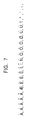
- Figs. 3A to 3C show examples of displayed keyboards when there are the 22 special characters shown in Fig. 7.
- a city name or a street name is entered.
- candidates for characters that appear subsequent to an entered character string (a case in which zero characters are entered is also included) can be obtained.
- characters other than the character candidates are shaded out.
- the normal characters are displayed as described above.
- Concerning the special characters only special characters that are candidates are displayed in the special character display area SCA, and special characters other than the candidates are not displayed in the special character display area SCA.
- Fig. 4 is a flowchart showing a process of displaying the keyboard in the second embodiment.
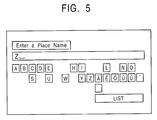
- Fig. 5 shows an example of the displayed keyboard in the second embodiment.
- the process searches special characters that are required to be entered for candidates for a special character that can be used as the initial character of a character string, and the number of special character candidates is set to the number of undisplayed special characters N SC (step S202). It is checked whether or not the number of undisplayed special characters N SC exceeds the maximum number of special characters N MAX that can be displayed in the special character display area SCA (step S203). If N SC ⁇ N MAX , all the special character key candidates are displayed in the special character display area SCA (step S204).
- step S205 It is determined whether or not a character is entered (step S205). If no character is entered, in step S204, the special characters continue to be displayed. If a character is entered in step S205, the entered character string is updated (step S206). Then, the process searches for normal character candidates and special character candidates subsequent to the entered character string, and the number of special character candidates is set to the number of undisplayed special characters N SC (step S207). Only the normal character candidate keys are displayed or highlighted in the normal character display area NCA, or alternatively keys other than the normal character candidates are shaded out (step S208). Subsequently, the processing from step S203 onward is repeated.
- Fig. 5 shows an example in which, concerning the normal characters, only the normal character candidate keys are displayed.
- step S203 the number of undisplayed special characters N SC exceeds the maximum number of special characters N MAX , that is, if N SC > N MAX , (N MAX -2) special character keys in the first group and the two-character-sized more key MK are displayed in the special character display area SCA (step S209).
- N SC After N SC is updated, it is checked whether or not a character is entered (step S211). If no character is entered, it is checked whether or not the more key MK is operated (step S212). If the more key MK is not operated, the keyboard continues to be displayed, and the processing in step S211 is repeated. If he more key MK is not operated and a character is entered in step S211, in step S206, the entered character string is updated. Then, the subsequent processing is repeated.
- step S212 If no character is entered, and the more key MK is operated in step S212, it is checked whether or not the number of undisplayed special characters N SC exceeds the maximum number of special characters N MAX (step S213). If N SC > N MAX , the process returns to step S209, and (N MAX -2) special character keys in the second group and the two-character-sized more key MK are displayed in the special character display area SCA (step S209). Then, the subsequent processing is repeated.
- step S213 In contrast, if N SC ⁇ N MAX in step S213, all the remaining special characters in the last group (third group) are displayed in the special character display area SCA (step S214). Then, the number of undisplayed special characters N SC is initialized, that is, the number of special character candidates is initialized as the number of undisplayed special characters N SC (step S215), and the processing from step S212 onward is repeated. Since the initialization is performed in step S215, when the more key MK is operated, the special character keys in the first group and the more key MK can be simultaneously displayed.
- the present invention is not limited to the navigation apparatus. It should be understood that the present invention is applicable to all apparatuses for displaying a keyboard on a display screen and for entering characters.
Landscapes
- Engineering & Computer Science (AREA)
- General Engineering & Computer Science (AREA)
- Theoretical Computer Science (AREA)
- Human Computer Interaction (AREA)
- Physics & Mathematics (AREA)
- General Physics & Mathematics (AREA)
- Input From Keyboards Or The Like (AREA)
- User Interface Of Digital Computer (AREA)
- Position Input By Displaying (AREA)
Abstract
Description
- The present invention relates to keyboard display methods, and more particularly relates to a keyboard display method for an apparatus for displaying a keyboard on a display screen and, in response to the operation (operation) of predetermined keys on the keyboard, entering characters assigned to the keys.
- There are apparatuses for displaying a keyboard on a display screen (monitor) and, in response to the operation of predetermined keys on the keyboard, entering characters assigned to the keys. For example, in a navigation apparatus for giving vehicle traveling guidance so that the vehicle can reach a desired destination, it is necessary to enter a city name or a street name when specifying the destination by an address, an intersection, or a POI (Point Of Interest). In such a case, a keyboard is displayed on a display screen, and predetermined keys on the keyboard are operated in sequence. As a result, the city name or the street name can be entered.
- The keyboard displayed on the display screen includes a normal character display area for displaying normal character keys, such as the alphabet and numerals, and a special key display area for displaying special character keys other than the normal characters. For example, a maximum of twelve special characters can be displayed in the special character display area. It is impossible to display more than twelve special characters. The special characters include 33 symbols shown in Fig. 6A and the 28 accented characters displayed in Fig. 6B.
- For a known navigation apparatus, twelve special characters are sufficient, and no problem is caused. In contrast, multilingual navigation apparatuses that have recently been used in Europe are required to be compatible with an increasing number of languages. Accordingly, the number of accented characters that are required to be entered using the keyboard is increasing. As navigation apparatuses become multifunctional, the number of symbols that are required to be entered using the keyboard is increasing. Thus, multilingual navigation apparatuses to be used in Europe are required to enter the 22 special characters shown in Fig. 7 using the keyboard. As described above, however, the special character display area can only display a maximum of twelve special characters.
- In order to enter all accented characters, accent symbols are displayed in the special character display area, and the accented characters can be entered by simultaneously operating the alphabet characters A, E, I, N, O, and U and the accent symbols. Figs. 8A to 8C show a case in which the alphabet character A and the accent symbols are simultaneously operated to enter the alphabet character A with the accent symbols, namely, the accented characters.
- In the above-described method, it is necessary to simultaneously operate two keys, and hence the character entering operation becomes burdensome. In addition, not all special symbols can be entered by the above-described method.
- Accordingly, it is an object of the present invention to enable all special characters to be entered by a simple operation.
- A keyboard display method displays normal character keys in a normal character display area of a keyboard displayed on a display screen and special character keys other than the normal characters in a special character display area of the keyboard. When it is necessary to enter more special characters than the maximum number of special characters that can be displayed in the special character display area, all the special characters are divided into a plurality of groups. The special character keys in each of the groups and a request key for requesting display of the special characters in the other group are displayed. When the request key is operated, the special keys in the other group are displayed in the special character display area. Accordingly, all the special characters can be displayed and entered by a simple operation.
- When only special characters with a possibility of being entered next are displayed in the special character display area, these special characters with a possibility of being entered next may be searched for. When the number of detected special characters exceeds the maximum number of special characters that can be displayed in the special character display area, all the detected special characters may be divided into a plurality of groups. The special character keys in each of the groups and a request key for requesting display of the special characters in the other group may be simultaneously displayed. When the request key is operated, the special character keys in the other group may be displayed in the special character display area. Accordingly, when displaying only special characters with a possibility of being entered next, all the special characters can be displayed and entered by a simple operation.
-
- Fig. 1 illustrates the schematic configuration of a navigation apparatus according to the present invention;
- Fig. 2 is a flowchart showing a process of displaying a keyboard according to a first embodiment of the present invention;
- Figs. 3A to 3C show examples of displayed keyboards when there are 22 special characters shown in Fig. 7;
- Fig. 4 is a flowchart showing a process of displaying a keyboard according to a second embodiment of the present invention;
- Fig. 5 shows an example of a displayed keyboard in the second embodiment;
- Figs. 6A and 6B show examples of special characters:
- Fig. 7 shows 22 required special characters; and
- Figs. 8A to 8C illustrate a known accented character entering method.
-
- Fig. 1 shows the schematic configuration of a navigation apparatus according to the present invention. A
navigation controller 11 performs navigation control, such as map rendering control for rendering a map of the vicinity of the vehicle position, destination entering control, and path planning/guidance control. Also, thenavigation controller 11 appropriately displays a keyboard when entering a destination and performs destination entering control. In response to a request from thenavigation controller 11, a DVD (Digital Versatile Disk)control unit 12 reads a desired map from aDVD 13 and inputs the map to thenavigation controller 11. Aremote control 14 is a unit for entering menu selection, map scrolling, and destination search to thenavigation controller 11. Avehicle position detector 15 detects the vehicle position and includes a distance sensor for generating a pulse every time the vehicle travels a predetermined distance, an angle sensor for measuring the direction in which the vehicle is traveling, and a GPS (Global Positioning System) reception unit. Adisplay unit 16 displays a map and a menu, and appropriately displays the keyboard. Thedisplay unit 16 includes a display on/off switch and a TV/navigation selector switch in the edge portion thereof. Anaudio circuit 17 converts intersection-guidance audio data output from thenavigation controller 11 into analog data and outputs the analog data from aspeaker 18 by controlling the tone and the volume. - In order to enter a destination, the
navigation controller 11 appropriately displays a keyboard on a display screen. Portions (1) to (3) in Fig. 1 show examples of displayed keyboards when a location name is entered to set the destination. Portion (1) shows a case in which the number of special characters that are required to be entered is zero. In this case, a normal character display area NCA displays the alphabet A to Z and the numerals 0 to 9, and a special character display area (represented by dotted lines) SCA displays nothing. - Portion (2) shows a case in which the number of special characters that are required to be entered exceeds the maximum number of special characters that can be displayed in the special character display area SCA (e.g., twelve characters). The normal character display area NCA displays the alphabet A to Z and the numerals 0 to 9, and the special character display area SCA displays some of the special characters (ten special characters) and a more key MK for requesting display of the other special characters. In other words, when the number of special characters that are required to be entered exceeds the maximum number of special characters that can be displayed in the special character display area SCA (twelve characters in this case), all special characters are divided into a plurality of groups. The special keys in a first group and the more key MK are simultaneously displayed. The more key MK has a size of two characters. When the number of special characters is 22, the special characters are divided into three groups of 10, 10, and 2, respectively. When the more key MK is operated in a state shown in Fig. 1, the ten special keys in the second group and the more key MK are simultaneously displayed in the special character display area SCA. When the more key is again operated, the two special characters in the third group and the more key MK are simultaneously displayed in the special character display area SCA. When the more key MK is again operated, the state returns to the initial state shown.
- Portion (3) shows a case in which the number of special characters that are required to be entered is three, and that the number of special characters that are required to be entered does not exceed the maximum number of special characters that can be displayed in the special character display area SCA (twelve characters in this case). In such a case, the normal character display area NCA displays the alphabet A to Z and the numerals 0 to 9, and the special character display area SCA displays all the special characters. On the other hand, the more key MK is not displayed.
- Fig. 2 is a flowchart showing a process of displaying the keyboard according to a first embodiment of the present invention.
- When it becomes necessary to display the keyboard, all normal characters (the alphabet and the numerals) are displayed in the normal character display area NCA, and the special characters are displayed as follows.
- Specifically, the number of special characters that are required to be entered is represented by the number of undisplayed special characters NSC (step S101). It is checked whether or not the number of undisplayed special characters NSC exceeds the maximum number of special characters NMAX that can be displayed in the special character display area SCA (step S102). If NSC ≤ NMAX, all special characters are displayed in the special character display area SCA (see portion (3) in Fig. 3) (step S103). It is determined whether or not it is necessary to continue displaying the keyboard (step S104). If it is unnecessary, the keyboard displaying process is terminated. If the determination in step S104 is affirmative (Yes), the keyboard continues to be displayed.
- In contrast, in step S102, if the number of undisplayed special characters NSC exceeds the maximum number of special characters NMAX, that is, if NSC > NMAX, then (NMAX - 2) special character keys in the first group and the two-character-sized more key MK are displayed in the special character display area SCA (see portion (2) in Fig. 1) (step S105). In accordance with the following equation, the number of undisplayed special characters NSC is updated (step S106):
- If the more key MK is operated in step S108, it is checked whether or not the number of undisplayed special characters NSC exceeds the maximum number of special characters NMAX (step S109). If NSC > NMAX, the process returns to step S105, and (NMAX - 2) special keys in the second group and the two-character-sized more key MK are displayed in the special character display area SCA (step S105). Then the subsequent processing is repeated.
- In contrast, if NSC ≤ NMAX in step S109, all the remaining special characters in the last group (the third group) are displayed in the special character display area SCA (step S110). Then, the number of undisplayed special characters NSC is initialized, that is, the number of special characters that are required to be entered is set to the number of undisplayed special characters NSC (step S111), and the processing from step S108 onward is repeated. Since the initialization is performed in step S111, when the more key MK is operated, the special character keys in the first group and the more key MK can be simultaneously displayed.
- Figs. 3A to 3C show examples of displayed keyboards when there are the 22 special characters shown in Fig. 7. The normal character display area NCA displays the alphabet A to Z and the numerals 0 to 9, and the special character display area SCA displays the special character keys and the more key MK. Since the number of undisplayed special characters NSC (= 22) is greater than the maximum number of displayable special characters NMAX, as shown in Fig. 3A, ten special keys in the first group and the more key MK are simultaneously displayed. When the more key MK is operated in the state shown in Fig. 3A, as shown in Fig. 3B, ten special character keys in the next group, that is, the second group, and the more key MK are displayed in the special character display area SCA. When the more key MK is operated in the state shown in Fig. 3B, two special character keys in the third group, that is the last group, and the more key MK are displayed in the special character display area SCA. When the more key MK is operated in the state shown in Fig. 3C, the state returns to the initial state shown in Fig. 3A.
- When entering a destination to the navigation apparatus, a city name or a street name is entered. By arranging city names and street names in alphabetical order into a database, candidates for characters that appear subsequent to an entered character string (a case in which zero characters are entered is also included) can be obtained. In order to facilitate the entering operation, only character candidates to be entered next are displayed or highlighted, or alternatively characters other than the character candidates are shaded out. In a second embodiment of the present invention, the normal characters are displayed as described above. Concerning the special characters, only special characters that are candidates are displayed in the special character display area SCA, and special characters other than the candidates are not displayed in the special character display area SCA. When the number of special character candidates exceeds the maximum number of special characters NMAX that can be displayed in the special character display area SCA, a grouping display process similar to that in the first embodiment is performed.
- Fig. 4 is a flowchart showing a process of displaying the keyboard in the second embodiment. Fig. 5 shows an example of the displayed keyboard in the second embodiment.
- When it becomes necessary to display the keyboard, all normal characters (the alphabet and the numerals) are displayed in the normal character display area NCA (step S201), and special characters are displayed as follows.
- Specifically, the process searches special characters that are required to be entered for candidates for a special character that can be used as the initial character of a character string, and the number of special character candidates is set to the number of undisplayed special characters NSC (step S202). It is checked whether or not the number of undisplayed special characters NSC exceeds the maximum number of special characters NMAX that can be displayed in the special character display area SCA (step S203). If NSC ≤ NMAX, all the special character key candidates are displayed in the special character display area SCA (step S204). Fig. 5 shows an example in which the number of undisplayed special characters NSC is seven, which is less than the maximum number of special characters NMAX (= 12), and hence all the special character candidates are displayed.
- It is determined whether or not a character is entered (step S205). If no character is entered, in step S204, the special characters continue to be displayed. If a character is entered in step S205, the entered character string is updated (step S206). Then, the process searches for normal character candidates and special character candidates subsequent to the entered character string, and the number of special character candidates is set to the number of undisplayed special characters NSC (step S207). Only the normal character candidate keys are displayed or highlighted in the normal character display area NCA, or alternatively keys other than the normal character candidates are shaded out (step S208). Subsequently, the processing from step S203 onward is repeated. Fig. 5 shows an example in which, concerning the normal characters, only the normal character candidate keys are displayed.
- In contrast, if, in step S203, the number of undisplayed special characters NSC exceeds the maximum number of special characters NMAX, that is, if NSC > NMAX, (NMAX -2) special character keys in the first group and the two-character-sized more key MK are displayed in the special character display area SCA (step S209). Then, the number of undisplayed special characters NSC is updated by the following equation (step S210):
- After NSC is updated, it is checked whether or not a character is entered (step S211). If no character is entered, it is checked whether or not the more key MK is operated (step S212). If the more key MK is not operated, the keyboard continues to be displayed, and the processing in step S211 is repeated. If he more key MK is not operated and a character is entered in step S211, in step S206, the entered character string is updated. Then, the subsequent processing is repeated.
- If no character is entered, and the more key MK is operated in step S212, it is checked whether or not the number of undisplayed special characters NSC exceeds the maximum number of special characters NMAX (step S213). If NSC > NMAX, the process returns to step S209, and (NMAX -2) special character keys in the second group and the two-character-sized more key MK are displayed in the special character display area SCA (step S209). Then, the subsequent processing is repeated.
- In contrast, if NSC ≤ NMAX in step S213, all the remaining special characters in the last group (third group) are displayed in the special character display area SCA (step S214). Then, the number of undisplayed special characters NSC is initialized, that is, the number of special character candidates is initialized as the number of undisplayed special characters NSC (step S215), and the processing from step S212 onward is repeated. Since the initialization is performed in step S215, when the more key MK is operated, the special character keys in the first group and the more key MK can be simultaneously displayed.
- The above-described process is repeated. When it becomes unnecessary to display the keyboard, the keyboard displaying process is terminated.
- Although a case in which the present invention is applied to a navigation apparatus has been described in the above description, the present invention is not limited to the navigation apparatus. It should be understood that the present invention is applicable to all apparatuses for displaying a keyboard on a display screen and for entering characters.
Claims (10)
- A keyboard display method for an apparatus for displaying a keyboard on a display screen (16) and, by operating a predetermined key on the keyboard, entering a character assigned to the key, comprising:displaying normal character keys in a normal character display area (NCA) of the keyboard;displaying special character keys other than the normal characters in a special character display area (SCA) of the keyboard;dividing all the special characters into a plurality of groups when it is necessary to enter more special characters than the maximum number of special characters (NMAX) that can be displayed in the special character display area (SCA);displaying the special character keys in each of the groups and a request key (MK) for requesting display of the special characters in the other group; anddisplaying the special keys in the other group in the special character display area (SCA) when the request key (MK) is operated.
- A keyboard display method according to Claim 1, wherein a database of character string groups is searched for special characters with a possibility of being entered next, and the detected special characters are displayed in the special character display area (SCA).
- A keyboard display method according to claim 1, wherein, when the number of detected special characters is less than or equal to the maximum number of special characters (NMAX) that can be displayed in the special character display area (SCA), all the detected special characters are displayed in the special character display area (SCA).
- A keyboard display method according to claim 2, wherein, when the number of detected special characters is less than or equal to the maximum number of special characters (NMAX) that can be displayed in the special character display area (SCA), all the detected special characters are displayed in the special character display area (SCA).
- A keyboard display method according to claim 1 or 2, wherein, when the request key (MK) is operated while the special characters in the last group and the request key (MK) are being displayed, the special characters in the first group and the request key (MK) are simultaneously displayed.
- A keyboard display method according to any one of claims 1 to 4, wherein, in a multilingual navigation apparatus, city names are put into a database, and the keyboard is displayed when entering a city name.
- A keyboard display method according to any one of claims 1 to 4, wherein, in a multilingual navigation apparatus, street names are put into a database, and the keyboard is displayed when entering a street name.
- A keyboard display method according to any one of claims 1 to 4, wherein an entered character string is updated when a character is entered, and
normal character candidates and special character candidates subsequent to the entered character string are searched for, and the special characters other than the detected candidates are not displayed in the special character display area (SCA). - A keyboard display method according to any one of claims 1 to 4, wherein only normal character candidate keys are displayed or highlighted in the normal character display area (NCA), or keys other than the normal character candidates are shaded out.
- A keyboard display method according to any one of claims 1 to 4, wherein the special characters include accented characters in European languages.
Applications Claiming Priority (2)
| Application Number | Priority Date | Filing Date | Title |
|---|---|---|---|
| JP2001273402 | 2001-09-10 | ||
| JP2001273402A JP4596711B2 (en) | 2001-09-10 | 2001-09-10 | Keyboard display method and character input device |
Publications (2)
| Publication Number | Publication Date |
|---|---|
| EP1291751A2 true EP1291751A2 (en) | 2003-03-12 |
| EP1291751A3 EP1291751A3 (en) | 2007-01-10 |
Family
ID=19098624
Family Applications (1)
| Application Number | Title | Priority Date | Filing Date |
|---|---|---|---|
| EP02255786A Withdrawn EP1291751A3 (en) | 2001-09-10 | 2002-08-20 | Keyboard display method |
Country Status (2)
| Country | Link |
|---|---|
| EP (1) | EP1291751A3 (en) |
| JP (1) | JP4596711B2 (en) |
Cited By (1)
| Publication number | Priority date | Publication date | Assignee | Title |
|---|---|---|---|---|
| EP1548551A3 (en) * | 2003-12-23 | 2006-08-02 | Volkswagen AG | Method and apparatus for inputting alphanumeric characters |
Families Citing this family (1)
| Publication number | Priority date | Publication date | Assignee | Title |
|---|---|---|---|---|
| KR102235111B1 (en) * | 2012-10-23 | 2021-04-01 | 윤경숙 | The method of changing the text of specific group which is allocatwd in button |
Family Cites Families (9)
| Publication number | Priority date | Publication date | Assignee | Title |
|---|---|---|---|---|
| US4124843A (en) * | 1977-05-02 | 1978-11-07 | Atex Corporation | Multi-lingual input keyboard and display |
| JPS60150160A (en) * | 1984-01-16 | 1985-08-07 | Hitachi Software Eng Co Ltd | Display system for special character |
| JPS62274360A (en) * | 1986-05-22 | 1987-11-28 | Nec Corp | Word processor |
| DE69319679T2 (en) * | 1992-09-14 | 1998-11-12 | Sony Corp | Entry of special letters |
| JPH0997266A (en) * | 1995-09-29 | 1997-04-08 | Aisin Aw Co Ltd | On-vehicle navigation system |
| US5914676A (en) * | 1998-01-22 | 1999-06-22 | Sony Corporation | Multi-language display keypad |
| US6037942A (en) * | 1998-03-10 | 2000-03-14 | Magellan Dis, Inc. | Navigation system character input device |
| JP2000148366A (en) * | 1998-11-06 | 2000-05-26 | Sony Corp | Character / symbol input device and character / symbol input method |
| JP2001222362A (en) * | 2000-02-10 | 2001-08-17 | Nidec Copal Corp | Information processor and information processing method |
-
2001
- 2001-09-10 JP JP2001273402A patent/JP4596711B2/en not_active Expired - Fee Related
-
2002
- 2002-08-20 EP EP02255786A patent/EP1291751A3/en not_active Withdrawn
Non-Patent Citations (4)
| Title |
|---|
| "ISO 9241-10:1996 Ergonomic requirements for office work with visual display terminals (VDTs). Part 10: Dialogue principles", INTERNATIONAL STANDARD - ISO, ZUERICH, CH, vol. 9241-10:1996, 1 May 1996 (1996-05-01), pages 1 - 11, XP001525044 * |
| "ISO 9241-11:1998 Ergonomic requirements for office work with visual display terminals (VDTs) -- Part 11: Guidance on usability", INTERNATIONAL STANDARD - ISO, ZUERICH, CH, vol. 9241-11, 1 January 1998 (1998-01-01), pages 22pp, XP001525162 * |
| BECKER: "Operation Guide: Model: Traffic Pro 4720. http://www.becker.de/beckerCC21/www_rout/documents/4720_TrafficPro_En.pdf", INTERNET CITATION, 2002, XP002316217 * |
| HALL P A V ET AL: "APPROXIMATE STRING MATCHING", ACM COMPUTING SURVEYS, ACM, NEW YORK, NY, US, US, vol. 12, no. 4, 1 December 1980 (1980-12-01), pages 381 - 402, XP000747617, ISSN: 0360-0300, DOI: 10.1145/356827.356830 * |
Cited By (1)
| Publication number | Priority date | Publication date | Assignee | Title |
|---|---|---|---|---|
| EP1548551A3 (en) * | 2003-12-23 | 2006-08-02 | Volkswagen AG | Method and apparatus for inputting alphanumeric characters |
Also Published As
| Publication number | Publication date |
|---|---|
| EP1291751A3 (en) | 2007-01-10 |
| JP4596711B2 (en) | 2010-12-15 |
| JP2003084897A (en) | 2003-03-19 |
Similar Documents
| Publication | Publication Date | Title |
|---|---|---|
| US6640185B2 (en) | Display method and apparatus for navigation system | |
| US20120229376A1 (en) | Input device | |
| EP1816438B1 (en) | Method and apparatus for searching point of interest by name or phone number | |
| US8099414B2 (en) | Facility information output device, facility information output method, and computer-readable medium storing facility information output program | |
| JPH11143614A (en) | Name input method | |
| US20080084417A1 (en) | Character input apparatus and program | |
| JP4740168B2 (en) | Information retrieval apparatus, control method thereof, and control program | |
| JP7818735B2 (en) | Location search method, location search program, location search storage medium, and location search device | |
| JP2011112496A (en) | Map information search device, control method, program and storage medium | |
| EP1291751A2 (en) | Keyboard display method | |
| JP2917856B2 (en) | Item search device in navigation device | |
| JP4987535B2 (en) | Information retrieval apparatus, control method thereof, and control program | |
| JPH07271824A (en) | Menu display method in navigation device | |
| KR100716337B1 (en) | Navigation Map Screen Touch Area Zoom Display Method | |
| JP5265233B2 (en) | Point search device, point search method, point search program, and recording medium | |
| JP2000339339A (en) | Information retrieval device | |
| JP5421403B2 (en) | Point list presenting device, point list presenting method, point list presenting program, and recording medium | |
| JP4618544B2 (en) | Navigation device and storage medium | |
| JP4885645B2 (en) | In-vehicle information terminal | |
| JP6072844B2 (en) | Display device, presentation device, display method, presentation method, display program, presentation program, and recording medium | |
| JP5957555B2 (en) | Display method, display device, display program, and recording medium | |
| JP6543404B2 (en) | Point search apparatus, point search method, point search program, display device, display method and display program | |
| JP2002107173A (en) | Navigation device | |
| JP5432300B2 (en) | Point list presenting device, point list presenting method, point list presenting program, and recording medium | |
| JPH1183523A (en) | Information display equipment |
Legal Events
| Date | Code | Title | Description |
|---|---|---|---|
| PUAI | Public reference made under article 153(3) epc to a published international application that has entered the european phase |
Free format text: ORIGINAL CODE: 0009012 |
|
| AK | Designated contracting states |
Kind code of ref document: A2 Designated state(s): AT BE BG CH CY CZ DE DK EE ES FI FR GB GR IE IT LI LU MC NL PT SE SK TR Designated state(s): AT BE BG CH CY CZ DE DK EE ES FI FR GB GR IE IT LI LU MC NL PT SE SK TR |
|
| AX | Request for extension of the european patent |
Extension state: AL LT LV MK RO SI |
|
| PUAL | Search report despatched |
Free format text: ORIGINAL CODE: 0009013 |
|
| AK | Designated contracting states |
Kind code of ref document: A3 Designated state(s): AT BE BG CH CY CZ DE DK EE ES FI FR GB GR IE IT LI LU MC NL PT SE SK TR |
|
| AX | Request for extension of the european patent |
Extension state: AL LT LV MK RO SI |
|
| 17P | Request for examination filed |
Effective date: 20070221 |
|
| 17Q | First examination report despatched |
Effective date: 20070327 |
|
| AKX | Designation fees paid |
Designated state(s): DE FR GB |
|
| STAA | Information on the status of an ep patent application or granted ep patent |
Free format text: STATUS: THE APPLICATION HAS BEEN WITHDRAWN |
|
| 18W | Application withdrawn |
Effective date: 20131016 |