EP1286253A2 - Method for developing adaptive menus - Google Patents
Method for developing adaptive menus Download PDFInfo
- Publication number
- EP1286253A2 EP1286253A2 EP02090273A EP02090273A EP1286253A2 EP 1286253 A2 EP1286253 A2 EP 1286253A2 EP 02090273 A EP02090273 A EP 02090273A EP 02090273 A EP02090273 A EP 02090273A EP 1286253 A2 EP1286253 A2 EP 1286253A2
- Authority
- EP
- European Patent Office
- Prior art keywords
- items
- menu
- user
- human cognitive
- presentation method
- Prior art date
- Legal status (The legal status is an assumption and is not a legal conclusion. Google has not performed a legal analysis and makes no representation as to the accuracy of the status listed.)
- Withdrawn
Links
Images
Classifications
-
- G—PHYSICS
- G06—COMPUTING OR CALCULATING; COUNTING
- G06F—ELECTRIC DIGITAL DATA PROCESSING
- G06F3/00—Input arrangements for transferring data to be processed into a form capable of being handled by the computer; Output arrangements for transferring data from processing unit to output unit, e.g. interface arrangements
- G06F3/14—Digital output to display device ; Cooperation and interconnection of the display device with other functional units
-
- G—PHYSICS
- G06—COMPUTING OR CALCULATING; COUNTING
- G06F—ELECTRIC DIGITAL DATA PROCESSING
- G06F3/00—Input arrangements for transferring data to be processed into a form capable of being handled by the computer; Output arrangements for transferring data from processing unit to output unit, e.g. interface arrangements
- G06F3/01—Input arrangements or combined input and output arrangements for interaction between user and computer
- G06F3/048—Interaction techniques based on graphical user interfaces [GUI]
- G06F3/0481—Interaction techniques based on graphical user interfaces [GUI] based on specific properties of the displayed interaction object or a metaphor-based environment, e.g. interaction with desktop elements like windows or icons, or assisted by a cursor's changing behaviour or appearance
- G06F3/0482—Interaction with lists of selectable items, e.g. menus
Definitions
- the present invention relates to a method for adaptive menu design and items presentation reflecting cognitive characteristics. More particularly, the present invention relates to a technique to provide menu items reflecting human cognitive characteristics so as to apply for computer OS, the Internet browsers, and personal data assistants (PDAs) as well as computer programs.
- PDAs personal data assistants
- menu item display technique as provided in Microsoft Windows 2000 and Office 2000 that appears in U.S. patent No. 6,121,968 applied in 1998.
- this technique a subset list of frequently accessed menus items is provided initially, and the complete list of items is provided after operating a button or a certain period of user time.
- This technique allows select frequently accessed items in a short period of time and clarifies what are the selected items.
- selection process for items of infrequent access is too bothersome for user's satisfaction.
- the role of menu item display that makes users familiarized with the system functions even if not available for use is not fully exercised. Indeed, many users of Microsoft Windows 2000 and Microsoft Office 2000 do not like this type of menus.
- the present invention is to resolve the aforementioned problems in the prior art. It is an object of the present invention to provide a method for displaying menu items where the menu items do not change their display positions and some prioritized menus items, such as frequently used or important items, are presented easy-to-recognize and easy-to-select.
- Another object of the invention is to make users familiarized with menu items so as to incur no confusion even with the changes of prioritized menus items.
- the present invention provides a menu design and items display method reflecting human cognitive characteristics to present some prioritized menu items with providing visual affordance first.
- the method comprising the steps of: selecting some items from the menu items by selection criteria such as frequency; presenting only the selected items at their own positions in the display; presenting the remaining items at their positions after a certain lapse of time; working on the system by perceiving users' selection; and recording the users' selection to update the priorities of items.
- prioritized menu items include some important items, frequently accessed items, or are selected by considering the context of user operations.
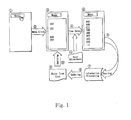
- FIG.1 illustrates how the menu designed according to the present invention presents menu items and how the current result is used for the next presentation.
- the menu items provided by computer programs are displayed in the graphic user interface throughout two stages. If the user clicks the button to activate the menu, at the first stage some prioritized menu items are presented at their own positions and the remaining items are not displayed yet. After a certain lapse of time the second stage begins. At this second stage the remaining items that did not appear at the first stage do appear at their positions. On completing the two stages, the whole items come to be displayed at their own positions.
- the time interval between the first and the second stages should be determined considering the user's cognitive characteristics. It must be greater than at least 0.17 seconds, because the sum of perception time and cognition time is in the range of 0.15 to 0.17 seconds. This time interval needs be adjusted depending on the user's level and the user can adjust it personally. However, it must not be greater than 3 seconds because the cognitive endurance limit is known to be in the range of 2 to 3 seconds.
- the remaining items other than 'some prioritized menu items' may appear not at a later time, but appear in "light gray” first and turn into “black” after a certain lapse of time, i.e., after 0.17 to 3 seconds. This will allow users to discern priority of the items visually.
- a menu design and items presentation method reflecting human cognitive characteristics in accordance with the present invention is proposed as a new method to present menu items available in computer programs, where some important or frequently accessed items that are selected using human cognitive property are presented in advance by a certain period of time. This method has the following advantageous effects.
- menu design method in accordance with the present invention, users can reduce the time for menu item selection.
- the invention makes users to recognize and consider the selected items first and efficiently supports learning of novice users. The user satisfaction with these features will consequently lead to improvement of the product image and reduce the cost for product manufacturing and maintenance.
Landscapes
- Engineering & Computer Science (AREA)
- Theoretical Computer Science (AREA)
- General Engineering & Computer Science (AREA)
- Human Computer Interaction (AREA)
- Physics & Mathematics (AREA)
- General Physics & Mathematics (AREA)
- User Interface Of Digital Computer (AREA)
Abstract
Description
- It supports efficiently both initial learning of novice users and menu selection work for proficient users.
- It eliminates potential confusion that may arise from the cases where prioritized accessed items change.
- It does not incur cause of users' dissatisfaction through indirect user support.
- It does not hide or fold down menu items but present prioritized accessed items first for user's cognitive convenience.
- It does not rearrange prioritized menu items into other top positions.
Claims (6)
- A menu design and items presentation method reflecting human cognitive characteristics to present some prioritized menu items in the menu item display with providing visual affordance first, said method comprising the steps of:selecting some prioritized items from the menu items by selection criteria;presenting only the selected items at their own positions in the display;presenting the remaining items at their positions after a certain lapse of time;working on the system by perceiving user's operation; andrecording the user's operation to update the priorities of the menu items.
- The menu design and items presentation method reflecting human cognitive characteristics of Claim 1, wherein the prioritized menu items are selected based on importance of the item, frequency of access, or context of user's conducts.
- The menu design and items presentation method reflecting human cognitive property of Claim 1, wherein the minimum time unit for user perception and cognition is in the range of 0.15 to 0.17 seconds.
- The menu design and items presentation method reflecting human cognitive characteristics of Claim 1 or Claim 3, wherein perception time and cognition time are adjustable depending on the user's level and the user can personally adjust the time interval.
- The menu design and items presentation method reflecting human cognitive characteristics of Claim 1, wherein the time limit of user endurance to wait for feedback display is in the range of 2 to 3 seconds.
- The menu design and items presentation method reflecting human cognitive characteristics of Claim 1, 3, or 5, wherein the menu priority is provided in such a manner that the remaining items other than the selected items appear in a light color first and then turn into a darker color after 0.17 to 3 seconds.
Applications Claiming Priority (2)
| Application Number | Priority Date | Filing Date | Title |
|---|---|---|---|
| KR2001051018 | 2001-08-23 | ||
| KR10-2001-0051018A KR100420069B1 (en) | 2001-08-23 | 2001-08-23 | Method for developing adaptive menus |
Publications (2)
| Publication Number | Publication Date |
|---|---|
| EP1286253A2 true EP1286253A2 (en) | 2003-02-26 |
| EP1286253A3 EP1286253A3 (en) | 2005-10-05 |
Family
ID=19713488
Family Applications (1)
| Application Number | Title | Priority Date | Filing Date |
|---|---|---|---|
| EP02090273A Withdrawn EP1286253A3 (en) | 2001-08-23 | 2002-07-22 | Method for developing adaptive menus |
Country Status (3)
| Country | Link |
|---|---|
| US (1) | US7269799B2 (en) |
| EP (1) | EP1286253A3 (en) |
| KR (1) | KR100420069B1 (en) |
Cited By (2)
| Publication number | Priority date | Publication date | Assignee | Title |
|---|---|---|---|---|
| EP1560106A3 (en) * | 2004-01-28 | 2006-05-03 | Microsoft Corporation | Method and system for pinning contacts and items |
| EP2884379A1 (en) * | 2013-12-16 | 2015-06-17 | Orange | Method and device for controlling the display of a plurality of contents, corresponding terminal and computer program |
Families Citing this family (81)
| Publication number | Priority date | Publication date | Assignee | Title |
|---|---|---|---|---|
| US6974252B2 (en) * | 2003-03-11 | 2005-12-13 | Intel Corporation | Failsafe mechanism for preventing an integrated circuit from overheating |
| US20040217991A1 (en) * | 2003-04-30 | 2004-11-04 | International Business Machines Corporation | Method and apparatus for dynamic sorting and displaying of listing data composition and automating the activation event |
| US7308288B2 (en) * | 2003-08-22 | 2007-12-11 | Sbc Knowledge Ventures, Lp. | System and method for prioritized interface design |
| US20070192711A1 (en) * | 2006-02-13 | 2007-08-16 | Research In Motion Limited | Method and arrangement for providing a primary actions menu on a handheld communication device |
| US20060206818A1 (en) * | 2005-03-10 | 2006-09-14 | Epson America Inc. | Dynamic frequently asked question system |
| JP2006317649A (en) * | 2005-05-12 | 2006-11-24 | Ricoh Co Ltd | Screen control method for image forming apparatus |
| US20070136690A1 (en) * | 2005-12-12 | 2007-06-14 | Microsoft Corporation | Wedge menu |
| KR100688226B1 (en) * | 2006-04-25 | 2007-03-02 | 삼성전자주식회사 | How to Hide / Show Options in the User Interface of a Portable Communication Terminal |
| WO2007147247A1 (en) * | 2006-06-20 | 2007-12-27 | Cogneto Development Inc. | Grouped cascading user interface |
| US20080046839A1 (en) * | 2006-06-27 | 2008-02-21 | Pixtel Media Technology (P) Ltd. | Input mode switching methods and devices utilizing the same |
| US7882449B2 (en) * | 2007-11-13 | 2011-02-01 | International Business Machines Corporation | Providing suitable menu position indicators that predict menu placement of menus having variable positions depending on an availability of display space |
| KR101562792B1 (en) * | 2009-06-10 | 2015-10-23 | 삼성전자주식회사 | Apparatus and method for providing target prediction interface |
| US20110202384A1 (en) * | 2010-02-17 | 2011-08-18 | Rabstejnek Wayne S | Enterprise Rendering Platform |
| KR101735836B1 (en) * | 2010-12-13 | 2017-05-15 | 삼성전자주식회사 | Device and method for performing menu in wireless terminal |
| KR20140051012A (en) * | 2012-10-22 | 2014-04-30 | 삼성전자주식회사 | Electronic key and memethods for electronic for transmitting the electronic key and thereof |
| US20150286349A1 (en) * | 2014-04-02 | 2015-10-08 | Microsoft Corporation | Transient user interface elements |
| US10509626B2 (en) | 2016-02-22 | 2019-12-17 | Sonos, Inc | Handling of loss of pairing between networked devices |
| US10095470B2 (en) | 2016-02-22 | 2018-10-09 | Sonos, Inc. | Audio response playback |
| US9965247B2 (en) | 2016-02-22 | 2018-05-08 | Sonos, Inc. | Voice controlled media playback system based on user profile |
| US10264030B2 (en) | 2016-02-22 | 2019-04-16 | Sonos, Inc. | Networked microphone device control |
| US9820039B2 (en) | 2016-02-22 | 2017-11-14 | Sonos, Inc. | Default playback devices |
| US9947316B2 (en) | 2016-02-22 | 2018-04-17 | Sonos, Inc. | Voice control of a media playback system |
| US9978390B2 (en) | 2016-06-09 | 2018-05-22 | Sonos, Inc. | Dynamic player selection for audio signal processing |
| US10152969B2 (en) | 2016-07-15 | 2018-12-11 | Sonos, Inc. | Voice detection by multiple devices |
| US10134399B2 (en) | 2016-07-15 | 2018-11-20 | Sonos, Inc. | Contextualization of voice inputs |
| US10115400B2 (en) | 2016-08-05 | 2018-10-30 | Sonos, Inc. | Multiple voice services |
| US9942678B1 (en) | 2016-09-27 | 2018-04-10 | Sonos, Inc. | Audio playback settings for voice interaction |
| US9743204B1 (en) | 2016-09-30 | 2017-08-22 | Sonos, Inc. | Multi-orientation playback device microphones |
| US10181323B2 (en) | 2016-10-19 | 2019-01-15 | Sonos, Inc. | Arbitration-based voice recognition |
| US11183181B2 (en) | 2017-03-27 | 2021-11-23 | Sonos, Inc. | Systems and methods of multiple voice services |
| US10475449B2 (en) | 2017-08-07 | 2019-11-12 | Sonos, Inc. | Wake-word detection suppression |
| US10048930B1 (en) | 2017-09-08 | 2018-08-14 | Sonos, Inc. | Dynamic computation of system response volume |
| US10446165B2 (en) | 2017-09-27 | 2019-10-15 | Sonos, Inc. | Robust short-time fourier transform acoustic echo cancellation during audio playback |
| US10482868B2 (en) | 2017-09-28 | 2019-11-19 | Sonos, Inc. | Multi-channel acoustic echo cancellation |
| US10621981B2 (en) | 2017-09-28 | 2020-04-14 | Sonos, Inc. | Tone interference cancellation |
| US10051366B1 (en) | 2017-09-28 | 2018-08-14 | Sonos, Inc. | Three-dimensional beam forming with a microphone array |
| US10466962B2 (en) | 2017-09-29 | 2019-11-05 | Sonos, Inc. | Media playback system with voice assistance |
| US10880650B2 (en) | 2017-12-10 | 2020-12-29 | Sonos, Inc. | Network microphone devices with automatic do not disturb actuation capabilities |
| US10818290B2 (en) | 2017-12-11 | 2020-10-27 | Sonos, Inc. | Home graph |
| US11343614B2 (en) | 2018-01-31 | 2022-05-24 | Sonos, Inc. | Device designation of playback and network microphone device arrangements |
| US11175880B2 (en) | 2018-05-10 | 2021-11-16 | Sonos, Inc. | Systems and methods for voice-assisted media content selection |
| US10847178B2 (en) | 2018-05-18 | 2020-11-24 | Sonos, Inc. | Linear filtering for noise-suppressed speech detection |
| US10959029B2 (en) | 2018-05-25 | 2021-03-23 | Sonos, Inc. | Determining and adapting to changes in microphone performance of playback devices |
| US10681460B2 (en) | 2018-06-28 | 2020-06-09 | Sonos, Inc. | Systems and methods for associating playback devices with voice assistant services |
| US11076035B2 (en) | 2018-08-28 | 2021-07-27 | Sonos, Inc. | Do not disturb feature for audio notifications |
| US10461710B1 (en) | 2018-08-28 | 2019-10-29 | Sonos, Inc. | Media playback system with maximum volume setting |
| US10587430B1 (en) | 2018-09-14 | 2020-03-10 | Sonos, Inc. | Networked devices, systems, and methods for associating playback devices based on sound codes |
| US10878811B2 (en) | 2018-09-14 | 2020-12-29 | Sonos, Inc. | Networked devices, systems, and methods for intelligently deactivating wake-word engines |
| US11024331B2 (en) | 2018-09-21 | 2021-06-01 | Sonos, Inc. | Voice detection optimization using sound metadata |
| US10811015B2 (en) | 2018-09-25 | 2020-10-20 | Sonos, Inc. | Voice detection optimization based on selected voice assistant service |
| US11100923B2 (en) | 2018-09-28 | 2021-08-24 | Sonos, Inc. | Systems and methods for selective wake word detection using neural network models |
| US10692518B2 (en) | 2018-09-29 | 2020-06-23 | Sonos, Inc. | Linear filtering for noise-suppressed speech detection via multiple network microphone devices |
| US11899519B2 (en) | 2018-10-23 | 2024-02-13 | Sonos, Inc. | Multiple stage network microphone device with reduced power consumption and processing load |
| EP3654249A1 (en) | 2018-11-15 | 2020-05-20 | Snips | Dilated convolutions and gating for efficient keyword spotting |
| US11183183B2 (en) | 2018-12-07 | 2021-11-23 | Sonos, Inc. | Systems and methods of operating media playback systems having multiple voice assistant services |
| US11132989B2 (en) | 2018-12-13 | 2021-09-28 | Sonos, Inc. | Networked microphone devices, systems, and methods of localized arbitration |
| US10602268B1 (en) | 2018-12-20 | 2020-03-24 | Sonos, Inc. | Optimization of network microphone devices using noise classification |
| US10867604B2 (en) | 2019-02-08 | 2020-12-15 | Sonos, Inc. | Devices, systems, and methods for distributed voice processing |
| US11315556B2 (en) | 2019-02-08 | 2022-04-26 | Sonos, Inc. | Devices, systems, and methods for distributed voice processing by transmitting sound data associated with a wake word to an appropriate device for identification |
| US11120794B2 (en) | 2019-05-03 | 2021-09-14 | Sonos, Inc. | Voice assistant persistence across multiple network microphone devices |
| US11200894B2 (en) | 2019-06-12 | 2021-12-14 | Sonos, Inc. | Network microphone device with command keyword eventing |
| US11361756B2 (en) | 2019-06-12 | 2022-06-14 | Sonos, Inc. | Conditional wake word eventing based on environment |
| US10586540B1 (en) | 2019-06-12 | 2020-03-10 | Sonos, Inc. | Network microphone device with command keyword conditioning |
| US11138975B2 (en) | 2019-07-31 | 2021-10-05 | Sonos, Inc. | Locally distributed keyword detection |
| US10871943B1 (en) | 2019-07-31 | 2020-12-22 | Sonos, Inc. | Noise classification for event detection |
| US11138969B2 (en) | 2019-07-31 | 2021-10-05 | Sonos, Inc. | Locally distributed keyword detection |
| US11189286B2 (en) | 2019-10-22 | 2021-11-30 | Sonos, Inc. | VAS toggle based on device orientation |
| US11200900B2 (en) | 2019-12-20 | 2021-12-14 | Sonos, Inc. | Offline voice control |
| US11562740B2 (en) | 2020-01-07 | 2023-01-24 | Sonos, Inc. | Voice verification for media playback |
| US11556307B2 (en) | 2020-01-31 | 2023-01-17 | Sonos, Inc. | Local voice data processing |
| US11308958B2 (en) | 2020-02-07 | 2022-04-19 | Sonos, Inc. | Localized wakeword verification |
| US11727919B2 (en) | 2020-05-20 | 2023-08-15 | Sonos, Inc. | Memory allocation for keyword spotting engines |
| US11308962B2 (en) | 2020-05-20 | 2022-04-19 | Sonos, Inc. | Input detection windowing |
| US11482224B2 (en) | 2020-05-20 | 2022-10-25 | Sonos, Inc. | Command keywords with input detection windowing |
| US12387716B2 (en) | 2020-06-08 | 2025-08-12 | Sonos, Inc. | Wakewordless voice quickstarts |
| US11698771B2 (en) | 2020-08-25 | 2023-07-11 | Sonos, Inc. | Vocal guidance engines for playback devices |
| US12283269B2 (en) | 2020-10-16 | 2025-04-22 | Sonos, Inc. | Intent inference in audiovisual communication sessions |
| US11984123B2 (en) | 2020-11-12 | 2024-05-14 | Sonos, Inc. | Network device interaction by range |
| US11551700B2 (en) | 2021-01-25 | 2023-01-10 | Sonos, Inc. | Systems and methods for power-efficient keyword detection |
| CN118303040A (en) | 2021-09-30 | 2024-07-05 | 搜诺思公司 | Enable and disable microphone and voice assistant |
| US12327549B2 (en) | 2022-02-09 | 2025-06-10 | Sonos, Inc. | Gatekeeping for voice intent processing |
Family Cites Families (4)
| Publication number | Priority date | Publication date | Assignee | Title |
|---|---|---|---|---|
| US5625783A (en) * | 1994-12-13 | 1997-04-29 | Microsoft Corporation | Automated system and method for dynamic menu construction in a graphical user interface |
| US5644738A (en) * | 1995-09-13 | 1997-07-01 | Hewlett-Packard Company | System and method using context identifiers for menu customization in a window |
| US6493006B1 (en) * | 1996-05-10 | 2002-12-10 | Apple Computer, Inc. | Graphical user interface having contextual menus |
| US6121968A (en) * | 1998-06-17 | 2000-09-19 | Microsoft Corporation | Adaptive menus |
-
2001
- 2001-08-23 KR KR10-2001-0051018A patent/KR100420069B1/en not_active Expired - Fee Related
-
2002
- 2002-07-18 US US10/198,320 patent/US7269799B2/en not_active Expired - Fee Related
- 2002-07-22 EP EP02090273A patent/EP1286253A3/en not_active Withdrawn
Cited By (4)
| Publication number | Priority date | Publication date | Assignee | Title |
|---|---|---|---|---|
| EP1560106A3 (en) * | 2004-01-28 | 2006-05-03 | Microsoft Corporation | Method and system for pinning contacts and items |
| US7493567B2 (en) | 2004-01-28 | 2009-02-17 | Microsoft Corporation | Method and system for pinning contacts and items |
| EP2884379A1 (en) * | 2013-12-16 | 2015-06-17 | Orange | Method and device for controlling the display of a plurality of contents, corresponding terminal and computer program |
| FR3015066A1 (en) * | 2013-12-16 | 2015-06-19 | Orange | METHOD AND DEVICE FOR CONTROLLING THE DISPLAY OF A PLURALITY OF CONTENTS, TERMINAL AND CORRESPONDING COMPUTER PROGRAM |
Also Published As
| Publication number | Publication date |
|---|---|
| EP1286253A3 (en) | 2005-10-05 |
| KR100420069B1 (en) | 2004-02-25 |
| US20030038848A1 (en) | 2003-02-27 |
| US7269799B2 (en) | 2007-09-11 |
| KR20030016936A (en) | 2003-03-03 |
Similar Documents
| Publication | Publication Date | Title |
|---|---|---|
| US7269799B2 (en) | Method for developing adaptive menus | |
| US5799292A (en) | Adaptive hypermedia presentation method and system | |
| EP4485090A2 (en) | Clock faces for an electronic device | |
| US20090049389A1 (en) | Usage Pattern Driven Graphical User Interface Element Rendering | |
| JP6775598B2 (en) | Devices, methods, and graphical user interfaces for displaying affordances in the background | |
| CN109154894B (en) | Method and system for customizing user interface presentation based on user status | |
| US7010755B2 (en) | Virtual desktop manager | |
| US8756516B2 (en) | Methods, systems, and computer program products for interacting simultaneously with multiple application programs | |
| JP4944773B2 (en) | Apparatus, method and computer program for controlling a computer device based on eye tracking | |
| US6268854B1 (en) | Picture search device and recording medium readable for the same | |
| KR100209841B1 (en) | How to Display Menu Items | |
| US7263668B1 (en) | Display interface to a computer controlled display system with variable comprehensiveness levels of menu items dependent upon size of variable display screen available for menu item display | |
| US20060075360A1 (en) | Dynamic highlight prompting apparatus and method | |
| EP3716251A1 (en) | Personalized makeup information recommendation method | |
| EP1207449A2 (en) | A method and system for facilitating the selection of icons | |
| US5900872A (en) | Method and apparatus for controlling the tracking of movable control elements in a graphical user interface | |
| US20040252074A1 (en) | Presentation system for displaying data | |
| MXPA05003098A (en) | Wave lens systems and methods for search results. | |
| MX2011000605A (en) | Pan and zoom control. | |
| US6317140B1 (en) | Displaying interactive bitmap images within a display space | |
| Debevc et al. | Design and evaluation of an adaptive icon toolbar | |
| Nayebi et al. | An expert-based framework for evaluating ios application usability | |
| JPH08115194A (en) | How to display help for information processing system | |
| Evans et al. | Screen readers and screen magnifiers | |
| EP1422600A2 (en) | Information processing apparatus, and method of assigning function to key |
Legal Events
| Date | Code | Title | Description |
|---|---|---|---|
| PUAI | Public reference made under article 153(3) epc to a published international application that has entered the european phase |
Free format text: ORIGINAL CODE: 0009012 |
|
| AK | Designated contracting states |
Kind code of ref document: A2 Designated state(s): AT BE BG CH CY CZ DE DK EE ES FI FR GB GR IE IT LI LU MC NL PT SE SK TR Designated state(s): AT BE BG CH CY CZ DE DK EE ES FI FR GB GR IE IT LI LU MC NL PT SE SK TR |
|
| AX | Request for extension of the european patent |
Extension state: AL LT LV MK RO SI |
|
| PUAL | Search report despatched |
Free format text: ORIGINAL CODE: 0009013 |
|
| AK | Designated contracting states |
Kind code of ref document: A3 Designated state(s): AT BE BG CH CY CZ DE DK EE ES FI FR GB GR IE IT LI LU MC NL PT SE SK TR |
|
| AX | Request for extension of the european patent |
Extension state: AL LT LV MK RO SI |
|
| AKX | Designation fees paid | ||
| STAA | Information on the status of an ep patent application or granted ep patent |
Free format text: STATUS: THE APPLICATION IS DEEMED TO BE WITHDRAWN |
|
| 18D | Application deemed to be withdrawn |
Effective date: 20060406 |
|
| REG | Reference to a national code |
Ref country code: DE Ref legal event code: 8566 |