EP1271322A2 - Crash recovery system - Google Patents
Crash recovery system Download PDFInfo
- Publication number
- EP1271322A2 EP1271322A2 EP02396095A EP02396095A EP1271322A2 EP 1271322 A2 EP1271322 A2 EP 1271322A2 EP 02396095 A EP02396095 A EP 02396095A EP 02396095 A EP02396095 A EP 02396095A EP 1271322 A2 EP1271322 A2 EP 1271322A2
- Authority
- EP
- European Patent Office
- Prior art keywords
- package
- partition
- software
- client device
- new
- Prior art date
- Legal status (The legal status is an assumption and is not a legal conclusion. Google has not performed a legal analysis and makes no representation as to the accuracy of the status listed.)
- Ceased
Links
Images



Classifications
-
- G—PHYSICS
- G06—COMPUTING OR CALCULATING; COUNTING
- G06F—ELECTRIC DIGITAL DATA PROCESSING
- G06F11/00—Error detection; Error correction; Monitoring
- G06F11/07—Responding to the occurrence of a fault, e.g. fault tolerance
- G06F11/14—Error detection or correction of the data by redundancy in operations
- G06F11/1402—Saving, restoring, recovering or retrying
- G06F11/1415—Saving, restoring, recovering or retrying at system level
- G06F11/1417—Boot up procedures
-
- G—PHYSICS
- G06—COMPUTING OR CALCULATING; COUNTING
- G06F—ELECTRIC DIGITAL DATA PROCESSING
- G06F8/00—Arrangements for software engineering
- G06F8/60—Software deployment
- G06F8/61—Installation
Definitions
- the present invention relates to the installation of software and recovering from installation and runtime errors in a continuously updated and extended distributed computer environment.
- PCT Patent Publication No. WO 00/58834 discloses a software installation and recovery system for a television viewing computer system.
- the computer system has a three stage startup procedure including a bootloader stage, an operating system kernel stage, and an application stage.
- a persistent storage has two partitions for each stage of the three stage startup procedure, a primary partition and a backup partition. More specifically, there are two partitions dedicated to holding a copy of the second stage boot loader, two partitions holding a copy of the operating system kernel, and two partitions holding a copy of the application software. An indication is recorded that specifies which of the partitions of each pair is the primary and which is the backup.
- the new image When a new software image is installed, the new image is first copied into the appropriate backup partition and an indication is made in the database that the software installation is underway. The primary and backup partitions are then swapped and the system is rebooted using the new primary partition of the software that has just been downloaded. Control is passed to the backup partition for each software component if the primary partition fails to load properly.
- This prior art device includes a separate backup partition for the bootloader stage, the operating kernel loading stage, and the applications loading stage of the installation procedure.
- the disclosed system detects only failures during loading of programs associated with these stages. That is, this system detects whether the loading process for each of these stages is successfully completed. Accordingly, this system does not address runtime failures, i.e., failures which occur during the running of the programs such as if the program becomes non-responsive or "hangs".
- the object of the present invention is to provide a client device and a method for keeping a software system that is continuously updated and extended consistent and stable over time.
- the object is met by a method for recovering from installation and runtime errors on a client device, wherein the client device includes a persistent memory such as a hard drive including first and second system partitions and a package partition.
- the runtime components of a software system of the client device are installed in the system partitions. All installed packages are saved in the package partition.
- one of the first and second system partitions is designated the "current" partition and the other is designated the "back-up partition”.
- the dual system partitions are used to perform a recovery procedure in which the software system returns to a previous version in response to a startup (boot) failure, a runtime failure (i.e. a failure that causes the program to "hang"), or a user request.
- the new software package When a new software package is received by the client device, the new software package is installed in one of the system partitions and is saved in the package partition. If the software package contains a critical component of the software system, i.e., a component that is continuously loaded or continuously running, the current system partition is first copied onto the backup partition. Then the new software package is installed on the backup system partition and saved on the package partition. If the new software package is a new version of an existing package, then the old version is deleted from the package partition. The designations of the backup and current system partitions are switched and the software system is restarted (rebooted) using the new current system partition which includes the new software. If a booting failure occurs or a runtime failure occurs, the recovery procedure described above is entered.
- a critical component of the software system i.e., a component that is continuously loaded or continuously running
- the current system partition is first copied onto the backup partition. Then the new software package is installed on the backup system partition and saved on the package partition. If the new software package is
- the new software package does not contain a critical component, the new software package is installed on the current system partition and saved to the package partition. If the new software package includes a new version of an existing package, then the old version is deleted from the package partition. If a booting failure occurs or a runtime failure occurs, the recovery procedure described above is entered. The recovery procedure may also be initiated by a user of the client device to revert back to a previous version of the software system.
- the client device is a "smart accessory" such as a mobile phone, a set top box for cable or satellite television services, a personal digital assistant (PDA), or a personal computer (PC) which automatically receives software updates from a service provider. If a loading failure or runtime failure occurs, the smart accessory will revert to a previous version of the software. The user of the smart accessory can continue using the client device. Furthermore, the service provider may then provide a further update packet for non-user-interactive (automatic) installation to cure a bug or security problem.
- a “smart accessory” such as a mobile phone, a set top box for cable or satellite television services, a personal digital assistant (PDA), or a personal computer (PC) which automatically receives software updates from a service provider. If a loading failure or runtime failure occurs, the smart accessory will revert to a previous version of the software. The user of the smart accessory can continue using the client device. Furthermore, the service provider may then provide a further update packet for non-user-interactive (automat
- the object of the invention is also met by a device having a persistent memory including first and second system partitions and a package partition for implementing the above described method.
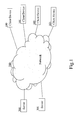
- Fig. 1 shows a distributed computer environment in which client devices 100, 101, 101, and 102 according to the present invention may be arranged.
- Each of the client devices 100 - 102 is connectable to servers 300 and 301 via a communication network 200 such as the world wide web or a satellite broadcast network.
- the server 300 may download software packages to the client device 100 through the communication network 200. The downloading may occur automatically or may be initiated by a user of the client device 100, i.e., the user may request a copy of a new version of the software.
- the server 300 may be arranged so that the downloading of the software package occurs via a broadcast transmission by the server 300 to all client devices to which the software package applies.
- Each of the client devices 100 - 102 may be any type of device that is connectable to a remote server through a communication network such as, for example, a mobile phone, a set top box for cable or satellite television services, a personal digital assistant (PDA), or a personal computer (PC).
- a communication network such as, for example, a mobile phone, a set top box for cable or satellite television services, a personal digital assistant (PDA), or a personal computer (PC).
- PDA personal digital assistant
- PC personal computer
- Fig. 2 is a partial schematic diagram of the client device 100 which includes a persistent memory 10 such as a hard drive or other non-volatile memory and a CPU 20.
- the persistent memory has first and second system partitions 12, 14 and a package partition 16.
- the first and second system partitions 12, 14 are collectively referred to as the system partitions 12, 14.
- one of the system partitions 12, 14 is designated the "current” system partition and the other is designated the “backup” system partition.
- This designation is stored in a boot indicator 24 in a non-volatile memory 26 of the client device 100.
- the non-volatile memory 26 may comprise a part of the persistent memory 10 or may comprise a separate non-volatile memory.
- the client device 100 starts, i.e., boots, the "current" one of the system partitions 12, 14 is used.
- the information in the boot indicator 24 instructs the CPU 20 regarding which of the system partitions 12, 14 is the current partition.
- Runtime components of the software system of the client device 100 are stored in the system partitions 12, 14.
- the runtime components include an operating system kernel, system commands, configuration files, libraries, a window system, applications and tools, and the user interface.
- the current system partition contains the latest version of the runtime components of the software system
- the backup system partition contains the previous version of the runtime components of the software system.
- the system partitions 12, 14 are used for the maintenance and installation of software and for recovering from a "crash" of the client device 100 by allowing an automatic return to the previous version of the system software in response to the crash as discussed in further detail below.
- the package partition 16 is a space in the persistent memory 10 which may include a copy of all of the software packages installed on the computer (thus providing a means for reinstalling the software system from scratch). Alternatively, the package partition 16 may include copies of only the new downloaded software packages.
- a package management system 18 includes a package database in each of the system partitions 10, 12 including information relating to the dependencies between the software packages and versioning information about the software packages installed in the associated ones of the system partitions 10, 12.
- Fig. 3 shows the process for installing new software packages onto the client device 100.
- the first system partition 12 is the current partition and the second system partition 14 is the backup partition at the start of the process for installing new software packages.
- step S10 the client device 100 must determine whether the software installation package includes a critical component of the system, step S12. To accomplish this, the software package is transmitted from the server 300 with a meta-file which includes specific information regarding whether the software component package includes a critical component. If the software does contain a critical component, an upgrade is performed in step S14. If the software contains only non-critical components, an update is performed in step S16.
- Critical components are components that are continuously running or loaded and that require a system reboot/restart to run when upgraded.
- the operating system kernel, the device drivers, and the window system are considered critical components.
- Non-critical components include, e.g., new applications, system commands, and configurations files. Other components must be evaluated by the software manufacturer on a case by case basis to determine whether they are considered critical components.
- Fig. 4 illustrates the steps for the upgrade procedure which applies to the installation of a software package containing a critical software component.
- step S20 an indication is made in the non-volatile memory of the client device 100 that the upgrade procedure has started. This indication allows the client device 100 to determine whether the upgrade was interrupted before being finished. Then the current system partition, i.e., the first system partition 12 in this case, is copied onto the backup system partition, i.e., the second system partition 14, step S22. The new software package is then installed on the backup system partition 14, step S24. The new software package is then also saved on the package partition 16, step S26.
- the preexisting version of the software package is deleted from the package partition, step S28.
- the information in the package management system 18 must be updated for the new software package, step S29. This information may be in a meta-file sent with the new software package.
- the boot indicator 24 in the non-volatile memory 26 is updated so that the backup system partition, i.e., the second system partition, is labeled as the current system partition and the current system partition, the first system partition, is labeled as the backup system partition, step S30. Accordingly, after step S30, the second system partition 14 is designated as the current system partition and the first system partition 12 is designated as the backup system partition.
- the indication in the nonvolatile memory 26 is changed to indicate that the upgrade procedure is finished.
- the client device 100 is now rebooted in step S34 using the current system partition 14 which includes the new software package.
- Fig. 5 shows the steps for the update procedure which applies to the installation of a software package containing only non-critical software components.
- step S40 an indication is made in a non-volatile memory of the client device 100 that the update procedure has started. This indication allows the client device 100 to determine whether the update procedure was interrupted before being finished.
- the new software package is then installed into the current system partition 12, step S42.
- the new software package is then also saved on the package partition 16, step S44. If the new software package is a replacement of a preexisting version, then the preexisting version of the software package is deleted from the package partition, step S46.
- the information in the package management system 18 is updated for the new software package, step S47. As stated above, this information may be in the meta-file sent with the new software package.
- step S48 the indication in the nonvolatile memory is changed to indicate that the update procedure is finished. A reboot is not needed for installation of non-critical components.
- a failure i.e., a system crash
- the client device initiates a recovery process.
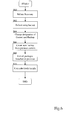
- Fig. 6 is a flow diagram illustrating the recovery process.
- the recovery process may be initiated in step S60 by a startup (boot) failure, a runtime (hangup) failure, or by a user request to revert back to a previous version of the system.
- the recovery process may alternatively be initiated after a number of hangups, i.e., five, occur within a predefined time period.
- the client device 100 After initiation of the recovery process, the client device 100 starts, i.e., boots up, from the backup one of the first and second system partitions 12, 14, step S62. If the upgrade procedure of Fig. 4 has just been performed the backup system partition is the first system partition 12, and if the update procedure of Fig. 5 has been performed the backup system partition is the second system partition.
- the boot indicator 24 of the non-volatile memory 26 is then updated to indicate that the backup system partition is now the new current system partition, step S64. The switching of the boot indicator may be performed before rebooting of step S62.
- a new backup system partition is then created by copying the previously current system partition, step S66, i.e., copying the system partition that was current during the step S60.
- the client device 100 then presents to the user a list of all software packages that were installed on the previously current system partition, step S68.
- This list of software packages may be kept on or derived from package databases of the package management system 18, which are updated for each upgrade and update procedure.
- the user may then selectively install application and system components on the system partition, step S70, from the list. Accordingly, if a user determines that a component that was previously installed caused the system to crash, the user can remove that component from the system package to avoid further problems in step S70.
- the user could completely reinstall the system of the user device 100 in step S70 by installing all software packages saved on the package partition.
- the client device 100 is a mobile phone or a set top box for a cable or satellite television system
- the user of the client device can continue using the device after a system crashes caused by an automatic download of a software package from the server 300.
- the user at the server 300 can selectively install the software programs as required.
- Fig. 7 is a flow diagram showing how the package management system 18 may be used according to the present invention during the step S70 of Fig. 6.
- the package management system 18 provides information to the user regarding the dependencies between the various software packages on the package partition.
- the package management system 18 checks for compatibility with the existing software packages, step S82. If the user selected software package is not compatible with one of the existing software packages, the CPU 20 issues a warning and/or blocks the installation of the user selected software package, step S84.
- the package management system 18 determines whether the user selected software package requires any further software packages to support the user selected software package, step S86. If the user selected software package requires further software packages, the CPU 20 issues a warning and/or automatically includes the required software packages with the installation of the user selected software package, step 88.
Landscapes
- Engineering & Computer Science (AREA)
- Theoretical Computer Science (AREA)
- General Engineering & Computer Science (AREA)
- Physics & Mathematics (AREA)
- General Physics & Mathematics (AREA)
- Software Systems (AREA)
- Quality & Reliability (AREA)
- Stored Programmes (AREA)
Abstract
Description
Claims (30)
- A method for recovering from startup and runtime failures of a software system in a computer environment including a client device (100), comprising the steps of:(a) providing a persistent memory (10) in the client device (100) including at least first and second system partitions (12,14) and at least one package partition (16), wherein runtime components of the software system are installed on the first and second system partitions (12,14) and at least the software packages of the software system downloaded from remote servers (300) are saved on the at least one package partition (16);(b) designating one of the first and second system partitions (12,14) as a current system partition and the other of the first and second system partitions (12,14) as a backup system partition;(c) using the current system partition by a central processing unit (20) of the client device (100) for controlling the client device (100);(d) rebooting the software system of the client device (100) using the backup system partition in response to one of an startup failure, a runtime failure of the software system of the client device (100), and a user request;(e) designating the backup system partition as the new current system partition; and(f) creating a new backup system partition from the new current system partition.
- The method of claim 1, wherein all installed software packages of the software system are saved on the at least one package partition (16), said method further comprising the step of reinstalling the entire software system by installing all of the software packages residing on the at least one package partition (16) after said step (f).
- The method of claim 2, further comprising the step of allowing selective removal of the software packages from the at least one package partition (16) after said step (f).
- The method of claim 1, further comprising the step of allowing selective removal of the software packages from the at least one package partition after said step (f).
- The method of claim 1, further comprising the step of:(g) allowing selective installation of software packages on the first and second system partitions (12,14) from the software packages saved on the at least one package partition (16) after said step (f).
- The method of claim 5, wherein said step (g) further comprises using a package management system to determine dependencies between the software packages saved on the at least one package partition (16).
- The method of claim 6, wherein said step (g) further comprises the steps of selecting a user selected software package on the package partition (16) for installation in one of the system partitions, determining whether the user selected software package is compatible with existing installed software packages, and blocking installation of the user selected software package if the user selected software package is not compatible with existing installed software packages.
- The method of claim 6, wherein said step (g) further comprises the steps of selecting a user selected software package on the package partition (16) for installation in one of the system partitions, determining whether the user selected software package is compatible with existing installed software packages, and outputting a warning if the user selected software package is not compatible with existing installed software packages.
- The method of claim 6, wherein said step (g) further comprises selecting a user selected software package from the package partition (16) for installation in one of the system partitions (12,14), identifying other software packages on the package partitions required for the user selected software package using the package management system, and installing both the selected software package and the other software packages identified by the package management system.
- The method of claim 1, further comprising the step of performing a software package installation procedure for installing a new software package in the client device (100) before said step (d), wherein the step of installing a new software package includes the substeps of:(i) receiving the new software package at the client device (100);(ii) determining whether the new software package contains a critical component, the critical component being a component that requires a reboot of the client device (100) to run after installation;(iii) performing an upgrade procedure including installing the new software package in the background system partition if it is determined in said step (ii) that the new software package contains a critical component;(iv) performing an update procedure including installing the new software package in the current system partition if it is determined in said step (ii) that the new software package does not contain a critical component; and(v) saving the new software package in the at least one package partition (16).
- The method of claim 10, further comprising the step of:(g) allowing selective installation of software packages on the first and second system partitions (12,14) from the software packages saved on the at least one package partition (16) after said step (f).
- The method of claim 11, wherein said step (g) further comprises outputting, by the client device (100), a list of software packages installed on the system partitions during the most recently performed software package installation procedure.
- The method of claim 10, wherein said new software package replaces a preexisting software package such that said substep (v) further includes removing the preexisting software package from the at least one package partition (16) after the new software package has been saved.
- The method of claim 10, further comprising the step of indicating in a non-volatile memory (26) of the computer that the installation process has started after said substep (i) and indicating in the non-volatile memory (26) after said substep (v) that the installation process is completed.
- The method of claim 10, wherein said substep (i) comprises receiving the new software package from a remote server (300) via a communication network (200).
- The method of claim 15, wherein said substep (i) comprises receiving the new software package from the remote server (300) automatically.
- The method of claim 15, wherein said substep (i) comprises receiving the new software package in response to a user request.
- The method of claim 10, wherein said substep (ii) comprises reading a meta-file sent with the new software package to determine whether the package contains a critical component.
- The method of claim 10, wherein said upgrade procedure of said substep (iii) comprises:copying the current system partition to the backup system partition;installing the new software package on the backup system partition;saving the new software on the at least one package partition (16);switching the designations of the current and backup system partitions so that the current system partition includes the new software package; andrebooting the client device (100) with the current system partition.
- The method of claim 19, further comprising the step of deleting an old version of the software package from the at least one package partition (16).
- The method of claim 19, further comprising the step of updating a package management system of the client device (100) used to determine dependencies between the software packages of the software system.
- The method of claim 10, wherein said update procedure of said substep (iv) comprises:installing the new software package on the current system partition; andsaving the new software package on the at least one package partition (16).
- The method of claim 22, further comprising the step of deleting an old version of the software package from the at least one package partition (16).
- The method of claim 22, further comprising the step of updating a package management system of the client device (100) used to determine dependencies between the software packages of the software system.
- The method of claim 10, where said substep (iii) is performed if the new software package includes one of at least part of an operating system kernel, a device driver, and at least part of a window system.
- The method of claim 1, where the client device (100) is one of a personal computer, a personal digital assistant, a mobile phone, a cable television set top box, and a satellite television set top box.
- A computer system comprising a client device (100) connectable to a server (300) via a communication network (200) for receiving software packages, said client device (100) comprising:a persistent memory (10) connected to said central processing unit (20), said persistent memory (10) having two system partitions (12,14) and at least one package partition (16), wherein runtime components of a software system of said client device (100) are installed on said two system partitions (12,14), one of said two system partitions (12,14) being designated as a current system partition and the other one of said two system partitions (12,14) is designated as a backup system partition, and wherein all software packages installed in the computer system are saved on said at least one package partition (16);a central processing unit (20) connected to said persistent memory (10) and using said current system partition for control; andmeans for automatically rebooting said computer system using the backup partition in response to one of a startup failure, a runtime failure, and a user request to revert to a previous software version.
- The computer system of claim 27, wherein said client device (100) further comprises means for allowing user selected ones of the software packages from the at least one package partition (16) to be installed on one of the system partitions (12,14) in response to one of a startup failure, a runtime failure, and a user request to revert to a previous software version.
- The computer system of claim 27, wherein said client device (100) further comprises a package management system including information regarding the dependencies and version information for each of the software packages on the at least one package partition (16).
- The computer system of claim 27, wherein said client device (100) comprises one of a personal computer, a personal digital assistant, and a mobile phone.
Applications Claiming Priority (2)
| Application Number | Priority Date | Filing Date | Title |
|---|---|---|---|
| US893270 | 2001-06-27 | ||
| US09/893,270 US6928579B2 (en) | 2001-06-27 | 2001-06-27 | Crash recovery system |
Publications (2)
| Publication Number | Publication Date |
|---|---|
| EP1271322A2 true EP1271322A2 (en) | 2003-01-02 |
| EP1271322A3 EP1271322A3 (en) | 2006-04-12 |
Family
ID=25401305
Family Applications (1)
| Application Number | Title | Priority Date | Filing Date |
|---|---|---|---|
| EP02396095A Ceased EP1271322A3 (en) | 2001-06-27 | 2002-06-18 | Crash recovery system |
Country Status (2)
| Country | Link |
|---|---|
| US (1) | US6928579B2 (en) |
| EP (1) | EP1271322A3 (en) |
Cited By (8)
| Publication number | Priority date | Publication date | Assignee | Title |
|---|---|---|---|---|
| CN102082966A (en) * | 2010-10-15 | 2011-06-01 | 福建新大陆通信科技股份有限公司 | Method for upgrading script configuration of set top box |
| CN102262576A (en) * | 2011-07-29 | 2011-11-30 | 成都易我科技开发有限责任公司 | Method for operating partition in use by using current system |
| WO2012000272A1 (en) * | 2010-06-29 | 2012-01-05 | 中兴通讯股份有限公司 | Method and device for self-rescuing after file system being damaged |
| EP2490122A3 (en) * | 2010-12-10 | 2013-04-10 | Mitel Networks Corporation | Hardware turnkey mobility |
| CN103049343A (en) * | 2011-10-14 | 2013-04-17 | 腾讯科技(深圳)有限公司 | Method and device for restoring operating system blue screen |
| US8990618B2 (en) | 2010-12-10 | 2015-03-24 | Mitel Networks Corporation | Partial fault tolerance in an embedded appliance |
| WO2017067448A1 (en) * | 2015-10-22 | 2017-04-27 | 深圳市中兴微电子技术有限公司 | Firmware-over-the-air upgrade method, system and computer storage medium |
| CN110998535A (en) * | 2017-07-24 | 2020-04-10 | 优步技术公司 | Restoring application functionality via analysis of application operation requests |
Families Citing this family (52)
| Publication number | Priority date | Publication date | Assignee | Title |
|---|---|---|---|---|
| US6504131B1 (en) * | 2001-09-19 | 2003-01-07 | Illinois Tool Works Inc. | Welding-type power supply with boot loader |
| US7409435B1 (en) * | 2002-02-28 | 2008-08-05 | Sprint Communications Company L.P. | Integrated services hub binary file trial run process |
| US7379982B2 (en) * | 2002-04-15 | 2008-05-27 | Bassam Tabbara | System and method for custom installation of an operating system on a remote client |
| US6836657B2 (en) * | 2002-11-12 | 2004-12-28 | Innopath Software, Inc. | Upgrading of electronic files including automatic recovery from failures and errors occurring during the upgrade |
| US7024581B1 (en) | 2002-10-09 | 2006-04-04 | Xpoint Technologies, Inc. | Data processing recovery system and method spanning multiple operating system |
| US8336044B2 (en) * | 2002-10-09 | 2012-12-18 | Rpx Corporation | Method and system for deploying a software image |
| AU2003279246A1 (en) * | 2002-10-10 | 2004-05-04 | Action Engine Corporation | Method and apparatus for remote control and updating of wireless mobile devices |
| US7194652B2 (en) * | 2002-10-29 | 2007-03-20 | Brocade Communications Systems, Inc. | High availability synchronization architecture |
| US7263648B2 (en) * | 2003-01-24 | 2007-08-28 | Wegener Communications, Inc. | Apparatus and method for accommodating loss of signal |
| US20040193953A1 (en) * | 2003-02-21 | 2004-09-30 | Sun Microsystems, Inc. | Method, system, and program for maintaining application program configuration settings |
| TW591395B (en) * | 2003-02-27 | 2004-06-11 | Acer Inc | Recovery method of multi-functional operating system and system thereof |
| US20040181777A1 (en) * | 2003-03-14 | 2004-09-16 | Swee-Koon Fam | Method and device for programming electronic devices using a uniform parameter format |
| US7171606B2 (en) * | 2003-03-25 | 2007-01-30 | Wegener Communications, Inc. | Software download control system, apparatus and method |
| US20040199910A1 (en) * | 2003-04-05 | 2004-10-07 | Baack James E. | Automated change back off process for restoring the root disk |
| US7810088B2 (en) * | 2003-06-20 | 2010-10-05 | Samsung Electronics Co., Ltd. | Apparatus and method for performing a fail-safe over-the-air software update in a mobile station |
| US7206411B2 (en) | 2003-06-25 | 2007-04-17 | Wegener Communications, Inc. | Rapid decryption of data by key synchronization and indexing |
| US20050055689A1 (en) * | 2003-09-10 | 2005-03-10 | Abfalter Scott A. | Software management for software defined radio in a distributed network |
| US7376945B1 (en) * | 2003-12-02 | 2008-05-20 | Cisco Technology, Inc. | Software change modeling for network devices |
| US20050204199A1 (en) * | 2004-02-28 | 2005-09-15 | Ibm Corporation | Automatic crash recovery in computer operating systems |
| US20050240815A1 (en) * | 2004-04-13 | 2005-10-27 | Sony Corporation | Modular imaging of computer software for system install and restore |
| US8595713B2 (en) * | 2004-07-08 | 2013-11-26 | Andrew Llc | Radio base station and a method of operating a radio base station |
| JP5279981B2 (en) * | 2004-11-22 | 2013-09-04 | 富士通株式会社 | Update control program, update control method, and update control apparatus |
| US7478283B2 (en) * | 2005-01-22 | 2009-01-13 | International Business Machines Corporation | Provisional application management with automated acceptance tests and decision criteria |
| US20070028216A1 (en) * | 2005-07-28 | 2007-02-01 | Boss Gregory J | Systems and methods for embedded application test suites |
| US9348574B2 (en) * | 2006-03-30 | 2016-05-24 | Bosch Automotive Service Solutions Inc. | Method for having multiple software programs on a diagnostic tool |
| US20080046710A1 (en) * | 2006-08-17 | 2008-02-21 | Steven Maddocks | Switching firmware images in storage systems |
| US8898659B2 (en) * | 2006-11-21 | 2014-11-25 | Dell Products L.P. | Method and apparatus to customize and configure multiple operating systems on a server |
| US20090013317A1 (en) * | 2007-02-08 | 2009-01-08 | Airnet Communications Corporation | Software Management for Software Defined Radio in a Distributed Network |
| US8856360B2 (en) * | 2007-06-22 | 2014-10-07 | Microsoft Corporation | Automatically identifying dynamic internet protocol addresses |
| US20080320110A1 (en) * | 2007-06-25 | 2008-12-25 | Sharp Laboratories Of America, Inc. | Firmware rollback and configuration restoration for electronic devices |
| EP2020776A1 (en) * | 2007-07-30 | 2009-02-04 | Nederlandse Organisatie voor toegepast- natuurwetenschappelijk onderzoek TNO | Restarting networks |
| US8938735B2 (en) * | 2007-08-31 | 2015-01-20 | Thomson Reuters Global Resources | Bootstrapper and software download manager |
| KR20090026535A (en) * | 2007-09-10 | 2009-03-13 | 삼성전자주식회사 | Imaging Device, Imaging System And Its Software Upgrade Method |
| US8515727B2 (en) * | 2008-03-19 | 2013-08-20 | International Business Machines Corporation | Automatic logic model build process with autonomous quality checking |
| US7721279B1 (en) * | 2009-01-28 | 2010-05-18 | International Business Machines Corporation | Packaging information integration applications |
| US8804172B2 (en) * | 2010-08-18 | 2014-08-12 | Konica Minolta Business Technologies, Inc. | Non-transitory computer readable recording medium stored with printer driver updating program and printer driver updating method |
| US20120117181A1 (en) * | 2010-11-05 | 2012-05-10 | Verizon Patent And Licensing, Inc. | System for and method of providing mobile applications management |
| CN103518188B (en) | 2011-03-31 | 2017-05-24 | 惠普发展公司,有限责任合伙企业 | Supervisor system resuming control |
| CN103309768B (en) * | 2012-03-16 | 2015-03-11 | 腾讯科技(深圳)有限公司 | Method and device for repairing system files |
| JP5932511B2 (en) * | 2012-06-19 | 2016-06-08 | キヤノン株式会社 | Information processing apparatus, software update method, and computer program |
| CN104317727B (en) * | 2014-09-30 | 2017-09-08 | 宇龙计算机通信科技(深圳)有限公司 | The processing method of mobile terminal and data partition |
| CN107004087B (en) * | 2014-10-24 | 2021-04-27 | 迈克菲有限公司 | A proxy for self-healing exists |
| CN104898592B (en) * | 2015-03-31 | 2017-11-28 | 联想(北京)有限公司 | A kind of generation method and electronic equipment of the rule that links |
| KR20170032715A (en) * | 2015-09-15 | 2017-03-23 | 삼성전자주식회사 | Method for Managing Application and Electronic Device supporting the same |
| CN107911248B (en) * | 2017-11-27 | 2020-11-10 | 北京百度网讯科技有限公司 | Upgrading method and device |
| US10613846B2 (en) * | 2018-04-13 | 2020-04-07 | International Business Machines Corporation | Binary restoration in a container orchestration system |
| US12222823B2 (en) * | 2018-07-20 | 2025-02-11 | Huawei Technologies Co., Ltd. | User data backup to data partition of storage medium |
| CN109358988A (en) * | 2018-12-10 | 2019-02-19 | 郑州云海信息技术有限公司 | A recovery method, device, system and readable storage medium for cloud backup data |
| CN110311960B (en) * | 2019-06-19 | 2022-05-10 | 浙江吉利控股集团有限公司 | A software upgrade method, system, device and storage medium |
| US11481278B2 (en) * | 2020-05-19 | 2022-10-25 | EMC IP Holding Company LLC | System and method for recovering an operating system after a runtime hang using a dual-flash device |
| US11797389B2 (en) | 2020-05-19 | 2023-10-24 | EMC IP Holding Company LLC | System and method for recovering an operating system after an upgrade hang using a dual-flash device |
| US11550655B2 (en) | 2020-05-19 | 2023-01-10 | EMC IP Holding Company LLC | System and method for monitoring and upgrading a dual-flash device |
Family Cites Families (26)
| Publication number | Priority date | Publication date | Assignee | Title |
|---|---|---|---|---|
| US5157663A (en) | 1990-09-24 | 1992-10-20 | Novell, Inc. | Fault tolerant computer system |
| JPH076026A (en) * | 1993-05-28 | 1995-01-10 | Xerox Corp | Method for guarantee of interchangeablity of configuration management and component and method for exclusion of non- interchangeability of resident software and migration software |
| US6381694B1 (en) | 1994-02-18 | 2002-04-30 | Apple Computer, Inc. | System for automatic recovery from software problems that cause computer failure |
| JP3140906B2 (en) * | 1994-04-12 | 2001-03-05 | 株式会社エヌ・ティ・ティ・データ | How to update and restore system files |
| US6259442B1 (en) | 1996-06-03 | 2001-07-10 | Webtv Networks, Inc. | Downloading software from a server to a client |
| US6175855B1 (en) * | 1996-12-20 | 2001-01-16 | Siemens Aktiengesellschaft | Method for instantiating a class having different versions |
| US5924102A (en) * | 1997-05-07 | 1999-07-13 | International Business Machines Corporation | System and method for managing critical files |
| US6073220A (en) | 1997-09-03 | 2000-06-06 | Duocor, Inc. | Apparatus and method for providing a transparent disk drive back-up |
| DE19748343C2 (en) * | 1997-11-03 | 2001-11-22 | Danfoss As | Hydraulic valve |
| US5974547A (en) | 1998-03-20 | 1999-10-26 | 3Com Corporation | Technique for reliable network booting of an operating system to a client computer |
| US6209089B1 (en) | 1998-08-12 | 2001-03-27 | Microsoft Corporation | Correcting for changed client machine hardware using a server-based operating system |
| US6557169B1 (en) * | 1998-10-11 | 2003-04-29 | International Business Machines Corporation | Method and system for changing the operating system of a workstation connected to a data transmission network |
| US6195695B1 (en) * | 1998-10-27 | 2001-02-27 | International Business Machines Corporation | Data processing system and method for recovering from system crashes |
| US6393585B1 (en) * | 1998-12-23 | 2002-05-21 | Scientific-Atlanta, Inc. | Method and apparatus for restoring operating systems in a set-top box environment |
| TW410297B (en) | 1999-03-05 | 2000-11-01 | Via Tech Inc | Remote booting of computers in local area network |
| US6490722B1 (en) * | 1999-03-30 | 2002-12-03 | Tivo Inc. | Software installation and recovery system |
| DE19924610B4 (en) * | 1999-05-28 | 2008-07-03 | Fujitsu Siemens Computers Gmbh | Setup procedures |
| US6467088B1 (en) * | 1999-06-30 | 2002-10-15 | Koninklijke Philips Electronics N.V. | Reconfiguration manager for controlling upgrades of electronic devices |
| US6397385B1 (en) * | 1999-07-16 | 2002-05-28 | Excel Switching Corporation | Method and apparatus for in service software upgrade for expandable telecommunications system |
| US6640334B1 (en) * | 1999-09-27 | 2003-10-28 | Nortel Networks Limited | Method and apparatus of remotely updating firmware of a communication device |
| US6615365B1 (en) * | 2000-03-11 | 2003-09-02 | Powerquest Corporation | Storing a computer disk image within an imaged partition |
| US6591376B1 (en) * | 2000-03-02 | 2003-07-08 | Hewlett-Packard Development Company, L.P. | Method and system for failsafe recovery and upgrade of an embedded operating system |
| EP1195679A1 (en) * | 2000-10-06 | 2002-04-10 | Hewlett-Packard Company, A Delaware Corporation | Performing operating system recovery from external back-up media in a headless computer entity |
| GB2367656A (en) | 2000-10-06 | 2002-04-10 | Hewlett Packard Co | Self-repairing operating system for computer entities |
| US6748553B2 (en) * | 2000-12-27 | 2004-06-08 | Intel Corporation | Method and apparatus for default factory image restoration of a system |
| US7318149B2 (en) | 2001-09-28 | 2008-01-08 | Hewlett-Packard Development Company, L.P. | Semi-persistent relocatable ram-based virtual floppy disk method |
-
2001
- 2001-06-27 US US09/893,270 patent/US6928579B2/en not_active Expired - Fee Related
-
2002
- 2002-06-18 EP EP02396095A patent/EP1271322A3/en not_active Ceased
Cited By (14)
| Publication number | Priority date | Publication date | Assignee | Title |
|---|---|---|---|---|
| US9223657B2 (en) | 2010-06-29 | 2015-12-29 | Zte Corporation | Self-rescue method and device for damaged file system |
| WO2012000272A1 (en) * | 2010-06-29 | 2012-01-05 | 中兴通讯股份有限公司 | Method and device for self-rescuing after file system being damaged |
| CN102314421A (en) * | 2010-06-29 | 2012-01-11 | 中兴通讯股份有限公司 | Self-rescuing method and self rescuing device for file system after being damaged |
| JP2013529820A (en) * | 2010-06-29 | 2013-07-22 | ゼットティーイー コーポレイション | Self-relief method and self-relief device for damaged file system |
| CN102082966A (en) * | 2010-10-15 | 2011-06-01 | 福建新大陆通信科技股份有限公司 | Method for upgrading script configuration of set top box |
| CN102082966B (en) * | 2010-10-15 | 2013-01-02 | 福建新大陆通信科技股份有限公司 | Method for upgrading script configuration of set top box |
| EP2490122A3 (en) * | 2010-12-10 | 2013-04-10 | Mitel Networks Corporation | Hardware turnkey mobility |
| US8990618B2 (en) | 2010-12-10 | 2015-03-24 | Mitel Networks Corporation | Partial fault tolerance in an embedded appliance |
| CN102262576B (en) * | 2011-07-29 | 2013-04-10 | 成都易我科技开发有限责任公司 | Method for operating partition in use by using current system |
| CN102262576A (en) * | 2011-07-29 | 2011-11-30 | 成都易我科技开发有限责任公司 | Method for operating partition in use by using current system |
| CN103049343A (en) * | 2011-10-14 | 2013-04-17 | 腾讯科技(深圳)有限公司 | Method and device for restoring operating system blue screen |
| WO2017067448A1 (en) * | 2015-10-22 | 2017-04-27 | 深圳市中兴微电子技术有限公司 | Firmware-over-the-air upgrade method, system and computer storage medium |
| CN110998535A (en) * | 2017-07-24 | 2020-04-10 | 优步技术公司 | Restoring application functionality via analysis of application operation requests |
| CN110998535B (en) * | 2017-07-24 | 2024-04-02 | 优步技术公司 | Restoring application functionality via analysis of application operation requests |
Also Published As
| Publication number | Publication date |
|---|---|
| US20030005037A1 (en) | 2003-01-02 |
| EP1271322A3 (en) | 2006-04-12 |
| US6928579B2 (en) | 2005-08-09 |
Similar Documents
| Publication | Publication Date | Title |
|---|---|---|
| US6928579B2 (en) | Crash recovery system | |
| USRE41162E1 (en) | Method for providing scaleable restart and backout of software upgrades for clustered computing | |
| US7934210B1 (en) | System and method for updating one or more programs and their environment | |
| US6553490B1 (en) | Computer system including local computer with capability to automatically update operating system or application program from network server | |
| US6418555B2 (en) | Automatic upgrade of software | |
| US6966058B2 (en) | System and method for managing software upgrades in a distributed computing system | |
| US5764992A (en) | Method and apparatus for automatic software replacement | |
| US6209089B1 (en) | Correcting for changed client machine hardware using a server-based operating system | |
| US9792105B2 (en) | Method and system for booting and automatically updating software, and recovering from update error, and computer readable recording medium storing method | |
| US5922072A (en) | Method and apparatus for creating alternate boot environments in a computer | |
| US6859925B2 (en) | Method for software installation and pre-setup | |
| US6363499B1 (en) | Method and system for restoring a computer to its original state after an unsuccessful installation attempt | |
| US8032740B2 (en) | Update in-use flash memory without external interfaces | |
| US20060026590A1 (en) | Method and apparatus for modifying software | |
| US20040243997A1 (en) | Method, system, and program for installing program components on a computer | |
| JP2003256225A (en) | Computer system, failure handling method, and program for operating computer system | |
| WO2009109925A2 (en) | Method and apparatus for user customizable software deployment | |
| US7739490B2 (en) | Control apparatus, upgrade method and program product of the same | |
| EP2648092B1 (en) | Updating method and multi-domain embedded system | |
| JPH1021060A (en) | Communication system having automatic program update processing function and recording medium provided with program for executing program update processing | |
| EP3260981B1 (en) | Information processing apparatus, information processing system, and information processing method for updating firmware | |
| JP5048498B2 (en) | Boot disk management utilities | |
| KR102423056B1 (en) | Method and system for swapping booting disk | |
| JP2005515524A (en) | Devices used in a network environment | |
| JP2004157767A (en) | Software update system |
Legal Events
| Date | Code | Title | Description |
|---|---|---|---|
| PUAI | Public reference made under article 153(3) epc to a published international application that has entered the european phase |
Free format text: ORIGINAL CODE: 0009012 |
|
| AK | Designated contracting states |
Kind code of ref document: A2 Designated state(s): AT BE CH CY DE DK ES FI FR GB GR IE IT LI LU MC NL PT SE TR |
|
| AX | Request for extension of the european patent |
Free format text: AL;LT;LV;MK;RO;SI |
|
| PUAL | Search report despatched |
Free format text: ORIGINAL CODE: 0009013 |
|
| AK | Designated contracting states |
Kind code of ref document: A3 Designated state(s): AT BE CH CY DE DK ES FI FR GB GR IE IT LI LU MC NL PT SE TR |
|
| AX | Request for extension of the european patent |
Extension state: AL LT LV MK RO SI |
|
| 17P | Request for examination filed |
Effective date: 20060925 |
|
| 17Q | First examination report despatched |
Effective date: 20061027 |
|
| AKX | Designation fees paid |
Designated state(s): DE FI FR GB NL |
|
| RBV | Designated contracting states (corrected) |
Designated state(s): DE FR GB |
|
| STAA | Information on the status of an ep patent application or granted ep patent |
Free format text: STATUS: THE APPLICATION HAS BEEN REFUSED |
|
| 18R | Application refused |
Effective date: 20110319 |