EP1251514A2 - DVD navigator and application programming interfaces - Google Patents
DVD navigator and application programming interfaces Download PDFInfo
- Publication number
- EP1251514A2 EP1251514A2 EP01127762A EP01127762A EP1251514A2 EP 1251514 A2 EP1251514 A2 EP 1251514A2 EP 01127762 A EP01127762 A EP 01127762A EP 01127762 A EP01127762 A EP 01127762A EP 1251514 A2 EP1251514 A2 EP 1251514A2
- Authority
- EP
- European Patent Office
- Prior art keywords
- dvd
- navigator
- application
- recited
- api
- Prior art date
- Legal status (The legal status is an assumption and is not a legal conclusion. Google has not performed a legal analysis and makes no representation as to the accuracy of the status listed.)
- Ceased
Links
Images


Classifications
-
- G—PHYSICS
- G06—COMPUTING OR CALCULATING; COUNTING
- G06F—ELECTRIC DIGITAL DATA PROCESSING
- G06F9/00—Arrangements for program control, e.g. control units
- G06F9/06—Arrangements for program control, e.g. control units using stored programs, i.e. using an internal store of processing equipment to receive or retain programs
- G06F9/46—Multiprogramming arrangements
- G06F9/54—Interprogram communication
- G06F9/542—Event management; Broadcasting; Multicasting; Notifications
-
- G—PHYSICS
- G11—INFORMATION STORAGE
- G11B—INFORMATION STORAGE BASED ON RELATIVE MOVEMENT BETWEEN RECORD CARRIER AND TRANSDUCER
- G11B19/00—Driving, starting, stopping record carriers not specifically of filamentary or web form, or of supports therefor; Control thereof; Control of operating function ; Driving both disc and head
- G11B19/02—Control of operating function, e.g. switching from recording to reproducing
-
- G—PHYSICS
- G11—INFORMATION STORAGE
- G11B—INFORMATION STORAGE BASED ON RELATIVE MOVEMENT BETWEEN RECORD CARRIER AND TRANSDUCER
- G11B27/00—Editing; Indexing; Addressing; Timing or synchronising; Monitoring; Measuring tape travel
- G11B27/10—Indexing; Addressing; Timing or synchronising; Measuring tape travel
- G11B27/102—Programmed access in sequence to addressed parts of tracks of operating record carriers
- G11B27/105—Programmed access in sequence to addressed parts of tracks of operating record carriers of operating discs
-
- H—ELECTRICITY
- H04—ELECTRIC COMMUNICATION TECHNIQUE
- H04N—PICTORIAL COMMUNICATION, e.g. TELEVISION
- H04N5/00—Details of television systems
- H04N5/76—Television signal recording
- H04N5/84—Television signal recording using optical recording
- H04N5/85—Television signal recording using optical recording on discs or drums
-
- G—PHYSICS
- G11—INFORMATION STORAGE
- G11B—INFORMATION STORAGE BASED ON RELATIVE MOVEMENT BETWEEN RECORD CARRIER AND TRANSDUCER
- G11B2220/00—Record carriers by type
- G11B2220/20—Disc-shaped record carriers
- G11B2220/25—Disc-shaped record carriers characterised in that the disc is based on a specific recording technology
- G11B2220/2537—Optical discs
- G11B2220/2562—DVDs [digital versatile discs]; Digital video discs; MMCDs; HDCDs
Definitions
- This invention relates to computers and like devices, and more particularly to improved methods and arrangements associated with a generic navigator program and the application programming interfaces (APIs) exposed thereby.
- APIs application programming interfaces
- a digital versatile disc (DVD) player is composed of three logical units, as defined in the DVD specification.
- the first logical unit is a DVD player application that presents an interface to the user and relays user commands to the second logical unit.
- the second logical unit a DVD navigator that reads and interprets the information on the DVD and controls which segments of video and audio are processed based on the user commands.
- the third logical unit is a DVD presentation layer that decompresses data read from the DVD and presents the corresponding audio, video and subpicture streams, as applicable, to one or more renderers.
- the DVD player is implanted via a graphical user interface (GUI) that is displayed to a user, and through which the user is able to selectively control playback, etc., of the DVD using a pointing selection input device, e.g., a mouse.
- GUI graphical user interface
- This generic navigator component provides a standard, specification-compliant DVD navigator as part of Windows® to help application developers avoid such possibly repetitive and difficult tasks.
- This generic navigator component exposes two application programming interfaces (APIs) that combined provide a powerful, yet simplified and consistent interface that player applications can use to control the DVD navigator.
- the APIs have been designed to further influence the flexibility and usefulness of the underlying DVD Navigator.
- enhancements have been developed to further extend the performance of the generic navigator component.
- the navigator program has been enhanced to better synchronize with the player application, thereby providing better control mechanisms for the player application, improved enforcement of restricted/parental controlled content viewing, generation and assignment of unique identifiers to the content source, and an improved user and player application environment for starting and stopping playback.
- DVD navigator and DVD2 APIs are referred to as the DVD navigator and DVD2 APIs. It is noted that while most of the description is directed towards a PC running the Windows® operating system, the various methods and arrangements are clearly applicable to other operating systems, devices, etc. Moreover, the use of the term DVD is not meant to exclude other media formats. Thus, the DVD content itself may come from a hard drive, a compact disc, over a network, and the like.
- the DVD navigator and/or DVD2 API enable a player application to interactively control the playback of DVD content.
- the DVD2 API consists of two interfaces. The first is termed “IDvdlnfo2". The second is termed “IDvdControl2".
- the player application may use the IDvdlnfo2 interface to query the current state of the DVD navigator and the IDvdControl2 interface to better control playback and/or to alter the DVD navigator's state.
- the DVD2 API provides several unique and novel features. For example, thread-based synchronization methods are provided for real-time playback; a playback control mechanism is provided to determine the degree of interactivity; communication mechanisms are provided between the player application and the disc program, playing of time ranges is supported; mechanisms are provided for coordinating and handling parental level requests and for determining the minimal parental level to play a restricted segment of content; and, a unique disc identifier algorithm is provided, which further supports the bookmarking of any location within the DVD content
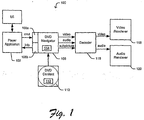
- FIG. 1 depicts an exemplary DVD player 100.
- Player 100 includes at least one player application 102 configured to present the user with a user interface (U/I) 104. Through U/I 104, the user is able to instruct player application 102 with regard to the playback of DVD content 110.
- U/I user interface
- player application 102 is provided with DVD2 API 108a and 108b to communicate user requests, and receive feedback information, respectively.
- DVD2 API 108a-b provide access to the functions within navigator 106.
- Navigator 106 interacts with DVD content 110, which in addition to media information includes a program 112.
- Program 112 defines the menus, jumps, etc., associated with the remaining content.
- Navigator 106 includes a state 114 associated with the playback process.
- the current user operation (e.g., play, stop, pause, reverse, fast-forward, slow motion, angle, etc.) is stored along with the current location within the DVD content (e.g., chapter, time, frame) and certain other registers such as those that could record recent jumps/UOPs.
- UOP current user operation
- the output of navigator 106 includes an encoded video stream, an encoded audio stream, and a subpicture stream, as applicable. These outputs are inputted to a decoder 116, which is configured to decode (decrypt and decompress) the encoded data and output the corresponding streams to the applicable video renderer 118 or audio renderer 120.
- Renderer 118 causes the video information to be displayed to the user, for example, via a video monitor.
- Renderer 120 causes the audio information to be reproduces for the listener, for example, via one or more speakers.
- FIG. 2 is a block diagram depicting an exemplary computing system 200 suitable for use with the arrangement in Fig. 1.
- Computing system 200 is, in this example, in the form of a personal computer (PC), however, in other examples computing system may take the form of a dedicated server(s), a special-purpose device, an appliance, a handheld computing device, a mobile telephone device, a pager device, etc.
- PC personal computer
- computing system may take the form of a dedicated server(s), a special-purpose device, an appliance, a handheld computing device, a mobile telephone device, a pager device, etc.
- computing system 200 includes a processing unit 221, a system memory 222, and a system bus 223.
- System bus 223 links together various system components including system memory 222 and the processing unit 221.
- System bus 223 may be any of several types of bus structures including a memory bus or memory controller, a peripheral bus, and a local bus using any of a variety of bus architectures.
- System memory 222 typically includes read only memory (ROM) 224 and random access memory (RAM) 225.
- ROM read only memory
- RAM random access memory
- BIOS basic input/output system 226
- BIOS basic routine that helps to transfer information between elements within computing system 200, such as during start-up, is stored in ROM 224.
- Computing system 200 further includes a hard disk drive 227 for reading from and writing to a hard disk, not shown, a magnetic disk drive 228 for reading from or writing to a removable magnetic disk 229, and an optical disk drive 30 for reading from or writing to a removable optical disk 231 such as a CD ROM or other optical media.
- Hard disk drive 227, magnetic disk drive 228, and optical disk drive 230 are connected to system bus 223 by a hard disk drive interface 232, a magnetic disk drive interface 233, and an optical drive interface 234, respectively.
- These drives and their associated computer-readable media provide nonvolatile storage of computer readable instructions, data structures, computer programs and other data for computing system 200.
- a number of computer programs may be stored on the hard disk, magnetic disk 229, optical disk 231, ROM 224 or RAM 225, including an operating system 235, one or more application programs 236, other programs 237, and program data 238.
- a user may enter commands and information into computing system 200 through various input devices such as a keyboard 240 and pointing device 242 (such as a mouse).
- a camera/microphone 255 or other like media device capable of capturing or otherwise outputting real-time data 256 can also be included as an input device to computing system 200.
- the real-time data 256 can be input into computing system 200 via an appropriate interface 257.
- Interface 257 can be connected to the system bus 223, thereby allowing real-time data 256 to be stored in RAM 225, or one of the other data storage devices, or otherwise processed.
- a monitor 247 or other type of display device is also connected to the system bus 223 via an interface, such as a video adapter 248.
- computing system 200 may also include other peripheral output devices (not shown), such as speakers, printers, etc.
- Computing system 200 may operate in a networked environment using logical connections to one or more remote computers, such as a remote computer 249.
- Remote computer 249 may be another personal computer, a server, a router, a network PC, a peer device or other common network node, and typically includes many or all of the elements described above relative to computing system 200, although only a memory storage device 250 has been illustrated in Fig. 2.
- LAN local area network
- WAN wide area network
- computing system 200 When used in a LAN networking environment, computing system 200 is connected to the local network 251 through a network interface or adapter 253. When used in a WAN networking environment, computing system 200 typically includes a modem 254 or other means for establishing communications over the wide area network 252, such as the Internet. Modem 254, which may be internal or external, is connected to system bus 223 via the serial port interface 246.
- DVD2 API 108a-b simplifies application authoring, adds functionality and solves many difficult synchronization issues common to DVD player applications development. Basically, a common DVD API helps discourage proprietary single-use monolithic DVD solutions that serve only as standalone DVD player applications. It also allows various applications (such as presentation programs, DVD players, games, or interactive learning programs) to add DVD support without having to know which DVD decoder or DVD hardware support is on the user's system. Historically, custom DVD solutions tend to be very hardware dependent and have limited upgrade options for users.
- DVD2 API 108a-b adds flexible synchronization mechanisms for the application to know the completion status of requests made to the DVD Navigator 106.
- the new command completion notification allows the application to concurrently perform other tasks and be informed of the status of a previous request.
- Previous DVD APIs assumed that either the application would be blocked until the request was completed, or would not send any notification to the application.
- Applications now have the option of receiving a synchronization object that they can use to wait on or are notified about completion events.
- the synchronization mechanism also returns the status of the request that indicates whether it succeeded or returns the reason (an error code) for its failure.
- Previous DVD APIs would appear to successfully execute requests that would later fail due to changed state when the DVD Navigator 106 actually started processing them. At that point, there was no way to propagate the error indication back to the player application 102.
- the new mechanism also notifies the player application 102 of every request that is cancelled or overridden by the disc's program 112 or by further user actions.
- DVD APIs use predefined behaviors that dictate how a command interacts with the current display. When a player application issues a new request, it pre-empts and cancels any content (video or audio) that is being played. Alternatively, the APIs semantics dictate that the current presentation completes before the new content is presented which forces the user to wait before he/she can request another action. Interactive applications such as DVD players and games may require the first behavior (instant effect), but other applications such as a slideshow may require the second behavior (complete the current presentation). Since these two options are mutually exclusive, predefined API's semantics cannot accommodate both. DVD2 API 108a-b allows player application 102 to indicate the desired behavior via flags, and also how it interacts with the synchronization mechanism.
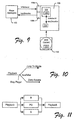
- DVD navigator 106 is configured to simulate a virtual CPU that uses an execution state 114 (in the form of a set of memory registers 124 (see, Fig. 9)).
- Previous DVD APIs allowed applications to read the contents of the registers.
- DVD2 API 108a-b also allows player application 102 to also change the contents of the memory registers.
- the combined read/write functionality allows player application 102 to essentially 'communicate' with program 112, as illustrated in Fig. 9.
- the read and write methods works in such a way that they can also be used for synchronization.
- player application 102 can implement 'controlled unlocking' or restricted access to all or portions of DVD content 110. With controlled unlocking, the user may be restricted from viewing portions of the disc until player application 102 sets specific memory registers. Player application 102 could receive this information from the content's author, the user, another program, a website, or the like.
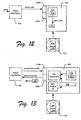
- Fig. 12 depicts the use of a code being written to registers 124 by player application 102 and being read by program 112. If the code is correct, then portion 130 of DVD content 110 can be played back.
- DVD2 API 108a-b contains a simplified naming scheme for the potential user operations suggested in the DVD specification Annex J.
- the DVD2 API uses less DVD jargon and features a more intuitive naming scheme.
- the user operation names proposed in the DVD specification are unclear and can lead to incorrect usage or under-utilization by application programs.
- the names now suggest their usage instead of an abstract label.
- time codes are now returned in a simple integer format instead of the awkward BCD coding.
- DVD2 API 108a-b has a mode that pauses navigator 106 and lets player application 102 respond to the parental level increase request before the navigator 106 continues. If the increase request is granted, the playback continues without requiring the user to start the movie from the beginning.
- the DVD specification only states that the navigator should pause until it knows whether the request succeeded or failed. It does not describe a mechanism to accomplish this task and suggests that the Navigator "calls the Temporary Parental Level Change feature built into the player" (4.6.4.1 V14-197).
- DVD specification describe any mechanism to allow the user to play multi-segment parent level branches (see, e.g., Fig 11).
- previous DVD APIs did not provide a mechanism that allowed the user to play multi-segment (or multiple-branch) parent level branches if no branches were permitted at the current user level.
- the navigator only notified the application that the playback has stopped, since no branch was available for the current parental level.
- navigator 106 and DVD2 API 108a-b compute the minimum level required to play the block and return this value along with a playback stopped' notification.
- the application can then notify the user of the required parental level that is required to continue playing DVD content 110.
- the user no longer has to guess the required level through trial and error, having to restart the movie on each try.
- DVD2 API 108a-b extends the functionality of the DVD Annex J specification and previous DVD APIs.
- the DVD Annex J specification only specifies actions to perform. It does not specify how player application 102 finds out information about the disc or the DVD navigator's state 114. Here, new disc and navigation state query functionality is provided.
- DVD2 API 108a-b does not require the application writer to already have a ready copy of the DVD specification to use it (e.g., due to the incomplete description of the data returned by the API).
- the data returned by the methods to get the textual information, the title attributes, audio attributes and subpicture attributes is documented so that application developers can get the necessary information from the new API and the associated documentation.
- DVD2 API 108a-b also allows the application to query the attributes of arbitrary title indices instead of just the current title index.
- DVD2 API 108a-b also returns the audio stream's Karaoke information so that intelligent Karaoke applications can be implemented.
- DVD2 API 108a-b also returns the capabilities of decoder 116 so the application can present configuration options to the user (like frame stepping in both direction, smooth rewind and fast-forward etc.) or intelligently alter the user interface.
- New control functionality is also provided.
- DVD2 API 108a-b allows player application 102 to play ranges of chapters or ranges of times, to select specific menu buttons (just not relative buttons) and allows the user to select buttons using a mouse location. It also supports the getting/setting of bookmark objects and the ability to query a calculated current unique disc ID.
- a "don't care" mode or model is depicted in Fig. 3, wherein player application 102 sends a request to navigator 106, without caring about what the result, if any, there is, and/or when the request is completed.
- An example might be a jump to location request, a show menu request, etc.
- player application essentially assumes that the requested operation has been completed.
- FIG. 4 an event mode or model is illustrated.
- player application 102 is provided notice upon a generic event sent by the navigator (when the request is completed).
- One drawback to this model is that player application 102 may have made more than one request and would not be able to tell the events apart.
- navigator 106 generates an object that can then be used by player application 102 to track the status of the request. This provides player application 102 with the ability to conduct instance tracking.
- navigator 106 can generate an object that can be used for tracking and also a subsequent event. In this manner, player application 102 can use the objects to tell events apart. Therefore, this model supports multiple instance tracking.
- FIG. 7 One variation is depicted in Fig. 7.
- player application 102 sends a request to navigator 106 (via DVD2 API 108a, of course). The player application 102 must wait for a result message from navigator 106.
- U/I 104 will probably be "frozen” while player application 102 waits.
- One way to solve the frozen U/I problem is to provide a worker program, such as is depicted in Fig. 8.
- the worker program receives the request and forwards it to navigator 106 and then itself waits for the result message. Once the worker receives the result message then it is forwarded to player application 102. While this may free up U/I 104, it may be difficult to manage several workers operating simultaneously.
- DVD2 API 108a-b creates associated synchronization command objects.
- the command object allows the application to synchronize and to learn about the command's status.
- Each API method is extended with two extra arguments.
- the general form of a DVD2 API command is:
- ppObject is an argument used to return a synchronization COM (Component Object Model) object to application 102; and, dwFlags is the set of flags passed to the method to determine the behavior and usage of the synchronization object. These are a bit-wise union of the available pre-defined flags.
- the synchronization object has the following interface:
- a variation on the interface also extends the original interface by including two methods that allow the application to wait on the start and end occurance along with other changes in the system:
- the flags take the following values:
- VFW_E_DVD_CMD_CANCELLED is returned by the initial DVD API method, by the IDvdCmd::WaitForStart or IDvdCmd::WaitForEnd or along with the event indication that the command was pre-empted and is no longer valid.
- player application 102 can determine the commencement and completion of the command, by any of the following: using the command object directly, using no command objects, listening to command related events, using a combination of events and objects to aid in tracking multiple instances of a command.
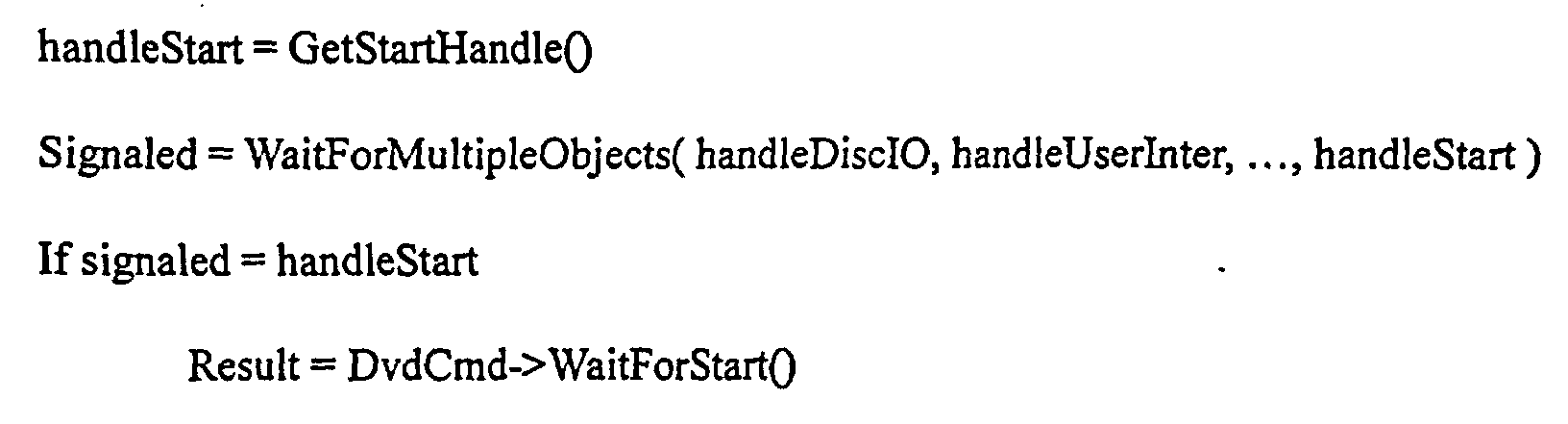
- IDvdCmd By passing an IDvdCmd pointer to the command, the Navigator will allocate and return a new IDvdCmd object. Calling the interface method IDvdCmd::WaitForStart() will block until the command begins and IDvdCmd::WaitForEnd() waits until the command completes. If the command has been cancelled, then the Navigator will return VFW_E_COMMAND_CANCELLED. After the application is done with the object, it must call Release() to free the COM object. A NULL pointer passed to the DVD API indicates that no command object should be returned to the application and the command execution should continue in the standard asynchronous mode.
- GetStartHandle() and GetEndHandle() return a system specific synchonization object that allows the application to wait for other requests (disc I/O, user interface changes, semaphore changes, unblocking threads, communications with other processes, etc) to be processed while it wait for the start or end events to occurs. Then the application calls the WaitForStart() or WaitForEnd() methods to retrieve the result.
- Dis I/O user interface changes
- semaphore changes unblocking threads, communications with other processes, etc
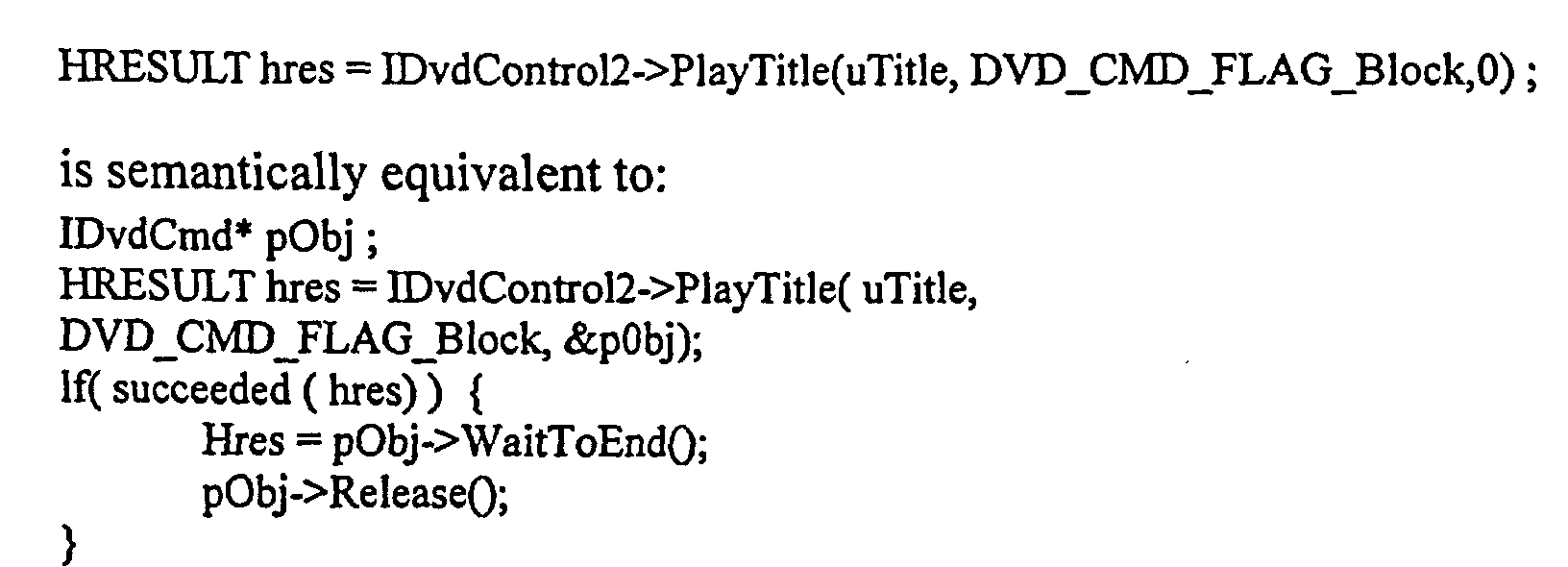
- the application can simply specify the DVD_CMD_FLAG_Block flag with a null object pointer.
- the command will not return until it has, either completed or was cancelled.
- the API will emulate a synchronous behavior. For example:
- an application can track different commands.
- the DVD2 API call will return an object that the application can use for later reference.
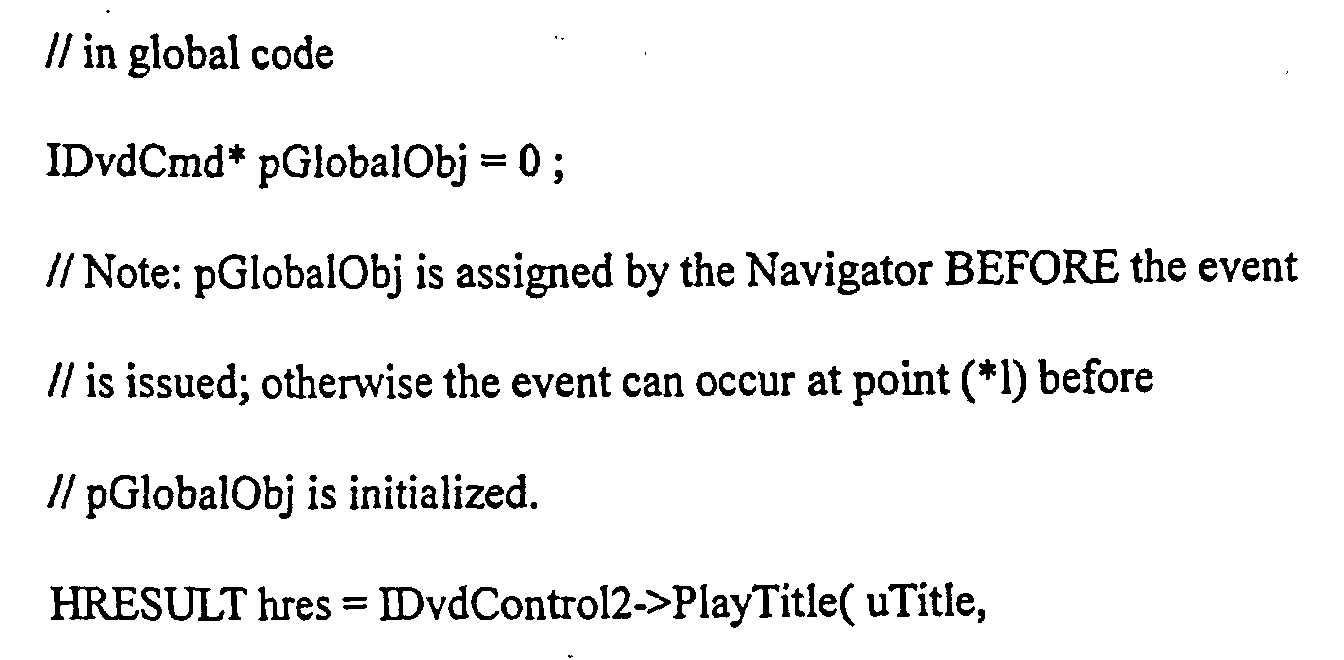
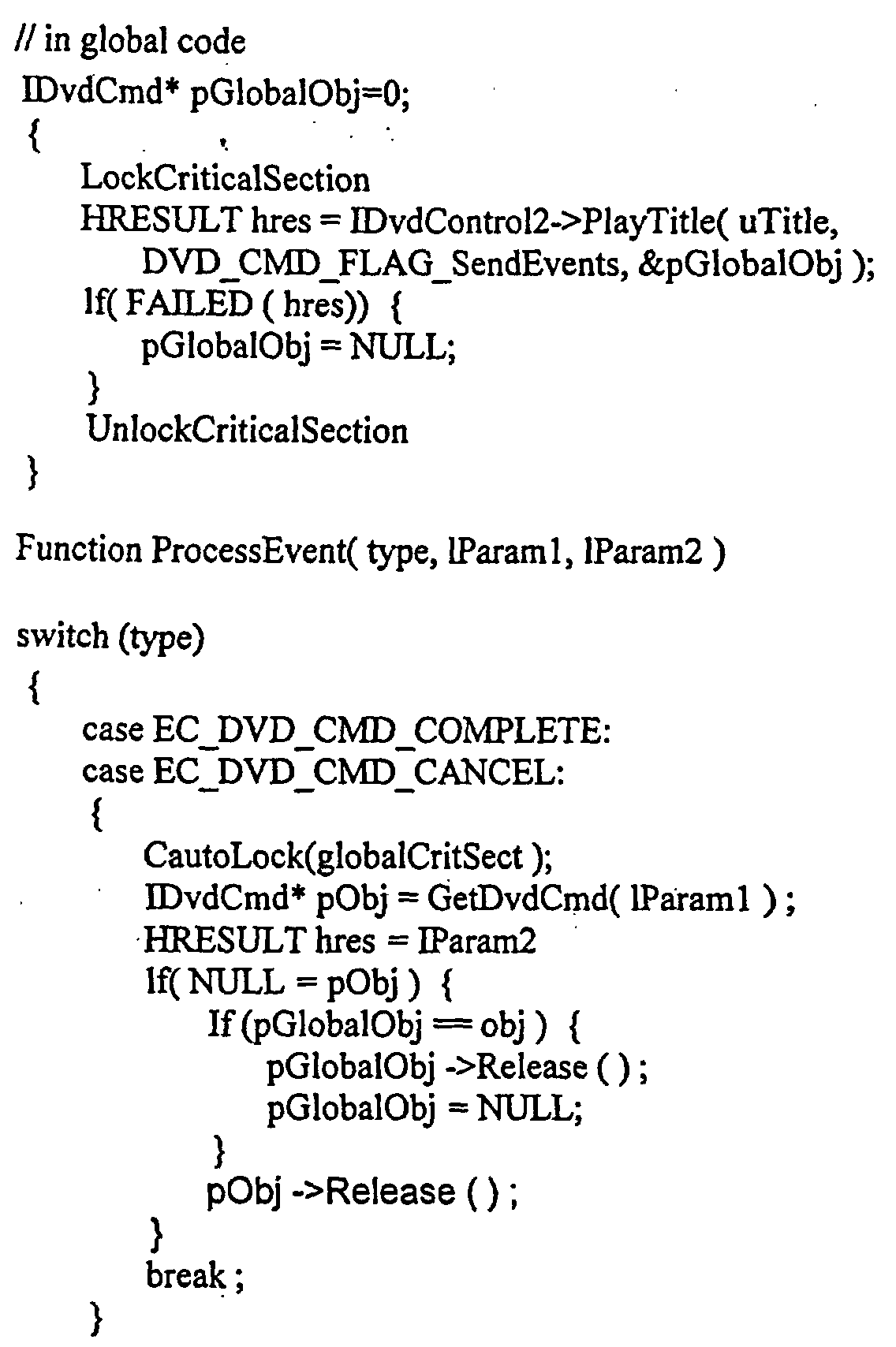
- the DVD2 API generates a unique identifier (or 'cookie') 1Param1 for each event that the application can map back to an IDvdCmd object.
- the cookie approach ensures that applications will not leak memory if they miss an event and allows the DVD Navigator to verify the validity of the object.
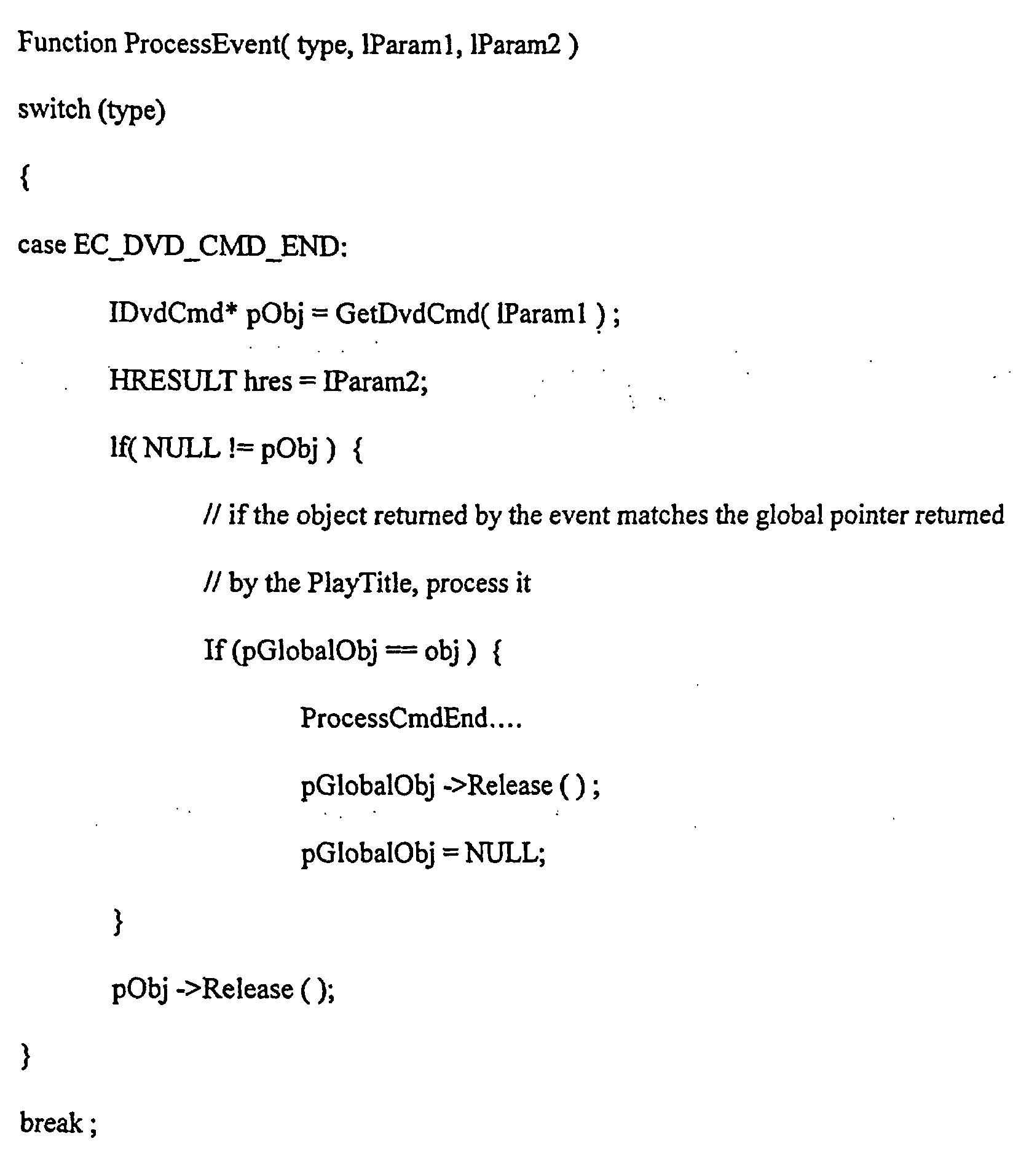
- the DVD2 API method IDvdlnfo2::GetCmdFromEvent( 1Param1 ) maps the cookie into a command object pointer.
- the application must call the COM "Release” method on the returned pointer after it has finished processing each of these events.
- the application When the application is completely finished with the message (usually after receiving an END event), it must call "Release” on the global command pointer that it saved.
- the application calls the method to request an action:
- the .._Flush flag indicates that the presentation of the current content should be immediately truncated so that new content can start to be displayed (like before).
- the absence of the flag indicates that the current content presentation should end first.
- the ..._..Rendered flags change the semantics of the start and end of each command. By default, the command starts and ends once it has been processed.
- the new flags indicate that the start and end occur when the results of the change of content have been processed and presented respectively.
- DVD2 API 108a-b permits player applications not only to read the DVD Navigator's general purpose registers (the GPRMs), but also allows them to set the GPRMs using:
- the combined read/write functionality allows DVD applications to 'communicate' with the program on the disc and can implement 'controlled unlocking' or restricted access to the content.
- the application can use GetA1IGPRMs to read the current state and set a specific register using SetGPRM.
- the SetGPRM method can also be used to synchronize the application and the DVD Navigator's virtual CPU.
- the SetGPRM method is executed only during the periods when the DVD Navigator is allowed to process user commands (the Presentation and Still phases, 3.3.6.1 V13-28). Navigation command execution is considered to be atomic. So setting the GPRM is postponed until these phases occur.
- the application can use the command object and event mechanism to ensure coordination.
- the command object's event mechanism is serialized with event notifications (such as domain changes or changes to system registers).
- the application can call SetGPRM and wait until the command completion event is received, and then wait for an event indicating a change the DVD navigator's state (possibly a domain change).
- DVD2 APIs do provide this capability. The following is a list of methods provided:
- the DVD2 API allows the playing of time periods using:
- any application like slideshow presentation, video games interludes, or kiosks can be implemented using a single DVD2 API command.
- the DVD navigator executes a SetTmpPML instruction, it only sends a PARENTAL_LEVEL_TOO_LOW event to the application. It immediately continues on executing the next command as if the parental level change failed.
- the application receives the event, stops the playback, displays a user interface to change the parental level, and then restarts the movie from the beginning.
- the Navigator is allowed to alter the parental level only when it is in the STOP Domain. As a result, since the navigator does not pause at the change it must stop the playback.
- DVD2 API 108a-b for example, the following sequence may occur.
- the application notifies the API of the availability of the parental level change feature by calling the method:
- the DVD Navigator When the DVD Navigator encounters a SetTmpPML instruction, it sends a PARENTAL_LEVEL_TOO_LOW event to the application.
- the application is expected to display some user interface to let the user increase the parental level.
- the DVD Navigator blocks until the application responds by calling IDVDControl2::AcceptParentalLevelChange() with TRUE or FALSE, and then proceeds accordingly without having to stop the playback.
- the DVD specification (Section 4.1.4.1 V14-22) describes a scheme for selecting different program chains (usually different possible segments of content) based on the current parental level. For example, at a certain point in the video, different versions of a scene could be available and are automatically selected by the navigator based on the parental level (e.g. segments intended for PG, R rated or children).
- the PTL_MAI table maps the current parental level into a 16-bit mask.
- the DVD Navigator obtains the current parental bit mask from the PTL_MAI table.
- the parental bit mask is used when the Navigator encounters a parental block (a collection of program chains in which each program chain has an exclusive parental bit mask).
- the Navigator searches each PTLID_FLD in the VTS_PGCI_SRP (Section 4.2.3 V14-62) for a program chain with a bit mask that shares common bits with the current parental bit mask.
- DVD2 API 108a-b uses the following algorithm to compute the minimum required parental level that would let the user continue:
- the index i is returned along with the DVD_ERROR_LowParentalLevel event.
- the application 102 can use the index to suggest a possible parental level setting to the user.
- DVD navigator 106 is configured to allow a player application 102 to encode and store the current state 114 of the DVD playback into an abstract object (referred to a bookmark 150) containing a persistent block of data.
- Fig. 13 depicts exemplary bookmarking functionality.
- DVD2 API 108a-b is configured to save, restore and query the state information contained in the bookmark.
- Player application 102 can query information in the bookmark 150 using the navigator 106 and save it for later use.
- Player application 102 can later resume playback by instructing the DVD navigator 106 to restore the DVD playback state 114 contained in the bookmark.
- Restoring bookmarks allows the player application to start playing from any arbitrary location, and any number of them for a DVD content 110.
- the bookmarks can be stored either in short term (memory) storage or long term storage (for example, a hard drive), and can be restored even after player application 102 and/or the PC has been shutdown and restarted.
- the bookmark not only contains the state of the DVD navigator (such as internal register values, playback location, playback state) but also the information about the current disc content being played and the user's settings. Player application 102 can use this extra information to intelligently select the appropriate bookmark from previously saved ones that can be played for a particular disc (usually the disc being played), for example. Bookmarks can be also be shared between users and between various applications
- bookmark 150 contains at least the following information: a substantially unique disc identifier 145, the address of the current video object unit (VOBU) being displayed (section 5.1.1 of the DVD specification), the loop count and shuffle history (Section 3.3.3.2 of the DVD specification), the current DVD resume information (outlined in section 3.3.3.2 of the DVD specification), the current DVD general parameter (GPRM) and system parameter (SPRM) values (sections 4.6.1.1 and 4.6.1.2), and the current domain and phase (section 3.3.3 and 3.3.6).
- the bookmark also includes versioning and integrity information.
- the bookmark 150 can be packaged as an abstract object or as a block of binary data for storage.
- DVD2 API 108 in certain exemplary implementations supports the following methods:
- DVD unique identifier The current DVD specification has a built-in unique identifier on each disc ("DVD unique identifier"). However, applications must assume that the disc authors correctly implemented the identifier; unfortunately, this not always so.
- a unique identifier 145 (see, Fig. 13) would provide the ability to differentiate different discs (not different exact copies, however).
- a unique identifier 145 also lets applications verify the compatibility of stored information with a particular DVD disc. Applications cannot successfully use cached information with the wrong disc. For example, when a user attempts to recall a saved location on the disc using a bookmark, the DVD navigator 108 can ensure the data's compatibility by comparing the unique identifier stored in the bookmark with the unique identifier of the current disc. Playback only continues if the identifiers match.
- Unique identifiers 145 allow applications to associate additional information with the disc by using the unique identifier as an index into a database. For example, even though the DVD specification supports textual information on the disc, it is rarely used. A web-based database of the disc's title and contents can be stored and retrieved by an application after it computes the identifier on the disc.
- the current built-in unique identifier on the DVD disc is inadequate.
- the identifier is relatively large in size (32 bytes), it relies on the disc author to ensure that it is actually unique, and a central entity must assign ranges of identifiers to disc authors to ensure that the uniqueness is maintained between companies.
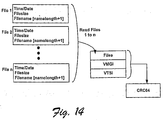
- a unique identifier 145 is generated by computing a 64-bit CRC of a concatenated or otherwise arranged binary representation of the file header and the file contents of various files in the DVD's VIDEO_TS directory. This is capability is further illustrated in Figs 13 and 14.
- a UniqueID2 algorithm generates the identifier in four steps:
- the 64-bit CRC is computed using an irreducible polynomial in the field GF(2) .
- the polynomial is generated by finding an exponent n such that x" ⁇ 1 has an irreducible (prime) factor of degree 64.
- the actual CRC value is computed, in certain examples, by concatenating all of the binary data into a single block (bits b o to b n ), assigning each bit b i to the coefficient x i in a polynomial, then computing the remainder after dividing by the polynomial P 64 :
- bit b o to b n assigning each bit b i to the coefficient x i in a polynomial
Landscapes
- Engineering & Computer Science (AREA)
- Multimedia (AREA)
- Software Systems (AREA)
- Theoretical Computer Science (AREA)
- Signal Processing (AREA)
- Physics & Mathematics (AREA)
- General Engineering & Computer Science (AREA)
- General Physics & Mathematics (AREA)
- Signal Processing For Digital Recording And Reproducing (AREA)
- Television Signal Processing For Recording (AREA)
Abstract
Description





IDvdControl2::SetGPRM( ULONG ulindex, WORD wValue, DWORD dwFlags, IDvdCmd** ppCmd)


SelectButton( ULONG ulButton)
GetState( IDvdState **pStateData)
SetState( IDvdState* pState, DWORD dwFlags, [out] IDvdCmd* ppCmd)

Bookmark = GetBookmark()
SetBootmark( bookmark )
DiscID = GetDiscIdentifierFromBookmark( bookmark )
BinaryData(data,size) = ConvertBookmarkToBinary( bookmark )
Bookmark = ConvertBinaryToBookmark( BinaryData )
SetBootmark( bookmark )
For each stored bookmark "bookmark"
If GetDiscIdentifierFromBookmark( bookmark ) = current Disc Id
Then
Add bookmark to the user selectable list

unsigned 32 bit integer: dwFileSize
BYTE bFilename[ filename Length ]
BYTE bFilenameTermNull=0
Claims (12)
- An apparatus comprising:memory; andlogic operatively coupled to the memory and operatively configurable to access multimedia content from a medium, the logic providing a multimedia navigator program, a control application programming interface (API) and an information API, the control and information APIs being configured to respond to flags that selectively determine if at least one operation will be conducted, the operation being selected from a group of operations that includes a player-navigator synchronization operation, a selective interactive user operation, and a read/write register operation.
- The apparatus as recited in Claim 1, wherein the player-navigator synchronization operation performs synchronizing steps that cause a multimedia player application to output a request command to the navigator program; and a multimedia content navigator program to subsequently return an event identifier and status result to the player application upon commencement, completion or cancellation of the requested command.
- The apparatus as recited in Claim 2, wherein the request command and the event identifier are both communicated via at least one application programming interface (API) operatively associated with the navigator program.
- The apparatus as recited in Claim 3, wherein the API is further configured to respond to at least one flag value that is selectively set by the player application to identify that the event identifier and status result should be returned upon commencement, completion or cancellation of the requested command.
- The apparatus as recited in Claim 2, wherein the navigator program is configured to operatively access multimedia information in response to the request command.
- The apparatus as recited in Claim 5, wherein the multimedia information includes digital versatile disc (DVD) formatted content
- The apparatus as recited in Claim 1, wherein the memory provides at least one register and the selective interactive user operation causes a multimedia player application to write data to at least one register that is operatively associated with a multimedia navigator program and allows at least one program defined within the multimedia content to read the at least one register.
- The apparatus as recited in Claim 7, wherein the data includes a code, and the at least one program responds to the code by allowing at least a portion of a remaining multimedia content to be accessed.
- The apparatus as recited in Claim 7, wherein the multimedia content includes digital versatile disc (DVD) formatted content.
- The apparatus as recited in Claim 9, wherein the data includes precise playback information associated with the DVD formatted content.
- The apparatus as recited in Claim 10, wherein the precise playback information includes a title, a start time and an end time.
- The apparatus as recited in Claim 8, wherein the multimedia player application writes the data to the at least one register via at least one application programming interface (API) operatively associated with the multimedia navigator program.
Applications Claiming Priority (2)
| Application Number | Priority Date | Filing Date | Title |
|---|---|---|---|
| US721402 | 2000-11-22 | ||
| US09/721,402 US7451453B1 (en) | 2000-11-22 | 2000-11-22 | DVD navigator and application programming interfaces (APIs) |
Publications (2)
| Publication Number | Publication Date |
|---|---|
| EP1251514A2 true EP1251514A2 (en) | 2002-10-23 |
| EP1251514A3 EP1251514A3 (en) | 2005-12-21 |
Family
ID=24897838
Family Applications (1)
| Application Number | Title | Priority Date | Filing Date |
|---|---|---|---|
| EP01127762A Ceased EP1251514A3 (en) | 2000-11-22 | 2001-11-21 | DVD navigator and application programming interfaces |
Country Status (4)
| Country | Link |
|---|---|
| US (1) | US7451453B1 (en) |
| EP (1) | EP1251514A3 (en) |
| JP (1) | JP4405698B2 (en) |
| KR (2) | KR20020040588A (en) |
Cited By (6)
| Publication number | Priority date | Publication date | Assignee | Title |
|---|---|---|---|---|
| WO2005048260A1 (en) * | 2003-11-05 | 2005-05-26 | Zootech Limited | Data processing system and method |
| EP1783613A4 (en) * | 2004-07-21 | 2009-11-25 | Konica Minolta Holdings Inc | Information generation device and information generation program |
| EP2187396A1 (en) * | 2003-10-10 | 2010-05-19 | Sharp Kabushiki Kaisha | A reproducing apparatus, a reproducing method, a content recording medium, a control program and a computer-readable recording medium |
| EP1965345A3 (en) * | 2007-02-27 | 2010-09-22 | Funai Electric Co., Ltd. | Optical disc apparatus |
| US7881590B2 (en) | 2002-11-13 | 2011-02-01 | Lg Electronics Inc. | Method for reproducing contents information in interactive optical disc device and method for providing contents information in contents provider server |
| US8126310B2 (en) * | 2003-10-13 | 2012-02-28 | Koninklijke Philips Electronics N.V. | Playback device and method for providing functionality based on event information retrieved from a playlist |
Families Citing this family (13)
| Publication number | Priority date | Publication date | Assignee | Title |
|---|---|---|---|---|
| US6753885B2 (en) | 2000-04-06 | 2004-06-22 | Microsoft Corporation | System and theme file format for creating visual styles |
| US20010048448A1 (en) | 2000-04-06 | 2001-12-06 | Raiz Gregory L. | Focus state themeing |
| KR100424481B1 (en) * | 2000-06-24 | 2004-03-22 | 엘지전자 주식회사 | Apparatus and method for recording and reproducing a digital broadcasting service information on optical medium |
| KR100910972B1 (en) * | 2002-12-07 | 2009-08-05 | 엘지전자 주식회사 | Playback Control Method in Interactive Optical Disc Device |
| KR100920654B1 (en) | 2002-12-09 | 2009-10-09 | 엘지전자 주식회사 | Playback Control Method in Interactive Optical Disc Device |
| GB0311141D0 (en) * | 2003-05-15 | 2003-06-18 | Koninkl Philips Electronics Nv | DVD player enhancement |
| US8321534B1 (en) | 2003-10-15 | 2012-11-27 | Radix Holdings, Llc | System and method for synchronization based on preferences |
| US7721254B2 (en) * | 2003-10-24 | 2010-05-18 | Microsoft Corporation | Programming interface for a computer platform |
| KR20050052927A (en) * | 2003-12-01 | 2005-06-07 | 삼성전자주식회사 | A reproducing apparatus, a reproducing method and the recording medium |
| US7818755B1 (en) * | 2004-12-22 | 2010-10-19 | Apple Inc. | Window server event taps |
| US8024700B2 (en) * | 2007-05-18 | 2011-09-20 | International Business Machines Corporation | Method and system for understanding social organization in a design and development process |
| US20160057173A1 (en) * | 2014-07-16 | 2016-02-25 | Genband Us Llc | Media Playback Synchronization Across Multiple Clients |
| WO2017149585A1 (en) * | 2016-02-29 | 2017-09-08 | 富士通株式会社 | Information processing device, information processing system, information processing method, and information processing program |
Family Cites Families (39)
| Publication number | Priority date | Publication date | Assignee | Title |
|---|---|---|---|---|
| US4305131A (en) | 1979-02-05 | 1981-12-08 | Best Robert M | Dialog between TV movies and human viewers |
| US4777537A (en) | 1985-10-21 | 1988-10-11 | Sony Corporation | Signal recording apparatus and method |
| US5434678A (en) | 1993-01-11 | 1995-07-18 | Abecassis; Max | Seamless transmission of non-sequential video segments |
| US5541738A (en) | 1994-04-12 | 1996-07-30 | E. Guide, Inc. | Electronic program guide |
| EP0836192A1 (en) | 1993-10-29 | 1998-04-15 | Kabushiki Kaisha Toshiba | Multi-scene recording medium and method and apparatus for reproducing data therefrom |
| US5497241A (en) | 1993-10-29 | 1996-03-05 | Time Warner Entertainment Co., L.P. | System and method for controlling display of motion picture subtitles in a selected language during play of a software carrier |
| JP3575063B2 (en) | 1994-07-04 | 2004-10-06 | ソニー株式会社 | Playback device and playback method |
| US5712976A (en) | 1994-09-08 | 1998-01-27 | International Business Machines Corporation | Video data streamer for simultaneously conveying same one or different ones of data blocks stored in storage node to each of plurality of communication nodes |
| US5692143A (en) | 1994-12-30 | 1997-11-25 | International Business Machines Corporation | Method and system for recalling desktop states in a data processing system |
| US5966121A (en) * | 1995-10-12 | 1999-10-12 | Andersen Consulting Llp | Interactive hypervideo editing system and interface |
| JPH09245438A (en) | 1996-03-12 | 1997-09-19 | Pioneer Electron Corp | Information recording medium and recording equipment and reproducing equipment therefor |
| JP3816571B2 (en) | 1996-03-15 | 2006-08-30 | パイオニア株式会社 | Information recording apparatus, information recording method, information reproducing apparatus, and information reproducing method |
| JP3783282B2 (en) | 1996-06-04 | 2006-06-07 | ソニー株式会社 | COMMUNICATION CONTROL METHOD, COMMUNICATION SYSTEM AND ELECTRONIC DEVICE USED FOR THE SAME |
| KR100202575B1 (en) * | 1996-06-21 | 1999-06-15 | 구자홍 | Storing device and method for data on reproduction of dvd player |
| US6370323B1 (en) | 1997-04-03 | 2002-04-09 | Lsi Logic Corporation | Digital video disc decoder including command buffer and command status pointers |
| US20030113096A1 (en) | 1997-07-07 | 2003-06-19 | Kabushiki Kaisha Toshiba | Multi-screen display system for automatically changing a plurality of simultaneously displayed images |
| JP3409834B2 (en) | 1997-07-10 | 2003-05-26 | ソニー株式会社 | Image processing apparatus, image processing method, and recording medium |
| US5929857A (en) | 1997-09-10 | 1999-07-27 | Oak Technology, Inc. | Method and apparatus for dynamically constructing a graphic user interface from a DVD data stream |
| JPH11120646A (en) | 1997-10-16 | 1999-04-30 | Sanyo Electric Co Ltd | Reservation recorder |
| JP3787827B2 (en) | 1997-10-21 | 2006-06-21 | ソニー株式会社 | Recording apparatus and method, reproducing apparatus and method, recording / reproducing apparatus and method, and providing medium |
| US6064380A (en) | 1997-11-17 | 2000-05-16 | International Business Machines Corporation | Bookmark for multi-media content |
| US6037934A (en) | 1997-11-21 | 2000-03-14 | International Business Machines Corporation | Named bookmark sets |
| US6100890A (en) | 1997-11-25 | 2000-08-08 | International Business Machines Corporation | Automatic bookmarks |
| US6580870B1 (en) | 1997-11-28 | 2003-06-17 | Kabushiki Kaisha Toshiba | Systems and methods for reproducing audiovisual information with external information |
| JPH11185442A (en) | 1997-12-22 | 1999-07-09 | Matsushita Electric Works Ltd | Disc system |
| US20030035007A1 (en) | 1998-01-05 | 2003-02-20 | Theodore D. Wugofski | Architecture for convergence systems |
| JPH11232838A (en) | 1998-02-16 | 1999-08-27 | Matsushita Electric Ind Co Ltd | Optical disk, optical disk recording device, and optical disk reader |
| JPH11273319A (en) | 1998-03-26 | 1999-10-08 | Onkyo Corp | Information reproduction control device and information reproduction method |
| JP3859894B2 (en) | 1998-04-10 | 2006-12-20 | 松下電器産業株式会社 | Device control command processing system and method |
| JP2000021035A (en) | 1998-07-06 | 2000-01-21 | Teijin Ltd | Inspection method for optical disk or optical disk substrate |
| US6694090B1 (en) | 1998-07-20 | 2004-02-17 | Thomson Licensing S.A. | Method and apparatus for dynamically overriding a ratings limit during playback of a digital program |
| EP1099218B1 (en) | 1998-07-20 | 2002-09-04 | Thomson Licensing S.A. | Digital video apparatus user interface |
| US6611812B2 (en) * | 1998-08-13 | 2003-08-26 | International Business Machines Corporation | Secure electronic content distribution on CDS and DVDs |
| US6643450B1 (en) | 1998-10-29 | 2003-11-04 | Oak Technology, Inc. | Digital versatile disc playback system with program chain object searching capabilities |
| JP3376314B2 (en) | 1999-05-12 | 2003-02-10 | 株式会社東芝 | Digital video information medium, digital video information recording / reproducing apparatus, and digital video information processing method |
| US6525746B1 (en) * | 1999-08-16 | 2003-02-25 | University Of Washington | Interactive video object processing environment having zoom window |
| JP3590577B2 (en) | 1999-12-27 | 2004-11-17 | ヴィジョネア株式会社 | Playback mode switching method, multimedia information playback method, and multimedia information playback device |
| US7200323B1 (en) | 2000-11-22 | 2007-04-03 | Microsoft Corporation | Restricted content viewing methods and arrangements for use in a DVD player |
| US6871012B1 (en) | 2000-11-22 | 2005-03-22 | Microsoft Corporation | Unique digital content identifier generating methods and arrangements |
-
2000
- 2000-11-22 US US09/721,402 patent/US7451453B1/en not_active Expired - Fee Related
-
2001
- 2001-11-21 EP EP01127762A patent/EP1251514A3/en not_active Ceased
- 2001-11-21 JP JP2001356447A patent/JP4405698B2/en not_active Expired - Fee Related
- 2001-11-21 KR KR1020010072628A patent/KR20020040588A/en not_active Ceased
-
2008
- 2008-10-20 KR KR1020080102496A patent/KR100952559B1/en not_active Expired - Fee Related
Cited By (14)
| Publication number | Priority date | Publication date | Assignee | Title |
|---|---|---|---|---|
| US7881590B2 (en) | 2002-11-13 | 2011-02-01 | Lg Electronics Inc. | Method for reproducing contents information in interactive optical disc device and method for providing contents information in contents provider server |
| US8565575B2 (en) | 2003-10-10 | 2013-10-22 | Sharp Kabushiki Kaisha | Reproducing apparatus, method for controlling reproducing apparatus, content recording medium, and non-transitory recording medium storing control program |
| US8798440B2 (en) | 2003-10-10 | 2014-08-05 | Sharp Kabushiki Kaisha | Video data reproducing apparatus and method utilizing acquired data structure including video data and related reproduction information, non-transitory recording medium containing the data structure and non-transitory recording medium storing control program for causing computer to operate as reproducing apparatus |
| EP2187396A1 (en) * | 2003-10-10 | 2010-05-19 | Sharp Kabushiki Kaisha | A reproducing apparatus, a reproducing method, a content recording medium, a control program and a computer-readable recording medium |
| US8792026B2 (en) | 2003-10-10 | 2014-07-29 | Sharp Kabushiki Kaisha | Video data reproducing apparatus and method utilizing acquired data structure including video data and related reproduction information, and non-transitory recording medium storing control program for causing computer to operate as reproducing apparatus |
| US8625966B2 (en) | 2003-10-10 | 2014-01-07 | Sharp Kabushiki Kaisha | Reproducing apparatus, method for operating reproducing apparatus and non-transitory computer-readable recording medium storing control program |
| US8625962B2 (en) | 2003-10-10 | 2014-01-07 | Sharp Kabushiki Kaisha | Method and apparatus for reproducing content data, non-transitory computer-readable medium for causing the apparatus to carry out the method, and non-transitory content recording medium for causing the apparatus to carry out the method |
| US8233770B2 (en) | 2003-10-10 | 2012-07-31 | Sharp Kabushiki Kaisha | Content reproducing apparatus, recording medium, content recording medium, and method for controlling content reproducing apparatus |
| US8126310B2 (en) * | 2003-10-13 | 2012-02-28 | Koninklijke Philips Electronics N.V. | Playback device and method for providing functionality based on event information retrieved from a playlist |
| US9386290B2 (en) | 2003-10-13 | 2016-07-05 | Koninklijke Philips N.V. | Playback device and method for providing functionality based on event information retrieved from a playlist |
| WO2005048260A1 (en) * | 2003-11-05 | 2005-05-26 | Zootech Limited | Data processing system and method |
| EP1783613A4 (en) * | 2004-07-21 | 2009-11-25 | Konica Minolta Holdings Inc | Information generation device and information generation program |
| US7860756B2 (en) | 2007-02-27 | 2010-12-28 | Funai Electric Co., Ltd. | Optical disc apparatus |
| EP1965345A3 (en) * | 2007-02-27 | 2010-09-22 | Funai Electric Co., Ltd. | Optical disc apparatus |
Also Published As
| Publication number | Publication date |
|---|---|
| US7451453B1 (en) | 2008-11-11 |
| KR100952559B1 (en) | 2010-04-12 |
| KR20080103041A (en) | 2008-11-26 |
| EP1251514A3 (en) | 2005-12-21 |
| KR20020040588A (en) | 2002-05-30 |
| JP4405698B2 (en) | 2010-01-27 |
| JP2002288934A (en) | 2002-10-04 |
Similar Documents
| Publication | Publication Date | Title |
|---|---|---|
| US6990671B1 (en) | Playback control methods and arrangements for a DVD player | |
| KR100952559B1 (en) | Device for navigating multimedia content | |
| US6871012B1 (en) | Unique digital content identifier generating methods and arrangements | |
| JP5015150B2 (en) | Declarative response to state changes in interactive multimedia environment | |
| JP4694813B2 (en) | Information storage medium on which event occurrence information is recorded, reproducing apparatus and reproducing method thereof | |
| CN101213607B (en) | Synchronous aspects of interactive multimedia presentation management | |
| KR20050045253A (en) | Storage medium recorded text-based subtitle data including style information thereon, display playback device and display playback method thereof | |
| US8582960B2 (en) | Storage medium storing moving-image data that includes mode information, and reproducing apparatus and method | |
| JP5254304B2 (en) | Recording medium on which program management information is recorded, method for reproducing the same, and apparatus therefor | |
| US7200323B1 (en) | Restricted content viewing methods and arrangements for use in a DVD player | |
| WO2005020236A1 (en) | Interactive data processing method and apparatus | |
| JP2008547127A (en) | Method and system for retrieving graphics from storage devices that are slow to retrieve | |
| HK1050423A (en) | Dvd navigator and application programming interfaces | |
| TW200532540A (en) | Storage medium storing program management information, and reproducing method and apparatus | |
| CN101103405B (en) | Method for executing application from multiple information storage media | |
| JPH06214690A (en) | Information synchronization control method, information transmission device, and information output device | |
| KR20050041854A (en) | Storage medium storing program management information, reproducing apparatus for the storage medium, and method therefor |
Legal Events
| Date | Code | Title | Description |
|---|---|---|---|
| PUAI | Public reference made under article 153(3) epc to a published international application that has entered the european phase |
Free format text: ORIGINAL CODE: 0009012 |
|
| AK | Designated contracting states |
Kind code of ref document: A2 Designated state(s): AT BE CH CY DE DK ES FI FR GB GR IE IT LI LU MC NL PT SE TR |
|
| AX | Request for extension of the european patent |
Free format text: AL;LT;LV;MK;RO;SI |
|
| PUAL | Search report despatched |
Free format text: ORIGINAL CODE: 0009013 |
|
| AK | Designated contracting states |
Kind code of ref document: A3 Designated state(s): AT BE CH CY DE DK ES FI FR GB GR IE IT LI LU MC NL PT SE TR |
|
| AX | Request for extension of the european patent |
Extension state: AL LT LV MK RO SI |
|
| RIC1 | Information provided on ipc code assigned before grant |
Ipc: 7G 11B 19/02 B Ipc: 7G 11B 27/10 B Ipc: 7G 06F 9/46 A |
|
| 17P | Request for examination filed |
Effective date: 20060425 |
|
| AKX | Designation fees paid |
Designated state(s): AT BE CH CY DE DK ES FI FR GB GR IE IT LI LU MC NL PT SE TR |
|
| 17Q | First examination report despatched |
Effective date: 20060522 |
|
| STAA | Information on the status of an ep patent application or granted ep patent |
Free format text: STATUS: THE APPLICATION HAS BEEN REFUSED |
|
| 18R | Application refused |
Effective date: 20131205 |
|
| REG | Reference to a national code |
Ref country code: HK Ref legal event code: WD Ref document number: 1050423 Country of ref document: HK |