EP1199887A2 - Television program guiding apparatus and method - Google Patents
Television program guiding apparatus and method Download PDFInfo
- Publication number
- EP1199887A2 EP1199887A2 EP01124258A EP01124258A EP1199887A2 EP 1199887 A2 EP1199887 A2 EP 1199887A2 EP 01124258 A EP01124258 A EP 01124258A EP 01124258 A EP01124258 A EP 01124258A EP 1199887 A2 EP1199887 A2 EP 1199887A2
- Authority
- EP
- European Patent Office
- Prior art keywords
- program
- display
- displaying
- user
- epg
- Prior art date
- Legal status (The legal status is an assumption and is not a legal conclusion. Google has not performed a legal analysis and makes no representation as to the accuracy of the status listed.)
- Withdrawn
Links
Images









Classifications
-
- H—ELECTRICITY
- H04—ELECTRIC COMMUNICATION TECHNIQUE
- H04H—BROADCAST COMMUNICATION
- H04H60/00—Arrangements for broadcast applications with a direct linking to broadcast information or broadcast space-time; Broadcast-related systems
- H04H60/68—Systems specially adapted for using specific information, e.g. geographical or meteorological information
- H04H60/72—Systems specially adapted for using specific information, e.g. geographical or meteorological information using electronic programme guides [EPG]
-
- H—ELECTRICITY
- H04—ELECTRIC COMMUNICATION TECHNIQUE
- H04H—BROADCAST COMMUNICATION
- H04H60/00—Arrangements for broadcast applications with a direct linking to broadcast information or broadcast space-time; Broadcast-related systems
- H04H60/35—Arrangements for identifying or recognising characteristics with a direct linkage to broadcast information or to broadcast space-time, e.g. for identifying broadcast stations or for identifying users
- H04H60/47—Arrangements for identifying or recognising characteristics with a direct linkage to broadcast information or to broadcast space-time, e.g. for identifying broadcast stations or for identifying users for recognising genres
-
- H—ELECTRICITY
- H04—ELECTRIC COMMUNICATION TECHNIQUE
- H04N—PICTORIAL COMMUNICATION, e.g. TELEVISION
- H04N21/00—Selective content distribution, e.g. interactive television or video on demand [VOD]
- H04N21/40—Client devices specifically adapted for the reception of or interaction with content, e.g. set-top-box [STB]; Operations thereof
- H04N21/41—Structure of client; Structure of client peripherals
- H04N21/422—Input-only peripherals, i.e. input devices connected to specially adapted client devices, e.g. global positioning system [GPS]
- H04N21/42204—User interfaces specially adapted for controlling a client device through a remote control device; Remote control devices therefor
- H04N21/42206—User interfaces specially adapted for controlling a client device through a remote control device; Remote control devices therefor characterized by hardware details
- H04N21/4221—Dedicated function buttons, e.g. for the control of an EPG, subtitles, aspect ratio, picture-in-picture or teletext
-
- H—ELECTRICITY
- H04—ELECTRIC COMMUNICATION TECHNIQUE
- H04N—PICTORIAL COMMUNICATION, e.g. TELEVISION
- H04N21/00—Selective content distribution, e.g. interactive television or video on demand [VOD]
- H04N21/40—Client devices specifically adapted for the reception of or interaction with content, e.g. set-top-box [STB]; Operations thereof
- H04N21/43—Processing of content or additional data, e.g. demultiplexing additional data from a digital video stream; Elementary client operations, e.g. monitoring of home network or synchronising decoder's clock; Client middleware
- H04N21/431—Generation of visual interfaces for content selection or interaction; Content or additional data rendering
- H04N21/4312—Generation of visual interfaces for content selection or interaction; Content or additional data rendering involving specific graphical features, e.g. screen layout, special fonts or colors, blinking icons, highlights or animations
- H04N21/4314—Generation of visual interfaces for content selection or interaction; Content or additional data rendering involving specific graphical features, e.g. screen layout, special fonts or colors, blinking icons, highlights or animations for fitting data in a restricted space on the screen, e.g. EPG data in a rectangular grid
-
- H—ELECTRICITY
- H04—ELECTRIC COMMUNICATION TECHNIQUE
- H04N—PICTORIAL COMMUNICATION, e.g. TELEVISION
- H04N21/00—Selective content distribution, e.g. interactive television or video on demand [VOD]
- H04N21/40—Client devices specifically adapted for the reception of or interaction with content, e.g. set-top-box [STB]; Operations thereof
- H04N21/45—Management operations performed by the client for facilitating the reception of or the interaction with the content or administrating data related to the end-user or to the client device itself, e.g. learning user preferences for recommending movies, resolving scheduling conflicts
- H04N21/4508—Management of client data or end-user data
- H04N21/4532—Management of client data or end-user data involving end-user characteristics, e.g. viewer profile, preferences
-
- H—ELECTRICITY
- H04—ELECTRIC COMMUNICATION TECHNIQUE
- H04N—PICTORIAL COMMUNICATION, e.g. TELEVISION
- H04N21/00—Selective content distribution, e.g. interactive television or video on demand [VOD]
- H04N21/40—Client devices specifically adapted for the reception of or interaction with content, e.g. set-top-box [STB]; Operations thereof
- H04N21/47—End-user applications
-
- H—ELECTRICITY
- H04—ELECTRIC COMMUNICATION TECHNIQUE
- H04N—PICTORIAL COMMUNICATION, e.g. TELEVISION
- H04N21/00—Selective content distribution, e.g. interactive television or video on demand [VOD]
- H04N21/40—Client devices specifically adapted for the reception of or interaction with content, e.g. set-top-box [STB]; Operations thereof
- H04N21/47—End-user applications
- H04N21/472—End-user interface for requesting content, additional data or services; End-user interface for interacting with content, e.g. for content reservation or setting reminders, for requesting event notification, for manipulating displayed content
- H04N21/4728—End-user interface for requesting content, additional data or services; End-user interface for interacting with content, e.g. for content reservation or setting reminders, for requesting event notification, for manipulating displayed content for selecting a Region Of Interest [ROI], e.g. for requesting a higher resolution version of a selected region
-
- H—ELECTRICITY
- H04—ELECTRIC COMMUNICATION TECHNIQUE
- H04N—PICTORIAL COMMUNICATION, e.g. TELEVISION
- H04N21/00—Selective content distribution, e.g. interactive television or video on demand [VOD]
- H04N21/40—Client devices specifically adapted for the reception of or interaction with content, e.g. set-top-box [STB]; Operations thereof
- H04N21/47—End-user applications
- H04N21/475—End-user interface for inputting end-user data, e.g. personal identification number [PIN], preference data
- H04N21/4755—End-user interface for inputting end-user data, e.g. personal identification number [PIN], preference data for defining user preferences, e.g. favourite actors or genre
-
- H—ELECTRICITY
- H04—ELECTRIC COMMUNICATION TECHNIQUE
- H04N—PICTORIAL COMMUNICATION, e.g. TELEVISION
- H04N21/00—Selective content distribution, e.g. interactive television or video on demand [VOD]
- H04N21/40—Client devices specifically adapted for the reception of or interaction with content, e.g. set-top-box [STB]; Operations thereof
- H04N21/47—End-user applications
- H04N21/482—End-user interface for programme selection
- H04N21/4821—End-user interface for programme selection using a grid, e.g. sorted out by channel and broadcast time
-
- H—ELECTRICITY
- H04—ELECTRIC COMMUNICATION TECHNIQUE
- H04N—PICTORIAL COMMUNICATION, e.g. TELEVISION
- H04N21/00—Selective content distribution, e.g. interactive television or video on demand [VOD]
- H04N21/40—Client devices specifically adapted for the reception of or interaction with content, e.g. set-top-box [STB]; Operations thereof
- H04N21/47—End-user applications
- H04N21/482—End-user interface for programme selection
- H04N21/4828—End-user interface for programme selection for searching programme descriptors
-
- H—ELECTRICITY
- H04—ELECTRIC COMMUNICATION TECHNIQUE
- H04N—PICTORIAL COMMUNICATION, e.g. TELEVISION
- H04N21/00—Selective content distribution, e.g. interactive television or video on demand [VOD]
- H04N21/80—Generation or processing of content or additional data by content creator independently of the distribution process; Content per se
- H04N21/83—Generation or processing of protective or descriptive data associated with content; Content structuring
- H04N21/84—Generation or processing of descriptive data, e.g. content descriptors
Definitions
- the present invention relates to electronic program guides.
- Digital broadcasting systems are operated in recent years, which transmit digitized television signals via satellites, such as broadcasting satellites and communication satellites, for reception by viewers so that they can watch television programs at home.
- satellites such as broadcasting satellites and communication satellites
- a system of this type can provide so many channels that a multitude of programs can be aired.
- Such a system transmits, from a satellite to a receiver at each viewer's home, information about an electronic program guide (EPG) indicative of contents of these many programs together with their video/audio data.
- EPG electronic program guide
- the user operates the receiver to display the EPG on a TV display.
- the user can search for programs, tune to programs to view/record them, and schedule programs for viewing/recording.
- the EPG provides well over 100 programs, and all of them cannot be displayed within a single program guide screen.
- the present invention has been made in view of the above circumstances, and an object of the present invention is, therefore, to provide a program guiding apparatus and method capable of displaying as many program cells as possible on a single screen, whereby a user can locate an area or areas packed with programs which belong to his/her favorite categories.
- the above object of the present invention can be achieved by the following program guiding apparatus.
- the program guiding apparatus is provided with: a device for storing program information including a category to which a program belongs; a device for setting a display priority level for displaying a program cell corresponding to said category; a device for setting a display mode for displaying said program cell corresponding to said category; and a device for generating a program guide in which a plurality of program cells are arranged two-dimensionally based on said display priority level, said display mode, and said program information.
- a program guide is generated, in which a plurality of program cells are arranged two-dimensionally based on a display priority level set corresponding to each of categories, a display mode corresponding to each of the categories, and program information.
- a user can identify a category via the corresponding display mode for displaying the corresponding program cells, in the program guide.
- the user can also view program cells in the display modes corresponding to respective categories, in the program guide, whereby the user can quickly locate an area or areas crowded with programs belonging to his/her favorite categories.
- the user can set the display priority level for each category, and hence can rank the categories which he/she wishes to display in the program guide, and can display the program cells based on the rankings in the program guide, whereby the user can create his/her own program guide.
- the program guide allows the user to identify a category via the corresponding display mode for displaying the corresponding program cells, and hence, there is no need to enter a lot of textual information in each program cell as in conventional equivalents, whereby a greater number of program cells can be displayed within a single screen.
- the program guiding apparatus is provided with: a device for displaying said generated program guide on a two-dimensional screen; a device for accepting a selection of one of said plurality of program cells arranged on said displayed program guide; and a device for generating an information display screen in a display mode related to said display mode for displaying said selected program cell and displaying predetermined information related to said selected program cell in said information display screen.
- a user can selects program cell and check the program cell information.
- the program guiding apparatus is provided with: a device for displaying said generated program guide on a two-dimensional screen; a device for accepting a selection of one of said plurality of program cells arranged on said displayed program guide; and a device for generating an information display screen in a display mode related to said display mode for displaying said selected program cell and displaying predetermined information related to said selected program cell in said information display screen; wherein said predetermined information includes program information corresponding to said program cell.
- the user can check program information, which he/she cannot check with the program cell, in the information display screen corresponding to the program cell.
- the program guiding apparatus is provided with: a device for displaying said generated program guide on a two-dimensional screen; a device for accepting a designation of an area including at least one program cell on said displayed program guide; and a device for displaying information based on a predetermined attribute related to at least one program corresponding to at least one program cell included in said designated predetermined area.
- the user can check information based on a predetermined attribute related to programs, in the program guide easily.
- the program guiding apparatus is provided with: a device for displaying said generated program guide on a two-dimensional screen; a device for accepting a designation of an area including at least one program cell on said displayed program guide; and a device for collecting statistics on a predetermined program attribute for at least one program corresponding to said at least one program cell included in said designated predetermined area.
- the user can collect statistics on a predetermined attribute as to programs within a user-designated area. For example, the user can collect statistics regarding programs in which a particular entertainer appears.
- the program guiding apparatus is provided with: a device for displaying said generated program guide on a two-dimensional screen; a device for accepting a designation of an area including at least one program cell on said displayed program guide; and a device for collecting statistics on a predetermined program attribute for at least one program corresponding to said at least one program cell included in said designated predetermined area; wherein said collected statistics are displayed on said program guide.
- the user can check the statistical result.
- the program guiding apparatus is provided with: a device for displaying said generated program guide on a two-dimensional screen; and a search device for searching for an area in which a predetermined program attribute satisfies a predetermined condition, in said program guide, and indicating said searched area in said program guide.
- the user can search for an area in which a predetermined program attribute satisfies a predetermined condition, for example, an area having five or more programs falling into a category or categories added to a table as favorites.
- the program guiding apparatus is provided with: a device for displaying said generated program guide on a two-dimensional screen; a search device for searching for an area in which a predetermined program attribute satisfies a predetermined condition, in said program guide, and indicating said searched area in said program guide; and a device for accepting a direction to move said searched area, wherein said search device searches for another area in which said predetermined program attribute satisfies said predetermined condition, other than said previously searched area, every time said search device accepts said direction to move the area.
- the user can search for and check areas in which a predetermined program attribute satisfies a predetermined condition one after another.
- said display priority level is automatically set based on a history by a user.
- the time and labor, setting a display priority level, on the part of the user can be reduced.
- said display priority level is set by a user.
- the user can set the display priority level as he/she likes.
- said display mode includes a shape, a pattern, and a color of a program cell, or combinations thereof.
- a user can check a program cell information easily.
- a user can check a program cell easily.
- the above object of the present invention can be achieved by the following program guiding method of the present invention.
- the program guiding method is provided with the steps of: storing program information including a category to which a program belongs; setting a display priority level for displaying a program cell corresponding to said category; setting a display mode for displaying said program cell corresponding to said category; and generating a program guide in which a plurality of program cells are arranged two-dimensionally based on said display priority level, said display mode, and said program information.
- a program guide is generated, in which a plurality of program cells are arranged two-dimensionally based on a display priority level set corresponding to each of categories, a display mode corresponding to each of the categories, and program information.
- a user can identify a category via the corresponding display mode for displaying the corresponding program cells, in the program guide.
- the user can also view program cells in the display modes corresponding to respective categories, in the program guide, whereby the user can quickly locate an area or areas crowded with programs belonging to his/her favorite categories.
- the user can set the display priority level for each category, and hence can rank the categories which he/she wishes to display in the program guide, and can display the program cells based on the rankings in the program guide, whereby the user can create his/her own program guide.
- the program guide allows the user to identify a category via the corresponding display mode for displaying the corresponding program cells, and hence, there is no need to enter a lot of textual information in each program cell as in conventional equivalents, whereby a greater number of program cells can be displayed within a single screen.
- FIG. 1 shows the configuration of a satellite digital broadcast receiver according to an embodiment of the present invention.
- the satellite digital broadcast receiver 1 shown in FIG. 1 installed in the home of a viewer, receives digital broadcast signals (broadcast waves) from a satellite to display a television (TV) program on a home TV screen.
- the receiver 1 receives information about an electronic program guide (EPG) sent from the satellite to display the information on the TV screen as instructed by the viewer.
- EPG electronic program guide
- the receiver 1 has various components connected to a bus 2.
- the receiver 1 can also be operated by an attached remote control 12.
- the broadcast waves (BS-RF signals) transmitted from the satellite are received by an antenna 3, and then sent to a tuner 4 within the receiver 1.
- the broadcast waves include TV video/audio information (hereinafter referred to as "TV program information"), and SI or "service information” used to display the EPG.
- the tuner 4 tunes to a user-selected band, and converts the received signal waves to intermediate frequency (IF) signals for application to a demodulation processing section 5.
- the section 5 demodulates the input digital signals, subjects the demodulated signals to data frame reformatting, error correction and other processes, and supplies the resulting signals to a demultiplexer 6 in an MPEG-2 transport stream (TS) format through a descrambler 20.
- TS MPEG-2 transport stream
- the demultiplexer 6 separates the audio and video data of a specified service from the input MPEG-2 TS format data for application to an audio decoder 10 and a video decoder 8, respectively.
- the audio data is coded in an MPEG-2 AAC format and the video data in an MPEG-2 video format.
- the audio decoder 10 decodes the input audio data to generate program audio data for application to an audio processing section 11.
- the section 11, including amplifiers, performs predetermined audio signal processes to generate an audio output to audio speakers 23.
- the video decoder 8 decodes the input video data to generate program video data for application to a display processor 9.
- the processor 9 subjects the input program video data to predetermined processes to generate a video output to a display 22.
- the display processor 9 also superimposes textual information, etc. on program pictures displayed on the display 22.
- EPG display data to be described below is superimposed on or replaced with the program video data by the display processor 9, for output to the display 22.
- a large storage-capacity recorder 24 receives audio signals from the audio processing section 11, video signals from the display processor 9, and all or part of the TS data from the demultiplexer 6 for recording into a recording medium.
- the demultiplexer 6 further separates SI-containing data (data other than the TV program information) from the input MPEG-2 TS data.
- the SI provides the basis for the EPG display data, and is thus utilized for EPG display processes.
- the SI and other data separated by the demultiplexer 6 is stored in a RAM 16.
- a nonvolatile RAM is used as the RAM 16.
- a flash memory 14 stores various graphic data (program grids, and predetermined symbols including channel logos) needed for EPG display, and a ROM 15 stores font data, etc. for use as EPG text.
- a conditional access processing section 7 performs the following processes.
- Conditional access which is available only to those who have made a subscription contract with a broadcasting business, provides information on a service or program basis, and the relevant encrypted MPEG-2 TS data is transmitted to the subscribers.
- the conditional access processing section 7 is comprised of a decryption processing section or descrambler 20, and an IC card 21 in which contract information is recorded.
- a service center jointly operated by the broadcasting businesses sends an IC card 21 to each subscribing user.
- the subscription terms define subscribable channels and programs on a monthly or yearly basis, for example.
- the conditional access processing section 7 uses both the terms of contract and the decryption-related information obtained from the broadcast waves, decrypts the MPEG-2 TS data, if the user is a subscriber to this service, so that the user can view that conditional access program. If the user is not a subscriber, however, the MPEG-2 TS data is not decrypted, so that the user cannot view that program. In the latter case, text informing that the user cannot view the program, which is stored in the ROM 15, etc., is displayed on an EPG display screen.
- purchases are recorded in the IC card 21 every time the user purchases a program, and the user's pay-per-view program purchase information is periodically transmitted from the receiver 1 to a program distributor via a modem 18 and a public network 19.
- Instructions input by the user using the remote control 12 is transferred to a CPU 17 via an interface 13.
- the CPU 17 prepares EPG text data by referencing the SI, etc. stored in the RAM 16.
- the CPU 17 then prepares EPG display data, using the graphic data such as the EPG grid data stored in the flash memory 14, the font data in the ROM 15, and the EPG text data in the RAM 16, for application to the display processor 9.
- the processor 9, based on a switching instruction from the CPU 17, either switches the program video data from the video decoder 8 to the EPG display data, or superimposes the EPG display data upon the program video data, for output to the display 22 as the video signals.
- the public network 19 is connected to the bus 2 through the modem 18 to which a user's telephone or personal computer is connected, for necessary communication between broadcast stations and the user's home.
- the receiver 1 which is configured as described above, functions as a program guiding apparatus of the present invention.
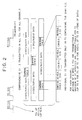
- FIG. 2 schematically shows a digital signal data format.
- multiple BS channels (bands) are arranged in a satellite digital broadcasting system, enabling each BS channel to transmit up to eight MPEG-2 TSs and each TS to include up to thirty-two services.
- the term "BS channel” is used to mean a frequency band in satellite broadcasting, as distinguished from a channel through which the receiver 1 receives broadcast programs.
- Each TS includes comprehensive SI which is multiplexed with video/audio information.
- comprehensive SI means the SI of all broadcasting stations, including program schedule information of all their channels. That is, a single version of the comprehensive SI is transmitted while multiplexed in all TSs of all the BS channels. With this arrangement, no matter which channel the viewer is tuned to, the viewer can acquire the comprehensive SI included in any TS of that tuned channel to prepare EPG data for all the channels.
- the CPU 17 shown in FIG. 1 controls the demultiplexer 6 to acquire the comprehensive SI from the currently received TS for preparation of the EPG text data based on the acquired SI.
- FIG. 2 also shows, in its lower part, a video/audio data format for each TS.
- each TS can transmit a maximum of 32 services, and these 32 services are time-division-multiplexed in the form of packets.
- services provided by multiple broadcast stations (services A, B, etc.) are time-division-multiplexed.
- the CPU 17 causes the tuner 4 of FIG. 1 to tune to a BS channel including a particular TS. Then, the demodulation processing section 5 of FIG.
- the demultiplexer 6 specifies and extracts the particular TS from the plurality of TSs included in that BS channel, and further the demultiplexer 6 extracts the service A, which is time-division-multiplexed in the particular TS, by referencing its identifier.
- individual station data (indicated by the services A, B, etc.) includes individual SI describing each service.
- each individual SI precedes the service data for convenience sake.
- the individual SI is similar to the comprehensive SI, but is different in that the individual SI includes information unique to itself which is not included in the comprehensive SI. That is, the comprehensive SI includes information needed to display an EPG for all the channels, while the individual SI includes, for example, detailed information about each program.
- the CPU 17 of FIG. 1 acquires individual SI as instructed by the user to display the detailed information about a specific program.
- FIG. 3 shows an example of information included in the SI stored in the RAM 16.
- the SI includes category information, in addition to the channel number, date, start time, end time, etc. of each program.
- a maximum of three main categories is set per program. For example, for "sports news”, two main categories, “sports” and “news”, are set, as for program 3 shown in FIG. 3.
- each main category includes a maximum of three subcategories, so that each program can have a maximum of nine subcategories. For example, for the program 3 shown in FIG. 3, three subcategories, "baseball”, “soccer”, and "tennis”, are set.
- Such categorization is provided by broadcast stations in advance.
- the RAM 16 also stores a program cell display management table that manages information about the display priority level and the display mode which are set for each category in order to display the cells of programs belonging to the corresponding category.
- FIG. 4 shows an example of information to be managed by a program cell display management table 25.
- display priority level means how each category is ranked in a group of categories. That is, the higher a category is ranked, the more the user likes that category.
- the table 25 shown in FIG. 4 lists the display priority levels in alphabetical order with "A" being the highest. The user can select which and how program cells are to be displayed, in an All-at-a-Glance EPG which will be described below.
- the user can narrow the categories to those ranked at a particular display level or higher (e.g., "B” or higher) to display program cells for only such programs as belonging to the thus narrowed categories.
- a particular display level or higher e.g., "B” or higher
- the priority level "A” is given to a category "variety", meaning that the user wishes to display the cells of programs categorized into "variety" in the All-at-a-Glance EPG first.
- the user can set the same display priority level ("D" in the example of FIG. 4) for a plurality of categories, such as for "music" and "news” in the same example.
- the user can set a total of 3 main categories and a total of 9 subcategories for each program, and thus there may be cases where a single program belongs to a plurality of categories.
- the display priority level is set for a representative category.
- the user can select a representative category over an EPG screen, etc. If the user does not select a representative category, a category, which is "main 1" in the example of FIG. 3, is automatically selected, for example.
- display flags shown in FIG. 4 indicate that the cells of programs belonging to the flagged categories are to be displayed in the display modes corresponding to the respective categories. That is, the display flags function to narrow the categories to those ranked at a particular level or higher, in displaying program cells.
- the display flags are set to "1" for the levels "A", “B", and "C”, and this means that the cells of programs belonging to the narrowed categories ranked at the display priority level "C" or higher are to be displayed in their corresponding display modes.
- the display mode for displaying a program cell is set for each category, and includes the shape, pattern, and color of the program cell, and their combinations.
- FIG. 4 shows an example in which the display mode is set by color such that the cells of programs respectively belonging to different categories are colored differently. For example, red is assigned to "variety", meaning that the cells of programs categorized into “variety” are to be colored red in the All-at-a-Glance EPG which will be described below. Further, the user can select the same display mode (red in the example of FIG. 4) for a plurality of categories, such as for "variety” and "cartoon” in the same example.
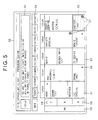
- FIG. 5 shows an example of a basic EPG display screen.
- This EPG display screen displays a program guide for multiple channels on a day-of-the-week basis, and will hereinafter be called as "Day. EPG".
- the Day EPG 30 is displayed by pressing an "EPG key" 91 (described below) on the remote control 12.
- the Day EPG 30 displays current date/time information in its uppermost area.
- the Day EPG 30 includes program guides for eight days from the current day to the same day of the next week as shown in the FIG. 5.
- the Day EPG 30 provides a program guide embracing all the channels for each day.
- a program guide for that day appears on the screen.
- the program guide is displayed in a program grid 32, in which program cells 31 are arranged.
- a time slot area 29 is arranged as a column to the left of the program grid 32.
- a program guide is displayed, which lists programs from 7 to 10 in evening time slots on Saturday, May 13.
- Each cell 31 includes the tile, outline, and other information about a program to be aired in the relevant time slot displayed in the time slot area 29. Channels are listed in a row above the program grid 32.
- Some program cells 31 include a continuation mark 36, indicating that the marked program, which is long, extends in the direction of time axis pointed by the arrow beyond the program grid 32.
- a scroll mark 28 allows the user to scroll through the screen in the pointed direction.
- displayed are Favorite Category icons 37.
- the Favorite Category icon 37 indicates that a category to which the marked program belongs is added as a favorite to the table 25 with its display priority level set to "A" (such a category will hereinafter be referred to as "level 'A' category” whenever applicable).
- the level “A” categories may be marked with their display priority level instead of Favorite Category icons 37, and the cells 31 of programs belonging to categories ranked "B", “C” and so on may similarly be marked with their display priority levels “B", “C” and so on.
- the program highlighted by a cursor 33 is the program currently selected by the user.
- An outline of the currently selected program is displayed in an outline area 35 in the upper part of FIG. 5.
- the outline text is generated based on comprehensive SI included in each of the above-mentioned TSs.
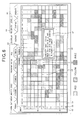
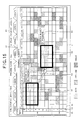
- FIG. 6 shows an example of a screen displaying the All-at-a-Glance EPG, which is a key feature of the present invention.
- a time slot area 42 is arranged as a column to the left of a program grid 41.
- a program guide is displayed, which lists programs in time slots from 5 p.m. on Saturday, May 13 to 5 a.m. on the next day.
- a channel display area 43 is arranged in a row above the program grid 41.
- a field (denoted by reference numeral 49) surrounded by a broken line in the program grid 41 of the EPG 40 corresponds to the program grid 32 of the Day EPG 30. It should be noted that the program cells 46 other than those in the field 49 are depicted as having the same interval of time (one hour) for convenience sake. Thus, the size of the program grid 41 of the All EPG 40 is far larger than that of the program grid 32 of the Day EPG 30 in terms of the number of cells displayed. That is, a greater number of program cells 44 can be displayed over a single screen.
- the program grid 41 is similar to that in the Day EPG 30 in that the grid 41 includes the cells 44 of programs corresponding to their time slots, but is different in that information including the title and outline of each program is not displayed in the corresponding cell 44.
- Each cell 44 is displayed based on the display priority level, display flag, and display mode managed by the program cell display management table 25. For example, the All EPG 40 shown in FIG. 6 is displayed based on the table 25 shown in FIG. 4; i.e., the cells 44 of programs belonging to the flagged categories ranked "A" to "C" are displayed in the display modes corresponding to the respective categories.
- the display priority level denoted by reference numeral 45 indicates that the cells 44 of programs belonging to categories ranked at that display priority level or higher ("C" or higher in the example of FIG. 6) are to be displayed in the display modes corresponding to the respective categories, and the display priority level 45 corresponds to the display flags set in the program cell display management table 25.
- the cells 44 of programs belonging to unflagged categories are not displayed in the respective display modes managed by the table 25, but are masked in white.
- the program cells 44 corresponding to unflagged categories may be masked in black, a translucent color (such that their pictures are seen through), or in other inconspicuous colors, or may not be displayed at all.
- program cells 44 colored red in the example of FIG. 6 correspond to the cells 31 marked with the Favorite Category icons 37 in the Day EPG 30 screen.
- the user can select a program cell 44 with a cursor 46 also in the All EPG 40.
- the selected program cell 44 pops up as shown in FIG. 6.
- a subscreen 47 displaying information about the selected program cell 44 pops up on the All EPG 40.
- the subscreen 47 displays the title, outline, and other information about the program corresponding to the selected cell 44.
- the subscreen 47 thus allows the user to look into the program information which he/she cannot check with the program cell 44.
- the information in the subscreen 47 is displayed in a mode related to the selected cell 44. For example, if the cell 44 is colored red, the corresponding subscreen 47 is also colored red.
- the scroll marks 28 indicate that the display screen is scrollable in the directions pointed by the marks 28, likewise in the Day EPG 30.
- the All EPG 40 screen also allows the user to collect statistics on predetermined attributes for programs within a user-designated predetermined area, the predetermined attributes including display priority level, category, and performer.
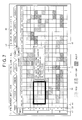
- FIG. 7 shows an example in which the user collects statistics on the level "A" category for programs.
- the area for collection of statistics is demarcated as a field 50 which corresponds to the program grid 32 in the Day EPG 30.
- the statistical result about the programs falling into the level "A" category i.e., the number of program cells 44 colored red are displayed in a popped up information subscreen 51. It may also be configured such that the user can set the field 50 to a desired size.
- the All EPG 40 screen also allows the user to search for an area satisfying a predetermined condition as to an attribute.
- FIG. 8 shows an example in which such an area including five or more programs belonging to the level "A" category is searched.
- the searched area is indicated by a field 52, together with a popped up subscreen 53 which informs the user of the search result. It may likewise be configured such that the user can set the field 52 to a desired size.
- FIG. 9 shows the appearance of the remote control 12 used together with the digital receiver 1 of the present invention.
- Cursor Movement keys 81 to 84 are arranged substantially in the middle of the remote control 12, allowing the user to move the cursor 33 over the Day EPG 30 screen, the cursor 46 over the All EPG 40 screen, and other cursors.
- the cursor 33 is moved leftward one program cell, while when the user presses the right arrow key 83, the cursor 33 is moved rightward one program cell. Further, when the up arrow key 82 is pressed, the cursor 33 is moved up, while when the down arrow key 84 is pressed, the cursor 33 is moved down.
- the receiver 1 tunes to the channel broadcasting the program in question for output of the picture and sound of the program to the display 22 and the audio speakers 23.
- the OK key 80 is pressed again, a Record screen appears together with the picture of the program.
- the user can record the program. This is how the user can view and/or record the program.
- the "EPG key” 91 is used to display a regular Day EPG screen.
- the user can switch the display 22 screen from the program to the Day EPG 30 such as shown in FIG. 5.
- the key 91 is pressed again.
- the "Day Change key” 92 to the right of the EPG key 91 is used to change the day of the week in the displayed program guide.
- the "Favorite Category key" 93 below the EPG key 91 when pressed, allows the user viewing the Day EPG 30 to add a category for a program selected by the cursor 33 to the program cell display management table 25 by setting the display priority level of that category to "A". This automatically marks all program cells 31 corresponding to the level "A" category in the Day EPG 30 with the Favorite Category icons 37.
- a query screen through which the user determines categories ranked at a particular level or higher may be displayed upon pressing the Favorite Category key 93 to allow the user to set priority levels other than "A".
- a "Display key" 94 to the right of the Favorite Category key 93 when pressed, allows the user watching a program or browsing one of the EPG screens to switch to a screen for setting the display priority level/display mode for program cells, such as, a Display Priority Level/Display Mode Setting screen 55 shown in FIG. 10, for example.
- the screen 55 is provided with setting areas 57 through which the user can enter desired display priority level/display mode settings by category. The entered settings are reflected in the program cell display management table 25.
- a mark 58 shown in the lower part of the screen 55 indicates that the user can scroll down the screen 55 to see more categories by moving a cursor 56 downward.
- the Display Priority Level/Display Mode Setting screen 55 may be superimposed on the Day EPG and All EPG screens.
- An "All-at-a-Glance key" 95 below the Favorite Category key 93 allows the user viewing a program to switch to an All EPG screen, such as the screen 40 shown in FIG. 6, for example, when pressed. To return to the program from the All EPG screen, the key 95 is pressed again.
- a "Statistics key" 96 to the right of the All-at-a-Glance key 95 allows the user browsing the All EPG screen to display the field 50 such as shown on the All EPG 40 screen in FIG. 7, when pressed. The user can move this field 50 using the Cursor Movement keys 81 to 84.
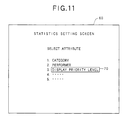
- a Statistics Setting screen 60 such as shown in FIG. 11 appears. This screen 60 allows the user to select an attribute on which to collect statistics for programs within the field 50 shown in FIG. 7.
- the above-mentioned statistical process (see FIG. 7) is performed based on the attribute selected over the Statistics Setting screen 60.
- the screen 60 may be superimposed on the All EPG screen.
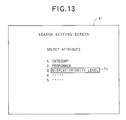
- a "Search key" 97 below the All-at-a-Glance key 95 allows the user viewing the All EPG screen to switch to a Search Setting screen 61 such as shown in FIG. 13, when pressed.
- the screen 61 asks the user to select an attribute through which to search for an area satisfying a predetermined condition.
- the above-mentioned search process (see FIG. 8) is performed based on the attribute selected over the Search Setting screen 61.
- the screen 61 may be superimposed on the All EPG screen.
- An "Information key" 98 to the right of the Search key 97 allows the user viewing the Day EPG or All EPG screen to display a Detailed Information screen for a program selected by the cursor 33 or 46, when pressed.
- the Detailed Information screen (not shown) displays an in-depth description of the selected program, including, for example, details of the program (e.g., a synopsis of the program), information about whether the program is a conditional access program or not, information about the fact that the user cannot view the program due to the terms of contract, etc., together with the information displayed in the outline area 35 on the Day EPG screen or the information displayed in the subscreen 47 on the All EPG screen.
- the detailed program information is generated based on the corresponding individual SI in each of the above-mentioned TSs.
- the Detailed Information screen is associated with each of all the program cells listed in each EPG on a one-to-one basis.
- An "ESC key” 99 which is below the Search key 97, is pressed to return to the program screen from an EPG screen.
- a "BACK key” 100 to the right of the ESC key 99 is used to undo the last action.
- FIG. 16 shows a main routine executed by the CPU 17 while the user is viewing a program.
- the CPU 17 extracts the comprehensive SI from a TS of the tuned channel to acquire the date/time data included therein (step S2).
- the date/time data is managed by the broadcasting station transmitting the broadcast waves, and the current date/time data is included in the comprehensive SI.
- the CPU 17 acquires the date/time data from the transmitted waves.
- the CPU 17 calculates the day of the week of "Today" or the current day from the acquired date/time data (step S3).
- the CPU 17 specifies the day from the date/time data through a predetermined calendar-based computation. Then, EPG display data for 8 days from the current day is acquired as day cell data for the Day EPG based on the thus specified date/time and day data (step S4).
- step S5 when the user presses the EPG key 91, the CPU 17 detects this (step S5) to start a Day EPG displaying subroutine (step S6).
- step S6 When the user presses the Display key 94, the CPU 17 detects this (step S7) to start a display priority level/display mode setting subroutine (step S8).
- step S9 the CPU 17 detects this (step S9) to start an All EPG displaying subroutine (step S10).
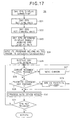
- FIG. 17 shows the Day EPG displaying subroutine executed in step S6 of FIG. 16.
- the CPU 17 sets the day of a Day EPG for display to the current day, whereby "Today" is selected on the Day tab 34.
- the CPU 17 sets the time axis of the Day EPG for display (step S21), by arranging the time slot area 29 such that the area 29 starts with a unit time including the current time.
- the CPU 17 sets the channel axis of the Day EPG for display (step S22); i.e., the channel axis displayed when the user pressed the EPG key 91 is maintained. Then, the CPU 17 determines the size of the program grid 32 and acquires EPG display data fit for the determined display range, from the SI (step S23). For example, if a program grid as large as m hours and n channels can be arranged by a receiver setting, then the CPU 17 determines the size as large as m hours from the starting time set in step S21 and n channels from the starting channel set in step S22, and acquires the EPG display data fit for the determined display range. Next, the CPU 17 references the program cell display management table 25 to specify programs belonging to a favorite category or categories from among programs listed in the program grid determined in step S23 (step S24).
- the CPU 17 and the display processor 9 configure the program guide to display the Day EPG on the display 22, and at the same time, display the Favorite Category icons 37 in the cells of the programs specified in step S24 (step S25). This is how the Day EPG 30 such as shown in FIG. 5 is displayed.
- the CPU 17 detects this (step S26) to move the cursor 33 in the directions corresponding to the pressed keys (step S27).
- step S28 the CPU 17 detects this (step S28) to add the category for the program in the cell 31 selected by the cursor 33 as a level "A" category to the program cell display management table 25 (step S29). Further, in step S30 of FIG. 17, the CPU 17 executes processes corresponding to various key operations performed over the remote control 12. For example, when the Information key 98 is pressed with the Day EPG 30 displayed, the Detailed Information screen for the program selected by the cursor 33 is displayed. Further, the user can schedule programs for viewing/recording with the Day EPG 30 displayed, as mentioned above. When the EPG key 91 is pressed again (step S31), the CPU 17 returns to the process of FIG. 16, allowing the user to view the program.
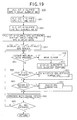
- FIG. 18 shows the display priority level/display mode setting subroutine executed in step S8 of FIG. 16.
- a Display Priority Level/Display Mode Setting screen 55 such as shown in FIG. 10 is displayed (step S41).
- the CPU 17 detects this (step S42) to move the cursor 56 in the directions corresponding to the pressed keys (step S43).
- the CPU 17 detects this (step S44) to prompt the user to enter a setting in the selected area 57 (step S45).
- the CPU 17 detects this (step S46) to enter (display) the display priority level or display mode corresponding to the pressed key 85 (step S47).
- a table in which display priority levels/display modes are associated with numbers is stored in the RAM 16 in advance, so that when the numerical key 85 corresponding to a display priority level or mode is pressed, such a display priority level or mode is entered (displayed) in the setting area 57.
- the CPU 17 detects this (step S48) to add these settings entered in the setting areas 57 to the program cell display management table 25 stored in the RAM 16 (step S49). At the same time, the CPU 17 removes the Display Priority Level/Display Mode Setting screen 55, and returns to the process of FIG. 16, allowing the user to view the program.
- a recommended display priority level and a recommended display mode are stored for each category in the program cell display management table 25 in advance such that the user can change such recommended priority levels/modes stored in the table 25 as to some of the categories only when he/she wishes to do so, through the Display Priority Level/Display Mode Setting screen 55.
- FIG. 19 shows the All EPG displaying subroutine executed in step S10 of FIG. 16. Similarly, in the All EPG displaying subroutine, first, the CPU 17 sets the day of an All EPG for display to the current day, whereby "Today" is selected on the Day tab 34. Then, the CPU 17 sets the time axis of the Day EPG for display (step S51).
- the CPU 17 sets the channel axis of the Day EPG for display (step S52); i.e., the channel axis displayed when the user pressed the All key 95 is maintained. Then, the CPU 17 determines the size of the program grid and acquires EPG display data fit for the determined display range, from the SI (step S53). Although these steps S51 to S53 are similar to those performed to display the Day EPG screen, the display range of the All EPG for display is far larger than that of the Day EPG in terms of the number of cells displayed, as mentioned above.
- step S55 When the user presses the Cursor Movement keys 81 to 84 with the All EPG 30 displayed, the CPU 17 detects this (step S55) to move the cursor 46 in the directions corresponding to the pressed keys (step S56). Further, as to a program cell 44 selected by the cursor 46, the subscreen 47 appears in a mode related to the display mode specified for that program cell 44, and its program information is displayed in the subscreen 47 (step S57). If the user then presses the Statistics key 96, the CPU 17 detects this (step S58) to start the statistics collecting subroutine (step S59). If, on the other hand, the Search key 97 is pressed, the CPU 17 detects this (step S60) to start the searching subroutine (step S61). In step S62 of FIG.
- step S62 processes corresponding to various key operations performed on the remote control 12 are executed similarly to step S30 of FIG. 17. Further, when one of the numerical keys 85 is pressed in step S62, the display priority level corresponding to the pressed key is displayed in FIG. 6 as denoted by reference numeral 45, which is reflected in the program cell display management table 25 by setting the corresponding display flag to "1", and the cells 44 of programs falling into the categories ranked at that display priority level or higher are displayed on the All EPG 40 screen in the display modes specified for the respective categories. Further, when the All-at-a-Glance key 95 is pressed again (step S63), the CPU 17 returns to the process of FIG. 16, allowing the user to view the program.
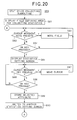
- FIGS. 20 and 21 show the statistics collecting subroutine executed in step S59 of FIG. 19.
- the field 50 defining an area for a statistical process is displayed on the All EPG 40 screen (step S81).
- the CPU 17 detects this (step S82) to move the field 50 in the directions corresponding to the pressed keys (step S83), whereby the user selects a desired area with the field 50.
- the CPU 17 detects this (step S84) to display the Statistics Setting screen 60 such as shown in FIG. 11, in place of or while superimposed on the All EPG 40 screen (step S85).
- step S86 the CPU 17 detects this (step S86) to move a cursor 70 in the direction corresponding to the pressed key (step S87), whereby the user selects an attribute (the display priority level in the example of FIG. 11) on which to collect statistics.
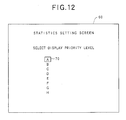
- step S88 the CPU 17 detects this (step S88) to store the selected attribute in the RAM 16 (step S89). Then, the CPU 17 switches to another Statistics Setting screen 60 such as shown in FIG. 12 (step S90).
- step S91 when the user presses the Cursor Movement key 82 or 84 over the Statistics Setting screen 60 of FIG. 12, the CPU 17 detects this (step S91) to move the cursor 70 in the direction corresponding to the pressed key (step S92), whereby the user selects an item on which to collect statistics (the display priority level "A" in the example of FIG. 12) with the cursor 70.
- step S93 the CPU 17 detects this (step S93) to store the selected item in the RAM 16, and at the same time, removes the Statistics Setting screen 60 to display the All EPG 40 on the display 22 (step S94).
- the CPU 17 collects statistics on the selected item of the selected attribute for the programs included in the field 50 (step S95), and displays the statistical result in the subscreen 51 (step S96).
- the statistics are collected on the level "A" category for the relevant programs, and the result that there are seven such programs is displayed on the subscreen 51.
- the Statistics key 95 is pressed again, the CPU 17 returns to the process of FIG. 19.
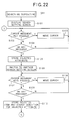
- FIG. 22 shows the searching subroutine executed in step S61 of FIG. 19.
- the Search Setting screen 61 such as shown in FIG. 13 is displayed in place of or while superimposed on the All EPG 40 screen (step S101).
- step S102 the CPU 17 detects this (step S102) to move a cursor 71 in the direction corresponding to the pressed key (step S103), whereby the user selects an attribute for search (the display priority level in the example of FIG. 13) with the cursor 71.
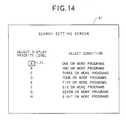
- step S104 the CPU 17 detects this (step S104) to store the selected attribute in the RAM 16 (step S105). Then, the CPU 17 switches to another Search Setting screen 61 such as shown in FIG. 14 (step S106).
- step S107 when the user presses the Cursor Movement keys 81 to 84 over the Search Setting screen 61 of FIG. 14, the CPU 17 detects this (step S107) to move the cursor 71 in the directions corresponding to the pressed keys (step S108), whereby the user selects an item for search (the display priority level "A" in the example of FIG. 14) with the cursor 71, as well as a search condition ("five or more programs" in the same example).
- step S109 When the user presses the OK key 80 thereafter, the CPU 17 detects this (step S109) to store the selected item and search condition of the selected attribute in the RAM 16 (step S110).
- the CPU 17 removes the Search Setting screen 61, as shown in FIG. 23 (step S111).
- the CPU 17 searches for such an area as satisfying the selected search condition for the selected attribute item (step S112) to display the searched area defined by the field 52 and also the search result in the subscreen 53 (step S113).
- the area including 5 or more programs belonging to the level "A" category is displayed as the field 52, and the information that there are 8 such programs in the searched area is displayed in the subscreen 53.
- step S114 the CPU 17 detects this (step S114) to search for such an area as satisfying the search condition other than the one searched in step S109 (i.e., to cause the field 52 to jump to another area) and define the newly searched area with the field 52 and also indicate the search result in the associated subscreen 53. That is, pressing the OK key 80 again means accepting the instruction to move an area for search.
- the field 52 and the subscreen 53 move or "jump" to the next searched area, as shown in FIG. 15.
- the field 52 and the subscreen 53 similarly jump thereafter every time the OK key 80 is pressed.
- step S115 the CPU 17 returns to the process of FIG. 19.
- the All EPG allows a far greater number of program cells to be displayed within a single screen than the regular Day EPG, etc., and further allows the program cells to be displayed in different modes by category, whereby the user can locate time slots and channels which are crowded with broadcast programs belonging to a particular category or categories, at a glance through a screen displaying a larger number of program cells.
- the user can rank his/her favorite categories by setting display priority levels, and display the cells of only programs belonging to such categories as being ranked at a particular level or higher in user-selected display modes, whereby the user can check time slots and channels which are packed with programs belonging to his/her favorite categories quickly. Additionally, by setting uninteresting categories to low priority levels, the cells of programs belonging to such low level categories can be displayed less conspicuously in the All EPG, whereby the user can create his/her own program guide.
- the user is allowed to set the display priority level-arbitrarily.
- the priority level may be set automatically according to a history of user performed operations. For example, a View history, a Record history, a To-View history, and a To-Record history may be stored in the RAM 16 such that the display priority level can be set automatically according to frequency.
- the CPU 17 may search for an area having the cells of programs frequently viewed according to the View history, for display as the field 52 together with the search result in the associated subscreen 53, and may additionally cause the field 52 to jump.
- the user may be allowed to select favorite channels and time slots in the All EPG, and display a program guide showing only those channels and time slots selected as his/her favorites.
- only a program grid having a number of programs equal to or greater than a specified number are present with respect to a certain channel and time slot is displayed, and the user may specify that number arbitrarily.
- channels, time slots, etc. which are frequently tuned to by the user may be determined by investigating the View history, and added to a database, and only an area or areas which are crowded with programs which it is thought the user likes may be displayed based on the result of the investigation.
- the present invention is not limited to them, but can be applied to, for example, systems for airing programs with dedicated cables and systems for airing programs via public networks, such as the Internet.
- the EPG screens are displayed on the TV display in the above embodiments, the present invention is not limited to them.
- the EPG screens may be displayed on a personal computer monitor, etc.
- the present invention enables a greater number of program cells to be displayed within a single screen, and hence allows the user to recognize an area or areas crowded with programs belonging to his/her favorite categories quickly.
Landscapes
- Engineering & Computer Science (AREA)
- Signal Processing (AREA)
- Multimedia (AREA)
- Human Computer Interaction (AREA)
- Databases & Information Systems (AREA)
- Two-Way Televisions, Distribution Of Moving Picture Or The Like (AREA)
- Television Systems (AREA)
- Circuits Of Receivers In General (AREA)
Abstract
Description
Claims (13)
- A program guiding apparatus(1) characterized in that the apparatus comprises:a storing device(16) for storing program information including a category to which a program belongs;a display priority setting device(17) for setting a display priority level for displaying a program cell corresponding to said category;a display mode setting device(17) for setting a display mode for displaying said program cell corresponding to said category; anda generating device(9) for generating a program guide in which a plurality of program cells are arranged two-dimensionally based on said display priority level, said display mode, and said program information.
- The program guiding apparatus(1) according to claim 1, further characterized in that the apparatus comprises:a displaying device(22) for displaying said generated program guide on a two-dimensional screen;an accepting device(17) for accepting a selection of one of said plurality of program cells arranged on said displayed program guide; anda generating device(9) for generating an information display screen in a display mode related to said display mode for displaying said selected program cell and displaying predetermined information related to said selected program cell in said information display screen.
- The program guiding apparatus(1) according to claim 2, wherein said
predetermined information includes program information corresponding to said program cell. - The program guiding apparatus(1) according to any of claims 1 to 3, further characterized in that the apparatus comprises:a displaying device(22) for displaying said generated program guide on a two-dimensional screen;an accepting device(17) for accepting a designation of an area including at least one program cell on said displayed program guide; anda displaying device(22) for displaying information based on a predetermined attribute related to at least one program corresponding to at least one program cell included in said designated predetermined area.
- The program guiding apparatus(1) according to any of claims 1 to 4, further characterized in that the apparatus comprises:a displaying device(22) for displaying said generated program guide on a two-dimensional screen;an accepting device(17) for accepting a designation of an area including at least one program cell on said displayed program guide; anda collecting device(17) for collecting statistics on a predetermined program attribute for at least one program corresponding to said at least one program cell included in said designated area.
- The program guiding apparatus(1) according to claim 5, wherein said
collected statistics are displayed on said program guide. - The program guiding apparatus(1) according to any of claims 1 to 6, further characterized in that the apparatus comprises:a displaying device(22) for displaying said generated program guide on a two-dimensional screen; anda search device(17) for searching for an area in which a predetermined program attribute satisfies a predetermined condition, in said program guide, and indicating said searched area in said program guide.
- The program guiding apparatus(1) according to claim 7, further characterized in that the apparatus comprises:an accepting device(17) for accepting a direction to move said searched area, whereinsaid search device(17) searches for another area in which said predetermined program attribute satisfies said predetermined condition, other than said previously searched area, every time said search device accepts said direction to move the area.
- The program guiding apparatus(1) according to any of claims 1 to 8, wherein said
display priority level is automatically set based on a history by a user. - The program guiding apparatus(1) according to any of claims 1 to 9, wherein said display priority level is set by a user.
- The program guiding apparatus(1) according to any of claims 1 to 10, wherein said display mode includes a shape, a pattern, or a color of a program cell, or combinations thereof.
- The program guiding apparatus(1) according to any of claims 1 to 11, wherein there are a plurality of categories, and wherein further said display priority level and said display mode are set for each of said plurality of categories to display program cells corresponding to said each of said plurality of categories.
- A program guiding method characterized in that the method comprises:a storing process of storing program information including a category to which a program belongs;a setting process of setting a display priority level for displaying a program cell corresponding to said category;a setting process of setting a display mode for displaying said program cell corresponding to said category; anda generating process of generating a program guide in which a plurality of program cells are arranged two-dimensionally based on said display priority level, said display mode, and said program information.
Applications Claiming Priority (2)
| Application Number | Priority Date | Filing Date | Title |
|---|---|---|---|
| JP2000317789A JP2002125169A (en) | 2000-10-18 | 2000-10-18 | Program guide device and program guide method |
| JP2000317789 | 2000-10-18 |
Publications (2)
| Publication Number | Publication Date |
|---|---|
| EP1199887A2 true EP1199887A2 (en) | 2002-04-24 |
| EP1199887A3 EP1199887A3 (en) | 2004-08-04 |
Family
ID=18796520
Family Applications (1)
| Application Number | Title | Priority Date | Filing Date |
|---|---|---|---|
| EP01124258A Withdrawn EP1199887A3 (en) | 2000-10-18 | 2001-10-16 | Television program guiding apparatus and method |
Country Status (3)
| Country | Link |
|---|---|
| US (1) | US7065777B2 (en) |
| EP (1) | EP1199887A3 (en) |
| JP (1) | JP2002125169A (en) |
Cited By (11)
| Publication number | Priority date | Publication date | Assignee | Title |
|---|---|---|---|---|
| EP1471735A2 (en) * | 2003-04-23 | 2004-10-27 | Microsoft Corporation | Customized EPG display with visual cues |
| EP1569445A2 (en) * | 2004-02-27 | 2005-08-31 | Sony Corporation | Program guide displaying method, apparatus and computer program |
| EP1580989A1 (en) * | 2004-03-22 | 2005-09-28 | Humax Co., Ltd. | Method for implementing a digital electronic program guide (EPG) |
| EP1578120A3 (en) * | 2004-03-19 | 2005-11-09 | Microsoft Corporation | Method and apparatus for generating a program guide |
| EP1596590A1 (en) * | 2004-05-07 | 2005-11-16 | Sony Corporation | Television program guide with reservation recording |
| CN1333581C (en) * | 2002-05-23 | 2007-08-22 | 索尼株式会社 | Program display control apparatus and program display control method |
| EP1921847A1 (en) * | 2006-11-07 | 2008-05-14 | Humax Co., Ltd. | Method and device for displaying program information of broadcasting |
| EP2101491A1 (en) * | 2008-03-13 | 2009-09-16 | Victor Company of Japan, Ltd. | Broadcast receiving apparatus |
| RU2485689C1 (en) * | 2009-07-23 | 2013-06-20 | Шарп Кабусики Кайся | Device to search for data about programs |
| EP2502413A4 (en) * | 2009-11-17 | 2014-08-13 | Lg Electronics Inc | Method for displaying contents information |
| EP2925010A1 (en) * | 2014-03-25 | 2015-09-30 | Samsung Electronics Co., Ltd | Display apparatus and method of controlling the same |
Families Citing this family (60)
| Publication number | Priority date | Publication date | Assignee | Title |
|---|---|---|---|---|
| US7831930B2 (en) * | 2001-11-20 | 2010-11-09 | Universal Electronics Inc. | System and method for displaying a user interface for a remote control application |
| US6326988B1 (en) * | 1999-06-08 | 2001-12-04 | Monkey Media, Inc. | Method, apparatus and article of manufacture for displaying content in a multi-dimensional topic space |
| US7877769B2 (en) | 2000-04-17 | 2011-01-25 | Lg Electronics Inc. | Information descriptor and extended information descriptor data structures for digital television signals |
| US8782705B2 (en) | 2000-04-17 | 2014-07-15 | Lg Electronics Inc. | Information descriptor and extended information descriptor data structures for digital television signals |
| JP4176973B2 (en) * | 2001-05-15 | 2008-11-05 | アルパイン株式会社 | Receiving machine |
| EP2053609A3 (en) * | 2001-11-29 | 2009-05-06 | Sharp Kabushiki Kaisha | Data recording method, data deletion method, data display method, recording apparatus, recording medium, and program |
| US20030233651A1 (en) * | 2002-06-18 | 2003-12-18 | Farley Elisha Rawle Edwin | System and method for parental control of digital display media |
| US7315622B2 (en) * | 2002-06-27 | 2008-01-01 | Nxp B.V. | Robust method for achieving audio/video synchronization in MPEG decoders in personal video recording applications |
| JP4261893B2 (en) | 2002-12-13 | 2009-04-30 | キヤノン株式会社 | Information processing apparatus and information processing method |
| JP4298282B2 (en) * | 2002-12-13 | 2009-07-15 | キヤノン株式会社 | Display control apparatus and control method thereof |
| US8712218B1 (en) * | 2002-12-17 | 2014-04-29 | At&T Intellectual Property Ii, L.P. | System and method for providing program recommendations through multimedia searching based on established viewer preferences |
| KR100467622B1 (en) * | 2002-12-31 | 2005-01-24 | 삼성전자주식회사 | Apparatus and method for displaying electronic program guide |
| KR20040069749A (en) * | 2003-01-30 | 2004-08-06 | 삼성전자주식회사 | Electronic program magazine |
| US8347333B1 (en) * | 2003-08-13 | 2013-01-01 | The Directv Group, Inc. | Modified electronic program guide |
| JP4487517B2 (en) | 2003-08-28 | 2010-06-23 | ソニー株式会社 | Information providing apparatus, information providing method, and computer program |
| KR100562904B1 (en) * | 2003-09-02 | 2006-03-21 | 삼성전자주식회사 | How to Display EPP Information Using Minimap |
| JP2005151195A (en) * | 2003-11-17 | 2005-06-09 | Casio Comput Co Ltd | Digital broadcast receiver and program |
| US20060026638A1 (en) * | 2004-04-30 | 2006-02-02 | Vulcan Inc. | Maintaining a graphical user interface state that is based on a selected type of content |
| WO2005109885A2 (en) * | 2004-04-30 | 2005-11-17 | Vulcan Inc. | Controlling content presentation |
| JP2006053664A (en) * | 2004-08-10 | 2006-02-23 | Fujitsu Ltd | Identification mark registration method, electronic apparatus, and computer program |
| US8353750B2 (en) * | 2004-09-23 | 2013-01-15 | Patchen Jeffery Allen | Response game systems and method |
| JP2006180306A (en) * | 2004-12-24 | 2006-07-06 | Hitachi Ltd | Movie recording / playback device |
| JP2006211053A (en) * | 2005-01-25 | 2006-08-10 | Sharp Corp | Electronic device, program guide display method, and program guide display program |
| JP4661291B2 (en) * | 2005-03-24 | 2011-03-30 | パナソニック株式会社 | Electronic program guide display device and electronic program guide display method |
| US20060253782A1 (en) * | 2005-04-01 | 2006-11-09 | Vulcan Inc. | Interface for manipulating multimedia playlists |
| JP4455415B2 (en) * | 2005-06-10 | 2010-04-21 | キヤノン株式会社 | Display method and display control apparatus |
| JP2008005225A (en) * | 2006-06-22 | 2008-01-10 | Hitachi Ltd | Program information presentation method |
| US8205230B2 (en) | 2006-12-29 | 2012-06-19 | Google Inc. | System and method for displaying and searching multimedia events scheduling information |
| US8544040B2 (en) * | 2006-12-29 | 2013-09-24 | Google Inc. | System and method for displaying multimedia events scheduling information |
| US20080163048A1 (en) * | 2006-12-29 | 2008-07-03 | Gossweiler Iii Richard Carl | System and method for displaying multimedia events scheduling information and Corresponding search results |
| US8291454B2 (en) * | 2006-12-29 | 2012-10-16 | Google Inc. | System and method for downloading multimedia events scheduling information for display |
| JP5290994B2 (en) * | 2006-12-29 | 2013-09-18 | グーグル インコーポレイテッド | System and method for displaying multimedia event scheduling information |
| JP2008263480A (en) * | 2007-04-13 | 2008-10-30 | Mitsubishi Electric Corp | Electronic program guide display device and electronic program guide creation method |
| US8972875B2 (en) | 2007-04-24 | 2015-03-03 | Google Inc. | Relevance bar for content listings |
| US8799952B2 (en) * | 2007-04-24 | 2014-08-05 | Google Inc. | Virtual channels |
| JP2009010848A (en) * | 2007-06-29 | 2009-01-15 | Victor Co Of Japan Ltd | Apparatus and program for processing program information |
| US9084025B1 (en) | 2007-08-06 | 2015-07-14 | Google Inc. | System and method for displaying both multimedia events search results and internet search results |
| WO2009030775A1 (en) * | 2007-09-07 | 2009-03-12 | Getmore Tv Sarl | System and method for programming video recorders |
| EP2190201A4 (en) * | 2007-09-18 | 2011-07-06 | Panasonic Corp | DEVICE, METHOD, AND DISPLAY PROGRAM |
| JP5038432B2 (en) * | 2007-09-18 | 2012-10-03 | パナソニック株式会社 | Display device, display method, and display program |
| US9055260B2 (en) * | 2007-12-17 | 2015-06-09 | Echostar Technologies L.L.C. | Electronic program guide generation apparatus, systems, and methods |
| US9241121B2 (en) * | 2007-12-20 | 2016-01-19 | Echostar Technologies L.L.C. | Programs of interest presentation apparatus, systems, and methods |
| JP5379385B2 (en) * | 2008-02-19 | 2013-12-25 | 任天堂株式会社 | Program information display program and program information display device |
| JP4715861B2 (en) * | 2008-04-21 | 2011-07-06 | ソニー株式会社 | Information providing apparatus, information providing method, content recording / reproducing apparatus, content recording / reproducing method, and computer program |
| JP4798184B2 (en) * | 2008-08-04 | 2011-10-19 | ソニー株式会社 | Program guide display control device, program guide display device, and program guide display control method |
| US20100192181A1 (en) * | 2009-01-29 | 2010-07-29 | At&T Intellectual Property I, L.P. | System and Method to Navigate an Electonic Program Guide (EPG) Display |
| US20100262924A1 (en) * | 2009-04-08 | 2010-10-14 | Kalu Onuka Kalu | System and method for linking items to a group |
| US20120124626A1 (en) * | 2009-06-24 | 2012-05-17 | Atsushi Itoh | Program information display device, display method, and program |
| WO2011149558A2 (en) | 2010-05-28 | 2011-12-01 | Abelow Daniel H | Reality alternate |
| JP2012138685A (en) * | 2010-12-24 | 2012-07-19 | Toshiba Corp | Video recorder and video recording method |
| US9043722B1 (en) | 2012-06-19 | 2015-05-26 | Surfwax, Inc. | User interfaces for displaying relationships between cells in a grid |
| US20140089981A1 (en) * | 2012-09-25 | 2014-03-27 | United Video Properties, Inc. | Systems and methods for presenting shortcuts in free spaces of a program guide |
| US9100709B1 (en) * | 2013-01-07 | 2015-08-04 | Time Warner Cable Enterprises Llc | Content selection and playback in a network environment |
| US9578382B2 (en) * | 2013-06-26 | 2017-02-21 | Google Inc. | Subscribable channel collections |
| KR20150069760A (en) * | 2013-12-16 | 2015-06-24 | 엘지전자 주식회사 | Display device and method for controlling the same |
| US9848242B2 (en) | 2015-09-30 | 2017-12-19 | Rovi Guides, Inc. | Systems and methods for adjusting the priority of media assets scheduled to be recorded |
| KR102771482B1 (en) * | 2018-11-02 | 2025-02-25 | 소니그룹주식회사 | Display control device, display control method and program |
| JP7214685B2 (en) * | 2020-07-21 | 2023-01-30 | ソニーグループ株式会社 | System, information processing method and program |
| JP7606866B2 (en) * | 2020-12-09 | 2024-12-26 | 日本放送協会 | Genre-specific text collection device and its program |
| CN113225601A (en) * | 2021-05-08 | 2021-08-06 | 海信视像科技股份有限公司 | Display device and recommendation method of television programs in program guide |
Family Cites Families (13)
| Publication number | Priority date | Publication date | Assignee | Title |
|---|---|---|---|---|
| US5541738A (en) * | 1994-04-12 | 1996-07-30 | E. Guide, Inc. | Electronic program guide |
| US5559548A (en) * | 1994-05-20 | 1996-09-24 | Davis; Bruce | System and method for generating an information display schedule for an electronic program guide |
| US5880768A (en) * | 1995-04-06 | 1999-03-09 | Prevue Networks, Inc. | Interactive program guide systems and processes |
| DE19537372B4 (en) * | 1995-10-06 | 2007-06-21 | Siemens Ag | Method and circuit arrangement for controlling information to be displayed in an optical display device |
| US5929932A (en) * | 1995-10-24 | 1999-07-27 | Sanyo Electric Co., Ltd. | Program guide display controller at user terminal of television broadcasting system |
| US5793438A (en) * | 1995-11-13 | 1998-08-11 | Hyundai Electronics America | Electronic program guide with enhanced presentation |
| US6389593B1 (en) * | 1995-12-12 | 2002-05-14 | Sony Corporation | Method of and apparatus for controlling transmission of information on programs |
| US6177931B1 (en) * | 1996-12-19 | 2001-01-23 | Index Systems, Inc. | Systems and methods for displaying and recording control interface with television programs, video, advertising information and program scheduling information |
| EP0916222B1 (en) * | 1997-06-03 | 2007-04-04 | Koninklijke Philips Electronics N.V. | Navigating through television programs |
| IL121230A (en) * | 1997-07-03 | 2004-05-12 | Nds Ltd | Intelligent electronic program guide |
| US6536041B1 (en) * | 1998-06-16 | 2003-03-18 | United Video Properties, Inc. | Program guide system with real-time data sources |
| US6415437B1 (en) * | 1998-07-23 | 2002-07-02 | Diva Systems Corporation | Method and apparatus for combining video sequences with an interactive program guide |
| EP1050160B1 (en) * | 1998-11-16 | 2015-04-08 | Koninklijke Philips N.V. | Apparatus for receiving programs |
-
2000
- 2000-10-18 JP JP2000317789A patent/JP2002125169A/en not_active Abandoned
-
2001
- 2001-10-16 EP EP01124258A patent/EP1199887A3/en not_active Withdrawn
- 2001-10-18 US US09/981,257 patent/US7065777B2/en not_active Expired - Fee Related
Cited By (15)
| Publication number | Priority date | Publication date | Assignee | Title |
|---|---|---|---|---|
| US7730511B2 (en) | 1920-05-07 | 2010-06-01 | Sony Corporation | Information processing apparatus, information processing method and program for the same |
| CN1333581C (en) * | 2002-05-23 | 2007-08-22 | 索尼株式会社 | Program display control apparatus and program display control method |
| EP1471735A2 (en) * | 2003-04-23 | 2004-10-27 | Microsoft Corporation | Customized EPG display with visual cues |
| EP1569445A2 (en) * | 2004-02-27 | 2005-08-31 | Sony Corporation | Program guide displaying method, apparatus and computer program |
| EP1578120A3 (en) * | 2004-03-19 | 2005-11-09 | Microsoft Corporation | Method and apparatus for generating a program guide |
| EP1580989A1 (en) * | 2004-03-22 | 2005-09-28 | Humax Co., Ltd. | Method for implementing a digital electronic program guide (EPG) |
| EP1596590A1 (en) * | 2004-05-07 | 2005-11-16 | Sony Corporation | Television program guide with reservation recording |
| EP1921847A1 (en) * | 2006-11-07 | 2008-05-14 | Humax Co., Ltd. | Method and device for displaying program information of broadcasting |
| US8707355B2 (en) | 2006-11-07 | 2014-04-22 | Humax Co., Ltd. | Method and device for displaying program information of broadcasting |
| EP2101491A1 (en) * | 2008-03-13 | 2009-09-16 | Victor Company of Japan, Ltd. | Broadcast receiving apparatus |
| RU2485689C1 (en) * | 2009-07-23 | 2013-06-20 | Шарп Кабусики Кайся | Device to search for data about programs |
| EP2502413A4 (en) * | 2009-11-17 | 2014-08-13 | Lg Electronics Inc | Method for displaying contents information |
| EP2925010A1 (en) * | 2014-03-25 | 2015-09-30 | Samsung Electronics Co., Ltd | Display apparatus and method of controlling the same |
| US10448113B2 (en) | 2014-03-25 | 2019-10-15 | Samsung Electronics Co., Ltd. | Display apparatus and method of controlling the same |
| EP3764653A1 (en) * | 2014-03-25 | 2021-01-13 | Samsung Electronics Co., Ltd. | Display apparatus and method of controlling the same |
Also Published As
| Publication number | Publication date |
|---|---|
| US7065777B2 (en) | 2006-06-20 |
| EP1199887A3 (en) | 2004-08-04 |
| US20020044144A1 (en) | 2002-04-18 |
| JP2002125169A (en) | 2002-04-26 |
Similar Documents
| Publication | Publication Date | Title |
|---|---|---|
| US7065777B2 (en) | Program guiding apparatus and method | |
| EP1193968B1 (en) | Television program guiding apparatus and method | |
| EP2257053B1 (en) | Television schedule system and method of operation | |
| AU784407B2 (en) | Apparatus and method for displaying electronic program guide | |
| JP3996317B2 (en) | Program guide display device and display method | |
| US6426779B1 (en) | Method and apparatus for providing favorite station and programming information in a multiple station broadcast system | |
| EP1244299A2 (en) | On screen programme list display for multiple channel broadcasting systems | |
| US20020035727A1 (en) | Program guide display apparatus and program guide display method | |
| WO1997048228A9 (en) | Television schedule system and method of operation | |
| JP2001238144A (en) | Device and method for displaying program guide | |
| KR100841303B1 (en) | How to service video on demand | |
| JP4955355B2 (en) | Electronic device and electronic device control method | |
| HK1008892A (en) | On screen programme list display for multiple channel broadcasting systems | |
| HK1109005A (en) | Television schedule system and method of operation |
Legal Events
| Date | Code | Title | Description |
|---|---|---|---|
| PUAI | Public reference made under article 153(3) epc to a published international application that has entered the european phase |
Free format text: ORIGINAL CODE: 0009012 |
|
| AK | Designated contracting states |
Kind code of ref document: A2 Designated state(s): AT BE CH CY DE DK ES FI FR GB GR IE IT LI LU MC NL PT SE TR |
|
| AX | Request for extension of the european patent |
Free format text: AL;LT;LV;MK;RO;SI |
|
| PUAL | Search report despatched |
Free format text: ORIGINAL CODE: 0009013 |
|
| AK | Designated contracting states |
Kind code of ref document: A3 Designated state(s): AT BE CH CY DE DK ES FI FR GB GR IE IT LI LU MC NL PT SE TR |
|
| AX | Request for extension of the european patent |
Extension state: AL LT LV MK RO SI |
|
| 17P | Request for examination filed |
Effective date: 20040804 |
|
| 17Q | First examination report despatched |
Effective date: 20050201 |
|
| AKX | Designation fees paid |
Designated state(s): DE FR GB |
|
| RBV | Designated contracting states (corrected) |
Designated state(s): DE FR GB |
|
| GRAP | Despatch of communication of intention to grant a patent |
Free format text: ORIGINAL CODE: EPIDOSNIGR1 |
|
| STAA | Information on the status of an ep patent application or granted ep patent |
Free format text: STATUS: THE APPLICATION IS DEEMED TO BE WITHDRAWN |
|
| 18D | Application deemed to be withdrawn |
Effective date: 20080216 |