EP1197901A2 - Reminders for a communication terminal - Google Patents
Reminders for a communication terminal Download PDFInfo
- Publication number
- EP1197901A2 EP1197901A2 EP01307006A EP01307006A EP1197901A2 EP 1197901 A2 EP1197901 A2 EP 1197901A2 EP 01307006 A EP01307006 A EP 01307006A EP 01307006 A EP01307006 A EP 01307006A EP 1197901 A2 EP1197901 A2 EP 1197901A2
- Authority
- EP
- European Patent Office
- Prior art keywords
- reminder
- user
- communication terminal
- time
- application
- Prior art date
- Legal status (The legal status is an assumption and is not a legal conclusion. Google has not performed a legal analysis and makes no representation as to the accuracy of the status listed.)
- Ceased
Links
Images



Classifications
-
- H—ELECTRICITY
- H04—ELECTRIC COMMUNICATION TECHNIQUE
- H04M—TELEPHONIC COMMUNICATION
- H04M1/00—Substation equipment, e.g. for use by subscribers
- H04M1/72—Mobile telephones; Cordless telephones, i.e. devices for establishing wireless links to base stations without route selection
- H04M1/724—User interfaces specially adapted for cordless or mobile telephones
- H04M1/72448—User interfaces specially adapted for cordless or mobile telephones with means for adapting the functionality of the device according to specific conditions
- H04M1/72451—User interfaces specially adapted for cordless or mobile telephones with means for adapting the functionality of the device according to specific conditions according to schedules, e.g. using calendar applications
Definitions
- the invention relates to a reminder for a communication terminal, e.g. hand-portable phone, not having a calendar application.
- a method of handling reminders in a hand-portable communication terminal comprises manually entering characters into a text editor window for providing a reminder text, entering time information into a time entry window for setting a reminder time, providing real time clock information from a clock application, comparing said time information with the real time clock information, and alerting when the real time clock has reached said reminder time.
- the clock provides the clock information and the reminder application initiates individual count downs for the individual reminders.
- a hand-portable communication terminal including a control unit, a user interface including a display, text input means, and said user interface is controlled by the control unit, a clock application controlled by the control unit, and having a clock function and a reminder application which the display can present, said reminder application has a text editor window in which the user through the user interface enters a reminder text label, and a time entry window in which the user through the user interface enters a date and time for the reminder.
- An alert unit alerts when the clock reaches the entered date and time for the reminder.
- This concept does not require a lot of memory space because the reminder application may use the text editor from the message application of a telephone, and only a very limited space for the saving of the reminders.
- the text is fully user defined but limited to 36 characters.
- a clock application provides real time clock information to the reminder application, and said reminder application displays a reminder note when the real time clock has been reached the reminder time.
- the reminder application provides the user access to "Add new” reminders, "View all” existing reminders and "Erase” existing reminders.
- the reminder application allows the user to transmit a reminder to a remote second communication terminal via a wireless communication network. Prior to the transmission the reminder application requests the user to enter the phone number of the receiver of the reminder. The reminder application allows the user to search for the phone number of the receiving terminal in an internal phone number database of the transmitting terminal.
- the reminder application upon receipt of a reminder, allows the user to inspect a reminder received from a remote second communication terminal via a wireless communication network. Furthermore the reminder application allows the user to save or discard a reminder received from a remote second communication terminal. Preferably the reminders are transferred via the wireless communication network included in a message according to the Smart Messaging Specification.
- Fig. 1 shows a preferred embodiment of a phone according to the invention, and it will be seen that the phone, which is generally designated by 1, comprises a user interface having a keypad 2, a display 3, an on/off button 4 (present in the top of the phone and therefore not visible in the present view), a speaker 5, and a microphone 6 (openings present in the bottom of the phone and therefore not visible in the present view).
- the phone 1 according to the preferred embodiment is adapted for communication via a cellular network, such as the GSM 900/1800 MHz network.
- the keypad 2 has a first group 7 of keys as alphanumeric keys, one softkey 8, a cursor navigation key 10 (scroll up/down), and a "clear"-key 9 for erasing letters in text in the display 3, jumping steps down in the menu structure and rejecting calls.
- the present functionality of the soft key 8 is shown in separate fields (softkey-label) in the display 3 just above the softkey 8.
- the softkey 8 is a multifunction key and its present function depends on the state of the phone1. The softkey 8 gives access to the menu, the phonebook and call handling.
- Fig. 2 schematically shows the most important parts of a preferred embodiment of the phone, said parts being essential to the understanding of the invention.
- the processor 18 controls the communication with the network via the transmitter/receiver circuit 19 and an internal antenna 20.
- the microphone 6 transforms the user's speech into analogue signals, the analogue signals formed thereby are A/D converted in an A/D converter (not shown) before the speech is encoded in a digital signal processing unit 14 (DSP).
- DSP digital signal processing unit 14
- the encoded speech signal is transferred to the processor 18, which i.a. supports the GSM terminal software.
- the processor 18 also forms the interface to the peripheral units of the apparatus, including a RAM memory 17a and a Flash ROM memory 17b, a SIM card 16, the display 3 and the keypad 2 (as well as data, power supply, etc.).
- the digital signal-processing unit 14 speech-decodes the signal, which is transferred from the processor 18 to the earpiece 5 via a D/A converter (not shown).
- the processor 18 includes a reminder controller 22 controlling the reminder concept according to a preferred embodiment of the invention.
- the reminder controller 22 is preferably implemented as a software application implemented into the phone software of the terminal 1.
- the reminder controller 22 is connected to a clock application 21 in the phone used for time stamping of messages, and display of clock information in the display.
- the clock application 21 is controlled by the master clock 25 of the phone and is therefor very precise.
- the reminder controller 22 uses a text editor 27 of the phone for the dialogues with the user, i.a. for entering a reminder text and for setting the alerting time and date.
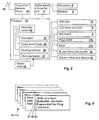
- These individual reminders are stored on electronic cards 40.1-N and are stored in a non-volatile memory of the phone, e.g. on the SIM card.
- the cards 40.1-N include a time field having an "hh.mm” format, a date field having a "dd.mm.yyyy” format and a text field allowing the user to enter 36 bytes of data.
- each reminder requires 48 bytes of data.
- the reminders are stored in a stack where the first coming reminder is placed as number one and so on. An expired reminder loses the time information and expired reminder and reminders stored without time information are placed at the end of the stack in alphabetic order.
- the individual field of data on the cards 40.1-N are separated by line-feeds and the format of the cards 40.1-N are therefor prepared for transmission between terminals by means of the Nokia Smart Messaging Specification, revision 1.0.0; September 15, 1997.
- At least the time fields or the text fields must be inputted in order to create a valid reminder.
- the reminder controller 22 For each of the reminders having a valid alert time not yet passed the reminder controller 22 has established count down timers 28, and when an alerting time has been reached the reminder controller 22 starts the alerting by means of the buzzer 23, vibrator 24 and flashing of the backlight of the LCD 3.
- the reminder controller 22 clears the time data of the reminder or sets a new time if the user desires to snooze the alerting - hereby the count down timers will be disabled and enabled for a new alert time, respectively.
- the reminder controller 22 calculates the difference between the alert time and the present time and uses this difference as input to the count down timer 28. All the units in the reminder application may be implemented as software.
- the reminder memory aids the user to save short text notes with an alarm.
- the phone starts alarming when the set date and time is reached.
- references to fig. 3 and 4. To access the reminder menu from idle state 100 (display 4.100 in fig. 4), in which the display includes battery and antenna bars 42, an operator identification label and a softkey label 41 informing the user that pressing the softkey 8 will give access to the menu structure.
- a selection list pop up in state 102 (display 4.102 in fig. 4), whereby the user will have access to "add new” reminders, "View all” existing reminders and “Erase” the existing reminders.
- a highlighting bar 45 may be moved between the selectable items 46. Pressing the "C” key 9 will bring the phone back to state 101.
- a text entry window 48 in state 103 (display 4.103 in fig. 4), where an information note 47 informs the user about the type of input, a blinking cursor 49 indicates where the next letter will be placed, and a data amount indicator 50 indicates the number of characters that may still be entered (in the preferred embodiment max 36). Pressing the scroll key 10 will move the cursor bar 49 between the entered characters. Pressing the "C" key 9 will delete the character on the left side of the bar 49 and long pressing (for at least 0.8 second) will bring the phone back to state 102.
- the phone goes to state 105 (display 4.105 in fig. 4).
- the user is asked to enter a date with the present date as default.
- the cursor 49 is placed in the left side of the date and amending the date will only affect the entered numbers and the dots will stay fixed.
- the reminder controller 22 verifies the validity of the entered date and gives an error notification if the date is invalid. Pressing the "C” key 9 will delete the character at the left side of the bar 49 and if the bar 49 is placed to the left, pressing the "C” key 9 will bring the phone back to state 104.
- the phone is in state 107 (display 4.107 in fig. 4) a notification note saying that the reminder is set. After a few seconds the phone automatically goes back to the selection list pop up in state 102.
- the reminder is hereby stored as one of the cards 40.1-N in fig. 9 and the alert will sound when the time of the clock application reaches the alert time.
- the user in state 109 can also select to send one of the existing reminders to another terminal. This is done by sending the time and text content in a smart message according to the Nokia Smart Messaging Specification, and a receiving terminal supporting this specification will recognize the received message as a reminder, decode the message and store the received data as a reminder.
- state 112 the user is requested to enter a phone number. This may be done by entering the phone number manually by using the key board 2 of by retrieving a phone number from a phonebook database in the phone by selecting the search functionality by pressing the softkey 8. Pressing the "C" key 9 will bring the phone back to state 108.
- the softkey 8 change functionality to "OK” as it can be seen in state 113 (display 4.113 in fig. 4). Pressing the "C” key 9 will delete the number on the left side of the cursor bar 49, and when all characters have been deleted a further press on the "C” key 9 will bring the phone back to state 112.
- the reminder will be sent to the entered phone number, and a notification note in state 114 (display 4.114 in fig. 4) will inform the user that the reminder has been sent. After a few seconds the phone automatically goes back to the selection list pop up in state 108 and display the sent reminder.
- state 115 If the user in state 115 selects to delete all the reminders, the phone goes to state 119 (display 4.119 in fig. 4) where the user is asked to confirm the deletion. Pressing the "C” key will bring the phone back to state 115. If he confirms the deletion by pressing the "Yes” softkey 8 a notification saying that the reminder memory is empty is shown in state 120 (display 4.120 in fig. 4). After a few seconds the phone automatically goes back to the reminders menu in state 101.
- a reminder may be sent as a Smart Message via a cellular network - Over The Air (OTA) - and when such a message is received the phone displays a notification text 58 informing the user about the reception of the OTA reminder.
- This notification 58 is displayed in the in the idle mode display and therefor the clock 57, and the antenna and battery bars 42 will be displayed.
- the softkey label will change from "Menu” in idle state 200 to "Option" in the notification window in state 201 (display 6.201 in fig. 6).
- the user By selecting “Options” the user will have access to a selection list as shown in state 202 (display 6.202 in fig. 6). If the user select the "Read” option by pressing the "OK” softkey 8 with “Read” highlighted, the received reminder will be displayed in state 203 (display 6.203 in fig. 6), and will include an alerting time field 53, an alerting date field 54 and a text field 55. The time information is optional and if no time information is present the two time fields 53 and 54 will be empty. Pressing either the softkey 8 or the clear key 9 will bring the phone back to state 202.
- a notification note 51 informs the user about the saving of the reminder in state 204 (display 6.204 in fig. 6), and the phone goes back to idle state.
- a notification note 51 informs the user about the discarding of the reminder in state 205 (display 6.205 in fig. 6), and the phone goes back to idle state.
- the softkey 8 will have “Snooze” as function, and by pressing the "Snooze” softkey 8, e.g. 10 minutes will be added to the alert time of the reminder card.
- a notification text is displayed in state 213 (display 6.213 in fig. 6) which will inform the user about the snooze time, and the phone goes back to idle state.
- Reminders allow the user to set an alarm for a certain time, with an attached text to remind them of an important event or task.
- the concept provides to some extent the same functionality as a calendar function, but it is based on a much simpler architecture and it requires a much smaller memory capacity.
- a calendar is series of pages showing dates. Calendar is also used for entering appointments, special events, etc. However Calendar applications are quite memory consuming, and therefor it is desired not to include Calendars in mobile terminals at the basic segment (cheap phones and other kind of terminals).
- the user can add up to ten reminders to the memory. If the reminder list is full (i.e. there is no space to save the received reminder), the user is asked if they wish to replace an existing reminder from the list. If the user chooses to replace an existing reminder, the new reminder is automatically saved, and the user is informed using a notification text.
- Reminders are displayed using the text, which the user has input. If the text is too long to be displayed on one line, it is truncated. The reminders are listed in time order, according to expiry time. This means that the next reminder to expire will always be at the top of the list. An icon may indicate whether or not the reminder has expired. Reminders with no alarm attached are listed under those with alarms.
- an icon may indicate if the reminder has expired or not yet expired.
- the user is prompted for time in a few different situations.
- the time entry is done in each situation in the same way.
- the time format may be language dependent.
Landscapes
- Engineering & Computer Science (AREA)
- Human Computer Interaction (AREA)
- Computer Networks & Wireless Communication (AREA)
- Signal Processing (AREA)
- Telephone Function (AREA)
- Mobile Radio Communication Systems (AREA)
- Calculators And Similar Devices (AREA)
- User Interface Of Digital Computer (AREA)
Abstract
Description
- The first digit in the date field can be 0,1,2,or 3.
- The second digit in the date field can be 0 or 1, if the first digit in date field is 3. The second digit in the date field cannot be 0 if the first digit in the date field is 0. Otherwise the second digit in the date field can be any digit from 0-9.
- The first digit in the month field can be 0 or 1.
- The second digit in the month field can be 0, 1, or 2 if the first digit in the month field is 1. The second digit in the month field cannot be 0 if the first digit in the month field is 0. Otherwise the second digit in the month field can be any digit from 0-9.
- The first two digits in the year field must be 20. (four digit format)
- The third and the fourth digit can be any digit. (four digit format)
Claims (11)
- A method of handling reminders in a handportable communication terminal, comprisingmanually entering of character into a text editor window for providing a reminder text,entering time information into a time entry window for setting a reminder time,providing real time clock information from a clock application,comparing said time information with the real time clock information, andalerting when the real time clock has reached said reminder time.
- A method according to claim 1, wherein the alerting comprises display of the reminder text.
- A handportable communication terminal, includinga control unit,a user interface including a display, text input means, and said user interface is controlled by the control unit,a clock application controlled by the control unit, and having a clock function and a reminder application which the display can present,said reminder application has:a text editor window in which the user through the user interface enters a reminder text label, anda time entry window in which the user through the user interface enters a date and time for the reminder,and an alert unit that alerts when the clock reaches the entered date and time for the reminder.
- A handportable communication terminal according to claim 3, and comprising a clock application providing real time clock information to the reminder application, and said reminder application displays a reminder note when the real time clock has reached the reminder time.
- A handportable communication terminal according to claim 3, wherein the reminder application provides the user access to "Add new" reminders, "View all" existing reminders and "Erase" existing reminders.
- A handportable communication terminal according to claim 3, wherein the reminder application allows the user to transmit a reminder to a remote second communication terminal via a wireless communication network.
- A handportable communication terminal according to claim 6, wherein the reminder application upon receiving instructions to send a reminder requests the user to enter a phone number on the receiver of the reminder.
- A handportable communication terminal according to claim 7, wherein the reminder application allows the user to search for the phone number of the receiving terminal in an internal phone number database of the transmitting terminal.
- A handportable communication terminal according to claim 6, wherein the reminder application allows the user to inspect a reminder received from a remote second communication terminal via a wireless communication network.
- A handportable communication terminal according to claim 9, wherein the reminder application furthermore allows the user to save or discard a reminder received from a remote second communication terminal.
- A handportable communication terminal according to any of the claims 6-10, wherein the reminders are transferred via the wireless communication network included in a message according to the Smart Messaging Specification.
Applications Claiming Priority (2)
| Application Number | Priority Date | Filing Date | Title |
|---|---|---|---|
| GB0021446A GB2366696B (en) | 2000-08-31 | 2000-08-31 | Reminders for a communication terminal |
| GB0021446 | 2000-08-31 |
Publications (2)
| Publication Number | Publication Date |
|---|---|
| EP1197901A2 true EP1197901A2 (en) | 2002-04-17 |
| EP1197901A3 EP1197901A3 (en) | 2004-01-21 |
Family
ID=9898631
Family Applications (1)
| Application Number | Title | Priority Date | Filing Date |
|---|---|---|---|
| EP01307006A Ceased EP1197901A3 (en) | 2000-08-31 | 2001-08-17 | Reminders for a communication terminal |
Country Status (3)
| Country | Link |
|---|---|
| US (1) | US20020024540A1 (en) |
| EP (1) | EP1197901A3 (en) |
| GB (1) | GB2366696B (en) |
Cited By (8)
| Publication number | Priority date | Publication date | Assignee | Title |
|---|---|---|---|---|
| FR2847416A1 (en) * | 2002-11-15 | 2004-05-21 | Motorola Inc | SERVICE UNLOCK FOR A WIRELESS TELECOMMUNICATIONS DEVICE |
| WO2004045232A1 (en) | 2002-11-13 | 2004-05-27 | Nokia Corporation | Method, system and communication terminal for utilising a multimedia messaging service format for applications |
| WO2004112343A1 (en) * | 2003-06-12 | 2004-12-23 | International Business Machines Corporation | Managing display of dialogs in computing devices based on device proximity |
| EP1507424A1 (en) * | 2003-08-13 | 2005-02-16 | Siemens Aktiengesellschaft | Method and means for activation and deactivation of applications of a mobile terminal in a mobile communication network |
| EP1400892A3 (en) * | 2002-09-18 | 2006-05-10 | Fujitsu Limited | Information processing device, schedule inputting method and program for use in information processing device |
| EP1739937A1 (en) * | 2005-06-29 | 2007-01-03 | Sony Ericsson Mobile Communications AB | Electronic equipment and corresponding method for providing a reminder in a wireless communication system |
| US8046008B2 (en) | 2002-09-16 | 2011-10-25 | Samsung Electronics Co., Ltd | Method for transmitting and recording schedule using short message service |
| CN102307264A (en) * | 2011-09-20 | 2012-01-04 | 宇龙计算机通信科技(深圳)有限公司 | Memo method and communication terminal |
Families Citing this family (44)
| Publication number | Priority date | Publication date | Assignee | Title |
|---|---|---|---|---|
| KR100424469B1 (en) * | 2001-12-15 | 2004-03-26 | 삼성전자주식회사 | Voice alarm apparatus and method in mobile communication terminal equipment |
| JP3794395B2 (en) * | 2002-06-04 | 2006-07-05 | カシオ計算機株式会社 | Electronic camera, notification control method thereof, and program |
| KR100474684B1 (en) * | 2002-09-12 | 2005-03-10 | 삼성전자주식회사 | Method for scheduling of mobile station |
| WO2004093475A1 (en) * | 2003-04-17 | 2004-10-28 | Nokia Corporation | Reminder handling |
| US9392428B2 (en) | 2003-04-17 | 2016-07-12 | Nokia Technologies Oy | Reminder handling |
| CA2476697A1 (en) * | 2003-08-19 | 2005-02-19 | Karim Moheb Zaki | Remote reminders application system |
| KR100608772B1 (en) * | 2004-04-22 | 2006-08-08 | 엘지전자 주식회사 | How to set up wake-up call for mobile terminal |
| US20050250551A1 (en) * | 2004-05-10 | 2005-11-10 | Nokia Corporation | Notification about an event |
| US20060150106A1 (en) * | 2004-12-30 | 2006-07-06 | Paivi Jokinen | Mobile communication terminal |
| US7925990B2 (en) | 2005-03-31 | 2011-04-12 | At&T Intellectual Property I, L. P. | Methods, systems, and products for calendaring applications |
| US7640507B2 (en) * | 2005-02-28 | 2009-12-29 | At&T Intellectual Property I, L.P. | Methods, systems, and products for calendaring applications |
| WO2007033495A1 (en) * | 2005-09-26 | 2007-03-29 | Research In Motion Limited | Communications event scheduler |
| US20070089071A1 (en) * | 2005-10-14 | 2007-04-19 | Research In Motion Limited | Software mechanism for providing distinct types of time dependent event objects for display in a graphical user interface |
| US7509588B2 (en) | 2005-12-30 | 2009-03-24 | Apple Inc. | Portable electronic device with interface reconfiguration mode |
| CN1831910A (en) * | 2006-03-28 | 2006-09-13 | 张雅婷 | Advertisement media and its system and method |
| US10313505B2 (en) | 2006-09-06 | 2019-06-04 | Apple Inc. | Portable multifunction device, method, and graphical user interface for configuring and displaying widgets |
| US7940250B2 (en) * | 2006-09-06 | 2011-05-10 | Apple Inc. | Web-clip widgets on a portable multifunction device |
| US8564544B2 (en) * | 2006-09-06 | 2013-10-22 | Apple Inc. | Touch screen device, method, and graphical user interface for customizing display of content category icons |
| US7912480B2 (en) * | 2006-09-21 | 2011-03-22 | Research In Motion Limited | System and method for electronic notes in a mobile environment |
| US8788954B2 (en) * | 2007-01-07 | 2014-07-22 | Apple Inc. | Web-clip widgets on a portable multifunction device |
| US8519964B2 (en) * | 2007-01-07 | 2013-08-27 | Apple Inc. | Portable multifunction device, method, and graphical user interface supporting user navigations of graphical objects on a touch screen display |
| US9933937B2 (en) | 2007-06-20 | 2018-04-03 | Apple Inc. | Portable multifunction device, method, and graphical user interface for playing online videos |
| US9772751B2 (en) | 2007-06-29 | 2017-09-26 | Apple Inc. | Using gestures to slide between user interfaces |
| EP2176789A4 (en) * | 2007-08-09 | 2013-07-24 | T Mobile Usa Inc | Synchronization and display of a plurality of calendars on a device |
| US8619038B2 (en) | 2007-09-04 | 2013-12-31 | Apple Inc. | Editing interface |
| US11126321B2 (en) | 2007-09-04 | 2021-09-21 | Apple Inc. | Application menu user interface |
| US9619143B2 (en) * | 2008-01-06 | 2017-04-11 | Apple Inc. | Device, method, and graphical user interface for viewing application launch icons |
| US8453057B2 (en) * | 2008-12-22 | 2013-05-28 | Verizon Patent And Licensing Inc. | Stage interaction for mobile device |
| US20100231364A1 (en) * | 2009-03-16 | 2010-09-16 | Nokia Corporation | Reminder notification for electronic devices |
| US10832362B1 (en) | 2009-09-25 | 2020-11-10 | Nimvia, LLC | Case management and docketing utilizing private pair |
| US8736561B2 (en) | 2010-01-06 | 2014-05-27 | Apple Inc. | Device, method, and graphical user interface with content display modes and display rotation heuristics |
| US10788976B2 (en) | 2010-04-07 | 2020-09-29 | Apple Inc. | Device, method, and graphical user interface for managing folders with multiple pages |
| US9170708B2 (en) | 2010-04-07 | 2015-10-27 | Apple Inc. | Device, method, and graphical user interface for managing folders |
| US9244606B2 (en) | 2010-12-20 | 2016-01-26 | Apple Inc. | Device, method, and graphical user interface for navigation of concurrently open software applications |
| US9459776B1 (en) * | 2013-03-13 | 2016-10-04 | The United States Of America As Represented By The Secretary Of The Army | Device for use in studies involving multiple subjects to record observation data in an output file |
| EP3063608B1 (en) | 2013-10-30 | 2020-02-12 | Apple Inc. | Displaying relevant user interface objects |
| US11556606B1 (en) | 2013-12-17 | 2023-01-17 | Nimvia, LLC | Graphical user interfaces (GUIs) including outgoing USPTO correspondence for use in patent case management and docketing |
| JP6742689B2 (en) * | 2015-01-09 | 2020-08-19 | 株式会社ジェイテクト | Operation program editing device and program |
| US12175065B2 (en) | 2016-06-10 | 2024-12-24 | Apple Inc. | Context-specific user interfaces for relocating one or more complications in a watch or clock interface |
| DK201670595A1 (en) | 2016-06-11 | 2018-01-22 | Apple Inc | Configuring context-specific user interfaces |
| US11816325B2 (en) | 2016-06-12 | 2023-11-14 | Apple Inc. | Application shortcuts for carplay |
| US11016643B2 (en) | 2019-04-15 | 2021-05-25 | Apple Inc. | Movement of user interface object with user-specified content |
| US11675476B2 (en) | 2019-05-05 | 2023-06-13 | Apple Inc. | User interfaces for widgets |
| US11864067B2 (en) * | 2020-12-07 | 2024-01-02 | Verizon Patent And Licensing Inc. | Systems and methods for sending and receiving messages as reminders |
Family Cites Families (12)
| Publication number | Priority date | Publication date | Assignee | Title |
|---|---|---|---|---|
| JPH065526B2 (en) * | 1984-06-11 | 1994-01-19 | シャ−プ株式会社 | Input method in schedule management device |
| US4872005A (en) * | 1988-01-04 | 1989-10-03 | Motorola, Inc. | Paging receiver capable of reminding a user of an important message event |
| US5199104A (en) * | 1988-12-15 | 1993-03-30 | Sony Corporation | Electronic organizer with electronic book marker |
| US5265158A (en) * | 1989-05-25 | 1993-11-23 | Nokia Mobile Phones Ltd. | Construction of a stand alone portable telephone unit |
| WO1992003007A1 (en) * | 1990-08-06 | 1992-02-20 | Motorola, Inc. | Portable office cordless telephone |
| DE69232396T2 (en) * | 1991-12-10 | 2002-09-19 | Khyber Technologies Corp | PORTABLE NEWS AND PLANNING DEVICE WITH BASE STATION |
| US5521589A (en) * | 1992-10-19 | 1996-05-28 | Motorola, Inc. | Method and apparatus for receiving and selectively announcing time-activated messages |
| CA2227904C (en) * | 1995-07-26 | 2000-11-14 | Tegic Communications, Inc. | Reduced keyboard disambiguating system |
| CA2217473A1 (en) * | 1997-10-03 | 1999-04-03 | David Edward William Mercer | Service access using limited set of characters |
| US6119014A (en) * | 1998-04-01 | 2000-09-12 | Ericsson Inc. | System and method for displaying short messages depending upon location, priority, and user-defined indicators |
| JP2000206916A (en) * | 1999-01-08 | 2000-07-28 | Sony Computer Entertainment Inc | Portable terminal with advertisement medium function |
| US6438217B1 (en) * | 1999-03-11 | 2002-08-20 | Microsoft Corporation | Apparatus and method for future transmission of device-independent messages |
-
2000
- 2000-08-31 GB GB0021446A patent/GB2366696B/en not_active Expired - Fee Related
-
2001
- 2001-08-17 EP EP01307006A patent/EP1197901A3/en not_active Ceased
- 2001-08-29 US US09/940,484 patent/US20020024540A1/en not_active Abandoned
Cited By (12)
| Publication number | Priority date | Publication date | Assignee | Title |
|---|---|---|---|---|
| US8046008B2 (en) | 2002-09-16 | 2011-10-25 | Samsung Electronics Co., Ltd | Method for transmitting and recording schedule using short message service |
| EP1400892A3 (en) * | 2002-09-18 | 2006-05-10 | Fujitsu Limited | Information processing device, schedule inputting method and program for use in information processing device |
| US7133693B2 (en) | 2002-09-18 | 2006-11-07 | Fujitsu Limited | Information processing device, schedule inputting method and program for use in information processing device |
| US7457642B2 (en) | 2002-09-18 | 2008-11-25 | Fujitsu Limited | Information processing device, schedule inputting method and program for use in information processing device |
| WO2004045232A1 (en) | 2002-11-13 | 2004-05-27 | Nokia Corporation | Method, system and communication terminal for utilising a multimedia messaging service format for applications |
| FR2847416A1 (en) * | 2002-11-15 | 2004-05-21 | Motorola Inc | SERVICE UNLOCK FOR A WIRELESS TELECOMMUNICATIONS DEVICE |
| EP1568197A4 (en) * | 2002-11-15 | 2009-08-26 | Motorola Inc | Service lock release for a wireless communication device |
| WO2004112343A1 (en) * | 2003-06-12 | 2004-12-23 | International Business Machines Corporation | Managing display of dialogs in computing devices based on device proximity |
| EP1507424A1 (en) * | 2003-08-13 | 2005-02-16 | Siemens Aktiengesellschaft | Method and means for activation and deactivation of applications of a mobile terminal in a mobile communication network |
| WO2005020601A3 (en) * | 2003-08-13 | 2005-08-18 | Siemens Ag | Method and means for activating and deactivating applications of a mobile radio terminal within a mobile radio network |
| EP1739937A1 (en) * | 2005-06-29 | 2007-01-03 | Sony Ericsson Mobile Communications AB | Electronic equipment and corresponding method for providing a reminder in a wireless communication system |
| CN102307264A (en) * | 2011-09-20 | 2012-01-04 | 宇龙计算机通信科技(深圳)有限公司 | Memo method and communication terminal |
Also Published As
| Publication number | Publication date |
|---|---|
| GB2366696B (en) | 2004-03-10 |
| GB0021446D0 (en) | 2000-10-18 |
| US20020024540A1 (en) | 2002-02-28 |
| GB2366696A (en) | 2002-03-13 |
| EP1197901A3 (en) | 2004-01-21 |
Similar Documents
| Publication | Publication Date | Title |
|---|---|---|
| EP1197901A2 (en) | Reminders for a communication terminal | |
| US5625683A (en) | Method of and telephone with call-reminding and auto-dialing | |
| KR100605845B1 (en) | Method for transmitting and recording schedule using a short message service | |
| EP1032186B1 (en) | A method and a cellular telecommunication apparatus for displaying the local time | |
| DE10144354B4 (en) | A method for providing an event date notification function in a telephone | |
| EP1220520B1 (en) | Message display method in mobile terminal | |
| CN1086080C (en) | Method for transmitting short message in digital mobile communication terminal with short message service function | |
| CN1902897B (en) | Recording method, apparatus and system for calendar alerts | |
| EP1641225A1 (en) | Apparatus and method for updating registered images in a phonebook of a portable wireless terminal | |
| EP3352437B1 (en) | A method for controlling a communications device and communications device | |
| KR100732059B1 (en) | How to Display Event Information of Mobile Terminal | |
| US20030114189A1 (en) | Voice alarm apparatus and method for mobile communication terminal | |
| KR20020078390A (en) | Method for display of user's schedule in mobile communication terminal | |
| KR100345536B1 (en) | Method for displaying reduced fare hours of call charge and thereof using method in mobile phone | |
| KR20010003397A (en) | Method for managing memorial days in hand held phone | |
| US20020132645A1 (en) | Mobile terminal with schedule display | |
| KR100689387B1 (en) | Selective Short Message Reception Alarm Method for Mobile Phone Terminal Equipment | |
| KR100584346B1 (en) | Schedule management method of mobile terminal | |
| KR100593976B1 (en) | Method for implementing group schedule function in mobile communication terminal | |
| KR101104465B1 (en) | Schedule management apparatus and method | |
| JP2003333137A (en) | Information processing apparatus and standby screen control program | |
| KR100595164B1 (en) | Method of providing additional service of mobile communication terminal | |
| JP2000350244A (en) | Portable wireless terminal | |
| JP2793525B2 (en) | Mobile phone | |
| KR20030041638A (en) | Method for automatically notifying present location in mobile phone |
Legal Events
| Date | Code | Title | Description |
|---|---|---|---|
| PUAI | Public reference made under article 153(3) epc to a published international application that has entered the european phase |
Free format text: ORIGINAL CODE: 0009012 |
|
| AK | Designated contracting states |
Kind code of ref document: A2 Designated state(s): AT BE CH CY DE DK ES FI FR GB GR IE IT LI LU MC NL PT SE TR |
|
| AX | Request for extension of the european patent |
Free format text: AL;LT;LV;MK;RO;SI |
|
| PUAL | Search report despatched |
Free format text: ORIGINAL CODE: 0009013 |
|
| AK | Designated contracting states |
Kind code of ref document: A3 Designated state(s): AT BE CH CY DE DK ES FI FR GB GR IE IT LI LU MC NL PT SE TR |
|
| AX | Request for extension of the european patent |
Extension state: AL LT LV MK RO SI |
|
| 17P | Request for examination filed |
Effective date: 20040721 |
|
| AKX | Designation fees paid |
Designated state(s): AT BE CH CY DE DK ES FI FR GB GR IE IT LI LU MC NL PT SE TR |
|
| 17Q | First examination report despatched |
Effective date: 20041004 |
|
| APBN | Date of receipt of notice of appeal recorded |
Free format text: ORIGINAL CODE: EPIDOSNNOA2E |
|
| APBR | Date of receipt of statement of grounds of appeal recorded |
Free format text: ORIGINAL CODE: EPIDOSNNOA3E |
|
| APAF | Appeal reference modified |
Free format text: ORIGINAL CODE: EPIDOSCREFNE |
|
| APBT | Appeal procedure closed |
Free format text: ORIGINAL CODE: EPIDOSNNOA9E |
|
| STAA | Information on the status of an ep patent application or granted ep patent |
Free format text: STATUS: THE APPLICATION HAS BEEN REFUSED |
|
| 18R | Application refused |
Effective date: 20090729 |