EP1193652A2 - Interactive graphical user interface for animation - Google Patents
Interactive graphical user interface for animation Download PDFInfo
- Publication number
- EP1193652A2 EP1193652A2 EP01308064A EP01308064A EP1193652A2 EP 1193652 A2 EP1193652 A2 EP 1193652A2 EP 01308064 A EP01308064 A EP 01308064A EP 01308064 A EP01308064 A EP 01308064A EP 1193652 A2 EP1193652 A2 EP 1193652A2
- Authority
- EP
- European Patent Office
- Prior art keywords
- anchor
- window
- anchors
- cursor
- computer
- Prior art date
- Legal status (The legal status is an assumption and is not a legal conclusion. Google has not performed a legal analysis and makes no representation as to the accuracy of the status listed.)
- Withdrawn
Links
Images












Classifications
-
- G—PHYSICS
- G06—COMPUTING OR CALCULATING; COUNTING
- G06T—IMAGE DATA PROCESSING OR GENERATION, IN GENERAL
- G06T13/00—Animation
-
- G—PHYSICS
- G06—COMPUTING OR CALCULATING; COUNTING
- G06T—IMAGE DATA PROCESSING OR GENERATION, IN GENERAL
- G06T2200/00—Indexing scheme for image data processing or generation, in general
- G06T2200/24—Indexing scheme for image data processing or generation, in general involving graphical user interfaces [GUIs]
Definitions
- the present invention relates generally to devices for computer animation performance and methods and computer-readable media for implementing the same. More particularly, the present invention relates to using an interactive graphical interface for animation performance.
- Computer systems often utilize displays with icons, pictures, text, pop-up, drop-down menus and other graphical items.
- individual graphical items or combinations of graphical items are typically shown on the display monitor.
- the graphical item is generally activated by a point and click method in which a cursor controlled by a mouse, touch device, pen or trackball is pointed at the item, and a button, keyboard command or activation unit is clicked.
- three dimensional character animations are incrementally specified using highly technical interfaces wherein the user adjusts one parameter at a time and then previews the result.
- the final animation is an immutable sequence of rendered frames.
- video games wherein the user, in real-time, triggers predefined movements, but is given very little control over the nuances of expression and movement.
- animation may be performed in three dimensions, but typically utilizes a complex process called "rendering" to provide a representation of an image.
- rendering a complex process
- physical objects such as tubes, spheres, rectangles, and the like may be used to "build” other, more visually complex objects.
- Such objects may be rotated, stretched, twisted, or the like.
- modifiers which may include a stack of parametric definitions for each desired geometric subclass, thus requiring a large amount of storage and a complex retrieval system.
- Various three dimensional animation systems provide additive displacements as a method of combining partially defined gestures, facial expressions, or morphing targets. Such targets are generally controlled by bands of sliders.
- joystick music synthesizers wherein the joystick is used to control various aspects of the timbre and dynamics of the sound.
- the joystick is moved from a first position to a second position, and the parameters are dynamically mixed based on the second position of the joystick.
- the present invention provides an electronic display system that facilitates the use of a graphical interface for interactive animation on a display device.
- the invention includes: a central processing unit; a memory loaded with an operating system, application programs and computer-executable instructions for using a graphical interface for achieving the animation; a display unit coupled to the system bus; a cursor control unit arranged to provide signals to control movement of a cursor on the display unit; and the system bus.
- the computer-executable instructions for achieving use of a graphical interface for animation include: (1) inserting a desired image onto a first window; (2) inserting anchors onto a second window by, for each anchor, selecting a desired pose from a plurality of predetermined poses; and (2) upon a cursor being dragged over the second window to a desired anchor, additively applying, for the desired anchor to the desired image based on a proximity of the cursor to the desired anchor.
- the characteristics for the anchors are, for animation, typically facial expressions, character poses or camera positions, and the like.
- the electronic display system is generally implemented as a computer display system.
- Inserting anchors may include combining a plurality of desired anchors to form a compound anchor, e.g., by dragging one or more anchors on top of another anchor.
- a palette may be shown in a third window on the display unit and may be used for selecting a desired image to be inserted onto the first window.
- the present invention includes a method for facilitating use of an interactive graphical interface for animation on an electronic display system by a user.
- the steps of the method may include inserting a desired image onto a first window; inserting anchors onto a second window by, for each anchor, selecting a desired pose, from a plurality of preselected poses; and dragging a cursor over the second window to a desired anchor wherein characteristics for the desired anchor are additively applied to the desired image, based on a proximity of the cursor to the desired anchor.
- Characteristics for the anchors in the method are typically, for animation: facial expressions, character poses, orientation of an image or camera positions and the like.
- the electronic display system may be implemented by a computer display system.
- a plurality of desired anchors may be combined to form a compound anchor by dragging an anchor onto another anchor or pile of anchors.
- a palette in a third window displayed on the display unit may be used for selecting a desired image to be inserted onto the first window.
- the steps of the method of the invention may be implemented by computer-executable instructions in a computer-readable medium.
- Figure 1 is a graphical representation of a 4-way split screen depiction of one embodiment of an implementation scheme for using a graphical interface for animation in accordance with the present invention.
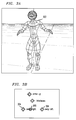
- Figure 2A is an illustration of a character in a dance pose based on clicking a mouse for a cursor very close to the sway-right target pose selection shown on the skeleton controller in Figure 2B.
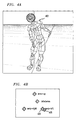
- Figure 3A is an illustration of a character in a dance pose based on clicking a mouse for a cursor approximately equidistant from the sway-right target pose selection and the sway-left target pose selection shown on the skeleton controller in Figure 3B.
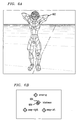
- Figure 4A is an illustration of a character in a dance pose based on clicking a mouse for a cursor very close to the sway-left target pose selection shown on the skeleton controller in Figure 4B.
- Figure 5A is an illustration of a character in a dance pose based on clicking a mouse for a cursor approximately equidistant from the sway-right target pose selection, the in-between pose selection and the sway-left target pose selection shown on the skeleton controller in Figure 5B.
- Figure 6A is an illustration of a character in a dance pose based on clicking a mouse for a cursor very close to the in-between target pose selection shown on the skeleton controller in Figure 6B.
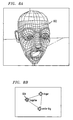
- Figure 7A is an illustration of a facial configuration based on clicking a mouse for a cursor in an area apart from the target selection shown on the facial controller in Figure 7B.
- Figure 8A is an illustration of a facial configuration based on clicking a mouse for a cursor in an area substantially on the surprise target selection shown on the facial controller in Figure 8B.
- Figure 9A is an illustration of a facial configuration based on clicking a mouse for a cursor in an area substantially halfway between the surprise target selection and the anger target selection shown on the facial controller in Figure 9B.
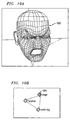
- Figure 10A is an illustration of a facial configuration based on clicking a mouse for a cursor in an area substantially on the anger target selection shown on the facial controller in Figure 10B.
- Figure 11A is an illustration of a facial configuration based on clicking a mouse for a cursor in an area substantially halfway between the anger target selection and the smile-big target selection shown on the facial controller in Figure 11B.
- Figure 12A is an illustration of a facial configuration based on clicking a mouse for a cursor in an area substantially on the smile-big target selection shown on the facial controller in Figure 12B.
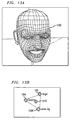
- Figure 13A is an illustration of a facial configuration based on clicking a mouse for a cursor in an area substantially equidistant between the anger target selection, the surprise target selection and the smile-big target selection shown on the facial controller in Figure 13B.
- Figure 14A is an illustration of a configuration of a series of blocks based on clicking a mouse for a cursor in an area apart from the target selection shown on the block controller in Figure 14B.
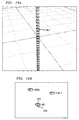
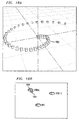
- Figure 15A is an illustration of a configuration of a series of blocks based on clicking a mouse for a cursor in an area approaching the line target selection shown on the block controller in Figure 15B.
- Figure 16A is an illustration of a configuration of a series of blocks based on clicking a mouse for a cursor in an area substantially on the line target selection shown on the block controller in Figure 16B.
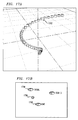
- Figure 17A is an illustration of a configuration of a series of blocks based on clicking a mouse for a cursor lying intermediate between the line target selection and the spiral target selection shown on the block controller in Figure 17B.
- Figure 18A is an illustration of a configuration of a series of blocks based on clicking a mouse for a cursor in an area substantially on the spiral target selection shown on the block controller in Figure 18B.
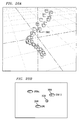
- Figure 19A is an illustration of a configuration of a series of blocks based on clicking a mouse for a cursor in an area substantially on the star 3 target selection shown on the block controller in Figure 19B.
- Figure 20A is an illustration of a configuration of a series of blocks based on clicking a mouse for a cursor lying intermediate between the line target selection and the star 3 target selection shown on the block controller in Figure 20B.
- Figure 21A is an illustration of a configuration of a series of blocks based on clicking a mouse for a cursor lying closer to the line target selection than to the star 3 target selection shown on the block controller in Figure 21B.
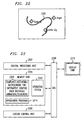
- Figure 22 is an illustration of a recording of a series of facial expressions utilized wherein the recording may be used to re-implement the series.
- Figure 23 illustrates one embodiment of a block diagram of an electronic display system operative to facilitate interactive, expressive animation by a user in accordance with the present invention.
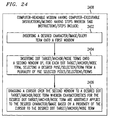
- Figure 24 shows one embodiment of steps for a method or computer-readable medium having computer-executable instructions for facilitating interactive, expressive, animation on an electronic display system by a user in accordance with the present invention.
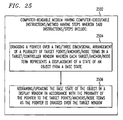
- Figure 25 shows one embodiment of steps for a method or computer-readable medium having computer-executable instructions for facilitating animation using a graphics-based graphical user interface in accordance with the present invention.
- Figures 26A-26C illustrate one embodiment of a graphic user interface in accordance with the present invention.
- the present invention provides a graphical user interface which allows the user to interactively change the state of an object or objects.
- the interface is controlled by a pointing device (mouse or tablet) or any other input device whose output may be translated to an x,y position on a second window.
- the interface of the present invention may also be used interactively to search to find a desired state of the object. Since the user may see the resulting change of the object as he moves the pointer, the search process is guided by a tight feedback loop.
- database queries are delimited through a set of key words or expressions, and the result is displayed as an ordered list of documents that contain the set of keywords or expressions.
- the documents are ordered by relevance, where relevance is defined algorithmically as a match between the query terms and the frequency and distribution of those terms, or semantic associations of those terms, in the documents. Modifying the query will result in a reordered list.
- modifications are specifying different degrees of relevance of the terms, deleting some terms, introducing new terms, and indicating which terms should be close to one.
- the current art for describing these modifications includes Boolean strings, binary relevance operators (e.g., + or -), checklists, and graphical techniques for inserting or deleting terms.
- a query will return a large set of documents and it is difficult to determine algorithmically the appropriate relevance weightings that fit the needs of the user.
- the present invention provides a novel method for rearranging the query result. Using techniques developed for real-time graphical manipulation of animated figures, a graphical user interface may be used in accordance with the present invention to rearrange the query result. Each node in a graph represents a term in the query.
- the nodes may be arbitrarily rearranged in a two dimensional, or simulated three dimensional, display.
- terms with no semantic association may be arranged near one another.
- Positioning a cursor in the display results in a unique ordering of the query result.
- the cursor need not be on a node or on the direct path between nodes. If the cursor is on a node, then the term associated with that node receives the strongest relevance weighting.
- the distance between the cursor and each node i.e., term
- Rearranging the graph creates new possible combinations of weights. Positioning the cursor within the graph defines a unique combination of weights. The position of the cursor may be moved within the graph, and each repositioning causes a new list to be displayed.
- the user interface of the present invention consists of two windows, a display window and a target (controller) window.
- the target window displays a two dimensional arrangement of target points where each target represents a DISPLACEMENT of the object from some BASE STATE.
- the object is updated and redrawn in the display window.
- the state change in the object is determined by the proximity of the pointer to the various targets.
- Each target has an area of influence which is used to determine (based on the mouse position) how much of that target's displacement is applied to the object.
- the WEIGHTING CALCULATION may use any arbitrary function, but is typically based on the distance between the pointer and the target. How the target displacements are defined or selected is defined by a preselected external interface or procedure.
- the object's state is changed as follows: every time the pointer position changes, the object is first put into its default base state. Then, all the targets are applied to the object based on their weighting, which is calculated from the mouse position. Often, only a small number of targets will be close enough to the mouse to have any influence.
- the object (“PARAMETER OBJECT”) may then either be directly displayed or its set of parameters and values may be applied to another "DISPLAY OBJECT" which the user sees.
- the following Lisp pseudo-code shows what happens every time the user moves the pointer:
- the OBJECT (or "PARAMETER OBJECT") is anything that may be represented or encoded by a sequence of properties and their associated numeric values. It is this object which is directly changed by the interface in the manner described in the algorithm.
- a STATE is a given set of parameters and values associated with a particular object. So, for example, the state of a television set might be defined by the values for the current channel, contrast, brightness, color and tint. Or the state of a human body, for animation purposes, might be defined by the state of bone rotations around their respective joints. One set of angles may define a "throw” pose and another may define a "crouch” pose.
- the DISPLAY OBJECT is the object that the user sees in the display window.
- the DISPLAY OBJECT potentially may be different from the parameter object.
- the translation from the parameter object to the display object may be arbitrarily complex. For example, if the parameter object represents various parameters used in a physical simulation (gravity, wind velocity, friction, etc.), those parameters will be applied in the simulated environment, and the simulated environment will be redisplayed. On the other hand, often the parameter object may be displayed directly itself.
- a human animation skeleton may serve both as a displayable structure and as a container for the various parameters and values that define the different body pose states.
- the BASE STATE of an object is a default state that is used as a reference to save displacements (see below).
- a DISPLACEMENT is the difference between two states of an object.
- a DISPLACEMENT is the difference between a desired target state and the base state.
- the WEIGHTING CALCULATION is the function used to compute how much influence a given target has.
- One simple weighting calculation uses a radial falloff where each target represents the center of a circle. When the mouse is directly over the target (in the center of the circle), the full weight of that target's displacement is applied to the object. When the mouse is outside of the circle, the target has no effect on the object's state, and the weighting inside the circle is a number from 0.0 to 1.0, reflecting the pointer's distance from the center.
- the present invention provides a real-time interface for performer animation that enables a user to create various classes of targets with different behaviors, internal structure, and graphical representations wherein the animation includes some of the expressive power of scripted systems with natural input gestures and real-time control of interactive systems.
- target poses for performer animation may be combined into compound target poses and treated as one unit.
- the present invention provides the advantages of real-time animation with less complexity in providing development f expression and movement for target poses.
- the present invention may be used to control body movement, dancing and facial expressions of a three dimensional character in an on-line shared music environment, chat room, interactive game or the like.
- the invention may also be applied to dynamically control sound synthesis.
- Figure 1 is a graphical representation of a 4-way split screen depiction of one embodiment of an implementation scheme on a computer screen in accordance with the present invention.
- a wire-frame depiction of a head 102 is shown as a basic unit to be animated.
- the basic unit to be animated is selected by using a cursor directed by a mouse, a mouse-directing post, touchpad or the like, to click on the desired geometry selection selected from the plurality of geometry selections shown on the geometry selection screen 104 indicated in the lower left portion of Figure 1.
- the user may select to have the wire frame covered with "skin" that may be shaded in various sections.
- selection of the skin-covered version of the head requires more memory than the wire-frame version of the head, so that, depending on the computer's computational capacity, the skin-covered version of the head may move at a slower rate than the wire-frame version of the head.
- a 450 MHz computer with a Pentium processor may implement the present invention.
- At least one target screen is selected for the upper right portion.
- target facial expressions of Fear 106, Surprise 108, Anger 110, Surprise Smile 112, Smile II 114 and Disgust 116 have been selected by clicking on the + button to show a pull-down screen with available facial expressions, thus providing a dot target or anchor on the screen for each selected facial expression, and then moving the dot target or anchor by mouse-clicking on the dot target or anchor and dragging the dot target or anchor to the desired position on the screen.
- the software programs listed on the pull-down screen for the facial expressions have been prepared previously.
- the cursor is placed on a dot target or anchor for a desired facial expression, and then the cursor is moved to a dot target or anchor for a next desired facial expression.
- the software for the selected facial expression interpolates the facial expression as the cursor is moved, animating the head to change from the facial expression for the first dot target or anchor to a next facial expression for the next dot target or anchor.
- Double-clicking and dragging the dot targets or anchors closer together as shown in Figure 1 when the dot target or anchor for Anger 110 is dragged to a position 118 close to the Surprise 108, provides for faster change in facial expression to the next facial expression when the cursor is moved from Anger 18 to Surprise 108 or, when the dot targets or anchors are superimposed, provides for combining the selected facial expressions.
- a layer may be added with camera poses.
- camera pose 1 132 may represent viewing the character from a close-up perspective
- camera pose 2 134 may represent viewing the character from a distance.
- other layers may be added, as, for example, when the facial expression is to be combined with motion.
- the geometry may be selected by mouse-clicking in the geometry selection area at the lower left of Figure 1.
- a head may be added in the same manner, providing, for example, a character shown in Figure 2A.
- Figure 2A is an illustration of a character 202 in a dance pose based on clicking a mouse for a cursor 204 very close to the sway-right 206 target pose selection shown on the skeleton controller in Figure 2B.
- Two windows are utilized: a performer window and a target pose window, wherein the target pose window may have a plurality of layers.
- Each layer of the pose window shows available characteristics for a skeletal action, facial expression, or the like.
- target poses Arms Up 120, Arms Raised Halfway 122, Sway Left 124, Sway Right 126 are selected in a manner similar to the selection of facial expressions.
- the target screen on the lower right portion of Figure 1 may be selected and added to the target screen on the upper right portion of Figure 1.
- the facial expression of the character, as well as his target pose change in accordance with the position of the cursor relative to the target facial expressions and the target poses.
- FIG. 3A is an illustration of a character 302 in a dance pose based on clicking a mouse for a cursor 308 approximately equidistant from the sway-right 304 target pose selection and the sway-left 306 target pose selection shown on the skeleton controller in Figure 3B.
- the cursor is dragged from one target pose to a next target pose, geometrical x,y values representing the pose in the underlying software program are interpolated, and the screen shot illustrated shows a change in the pose from a swing-right pose toward a swing-left pose.
- Figure 4A is an illustration of a character 402 in a dance pose based on clicking a mouse for a cursor 408 very close to the sway-left 406 target pose selection shown on the skeleton controller in Figure 4B.
- Figure 5A is an illustration of a character 502 in a dance pose based on clicking a mouse for a cursor 504 approximately equidistant from the sway-right 508 target pose selection, the in-between 506 pose selection and the sway-left 510 target pose selection shown on the skeleton controller in Figure 5B.
- Figure 6A is an illustration of a character 602 in a dance pose based on clicking a mouse for a cursor 604 very close to the in-between 606 target pose selection shown on the skeleton controller in Figure 6B.
- the cursor may be clicked on each limb of the character in the poses when the limb is to be moved, and the limb is dragged to the desired position.
- Figure 7A is an illustration of a facial configuration 702 based on clicking a mouse for a cursor 704 in an area apart from the target selection shown on the facial controller in Figure 7B.
- Figure 8A is an illustration of a facial configuration 802 based on clicking a mouse for a cursor 804 in an area substantially on the surprise target selection shown on the facial controller in Figure 8B.
- Figure 9A is an illustration of a facial configuration 902 based on clicking a mouse for a cursor 906 in an area substantially halfway between the surprise target 904 selection and the anger target 908 selection shown on the facial controller in Figure 9B.
- Figure 10A is an illustration of a facial configuration 1002 based on clicking a mouse for a cursor 1004 in an area substantially on the anger target selection shown on the facial controller in Figure 10B.
- Figure 11 A is an illustration of a facial configuration 1102 based on clicking a mouse for a cursor 1106 in an area substantially halfway between the anger target 1104 selection and the smile-big target 1108 selection shown on the facial controller in Figure 11B.
- Figure 12A is an illustration of a facial configuration 1202 based on clicking a mouse for a cursor 1204 in an area substantially on the smile-big target selection shown on the facial controller in Figure 12B.
- Figure 13A is an illustration of a facial configuration 1302 based on clicking a mouse for a cursor 1310 in an area substantially equidistant between the anger target 1306 selection, the surprise target 1304 selection and the smile-big target 1308 selection shown on the facial controller in Figure 13B.
- Other facial expression selections may be utilized.
- Sequential changes may be made to an arrangement of a plurality of boxes in accordance with the present invention.
- the boxes may, for example, be arranged in a circle, a line, a spiral, every third one located inward, every fifth one located inward, randomly, or as a vertical circle inside a horizontal circle.
- the arrangements are transformed from a first configuration to a second configuration.
- the user may zoom in and out for the configurations.
- Figure 14A is an illustration of a configuration of a series of blocks 1402 based on clicking a mouse for a cursor 1404 in an area apart from the target selection shown on the block controller in Figure 14B.
- Figure 15A is an illustration of a configuration of a series of blocks 1502 based on clicking a mouse for a cursor 1504 in an area approaching the line target 1506 selection shown on the block controller in Figure 15B.
- Figure 16A is an illustration of a configuration of a series of blocks 1602 based on clicking a mouse for a cursor 1604 in an area substantially on the line target 1606 selection shown on the block controller in Figure 16B.
- Figure 17A is an illustration of a configuration of a series of blocks 1702 based on clicking a mouse for a cursor 1706 lying intermediate between the line target 1708 selection and the spiral target 1704 selection shown on the block controller in Figure 17B.
- Figure 18A is an illustration of a configuration of a series of blocks 1802 based on clicking a mouse for a cursor 184 in an area substantially on the spiral target 1806 selection shown on the block controller in Figure 18B.
- Figure 19A is an illustration of a configuration of a series of blocks 1902 based on clicking a mouse for a cursor 1904 in an area substantially on the star 3 target 1906 selection shown on the block controller in Figure 19B.
- Figure 20A is an illustration of a configuration of a series of blocks 2002 based on clicking a mouse for a cursor 2006 lying intermediate between the line target 2008 selection and the star 3 target 2004 selection shown on the block controller in Figure 20B.
- Figure 21A is an illustration of a configuration of a series of blocks 2102 based on clicking a mouse for a cursor 2104 lying closer to the line target 2106 selection than to the star 3 target 2108 selection shown on the block controller in Figure 21 B.
- the user may insert facial and skeletal target poses in a performer window by dragging and dropping a selected pose from a palette of pre-defined target poses in the target pose window. To animate the character, the user drags the mouse over the target pose window.
- the target poses are additively applied to the character based on proximity to the cursor. Thus, for example, a smile may dynamically morph into a frown as the cursor moves between a smile target and a frown target, or one dance step may transition to another dance step.
- the exact layout of targets defines a graphical lexicon of input gestures with corresponding character motions.
- Various classes of targets may be created with different behaviors, internal structure, and graphical representations.
- FIG. 22 is an illustration of a recording 2202 of a series of facial expressions utilized wherein the recording may be used to re-implement the series.
- the present invention may be implemented as an electronic display system, shown in one embodiment in block diagram form in Figure 23, operative to facilitate interactive, expressive, three dimensional animation by a user.
- the electronic display system includes a central processing unit 2302, coupled to a system bus 808; a memory unit 2304 coupled to the system bus 2308 and having loaded therein an operating system 2312, application programs 2314 and computer-executable instructions for interactive graphic user-interface animation or searching 2316; a display unit 2310 coupled to the system bus 2308; a cursor control unit 2306 coupled to the system bus 2308; and the system bus 2308, for linking the central processing unit, the display unit, the memory unit, and the cursor control unit.
- the computer-executable instructions for interactive graphic user-interface animation or searching 2316 may include: inserting a desired character, image, or query term onto a first window, which may be accomplished, for example, by selection from a palette in another window; inserting dot targets, anchors, or node terms onto a second window by, for each dot target, anchor, or node term, selecting a desired pose or selection from a plurality of predetermined poses, selections, or terms; and upon a cursor being dragged over the second window to a desired dot target, anchor, or node term, additively applying characteristics for the desired dot target, anchor, or node term to the desired character, image, or query term based on a proximity of the cursor to the desired dot target, anchor, or node term.
- the cursor control unit 806 may be a mouse, a moveable control peg in a keyboard, a touch-sensitive pad, or the like.
- the characteristics for the dot targets, anchors, or node terms are selectable for the use employed by the user. For example, for animation, characteristics may include facial expressions, character poses, or camera positions (for zooming in and out with respect to the view).
- the electronic display system may be implemented by a computer display system. Dot targets, anchors, or node terms may be combined by dragging a desired dot target, anchor, or node term onto at least one other dot target, anchor, or node term to form a compound dot target, anchor, or node term that has the characteristics of the combined dot targets, anchors or node terms.
- a palette may be generated by the computer-executable instructions and shown in a third window on the display unit. The palette may be used for selecting a desired character, image or query term to be inserted onto the first window.
- Figure 24 shows one embodiment of steps for a method or computer-executable instructions 2408 for facilitating interactive, expressive, three dimensional animation or searching on an electronic display system by a user in accordance with the present invention.
- the steps include: inserting 2402 a desired character, image, or query term onto a first window; inserting 2404 dot targets, anchors, node terms onto a second window by, for each dot target, anchor, or node term, selecting a desired pose, selection, or query term from a plurality of preselected poses, selections, or query terms; and dragging 2406 a cursor over the second window to a desired dot target, anchor, or query term wherein characteristics for the desired dot target, anchor, or node term are additively applied to the desired character, image, or query term based on a proximity of the cursor to the desired dot target, anchor, or node term.
- the characteristics are as described above.
- the electronic display system is typically a computer display system. Combinations of dot targets, anchors, or node terms are made by dragging one dot target, anchor, or node term onto at least one other dot target, anchor, or node term to get combined characteristics (interpolated).
- a palette may be used to select characters, images or query terms as described above.
- a computer-readable medium having computer-readable instructions 2408 may be used for implementing the present invention.
- the instructions provide for executing the steps of the method of the invention and are implemented in the fashion described above.
- the present invention may be implemented as a method or computer-readable medium 2502 having computer-executable instructions for facilitating animation or searching using a graphical user interface.
- the method or computer-readable medium include steps or computer-executable instructions that include: dragging 2504 a pointer over a two/three dimensional arrangement of a plurality of target points, anchors, or node terms in a target or controller window wherein each target, anchor or node term. represents a displacement of a state of an object from a base state; and redrawing or updating 2506 the base state of the object in a display window in accordance with the proximity of the pointer to the target points, anchors or node terms as the pointer is dragged over the target window.
- positions of the plurality of target points, anchors, or node terms in the target or controller window may be set by the user.
- the user may use the pointer to position the plurality of target points, anchors, or node terms, either individually or as a group.
- each target has a predetermined area of influence that is used to determine, based on a position of the pointer, the displacement to be applied to the object.
- the state of the object is generally redrawn or updated by putting an object into a default base state when a position of the pointer changes, then applying targets, anchors, or node terms to the object based on a weighting of each target, anchor, or node term, wherein the weighting is calculated based on the displacement of the pointer from the target, anchor, or node term.
- Each redrawing or updating of the base state of the object may be recorded to provide an animation path or search path which may be used to reproduce the series of redrawings or updatings.
- the animation path or search path is typically editable.
- pointing and clicking may be used to select and change or delete any portion of the animation or search path.
- multiple targets, anchors or node terms with individual weightings may be applied simultaneously.
- Example 1 (33% 33% 33%): trust psychology web
- Example 2 (50% 33% 17%): trust trust trust psychology psychology web
- Example 3 (50% 17% 33%): trust trust trust psychology web web
- Example 4 (17% 50% 33%): trust psychology psychology psychology web web
- search engines allow limited control over the weights and factors used to determine relevance rankings.
- Search engines such as 'http://www.altavista.com' and many other popular engines allow terms to be prefixed with a "+” indicating that relevant documents must contain the term, and "-" indicating that relevant documents must not contain the query term.
- a few search engines such as 'http://www.infoseek.com' weigh repeated query terms more heavily than term used only once in a query. For example, as shown in Table 1 above, where listings were generated by infoseek by varying the occurrences of "trust”, “psychology”, and “web” in a query, it is clear that the query terms "trust”, “psychology” and “web” retrieve different sets of document references depending upon how often each term is repeated.
- the query was intended to retrieve documents on the psychology underlying attributed trustworthiness of websites. As may be seen from examining Table 1, many of the retrieved references were not relevant to the search goal. Notably, in the examples shown in Table 1, the same number of document references was retrieved for each query. What differs is the relative rank assigned to each.
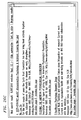
- Figures 26A-26C illustrate one embodiment of a graphic user interface in accordance with the present invention.
- Figure 26A shows a selection of anchor terms: "trust”, “psychology” and “web”.
- the numbered arrows indicate different cursor positions. The numbers of the arrows refer to the examples shown in Table 1.
- Figure 26B shows a control screen for selecting or deleting anchor terms.
- Figure 26C shows a display of a list of documents references and summaries generated for cursor position "2" in Figure 26A.
- the query terms, any terms in the expanded query i.e., semantic cohorts of the original query
- other relevancy factors may be chosen as anchors in a visual display in accordance with the display properties described earlier for the animation system.
- the relative position of the anchors may be modified via drag-and-drop manipulations.
- the existence of an anchor may be manipulated by choosing the factor from a list of factors. Positioning the cursor within the display will determine how the anchors are weighted, which in turn will determine the relevance ranking of the documents.
- the anchors may be the type of relevance ranking factors mentioned above, or in a mega search engine, e.g., 'http://www.dogpile.com', the anchors may be various constituent search engines that are used by the mega search engine. The weight given to a particular domain or the inclusion of an audio or graphic image may also be used.
- the present invention is not limited to the preceding lists of factors but may accommodate any well-defined factor.
- Table 2 shown above, is an illustration of a database generated in client memory to permit fast regeneration of a list of document references and summaries. Double-boxed cells are table column headers defining the content of each column. The second row of the table is an example of a row entry taken from the second entry of the web search results shown in Figure 26C. The number of links in the last two columns represent arbitrary values selected for this example.
- the search engine returns to the client not only the ten or so most relevant document references and summaries (where relevance is determined algorithmically) as is typically done, but also a database containing a much larger list of references (e.g., the top 1000 documents), summaries, and the unweighted vector of factors. This allows very fast recompilation and display of the "most relevant" document references.
- Table 1 could be generated by moving a cursor appropriately between the anchors, "trust”, “psychology” and “web”.
- the other factors, e.g., document, recency, and popularity, would continue to affect the relevancy rankings as before.
- the cursor's movements would only affect the weights associated with the chosen anchors.
- the list of relevant document references and summaries is re-generated whenever the mouse button is released in a drag and drop manipulation.
- a user may explore the list of retrieved document references far more efficiently than moving to each 'next' screen of 10 references, or resubmitting the query with repetitions of some of the query terms.
Landscapes
- Physics & Mathematics (AREA)
- General Physics & Mathematics (AREA)
- Engineering & Computer Science (AREA)
- Theoretical Computer Science (AREA)
- User Interface Of Digital Computer (AREA)
- Processing Or Creating Images (AREA)
- Digital Computer Display Output (AREA)
Abstract
Description
guided by a tight feedback loop. In the current art, database queries are delimited through a set of key words or expressions, and the result is displayed as an ordered list of documents that contain the set of keywords or expressions. The documents are ordered by relevance, where relevance is defined algorithmically as a match between the query terms and the frequency and distribution of those terms, or semantic associations of those terms, in the documents. Modifying the query will result in a reordered list. Examples of modifications are specifying different degrees of relevance of the terms, deleting some terms, introducing new terms, and indicating which terms should be close to one. The current art for describing these modifications includes Boolean strings, binary relevance operators (e.g., + or -), checklists, and graphical techniques for inserting or deleting terms. Often a query will return a large set of documents and it is difficult to determine algorithmically the appropriate relevance weightings that fit the needs of the user. In contrast, the present invention provides a novel method for rearranging the query result. Using techniques developed for real-time graphical manipulation of animated figures, a graphical user interface may be used in accordance with the present invention to rearrange the query result. Each node in a graph represents a term in the query. One advantage provided by the present invention is that the nodes may be arbitrarily rearranged in a two dimensional, or simulated three dimensional, display. Thus, terms with no semantic association may be arranged near one another. Positioning a cursor in the display results in a unique ordering of the query result. Notably, the cursor need not be on a node or on the direct path between nodes. If the cursor is on a node, then the term associated with that node receives the strongest relevance weighting. As the cursor is repositioned between nodes, the distance between the cursor and each node (i.e., term) is used to calculate a new set of relevance weightings. Rearranging the graph creates new possible combinations of weights. Positioning the cursor within the graph defines a unique combination of weights. The position of the cursor may be moved within the graph, and each repositioning causes a new list to be displayed.
directly displayed or its set of parameters and values may be applied to another "DISPLAY OBJECT" which the user sees. The following Lisp pseudo-code shows what happens every time the user moves the pointer:
influence a given target has. One simple weighting calculation uses a radial falloff where each target represents the center of a circle. When the mouse is directly over the target (in the center of the circle), the full weight of that target's displacement is applied to the object. When the mouse is outside of the circle, the target has no effect on the object's state, and the weighting inside the circle is a number from 0.0 to 1.0, reflecting the pointer's distance from the center.

Claims (30)
- An electronic display system operative to facilitate interactive graphical interface animation by a user, comprising:a central processing unit, coupled to a system bus;a memory unit coupled to the system bus and having loadedtherein an operating system, application programs and computer-executable instructions for:inserting a desired image onto a first window;inserting anchors onto a second window by, for each anchor, selecting a desired pose from a plurality of predetermined poses; andupon a cursor being dragged over the second window to a desired anchor, additively applying characteristics for the desired anchor to the desired image based on a proximity of the cursor to the desired dot anchor;a display unit coupled to the system bus;a cursor control unit arranged to provide signals to controlmovement of a cursor on the display unit; andthe system bus, for linking the central processing unit, the display unit, the memory unit, and the cursor control unit.
- The electronic display system of claim 1 wherein the characteristics for the anchors are at least one of:facial expressions;poses; andcamera positions.
- The electronic display system of claim 1 wherein the electronic display system is a computer display system.
- The electronic display system of claim 1 wherein inserting anchors further includes combining a plurality of desired anchors to form a compound anchor.
- The electronic display system of claim 1 wherein a palette in a third window shown on the display unit is used for selecting a desired image to be inserted onto the first window.
- A method for facilitating interactive, expressive animation on an electronic display system by a user, comprising the steps of:wherein characteristics for the desired anchor are additively applied to the desired image based on a proximity of the cursor to the desired anchor.inserting a desired image onto a first window;inserting anchors onto a second window by, for each anchor, selecting a desired pose from a plurality of preselected poses; anddragging a cursor over the second window to a desired anchor
- The method of claim 6 wherein the characteristics for the anchors are at least one of:facial expressions;poses; andcamera positions.
- The method of claim 6 wherein the electronic display system is a computer display system.
- The method of claim 6 wherein inserting anchors further includes combining a plurality of desired anchors to form a compound anchor.
- The method of claim 6 wherein a palette in a third window displayed on the display unit is used for selecting a desired image to be inserted onto the first window.
- A computer-readable medium having computer-readable instructions for providing a graphical user interface for interactive animation, wherein the computer-executable instructions include:inserting a desired image onto a first window;inserting anchors onto a second window by, for each anchor, selecting a desired pose from a plurality of predetermined poses; andupon a cursor being dragged over the second window to a desired anchor, additively applying characteristics for the desired anchor to the desired image based on a proximity of the cursor to the desired anchor.
- The computer-readable medium of claim 11 wherein the characteristics for the dot targets/anchors/node terms are at least one of:facial expressions;poses; andcamera positions.
- The computer-readable medium of claim 11 wherein inserting anchors further includes combining a plurality of desired anchors to form a compound anchor.
- The computer-readable medium of claim 11 wherein a palette in a third window is utilized for selecting a desired image to be inserted onto the first window.
- A method for facilitating animation using a graphics-based graphical user interface, comprising the steps of:dragging a pointer over an arrangement of a plurality of anchors in a controller window wherein each anchor represents a displacement of a state of a graphics-based object from a base state; andredrawing/updating the base state of the object in a display window in accordance with the proximity of the pointer to the anchors as the pointer is dragged over the controller window.
- The method of claim 15 wherein positions of the plurality of anchors in the controller window are set by the user.
- The method of claim 16 wherein the user uses the pointer to position the plurality of anchors.
- The method of claim 15 wherein each target has a predetermined area of influence that is used to determine, based on a position of the pointer, the displacement to be applied to the graphics-based object.
- The method of claim 15 wherein the state of the object is redrawn/updated by putting the graphics-based object into a default base state when a position of the pointer changes, then applying anchors to the object based on a weighting of each anchor, wherein the weighting is calculated based on the displacement of the pointer from the anchor.
- The method of claim 15 wherein each redrawing/updating of the base state of the graphics-based object is recorded to provide an animation path.
- The method of claim 20 wherein the animation path is editable.
- The method of claim 15 wherein multiple anchors with individual weightings are applied simultaneously.
- A computer-readable medium having computer-executable instructions for facilitating animation using a graphics-based graphical user interface, wherein the computer-executable instructions include:dragging a pointer over an arrangement of a plurality of anchors in a controller window wherein each anchor represents a displacement of a state of a graphics-based object from a base state; andredrawing/updating the base state of the object in a display window in accordance with the proximity of the pointer to the anchors as the pointer is dragged over the controller window.
- The computer-readable medium of claim 23 wherein positions of the plurality of anchors in the controller window are set by the user.
- The computer-readable medium of claim 24 wherein the user uses the pointer to position the plurality of anchors.
- The computer-readable medium of claim 23 wherein each anchor has a predetermined area of influence that is used to determine, based on a position of the pointer, the displacement to be applied to the graphics-based object.
- The computer-readable medium of claim 23 wherein the state of the graphics-based object is redrawn/updated by putting an object into a default base state when a position of the pointer changes, then applying anchors to the graphics-based object based on a weighting of each anchor, wherein the weighting is calculated based on the displacement of the pointer from the anchor.
- The computer-readable medium of claim 23 wherein each redrawing/updating of the base state of the graphics-based object is recorded to provide an animation path.
- The computer-readable medium of claim 28 wherein the animation path is editable.
- The computer-readable medium of claim 23 wherein multiple anchors with individual weightings are applied simultaneously.
Applications Claiming Priority (2)
| Application Number | Priority Date | Filing Date | Title |
|---|---|---|---|
| US672475 | 2000-09-28 | ||
| US09/672,475 US7391420B1 (en) | 2000-09-28 | 2000-09-28 | Graphical user interface graphics-based interpolated animation performance |
Publications (2)
| Publication Number | Publication Date |
|---|---|
| EP1193652A2 true EP1193652A2 (en) | 2002-04-03 |
| EP1193652A3 EP1193652A3 (en) | 2004-08-11 |
Family
ID=24698699
Family Applications (1)
| Application Number | Title | Priority Date | Filing Date |
|---|---|---|---|
| EP01308064A Withdrawn EP1193652A3 (en) | 2000-09-28 | 2001-09-21 | Interactive graphical user interface for animation |
Country Status (4)
| Country | Link |
|---|---|
| US (3) | US7391420B1 (en) |
| EP (1) | EP1193652A3 (en) |
| JP (1) | JP2002197489A (en) |
| CA (1) | CA2357286A1 (en) |
Cited By (2)
| Publication number | Priority date | Publication date | Assignee | Title |
|---|---|---|---|---|
| CN101393599B (en) * | 2007-09-19 | 2012-02-08 | 中国科学院自动化研究所 | A Game Character Control Method Based on Facial Expressions |
| CN111552428A (en) * | 2020-04-29 | 2020-08-18 | 腾讯科技(深圳)有限公司 | Data processing method, data processing device, computer equipment and storage medium |
Families Citing this family (52)
| Publication number | Priority date | Publication date | Assignee | Title |
|---|---|---|---|---|
| US20100122312A1 (en) * | 2008-11-07 | 2010-05-13 | Novell, Inc. | Predictive service systems |
| US7391420B1 (en) * | 2000-09-28 | 2008-06-24 | At&T Corp. | Graphical user interface graphics-based interpolated animation performance |
| US8224663B2 (en) * | 2002-05-24 | 2012-07-17 | Becton, Dickinson And Company | System and method for assessment and corrective action based on guidelines |
| JP2004242284A (en) * | 2002-12-04 | 2004-08-26 | Canon Inc | Information processing apparatus, information processing method, storage medium, and program |
| US7688323B2 (en) * | 2004-07-20 | 2010-03-30 | Luxology, Llc | Function portions of animation program |
| JP4701395B2 (en) * | 2005-10-14 | 2011-06-15 | 国立大学法人九州工業大学 | Drawing control device |
| JP2007156650A (en) | 2005-12-01 | 2007-06-21 | Sony Corp | Image processing device |
| US8701026B2 (en) | 2006-03-07 | 2014-04-15 | Goma Systems Corporation | User interface |
| US20070229520A1 (en) * | 2006-03-31 | 2007-10-04 | Microsoft Corporation | Buffered Paint Systems |
| KR101390103B1 (en) * | 2007-04-03 | 2014-04-28 | 엘지전자 주식회사 | Controlling image and mobile terminal |
| US8290757B2 (en) * | 2008-06-06 | 2012-10-16 | Pixar | Method, system and computer readable media for deforming simulation meshes used in posing animated characters |
| US8296297B2 (en) * | 2008-12-30 | 2012-10-23 | Novell, Inc. | Content analysis and correlation |
| US8386475B2 (en) | 2008-12-30 | 2013-02-26 | Novell, Inc. | Attribution analysis and correlation |
| US9134816B2 (en) | 2009-11-11 | 2015-09-15 | Erik Dahlkvist | Method for using virtual facial and bodily expressions |
| US9449521B2 (en) | 2009-11-11 | 2016-09-20 | Erik Dahlkvist | Method for using virtual facial and bodily expressions |
| WO2011059788A1 (en) * | 2009-11-11 | 2011-05-19 | Sociotar Inc. | Method for using virtual facial expressions |
| US10303035B2 (en) | 2009-12-22 | 2019-05-28 | View, Inc. | Self-contained EC IGU |
| US20210063836A1 (en) | 2017-04-26 | 2021-03-04 | View, Inc. | Building network |
| US11592723B2 (en) | 2009-12-22 | 2023-02-28 | View, Inc. | Automated commissioning of controllers in a window network |
| EP2355526A3 (en) | 2010-01-14 | 2012-10-31 | Nintendo Co., Ltd. | Computer-readable storage medium having stored therein display control program, display control apparatus, display control system, and display control method |
| JP5898842B2 (en) | 2010-01-14 | 2016-04-06 | 任天堂株式会社 | Portable information processing device, portable game device |
| JP5800501B2 (en) | 2010-03-12 | 2015-10-28 | 任天堂株式会社 | Display control program, display control apparatus, display control system, and display control method |
| WO2011149160A1 (en) * | 2010-05-25 | 2011-12-01 | 연세대학교 산학협력단 | Animation authoring system and method for authoring animation |
| US8384770B2 (en) | 2010-06-02 | 2013-02-26 | Nintendo Co., Ltd. | Image display system, image display apparatus, and image display method |
| JP6021296B2 (en) | 2010-12-16 | 2016-11-09 | 任天堂株式会社 | Display control program, display control device, display control system, and display control method |
| US11054792B2 (en) * | 2012-04-13 | 2021-07-06 | View, Inc. | Monitoring sites containing switchable optical devices and controllers |
| US10989977B2 (en) | 2011-03-16 | 2021-04-27 | View, Inc. | Onboard controller for multistate windows |
| WO2013020247A1 (en) * | 2011-08-09 | 2013-02-14 | Intel Corporation | Parameterized 3d face generation |
| US20130057536A1 (en) * | 2011-09-02 | 2013-03-07 | Xiaoyun Li | Method for relieving eye strain using animation |
| JP5490080B2 (en) * | 2011-12-06 | 2014-05-14 | 株式会社セルシス | Skeleton model attitude control method and program |
| US10269165B1 (en) * | 2012-01-30 | 2019-04-23 | Lucasfilm Entertainment Company Ltd. | Facial animation models |
| US10964320B2 (en) | 2012-04-13 | 2021-03-30 | View, Inc. | Controlling optically-switchable devices |
| US12400651B2 (en) | 2012-04-13 | 2025-08-26 | View Operating Corporation | Controlling optically-switchable devices |
| US9478058B2 (en) * | 2012-08-06 | 2016-10-25 | CELSYS, Inc. | Object correcting apparatus and method and computer-readable recording medium |
| GB2512302B (en) * | 2013-03-25 | 2015-07-22 | Naturalmotion Ltd | Animation of a virtual object |
| US9189860B2 (en) * | 2013-04-22 | 2015-11-17 | General Electric Company | Real-time, interactive image analysis |
| GB2515266B (en) * | 2013-05-09 | 2018-02-28 | Disney Entpr Inc | Manufacturing Process for 3D Printed Objects |
| US11868103B2 (en) | 2014-03-05 | 2024-01-09 | View, Inc. | Site monitoring system |
| KR102336168B1 (en) | 2014-03-05 | 2021-12-07 | 뷰, 인크. | Monitoring sites containing switchable optical devices and controllers |
| US10481459B2 (en) | 2014-06-30 | 2019-11-19 | View, Inc. | Control methods and systems for networks of optically switchable windows during reduced power availability |
| US11740948B2 (en) | 2014-12-08 | 2023-08-29 | View, Inc. | Multiple interacting systems at a site |
| US20160350957A1 (en) * | 2015-05-26 | 2016-12-01 | Andrew Woods | Multitrack Virtual Puppeteering |
| WO2016205362A1 (en) * | 2015-06-16 | 2016-12-22 | Sociotar Inc | Method for using virtual facial and bodily expressions |
| US12366111B2 (en) | 2015-09-18 | 2025-07-22 | View Operating Corporation | Trunk line window controllers |
| CN105404484B (en) * | 2015-10-28 | 2019-01-25 | 努比亚技术有限公司 | Terminal split screen device and method |
| US10796798B1 (en) * | 2016-04-01 | 2020-10-06 | Virtual Sandtray, LLC | System and method of a virtual sand tray |
| US12147142B2 (en) | 2017-04-26 | 2024-11-19 | View, Inc. | Remote management of a facility |
| US12603091B2 (en) | 2017-04-26 | 2026-04-14 | View Operating Corporation | Immersive collaboration of remote participants via media displays |
| US11014242B2 (en) * | 2018-01-26 | 2021-05-25 | Microsoft Technology Licensing, Llc | Puppeteering in augmented reality |
| US10438414B2 (en) | 2018-01-26 | 2019-10-08 | Microsoft Technology Licensing, Llc | Authoring and presenting 3D presentations in augmented reality |
| JP7644501B2 (en) | 2019-05-09 | 2025-03-12 | ビュー オペレーティング コーポレーション | Antenna systems for controlled coverage within buildings |
| TW202206925A (en) | 2020-03-26 | 2022-02-16 | 美商視野公司 | Access and messaging in a multi client network |
Family Cites Families (11)
| Publication number | Priority date | Publication date | Assignee | Title |
|---|---|---|---|---|
| US5546529A (en) * | 1994-07-28 | 1996-08-13 | Xerox Corporation | Method and apparatus for visualization of database search results |
| US5854634A (en) * | 1995-12-26 | 1998-12-29 | Imax Corporation | Computer-assisted animation construction system using source poses within a pose transformation space |
| GB9606129D0 (en) * | 1996-03-22 | 1996-05-22 | Philips Electronics Nv | Virtual environment navigation and interaction apparatus |
| US5933150A (en) | 1996-08-06 | 1999-08-03 | Interval Research Corporation | System for image manipulation and animation using embedded constraint graphics |
| US5847708A (en) * | 1996-09-25 | 1998-12-08 | Ricoh Corporation | Method and apparatus for sorting information |
| US6011562A (en) | 1997-08-01 | 2000-01-04 | Avid Technology Inc. | Method and system employing an NLE to create and modify 3D animations by mixing and compositing animation data |
| US6711562B1 (en) * | 1999-12-01 | 2004-03-23 | The Trustees Of Columbia University In The City Of New York | Cache sensitive search (CSS) tree indexing system and method |
| US6701317B1 (en) * | 2000-09-19 | 2004-03-02 | Overture Services, Inc. | Web page connectivity server construction |
| US7391420B1 (en) * | 2000-09-28 | 2008-06-24 | At&T Corp. | Graphical user interface graphics-based interpolated animation performance |
| US6720962B1 (en) * | 2000-12-04 | 2004-04-13 | Joseph Alter Inc. | Hair generation and other natural phenomena with surface derived control volumes in computer graphics and animation |
| US7176915B1 (en) * | 2002-08-09 | 2007-02-13 | Avid Technology, Inc. | Subdividing rotation in a character using quaternion interpolation for modeling and animation in three dimensions |
-
2000
- 2000-09-28 US US09/672,475 patent/US7391420B1/en not_active Expired - Lifetime
-
2001
- 2001-09-13 CA CA002357286A patent/CA2357286A1/en not_active Abandoned
- 2001-09-21 EP EP01308064A patent/EP1193652A3/en not_active Withdrawn
- 2001-09-28 JP JP2001299722A patent/JP2002197489A/en active Pending
-
2008
- 2008-05-16 US US12/122,147 patent/US8125482B2/en not_active Expired - Fee Related
- 2008-05-16 US US12/122,168 patent/US7612778B2/en not_active Expired - Fee Related
Cited By (2)
| Publication number | Priority date | Publication date | Assignee | Title |
|---|---|---|---|---|
| CN101393599B (en) * | 2007-09-19 | 2012-02-08 | 中国科学院自动化研究所 | A Game Character Control Method Based on Facial Expressions |
| CN111552428A (en) * | 2020-04-29 | 2020-08-18 | 腾讯科技(深圳)有限公司 | Data processing method, data processing device, computer equipment and storage medium |
Also Published As
| Publication number | Publication date |
|---|---|
| EP1193652A3 (en) | 2004-08-11 |
| US8125482B2 (en) | 2012-02-28 |
| JP2002197489A (en) | 2002-07-12 |
| US20080222555A1 (en) | 2008-09-11 |
| US20080222574A1 (en) | 2008-09-11 |
| US7391420B1 (en) | 2008-06-24 |
| US7612778B2 (en) | 2009-11-03 |
| CA2357286A1 (en) | 2002-03-28 |
Similar Documents
| Publication | Publication Date | Title |
|---|---|---|
| US7612778B2 (en) | Graphical user interface graphics-based interpolated animation performance | |
| US6243093B1 (en) | Methods, apparatus and data structures for providing a user interface, which exploits spatial memory in three-dimensions, to objects and which visually groups matching objects | |
| Mackinlay et al. | An organic user interface for searching citation links | |
| US6054989A (en) | Methods, apparatus and data structures for providing a user interface, which exploits spatial memory in three-dimensions, to objects and which provides spatialized audio | |
| US6414677B1 (en) | Methods, apparatus and data structures for providing a user interface, which exploits spatial memory in three-dimensions, to objects and which visually groups proximally located objects | |
| US6166738A (en) | Methods, apparatus and data structures for providing a user interface, which exploits spatial memory in three-dimensions, to objects | |
| Huang et al. | On-line animated visualization of huge graphs using a modified spring algorithm | |
| Robertson et al. | Information visualization using 3D interactive animation | |
| Hearst | User interfaces and visualization | |
| US7278115B1 (en) | Methods, apparatus and data structures for providing a user interface to objects, the user interface exploiting spatial memory and visually indicating at least one object parameter | |
| Shneiderman | The eyes have it: A task by data type taxonomy for information visualizations | |
| Benford et al. | VR‐VIBE: A virtual environment for co‐operative information retrieval | |
| Young | Three dimensional information visualisation | |
| US9965161B2 (en) | Interactive browser-based semiotic communication system | |
| AU2003244888B2 (en) | Display of data element indicia based on data types | |
| WO2000051022A2 (en) | A system, method and article of manufacture for visual navigation utilizing web technology | |
| EP1193623A2 (en) | Graphic user interface text-based interpolation searching | |
| Hakala et al. | Spatial interactive visualization on small screen | |
| Vande Moere et al. | Visualizing abstract information using motion properties of data-driven infoticles | |
| Rapley et al. | Three dimensional interface for an object oriented database | |
| Yang et al. | Content-based retrieval of Flash™ movies: research issues, generic framework, and future directions | |
| US20250117114A1 (en) | Sweep algorithm for output of graphical objects | |
| Chang | Content-based access to multimedia information | |
| Mostafa et al. | The agent visualization system: a graphical and textual representation for multi-agent systems | |
| ULMAN | Browsing Data in 3D: An Immersive First Person File Browser |
Legal Events
| Date | Code | Title | Description |
|---|---|---|---|
| PUAI | Public reference made under article 153(3) epc to a published international application that has entered the european phase |
Free format text: ORIGINAL CODE: 0009012 |
|
| AK | Designated contracting states |
Kind code of ref document: A2 Designated state(s): AT BE CH CY DE DK ES FI FR GB GR IE IT LI LU MC NL PT SE TR |
|
| AX | Request for extension of the european patent |
Free format text: AL;LT;LV;MK;RO;SI |
|
| PUAL | Search report despatched |
Free format text: ORIGINAL CODE: 0009013 |
|
| AK | Designated contracting states |
Kind code of ref document: A3 Designated state(s): AT BE CH CY DE DK ES FI FR GB GR IE IT LI LU MC NL PT SE TR |
|
| AX | Request for extension of the european patent |
Extension state: AL LT LV MK RO SI |
|
| 17P | Request for examination filed |
Effective date: 20050209 |
|
| AKX | Designation fees paid |
Designated state(s): DE FR GB |
|
| RBV | Designated contracting states (corrected) |
Designated state(s): DE FR GB |
|
| RBV | Designated contracting states (corrected) |
Designated state(s): DE FI FR GB NL SE |
|
| 17Q | First examination report despatched |
Effective date: 20110316 |
|
| STAA | Information on the status of an ep patent application or granted ep patent |
Free format text: STATUS: THE APPLICATION IS DEEMED TO BE WITHDRAWN |
|
| 18D | Application deemed to be withdrawn |
Effective date: 20110401 |