EP1184789A2 - Method for accessing data and processing metrics data using encoded inbound anchors and automatically generated markup language files - Google Patents
Method for accessing data and processing metrics data using encoded inbound anchors and automatically generated markup language files Download PDFInfo
- Publication number
- EP1184789A2 EP1184789A2 EP01307180A EP01307180A EP1184789A2 EP 1184789 A2 EP1184789 A2 EP 1184789A2 EP 01307180 A EP01307180 A EP 01307180A EP 01307180 A EP01307180 A EP 01307180A EP 1184789 A2 EP1184789 A2 EP 1184789A2
- Authority
- EP
- European Patent Office
- Prior art keywords
- anchors
- files
- build
- log
- log file
- Prior art date
- Legal status (The legal status is an assumption and is not a legal conclusion. Google has not performed a legal analysis and makes no representation as to the accuracy of the status listed.)
- Withdrawn
Links
Images





Classifications
-
- G—PHYSICS
- G06—COMPUTING OR CALCULATING; COUNTING
- G06F—ELECTRIC DIGITAL DATA PROCESSING
- G06F11/00—Error detection; Error correction; Monitoring
- G06F11/36—Prevention of errors by analysis, debugging or testing of software
- G06F11/362—Debugging of software
- G06F11/366—Debugging of software using diagnostics
-
- G—PHYSICS
- G06—COMPUTING OR CALCULATING; COUNTING
- G06F—ELECTRIC DIGITAL DATA PROCESSING
- G06F11/00—Error detection; Error correction; Monitoring
- G06F11/07—Responding to the occurrence of a fault, e.g. fault tolerance
- G06F11/0703—Error or fault processing not based on redundancy, i.e. by taking additional measures to deal with the error or fault not making use of redundancy in operation, in hardware, or in data representation
- G06F11/0766—Error or fault reporting or storing
- G06F11/0769—Readable error formats, e.g. cross-platform generic formats, human understandable formats
-
- G—PHYSICS
- G06—COMPUTING OR CALCULATING; COUNTING
- G06F—ELECTRIC DIGITAL DATA PROCESSING
- G06F11/00—Error detection; Error correction; Monitoring
- G06F11/30—Monitoring
- G06F11/34—Recording or statistical evaluation of computer activity, e.g. of down time, of input/output operation ; Recording or statistical evaluation of user activity, e.g. usability assessment
- G06F11/3466—Performance evaluation by tracing or monitoring
- G06F11/3476—Data logging
-
- G—PHYSICS
- G06—COMPUTING OR CALCULATING; COUNTING
- G06F—ELECTRIC DIGITAL DATA PROCESSING
- G06F11/00—Error detection; Error correction; Monitoring
- G06F11/36—Prevention of errors by analysis, debugging or testing of software
- G06F11/362—Debugging of software
- G06F11/3636—Debugging of software by tracing the execution of the program
-
- G—PHYSICS
- G06—COMPUTING OR CALCULATING; COUNTING
- G06F—ELECTRIC DIGITAL DATA PROCESSING
- G06F16/00—Information retrieval; Database structures therefor; File system structures therefor
- G06F16/90—Details of database functions independent of the retrieved data types
- G06F16/95—Retrieval from the web
- G06F16/958—Organisation or management of web site content, e.g. publishing, maintaining pages or automatic linking
- G06F16/972—Access to data in other repository systems, e.g. legacy data or dynamic Web page generation
-
- G—PHYSICS
- G06—COMPUTING OR CALCULATING; COUNTING
- G06F—ELECTRIC DIGITAL DATA PROCESSING
- G06F40/00—Handling natural language data
- G06F40/10—Text processing
- G06F40/12—Use of codes for handling textual entities
- G06F40/134—Hyperlinking
-
- G—PHYSICS
- G06—COMPUTING OR CALCULATING; COUNTING
- G06F—ELECTRIC DIGITAL DATA PROCESSING
- G06F40/00—Handling natural language data
- G06F40/10—Text processing
- G06F40/12—Use of codes for handling textual entities
- G06F40/14—Tree-structured documents
- G06F40/143—Markup, e.g. Standard Generalized Markup Language [SGML] or Document Type Definition [DTD]
-
- G—PHYSICS
- G06—COMPUTING OR CALCULATING; COUNTING
- G06F—ELECTRIC DIGITAL DATA PROCESSING
- G06F11/00—Error detection; Error correction; Monitoring
- G06F11/30—Monitoring
- G06F11/32—Monitoring with visual or acoustical indication of the functioning of the machine
- G06F11/323—Visualisation of programs or trace data
-
- G—PHYSICS
- G06—COMPUTING OR CALCULATING; COUNTING
- G06F—ELECTRIC DIGITAL DATA PROCESSING
- G06F11/00—Error detection; Error correction; Monitoring
- G06F11/30—Monitoring
- G06F11/34—Recording or statistical evaluation of computer activity, e.g. of down time, of input/output operation ; Recording or statistical evaluation of user activity, e.g. usability assessment
- G06F11/3409—Recording or statistical evaluation of computer activity, e.g. of down time, of input/output operation ; Recording or statistical evaluation of user activity, e.g. usability assessment for performance assessment
-
- G—PHYSICS
- G06—COMPUTING OR CALCULATING; COUNTING
- G06F—ELECTRIC DIGITAL DATA PROCESSING
- G06F2201/00—Indexing scheme relating to error detection, to error correction, and to monitoring
- G06F2201/875—Monitoring of systems including the internet
-
- G—PHYSICS
- G06—COMPUTING OR CALCULATING; COUNTING
- G06F—ELECTRIC DIGITAL DATA PROCESSING
- G06F2201/00—Indexing scheme relating to error detection, to error correction, and to monitoring
- G06F2201/88—Monitoring involving counting
Definitions
- This invention relates to the organization and interrelationship of computer log files and more particularly to a methodology for the use of encoded inbound anchors and automatically generated HTML files to produce hyperlinked, cross-referenced HTML files and the generation of supporting process metrics.
- the Internet World-Wide Web utilizes a web browser program at the user's computer (a web client program) to access information provided at a web server site.
- the protocols and standards which define WWW include hypertext links embedded within a document (referred to herein as hyperlinks) as defined by the HyperText Markup Language (HTML) standards.
- Documents are communicated via the HyperText Transfer Protocol (HTTP).
- HTML HyperText Transfer Protocol
- a markup language is a way of embedding within any document meta commands, usually invisible to the user, that direct how to display or print the text in the document.
- a hyperlink is an object (text or image) on a page of information which links the user, if selected, to other related information. In standard WWW web browser programs, the user can move to this related information by simply "selecting" or "clicking on” the link as it is displayed on the user's computer screen.
- Links are also known outside the context of HTML web browsing programs and remotely accessible web pages.
- local "help" files as commonly provided in operating systems and applications such as Microsoft® Windows or Microsoft® Office tools are often designed with hyperlinks to permit the user to thereby navigate among related help messages and topics.
- web browsers commonly support other protocols in addition to HTML and use hyperlinks therewith.
- most web browsers also support the file transfer protocol (FTP) wherein file system directories may be viewed as a tree structure and the files and subdirectories therein are displayed by the web browser as hyperlinks.
- FTP file transfer protocol
- search engines Associated with the WWW are a number of web server sites functioning as "search engines" which provide access to indexed information to locate web pages that are of interest to a user.
- these search engines search large, proprietary databases for matches against a set of user supplied keywords.
- a list of web pages which match the user's supplied keyword search is then returned to the user's web browser.
- the list of matching web pages is presented by the web browser program on the user's computer display as a list of links to the matching web pages. The user may then select the links of interest and click the link to visit that web page.
- Standard features of conventional web browser programs support simplified "navigation" of sites on the web.
- standard features include the ability to move forward or backward over a chain of previously viewed web pages. A first web page visited may provide a link to another page of interest and so on. Such multiple links may be thought of as a chain. Once having navigated to one page in such a chain of linked pages, the web browser provides standard features to navigate forward or backward on the chain of links already visited.
- a Universal Resource Locator (URL) is used by a user to view a predefined static page of information.
- a URL can be used to allow a user to access a Common Gateway Interface (CGI) program which generates the page displayed to the user after the user accesses the URL.
- CGI Common Gateway Interface
- a system for rapidly and easily searching large collections of documents is described in U.S. Patent 6,055,538 of Kessenich, et al. which is entitled "Method and System For Using Web Browser To Search Large Collections Of Documents" and issued April 25, 2000 and is incorporated herein by reference in its entirety.
- the Kessenich patent uses standard web browser programs as the user interface to perform searches.
- the Kessenich patent parses a collection of text documents to identify symbols therein and builds a database file which identifies the file and line locations of each symbol identified.
- the database file is constructed to permit rapid searching for symbols to permit interactive use of the present invention as a search tool.
- a database client process interacts with the web browser via standard CGI techniques to convert browser commands and queries into appropriate server process requests.
- a server process receives such requests and manipulates the database files in response to the requests.
- Query results returned to the client process are then reformatted by the client process to return a document with hypertext links in place of search keys located in the database (e.g. , an HTML page).
- the Kessenich patent thereby provides for rapid searching of large collections of text documents which is not coupled to a specific toolset used to create any one of the documents and which uses a simple and well-known user interface, namely, web browsers.
- a well written computer program undergoes four distinct phases of development: specification, design, coding and test.
- specification phase the problem which the computer program is meant to solve, or the task which the computer program is meant to perform, is determined and specified.
- design phase a solution to the specified problem, or a method of accomplishing the specified task, is designed.
- coding phase the design solution or design method is implemented in writing in a particular computer language, such as FORTRAN, C, PASCAL, COBOL, other high level programming languages or in assembly language.
- the test phase the computer program is tested to determine if it meets the specification and design requirements.
- a build is usually performed to transform the output of the coding phase to a machine executable source for the test phase.
- computer programmers In the coding phase, computer programmers typically create computer programs by writing the programs in a form that cannot be directly executed by the computer on which the program is intended to operate (the target machine). This form of the program, known as the source code, is then translated into instructions the target machine can directly execute (known as object code, executable code, or machine instructions). While there are various stages and types of such translations and types of tools for such translation (such as, compilers, assemblers, linkers), for the purpose of the present application, these tools are each encompassed within the term "compiler.” The computer programmer typically uses the compiler to "build" the software program.
- a debugger allows a programmer to observe program operation by supplying intermediate variable values, setting breakpoints, specifying variable values, and providing other data useful to understanding, analyzing and validating program operation. Additionally, a programmer needs to resolve problems encountered when a build is performed to transform their source code into executable code.
- a note is informational in nature and may be temporarily ignored without adverse consequences and, like the warning, does not prematurely terminate the build process.
- the build process should result in an executable code and a log file.
- the executable code contains fatal problems, and by definition will not operate properly.
- An executable code associated with a log file which contains warnings may or may not operate properly.
- Executable code associated with a log containing only notes should run but may not give the expected results.
- log files may consist of a few pages or hundreds of pages.
- the programer would review the log file to determine what errors, warnings and notes occurred during the build process and correct each one. If an error occurred, the developer could normally go to the end of the log file to determine the error message. Generally, since the error halted the build process, the executable code will not be completed. Alternatively, in the presence of an error, provisions can be made to continue the build process at a later point in the source code which allows the programmer to identify as many errors as possible in a single run. Warnings and notes may also require the programmer to take specific action to clear up these potential problems.
- the present invention is directed to a system and method which allows ready access and review of the information contained within the log files (e.g ., audit and/or security trails, transaction records, and other files indicative of the status and/or results produced by a process) to determine the status of the result (e.g., executable code, database, etc.).
- the invention further provides a methodology for the automatic simplification of the information contained within the log files to allow the programmer to determine the status of the result (e.g. , build in connection with program compilation, etc.) in a minimum amount of time.
- the invention also allows the programmers to easily determine the problems resulting from and/or encountered during the audited process (e.g., build).
- the invention further provides hyperlinked connections between related files for easy programmer access to the information and to allow the programmer to build and access a table of contents which organizes the available information.
- the invention can further provide the programmer with metrics to determine the overall status of the audited process (e.g. , build, etc.).
- the invention also provides simplification, aids error determination, and hyperlinked connections and metrics for any process that results in log files.
- references to HTML include the broader class of markup languages.
- references to inbound anchors supported by HTML include similar labels identifying a location in an object (such as a file) that is the target of a pointer such as an outbound anchor provided by HTML.
- log files resultant from a program build, the term log files should be interpreted to include audit and security trails, transaction records, and other data generated, during the performance of a process, indicative of an operation of the process or an output provided by the process.
- the present invention is directed to a program and method which accesses a log file and automatically indexes the log file by means of anchors or related methods.
- This indexing performed by the program includes embedding encoded inbound anchors (a point within a file the user can transfer to) or flags, within the log file to selected entries, or areas of interest which are contained in the log file and, using these encoded anchors and hyperlinks, create cross-references between related files for easy assimilation of the contained information.
- an anchor is a type of markup which defines, on the outbound side, a hyperlink which is a pointer to a file or a location and, on the inbound side, the target of a pointer or hyperlink.
- the inbound anchors have labels whose values encode information according to a standard method.
- the encoded portion may include a classification, a unique number and a number identifying the process that created that anchor.
- the encoded anchors can also be used for the automatic generation of process metrics. These process metrics may include counting the number of instances of specific parameters or areas of interest, identifying the most critical parameters present or the calculation of other metrics of interest to the user.
- Encoding information into the label of an inbound anchor is a means of attaching information to that point in the document which can be used in the generation of summary metrics and can be used in the generation of tables of contents.
- the encoded anchors are preferably HTML codes and ensure the log file information can be accessed via hyperlinks.
- the status of the resulting builds or other output, or of the portions of the process leading up to, or following, the build can be displayed, along with the appropriate metrics in various formats including a table or similar display technique.
- These tables can include hyperlinks within the cells of the tables to allow the user to access additional information with a single selection.
- a table of contents can also be automatically configured using the names of the log files.
- the organization of the table of contents typically represents the organization of the associated files.
- These tables of contents can also be configured in an HTML format.
- a methodology which allows the automatic generation and the simplified display of the information contained in a number of log files.
- This methodology allows the programmer to identify the entries of interest within the log file and highlight these entries with encoded anchors.
- Process metrics including the number of times the entry of interest appears, the greatest severity of the problems encountered by a specific process or metrics of similar substance, can be automatically calculated according to a feature of the methodology.
- the information contained in the log entries can be displayed in a simplified format such as a table with the related and appropriate process metrics.
- Embedded hyperlinks can again be used by the user to transition between the associated displays.
- HTML codes can be used for the encoded anchors.
- Process metrics may be calculated for the errors, warnings or notes which appear in the log files, and links can be created between the various files by the use of hyperlinks. Parameters associated with the individual variations, or "flavors" (e.g. minor variations in code or constants used in the code) of the source code files can also be displayed for user consideration.
- a program and a methodology which allows a user to make copious detailed output from complex and varied automated processes that run periodically or when initiated to transform data, such as building (compiling) executable programs from source files, easier to rapidly assess for problems and status, and also easier to "navigate” interactively to view unusual or abnormal results, as well as normal results, in context, by use of standard HTML, web browser (client), and web server features or the equivalent.
- This detailed output can be from a single log file or audit trail or from a number of log files and audit trails.
- This program or methodology further includes the step of one or more automated processes that run periodically or when initiated to transform data and record one or more log files (or audit trails) of their actions and results, with various processes producing various types of log files.
- log files are produced as, or converted to, HTML ("HTMLized”), and tagged with one or more standard inbound HTML anchors to mark locations of interest so the locations can be the targets of hyperlinks specified by outbound HTML anchors in other locations or other HTML files.
- the invention also includes markup languages and anchors equivalent to the HTML language and anchors.
- This program and method further includes the step of encoding information into the inbound anchor labels in a standard manner, regardless of which process produces each log file or portion, such that the anchor labels are not only unique targets of the inbound hyperlinks within each log file, but also carry and convey information about the type of event recorded at that location in the log file, such as a problem (error, warning, note), start or end of a test case, or start of a cross-reference section.
- This program and method further includes the steps of a standard process for one or more software programs that: 1) scans one or more HTMLized log files in one or more log directories for recognized encodings in inbound HTML anchor labels or the equivalent, 2) counts the anchors by types to summarize the counts to a single or a plurality of metrics files that accrue numeric summaries for many process runs and logs directories, and 3) constructs tables of contents files.
- These tables of contents files can be HTML pages or their equivalents, and list all files, whether HTMLized or not, in one or more log directories, either directly or represented as collections of cross-reference sections.
- the table of contents files also summarizes problems in or status from each log file or cross-reference section based on its encoded inbound HTML anchors, with the table of contents files containing outbound anchors (hyperlinks) to each log file or cross-reference section and to each problem or other interesting location, such as the start of the text produced by a test case, in each log file or cross-reference section.
- the program and method of the invention further includes the steps of a standard process (one or more software programs) known as Common Gateway Interface (CGI) programs, which run on a web server system or the equivalent and read one or more metrics files to produce various HTML output files (web pages) or the equivalent which contain various levels of summary tables whose cells are hyperlinks to view more specific and detailed information, such as more detailed tables, eventually by following the chain of hyperlinks reaching log directory table of contents files and then actual log files.
- CGI Common Gateway Interface
- FIGURE 1 is an overall block diagram of a method according to the present invention.
- the developer or programmer writes the program in source code which is depicted in block 105.
- a build of the source code 105 must be performed.
- the build is performed in a build environment 110.
- two different types of files are created, an executable code 115 and log files 120.
- the executable code 115 is the code which is run by the processor to perform the desired functionality.
- the log files 120 which are generated during the build contain the errors, warnings and notes described previously. These log files 120 can be used by the developer to determine whether or not the build was successful and to identify potential problems encountered during the build. As presently configured these log files are unwieldy and difficult to use.
- a build of a single source code file may result in one or more log files and a build of more than one source code file may result in one or more log files.
- log files 120 are provided to an "HTMLizer” 125 which creates “HTMLized” log files 130.
- various Common Process Framework (CPF) functions are performed on the "HTMLized” log files from block 130.
- CPF functions may include the generation of the table of contents and metric information, including statistical analysis.
- log file(s) includes the original log file directly generated as a result of the build, as well as copies of that file or other data generated as a result of parsing, editing, or otherwise incorporating other portions or derivatives of the log file into one or more log files.
- an appropriate converter would be used to generate a marked-up document, e.g., an "XMLizer” in the case of XML, etc.
- the result of block 135 is a table of contents file in block 140 and numerous metric files in block 145.
- a metric file is created for each product and each step, and metrics files may be appended for multiple runs.
- These metric files 145 are used by the Common Gateway Interface (CGI) scripts 150 which create web pages which summarize the metrics contained in block 145.
- CGI Common Gateway Interface
- the web pages created contain hyperlinks to each of the associated web pages and to a table of contents file. Together, these hyperlinked HTML files form dynamic HTML files in block 155.
- the metric and status information from the dynamic HTML blocks 155 can then be displayed in several different formats, a different format for each HTML block 155.
- the three formats shown in FIGURE 1 include the Overnight Process Status Screen block 160, the Product Step Status Multiple Runs Screen block 165 and the Product Step Status Single Run Screen block 170.
- the information contained in the table of contents file from block 140 can also be presented in a Product Step Log File Table Of Contents Screen in block 175.
- the information contained in the HTMLized log files of block 130 can be displayed in the Process Step Log File Screen of block 180.
- a build of the source code from block 105 is performed in the build environment 110 which creates two types of files, the executable code 115 and the log files 120.
- the executable code can be used in the test phase to ensure that the software performs as expected.
- the log files from block 120 are used to determine the successfulness of the build performed within the build environment 110. This information could be contained in a single log file or can be broken up and displayed in numerous smaller log files.
- the log files of block 120 can be used by the programmer or the developer as configured by the build environment to determine the successfulness of the build. However, the format of these log files will require the programmer or developer to devote a substantial amount of time to determine the successfulness of the build.
- the present invention organizes and makes the information contained in the log files easily accessible to the programmer or developer. Additionally, numerous source code 105 files can be sent to the build environment 110 during a specific period of time, for instance, overnight; and the resulting log files can contain the information pertaining to these source code files. A build of each source code file can result in a specific log file; the log information for more than one source code file can be contained in a single log file, or the log information for a single source code file can be broken up to be captured by numerous log files. These log files can also be used by system maintenance personnel to oversee the operation of the associated computers.
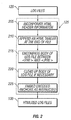
- the HTMLizer of block 125 performs several functions as illustrated by FIGURE 2.
- the HTMLizer incorporates certain HTML header information into each of the log files step 205 and appends an HTML trailer at the end of each of the log files step 210.
- the HTML control code " ⁇ PRE>” is placed at the start of the body of the log file and a " ⁇ /PRE>” is placed at the end of the body step 215.
- the HTMLizer ensures that the body of the log file is safe for HTML display by converting all " ⁇ ,” ">,” and "&" HTML control characters to HTML escape sequences at step 220.
- the HTMLizer also embeds encoded inbound anchors into the log files step 225 to create the HTMLized log files.
- encoded anchors can be placed to mark errors, warnings, notes, cross-reference points, test cases to be counted, or any other characteristic for which metrics are required or desired.
- encoded inbound anchors include:
- encoded anchor lines may need to include a specific format, i.e., must begin at the start of the line in column 1.
- Outbound anchors are used to transition the user to a different Universal Resource Locator (URL) using a hyperlink.
- Inbound anchors are labels that mark a location in the file that can be the target of an outbound anchor.
- Outbound and inbound anchors can be used together to transition a user, first to a different file, and then to a specific location within that file, or to a different location in the same file.
- Encoded inbound and outbound anchors act as ordinary inbound and outbound anchors but also contain useable information encoded in the inbound anchor label. Such encoded inbound anchors identify the errors, warnings, and notes, and create hyperlinks in the various HTMLized log files.
- the class in the format of the encoded inbound anchor may be an error, warning or note or any other aspect of the log file of interest.
- the index of the encoded inbound anchor is a number which is unique throughout the entire log file.
- the error-text of the encoded inbound anchor must be the entire visible text on the physical line and is associated with the anchor which preceded it. In order for the error-text to be displayed in bold a ⁇ B> must precede the error-text and a ⁇ /B> must be included to turn off the bold format. Additionally, the encoded inbound anchor must be concluded with a ⁇ /A>.
- the index number may actually be any string not containing a double quote. If the associated log files are appended to multiple times, the index may include a pid.count to differentiate inputs from various runs. The pid value is a process ID. Finally, if the error-text is longer than a single line, the HTMLizer may ensure the error-text remains together with an inserted " ⁇ " which indicates the error-text is wrapped. Even though several lines of error-text may be included in the file, the table of contents file uses or displays only the first line of the error-text and the error/warning/note hyperlink labels. In order to ensure that each of the encoded inbound anchors are included in the metrics information, the encoded inbound anchor format may need to be strictly followed. The encoded inbound anchors are also case sensitive, as well as space sensitive.
- the HTMLized log files of block 130 may need to reside in a single directory on the system where the process step was invoked. In this case, the directory must also contain any other related files.
- the names of the HTMLized log files in block 130 will be used to determine their position in the automatically generated, alphabetically sorted table of contents file.
- One of the files normally included in the log files after a build includes a "00.top.log.html" in each log directory. Normally, all standard output (i.e., stdout) and standard error (i.e., stderr) goes to this log file unless redirected elsewhere.
- This log file must also be HTMLized, by the HTMLizer block 125, before it can be included in the table of contents file in block 140.
- the names of the log files in block 120 should be defined in some logical order and segregated into logical groups.
- Numeric prefixes can be included in log file names to determine the order and hierarchy in which the files appear in the table of contents file. Since these numeric prefixes are part of the hyperlink Universal Resource Locator (URL) they are not displayed to the user in the hyperlink label.
- the HTMLizer can be configured to insert these numeric prefixes in the HTMLized log file names. For example the numeric prefixes in the following HTMLized log file names:
- the CPF functions of block 135 may include the capability to scan log files to count encoded inbound anchors, record the counts, and build a table of contents file that lists and includes hyperlinks that reflect a log file directory. Additionally, outbound hyperlinks can be included in the table of contents file to quick reference the location of the corresponding links within the log files.
- the CPF function block 135 creates the table of contents file in block 140 and the metric files in block 145.
- the name of the table of contents file created in block 140 is "toc.html". This table of contents file includes hyperlinks to all of the other files found in the directory, ordered and grouped according to the file name convention previously described and may include additional information.
- the CPF functions block 135 also gathers the metrics for the metrics files in block 145.
- Each metrics file may include a number of metrics blocks where each block contains the metrics information for a specific process step run.
- Each metrics block may describe one invocation of one CPF session or a predefined script, plus a count of the errors, warnings and notes, count of test cases passed and the total number of cases attempted, and coverage (branches) hit and available; or any other parameter of interest found in the log files or elsewhere.
- the information contained in the metrics files of block 145 is then included in the web pages generated by CGI scripts of block 150 as described below. These web pages include hyperlinks to other related files and to the table of contents file.
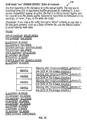
- FIGURE 3 is a sample status screen of a developer's view of the build process result.
- a similar status screen can be made for a manager and which would be selectable from hyperlink 305. Views, on the developer's view, can be updated by selecting the update views button 310.
- FIGURE 3 is a status screen associated with all overnight process for all of a configured set of products. Also available is an overview of the build process steps run overnight by selecting the overnight button 315. The overnight display shows global logs not related to any one product.
- a figure similar to FIGURE 4 can be displayed for the various machines, in this case, AMARANTH or BROCCOLI, by the selection of the appropriate button 320. If either of these buttons are selected, a table would be displayed which would restrict its view to one system's results.
- the cell color (not shown in FIGURE 3) and the associated text indicate the worst case status of all of the runs for that product during the appropriate time. Similar indicia can be included in the other views as well.
- the Arch-build cell 360 may contain information for 15 builds for which 14 builds were clean and one contained a warning. Since the worst case is displayed in FIGURE 3, the warning appears in the cell.
- a hyperlink which allows the developer to view all of the log results for the appropriate product and process step.
- nine products are displayed, namely, Arch, SAM, ParMgr, ObAM4.2, ObAM, DMI, Judy, iCOD, and Krm 325. Each product may include many constructed programs or other files.
- Update.be column 330 gives the status of the update build environment. This is a collection of tools and directories that allow a programmer to perform a build in a known way while minimizing the presence of variables.
- the cells within the update.be column indicate to the programmer the status of the build environment prior to the submission of the product's source code to the build environment. An indication of clean in this column means that the build environment was correctly configured to run the build for that product.
- the checkout column 335 contains two pieces of information for the developer.
- the first piece of information is an assurance that the source code is available for the build.
- the second portion of information can be an assurance that the source code is mounted during the build and within the correct build environment. Together, this information ensures that the source files are available to the build environment so that the build can be completed.
- These first two columns, update.be 330 and checkout 335, show that the build environment is correct prior to the build being performed.
- the build column 340 shows the status of the build process itself.
- the cells from this column can indicate that the build was clean for the specific product, or that an error, warning or note was encountered.
- the package column 345 ensures that the files resulting from the build process are available as a bundled product rather than as individual files. For example, the package step might construct a Software Distributor bundle, product, or file set.
- the runtests 350 column shows the status of automated regression testing, if any, which have been performed on the newly built product.
- the last column in FIGURE 3, the DEPOTS column 355, allows the developer a way in which to view which packages were successfully built, on which systems they reside, and what information is available concerning these packages. This information would include when the last build was performed and related information.
- FIGURE 3 can be modified to include the information of concern to the developer, programmer, manager or system administrator.
- Each of the cells at each of the intersections of the horizontal product rows and the process step vertical columns contains a hyperlink which directs the developer to additional details on the specific process step for that specific product.
- the DEPOTS 355 column contains a hyperlink which gives additional information for the specific product for that row.
- coloring is used to highlight information of critical interest to developers. For example, errors are shown in red (not shown in FIGURE 3) to call these errors to the attention of the developer.
- FIGURE 4 shows a sample product step status which includes information pertaining to multiple runs.
- Hyperlinks (405) of FIGURE 4 allow the user to view additional information or different status screens by selecting the respective hyperlink or icon.
- FIGURE 4 represents the selection of the cell at the intersection of the SAM row of FIGURE 3 and the build column labeled (360).
- the title of the product step status screen of FIGURE 4 indicates that this is the information pertaining to the SAM build status (410), and includes information for the last ten runs of the SAM build process.
- the host name (415) shows which machine the process step was run on.
- the release number (420) shows which release the build relates to the operating system.
- the cycle (425) indicates which integration cycle is associated with the build environment.
- the tag (430) indicates how the source code was released from the history manager.
- the history manager is a software configuration manager and is used to store various versions of each source file to show the evolution of the file over time.
- the "flavor” (435) can be used to show how the executable files were built for specific versions of the constructed files.
- the job ID (440) is an identifier which is assigned during the build process for a specific run. These eight key attributes can be used to identify a specific overnight process step.
- the table of contents (445) column is a hyperlink which allows the user to transition directly to the table of contents for the associated builds, skipping single-run information accessed via hyperlinks in the job ID (440) column.
- the errors, warnings, and notes columns (450) indicate respectively whether any errors, warnings or notes were encountered during the build of the specific version of this product. Numbers in these columns indicate the number of errors, warnings or notes that were generated during the build process. While FIGURE 4 indicates the status of the last ten runs, similar displays can be configured for other numbers of runs.
- the counts included in the errors, warnings, or notes columns (450) are provided as a result of the encoded inbound anchors which were included in the "HTMLized" log files.
- hyperlinks are included that allow the user to display additional information about these specific cells.
- each individual cell within FIGURE 3 contains a hyperlink allowing the user to access a product step status screen which displays information for multiple runs.
- FIGURE 3 can contain up to one hyperlink per cell of the figure, in this case, 54 hyperlinks in all (nine rows and six columns).
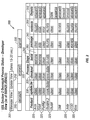
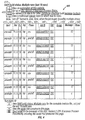
- FIGURES 5A and 5B are a runtests status screen for multiple runs for the SAM product and the runtests process step. While FIGURES 5A and 5B include all of the information contained in FIGURE 4, they also contain additional information such as the number of test cases which were run, the number of test cases which were passed, and a percentage which indicates the pass rate. This illustrates the optional use of additional types of encoded inbound anchors.
- FIGURE 6 is a build status screen provided in connection with a single run of a process step.
- FIGURE 6 shows the status screen which is displayed if the hyperlink under the job ID column in the first row of FIGURE 4 is selected (indicated by the label 455).
- FIGURE 6 again shows the eight key attributes and gives additional information about the specific single run. While every functional area of the SAM build run, job ID 000628.025201 was examined, the display only includes the three functional areas (FA) which had potential problems, namely "kc" (605), “tritest” (610), and “ug” (615), and adds a "totals” (620) row. Within each of these rows, the numbers of errors, warnings, and notes are displayed. These specific cells also contain hyperlinks which allow the user to access additional pertinent information. These hyperlinks connect the user to the beginnings of the statistics of these FA in the log files.
- FA functional areas
- specific products can contain one or more functional areas. For each of these functional areas, a separate build is performed which produces its own log file. While all of these functional areas could be listed in the table of FIGURE 6, in the preferred embodiment of the present invention only those functional areas which have errors, warnings or notes are displayed. By displaying only the functional areas which have errors, warnings or notes, the developer's attention is drawn to the functional areas which have potential problems.
- FIGURES 7A, 7B and 7C are a representation of a table of contents, file or page which have been automatically generated. Hyperlinks are included within the table of contents to allow the user to view additional details and associated files. Note that errors, warnings and notes are called out by subsidiary outbound hyperlinks.
- log files as an example, one skilled in the art would understand that the terms audit trails and transaction records could be used interchangeably with log files.
- the invention is equally applicable to other kinds of log files, audit trails, transaction records, including, for example files generated by applications (e.g. , compilers and databases) and operating systems (including for example network operating systems).
- log file(s) as used herein includes the original log file directly generated as a result of the build as well as copies of that file or other data generated as a result of parsing, editing, or otherwise incorporating other portions or derivatives of the log file into one or more log files.
- HTML Hyper-Text Markup Language
- XML eXtended Markup Language
- SGML Standard Generalized Markup Language
- nroff troff.
Landscapes
- Engineering & Computer Science (AREA)
- Theoretical Computer Science (AREA)
- General Engineering & Computer Science (AREA)
- Physics & Mathematics (AREA)
- General Physics & Mathematics (AREA)
- Quality & Reliability (AREA)
- Computer Hardware Design (AREA)
- Artificial Intelligence (AREA)
- Health & Medical Sciences (AREA)
- Audiology, Speech & Language Pathology (AREA)
- Computational Linguistics (AREA)
- General Health & Medical Sciences (AREA)
- Databases & Information Systems (AREA)
- Data Mining & Analysis (AREA)
- Information Retrieval, Db Structures And Fs Structures Therefor (AREA)
- Debugging And Monitoring (AREA)
Abstract
Description
<A name = "string">text</A>.
Examples of encoded inbound anchors include:
[</B></A>]<A name = "class-index"><B> error-text {new line}
For example:
<A name = "error-143"> <B> this is an error ...
Additionally, encoded anchor lines may need to include a specific format, i.e., must begin at the start of the line in
Claims (10)
- A method of automatically processing a log file 120 comprising the steps of:embedding 225 encoded inbound anchors within said log file to mark selected entries in said log file to create a marked up log file 100; andprocessing 135 said embedded encoded inbound anchors within said marked up log file.
- The method of claim 1 wherein the step of embedding 225 encoded inbound anchors within said log files results in HTML files.
- The method of claim 1 wherein the step of processing 135 said embedded encoded inbound anchors comprises the step of:
indexing said marked up log file using said encoded inbound anchors. - The method of claim 3 wherein the step of indexing 135 said marked up log file further comprises the steps of:
creating a table of contents which represents the overall organization of the log files in a directory and draws attention to said encoded inbound anchors. - The method of claim 1 wherein the step of processing 135 said embedded encoded inbound anchors comprises the step of:
counting said encoded inbound anchors to determine process metrics. - A computer program product recorded on computer readable media for the automatic processing of a log file 120 comprising the steps of:computer readable means 125 for embedding encoded inbound anchors 225 within said log file to mark selected entries in said log file to create a marked up log file; andcomputer readable means for processing 135 said embedded encoded inbound anchors within said marked up log file 130.
- The computer program product recorded on computer readable media of claim 6 wherein:
the computer readable means for processing 135 said embedded encoded inbound anchors includes computer readable means for indexing said marked up log file 130 using said encoded inbound anchors. - The computer program product recorded on computer readable media of claim 7 wherein:
the computer readable means for indexing 135 said marked up log file 130 includes computer readable means for creating a table of contents which represents the overall organization of the log files in a directory and draws attention to said encoded inbound anchors. - The computer program product recorded on computer readable media of claim 6 wherein:
the computer readable means for processing 135 said embedded encoded inbound anchors includes computer readable means for counting said encoded inbound anchors to determine process metrics. - The computer program product recorded on computer readable media of claim 9 wherein:
the computer readable means for processing 135 said embedded encoded inbound further includes computer readable means for indexing said marked up log file 130 using said encoded inbound anchors.
Applications Claiming Priority (2)
| Application Number | Priority Date | Filing Date | Title |
|---|---|---|---|
| US65244800A | 2000-08-31 | 2000-08-31 | |
| US652448 | 2000-08-31 |
Publications (2)
| Publication Number | Publication Date |
|---|---|
| EP1184789A2 true EP1184789A2 (en) | 2002-03-06 |
| EP1184789A3 EP1184789A3 (en) | 2004-07-21 |
Family
ID=24616869
Family Applications (1)
| Application Number | Title | Priority Date | Filing Date |
|---|---|---|---|
| EP01307180A Withdrawn EP1184789A3 (en) | 2000-08-31 | 2001-08-23 | Method for accessing data and processing metrics data using encoded inbound anchors and automatically generated markup language files |
Country Status (1)
| Country | Link |
|---|---|
| EP (1) | EP1184789A3 (en) |
Cited By (5)
| Publication number | Priority date | Publication date | Assignee | Title |
|---|---|---|---|---|
| CN102508778A (en) * | 2011-11-16 | 2012-06-20 | 山东浪潮齐鲁软件产业股份有限公司 | Method for detecting whether log is directly output without log output level judgment |
| CN103490936A (en) * | 2013-10-10 | 2014-01-01 | 曙光信息产业(北京)有限公司 | Copy synchronization method and apparatus in multi-copy system |
| CN107957937A (en) * | 2017-12-19 | 2018-04-24 | 郑州云海信息技术有限公司 | A kind of method and system of daily record output |
| CN108334442A (en) * | 2017-01-20 | 2018-07-27 | 武汉斗鱼网络科技有限公司 | A kind of test method and device of simulation search main broadcaster |
| CN117076161A (en) * | 2023-10-16 | 2023-11-17 | 湖南于一科技有限公司 | How to obtain and write data by selecting content in a box |
Family Cites Families (3)
| Publication number | Priority date | Publication date | Assignee | Title |
|---|---|---|---|---|
| US5752002A (en) * | 1995-06-12 | 1998-05-12 | Sand Microelectronics, Inc. | Method and apparatus for performance optimization of integrated circuit designs |
| US5892917A (en) * | 1995-09-27 | 1999-04-06 | Microsoft Corporation | System for log record and log expansion with inserted log records representing object request for specified object corresponding to cached object copies |
| US6006225A (en) * | 1998-06-15 | 1999-12-21 | Amazon.Com | Refining search queries by the suggestion of correlated terms from prior searches |
-
2001
- 2001-08-23 EP EP01307180A patent/EP1184789A3/en not_active Withdrawn
Cited By (7)
| Publication number | Priority date | Publication date | Assignee | Title |
|---|---|---|---|---|
| CN102508778A (en) * | 2011-11-16 | 2012-06-20 | 山东浪潮齐鲁软件产业股份有限公司 | Method for detecting whether log is directly output without log output level judgment |
| CN103490936A (en) * | 2013-10-10 | 2014-01-01 | 曙光信息产业(北京)有限公司 | Copy synchronization method and apparatus in multi-copy system |
| CN103490936B (en) * | 2013-10-10 | 2017-04-26 | 曙光信息产业(北京)有限公司 | Copy synchronization method and apparatus in multi-copy system |
| CN108334442A (en) * | 2017-01-20 | 2018-07-27 | 武汉斗鱼网络科技有限公司 | A kind of test method and device of simulation search main broadcaster |
| CN107957937A (en) * | 2017-12-19 | 2018-04-24 | 郑州云海信息技术有限公司 | A kind of method and system of daily record output |
| CN117076161A (en) * | 2023-10-16 | 2023-11-17 | 湖南于一科技有限公司 | How to obtain and write data by selecting content in a box |
| CN117076161B (en) * | 2023-10-16 | 2023-12-29 | 湖南于一科技有限公司 | How to obtain and write data by selecting content in a box |
Also Published As
| Publication number | Publication date |
|---|---|
| EP1184789A3 (en) | 2004-07-21 |
Similar Documents
| Publication | Publication Date | Title |
|---|---|---|
| Di Lucca et al. | WARE: A tool for the reverse engineering of web applications | |
| US7730013B2 (en) | System and method for searching dates efficiently in a collection of web documents | |
| US7003781B1 (en) | Method and apparatus for correlation of events in a distributed multi-system computing environment | |
| US6626953B2 (en) | System and method for retrieving software release information | |
| US6742163B1 (en) | Displaying multiple document abstracts in a single hyperlinked abstract, and their modified source documents | |
| US7069501B2 (en) | Structured document processing system and structured document processing method | |
| US7571431B2 (en) | Processing macro information and displaying via GUI in different tools | |
| US7380239B1 (en) | Method and mechanism for diagnosing computer applications using traces | |
| US7836346B1 (en) | Method and system for analyzing software test results | |
| US20030056192A1 (en) | Source code analysis system and method | |
| US6430571B1 (en) | Multi-frame output form that facilitates internet search and update in a hierarchical database | |
| US20030167423A1 (en) | Program product, method, and system for testing consistency of machine code files and source files | |
| US10127313B2 (en) | Method of retrieving attributes from at least two data sources | |
| GB2360609A (en) | Dynamically generating expanded user messages in a computer system | |
| Chen et al. | RIPPLES: tool for change in legacy software | |
| EP1743262A4 (en) | TECHNIQUES FOR MANAGING AND GENERATING WEB FORMS | |
| WO2011035944A1 (en) | Managing application state information by means of a uniform resource identifier (uri) | |
| EP1526448A1 (en) | Method and computer system for document authoring | |
| US6915487B2 (en) | Method, system, computer program product, and article of manufacture for construction of a computer application interface for consumption by a connector builder | |
| Abowd et al. | MORALE. Mission ORiented Architectural Legacy Evolution | |
| EP1184789A2 (en) | Method for accessing data and processing metrics data using encoded inbound anchors and automatically generated markup language files | |
| US5649180A (en) | Method for generating hierarchical specification information from software | |
| JP3914081B2 (en) | Access authority setting method and structured document management system | |
| Ricca et al. | Detecting anomaly and failure in web applications | |
| US7162483B2 (en) | Method and apparatus for searching multiple data element type files |
Legal Events
| Date | Code | Title | Description |
|---|---|---|---|
| PUAI | Public reference made under article 153(3) epc to a published international application that has entered the european phase |
Free format text: ORIGINAL CODE: 0009012 |
|
| AK | Designated contracting states |
Kind code of ref document: A2 Designated state(s): AT BE CH CY DE DK ES FI FR GB GR IE IT LI LU MC NL PT SE TR |
|
| AX | Request for extension of the european patent |
Free format text: AL;LT;LV;MK;RO;SI |
|
| PUAL | Search report despatched |
Free format text: ORIGINAL CODE: 0009013 |
|
| AK | Designated contracting states |
Kind code of ref document: A3 Designated state(s): AT BE CH CY DE DK ES FI FR GB GR IE IT LI LU MC NL PT SE TR |
|
| AX | Request for extension of the european patent |
Extension state: AL LT LV MK RO SI |
|
| 17P | Request for examination filed |
Effective date: 20050107 |
|
| AKX | Designation fees paid |
Designated state(s): DE FR GB |
|
| STAA | Information on the status of an ep patent application or granted ep patent |
Free format text: STATUS: THE APPLICATION IS DEEMED TO BE WITHDRAWN |
|
| 18D | Application deemed to be withdrawn |
Effective date: 20051230 |