EP1182585A2 - A method and system for cataloging images - Google Patents
A method and system for cataloging images Download PDFInfo
- Publication number
- EP1182585A2 EP1182585A2 EP01202975A EP01202975A EP1182585A2 EP 1182585 A2 EP1182585 A2 EP 1182585A2 EP 01202975 A EP01202975 A EP 01202975A EP 01202975 A EP01202975 A EP 01202975A EP 1182585 A2 EP1182585 A2 EP 1182585A2
- Authority
- EP
- European Patent Office
- Prior art keywords
- image
- images
- icon
- category
- computer
- Prior art date
- Legal status (The legal status is an assumption and is not a legal conclusion. Google has not performed a legal analysis and makes no representation as to the accuracy of the status listed.)
- Ceased
Links
Images







Classifications
-
- G—PHYSICS
- G06—COMPUTING OR CALCULATING; COUNTING
- G06F—ELECTRIC DIGITAL DATA PROCESSING
- G06F16/00—Information retrieval; Database structures therefor; File system structures therefor
- G06F16/50—Information retrieval; Database structures therefor; File system structures therefor of still image data
- G06F16/54—Browsing; Visualisation therefor
Definitions
- the present invention is directed to cataloging of digital images. More particularly, the software and system for cataloging digital images into an electronically stored collection or library.
- Photographs are taken for a variety of personal and business reasons. During the course of the year an individual may take numerous photographs of various events. During these events, quite often there is a variety of different individuals and items present in these photographs. In the prior art, when one desires to catalog these images in a particular order, they usually are left to placing these images manually into photograph albums. This is a very extensive, manual procedure requiring a significant amount of time. In addition, it is very limited with regard to the amount of information that can be associated with the image in a quick and easy manner. While some photo albums allow the writing and placing of text, the entering of this data is a very time consuming and arduous affair.
- Applicants have invented an efficient method and system for organizing digital images in a quick and efficient manner.
- the organized images can be easily retrieved and reorganized by a variety of criteria.
- a computer software product comprising a computer readable storage medium having a computer program which when loaded into a computer of an image forming device causes the computer to perform the following steps:
- a computer software product comprising a computer readable storage medium having a computer program which when loaded into a computer of an image forming device causes the computer to perform the following steps:
- a method for retrieving an image from a plurality of images that have been previously categorized comprising the steps of:
- a computer software product for automatically categorizing images comprising a computer readable storage medium having a computer program which when loaded into a computer of an image forming device causes the computer to perform the following steps:
- the system includes a computer 12 for processing data and information.
- the computer 12 also includes an appropriate processor and memory storage for the running of software programs and storing of digital data as is customarily done by computers.
- computer 12 is a personal computer having a display device 14 which in the particular embodiment is a CRT.
- the computer 12 also includes input devices 16 and 18 for entering of data into the computer 12 by the user.
- input device 16 is a keypad and input device 18 is a mouse.
- a scanner 20 is provided for scanning of hard copy images for obtaining digital files of images.
- the scanned images are digitized and forwarded to computer 12 as is well known in the art.
- Computer 12 is also provided with appropriate communication hardware and software, as is well known in the art, for allowing communication with third parties.
- the communication hardware and software allows communication to an internet service provider ISP 22 which in turn allows communication with the internet 24.
- the internet 24, as is well known, allows electronic communication with various other parties.
- the system 10 also includes a photoservice provider 26 capable of providing digital imaging goods and/or services. These goods and services may be requested by customers over the internet 24 or by any other means, for example, but not by way of limitation through the use of order envelopes containing image products having images thereon.
- the ordered goods and/or services may be provided to the customer over the internet 24 or by forwarding such goods and/or services directly to the customer through the mail, or other delivery system.
- a third party 28 may also be connected to internet 24 for communication with others that are connected to internet 24.
- the software program is designed such that when loaded onto a computer, it will cause the computer to perform the steps set forth in Figure 2.
- the first step 30 of software program allows the user to obtain digital images from any appropriate source.
- digital images may be obtained by scanning of images by the user, or from a digital device such as a digital camera, or from a stored digital data file on the computer 12.
- the images may be obtained from the third party 28 over a communication network such as the Internet 24.
- a roll of photographic film may have been sent to service provider 26 where the film would have been developed and digitally scanned so as to provide a digital record of the images contained thereon.
- the scanned digital images would then be forwarded to the user over the internet 24 and ISP 22 allowing access by the user at computer 12.
- the selected images are reviewed and categorized.
- the images at step 34 are used as desired.
- the categorized images would be sent to a data storage file, to a third party, a service provider for obtaining desired goods and/ or services, or possibly to a printer.
- FIG. 3A there is illustrated a series of computer display screens that illustrate the use of the computer software program of the present invention.
- a computer screen which illustrates one of the first screens viewed by the user when the program is activated.
- the user may obtain images by selecting item 1 in which case, by selecting this item, options will be provided for the user.
- the user may obtain images by selecting item 1 in which case, by selecting this item, options will be provided for the user.
- a third party source such as a service provider, friend, relative, or business associate, etc.
- Another option is to open an existing digital data file containing digital images.
- Figure 3B illustrates the first working screen 40 after the image or images that have been obtained and are ready for cataloging.
- the initial working screen 40 has a working window 41 in which the image or images to be cataloged will be displayed.
- the images will be sequentially displayed in window 41 until the user is done cataloging the selected images.
- the first image 43 is illustrated in window 41.
- the working screen 39 includes at least one selection category for categorizing of images. It is to be understood that any desired number of selection categories may be provided by the software program or created by the user.
- selection category 40 is directed to "Who", meaning who are the individuals in the image 44 that are to be identified with the image.
- selection category 40 there is provided a plurality of the image icons 50, 52, 54, and 56 for allowing the user to quickly and easily categorize the image 44.
- the icons 50, 52, 54, 56 are individuals that are in some way known to the user.
- icon 50 identifies individual name "Dan”
- icon 52 identified the individual “Sally”
- icon 54 identifies "Mom”
- icon 56 identifies "Dad”.
- the various icons can be used to identify anyone or subject desired by the user. As discussed later herein, these individual icons may be personalized in accordance with the wishes of the user.
- each of the icons can represent a name, a relationship, or any other desired reference.
- the icons 50 - 56 each refer to individuals. However, these icons could have also referred to groups of individuals. For example, family, choir, co-workers, etc.
- the icons illustrated in selection category 40 are all personalized according to the user and provide quick visual identification of the category.
- the icons are actually images of the individual identified as “Dan”, “Sally”, “Mom”, or “Dad”.
- the user would take an appropriate selection device, for example, the use of a mouse 18 or keyboard 16 whereby a selection arrow will be placed over the two appropriate icons and selected.
- display window 50 displays the information that is to be associated with the image 43.
- both text and visual icons with be associated with the image 43.
- the individuals have been identified as "Joanne” and "Noah”. This information (meta data) is attached to the image file which can be used for searching and/or displaying of information when the images are later searched and/or displayed.
- An add button 49 is provided in association with selection category 40 so that new icons and/or text identifiers may be provided for selection by the user. For example, during viewing of an image in window 41, a new individual may be viewed and the user wishes to associate this new individual with this image and possible other images. By selecting the add button 49, an arrow should show up on the image that would allow the user to identify an area of the image, for example, the portion of the image where this new individual is located. In Fig. 3C, the selected area is indicated by dash line 57. Then the user can select that this area be created as a new selection icon for selection category 40. Alternatively or in addition thereto, new text identifier by itself or in conjunction with the icon could be created. The new icon or text identifier can then be used in categorizing images provided in window 41 in the same manner as the other icons.
- add button 49 could initiate a dialog box wherein a user could specify a specific location or universal resource locator (URL) on the internet 24 of a third party who provides pre-constructed icons with associated text identifiers for downloading into the software. These icons may be provided for a fee or they may be provided for free if the user provides some information.
- the downloaded icons are automatically assigned to the proper selection category or if appropriate, new categories are automatically created to contain the downloaded icons.
- the "What" selection category 42 is selected by the user.
- Selection category 42 has various icons which identify particular events and also a corresponding list 59 set forth. Any one of the icons 58, 60, 62, 64 or selection items 63, 65, and 67 may be selected.
- selection box 40 there is the ability to add additional information by the add button 70 which operates in the same manner as button 49 previously discussed. Once the appropriate selections have been made, the information associated with the selected icons or text will be displayed in display window 80.
- the next selection category 44 in the particular embodiment illustrated is the "When".
- the "When" category comprises a category wherein a date may be entered.
- the date may be the date of capture of the image or the date when the user is using the program.
- the date of manipulation of the image will be automatically entered if there is no previous date supplied.
- the date may be provided with the original image.
- the APS photographic system which uses a film strip having a magnetic layer upon which information can be provided by the camera that captures the image.
- Various types of information can be added by the camera that can used later in the photofinishing process. An example of such information is the date.
- This information can be maintained with the image and when the image is digitally scanned by a service provider, the date recorded on the film can be associated with the image.
- the service provider may download the image to the user in which case the date downloaded can be imported automatically into the program used by the user. It is to be understood that any other pertinent data may be added automatically to the cataloging program. For example, but not way of limitation, additional data may be provided on the scanned film, provided by way of a digital camera, or even by a third party source such as the photofinisher.
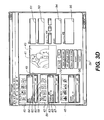
- the next selection category 46 "Where" is illustrated.
- icons, 82, 84, 86, and 88 which can be selected for association with the image in window 42.
- a selection window having other information such as personalized places can be added.
- the icons 82, 84, 86, and 88 respectively refer to images or places directly associated to the consumer.
- the first icon may represent a work location
- the icon 84 can represent home
- the third icon can represent a particular place or theme park that was visited
- the last icon 88 could represent a relative's place.
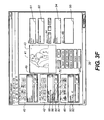
- the last selection category 48 is "Why". Referring to Figure 3G, there is illustrated the reason why the people were gathered. In the particular embodiment illustrated, this is "Ma's and Pa's" 50 th anniversary party. This information in the particular embodiment was manually entered and is illustrated in display window 94. However, it is desired that appropriate icons could be personalized and added for selection thereof.
- Figure 3H illustrates the screen whereby all the information will be kept as entered or revised and is shown by display screen 97.
- the data is retained by depressing the enter key on the keyboard 16 or an equivalent button 101 provided on the screen.
- a retain button 98 is provided so that the user can repeat the same selections made for the previous image for the image currently being displayed. If only some of the categories are to be the same for the next image, the retain button 98 can be selected and then editing of the desired category may be accomplished relatively quick and easy.
- the icons used for selection categories may be icons originally provided with the software program, provided by a third party, and/or as illustrated above the icon can be created and personalized by the user.
- the selection categories may also be originally provided by the software program, provided by a third party and/or created by the user. This allows the user to be able to use the program as initially provided or personalize the software program with the desired categories and icons specifically suited to meet the needs of the user. For example, the user would initially review a plurality of selection categories and image icons and select the desired categories and icon for use with the program. Additionally, during this initial set-up, personalized categories and/or icons may be added by the user as desired. Once the computer software program has been set-up, the categorization of images by the user can proceed.
- the present invention also allows the user to modify the selection categories and/or icons at any time by use of the add button 49, 70, or 96 as previously discussed.
- New categories and/or icons may be automatically provided by third parties or by other devices. For example, if an individual is using a camera at a theme park, meta data may be provided to the camera (digital or film-based) identifying a category and/or icon which would be read by a photoservice provider, the category and/or icon in turn would be provided with the digital image file. For example, a new icon providing an image of the theme park visited would be automatically associated with each of the images captured at the theme park. If no category or icon is present in the software that reads the icon and/or category, a new category and/or icon will be automatically created by the software for use with the current image and any further images used with the software.
- user would obtain the desired image or images for categorizing.
- the images as previously discussed may be obtained from any source.
- the images may be obtained from a roll of film that has been developed and scanned so as to provide a digital record of the images which has been forwarded to the user electronically or by hard copy devices such as a computer disc, flash cards, etc.
- the images may be simply obtained from a computer file that has been stored or received. Once the image or images have been retrieved, then the user would go through each of the selection categories for the desired images and associate the desired icons with the images.
- the user may also use the software to search and/or re-categorize digital images that have already been categorized.
- the user would identify a group or groups of images that have been previously categorized.
- the selection icons and/or text identifiers for the categories would be used as means for identifying the group and/ or type of images desired. For example, if the user wanted all of the images associated with Dad and birthday the appropriate icons would be selected and the FIND feature would be selected. This would result in the images having these associated data being gathered.
- the user can then use the grouped images as desired. When the user has finished, the image can then be returned from where they were obtained.
- the images may be used to create a new group or reorganize existing groups.
- the user may categorize and reorganize any or all the images as desired.
- the grouping of the images being limited only by the icons and categories available to the user. As previously discussed the categories and icons are selected as desired by user.
- the user may accept the icons as originally provided or select a customized feature whereby personalized icons can be added. This can be done at any time.
- the personal icons could be created initially upon receipt of the software and installed into the computer or they can be created as images are viewed. It is desirable to have as many icons initially provided so that all the images will have consistent icons for later sorting as discussed later herein. However, as new images are obtained, there is often a need to provide new and additional icons.
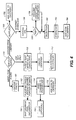
- the image icon may be added during viewing of the images for categorizing.
- a photo is selected because the user may realize a new icon is necessary.
- step 102 after selection of the appropriate button for the adding of a new icon, a portion 200 of the image is selected for use as an icon.
- portion 200 of the image may be optionally or automatically saved by the program in step 166 or 168 further retaining maximum pixel resolution for use in searching and automatically cataloging images that have not been cataloged, the specifics of which will be discussed later.
- a square representing the icon to be created, is placed around the portion 200 of an image as desired by the user.
- the selected image is properly sized for use as an icon.
- the icon is added to the appropriate selection menu.
- Text information may be associated with the icon.
- Step 108 provides for the typing of text.
- a new identifier is provided and at step 112, it is added to the list of identifiers. These identifiers may of course be associated with a particular icon. Alternatively, an icon from a library supplied with the program or by a third party may be added as illustrated by steps 150 - 168.
- step 150 the user may decide to add an icon supplied by the program as shown in step 152 which is directly added to a category or he may choose to connect to a third party to download an icon from the third party library.
- the user chooses the third party download in step 154 by supplying a universal resource locator (URL) to an internet browser such as the Internet Explorer browser produced by Microsoft Inc.
- the browser facilitates the network connection to the third party library supplier via the internet 24.
- Some libraries might cause the user to incur a fee and such information to satisfy payment is supplied in step 158.
- the choice in step 156 leads to an icon selection step 160 followed by step 162 for downloading the icon using standard internet file transfer protocol (ftp).
- ftp standard internet file transfer protocol
- the downloaded icon is then added to a category in step 164.
- a modified display screen of the software made in accordance with the present invention like numerals indicating like items and operations as previously discussed.
- a plurality of images 120-139 are provided within window 42.
- individual images, selected groups of images, or all of the images may be categorized at the same time. For example, all of the images may be categorized as a group. Alternatively, groups of images may be categorized.
- images 122, 123, 124, 129 and 139 are selected for categorization. Once selected, the appropriated icons of the desired categories are selected and associated with the selected images. If desired, the images may be selected individually for categorization.
- This system is particularly useful when receiving a plurality of images that were obtained from a single source, for example, a roll of photographic film.
- images from a single source will have a number of common themes among the images. This set-up allows for the quick grouping and categorization of the images.
- images can be viewed as a group allowing easier selection and/or reorganization.
- the images are forwarded to a device for storage and use.
- the user may have a variety of options, for example, the printing, displaying and/or transmitting of the images with or without all of the associated images.
- One of the benefits of the present invention is that since all of the images have associated data in a variety of different fields, the reclassification and reorganization of these images can be done in a quick and easy manner by appropriately building a search request for reconstructing a recalling of images. In particular, should someone want all of the pictures of "Grandpa" from a time period to a time period taken on birthdays, this could easily be retrieved by entering of the appropriate information in the appropriate selection categories.
- any desired combination of groupings may be selected by the user for recategorizing of the images which can be used in a variety of different ways.
- the reorganized images may be sent and shared with other third parties over the internet or forwarded to an image service provider for production of image products to be delivered as a gift to a third party.
- associated photo images may be provided as a photo album or album pages which can be sent to a third party.
- images that were taken over years of sporting events may be sent to a grandparent for their use and review in any desired manner.
- the grouping of images can also be very useful in ordering of certain goods and/or services. For example, if album pages are being ordered, the grouping of the images by desired categories could be a first step in placing the image in the desired grouping and order.
- the vast library of images can now be reaccessed and reorganized as desired by the user or any recipient who has access to the images.
- the software used for organizing and retrieving the images could also be forwarded with the images to a third party so that the third party may be able to use these images in the same manner as the user that forwarded the images.
- the software program is illustrated as being run on a computer that the user has direct access.
- the present invention is not so limited.
- the program may reside at a remote location, such as a photoservice provider that can be accessed over communication links, such as the internet.
- the software program and maybe even the image to be categorized may be stored.
- the invention has shown the creation and use of the image icons to assist the user in the cataloging of images.
- the maximum pixel resolution of the portion 200 of the image to be used for an icon has been saved for use in searching and automatically cataloging images that have not been cataloged.
- the actual image information contained in the pixels comprising portion 200 of the image or by an analysis of this information resulting in certain characteristics of this information is used by the program to search non-cataloged images for similar or nearly matching image information contained in the pixels of the non-cataloged images.
- the program Upon finding such images, the program causes the meta data associated with the icon created in step 106 of Fig. 4 to be appended to the newly found images.
- An example would be that an icon of the face of an individual would be created.
- the stored maximum pixel resolution correlated to the created icon would then be analyzed to determine certain characteristics. These characteristics would then be used to review non-cataloged images and when images having these characteristics are found, then the icon correlated to that face of that individual would be associated therewith.
- the pixels of the icon are analyzed for outline patterns.
- the images to be reviewed are analyzed to see if these patterns exist. When a match is found this is an indication that the image of the icon is present in the reviewed image.
- non-categorized images can be quickly and easily cataloged with little or no review by the user.
Landscapes
- Engineering & Computer Science (AREA)
- Theoretical Computer Science (AREA)
- Data Mining & Analysis (AREA)
- Databases & Information Systems (AREA)
- Physics & Mathematics (AREA)
- General Engineering & Computer Science (AREA)
- General Physics & Mathematics (AREA)
- User Interface Of Digital Computer (AREA)
- Information Retrieval, Db Structures And Fs Structures Therefor (AREA)
- Processing Or Creating Images (AREA)
- Two-Way Televisions, Distribution Of Moving Picture Or The Like (AREA)
Abstract
Description
Claims (20)
- A computer software product comprising a computer readable storage medium having a computer program which when loaded into a computer of an image forming device causes the computer to perform the following steps:displaying at least one image for categorization;providing at least one selection category having at least one image association icon that can be associated with the image to be reviewed.
- A method for organizing a plurality of images comprising the steps of:displaying at least of said plurality of images;categorizing said at least one of said plurality of images using an image icon for at least one selection category.
- The invention according to claim 1 or 2, wherein said at least one selection category comprises five selection categories.
- The invention according to claim 1 or 2, wherein said at least one image icon comprises a plurality of icons.
- The invention according to claim 1 or 2, wherein said at least one icon is associated with a corresponding text.
- The invention according to claim 1 or 2, further comprising the step of:providing an additional selection feature for adding customized icons.
- The invention according to claim 6, wherein said icon is obtained using the image being categorized.
- The invention according to claim 1 or 2, wherein said at least one selection category comprises at least one of the following:Who;What;Where;When;Why.
- The invention according to claim 1 or 2, wherein a working screen having a window for displaying of said at least one digital image and at least one section area for illustrating said at least one image association icon.
- The invention according to claim 1 or 2, wherein said software product further provides the steps of:providing for the addition of a new image icon for use in categorizing.
- The invention according to claim 10, wherein said new image icon is obtained from said at least one image for categorization.
- A computer software product comprising a computer readable storage medium having a computer program which when loaded into a computer of an image forming device causes the computer to perform the following steps:retrieving at least one image from a plurality of images that have been previously categorized;providing at least one selection category having at least one image association icon that can be associated with the image to be reviewed.
- A method for retrieving an image from a plurality of images that have been previously categorized, comprising the steps of:retrieving at least one image from a plurality of images that have been previously categorized;providing at least one selection category having at least one image association icon that can be associated with the image to be reviewed.
- A method for automatically organizing a plurality of images comprising the steps of:providing at least on image icon associated with a category,using predetermined characteristics of said icon for use in identifying non-categorized images for association with said category.
- A method according to claim 14, wherein said predetermined characteristics comprise analyzing the pixel content of said image icon.
- A computer software product for automatically categorizing images comprising a computer readable storage medium having a computer program which when loaded into a computer of an image forming device causes the computer to perform the following steps:providing at least on image icon associated with a category,using predetermined characteristics of said icon for use in identifying non-categorized images for association with said category.
- A method for personalizing an image computer software program, comprising the steps of:a. providing a categorization/retrieval program that uses categories and image icons for use in categorizing and/or retrieving digital images;b. selecting from a plurality of stored categories at least one selection category; andc. selecting from a plurality of stored image icons at least one image icon for use with said at least one selection category.
- A method according to claim 17, further comprising the step of:adding a personalized selection category as determined by the user.
- A method according to claim 17, further comprising the step of:adding a personalized image icon for use with said at least one selection category or said personalized category.
- A method according to claim 17, further comprising the step of automatically adding a new category or icon to said program in response to information provided with an image that is used by said program.
Applications Claiming Priority (2)
| Application Number | Priority Date | Filing Date | Title |
|---|---|---|---|
| US640938 | 2000-08-17 | ||
| US09/640,938 US6810149B1 (en) | 2000-08-17 | 2000-08-17 | Method and system for cataloging images |
Publications (2)
| Publication Number | Publication Date |
|---|---|
| EP1182585A2 true EP1182585A2 (en) | 2002-02-27 |
| EP1182585A3 EP1182585A3 (en) | 2004-06-09 |
Family
ID=24570285
Family Applications (1)
| Application Number | Title | Priority Date | Filing Date |
|---|---|---|---|
| EP01202975A Ceased EP1182585A3 (en) | 2000-08-17 | 2001-08-06 | A method and system for cataloging images |
Country Status (3)
| Country | Link |
|---|---|
| US (1) | US6810149B1 (en) |
| EP (1) | EP1182585A3 (en) |
| JP (1) | JP2002140343A (en) |
Cited By (14)
| Publication number | Priority date | Publication date | Assignee | Title |
|---|---|---|---|---|
| GB2381900A (en) * | 2001-08-29 | 2003-05-14 | Hewlett Packard Co | Acquisition and organisation of digital images |
| GB2390791A (en) * | 2002-07-08 | 2004-01-14 | Canon Europa Nv | Editing a gallery of digital images |
| EP1566752A3 (en) * | 2004-02-17 | 2006-03-08 | Microsoft Corporation | Rapid visual sorting of digital files and data |
| US7109848B2 (en) | 2003-11-17 | 2006-09-19 | Nokia Corporation | Applications and methods for providing a reminder or an alert to a digital media capture device |
| WO2006064207A3 (en) * | 2004-12-16 | 2006-12-21 | Renovo Ltd | Information collection system |
| WO2008014406A1 (en) * | 2006-07-28 | 2008-01-31 | Blue Lava Technologies | Method and system for organizing multimedia content |
| WO2009074930A1 (en) * | 2007-12-13 | 2009-06-18 | Koninklijke Philips Electronics N.V. | A method of retrieving data from a medical image data set |
| WO2010035249A1 (en) * | 2008-09-24 | 2010-04-01 | France Telecom | Content classification utilizing a reduced description palette to simplify content analysis |
| US7774718B2 (en) | 2003-12-17 | 2010-08-10 | Nokia Corporation | Time handle in a media diary application for accessing media files |
| US8010579B2 (en) | 2003-11-17 | 2011-08-30 | Nokia Corporation | Bookmarking and annotating in a media diary application |
| WO2011113829A1 (en) * | 2010-03-16 | 2011-09-22 | Cogniva Europe | Multi-dimensional methods for registering and searching for documents |
| US8990255B2 (en) | 2003-11-17 | 2015-03-24 | Nokia Corporation | Time bar navigation in a media diary application |
| CN104981837A (en) * | 2013-03-19 | 2015-10-14 | 富士胶片株式会社 | Electronic album creation device and electronic album production method |
| WO2018007982A1 (en) * | 2016-07-07 | 2018-01-11 | Private Universe Sa | A method and apparatus for cataloguing an electronic document |
Families Citing this family (72)
| Publication number | Priority date | Publication date | Assignee | Title |
|---|---|---|---|---|
| JP2002185896A (en) * | 2000-12-13 | 2002-06-28 | Fujitsu Ltd | Digital camera data processing service method and system |
| US7840634B2 (en) * | 2001-06-26 | 2010-11-23 | Eastman Kodak Company | System and method for managing images over a communication network |
| US20030131002A1 (en) * | 2002-01-08 | 2003-07-10 | Gennetten K. Douglas | Method and apparatus for identifying a digital image and for accessing the digital image over a network |
| JP2003256461A (en) * | 2002-03-04 | 2003-09-12 | Fuji Photo Film Co Ltd | Method and device for retrieving image, and program |
| EP1367505A1 (en) * | 2002-05-30 | 2003-12-03 | Thomson Licensing S.A. | Method and device for creating semantic browsing options |
| JP2004013505A (en) * | 2002-06-06 | 2004-01-15 | Konica Minolta Holdings Inc | Image processing device and method, image processing program, and recording medium with the program recorded thereon |
| US20030227553A1 (en) * | 2002-06-11 | 2003-12-11 | Steve Mattis | Systems and methods for image indexing |
| US20040006577A1 (en) * | 2002-07-02 | 2004-01-08 | Malcolm Rix | Method for managing media files |
| JP2004145555A (en) * | 2002-10-23 | 2004-05-20 | Olympus Corp | Data base registration system and data base registration method |
| FR2852422B1 (en) * | 2003-03-14 | 2005-05-06 | Eastman Kodak Co | METHOD FOR AUTOMATICALLY IDENTIFYING ENTITIES IN A DIGITAL IMAGE |
| US7846023B2 (en) * | 2003-03-27 | 2010-12-07 | Microsoft Corporation | Application-centric user interface techniques |
| JP4315344B2 (en) * | 2003-11-27 | 2009-08-19 | 富士フイルム株式会社 | Image editing apparatus and method, and program |
| US8007847B2 (en) | 2004-01-13 | 2011-08-30 | Eytan Biderman | Feeding formula appliance |
| US7457467B2 (en) * | 2004-01-30 | 2008-11-25 | Xerox Corporation | Method and apparatus for automatically combining a digital image with text data |
| US20060002255A1 (en) * | 2004-07-01 | 2006-01-05 | Yung-Chiuan Weng | Optimized audio / video recording and playing system and method |
| JP2008527563A (en) * | 2005-01-16 | 2008-07-24 | ズランゴー リミテッド | Iconic communication |
| WO2006075335A2 (en) * | 2005-01-16 | 2006-07-20 | Zlango Ltd. | Communications network system and methods for using same |
| US8744350B2 (en) * | 2005-01-18 | 2014-06-03 | Zlango Ltd. | Activating an application |
| US7831913B2 (en) * | 2005-07-29 | 2010-11-09 | Microsoft Corporation | Selection-based item tagging |
| US7853898B2 (en) * | 2005-11-17 | 2010-12-14 | International Business Machines Corporation | Method and apparatus for managing image display in a digital image display apparatus |
| US20070136095A1 (en) * | 2005-12-09 | 2007-06-14 | Arizona Board Of Regents On Behalf Of The University Of Arizona | Icon Queues for Workflow Management |
| EP1982450A2 (en) * | 2006-01-16 | 2008-10-22 | Zlango Ltd. | Communications network system and methods for using same |
| EP1977312A2 (en) * | 2006-01-16 | 2008-10-08 | Zlango Ltd. | Iconic communication |
| US8259995B1 (en) | 2006-01-26 | 2012-09-04 | Adobe Systems Incorporated | Designating a tag icon |
| US7978936B1 (en) * | 2006-01-26 | 2011-07-12 | Adobe Systems Incorporated | Indicating a correspondence between an image and an object |
| US8078618B2 (en) * | 2006-01-30 | 2011-12-13 | Eastman Kodak Company | Automatic multimode system for organizing and retrieving content data files |
| US20080086504A1 (en) * | 2006-10-05 | 2008-04-10 | Joseph Sanders | Virtual interview system |
| US20090063514A1 (en) * | 2007-08-30 | 2009-03-05 | International Business Machines Corporation | System and method for generating files having categorization architectures for digital images |
| US7836093B2 (en) * | 2007-12-11 | 2010-11-16 | Eastman Kodak Company | Image record trend identification for user profiles |
| US20100269064A1 (en) * | 2007-12-13 | 2010-10-21 | Koninklijke Philips Electronics N.V. | Navigation in a series of images |
| JP5194776B2 (en) * | 2007-12-21 | 2013-05-08 | 株式会社リコー | Information display system, information display method and program |
| US9721148B2 (en) | 2007-12-31 | 2017-08-01 | Applied Recognition Inc. | Face detection and recognition |
| CN102016882B (en) * | 2007-12-31 | 2015-05-27 | 应用识别公司 | Method, system and computer program for identifying and sharing digital images using facial signatures |
| CN103475837B (en) | 2008-05-19 | 2017-06-23 | 日立麦克赛尔株式会社 | Record reproducing device and method |
| US20090297045A1 (en) * | 2008-05-29 | 2009-12-03 | Poetker Robert B | Evaluating subject interests from digital image records |
| JP2010086221A (en) * | 2008-09-30 | 2010-04-15 | Fujifilm Corp | Image editing method and device, and computer readable recording medium storing program for implementing the method |
| US8416997B2 (en) * | 2010-01-27 | 2013-04-09 | Apple Inc. | Method of person identification using social connections |
| US20110243397A1 (en) | 2010-03-30 | 2011-10-06 | Christopher Watkins | Searching digital image collections using face recognition |
| WO2012050832A1 (en) | 2010-09-28 | 2012-04-19 | Google Inc. | Systems and methods utilizing efficient video compression techniques for providing static image data |
| US10121133B2 (en) | 2010-10-13 | 2018-11-06 | Walmart Apollo, Llc | Method for self-checkout with a mobile device |
| EP2601880B1 (en) * | 2011-03-30 | 2014-09-03 | Olympus Medical Systems Corp. | Image management apparatus, operating method of the same, image management program and capsule endoscope system |
| US8548207B2 (en) | 2011-08-15 | 2013-10-01 | Daon Holdings Limited | Method of host-directed illumination and system for conducting host-directed illumination |
| US9202105B1 (en) | 2012-01-13 | 2015-12-01 | Amazon Technologies, Inc. | Image analysis for user authentication |
| US9094681B1 (en) | 2012-02-28 | 2015-07-28 | Google Inc. | Adaptive segmentation |
| US10068276B2 (en) | 2013-12-05 | 2018-09-04 | Walmart Apollo, Llc | System and method for coupling a mobile device and point of sale device to transmit mobile shopping cart and provide shopping recommendations |
| JP2014219993A (en) * | 2014-07-01 | 2014-11-20 | セイコーエプソン株式会社 | Image display control device, image display control method, and computer program |
| US12084824B2 (en) | 2015-03-06 | 2024-09-10 | Walmart Apollo, Llc | Shopping facility assistance systems, devices and methods |
| WO2016142794A1 (en) | 2015-03-06 | 2016-09-15 | Wal-Mart Stores, Inc | Item monitoring system and method |
| US20160260142A1 (en) | 2015-03-06 | 2016-09-08 | Wal-Mart Stores, Inc. | Shopping facility assistance systems, devices and methods to support requesting in-person assistance |
| US20180099846A1 (en) | 2015-03-06 | 2018-04-12 | Wal-Mart Stores, Inc. | Method and apparatus for transporting a plurality of stacked motorized transport units |
| US12366043B2 (en) | 2015-03-06 | 2025-07-22 | Walmart Apollo, Llc | Overriding control of motorized transport unit systems, devices and methods |
| CA2928381A1 (en) | 2015-05-28 | 2016-11-28 | Wal-Mart Stores, Inc. | System for inventory management |
| CA2951899A1 (en) | 2015-12-22 | 2017-06-22 | Wal-Mart Stores, Inc. | Shopping cart bagging station and method of forming the same |
| US10486725B2 (en) | 2015-12-22 | 2019-11-26 | Walmart Apollo, Llc | Shopping cart bagging station and method of forming the same |
| US10336358B2 (en) | 2015-12-22 | 2019-07-02 | Walmart Apollo, Llc | Shopping cart bagging station and method of forming the same |
| US10399587B2 (en) | 2015-12-22 | 2019-09-03 | Walmart Apollo, Llc | Shopping cart bagging station and method of forming the same |
| US10251024B2 (en) | 2016-03-23 | 2019-04-02 | Walmart Apollo, Llc | System for tracking physical objects |
| JP2017177809A (en) * | 2016-03-24 | 2017-10-05 | カシオ計算機株式会社 | Printer, method of selecting printing image, and program of selecting printing image |
| CA2961938A1 (en) | 2016-04-01 | 2017-10-01 | Wal-Mart Stores, Inc. | Systems and methods for moving pallets via unmanned motorized unit-guided forklifts |
| USD825951S1 (en) | 2016-06-16 | 2018-08-21 | Walmart Apollo, Llc | Retail store fixture |
| US10040468B2 (en) | 2016-07-07 | 2018-08-07 | Wal-Mart Stores, Inc. | Shopping cart basket |
| US10058197B2 (en) | 2016-07-26 | 2018-08-28 | Walmart Apollo, Llc | Bag dispenser |
| US10513282B2 (en) | 2016-08-19 | 2019-12-24 | Walmart Apollo, Llc | Shopping cart bagging station and method of forming the same |
| US10040469B2 (en) | 2016-09-30 | 2018-08-07 | Wal-Mart Stores, Inc. | Shopping cart bagging station and method of forming the same |
| US10422474B2 (en) | 2016-12-30 | 2019-09-24 | Walmart Apollo, Llc | Self-locking clip mechanism and mobile device holder incorporating the same |
| WO2018227135A1 (en) | 2017-06-09 | 2018-12-13 | Walmart Apollo, Llc | Systems and methods for an augmented display system |
| WO2019023431A1 (en) | 2017-07-27 | 2019-01-31 | Walmart Apollo, Llc | Systems and methods for data transfer distributed environments |
| US10173708B1 (en) | 2017-08-17 | 2019-01-08 | Walmart Apollo, Llc | Shopping cart bagging station |
| US10507858B2 (en) | 2017-08-25 | 2019-12-17 | Walmart Apollo, Llc | Shopping cart bagging station |
| US10750886B2 (en) | 2017-10-27 | 2020-08-25 | Walmart Apollo, Llc | Systems and methods of objectively confirming customer self-scanning of products in a retail store |
| US20190244214A1 (en) | 2018-02-08 | 2019-08-08 | Walmart Apollo, Llc | Customized item self-returns system |
| US10507859B2 (en) | 2018-02-09 | 2019-12-17 | Walmart Apollo, Llc | Shopping cart bagging station |
Family Cites Families (24)
| Publication number | Priority date | Publication date | Assignee | Title |
|---|---|---|---|---|
| FR2662009B1 (en) | 1990-05-09 | 1996-03-08 | Apple Computer | MULTIPLE FACES MANOPULABLE ICON FOR DISPLAY ON COMPUTER. |
| US5202828A (en) | 1991-05-15 | 1993-04-13 | Apple Computer, Inc. | User interface system having programmable user interface elements |
| US5323314A (en) | 1991-12-31 | 1994-06-21 | International Business Machines Corporation | Method and system for graphic representation of meeting parameters in a data processing system |
| US5555354A (en) | 1993-03-23 | 1996-09-10 | Silicon Graphics Inc. | Method and apparatus for navigation within three-dimensional information landscape |
| US5544302A (en) | 1993-06-03 | 1996-08-06 | Taligent, Inc. | Object-oriented framework for creating and using container objects with built-in properties |
| US5367624A (en) | 1993-06-11 | 1994-11-22 | Consilium, Inc. | Interface for controlling transactions in a manufacturing execution system |
| US5812995A (en) * | 1993-10-14 | 1998-09-22 | Matsushita Electric Industrial Co., Ltd. | Electronic document filing system for registering and retrieving a plurality of documents |
| KR100348915B1 (en) * | 1994-05-12 | 2002-12-26 | 마이크로소프트 코포레이션 | TV program selection method and system |
| US5664128A (en) | 1995-02-23 | 1997-09-02 | Apple Computer, Inc. | Object storage apparatus for use with data sets in computer applications |
| US5943049A (en) * | 1995-04-27 | 1999-08-24 | Casio Computer Co., Ltd. | Image processor for displayed message, balloon, and character's face |
| US5689286A (en) * | 1995-05-23 | 1997-11-18 | Ast Research, Inc. | Component-based icon construction and customization system |
| US6466241B1 (en) * | 1995-07-17 | 2002-10-15 | Gateway, Inc. | Method and apparatus for managing program activation through use of a favorite program button menu |
| US5668964A (en) | 1995-08-24 | 1997-09-16 | Wall Data Incorporated | Graphical user interface for creating a new notebook with a dragged page |
| US5751287A (en) | 1995-11-06 | 1998-05-12 | Documagix, Inc. | System for organizing document icons with suggestions, folders, drawers, and cabinets |
| US5970471A (en) * | 1996-03-22 | 1999-10-19 | Charles E. Hill & Associates, Inc. | Virtual catalog and product presentation method and apparatus |
| US6519584B1 (en) * | 1996-06-26 | 2003-02-11 | Sun Microsystem, Inc. | Dynamic display advertising |
| US6622148B1 (en) * | 1996-10-23 | 2003-09-16 | Viacom International Inc. | Interactive video title selection system and method |
| US5963203A (en) | 1997-07-03 | 1999-10-05 | Obvious Technology, Inc. | Interactive video icon with designated viewing position |
| JPH10275150A (en) | 1997-03-28 | 1998-10-13 | Toa Medical Electronics Co Ltd | Image filing system |
| EP0875845A3 (en) * | 1997-04-30 | 2000-06-07 | Sony Corporation | Browser apparatus, address registering method, browser system, and recording medium |
| JP3545912B2 (en) * | 1997-07-11 | 2004-07-21 | シャープ株式会社 | Digital image forming device |
| US5953007A (en) | 1997-09-15 | 1999-09-14 | International Business Machines Corporation | System, method, and program for using animations to show page layout combinations in a user interface for submitting print jobs |
| US6028603A (en) | 1997-10-24 | 2000-02-22 | Pictra, Inc. | Methods and apparatuses for presenting a collection of digital media in a media container |
| JP4131300B2 (en) * | 1998-06-26 | 2008-08-13 | ソニー株式会社 | Edit list creation device |
-
2000
- 2000-08-17 US US09/640,938 patent/US6810149B1/en not_active Expired - Lifetime
-
2001
- 2001-08-06 EP EP01202975A patent/EP1182585A3/en not_active Ceased
- 2001-08-16 JP JP2001247312A patent/JP2002140343A/en not_active Withdrawn
Cited By (25)
| Publication number | Priority date | Publication date | Assignee | Title |
|---|---|---|---|---|
| US7499200B2 (en) | 2001-08-29 | 2009-03-03 | Hewlett-Packard Development Company, L.P. | Acquisition and organization of digital images |
| GB2381900B (en) * | 2001-08-29 | 2005-04-27 | Hewlett Packard Co | Acquisition and organization of digital images |
| GB2381900A (en) * | 2001-08-29 | 2003-05-14 | Hewlett Packard Co | Acquisition and organisation of digital images |
| GB2390791A (en) * | 2002-07-08 | 2004-01-14 | Canon Europa Nv | Editing a gallery of digital images |
| GB2390791B (en) * | 2002-07-08 | 2005-09-28 | Canon Europa Nv | Method and system for editing a digital gallery of digital image on a user terminal |
| US8990255B2 (en) | 2003-11-17 | 2015-03-24 | Nokia Corporation | Time bar navigation in a media diary application |
| US7109848B2 (en) | 2003-11-17 | 2006-09-19 | Nokia Corporation | Applications and methods for providing a reminder or an alert to a digital media capture device |
| US8010579B2 (en) | 2003-11-17 | 2011-08-30 | Nokia Corporation | Bookmarking and annotating in a media diary application |
| US7774718B2 (en) | 2003-12-17 | 2010-08-10 | Nokia Corporation | Time handle in a media diary application for accessing media files |
| KR101122960B1 (en) | 2004-02-17 | 2012-03-16 | 마이크로소프트 코포레이션 | Rapid visual sorting of digital files and data |
| EP1566752A3 (en) * | 2004-02-17 | 2006-03-08 | Microsoft Corporation | Rapid visual sorting of digital files and data |
| US7437005B2 (en) | 2004-02-17 | 2008-10-14 | Microsoft Corporation | Rapid visual sorting of digital files and data |
| CN1680939B (en) * | 2004-02-17 | 2011-06-08 | 微软公司 | Rapid visual sorting method of digital files and data |
| WO2006064207A3 (en) * | 2004-12-16 | 2006-12-21 | Renovo Ltd | Information collection system |
| WO2008014406A1 (en) * | 2006-07-28 | 2008-01-31 | Blue Lava Technologies | Method and system for organizing multimedia content |
| RU2493593C2 (en) * | 2007-12-13 | 2013-09-20 | Конинклейке Филипс Электроникс Н.В. | Method of extracting data from set of data of medical images |
| WO2009074930A1 (en) * | 2007-12-13 | 2009-06-18 | Koninklijke Philips Electronics N.V. | A method of retrieving data from a medical image data set |
| US9436798B2 (en) | 2007-12-13 | 2016-09-06 | Koninklijke Philips N.V. | Method of retrieving data from a medical image data set |
| CN102224500A (en) * | 2008-09-24 | 2011-10-19 | 法国电信公司 | Content classification utilizing a reduced description palette to simplify content analysis |
| WO2010035249A1 (en) * | 2008-09-24 | 2010-04-01 | France Telecom | Content classification utilizing a reduced description palette to simplify content analysis |
| FR2957703A1 (en) * | 2010-03-16 | 2011-09-23 | Cogniva Europ | MULTI-DIMENSIONAL METHODS FOR RECORDING AND RECOVERING DOCUMENTS |
| WO2011113829A1 (en) * | 2010-03-16 | 2011-09-22 | Cogniva Europe | Multi-dimensional methods for registering and searching for documents |
| CN104981837A (en) * | 2013-03-19 | 2015-10-14 | 富士胶片株式会社 | Electronic album creation device and electronic album production method |
| WO2018007982A1 (en) * | 2016-07-07 | 2018-01-11 | Private Universe Sa | A method and apparatus for cataloguing an electronic document |
| WO2018007855A1 (en) * | 2016-07-07 | 2018-01-11 | Private Universe Sa | A method and apparatus for cataloguing an electronic document |
Also Published As
| Publication number | Publication date |
|---|---|
| JP2002140343A (en) | 2002-05-17 |
| US6810149B1 (en) | 2004-10-26 |
| EP1182585A3 (en) | 2004-06-09 |
Similar Documents
| Publication | Publication Date | Title |
|---|---|---|
| US6810149B1 (en) | Method and system for cataloging images | |
| US7444354B2 (en) | Method and apparatus for storing images, method and apparatus for instructing image filing, image storing system, method and apparatus for image evaluation, and programs therefor | |
| US7240053B2 (en) | Automated discovery, assignment, and submission of image metadata to a network-based photosharing service | |
| US6629104B1 (en) | Method for adding personalized metadata to a collection of digital images | |
| US8069092B2 (en) | Method system of software for publishing images on a publicly available website and for ordering of goods or services | |
| US6396963B2 (en) | Photocollage generation and modification | |
| US6745186B1 (en) | Product and method for organizing and searching digital images | |
| EP1004967B1 (en) | Photocollage generation and modification using image recognition | |
| US20050063613A1 (en) | Network based system and method to process images | |
| US20050120047A1 (en) | System and method for ordering printing of images, and system and method for printing edited images | |
| US8341219B1 (en) | Sharing data based on tagging | |
| US20010041020A1 (en) | Photocollage generation and modification using image recognition | |
| US20040264810A1 (en) | System and method for organizing images | |
| US20020107829A1 (en) | System, method and computer program product for catching, marking, managing and searching content | |
| US20040230966A1 (en) | User-defined templates for automatic image naming | |
| US7028900B2 (en) | Kit for use in organizing images | |
| JP2003298991A (en) | Image arranging method and apparatus, and program | |
| US20020180764A1 (en) | Method and system for digital image management | |
| JP2012146308A (en) | Method for organizing and manipulating images and computer software program for the same | |
| JP2002259762A (en) | Data management method and system, and recording medium | |
| US7127124B2 (en) | Method, apparatus and program for composite image generation | |
| US20080117459A1 (en) | Method, system, and recording medium for ordering prints | |
| US20030023594A1 (en) | System and method for organizing, preserving, sharing and updating voluminous personal memoirs and for dynamic accounting of assets | |
| US20020026391A1 (en) | Method and system for collecting rich inventory via computer system | |
| US20020093680A1 (en) | Method, system and recording medium for ordering prints |
Legal Events
| Date | Code | Title | Description |
|---|---|---|---|
| PUAI | Public reference made under article 153(3) epc to a published international application that has entered the european phase |
Free format text: ORIGINAL CODE: 0009012 |
|
| AK | Designated contracting states |
Kind code of ref document: A2 Designated state(s): AT BE CH CY DE DK ES FI FR GB GR IE IT LI LU MC NL PT SE TR |
|
| AX | Request for extension of the european patent |
Free format text: AL;LT;LV;MK;RO;SI |
|
| PUAL | Search report despatched |
Free format text: ORIGINAL CODE: 0009013 |
|
| AK | Designated contracting states |
Kind code of ref document: A3 Designated state(s): AT BE CH CY DE DK ES FI FR GB GR IE IT LI LU MC NL PT SE TR |
|
| AX | Request for extension of the european patent |
Extension state: AL LT LV MK RO SI |
|
| 17P | Request for examination filed |
Effective date: 20041109 |
|
| 17Q | First examination report despatched |
Effective date: 20050114 |
|
| AKX | Designation fees paid |
Designated state(s): DE FR GB |
|
| 17Q | First examination report despatched |
Effective date: 20050114 |
|
| 17Q | First examination report despatched |
Effective date: 20050114 |
|
| APBN | Date of receipt of notice of appeal recorded |
Free format text: ORIGINAL CODE: EPIDOSNNOA2E |
|
| APBR | Date of receipt of statement of grounds of appeal recorded |
Free format text: ORIGINAL CODE: EPIDOSNNOA3E |
|
| APAF | Appeal reference modified |
Free format text: ORIGINAL CODE: EPIDOSCREFNE |
|
| APBT | Appeal procedure closed |
Free format text: ORIGINAL CODE: EPIDOSNNOA9E |
|
| STAA | Information on the status of an ep patent application or granted ep patent |
Free format text: STATUS: THE APPLICATION HAS BEEN REFUSED |
|
| 18R | Application refused |
Effective date: 20090514 |