EP1160685A2 - Content managing system, content managing apparatus, and content managing method - Google Patents
Content managing system, content managing apparatus, and content managing method Download PDFInfo
- Publication number
- EP1160685A2 EP1160685A2 EP01111696A EP01111696A EP1160685A2 EP 1160685 A2 EP1160685 A2 EP 1160685A2 EP 01111696 A EP01111696 A EP 01111696A EP 01111696 A EP01111696 A EP 01111696A EP 1160685 A2 EP1160685 A2 EP 1160685A2
- Authority
- EP
- European Patent Office
- Prior art keywords
- content
- user
- managing
- file
- library
- Prior art date
- Legal status (The legal status is an assumption and is not a legal conclusion. Google has not performed a legal analysis and makes no representation as to the accuracy of the status listed.)
- Withdrawn
Links
Images




Classifications
-
- G—PHYSICS
- G06—COMPUTING OR CALCULATING; COUNTING
- G06F—ELECTRIC DIGITAL DATA PROCESSING
- G06F16/00—Information retrieval; Database structures therefor; File system structures therefor
- G06F16/40—Information retrieval; Database structures therefor; File system structures therefor of multimedia data, e.g. slideshows comprising image and additional audio data
- G06F16/48—Retrieval characterised by using metadata, e.g. metadata not derived from the content or metadata generated manually
-
- G—PHYSICS
- G06—COMPUTING OR CALCULATING; COUNTING
- G06F—ELECTRIC DIGITAL DATA PROCESSING
- G06F16/00—Information retrieval; Database structures therefor; File system structures therefor
- G06F16/40—Information retrieval; Database structures therefor; File system structures therefor of multimedia data, e.g. slideshows comprising image and additional audio data
Definitions
- the present invention relates to a content managing system, a content managing method, and a content managing apparatus suitably used in a system that allows files of contents of moving pictures, still pictures, and music programs to be totally managed.
- a user terminal unit When such a service is used, a user terminal unit is connected to a server that delivers a content through the network. When the user terminal unit is connected to such a server, the content name and the data about each content that the server provides are displayed. When the user purchases the content, the user terminal unit transmits a download request for the desired content to the server.
- the server retrieves the file of the desired content from a predetermined library and transfers the retrieved file to the user terminal unit through the network.
- the file of the content is stored to a hard disk drive or the like of the user terminal unit.
- the file of the content is directly transferred from the server to the user terminal unit through the network.
- the data amount of the file of a content of a moving picture, a still picture, a music program, or the like is large, it takes a long time to download the file. Sometimes, the download of the file may fail.
- the capacity of the storage of the user terminal unit is limited.
- the storage becomes full with files of contents having large data amounts.
- the user terminal unit manages the files of contents, they may be destroyed or mistakenly erased.
- An object of the present invention is to provide a content managing system, an apparatus thereof, and a system thereof that allow a user to easily purchase the file of a content and that totally manage contents.
- a first aspect of the present invention is a content managing system having a content managing portion comprising a content library for storing a plurality of content files, a library managing means for managing the content library, a customer file storing means, having areas assigned to individual users, for storing content files for the individual users, a customer file managing means for managing the customer file storing means, and a delivery managing means for managing the delivery of a content file to a user terminal unit, wherein the content managing portion and the user terminal unit are connected through a network, and wherein the content managing portion is operated from the user terminal unit through the network so as to manage a content file of each user.
- a second aspect of the present invention is a content managing apparatus, comprising a content library for storing a plurality of content files, a library managing means for managing the content library, a customer file storing means, having areas assigned to individual users, for storing content files for the individual users, a customer file managing means for managing the customer file storing means, and a delivery managing means for managing the delivery of a content file to a user terminal unit, and a communicating means for connecting the content managing apparatus to a network, wherein the content managing apparatus can be connected to the user terminal through the network.
- a third aspect of the present invention is a content managing method using a content managing portion having a content library for storing a plurality of content files and a content managing portion for assigning user areas to a customer file storage, the user areas storing content files for individual users, comprising the steps of connecting the content managing portion and a user terminal unit through a network, and causing the user terminal unit to operate the content managing portion through the network so as to manage a content file of each user.
- the content managing company has a content library, a library managing server, a customer file storage, a customer file managing server, a delivery managing database, and a delivery managing server.
- the content library stores many contents that the content managing company provides and sells.
- the library managing server manages the content library.
- the customer file storage stores contents of users.
- the customer file managing server manages the customer file storage.
- the delivery managing database stores delivery information.
- the delivery managing server manages the delivery of contents. User areas for individual users are assigned in the customer file storage.
- a user terminal unit is connected to a server of the content managing company through a network.
- the customer file storage provides a user area for storing a content to a user who made a contract with the content managing company.
- the user can freely use the user area of the customer file storage in the range of the contracted capacity while the contract is valid.
- the user can add, delete, and move a content stored in the user area.
- the user can store the file of a content that he or she has purchased to the user area.
- Fig. 1 shows an example of the structure of a system according to the present invention.
- reference numeral 1 is a content managing company.
- the content managing company 1 totally manages content data of moving pictures such as movies and dramas, content data of still pictures, content data of music programs, and so forth.
- the content managing company 1 provides a service for storing contents of users and a service in association therewith as well as a service for selling and providing contents.
- the content managing company 1 has a content library 11, a library managing server 12, a customer file storage 13, a customer file managing server 14, a delivery managing database 15, and a delivery managing server 16.
- the content library 11 stores many contents that the content managing company 1 provides and sells.
- the library managing server 12 manages the content library 11.
- the customer file storage 13 stores contents of users.
- the customer file managing server 14 manages the customer file storage 13.
- the delivery managing database 15 stores delivery information.
- the delivery managing server 16 manages the delivery of contents.
- the content managing company 1 has a mail processing server 17.
- the mail processing server 17 exchanges message with customers.
- These servers 12, 14, 16, and 17 are connected to a network so that data is exchanged therebetween.
- these severs 12, 14, 16, and 17 can be connected to the network 3 through a communication interface 19.
- the network 3 is for example the Internet.
- These servers 12, 14, 16, and 17 may be accomplished by dedicated computers, respectively. Alternatively, the servers 12, 14, 16, and 17 may be accomplished by a single computer.
- the content library 11, the customer file storage 13, and the customer database 15 may be accomplished by a storage device of a server or dedicated computers.
- these servers 12, 14, 16, and 17 and the content library 11, the customer file storage 13, and the customer database 15 may be managed by different companies rather than the same company.
- a user terminal unit 2 is a terminal unit that each user operates.
- the user terminal unit 2 can be accomplished by a personal computer.
- the user terminal unit 2 has a communicating function.
- the user terminal unit 2 can be connected to the network 3.
- the user terminal unit 2 may be connected to the network 3 through a telephone line, a network service of a CATV (Cable Television), a network service of a cellular phone, a dedicated line, or the like.
- the content library 11 has a storage device having a large storage capacity so that it can store many content data that the content managing company 1 provides and sells. As shown in Fig. 2, the file of each content stored in the content library 11 is managed with "file name”, "registered date and time”, “genre”, “file size”, “file format”, “fee”, and "title of content”.
- the "file name” is a uniquely designated name of each content file so as to identify it.
- the "registered date and time” is the date and time at which each content file will be registered or was registered.
- the "title of content” is a sentence that field represents the title of each content file.
- the “title of content” may contains a still picture of a typical scene, a moving picture thereof, an audio guide, or the like.
- the “genre” is information as which each content file is categorized.
- the "file size” is the size of each content file.
- the “file size” is normally a value expressed as bytes. Alternatively, the "file size” may be a special parameter corresponding to each file format.
- the "file size” may be a value expressed as the reproduction time of the moving picture.
- the "file format” is information that represents the format of each content file.
- the “fee” is the fee necessary for purchasing each content file.
- the “fee” may contain copyright information.
- the library managing server 12 manages the content library 11. When another device on the network transmits a content request to the library managing server 12, it searches the content library 11 for the requested content file and transfers the retrieved content file to the device. In other words, the library managing server 12 has a searching function. When the library managing server 12 receives a keyword, the library managing server 12 searches the content library 11 for a content file that contains the keyword and outputs the searched result. In addition, the library managing server 12 can output the searched result corresponding to the file name, the registered date and time, the genre, the file size, the fee, and the title of content.
- the library managing server 12 manages content files that are scheduled to be delivered later.
- the library managing server 12 can provide information about content files that are scheduled to be delivered later and output the searched result.
- the library managing server 12 registers the content file to the content library 11.
- the customer file storage 13 provides a user area 18 that a user who made a contract with the content managing company 1 can use for storing a content. As shown in Fig. 3, the customer file storage 13 assigns a record capacity to each user. Each user is managed with a unique user ID. The total capacity for each user is designated corresponding to a contract that each user made with the content managing company 1. Corresponding to the contract, the total capacity is designated and assigned as the user area 18 for each user. Each user can freely use the assigned user area 18 of the customer file storage 13 in the range of the contracted capacity in the period corresponding to the contract.
- each user can store a new content file to the user area 18, delete a content file from the user area 18, move a content file in the user area 18, and download a content file stored in the user area 18 to the user terminal unit 2.
- the user can store his or her content file to the user area 18.
- the content managing company 1 When the content managing company 1 makes a contract with each user, the content managing company 1 will charge the user corresponding to the size of the user area 18. Of cause, the content managing company 1 can change the size of the user area 18 later.
- Each user can purchase content data stored in the content library 11 and a content file that is scheduled to be delivered later.
- the user can store the purchased content file to the user area 18 of the customer file storage 13.
- the user can store a content file that he or she created to the user area 18 of the customer file storage 13.
- the customer file managing server 14 manages content files stored in the user area 18 for each user of the customer file storage 13 using a database shown in Fig. 4.
- the customer file managing server 14 can perform for example a file searching process, a file transferring process, a file deleting process, and so forth.
- the file managing server 14 prohibits each user from accessing the user area 18 assigned to another user.
- each user is managed with a unique user ID.
- Each content file stored by each user is managed with the user ID, the file name, the genre, the file size, and the storage record area.
- An automatic delete option is added to each content file.
- the automatic delete option is added to a content file, the content file is deleted when the user area 18 runs out and no more stores a new content file.
- the customer file managing server 14 performs a record capacity increasing / decreasing process for the user area corresponding to a changed contract, a contract period managing process, and so forth.
- the delivery managing server 16 manages the delivery of content data.
- the delivery managing server 16 receives a content purchase request from a user, the delivery managing server 16 creates delivery management information for each user in the delivery managing database 15.
- the delivery managing database 15 is managed with the user ID, the file name, the requested date and time, the scheduled file registration date and time, the capacity, the genre, and the file transferred date.
- a file purchase request command is transmitted from the user terminal unit 2 to the delivery managing server 16 through the network 3.
- delivery management information for each user is created in the delivery managing database 15.
- the delivery managing server 16 sends a copy command for copying the file to the user area 18 for the user to the library managing server 12.
- the library managing server 12 searches the content library 11 for a file of a desired content. When the content library 11 contains the file, the library managing server 12 retrieves the file from the content library 11, and sends the retrieved file to the customer file managing server 14.
- the customer file managing server 14 copies the file to the user area 18 of the customer file storage 13.
- the content purchasing process can be accomplished as a copying process for copying a file from the content library 11 to the user area 18 of the customer file storage 13. Since the capacity of a file of a content of a moving picture is large, it takes a long time to transfer the file. In contrast, according to such a system, since a file is copied between servers on the same network, the content purchasing process can be quickly completed. In addition, a situation of which the download of a file fails does not take place.
- a user can access his or her assigned user area 18 through the user terminal unit 2. As was described above, the file of a content that a user purchased is stored in the user area 18. The user can access the user area 18 and download it to the user terminal unit 2 or reproduce it on real time basis (as the streaming reproducing operation).
- a user area for storing a content is assigned to each user who made a contract with the content managing company 1.
- Each user can use a content purchase service and other services with the user area.
- the user terminal unit 2 has a communicating function for connecting it to the network 3.
- a browser that allows the user to browse web pages is installed to the user terminal unit 2.
- the user uses a service provided by the content managing company 1, he or she makes a contract with the content managing company 1. After the user made a contract with the content managing company 1, it assigns a user ID and a password to the user.
- the authentication page contains a user ID input box and a password input box.
- the user inputs the user ID and the password assigned by the content managing company 1 to those boxes and then clicks a login button.
- the content managing company 1 When the user inputs the user ID and the password to those boxes and then clicks the login button, the content managing company 1 performs an authenticating process for determining whether or not the accessed user is a user who made a contract with the content managing company 1. When the content managing company 1 has authenticated the user as a valid user, the content managing company 1 transmits a user home page to the user terminal unit 2.
- the user home page is a home page that is dedicated for each user and that is necessary for using the service of the content managing company 1.
- the user home page displays the user ID of the user, the total capacity of the user area, the used capacity, and so forth.
- the user home page displays an indication for checking the used state of the user area of the user, an indication for purchasing a content, and an indication for using various services.
- a user area used state request command is transmitted from the user terminal unit 2.
- the user area used state request command is transmitted to the customer file managing server 14 through the network 3.
- the customer file managing server 14 When the customer file managing server 14 receives the user area used state request command, the customer file managing server 14 checks for the used state of the user area 18 corresponding to the user ID of the user. With the managing database shown in Fig. 4, the customer file managing server 14 checks for the used state of the user area 18 for the user and transmits a user stored content list page to the user terminal unit 2. The user can know the used state of the user area 18 on the user stored content list page.
- the user can download the file of a content stored in the user area 18 or reproduce it on real time basis (as the streaming reproducing operation).
- the customer file managing server 14 When the customer file managing server 14 receives the steaming reproduction request command from the user terminal unit 2, the customer file managing server 14 retrieves the designated file from the user area 18 and transfers the data of the file to the user terminal unit 2 for the streaming reproducing operation. At that point, the user terminal unit 2 starts up an application for the streaming reproducing operation for a moving picture of the file. When the customer file managing server 14 transmits the data of the file to the user terminal unit 2, the application for the streaming reproducing operation reproduces the content corresponding to the transmitted data.
- a file transfer request command is transmitted from the user terminal unit 2.
- the file transfer request command is transmitted to the customer file managing server 14 through the network 3.
- the customer file managing server 14 When the customer file managing server 14 receives the file transfer request command, the customer file managing server 14 retrieves the designated file from the user area 18 and transfers the retrieved file to the user terminal unit 2.
- the file of the content transferred from the customer file managing server 14 is stored to the hard disk drive or the like of the user terminal unit 2.
- the file name may be selected from a box that contains a plurality of file names. Alternatively, contents may be narrowed down corresponding to the searched result so that the user can select a file name from the narrowed result.
- a file purchase request command is transmitted from the user terminal unit 2. The file purchase request command is transmitted to the delivery managing server 16 through the network 3.
- the delivery managing server 16 When the delivery managing server 16 receives the file purchase request command, the delivery managing server 16 registers the file purchased state to the delivery managing database shown in Fig. 5 and transmits a copy command for copying the file to the user area 18 for the user to the library managing server 12.
- the library managing server 12 When the library managing server 12 receives the copy command, the library managing server 12 searches the content library 11 for the file. When the content library 11 contains the file, the library managing server 12 retrieves the file from the content library 11 and copies the file to the designated user area 18 of the customer file storage 13. As a result, the content purchasing process is completed.
- the library managing server 12 When the requested file is scheduled to be delivered later, the library managing server 12 notifies the delivery managing server 16 of the scheduled delivery date. On the scheduled delivery date, the delivery managing server 16 sends a copy command for copying the file to the user area 18 for the user to the library managing server 12.
- the library managing server 12 searches the content library 11 for the file. When the content library 11 contains the file, the library managing server 12 retrieves the file from the content library 11 and copies the file to the designated user area 18 of the customer file storage 13. As a result, the content purchasing process is completed.
- Fig. 6 is a flow chart showing a content purchasing process of the delivery managing server.
- the user can automatically purchase files that are scheduled to be registered later to the content library 11 as well as those registered currently in the content library 11.
- the delivery managing server when the delivery managing server receives a content purchase command from the user terminal unit 2 (at step S1), the delivery managing server issues a search command to the library managing server 12.
- the library managing server 12 determines whether or not the content library 11 stores the content file corresponding to the content purchase command (at step S2).
- the library managing server 12 transmits the searched result as a check message to the user terminal unit 1 (at step S3).
- the library managing server 12 determines whether or not the content library 11 stores the content file that the user wants to purchase (at step S4). When the determined result at step S4 is Yes (namely, the content library 11 stores the content file), the library managing server 12 retrieves the content file from the content library 11 and sends the retrieved content file to the customer managing server 14. The customer managing server 14 copies the content file to the user area 18 for the user of the customer file storage 13 (at step S5).
- the delivery managing server transmits a message that represents the scheduled delivery date of the content file to the user terminal unit 2 (at step S6). Thereafter, the delivery managing server determines whether or not today is the scheduled delivery date (at step S7). When the determined result at step S7 is Yes (namely, today is the scheduled delivery date), the delivery managing server determines whether or not the content library 11 stores the content file (at step S8).
- the delivery managing server determines whether or not the content library 11 stores the content file that the user wants to purchase (at step S9).
- the delivery managing server retrieves the content file from the content library 11 and sends the retrieved content file to the customer managing server 14.
- the customer managing server 14 copies the content file to the user area 18 for the user of the customer file storage 13 (at step S5).
- the delivery managing server transmits a message that represents the next scheduled delivery date to the user terminal unit 2 (at step S10). Thereafter, the flow returns to step S7.
- the file of the content is copied and stored to the user area 18 for the user.
- the user can designate an automatic delete option to each content file stored in the user area 18.
- the automatic delete option When any content file stored in the user area 18 has been designated the automatic delete option, if the user area 18 cannot store a newly purchased content file due to an insufficient capacity, a content file designated with the automatic delete option is deleted. As a result, a storage area for the newly purchased content file is obtained.
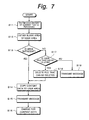
- Fig. 7 is a flow chart showing a process using such an automatic delete option.
- the data amount of a content file that the user wants to purchase is obtained (at step S11).
- the remaining data amount of the user area 18 for the user is obtained (at step S12). It is determined whether or not the remaining data amount is sufficient corresponding to the data amount of the content data that the user wants to purchase and the remaining data amount of the user area 18 (at step S13).
- the content file that the user wants to purchase is copied to the user area 18 for the user (at step S14).
- a message that represents that the content purchasing process has been completed is transmitted to the user terminal unit 2 (at step S15).
- a charging process for the purchased content file is performed (at step S16).
- step S13 determines whether or not the user area 18 stores a content file that has been designated with the automatic delete option and whether when the content file is deleted, a sufficient blank capacity for the content file that the user wants to purchase can be obtained (at step S17).
- step S17 When the determined result at step S17 is Yes (namely, the user area 18 stores a content file that is designated with the automatic delete option and when the content file is deleted, a sufficient blank capacity for the content file that the user wants to purchase can be obtained), the content file designated with the automatic delete option is deleted and the blank capacity is obtained (at step S18). Thereafter, the flow advances to step S14.
- step S14 the content file that the user wants to purchase is copied to the user area 18. Thereafter, a message that represents that the content purchasing process has been completed is transmitted to the user terminal unit 2 (at step S15). Thereafter, the charging process for the purchased content file is performed (at step S16).
- the pages that the content managing company 1 provides may be varied depending on the user interface, the services that the content managing company 1 provides, and so forth. In other words, the pages that follow are just examples. In addition, the pages may be changed corresponding to user options and contract conditions.
- Figs. 8 to 15 show examples of pages provided by the content managing company.
- a user who made a contract with the content managing company 1 uses a service thereof, he or she connects the user terminal unit 2 to the network 3, starts up the browser, and accesses the URL of the content managing company 1.
- the user terminal unit 2 accesses the URL of the content managing company 1, the content managing company 1 transmits an authentication page shown in Fig. 8 to the user terminal unit 2.
- the authentication page contains a user ID input box 51 and a password input box 52.
- the user inputs a user ID and a password assigned by the content managing company 1 to the boxes 51 and 52 and then clicks a login button 53.
- the content managing company 1 When the user inputs the user ID and the password to the boxes 51 and 52 and clicks the login button 53, the content managing company 1 performs the authenticating process that determines whether or not the user is a valid user who made a contract with the content managing company 1. When the content managing company 1 has authenticated the user as a valid user, the content managing company 1 transmits a user home page shown in Fig. 9 to the user terminal unit 2.
- the user home page is a home page dedicated for each user who uses a service of the content managing company 1.
- the user home page displays an indication 54 for the user ID, the total capacity of the user area, the used capacity, and so forth.
- the user home page also displays an indication 55 for checking for the used state of the user area 18 for each user, an indication 56 for purchasing a content, an indication 57 for using various services, and an indication 58 for designating various options.
- the user home page may display an indication 59 for a recommended content.
- a user area used state request command is transmitted from the user terminal unit 2.
- the user area used state request command is transmitted to the customer file managing server 14 through the network 3.
- the customer file managing server 14 When the customer file managing server 14 receives the user area used state request command, the customer file managing server 14 checks for the used state of the user area 18 corresponding to the user ID of the user. The customer file managing server 14 checks for the user area 18 of the user using the management table shown in Fig. 4 and transmits a user stored content list page shown in Fig. 10 to the user terminal unit 2. The user can check for the used state of the user area 18 on the user stored content list page shown in Fig. 10.
- the user stored content list page displays a file name indication 61, a genre indication 62, a size indication 63, and a automatic delete YES / NO indication 64.
- Each row of the user stored content list page displays an open button 65 and a store button 66.
- a content explanation request command for the file is transmitted from the user terminal unit 2.
- the content explanation request command for the file is transmitted to the customer file managing server 14 through the network 3.
- the customer file managing server 14 When the customer file managing server 14 receives the content explanation request command, the customer file managing server 14 checks for the content explanation with the management table shown in Fig. 4 and transmits a content explanation page to the user terminal unit 2. The user can know the content explanation on the content explanation page.
- an automatic delete option change command is transmitted from the user terminal unit 2.
- the automatic delete option change command is transmitted to the customer file managing server 14 through the network 3.
- the customer file managing server 14 receives the automatic delete option change command, the customer file managing server 14 changes the automatic delete YES / NO option of the management table shown in Fig. 4.
- a streaming reproduction request command for the file is transmitted from the user terminal unit 2.
- the streaming reproduction request command is transmitted to the customer file managing server 14 through the network 3.
- the customer file managing server 14 When the customer file managing server 14 receives the streaming reproduction request command, the customer file managing server 14 retrieves the designated file from the user area 18 and transfers the data of the file to the user terminal unit 2 for the streaming reproducing operation. At that point, the user terminal unit 2 starts up the application the steaming reproducing operation for the moving picture. When the customer file managing server 14 transmits the data of the file to the user terminal unit 2, the streaming reproducing application reproduces the content corresponding to the transmitted data.
- a transfer request command for the file is transmitted from the user terminal unit 2.
- the transfer request command for the file is transmitted to the customer file managing server 14 through the network 3.
- the customer file managing server 14 When the customer file managing server 14 receives the transfer request command for the file, the customer file managing server 14 retrieves the designated file from the user area 18 and transfers the retrieved file to the user terminal unit 2.
- the file of the content transferred from the customer file managing server 14 is stored to the hard disk drive or the like of the user terminal unit 2.
- a content purchase page is transmitted to the user terminal unit 2.
- the content purchase page displays a purchase request indication 71, a purchase confirmation indication 72, a delivery schedule indication 73, and a library search indication 74.
- a purchase page is transmitted to the user terminal unit 2.
- the purchase page displays a purchase file name input box 75.
- a search request command for the file is transmitted from the user terminal unit 2.
- the search request command for the file is transmitted to the library managing server 12 through the network 3.
- the library managing server 12 When the library managing server 12 receives the search request command for the file, the library managing server 12 searches the database shown in Fig. 2 for a content with the designated file name. When the database contains the content with the designated file name, the library managing server 12 retrieves the content from the database and transmits the information of the content to the user terminal unit 2. The purchase page displays an indication 77 for the information about the content as shown in Fig. 13.
- the user can check that the indication 77 for the information about the content displays the desired content.
- a purchase button 78 When the user wants to purchase the content, he or she clicks a purchase button 78.
- a purchase request command for the file is transmitted from the user terminal unit 2.
- the purchase request command for the file is transmitted to the delivery managing server 16 through the network 3.
- the delivery managing server 16 When the delivery managing server 16 receives the purchase request command for the file, the delivery managing server 16 registers the file purchased state to the delivery managing database shown in Fig. 5 and sends a command for copying the file to the user area 18 of the user who requested the file to the library managing server 12.
- the library managing server 12 When the library managing server 12 receives the copy command, the library managing server 12 searches the content library 11 for the file. When the content library 11 contains the file, the library managing server 12 retrieves data of the file of the content from the content library 11, and copies the data to the designated user area 18 of the customer file storage 13. As a result, the content purchasing process is completed.
- the library managing server 12 When the file is scheduled to be delivered later, the library managing server 12 notifies the delivery managing server 16 of the scheduled delivery date. On the scheduled delivery date, the delivery managing server 16 sends a copy command for copying the file to the user area 18 of the user who requested the file to the library managing server 12.
- the library managing server 12 searches the content library 11 for the file.
- the library managing server 12 retrieves the file from the content library 11 and copies the data of the file to the designated user area 18 of the customer file storage 13. As a result, the content purchasing process is completed.
- the data of the file is copied to the user area 18 of the user who requested the file and then the content is purchased, a charging process is performed corresponding to the fee of the content.
- a scheduled delivery content list page is transmitted to the user terminal unit 2.
- the scheduled delivery content list page displays a file name indication 81, a scheduled delivery date and time indication 82, a genre indication 83, a size indication 84, a file format indication 85, a fee indication 86, and a purchase button 87.
- the purchase button 87 When the user wants to purchase a content on the scheduled delivery content list page, he or she clicks the purchase button 87. When the user clicks the purchase button 87, the purchase page shown in Fig. 13 appears. On the purchase page, the file name box 75 indicates the file name of the file that the user wants to purchase. As was described above, on the purchase page, the user can purchase the data of the file of the content.
- the content search page display a keyword input box 91.
- a search request command for a content that contains the keyword is transmitted from the user terminal unit 2.
- the search request command is transmitted to the library managing server 12 through the network 3.
- the library managing server 12 searches the library for a file that contains the keyword.
- the library managing server 12 displays the file name, the registered date and time, the genre, the size, the file format, and the fee of the file of the content that matches the search condition as a file name indication 93, a registered date and time indication 94, a genre indication 95, a size indication 96, a file format indication 97, and a fee indication 98, respectively.
- the user wants to purchase the content on the content search page he or she clicks a purchase button 99.
- the purchase button 99 the purchase page shown in Fig. 13 appears.
- the purchase file name input box 75 indicates the file name of the file that the user wants to purchase.
- the user can purchase data of the file of the content.
- a content managing company has a content library, a library managing server, a customer file storage, a customer file managing server, a delivery managing database, and a delivery managing server.
- the content library stores many contents that the content managing company provides and sells.
- the library managing server manages the content library.
- the customer file storage stores contents of users.
- the customer file managing server manages the customer file storage.
- the delivery managing database stores delivery information.
- the delivery managing server manages the delivery of contents.
- user areas are assigned for individual users.
- a user terminal unit is connected to a server of the content managing company through a network.
- the customer file storage provides a user area for storing a content to a user who made a contract with the content managing company.
- the user can freely use the user area of the customer file storage in the range of the contracted capacity while the contract is valid.
- the user can store a new content file to the user area, delete a content file therefrom, and download a content file therefrom to the user terminal unit.
- an automatic delete option can be designated to each content file stored in the user area.
- a content file has been designated with the automatic delete option, if a newly purchased content file cannot be stored to the user area due to an insufficient storage capacity, the content file designated with the automatic delete option is deleted from the user area and a storage capacity for the newly purchased content file is obtained.
- content files that are scheduled to be delivered later can be registered to the database of the delivery managing server. On the scheduled delivery date, a content file that the user wants can be automatically purchased and stored to the designated user area of the customer storage.
Landscapes
- Engineering & Computer Science (AREA)
- Theoretical Computer Science (AREA)
- General Physics & Mathematics (AREA)
- Databases & Information Systems (AREA)
- Physics & Mathematics (AREA)
- General Engineering & Computer Science (AREA)
- Data Mining & Analysis (AREA)
- Multimedia (AREA)
- Library & Information Science (AREA)
- Management, Administration, Business Operations System, And Electronic Commerce (AREA)
- Information Retrieval, Db Structures And Fs Structures Therefor (AREA)
- Multi Processors (AREA)
- Information Transfer Between Computers (AREA)
Abstract
A content managing system is disclosed, that has a content managing portion comprising a content library for storing a plurality of content files, a library managing means for managing the content library, a customer file storing means, having areas assigned to individual users, for storing content files for the individual users, a customer file managing means for managing the customer file storing means, and a delivery managing means for managing the delivery of a content file to a user terminal unit, wherein the content managing portion and the user terminal unit are connected through a network, and wherein the content managing portion is operated from the user terminal unit through the network so as to manage a content file of each user. <IMAGE>
Description
The present invention relates to a content
managing system, a content managing method, and a
content managing apparatus suitably used in a system
that allows files of contents of moving pictures, still
pictures, and music programs to be totally managed.
A service that provides files of contents of
moving pictures, still pictures, music programs, and so
forth through a network is becoming attractive. In
such a conventional content delivering service, when a
user purchases a content, he or she accesses a
particular server that delivers the content through a
user terminal unit and downloads the file of the
content through the network.
In recent years, servers that deliver
contents of moving pictures, still pictures, music
programs, and so forth have been used on a network.
When such a service is used, a user terminal unit is
connected to a server that delivers a content through
the network. When the user terminal unit is connected
to such a server, the content name and the data about
each content that the server provides are displayed.
When the user purchases the content, the user terminal
unit transmits a download request for the desired
content to the server.
When the server receives the download request
for the desired content, the server retrieves the file
of the desired content from a predetermined library and
transfers the retrieved file to the user terminal unit
through the network. The file of the content is stored
to a hard disk drive or the like of the user terminal
unit.
In such a manner, in the conventional content
delivery service, when a user purchases a content, the
file of the content is directly transferred from the
server to the user terminal unit through the network.
However, since the data amount of the file of a content
of a moving picture, a still picture, a music program,
or the like is large, it takes a long time to download
the file. Sometimes, the download of the file may
fail.
In addition, the capacity of the storage of
the user terminal unit is limited. When the
conventional content delivery service is used, the
storage becomes full with files of contents having
large data amounts. Thus, it becomes difficult to
manage the files. Moreover, when the user terminal
unit manages the files of contents, they may be
destroyed or mistakenly erased.
Moreover, in the conventional service,
although content files stored in a library can be
obtained, contents that are scheduled to be provided
later cannot be automatically obtained.
An object of the present invention is to
provide a content managing system, an apparatus
thereof, and a system thereof that allow a user to
easily purchase the file of a content and that totally
manage contents.
A first aspect of the present invention is a
content managing system having a content managing
portion comprising a content library for storing a
plurality of content files, a library managing means
for managing the content library, a customer file
storing means, having areas assigned to individual
users, for storing content files for the individual
users, a customer file managing means for managing the
customer file storing means, and a delivery managing
means for managing the delivery of a content file to a
user terminal unit, wherein the content managing
portion and the user terminal unit are connected
through a network, and wherein the content managing
portion is operated from the user terminal unit through
the network so as to manage a content file of each
user.
A second aspect of the present invention is a
content managing apparatus, comprising a content
library for storing a plurality of content files, a
library managing means for managing the content
library, a customer file storing means, having areas
assigned to individual users, for storing content files
for the individual users, a customer file managing
means for managing the customer file storing means, and
a delivery managing means for managing the delivery of
a content file to a user terminal unit, and a
communicating means for connecting the content managing
apparatus to a network, wherein the content managing
apparatus can be connected to the user terminal through
the network.
A third aspect of the present invention is a
content managing method using a content managing
portion having a content library for storing a
plurality of content files and a content managing
portion for assigning user areas to a customer file
storage, the user areas storing content files for
individual users, comprising the steps of connecting
the content managing portion and a user terminal unit
through a network, and causing the user terminal unit
to operate the content managing portion through the
network so as to manage a content file of each user.
The content managing company has a content
library, a library managing server, a customer file
storage, a customer file managing server, a delivery
managing database, and a delivery managing server. The
content library stores many contents that the content
managing company provides and sells. The library
managing server manages the content library. The
customer file storage stores contents of users. The
customer file managing server manages the customer file
storage. The delivery managing database stores
delivery information. The delivery managing server
manages the delivery of contents. User areas for
individual users are assigned in the customer file
storage. A user terminal unit is connected to a server
of the content managing company through a network.
The customer file storage provides a user
area for storing a content to a user who made a
contract with the content managing company. The user
can freely use the user area of the customer file
storage in the range of the contracted capacity while
the contract is valid. The user can add, delete, and
move a content stored in the user area. In addition,
the user can store the file of a content that he or she
has purchased to the user area.
These and other objects, features and
advantages of the present invention will become more
apparent in light of the following detailed description
of a best mode embodiment thereof, as illustrated in
the accompanying drawings.
Next, with reference to the accompanying
drawings, an embodiment of the present invention will
be described. Fig. 1 shows an example of the structure
of a system according to the present invention. In
Fig. 1, reference numeral 1 is a content managing
company. The content managing company 1 totally
manages content data of moving pictures such as movies
and dramas, content data of still pictures, content
data of music programs, and so forth. In addition, the
content managing company 1 provides a service for
storing contents of users and a service in association
therewith as well as a service for selling and
providing contents.
The content managing company 1 has a content
library 11, a library managing server 12, a customer
file storage 13, a customer file managing server 14, a
delivery managing database 15, and a delivery managing
server 16. The content library 11 stores many contents
that the content managing company 1 provides and sells.
The library managing server 12 manages the content
library 11. The customer file storage 13 stores
contents of users. The customer file managing server
14 manages the customer file storage 13. The delivery
managing database 15 stores delivery information. The
delivery managing server 16 manages the delivery of
contents. In addition, the content managing company 1
has a mail processing server 17. The mail processing
server 17 exchanges message with customers.
These servers 12, 14, 16, and 17 are
connected to a network so that data is exchanged
therebetween. In addition, these severs 12, 14, 16,
and 17 can be connected to the network 3 through a
communication interface 19. The network 3 is for
example the Internet.
These servers 12, 14, 16, and 17 may be
accomplished by dedicated computers, respectively.
Alternatively, the servers 12, 14, 16, and 17 may be
accomplished by a single computer. The content library
11, the customer file storage 13, and the customer
database 15 may be accomplished by a storage device of
a server or dedicated computers. In addition, these
servers 12, 14, 16, and 17 and the content library 11,
the customer file storage 13, and the customer database
15 may be managed by different companies rather than
the same company.
A user terminal unit 2 is a terminal unit
that each user operates. The user terminal unit 2 can
be accomplished by a personal computer. The user
terminal unit 2 has a communicating function. The user
terminal unit 2 can be connected to the network 3. The
user terminal unit 2 may be connected to the network 3
through a telephone line, a network service of a CATV
(Cable Television), a network service of a cellular
phone, a dedicated line, or the like.
The content library 11 has a storage device
having a large storage capacity so that it can store
many content data that the content managing company 1
provides and sells. As shown in Fig. 2, the file of
each content stored in the content library 11 is
managed with "file name", "registered date and time",
"genre", "file size", "file format", "fee", and "title
of content".
The "file name" is a uniquely designated name
of each content file so as to identify it. The
"registered date and time" is the date and time at
which each content file will be registered or was
registered. The "title of content" is a sentence that
field represents the title of each content file. The
"title of content" may contains a still picture of a
typical scene, a moving picture thereof, an audio
guide, or the like. The "genre" is information as
which each content file is categorized. The "file
size" is the size of each content file. The "file
size" is normally a value expressed as bytes.
Alternatively, the "file size" may be a special
parameter corresponding to each file format. For
example, in the case of a moving picture, the "file
size" may be a value expressed as the reproduction time
of the moving picture. The "file format" is
information that represents the format of each content
file. The "fee" is the fee necessary for purchasing
each content file. The "fee" may contain copyright
information.
The library managing server 12 manages the
content library 11. When another device on the network
transmits a content request to the library managing
server 12, it searches the content library 11 for the
requested content file and transfers the retrieved
content file to the device. In other words, the
library managing server 12 has a searching function.
When the library managing server 12 receives a keyword,
the library managing server 12 searches the content
library 11 for a content file that contains the keyword
and outputs the searched result. In addition, the
library managing server 12 can output the searched
result corresponding to the file name, the registered
date and time, the genre, the file size, the fee, and
the title of content.
In addition to content files stored in the
content library 11, the library managing server 12
manages content files that are scheduled to be
delivered later. Corresponding to a request received
from an external device, the library managing server 12
can provide information about content files that are
scheduled to be delivered later and output the searched
result. When the library managing server 12 receives a
content file that will be newly delivered, the library
managing server 12 registers the content file to the
content library 11.
The customer file storage 13 provides a user
area 18 that a user who made a contract with the
content managing company 1 can use for storing a
content. As shown in Fig. 3, the customer file storage
13 assigns a record capacity to each user. Each user
is managed with a unique user ID. The total capacity
for each user is designated corresponding to a contract
that each user made with the content managing company
1. Corresponding to the contract, the total capacity
is designated and assigned as the user area 18 for each
user. Each user can freely use the assigned user area
18 of the customer file storage 13 in the range of the
contracted capacity in the period corresponding to the
contract. In other words, each user can store a new
content file to the user area 18, delete a content file
from the user area 18, move a content file in the user
area 18, and download a content file stored in the user
area 18 to the user terminal unit 2. The user can
store his or her content file to the user area 18.
When the content managing company 1 makes a
contract with each user, the content managing company 1
will charge the user corresponding to the size of the
user area 18. Of cause, the content managing company 1
can change the size of the user area 18 later.
Each user can purchase content data stored in
the content library 11 and a content file that is
scheduled to be delivered later. The user can store
the purchased content file to the user area 18 of the
customer file storage 13. In addition, the user can
store a content file that he or she created to the user
area 18 of the customer file storage 13.
The customer file managing server 14 manages
content files stored in the user area 18 for each user
of the customer file storage 13 using a database shown
in Fig. 4. The customer file managing server 14 can
perform for example a file searching process, a file
transferring process, a file deleting process, and so
forth. The file managing server 14 prohibits each user
from accessing the user area 18 assigned to another
user.
As shown in Fig. 4, each user is managed with
a unique user ID. Each content file stored by each
user is managed with the user ID, the file name, the
genre, the file size, and the storage record area. An
automatic delete option is added to each content file.
When the automatic delete option is added to a content
file, the content file is deleted when the user area 18
runs out and no more stores a new content file.
Moreover, the customer file managing server 14 performs
a record capacity increasing / decreasing process for
the user area corresponding to a changed contract, a
contract period managing process, and so forth.
The delivery managing server 16 manages the
delivery of content data. When the delivery managing
server 16 receives a content purchase request from a
user, the delivery managing server 16 creates delivery
management information for each user in the delivery
managing database 15. As shown in Fig. 5, the delivery
managing database 15 is managed with the user ID, the
file name, the requested date and time, the scheduled
file registration date and time, the capacity, the
genre, and the file transferred date.
When a user purchases a content, a file
purchase request command is transmitted from the user
terminal unit 2 to the delivery managing server 16
through the network 3. Corresponding to the purchase
request, delivery management information for each user
is created in the delivery managing database 15.
The delivery managing server 16 sends a copy
command for copying the file to the user area 18 for
the user to the library managing server 12. The
library managing server 12 searches the content library
11 for a file of a desired content. When the content
library 11 contains the file, the library managing
server 12 retrieves the file from the content library
11, and sends the retrieved file to the customer file
managing server 14. The customer file managing server
14 copies the file to the user area 18 of the customer
file storage 13.
Thus, the content purchasing process can be
accomplished as a copying process for copying a file
from the content library 11 to the user area 18 of the
customer file storage 13. Since the capacity of a file
of a content of a moving picture is large, it takes a
long time to transfer the file. In contrast, according
to such a system, since a file is copied between
servers on the same network, the content purchasing
process can be quickly completed. In addition, a
situation of which the download of a file fails does
not take place.
A user can access his or her assigned user
area 18 through the user terminal unit 2. As was
described above, the file of a content that a user
purchased is stored in the user area 18. The user can
access the user area 18 and download it to the user
terminal unit 2 or reproduce it on real time basis (as
the streaming reproducing operation).
In the system, as was described above, a user
area for storing a content is assigned to each user who
made a contract with the content managing company 1.
Each user can use a content purchase service and other
services with the user area.
Next, services provided by the content
managing company 1 will be described in reality.
The user terminal unit 2 has a communicating
function for connecting it to the network 3. A browser
that allows the user to browse web pages is installed
to the user terminal unit 2. When the user uses a
service provided by the content managing company 1, he
or she makes a contract with the content managing
company 1. After the user made a contract with the
content managing company 1, it assigns a user ID and a
password to the user.
When a user who made a contract with the
content managing company 1 wants to use the service of
the content managing company 1, he or she connects the
user terminal unit 2 to the network 3, starts up the
browser, and accesses the URL (Uniform Resource
Locator) of the content managing company 1. When the
user terminal unit 2 accesses the URL of the content
managing company 1, it transmits an authentication page
to the user terminal unit 2.
The authentication page contains a user ID
input box and a password input box. The user inputs
the user ID and the password assigned by the content
managing company 1 to those boxes and then clicks a
login button.
When the user inputs the user ID and the
password to those boxes and then clicks the login
button, the content managing company 1 performs an
authenticating process for determining whether or not
the accessed user is a user who made a contract with
the content managing company 1. When the content
managing company 1 has authenticated the user as a
valid user, the content managing company 1 transmits a
user home page to the user terminal unit 2.
The user home page is a home page that is
dedicated for each user and that is necessary for using
the service of the content managing company 1. The
user home page displays the user ID of the user, the
total capacity of the user area, the used capacity, and
so forth. In addition, the user home page displays an
indication for checking the used state of the user area
of the user, an indication for purchasing a content,
and an indication for using various services.
When the user checks for the used state of
the user area 18, he or she clicks a predetermined area
on the home page. At a result, a user area used state
request command is transmitted from the user terminal
unit 2. The user area used state request command is
transmitted to the customer file managing server 14
through the network 3.
When the customer file managing server 14
receives the user area used state request command, the
customer file managing server 14 checks for the used
state of the user area 18 corresponding to the user ID
of the user. With the managing database shown in Fig.
4, the customer file managing server 14 checks for the
used state of the user area 18 for the user and
transmits a user stored content list page to the user
terminal unit 2. The user can know the used state of
the user area 18 on the user stored content list page.
The user can download the file of a content
stored in the user area 18 or reproduce it on real time
basis (as the streaming reproducing operation).
When the user reproduces the file of a
content stored in the user area 18 on real time basis
(as the streaming reproducing operation), he or she
designate the file name thereof and then clicks a
predetermined button. As a result, a streaming
reproduction request command for the file is
transmitted from the user terminal unit 2. The
steaming reproduction request command for the file is
transmitted to the customer file managing server 14
through the network 3.
When the customer file managing server 14
receives the steaming reproduction request command from
the user terminal unit 2, the customer file managing
server 14 retrieves the designated file from the user
area 18 and transfers the data of the file to the user
terminal unit 2 for the streaming reproducing
operation. At that point, the user terminal unit 2
starts up an application for the streaming reproducing
operation for a moving picture of the file. When the
customer file managing server 14 transmits the data of
the file to the user terminal unit 2, the application
for the streaming reproducing operation reproduces the
content corresponding to the transmitted data.
When the user stores the file of the content,
he or she designates the file and clicks a
predetermined button. As a result, a file transfer
request command is transmitted from the user terminal
unit 2. The file transfer request command is
transmitted to the customer file managing server 14
through the network 3.
When the customer file managing server 14
receives the file transfer request command, the
customer file managing server 14 retrieves the
designated file from the user area 18 and transfers the
retrieved file to the user terminal unit 2. The file
of the content transferred from the customer file
managing server 14 is stored to the hard disk drive or
the like of the user terminal unit 2.
When the user purchases a content, he or she
inputs the file name of the content to a predetermined
box of the purchase page. The file name may be
selected from a box that contains a plurality of file
names. Alternatively, contents may be narrowed down
corresponding to the searched result so that the user
can select a file name from the narrowed result. When
the user inputs the file name and clicks the purchase
button, a file purchase request command is transmitted
from the user terminal unit 2. The file purchase
request command is transmitted to the delivery managing
server 16 through the network 3.
When the delivery managing server 16 receives
the file purchase request command, the delivery
managing server 16 registers the file purchased state
to the delivery managing database shown in Fig. 5 and
transmits a copy command for copying the file to the
user area 18 for the user to the library managing
server 12.
When the library managing server 12 receives
the copy command, the library managing server 12
searches the content library 11 for the file. When the
content library 11 contains the file, the library
managing server 12 retrieves the file from the content
library 11 and copies the file to the designated user
area 18 of the customer file storage 13. As a result,
the content purchasing process is completed.
When the requested file is scheduled to be
delivered later, the library managing server 12
notifies the delivery managing server 16 of the
scheduled delivery date. On the scheduled delivery
date, the delivery managing server 16 sends a copy
command for copying the file to the user area 18 for
the user to the library managing server 12. When the
library managing server 12 receives the copy command,
the library managing server 12 searches the content
library 11 for the file. When the content library 11
contains the file, the library managing server 12
retrieves the file from the content library 11 and
copies the file to the designated user area 18 of the
customer file storage 13. As a result, the content
purchasing process is completed.
After the file of the content corresponding
to the purchase request has been copied from the
library to the user area 18 of the user and thereby the
content purchasing process has been completed, a
charging process is performed for the fee of the
content.
Fig. 6 is a flow chart showing a content
purchasing process of the delivery managing server. In
this example, the user can automatically purchase files
that are scheduled to be registered later to the
content library 11 as well as those registered
currently in the content library 11.
In Fig. 6, when the delivery managing server
receives a content purchase command from the user
terminal unit 2 (at step S1), the delivery managing
server issues a search command to the library managing
server 12. The library managing server 12 determines
whether or not the content library 11 stores the
content file corresponding to the content purchase
command (at step S2). The library managing server 12
transmits the searched result as a check message to the
user terminal unit 1 (at step S3).
The library managing server 12 determines
whether or not the content library 11 stores the
content file that the user wants to purchase (at step
S4). When the determined result at step S4 is Yes
(namely, the content library 11 stores the content
file), the library managing server 12 retrieves the
content file from the content library 11 and sends the
retrieved content file to the customer managing server
14. The customer managing server 14 copies the content
file to the user area 18 for the user of the customer
file storage 13 (at step S5).
When the determined result at step S4 is No
(namely, the content library 11 does not store the
content file that the user wants to purchase), the
delivery managing server transmits a message that
represents the scheduled delivery date of the content
file to the user terminal unit 2 (at step S6).
Thereafter, the delivery managing server determines
whether or not today is the scheduled delivery date (at
step S7). When the determined result at step S7 is Yes
(namely, today is the scheduled delivery date), the
delivery managing server determines whether or not the
content library 11 stores the content file (at step
S8).
Thereafter, the delivery managing server
determines whether or not the content library 11 stores
the content file that the user wants to purchase (at
step S9). When the determined result at step S9 is Yes
(namely, the content library 11 stores the content
file), the delivery managing server retrieves the
content file from the content library 11 and sends the
retrieved content file to the customer managing server
14. The customer managing server 14 copies the content
file to the user area 18 for the user of the customer
file storage 13 (at step S5). When the determined
result at step S9 is No (namely, the content library 11
does not store the content file), the delivery managing
server transmits a message that represents the next
scheduled delivery date to the user terminal unit 2 (at
step S10). Thereafter, the flow returns to step S7.
In such a process, when the user wants to
purchase a content, the file of the content is copied
and stored to the user area 18 for the user.
However, there may be a situation of which
when the user purchases a content file, since the user
area 18 for the user is full, the purchased content
file cannot be stored thereto.
To solve such a problem, in the example, the
user can designate an automatic delete option to each
content file stored in the user area 18. When any
content file stored in the user area 18 has been
designated the automatic delete option, if the user
area 18 cannot store a newly purchased content file due
to an insufficient capacity, a content file designated
with the automatic delete option is deleted. As a
result, a storage area for the newly purchased content
file is obtained.
Fig. 7 is a flow chart showing a process
using such an automatic delete option.
In Fig. 7, the data amount of a content file
that the user wants to purchase is obtained (at step
S11). In addition, the remaining data amount of the
user area 18 for the user is obtained (at step S12).
It is determined whether or not the remaining data
amount is sufficient corresponding to the data amount
of the content data that the user wants to purchase and
the remaining data amount of the user area 18 (at step
S13). When the determined result at step S13 is Yes
(namely, the remaining data amount is sufficient), the
content file that the user wants to purchase is copied
to the user area 18 for the user (at step S14).
Thereafter, a message that represents that the content
purchasing process has been completed is transmitted to
the user terminal unit 2 (at step S15). Thereafter, a
charging process for the purchased content file is
performed (at step S16).
When the determined result at step S13 is No
(namely, the remaining data amount is not sufficient),
it is determined whether or not the user area 18 stores
a content file that has been designated with the
automatic delete option and whether when the content
file is deleted, a sufficient blank capacity for the
content file that the user wants to purchase can be
obtained (at step S17).
When the determined result at step S17 is Yes
(namely, the user area 18 stores a content file that is
designated with the automatic delete option and when
the content file is deleted, a sufficient blank
capacity for the content file that the user wants to
purchase can be obtained), the content file designated
with the automatic delete option is deleted and the
blank capacity is obtained (at step S18). Thereafter,
the flow advances to step S14. At step S14, the
content file that the user wants to purchase is copied
to the user area 18. Thereafter, a message that
represents that the content purchasing process has been
completed is transmitted to the user terminal unit 2
(at step S15). Thereafter, the charging process for
the purchased content file is performed (at step S16).
When the determined result at step S17 is No
(namely, when the user area 18 does not store a content
file designated with the automatic delete option or
even if a content file designated with the automatic
delete option is deleted, the sufficient blank capacity
cannot be obtained), a message that represents that the
user cannot purchase the content file that he or she
wants due to the insufficient blank capacity is
transmitted to the user terminal unit 2 (at step S19).
Next, examples of pages that the content
managing company 1 provide will be described. The
pages that the content managing company 1 provides may
be varied depending on the user interface, the services
that the content managing company 1 provides, and so
forth. In other words, the pages that follow are just
examples. In addition, the pages may be changed
corresponding to user options and contract conditions.
Figs. 8 to 15 show examples of pages provided
by the content managing company. When a user who made
a contract with the content managing company 1 uses a
service thereof, he or she connects the user terminal
unit 2 to the network 3, starts up the browser, and
accesses the URL of the content managing company 1.
When the user terminal unit 2 accesses the URL of the
content managing company 1, the content managing
company 1 transmits an authentication page shown in
Fig. 8 to the user terminal unit 2.
The authentication page contains a user ID
input box 51 and a password input box 52. The user
inputs a user ID and a password assigned by the content
managing company 1 to the boxes 51 and 52 and then
clicks a login button 53.
When the user inputs the user ID and the
password to the boxes 51 and 52 and clicks the login
button 53, the content managing company 1 performs the
authenticating process that determines whether or not
the user is a valid user who made a contract with the
content managing company 1. When the content managing
company 1 has authenticated the user as a valid user,
the content managing company 1 transmits a user home
page shown in Fig. 9 to the user terminal unit 2.
The user home page is a home page dedicated
for each user who uses a service of the content
managing company 1. The user home page displays an
indication 54 for the user ID, the total capacity of
the user area, the used capacity, and so forth.
The user home page also displays an
indication 55 for checking for the used state of the
user area 18 for each user, an indication 56 for
purchasing a content, an indication 57 for using
various services, and an indication 58 for designating
various options. The user home page may display an
indication 59 for a recommended content.
When the user clicks the indication 55 for
checking for the used state of the user area 18, a user
area used state request command is transmitted from the
user terminal unit 2. The user area used state
request command is transmitted to the customer file
managing server 14 through the network 3.
When the customer file managing server 14
receives the user area used state request command, the
customer file managing server 14 checks for the used
state of the user area 18 corresponding to the user ID
of the user. The customer file managing server 14
checks for the user area 18 of the user using the
management table shown in Fig. 4 and transmits a user
stored content list page shown in Fig. 10 to the user
terminal unit 2. The user can check for the used state
of the user area 18 on the user stored content list
page shown in Fig. 10.
The user stored content list page displays a
file name indication 61, a genre indication 62, a size
indication 63, and a automatic delete YES / NO
indication 64. Each row of the user stored content
list page displays an open button 65 and a store button
66.
When the user clicks the file name indication
61, a content explanation request command for the file
is transmitted from the user terminal unit 2. The
content explanation request command for the file is
transmitted to the customer file managing server 14
through the network 3.
When the customer file managing server 14
receives the content explanation request command, the
customer file managing server 14 checks for the content
explanation with the management table shown in Fig. 4
and transmits a content explanation page to the user
terminal unit 2. The user can know the content
explanation on the content explanation page.
In Fig. 10, when the user clicks the
automatic delete YES / NO indication 64, an automatic
delete option change command is transmitted from the
user terminal unit 2. The automatic delete option
change command is transmitted to the customer file
managing server 14 through the network 3. When the
customer file managing server 14 receives the automatic
delete option change command, the customer file
managing server 14 changes the automatic delete YES /
NO option of the management table shown in Fig. 4.
When the user clicks the open button 65, a
streaming reproduction request command for the file is
transmitted from the user terminal unit 2. The
streaming reproduction request command is transmitted
to the customer file managing server 14 through the
network 3.
When the customer file managing server 14
receives the streaming reproduction request command,
the customer file managing server 14 retrieves the
designated file from the user area 18 and transfers the
data of the file to the user terminal unit 2 for the
streaming reproducing operation. At that point, the
user terminal unit 2 starts up the application the
steaming reproducing operation for the moving picture.
When the customer file managing server 14 transmits the
data of the file to the user terminal unit 2, the
streaming reproducing application reproduces the
content corresponding to the transmitted data.
When the user clicks the store button 66, a
transfer request command for the file is transmitted
from the user terminal unit 2. The transfer request
command for the file is transmitted to the customer
file managing server 14 through the network 3.
When the customer file managing server 14
receives the transfer request command for the file, the
customer file managing server 14 retrieves the
designated file from the user area 18 and transfers the
retrieved file to the user terminal unit 2. The file
of the content transferred from the customer file
managing server 14 is stored to the hard disk drive or
the like of the user terminal unit 2.
On the user home page shown in Fig. 9, when
the user clicks the content purchase indication 56, as
shown in Fig. 12, a content purchase page is
transmitted to the user terminal unit 2. The content
purchase page displays a purchase request indication
71, a purchase confirmation indication 72, a delivery
schedule indication 73, and a library search indication
74.
When the user clicks the purchase request
indication 71, as shown in Fig. 13, a purchase page is
transmitted to the user terminal unit 2. The purchase
page displays a purchase file name input box 75. When
the user inputs a desired file name to the input box 75
and clicks an OK button 76, a search request command
for the file is transmitted from the user terminal unit
2. The search request command for the file is
transmitted to the library managing server 12 through
the network 3.
When the library managing server 12 receives
the search request command for the file, the library
managing server 12 searches the database shown in Fig.
2 for a content with the designated file name. When
the database contains the content with the designated
file name, the library managing server 12 retrieves the
content from the database and transmits the information
of the content to the user terminal unit 2. The
purchase page displays an indication 77 for the
information about the content as shown in Fig. 13.
The user can check that the indication 77 for
the information about the content displays the desired
content. When the user wants to purchase the content,
he or she clicks a purchase button 78.
When the user clicks the purchase button 78,
a purchase request command for the file is transmitted
from the user terminal unit 2. The purchase request
command for the file is transmitted to the delivery
managing server 16 through the network 3.
When the delivery managing server 16 receives
the purchase request command for the file, the delivery
managing server 16 registers the file purchased state
to the delivery managing database shown in Fig. 5 and
sends a command for copying the file to the user area
18 of the user who requested the file to the library
managing server 12.
When the library managing server 12 receives
the copy command, the library managing server 12
searches the content library 11 for the file. When the
content library 11 contains the file, the library
managing server 12 retrieves data of the file of the
content from the content library 11, and copies the
data to the designated user area 18 of the customer
file storage 13. As a result, the content purchasing
process is completed.
When the file is scheduled to be delivered
later, the library managing server 12 notifies the
delivery managing server 16 of the scheduled delivery
date. On the scheduled delivery date, the delivery
managing server 16 sends a copy command for copying the
file to the user area 18 of the user who requested the
file to the library managing server 12. When the
library managing server 12 receives the copy command,
the library managing server 12 searches the content
library 11 for the file. When the content library 11
contains the file, the library managing server 12
retrieves the file from the content library 11 and
copies the data of the file to the designated user area
18 of the customer file storage 13. As a result, the
content purchasing process is completed.
After the file of a content is retrieved from
the library corresponding to a purchase request of a
user, the data of the file is copied to the user area
18 of the user who requested the file and then the
content is purchased, a charging process is performed
corresponding to the fee of the content.
When the user clicks the delivery schedule
indication 73 shown in Fig. 12, a scheduled delivery
content list page is transmitted to the user terminal
unit 2. The scheduled delivery content list page
displays a file name indication 81, a scheduled
delivery date and time indication 82, a genre
indication 83, a size indication 84, a file format
indication 85, a fee indication 86, and a purchase
button 87.
When the user wants to purchase a content on
the scheduled delivery content list page, he or she
clicks the purchase button 87. When the user clicks
the purchase button 87, the purchase page shown in Fig.
13 appears. On the purchase page, the file name box 75
indicates the file name of the file that the user wants
to purchase. As was described above, on the purchase
page, the user can purchase the data of the file of the
content.
When the user clicks the library search
indication 74 shown in Fig. 12, a content search page
shown in Fig. 15 appears. The content search page
display a keyword input box 91.
When the user wants to search a content from
the library or checks for a content that is scheduled
to be delivered later, he or she inputs a keyword of
the desired content to the keyword input box 91 on the
content search page and then clicks an OK button 92.
When the user inputs a keyword to the keyword
input box 91 and clicks the OK button 92, a search
request command for a content that contains the keyword
is transmitted from the user terminal unit 2. The
search request command is transmitted to the library
managing server 12 through the network 3.
When the library managing server 12 receives
the search request command, the library managing server
12 searches the library for a file that contains the
keyword. When the library contains the file, the
library managing server 12 displays the file name, the
registered date and time, the genre, the size, the file
format, and the fee of the file of the content that
matches the search condition as a file name indication
93, a registered date and time indication 94, a genre
indication 95, a size indication 96, a file format
indication 97, and a fee indication 98, respectively.
When the user wants to purchase the content
on the content search page, he or she clicks a purchase
button 99. When the user clicks the purchase button
99, the purchase page shown in Fig. 13 appears. On the
purchase page, the purchase file name input box 75
indicates the file name of the file that the user wants
to purchase. On the purchase page, the user can
purchase data of the file of the content.
In the above-described example, as content
files, moving picture files, still picture files, and
music picture files are managed. In addition, software
programs of applications and games may be managed.
According to the present invention, a content
managing company has a content library, a library
managing server, a customer file storage, a customer
file managing server, a delivery managing database, and
a delivery managing server. The content library stores
many contents that the content managing company
provides and sells. The library managing server
manages the content library. The customer file storage
stores contents of users. The customer file managing
server manages the customer file storage. The delivery
managing database stores delivery information. The
delivery managing server manages the delivery of
contents. In the customer file storage, user areas are
assigned for individual users. A user terminal unit is
connected to a server of the content managing company
through a network.
The customer file storage provides a user
area for storing a content to a user who made a
contract with the content managing company. The user
can freely use the user area of the customer file
storage in the range of the contracted capacity while
the contract is valid. The user can store a new
content file to the user area, delete a content file
therefrom, and download a content file therefrom to the
user terminal unit.
In addition, according to the present
invention, an automatic delete option can be designated
to each content file stored in the user area. When a
content file has been designated with the automatic
delete option, if a newly purchased content file cannot
be stored to the user area due to an insufficient
storage capacity, the content file designated with the
automatic delete option is deleted from the user area
and a storage capacity for the newly purchased content
file is obtained.
In addition, according to the present
invention, as well as content files stored in the
library, content files that are scheduled to be
delivered later can be registered to the database of
the delivery managing server. On the scheduled
delivery date, a content file that the user wants can
be automatically purchased and stored to the designated
user area of the customer storage.
Although the present invention has been shown
and described with respect to a best mode embodiment
thereof, it should be understood by those skilled in
the art that the foregoing and various other changes,
omissions, and additions in the form and detail thereof
may be made therein without departing from the spirit
and scope of the present invention.
Claims (30)
- A content managing system having a content managing portion comprising:a content library for storing a plurality of content files;library managing means for managing said content library;customer file storing means, having areas assigned to individual users, for storing content files for the individual users;customer file managing means for managing said customer file storing means; anddelivery managing means for managing the delivery of a content file to a user terminal unit,wherein the content managing portion and the user terminal unit are connected through a network, andwherein the content managing portion is operated from the user terminal unit through the network so as to manage a content file of each user.
- The content managing system as set forth in claim 1,wherein said customer file managing means manages the user area for each user so that the user area can be accessed from only the user terminal unit of the user who has been assigned to the user area, andwherein said customer file managing means processes a content file stored in the user area corresponding to a command received from the user terminal unit of the user who has been assigned to the user area.
- The content managing system as set forth in claim 1,
wherein said customer file managing means manages the used state of the user area with a database. - The content managing system as set forth in claim 1,
wherein said customer file managing means allows the used state of the user area to be displayed by the user terminal unit of the user who has been assigned to the user area. - The content managing system as set forth in claim 1,
wherein said library managing means manages content files stored in said library with a database. - The content managing system as set forth in claim 1,
wherein said library managing means manages content files that are scheduled to be registered later to said library as well as content files currently stored in said library. - The content managing system as set forth in claim 1,
wherein said delivery managing means manages a user's delivery request with a database. - The content managing system as set forth in claim 1,wherein said delivery managing means performs a process for purchasing a content file corresponding to a user's delivery request when the content file has been registered to said library, andwherein said delivery managing means performs a process for purchasing a content file on a scheduled registration date when the content file is scheduled to be registered later.
- The content managing system as set forth in claim 8,
wherein the content file purchasing process is performed by copying the content file that the user wants to purchase from said library to the user area for the user. - The content managing system as set forth in claim 1,wherein an automatic delete on / off option can be designated to a content file stored in each user area, andwherein when a new content file is stored to the user area, if the storage capacity of the user area becomes insufficient, said customer file managing means deletes a content file designated with the automatic delete on option from the user area.
- A content managing apparatus, comprising:
a content library for storing a plurality of content files;library managing means for managing said content library;customer file storing means, having areas assigned to individual users, for storing content files for the individual users;customer file managing means for managing said customer file storing means; anddelivery managing means for managing the delivery of a content file to a user terminal unit; andcommunicating means for connecting the content managing apparatus to a network,wherein the content managing apparatus can be connected to the user terminal through the network. - The content managing apparatus as set forth in claim 11,wherein said customer file managing means manages the user area for each user so that the user area can be accessed from only the user terminal unit of the user who has been assigned to the user area, andwherein said customer file managing means processes a content file stored in the user area corresponding to a command received from the user terminal unit of the user who has been assigned to the user area.
- The content managing apparatus as set forth in claim 11,
wherein said customer file managing means manages the used state of the user area with a database. - The content managing apparatus as set forth in claim 11,
wherein said customer file managing means allows the used state of the user area to be displayed by the user terminal unit of the user who has been assigned to the user area. - The content managing apparatus as set forth in claim 11,
wherein said library managing means manages content files stored in said library with a database. - The content managing apparatus as set forth in claim 11,
wherein said library managing means manages content files that are scheduled to be registered later to said library as well as content files currently stored in said library. - The content managing apparatus as set forth in claim 11,
wherein said delivery managing means manages a user's delivery request with a database. - The content managing apparatus as set forth in claim 11,wherein said delivery managing means performs a process for purchasing a content file corresponding to a user's delivery request when the content file has been registered to said library, andwherein said delivery managing means performs a process for purchasing a content file on a scheduled registration date when the content file is scheduled to be registered later.
- The content managing apparatus as set forth in claim 18,
wherein the content file purchasing process is performed by copying the content file that the user wants to purchase from said library to the user area for the user. - The content managing apparatus as set forth in claim 11,wherein an automatic delete on / off option can be designated to a content file stored in each user area, andwherein when a new content file is stored to the user area, if the storage capacity of the user area becomes insufficient, said customer file managing means deletes a content file designated with the automatic delete on option from the user area.
- A content managing method using a content managing portion having a content library for storing a plurality of content files and a content managing portion for assigning user areas to a customer file storage, the user areas storing content files for individual users, comprising the steps of:connecting the content managing portion and a user terminal unit through a network; andcausing the user terminal unit to operate the content managing portion through the network so as to manage a content file of each user.
- The content managing method as set forth in claim 21,wherein the user area for each user is managed so that the user area can be accessed from only the user terminal unit of the user who has been assigned to the user area, andwherein a content file stored in the user area is processed corresponding to a command received from the user terminal unit of the user who has been assigned to the user area.
- The content managing method as set forth in claim 21,
wherein the used state of the user area is managed with a database. - The content managing method as set forth in claim 21,
wherein the used state of the user area can be displayed by the user terminal unit of the user who has been assigned to the user area. - The content managing method as set forth in claim 21,
wherein content files stored in the library are managed with a database. - The content managing method as set forth in claim 21,
wherein content files that are scheduled to be registered later to the library are managed as well as content files currently stored in the library. - The content managing method as set forth in claim 21,
wherein a user's delivery request is managed with a database. - The content managing method as set forth in claim 21,wherein a process for purchasing a content file is performed corresponding to a user's delivery request when the content file has been registered to the library, andwherein a process for purchasing a content file is performed on a scheduled registration date when the content file is scheduled to be registered later.
- The content managing method as set forth in claim 28,
wherein the content file purchasing process is performed by copying the content file that the user wants to purchase from the library to the user area for the user. - The content managing method as set forth in claim 21,wherein an automatic delete on / off option can be designated to a content file stored in each user area, andwherein when a new content file is stored to the user area, if the storage capacity of the user area becomes insufficient, a content file designated with the automatic delete on option is deleted from the user area.
Applications Claiming Priority (2)
| Application Number | Priority Date | Filing Date | Title |
|---|---|---|---|
| JP2000141762A JP2001325457A (en) | 2000-05-15 | 2000-05-15 | Content management system, contents management device, and content management method |
| JP2000141762 | 2000-05-15 |
Publications (1)
| Publication Number | Publication Date |
|---|---|
| EP1160685A2 true EP1160685A2 (en) | 2001-12-05 |
Family
ID=18648837
Family Applications (1)
| Application Number | Title | Priority Date | Filing Date |
|---|---|---|---|
| EP01111696A Withdrawn EP1160685A2 (en) | 2000-05-15 | 2001-05-14 | Content managing system, content managing apparatus, and content managing method |
Country Status (3)
| Country | Link |
|---|---|
| US (1) | US20020049723A1 (en) |
| EP (1) | EP1160685A2 (en) |
| JP (1) | JP2001325457A (en) |
Cited By (1)
| Publication number | Priority date | Publication date | Assignee | Title |
|---|---|---|---|---|
| US8566457B2 (en) * | 2003-05-23 | 2013-10-22 | Kabushiki Kaisha Toshiba | Content delivery service providing apparatus and content delivery service terminal unit |
Families Citing this family (11)
| Publication number | Priority date | Publication date | Assignee | Title |
|---|---|---|---|---|
| JP2003296215A (en) * | 2002-03-29 | 2003-10-17 | Sony Corp | File management system and file management method |
| JP3988047B2 (en) | 2003-03-20 | 2007-10-10 | 日本電気株式会社 | Storage system, storage device, program |
| US7119716B2 (en) * | 2003-05-28 | 2006-10-10 | Legalview Assets, Limited | Response systems and methods for notification systems for modifying future notifications |
| JP4645500B2 (en) * | 2006-03-28 | 2011-03-09 | 株式会社ケンウッド | Recording / playback apparatus and access restriction method |
| TWI329280B (en) * | 2006-10-14 | 2010-08-21 | Asustek Comp Inc | Multi-media file automatic updating method, software program thereof, and multi-media file playing system |
| US20080140941A1 (en) * | 2006-12-07 | 2008-06-12 | Dasgupta Gargi B | Method and System for Hoarding Content on Mobile Clients |
| JP5268617B2 (en) * | 2008-12-17 | 2013-08-21 | キヤノン株式会社 | Image forming apparatus, image forming apparatus control method, and computer program |
| US9552607B2 (en) * | 2012-03-21 | 2017-01-24 | Beatport, LLC | Systems and methods for selling sounds |
| US9158482B2 (en) * | 2013-04-29 | 2015-10-13 | Hewlett-Packard Development Company, L.P. | Recommending and installing scheduled delivery print applications |
| US11399218B2 (en) * | 2016-09-09 | 2022-07-26 | Comcast Cable Communications, Llc | Methods and systems for verification of asset availability |
| CN109782849A (en) * | 2018-12-29 | 2019-05-21 | 大连海航科技有限公司 | Individual soldier's handheld terminal |
Family Cites Families (8)
| Publication number | Priority date | Publication date | Assignee | Title |
|---|---|---|---|---|
| US5771354A (en) * | 1993-11-04 | 1998-06-23 | Crawford; Christopher M. | Internet online backup system provides remote storage for customers using IDs and passwords which were interactively established when signing up for backup services |
| US5978567A (en) * | 1994-07-27 | 1999-11-02 | Instant Video Technologies Inc. | System for distribution of interactive multimedia and linear programs by enabling program webs which include control scripts to define presentation by client transceiver |
| US5778395A (en) * | 1995-10-23 | 1998-07-07 | Stac, Inc. | System for backing up files from disk volumes on multiple nodes of a computer network |
| US5926624A (en) * | 1996-09-12 | 1999-07-20 | Audible, Inc. | Digital information library and delivery system with logic for generating files targeted to the playback device |
| US6260040B1 (en) * | 1998-01-05 | 2001-07-10 | International Business Machines Corporation | Shared file system for digital content |
| US6226618B1 (en) * | 1998-08-13 | 2001-05-01 | International Business Machines Corporation | Electronic content delivery system |
| US6331865B1 (en) * | 1998-10-16 | 2001-12-18 | Softbook Press, Inc. | Method and apparatus for electronically distributing and viewing digital contents |
| US6248946B1 (en) * | 2000-03-01 | 2001-06-19 | Ijockey, Inc. | Multimedia content delivery system and method |
-
2000
- 2000-05-15 JP JP2000141762A patent/JP2001325457A/en active Pending
-
2001
- 2001-05-14 EP EP01111696A patent/EP1160685A2/en not_active Withdrawn
- 2001-05-15 US US09/855,418 patent/US20020049723A1/en not_active Abandoned
Cited By (1)
| Publication number | Priority date | Publication date | Assignee | Title |
|---|---|---|---|---|
| US8566457B2 (en) * | 2003-05-23 | 2013-10-22 | Kabushiki Kaisha Toshiba | Content delivery service providing apparatus and content delivery service terminal unit |
Also Published As
| Publication number | Publication date |
|---|---|
| US20020049723A1 (en) | 2002-04-25 |
| JP2001325457A (en) | 2001-11-22 |
Similar Documents
| Publication | Publication Date | Title |
|---|---|---|
| US20020023101A1 (en) | Content managing system, content managing apparatus, and content managing method | |
| US7634484B2 (en) | Metadata distribution management system, apparatus, and method, and computer program therefore | |
| CN100492352C (en) | Media content creation and publishing system and method | |
| US7433916B2 (en) | Server apparatus and control method therefor | |
| US20150067103A1 (en) | Media processing system automatically offering access to newly available media in a media exchange network | |
| US20020032905A1 (en) | Online digital video signal transfer apparatus and method | |
| US20020143782A1 (en) | Content management system | |
| CN102739670A (en) | System for the delivery and dynamic presentation of large media assets over bandwidth constrained networks | |
| EP1156426A2 (en) | Content managing system, content managing method, and camera apparatus | |
| EP1160685A2 (en) | Content managing system, content managing apparatus, and content managing method | |
| US7155452B2 (en) | System, method, apparatus, and program for providing electronic manual | |
| US8775600B2 (en) | Storage system and data management method in storage system | |
| EP1170680A2 (en) | Content managing system, content managing apparatus, and content managing method | |
| EP1156636B1 (en) | Content delivering method | |
| US20020010738A1 (en) | Content managing system and content managing method | |
| US20130041762A1 (en) | Systems and Method for Real-Time Media Placement | |
| WO2005117438A1 (en) | Streaming video distributing system | |
| JP3827612B2 (en) | Time-limited content distribution system and distribution device | |
| JP2022039362A (en) | Privilege offering system | |
| JP2003299065A (en) | Preview video distribution system | |
| JP2003346008A (en) | Content sales mediation method and device, content sales mediation program and recording medium recording the program, content purchase method and device, content purchase program and recording medium recording the program |
Legal Events
| Date | Code | Title | Description |
|---|---|---|---|
| PUAI | Public reference made under article 153(3) epc to a published international application that has entered the european phase |
Free format text: ORIGINAL CODE: 0009012 |
|
| AK | Designated contracting states |
Kind code of ref document: A2 Designated state(s): AT BE CH CY DE DK ES FI FR GB GR IE IT LI LU MC NL PT SE TR |
|
| AX | Request for extension of the european patent |
Free format text: AL;LT;LV;MK;RO;SI |
|
| STAA | Information on the status of an ep patent application or granted ep patent |
Free format text: STATUS: THE APPLICATION HAS BEEN WITHDRAWN |
|
| 18W | Application withdrawn |
Effective date: 20040505 |