EP1156453A2 - Image processing apparatus, image processing method, storage medium, and program - Google Patents
Image processing apparatus, image processing method, storage medium, and program Download PDFInfo
- Publication number
- EP1156453A2 EP1156453A2 EP01304320A EP01304320A EP1156453A2 EP 1156453 A2 EP1156453 A2 EP 1156453A2 EP 01304320 A EP01304320 A EP 01304320A EP 01304320 A EP01304320 A EP 01304320A EP 1156453 A2 EP1156453 A2 EP 1156453A2
- Authority
- EP
- European Patent Office
- Prior art keywords
- image
- image processing
- display
- stored
- displayed
- Prior art date
- Legal status (The legal status is an assumption and is not a legal conclusion. Google has not performed a legal analysis and makes no representation as to the accuracy of the status listed.)
- Granted
Links
Images





Classifications
-
- H—ELECTRICITY
- H04—ELECTRIC COMMUNICATION TECHNIQUE
- H04N—PICTORIAL COMMUNICATION, e.g. TELEVISION
- H04N5/00—Details of television systems
- H04N5/76—Television signal recording
- H04N5/765—Interface circuits between an apparatus for recording and another apparatus
-
- H—ELECTRICITY
- H04—ELECTRIC COMMUNICATION TECHNIQUE
- H04N—PICTORIAL COMMUNICATION, e.g. TELEVISION
- H04N1/00—Scanning, transmission or reproduction of documents or the like, e.g. facsimile transmission; Details thereof
- H04N1/00127—Connection or combination of a still picture apparatus with another apparatus, e.g. for storage, processing or transmission of still picture signals or of information associated with a still picture
- H04N1/00132—Connection or combination of a still picture apparatus with another apparatus, e.g. for storage, processing or transmission of still picture signals or of information associated with a still picture in a digital photofinishing system, i.e. a system where digital photographic images undergo typical photofinishing processing, e.g. printing ordering
- H04N1/00137—Transmission
- H04N1/0014—Transmission via e-mail
-
- G—PHYSICS
- G06—COMPUTING OR CALCULATING; COUNTING
- G06F—ELECTRIC DIGITAL DATA PROCESSING
- G06F3/00—Input arrangements for transferring data to be processed into a form capable of being handled by the computer; Output arrangements for transferring data from processing unit to output unit, e.g. interface arrangements
- G06F3/002—Specific input/output arrangements not covered by G06F3/01 - G06F3/16
- G06F3/005—Input arrangements through a video camera
-
- H—ELECTRICITY
- H04—ELECTRIC COMMUNICATION TECHNIQUE
- H04N—PICTORIAL COMMUNICATION, e.g. TELEVISION
- H04N1/00—Scanning, transmission or reproduction of documents or the like, e.g. facsimile transmission; Details thereof
- H04N1/00127—Connection or combination of a still picture apparatus with another apparatus, e.g. for storage, processing or transmission of still picture signals or of information associated with a still picture
- H04N1/00132—Connection or combination of a still picture apparatus with another apparatus, e.g. for storage, processing or transmission of still picture signals or of information associated with a still picture in a digital photofinishing system, i.e. a system where digital photographic images undergo typical photofinishing processing, e.g. printing ordering
- H04N1/00167—Processing or editing
-
- H—ELECTRICITY
- H04—ELECTRIC COMMUNICATION TECHNIQUE
- H04N—PICTORIAL COMMUNICATION, e.g. TELEVISION
- H04N1/00—Scanning, transmission or reproduction of documents or the like, e.g. facsimile transmission; Details thereof
- H04N1/00127—Connection or combination of a still picture apparatus with another apparatus, e.g. for storage, processing or transmission of still picture signals or of information associated with a still picture
- H04N1/00132—Connection or combination of a still picture apparatus with another apparatus, e.g. for storage, processing or transmission of still picture signals or of information associated with a still picture in a digital photofinishing system, i.e. a system where digital photographic images undergo typical photofinishing processing, e.g. printing ordering
- H04N1/00185—Image output
- H04N1/00188—Printing, e.g. prints or reprints
-
- H—ELECTRICITY
- H04—ELECTRIC COMMUNICATION TECHNIQUE
- H04N—PICTORIAL COMMUNICATION, e.g. TELEVISION
- H04N1/00—Scanning, transmission or reproduction of documents or the like, e.g. facsimile transmission; Details thereof
- H04N1/0035—User-machine interface; Control console
- H04N1/00405—Output means
- H04N1/00408—Display of information to the user, e.g. menus
- H04N1/0044—Display of information to the user, e.g. menus for image preview or review, e.g. to help the user position a sheet
- H04N1/00442—Simultaneous viewing of a plurality of images, e.g. using a mosaic display arrangement of thumbnails
-
- H—ELECTRICITY
- H04—ELECTRIC COMMUNICATION TECHNIQUE
- H04N—PICTORIAL COMMUNICATION, e.g. TELEVISION
- H04N1/00—Scanning, transmission or reproduction of documents or the like, e.g. facsimile transmission; Details thereof
- H04N1/0035—User-machine interface; Control console
- H04N1/00405—Output means
- H04N1/00408—Display of information to the user, e.g. menus
- H04N1/0044—Display of information to the user, e.g. menus for image preview or review, e.g. to help the user position a sheet
- H04N1/00442—Simultaneous viewing of a plurality of images, e.g. using a mosaic display arrangement of thumbnails
- H04N1/00445—Simultaneous viewing of a plurality of images, e.g. using a mosaic display arrangement of thumbnails arranged in a one dimensional array
- H04N1/0045—Simultaneous viewing of a plurality of images, e.g. using a mosaic display arrangement of thumbnails arranged in a one dimensional array vertically
-
- H—ELECTRICITY
- H04—ELECTRIC COMMUNICATION TECHNIQUE
- H04N—PICTORIAL COMMUNICATION, e.g. TELEVISION
- H04N1/00—Scanning, transmission or reproduction of documents or the like, e.g. facsimile transmission; Details thereof
- H04N1/0035—User-machine interface; Control console
- H04N1/00405—Output means
- H04N1/00408—Display of information to the user, e.g. menus
- H04N1/0044—Display of information to the user, e.g. menus for image preview or review, e.g. to help the user position a sheet
- H04N1/00442—Simultaneous viewing of a plurality of images, e.g. using a mosaic display arrangement of thumbnails
- H04N1/00453—Simultaneous viewing of a plurality of images, e.g. using a mosaic display arrangement of thumbnails arranged in a two dimensional array
-
- H—ELECTRICITY
- H04—ELECTRIC COMMUNICATION TECHNIQUE
- H04N—PICTORIAL COMMUNICATION, e.g. TELEVISION
- H04N1/00—Scanning, transmission or reproduction of documents or the like, e.g. facsimile transmission; Details thereof
- H04N1/0035—User-machine interface; Control console
- H04N1/00405—Output means
- H04N1/00408—Display of information to the user, e.g. menus
- H04N1/0044—Display of information to the user, e.g. menus for image preview or review, e.g. to help the user position a sheet
- H04N1/00458—Sequential viewing of a plurality of images, e.g. browsing or scrolling
-
- H—ELECTRICITY
- H04—ELECTRIC COMMUNICATION TECHNIQUE
- H04N—PICTORIAL COMMUNICATION, e.g. TELEVISION
- H04N1/00—Scanning, transmission or reproduction of documents or the like, e.g. facsimile transmission; Details thereof
- H04N1/0035—User-machine interface; Control console
- H04N1/00405—Output means
- H04N1/00408—Display of information to the user, e.g. menus
- H04N1/0044—Display of information to the user, e.g. menus for image preview or review, e.g. to help the user position a sheet
- H04N1/00461—Display of information to the user, e.g. menus for image preview or review, e.g. to help the user position a sheet marking or otherwise tagging one or more displayed image, e.g. for selective reproduction
-
- H—ELECTRICITY
- H04—ELECTRIC COMMUNICATION TECHNIQUE
- H04N—PICTORIAL COMMUNICATION, e.g. TELEVISION
- H04N1/00—Scanning, transmission or reproduction of documents or the like, e.g. facsimile transmission; Details thereof
- H04N1/00127—Connection or combination of a still picture apparatus with another apparatus, e.g. for storage, processing or transmission of still picture signals or of information associated with a still picture
- H04N1/00132—Connection or combination of a still picture apparatus with another apparatus, e.g. for storage, processing or transmission of still picture signals or of information associated with a still picture in a digital photofinishing system, i.e. a system where digital photographic images undergo typical photofinishing processing, e.g. printing ordering
-
- H—ELECTRICITY
- H04—ELECTRIC COMMUNICATION TECHNIQUE
- H04N—PICTORIAL COMMUNICATION, e.g. TELEVISION
- H04N2201/00—Indexing scheme relating to scanning, transmission or reproduction of documents or the like, and to details thereof
- H04N2201/32—Circuits or arrangements for control or supervision between transmitter and receiver or between image input and image output device, e.g. between a still-image camera and its memory or between a still-image camera and a printer device
- H04N2201/3201—Display, printing, storage or transmission of additional information, e.g. ID code, date and time or title
- H04N2201/3225—Display, printing, storage or transmission of additional information, e.g. ID code, date and time or title of data relating to an image, a page or a document
- H04N2201/325—Modified version of the image, e.g. part of the image, image reduced in size or resolution, thumbnail or screennail
Definitions
- the present invention relates to a technique of transferring an image to a computer from a digital camera or anther apparatus for storing the image, and printing the image or E-mailing the image.
- FIG. 1 A representative example of the image management software is shown in FIG. 1.
- a folder containing an image to be displayed is selected from section 1, and an image file in the folder is displayed in a thumb nail form (image obtained by reducing in size and displaying the original image) in a section 2, so that a user can easily see a large number of images at once.
- a certain thumb nail image is selected and double clicked in a section 3
- the image can be enlarged and displayed in a separate window.
- the printing of the image can be executed.
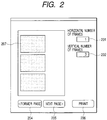
- FIG. 2 shows an example of a printing designation window.
- a plurality of thumb nails are selected and "print" is selected from a menu or the like. Then, the window of FIG. 2 appears.
- selected thumb nail images 207 are arranged and displayed.
- a horizontal number of frames ⁇ a vertical number of frames of images arranged in a sheet can be designated with frame number designations 201, 202.
- the images can be confirmed by pressing a former page button 204 or a next page button 205. Subsequently, when a print button is pushed, the images are printed according to the layout with a printer.
- some image management software has a "slide show" function with which a plurality of selected thumb nail images are fully display over a screen and can continuously be seen.
- a first image of the selected images is displayed all over the screen, and the display is changed to the next image display by clicking a mouse or pressing some key.
- the selected images can successively be displayed and seen all over the screen. In this case, the display can be returned to the previous image display by pressing an arrow key " ⁇ " or a specific key.
- Images are photographed with a digital camera, stored in the PC, and displayed in a list in the thumb nail form with the image management software. These images include an image out of focus, an image photographed with manual vibration, repeatedly photographed images of a similar scene or the same object, and the like.
- the thumb nail is prepared and displayed in a size of about 80 ⁇ 60 dots, or 160 ⁇ 120 dots at most.
- this size of display it is very difficult to distinguish the image out of focus, the image with manual vibration, or the like.
- the user wants to print, e-mail or otherwise send a favorite photograph to an acquaintance, but as described above it is difficult to find the photograph from many images in the list display with such thumb nail size. Therefore, the user double-clicks the thumb nails one by one, enlarges and displays each image in a separate window and confirms whether the image is good or bad, or reproduces the images with the aforementioned slide show function to successively check the images. In this case, the user performs an operation of memorizing the favorite image, one returning to the thumb nail display screen, and reselecting only the favorite image from the screen to print the image or attach the image to the E-mail.
- the image is to be printed or attached to the E-mail.
- an operation of checking and selecting the image is not correlated with an operation of printing a result or attaching the result to the E-mail, and this is inconvenient in user's operation.
- An object of the present invention is to solve all or at least one of the aforementioned problems.
- an object of the present invention is to provide an image processing apparatus, image processing method, storage medium, and program which solves the aforementioned disadvantages, can securely or easily judge whether an image is good or band, and can selectively process only the good image.
- an image processing apparatus comprising:
- the second display control means displays the stored image corresponding to the reduced image indicated by the indication means.
- an object of the present invention is to confirm the image by the display of the second display control means without requiring an intricate operation.
- an indicator for changing the image to be displayed in the display is displayed.
- the image processing apparatus further comprises display changeover means for successively automatically changing the image to be displayed in the display.
- an object of the present invention is to smoothly shift to a specific image processing with respect to an image judged to be appropriate for the specific image processing.
- the image processing apparatus further comprises execution instruction means for instructing the specific image processing to be actually performed in the image displayed in the display by the second display control means.
- the execution means executes the specific image processing on the image for which the execution is instructed by the execution instruction means.
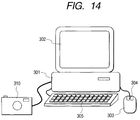
- FIG. 14 shows a constitution example of a personal computer system as a platform on which the present invention is carried out.
- reference numeral 301 denotes a computer system main body
- 302 denotes a display for displaying data
- 303 denotes a mouse as a typical pointing device
- 304 denotes a mouse button
- 305 denotes a keyboard.
- a digital camera 310 is connected to the computer system main body via communication cables such as RS-232C and USB.
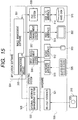
- FIG. 15 is a diagram showing a constitution of an image data management system including software and hardware.
- reference numeral 509 denotes hardware
- 505 denotes an operating system (OS) operating on the hardware 509
- 504 denotes application software operating on the OS 505.
- OS operating system
- blocks constituting the hardware 509 and OS 505 a block which is of course included as a constituting factor but is not directly necessary for describing an embodiment of the present invention is not shown. Examples of the not-shown block include hardware such as CPU and memory, a memory management system as the OS, and the like.
- reference numeral 515 denotes a hard disk for physically storing a file and data.
- a file system 508 constituting the OS has a function for allowing the application software to input/output the file without noticing the hardware.
- a disk IO interface 514 is disposed such that the file system 508 performs reading/writing of the hard disk 515.
- a drawing management system 507 constituting the OS has a function for allowing the application software to perform drawing without noticing the hardware.
- Reference numeral 513 denotes a video interface for allowing the drawing management system 507 to perform the drawing in the display 302.
- An input device management system 506 constituting the OS has a function for allowing the application software to receive a user's input without noticing the hardware.
- Reference numeral 510 denotes a keyboard interface for allowing the input device management system 506 to receive the input of the keyboard 305
- 512 denotes a mouse interface for allowing the input device management system 506 to receive the input from the mouse 303.
- the digital camera 301 is connected via RS-232C cable in the present example.
- the digital camera is managed by an external interface management system 522 via an RS-232C interface 521.
- the communication module 305 performs communication with this external interface management system.
- An image management software 501 uses this communication module to exchange image data and information with the camera.
- FIG. 13 shows an example of the digital camera.
- a USB I/F 1 is connected to PC.
- a mode dial switch 2 has a play mode 2a, photography mode 2b, stitch assist mode 2c, slide show reproduction mode 2d, and power Off 2e.
- Reference numeral 3 denotes a compact flash TM (CF) card slot.
- the mode dial switch is turned to another mode from the power Off. On turning on the power, the mode works.
- an image preview is displayed in an LCD 4.
- a release switch 5 is pushed, the image is photographed and recorded in a CF card 6.
- the play mode the last photographed and recorded image is displayed in the LCD, and the image is successively fed and reproduced by +- buttons 7a, 7b.
- the user selects a thumb nail for the slide show reproduction in the thumb nail display screen of FIG. 1.
- a selecting method when "select all" is designated from the menu, all thumb nails are brought to a selected state. In the selected state, a frame color of the thumb nail turns to red, blue or another color.
- the first thumb nail is clicked and brought to the selected state. Thereafter, the last thumb nail is clicked while pushing SHIFT key. Then, the thumb nails including intermediate thumb nails are in the selected state.
- CTRL key is pushed, and simultaneously the thumb nails are clicked. Then, only the clicked thumb nails are in the selected state.
- reference numeral 301 denotes the whole screen
- 302 denotes a displayed image.
- a back button 303 is pushed
- the displayed image can be returned to the previous image.
- a next button 304 is pushed, the display can advance to the display of the next image.
- the mouse may be clocked, or a space key or an arrow ⁇ key may be pushed in the same manner.
- the display can also be returned with an arrow ⁇ key.
- Reference numeral 305 denotes a printing designation button.
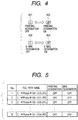
- the user sees the image, and wants to print the image, the user pushes the printing designation button. Then, a designation end mark is displayed on the button as shown by 402 of FIG. 4. This indicates that the user has designated the printing of the image.
- the button is pushed once again, the printing designation is canceled, and the display returns to 401.
- the user successively displays and checks the image, and finds the image to be printed, the user designates the printing of the image.
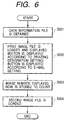
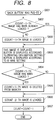
- step 601 the list is obtained, and in step 602 an image file No. 1 of the list is loaded and displayed. Subsequently, the buttons 401 and 402 of FIG. 4 are displayed in accordance with the value of print designation of the list shown in FIG. 5. In this case, since the initial value is Off, the button 401 is displayed.
- step 603 the first image being displayed is stored in a variable COUNT. Subsequently, (COUNT+1)-th image file is loaded. Thereby, the image can quickly be displayed for the next image display.
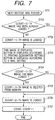
- step 702 It is checked in step 702 whether a (COUNT+1)-th image to be displayed has already been loaded. When the image is not loaded, the image is loaded in step 708. Subsequently in step 703, the image is displayed in the screen. Moreover, the button 401 or 402 of FIG. 4 is displayed in accordance with the printing designation value of the list shown in FIG. 5. It is checked in step 704 whether the (COUNT+1)-th image is in a memory. If the image is in the memory, the image is deleted in step 705. Next in step 706 a (COUNT+2)-th image is loaded, and in step 707 COUNT value is increased by one. In this case, the previous and next images to the image being displayed are loaded in the memory. Even when the back or next button is pushed, the corresponding image can quickly be displayed.
- step 802 It is checked in step 802 whether a (COUNT-1)-th image to be displayed has already been loaded. When the image is not loaded, the image is loaded in step 808. Subsequently in step 803, the image is displayed in the screen. Moreover, the button 401 or 402 of FIG. 4 is displayed in accordance with the printing designation value of the list shown in FIG. 5. It is checked in step 804 whether the (COUNT+1)-th image is in the memory. If the image is in the memory, the image is deleted in step 805. Next in step 806 a (COUNT-2)-th image is loaded, and in step 807 the COUNT value is decreased by one. In this case, the previous and next images to the image being displayed are loaded in the memory. Even when the back or next button is pushed, the corresponding image can quickly be displayed.
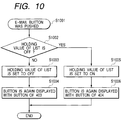
- step 902 a state before the button is pushed is obtained from the list of FIG. 5. If in step 903 or 905 a list holding value is Off, the value is set to On. If the value is On, the value is set to Off. Subsequently in step 904 or 906, the button is again displayed in accordance with the setting.
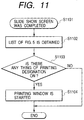
- step 1102 It is checked in step 1102 whether there is On in the column of printing designation of the list shown in FIG. 5. If there is even one On, the printing window of FIG. 2 is started in step 1104. In the printing window, the path name of the image file having On in the list of FIG. 5 is obtained, the image is loaded, and the image is used as the displayed image 207 or the image whose printing is executed by pushing the print button 206.
- the user selects a thumb nail for the slide show reproduction in the thumb nail display screen of FIG. 1.
- a selecting method when "select all" is designated from the menu, all thumb nails are brought to a selected state. In the selected state, a frame color of the thumb nail turns to red, blue or another color.
- the first thumb nail is clicked and brought to the selected state. Thereafter, the last thumb nail is clicked while pushing SHIFT key. Then, the thumb nails including intermediate thumb nails are in the selected state.
- CTRL key is pushed, and simultaneously the thumb nails are clicked. Then, only the clicked thumb nails are in the selected state.
- reference numeral 301 denotes the whole screen
- 302 denotes the displayed image.
- the display can be returned to the previous image.
- the next button 304 is pushed, the display can advance to the display of the next image.
- the mouse may be clocked, or the space key or the arrow ⁇ key may be pushed in the same manner.
- the display can also be returned with the arrow ⁇ key.
- Reference numeral 306 denotes an E-mail designation button.
- the user sees the image, and wants to attach the image to the E-mail, the user pushes this button. Then, the designation end mark is displayed on the button as shown by 404 of FIG. 4, and this informs the user of the E-mail designation.
- the button is pushed once again, the E-mail designation is canceled, and the display returns to 403.
- the user successively displays and checks the image, and finds the image to be attached to the E-mail, the user designates the attaching of the image.
- the inner processing procedure will be described along the flow of a series of operations.
- the list of selected images shown in FIG. 5 is transferred from the thumb nail display screen.
- the image file path name is stored, and values for the E-mail designation are all stored with initial value Off designation.
- step 601 the list is obtained, and in step 602 the image file No. 1 of the list is loaded and displayed. Subsequently, the buttons 403 and 404 of FIG. 4 are displayed in accordance with the value of E-mail designation of the list shown in FIG. 5. In this case, since the initial value is Off, the button 403 is displayed.
- step 603 the first image being displayed is stored in the variable COUNT. Subsequently, (COUNT+1)-th image file is loaded. Thereby, the image can quickly be displayed for the next image display.
- step 702 It is checked in step 702 whether the (COUNT+1)-th image to be displayed has already been loaded. When the image is not loaded, the image is loaded in step 708. Subsequently in step 703, the image is displayed in the screen. Moreover, the button 403 or 404 of FIG. 4 is displayed in accordance with the E-mail designation value of the list shown in FIG. 5. It is checked in step 704 whether the (COUNT-1)-th image is in the memory. If the image is in the memory, the image is deleted in step 705. Next in step 706 the (COUNT+2)-th image is loaded, and in step 707 COUNT value is increased by one. In this case, the previous and next images to the image being displayed are loaded in the memory. Even when the back or next button is pushed, the corresponding image can quickly be displayed.
- step 802 It is checked in step 802 whether the (COUNT-1)-th image to be displayed has already been loaded. When the image is not loaded, the image is loaded in step 808. Subsequently in step 803, the image is displayed in the screen. Moreover, the button 403 or 404 of FIG. 4 is displayed in accordance with the E-mail designation value of the list shown in FIG. 5. It is checked in step 804 whether the (COUNT+1)-th image is in the memory. If the image is in the memory, the image is deleted in step 805. Next in step 806 the (COUNT-2)-th image is loaded, and in step 807 the COUNT value is decreased by one. In this case, the previous and next images to the image being displayed are loaded in the memory. Even when the back or next button is pushed, the corresponding image can quickly be displayed.
- step 1002 a state before the button is pushed is obtained from the list of FIG. 5. If in step 1003 or 1005 the list holding value is Off, the value is set to On. If the value is On, the value is set to Off. Subsequently in step 1004 or 1006, the button is again displayed in accordance with the setting.
- step 1202 It is checked in step 1202 whether there is On in the column of E-mail designation of the list shown in FIG. 5. If there is even one On, in step 1204 the path name of the image file with the E-mail On is obtained. In step 1205 the E-mail software is started and the path name of the image file is passed. In the E-mail software, a new mail screen is displayed, and these image files are attached.
- the display advances to the next image in response to the user's clear instruction, the end button 301 of FIG. 3 is pushed, and the slide show screen is ended.
- the image is displayed for a given time, and subsequently the display is automatically successively changed to that of the next image.
- the slide show screen automatically ends.
- the printing designation button or the E-mail designation button is pushed, and thereby the designation can be performed similarly as the first and second embodiment.
- the slide show screen automatically ends.
- the printing designation or the E-mail designation the printing window or the E-mail software is automatically displayed.
- the present invention can preferably be applied not only to printing and mail transmission but also to a use mode in which the image is transferred, for example, to the computer from the digital camera.
- the image is transferred, for example, to the computer from the digital camera.
- the number of frames of stored images is limited. Therefore, it is necessary to frequently transfer or delete the image in the storage medium.
- the present invention is also preferable in a storage region change processing for transferring the image in this manner.
- an original stored image corresponding to the indicated reduced image is displayed as largely as possible in the screen, but this is not limited.
- an image larger than the reduced image may be displayed.
- the reduced image may be enlarged and displayed.
- the present invention may be applied to a system constituted of a plurality of apparatuses (e.g., a host computer, interface apparatus, reader, printer, and the like), or to an apparatus constituted of one unit (e.g., a copying machine, facsimile machine).
- apparatuses e.g., a host computer, interface apparatus, reader, printer, and the like
- apparatus constituted of one unit e.g., a copying machine, facsimile machine.
- a program code of software for realizing the aforementioned embodiment function is supplied to an apparatus connected to various devices or a computer in a system in such a manner that various devices are operated to realize the aforementioned embodiment function.
- the system or the apparatus computer (CPU or MPU) is operated by operating various devices according to the stored program.
- the invention carried out in this manner is also included in a category of the present invention.
- the program code itself of the software realizes the function of the aforementioned embodiment.
- the program code itself, and means for supplying the program code to the computer, for example the storage medium with the program code stored therein constitute the present invention.
- Examples of the storage medium with the program code stored therein include a floppy disk, hard disk, optical disk, magnetic optical disk, CD-ROM, magnetic tape, nonvolatile memory card, ROM, and the like.
- the program code cooperates with an operating system (OS) operating in the computer, another application software, or the like, and the aforementioned embodiment function is realized. Even in this case, needless to say, the program code is included in the embodiment of the present invention.
- OS operating system
- designation means when designation means is disposed in the slide show display, first the user displays the image in a large size, can judge whether the image is good or band, and can selectively process only the good image. Moreover, the image selected in this manner is printed or attached to the E-mail according to the user's final object. This operation can continuously be performed without being interrupted.
- the image processing apparatus of the present invention includes: take-in means for taking in a reduced image from a storage medium in which a stored image and the reduced image corresponding to the stored image are stored; first display control means for displaying the reduced image taken by the take-in means in a display; indication means for indicating the reduced image to be subjected to a specific image processing from the reduced image displayed in the display; second display control means for displaying the reduced image indicated by the indication means in such a manner that the image is more easily recognized; and execution means for executing the specific image processing on the stored image after the second display control means displays the image. Therefore, the image which should not be processed can be prevented from being incorrectly indicated by the reduced image.
- the stored image corresponding to the reduced image is displayed, the stored image is displayed in a size larger than that of the reduced image, or at least a part of the reduced image is enlarged and displayed.
- the second display control means displays the stored image corresponding to the reduced image indicated by the indication means, the image can be confirmed with a non-reduced stored image.
- the second display control means displays any one of the images to be displayed in the display, it is unnecessary to simultaneously display another image or to reduce the display screen.
- the image can be displayed in a large size fully in the display, and can easily be confirmed.
- the displayed large image can successively be changed. All the images are easily confirmed in the large screen.
- the image processing apparatus further includes display changeover means for successively automatically changing the image to be displayed in the display, an operation of performing a changeover instruction can be omitted during confirmation of the image.
- the image processing apparatus further comprises execution instruction means for instructing the specific image processing to be actually performed in the image displayed in the display by the second display control means, and the execution means executes the specific image processing on the image for which the execution is instructed by the execution instruction means. Therefore, while seeing the large image, the image processing can actually be performed on the image to be actually processed.
- the printing processing is performed as the specific image processing, the performing of an unnecessary printing is reduced.
- the image can be printed with a resolution much higher than a display resolution of the system. Characteristics which cannot easily be recognized during confirmation with the reduced image remarkably appear in the printed image. Therefore, the present invention is effectively applied during the printing processing.
- the image processing apparatus includes edition operation acceptance means for accepting the user's operation, the printing processing smoothly flows and the apparatus is conveniently used.
- the mail transmission processing is performed as the specific image processing. Therefore, for example, when the image is transmitted via E-mail, a troublesome operation of starting another application to confirm the image during preparation of a new mail can be omitted, and the apparatus is conveniently used.
- the apparatus includes mail preparation control means for controlling the apparatus in such a manner that a new mail preparation processing of attaching the image indicated to be mailed/transmitted is performed during the mail transmission processing. Therefore, the processing can smoothly shift to the processing of preparing the new mail.
- a transfer processing of transferring the stored image to a desired storage region is performed as the specific image processing. Therefore, an operation of starting another application to confirm the image to be transferred and transferring the desired image after confirmation is not required. Therefore, the intricate operation can be omitted and the apparatus is conveniently used.
- the storage medium of the digital camera the number of frames of stored images is limited. Therefore, an operation of transferring the image to the computer is frequently performed, and further there are many opportunities for performing the printing or another operation. In a use mode in which the storage medium is included in the digital camera, particularly a user's operation property can be enhanced.
- an electrical signal carrying processor implementable instructions for controlling a processor to carry out the method as hereinbefore described.
Landscapes
- Engineering & Computer Science (AREA)
- Multimedia (AREA)
- Signal Processing (AREA)
- Human Computer Interaction (AREA)
- Theoretical Computer Science (AREA)
- General Physics & Mathematics (AREA)
- General Engineering & Computer Science (AREA)
- Physics & Mathematics (AREA)
- User Interface Of Digital Computer (AREA)
- Television Signal Processing For Recording (AREA)
- Editing Of Facsimile Originals (AREA)
- Processing Or Creating Images (AREA)
- Information Retrieval, Db Structures And Fs Structures Therefor (AREA)
- Image Processing (AREA)
Abstract
Description
Claims (35)
- An image processing apparatus comprising:fetching means for fetching in a reduced image from a storage medium in which a stored image and the reduced image corresponding to said stored image are stored;first display control means for displaying the reduced image fetched by said fetching means in a display;indication means for indicating the reduced image to be subjected to a specific image processing from said reduced image displayed in said display;second display control means for displaying an image in a size larger than a size of the reduced image indicated by said indication means; andexecution means for executing said specific image processing on said stored image after said second display control means displays the image in the size larger than the size of said reduced image.
- The image processing apparatus according to claim 1 wherein said second display control means displays said stored image corresponding to the reduced image indicated by said indication means.
- The image processing apparatus according to claim 1 wherein said second display control means displays any one image among the images to be displayed in said display.
- The image processing apparatus according to claim 3 wherein an indicator for changing the image to be displayed in said display is displayed.
- The image processing apparatus according to claim 3, further comprising display change means for successively automatically changing the image to be displayed in said display.
- The image processing apparatus according to claim 1, further comprising execution instruction means for instructing said specific image processing to be actually performed in the image displayed in said display by said second display control means,
wherein said execution means executes said specific image processing on the image for which the execution is instructed by said execution instruction means. - The image processing apparatus according to claim 1 wherein said specific image processing is a printing processing.
- The image processing apparatus according to claim 7, further comprising edition operation acceptance means for accepting a user's operation to edit arrangement and printing size of the image to be printed during said printing processing.
- The image processing apparatus according to claim 1 wherein said specific image processing is a mail transmission processing.
- The image processing apparatus according to claim 9, further comprising mail preparation control means for controlling said mail transmission processing in such a manner that a new mail preparation processing of attaching the image indicated to be mailed/transmitted is performed during the mail transmission processing.
- The image processing apparatus according to claim 1 wherein said specific image processing is a transfer processing of transferring said stored image to a desired storage region.
- The image processing apparatus according to claim 1 wherein said storage medium is included in a digital camera.
- An image processing method comprising:a fetching step of fetching a reduced image from a storage medium in which a stored image and the reduced image corresponding to said stored image are stored;a first display control step of displaying the reduced image fetched by said fetching step in a display;an indication step of indicating the reduced image to be subjected to a specific image processing from said reduced image displayed in said display;a second display control step of displaying an image in a size larger than a size of the reduced image indicated by said indication step; andan execution step of executing said specific image processing on said stored image after said second display control step displays the image in the size larger than the size of said reduced image.
- The image processing method according to claim 13 wherein said second display control step displays said stored image corresponding to the reduced image indicated by said indication step.
- The image processing method according to claim 13 wherein said second display control step displays any one image among the images to be displayed in said display.
- The image processing method according to claim 15 wherein an indicator for changing the image to be displayed in said display is displayed.
- The image processing method according to claim 15, further comprising a display change step of successively automatically changing the image to be displayed in said display.
- The image processing method according to claim 13, further comprising an execution instruction step of instructing said specific image processing to be actually performed in the image displayed in said display by said second display control step,
wherein said execution step executes said specific image processing on the image for which the execution is instructed by said execution instruction step. - The image processing method according to claim 13 wherein said specific image processing is a printing processing.
- The image processing method according to claim 19, further comprising an edition operation acceptance step of accepting a user's operation to edit an arrangement and a printing size of the image to be printed during said printing processing.
- The image processing method according to claim 13 wherein said specific image processing is a mail transmission processing.
- The image processing method according to claim 21, further comprising a mail preparation control step for controlling said mail transmission processing in such a manner that a new mail preparation processing of attaching the image indicated to be mailed/transmitted is performed during the mail transmission processing.
- The image processing method according to claim 13 wherein said specific image processing is a transfer processing of transferring said stored image to a desired storage region.
- The image processing method according to claim 13 wherein said storage medium is included in a digital camera.
- A storage medium wherein a program for executing the image processing method according to claim 13 by a computer is stored.
- An image processing apparatus comprising:a storage medium in which a stored image is stored;first display control means for displaying a reduced image corresponding to said stored image in a display;indication means for indicating the reduced image to be subjected to a specific image processing from said reduced image displayed in said display;second display control means for displaying a reduced image content indicated by said indication means in such a manner that the reduced image content is more easily recognized; andexecution means for executing said specific image processing on said stored image after said second display control means displays the image.
- The image processing apparatus according to claim 26 wherein said second display control means displays an image having a size larger than that of said reduced image.
- The image processing apparatus according to claim 26 wherein said second display control means enlarges and displays at least a part of said reduced image.
- An image processing method comprising an image processing step comprising:a first display control step of displaying a reduced image corresponding to a stored image in a display;an indication step of indicating the reduced image to be subjected to a specific image processing from said reduced image displayed in said display;a second display control step of displaying a reduced image content indicated by said indication means in such a manner that the reduced image content is more easily recognized; andan execution step of executing said specific image processing on said stored image after said second display control step displays the image.
- The image processing method according to claim 29 wherein said second display control step displays an image having a size larger than that of said reduced image.
- The image processing method according to claim 29 wherein said second display control step enlarges and displays at least a part of said reduced image.
- A storage medium wherein a program for executing the image processing method according to claim 29 by a computer is stored.
- A program which can be executed by a computer and which realizes an image processing method, said program comprising:a code for executing a fetching step of fetching a reduced image from a storage medium in which a stored image and the reduced image corresponding to said stored image are stored;a code for executing a first display control step of displaying the reduced image fetched by said fetching step in a display;a code for executing an indication step of indicating the reduced image to be subjected to a specific image processing from said reduced image displayed in said display;a code for executing a second display control step of displaying an image in a size larger than a size of the reduced image indicated by said indication step; anda code for executing an execution step of executing said specific image processing on said stored image after said second display control step displays the image in the'size larger than a size of said reduced image.
- A method of processing one or more images of a set of images stored as a set of data objects in a memory, the method comprising:displaying a sequence of images from the set of images for viewing by a user;receiving user generated selection inputs in respect of a subset of the images, each user generated selection input being input while the respective image is displayed;storing selection data representative of the inputs;and processing a subset of the data objects in a process which selects the data objects in accordance with the stored selection data.
- An electrical signal carrying processor implementable instructions for controlling a processor to carry out the method of any one of claims 13 to 24, 29 to 31 and 34.
Applications Claiming Priority (2)
| Application Number | Priority Date | Filing Date | Title |
|---|---|---|---|
| JP2000143206A JP3862474B2 (en) | 2000-05-16 | 2000-05-16 | Image processing apparatus, image processing method, and storage medium |
| JP2000143206 | 2000-05-16 |
Publications (3)
| Publication Number | Publication Date |
|---|---|
| EP1156453A2 true EP1156453A2 (en) | 2001-11-21 |
| EP1156453A3 EP1156453A3 (en) | 2004-09-08 |
| EP1156453B1 EP1156453B1 (en) | 2007-12-19 |
Family
ID=18650059
Family Applications (1)
| Application Number | Title | Priority Date | Filing Date |
|---|---|---|---|
| EP01304320A Expired - Lifetime EP1156453B1 (en) | 2000-05-16 | 2001-05-15 | Image processing apparatus, image processing method, storage medium, and program |
Country Status (6)
| Country | Link |
|---|---|
| US (2) | US8429563B2 (en) |
| EP (1) | EP1156453B1 (en) |
| JP (1) | JP3862474B2 (en) |
| KR (1) | KR100495292B1 (en) |
| CN (1) | CN1230782C (en) |
| DE (1) | DE60131922T2 (en) |
Cited By (2)
| Publication number | Priority date | Publication date | Assignee | Title |
|---|---|---|---|---|
| EP1429237A3 (en) * | 2002-12-13 | 2005-07-06 | Samsung Electronics Co., Ltd. | System for displaying multiple images with indication of the read direction |
| EP1470702A4 (en) * | 2002-01-11 | 2005-08-03 | Portrait Innovations Inc | Systems and methods for producing portraits |
Families Citing this family (31)
| Publication number | Priority date | Publication date | Assignee | Title |
|---|---|---|---|---|
| TW501072B (en) * | 2001-05-09 | 2002-09-01 | Ulead Systems Inc | Visualization process method of image file and image editor having visualization process function and the readable storage medium of computer to store program |
| JP4717299B2 (en) * | 2001-09-27 | 2011-07-06 | キヤノン株式会社 | Image management apparatus, image management apparatus control method, and computer program |
| JP2007256971A (en) * | 2002-01-23 | 2007-10-04 | Sony Corp | Image display control method and image display control apparatus |
| JP2003242178A (en) | 2002-02-20 | 2003-08-29 | Fuji Photo Film Co Ltd | Folder icon display control device |
| US20040001107A1 (en) * | 2002-06-27 | 2004-01-01 | Russon Virgil Kay | Image management system and method |
| GB2391150B (en) * | 2002-07-19 | 2005-10-26 | Autodesk Canada Inc | Editing image data |
| JP4217051B2 (en) * | 2002-10-31 | 2009-01-28 | キヤノンイメージングシステムズ株式会社 | Information processing apparatus, object selection method, and object selection program |
| US7852495B2 (en) * | 2003-01-15 | 2010-12-14 | Xerox Corporation | Systems and methods for generating document distribution confirmation sheets with multi-destination status and/or multi-service status information |
| US8026970B2 (en) | 2003-02-27 | 2011-09-27 | Casio Computer Co., Ltd. | Image reproduction apparatus capable of simultaneously reproducing plurality of images |
| JP4098146B2 (en) * | 2003-04-25 | 2008-06-11 | 株式会社東芝 | Recording / reproducing apparatus and recording / reproducing method |
| JP2005096242A (en) * | 2003-09-24 | 2005-04-14 | Canon Inc | Image processing apparatus and image processing apparatus control method |
| KR100595633B1 (en) * | 2003-12-18 | 2006-06-30 | 엘지전자 주식회사 | How to write multimedia message on mobile terminal |
| JP4653557B2 (en) * | 2004-05-24 | 2011-03-16 | 株式会社東芝 | Medical image display device and medical image display method |
| JP4508745B2 (en) * | 2004-06-29 | 2010-07-21 | キヤノン株式会社 | Information processing apparatus, image editing apparatus, control method therefor, computer program, and computer-readable storage medium |
| US20060093309A1 (en) * | 2004-10-05 | 2006-05-04 | Magix Ag | System and method for creating a photo movie |
| US20060182425A1 (en) * | 2005-02-11 | 2006-08-17 | Paul Boerger | Converting a still image to a plurality of video frame images |
| KR101123707B1 (en) * | 2005-06-20 | 2012-03-16 | 삼성전자주식회사 | Image forming apparatus and image forming method printing capture image |
| JP4600189B2 (en) * | 2005-07-14 | 2010-12-15 | セイコーエプソン株式会社 | Image display device |
| KR100686162B1 (en) * | 2005-07-18 | 2007-02-26 | 엘지전자 주식회사 | How to display mobile terminal and thumbnail image |
| TWI271095B (en) * | 2005-10-28 | 2007-01-11 | Hi Touch Imaging Tech Co Ltd | Method for printing an image during an image playing mode |
| JP4735384B2 (en) * | 2006-04-11 | 2011-07-27 | 富士ゼロックス株式会社 | Electronic conference system, electronic conference terminal, electronic conference system control method, and electronic conference terminal control program |
| JP4819892B2 (en) | 2006-06-23 | 2011-11-24 | シャープ株式会社 | Image display device, image display method, image display system, image data transmission device, program, and recording medium |
| JP2008160426A (en) * | 2006-12-22 | 2008-07-10 | Canon Inc | Network control device, image processing device, control method therefor, and program |
| JP2008207455A (en) | 2007-02-27 | 2008-09-11 | Brother Ind Ltd | Printing apparatus and output method performed by the printing apparatus |
| JP2009110148A (en) | 2007-10-29 | 2009-05-21 | Oki Electric Ind Co Ltd | Automatic transaction device, automatic transaction system, and operation method for automatic transaction device |
| JP5455456B2 (en) * | 2009-06-09 | 2014-03-26 | キヤノン株式会社 | Information processing apparatus, information processing method, and program |
| JP5120366B2 (en) | 2009-11-30 | 2013-01-16 | ブラザー工業株式会社 | Image processing apparatus and image processing program |
| CN102339468B (en) * | 2010-07-19 | 2016-03-30 | 腾讯科技(深圳)有限公司 | The method and apparatus of edited image |
| JP5979987B2 (en) * | 2012-05-30 | 2016-08-31 | キヤノン株式会社 | Information processing apparatus, control method thereof, and program |
| US20150106722A1 (en) * | 2013-10-14 | 2015-04-16 | Apple Inc. | Navigating Image Presentations |
| CN105348445A (en) * | 2015-10-26 | 2016-02-24 | 齐鲁工业大学 | Preparation method of novel plastic pigment used for paper coating |
Family Cites Families (38)
| Publication number | Priority date | Publication date | Assignee | Title |
|---|---|---|---|---|
| US5752053A (en) * | 1987-11-16 | 1998-05-12 | Canon Kabushiki Kaisha | Document processing apparatus for processing a document and associated format information |
| US5153729A (en) * | 1988-10-24 | 1992-10-06 | Fuji Photo Film Co., Ltd. | Digital electronic still camera automatically determining conditions of a memory cartridge |
| JP3020957B2 (en) | 1988-11-18 | 2000-03-15 | キヤノン株式会社 | Image processing method |
| JP2592124B2 (en) | 1989-02-01 | 1997-03-19 | 富士写真フイルム株式会社 | Image retrieval device |
| US5459830A (en) * | 1991-07-22 | 1995-10-17 | Sony Corporation | Animation data index creation drawn from image data sampling composites |
| JP3150246B2 (en) * | 1993-12-09 | 2001-03-26 | キヤノン株式会社 | Data management method and device |
| JPH07175710A (en) * | 1993-12-20 | 1995-07-14 | Canon Inc | Data management method and device |
| DE4417228A1 (en) * | 1994-05-17 | 1995-11-23 | Michael Dr Altwein | Strain gauge measuring arrangement, use of the same and modulation amplifier for such measuring arrangements |
| KR100200839B1 (en) | 1995-01-27 | 1999-06-15 | 윤종용 | How to record digital video tape for trick play |
| US5819261A (en) * | 1995-03-28 | 1998-10-06 | Canon Kabushiki Kaisha | Method and apparatus for extracting a keyword from scheduling data using the keyword for searching the schedule data file |
| US6801327B1 (en) * | 1996-01-30 | 2004-10-05 | Fuji Photo Film Co., Ltd. | Filing system and method, and apparatus and method for reproducing image data |
| JPH10200839A (en) * | 1997-01-08 | 1998-07-31 | Seiko Epson Corp | Image selection method and direct print adapter |
| US6441854B2 (en) * | 1997-02-20 | 2002-08-27 | Eastman Kodak Company | Electronic camera with quick review of last captured image |
| US6400853B1 (en) * | 1997-03-19 | 2002-06-04 | Canon Kabushiki Kaisha | Image retrieval apparatus and method |
| US6118480A (en) * | 1997-05-05 | 2000-09-12 | Flashpoint Technology, Inc. | Method and apparatus for integrating a digital camera user interface across multiple operating modes |
| US6215523B1 (en) * | 1997-06-10 | 2001-04-10 | Flashpoint Technology, Inc. | Method and system for accelerating a user interface of an image capture unit during review mode |
| JP4540134B2 (en) * | 1997-11-05 | 2010-09-08 | 株式会社ニコン | Information processing apparatus and method, and recording medium |
| US5898436A (en) * | 1997-12-05 | 1999-04-27 | Hewlett-Packard Company | Graphical user interface for digital image editing |
| JPH11191870A (en) * | 1997-12-25 | 1999-07-13 | Fuji Photo Film Co Ltd | Method and system for processing order of image output service, order information preparing device to be used for the method, order receiving device and digital camera |
| JPH11232006A (en) * | 1998-02-16 | 1999-08-27 | Canon Inc | Output device, output method, and storage medium |
| JPH11259630A (en) | 1998-03-12 | 1999-09-24 | Canon Inc | Image processing apparatus and method, and storage medium |
| US6784925B1 (en) * | 1998-03-24 | 2004-08-31 | Canon Kabushiki Kaisha | System to manage digital camera images |
| JP3096684B2 (en) * | 1998-03-25 | 2000-10-10 | 三洋電機株式会社 | Digital camera |
| US6167469A (en) * | 1998-05-18 | 2000-12-26 | Agilent Technologies, Inc. | Digital camera having display device for displaying graphical representation of user input and method for transporting the selected digital images thereof |
| JP3882346B2 (en) * | 1998-07-17 | 2007-02-14 | 富士フイルムホールディングス株式会社 | Printer |
| US20010012062A1 (en) * | 1998-07-23 | 2001-08-09 | Eric C. Anderson | System and method for automatic analysis and categorization of images in an electronic imaging device |
| US6549304B1 (en) * | 1998-08-07 | 2003-04-15 | Hewlett-Packard Company | Scanning appliance and method having user help capability |
| JP2000069268A (en) * | 1998-08-24 | 2000-03-03 | Ricoh Co Ltd | Image processing device |
| JP4142164B2 (en) | 1998-09-04 | 2008-08-27 | オリンパス株式会社 | Image display device |
| US6373507B1 (en) * | 1998-09-14 | 2002-04-16 | Microsoft Corporation | Computer-implemented image acquistion system |
| JP2000194718A (en) * | 1998-12-28 | 2000-07-14 | Fuji Photo Film Co Ltd | Device and method for integrating files, recording medium stored with file integration program, system and method for controlling printer |
| US6657702B1 (en) * | 1999-08-31 | 2003-12-02 | Shutterfly, Inc. | Facilitating photographic print re-ordering |
| JP2001230992A (en) | 2000-02-18 | 2001-08-24 | Nidec Copal Corp | Image display device and its control method |
| US20020032677A1 (en) * | 2000-03-01 | 2002-03-14 | Jeff Morgenthaler | Methods for creating, editing, and updating searchable graphical database and databases of graphical images and information and displaying graphical images from a searchable graphical database or databases in a sequential or slide show format |
| US20020038299A1 (en) * | 2000-03-20 | 2002-03-28 | Uri Zernik | Interface for presenting information |
| US20040210845A1 (en) * | 2000-04-18 | 2004-10-21 | Glenn Paul | Internet presentation system |
| JP2001313885A (en) | 2000-05-01 | 2001-11-09 | Sony Corp | Information processing apparatus and method, and program storage medium |
| US7882258B1 (en) * | 2003-02-05 | 2011-02-01 | Silver Screen Tele-Reality, Inc. | System, method, and computer readable medium for creating a video clip |
-
2000
- 2000-05-16 JP JP2000143206A patent/JP3862474B2/en not_active Expired - Fee Related
-
2001
- 2001-05-04 US US09/848,372 patent/US8429563B2/en not_active Expired - Fee Related
- 2001-05-15 KR KR10-2001-0026471A patent/KR100495292B1/en not_active Expired - Fee Related
- 2001-05-15 DE DE60131922T patent/DE60131922T2/en not_active Expired - Lifetime
- 2001-05-15 EP EP01304320A patent/EP1156453B1/en not_active Expired - Lifetime
- 2001-05-16 CN CNB011191015A patent/CN1230782C/en not_active Expired - Fee Related
-
2013
- 2013-03-15 US US13/835,023 patent/US9524019B2/en not_active Expired - Fee Related
Cited By (5)
| Publication number | Priority date | Publication date | Assignee | Title |
|---|---|---|---|---|
| EP1470702A4 (en) * | 2002-01-11 | 2005-08-03 | Portrait Innovations Inc | Systems and methods for producing portraits |
| US7193742B2 (en) | 2002-01-11 | 2007-03-20 | John Grosso | Systems and methods for producing portraits |
| AU2003235661B2 (en) * | 2002-01-11 | 2007-07-26 | Portrait Innovations, Inc. | Systems and methods for producing portraits |
| US7580148B2 (en) | 2002-01-11 | 2009-08-25 | Portrait Innovations, Inc. | Systems and methods for producing portraits |
| EP1429237A3 (en) * | 2002-12-13 | 2005-07-06 | Samsung Electronics Co., Ltd. | System for displaying multiple images with indication of the read direction |
Also Published As
| Publication number | Publication date |
|---|---|
| US20020047869A1 (en) | 2002-04-25 |
| JP3862474B2 (en) | 2006-12-27 |
| US8429563B2 (en) | 2013-04-23 |
| DE60131922D1 (en) | 2008-01-31 |
| EP1156453A3 (en) | 2004-09-08 |
| JP2001326885A (en) | 2001-11-22 |
| KR20010105198A (en) | 2001-11-28 |
| EP1156453B1 (en) | 2007-12-19 |
| US9524019B2 (en) | 2016-12-20 |
| US20130201220A1 (en) | 2013-08-08 |
| DE60131922T2 (en) | 2008-12-18 |
| CN1324059A (en) | 2001-11-28 |
| KR100495292B1 (en) | 2005-06-14 |
| CN1230782C (en) | 2005-12-07 |
Similar Documents
| Publication | Publication Date | Title |
|---|---|---|
| EP1156453B1 (en) | Image processing apparatus, image processing method, storage medium, and program | |
| US7038714B1 (en) | Printing system and method having a digital printer that uses a digital camera image display | |
| US7154534B2 (en) | Image input apparatus, program executed by computer, and method for preparing document with image | |
| US20030156200A1 (en) | Printing system and method having a docking digital printer that uses a digital camera image display | |
| JP4945486B2 (en) | Image importance determination device, album automatic layout device, program, image importance determination method, and album automatic layout method | |
| US20020093682A1 (en) | Image processing apparatus and method for processing data for image processing apparatus | |
| US8102551B2 (en) | Image processing apparatus, method of displaying raw file information, and computer program product | |
| JP2005184795A (en) | Apparatus, method, and program for editing image | |
| US7868932B2 (en) | System and method for forming a border print | |
| JP2008505537A (en) | Television system | |
| JP2006172021A (en) | Image processing apparatus and image processing method | |
| JP2001298607A (en) | Image composition method, computer readable recording medium, and order accepting apparatus | |
| JP4783073B2 (en) | Camera, display control apparatus for the camera, and display control method therefor | |
| US7812977B2 (en) | Image-processing system, image-processing method, and product of image-processing program for displaying an image individually or as a composite image | |
| JP2006157825A (en) | Image selection method and image selection apparatus | |
| JP3883182B2 (en) | Digital camera | |
| JP2000339344A (en) | Image reading and storing device | |
| JP4389728B2 (en) | Image forming apparatus, image selection screen generation method, and program | |
| JP2003050989A (en) | Method and system for handling text information and image information | |
| JP2003274237A (en) | Digital camera | |
| JP2005027132A (en) | Image processing apparatus and image display program | |
| JP2005191967A (en) | Image reproducing apparatus, digital camera, image reproducing method and program | |
| JP2006146336A (en) | Image processing apparatus and image processing method | |
| JP2007323614A (en) | Information processor, information processing method, and computer program |
Legal Events
| Date | Code | Title | Description |
|---|---|---|---|
| PUAI | Public reference made under article 153(3) epc to a published international application that has entered the european phase |
Free format text: ORIGINAL CODE: 0009012 |
|
| AK | Designated contracting states |
Kind code of ref document: A2 Designated state(s): AT BE CH CY DE DK ES FI FR GB GR IE IT LI LU MC NL PT SE TR |
|
| AX | Request for extension of the european patent |
Free format text: AL;LT;LV;MK;RO;SI |
|
| PUAL | Search report despatched |
Free format text: ORIGINAL CODE: 0009013 |
|
| AK | Designated contracting states |
Kind code of ref document: A3 Designated state(s): AT BE CH CY DE DK ES FI FR GB GR IE IT LI LU MC NL PT SE TR |
|
| AX | Request for extension of the european patent |
Extension state: AL LT LV MK RO SI |
|
| 17P | Request for examination filed |
Effective date: 20050121 |
|
| AKX | Designation fees paid |
Designated state(s): DE FR GB IT NL |
|
| 17Q | First examination report despatched |
Effective date: 20060209 |
|
| GRAP | Despatch of communication of intention to grant a patent |
Free format text: ORIGINAL CODE: EPIDOSNIGR1 |
|
| GRAS | Grant fee paid |
Free format text: ORIGINAL CODE: EPIDOSNIGR3 |
|
| GRAA | (expected) grant |
Free format text: ORIGINAL CODE: 0009210 |
|
| AK | Designated contracting states |
Kind code of ref document: B1 Designated state(s): DE FR GB IT NL |
|
| REG | Reference to a national code |
Ref country code: GB Ref legal event code: FG4D |
|
| REF | Corresponds to: |
Ref document number: 60131922 Country of ref document: DE Date of ref document: 20080131 Kind code of ref document: P |
|
| PG25 | Lapsed in a contracting state [announced via postgrant information from national office to epo] |
Ref country code: NL Free format text: LAPSE BECAUSE OF FAILURE TO SUBMIT A TRANSLATION OF THE DESCRIPTION OR TO PAY THE FEE WITHIN THE PRESCRIBED TIME-LIMIT Effective date: 20071219 |
|
| NLV1 | Nl: lapsed or annulled due to failure to fulfill the requirements of art. 29p and 29m of the patents act | ||
| ET | Fr: translation filed | ||
| PLBE | No opposition filed within time limit |
Free format text: ORIGINAL CODE: 0009261 |
|
| STAA | Information on the status of an ep patent application or granted ep patent |
Free format text: STATUS: NO OPPOSITION FILED WITHIN TIME LIMIT |
|
| 26N | No opposition filed |
Effective date: 20080922 |
|
| PG25 | Lapsed in a contracting state [announced via postgrant information from national office to epo] |
Ref country code: IT Free format text: LAPSE BECAUSE OF NON-PAYMENT OF DUE FEES Effective date: 20080531 |
|
| REG | Reference to a national code |
Ref country code: FR Ref legal event code: PLFP Year of fee payment: 16 |
|
| PGFP | Annual fee paid to national office [announced via postgrant information from national office to epo] |
Ref country code: GB Payment date: 20160525 Year of fee payment: 16 |
|
| PGFP | Annual fee paid to national office [announced via postgrant information from national office to epo] |
Ref country code: FR Payment date: 20160526 Year of fee payment: 16 |
|
| GBPC | Gb: european patent ceased through non-payment of renewal fee |
Effective date: 20170515 |
|
| REG | Reference to a national code |
Ref country code: FR Ref legal event code: ST Effective date: 20180131 |
|
| PG25 | Lapsed in a contracting state [announced via postgrant information from national office to epo] |
Ref country code: GB Free format text: LAPSE BECAUSE OF NON-PAYMENT OF DUE FEES Effective date: 20170515 |
|
| PG25 | Lapsed in a contracting state [announced via postgrant information from national office to epo] |
Ref country code: FR Free format text: LAPSE BECAUSE OF NON-PAYMENT OF DUE FEES Effective date: 20170531 |
|
| PGFP | Annual fee paid to national office [announced via postgrant information from national office to epo] |
Ref country code: DE Payment date: 20190731 Year of fee payment: 19 |
|
| REG | Reference to a national code |
Ref country code: DE Ref legal event code: R119 Ref document number: 60131922 Country of ref document: DE |
|
| PG25 | Lapsed in a contracting state [announced via postgrant information from national office to epo] |
Ref country code: DE Free format text: LAPSE BECAUSE OF NON-PAYMENT OF DUE FEES Effective date: 20201201 |