EP1130519A2 - System and method for automatically configuring an emulation system - Google Patents
System and method for automatically configuring an emulation system Download PDFInfo
- Publication number
- EP1130519A2 EP1130519A2 EP01200791A EP01200791A EP1130519A2 EP 1130519 A2 EP1130519 A2 EP 1130519A2 EP 01200791 A EP01200791 A EP 01200791A EP 01200791 A EP01200791 A EP 01200791A EP 1130519 A2 EP1130519 A2 EP 1130519A2
- Authority
- EP
- European Patent Office
- Prior art keywords
- software
- emulation
- components
- debug
- source code
- Prior art date
- Legal status (The legal status is an assumption and is not a legal conclusion. Google has not performed a legal analysis and makes no representation as to the accuracy of the status listed.)
- Withdrawn
Links
Images







Classifications
-
- G—PHYSICS
- G06—COMPUTING OR CALCULATING; COUNTING
- G06F—ELECTRIC DIGITAL DATA PROCESSING
- G06F11/00—Error detection; Error correction; Monitoring
- G06F11/36—Prevention of errors by analysis, debugging or testing of software
- G06F11/362—Debugging of software
-
- G—PHYSICS
- G06—COMPUTING OR CALCULATING; COUNTING
- G06F—ELECTRIC DIGITAL DATA PROCESSING
- G06F11/00—Error detection; Error correction; Monitoring
- G06F11/36—Prevention of errors by analysis, debugging or testing of software
- G06F11/3698—Environments for analysis, debugging or testing of software
Definitions
- the present invention relates to software and hardware testing environments, and more particularly to software and hardware testing tools for debugging systems that include one or more digital signal processors.
- Embedded systems developers are facing a problem of "vanishing visibility”. It is increasingly harder to see in real time what's happening within an application, due to higher processor speeds, higher integration levels, and larger on-chip caches. "System-on-a-chip” solutions are incorporating more and more ASIC peripherals. Capabilities that used to be off-chip, and easily accessible for monitoring with logic analyzers, are now on-chip. The more traditional solutions of using logic analyzers and in-circuit emulators are quickly becoming insufficient to support the debugging needs of today's developers.
- JTAG emulation has replaced in-circuit emulation.
- a JTAG test port is integrated into the microprocessor permitting data to be moved on- and off-chip without interrupting the executing device.
- this capability is augmented with additional emulation logic to provide even greater visibility and access into registers and other internal functions such as on-chip cache memories.
- a software representation of the capabilities of each functional component is created by using the description of the set of functional components. Then, the software representation is interrogated to determine a set of operational capabilities of the hardware system. The software system is then operated in a manner that is responsive to the set of operation capabilities of the hardware system.
- the software system is a software development system connected to a test bed for debugging an application program being executed on a target hardware system.
- the database and software representation correspond to a set of emulation components provided on the target hardware system.
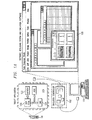
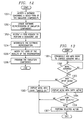
- FIG. 1A illustrates an embodiment of the present invention.
- General-purpose personal computer 101 is connected to target hardware 103 with emulation controller 102.
- Target hardware 103 is a megacell that includes emulation logic 124 to support software debugging activities as well as DSP 120 and memory 122.
- Details of general construction of DSPs are well known and may be found readily elsewhere.
- U.S. Patent 5,072,418 issued to Frederick Boutaud, et al, describes a DSP in detail.
- U.S. Patent 5,329,471 and 5,828,824 issued to Gary Swoboda, et al describes in detail how to test and emulate a DSP.
- DSP 120 is connected to memory 122, which holds the application program that is to be debugged.
- Emulation logic 124 interacts with emulation controller 102 during the debugging of the application program.
- emulation controller 102 is connected to target hardware 103 through a JTAG test port.
- Personal computer 101 hosts a software development system that incorporates software debugging and emulation software with which the user interacts through user interface 105.
- Digital cellular telephone 104 is illustrative of one of the many ways in which the target hardware and accompanying software may be packaged.
- Figure 1B is a block diagram of the logical architecture of an embodiment of a software development system with user interface 105 that executes on personal computer 101.
- the software development system is comprised of a set of tightly integrated modules providing tools to support the entire software development process for DSP applications.
- Integrated Tools Environment 114 comprises user interface 105, a source code editor, a code profiling tool, and a project management tool.
- the second level of this architecture comprises the tools for generating code (block 106), for debugging code (block 107), and for analyzing the performance of the code in real-time (block 108).
- this level includes support for adding additional development tools as "plug-ins" (block 109).
- a "plug in” is a software application that may be dynamically added to the software development system to extend the functionality of the system.
- the third level provides the low-level support for debugging. It comprises an instruction set simulator (block 111) for host debugging, software for configuring the emulation resources available on the target hardware (block 110), and software for interfacing to the target hardware (block 112). Commands are sent to emulation logic 124 via JTAG test port 126. Trace data is received on a Real Time Data Exchange (RTDX) bus 128.
- DSP/BIOS 130 provides basic operating system support for the application as well as some low level support enabling the application to run in real-time while debugging information is collected.
- FIG. 1C presents a more detailed view of the logical architecture of an embodiment of the present invention.
- Software development system 140 includes central management facility 146 for controlling the emulation components available on target hardware 103.
- Plug-ins 142 and 144 communicate with central management facility 146 to use the emulation components to perform debug jobs.
- Software development system 140 may be extended through the addition of other plug-ins that utilize the emulation components provided those plug-ins conform to interface 148 of central management facility 146.
- Central management facility 148 makes it possible for plug-ins 142, 144 and future plug-ins to share the use of the components while preventing conflicts.
- central management facility 146 access database 152 to build a software representation of the emulation components available on target 103.
- This software representation and the accompanying code for using that representation are represented by block 154.
- Central management facility 146 then works with code block 154 to determine what debug capabilities are supported by the emulation components on target 103 and configure the user interface of software development system 140 to include only those menu items for debug tasks that may actually be performed with the available components.
- a system and methods will now be described to provide a software development system and a user interface that has a software centric view.
- a user has certain debug tasks they want to perform while debugging an embedded application program, such as: setting a breakpoint or watch point at a certain instruction, using a timer to determine if an interrupt service routine takes more than an allowable amount of time to execute, etc.
- a software centric system is dependent on underlying hardware functionality, but not on a specific hardware implementation.
- HW emulation component hardware
- ISA instruction set architecture
- HW implementation changes, but not the HW functionality.
- a HW comparator compares the value of an input bus, such as the program address bus to a user chosen value, which is placed in a reference register. If the value on the bus and the value in the reference register are equal the output of the comparator will be true. If the values are different, the output of the comparator will be false.
- the size of the bus, and hence the size of the reference register will vary from one ISA to the next.
- one ISA may require 22 gates to implement a reference register 22 bits wide, and another may require 32 gates to implement a reference register 32 bits wide.
- the reference register size may be the same, but the implementation may be different due to the HW design considerations of a higher CPU clock rate.
- a hardware centric system requires the user to be aware of the programming details of the hardware implementation. In addition to placing a burden on the user by requiring the user to learn details of the hardware, the system must be modified each time the hardware implementation is changed. In this software centric view, the upper portions of the system such as the user interface are only concerned with the functionality of the hardware and are not aware of the implementation details. Advantageously, this allows the new GUI to be identical for all ISAs.
- Figure 2 presents one possible configuration of emulation components provided on target hardware 103.
- These emulation components comprise logic that monitors activity such as event detector 201 and auxiliary event detector 202, logic that records activity such as counters and state machines (block 203), logic that permits pin sharing such as scan adapter 205 and pin manager 204, logic that imports data such as RTDX 207, logic that accelerates transmission such as local oscillator 209, logic that exports data such as RTDX 207 and trace export 208, logic that captures execution activity such as trace collection 210, and logic that direct traffic such as trigger builder 206.
- logic that monitors activity such as event detector 201 and auxiliary event detector 202
- logic that records activity such as counters and state machines (block 203)
- logic that permits pin sharing such as scan adapter 205 and pin manager 204
- logic that imports data such as RTDX 207
- logic that accelerates transmission such as local oscillator 209
- logic that exports data such as RTDX 207 and trace
- the software development system allows the software developer to make use of these emulation components during debug activities without requiring the developer to know anything about the capabilities of the emulation components on target hardware 103.
- central management facility 146 and code block 154 determine if a job can be performed or not.
- central management facility 146 tracks their usage and updates the menus of software development system 140 accordingly.
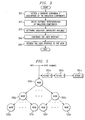
- Figure 3 presents a flow graph of a method for configuring the software development system of Figure 1B upon initial activation.
- the emulation software of the software development system is designed to be independent of the architecture of target hardware 103. This design allows the software development system to support multiple different target hardware configurations without change.
- an emulation component database containing a description of the configuration of the target hardware is accessed and the system configures itself to present to the user only those emulation capabilities that are supported by the target hardware.
- step 301 an emulation component database containing a description of the emulation components available on the target hardware is accessed.
- step 302 a software representation of these emulation components and their interconnections is created from the contents of this database.
- step 303 the software debugging system analyzes the capabilities of the emulation components by traversing this software representation.
- step 304 the user interface of the software debugging system is configured to present to the user only those capabilities that are provided by the emulation components on the target hardware.
- step 305 the user interface is presented to the user to begin the debugging session.
- the software representation created in step 302 has a one-to-one relationship with the emulation components on the target hardware.
- Each emulation component is represented by a software module and the available interconnections among the components are reproduced by interconnections among the software modules.
- a software "wire list” is created and the emulation software includes a generic algorithm that can "walk” this wire list dynamically to determine what emulation components are available, how the components are interconnected, and as result, determine whether or not a capability should be presented to the user.
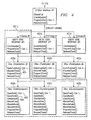
- FIG. 4 illustrates the structure of this wire list in an embodiment of the present invention.
- This figure presents a class hierarchy for a C++ implementation of the wire list.
- Area 401n corresponds to the representation of one instruction set architecture (ISA).
- Areas 401b-n correspond to similar representations for other ISAs.
- Each emulation component in the target hardware is represented by a component object 402a-n.
- component object 402a might represent event detector 201
- component object 402b might represent trigger builder 206
- component object 402n might represent a counter 203.
- Each component object 402n defines functions for reserving, programming, and releasing the emulation component it represents. It also defines two functions that are part of the wire list walking implementation.
- QueryTree() function 405 is called to determine if the represented emulation component can perform a requested operation.
- QueryTree() function 405 will call QueryNode() function 406 passing the task tree as a parameter. This function iterates through each node of the task tree to determine if it can perform the operation represented by that node.
- QueryNode() function 406 is also called by a component object 402n that represents an emulation component capable of performing a Boolean operation to determine if the represented emulation component can fulfill the requirements of an operand of a Boolean operation.
- System object 403a is the starting point of the wire list. It defines generic functions for reserving, programming, and releasing the emulation components represented in the wire list.
- System objects 403 b-n correspond to the starting points of other software wire lists that may be present. These wire lists represent other target hardware that may have the same ISA as that represented by system object 403a but the emulation components available may vary.
- This representation and the flexible architecture of the software development system allow the system to support multiple target hardware configurations without requiring any major changes to the software.
- the possible types of emulation components are generally well known as discussed with reference to Figure 2 and the software debugging system contains a class definition for each well-known type. As the representation is built from the database containing the description of the target hardware, this class definition is used to create a component object 402a-n for each emulation component of each type. If the target hardware contains more than one of a given component type, more than one component object is created using the same class definition.
- SRAM Static Random Access Memory
- the software development system uses the wire list walking software to determine what emulation capabilities are supported. It iterates through a list of predefined debug jobs represented internally as analysis trees, processing each analysis tree to determine if the emulation hardware can provide the functionality required by the debug job.
- the analysis tree is presented in more detail below in the discussion of the use of the software debugging system once it is activated.
- Figure 5 presents the structure of a task tree.
- Each analysis tree is translated into a task tree by the wire list walking software. If a debug job includes multiple state, the State Number represents the state where the tree occurs.
- Each action 501n describes what to do if an event defined by a node, or a combination of nodes, is triggered. Action 501n may be "halt CPU”, “increment/decrement counter”, “go to another state”, toggle a pin", etc.
- Each node 501n of the tree contains, among other things, a location to store an identifier for the emulation component assigned to it by the wire list walking algorithm.
- Figure 6 presents a simple debugging job to illustrate the wire list walking algorithm.
- the target hardware emulation components include two comparators 601 and 602 that are connected to a Boolean AND block 603.
- the software wire list would have component objects 402n-1, 402n-2, and 402n.3 corresponding to components 601, 602, and 603, respectively. Interconnections 604, 605, 606, and 607 would be represented within the corresponding objects 402n-1 - n-3.
- the job submitted is to perform the Boolean AND of data from program address bus 606 and write address bus 607. The algorithm will start at the output side of this request and ask "Can any component do a Boolean AND?".
- the component object 402n-1 representing Boolean AND 603 would answer affirmatively. Then, starting with the input of Boolean AND 603, the interconnections 604 and 605 would be followed asking the question "Can anyone do a compare of the program address bus?" The component object 402n representing comparator 601 would respond affirmatively. To complete this request, again from the input side the question would be asked of the interconnections "Can anyone do a compare of the write address bus?". The component object 402n-2 representing comparator 602 would respond affirmatively. The system now knows that the job can be performed as requested. Pointers to the component objects 402n-1, 402n-2, and 402n-3 that satisfy this job request will be stored in the appropriate nodes of the task tree representing this job.
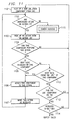
- Figure 7 presents a flow graph of the search process employed by the wire list walking algorithm.
- system object 403 and the root node of the task tree all available component objects in the system will be used as search entry points to find a best combination of emulation components for the job represented by the task tree.
- the first component object 402n in the hierarchy is selected.
- QueryFunction() 404 will call QueryTree() function 405 of the selected component module 402n passing the task tree as a parameter.
- QueryTree() function 405 is known as the "can I" function of component object 402n.
- Each QueryTree() function 405 will call its own QueryNode() function 406 passing the task tree as a parameter.
- step 703 is executed in which another component object is selected.
- the search process then continues at step 702. If the test result is true, a second test is made at step 705 to determine if any node in the task tree is unresolved. If the test result is true, the search process is started again at step 701. If the test result is false, all nodes are resolved, and step 704 is executed to search for actions.
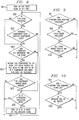
- Figure 8 contains a flow graph describing the iterative process QueryNode() function 406 follows to determine if it can perform the operation represented by that node. This process corresponds to step 702 in Figure 7.
- step 801 the root node of the task tree is selected. If the node is not resolved as per the test performed in step 809, the process continues with step 803. If it is resolved, at step 802, a check is made to determine if the cost of the emulation component assigned to the node is greater than the cost of the current emulation component. If it is not, the process continues at step 806. Otherwise, step 803 is performed.
- Each component module has an assigned cost and the cost of a solution is the total cost of all the components included in the final solution. Cost is generally a matter of complexity. For example, an AND gate with three inputs is assigned a higher cost than an AND gate with two inputs. If the component cost of a component module already assigned to the node in question is greater than the cost of the current component module, then the current node is considered as a replacement. If it is determined that it can replace the assigned component module, then the current module becomes part of the candidate solution and the old assigned module is released. In this manner, when a final solution is found, it will be the lowest cost solution available.
- step 803 the test is made to determine if represented emulation component can perform the operation required by this node of the task tree. If it cannot, the process continues at step 806. If it can, step 804 is performed in which the represented emulation component is assigned to the node. Then, at step 805, a test is made to determine if the represented component has additional capacity. If it cannot, the process terminates and returns to step 702 in Figure 7. If it can, step 806 is executed. At step 806, a test is made to determine if the task tree node is requesting a Boolean operation. If the test result is negative, the process terminates and returns to step 702 in Figure 7. Otherwise, a child node of the Boolean operation node is selected and the process continues at step 809.
- Figures 9 and 10 are flow graphs of two of the possible tests performed at step 803 to determine if the represented component can perform the operation.
- Figure 9 illustrates the handling of a Boolean operation
- Figure 10 represents the handling of a compare operation.
- step 901 determines at step 901 that it can perform a requested Boolean operation
- a test is then made at step 902 to determine if all child nodes of the Boolean operation are resolved. If the result of this test is positive, a test is made at step 903 to determine if all of the events for each child node are connected. If the results of the tests at steps 901-903 are all positive, a positive response is returned to step 803 in Figure 8. If the result of any of these tests is negative, a negative response is returned to stpe 803.
- each child node of the Boolean node in the task tree is picked up in turn and other component objects 402n are called via their respective QueryNode() functions with each child node as a parameter to find a component object for each child node.
- the search is successful only if all the child nodes may be handled by a group of interconnected component modules.
- component object 402n determines at step 1001 that it can perform a requested compare operation, it will check to see if the requested operand is one of the inputs to represented emulation component at step 1002. If it is, a positive response is returned to step 803 in Figure 8. If the result is negative in either step 1001 or step 1002, a negative result is returned to step 803.
- component module 402n represents a multiplexor
- component object 402n will call the QueryNode() functions of its interconnected component objects passing the node it received as a parameter. If any function call returns a success, the search ends for the multiplexor component object.
- Figure 11 presents a flow graph of the search process for resolving actions defined in the task tree.
- QueryNode() function 406 call for the root node of the task tree returns a success
- QueryTree() function 405 will then determine if the actions defined by the task tree can be triggered . If all of the actions can be triggered, the search is successful.
- an emulation component is picked.
- a test is made at step 1102 to determine if there are any unresolved actions 501a-n. If the response to this test is negative, the search terminates successfully at step 1115. Otherwise, the next action 501n is picked up from the action list at step 1103.
- a test is made at step 1104 to determine if the current emulation component can perform action 501n. If the response is negative, the process returns to step 1101 to get the next emulation component. Otherwise, a test is made at step 1105 to see if the root node event is generated by the current component. If so, then this action is resolved. The current component is assigned to the action in step 1106 and the action is marked as resolved in step 1107.
- step 1105 The search process then resumes with step 1102 to check for additional unresolved actions. If the test at step 1105 is negative, a test is made at step 1112 to determine if the root node event is generated by another emulation component and the current component can take that event as input. If so, then the action is resolved and the process continues at step 1106. If not, a check is made at step 1113 to determine if there are more emulation components to be tried. If so, the process resumes at step 1101 with the next emulation component. Otherwise, a check is made at step 1114 to see if the search has been repeated three times. If not, the search starts again at step 1101 with the first emulation component. After three unsuccessful searches through the emulation components, the search terminates unsuccessfully.
- step 304 the user interface is configured to present to the user only those capabilities that have been detected in step 303.
- Menu items for those jobs most frequently performed by the user that have passed successfully through step 303 are dynamically added to certain of the context sensitive menus of the software debugging system.
- Figure 12 presents a flow graph of a method for using emulation components available on the target hardware during the debugging of an embedded application.
- an emulation component database containing information regarding available emulation components is accessed.
- These emulation components may include counters, comparators, processors, logic gates, cores, boards, CPUs, pins, etc.
- the information comprises a list of the emulation components, an identification for each of emulation component, (e.g., a counter, a comparator, etc.), an identification of the inputs to and outputs from each component, and a list of interconnections between the components.
- the emulation component database is generated manually.
- the emulation component information is dynamically generated by a software tool.
- the software tool will accept as input a file describing the layout of the target hardware. Such a file may be generated by the computer-aided design tool used by a hardware designer to lay out the target hardware.
- the software tool will use the information in this file to create a database describing the emulation components available in the hardware design.
- the emulation component database containing the system resource information may be accessed in several ways.
- the database may be accessed over a communications network, such as the Internet, an Ethernet, a Local Area Network, etc.
- the database may accessed over a communication medium, such as FireWire (IEEE standard 1394), through parallel ports, by peripheral component interconnect (“PCI”), etc.
- FireWire IEEE standard 1394
- PCI peripheral component interconnect
- step 1202 a software representation of the emulation components is created. An embodiment is described in the discussion of step 302 of Figure 3 above.
- a user request is received.
- this user enters a request through a graphical user interface (GUI) that presents a software-centric, user task oriented view of the emulation capabilities of the target hardware.
- GUI graphical user interface
- the user may think in terms of the debug jobs to be accomplished based on the generic functionality of the emulation components and not be concerned with the details of the actual hardware implementation of those components.
- a comparator emulation component compares the value of an input bus, such as the program address bus to a user chosen value, which is placed in a reference register. If the value on the bus and the value in the reference register are equal, the output of the comparator is "true.” If the values are different, the output of the comparator is "false.”
- the size of the bus, and hence the size of the reference register may vary from one target architecture to the next. One architecture may require 22 gates to implement a reference register 22 bits wide, and another may require 32 gates to implement a reference register 32 bits wide. Or the reference register size may be the same, but the implementation may be different due to the hardware design considerations of a higher CPU clock rate. These are implementation differences, but the functionality remains the same: the output of the comparator is unaffected by the implementation of the reference register.
- step 1204 the software representation is interrogated to determine if the system resources can perform the requested job.
- An embodiment of this interrogation process is presented in the discussion of software wire list walking associated with Figures 7-11 above.
- the wire list walking algorithm finds the lowest cost combination of available emulation components that can perform the requested job. It also determines if one or more lower cost solutions are possible if emulation components currently programmed by other jobs were made available. If such solutions are possible, the user is notified that a solution has been found but that a lower cost solution may be had if another job or jobs is canceled. The user then has the option of accepting the current solution or canceling the identified job or jobs and receiving an even lower cost solution.
- the requested emulation components may be "reserved" after they are identified. This is done to prevent an operation identified as capable from being changed to impossible, or not possible until later. This may include reserving, or controlling access to, all system resources, or just the identified system resources.
- step 1205 the user is notified as to whether the requested job can be performed by the available emulation components.
- This notification may indicate one of three things: the requested job can be performed; the requested job cannot be performed; or, the requested job could be performed but one or more of the emulation components required by the job are in use by another job.
- step 1206 the system resources assigned to the debug job are programmed by transferring information such as data, programs, commands, signals, messages, or combinations thereof to the target hardware.
- the user may request debug jobs such as setting a hardware breakpoint, defining a watchpoint, and using a timer to determine if an interrupt service routine takes more than an allowable amount of time to execute.
- debug jobs such as setting a hardware breakpoint, defining a watchpoint, and using a timer to determine if an interrupt service routine takes more than an allowable amount of time to execute.
- the user may request the more frequently executed jobs such as setting breakpoints or watchpoints through a context sensitive menu that may be activated with a right mouse click where the user spends most of his time while debugging - the source code window.
- the debug jobs that appear in this menu are selected when the software development system is initialized using the method described above in relation to Figure 3.
- jobs are dynamically made active and available for user-selection or inactive and unavailable for user selection based on the context in which the activation occurs. For example, if a data variable is highlighted when the right mouse button is clicked, jobs that work with data variables will be displayed as active while any jobs that do not work with data variable will be "grayed out” to indicate that the jobs may not be selected in this context.
- a job listed in the context sensitive menu cannot be executed because one or more emulation components required by it are no longer available, that job will be made inactive. It will only become active again when the required emulation components become available. For example, if all of the comparator components are assigned to debug jobs, any debug job listed in this menu that requires the use of a comparator will become inactive.
- Figure 13 presents a flow graph of a method allowing a plugin of a software system to dynamically vary items in context sensitive menus.
- a plugin calls the software system to add a new menu item to a specified context sensitive menu.
- the modified menu is activated by the user.
- step 1303 the software system queries the plugin to find out if the new menu item should be displayed as active or inactive. If the response is that the menu item should be made inactive, at step 1305, the menu is displayed with the item "grayed out”. Otherwise, at step 1304, the menu is displayed with the item available for user selection. If the user selects this new menu item at step 1306, the software system calls the plugin to execute the selected action as indicated by step 1307.
- the above method for dynamic menus is implemented by providing a common object model (COM) interface between the software development system and the emulation software.
- COM is one type of commercially available object request broker.
- the emulation software adds a menu item at step 1301, it calls this interface and includes two functions in the parameters of the call.
- the first function is called by the software development system at step 1303 after the user clicks the right mouse button to activate the context sensitive menu in step 1302 and before the menu is displayed.
- This function tells the software development system whether the associated menu item should be displayed as active or inactive when the menu appears. This determination is made based on the context in which the menu is activated and the availability of the emulation components required to execute the associated debug job.
- the second function is called by the software development if the user selects the menu item in step 1306. This second function executes the action associated with the menu item.
- the most common debug jobs supported by the emulation components available in the target hardware are made available to the user in a context sensitive menu associated with a source code editor.
- the menu items available for selection on this menu are varied dynamically depending upon the context in which the menu is activated and the current availability of the required emulation components.
- the contexts supported include selection of a data variable, selection of a single line of source code, selection of a contiguous block of source code, and current cursor position in the source code window.
- the context sensitive menu will make available to the user only those debug jobs that operate with a data variable. Any other debug jobs will appear as inactive menu items. Analogously, if a single line of source code or a contiguous block of source code is highlighted when the right mouse button is clicked, only those debug jobs that operate in the selected context will be made available to the user. If nothing is highlighted in the source code window when the right mouse button is clicked, the source code line nearest to the position of the cursor in the window is used as the default context.
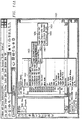
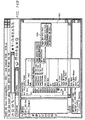
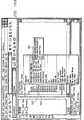
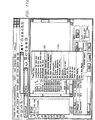
- Figures 14A and 14B illustrate an embodiment of the dynamic menu capability. These figures show a source code editor window containing source code for an application program that is being executed on target processor 120. In Figure 14A, nothing was highlighted in source code window 1401 and the right mouse button was clicked. The user has selected menu item 1402 for the Advanced Event Triggering option followed by a selection of menu item 1403 for the Toggle Action/Watchpoint option. At this point, menu 1404 is displayed and only those jobs that may be performed with a source code line are active. In this instance, only job 1405 is active and jobs 1406, 1407, and 1408 are "grayed out" to indicate that they are not available for selection because they do not apply to the source code context.
- the selected source code context is represented internally as a data object if the context is a data variable or as a source object if the context is one line or a range of lines of source code.
- These internal representations encapsulate the relevant debugging information associated with the context such as start address, length, type, etc. This list of possible relevant debugging information is intended to be representative, not exclusive.
- the debugging information is supplied by the software development system, which is uniquely positioned to create, retain, and update it as the application is edited, compiled and/or assembled, and linked. When the application is compiled/assembled and linked, a file in common object file format (COFF) is created that contains, among other things, symbolic information to be used by the debugging software.
- COFF common object file format
- debug job When the user selects a debug job, information is extracted from the internal representation associated with the selected context and used to fill one or more parameters of the job. This capability frees the user from having to know or look up the relevant debugging information when defining a debug job.
- the user is not limited to this method of filling in parameters. The user may choose to manually enter the parameter values instead.
- these internal representations are retained by the software development system and are updated if the source code that they represent is modified. This feature permits the user to make modifications to source code during a debugging session without having to redefine all debug jobs created before the modification. Instead, any debug job referring to a source code context that has been subsequently modified is automatically updated when the modification is made.
- Figure 15 illustrates a method for dynamically determining relevant debugging information from the source code of the program being debugged.
- the source code of the program being debugged is displayed in a source code window of the software development system.
- the area of the source code in which the user wishes to specify some debug job is highlighted. This area may be a single line of code or a range of source code lines.
- a source code object containing relevant debugging information about the source code context selected is created in step 1503.
- the relevant debugging information is obtained from a COFF file containing debug information that is created by the software development system when the source code is compiled or assembled and linked to form the program.
- step 1504 If a debug job is selected from a menu while the source code area is highlighted (step 1504), the information from the associated source code object is used to automatically fill in the parameters of the debug job (step 1506). Or, the highlighted area may be "dragged and dropped” onto a dialog box (step 1505) and the information from the associated source code object is used to fill in parameters in the dialog box (step 1506).
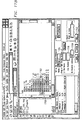
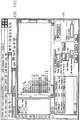
- Figures 16A and 16B show the source edit window of Figure 14 and illustrate dynamic determination of debugging info for a simple debug job.
- a hardware breakpoint job is being selected from context sensitive menu 1601.
- the address at which the breakpoint is to occur is automatically determined from source code line 1604 indicated by cursor 1602.
- indicator 1603 appears to the left of source code line 1604 to denote that a breakpoint has been set for that line. Clicking on indicator 1603 causes information box 1605 to be displayed.
- Information box 1605 contains the parameters of the breakpoint job that were automatically supplied by the source code object created when source code line 1604 was selected.
- Figures 17A-D show the source edit window of Figures 16A-B and illustrate dynamic determination of debugging info for a more complex debug job in which a source code object is used to fill in the job's parameters in a dialog box.
- a debug job Set Hardware Breakpoint 1701 is selected from menu 1702.
- Dialog box 1703 is displayed in the lower right corner of the window as illustrated in Figure 17B.
- absolute address parameter 1704 is currently 0x0 (the default) and file name parameter 1705 and line number 1706 are currently blank.
- source code line 1707 is selected by depressing the left mouse button and keeping it depressed. This indicates that a drag and drop operation is desired. Drag and drop cursor 1708 appears to indicate that the system is ready to execute the operation.
- drag and drop cursor 1708 is moved to dialog window 1703 and placed over file name parameter 1705.
- the mouse button is then released and parameters 1705 and 1706 are automatically filed in from the information in the source code object associated with source code line 1707 as shown in Figure 17D.
- Figure 18 presents a flow graph illustrating a method for dynamically updating debug jobs if the source code for the program being debugged is changed. Steps 1801-1806 are identical to steps 1501-1506 as described with Figure 15 above.
- step 1807 the system retains the source code object created from the selected source code context. This source code object is associated with the debug job in step 1808. If the source code is modified as denoted in step 1809, the retained source code object and the associated debug job are updated to reflect the modification if it affects them in step 1810.
- source and data objects supply the plugins with information about program locations and data expressions for selected source code contexts. If the user modifies the source code of the program being debugged, the source and data objects are automatically updated by the software development system if the modifications affect them. Before executing any active debug jobs, the plugin will validate the debug information for each job having associated source and data objects and update the debug jobs as required. Thus, debug jobs whose source and data object information has changed are automatically reprogrammed with the updated information and the user is not required to take any action. If it is not possible to reprogram a given debug job, the user is notified and the job is not executed.
- step 1205 the user is notified as to whether the requested job can be performed by the available emulation components.
- This notification may indicate one of three things: the requested job can be performed; the requested job cannot be performed; or, the requested job could be performed but one or more of the emulation components required by the job are in use by another job.
- the system aids the user in finding and deleting or disabling the debug jobs that are using the desired components rather than requiring the user to determine this information by trial and error.
- Figure 19 presents a flow graph of a method for proactively allowing emulation components already in use by other debugging jobs to be released for use in a new debugging job.
- the system determines if the emulation components are available to accomplish the requested job. This is done by the wire list walking process described previously. If the components are available, step 1906 is executed to report success. Otherwise, the system determines if the job would be possible if the emulation components were available in step 1902.
- the software creates a duplicate set of component modules that are all marked as being available. This duplicate set is searched by the wire list walking algorithm to determine if the job is possible with all emulation components available.
- step 1907 is executed to report failure. Otherwise, the system then determines which existing debug jobs are using the needed components in step 1903.
- step 1903 the software has found a group of components in the duplicate set required for the job. By comparing this set with the original set of emulation component modules showing which components are assigned to existing jobs, a list of existing jobs using the required components is formed.
- Step 1904 displays an error dialog to the user that contains a list of these conflicting debug jobs.
- the user now has the option to delete or disable one or more of the listed jobs in step 1905. If the user does delete or disable a job, processing continues at step 1901. Otherwise, failure is reported at step 1907.
- Figure 20 presents an illustration of an embodiment of the proactive error handling method of Figure 19.
- the user has attempted to define a hardware breakpoint at source code line 2001 using Hardware Breakpoint dialog 2002.
- the system has determined that all of the available hardware breakpoint emulation components are currently in use by two other debug jobs 2003.
- Proactive Error Dialog 2004 has been displayed, listing the debug jobs 2003 that are using the required jobs.
- the user may now select one or more of the jobs and disable them by selecting button 2005 or remove them by selecting button 2006. Or the user may elect to disable the new debug job by selecting button 2007.
- all debug jobs are represented internally as analysis trees.
- This generic representation reinforces the separation between the user interface and the underlying software that actually identifies and programs the emulation components.
- the tree represents a user-requested operation, not a specific set of instructions on how to program the hardware. All hardware specific information is confined to the very lowest level of the software architecture.
- Figure 21 presents a generic diagram of the analysis tree structure.
- Node 2101 is the root node of the tree.
- Node 2102 is a global If node corresponding to an If statement not tied to a state. These will always be left nodes of node 2101.
- Nodes 2103a-n are global action nodes. These are actions not tied to a state or to a global If statement. Nodes of this type will always be right nodes of node 2101.
- Nodes 2104a-n represent states. These nodes will always be down nodes of node 2101. Each state node 2104n may have down and right nodes as illustrated by those shown for node 2104a.
- Nodes 2105a-n are right nodes of 2104a.
- the down node of node 2104a is If node 2106a. This node represents the first If statement in the state represented by 2104a. Additional If statements are represented by subsequent down nodes such as 2106b from If node 2106a. If node 2106a may have left, down, right, and next nodes.
- the left node will be a tree of operations as illustrated by node 2109 and its child nodes. These operation nodes may be !, &&, or
- the right node is one or more action nodes 2110a-n representing a list of actions to perform when the If clause event condition is true.
- the next node may optionally represent an Elseif clause such as node 2107 or an Else clause such as node 2108.
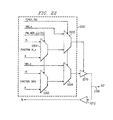
- Figure 22 is a schematic diagram of an embodiment of a configurable I/O pin on a target processor that can be configured by a software development system.
- the debug software system views pin manager 220 (see Figure 2) as a group of pins that are controlled separately.
- Each pin 2200 and associated multiplex circuit 2201, as illustrated in Figure 22, can multiplex from one to sixteen functions onto a debug test port pin.
- Each pin can have as few as three functions: function, zero, off or HI-Z; and as many as sixteen functions: function[13:0 ⁇ , zero, and off.
- Pin function selection multiplexors 2202, 2204 are controlled by four general purpose register bits Pin_Mgr_x[n+3:n] that are in a scan chain that receives emulation commands from the software development system.
- Function data is connected to inputs of mux 2202, while corresponding output control signals Function_HI_Z are connected to inputs of mux 2204.
- Function_HI_Z signals are also provided by a scan register in response to
- a state machine associated with the scan interface is responsible for assigning pins to scan functions.
- Other function signals in this embodiment include trace data outputs T[9:0], trace clock C[1:0], real time data transfer (RTDX) R[3:0] traditional EMU0/1, triggers X[1:0], high impedance off state Z and zero 0.
- Table 1 lists various ways in which the set of emulation pins EMU[9:0] and trace clock TR_CK[1:0] pins can be configured in this embodiment. Other embodiments may allow different combinations, or different numbers of pins, for example.
- Emulation pin configurations Multiplexor Selection 0 1 2 3 4 5 6 7 8 9 10 11 12 13 14 15 EMU 0 Z 0 T4 T5 T6 T7 T8 T9 E1 EO R3 R2 R1 R0 X0 X1 EMU 1 Z 0 T4 T5 T6 T7 T8 E1 E0 R3 R2 R1 R0 X0 X1 EMU 2 Z 0 T4 T5 T6 T7 E1 E0 R3 R2 R1 R0 X0 X1 EMU 3 Z 0 T4 T5 T6 E1 E0 R3 R2 R1 R0 X0 X1 EMU 4 Z 0 T4 T5 E1 E0 R3 R2 R1 R0 X0 X1 EMU 5 Z 0 T4 E1 E0 R3 R2 R1 R0 X0 X1 EMU 6 Z 0 T3 EMU 7 Z 0 T2 EMU 8 Z 0 T1 EMU 9 Z 0 T0 CK1 Z 0 C1 T
- the emulation components database includes the capabilities associated with each emulation pin.
- the emulation software can therefore do the wirelist walking from any given pin back toward the associated device core to determine if a requested emulation function of the core can be provided at that pin.
- the availability of a particular core emulation function at a particular pin may depend upon the current or requested configuration of the entire set of debug test port pins.
- the pin manager can be configured to optimize trace data access by assigning all ten trace bits T[9:0 ⁇ to test port pins EMU[9:0].
- RTDX signals R[3:0] can be assigned to four test port pins, trigger signals X[1:0] assigned to two other test port pins, and only four trace bits T[3:0] selected, for example.
- the pin manager can be configured dynamically in response to various debug jobs. Likewise, pin managers having different implementations can be handled with appropriate entries in the emulation component database associated with each implementation.
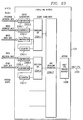
- Figure 23 is a block diagram illustrating a portion of a set of emulation components 124 provided by target system 103 of Figure 1.
- Five comparators 2300.1-5 connected to monitor various buses within DSP core 120 are illustrated.
- Two counters 2302.1-2 are connected to two of the comparators to accumulate event counts.
- Boolean combinatorial OR circuits 2304.1-2 receive the outputs of the comparators and counters and combine selected inputs to create an output signal when a selected event or set of events occurs. Other similar sets of counters and Boolean circuits are provided, but not illustrated here for clarity.
- Boolean circuitry 2304.3 collects the outputs of the various OR gate circuits and combines selected inputs to create an output signal when a selected event or set of events occurs.
- Trigger building circuitry 2306 receives the output signal from the Boolean circuitry and generates a resultant trigger signal.
- a trigger signal can be configured to halt the processor core, or connected to a selected emulation output pin, as discussed above
- the emulation software can therefore do the wirelist walking from any given pin back toward the associated device core using an emulation component database corresponding to emulation components 124 to determine if a requested emulation function of the core can be provided using emulation components 124.
- the availability of a particular core emulation function at a particular pin may depend upon the current or requested configuration of the entire set of debug test port pins and emulation components.
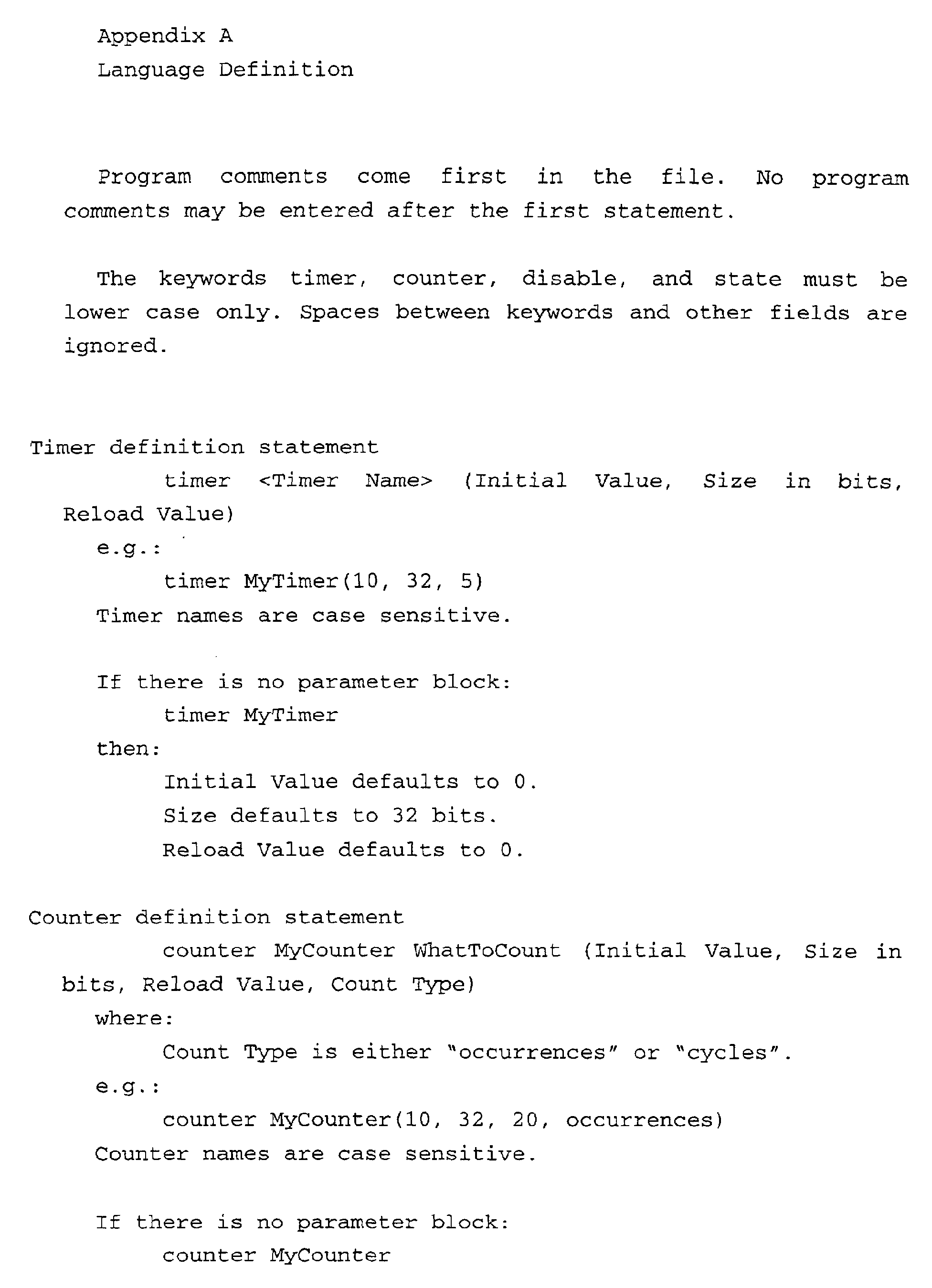
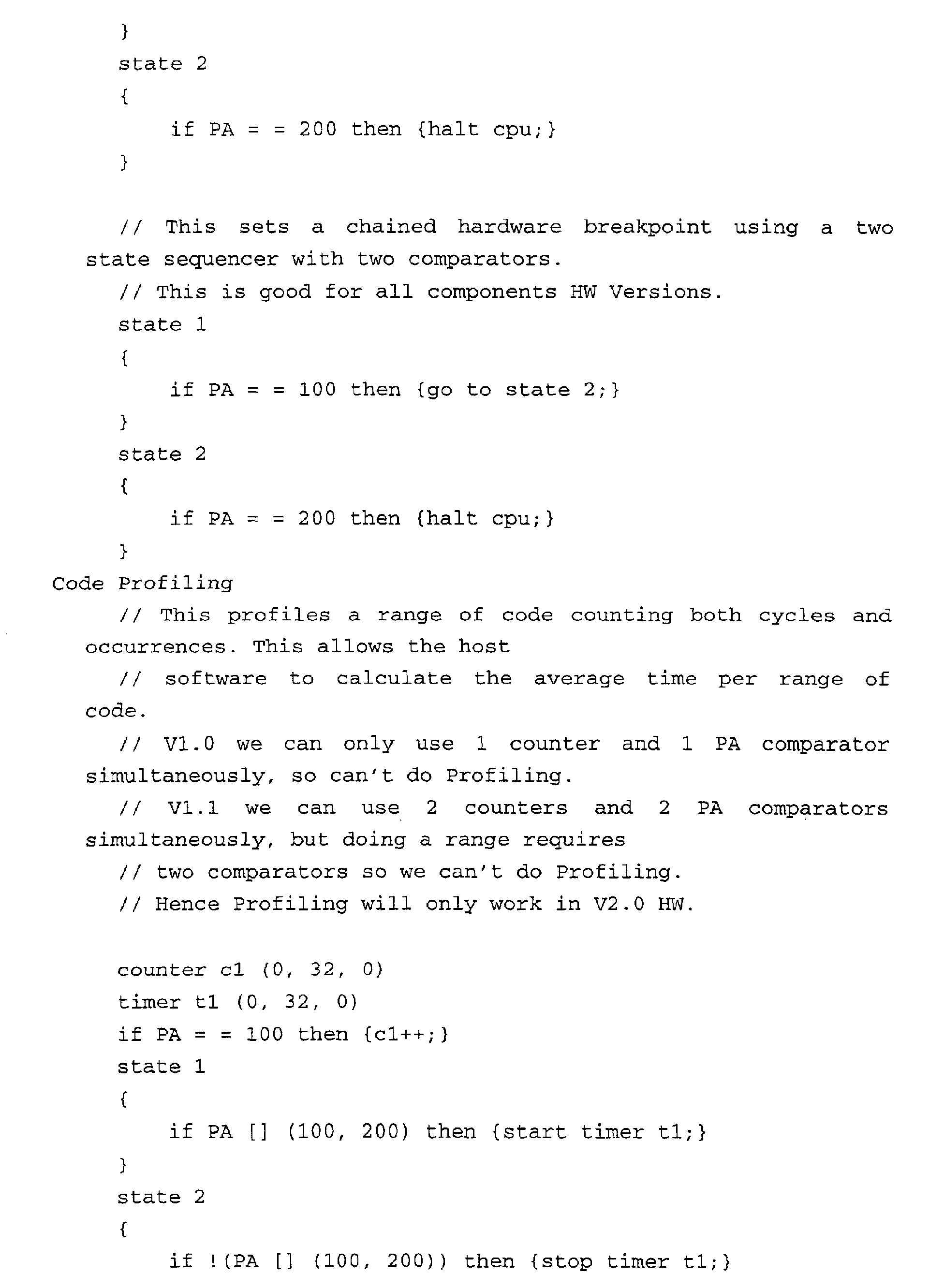
- a language is defined to provide a means for specifying batch tests for debugging the lower levels of the software development tool and to allow a developer to test emulation component hardware.
- This language is parsed into analysis trees as described above that are passed as parameters to the software development system through a special interface to the low level software that interfaces directly to the emulation components. This language is presented in Appendix A.
- the software system is executed on a host processor interconnected with the hardware system.
- a database is accessed to obtain a description of a set of functional components present within the hardware system.
- a software representation of the capabilities of each functional component is created by using the description of the set of functional components.
- the software representation is interrogated to determine a set of operational capabilities of the hardware system.
- the software system is then operated in a manner that is responsive to the set of operational capabilities of the hardware system.
- the software system is a software development system connected to test bed for debugging an application program being executed on a target hardware system.
- the database and software representation correspond to a set of emulation components provided on the target hardware system.
- the software system can automatically adapt itself to any one of several different hardware environments where each hardware environment is described by a corresponding database that defines a set of capabilities of the hardware environment.
- a user interface of the software system can be configured to present only a set of activities that are possible in accordance with the set of operational capabilities.
- the software representation can be interrogated to determine if a set of functional emulation components are available in the target system to perform a user selected debug activity.
- the invention can be embodied as a software development system with a memory storage system holding a software development tool program.
- a host computer is connected to the memory storage system and is operable to execute the software development tool program.
- a test port is provided for connecting to a hardware system, the hardware system being operable to execute an application program that will be debugged by the software development system.
- the hardware system may include a microprocessor connected to a memory module for holding a software program, where the microprocessor is operable to execute the application program.
- a set of functional emulation components is connected to the microprocessor for monitoring various parameters during execution of the application program, the set of functional emulation components being configurable in response to an emulation command from the software development system.
- a test port is connected to the set of functional emulation components, and the test port is operable to receive emulation commands from the software development system on a host processor.
- Another embodiment of the invention is a digital system that has a microprocessor with a memory circuit holding an application program for execution by the microprocessor, wherein the application program was developed with a software development system using the method described above.
- a method for automatically determining capabilities of a hardware system to permit a software development system to support multiple hardware system architectures A database corresponding to a hardware system selected from the multiple hardware system architectures is accessed for use during a software debug session.
- a software representation of a set of emulation components of the hardware system is created in accordance with the database such that interconnections of the set of emulation components are also represented.
- a request is made to the software development system for a debug job in which the request is comprised of at least an action and one or more events that will trigger the action.
- the software representation of the set of emulation components is then traversed to determine if an emulation component required to execute the action is present in the hardware system and if a set of emulation components capable of detecting the one or more events are interconnected to the emulation component in such a way that the first action will be triggered when the one or more events occur. If so, the debug job is performed using the selected set of emulation components.
- the software representation is traversed by querying the plurality of software objects to determine if any of the corresponding emulation components can perform the first action; following the linkage information of a first object from the plurality of software objects that can perform the first action to identify a first set of interconnected objects; and querying the first set of interconnected objects to determine if the corresponding emulation components are capable of detecting the one or more events in such a way that the first action will be triggered when the one or more events occur.
- This method can also include following the linkage information of a second object from the plurality of software objects that can perform the first action to identify a second set of interconnected objects; querying the second set of interconnected objects to determine if the corresponding emulation components are capable of detecting the one or more events in such a way that the first action will be triggered when the one or more events occur; assigning a first complexity value to the first set of interconnected objects and a second complexity value to the second set of interconnect objects; and selecting a set of emulation components to execute the first action having a lower corresponding complexity value.
- the method can also include determining that a first set of emulation components that could perform the first request is already assigned to a prior request; determining that a second set of emulation components could also perform the prior request; assigning the second set of emulation components to perform the prior request; and then assigning the first set of emulation components to perform the first request.
- Another method described herein is a method for dynamically varying context sensitive menus of a software system, which comprising the steps of: adding a first menu item to a first context sensitive menu of a graphical user interface (GUI) in response to a call to the software system from a first subsystem module; receiving an activation event for the first context sensitive menu from the GUI; displaying the first menu item as either active or inactive based on a response to a query from the software system to a second subsystem module; and executing an action associated with the first menu item as specified by the first subsystem module when the first menu item is selected only if the first menu item is active.
- GUI graphical user interface
- the step of adding a first menu item can call the software system from the first subsystem module with a call that includes sending two functions as parameters.
- the step of displaying comprises a step of calling a first of the two functions to determine if the first menu item should be displayed as active or inactive; and the step of executing comprises a step of calling a second of the two functions to invoke the action associated with the first menu item.
- the step of adding a first menu item can comprise the steps of: determining if a resource is present to perform the action associated with first menu item; and adding the first menu item to the first context sensitive menu only if the resource is present.
- This method can also comprise the steps of: displaying source code of an application program in a source code window of the GUI; displaying the first context sensitive menu with a first set of menu items including the first menu item in response to selection of a first element in the source code window, wherein the first menu item is displayed in an active state; and displaying the first context sensitive menu with the first menu item displayed in an inactive state in response to selection of a second element in the source code window.
- Another method described herein is a method for dynamically determining debugging information from source code of a program being debugged, the method comprising the steps of: displaying at least a part of the source code of the program being debugged in a first area of a display; selecting a portion of the source code for a debug activity; creating a source code object containing debugging information relevant to the portion of source code; and initiating a debug activity by using the debugging information from the source code object.
- This method can also include the steps of retaining the source code object for use if the associated portion of source code is selected again and dynamically updating the source code object in response to a change made to the associated portion of source code.
- the step of initiating can include the steps of: presenting a menu having a set of potential debug activities in response to the step of selecting a portion of the source code; selecting the debug activity from the set of potential debug activities; and extracting parameters from the source code object to supply one or more parameters required by the debug activity.
- the step of initiating can also include the steps of: displaying a parameter input area in a second area of the display for inputting a set of parameters required by the debug activity; and dragging and dropping the portion of source code from the first area of a display to the second area of the display and thereby causing one or more of the parameters required by the debug activity to be extracted from the source code object.
- This method can also include a step of dynamically updating the debug activity in response to an update made to the source code object.
- Another method described herein is a method for proactively allowing emulation components already in use by other debugging jobs to be released for use in a new debugging job, the method comprising the steps of: requesting the new debug job; determining that a first set of emulation components needed to perform the new debug job are present but at least one or more emulation component of the first set of emulation components is not currently available; selecting a set of existing debug jobs that are using the one or more emulation components required by the new debug job; indicating that the requested new debug job cannot currently be executed and displaying the set of existing debug jobs that are using the required one or more emulation components; and canceling one or more of the set of existing debug jobs selected from the list in order to free up the required one or more emulation components.
- the steps of determining and canceling can be repeated until a second set of emulation components needed to perform the new debug job are present and available.
- the software system can automatically adapt itself to a hardware environment as each environment is described by a database that defines the capabilities of that hardware.
- the software system does not need to be modified each time a new hardware environment is created.
- the user interface of the software system can be configured to present only a set of activities that are possible in accordance with the set of operational capabilities of the hardware environment.
- the user is not presented with options for capabilities that are not present.
- the software system dynamically updates the user interface to inform the user that certain activities are no longer possible because the components needed are in use.
- test bed system can be included in an emulation component database and used by the software to configure the test bed system.
- hardware resources can be logic analyzers, signal generators, oscilloscopes, etc., for example.
- a software system that is intended to operate in conjunction with various sets of hardware resources can benefit from self-configuring aspects described herein.
- a medical system that includes various and changing medical devices.
- a production system that incorporates various and changing production machinery, or a single production machine that can be fitted with various and changeable tools and implements.
- Another example is an automotive control system in which various driver displays and menus are presented in accordance with various and changeable optional equipment.
Landscapes
- Engineering & Computer Science (AREA)
- Theoretical Computer Science (AREA)
- Computer Hardware Design (AREA)
- Quality & Reliability (AREA)
- Physics & Mathematics (AREA)
- General Engineering & Computer Science (AREA)
- General Physics & Mathematics (AREA)
- Debugging And Monitoring (AREA)
- Computer And Data Communications (AREA)
- Test And Diagnosis Of Digital Computers (AREA)
Abstract
Description
a software system and method for configuring a software system for interaction with a hardware system. In this method, the software system is executed on a host processor interconnected with the hardware system. A database is accessed to obtain a description of a set of functional components present within the hardware system. A software representation of the capabilities of each functional component is created by using the description of the set of functional components. Then, the software representation is interrogated to determine a set of operational capabilities of the hardware system. The software system is then operated in a manner that is responsive to the set of operation capabilities of the hardware system.
When the application is compiled/assembled and linked, a file in common object file format (COFF) is created that contains, among other things, symbolic information to be used by the debugging software.
| Emulation pin | ||||||||||||||||
| Multiplexor Selection | ||||||||||||||||
| 0 | 1 | 2 | 3 | 4 | 5 | 6 | 7 | 8 | 9 | 10 | 11 | 12 | 13 | 14 15 | ||
| EMU 0 | | 0 | T4 | T5 | T6 | T7 | T8 | T9 | E1 | EO | R3 | R2 | R1 | R0 | X0 | X1 |
| EMU 1 | | 0 | T4 | T5 | T6 | T7 | T8 | E1 | E0 | R3 | R2 | R1 | R0 | X0 | X1 | |
| EMU 2 | | 0 | T4 | T5 | T6 | T7 | E1 | E0 | R3 | R2 | R1 | R0 | X0 | X1 | ||
| EMU 3 | | 0 | T4 | T5 | T6 | E1 | E0 | R3 | R2 | R1 | R0 | X0 | X1 | |||
| EMU 4 | | 0 | T4 | T5 | E1 | E0 | R3 | R2 | R1 | R0 | X0 | X1 | ||||
| EMU 5 | | 0 | T4 | E1 | E0 | R3 | R2 | R1 | R0 | X0 | X1 | |||||
| EMU 6 | | 0 | T3 | |||||||||||||
| EMU 7 | | 0 | T2 | |||||||||||||
| EMU 8 | | 0 | T1 | |||||||||||||
| EMU 9 | | 0 | | |||||||||||||
| CK1 | Z | |||||||||||||||
| 0 | C1 | T9 | E0 | E1 | R0 | X0 | | |||||||||
| CK0 | Z | |||||||||||||||
| 0 | C0 |
adding the first menu item to the first context sensitive menu only if the resource is present.






Claims (20)
- A method for configuring a software system for interaction with a hardware system, comprising the steps of:executing the software system on a host processor interconnected with the hardware system;accessing a database to obtain a description of a set of functional components present within the hardware system;creating a software representation of the capabilities of each functional component by using the description of the set of functional components;interrogating the software representation to determine a set of operational capabilities of the hardware system; andoperating the software system in a manner that is responsive to the set of operational capabilities of the hardware system.
- The method of Claim 1, further comprising the step of configuring a user interface of the software system to present only a set of activities that are possible in accordance with the set of operational capabilities.
- The method according to any preceding Claim, wherein the software system is a software development system and the hardware system comprises a target system,
wherein the step of interrogating the software representation determines a set of emulation capabilities of the target system; and further comprising the steps of:selecting a first set of debug activities in accordance with the set of emulation capabilities from a plurality of debug activities included within the software development system; andconfiguring a user interface of the software development system to present the first set of debug activities, such that remaining debug activities of the plurality of debug activities that cannot be supported by the target system are not included in the user interface. - The method according to any preceding Claim, further comprising the steps of:receiving a user request to perform a first activity;interrogating the software representation to determine if a first set of functional components are available to perform the first activity;initializing the first set of functional components and then performing the first activity; andrepeating the steps of receiving, interrogating, initializing and performing other user requests.
- The method of Claim 4, further comprising the steps of:receiving a user request to perform a second activity;interrogating the software representation to determine if a second set of functional components are available to perform the second activity; andindicating that the second activity cannot be performed if the step of interrogating determines a second set of functional components is not available to perform the second activity.
- The method according to either Claim 4 or 5, further comprising the steps of:updating the set of software representations to indicate that one or more corresponding functional components are present but not available because it is being used to perform the first activity;receiving a user request to perform a third activity;interrogating the software representation to determine if a third set of functional components are available to perform the third activity; andindicating that the third activity cannot be performed currently if the step of interrogating determines a third set of functional components is present to perform the third activity, but that a portion of the third set of functional components is currently not available.
- The method according to any preceding Claim, further comprising the step of updating the software representation to indicate that one or more corresponding functional components are present but not available because it is being reserved to perform another activity
- The method according to any preceding Claim, wherein the step of initializing the first set of functional components comprises the step of sending a command to the hardware system to enable a first mode of operation.
- The method according to any preceding Claim, wherein the step of creating the software representation forms a set of software components wherein each of the software components corresponds to a single unique functional component of the hardware system.
- The method according to any preceding Claim, further comprising the steps of:receiving a user request to perform a first debug activity;interrogating the software representation to determine if a first set of functional emulation components are available in the target system to perform the first debug activity;initializing the first set of functional emulation components by sending a first emulation command to the target system;performing the first debug activity after initializing the first set of functional debug components; andrepeating the steps of receiving, interrogating, initializing and performing other user requests.
- A digital system comprising:a microprocessor connected to a memory module for holding a software program, the microprocessor operable to execute the software program;a set of functional emulation components connected to the microprocessor for monitoring at least a first parameter during execution of the software program, the set of functional emulation components being configurable in response to an emulation command;a test port connected to the set of functional emulation components, the test port operable to receive emulation commands from a software development system on a host processor; andwherein a first emulation command is provided in accordance with Claim 10.
- A method for automatically determining capabilities of a hardware system to permit a software development system to support multiple hardware system architectures, comprising the steps of:accessing a first database corresponding to a first hardware system selected from the multiple hardware system architectures for use during a software debug session;creating a software representation for use by the software development system of a set of emulation components of the first hardware system in accordance with the first database such that interconnections of the set of emulation components are also represented;accepting a first request to the software development system for a debug job in which the request is comprised of at least a first action and one or more events that will trigger the action;traversing the software representation of the set of emulation components to determine if a first emulation component required to execute the first action is present in the first hardware system and if a first set of emulation components capable of detecting the one or more events are interconnected to the first emulation component in such a way that the first action will be triggered when the one or more events occur; andperforming the debug job using a set of emulation components selected by the step of traversing.
- The method of Claim 12, wherein the step of traversing the software representation comprises the steps of:querying the plurality of software objects to determine if any of the corresponding emulation components can perform the first action;following the linkage information of a first object from the plurality of software objects that can perform the first action to identify a first set of interconnected objects; andquerying the first set of interconnected objects to determine if the corresponding emulation components are capable of detecting the one or more events in such a way that the first action will be triggered when the one or more events occur.
- The method of Claim 13, further comprising the steps of:following the linkage information of a second object from the plurality of software objects that can perform the first action to identify a second set of interconnected objects;querying the second set of interconnected objects to determine if the corresponding emulation components are capable of detecting the one or more events in such a way that the first action will be triggered when the one or more events occur;assigning a first complexity value to the first set of interconnected objects and a second complexity value to the second set of interconnect objects; andselecting a set of emulation components to execute the first action having a lower corresponding complexity value.
- A method for dynamically varying context sensitive menus of a software system, comprising the steps of:adding a first menu item to a first context sensitive menu of a graphical user interface (GUI) in response to a call to the software system from a first subsystem module;receiving an activation event for the first context sensitive menu from the GUI;displaying the first menu item as either active or inactive based on a response to a query from the software system to a second subsystem module; andexecuting an action associated with the first menu item as specified by the first subsystem module when the first menu item is selected only if the first menu item is active.
- The method of Claim 15, in which the step of adding a first menu item comprises the steps of:determining if a resource is present to perform the action associated with first menu item; andadding the first menu item to the first context sensitive menu only if the resource is present.
- In a software debugging system, a method for dynamically determining debugging information from source code of a program being debugged, the method comprising the steps of:displaying at least a part of the source code of the program being debugged in a first area of a display;selecting a portion of the source code for a debug activity;creating a source code object containing debugging information relevant to the portion of source code; andinitiating a debug activity by using the debugging information from the source code object.
- The method of Claim 17 further comprising the step of:retaining the source code object for use if the associated portion of source code is selected again; anddynamically updating the source code object in response to a change made to the associated portion of source code.
- The method of Claim 18 where the step of initiating comprises the steps of:displaying a parameter input area in a second area of the display for inputting a set of parameters required by the debug activity; anddragging and dropping the portion of source code from the first area of a display to the second area of the display and thereby causing one or more of the parameters required by the debug activity to be extracted from the source code object.
- In a software debugging system, a method for proactively allowing emulation components already in use by other debugging jobs to be released for use in a new debugging job, the method comprising the steps of:requesting the new debug job;determining that a first set of emulation components needed to perform the new debug job are present but at least one or more emulation component of the first set of emulation components is not currently available;selecting a set of existing debug jobs that are using the one or more emulation components required by the new debug job;indicating that the requested new debug job cannot currently be executed and displaying the set of existing debug jobs that are using the required one or more emulation components; andcanceling one or more of the set of existing debug jobs selected from the list in order to free up the required one or more emulation components.
Applications Claiming Priority (10)
| Application Number | Priority Date | Filing Date | Title |
|---|---|---|---|
| US18634200P | 2000-03-02 | 2000-03-02 | |
| US18632600P | 2000-03-02 | 2000-03-02 | |
| US18634100P | 2000-03-02 | 2000-03-02 | |
| US18633900P | 2000-03-02 | 2000-03-02 | |
| US18634000P | 2000-03-02 | 2000-03-02 | |
| US186339P | 2000-03-02 | ||
| US186340P | 2000-03-02 | ||
| US186341P | 2000-03-02 | ||
| US186342P | 2000-03-02 | ||
| US186326P | 2000-03-02 |
Publications (2)
| Publication Number | Publication Date |
|---|---|
| EP1130519A2 true EP1130519A2 (en) | 2001-09-05 |
| EP1130519A3 EP1130519A3 (en) | 2009-09-30 |
Family
ID=27539154
Family Applications (1)
| Application Number | Title | Priority Date | Filing Date |
|---|---|---|---|
| EP01200791A Withdrawn EP1130519A3 (en) | 2000-03-02 | 2001-03-02 | System and method for automatically configuring an emulation system |
Country Status (3)
| Country | Link |
|---|---|
| US (5) | US20020087948A1 (en) |
| EP (1) | EP1130519A3 (en) |
| JP (1) | JP2001356934A (en) |
Cited By (1)
| Publication number | Priority date | Publication date | Assignee | Title |
|---|---|---|---|---|
| GB2389210A (en) * | 2002-05-27 | 2003-12-03 | Radioscape Ltd | Method of testing components designed to perform real-time DSP or communications high resource function |
Families Citing this family (186)
| Publication number | Priority date | Publication date | Assignee | Title |
|---|---|---|---|---|
| US7117446B2 (en) * | 1999-02-01 | 2006-10-03 | Sonic Solutions, Inc. | User interface method and system for application programs implemented with component architectures |
| US20020087948A1 (en) * | 2000-03-02 | 2002-07-04 | Jonathan Dzoba | Configurable debug system with proactive error handling |
| SE0002440D0 (en) * | 2000-06-28 | 2000-06-28 | Virtutech Ab | Interpreter |
| US20020116699A1 (en) * | 2000-12-18 | 2002-08-22 | Armin Amrhein | Apparatus and method for checking the status of control systems |
| DE10106504A1 (en) * | 2001-02-13 | 2002-08-29 | Bosch Gmbh Robert | Method and device for emulating control and / or regulating functions of a control or regulating device |
| JP2002288002A (en) * | 2001-03-26 | 2002-10-04 | Mitsubishi Electric Corp | Emulator device and emulation method |
| JP4122974B2 (en) * | 2001-03-29 | 2008-07-23 | 三菱電機株式会社 | Programming tools |
| US20020144235A1 (en) * | 2001-03-30 | 2002-10-03 | Charles Simmers | Debugging embedded systems |
| US7823131B2 (en) * | 2001-06-29 | 2010-10-26 | Mentor Graphics Corporation | Debugger for a hardware-implemented operating system |
| US7603289B2 (en) * | 2001-07-13 | 2009-10-13 | Siemens Aktiengesellschaft | System and method for electronic delivery of content for industrial automation systems |
| US8739112B1 (en) * | 2001-08-27 | 2014-05-27 | Goldman, Sachs & Co. | Developers' resource portal |
| US6970809B2 (en) * | 2001-08-29 | 2005-11-29 | International Business Machines Corporation | Automated configuration of on-circuit facilities |
| US7627462B2 (en) * | 2001-11-27 | 2009-12-01 | Arm Limited | Hardware simulation using a test scenario manager |
| US20030115570A1 (en) * | 2001-12-13 | 2003-06-19 | International Business Machines Corporation | Development environment for building software applications that mimics the target environment |
| TWI231451B (en) * | 2001-12-31 | 2005-04-21 | Penbex Data Systems Inc | Program testing system and method |
| JP4440515B2 (en) * | 2002-03-20 | 2010-03-24 | 富士通マイクロエレクトロニクス株式会社 | LSI development apparatus and LSI development system |
| EP1349071A1 (en) * | 2002-03-29 | 2003-10-01 | STMicroelectronics N.V. | Integrated circuit with direct debugging architecture |
| US7379860B1 (en) * | 2002-03-29 | 2008-05-27 | Cypress Semiconductor Corporation | Method for integrating event-related information and trace information |
| US7099813B2 (en) * | 2002-04-09 | 2006-08-29 | Arm Limited | Simulating program instruction execution and hardware device operation |
| US7363617B2 (en) * | 2002-05-23 | 2008-04-22 | International Business Machines Corporation | Database breakpoint apparatus and method |
| US20040133709A1 (en) * | 2002-07-09 | 2004-07-08 | International Business Machines Corporation | Method and system for personalized I/O device initialization |
| US20040045009A1 (en) * | 2002-08-29 | 2004-03-04 | Bae Systems Information Electronic Systems Integration, Inc. | Observation tool for signal processing components |
| US7765521B2 (en) * | 2002-08-29 | 2010-07-27 | Jeffrey F Bryant | Configuration engine |
| US7231549B1 (en) | 2002-10-04 | 2007-06-12 | American Megatrends, Inc. | Method and apparatus for providing on-demand computer diagnostics |
| US7200775B1 (en) | 2002-10-04 | 2007-04-03 | American Megatrends, Inc. | Method and data structures for use in providing on-demand computer diagnostics |
| US7334166B1 (en) * | 2002-10-04 | 2008-02-19 | American Megatrends, Inc. | Method, system, and apparatus for providing and utilizing server-side entry points for use in diagnostics on-demand services |
| US7415698B2 (en) * | 2002-12-09 | 2008-08-19 | International Business Machines Corporation | Testing and debugging framework for application builders |
| US20050114785A1 (en) * | 2003-01-07 | 2005-05-26 | Microsoft Corporation | Active content wizard execution with improved conspicuity |
| US20040130572A1 (en) * | 2003-01-07 | 2004-07-08 | Aravind Bala | Active content wizard: execution of tasks and structured content |
| US7565607B2 (en) * | 2003-01-07 | 2009-07-21 | Microsoft Corporation | Automatic image capture for generating content |
| US20040186775A1 (en) * | 2003-01-29 | 2004-09-23 | Margiloff William A. | Systems and methods for providing an improved toolbar |
| US7984434B1 (en) * | 2003-05-21 | 2011-07-19 | Altera Corporation | Nondestructive patching mechanism |
| US20040267489A1 (en) * | 2003-06-24 | 2004-12-30 | Frederic Reblewski | Data compaction and pin assignment |
| US20050010908A1 (en) * | 2003-07-10 | 2005-01-13 | International Business Machines Corporation | Method, apparatus and computer program product for implementing breakpoint based performance measurement |
| US7840943B2 (en) * | 2003-08-08 | 2010-11-23 | Oracle America, Inc. | Method and apparatus for transferring data in a distributed testing system |
| US8392879B2 (en) * | 2003-10-06 | 2013-03-05 | National Instruments Corporation | Parameter assistant for automatically specifying parameter values for a software program |
| US20050097519A1 (en) * | 2003-11-05 | 2005-05-05 | Larson Lee A. | Apparatus and method for dispositioning signal groups returned by a JTAG scan |
| US20050102574A1 (en) * | 2003-11-05 | 2005-05-12 | Larson Lee A. | Apparatus and method for performing boundary scans using fixed and variable signal groups |
| US7328429B2 (en) * | 2003-11-13 | 2008-02-05 | Intel Corporation | Instruction operand tracing for software debug |
| AU2004313518A1 (en) * | 2003-12-15 | 2005-07-28 | Evolveware Information Technology (India) Pty. Ltd | An apparatus for migration and conversion of software code from any source platform to any target platform |
| US7730451B2 (en) * | 2003-12-26 | 2010-06-01 | Microsoft Corporation | Source server |
| US7490314B2 (en) * | 2004-01-30 | 2009-02-10 | Microsoft Corporation | System and method for exposing tasks in a development environment |
| CN100399241C (en) * | 2004-07-08 | 2008-07-02 | 微软公司 | automatic text generation |
| US7574625B2 (en) * | 2004-09-14 | 2009-08-11 | Microsoft Corporation | Active content wizard testing |
| US7457671B2 (en) * | 2004-09-30 | 2008-11-25 | Rockwell Automation Technologies, Inc. | Systems and methods that facilitate management of add-on instruction generation, selection, and/or monitoring during execution |
| JP4182437B2 (en) * | 2004-10-04 | 2008-11-19 | ソニー株式会社 | Audio video synchronization system and monitor device |
| JP4867009B2 (en) * | 2004-12-09 | 2012-02-01 | 国立大学法人 奈良先端科学技術大学院大学 | Program development support apparatus, program development support program, and simulation apparatus for computer system including quantum computer |
| US7584456B1 (en) * | 2005-01-14 | 2009-09-01 | Altera Corporation | Method and apparatus for debugging embedded systems having read only memory |
| US20060184880A1 (en) * | 2005-02-17 | 2006-08-17 | Microsoft Corporation | Discoverability of tasks using active content wizards and help files - the what can I do now? feature |
| US7840845B2 (en) * | 2005-02-18 | 2010-11-23 | Intel Corporation | Method and system for setting a breakpoint |
| JP4924976B2 (en) * | 2005-03-23 | 2012-04-25 | 新日鉄ソリューションズ株式会社 | Software development support system |
| US7672968B2 (en) * | 2005-05-12 | 2010-03-02 | Apple Inc. | Displaying a tooltip associated with a concurrently displayed database object |
| US7886271B2 (en) * | 2005-05-16 | 2011-02-08 | Texas Instruments Incorporated | Embedding event information in the timing stream |
| US8527958B2 (en) * | 2005-05-16 | 2013-09-03 | Texas Instruments Incorporated | Profiling operating context and tracing program on a target processor |
| US20070174037A1 (en) * | 2005-11-10 | 2007-07-26 | Chuan-Po Ling | Multiple-microcontroller emulation system, multiple-microcontroller integrated development environment, and method for the same |
| US20070168742A1 (en) * | 2005-11-18 | 2007-07-19 | Microsoft Corporation | Isolating code modules |
| US7721196B2 (en) * | 2005-12-07 | 2010-05-18 | Microsoft Corporation | Arbitrary rendering of visual elements on a code editor |
| US7640260B2 (en) | 2005-12-12 | 2009-12-29 | Microsoft Corporation | Valid transformation expressions for structured data |
| US8402426B2 (en) * | 2005-12-30 | 2013-03-19 | Sap Ag | Architectural design for make to stock application software |
| US8370794B2 (en) | 2005-12-30 | 2013-02-05 | Sap Ag | Software model process component |
| US8316344B2 (en) | 2005-12-30 | 2012-11-20 | Sap Ag | Software model deployment units |
| US8396731B2 (en) | 2005-12-30 | 2013-03-12 | Sap Ag | Architectural design for service procurement application software |
| US20070156550A1 (en) * | 2005-12-30 | 2007-07-05 | Der Emde Martin V | Architectural design for cash and liquidity management application software |
| US8407664B2 (en) | 2005-12-30 | 2013-03-26 | Sap Ag | Software model business objects |
| US8522194B2 (en) | 2005-12-30 | 2013-08-27 | Sap Ag | Software modeling |
| US8676617B2 (en) * | 2005-12-30 | 2014-03-18 | Sap Ag | Architectural design for self-service procurement application software |
| US8326703B2 (en) | 2005-12-30 | 2012-12-04 | Sap Ag | Architectural design for product catalog management application software |
| US20070156500A1 (en) * | 2005-12-30 | 2007-07-05 | Wilfried Merkel | Architectural design for sell from stock application software |
| US8660904B2 (en) * | 2005-12-30 | 2014-02-25 | Sap Ag | Architectural design for service request and order management application software |
| US8448137B2 (en) | 2005-12-30 | 2013-05-21 | Sap Ag | Software model integration scenarios |
| US8327319B2 (en) * | 2005-12-30 | 2012-12-04 | Sap Ag | Software model process interaction |
| US8321831B2 (en) * | 2005-12-30 | 2012-11-27 | Sap Ag | Architectural design for internal projects application software |
| US8688495B2 (en) | 2005-12-30 | 2014-04-01 | Sap Ag | Architectural design for time recording application software |
| US8380553B2 (en) | 2005-12-30 | 2013-02-19 | Sap Ag | Architectural design for plan-driven procurement application software |
| WO2008108773A1 (en) | 2006-03-09 | 2008-09-12 | Evolveware, Inc. | System and method for knowledge extraction and abstraction |
| US8442850B2 (en) | 2006-03-30 | 2013-05-14 | Sap Ag | Providing accounting software application as enterprise services |
| US20070233539A1 (en) * | 2006-03-30 | 2007-10-04 | Philipp Suenderhauf | Providing human capital management software application as enterprise services |
| US8396749B2 (en) | 2006-03-30 | 2013-03-12 | Sap Ag | Providing customer relationship management application as enterprise services |
| US8396761B2 (en) | 2006-03-30 | 2013-03-12 | Sap Ag | Providing product catalog software application as enterprise services |
| US8438119B2 (en) | 2006-03-30 | 2013-05-07 | Sap Ag | Foundation layer for services based enterprise software architecture |
| US8326702B2 (en) * | 2006-03-30 | 2012-12-04 | Sap Ag | Providing supplier relationship management software application as enterprise services |
| US8538864B2 (en) | 2006-03-30 | 2013-09-17 | Sap Ag | Providing payment software application as enterprise services |
| US20070233575A1 (en) * | 2006-03-30 | 2007-10-04 | Arthur Berger | Architectural design for strategic sourcing application software |
| US7739660B2 (en) * | 2006-03-31 | 2010-06-15 | Sap Ag | Code management in a distributed software development environment |
| US8321832B2 (en) * | 2006-03-31 | 2012-11-27 | Sap Ag | Composite application modeling |
| US8312416B2 (en) * | 2006-04-13 | 2012-11-13 | Sap Ag | Software model business process variant types |
| US20080016385A1 (en) * | 2006-07-13 | 2008-01-17 | Hollingsworth Robert E | Plain Language Announcement of Diagnostic and Troubleshooting Information for Users |
| US8020149B2 (en) | 2006-08-04 | 2011-09-13 | Apple Inc. | System and method for mitigating repeated crashes of an application resulting from supplemental code |
| US7509348B2 (en) * | 2006-08-31 | 2009-03-24 | Microsoft Corporation | Radially expanding and context-dependent navigation dial |
| US7908587B1 (en) * | 2006-09-13 | 2011-03-15 | Knox Lee B | IO update time based conditional statement evaluation |
| US8166532B2 (en) * | 2006-10-10 | 2012-04-24 | Honeywell International Inc. | Decentralized access control framework |
| US7853987B2 (en) * | 2006-10-10 | 2010-12-14 | Honeywell International Inc. | Policy language and state machine model for dynamic authorization in physical access control |
| US20080155239A1 (en) * | 2006-10-10 | 2008-06-26 | Honeywell International Inc. | Automata based storage and execution of application logic in smart card like devices |
| US7640503B1 (en) * | 2006-10-31 | 2009-12-29 | Hewlett-Packard Development Company, L.P. | Graphic representation of computer reconfigurations |
| US8533530B2 (en) * | 2006-11-15 | 2013-09-10 | Qualcomm Incorporated | Method and system for trusted/untrusted digital signal processor debugging operations |
| US8380966B2 (en) * | 2006-11-15 | 2013-02-19 | Qualcomm Incorporated | Method and system for instruction stuffing operations during non-intrusive digital signal processor debugging |
| US8341604B2 (en) * | 2006-11-15 | 2012-12-25 | Qualcomm Incorporated | Embedded trace macrocell for enhanced digital signal processor debugging operations |
| US8370806B2 (en) | 2006-11-15 | 2013-02-05 | Qualcomm Incorporated | Non-intrusive, thread-selective, debugging method and system for a multi-thread digital signal processor |
| US8296731B2 (en) * | 2007-03-05 | 2012-10-23 | Microsoft Corporation | Dynamic method selection based on declarative requirements of interaction scope |
| US8484516B2 (en) * | 2007-04-11 | 2013-07-09 | Qualcomm Incorporated | Inter-thread trace alignment method and system for a multi-threaded processor |
| US20080270898A1 (en) * | 2007-04-26 | 2008-10-30 | Kristin Petersen | Methods and Apparatus for Dynamically Updating a Graphical User Interface, to Focus on a Production Display or a Debug Display |
| US20080270847A1 (en) * | 2007-04-26 | 2008-10-30 | Carli Connally | Methods and Apparatus for Displaying Production and Debug Test Data |
| US20090031179A1 (en) * | 2007-07-28 | 2009-01-29 | Sam Michael | Jtag test code and data compiler and method |
| WO2009055914A1 (en) * | 2007-11-02 | 2009-05-07 | Klocwork Corp. | Static analysis defect detection in the presence of virtual function calls |
| US8191074B2 (en) * | 2007-11-15 | 2012-05-29 | Ericsson Ab | Method and apparatus for automatic debugging technique |
| US8671033B2 (en) | 2007-12-31 | 2014-03-11 | Sap Ag | Architectural design for personnel events application software |
| US20090171811A1 (en) * | 2007-12-31 | 2009-07-02 | Peter Markus A | Architectural Design For Product Catalog Management Application Software |
| US8671034B2 (en) * | 2007-12-31 | 2014-03-11 | Sap Ag | Providing human capital management software application as enterprise services |
| US8671032B2 (en) | 2007-12-31 | 2014-03-11 | Sap Ag | Providing payment software application as enterprise services |
| US8315900B2 (en) * | 2007-12-31 | 2012-11-20 | Sap Ag | Architectural design for self-service procurement application software |
| US8510143B2 (en) * | 2007-12-31 | 2013-08-13 | Sap Ag | Architectural design for ad-hoc goods movement software |
| US8447657B2 (en) | 2007-12-31 | 2013-05-21 | Sap Ag | Architectural design for service procurement application software |
| US8401936B2 (en) | 2007-12-31 | 2013-03-19 | Sap Ag | Architectural design for expense reimbursement application software |
| US8291388B2 (en) * | 2008-01-09 | 2012-10-16 | International Business Machines Corporation | System, method and program for executing a debugger |
| US20090282390A1 (en) * | 2008-05-08 | 2009-11-12 | Microsoft Corporation | Parallel Run-Time Rendering Debugger |
| US20100070556A1 (en) * | 2008-09-18 | 2010-03-18 | Sap Ag | Architectural Design for Data Migration Application Software |
| US20100082497A1 (en) * | 2008-09-18 | 2010-04-01 | Sap Ag | Providing Foundation Application as Enterprise Services |
| US8315926B2 (en) | 2008-09-18 | 2012-11-20 | Sap Ag | Architectural design for tax declaration application software |
| US8374896B2 (en) | 2008-09-18 | 2013-02-12 | Sap Ag | Architectural design for opportunity management application software |
| US8386325B2 (en) | 2008-09-18 | 2013-02-26 | Sap Ag | Architectural design for plan-driven procurement application software |
| US8380549B2 (en) | 2008-09-18 | 2013-02-19 | Sap Ag | Architectural design for embedded support application software |
| US8595077B2 (en) | 2008-09-18 | 2013-11-26 | Sap Ag | Architectural design for service request and order management application software |
| US8352338B2 (en) | 2008-09-18 | 2013-01-08 | Sap Ag | Architectural design for time recording application software |
| US8818884B2 (en) * | 2008-09-18 | 2014-08-26 | Sap Ag | Architectural design for customer returns handling application software |
| US20100070395A1 (en) * | 2008-09-18 | 2010-03-18 | Andreas Elkeles | Architectural design for payroll processing application software |
| US8326706B2 (en) * | 2008-09-18 | 2012-12-04 | Sap Ag | Providing logistics execution application as enterprise services |
| US8321250B2 (en) | 2008-09-18 | 2012-11-27 | Sap Ag | Architectural design for sell from stock application software |
| US8359218B2 (en) * | 2008-09-18 | 2013-01-22 | Sap Ag | Computer readable medium for implementing supply chain control using service-oriented methodology |
| US20100100869A1 (en) * | 2008-10-19 | 2010-04-22 | Nedim Fresko | Method of Creating an Application That Provides for the Specifying of a New Menu Item in a Context Sensitive Menu |
| US8321306B2 (en) * | 2008-12-03 | 2012-11-27 | Sap Ag | Architectural design for selling project-based services application software |
| US8311904B2 (en) | 2008-12-03 | 2012-11-13 | Sap Ag | Architectural design for intra-company stock transfer application software |
| US8401908B2 (en) | 2008-12-03 | 2013-03-19 | Sap Ag | Architectural design for make-to-specification application software |
| US8738476B2 (en) * | 2008-12-03 | 2014-05-27 | Sap Ag | Architectural design for selling standardized services application software |
| US8321308B2 (en) | 2008-12-03 | 2012-11-27 | Sap Ag | Architectural design for manual invoicing application software |
| US20100153158A1 (en) * | 2008-12-11 | 2010-06-17 | Sap Ag | Providing project management software application as enterprise services |
| US8671035B2 (en) | 2008-12-11 | 2014-03-11 | Sap Ag | Providing payroll software application as enterprise services |
| JP5448542B2 (en) * | 2009-04-15 | 2014-03-19 | キヤノン株式会社 | Information processing apparatus, control method, and program |
| US8214701B1 (en) * | 2009-04-17 | 2012-07-03 | Altera Corporation | Hardware and software debugging |
| JP2011028734A (en) * | 2009-06-30 | 2011-02-10 | Renesas Electronics Corp | Debugging system, emulator, debugging method, and debugging program |
| US9703550B1 (en) * | 2009-09-29 | 2017-07-11 | EMC IP Holding Company LLC | Techniques for building code entities |
| US9021354B2 (en) * | 2010-04-09 | 2015-04-28 | Apple Inc. | Context sensitive remote device |
| US9117018B2 (en) * | 2010-11-25 | 2015-08-25 | Freescale Semiconductor, Inc. | Method of debugging software and corresponding computer program product |
| US8595565B1 (en) * | 2010-12-15 | 2013-11-26 | The Boeing Company | Methods and systems for optimizing information technology costs based on outage costs |
| EP2477116A1 (en) * | 2011-01-13 | 2012-07-18 | Software AG | Method and system for debugging a job running on a legacy system |
| US8639981B2 (en) * | 2011-08-29 | 2014-01-28 | Apple Inc. | Flexible SoC design verification environment |
| EP2608057A1 (en) | 2011-12-23 | 2013-06-26 | Software AG | Computer-implemented system for analyzing an instance of a process |
| US9092567B2 (en) | 2012-06-29 | 2015-07-28 | Freescale Semiconductor, Inc. | Systems and methods for analyzing transactions in a computer system |
| US8832664B2 (en) * | 2012-07-20 | 2014-09-09 | Intel Mobile Communications GmbH | Method and apparatus for interconnect tracing and monitoring in a system on chip |
| CN203117963U (en) * | 2012-12-17 | 2013-08-07 | 新唐科技股份有限公司 | Debugging system and device for providing graphical pin interface |
| US9389986B2 (en) * | 2013-05-06 | 2016-07-12 | Microsoft Technology Licensing, Llc | Identifying impacted tests from statically collected data |
| US9639330B2 (en) * | 2013-05-14 | 2017-05-02 | Microsoft Technology Licensing, Llc | Programming interface |
| US8990777B2 (en) | 2013-05-21 | 2015-03-24 | Concurix Corporation | Interactive graph for navigating and monitoring execution of application code |
| US9734040B2 (en) | 2013-05-21 | 2017-08-15 | Microsoft Technology Licensing, Llc | Animated highlights in a graph representing an application |
| US20140189650A1 (en) * | 2013-05-21 | 2014-07-03 | Concurix Corporation | Setting Breakpoints Using an Interactive Graph Representing an Application |
| US9298596B2 (en) * | 2013-07-09 | 2016-03-29 | International Business Machines Corporation | Test framework for computing jobs |
| US9280841B2 (en) | 2013-07-24 | 2016-03-08 | Microsoft Technology Licensing, Llc | Event chain visualization of performance data |
| US9292415B2 (en) | 2013-09-04 | 2016-03-22 | Microsoft Technology Licensing, Llc | Module specific tracing in a shared module environment |
| US11238056B2 (en) | 2013-10-28 | 2022-02-01 | Microsoft Technology Licensing, Llc | Enhancing search results with social labels |
| US9542440B2 (en) * | 2013-11-04 | 2017-01-10 | Microsoft Technology Licensing, Llc | Enterprise graph search based on object and actor relationships |
| WO2015071777A1 (en) | 2013-11-13 | 2015-05-21 | Concurix Corporation | Software component recommendation based on multiple trace runs |
| US11645289B2 (en) | 2014-02-04 | 2023-05-09 | Microsoft Technology Licensing, Llc | Ranking enterprise graph queries |
| US9870432B2 (en) | 2014-02-24 | 2018-01-16 | Microsoft Technology Licensing, Llc | Persisted enterprise graph queries |
| US11657060B2 (en) | 2014-02-27 | 2023-05-23 | Microsoft Technology Licensing, Llc | Utilizing interactivity signals to generate relationships and promote content |
| US10757201B2 (en) | 2014-03-01 | 2020-08-25 | Microsoft Technology Licensing, Llc | Document and content feed |
| US10255563B2 (en) | 2014-03-03 | 2019-04-09 | Microsoft Technology Licensing, Llc | Aggregating enterprise graph content around user-generated topics |
| US10394827B2 (en) | 2014-03-03 | 2019-08-27 | Microsoft Technology Licensing, Llc | Discovering enterprise content based on implicit and explicit signals |
| US10169457B2 (en) | 2014-03-03 | 2019-01-01 | Microsoft Technology Licensing, Llc | Displaying and posting aggregated social activity on a piece of enterprise content |
| US9225776B1 (en) | 2014-08-11 | 2015-12-29 | International Business Machines Corporation | Distributing UI control events from a single event producer across multiple systems event consumers |
| US10061826B2 (en) | 2014-09-05 | 2018-08-28 | Microsoft Technology Licensing, Llc. | Distant content discovery |
| US10218560B2 (en) * | 2015-08-28 | 2019-02-26 | Nicira, Inc. | Centralized troubleshooting tool in distributed virtual network |
| US10791041B2 (en) | 2015-08-28 | 2020-09-29 | Nicira, Inc. | Centralized troubleshooting tool in distributed virtual network |
| US10333797B2 (en) | 2015-08-28 | 2019-06-25 | Nicira, Inc. | Centralized troubleshooting tool in distributed virtual network |
| US9971572B2 (en) | 2015-10-30 | 2018-05-15 | International Business Machines Corporation | GUI-driven symbol management and code generator |
| US9836382B2 (en) * | 2016-02-17 | 2017-12-05 | International Business Machines Corporation | Cognitive platform for troubleshooting system events |
| US10481990B2 (en) * | 2016-06-13 | 2019-11-19 | Intel Corporation | Apparatuses and methods for a multiple master capable debug interface |
| US10664350B2 (en) | 2016-12-14 | 2020-05-26 | Vmware, Inc. | Failure handling for lifecycle blueprint workflows |
| US11231912B2 (en) | 2016-12-14 | 2022-01-25 | Vmware, Inc. | Post-deployment modification of information-technology application using lifecycle blueprint |
| US11231910B2 (en) * | 2016-12-14 | 2022-01-25 | Vmware, Inc. | Topological lifecycle-blueprint interface for modifying information-technology application |
| US11237946B2 (en) * | 2018-05-03 | 2022-02-01 | Sap Se | Error finder tool |
| US11112939B2 (en) | 2018-05-07 | 2021-09-07 | Servicenow, Inc. | Dynamic updates for configurable menu items |
| CN109726109A (en) * | 2018-06-04 | 2019-05-07 | 平安普惠企业管理有限公司 | Code debugging method, apparatus, equipment and computer storage medium |
| US11010280B1 (en) * | 2019-03-13 | 2021-05-18 | Parallels International Gmbh | System and method for virtualization-assisted debugging |
| US11699357B2 (en) * | 2020-07-07 | 2023-07-11 | Neuron Fuel, Inc. | Collaborative learning system |
| CN111949529B (en) * | 2020-08-06 | 2024-03-22 | 曙光信息产业(北京)有限公司 | System debugging method, device, computer equipment and storage medium |
| KR20240092317A (en) | 2022-12-14 | 2024-06-24 | 삼성전자주식회사 | Memory device, operating method of memory device, and memory system |
| CN116340188B (en) * | 2023-05-26 | 2023-08-04 | 深流微智能科技(深圳)有限公司 | Debugging method and system for GPU chip rendering task |
Family Cites Families (31)
| Publication number | Priority date | Publication date | Assignee | Title |
|---|---|---|---|---|
| US5179702A (en) * | 1989-12-29 | 1993-01-12 | Supercomputer Systems Limited Partnership | System and method for controlling a highly parallel multiprocessor using an anarchy based scheduler for parallel execution thread scheduling |
| US5455933A (en) * | 1993-07-14 | 1995-10-03 | Dell Usa, L.P. | Circuit and method for remote diagnosis of personal computers |
| US5602990A (en) * | 1993-07-23 | 1997-02-11 | Pyramid Technology Corporation | Computer system diagnostic testing using hardware abstraction |
| US5675803A (en) * | 1994-01-28 | 1997-10-07 | Sun Microsystems, Inc. | Method and apparatus for a fast debugger fix and continue operation |
| JPH08272648A (en) * | 1994-12-29 | 1996-10-18 | Hitachi Ltd | Method for automatically generating debug command file and device for automatically regenerating breakpoint in debug command file |
| US5819093A (en) * | 1995-03-03 | 1998-10-06 | Sun Microsystems, Inc. | System and method for a distributed debugger for debugging distributed application programs |
| US5787245A (en) * | 1995-11-13 | 1998-07-28 | Object Technology Licensing Corporation | Portable debugging service utilizing a client debugger object and a server debugger object |
| FR2741972B1 (en) * | 1995-11-30 | 1998-01-02 | Thomson Multimedia Sa | DEVICE AND METHOD FOR LOADING A USER INTERFACE |
| DE69703938T3 (en) * | 1996-11-22 | 2007-05-16 | (at)Road Ltd., Ipswich | RESOURCES ALLOCATION |
| US5828824A (en) | 1996-12-16 | 1998-10-27 | Texas Instruments Incorporated | Method for debugging an integrated circuit using extended operating modes |
| US5954829A (en) * | 1996-12-30 | 1999-09-21 | Mci Communications Corporation | System, method, and computer program product for digital cross connect testing |
| US6134674A (en) * | 1997-02-28 | 2000-10-17 | Sony Corporation | Computer based test operating system |
| US5991826A (en) * | 1997-03-10 | 1999-11-23 | Compaq Computer Coporation | System for configuring computer devices according to configuration patterns |
| US6314530B1 (en) * | 1997-04-08 | 2001-11-06 | Advanced Micro Devices, Inc. | Processor having a trace access instruction to access on-chip trace memory |
| US6182258B1 (en) * | 1997-06-03 | 2001-01-30 | Verisity Ltd. | Method and apparatus for test generation during circuit design |
| US6282701B1 (en) * | 1997-07-31 | 2001-08-28 | Mutek Solutions, Ltd. | System and method for monitoring and analyzing the execution of computer programs |
| US6298457B1 (en) * | 1997-10-17 | 2001-10-02 | International Business Machines Corporation | Non-invasive networked-based customer support |
| DE69908682T2 (en) * | 1998-03-20 | 2004-05-13 | Texas Instruments Inc., Dallas | Processor with real-time flow control for debugging without debugging monitor |
| US6260160B1 (en) * | 1998-06-15 | 2001-07-10 | Siemens Information And Communication Networks, Inc. | Remote troubleshooting of a computing device |
| US6430705B1 (en) * | 1998-08-21 | 2002-08-06 | Advanced Micro Devices, Inc. | Method for utilizing virtual hardware descriptions to allow for multi-processor debugging in environments using varying processor revision levels |
| CA2246270C (en) * | 1998-09-01 | 2003-09-23 | Ibm Canada Limited - Ibm Canada Limitee | Debugging multiple related processes simultaneously |
| US6425101B1 (en) * | 1998-10-30 | 2002-07-23 | Infineon Technologies North America Corp. | Programmable JTAG network architecture to support proprietary debug protocol |
| US6567933B1 (en) * | 1999-02-19 | 2003-05-20 | Texas Instruments Incorporated | Emulation suspension mode with stop mode extension |
| US6298454B1 (en) * | 1999-02-22 | 2001-10-02 | Fisher-Rosemount Systems, Inc. | Diagnostics in a process control system |
| US6584590B1 (en) * | 1999-08-13 | 2003-06-24 | Lucent Technologies Inc. | JTAG port-sharing device |
| US6539499B1 (en) * | 1999-10-06 | 2003-03-25 | Dell Usa, L.P. | Graphical interface, method, and system for the provision of diagnostic and support services in a computer system |
| US6598180B1 (en) * | 1999-12-30 | 2003-07-22 | International Business Machines Corporation | Method, system and program products for selectively debugging program versions executing with in a computing environment |
| US6539522B1 (en) * | 2000-01-31 | 2003-03-25 | International Business Machines Corporation | Method of developing re-usable software for efficient verification of system-on-chip integrated circuit designs |
| US6658650B1 (en) * | 2000-02-18 | 2003-12-02 | International Business Machines Corporation | Service entry point for use in debugging multi-job computer programs |
| US20020087948A1 (en) * | 2000-03-02 | 2002-07-04 | Jonathan Dzoba | Configurable debug system with proactive error handling |
| US6658600B1 (en) * | 2000-04-24 | 2003-12-02 | Microsoft Corporation | Target control abstraction for debugging embedded systems |
-
2001
- 2001-03-02 US US09/798,227 patent/US20020087948A1/en not_active Abandoned
- 2001-03-02 US US09/798,095 patent/US7055136B2/en not_active Expired - Lifetime
- 2001-03-02 EP EP01200791A patent/EP1130519A3/en not_active Withdrawn
- 2001-03-02 JP JP2001109231A patent/JP2001356934A/en not_active Abandoned
- 2001-03-02 US US09/798,173 patent/US6785850B2/en not_active Expired - Lifetime
- 2001-03-02 US US09/798,001 patent/US6708290B2/en not_active Expired - Lifetime
- 2001-03-02 US US09/798,559 patent/US20010034880A1/en not_active Abandoned
Cited By (2)
| Publication number | Priority date | Publication date | Assignee | Title |
|---|---|---|---|---|
| GB2389210A (en) * | 2002-05-27 | 2003-12-03 | Radioscape Ltd | Method of testing components designed to perform real-time DSP or communications high resource function |
| GB2389210B (en) * | 2002-05-27 | 2004-08-11 | Radioscape Ltd | Method of testing components designed to perform real-time, high resource functions |
Also Published As
| Publication number | Publication date |
|---|---|
| US7055136B2 (en) | 2006-05-30 |
| US20010034859A1 (en) | 2001-10-25 |
| US20020087948A1 (en) | 2002-07-04 |
| US6708290B2 (en) | 2004-03-16 |
| US20010034880A1 (en) | 2001-10-25 |
| US6785850B2 (en) | 2004-08-31 |
| JP2001356934A (en) | 2001-12-26 |
| EP1130519A3 (en) | 2009-09-30 |
| US20020004933A1 (en) | 2002-01-10 |
| US20010042226A1 (en) | 2001-11-15 |
Similar Documents
| Publication | Publication Date | Title |
|---|---|---|
| US6708290B2 (en) | Configurable debug system with wire list walking | |
| US6385765B1 (en) | Specification and verification for concurrent systems with graphical and textual editors | |
| US6802026B1 (en) | Parameterizable and reconfigurable debugger core generators | |
| US7143392B2 (en) | Hyperbolic tree space display of computer system monitoring and analysis data | |
| US5847955A (en) | System and method for controlling an instrumentation system | |
| CA2244293C (en) | A process and apparatus for tracing software entities in a distributed system | |
| US9098635B2 (en) | Method and system for testing and analyzing user interfaces | |
| US20090150870A1 (en) | Method, Apparatus, and Computer Program Product for Implementing Enhanced Template Debug | |
| CN111782539A (en) | An integrated development platform for testing and diagnosis based on domestic operating system | |
| US6526567B1 (en) | System and method for optimizing a device driver by incorporating debugging and tracing | |
| CN114625592B (en) | Method, system, equipment and storage medium for fast debugging of FPGA prototype verification | |
| CN113505061A (en) | Automatic test software platform | |
| US7448039B2 (en) | Method and system for logging test data | |
| EP1171821B1 (en) | Method and apparatus for automated software testing | |
| US5495578A (en) | Apparatus and method for changing the behavior of a computer program while retaining control of program execution | |
| CN118550784A (en) | Automated test case integration method and device, case test method and device | |
| KR920006969B1 (en) | Automatic test generator for logic device | |
| US8798971B2 (en) | System and method for using a truth table graphical function in a statechart | |
| US20070214178A1 (en) | Multi-project verification environment | |
| Dias et al. | Software architecture analysis based on statechart semantics | |
| CN121580942A (en) | A method and apparatus for summarizing project status | |
| Banerjee | Advances in model-based testing of GUI-based software | |
| Vieira et al. | Analyzing software architectures with Argus-I | |
| US6234689B1 (en) | Apparatus and method for mapping a custom routine to an interface button | |
| CN109299004B (en) | Key element difference analysis method and system |
Legal Events
| Date | Code | Title | Description |
|---|---|---|---|
| PUAI | Public reference made under article 153(3) epc to a published international application that has entered the european phase |
Free format text: ORIGINAL CODE: 0009012 |
|
| 17P | Request for examination filed |
Effective date: 20010302 |
|
| AK | Designated contracting states |
Kind code of ref document: A2 Designated state(s): AT BE CH CY DE DK ES FI FR GB GR IE IT LI LU MC NL PT SE TR |
|
| AX | Request for extension of the european patent |
Free format text: AL;LT;LV;MK;RO;SI |
|
| RIC1 | Information provided on ipc code assigned before grant |
Ipc: G06F 9/44 20060101ALI20090615BHEP Ipc: G06F 11/26 20060101ALI20090615BHEP Ipc: G06F 11/36 20060101ALI20090615BHEP Ipc: G06F 11/34 20060101ALI20090615BHEP Ipc: G01R 31/3185 20060101ALI20090615BHEP Ipc: G06F 1/22 20060101AFI20090615BHEP |
|
| PUAL | Search report despatched |
Free format text: ORIGINAL CODE: 0009013 |
|
| AK | Designated contracting states |
Kind code of ref document: A3 Designated state(s): AT BE CH CY DE DK ES FI FR GB GR IE IT LI LU MC NL PT SE TR |
|
| AX | Request for extension of the european patent |
Extension state: AL LT LV MK RO SI |
|
| AKX | Designation fees paid |
Designated state(s): AT BE CH CY DE DK ES FI FR GB GR IE IT LI LU MC NL PT SE TR |
|
| STAA | Information on the status of an ep patent application or granted ep patent |
Free format text: STATUS: THE APPLICATION IS DEEMED TO BE WITHDRAWN |
|
| 18D | Application deemed to be withdrawn |
Effective date: 20100401 |