EP1093050A2 - Information processing system and screen display method - Google Patents
Information processing system and screen display method Download PDFInfo
- Publication number
- EP1093050A2 EP1093050A2 EP00307783A EP00307783A EP1093050A2 EP 1093050 A2 EP1093050 A2 EP 1093050A2 EP 00307783 A EP00307783 A EP 00307783A EP 00307783 A EP00307783 A EP 00307783A EP 1093050 A2 EP1093050 A2 EP 1093050A2
- Authority
- EP
- European Patent Office
- Prior art keywords
- touch
- display
- function
- information
- screen unit
- Prior art date
- Legal status (The legal status is an assumption and is not a legal conclusion. Google has not performed a legal analysis and makes no representation as to the accuracy of the status listed.)
- Withdrawn
Links
Images








Classifications
-
- G—PHYSICS
- G06—COMPUTING OR CALCULATING; COUNTING
- G06F—ELECTRIC DIGITAL DATA PROCESSING
- G06F3/00—Input arrangements for transferring data to be processed into a form capable of being handled by the computer; Output arrangements for transferring data from processing unit to output unit, e.g. interface arrangements
- G06F3/01—Input arrangements or combined input and output arrangements for interaction between user and computer
- G06F3/048—Interaction techniques based on graphical user interfaces [GUI]
- G06F3/0487—Interaction techniques based on graphical user interfaces [GUI] using specific features provided by the input device, e.g. functions controlled by the rotation of a mouse with dual sensing arrangements, or of the nature of the input device, e.g. tap gestures based on pressure sensed by a digitiser
- G06F3/0488—Interaction techniques based on graphical user interfaces [GUI] using specific features provided by the input device, e.g. functions controlled by the rotation of a mouse with dual sensing arrangements, or of the nature of the input device, e.g. tap gestures based on pressure sensed by a digitiser using a touch-screen or digitiser, e.g. input of commands through traced gestures
Definitions
- the present invention relates to an information processing system including input/output (I/O) devices such as a touch panel, a mouse, etc. capable of inputting information with an operation against a display on a screen.
- I/O input/output
- a sensor for detecting a touch (or press-down) on a screen from outside is provided corresponding to a touch panel display screen for displaying the information.
- the sensor detects coordinates of that touch position, and an operation instruction is given to the information processing system.
- Japanese Patent Laying-Open Application No.9-26832 An example of such an information processing system is disclosed in Japanese Patent Laying-Open Application No.9-26832.
- This type of information processing system includes a large-sized main LCD having high resolution, a main CPU for controlling the main LCD, a small-sized sub LCD having low resolution, a touch panel on the sub LCD, and a sub CPU for controlling the sub LCD.
- a necessity for providing the touch panel on the main LCD is eliminated by combining the small-sized low resolution sub LCD with the touch panel provided on the sub LCD, and declines both in contrast of the main LCD and in display function are thereby prevented.
- this proposal has a scheme for reducing a consumption of electric power by operating only the sub LCD and a sub processor in operations not requiring the high resolution.
- both of the touch panel and another pointing device e.g., the mouse can be used as the pointing device
- the mouse cursor when detecting that the operator manipulates the mouse, a mouse cursor is displayed on the screen, and, when detecting that the operator operates the touch panel, the mouse cursor is not displayed.
- the reason for taking a mode in which the mouse cursor is not displayed when operating the touch panel, is that the operator is able to directly specify desired coordinates on the screen by use of a finger or a pen.
- this type of information processing system may generally be a small-sized information terminal such as a notebook type personal computer, a pen-inputting type personal computer, a PDA, etc., and an area of a display screen thereof is small in general. Therefore, other external display means such as a liquid crystal projector or a large-screen CRT is connected via a cable, and the demonstration or the presentation is conducted for the audiences by use of this external display device in many cases.
- a video controller incorporated into the information processing system is used for controlling display on the external display device, the same content as that displayed on the external display device may not be displayable on the screen of the information terminal owing to a limit of performance of the video controller.
- the operator must operate the touch panel in a state of displaying nothing on the screen of the information processing system, and it is difficult to pinpoint the exact coordinates on the screen by operating the touch panel.
- An other type of information processing system incorporates two video controllers.
- One of the two video controllers controls the display on the touch panel screen, while the other controller controls the display on the external display device. Therefore, this information processing system displays different contents on the two screens.
- it is difficult to specify a menu, a button or an icon by use of the touch panel because they are displayed on the external display device but are not displayed on the touch panel.
- the operators would like to have a method of controlling the information processing system by use of a touch panel capable of easily operating the menu, the button or the icon displayed on only the external display device.
- a mouse cursor is always displayed on the screen.
- Embodiment of the present invention may provide an information processing system, a display control method and a program (possibly stored on a medium) for execution of the control thereof, which are capable of making an operation of an operator easily understandable to an audience.
- Embodiments of the present invention nay provide an information processing system, a display control method and a program (possibly stored on a medium) for execution of the control thereof, which are capable of making the operator's operation using an external display device connected to the information processing system easily understandable to an audience, and making the operator's operation easily understandable and handleable to the operator himself or herself.
- the present invention may be used with an information processing system including an input/output device like a touch panel serving as a pointing device incorporating the above function.
- an information processing system comprises an operation screen unit capable of displaying information and detecting a touch operation on a surface thereof, a first display control unit for controlling display of the information on the operation screen unit, and an operation mode selecting unit for selecting any one of two or more operation modes with respect to the touch operation.
- the operation mode selecting unit selects the following operation modes.
- a first operation mode provides the touch operation on the operation screen unit with a first function corresponding to the touch operation.
- the touch operation is defined as an operation of selecting a display item by touching such as, e.g., a menu, a button or an icon displayed on the operation screen unit.
- the first function implies that a specified application program is started up by, e.g., the menu being chosen.
- a second operation mode provides the touch operation on the operation screen unit, instead of providing the first function corresponding to the touch operation, or together with providing the first function, with a second function of displaying a marker for indicating a detection of the touch in a touch position.
- the information processing system may further comprise a connecting module for connecting a display device capable of displaying information in addition to the operation screen unit.
- the first display control unit controls the display of the information on the display device connected to the connecting module and the display of the information on the operation screen unit.
- the second operation mode provides the touch operation on the operation screen unit, instead of providing the first function corresponding to the touch operation, or together with providing the first function, with a second function of displaying a marker for indicating a detection of the touch in at least one of a touch position and a display position on the display device which is determined based on the touch operation.
- the display position on the display device which is determined based on the touch operation is a position on the screen of the display device corresponding to the operation screen unit.
- this position is, for example, a position determined as absolute coordinates on the display device, which correspond to absolute coordinates on the operation screen, or a position determined by a relative moving quantity on the screen of the display device that is based on a relative moving quantity by the operation on the operation screen.
- the first display control unit may execute the control so that the information is exclusively displayed on any one of the display device and the operation screen unit. Namely, the first display control unit may control so that the information is displayed on only one of the display device and the operation screen unit.
- the information processing system may further comprise a second display control unit. That is, the first display control unit controls display of a first item of information on the operation screen unit, and the second display control unit controls display of a second item of information on the display device. Based on this, for instance, pieces of information having different contents may be displayed on the operation screen unit and the display device.
- the information having different contents implies what the information displayed on the screen differs as by the menu, the button or the message.
- a control unit for distinguishing between the operation modes on the operation screen unit may be provided as a substitute for the operation mode selecting unit for selecting the operation modes on the operation screen unit with respect to the touch operation.
- the control unit makes a judgement to pick up any one of two or more operation modes for the touch operation on the operation screen unit.
- the operation in a first mode is provided with a first function corresponding to this operation
- the operation in a second mode is provided with, instead of providing the first function, or together with providing the first function, a second function of displaying a marker for indicating a detection of the touch in this touch position.
- an information processing system to which a display unit for displaying information and a pointing device for indicating coordinates on the display unit are connectable, comprises a detection unit for detecting an operator's input operation of indicating the coordinates by use of the pointing device, and a display control unit for displaying a marker for showing the respective coordinates on the display indicated by the input operation.
- the display unit capable of displaying the information may embrace a display device such as a display, etc. connected to, e.g., a computer.
- the pointing device may embrace a device such as a mouse, a track ball, a joy stick, etc., connected to the computer, for indicating the coordinates on the display unit, or a touch panel, etc..
- the display control unit may erase the marker after the marker has been displayed for a predetermined time.
- the display control unit may, if an elapse time till a posterior coordinate indication since an anterior coordinate indication is longer than the predetermined time (for which the marker continues to be displayed), erase the marker displayed by the anterior coordinate indication and display the marker at the coordinates indicated posteriorly.
- the information processing system may further comprise a display unit, and a connecting module to which other display device on which to set display coordinates corresponding to the coordinates on the display unit, is connected.
- the display control unit may control display of information on at least one of the display unit and the other display device, and display the marker on at least one of the display unit and the other display device on which the information is being displayed.
- Another aspect of the invention relates to computer programs, a first embodiment of which comprises program code means operable to carry out a step of setting an operation screen unit capable of displaying information and detecting a touch panel on its surface to any one of two operation modes, a step of displaying the information on at least one of the operation screen unit and other display device to be connected to the information processing system, a step of providing the touch operation on the operation screen unit with a first function corresponding to the touch operation in a first operation mode, and a step of providing, in a second operation mode, the touch operation on the operation screen unit, instead of providing the first function corresponding to this touch operation, or together with providing the first function, with a second function of displaying a marker for indicating a detection of the touch in at least one of a touch position and a display position on the display device which is determined based on the touch operation.
- the program code means causes a computer to execute:
- a third embodiment of the computer program causes a computer, to which a display unit and a pointing device can be connected, to execute a step of detecting an operator's input operation of indicating the coordinates on the display unit by use of a pointing device, and a step of displaying a marker for showing the respective coordinates on the display unit indicated by the input operation.
- This program may further make a computer execute a step of selecting any one of a first operation mode for providing a first function of executing a normal process corresponding to the operator's input operation using the pointing device, and a second operation mode for providing a second function of executing a process different from the first operation mode, and a step of displaying the marker on the basis of the selection of the second operation mode.
- This program may further make a computer execute a step of erasing the marker after the marker has been displayed for a predetermined time. Further this program may further make a computer execute a step of calculating an elapse time till a posterior coordinate indication since an anterior coordinate indication, and a step of displaying the marker at the coordinates indicated posteriorly after erasing the marker displayed by the anterior coordinate indication if the elapse time is longer than the predetermined time (for which the marker continues to be displayed).
- This program may further make a computer execute a step of controlling the display of the information on at least one of the display unit provided on the computer and other display device, connected to the computer, on which display coordinates corresponding to the coordinates on the display unit are set, and a step of displaying the marker on at least one of the display unit and the other display device on which the information is being displayed.
- the above programs may be recorded on a storage medium.
- a marker for indicating the detection of a touch is displayed in the touch position. It is therefore feasible to make the operation of the operator understandable to the audience in a demonstration or a presentation.
- FIGS. 1 through 7 and 14 through 18 An information processing system in a first embodiment of the present invention will be described with reference to FIGS. 1 through 7 and 14 through 18.
- FIG. 1 shows an external configuration of the information processing system in the first embodiment
- the information processing system is constructed of a main body including a CPU, a memory, a hard disk, a keyboard, etc., and a touch panel 4 (corresponding to an operation screen unit) with a display unit incorporating a sensor.
- This information processing system is connectable via an external connecting terminal 7 to an external display device (projector) 5.
- information displayed on the touch panel 4 is projected also on a screen 5a.
- FIG. 2 is a block diagram showing functions of the information processing system.
- the information processing system includes functional blocks such as a CPU 1 (corresponding to a control unit) for executing a program, a memory 2 for storing the program, a touch panel 4 serving as a user interface for displaying output information of the CPU 1 and inputting an instruction to the CPU 1, a display control unit 3 (corresponding to a first display control unit) for generating image information from the output of the CPU 1 and controlling displays on the touch panel 4 and on the projector 5, an external connecting terminal 7 (corresponding to a connecting module) for connecting the projector 5 to the display control unit 3, and an input mode switching key 6 (corresponding to a operation mode selection unit) for switching over an input mode by use of the touch panel 4.
- the program executed by the CPU 1 contains an OS (Operating System) 11, an input device driver 12 and a display device driver 13.
- the input device driver 12 and the display device driver 13 correspond to a program of displaying a marker to indicate the detection of a touch.
- the CPU 1 provides a user with a function as the information processing system by executing the input device driver 12, the display device driver 13 and a variety of information processing programs.
- the memory 2 on which the OS 11, the input device driver 12 and the display device driver 13 are developed, stores those pieces of software.
- the touch panel 4 is controlled by the display control unit 3 and thereby displays, on its screen, information of the program executed by the CPU 1, e.g., menus, buttons, icons, messages, etc.. Further, when the user pinpoints the indicator such as the menu, or the button or the icon displayed on the screen by use of a touch panel pen 20 (which is hereinafter simply called the pen 20), the touch panel 4 detects coordinates of this pinpoint (touch) position and notifies the CPU 1 of the coordinates thereof by interrupt.
- a touch panel pen 20 which is hereinafter simply called the pen 20
- the projector 5 can be connected to the present information processing system via the external connecting terminal 7.
- the projector 5 is, as in the case of the touch panel 4, controlled by the display control unit 3, and displays the output information of the program executed by the CPU 1. In a state where the projector 5 is not connected, the output information of the program executed by the CPU 1 is displayed on only the touch panel 4.
- the display control unit 3 receives the information from the CPU 1, develops this item of information into display data on the screen, e.g., bitmap formatted data such as the menu, the button, the icon, the message, etc., and the thus developed data are displayed on the touch panel 4 and the projector 5 as well.
- bitmap formatted data such as the menu, the button, the icon, the message, etc.
- the input mode switching key 6 is used for switching over an operation mode when the user operates by touching the touch panel 4, i.e., the operation mode for inputting through the touch panel 4.
- An instruction given by this input mode switching key 6 is stored in the memory 2 and referred to from the OS 11, the input device driver 12 and the display device driver 13.
- the input device driver 12 In a state where the input mode switching key 6 is not pressed down (a first operation mode), when the pen 20 manipulated by the user touches the indicator such as the menu, the button, the icon, etc. on the touch panel 4, the input device driver 12 detects an event occurring upon touching the touch panel 4 (which is hereinafter referred to as a touch event). The input device driver 12 notifies the OS 11 of this touch event and coordinates of the touch position thereof. Further, the OS 11 notifies a predetermined application program of these pieces of data.
- the information processing system in the first embodiment provides the user's touch operation (press-down) on the touch panel 4 with a function (corresponding to a first function) corresponding to this touch operation.
- the input device driver 12 In a state where the input mode switching key 6 is pressed down (a second operation mode), when the user presses the indicator such as the menu, the button, the icon, etc. on the touch panel 4 with the pen 20, the input device driver 12 detects a touch event, and notifies the OS 11 of an instruction to display a mark 21 (corresponding to the marker) on the screen and of the display coordinates thereof. The OS 11 thereby indicates the display device driver 13 to display the mark 21 at the display coordinates. While on the other hand, the touch event itself is discarded by the input device driver 12 without the OS 11 being notified of this touch event.
- the information processing system in the first embodiment in the second operation mode, displays the mark 21 for indicating a detection of the touch in a touch position on the touch panel 4 and in a position on a screen 5a of the projector 5 which corresponds to the above touch position with respect to the touch operation on the screen 4a of the touch panel 4 by using the pen 20 instead of providing the function corresponding to the touch operation (which corresponds to a second function).
- the input device driver 12 detects the touch operation on the touch panel 4. Namely, when the user touches the touch panel 4 with the pens 20, the input device driver 12 detects an event occurred by the touch operation (touch event) and a touch position. The input device driver 12, in the first operation mode, notifies the OS 11 of the touch event. On the other hand, the input device driver 12, in the second operation mode, discards this touch event, and notifies the OS 11 of an instruction for displaying the mark 21 and of display coordinates thereof.
- the display device driver 13 receives display information displayed on the touch panel 4 and on the projector 5 from the OS 11, and transfers the display information to the display control unit 3.
- FIG. 14 is a flowchart showing processes of the input device driver 12 executed by the CPU 1 of the information processing system in the first embodiment. The operation of the information processing system will hereinafter be explained referring to the flowchart in FIG. 14.
- a register Time for storing a time when the mark 21 was displayed last time is set beforehand. Null is set in this register Time when erasing the mark 21 being displayed and when in an initializing process. That is to say, a value in Time is cleared.
- step S101 the input device driver 12 initializes Time to Null (step S101, of which a representation is hereinafter simplified such as S101).
- the input device driver 12 judges whether Time is Null or not (S102).
- the input device driver 12 compares a difference between the present time and Time with a predetermined value T0 (S103).
- the input device driver 12 erases the mark 21 being displayed (S104), and checks an input to the touch panel 4 (S105).
- the input device driver 12 shifts the control to the process of checking the input to the touch panel 4 in S105.
- the input device driver 12 When the user touches the screen 4a of the touch panel 4 by use of the pen 20 (S106), the input device driver 12 detects its touch operation (which is termed an occurrence of the touch event), and further calculates coordinates of a touch position thereof (S107). Moreover, if there is no input to the touch panel 4, the input device driver 12 repeats the processes of checking the value of Time and of erasing the mark 21 in S102 through S104.
- the input device driver 12 judges whether or not the input mode switching key 6 is in a press-down state (S108).
- the input device driver 12 judges that the second operation mode occurs, it does not notify the OS 11 of the occurrence of the user's touch event on the screen 4a of the touch panel 4. Namely, the input device driver 12, instead of notifying of the occurrence of this touch event, indicates the OS11 to display the mark 21 (corresponding to the marker for indicating a detection of the touch) for showing the occurrence of the touch event in the touched-by-the-user position on the touch panel 4, or a position, corresponding to this touch position, on the screen 5a of the projector 5 (S109).
- the OS 11 thereby issues a command to the display device driver 13 to display the mark 21 in the position concerned, whereby the mark 21 is displayed by the display control unit 3 through the display device driver 13.
- the input device driver 12 judges that the first operation mode occurs, and notifies the OS 11 of the information (touch event) showing that coordinate data of the touched-by-the-user position on the touch panel 4 and the touch operation have been detected (S10b). Thereafter, Time is set to Null (S10c).
- the OS 11 when notified of the touch event, to begin with, if the mark 21 is displayed, erases this mark 21. Further, the OS 11 notifies the predetermined application program of the information which the OS 11 itself has been notified of. An essential function of the application program (or the function as the information processing system) is thereby provided.
- the mark 21 indicating that the touch operation in the touch position has been detected is merely displayed on the screen 5a of the projector as well as on the touch panel 4 for a predetermined period of time (the second function), however, the function (the first function) as the information processing system is not provided. While in the state where the user releases the input mode switching key 6, the function (the first function) of the information processing system which corresponds to the touch operation is provided for the touch operation on the touch panel 4.
- the operator halts a proceeding of the demonstration, etc. by pressing down the input mode switching key 6, and is thereby able to pinpoint the touch position on the touch panel 4.
- an audience can easily follow up with the operation when in the demonstration.
- the first embodiment has exemplified an information processing system constructed such that in the state where the user (operator) depresses the input mode switching key 6, the mark 21 indicating that the touch operation in the touch position has been detected, is merely displayed on the screen 5a of the projector 5 as well as on the screen 4a of the touch panel 4 for the predetermined period of time with respect to the touch operation on the touch panel 4, without the information processing system acting on the detected touch.
- the system may also be constructed in such a way that in the state where the user presses down the input mode switching key 6, the mark 21 indicating that the touch operation in the touch position has been detected, is both displayed on the screen 5a of the projector 5 as well as on the screen 4a of the touch panel 4 for the predetermined period of time with respect to the touch operation on the touch panel 4, and acted on (i.e. its function in application program or the like is carried out).
- FIG. 5 shows an example of display on the screen in that case.
- the mark 21 indicates the touch position of the last time on the screen 4a (5a) before being operated.
- the mark 21 shifts to this touch position, and an OK button existing in this touch position effectively functions.
- FIG. 15 is a flowchart showing processes in this case.
- the processes shown in FIG. 15 are substantially the same as those in FIG. 14, excluding a process in S109a.
- the input device driver 12 judges that the second operation mode occurs, and notifies the OS 11 of the event occurred by the user's touching the screen 4a of the touch panel 4, coordinate data of the touch position on the touch panel 4, and an instruction for displaying the mark 21 (corresponding to the marker for indicating a detection of the touch) on the screen 5a of the projector 5 as well as on the screen 4a of the touch panel 4 in S109a.
- the OS 11 notifies the predetermined application program of the touch event and the coordinate data which the OS 11 itself has been notified of.
- the essential function (or the function as the information processing system) of the application program is provided (corresponding to the first function).
- the OS 11 issues a command to the display device driver 13 to display the mark 21 in the position concerned. Then, the mark 21 is displayed by the display control unit 3 through the display device driver 13 (corresponding to the second function).
- the first and second operation modes are switched over depending on whether the input mode switching key 6 is being depressed or not. These first and second operation nodes may be switched over based on the manipulation mode of the pen 20 on the touch panel 4.
- the following are processes of distinguishing between a first mode operation and a second mode operation on the basis of a time interval and a positional interval.
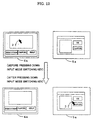
- FIG. 6 shows an example of a process of switching over the first mode operation and the second mode operation by the time interval of the operation.
- the mark 21 is displayed in the touch position.
- the mark 21 continues to be displayed for a predetermined time indicated by a hour glass 22. If the user touches once again within the period for which the mark 21 is displayed, the operation becomes effective (corresponding to the first mode operation), and the function of the information processing system is provided.
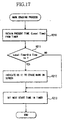
- FIG. 16 is a flowchart showing processes of the input device driver 12 executed by the CPU 1 in that case. Further, FIG. 17 shows processes of a program for erasing the mark 21 after the predetermined time.
- variable CurrentTime stored with a present time and a variable OldTime stored with a time of the last time are initialized (S110).
- the variable CurrentTime is defined as a local variable to which only the program shown in FIG. 16 refers.
- OldTime is defined as a global variable to which other programs also refer.
- the input device driver 12 detects this touch operation, and at first sets the present time to CurrentTime (S112). Next, the input device driver 12 calculates coordinates of the touch position (S113).
- the input device driver 12 judges whether or not a predetermined time n elapses till an input operation time (stored in CurrentTime ) detected this time is reached since the input operation time (stored in OldTime ) detected last time (S114) (that is, in the preceding processing of this step).
- the input device driver 12 judges that the second operation mode occurs, and does not notify the OS 11 of the occurrence of the event of the user's touching the screen 4a of the touch panel 4. That is, the input device driver 12 indicates the OS 11 to display the mark 21 (corresponding to the marker for indicating detection of the touch) for showing the occurrence of the touch event in the touched-by-the-user position on the touch panel 4, and a position, corresponding to this touch position, on the screen 5a of the projector 5 (S115). The OS 11 thereby issues a command to the display device driver 13 to display the mark 21 in the position concerned. Then, the mark 21 is displayed by the display control unit 3 through the display device driver 13. This mark 21 is erased after being displayed for a predetermined time.
- the input device driver 12 judges that the first operation mode occurs, and notifies the OS 11 of the information showing that coordinate data of the touched-by-the-user position on the touch panel and the touch operation have been detected (S116).
- the OS 11 at first, when the mark 21 is displayed, erases this mark 21. Further, the OS 11 notifies the predetermined application program of the information which the OS 11 itself has been notified of. The essential function of the application program (or the function as the information processing system) is thereby provided.
- a timer incorporated into the OS 11 starts up a program for an execution of the processing shown in FIG. 17, thereby erasing the mark 21.
- This program upon being started up, at first functions to record the present time in the local variable LocalTime (S210). Next, it is judged whether or not a predetermined time n has elapsed by comparing the present time (Local Time) with the input operation time (stored in the global variable OldTime ) detected last (S211). If the predetermined time has not elapsed, the processing comes to an end. If the predetermined time has elapsed, the OS 11 is indicated to erase the mark 21 on the screen (S212). Further, a time when this program should be started up is set (S213), and the processing is finished. Thus, this program is periodically started up by the timer, and repeats the processes described above.
- the mark 21 indicating that the touch operation in the touch position has been detected is merely displayed on the screen 5a of the projector as well as on the touch panel 4 for the predetermined period of time (the second function), however, the function (the first function) requested by the touch operation is not provided.
- the function (the first function) for a plurality of touch operations of the user on the touch panel 4 within the interval of the predetermined time, the function (the first function), corresponding to these touch operations, of the information processing system is provided.
- the operator halts the proceeding of the demonstration, etc. by controlling the time interval of the touch operation on the touch panel 4, and is thereby able to pinpoint the touch position on the touch panel 4.
- the audience can easily follow up with the operation when in the demonstration.
- the mode operations may be switched over by an interval between coordinates of two points touched consecutively.
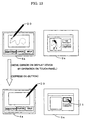
- FIG. 7 shows an example of operation in this case.
- FIG. 7 when the user touches the screen 4a of the touch panel 4 by using the pen 20, the mark 21 is displayed in this touch position. If the user again touches a position within a range (defined by a dotted line in FIG. 7) of a predetermined distance from the mark 21, the touch operation becomes effective (corresponding to the first mode operation), and the function of the information processing system is provided. On the other hand, even if the user again touches a position away a predetermined distance from the touch position of the first time with the pen 20 (corresponding to the second mode operation), the mark 21 moves to this position and is simply displayed therein, but no function as the information processing system is provided.
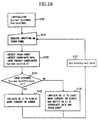
- FIG. 18 is a flowchart showing processes of the input device driver 12 executed by the CPU 1 in that case.
- the input device driver 12 initializes a variable CurrentCord holding coordinates of the present touch position and a variable OldCord holding the coordinates of the touch position of the last time (S120)(i.e. previous touch).
- the input device driver 12 waits for the user's operation on the touch panel 4 (S121). After the user's operation, the input device driver 12 detects and stores the coordinates of this touch position in CurrentCord (S123).
- the input device driver 12 compares the coordinates ( OldCord ) of the touch position of the user with the present coordinates ( CurrentCord ). Then, the input device driver 12 judges whether or not the present touch position is apart a predetermined distance ( d ) from the touch position of the last time (S124).
- the input device driver 12 judges it as the second mode operation and does not notify the OS 11 of the occurrence of the event by the user's touching the screen 4a of the touch panel 4. Namely, the input device driver 12, instead of notifying of the occurrence of this touch event, indicates the OS 11 to display the mark 21 (corresponding to the marker for indicating the detection of the touch) in the touched-by-the-user position on screen 4a of the touch panel 4 and a position, corresponding to this touch position, on the screen 5a of the projector 5 (S125).
- the input device driver 12 judges it as the first mode operation, and notifies the OS 11 of the touch event indicating that the coordinates data of the touched-by-the-user position on the touch panel 4 and the touch operation thereof have been detected (S126).
- the mark 21 indicating that the touch operation in that touch position is detected is merely displayed on the screen 4a of the touch panel 4 and on the screen 5a of the projector 5, however, no function within an application program or the like is carried out.
- the user touches somewhere within the predetermined distance ( d ) a plurality of times on the touch panel 4 the corresponding function selectable in that area of the panel is actually carried out.
- the operator stops the proceeding of the demonstration, etc. by controlling the position of the touch operation on the touch panel 4, and is able to pinpoint the touch position on the touch panel 4. As a result, the audience can easily understand what the operator has just done.
- the input device driver 12, the OS 11 and the display device driver 13 display the mark 21 in the touch position pinpointed by the pen 20.
- the mark 21 may be displayed by any one of the OS11 the input device driver 12 and the display device driver 13, or may also be displayed by combining one or more.
- those processes may be executed in other programs, e.g., a program layered between the OS 11 and the individual application program (which is termed "Middleware" exemplified by, e.g., a window system for adapting the OS of Character User Interface to Graphical User Interface), or may also be executed in the individual application program.
- Middleware exemplified by, e.g., a window system for adapting the OS of Character User Interface to Graphical User Interface
- the function in the first embodiment is actualized uniformly by all the application programs using this window system, etc.. While on the other hand, even when the above process is attained by the individual application program, what the function thereof is actualized is limited to that application program.
- the first embodiment discussed above have exemplified the operation mode in which the touch panel is touched by the pen 20, however, the present invention is not limited to this mode.
- the touch panel 4 touched by a human finger may also be used.
- the information processing system in the modified example given above involves the use of the time interval of touching the touch panel 4 or the interval between the touch positions in order to distinguish between the operation modes, however, the present invention is not confined to these intervals.
- the information processing system may distinguish between the operation of the first mode and the operation of the second mode on the basis of, for example, a time length of one touch kept on the touch panel 4, the touch operation similar to double-clicks and triple-clicks of the mouse) performed consecutively a plurality of times in the same position, a trajectory (e.g., whether a closed curve is included or not) of the manipulation of the pens 20 on the screen 4a, and so forth.
- FIGS. 8 to 11 show display examples of the screen 4a of the touch panel provided in this information processing system and of the screen 5a of the projector 5.
- FIG. 2 the configuration of this information processing system is illustrated in FIG. 2 as in the first embodiment.
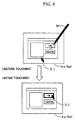
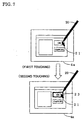
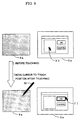
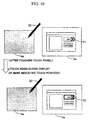
- the display control unit 3 in FIG. 2 in the second embodiment is, however, incapable of displaying the information on the touch panel 4 in a state where the projector 5 is connected. Therefore, the user executes the touch operation on the screen 4a of the touch panel 4 on which no information is displayed as illustrated in FIGS. 8 to 11.
- FIG. 8 shows an example (corresponding to the second operation mode) in which the user operates the input mode switching key 6 by pressing down this key 6.
- the mark 21 (corresponding to the marker) is displayed on a corresponding position on the screen 5a of the projector 5. Further, when a predetermined time elapses since the touch operation, the mark 21 is erased.
- the information processing system when the user releases the input mode switching key 6, provides the essential function (corresponding to the first operation mode).
- This process can be executed as shown in a flowchart in FIG. 14 in the same way in the first embodiment.
- the user is, after looking at the mark 21 displayed on the screen 5a of the projector 5 and thus confirming the corresponding position on the screen 4a of the touch panel 4, able to operate a desired menu, button or icon.
- FIG. 9 shows an example of the display screen on which to display the touch position on the touch panel 4 as well as of providing the function as the information processing system.
- the mark 21 is displayed in the touch position of the last time on the screen 5a of the projector 5.
- the mark 21 moves to a position, corresponding to this touch position, on the screen 5a of the projector 5, and a function (corresponding to a function indicated by the marker) corresponding to the position of the mark 21, is provided.
- FIG. 10 shows an example of distinguishing between the operation modes on the basis of the time interval of the touch operation. Namely, when the user touches the screen 4a of the touch panel 4, the mark 21 is displayed. The mark 21 disappears after the predetermined time has passed. If the user repeats the touch operation during the display of this mark 21, the operation becomes effective (the first mode operation), and the essential function of that touch operation is carried out.
- the user when the user implements the demonstration and the presentation by using the information processing system, the user halts the proceeding of the demonstration, etc. by controlling the time interval of the touch operation on the touch panel 4, and is thereby able to pinpoint the touch position on the touch panel 4.
- the audience can easily follow up with the operation when in the demonstration.
- the user is, after looking at the mark 21 displayed on the screen 5a of the projector 5 and thus confirming the corresponding position on the screen 4a of the touch panel 4 by controlling the time interval of the touch operation, able to operate a desired menu, button or icon.
- FIG. 11 shows an example of distinguishing between the operation modes on the basis of a distance of the touch position.
- the mark 21 is displayed in a corresponding position on the screen 5a of the projector 5.
- the user again touches a region (indicated by a circle 24 in FIG. 11) within a predetermined distance from the touch position, there is provided the essential function, corresponding to this touch operation, of the information processing system (the first mode operation).
- This process is executed based on a flowchart in FIG. 18 in the same way in the first embodiment.
- the user is, after looking at the mark 21 displayed on the screen 5a of the projector 5 and thus confirming the corresponding position on the screen 4a of the touch panel 4 by controlling the distance between the consecutive touch positions, able to operate a desired menu, button or icon.
- FIG. 3 is a functional block diagram of the information processing system.
- FIGS. 12 and 13 show display examples of the screen 4a of the touch panel and of the screen 5a of the projector 5.
- the information processing system includes two display control units 3a and 3b.
- Other configurations are the same as those in the first embodiment.
- the same components are marked with the like numerals, of which the repetitive explanations are omitted.
- the display control unit 3a (corresponding to a first display control unit) controls the display on the touch panel 4, while the display control unit 3b (corresponding to a second display control unit) controls the display on the projector 5.
- the information processing system in the third embodiment is capable of displaying different items of information such as menus buttons, icons or messages on the touch panel 4 and the projector 5 screen, respectively.
- FIG. 12 shows an example where the display of the mark 21 is switched over between the screen 4a of the touch panel 4 and the screen 5a of the projector 5, depending on a state of pressing down the input mode switching key 6. Specifically, in the state where the input mode switching key 6 is not depressed (corresponding to the first operation mode) the mark 21 is displayed on the screen 4a of the touch panel 4. In this state, the menu, the button, the icon, etc. on the touch panel 4 can be operated.
- the mark 21 is displayed in a position on the screen 5a of the projector 5, which corresponds to the touch position of the last time on the screen 4a of the touch panel 4.
- the manipulation of the pen 20 on the screen 4a of the touch panel 4 is displayed as it is on the screen 5a of the projector 5.
- the movement of the mark 21 on the screen 5a of the projector 5 is controlled by the operation on the touch panel 4.
- the mark 21 moves to the position on the projector 5, which corresponds to the touch position on the touch panel 4.
- the user touches the touch panel and is thereby able to operate the menu, the button or the icon which are different from those on the touch panel 4 and displayed on only the screen 5a of the projector 5 by touching the touch panel.
- the user is therefore able to be provided with a function (corresponding to the function indicated by the marker) of the application program which is displayed on only the screen 5a.
- the information processing system in the third embodiment is constructed so that the coordinates on the touch panel 4 and the coordinates on the projector are set in a one-to-one correspondence, and the mark 21 displayed on the screen 5a of the projector 5 is moved.
- the movement of the mark 21 displayed on the screen 5a of the projector 5 may be controlled by, when the pen 20 is slid on the touch panel 4, relatively calculating how far and where the mark 21 should be moved to on the basis of a displacement (moving distance and direction) of the pen 20.
- the input device driver 12 and the display device driver 13 explained in the first embodiment, or the Middleware such as the window system explained in ⁇ Other Modified Example ⁇ , may be recorded on a readable-by-computer recording medium, and read by a computer, thereby executing those pieces of software together with the OS 11 and the variety of application programs incorporated into the computer.
- the information processing system in a fourth embodiment can be thus actualized.
- the operation mode of the information processing system using the operation screen unit (e.g., the touch panel 4) on which the information can be displayed and the touch operation on the surface can be detected, is set to any one of the first and second operation modes. Then, the information is displayed on at least one of the operation screen unit and the projector 5 as the different one, and the touch operation is detected via the operation screen unit.
- the operation screen unit e.g., the touch panel 4
- the first operation mode provides the touch operation via the operation screen unit with the first function corresponding to this touch operation.
- the program for displaying the marker for indicating the detection of the touch in at least one of the above touch position and the display position on the projector 5 which is determined based on the above touch operation is recorded on the readable-by-computer recording medium, and read and executed by the computer.
- the whole of the OS 11 or the window system is not necessarily recorded on the recording medium.
- the readable-by-computer recording medium given herein embraces recording media on and from which the information such as data and programs can be stored electrically, magnetically, optically, mechanically or chemically and read by the computer.
- Those recording mediums may, e.g., a floppy disk, a magneto-optic disk, a CR-ROM, a CD-R/W, a DVD, a DAT, an 8mm tape, a memory card, etc.
- the above program is stored in a hard disk and a memory of the computer and can be downloaded into other computers via communications lines.
- a computer downloaded with the input device driver 12 and the display device driver 13 or the Middleware such as the window system, etc. can be made to function as the information processing system in the fourth embodiment.
- the hardware architecture of the typical computer wherein the program of the present invention which is recorded on the hard disk is loaded into the memory and executed by the CPU.
- the embodiment of the present invention is not limited to this hardware architecture.
- the present invention can be embodied with such a computer hardware architecture that, for example, the program of the present invention is recorded not on the hard disk but on a ROM and executed by the CPU.
- FIG. 19 is a functional block diagram showing a case in which a mouse 8 is used as the pointing device, and a CRT 9 is used as a display device. Other components in FIG. 19 are the same as those in FIG. 1 and marked with the line numerals, of which the repetitive explanations are omitted. Note that a much larger size of projector may be connected to the system architecture shown in FIG. 19.
- the mark 21 in the fifth embodiment is not a mouse cursor following up with the movement of the mouse 8 but a mark (corresponding to the marker) that pinpoints the position given when the button of the mouse 8 is pressed down (clicked).
- the audience is thereby able to follow the actions of the operator and easily understand the method of operating the information processing system and the application programs as well.
Landscapes
- Engineering & Computer Science (AREA)
- General Engineering & Computer Science (AREA)
- Theoretical Computer Science (AREA)
- Human Computer Interaction (AREA)
- Physics & Mathematics (AREA)
- General Physics & Mathematics (AREA)
- Position Input By Displaying (AREA)
- Controls And Circuits For Display Device (AREA)
- User Interface Of Digital Computer (AREA)
Abstract
Description
- The present invention relates to an information processing system including input/output (I/O) devices such as a touch panel, a mouse, etc. capable of inputting information with an operation against a display on a screen.
- In the information processing system including the above-described I/O devices like, e.g., the touch panel, a sensor for detecting a touch (or press-down) on a screen from outside is provided corresponding to a touch panel display screen for displaying the information. When an operator of the information processing system presses down a position of a button, etc. displayed on the screen, the sensor detects coordinates of that touch position, and an operation instruction is given to the information processing system.
- An example of such an information processing system is disclosed in Japanese Patent Laying-Open Application No.9-26832. This type of information processing system includes a large-sized main LCD having high resolution, a main CPU for controlling the main LCD, a small-sized sub LCD having low resolution, a touch panel on the sub LCD, and a sub CPU for controlling the sub LCD. According to this document, a necessity for providing the touch panel on the main LCD is eliminated by combining the small-sized low resolution sub LCD with the touch panel provided on the sub LCD, and declines both in contrast of the main LCD and in display function are thereby prevented. Further, this proposal has a scheme for reducing a consumption of electric power by operating only the sub LCD and a sub processor in operations not requiring the high resolution.
- Further, in some other conventional information processing systems, both of the touch panel and another pointing device, e.g., the mouse can be used as the pointing device In this type of information processing system, when detecting that the operator manipulates the mouse, a mouse cursor is displayed on the screen, and, when detecting that the operator operates the touch panel, the mouse cursor is not displayed.
- The reason for taking a mode in which the mouse cursor is not displayed when operating the touch panel, is that the operator is able to directly specify desired coordinates on the screen by use of a finger or a pen.
- In the case of performing a demonstration or a presentation by operating the touch panel in this information processing system, however, the audience is unable to follow the actions of the operator and cannot easily understand how the operator operates it.
- Further, this type of information processing system may generally be a small-sized information terminal such as a notebook type personal computer, a pen-inputting type personal computer, a PDA, etc., and an area of a display screen thereof is small in general. Therefore, other external display means such as a liquid crystal projector or a large-screen CRT is connected via a cable, and the demonstration or the presentation is conducted for the audiences by use of this external display device in many cases. In this case, if a video controller incorporated into the information processing system is used for controlling display on the external display device, the same content as that displayed on the external display device may not be displayable on the screen of the information terminal owing to a limit of performance of the video controller. Hence, the operator must operate the touch panel in a state of displaying nothing on the screen of the information processing system, and it is difficult to pinpoint the exact coordinates on the screen by operating the touch panel.
- An other type of information processing system incorporates two video controllers. One of the two video controllers controls the display on the touch panel screen, while the other controller controls the display on the external display device. Therefore, this information processing system displays different contents on the two screens. In this type of information processing system, it is difficult to specify a menu, a button or an icon by use of the touch panel because they are displayed on the external display device but are not displayed on the touch panel.
- In any case, the audiences would appreciate some way of pinpointing the touched coordinates to make the operation clearly understandable irrespective of whether the information is displayed on the touch panel or not.
- On the other hand, the operators would like to have a method of controlling the information processing system by use of a touch panel capable of easily operating the menu, the button or the icon displayed on only the external display device.
- Moreover, in an information processing system having no such touch panel described above and using only, e.g., a mouse as a pointing device, a mouse cursor is always displayed on the screen.
- In a demonstration or a presentation for an audience, however, the operator frequently moves the mouse cursor to the desired menu, button or icon, and hence it is difficult for the audience to grasp the operation by the operator as in the case of the information processing system including the touch panel described above.
- Accordingly, some means for making the content of operation by the operator easily understandable to the audience, is also required of the information processing system using a pointing device other than the touch panel.
- Embodiment of the present invention may provide an information processing system, a display control method and a program (possibly stored on a medium) for execution of the control thereof, which are capable of making an operation of an operator easily understandable to an audience.
- Embodiments of the present invention nay provide an information processing system, a display control method and a program (possibly stored on a medium) for execution of the control thereof, which are capable of making the operator's operation using an external display device connected to the information processing system easily understandable to an audience, and making the operator's operation easily understandable and handleable to the operator himself or herself.
- The present invention may be used with an information processing system including an input/output device like a touch panel serving as a pointing device incorporating the above function.
- According to one aspect of the present invention, an information processing system comprises an operation screen unit capable of displaying information and detecting a touch operation on a surface thereof, a first display control unit for controlling display of the information on the operation screen unit, and an operation mode selecting unit for selecting any one of two or more operation modes with respect to the touch operation. The operation mode selecting unit selects the following operation modes.
- A first operation mode provides the touch operation on the operation screen unit with a first function corresponding to the touch operation. The touch operation is defined as an operation of selecting a display item by touching such as, e.g., a menu, a button or an icon displayed on the operation screen unit. The first function implies that a specified application program is started up by, e.g., the menu being chosen.
- On the other hand, a second operation mode provides the touch operation on the operation screen unit, instead of providing the first function corresponding to the touch operation, or together with providing the first function, with a second function of displaying a marker for indicating a detection of the touch in a touch position.
- In a preferred embodiment, the information processing system may further comprise a connecting module for connecting a display device capable of displaying information in addition to the operation screen unit. The first display control unit controls the display of the information on the display device connected to the connecting module and the display of the information on the operation screen unit. In this case also, the second operation mode provides the touch operation on the operation screen unit, instead of providing the first function corresponding to the touch operation, or together with providing the first function, with a second function of displaying a marker for indicating a detection of the touch in at least one of a touch position and a display position on the display device which is determined based on the touch operation.
- Herein, the display position on the display device which is determined based on the touch operation is a position on the screen of the display device corresponding to the operation screen unit. For instance, this position is, for example, a position determined as absolute coordinates on the display device, which correspond to absolute coordinates on the operation screen, or a position determined by a relative moving quantity on the screen of the display device that is based on a relative moving quantity by the operation on the operation screen.
- In addition, the first display control unit may execute the control so that the information is exclusively displayed on any one of the display device and the operation screen unit. Namely, the first display control unit may control so that the information is displayed on only one of the display device and the operation screen unit.
- Furthermore, the information processing system may further comprise a second display control unit. That is, the first display control unit controls display of a first item of information on the operation screen unit, and the second display control unit controls display of a second item of information on the display device. Based on this, for instance, pieces of information having different contents may be displayed on the operation screen unit and the display device.
- Herein, the information having different contents implies what the information displayed on the screen differs as by the menu, the button or the message.
- A control unit for distinguishing between the operation modes on the operation screen unit may be provided as a substitute for the operation mode selecting unit for selecting the operation modes on the operation screen unit with respect to the touch operation. The control unit makes a judgement to pick up any one of two or more operation modes for the touch operation on the operation screen unit.
- Namely, the operation in a first mode is provided with a first function corresponding to this operation, and the operation in a second mode is provided with, instead of providing the first function, or together with providing the first function, a second function of displaying a marker for indicating a detection of the touch in this touch position.
- In another aspect of the invention, an information processing system, to which a display unit for displaying information and a pointing device for indicating coordinates on the display unit are connectable, comprises a detection unit for detecting an operator's input operation of indicating the coordinates by use of the pointing device, and a display control unit for displaying a marker for showing the respective coordinates on the display indicated by the input operation. Herein, the display unit capable of displaying the information may embrace a display device such as a display, etc. connected to, e.g., a computer. Further, the pointing device may embrace a device such as a mouse, a track ball, a joy stick, etc., connected to the computer, for indicating the coordinates on the display unit, or a touch panel, etc..
- The display control unit may erase the marker after the marker has been displayed for a predetermined time.
- The display control unit may, if an elapse time till a posterior coordinate indication since an anterior coordinate indication is longer than the predetermined time (for which the marker continues to be displayed), erase the marker displayed by the anterior coordinate indication and display the marker at the coordinates indicated posteriorly.
- The information processing system may further comprise a display unit, and a connecting module to which other display device on which to set display coordinates corresponding to the coordinates on the display unit, is connected. The display control unit may control display of information on at least one of the display unit and the other display device, and display the marker on at least one of the display unit and the other display device on which the information is being displayed.
- Another aspect of the invention relates to computer programs, a first embodiment of which comprises program code means operable to carry out a step of setting an operation screen unit capable of displaying information and detecting a touch panel on its surface to any one of two operation modes, a step of displaying the information on at least one of the operation screen unit and other display device to be connected to the information processing system, a step of providing the touch operation on the operation screen unit with a first function corresponding to the touch operation in a first operation mode, and a step of providing, in a second operation mode, the touch operation on the operation screen unit, instead of providing the first function corresponding to this touch operation, or together with providing the first function, with a second function of displaying a marker for indicating a detection of the touch in at least one of a touch position and a display position on the display device which is determined based on the touch operation.
- In a second embodiment, the program code means causes a computer to execute:
- a step of displaying information on at least one of an operation screen unit capable of displaying the information and detecting a touch operation on its surface, and other display device being connected to the computer,
- a step of detecting the touch operation on the operation screen unit,
- a step of distinguishing between operation modes on the operation screen unit,
- a step of providing the operation in a first mode on the operation screen unit with a first function corresponding to the first mode operation, and
- a step of providing the operation in a second mode on the operation screen unit, instead of providing the first function, or together with providing the first function, with a second function of displaying a marker for indicating a detection of the touch in at least one of a touch position and a display position on the display device which is determined based on the touch operation.
-
- A third embodiment of the computer program causes a computer, to which a display unit and a pointing device can be connected, to execute a step of detecting an operator's input operation of indicating the coordinates on the display unit by use of a pointing device, and a step of displaying a marker for showing the respective coordinates on the display unit indicated by the input operation.
- This program may further make a computer execute a step of selecting any one of a first operation mode for providing a first function of executing a normal process corresponding to the operator's input operation using the pointing device, and a second operation mode for providing a second function of executing a process different from the first operation mode, and a step of displaying the marker on the basis of the selection of the second operation mode.
- This program may further make a computer execute a step of erasing the marker after the marker has been displayed for a predetermined time. Further this program may further make a computer execute a step of calculating an elapse time till a posterior coordinate indication since an anterior coordinate indication, and a step of displaying the marker at the coordinates indicated posteriorly after erasing the marker displayed by the anterior coordinate indication if the elapse time is longer than the predetermined time (for which the marker continues to be displayed).
- This program may further make a computer execute a step of controlling the display of the information on at least one of the display unit provided on the computer and other display device, connected to the computer, on which display coordinates corresponding to the coordinates on the display unit are set, and a step of displaying the marker on at least one of the display unit and the other display device on which the information is being displayed.
- The above programs may be recorded on a storage medium.
- As discussed above, according to the present invention, instead of providing the function corresponding to the operation of the information processing system, or together with providing the function corresponding to this operation, a marker for indicating the detection of a touch is displayed in the touch position. It is therefore feasible to make the operation of the operator understandable to the audience in a demonstration or a presentation.
- Further, in a demonstration or a presentation using an external display device connected to the information processing system, it is possible to make the operator's operation easily understandable and handleable to the operator himself or herself.
- Reference will now be made, by way of example, to the accompanying drawings in which:
- FIG. 1 is a view showing an external configuration of an information processing system in an embodiment of the present invention;
- FIG. 2 is a diagram showing functional blocks of the information processing system in the embodiment of the present invention;
- FIG. 3 is a diagram showing functional blocks of the information processing system in a third embodiment of the present invention;
- FIG. 4 is a view showing a display example on a screen in the information processing system in the first embodiment;
- FIG. 5 is a view showing a display example on the screen in the information processing system in the first embodiment;
- FIG. 6 is a view showing a display example on the screen in the information processing system in the first embodiment;
- FIG. 7 is a view showing a display example on the screen in the information processing system in the first embodiment;
- FIG. 8 is a view showing a display example on the screen in the information processing system in a second embodiment;
- FIG. 9 is a view showing a display example on the screen in the information processing system in the second embodiment;
- FIG. 10 is a view showing a display example on the screen in the information processing system in the second embodiment;
- FIG. 11 is a view showing a display example on the screen in the information processing system in the second embodiment;
- FIG. 12 is a view showing a display example on the screen in the information processing system in the third embodiment;
- FIG. 13 is a view showing a display example on the screen in the information processing system in the third embodiment;
- FIG. 14 is a flowchart showing processing steps of a program
executed by a
CPU 1; - FIG. 15 is a flowchart showing processing steps of a program
executed by the
CPU 1; - FIG. 16 is a flowchart showing processing steps of a program
executed by the
CPU 1; - FIG. 17 is a flowchart showing processing steps of a program, started up by a timer, for erasing a mark;
- FIG. 18 is a flowchart showing processing steps of a program
executed by the
CPU 1; and - FIG. 19 is a diagram showing functional blocks of the information processing system in a fifth embodiment of the present invention.
-
- Preferred embodiments of the present invention will hereinafter be discussed with reference to the accompanying drawings.
- An information processing system in a first embodiment of the present invention will be described with reference to FIGS. 1 through 7 and 14 through 18.
- FIG. 1 shows an external configuration of the information processing system in the first embodiment, the information processing system is constructed of a main body including a CPU, a memory, a hard disk, a keyboard, etc., and a touch panel 4 (corresponding to an operation screen unit) with a display unit incorporating a sensor. This information processing system is connectable via an external connecting
terminal 7 to an external display device (projector) 5. In this case, information displayed on thetouch panel 4 is projected also on ascreen 5a. - FIG. 2 is a block diagram showing functions of the information processing system. The information processing system, as shown in FIG. 2 includes functional blocks such as a CPU 1 (corresponding to a control unit) for executing a program, a
memory 2 for storing the program, atouch panel 4 serving as a user interface for displaying output information of theCPU 1 and inputting an instruction to theCPU 1, a display control unit 3 (corresponding to a first display control unit) for generating image information from the output of theCPU 1 and controlling displays on thetouch panel 4 and on theprojector 5, an external connecting terminal 7 (corresponding to a connecting module) for connecting theprojector 5 to thedisplay control unit 3, and an input mode switching key 6 (corresponding to a operation mode selection unit) for switching over an input mode by use of thetouch panel 4. Further, the program executed by theCPU 1 contains an OS (Operating System) 11, an input device driver 12 and a display device driver 13. The input device driver 12 and the display device driver 13 correspond to a program of displaying a marker to indicate the detection of a touch. - The
CPU 1 provides a user with a function as the information processing system by executing the input device driver 12, the display device driver 13 and a variety of information processing programs. - The
memory 2, on which theOS 11, the input device driver 12 and the display device driver 13 are developed, stores those pieces of software. - The
touch panel 4 is controlled by thedisplay control unit 3 and thereby displays, on its screen, information of the program executed by theCPU 1, e.g., menus, buttons, icons, messages, etc.. Further, when the user pinpoints the indicator such as the menu, or the button or the icon displayed on the screen by use of a touch panel pen 20 (which is hereinafter simply called the pen 20), thetouch panel 4 detects coordinates of this pinpoint (touch) position and notifies theCPU 1 of the coordinates thereof by interrupt. - The
projector 5 can be connected to the present information processing system via the external connectingterminal 7. Theprojector 5 is, as in the case of thetouch panel 4, controlled by thedisplay control unit 3, and displays the output information of the program executed by theCPU 1. In a state where theprojector 5 is not connected, the output information of the program executed by theCPU 1 is displayed on only thetouch panel 4. - The
display control unit 3 receives the information from theCPU 1, develops this item of information into display data on the screen, e.g., bitmap formatted data such as the menu, the button, the icon, the message, etc., and the thus developed data are displayed on thetouch panel 4 and theprojector 5 as well. - The input
mode switching key 6 is used for switching over an operation mode when the user operates by touching thetouch panel 4, i.e., the operation mode for inputting through thetouch panel 4. An instruction given by this inputmode switching key 6 is stored in thememory 2 and referred to from theOS 11, the input device driver 12 and the display device driver 13. - In a state where the input
mode switching key 6 is not pressed down (a first operation mode), when thepen 20 manipulated by the user touches the indicator such as the menu, the button, the icon, etc. on thetouch panel 4, the input device driver 12 detects an event occurring upon touching the touch panel 4 (which is hereinafter referred to as a touch event). The input device driver 12 notifies theOS 11 of this touch event and coordinates of the touch position thereof. Further, theOS 11 notifies a predetermined application program of these pieces of data. - As a result, in the first operation mode, the information processing system in the first embodiment provides the user's touch operation (press-down) on the
touch panel 4 with a function (corresponding to a first function) corresponding to this touch operation. - In a state where the input
mode switching key 6 is pressed down (a second operation mode), when the user presses the indicator such as the menu, the button, the icon, etc. on thetouch panel 4 with thepen 20, the input device driver 12 detects a touch event, and notifies theOS 11 of an instruction to display a mark 21 (corresponding to the marker) on the screen and of the display coordinates thereof. TheOS 11 thereby indicates the display device driver 13 to display themark 21 at the display coordinates. While on the other hand, the touch event itself is discarded by the input device driver 12 without theOS 11 being notified of this touch event. - Consequently, as shown in FIG. 4, the information processing system in the first embodiment, in the second operation mode, displays the
mark 21 for indicating a detection of the touch in a touch position on thetouch panel 4 and in a position on ascreen 5a of theprojector 5 which corresponds to the above touch position with respect to the touch operation on thescreen 4a of thetouch panel 4 by using thepen 20 instead of providing the function corresponding to the touch operation (which corresponds to a second function). - The input device driver 12 detects the touch operation on the
touch panel 4. Namely, when the user touches thetouch panel 4 with thepens 20, the input device driver 12 detects an event occurred by the touch operation (touch event) and a touch position. The input device driver 12, in the first operation mode, notifies theOS 11 of the touch event. On the other hand, the input device driver 12, in the second operation mode, discards this touch event, and notifies theOS 11 of an instruction for displaying themark 21 and of display coordinates thereof. - The display device driver 13 receives display information displayed on the
touch panel 4 and on theprojector 5 from theOS 11, and transfers the display information to thedisplay control unit 3. - FIG. 14 is a flowchart showing processes of the input device driver 12 executed by the
CPU 1 of the information processing system in the first embodiment. The operation of the information processing system will hereinafter be explained referring to the flowchart in FIG. 14. - A register Time for storing a time when the
mark 21 was displayed last time, is set beforehand. Null is set in this register Time when erasing themark 21 being displayed and when in an initializing process. That is to say, a value in Time is cleared. - To start with, the input device driver 12 initializes Time to Null (step S101, of which a representation is hereinafter simplified such as S101).
- Next, the input device driver 12 judges whether Time is Null or not (S102).
- If Time is not Null, the input device driver 12 compares a difference between the present time and Time with a predetermined value T0 (S103).
- As a result of this comparison, if the difference is larger than T0, the input device driver 12 erases the
mark 21 being displayed (S104), and checks an input to the touch panel 4 (S105). - If Time is judged to be Null in the process in S102, and if the difference between the present time and Time is judged to be equal to T0 or smaller, the input device driver 12 shifts the control to the process of checking the input to the
touch panel 4 in S105. - When the user touches the
screen 4a of thetouch panel 4 by use of the pen 20 (S106), the input device driver 12 detects its touch operation (which is termed an occurrence of the touch event), and further calculates coordinates of a touch position thereof (S107). Moreover, if there is no input to thetouch panel 4, the input device driver 12 repeats the processes of checking the value of Time and of erasing themark 21 in S102 through S104. - Next, after calculating the coordinates of the touch position in S107, the input device driver 12 judges whether or not the input
mode switching key 6 is in a press-down state (S108). - If during the press-down, the input device driver 12 judges that the second operation mode occurs, it does not notify the
OS 11 of the occurrence of the user's touch event on thescreen 4a of thetouch panel 4. Namely, the input device driver 12, instead of notifying of the occurrence of this touch event, indicates the OS11 to display the mark 21 (corresponding to the marker for indicating a detection of the touch) for showing the occurrence of the touch event in the touched-by-the-user position on thetouch panel 4, or a position, corresponding to this touch position, on thescreen 5a of the projector 5 (S109). - The
OS 11 thereby issues a command to the display device driver 13 to display themark 21 in the position concerned, whereby themark 21 is displayed by thedisplay control unit 3 through the display device driver 13. - After displaying the
mark 21, the present time is set in Time (S10a). - On the other hand, if the input
mode switching key 6 is not being depressed (thekey 6 is released), the input device driver 12 judges that the first operation mode occurs, and notifies theOS 11 of the information (touch event) showing that coordinate data of the touched-by-the-user position on thetouch panel 4 and the touch operation have been detected (S10b). Thereafter, Time is set to Null (S10c). - The
OS 11, when notified of the touch event, to begin with, if themark 21 is displayed, erases thismark 21. Further, theOS 11 notifies the predetermined application program of the information which theOS 11 itself has been notified of. An essential function of the application program (or the function as the information processing system) is thereby provided. - As discussed above, in the state where the user presses down the input
mode switching key 6, themark 21 indicating that the touch operation in the touch position has been detected, is merely displayed on thescreen 5a of the projector as well as on thetouch panel 4 for a predetermined period of time (the second function), however, the function (the first function) as the information processing system is not provided. While in the state where the user releases the inputmode switching key 6, the function (the first function) of the information processing system which corresponds to the touch operation is provided for the touch operation on thetouch panel 4. - Therefore, on the occasion of performing a demonstration or presentation by use of this information processing system, the operator halts a proceeding of the demonstration, etc. by pressing down the input
mode switching key 6, and is thereby able to pinpoint the touch position on thetouch panel 4. As a result, an audience can easily follow up with the operation when in the demonstration. - The first embodiment has exemplified an information processing system constructed such that in the state where the user (operator) depresses the input
mode switching key 6, themark 21 indicating that the touch operation in the touch position has been detected, is merely displayed on thescreen 5a of theprojector 5 as well as on thescreen 4a of thetouch panel 4 for the predetermined period of time with respect to the touch operation on thetouch panel 4, without the information processing system acting on the detected touch. Alternatively, the system may also be constructed in such a way that in the state where the user presses down the inputmode switching key 6, themark 21 indicating that the touch operation in the touch position has been detected, is both displayed on thescreen 5a of theprojector 5 as well as on thescreen 4a of thetouch panel 4 for the predetermined period of time with respect to the touch operation on thetouch panel 4, and acted on (i.e. its function in application program or the like is carried out). - FIG. 5 shows an example of display on the screen in that case. The
mark 21 indicates the touch position of the last time on thescreen 4a (5a) before being operated. When the user touches a position on thetouch panel 4 with thepen 20, themark 21 shifts to this touch position, and an OK button existing in this touch position effectively functions. FIG. 15 is a flowchart showing processes in this case. - The processes shown in FIG. 15 are substantially the same as those in FIG. 14, excluding a process in S109a. To be specific, if during the press-down of the input
mode switching key 6, the input device driver 12 judges that the second operation mode occurs, and notifies theOS 11 of the event occurred by the user's touching thescreen 4a of thetouch panel 4, coordinate data of the touch position on thetouch panel 4, and an instruction for displaying the mark 21 (corresponding to the marker for indicating a detection of the touch) on thescreen 5a of theprojector 5 as well as on thescreen 4a of thetouch panel 4 in S109a. - Further, the
OS 11 notifies the predetermined application program of the touch event and the coordinate data which theOS 11 itself has been notified of. With this operation, the essential function (or the function as the information processing system) of the application program is provided (corresponding to the first function). Further, theOS 11 issues a command to the display device driver 13 to display themark 21 in the position concerned. Then, themark 21 is displayed by thedisplay control unit 3 through the display device driver 13 (corresponding to the second function). - As a consequence, when in the demonstration, etc. of the application program, if during the press-down of the input
mode switching key 6, themark 21 indicating the touch position is displayed on thescreen 4a of thetouch panel 4 and on thescreen 5a of theprojector 5 in accordance with the operation on thetouch panel 4, with the proceeding of the application program. The audience of the demonstration, etc. is therefore able to easily understand the operation of the operator. - In the first embodiment, the first and second operation modes are switched over depending on whether the input
mode switching key 6 is being depressed or not. These first and second operation nodes may be switched over based on the manipulation mode of thepen 20 on thetouch panel 4. The following are processes of distinguishing between a first mode operation and a second mode operation on the basis of a time interval and a positional interval. - To start with, FIG. 6 shows an example of a process of switching over the first mode operation and the second mode operation by the time interval of the operation. Referring to FIG. 6, when the user touches the
screen 4a of thetouch panel 4 by use of thepen 20, themark 21 is displayed in the touch position. Themark 21 continues to be displayed for a predetermined time indicated by ahour glass 22. If the user touches once again within the period for which themark 21 is displayed, the operation becomes effective (corresponding to the first mode operation), and the function of the information processing system is provided. - While on the other hand, when a predetermined time elapses since the touch of the first time, the display of the
mark 21 disappears. Hence, even if the user touches again the screen with the pen 20 (corresponding to the second mode operation), themark 21 is merely displayed, but the no function as the information processing system is provided. FIG. 16 is a flowchart showing processes of the input device driver 12 executed by theCPU 1 in that case. Further, FIG. 17 shows processes of a program for erasing themark 21 after the predetermined time. - In the processing in FIG. 16, at the first onset, a variable CurrentTime stored with a present time and a variable OldTime stored with a time of the last time are initialized (S110). Herein, the variable CurrentTime is defined as a local variable to which only the program shown in FIG. 16 refers. On the other hand OldTime is defined as a global variable to which other programs also refer.
- When the user touches the
screen 4a of thetouch panel 4 by using the pens 20 (S111), the input device driver 12 detects this touch operation, and at first sets the present time to CurrentTime (S112). Next, the input device driver 12 calculates coordinates of the touch position (S113). - Next, the input device driver 12 judges whether or not a predetermined time n elapses till an input operation time (stored in CurrentTime) detected this time is reached since the input operation time (stored in OldTime) detected last time (S114) (that is, in the preceding processing of this step).
- Herein, if the predetermined time n elapses, the input device driver 12 judges that the second operation mode occurs, and does not notify the
OS 11 of the occurrence of the event of the user's touching thescreen 4a of thetouch panel 4. That is, the input device driver 12 indicates theOS 11 to display the mark 21 (corresponding to the marker for indicating detection of the touch) for showing the occurrence of the touch event in the touched-by-the-user position on thetouch panel 4, and a position, corresponding to this touch position, on thescreen 5a of the projector 5 (S115). TheOS 11 thereby issues a command to the display device driver 13 to display themark 21 in the position concerned. Then, themark 21 is displayed by thedisplay control unit 3 through the display device driver 13. Thismark 21 is erased after being displayed for a predetermined time. - Whereas if the predetermined time n does not elapse, the input device driver 12 judges that the first operation mode occurs, and notifies the
OS 11 of the information showing that coordinate data of the touched-by-the-user position on the touch panel and the touch operation have been detected (S116). - The
OS 11 at first, when themark 21 is displayed, erases thismark 21. Further, theOS 11 notifies the predetermined application program of the information which theOS 11 itself has been notified of. The essential function of the application program (or the function as the information processing system) is thereby provided. - Moreover, if the touch operation is not detected for the predetermined time after the touch operation of the last time, a timer incorporated into the
OS 11 starts up a program for an execution of the processing shown in FIG. 17, thereby erasing themark 21. This program, upon being started up, at first functions to record the present time in the local variable LocalTime (S210). Next, it is judged whether or not a predetermined time n has elapsed by comparing the present time (Local Time) with the input operation time (stored in the global variable OldTime) detected last (S211). If the predetermined time has not elapsed, the processing comes to an end. If the predetermined time has elapsed, theOS 11 is indicated to erase themark 21 on the screen (S212). Further, a time when this program should be started up is set (S213), and the processing is finished. Thus, this program is periodically started up by the timer, and repeats the processes described above. - As described above, with respect to the touch operation of the user on the
touch panel 4 at the interval of the predetermined time, themark 21 indicating that the touch operation in the touch position has been detected, is merely displayed on thescreen 5a of the projector as well as on thetouch panel 4 for the predetermined period of time (the second function), however, the function (the first function) requested by the touch operation is not provided. On the other hand, for a plurality of touch operations of the user on thetouch panel 4 within the interval of the predetermined time, the function (the first function), corresponding to these touch operations, of the information processing system is provided. - Hence, on the occasion of performing a demonstration or presentation by use of this information processing system, the operator halts the proceeding of the demonstration, etc. by controlling the time interval of the touch operation on the
touch panel 4, and is thereby able to pinpoint the touch position on thetouch panel 4. As a result, the audience can easily follow up with the operation when in the demonstration. - In the modified example given above, there has been explained the process of the information processing system, by which the first and second mode operations are switched over based on the time interval of the touch operation on the
touch panel 4. Instead of this time interval, the mode operations may be switched over by an interval between coordinates of two points touched consecutively. FIG. 7 shows an example of operation in this case. - Referring to FIG. 7, when the user touches the
screen 4a of thetouch panel 4 by using thepen 20, themark 21 is displayed in this touch position. If the user again touches a position within a range (defined by a dotted line in FIG. 7) of a predetermined distance from themark 21, the touch operation becomes effective (corresponding to the first mode operation), and the function of the information processing system is provided. On the other hand, even if the user again touches a position away a predetermined distance from the touch position of the first time with the pen 20 (corresponding to the second mode operation), themark 21 moves to this position and is simply displayed therein, but no function as the information processing system is provided. FIG. 18 is a flowchart showing processes of the input device driver 12 executed by theCPU 1 in that case. - To begin with, the input device driver 12 initializes a variable CurrentCord holding coordinates of the present touch position and a variable OldCord holding the coordinates of the touch position of the last time (S120)(i.e. previous touch).
- Next, the input device driver 12 waits for the user's operation on the touch panel 4 (S121). After the user's operation, the input device driver 12 detects and stores the coordinates of this touch position in CurrentCord (S123).
- Subsequently, the input device driver 12 compares the coordinates (OldCord) of the touch position of the user with the present coordinates (CurrentCord). Then, the input device driver 12 judges whether or not the present touch position is apart a predetermined distance (d) from the touch position of the last time (S124).
- If judged to be apart the predetermined distance (d) from the touch position of the last time, the input device driver 12 judges it as the second mode operation and does not notify the
OS 11 of the occurrence of the event by the user's touching thescreen 4a of thetouch panel 4. Namely, the input device driver 12, instead of notifying of the occurrence of this touch event, indicates theOS 11 to display the mark 21 (corresponding to the marker for indicating the detection of the touch) in the touched-by-the-user position onscreen 4a of thetouch panel 4 and a position, corresponding to this touch position, on thescreen 5a of the projector 5 (S125). - While on the other hand, if judged to be within the predetermined distance (d) from the touch position of the last time, the input device driver 12 judges it as the first mode operation, and notifies the
OS 11 of the touch event indicating that the coordinates data of the touched-by-the-user position on thetouch panel 4 and the touch operation thereof have been detected (S126). - As discussed above, even when the user repeatedly touches a position apart the predetermined distance (d) from the touch position of the last time on the
touch panel 4, themark 21 indicating that the touch operation in that touch position is detected, is merely displayed on thescreen 4a of thetouch panel 4 and on thescreen 5a of theprojector 5, however, no function within an application program or the like is carried out. On the other hand, if the user touches somewhere within the predetermined distance (d) a plurality of times on thetouch panel 4, the corresponding function selectable in that area of the panel is actually carried out. - Therefore, as in the first embodiment, when performing the demonstration and the presentation by use of this information processing system, the operator stops the proceeding of the demonstration, etc. by controlling the position of the touch operation on the
touch panel 4, and is able to pinpoint the touch position on thetouch panel 4. As a result, the audience can easily understand what the operator has just done. - In accordance with the first embodiment, in the second mode operation, the input device driver 12, the
OS 11 and the display device driver 13 display themark 21 in the touch position pinpointed by thepen 20. Themark 21 may be displayed by any one of the OS11 the input device driver 12 and the display device driver 13, or may also be displayed by combining one or more. - Further, those processes may be executed in other programs, e.g., a program layered between the
OS 11 and the individual application program (which is termed "Middleware" exemplified by, e.g., a window system for adapting the OS of Character User Interface to Graphical User Interface), or may also be executed in the individual application program. - In the case of executing this process by the Middleware such as the window system, as by the information processing system in the first embodiment, the function in the first embodiment is actualized uniformly by all the application programs using this window system, etc.. While on the other hand, even when the above process is attained by the individual application program, what the function thereof is actualized is limited to that application program.
- The first embodiment discussed above have exemplified the operation mode in which the touch panel is touched by the
pen 20, however, the present invention is not limited to this mode. For instance, thetouch panel 4 touched by a human finger may also be used. - The information processing system in the modified example given above involves the use of the time interval of touching the
touch panel 4 or the interval between the touch positions in order to distinguish between the operation modes, however, the present invention is not confined to these intervals. The information processing system may distinguish between the operation of the first mode and the operation of the second mode on the basis of, for example, a time length of one touch kept on thetouch panel 4, the touch operation similar to double-clicks and triple-clicks of the mouse) performed consecutively a plurality of times in the same position, a trajectory (e.g., whether a closed curve is included or not) of the manipulation of thepens 20 on thescreen 4a, and so forth. - The information processing system in a second embodiment of the present invention will hereinafter be described with reference to FIGS. 8 through 11. FIGS. 8 to 11 show display examples of the
screen 4a of the touch panel provided in this information processing system and of thescreen 5a of theprojector 5. - The configuration of the information processing system and the processing of the programs in the second embodiment are the same as those in the first embodiment, and will be explained referring to FIGS. 2 and 14 through 18 as the necessity may arise.
- As described above, the configuration of this information processing system is illustrated in FIG. 2 as in the first embodiment. The
display control unit 3 in FIG. 2 in the second embodiment is, however, incapable of displaying the information on thetouch panel 4 in a state where theprojector 5 is connected. Therefore, the user executes the touch operation on thescreen 4a of thetouch panel 4 on which no information is displayed as illustrated in FIGS. 8 to 11. - FIG. 8 shows an example (corresponding to the second operation mode) in which the user operates the input
mode switching key 6 by pressing down thiskey 6. In this state, when the user touches thescreen 4a of thetouch panel 4 by using thepen 20, the mark 21 (corresponding to the marker) is displayed on a corresponding position on thescreen 5a of theprojector 5. Further, when a predetermined time elapses since the touch operation, themark 21 is erased. - On the other hand, the information processing system, when the user releases the input
mode switching key 6, provides the essential function (corresponding to the first operation mode). - This process can be executed as shown in a flowchart in FIG. 14 in the same way in the first embodiment. As described above, the user is, after looking at the
mark 21 displayed on thescreen 5a of theprojector 5 and thus confirming the corresponding position on thescreen 4a of thetouch panel 4, able to operate a desired menu, button or icon. - FIG. 9 shows an example of the display screen on which to display the touch position on the
touch panel 4 as well as of providing the function as the information processing system. To be specific, in the state where the user presses down the input mode switching key 6 (the second operation mode), themark 21 is displayed in the touch position of the last time on thescreen 5a of theprojector 5. In this state, when the user newly touches thescreen 4a of thetouch panel 4 with thepen 20, themark 21 moves to a position, corresponding to this touch position, on thescreen 5a of theprojector 5, and a function (corresponding to a function indicated by the marker) corresponding to the position of themark 21, is provided. - While in the state where the user does not depress the input mode switching key 6 (the first operation mode), the
mark 21 is not displayed on thescreen 5a of theprojector 5. In this state, when the user touches thescreen 4a of thetouch panel 4 with thepen 20, there is provided a function, corresponding to this operation, of the information processing system. This process is executed as shown in a flowchart in FIG. 15 in the same manner in the first embodiment. - FIG. 10 shows an example of distinguishing between the operation modes on the basis of the time interval of the touch operation. Namely, when the user touches the
screen 4a of thetouch panel 4, themark 21 is displayed. Themark 21 disappears after the predetermined time has passed. If the user repeats the touch operation during the display of thismark 21, the operation becomes effective (the first mode operation), and the essential function of that touch operation is carried out. - While on the other hand, even when the user touches the screen once again after the
mark 21 has disappeared (the second mode operation), themark 21 is merely displayed again, and no function corresponding to this operation as the information processing system is provided. This process is executed based on flowcharts in FIGS. 16 and 17 as in the first embodiment. - Thus, when the user implements the demonstration and the presentation by using the information processing system, the user halts the proceeding of the demonstration, etc. by controlling the time interval of the touch operation on the
touch panel 4, and is thereby able to pinpoint the touch position on thetouch panel 4. As a result, the audience can easily follow up with the operation when in the demonstration. Further, the user is, after looking at themark 21 displayed on thescreen 5a of theprojector 5 and thus confirming the corresponding position on thescreen 4a of thetouch panel 4 by controlling the time interval of the touch operation, able to operate a desired menu, button or icon. - FIG. 11 shows an example of distinguishing between the operation modes on the basis of a distance of the touch position. To be specific, when the user touches the
screen 4a of thetouch panel 4, themark 21 is displayed in a corresponding position on thescreen 5a of theprojector 5. Next, when the user again touches a region (indicated by acircle 24 in FIG. 11) within a predetermined distance from the touch position, there is provided the essential function, corresponding to this touch operation, of the information processing system (the first mode operation). - While on the other hand, even when the user touches again a position apart the predetermined distance or farther from the display position of the mark 21 (the second mode operation), the
mark 21 simply moves to this position, no action is taken in response to this touch operation by the information processing system. - This process is executed based on a flowchart in FIG. 18 in the same way in the first embodiment. As discussed above, the user is, after looking at the
mark 21 displayed on thescreen 5a of theprojector 5 and thus confirming the corresponding position on thescreen 4a of thetouch panel 4 by controlling the distance between the consecutive touch positions, able to operate a desired menu, button or icon. - The information processing system in a third embodiment of the present invention will hereinafter be described with reference to FIGS. 3, 12 and 13. FIG. 3 is a functional block diagram of the information processing system. FIGS. 12 and 13 show display examples of the
screen 4a of the touch panel and of thescreen 5a of theprojector 5. - As shown in FIG. 3, the information processing system includes two display control units 3a and 3b. Other configurations are the same as those in the first embodiment. The same components are marked with the like numerals, of which the repetitive explanations are omitted.
- As illustrated in FIG. 3, the display control unit 3a (corresponding to a first display control unit) controls the display on the
touch panel 4, while the display control unit 3b (corresponding to a second display control unit) controls the display on theprojector 5. Accordingly, the information processing system in the third embodiment is capable of displaying different items of information such as menus buttons, icons or messages on thetouch panel 4 and theprojector 5 screen, respectively. - FIG. 12 shows an example where the display of the
mark 21 is switched over between thescreen 4a of thetouch panel 4 and thescreen 5a of theprojector 5, depending on a state of pressing down the inputmode switching key 6. Specifically, in the state where the inputmode switching key 6 is not depressed (corresponding to the first operation mode) themark 21 is displayed on thescreen 4a of thetouch panel 4. In this state, the menu, the button, the icon, etc. on thetouch panel 4 can be operated. - While in the state where the input
mode switching key 6 is depressed (corresponding to the second operation mode), themark 21 is displayed in a position on thescreen 5a of theprojector 5, which corresponds to the touch position of the last time on thescreen 4a of thetouch panel 4. In this state, as shown in FIG. 13, the manipulation of thepen 20 on thescreen 4a of thetouch panel 4 is displayed as it is on thescreen 5a of theprojector 5. In this state, the movement of themark 21 on thescreen 5a of theprojector 5 is controlled by the operation on thetouch panel 4. - That is to say, the
mark 21 moves to the position on theprojector 5, which corresponds to the touch position on thetouch panel 4. The user touches the touch panel and is thereby able to operate the menu, the button or the icon which are different from those on thetouch panel 4 and displayed on only thescreen 5a of theprojector 5 by touching the touch panel. The user is therefore able to be provided with a function (corresponding to the function indicated by the marker) of the application program which is displayed on only thescreen 5a. - The information processing system in the third embodiment is constructed so that the coordinates on the
touch panel 4 and the coordinates on the projector are set in a one-to-one correspondence, and themark 21 displayed on thescreen 5a of theprojector 5 is moved. Instead of this mode, the movement of themark 21 displayed on thescreen 5a of theprojector 5 may be controlled by, when thepen 20 is slid on thetouch panel 4, relatively calculating how far and where themark 21 should be moved to on the basis of a displacement (moving distance and direction) of thepen 20. - The input device driver 12 and the display device driver 13 explained in the first embodiment, or the Middleware such as the window system explained in 〈Other Modified Example〉, may be recorded on a readable-by-computer recording medium, and read by a computer, thereby executing those pieces of software together with the
OS 11 and the variety of application programs incorporated into the computer. The information processing system in a fourth embodiment can be thus actualized. - Namely, in this embodiment of the present invention, the operation mode of the information processing system using the operation screen unit (e.g., the touch panel 4) on which the information can be displayed and the touch operation on the surface can be detected, is set to any one of the first and second operation modes. Then, the information is displayed on at least one of the operation screen unit and the
projector 5 as the different one, and the touch operation is detected via the operation screen unit. - The first operation mode provides the touch operation via the operation screen unit with the first function corresponding to this touch operation.
- In the second operation mode, instead of providing the touch operation via the operation screen unit with the first function corresponding to this touch operation, or together with providing the first function, the program for displaying the marker for indicating the detection of the touch in at least one of the above touch position and the display position on the
projector 5 which is determined based on the above touch operation, is recorded on the readable-by-computer recording medium, and read and executed by the computer. In this case, the whole of theOS 11 or the window system is not necessarily recorded on the recording medium. - The readable-by-computer recording medium given herein embraces recording media on and from which the information such as data and programs can be stored electrically, magnetically, optically, mechanically or chemically and read by the computer. Those recording mediums may, e.g., a floppy disk, a magneto-optic disk, a CR-ROM, a CD-R/W, a DVD, a DAT, an 8mm tape, a memory card, etc.. Further, the above program is stored in a hard disk and a memory of the computer and can be downloaded into other computers via communications lines. As a result, a computer downloaded with the input device driver 12 and the display device driver 13 or the Middleware such as the window system, etc. can be made to function as the information processing system in the fourth embodiment.
- As the information processing system in the embodiment of the present invention, there has been exemplified the hardware architecture of the typical computer, wherein the program of the present invention which is recorded on the hard disk is loaded into the memory and executed by the CPU. The embodiment of the present invention is not limited to this hardware architecture. The present invention can be embodied with such a computer hardware architecture that, for example, the program of the present invention is recorded not on the hard disk but on a ROM and executed by the CPU.
- The first to third embodiments discussed above have exemplified the information processing system involving the use of the
touch panel 4 as a pointing device, however, the present invention is not necessarily confined to this type of pointing device. In the information processing system using, e.g., a mouse as the pointing device, a coordinate indication of the mouse used by the operator, i.e., an input of the coordinate indication by, e.g., clicking the button thereof, is detected, and themark 21 according to the present invention may be displayed in a position of the coordinates detected above. FIG. 19 is a functional block diagram showing a case in which a mouse 8 is used as the pointing device, and aCRT 9 is used as a display device. Other components in FIG. 19 are the same as those in FIG. 1 and marked with the line numerals, of which the repetitive explanations are omitted. Note that a much larger size of projector may be connected to the system architecture shown in FIG. 19. - The
mark 21 in the fifth embodiment is not a mouse cursor following up with the movement of the mouse 8 but a mark (corresponding to the marker) that pinpoints the position given when the button of the mouse 8 is pressed down (clicked). - The audience is thereby able to follow the actions of the operator and easily understand the method of operating the information processing system and the application programs as well.
Claims (26)
- An information processing system comprising:an operation screen unit(4) capable of displaying information and detecting a touch operation on a surface thereof;a first display control unit(3) controlling display of the information on said operation screen unit(4); andan operation mode selecting unit(6) selecting any one of two or more operation modes with respect to the touch operation,
wherein a first operation mode provides the touch operation on said operation screen unit(4) with a first function corresponding to the touch operation, anda second operation mode provides the touch operation on said operation screen unit(4), instead of providing the first function corresponding to the touch operation, or together with providing the first function, with a second function of displaying a marker for indicating a detection of the touch in a touch position. - An information processing system according to claim 1, further comprising:a connecting module (7) for connecting a display device (5) capable of displaying information in addition to said operation screen unit(4),
wherein said display device(5) is connected via said connecting module(7),said first display control unit(3) controls the display of the information on said display device(5) and the display of the information on said operation screen unit(4), andthe second operation mode provides the touch operation on said operation screen unit (4), instead of providing the first function corresponding to the touch operation, or together with providing the first function, with a second function of displaying a marker for indicating a detection of the touch in at least one of a touch position and a display position on said display device(5) which is determined based on the touch operation. - An information processing system according to claim 2, wherein said first display control unit(3) executes the control so that the information is exclusively displayed on any one of said display device(5) and said operation screen unit(4), andthe second operation mode provides the touch operation on said operation screen unit(4), instead of providing the first function corresponding to the touch operation, or together with providing the first function, with a second function of displaying a marker for indicating a detection of the touch in at least one of a touch position and a display position on said display device(5) which is determined based on the touch operation.
- An information processing system according to claim 2, further comprising:a second display control unit(3b),
wherein said first display control unit(3a) controls display of a first item of information on said operation screen unit (4),said second display control unit(3b) controls display of a second item of information on said display device(5), andthe second operation mode provides the touch operation on said operation screen unit(4), instead of providing the first function corresponding to the touch operation, or together with providing the first function, with a second function of displaying a marker for indicating a detection of the touch in at least one of a touch position and a display position on said display device(5) which is determined based on the touch operation. - An information processing system comprising:an operation screen unit(4) capable of displaying information and detecting a touch operation on a surface thereof;a first display control unit(3) controlling display of the information on said operation screen unit(4); anda control unit(2,12) distinguishing between operation modes on said operation screen unit(4),
wherein a touch operation in a first mode on said operation screen unit(4) is provided with a first function corresponding to this touch operation, anda touch operation in a second mode on said operation screen unit(4) is provided with, instead of providing the first function, or together with providing the first function, a second function of displaying a marker for indicating a detection of the touch in a touch position. - An information processing system according to claim 5, further comprising:a connecting module(7) for connecting a display device(5) capable of displaying information in addition to said operation screen unit(4),
wherein said display device(5) is connected via said connecting module (7),said first display control unit(3) controls the display of the information on said display device(5) and the display of the information on said operation screen unit(4), andthe touch operation in the second mode on said operation screen unit(4) is provided with, instead of providing the first function, or together with providing the first function, a second function of displaying a marker for indicating a detection of the touch in at least one of a touch position and a display position on said display device(5) which is determined based on the touch operation. - An information processing system according to claim 6, wherein said first display control unit(3) executes the control so that the information is exclusively displayed on any one of said display device(5) or said operation screen unit(4), andthe touch operation in the second mode on said operation screen unit(4) is provided with, instead of providing the first function, or together with providing the first function, a second function of displaying a marker for indicating a detection of the touch in at least one of a touch position and a display position on said display device (5) which is determined based on the touch operation.
- An information processing system according to claim 6, further comprising:a second display control unit(3b),
wherein said first display control unit(3a) controls display of a first item of information on said operation screen unit(4),said second display control unit(3b) controls display of a second item of information on said display device(5), andthe touch operation in the second mode on said operation screen unit(4) is provided with, instead of providing the first function, or together with providing the first function, a second function of displaying a marker for indicating a detection of the touch in at least one of a touch position and a display position on said display device(5) which is determined based on the touch operation. - An information processing system, to which a display unit displaying information and a pointing device for indicating coordinates on said display unit are connectable, said system comprising:a detection unit detecting an operator's input operation of indicating the coordinates by use of said pointing device; anda display control unit(3) displaying a marker for showing the respective coordinates on said display unit indicated by the input operation.
- An information processing system according to claim 9, further comprising:an operation mode selecting unit(6) selecting any one of a first operation mode for providing a first function of executing a normal process corresponding to the operator's input operation using said pointing device, and a second operation mode for providing a second function of executing a process different from the first operation mode,
wherein said display control unit(3) executes a process of displaying the marker on the basis of the selection of the second operation mode. - An information processing system according to claim 9 or 10, wherein said display control unit (3) erases the marker after the marker has been displayed for a predetermined time.
- An information processing system according to claim 11, wherein said display control unit(3), if an elapsed time between a posterior coordinate indication and an anterior coordinate indication is longer than the predetermined time, erases the marker displayed by the anterior coordinate indication and displays the marker at the coordinates indicated posteriorly.
- An information processing system according to claim 9, 10, 11, or 12 wherein said pointing device is a touch panel (4) provided on said display unit (4).
- An information processing system according to any of claims 9 to 13, further comprising:a connecting module(7) to which other display device(5) on which to set display coordinates corresponding to the coordinates on said display unit, is connected,
wherein said display control unit(3) controls display of information on at least one of said display unit and said other display device(5), and displays the marker on at least one of said display unit and said other display device(5) on which the information is being displayed. - A method of controlling an information processing system, to which a display device(5) is connected, having an operation screen unit(4) used for displaying information and for providing a first function based on a touch operation on its surface, said method comprising, when information having the same content is displayed on said display device(5) and on said operation screen unit(4), steps of:detecting a touch operation on said operation screen unit(4); andproviding, instead of providing the first function based on the touch operation, or together with providing the first function, a second function of displaying a marker in a display position, corresponding to the detected touch position, on said display device (5).
- A method of controlling an information processing system, to which a display device(5) is connected, having an operation screen unit(4) capable of displaying information and detecting a touch operation on its surface, said method comprising, when no information is displayed on said operation screen unit(4), steps of:detecting the touch operation on said operation screen unit(4);displaying a marker in a coordinate position on said display device(5), which corresponds to a position of the detected touch on said operation screen unit(4); andproviding a function indicated by the marker on said display device(5).
- A method of controlling an information processing system, to which a display device(5) is connected, having an operation screen unit(4) capable of displaying information and detecting a touch operation on its surface, said method comprising, when different items of information are displayed on said display device(5) and said operation screen unit(4), steps of:detecting the touch operation on said operation screen unit(4);displaying a marker in a coordinate position on said display device(5), which corresponds to a position of the detected touch on said operation screen unit(4); andproviding a function indicated by the marker.
- A program of instructions executable by a machine to perform method steps for processing in response to user instruction using an operation screen unit(4), the method steps comprising:setting an operation screen unit(4) capable of displaying information and detecting a touch operation on its surface to any one of two operation modes,displaying the information on at least one of said operation screen unit(4) and other display device(5) connected to the information processing system;providing the touch operation on said operation screen unit(4) with a first function corresponding to the touch operation in a first operation mode; andproviding, in a second operation mode, the touch operation on said operation screen unit(4), instead of providing the first function corresponding to this touch operation, or together with providing the first function, with a second function of displaying a marker for indicating a detection of the touch in at least one of a touch position and a display position on said display device(5) which is determined based on the touch operation.
- A program of instructions executable by a machine to perform method steps for processing in response to user instruction using an operation screen unit(4), the method steps comprising:displaying information on at least one of an operation screen unit(4) capable of displaying the information and detecting a touch operation on its surface and other display device(5) connected to the computer;detecting the touch operation on said operation screen unit(4);distinguishing between operation modes on said operation screen unit(4);providing the operation in a first mode on said operation screen unit(4) with a first function corresponding to the first mode operation; andproviding the operation in a second mode on said operation screen unit(4), instead of providing the first function, or together with providing the first function, with a second function of displaying a marker for indicating a detection of the touch in at least one of a touch position and a display position on said display device(5) which is determined based on the touch operation.
- A program of instructions executable by a machine to perform method steps for processing in response to user instruction, using a display unit connected to the maching, the method steps comprising:detecting an operator's input operation of indicating the coordinates on a display unit by use of a pointing device being connected to the machine; anddisplaying a marker for showing the respective coordinates on said display unit indicated by the input operation.
- A program according to claim 20, executable to perform the further method steps of:selecting any one of a first operation mode for providing a first function of executing a normal process corresponding to the operator's input operation using said pointing device, and a second operation mode for providing a second function of executing a process different from the first operation mode; anddisplaying the marker on the basis of the selection of the second operation mode.
- The program according to claim 20, executable to perform the further method steps of:erasing the marker after the marker has been displayed for a predetermined time.
- The program according to claim 22, executable to perform the further steps of:calculating an elapsed time between a posterior coordinate indication and an anterior coordinate indication; anddisplaying the marker at the coordinates indicated posteriorly after erasing the marker displayed by the anterior coordinate indication if the elapsed time is longer than the predetermined time.
- The program according to any of claims 20 to 23, adapted for use with a pointing device in the form of a touch panel(4) provided on said display unit(4), and said step of detecting an operator's input operation is a process of detecting an operator's coordinate indicating operation on said touch panel(4).
- The program according to any of claims 20 to 24, executable to perform the further method steps of:controlling the display of the information on at least one of said display unit provided on said computer and other display device (5), connected to said computer, on which display coordinates corresponding to the coordinates on said display unit are set; anddisplaying the marker on at least one of said display unit and said other display device (5) on which the information is being displayed.
- A computer-readable storage medium on which is recorded the program of any one of claims 18 to 25.
Applications Claiming Priority (2)
| Application Number | Priority Date | Filing Date | Title |
|---|---|---|---|
| JP29252799 | 1999-10-14 | ||
| JP29252799A JP4044255B2 (en) | 1999-10-14 | 1999-10-14 | Information processing apparatus and screen display method |
Publications (2)
| Publication Number | Publication Date |
|---|---|
| EP1093050A2 true EP1093050A2 (en) | 2001-04-18 |
| EP1093050A3 EP1093050A3 (en) | 2004-12-15 |
Family
ID=17782969
Family Applications (1)
| Application Number | Title | Priority Date | Filing Date |
|---|---|---|---|
| EP00307783A Withdrawn EP1093050A3 (en) | 1999-10-14 | 2000-09-08 | Information processing system and screen display method |
Country Status (3)
| Country | Link |
|---|---|
| US (1) | US7239305B1 (en) |
| EP (1) | EP1093050A3 (en) |
| JP (1) | JP4044255B2 (en) |
Cited By (7)
| Publication number | Priority date | Publication date | Assignee | Title |
|---|---|---|---|---|
| US7002556B2 (en) * | 2001-06-20 | 2006-02-21 | Hitachi, Ltd. | Touch responsive display unit and method |
| KR100649623B1 (en) * | 2002-12-13 | 2006-11-24 | 봉 경 김 | Presentation system and method using touch panel device |
| GB2433402A (en) * | 2005-12-14 | 2007-06-20 | Siemens Plc | Touch sensitive mode/scroll control |
| RU2446829C2 (en) * | 2006-06-09 | 2012-04-10 | Конинклейке Филипс Электроникс Н.В. | Elimination of involvement of contrast agent concentration in mrt |
| KR20130086574A (en) * | 2013-03-28 | 2013-08-02 | 삼성전자주식회사 | Electro device comprising projector and method for controlling thereof |
| CN105723304A (en) * | 2013-08-26 | 2016-06-29 | 三星电子株式会社 | Method and apparatus for executing application using multiple input tools on touchscreen device |
| EP2575023A3 (en) * | 2011-09-29 | 2017-06-14 | Casio Computer Co., Ltd. | Electronic device, display system, and method of displaying a display screen of the electronic device |
Families Citing this family (27)
| Publication number | Priority date | Publication date | Assignee | Title |
|---|---|---|---|---|
| US7348964B1 (en) * | 2001-05-22 | 2008-03-25 | Palm, Inc. | Single-piece top surface display layer and integrated front cover for an electronic device |
| JP4686973B2 (en) * | 2003-12-16 | 2011-05-25 | 富士ゼロックス株式会社 | Mobile information processing terminal |
| US7545362B2 (en) * | 2004-02-26 | 2009-06-09 | Microsoft Corporation | Multi-modal navigation in a graphical user interface computing system |
| JP4210936B2 (en) * | 2004-07-08 | 2009-01-21 | ソニー株式会社 | Information processing apparatus and program used therefor |
| EP1628282A1 (en) * | 2004-08-20 | 2006-02-22 | Dialog Semiconductor GmbH | Display controller with DRAM graphics memory |
| JP2007013460A (en) * | 2005-06-29 | 2007-01-18 | Konica Minolta Business Technologies Inc | Image forming apparatus |
| JP4945961B2 (en) * | 2005-08-30 | 2012-06-06 | ソニー株式会社 | Imaging device |
| KR100891099B1 (en) * | 2007-01-25 | 2009-03-31 | 삼성전자주식회사 | How to improve usability on touch screens and touch screens |
| US9524094B2 (en) * | 2009-02-20 | 2016-12-20 | Nokia Technologies Oy | Method and apparatus for causing display of a cursor |
| JP2010218422A (en) * | 2009-03-18 | 2010-09-30 | Toshiba Corp | Information processing apparatus and method for controlling the same |
| JP5141984B2 (en) * | 2009-05-11 | 2013-02-13 | ソニー株式会社 | Information processing apparatus and method |
| JP4843696B2 (en) * | 2009-06-30 | 2011-12-21 | 株式会社東芝 | Information processing apparatus and touch operation support program |
| JP2011076399A (en) * | 2009-09-30 | 2011-04-14 | Fujitsu General Ltd | Screen sharing system, pointer display method in the same and screen sharing program |
| US10048725B2 (en) * | 2010-01-26 | 2018-08-14 | Apple Inc. | Video out interface for electronic device |
| CN201773582U (en) * | 2010-03-25 | 2011-03-23 | 鸿富锦精密工业(深圳)有限公司 | Play device |
| WO2012073577A1 (en) * | 2010-11-30 | 2012-06-07 | 三洋電機株式会社 | Display system and display device |
| CN103765464A (en) * | 2011-06-27 | 2014-04-30 | 核心文化传媒商业公司 | Virtual salesman |
| US9134814B2 (en) * | 2012-04-05 | 2015-09-15 | Seiko Epson Corporation | Input device, display system and input method |
| JP5906984B2 (en) * | 2012-07-30 | 2016-04-20 | カシオ計算機株式会社 | Display terminal device and program |
| EP2939632B1 (en) * | 2012-12-25 | 2021-10-13 | Kawasaki Jukogyo Kabushiki Kaisha | Surgical robot |
| JP6289038B2 (en) * | 2013-11-05 | 2018-03-07 | キヤノン株式会社 | Display control apparatus, method and program |
| JP6452409B2 (en) * | 2014-11-28 | 2019-01-16 | キヤノン株式会社 | Image display device and image display method |
| JP2016122428A (en) * | 2014-12-25 | 2016-07-07 | 株式会社寺岡精工 | Paper issuing device |
| WO2016151958A1 (en) * | 2015-03-20 | 2016-09-29 | ソニー株式会社 | Information processing device, information processing system, information processing method, and program |
| JP6213597B2 (en) * | 2016-03-17 | 2017-10-18 | カシオ計算機株式会社 | Display control apparatus, display control method, and program |
| CN107506087B (en) * | 2017-09-21 | 2022-08-23 | 京东方科技集团股份有限公司 | Display processing method and system and electronic equipment |
| JP6841520B2 (en) * | 2019-09-24 | 2021-03-10 | 株式会社寺岡精工 | Paper issuing device |
Citations (3)
| Publication number | Priority date | Publication date | Assignee | Title |
|---|---|---|---|---|
| EP0807879A2 (en) * | 1996-05-17 | 1997-11-19 | Sharp Kabushiki Kaisha | Information processing apparatus including a main body and a lid body |
| US5815142A (en) | 1994-07-25 | 1998-09-29 | International Business Machines Corporation | Apparatus and method for marking text on a display screen in a personal communications device |
| EP0947909A2 (en) * | 1998-03-27 | 1999-10-06 | International Business Machines Corporation | Flexibly interfaceable portable computing device |
Family Cites Families (11)
| Publication number | Priority date | Publication date | Assignee | Title |
|---|---|---|---|---|
| JPH03137686A (en) * | 1989-10-24 | 1991-06-12 | Mazda Motor Corp | Touch panel device |
| US5448263A (en) * | 1991-10-21 | 1995-09-05 | Smart Technologies Inc. | Interactive display system |
| US5428417A (en) * | 1993-08-02 | 1995-06-27 | Lichtenstein; Bernard | Visual lecture aid |
| US5528263A (en) * | 1994-06-15 | 1996-06-18 | Daniel M. Platzker | Interactive projected video image display system |
| JPH0816313A (en) * | 1994-07-04 | 1996-01-19 | Sanyo Electric Co Ltd | Method and device for handwriting input |
| GB9608571D0 (en) * | 1996-04-24 | 1996-07-03 | Marshall Timothy J | Keyboard |
| JPH09297656A (en) | 1996-05-08 | 1997-11-18 | Casio Comput Co Ltd | Electronics |
| JPH10105274A (en) | 1996-09-09 | 1998-04-24 | Internatl Business Mach Corp <Ibm> | Portable information processing equipment |
| US6380929B1 (en) * | 1996-09-20 | 2002-04-30 | Synaptics, Incorporated | Pen drawing computer input device |
| US6088023A (en) * | 1996-12-10 | 2000-07-11 | Willow Design, Inc. | Integrated pointing and drawing graphics system for computers |
| JPH10260670A (en) * | 1997-03-18 | 1998-09-29 | Victor Co Of Japan Ltd | Image display device |
-
1999
- 1999-10-14 JP JP29252799A patent/JP4044255B2/en not_active Expired - Fee Related
-
2000
- 2000-08-31 US US09/653,360 patent/US7239305B1/en not_active Expired - Fee Related
- 2000-09-08 EP EP00307783A patent/EP1093050A3/en not_active Withdrawn
Patent Citations (3)
| Publication number | Priority date | Publication date | Assignee | Title |
|---|---|---|---|---|
| US5815142A (en) | 1994-07-25 | 1998-09-29 | International Business Machines Corporation | Apparatus and method for marking text on a display screen in a personal communications device |
| EP0807879A2 (en) * | 1996-05-17 | 1997-11-19 | Sharp Kabushiki Kaisha | Information processing apparatus including a main body and a lid body |
| EP0947909A2 (en) * | 1998-03-27 | 1999-10-06 | International Business Machines Corporation | Flexibly interfaceable portable computing device |
Cited By (10)
| Publication number | Priority date | Publication date | Assignee | Title |
|---|---|---|---|---|
| US7002556B2 (en) * | 2001-06-20 | 2006-02-21 | Hitachi, Ltd. | Touch responsive display unit and method |
| KR100649623B1 (en) * | 2002-12-13 | 2006-11-24 | 봉 경 김 | Presentation system and method using touch panel device |
| GB2433402A (en) * | 2005-12-14 | 2007-06-20 | Siemens Plc | Touch sensitive mode/scroll control |
| GB2433402B (en) * | 2005-12-14 | 2007-11-28 | Siemens Plc | An input device |
| RU2446829C2 (en) * | 2006-06-09 | 2012-04-10 | Конинклейке Филипс Электроникс Н.В. | Elimination of involvement of contrast agent concentration in mrt |
| EP2575023A3 (en) * | 2011-09-29 | 2017-06-14 | Casio Computer Co., Ltd. | Electronic device, display system, and method of displaying a display screen of the electronic device |
| KR20130086574A (en) * | 2013-03-28 | 2013-08-02 | 삼성전자주식회사 | Electro device comprising projector and method for controlling thereof |
| CN104077074A (en) * | 2013-03-28 | 2014-10-01 | 三星电子株式会社 | Electronic device including projector and method for controlling the electronic device |
| EP2784655A3 (en) * | 2013-03-28 | 2017-04-26 | Samsung Electronics Co., Ltd. | Electronic device including projector and method for controlling the electronic device |
| CN105723304A (en) * | 2013-08-26 | 2016-06-29 | 三星电子株式会社 | Method and apparatus for executing application using multiple input tools on touchscreen device |
Also Published As
| Publication number | Publication date |
|---|---|
| EP1093050A3 (en) | 2004-12-15 |
| JP4044255B2 (en) | 2008-02-06 |
| US7239305B1 (en) | 2007-07-03 |
| JP2001117697A (en) | 2001-04-27 |
Similar Documents
| Publication | Publication Date | Title |
|---|---|---|
| EP1093050A2 (en) | Information processing system and screen display method | |
| US6930672B1 (en) | Input processing method and input control apparatus | |
| EP1085403B1 (en) | Method and device providing visual feedback during time-dependent user-input | |
| US8274484B2 (en) | Tracking input in a screen-reflective interface environment | |
| JP5230733B2 (en) | Pointer control unit | |
| CN101794181B (en) | There is the mobile terminal of dual touch screen and control the method for content wherein | |
| JP3872322B2 (en) | Input method, input system and program corresponding to touch panel | |
| CA2268208C (en) | Method for erasing on an electronic writeboard | |
| US6774886B2 (en) | Display system, cursor position indication method, and recording medium | |
| EP2299351A2 (en) | Information processing apparatus, information processing method and program | |
| US20040046796A1 (en) | Visual field changing method | |
| US20060143580A1 (en) | Method and system for quick screen switching in a multi-monitor environment | |
| JPH1165769A (en) | Touch panel display control method and recording medium for recording the same | |
| US20060271878A1 (en) | Information processing apparatus capable of displaying a plurality of windows | |
| US20040100451A1 (en) | Electronic apparatus and operation mode switching method | |
| US6018336A (en) | Computer system having digitizing tablet | |
| US7495658B2 (en) | Control device, electronic apparatus and medium for outputting information in accordance with an operation relative to an input device | |
| CN100447722C (en) | Cursor switching method in multi-display system and multi-display system | |
| JP2001255994A (en) | Input controller | |
| JP4869172B2 (en) | Information processing apparatus and computer-readable recording medium | |
| JP2006235832A (en) | Processing apparatus, information processing method, and program | |
| KR100907791B1 (en) | Electronic device, cursor position checking method and recording medium | |
| JPH11126135A (en) | Input device | |
| JP3350339B2 (en) | Drag mode setting method | |
| JP3943383B2 (en) | A computer system having a window system, a method for operating a window, and a computer program. |
Legal Events
| Date | Code | Title | Description |
|---|---|---|---|
| PUAI | Public reference made under article 153(3) epc to a published international application that has entered the european phase |
Free format text: ORIGINAL CODE: 0009012 |
|
| AK | Designated contracting states |
Kind code of ref document: A2 Designated state(s): AT BE CH CY DE DK ES FI FR GB GR IE IT LI LU MC NL PT SE |
|
| AX | Request for extension of the european patent |
Free format text: AL;LT;LV;MK;RO;SI |
|
| PUAL | Search report despatched |
Free format text: ORIGINAL CODE: 0009013 |
|
| AK | Designated contracting states |
Kind code of ref document: A3 Designated state(s): AT BE CH CY DE DK ES FI FR GB GR IE IT LI LU MC NL PT SE |
|
| AX | Request for extension of the european patent |
Extension state: AL LT LV MK RO SI |
|
| 17P | Request for examination filed |
Effective date: 20050609 |
|
| AKX | Designation fees paid |
Designated state(s): DE FR GB |
|
| 17Q | First examination report despatched |
Effective date: 20080318 |
|
| STAA | Information on the status of an ep patent application or granted ep patent |
Free format text: STATUS: THE APPLICATION IS DEEMED TO BE WITHDRAWN |
|
| 18D | Application deemed to be withdrawn |
Effective date: 20150401 |